VS Code 1.147 Lets Agents Route Between Models, Schedule Requests and Drive Your Browser
VS Code 1.147 adds experimental YAML model routers, Send Later scheduling, a Browser Use preview and an enterprise policy that allows Claude and Codex harnesses. Here is how each works and where each one stops.
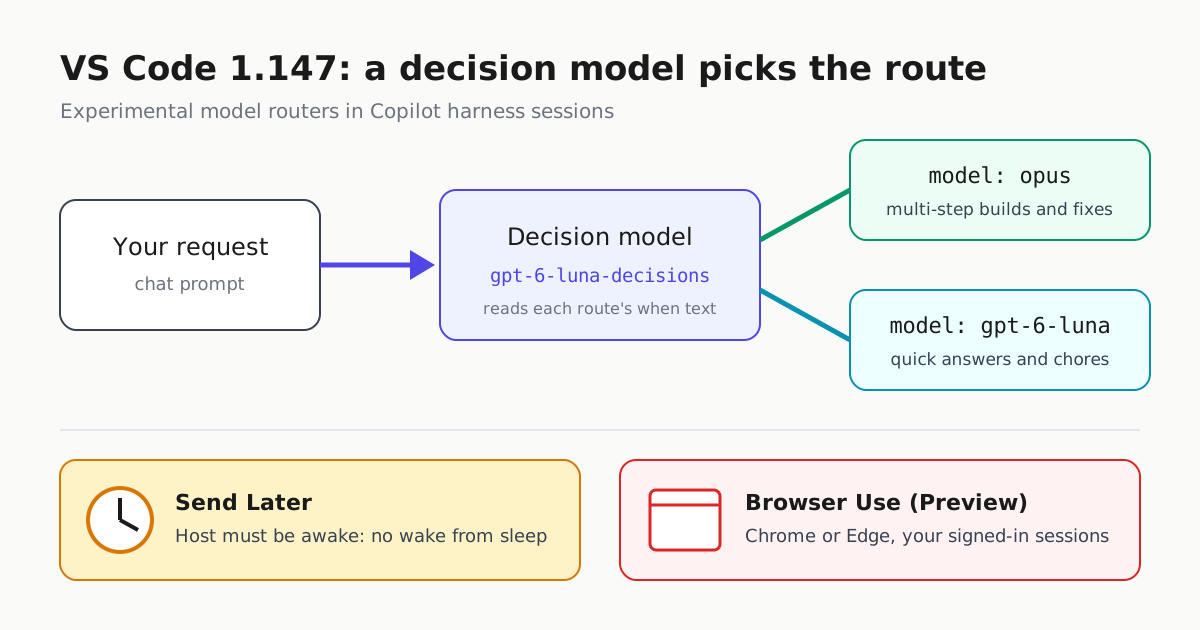
Microsoft shipped Visual Studio Code 1.147 to Stable on November 18, 2026, according to the official release notes. The 1.147.0 release page on GitHub shows it published on 18 Nov at 09:45; the page gives no year or time zone. VS Code now ships weekly, and most of this release lands in the Agents window. Four changes affect how you run coding agents day to day:
- Model routers let a decision model pick which model answers each request.
- Send Later schedules agent requests for a set time.
- Browser Use lets an agent work in your real Chrome or Edge.
vscode.allowedHarnesseslets admins offer the Claude and Codex harnesses alongside managed Copilot settings.
Almost all of it is Experimental or Preview and turned off by default. The limits matter as much as the features.
Model routers: write the split once
Up to now, you picked a model by hand for every request. A model router replaces that with a YAML file in ~/.agents/model-routers/. Each route pairs a model with a plain-language description of the work it should get. A decision model, gpt-6-luna-decisions, matches each request to a route, and VS Code runs the chat on that route’s model. This is the example from the release notes:
version: 1
description: Opus to build, GPT-6 Luna for quick questions.
routes:
  - model: opus
    when: Building or changing code over many steps, such as a feature, a bug fix, or a refactor.
  - model: gpt-6-luna
    when: Quick answers and small chores, such as where something is or what a setting does.
To turn routers on, add "chat.copilot.modelRouter.enabled": true to your user settings.json. Then type /model-router in a Copilot harness chat and describe the routing you want. The router you create shows up in the model picker. Routers work only in Copilot harness sessions, not in Claude or Codex sessions.
The when fields are descriptions a model reads, not rules VS Code enforces. Two similar prompts can end up on different routes. Microsoft calls routers early-stage and asks for feedback through issues. NTCompatible presents the feature as a way to send quick questions to cheaper models. That is a fair use of it, but Microsoft’s release notes make no cost claims. If you’re trying to cut spend, check which model actually ran a sample of requests before you assume the router is saving money. We compared hosted routers with routing you control yourself in Routers You Can’t See Inside.
Send Later and drafts: scheduling on your own machine
Send Later (sessions.sendLater.enabled, Agents window only) adds a scheduling menu to the send button. You can also type something like “Check the build in 10 minutes,” and the agent schedules a one-time, text-only follow-up in that chat. If the agent is still busy when the time comes, the scheduled request waits its turn instead of interrupting.
The limits:
- It works only for sessions on This Computer.
- It requires
chat.automations.enabled. - The local agent host must be running at the scheduled time. Scheduling doesn’t wake a sleeping computer, and a missed request runs once the host is available again.
As WindowsForum points out, if your laptop sleeps overnight, a “follow up in the morning” request runs only after the laptop wakes. For unattended schedules you need an always-on host. Our Mac mini agent host guide covers that setup.
Drafts (sessions.drafts.enabled) let you keep several unsent requests. Each one saves its workspace, agent, model, attachments and other configuration, and drafts survive restarts. A draft is deleted only after its request is accepted, so a failed send doesn’t lose your work.
Browser Use: an agent in your signed-in browser
Browser Use (Preview, chat.agentHost.browserUse.enabled) lets an agent control your default browser, as long as it’s Google Chrome or Microsoft Edge. Because it’s your real browser, the agent can reuse sessions you’re already signed into.
Requirements:
- the GitHub Copilot browser extension
- a Copilot harness session running on your own machine
- Node.js 22 or later on your PATH
To set it up, restart VS Code after enabling the setting, then run /plugin enable browser-use. If something isn’t working, /browser-use:doctor checks your setup.
Microsoft says to approve site access when prompted and to handle sign-ins and other sensitive steps yourself. Keep those prompts on. An agent working in your signed-in browser can act with your accounts.
A related change: requests started by automations or by other agents are no longer treated as if you wrote them. The assisted-permissions reviewer may now ask for approval in sessions where it didn’t before. You can give that reviewer your own rules with chat.permissions.assisted.instructions. That builds on the assisted permissions GA.
Allowing Claude and Codex under managed settings
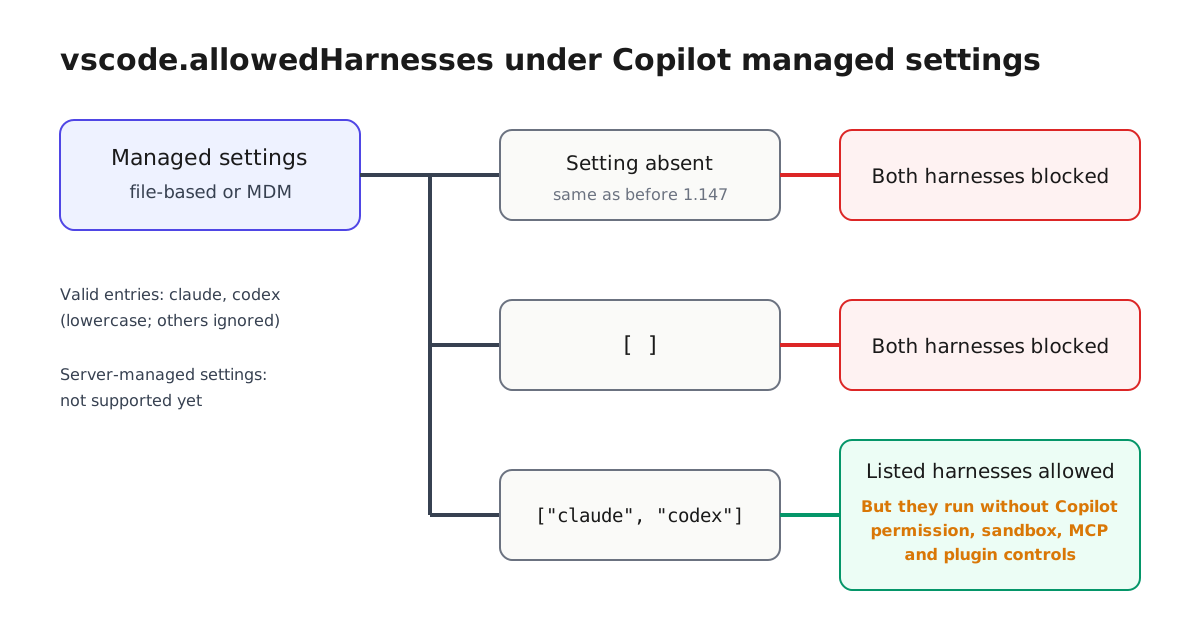
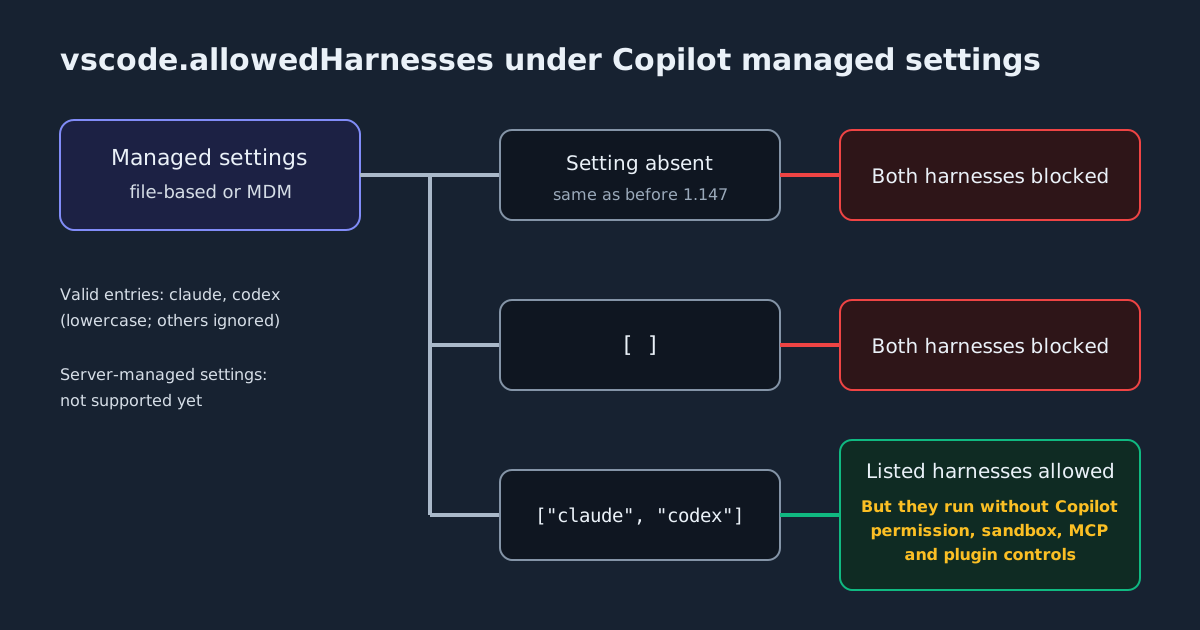
Before 1.147, any Copilot enterprise-managed setting disabled the Claude and Codex harnesses, because those harnesses don’t enforce Copilot’s settings. Admins can now allow them explicitly:
{
  "vscode": {
    "allowedHarnesses": ["claude", "codex"]
  }
}
How the policy behaves:
- The list allows the harnesses it names and blocks the rest. An empty list blocks both.
- Without the setting, both stay disabled, as before.
- Only lowercase
claudeandcodexare valid entries. Anything else is ignored. - It works in file-based or MDM-managed settings. Server-managed settings don’t support it yet.
- Other controls still apply, such as
vscode.temporaryAllowLocalHarness: false.
The most important caveat is that allowing a harness doesn’t make it follow your policy. Claude and Codex sessions run without Copilot’s managed permission, sandbox, MCP and plugin controls. If you allow them, you need a separate way to govern them, such as each tool’s own managed settings. See our guide to managed permissions across harnesses.
Managed Shell(...), Bash(...) and PowerShell(...) rules for Copilot harness sessions now also accept JavaScript regular expressions. For example, "Shell(/^git\\s+(push|pull)\\b/)" in permissions.ask requires approval for git push and pull.
At a glance
| Feature | Setting | Stage | Main limit |
|---|---|---|---|
| Model routers | chat.copilot.modelRouter.enabled |
Experimental | Copilot harness only; routing is chosen by a model |
| Send Later | sessions.sendLater.enabled |
Experimental | This Computer only; host must be awake |
| Drafts | sessions.drafts.enabled |
Experimental | Agents window |
| Browser Use | chat.agentHost.browserUse.enabled |
Preview | Chrome or Edge, Node.js 22+, local session |
| Allowed harnesses | vscode.allowedHarnesses |
Policy | No Copilot controls inside Claude or Codex |
Deprecations to plan for
The Local harness is deprecated and will be removed in February 2027. VS Code desktop is now deprecated on macOS Ventura, macOS Sonoma and 32-bit ARM Linux. The experimental AI usage statistics in the Status Bar (editor.aiStats.enabled) have been removed.
What to do
Update as usual, then turn on one feature at a time.
- Model routers: start with a two-route router and spot-check which model answers.
- Send Later: use it only on a machine that stays awake.
- Browser Use: decide deliberately which sites the agent may use with your signed-in sessions.
- Admins: before adding
allowedHarnesses, decide how you will govern Claude and Codex sessions, because Copilot’s controls won’t apply to them.