Claude Code Proxy and Codex Behind a Corporate Network: HTTPS_PROXY, NO_PROXY, Custom CA Certificates and SSL Error Fixes
Claude Code proxy and Codex setup behind TLS inspection: HTTPS_PROXY, NO_PROXY, NODE_EXTRA_CA_CERTS vs CODEX_CA_CERTIFICATE, plus SSL certificate error fixes.

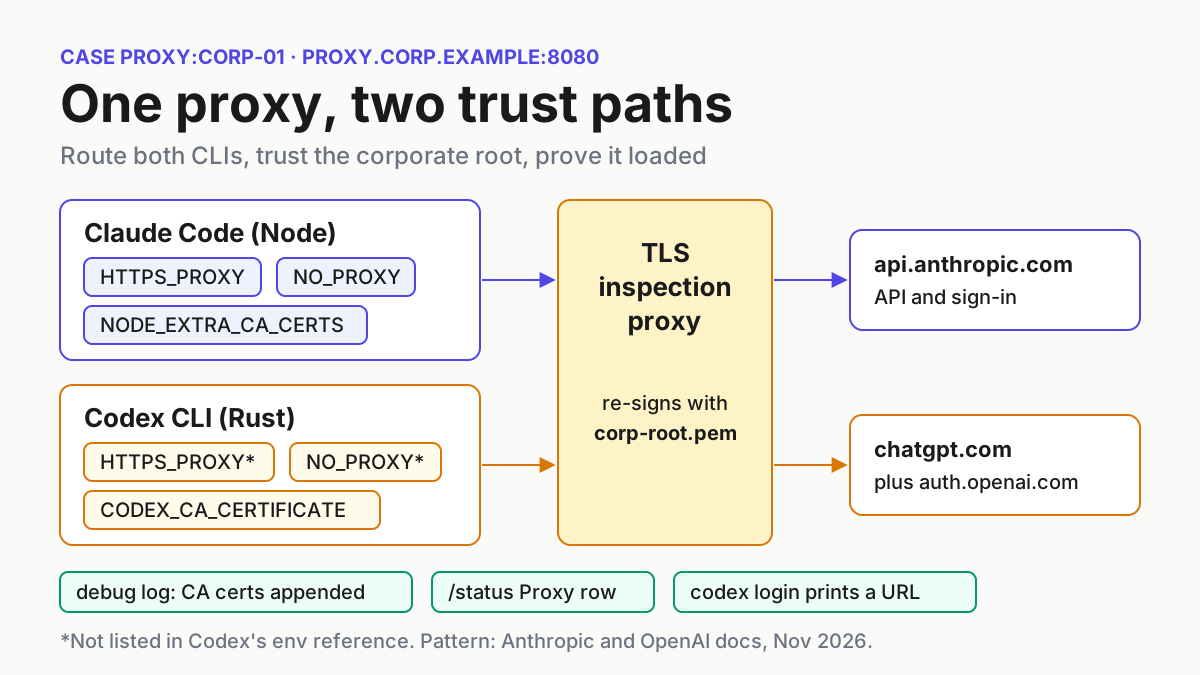
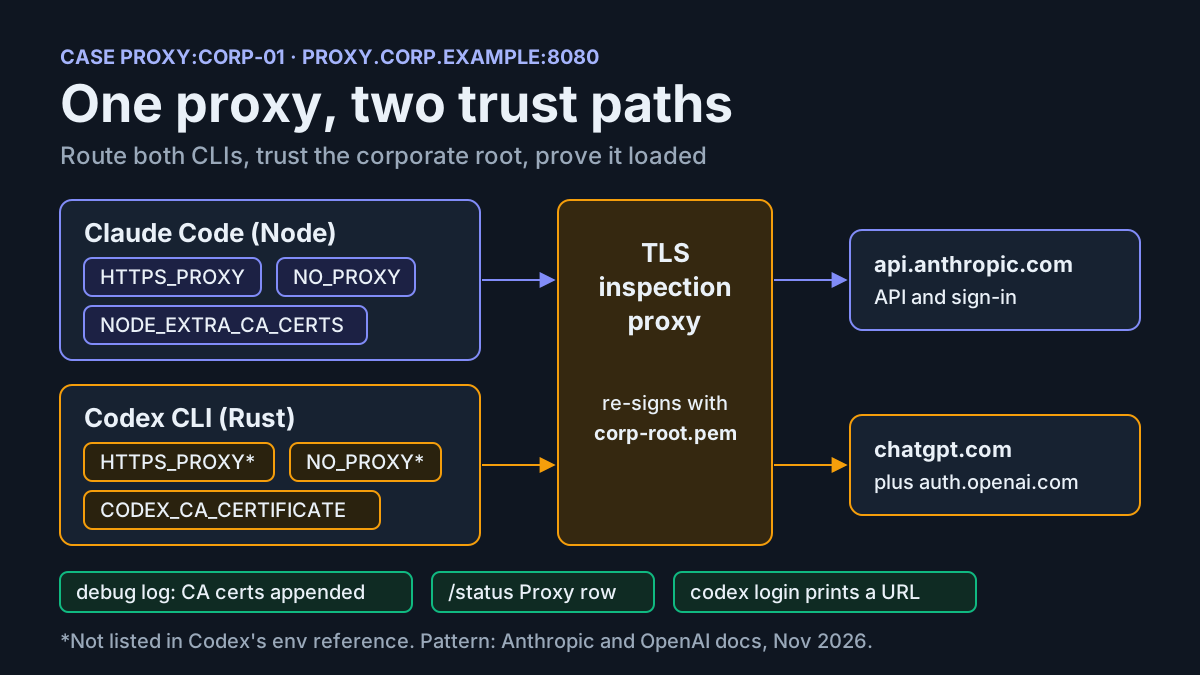
A developer on a corporate network installs Claude Code and Codex, runs the first sign-in, and gets a certificate error where a browser window should be. The network itself works. The problem is a TLS-inspecting proxy that re-signs every HTTPS connection with the company’s own root certificate, and neither CLI trusts that root yet. This guide builds a working claude code proxy setup and the matching Codex setup on one machine. Both tools route through the proxy, both trust the corporate root with certificate verification left on, both skip the proxy for localhost and internal hosts, and the configuration survives a restart.
It is for developers and platform engineers behind an HTTP or HTTPS proxy, often with TLS inspection from products such as Zscaler or Netskope. You need the proxy host and port, your company’s root CA exported as a PEM file, a shell, Claude Code from the native installer or from npm on Node 22.15 or later, and the Codex CLI. If one of the two tools isn’t installed, skip its sections; nothing below depends on having both.
The prompt for this guide was a Proxy302 post on X on November 18, 2026, which summarized Anthropic’s documented proxy behavior in three bullets: set HTTPS_PROXY; only HTTP(S) proxies work and SOCKS isn’t supported; set NO_PROXY=localhost,127.0.0.1 for local tools; and check the Proxy row in /status. That is accurate, and it covers routing. It does not cover the part that breaks most corporate setups, which is certificate trust, and it says nothing about Codex, which reads different variables. Its example also puts user:pass in the proxy URL, while Anthropic’s own page warns against hardcoding passwords in scripts.
A note on what is documented. Variable names, settings locations and log lines below come from Anthropic’s and OpenAI’s documentation and two Codex GitHub issues, all listed under Sources. The OpenSSL commands are standard OpenSSL usage, not vendor documentation. We did not run this configuration against a live corporate proxy, so every expected result is an illustrative expected observation, not a recorded test.
Why one fix never covers both CLIs
A TLS-inspecting proxy decrypts your connection, inspects it, and hands the client a certificate it signed itself with the corporate root. A client that does not trust that root sees what looks like a man-in-the-middle attack, because technically it is one, and refuses to continue. Every tool on the machine needs the root, and each tool finds roots its own way.
Claude Code’s Enterprise network configuration page describes its trust model. By default it trusts its bundled Mozilla CA set and the operating system’s certificate store. Reading the OS store needs a runtime with tls.getCACertificates: the native installer always has it, npm installs need Node 22.15 or later, and on older Node versions only the bundled set and NODE_EXTRA_CA_CERTS apply. The page says TLS-inspection proxies work without extra configuration when their root is in the OS store and the runtime can read it. So if IT already pushed the root into the OS store and you use the native installer, Claude Code may need no CA variable at all, while an old npm install on Node 20 on the same machine fails.
Codex is a Rust program; issue #6849 traces its login HTTP client to the codex-rs crates. Its environment variables reference lists two trust variables: CODEX_CA_CERTIFICATE, a PEM CA bundle for corporate TLS interception or private roots that takes precedence over SSL_CERT_FILE, and SSL_CERT_FILE as the fallback when the first is unset. The Codex authentication page adds that these custom CA settings apply to login, normal HTTPS requests and secure WebSocket connections. Neither page mentions a NODE_* variable, so the NODE_EXTRA_CA_CERTS export that fixed Claude Code does nothing for Codex.
Routing differs as well. Claude Code documents HTTPS_PROXY, HTTP_PROXY and NO_PROXY, accepts lowercase variants, and uses the first one set in the order https_proxy, HTTPS_PROXY, http_proxy, HTTP_PROXY. Codex’s environment page lists no proxy variables. Its configuration reference mentions chaining through an upstream proxy from the environment only for the network proxy that Codex starts for sandboxed commands (features.network_proxy.allow_upstream_proxy). This guide still sets the conventional variables for Codex, and shows where to check in its logs whether they took effect.
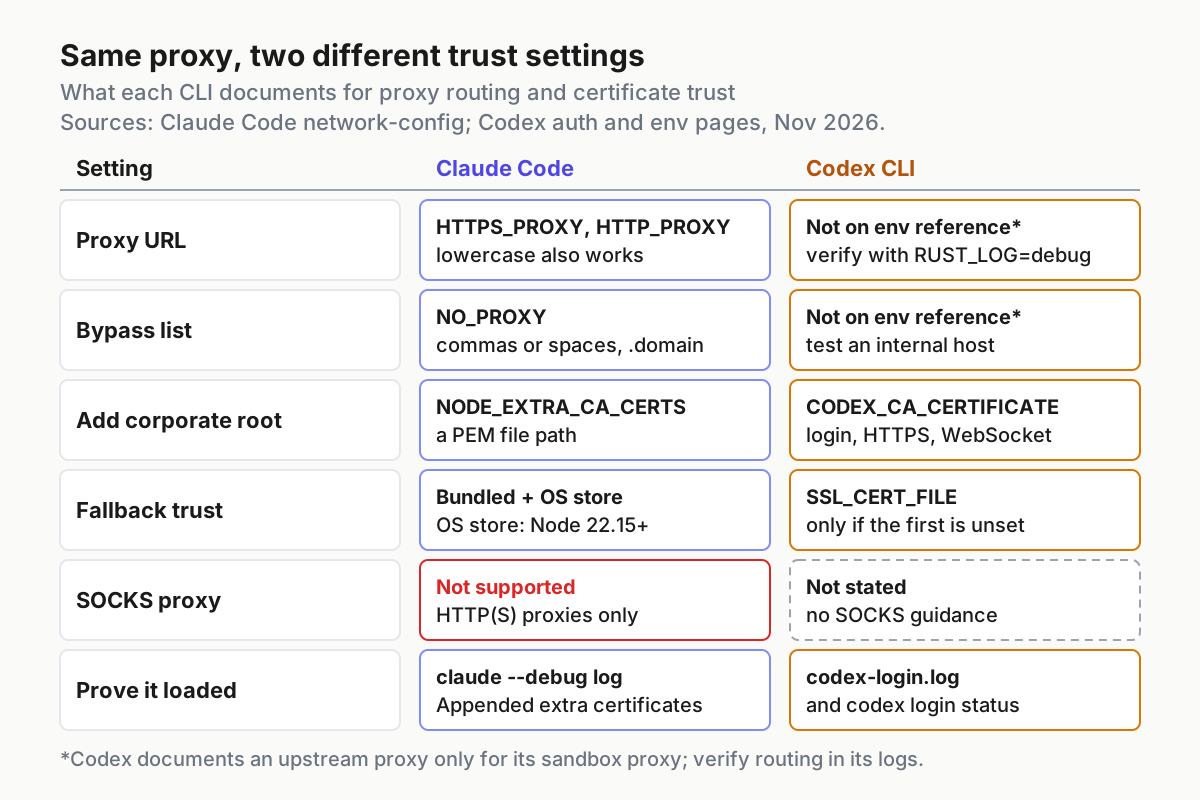
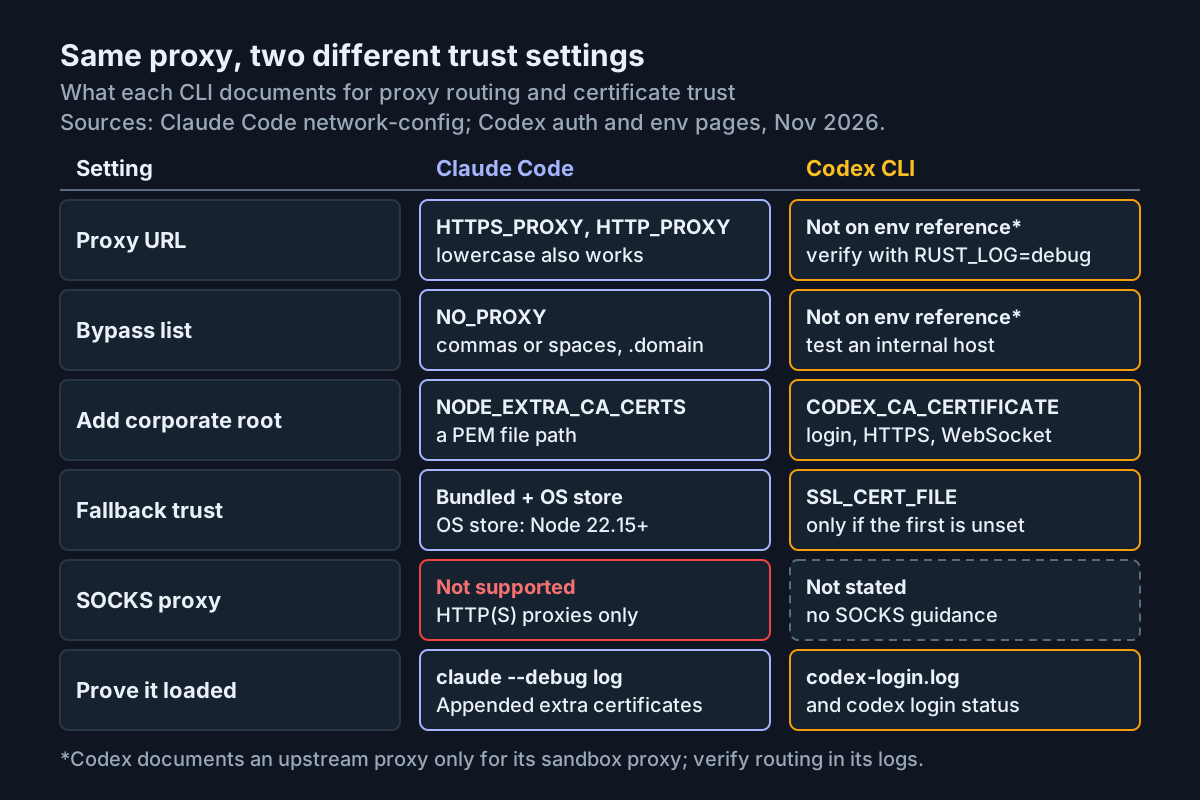
Same proxy, different plumbing: each CLI documents its own trust variable, and only Claude Code documents proxy routing. Sources: Claude Code network-config, Codex auth and environment variable pages, November 2026.
Collect four inputs before you touch a variable
Most failed setups trace back to a wrong input rather than a wrong variable. Gather these first.
- [ ] The proxy URL with its scheme, for example
http://proxy.corp.example:8080. Claude Code validates one network setting at startup, the proxy URL: when it can’t parse the value, such as one missing thehttp://scheme, it stops launch with an error naming the variable. Anthropic notes that since v2.1.327 some non-terminal starts (Claude Desktop, an SDK or cron) go ahead on a value withouthttp://, so a barehost:portcan appear to work in one place and fail in another. Write the full URL. - [ ] How the proxy authenticates. Basic authentication goes in the URL as
http://username:password@host:port. For NTLM or Kerberos, Anthropic suggests an LLM gateway that supports your method. Keep any password in a credential store, not in a script. - [ ] The corporate root CA as PEM. Ask IT for the root certificate that signs inspected traffic, not an intermediate and not a server certificate. On Windows, a certificate exported as Base-64 encoded X.509 is PEM text; a DER
.cerfile needs conversion, shown in the next section. - [ ] Hosts that must skip the proxy:
localhost,127.0.0.1, any local MCP servers, and internal domains such as.corp.example.
One more check costs nothing: confirm the system clock is right. A clock that is minutes or days off makes valid certificates look expired or not yet valid.
Check the PEM file before either tool reads it
Neither CLI is documented to validate the CA file when it reads it. Claude Code’s page says you usually learn about a bad certificate path from an error on a later request. Check the file yourself first. These are standard OpenSSL commands, run against the worked example’s path /etc/ssl/certs/corp-root.pem.
# 1. Convert a DER export to PEM (skip if the file already starts with -----BEGIN CERTIFICATE-----)
openssl x509 -inform der -in corp-root.cer -out /etc/ssl/certs/corp-root.pem

# 2. Count the certificates in the file
grep -c "BEGIN CERTIFICATE" /etc/ssl/certs/corp-root.pem

# 3. Who is it, who signed it, and when is it valid
openssl x509 -in /etc/ssl/certs/corp-root.pem -noout -subject -issuer -dates

# 4. Signature algorithm and key size
openssl x509 -in /etc/ssl/certs/corp-root.pem -noout -text | grep -E "Signature Algorithm|Public-Key"

# 5. Does the proxy's chain verify against this root?
openssl s_client -connect api.anthropic.com:443 -servername api.anthropic.com \
  -proxy proxy.corp.example:8080 -CAfile /etc/ssl/certs/corp-root.pem </dev/null 2>/dev/null \
  | grep "Verify return code"
Read the output in order:
- Step 2 should print
1for a single root, or a larger number for a bundle.0means the file is not PEM. - In step 3, a root’s
subjectandissuerare identical. If they differ, you exported an intermediate or a leaf certificate; go back to IT. notBeforemust be in the past andnotAfterin the future. The reporter of issue #55668 mentions a corporate certificate rotation that required re-exporting the PEM, so re-run this check after any rotation.- Step 4 matters for Codex. A commenter on issue #6849 reported in May 2026 that Codex’s chat and WebSocket paths rejected a hospital proxy’s SHA1-signed RSA-1024 root even with both CA variables set. If you see
sha1WithRSAEncryptionor(1024 bit), expect trouble and raise it with your security team. - Step 5 should print
Verify return code: 0 (ok). Code 20 (unable to get local issuer certificate) or code 19 (self-signed certificate in certificate chain) means this file is not the root that signs your proxy’s traffic.
Set up the Claude Code proxy in the shell, then settings.json
Test in a throwaway shell first, then persist the working values where every Claude Code process can read them.
- Export the variables and start a debug session:
export HTTPS_PROXY=http://proxy.corp.example:8080
export NO_PROXY="localhost,127.0.0.1,.corp.example"
export NODE_EXTRA_CA_CERTS=/etc/ssl/certs/corp-root.pem
claude --debug --debug-file /tmp/corp01-claude.txt
- Sign in and send one prompt. If both work, persist the same values in the
envblock of~/.claude/settings.json:
{
  "$schema": "https://json.schemastore.org/claude-code-settings.json",
  "env": {
    "HTTPS_PROXY": "http://proxy.corp.example:8080",
    "NO_PROXY": "localhost,127.0.0.1,.corp.example",
    "NODE_EXTRA_CA_CERTS": "/etc/ssl/certs/corp-root.pem",
    "CLAUDE_CODE_CERT_STORE": "bundled,system"
  }
}
- Remove the shell exports, open a new terminal and start Claude Code again. Variables are read once at startup, so a running session never picks up a change.
Why each choice works:
- User settings, not the project file. Anthropic’s page says that for
claude mcp loginthe proxy and CA variables must come from your shell,~/.claude/settings.jsonor managed settings, not project or local settings. In Claude Desktop sessions where the app manages the provider connection, these variables are read only from managed settings and~/.claude/settings.json, so a checked-out repository can’t redirect your TLS path. User settings work in every case. - Settings instead of a shell profile. Background agents run under a per-user supervisor that inherits the environment of whichever shell started it first. A shell-only export reaches background sessions only by luck. The docs call settings the only configuration that reaches every background session.
NO_PROXYwith a leading dot..corp.examplebypasses the proxy for hosts in that domain, and both comma and space separators are accepted. Claude Code never sends its WebSocket connections tolocalhost,::1or127.0.0.0/8through the proxy, but an HTTP MCP server on localhost still needs the entry.CLAUDE_CODE_CERT_STOREis optional.bundled,systemis already the default; writing it out records the intent. Setsystemto trust only the OS store, orbundledfor only the Mozilla set. It has no dedicated settings key, which is why it lives in theenvblock.- Strict JSON. A trailing comma or a
//comment turns the file into a Settings Error at the next start.
If your proxy mishandles gzip-compressed request bodies, add "CLAUDE_CODE_GZIP_REQUEST_BODIES": "0". If it demands a client certificate, the same page documents CLAUDE_CODE_CLIENT_CERT, CLAUDE_CODE_CLIENT_KEY and an optional passphrase variable. For where else variables can live and how to prove which value is active, see our Claude Code environment variables guide. If a variable is set both in the shell and in the env block, keep the values identical or drop the export: Anthropic’s settings precedence page says shell variables and settings keys are resolved pair by pair, not by one general level rule.
Prove Claude Code actually loaded the CA
/status alone is not proof. Its Additional CA cert(s) row shows the NODE_EXTRA_CA_CERTS path without checking that the file loaded. The debug log is where the load is recorded.
- Start with logging to a known file, then search it from a second terminal:
claude --debug --debug-file /tmp/corp01-claude.txt
# in another terminal, after the session starts
grep -E "CA certs|Failed to (read|load)" /tmp/corp01-claude.txt
- Without
--debug-file, look in~/.claude/debug/<session-id>.txtinstead. - In the session, run
/statusand compare what you see with the table below.
| Observation | Meaning | Next move |
|---|---|---|
CA certs: Appended extra certificates from NODE_EXTRA_CA_CERTS (/etc/ssl/certs/corp-root.pem) in the log |
The file loaded | Move on |
A Failed to read or Failed to load line |
Claude Code couldn’t read the file; the line gives the reason | Fix the path or permissions, restart |
| Warning that Claude Code used only the certificates it could read in full | Part of a bundle is malformed; connections needing a skipped certificate can fail | Re-export or split the bundle |
| Warning that Claude Code ignored all of the file | No readable certificate, often a DER file | Convert to PEM |
/status Proxy row shows http://proxy.corp.example:8080 |
Proxy active in this process | Move on |
| Proxy row marks the value invalid and ignored | The URL could not be parsed | Add the scheme, check the port |
| No Proxy row at all | No proxy variable reached this process | Check the env block, restart |
The warnings in rows three and four tell you exactly how to fix the file in their full text, according to Anthropic. A certificate skipped from your file still works if the same certificate is already in the CA store Claude Code trusts.
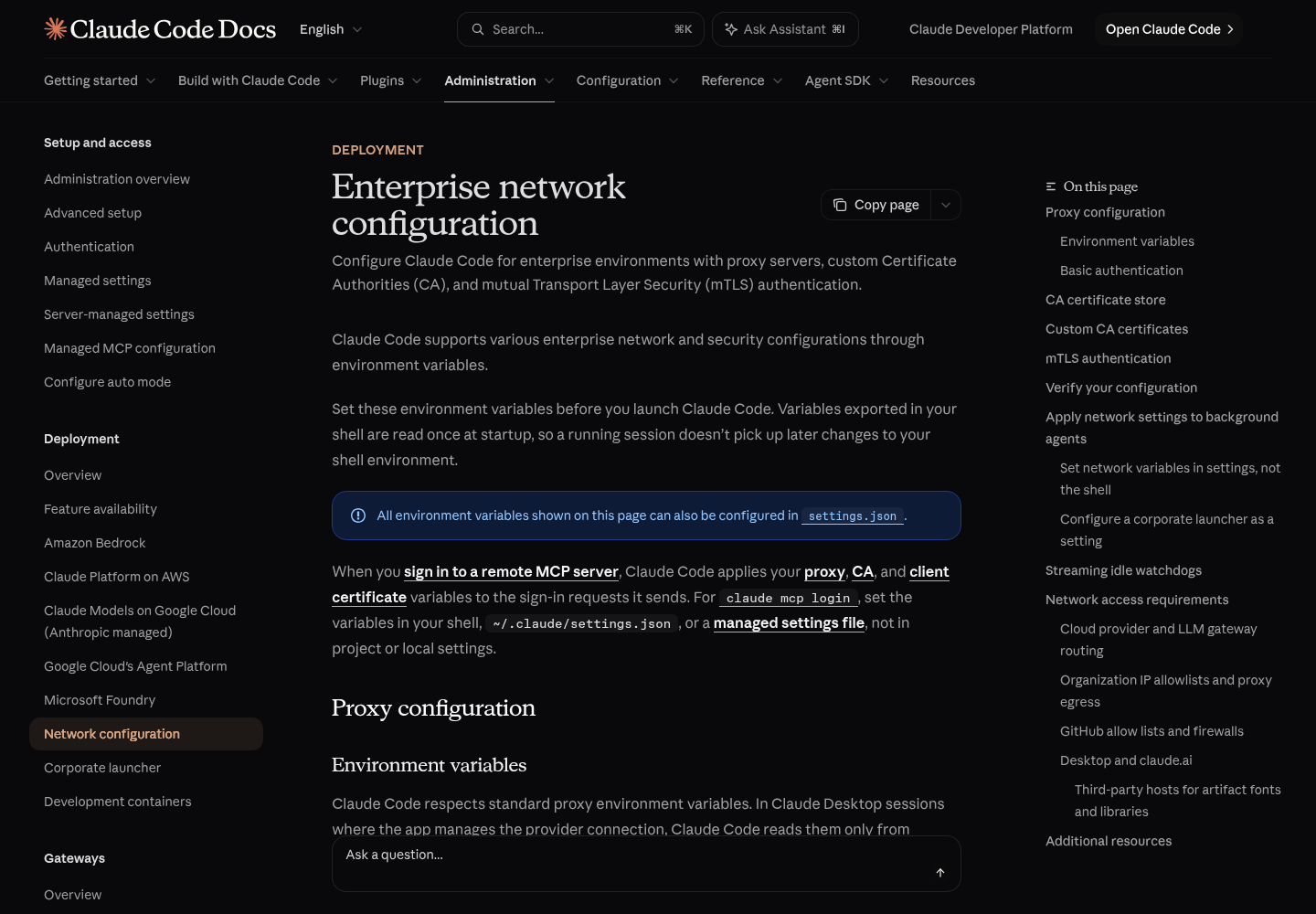
Anthropic’s Enterprise network configuration page is the reference for the proxy, CA store and debug-log behavior used in this section. Capture of code.claude.com, November 2026.
Point Codex at the corporate root
Codex reads its own variables, and its CA file must be in place before login, because the same trust setting covers the sign-in flow.
- Export the variables and log in:
export CODEX_CA_CERTIFICATE=/etc/ssl/certs/corp-root.pem
export HTTPS_PROXY=http://proxy.corp.example:8080      # conventional; not on Codex's env reference
export NO_PROXY="localhost,127.0.0.1,.corp.example"    # same caveat
codex login
- Expected: the browser sign-in flow opens instead of the login failing at the token exchange. Confirm with
codex login status, which reports the active authentication method. - If login fails, read the login log. Direct
codex loginruns writecodex-login.logunder the configured log directory, which defaults to$CODEX_HOME/log(normally~/.codex/log). - For a problem after login, turn on debug logging with
RUST_LOG=debug codex -c log_dir=./.codex-logand followtail -F ./.codex-log/codex-tui.login another terminal. This is also where you look for evidence that requests went to the proxy. - If your network blocks the localhost callback Codex uses to receive the sign-in result, run
codex login --device-auth(beta), after enabling device code login in your ChatGPT security settings or workspace permissions. - Persist the variables in your shell profile or user environment. The configuration reference has no
config.tomlkey for the CLI’s own CA; the only TLS CA keys there belong to OpenTelemetry exporters (otel.exporter.<id>.tls.ca-certificate), which you set separately if telemetry also passes through the inspection proxy.
Two judgement calls follow from what the docs don’t say. OpenAI calls CODEX_CA_CERTIFICATE a PEM CA bundle but does not say whether it adds to the default roots or replaces them. If hosts that are not inspected start failing after you set it, build one bundle with both sets:
cat /etc/ssl/certs/ca-certificates.crt /etc/ssl/certs/corp-root.pem > ~/.codex/corp-bundle.pem
export CODEX_CA_CERTIFICATE=~/.codex/corp-bundle.pem
/etc/ssl/certs/ca-certificates.crt is the Debian and Ubuntu system bundle; other distributions keep it elsewhere.
Second, MCP servers that Codex launches over stdio get their environment from their own table. A Node-based server behind the same proxy needs the Node variable passed to it explicitly:
[mcp_servers.internal-docs]
command = "npx"
args = ["-y", "internal-docs-mcp"]
env = { NODE_EXTRA_CA_CERTS = "/etc/ssl/certs/corp-root.pem", HTTPS_PROXY = "http://proxy.corp.example:8080" }
The server name and package are illustrative. env is the documented map of variables forwarded to a stdio server, and env_vars whitelists variables to pass through by name. Our Codex MCP setup guide covers the rest of that table. Issue #6849 was filed against Codex 0.58.0, and OpenAI’s docs now state the CA settings cover login; if your Codex is old, update it first with our Codex install, update and uninstall guide.
Windows: remove an inherited SSL_CERT_FILE
OpenAI’s docs say SSL_CERT_FILE is used only when CODEX_CA_CERTIFICATE is unset. Issue #55668, opened October 20, 2026, reports different behavior for the Codex VS Code extension on Windows (extension 26.1007.21434, bundled CLI 0.162.0-alpha.17.2). Anaconda’s OpenSSL activation sets SSL_CERT_FILE to its own Library\ssl\cacert.pem, which the reporter inspected: 121 certificates, none of them the CrowdStrike inspection root. With that variable inherited, Codex failed even though CODEX_CA_CERTIFICATE pointed at a verified PEM. The browser said Signed in to Codex while VS Code reported Sign-in failed: workspace routing discovery failed. Removing only SSL_CERT_FILE fixed it. The reporter states the internal cause has not been established, and the issue is open.
- In the shell you launch from, check both variables:
$env:SSL_CERT_FILE
$env:CODEX_CA_CERTIFICATE
- Close every VS Code window, so no process keeps the old environment.
- Remove the variable for this launch only, and start VS Code from the same shell:
Remove-Item Env:\SSL_CERT_FILE
code.cmd .
- To keep Anaconda’s setting for other tools, use a wrapper that restores it afterwards. This is our adaptation of the reporter’s mitigation, applied to the CLI:
function codex-corp {
  $saved = $env:SSL_CERT_FILE
  try {
    Remove-Item Env:\SSL_CERT_FILE -ErrorAction SilentlyContinue
    codex @args
  } finally {
    if ($saved) { $env:SSL_CERT_FILE = $saved }
  }
}
- Persist
CODEX_CA_CERTIFICATEas a user variable so new shells inherit it:[Environment]::SetEnvironmentVariable("CODEX_CA_CERTIFICATE", "C:\certs\corp-root.pem", "User").
No certificate verification is disabled, and Anaconda’s bundle stays untouched. If IT is rolling these settings out across many Windows machines, our guide to what IT is buying with corporate AI on a Windows PC covers the fleet side.
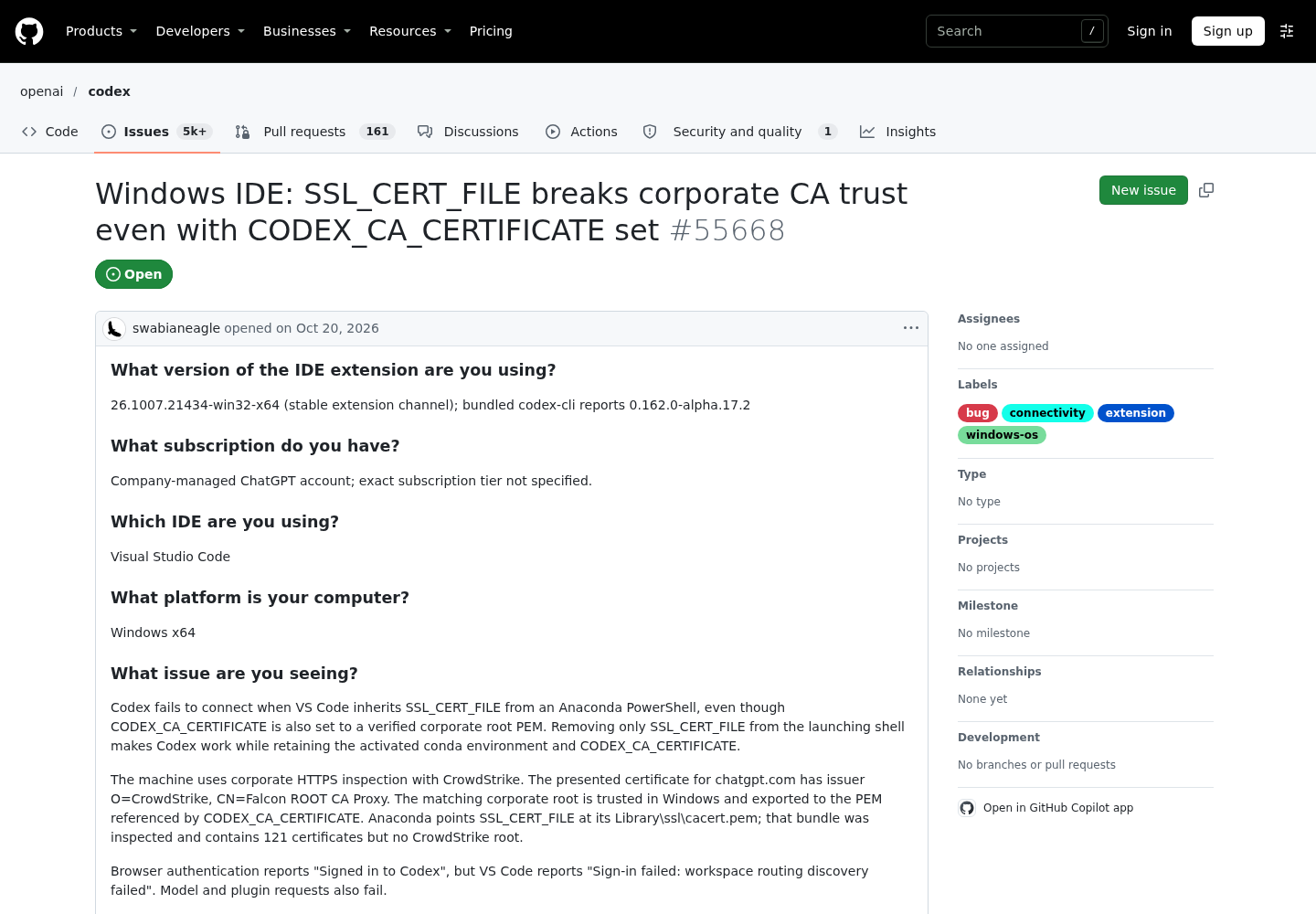
The open issue documenting the Windows SSL_CERT_FILE conflict and the shell-level workaround. Capture of github.com/openai/codex, November 2026.
Worked example: proxy:corp-01 from login to an internal host
One Linux workstation, case proxy:corp-01: proxy http://proxy.corp.example:8080 with TLS inspection, root at /etc/ssl/certs/corp-root.pem, internal domain .corp.example. Claude Code is the native install with the settings file above; Codex has CODEX_CA_CERTIFICATE exported and no SSL_CERT_FILE. A Windows laptop, proxy:corp-01-win, covers the last row. These are illustrative expected observations derived from the documentation and issues, not a recorded run.
| Input | Action | Expected result (illustrative) |
|---|---|---|
| proxy:corp-01 / claude-login. Native Claude Code, env block with HTTPS_PROXY, NO_PROXY and NODE_EXTRA_CA_CERTS=/etc/ssl/certs/corp-root.pem | Run claude --debug --debug-file /tmp/corp01-claude.txt, complete sign-in, run /status |
Sign-in completes; the log contains CA certs: Appended extra certificates from NODE_EXTRA_CA_CERTS (/etc/ssl/certs/corp-root.pem); the Proxy row shows http://proxy.corp.example:8080 |
proxy:corp-01 / claude-first-prompt. Same session, repository ~/src/billing |
Send the prompt: List the top-level folders in this repo | A response streams with no certificate error; if requests stall at the proxy, add CLAUDE_CODE_GZIP_REQUEST_BODIES=0 to the env block and restart |
proxy:corp-01 / mcp-localhost. HTTP MCP server at http://localhost:3845/mcp, added at user scope |
Ask Claude to call one of the server’s tools | The call goes direct because localhost is in NO_PROXY; without that entry the request goes to the proxy, which cannot reach your loopback interface |
proxy:corp-01 / internal-host. Remote MCP server https://tools.corp.example/mcp with a certificate issued by the same corporate root |
Sign in with claude mcp login from the same user settings, then call one of its tools |
The request bypasses the proxy through .corp.example, and TLS verifies because the root comes from NODE_EXTRA_CA_CERTS in user settings |
| proxy:corp-01 / codex-login. CODEX_CA_CERTIFICATE=/etc/ssl/certs/corp-root.pem, SSL_CERT_FILE unset | Run codex login, then codex login status |
The browser sign-in opens instead of Token exchange failed; status reports the active sign-in method; codex-login.log shows no TLS error |
proxy:corp-01-win / codex-ide. Anaconda PowerShell with SSL_CERT_FILE pointing at Library\ssl\cacert.pem |
Close all VS Code windows, run Remove-Item Env:\SSL_CERT_FILE, run code.cmd ., sign in to Codex |
Per issue #55668, sign-in and model requests succeed where they previously failed with workspace routing discovery failed |
Why the case is built this way. The root path is the same for both tools, so one PEM check covers both, but each tool receives it through its own variable. The internal host shares the corporate root because many companies issue internal certificates from the same PKI, which is how one file can serve inspected public traffic and direct internal traffic. Row three is the one people miss: Claude Code’s loopback exemption covers its WebSocket connections, not an HTTP MCP server you added, so the localhost entry is what keeps that server off the proxy. Row four depends on user settings, because Anthropic documents that claude mcp login ignores proxy and CA values from project or local settings. For scopes and how to add the servers, see our Claude Code MCP setup guide.
What failure looks like in the same case. If row one shows the Proxy row but no Appended line, the CA did not load and the next request will fail with an issuer error. If row five still fails after the CA is set, check SSL_CERT_FILE and the signature algorithm from the PEM check before anything else.
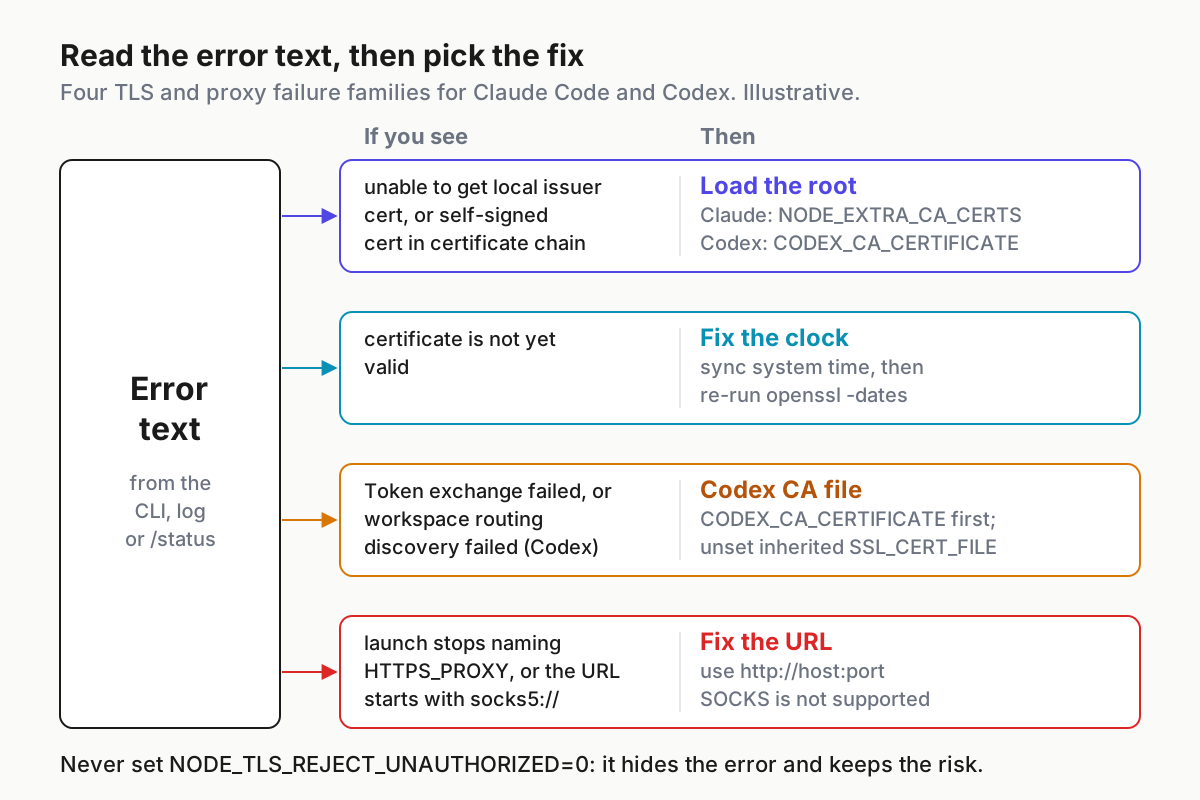
Read the error text before changing anything: each of the four families has a different fix. Illustrative triage based on Anthropic’s network-config page and Codex issues #6849 and #55668.
Error text to fix: a decision table
Match the text you see, then apply the fix in the same row. The first three strings are standard OpenSSL and Node wording, and exact text varies by runtime. The two Codex strings come from the GitHub issues.
| Error text | Tool | Likely cause | Fix |
|---|---|---|---|
unable to get local issuer certificate |
Either | The chain ends at a root the client doesn’t trust: CA variable missing, wrong file, or an intermediate instead of the root | Claude Code: set NODE_EXTRA_CA_CERTS and confirm the debug line. Codex: set CODEX_CA_CERTIFICATE. Re-run the s_client check |
self-signed certificate in certificate chain |
Either | The proxy presents its own root and the client doesn’t trust it | Same fix; confirm the PEM subject matches the issuer of the inspected chain |
certificate is not yet valid |
Either | Clock skew, or a root rotated minutes ago | Sync the system clock; re-check -dates |
Token exchange failed: error sending request for url (https://auth.openai.com/oauth/token) |
Codex | Login client doesn’t trust the inspection root (issue #6849, Codex 0.58.0) | Set CODEX_CA_CERTIFICATE before codex login; update an old Codex |
Sign-in failed: workspace routing discovery failed |
Codex IDE on Windows | Inherited SSL_CERT_FILE beating the corporate root (issue #55668) | Remove SSL_CERT_FILE from the launching shell; restart VS Code |
| Launch stops with an error naming HTTPS_PROXY | Claude Code | The proxy URL can’t be parsed, often a missing http:// |
Write the full URL |
A socks5:// proxy URL |
Claude Code | SOCKS proxies are not supported | Use the HTTP(S) proxy endpoint, or an LLM gateway |
| Warning that all of the NODE_EXTRA_CA_CERTS file was ignored | Claude Code | No readable certificate in the file | Convert to PEM |
| Foreground sessions work, background agents fail | Claude Code | Supervisor started from a shell without the variables | Move the variables into the settings env block |
Do not reach for NODE_TLS_REJECT_UNAUTHORIZED=0. A commenter on issue #6849 mentions using it with Claude Code, and the issue’s author notes it doesn’t help Codex’s Rust client. It switches off certificate verification for the whole Node process, so anything on the network path can read the session’s tokens. Anthropic also lists it among the variables cloud sessions ignore when they come from a settings file. Fix trust; don’t remove it. If a third tool, Cursor, fails on the same network, its usual cause is HTTP/2 through the proxy rather than the CA; see our Cursor connection errors guide.
Roll back without breaking other tools
Every change in this guide is an environment variable or a key in one file, so rollback is quick. Proxy and CA variables are read at startup, which means a restart is what makes a rollback take effect.
- Before you start the setup, copy the current file:
cp ~/.claude/settings.json ~/.claude/settings.json.bak. To roll back, restore that copy or delete the four keys from theenvblock. - Remove matching exports from your shell profile, open a new terminal, and confirm nothing is left with
env | grep -iE "proxy|CA_CERT|SSL_CERT". - Restart Claude Code. For background agents, Anthropic says an already-running supervisor keeps the launch configuration it started with and documents
claude daemon stop --anyfor restarting it after a launcher change. We expect the same command to clear a supervisor holding old network variables, though the docs only state it for the launcher case. - For Codex, unset
CODEX_CA_CERTIFICATEand the proxy variables, or delete the user variable on Windows. Thecodex-corpwrapper restoresSSL_CERT_FILEby itself in itsfinallyblock. - If a working setup breaks later, re-run the PEM check before reverting anything: a rotated root is a more likely cause than a changed variable.
What the official docs leave open
Four gaps are worth knowing before you file a ticket or blame your proxy team.
- Codex proxy variables. The environment reference lists no
HTTPS_PROXYorNO_PROXY. Confirm routing in aRUST_LOG=debuglog, and ask in the Codex repository if you need a firm answer. - Bundle or addition. Whether
CODEX_CA_CERTIFICATEreplaces or adds to the default roots is not stated; the combined bundle above works either way. - SOCKS for Codex. Not stated for the CLI’s own traffic. Claude Code states plainly that it does not support SOCKS.
- Weak inspection roots. Rejection of SHA-1 or RSA-1024 roots by Codex is a user report on a closed-for-login issue, not documented behavior.
GitHub Copilot CLI routes its sandbox traffic through its own proxy rules with different variables; our Copilot CLI sandbox proxy guide covers that tool.
Sources
- Proxy302 on X: Claude Code behind a proxy is one line, Proxy302, November 18, 2026
- Enterprise network configuration, Claude Code Docs, Anthropic
- Authentication, Codex documentation, OpenAI
- Environment variables, Codex documentation, OpenAI
- Configuration Reference, Codex documentation, OpenAI
- Settings files and precedence, Claude Code Docs, Anthropic
- Issue #55668: Windows IDE: SSL_CERT_FILE breaks corporate CA trust even with CODEX_CA_CERTIFICATE set, openai/codex on GitHub, opened October 20, 2026
- Issue #6849: OAuth Login Fails Behind Corporate Proxy with Custom CA Certificates, openai/codex on GitHub, opened November 18, 2025