Claude Code MCP Setup: Add Servers With claude mcp add, Pick the Right Scope, and Fix Connection Failures
Claude Code MCP setup, start to finish: add a stdio and an HTTP server, pick local, project or user scope, share .mcp.json safely, and fix failed connections.

Go deeper. Build your own.
You added an MCP server to Claude Code, it worked once, and now /mcp shows a cross next to it, or the server is missing from the one repository where you need it. Many of those reports trace back to a question nobody answered at setup time: which configuration file owns this server? This Claude Code MCP setup guide answers it by building a small, real configuration from scratch. You will connect one local stdio server and one remote HTTP server, place each in a scope you chose on purpose, share a team .mcp.json that holds no secret, verify both, and finish with a symptom-to-fix table and a rollback you can run in two minutes.
The reader I have in mind is an individual developer with Claude Code installed on a Pro or Max subscription or a Console account. If the protocol itself is new to you, read our MCP explainer for power users first. This guide stays on the mechanics.
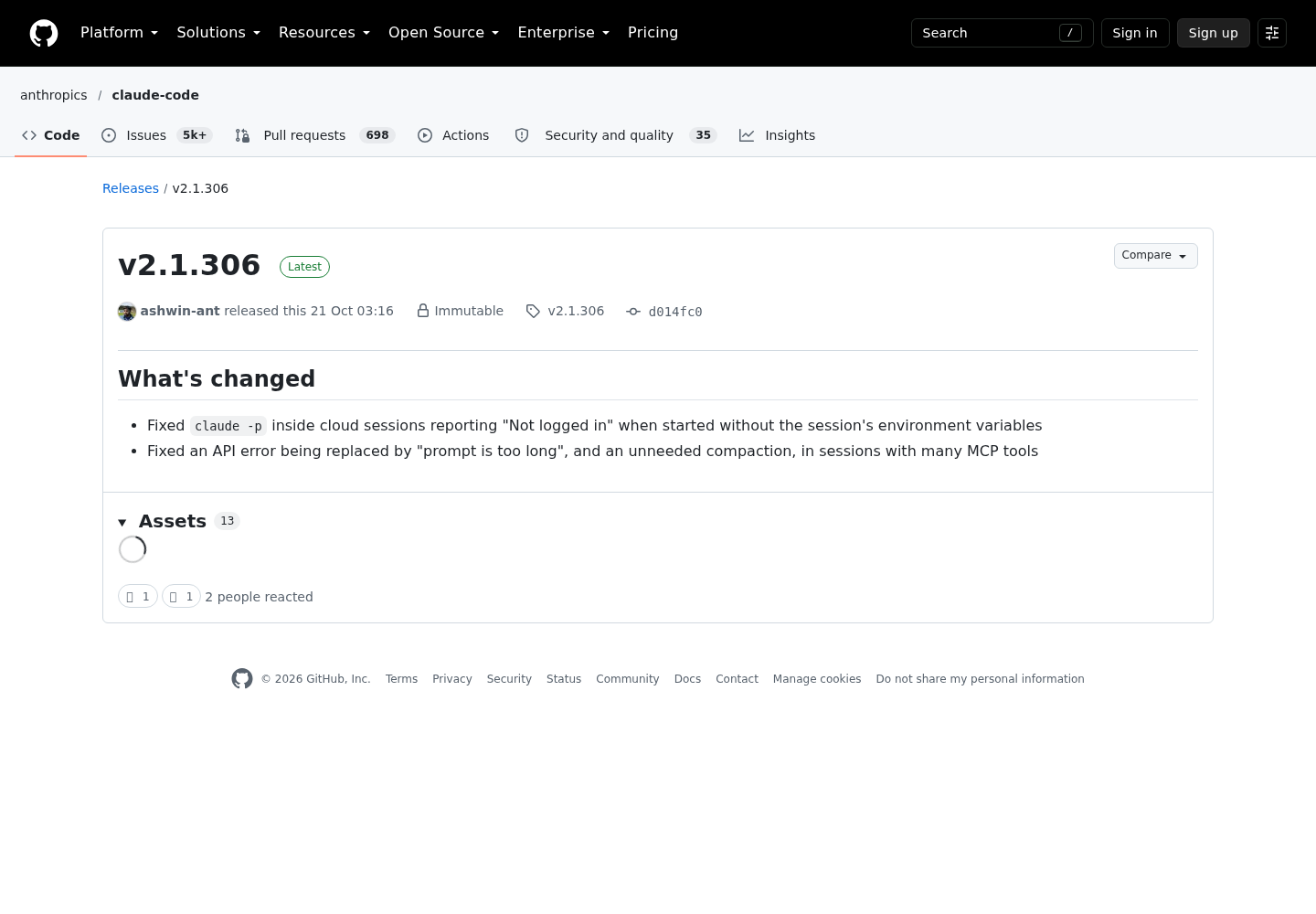
There is a dated reason to tidy this up now, but it is background, not the lesson. Anthropic’s Claude Code v2.1.306 release, published on GitHub on Oct 21, 2026, fixed “an API error being replaced by ‘prompt is too long’, and an unneeded compaction, in sessions with many MCP tools.” A day earlier, v2.1.305 fixed “an MCP server passed by a cloud session or by the SDK’s setMcpServers being replaced later in the session by a same-named server from your own settings.” Both bugs sit exactly where setup mistakes sit: which definition of a server loads, and how much tool context it costs.
A note on evidence before the first command. Everything below is documented syntax from Anthropic’s Claude Code MCP reference and CLI reference, plus OpenAI’s Codex configuration reference for the final section. We did not run these commands to capture output for this article, so the expected observations quote the status strings Anthropic documents rather than a terminal session we recorded. The database URL, the token and the server names are placeholders you replace with your own.
What you will build, and what to have ready
By the end you will have two servers connected and verified, each in a scope you can name, plus a documented way to see, fix or remove either of them. The worked example uses servers that Anthropic’s own documentation uses as examples, so every command maps to a published reference:
| Server name | What it is | Transport | Scope you will use | Where its credential lives |
|---|---|---|---|---|
db |
DBHub (@bytebase/dbhub), a database MCP server launched with npx |
stdio | local first, then project | A read-only connection string: in ~/.claude.json while local, then in your shell as DBHUB_DSN |
github |
GitHub’s remote MCP server | HTTP | user | A fine-grained personal access token, in ~/.claude.json or an environment variable |
sentry (optional) |
Sentry’s remote MCP server | HTTP with OAuth | project | No secret in any file; each person signs in through /mcp |
Why these choices? The database server holds a password and starts as a personal experiment, so it begins private and moves to the team file only after the secret has been pulled out into a variable. The GitHub token is yours alone and useful in every repository, which is the definition of user scope. Sentry shows the OAuth path, where the shared file can be committed as-is because sign-in happens per person and nothing sensitive is written to the repository.
Before you start, check off the following:
- [ ] Claude Code is installed and
claude --versionprints a version number, as the Claude Code overview describes. Runclaude updateto move to the latest build; several behaviors in this guide arrived in recent v2.1 releases, and v2.1.306 is marked Latest at the time of writing. - [ ] You are signed in with a Claude subscription or an Anthropic Console account. Most Claude Code surfaces require one of the two.
- [ ] You have a test repository under git, so every change to
.mcp.jsoncan be diffed and reverted. - [ ] Node.js with
npxis installed, because the stdio server is launched throughnpx. - [ ] You can reach a development Postgres database with a read-only user. Anthropic’s DBHub example recommends a read-only user “so the queries Claude runs can’t modify data.”
- [ ] You have generated a fine-grained GitHub token limited to the repositories Claude should see.
- [ ] You have decided whether each server deserves your trust. The MCP reference warns that servers fetching external content “can expose you to prompt injection risk.” Our MCP hardening guide covers that review, and this guide does not repeat it.
If you are new to the CLI’s broader habits, such as CLAUDE.md files, hooks and permission modes, the Claude Code power user’s field guide is the companion read.
Pick a scope before you type the command
Every claude mcp add writes to one of three scopes, and the default is the one people forget. The MCP reference defines them this way:
| Scope | Loads in | Shared with team | Stored in |
|---|---|---|---|
| Local (default) | Current project only | No | ~/.claude.json, under that project’s path |
| Project | Current project only | Yes, through version control | .mcp.json in the project root |
| User | All your projects | No | ~/.claude.json |
Two details explain most “it disappeared” reports. First, local scope is keyed to the directory you ran the command in. Add a server from ~/code/api and it will not exist in ~/code/web. Second, the word “local” is overloaded. MCP local scope lives in ~/.claude.json in your home directory, while the general local settings file is .claude/settings.local.json inside the project. The settings documentation confirms that ~/.claude.json is a file Claude Code writes for itself, holding “your sign-in session, MCP server configurations, per-project state such as trust decisions.” You rarely need to open it, but you should know which servers it is quietly holding.
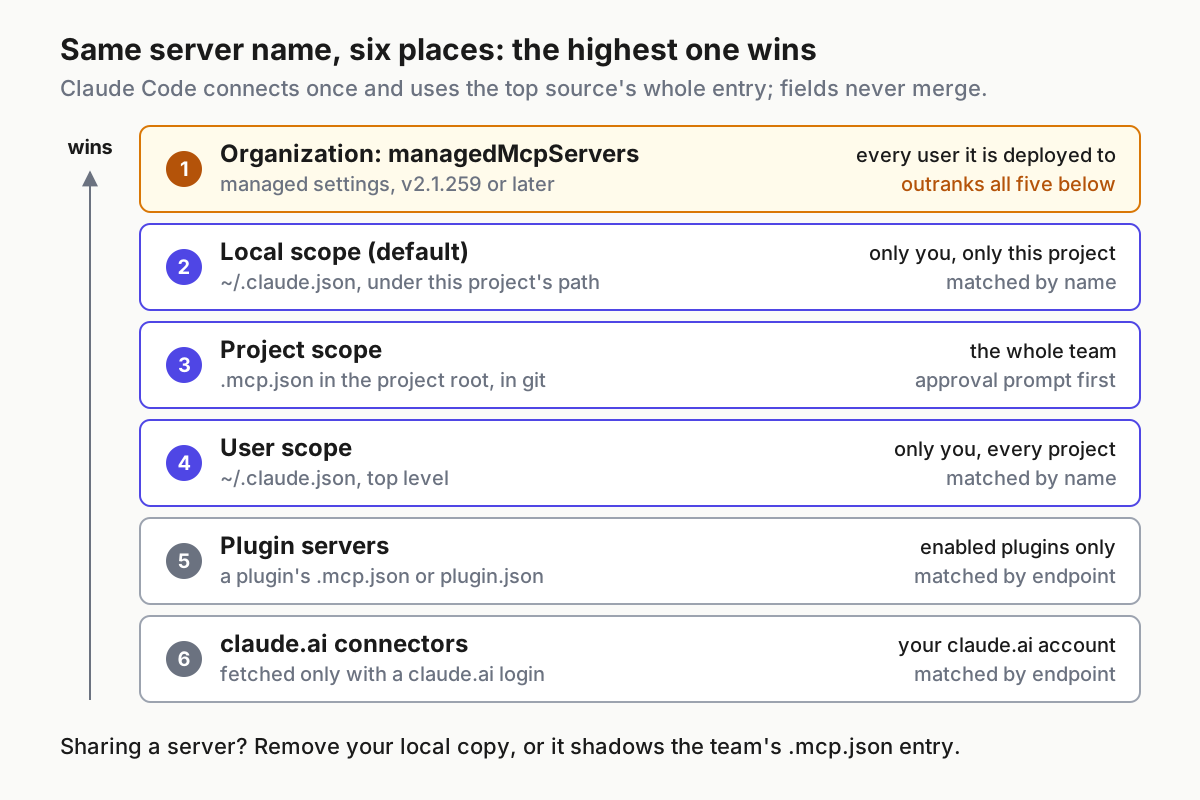
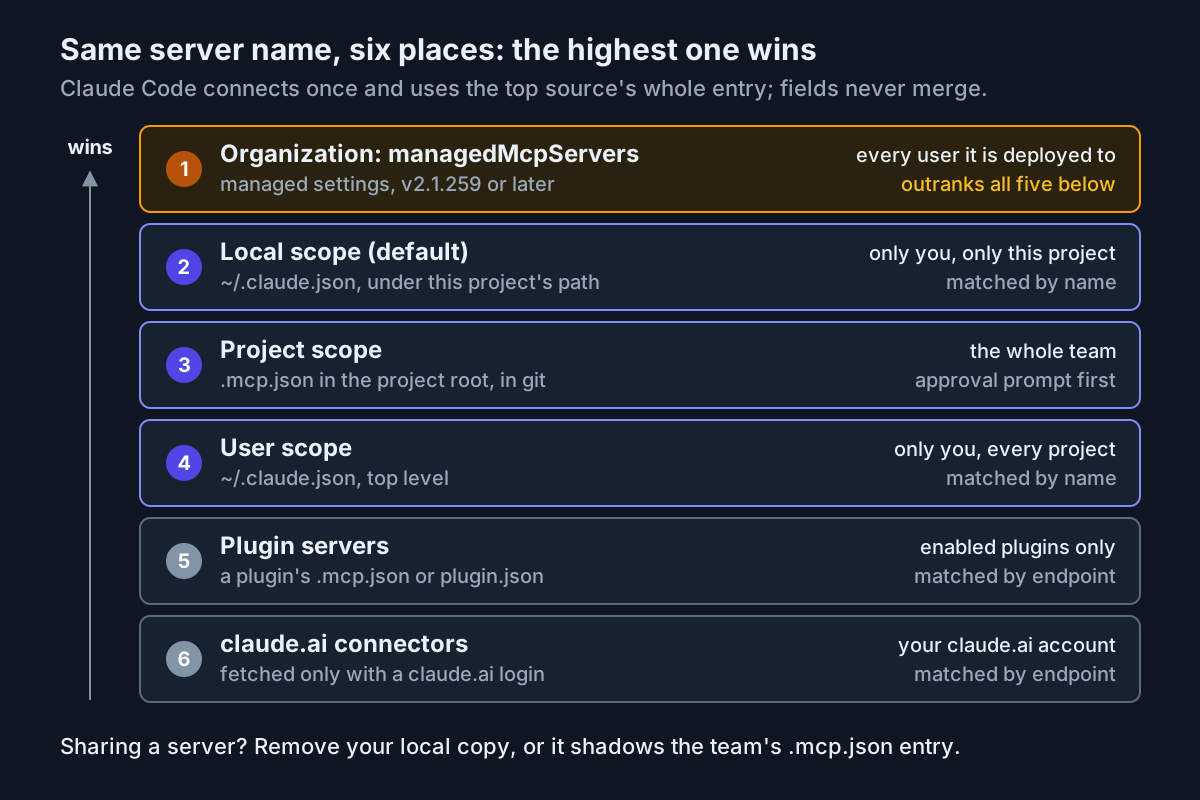
When the same name is defined in more than one place, Claude Code connects once, using the highest-precedence source, and “the entire server entry from that source is used; fields are not merged across scopes.” The order runs local, then project, then user, then plugin-provided servers, then claude.ai connectors. A server your organization provides through the managedMcpServers managed setting ranks above all of them on v2.1.259 or later. The three scopes are matched by name; plugins and claude.ai connectors are matched by endpoint, so a connector pointing at the same URL as one of your servers counts as a duplicate, and /mcp lists it as hidden.
Administrators have one more recent change to note. v2.1.305 changed allowedMcpServers to stop filtering managed-mcp.json stdio servers that use ${VAR} only in env; a server the allowlist used to leave out now loads after the upgrade, and the release notes point to deniedMcpServers to keep it off.
Use this decision table for each server you add:
| If the server… | Choose | Reason |
|---|---|---|
| Carries a credential you would never commit, or is still an experiment | Local (no flag needed) | Private to you and to this one project |
| Should appear for every teammate who clones the repository | Project (--scope project) |
Written to .mcp.json, which you commit; each person approves it |
| Is a personal tool you want in every repository | User (--scope user) |
One definition for all your projects |
| Already reaches you through your organization, a plugin or a claude.ai connector | Do not add a copy | A same-named or same-endpoint copy only creates a precedence puzzle |
The rule that bites later: a local definition outranks a project definition with the same name. If you test a server locally and then commit it to .mcp.json, your machine keeps loading the local copy until you remove it, while your teammates load the committed one. Sharing is what project scope is for, but only after the private copy is gone. That is the setup-time cousin of the same-name replacement bug v2.1.305 fixed for SDK and cloud sessions, and it is why the precedence diagram is worth keeping beside you while you work.
Add the local stdio server with claude mcp add
A stdio server runs as a local process that Claude Code starts and talks to over standard input and output. The documented syntax is claude mcp add [options] <name> -- <command> [args...], and the double dash is the part that matters.
cd ~/code/test-repo
claude mcp add --transport stdio db -- npx -y @bytebase/dbhub \
  --dsn "postgresql://readonly:pass@localhost:5432/app_dev"
Work through it in order:
- Change into the repository first. Local scope records the server under the current project’s path, so the directory you stand in decides where the server exists.
- Run the command. Claude Code’s own options (
--transport,--env,--scope) go before--; everything after--is “passed to the server untouched.” Without the separator, Claude Code would try to read-yand--dsnas its own options. - Read the result. A successful add prints an
Added ...line, which means the configuration was written. If you see awas not savedormay not have been savedmessage instead, treat the configuration as unchanged and resolve that before going further. - Inspect the entry with
claude mcp get db. It shows the details Claude Code recorded for the server, including its status. - Start
claudein the repository and ask a read-only question such as “Show me the schema for the orders table.” That prompt comes from Anthropic’s own DBHub example, and a real table list is your proof that the whole path works.
Three choices in that command deserve a reason. The name db uses only letters, which matters because names added through claude mcp commands may contain only letters, numbers, hyphens and underscores, and several built-in names, including workspace and computer-use, are reserved and rejected by claude mcp add. npx -y keeps the launch non-interactive, because a stdio server has no way to answer an install prompt. And the connection string uses a read-only database user, so a confused prompt cannot write to your tables.
Many servers read a key from the environment instead of an argument. The documented pattern passes it with --env:
claude mcp add --env AIRTABLE_API_KEY=YOUR_KEY --transport stdio airtable \
  -- npx -y airtable-mcp-server
Note the order. --env accepts several KEY=value pairs, so if the server name comes directly after it, the CLI reads the name as another pair and rejects it. Put another option such as --transport stdio between them, or put the name first, as in the reference’s claude mcp add example --env API_KEY=your-key -- npx -y @example/mcp-server.
Two runtime facts help if you write your own stdio server. Claude Code sets CLAUDE_PROJECT_DIR in the spawned server’s environment to the project root, so the server can resolve project paths without depending on its working directory. And when the session ends, Claude Code stops the process on a short clock: on macOS and Linux it sends SIGINT, then SIGTERM 100 milliseconds later if the process is still running, then SIGKILL after a further 400 milliseconds; on Windows it closes the server’s stdin and ends the process tree 300 milliseconds later. A server that must save state or remove lock files has to finish inside that window. Claude Code also does not reconnect stdio servers automatically; remote servers get retries, local processes do not, so a crashed stdio server stays down until you reconnect it.
Add the remote HTTP server with a header or OAuth
HTTP is the transport Anthropic recommends for remote servers, and it is the one that supports OAuth. Pick one of two authentication paths.
Path A: a token in a header. GitHub’s remote server authenticates with a personal access token passed as a header:
claude mcp add --transport http github --scope user \
  https://api.githubcopilot.com/mcp/ \
  --header "Authorization: Bearer YOUR_GITHUB_PAT"
- Replace the placeholder with your fine-grained token, then run the command.
--scope usermakes the server available in every project on your machine. - Expect an
Added ...line. Be aware thatclaude mcp add“saves the configuration without validating credentials, so a placeholder value is accepted here but the server fails to connect later.” - Open
claude, run/mcp, and look for a checkmark on thegithubrow. A bad token shows a cross instead, and the failure detail includes the HTTP status the server returned, such as a 401. - Ask a read-only question taken from the documentation’s examples: “Show me all open PRs assigned to me.”
If you would rather keep the token value out of ~/.claude.json, store a variable reference and set the value in your shell. The single quotes stop your shell from expanding it, so Claude Code receives the reference and resolves it when it loads the server:
claude mcp add-json --scope user github \
  '{"type":"http","url":"https://api.githubcopilot.com/mcp/","headers":{"Authorization":"Bearer ${MY_GITHUB_MCP_PAT}"}}'
Choose that variable name yourself. In a remote server’s url and headers, Claude Code deliberately reads a set of credential variables as empty, including its own ANTHROPIC_API_KEY and ANTHROPIC_AUTH_TOKEN, cloud provider credentials, and others your environment carries, such as NPM_TOKEN. A header built from one of those reaches the server as Bearer with nothing after it and is usually rejected with a 401. A name outside that set, like the one above, expands as written.
One behavior surprises people on this path. When you configure the Authorization header yourself, a 401 or 403 while connecting is reported as a failed connection, not as “needs authentication,” and Claude Code does not fall back to OAuth. The credential to fix is the one you supplied, so look at the token before you look at the server.
Path B: OAuth through /mcp. Sentry’s server uses browser sign-in instead of a token you paste:
claude mcp add --transport http sentry https://mcp.sentry.dev/mcp
- Add the server. Running the same command twice at the same scope fails with
MCP server sentry already exists in local config, so remove or rename first if you are repeating the exercise. - In a session, run
/mcpand follow the steps in your browser. If the browser does not open, copy the URL Claude Code provides; if the redirect fails after you approve, paste the full callback URL from your browser’s address bar into the prompt Claude Code shows. - From a shell,
claude mcp login sentryruns the same flow without opening the panel. Over SSH, connect withssh -tand add--no-browserso the command prints the authorization URL instead of trying to launch a browser. - Confirm that the
sentryrow in/mcpno longer needs authentication. Claude Code stores the tokens and refreshes them automatically, and when a stored refresh token is rejected it points you back at/mcpto re-authenticate.
If sign-in fails with “Incompatible auth server: does not support dynamic client registration,” the server needs a pre-registered OAuth app. Register one in the server’s developer portal, then add the server with --client-id, --client-secret (which prompts with masked input) and a --callback-port that matches the registered http://localhost:PORT/callback redirect.
Share a project .mcp.json without committing secrets
Once db works for you, give it to the team. The committed file must carry the shape of the configuration, not the password. Claude Code expands ${VAR} and ${VAR:-default} in .mcp.json inside command, args, env, url and headers, which is exactly what you need here.
Create .mcp.json in the repository root:
{
  "mcpServers": {
    "db": {
      "type": "stdio",
      "command": "npx",
      "args": ["-y", "@bytebase/dbhub", "--dsn", "${DBHUB_DSN}"]
    },
    "sentry": {
      "type": "http",
      "url": "https://mcp.sentry.dev/mcp"
    }
  }
}
Then promote it step by step:
- Set
DBHUB_DSNin your own shell environment, never in the repository. Each teammate sets their own value pointing at a database they are allowed to read. - Remove your private copy with
claude mcp remove db --scope local. Local outranks project, so skipping this step means your machine keeps running the old definition while everyone else runs the new one. If you addedsentryat local scope in Path B, remove that copy the same way. - Restart
claude. Because the file is new, Claude Code prompts for approval in the interactive session before it uses the project-scoped servers. Approve both. - Run
claude mcp listand confirm both entries connect. - Commit
.mcp.json. On a teammate’s first run in a fresh clone, the servers show⏸ Pending approvaluntil they runclaudeinteractively, accept the workspace trust dialog and approve.
A few file rules prevent quiet failures. An entry with a url but no type is a configuration error, because Claude Code reads an entry without type as a stdio server; it skips the entry and tells you to add "type": "http". The value streamable-http is accepted as an alias for http, so JSON copied from another client’s instructions usually works unchanged. An entry with "type": "sdk" is skipped, because only an SDK host application can register one. If a referenced variable is unset and has no default, the file still loads, but Claude Code warns about the missing variable in claude mcp list and /mcp and uses the literal ${DBHUB_DSN} text, which will not connect. And if a server needs the project root in command or args, write ${CLAUDE_PROJECT_DIR:-.}; that variable exists only in the server’s own environment, so the default is required.
Approval has two edges worth knowing. A cloned repository cannot approve its own servers: enableAllProjectMcpServers or enabledMcpjsonServers committed to the project’s .claude/settings.json is ignored until you trust the folder. In the other direction, claude -p runs, Agent SDK sessions and cloud sessions cannot show the prompt and load project-scoped servers without asking. If a repository you run headless might carry a server you do not want, block it with disabledMcpjsonServers, exclude project settings with --setting-sources, or start with --strict-mcp-config so only servers passed through --mcp-config load. Our restricted-mode fleet policy guide treats those flags as standing policy rather than per-session habits. A committed .mcp.json is also exactly how shadow MCP spreads through a team, so review changes to it in pull requests the way you review code.
Verify both servers with list, get, /mcp and a real call
Verification has several layers, and each catches something the others miss. The table quotes the statuses the MCP reference documents; it is not output captured for this article.
| Check | Command | Healthy (documented) | Unhealthy (documented) | What it tells you |
|---|---|---|---|---|
| Was it written? | claude mcp add |
Added ... |
was not saved, may not have been saved |
Whether the configuration changed at all |
| Does it connect? | claude mcp list |
✔ Connected |
✘ Failed to connect with detail, ! Needs authentication, ⏸ Pending approval |
A failure status means that server failed, not the list command |
| Why not? | claude mcp get db |
Server details and status | An Issue: line with the HTTP status or error code, or ✘ Rejected |
The only place a rejected project server appears |
| Inside the session | /mcp |
Checkmark and a tool count | Cross, a disabled marker, or a flag for a server exposing no tools | What Claude can actually use right now |
| Does it do work? | A read-only prompt | Real data comes back | The No such tool available tool error |
The full path, including permissions |
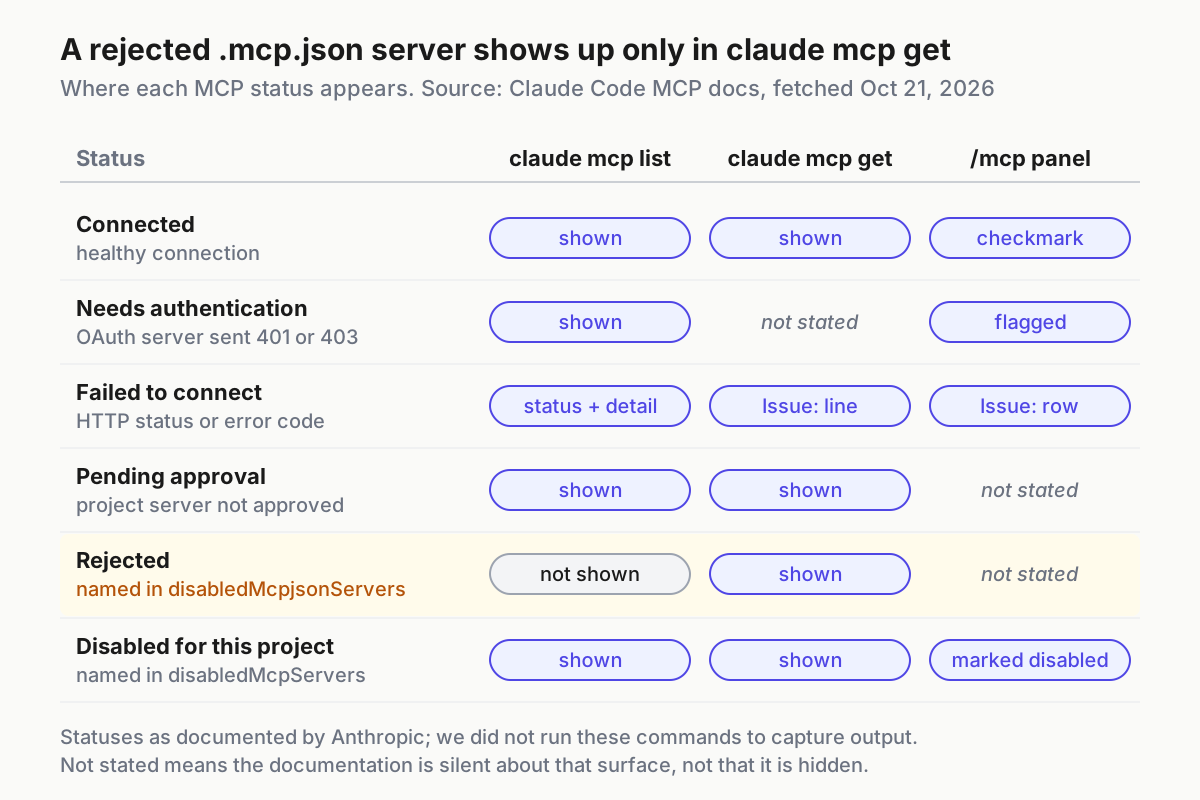
Two observations are easy to misread. A remote server you have used before can show a cached status in /mcp, such as cached 2h ago · connects on first use · 5 tools. That is normal when the discovery cache is on: the tool list comes from a previous session and the server connects the first time Claude calls one of its tools. And when a failure is reported, Claude Code redacts credential-like text and never prints the expanded server URL, so a missing token value in the message is a safety feature rather than a fault. A bare ✘ Connection error with no detail is deliberate for the same reason.
Finish with this checklist:
- [ ]
claude mcp listshowsdbandgithub, andsentryif you added it, as connected. - [ ]
/mcpshows a tool count next to each server, not a flag for a server that advertises tools but exposes none. - [ ] “Show me the schema for the orders table” returns real tables from
db. - [ ] “Show me all open PRs assigned to me” returns real pull requests from
github. - [ ]
claude mcp listprints no configuration warning about whitespace, missing variables or a name defined in more than one scope.
Once everything passes, record each server, its scope and its owner somewhere your team reads; the weekly MCP server inventory ritual is a good template for that record.
Symptom-to-fix table for failed MCP connections
Every row below is a cause the MCP reference documents. Work from the top; the earlier rows are cheaper to rule out.
| Symptom | Documented cause | Fix |
|---|---|---|
Server missing from claude mcp list in this repository |
Added at local scope from another directory | Run from the original project, or re-add with --scope user or --scope project |
MCP server db already exists in local config |
Same name at the same scope | claude mcp remove db --scope local, then add again |
stdio server never starts; the reference’s example error is spawn claude ENOENT |
The executable is not on your PATH |
Use the executable’s full path in the command |
Server flags such as --dsn treated as Claude Code options |
Missing -- before the server command |
Re-add with -- between Claude’s options and the command |
--env rejects the server name |
Name placed directly after --env |
Put --transport stdio between them, or put the name first |
⏸ Pending approval |
Project server not approved, or folder not trusted | Run claude interactively, accept trust, approve |
✘ Rejected, visible only in claude mcp get |
A disabledMcpjsonServers entry |
Remove the entry from the settings file that holds it |
⊘ Disabled for this project |
Server named in disabledMcpServers |
Turn it back on from the /mcp panel |
! Needs authentication |
OAuth not completed, or refresh token rejected | /mcp, then authenticate or Re-authenticate; or claude mcp login <name> |
✘ Failed to connect with a 401 after adding a header |
Bad token, or a covered credential variable read as empty | Fix the token or rename the variable; check the debug log described below |
has a "url" but no "type" |
JSON entry without type |
Add "type": "http" (or sse, ws) |
| Warning about one name in more than one scope | Different endpoints under one name | Keep one; claude mcp remove <name> --scope <scope> for the rest |
| Warning about a missing environment variable | Unset ${VAR} with no default |
Export the variable or add a ${VAR:-default} fallback |
| Warning about leading or trailing whitespace | A pasted token with a trailing newline | Edit the value; Claude Code uses it exactly as written |
| Server times out while starting | Startup slower than the timeout | Raise it, for example MCP_TIMEOUT=10000 claude for 10 seconds |
| Long tool calls abort | Idle window: 5 minutes for remote servers, 30 minutes for stdio | Add "timeout" in milliseconds to the entry, or set CLAUDE_CODE_MCP_TOOL_IDLE_TIMEOUT |
MCP server "github" disconnected · open /mcp to reconnect |
Five reconnect attempts with backoff failed | Reconnect from /mcp; /mcp reconnect all on v2.1.284 or later |
| A claude.ai connector never appears | An API key or other non-subscription credential is active | Run /status, unset the key, then /login with your claude.ai account |
For the credential row, the CLI reference documents --debug-file, which writes debug logs to a path and enables debug mode. Start with claude --debug-file /tmp/claude-debug.log and search that file for never expanded toward a remote server; that line names a covered variable your url or headers referenced.
Two rows need context. The timeout values are milliseconds, and the per-server timeout field is a hard wall-clock limit per tool call that progress notifications do not extend; values below 1000 are ignored. Separately, a remote server whose first connection fails with a transient error, such as a 5xx, a refused connection or a timeout, is already retried up to three times before Claude Code marks it failed. One manual reconnect from /mcp is therefore a better first move than editing configuration at the first red cross; reach for the configuration only when the same failure comes back with the same detail.
When many MCP tools crowd the context window
Tool search is on by default for current models. With it, only tool names and server instructions load at session start, so adding servers has “minimal impact on your context window,” and Claude Code imposes no fixed per-server tool cap; the practical limit is your context budget. That changes what “too many servers” means. The cost shows up in large tool outputs and in the few servers that load upfront, not in the raw count of servers you configured.
Work through this when sessions feel crowded:
- Update first. Before v2.1.306, sessions with many MCP tools could show “prompt is too long” in place of a real API error and run a compaction they did not need. If you see that message on an older build, run
claude update, reproduce, and only then decide whether you have a context problem. - Measure. Run
/contextto see what is consuming space, as Anthropic’s cost management guide suggests. - Disable what you are not using. Toggle idle servers off in
/mcp; the configuration stays and Claude Code stops connecting to them. - Prefer a CLI when one exists. The same guide notes that tools like
gh“are still more context-efficient than MCP servers because they don’t add any per-tool listing.” - Bound large outputs. Claude Code warns when a tool’s output passes 10,000 tokens and limits it to 25,000 tokens by default; set
MAX_MCP_OUTPUT_TOKENS, for exampleMAX_MCP_OUTPUT_TOKENS=50000, to change the limit. Successful text results longer than 50,000 characters are saved to a file instead of entering the conversation. - Use
alwaysLoadsparingly."alwaysLoad": trueon a server loads its tools upfront regardless of tool search and makes startup wait for them, capped at the standard 5-second connect timeout. Reserve it for a server Claude needs on every turn. - Know the switches.
ENABLE_TOOL_SEARCH=autoloads deferrable tools upfront until their definitions reach 10% of the context window,auto:5lowers that threshold to 5%, andfalseloads everything upfront with no deferral.
If you route Claude Code through an LLM gateway, v2.1.305 also matters. It fixed every request failing when an endpoint or gateway rejects tool search, a 2.1.304 regression, and Claude Code now retries without it. The MCP reference adds that Claude Code tries tool search again later at the cost of another rejected request, and that setting ENABLE_TOOL_SEARCH=false skips those requests entirely.
Roll back: remove servers, reset approvals, restore .mcp.json
Rollback is cheap when each step matches the scope you used. This sequence undoes the whole worked example:
claude mcp remove db --scope local
claude mcp remove github --scope user
git diff .mcp.json
git checkout -- .mcp.json
claude mcp reset-project-choices
claude mcp logout sentry
- Remove each server with the scope you added it at. For remote servers, removal also deletes the OAuth tokens and client registration Claude Code stored for them.
- If you only want a server quiet for a while, toggle it off in
/mcpinstead. Claude Code records that choice per project in~/.claude.jsonand keeps the definition, so turning it back on is one toggle. - Restore the shared file from git.
git diff .mcp.jsonshows what changed;git checkout -- .mcp.jsonreturns the last committed version, and checking the file out from an earlier commit takes you further back. - Reset approvals with
claude mcp reset-project-choices, so the next interactive run asks again about every.mcp.jsonserver. - Clear stored OAuth credentials with
claude mcp logout <name>, or choose Clear authentication in the server’s/mcpmenu. - If
~/.claude.jsonitself breaks, the settings documentation describes the recovery: Claude Code copies an unparseable file to~/.claude/backups/.claude.json.corrupted.<timestamp>and keeps backups it saves before each write; copy back one of the five most recent.claude.json.backup.<timestamp>files in~/.claude/backups/.
Map the same servers into Codex config.toml
If you also run OpenAI’s Codex CLI, the same two servers move into TOML. Per the Codex configuration reference, user-level configuration lives in ~/.codex/config.toml, and project-scoped overrides in .codex/config.toml load only when you trust the project. Keep the database string in the user-level file so it never sits inside a repository.
# ~/.codex/config.toml
[mcp_servers.db]
command = "npx"
args = ["-y", "@bytebase/dbhub", "--dsn", "postgresql://readonly:pass@localhost:5432/app_dev"]
startup_timeout_sec = 20

[mcp_servers.github]
url = "https://api.githubcopilot.com/mcp/"
bearer_token_env_var = "MY_GITHUB_MCP_PAT"
tool_timeout_sec = 60
The mapping is close, with a few differences worth knowing before you copy configuration between the two tools:
| Claude Code | Codex config.toml key |
Note |
|---|---|---|
Command and arguments after -- |
command, args |
Same split between launcher and arguments |
--env KEY=value |
env, or env_vars to pass named variables through |
env_vars is an allowlist of variables to forward |
--transport http with a URL |
url |
Streamable HTTP endpoint |
--header "Authorization: Bearer ..." |
bearer_token_env_var, http_headers or env_http_headers |
The first keeps the token out of the file |
MCP_TIMEOUT startup timeout |
startup_timeout_sec |
Codex default is 10 seconds |
Per-server timeout in milliseconds |
tool_timeout_sec |
Codex default is 60 seconds per tool |
Toggle off in /mcp |
enabled = false |
Disables without removing |
| No direct equivalent | required = true |
Fails startup or resume if the server cannot initialize |
oauth.scopes |
scopes |
OAuth scopes to request when signing in |
The bearer_token_env_var key gives Codex the clean version of the variable trick from Path A: the file names the variable, your shell holds the value. Our Codex startup and configuration diagnosis guide covers what to check when a Codex session starts without the servers you expect.
Sources
- Anthropic, Claude Code v2.1.306 release notes, GitHub, Oct 21, 2026
- Anthropic, Connect Claude Code to tools via MCP, Claude Code Docs
- Anthropic, Claude Code v2.1.305 release notes, GitHub, Oct 20, 2026
- Anthropic, Settings files and precedence, Claude Code Docs
- Anthropic, CLI reference, Claude Code Docs
- Anthropic, Manage costs effectively, Claude Code Docs
- OpenAI, Codex Configuration Reference
- Anthropic, Claude Code overview, Claude Code Docs