Ollama Local Only Mode for Coding Agents: Enforce It, Then Prove It
Set up Ollama local only mode for Claude Code and OpenCode: find -cloud tags, set OLLAMA_NO_CLOUD on the real server process, and prove prompts stay local.

Go deeper. Build your own.
Someone on your team reads Ollama’s October 17 post on X, pastes ollama launch claude --model deepseek-v4.1-flash:1017-cloud into a terminal and gets a fast, capable Claude Code session. Nothing in that terminal says the prompts, file contents and diffs have just gone to a hosted service. If your rule is that code and prompts stay on the machine, that paste broke it. Ollama local only mode is the server setting that would have refused the request.
This guide is for developers and platform engineers who run Claude Code, OpenCode or Codex through Ollama, using either ollama launch or an Anthropic-compatible base URL, under a policy that inference must stay local. By the end you will have four things: a filled-in register of every agent lane and the model tag it uses, the switch set on the process that actually serves requests, a recorded cloud-tag refusal alongside a completed local agent task, and a written list of the routes the switch cannot see.
The October 17 model is just the trigger. The pattern it exposed, a cloud suffix on a tag that otherwise looks local, was there before that post and will still be there after it. For the broader case for why teams choose local in the first place, see why “AI with no restrictions” usually means local. This page covers enforcement.
Before you start: the host, the agent and one local model
You need to know where the server runs before you can change how it behaves. Work through this list first.
- [ ] Identify the install type: the macOS app, the Windows app, a Linux systemd service named
ollama, or a container. The switch goes in a different place for each. - [ ] Get a shell on the host where
ollama serveruns. If your agents setOLLAMA_HOSTor a base URL that points at another machine, that machine is the one to change. - [ ] Pull at least one local model that can drive a coding agent. The examples use
qwen3.5for Claude Code, the model the Ollama CLI reference uses in itsollama launch claude --model qwen3.5example, andgemma4for quick checks. - [ ] Confirm one agent already works against Ollama, either through
ollama launch claude,ollama launch opencodeorollama launch codex, or through the manual Claude Code setup that pointsANTHROPIC_BASE_URLathttp://localhost:11434. - [ ] Run
ollama serve --helpand read the environment variables your build accepts. The CLI reference documents this as the way to list them. If no cloud-related variable appears, upgrade before going further. - [ ] Agree that the server may be restarted. Every change in Step 2 needs a restart.
One more prerequisite catches people once cloud is gone: context length. The Claude Code integration page says local models need a context window of 64k or more. The Ollama FAQ gives the server default as 4096 tokens, adjustable with OLLAMA_CONTEXT_LENGTH. A coding agent on a 4k window looks broken even when nothing is wrong. Set the context length in the same place you set the cloud switch, after checking the memory budget. The q2_0 import memory math walks through that calculation.
Why a local command can run on someone else’s GPU
Ollama serves local and hosted models through one command surface. The Cloud documentation states it plainly: in the Ollama app or CLI you ask for a hosted model with a tag such as gemma4:cloud, while API calls sent straight to https://ollama.com use the bare name from the cloud model list, such as gemma4:31b. Cloud models are never downloaded. The local server accepts the request and forwards it.
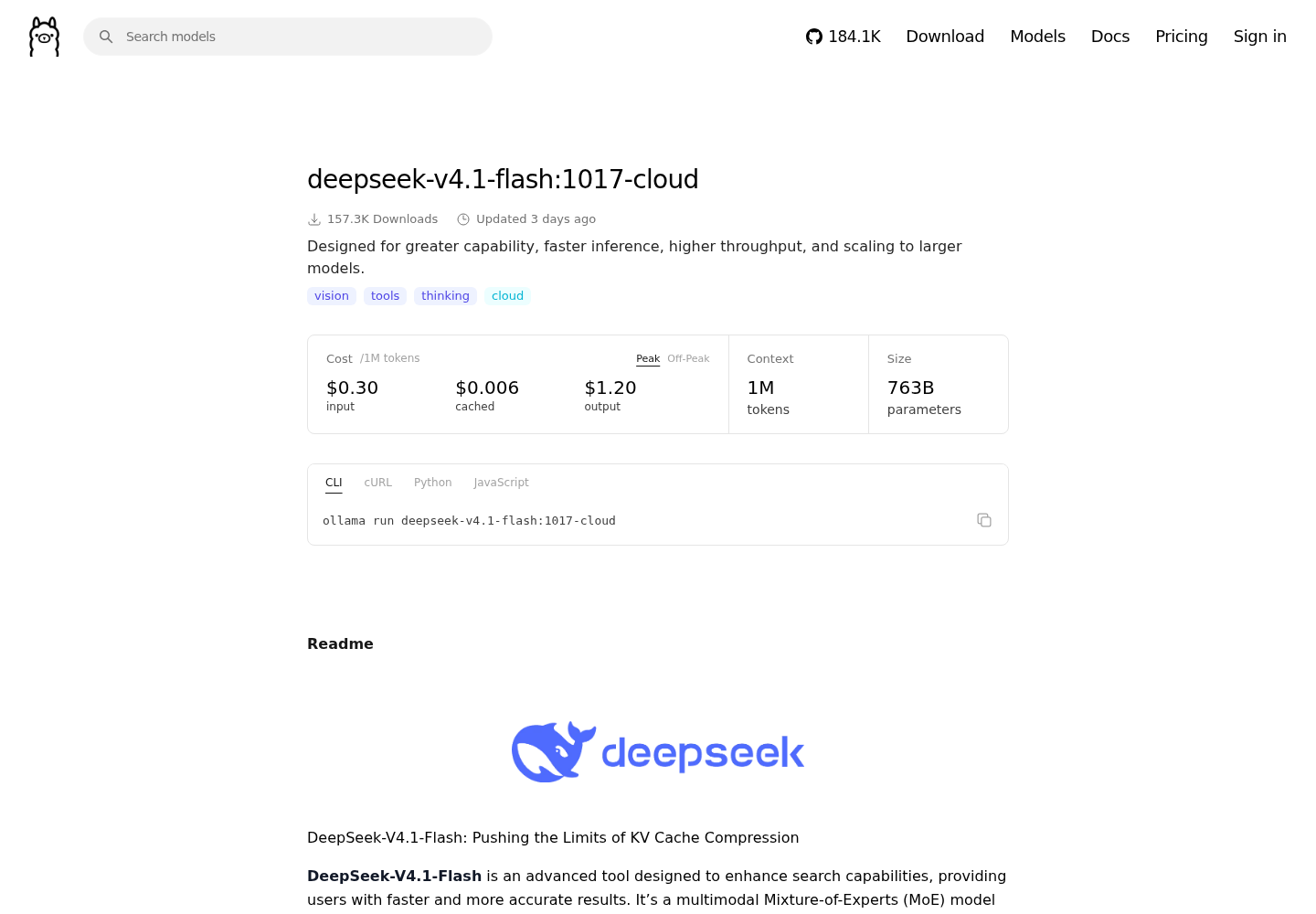
The October 17 tag shows what that means in practice. The library page for deepseek-v4.1-flash:1017-cloud labels it cloud, lists 763B parameters and a 1M-token context, and prices it per million tokens: $0.30 input and $1.20 output at peak, half that off-peak. No laptop holds that model. If ollama run accepts the tag anyway, the work is running somewhere else.
Coding agents take the same path. The Claude Code integration page says Ollama connects Claude Code to local and cloud models through its Anthropic-compatible API. So ollama launch claude --model qwen3.5 and ollama launch claude --model deepseek-v4.1-flash:1017-cloud reach the same port on the same server, and the tag alone decides whether inference stays local. That is why a serving layer you think of as purely local, as in most open-source agent stack designs, needs an explicit policy at the server.
Remote lanes come in two shapes, and the rest of this guide handles them differently:
- A cloud tag through the local server. The agent talks to
localhost:11434and asks for a-cloudor:cloudtag. Ollama local only mode catches this. - A client pointed straight at ollama.com. The Claude Code page documents setting
ANTHROPIC_BASE_URL=https://ollama.comwithOLLAMA_API_KEYas the bearer token, with no Ollama installation at all. Your local server never sees these requests, and the model name carries no cloud suffix to search for.
Data handling is the other half of the decision. The FAQ says Ollama processes cloud prompts and responses to provide the service, but does not store or log that content and never trains on it. The X post advertises US-based hosting with zero data retention. Both are retention promises. A rule that prompts must not leave the machine is broken the moment they are sent, however briefly the provider keeps them. Retention terms can help decide which data classes may use cloud lanes. They cannot make a cloud lane local.
Step 1: Audit every agent lane and fill the register
A lane is one combination of agent, launch method and model that someone actually uses: a script, a shell alias, a CI job or a habit. Audit lanes, not tools. A single Claude Code install can run a local lane in the morning and a cloud lane after lunch.
- List the models the server knows about with
ollama ls. Cloud entries can appear in this list. The Zed bug report notes that they can be pulled with commands such asollama pull minimax-m2.7:cloud, and that Ollama may add them on its own. - Search agent configs, launch scripts, shell profiles and CI definitions for tags ending in
-cloudor:cloud. - Search the same places for
https://ollama.comandOLLAMA_API_KEY. This finds the direct lanes that step 2 misses. - Inside each Claude Code lane, run
/status. The integration page warns that Claude settings can override shell variables, so the environment you exported may not be the one the agent uses. - Write one register row per lane, then decide what each row becomes once the switch is on.
The script below runs steps 1 to 3 in one pass. Treat it as an illustrative starting point: the search paths are example locations, so set SEARCH_PATHS to wherever your team keeps agent configuration and launch scripts.
#!/usr/bin/env bash
# lane-audit.sh: illustrative; adjust SEARCH_PATHS to your own config locations
set -u
SEARCH_PATHS="${SEARCH_PATHS:-$HOME/.claude $HOME/.config/opencode $HOME/.codex ./scripts ./.github}"

echo "== 1. Models the local server lists =="
ollama ls

echo "== 2. Cloud-suffixed tags in the server list =="
ollama ls | awk 'NR>1 {print $1}' | grep -E '[:-]cloud$' || echo "none"

echo "== 3. Cloud tags in agent configs and launch scripts =="
grep -rInE '[:-]cloud([^A-Za-z0-9_.-]|$)' $SEARCH_PATHS 2>/dev/null || echo "none"

echo "== 4. Clients pointed straight at ollama.com =="
grep -rInE 'https://ollama[.]com|OLLAMA_API_KEY' $SEARCH_PATHS 2>/dev/null || echo "none"
[ -n "${OLLAMA_API_KEY:-}" ] && echo "OLLAMA_API_KEY is set in this shell"
env | grep -E '^(ANTHROPIC_BASE_URL|OLLAMA_HOST)=' || true
What to expect: on a clean host, blocks 2, 3 and 4 all print none. A hit in block 2 means a cloud tag is cached in the server list. A hit in block 3 gives the file and line that launch a cloud lane. A hit in block 4 is a direct lane, which the local switch will never stop.
Below is a filled-in register for an illustrative four-person platform team whose policy is “client code never leaves the workstation”. Your rows will differ, but the columns and the decisions carry over. To see where vendor lanes forward data beyond the first hop, read your vendor lane may not be the last hop.
| Lane | Agent | Launch command or base URL | Model tag | Runs | Data allowed | Owner | Decision |
|---|---|---|---|---|---|---|---|
| refactor | Claude Code | ollama launch claude --model qwen3.5 |
qwen3.5 |
Local | Client code | Platform lead | Keep |
| pr-summary | Claude Code | ollama launch claude --model deepseek-v4.1-flash:1017-cloud |
deepseek-v4.1-flash:1017-cloud |
Cloud via local server | Client code | Backend developer | Violation: move to qwen3.5; the switch will refuse the old command |
| docs-draft | OpenCode | ollama launch opencode --model gemma4:cloud |
gemma4:cloud |
Cloud via local server | Public docs only | Docs owner | Allowed for this data class, but this host is going local-only: move the lane to a separate cloud-enabled host or use local gemma4 |
| ci-explain | Claude Code, headless | ANTHROPIC_BASE_URL=https://ollama.com with OLLAMA_API_KEY |
glm-5.3-flash |
Cloud, direct | Client code | CI owner | Violation the switch cannot catch: remove the key from CI secrets and point at the local server |
| quick-check | ollama run |
ollama run gemma4 |
gemma4 |
Local | Client code | Everyone | Keep |
The Data allowed column holds the most information. It records what policy permits for each lane, which is separate from what the lane does today. When the two disagree, the row needs a decision before Step 2.
Three of those decisions matter. First, the pr-summary row is the October 17 paste. Policy forbids it and the switch will block it, but block it on purpose: tell the owner which local tag replaces it before the old command starts failing in the middle of a task. Second, the docs-draft row is fine under policy but still cannot stay on this host, because the switch applies to the whole server. Ollama documents no per-tag allowlist, so mixed data classes need separate servers. Third, the ci-explain row is the dangerous one. It never touches the local server, so nothing in Step 2 affects it. Only removing the credential closes it.
Step 2: Enable Ollama local only mode on the serving process
The FAQ documents two equivalent controls: set "disable_ollama_cloud": true in ~/.ollama/server.json, or set the environment variable OLLAMA_NO_CLOUD=1. Restart Ollama after either change. Once the setting takes effect, the logs show Ollama cloud disabled: true. Turning cloud features off removes both cloud models and Ollama’s web search.
The words “environment variable” are where people go wrong. OLLAMA_NO_CLOUD=1 exported in your shell profile does nothing to a server started by systemd, launchd, the Windows app or Docker. Each of those launchers keeps its own environment, which is why the FAQ has a server configuration section for each platform. Pick the branch that matches how your server starts.
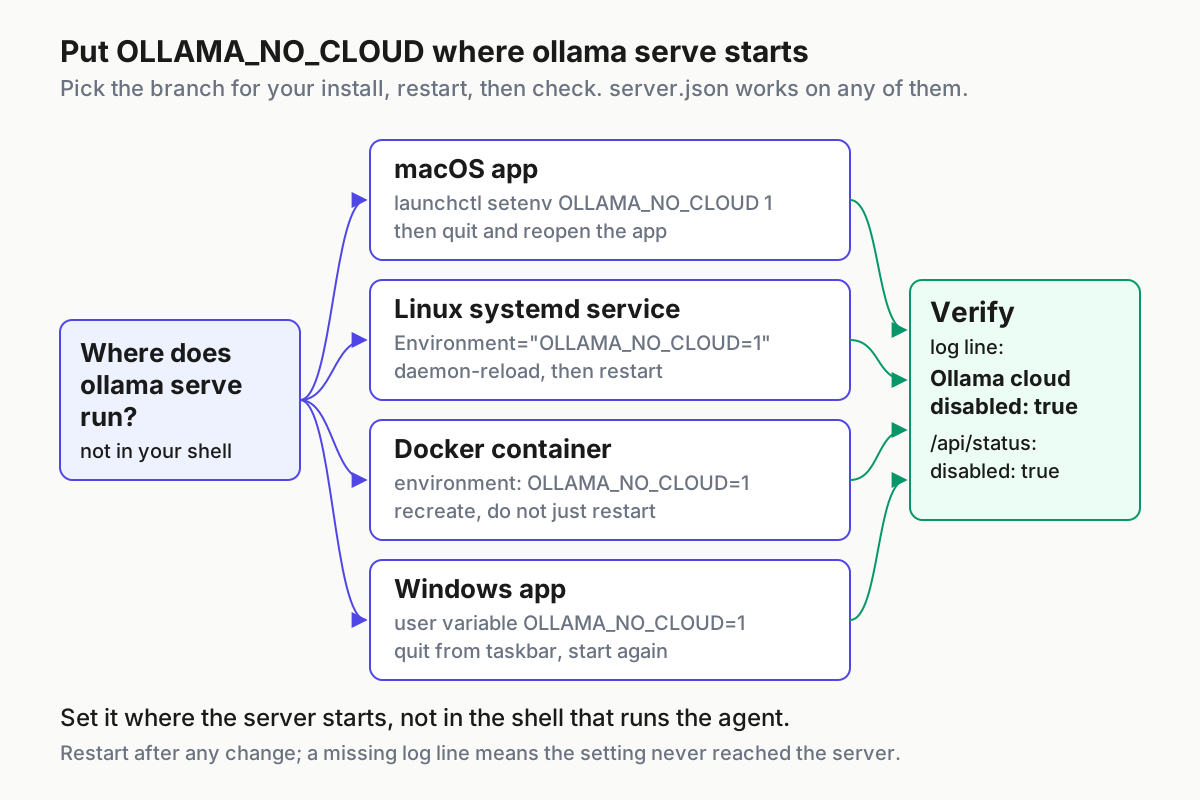
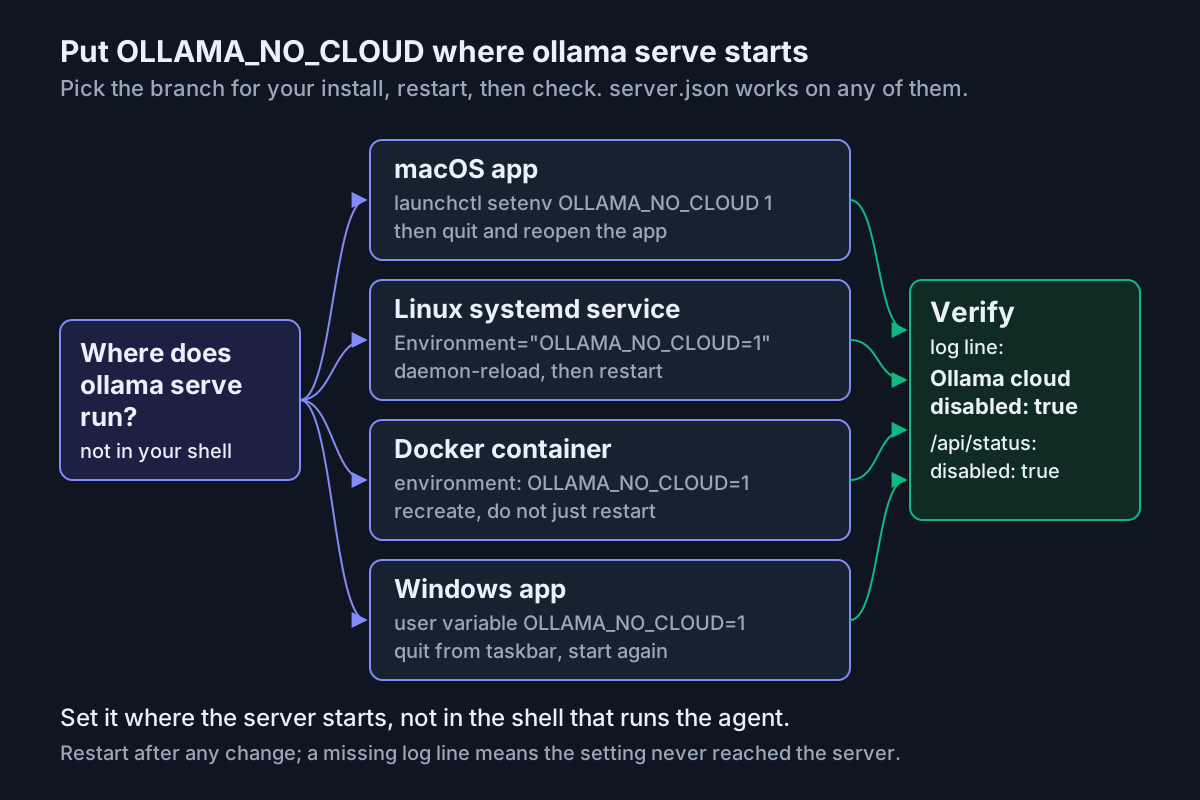
Linux with systemd
- Open an override with
sudo systemctl edit ollama.service. - Add the lines below under
[Service], then save and exit. - Reload and restart, then look for the log line.
[Service]
Environment="OLLAMA_NO_CLOUD=1"
Environment="OLLAMA_CONTEXT_LENGTH=65536"
sudo systemctl daemon-reload
sudo systemctl restart ollama
# standard systemd journal query; expect a line containing: Ollama cloud disabled: true
journalctl -u ollama -b --no-pager | grep -i "cloud disabled"
If you use the file instead, check whose home directory ~ refers to. The service runs as its own account, and the FAQ puts that account’s Ollama files under /usr/share/ollama/.ollama, which is where it lists the service’s key file. Editing server.json in your own home directory will not affect the service. The log line tells you whether the server picked the setting up.
macOS app
- Run
launchctl setenv OLLAMA_NO_CLOUD 1, following the FAQ’slaunchctl setenvpattern for the app. Addlaunchctl setenv OLLAMA_CONTEXT_LENGTH 65536at the same time. - Quit Ollama from the menu bar and open it again.
- Look for the cloud line in the app’s server log. The Troubleshooting docs linked from the FAQ give the log location.
launchctl setenv values do not survive a reboot, so on macOS also write server.json in your own ~/.ollama, because the app runs as you. The desktop app also has a Cloud setting. In issue #14373, a user whose web search kept failing found that toggle switched off, and the maintainer asked about it while diagnosing. Treat the toggle as a third control and make sure it agrees with the other two.
Windows app
- Quit Ollama from the taskbar.
- Open the environment variable settings, choose Edit environment variables for your account, and add
OLLAMA_NO_CLOUDwith the value1, plusOLLAMA_CONTEXT_LENGTHif you need it. - Start Ollama from the Start menu, as the FAQ describes, then search the server log.
[Environment]::SetEnvironmentVariable("OLLAMA_NO_CLOUD", "1", "User")
# after restarting Ollama from the Start menu:
Select-String -Path "$env:LOCALAPPDATA/Ollama/server.log" -Pattern "cloud disabled"
The log location, %LOCALAPPDATA% then Ollama then server.log, comes from the maintainer’s diagnostic questions in ollama/ollama issue #14373. PowerShell accepts the forward slashes used above.
Docker or Compose
- Add the variable to the container environment.
- Bind the port to loopback unless other machines need to reach it.
- Recreate the container, because a plain restart keeps the old environment, then read its logs.
services:
  ollama:
    image: ollama/ollama:latest
    container_name: ollama
    ports:
      - "127.0.0.1:11434:11434"
    volumes:
      - ./ollama:/root/.ollama
    environment:
      - OLLAMA_NO_CLOUD=1
      - OLLAMA_CONTEXT_LENGTH=65536
docker compose up -d --force-recreate
docker logs ollama 2>&1 | grep -i "cloud disabled"
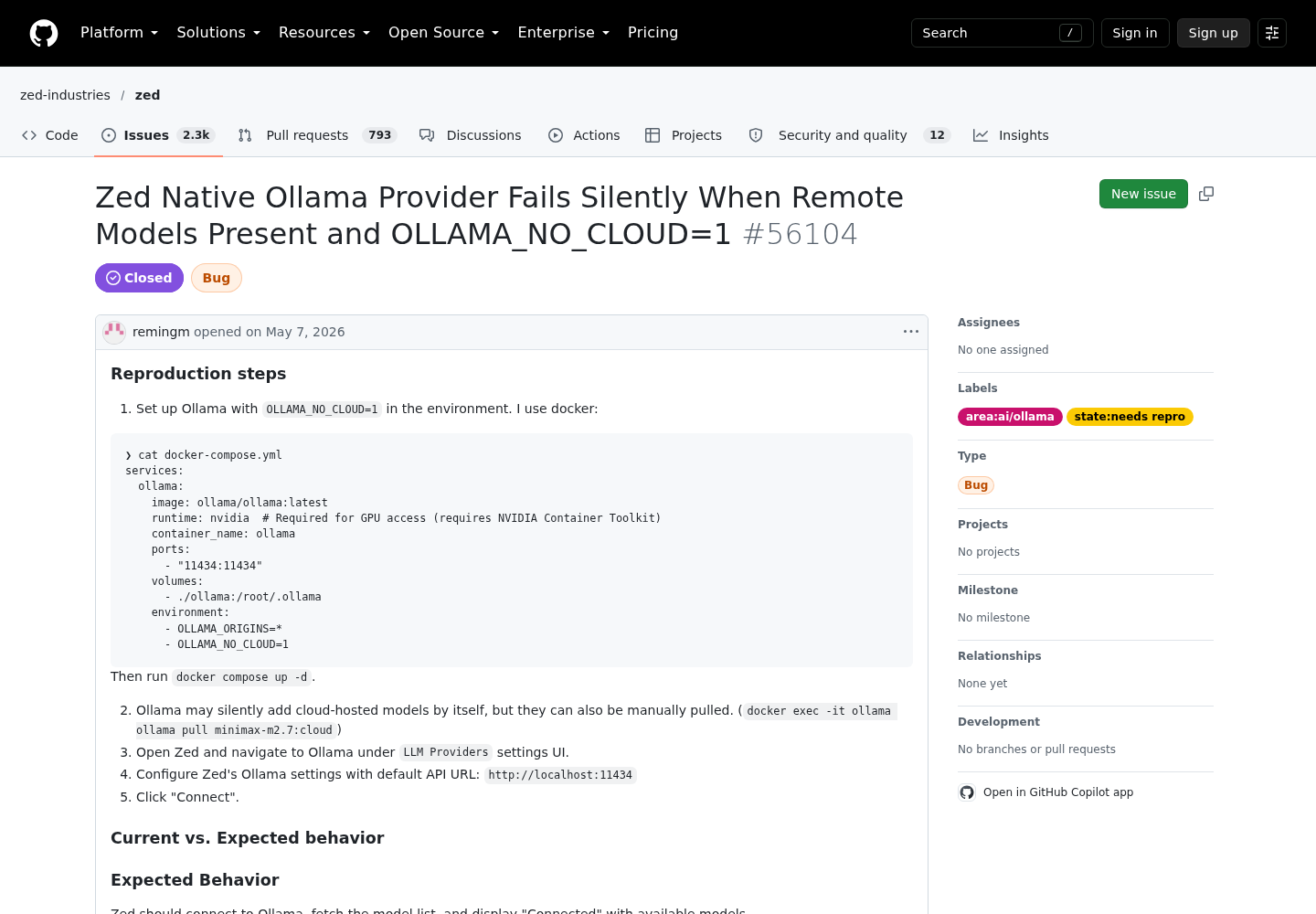
This layout follows the Compose file in Zed issue #56104, which ran OLLAMA_NO_CLOUD=1 the same way. Because /root/.ollama is a mounted volume, a server.json in ./ollama/ on the host survives image upgrades, even if someone later rebuilds the service without the environment line.
Which control to use
| Situation | Use | Why |
|---|---|---|
| One laptop running the app, single user | server.json plus the app’s Cloud setting |
Survives reboots; nothing to remember at launch |
| Linux workstation or shared server | systemd Environment= plus server.json for the service account |
Two independent controls; the override is easy to review |
| Container | Compose environment: plus server.json on the volume |
Rebuilt images and recreated containers keep at least one of the two |
| Fleet of mixed machines | Both controls everywhere, checked by the script in the last section | A missed setting shows up as a failed check, not a leak |
The FAQ says either control works. On a policy host, the safer reading is to set both, because each one covers a way the other can get lost.
Step 3: Prove the refusal, then prove local work still runs
A setting you have not tested is only a claim. Run these checks in order on the server host and record what your build prints. The order matters: the first two confirm the server read the setting, the middle two prove the switch is selective rather than broken, and the last two repeat the test through a real agent.
| # | Check | Command | Pass looks like | A failure means |
|---|---|---|---|---|
| 1 | Log line | The log query for your platform from Step 2 | Ollama cloud disabled: true |
The setting never reached the process; go back to Step 2 |
| 2 | Status endpoint | curl -s http://localhost:11434/api/status |
JSON with "disabled":true under cloud |
A different server is answering, or the build lacks the endpoint; trust the log line |
| 3 | Cloud tag refused | ollama run deepseek-v4.1-flash:1017-cloud "Reply with one word" |
An error and no model output | Any answer text means stop: this is an incident |
| 4 | Local model answers | ollama run qwen3.5 "Reply with the word ready", then ollama ps |
A text reply; ollama ps lists qwen3.5 with a PROCESSOR value such as 100% GPU |
The model is missing, or memory is too small for the context you set |
| 5 | Agent task, local | ollama launch claude --model qwen3.5 --yes -- -p "List the top-level files in this repository and say what the build script does" |
Claude Code answers about your actual files | Context too small, model lacks tool support, or agent settings override the base URL |
| 6 | Agent task, cloud tag | ollama launch claude --model deepseek-v4.1-flash:1017-cloud --yes -- -p "Reply with one word" |
The launch or the first request fails | Any answer means the lane is not covered |
The status endpoint is not in the FAQ. It comes from #14373, where a maintainer asked a user to run curl http://localhost:11434/api/status and another user posted {"cloud":{"disabled":true,"source":"both"}}. Use it as a convenient second signal on builds that have it. The log line remains the documented check.
For check 3, the FAQ promises that cloud models stop working but does not quote the error. Messages from related paths show the pattern. The Zed report quotes {"error":"ollama cloud is disabled: remote model details are unavailable"} from /api/show, and #14373 quotes ollama cloud is disabled: web search is unavailable (unable to verify server cloud policy). Expect something along those lines, but do not make the exact wording the test. The pass condition is that no model output comes back.
For checks 5 and 6, the integration page says --yes skips selectors, pulls the model when needed, requires --model, and passes everything after -- straight to Claude Code. That makes the pair scriptable. It also has a side effect: --yes downloads a missing local model, which is network traffic even though inference stays local.
ollama ps is the FAQ’s documented way to see which models are loaded and where. Its PROCESSOR column reads 100% GPU, 100% CPU or a split. That shows directly that the weights for check 4 sit in this machine’s memory.
Here is a filled-in verification record for the illustrative team’s Linux workstation. It shows the expected pattern for each check, not output we observed. Replace each value with what your host prints.
Verification record (illustrative example)
Host: build-ws-03 (Linux, systemd service "ollama")
Date: 2026-10-20        Operator: platform lead
Controls: systemd Environment=OLLAMA_NO_CLOUD=1
          /usr/share/ollama/.ollama/server.json disable_ollama_cloud=true
1 Log line       PASS  "Ollama cloud disabled: true" present after restart
2 /api/status    PASS  cloud.disabled = true
3 Cloud tag      PASS  ollama run deepseek-v4.1-flash:1017-cloud -> error, no output
4 Local model    PASS  qwen3.5 replied; ollama ps PROCESSOR = 100% GPU
5 Agent, local   PASS  Claude Code listed repository files via qwen3.5
6 Agent, cloud   PASS  launch with :1017-cloud failed before any answer
Register: 0 cloud lanes for "client code"; docs-draft moved to docs-host-01
Open item: ci-explain direct lane; OLLAMA_API_KEY removed from CI secrets, pending confirmation
For an extra network-level check on Linux, run the standard ss -tnp while check 5 is running. You should see the agent’s loopback connection to port 11434. If the Ollama process opens a connection to an external address during a pure inference task with no pull in progress, explain it before you sign off.
What the switch cannot see
Ollama local only mode is a server policy. It governs requests that reach the Ollama server and nothing else. The chart sorts the common routes by that test.
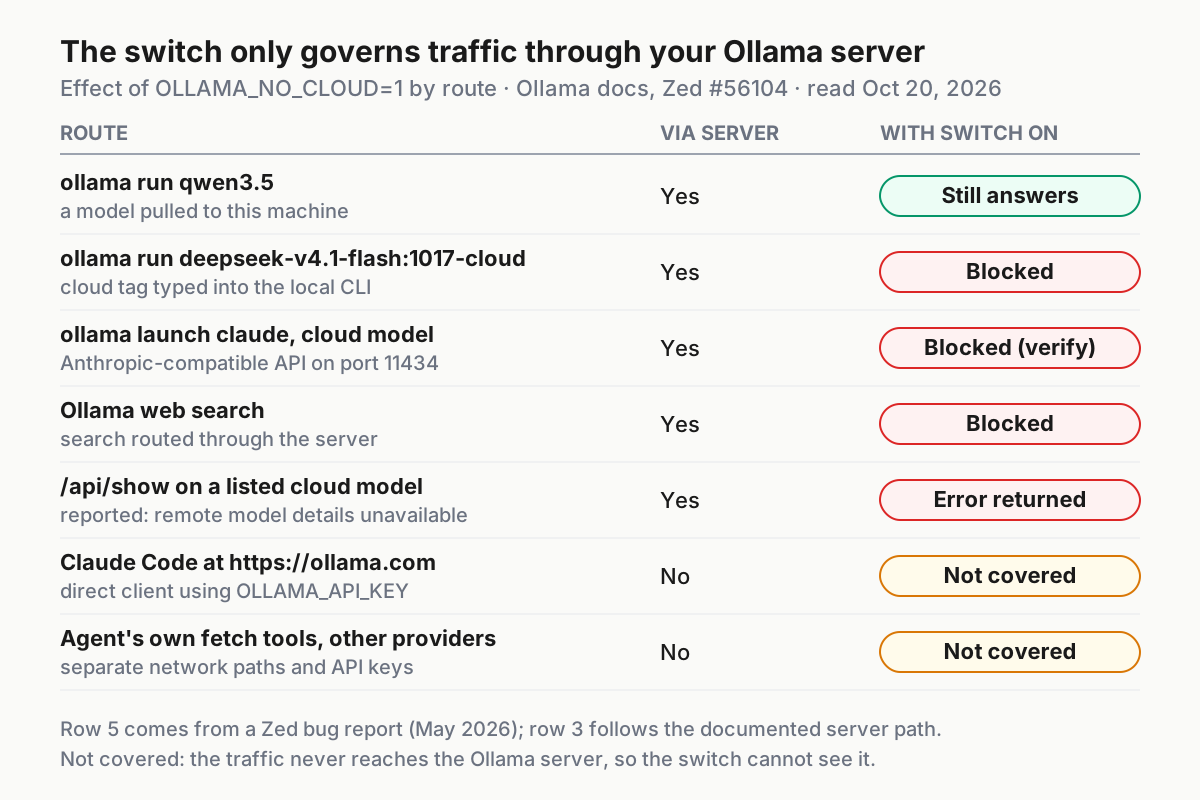
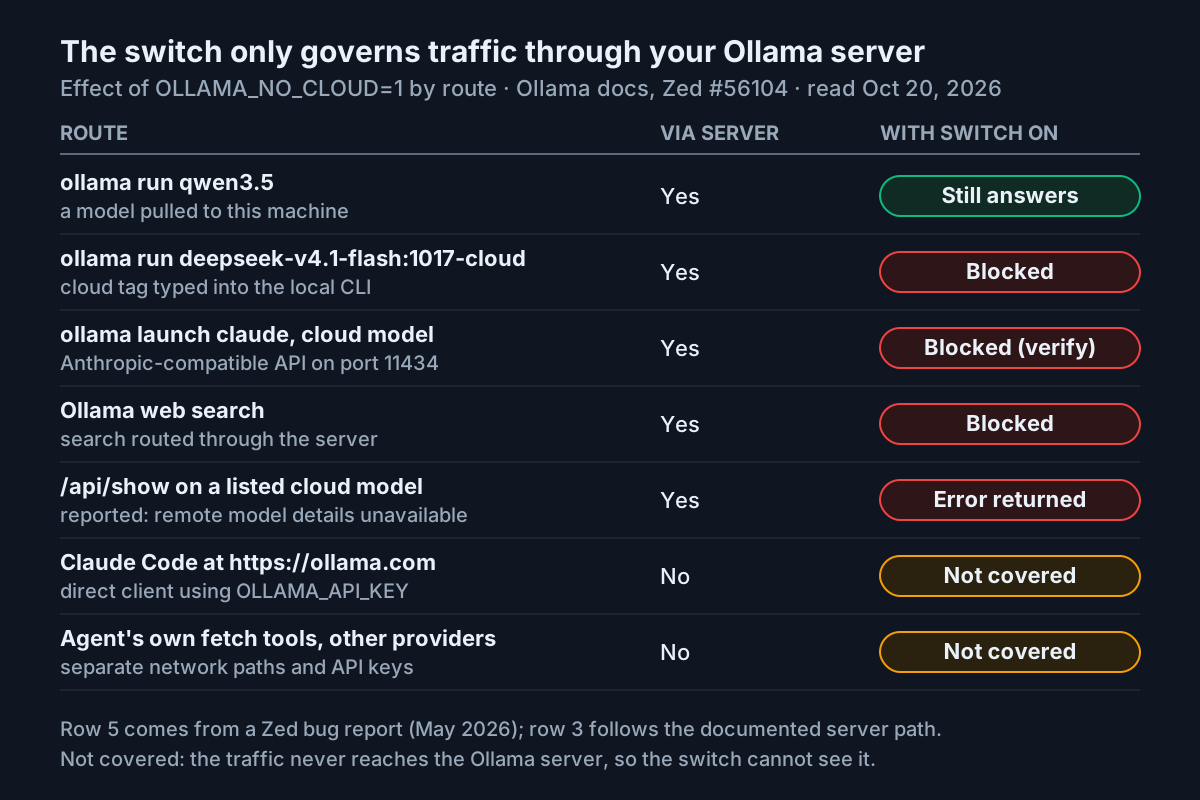
| Route | Covered by the switch? | Compensating control |
|---|---|---|
| Cloud tags through the local server | Yes (FAQ) | Keep both controls set; recheck after upgrades |
| Ollama web search | Yes (FAQ) | None needed; expect agent search tools that use it to fail |
Claude Code or another client pointed at https://ollama.com with OLLAMA_API_KEY |
No: it never touches the local server | Remove the key from machines and CI secrets; review agent settings, which can override shell variables |
| An agent’s own web fetch, search or other network tools | Not stated: assume no | Restrict those tools in the agent’s permission settings |
| Other provider API keys on the same machine | No | Inventory and remove them, or isolate those lanes on other hosts |
| Model pulls from the Ollama registry | Not listed among the disabled features | Use HTTPS_PROXY, as the FAQ describes, plus egress rules if pulls must be controlled; pre-pull for isolated hosts |
Other machines reaching this server after OLLAMA_HOST is changed |
The switch applies, but data now crosses your network | Keep the default 127.0.0.1 bind unless your policy covers the network boundary |
The chart’s blocked rows are documented behaviour. The /api/show error comes from a user report, and the launch row follows from the documented server path, so verify both on your own build.
The web fetch row needs care. The Claude Code integration page lists web search through Ollama and web fetch among Claude Code’s capabilities when it runs with Ollama, but it documents only web search as an Ollama service. Whether a given fetch goes through Ollama or through the agent’s own tooling depends on the agent and the build. Treat it as uncovered until you have tested it with a known URL and watched where the request went.
This matches what runs locally is not stays local found for remote-control features: a local process can still send data out through paths its main switch does not govern. If your rule is that nothing leaves the network, local-only mode is one control inside a firewall policy. It does not replace one.
Troubleshooting: symptoms, causes and fixes
| Symptom | Likely cause | Fix |
|---|---|---|
No Ollama cloud disabled line after you exported the variable |
It was set in your shell, not in the server’s environment | Use the launcher for your install from Step 2 and restart the server |
| The log says disabled, but a cloud tag still answers | The client is talking to a different server: another OLLAMA_HOST, a second background instance, or a direct https://ollama.com base URL |
Compare client and server with ollama --version, as the #14373 maintainer did; find stray ollama serve processes; check the agent’s /status |
| An editor’s Ollama provider hangs on Connect or shows no models | Cloud entries are still listed, /api/show returns an error for them, and the client gives up on the whole list |
Run ollama rm on each cloud tag, the Zed report’s workaround, and update the client |
| Web search fails with “unable to verify server cloud policy” | Expected on a local-only host; on a host meant to have cloud, one control is still disabled | On a cloud host, check the app’s Cloud setting, server.json and /api/status, as in #14373 |
A server.json edit has no effect on a Linux service |
You edited your own home directory, not the service account’s | Edit /usr/share/ollama/.ollama/server.json or use the systemd override |
| The local agent forgets files or cuts work short after the switch | The default 4096-token context | Set OLLAMA_CONTEXT_LENGTH to 64k or more, as the Claude Code page recommends, if memory allows |
| The Windows setting is ignored | Ollama was not fully restarted | Quit from the taskbar and start again from the Start menu |
A --yes launch stalls on a new host |
It is pulling a missing model | Pre-pull with ollama pull, or allow time on the first run |
Two of these need more explanation. The silent client failure in the Zed report was not unique to Zed. The reporter said the same behaviour affected another client and traced the cause to cloud entries staying in Ollama’s model list. The reporter closed the issue in June, saying an update now greys out cloud models while local models remain usable. Even so, any tool that fetches details for every listed model can hit the same problem. Removing cloud tags is the most compatible fix, and it also stops the next person from picking a cloud tag from a dropdown. The capture of that report appears at the end of this guide.
The second is the case where a cloud tag still answers. Treat it as an incident, not a configuration puzzle: stop the lane, record which data was sent, and only then debug. The cause is usually a second server or a direct base URL, which is why Step 1 searched for both.
Rollback, and turning cloud back on deliberately
Sometimes you need cloud back: a host changes purpose, or a public-docs lane gets its own machine. Undo the controls on purpose and update the register in the same change.
- Remove the environment setting. Delete the
Environment="OLLAMA_NO_CLOUD=1"line withsudo systemctl edit ollama.service, runlaunchctl unsetenv OLLAMA_NO_CLOUDon macOS, delete the Windows user variable, or drop the line from the Compose file. - Set
"disable_ollama_cloud": falsein everyserver.jsonyou edited, keeping any other keys. The file shown in #14373 also had aversionfield, so edit the file rather than overwriting it. On the desktop apps, turn the Cloud setting back on. - Restart the server the same way as in Step 2: recreate the container, run
daemon-reloadand restart the service, or quit and reopen the app. - Confirm the log now shows cloud disabled as false, and that
/api/statusagrees on builds that have it. - Run
ollama signinif the host needs a cloud account. The FAQ explains that the signed-in key is what lets a local instance run models hosted in Ollama’s cloud. - Update the register. Mark the host as cloud-enabled and list the data classes allowed on it, so nobody points a restricted lane at it by mistake.
Recovering from a leak is a different procedure. If you find a restricted lane using a cloud tag after enforcement, stop it, keep the transcript and the launch command as evidence, and follow your data-handling policy. The FAQ’s statement that cloud prompts are not stored or logged may feed into that assessment, but your policy makes the call, not the vendor’s promise. Then fix the root cause and run all of Step 3 again.
Keep it true after the next cloud model drop
New cloud tags will keep arriving with copy-paste commands attached, so make the check recurring. The script below is an illustrative probe for cron, a CI job or a fleet agent. It exits non-zero when the server reports cloud as enabled, and warns when cloud tags are still listed.
#!/usr/bin/env bash
# check-local-only.sh: illustrative; run on each local-only Ollama host
set -u
status=$(curl -fsS http://localhost:11434/api/status 2>/dev/null) || {
  echo "status endpoint unavailable: fall back to the server log check"; exit 2; }
echo "$status" | grep -q '"disabled":true' || { echo "CLOUD ENABLED: $status"; exit 1; }
if ollama ls | awk 'NR>1 {print $1}' | grep -qE '[:-]cloud$'; then
  echo "WARN: cloud tags still listed; remove them with ollama rm"
fi
echo "local-only OK"
Exit code 2 on hosts without the endpoint is deliberate: on those builds, run the log check instead and keep its output.
Use this checklist as the completion criteria for each host, and repeat it after every Ollama upgrade:
- [ ] The server log shows
Ollama cloud disabled: trueafter the latest restart. - [ ] Both controls are set: the launcher environment, and
server.jsonfor the account that runs the server. - [ ] A cloud tag fails with no model output, and the result is in the verification record.
- [ ] A local model answers, and
ollama psshows it loaded on this machine. - [ ] One real agent task has completed through
ollama launchwith a local model. - [ ] No cloud tags remain in
ollama ls. - [ ] The register shows zero cloud lanes, local or direct, for restricted data classes.
- [ ] Every route in the “cannot see” table has a named compensating control and an owner.
Any unchecked box keeps the host out of restricted work. A lane that resolves a cloud tag after enforcement is an incident to fix before anyone uses the host again.
Two habits keep the register honest. First, make “which tag, which server” part of reviewing every new launch script, in the same way that Claude Code permission modes become fleet policy once more than one person runs agents. Second, keep the verification records with your session archives. The question “was it local?” usually comes up months later, when the record is the only evidence left. The local-first vault guide covers what to keep and where.
Sources
- Ollama on X: DeepSeek-V4.1-Flash-1017 on Ollama Cloud, October 17, 2026
- Ollama FAQ: server configuration and disabling cloud features
- Ollama Cloud documentation
- Ollama: Claude Code integration
- Ollama CLI reference
- Ollama library: deepseek-v4.1-flash:1017-cloud
- ollama/ollama issue #14373: unable to verify server cloud policy
- zed-industries/zed issue #56104: Ollama provider fails silently with OLLAMA_NO_CLOUD=1