Ollama q2_0 GGUF Import: Fit 2-Bit MoE Models, Do the Memory Math, Verify Quality
Ollama 0.40.6 reads q2_0 GGUFs. This ollama q2_0 gguf import runbook covers memory math, the Modelfile import, a q4 check, rollback and runner cleanup.

Go deeper. Build your own.
You downloaded a 2-bit quant of a huge mixture-of-experts model, pointed Ollama at it, and got unsupported tensor "token_embd.weight" size overflows. Until this week that error was the whole story: llama.cpp could run the file, Ollama could not. Release v0.40.6, published 16 Oct 2026 at 22:00 UTC on GitHub Releases, fixes that by teaching Ollama’s GGUF reader the q2_0 tensor and file types, and this guide walks one ollama q2_0 gguf import end to end — the memory arithmetic before you download, the Modelfile import, a fixed-prompt quality check against your q4 baseline, and the Windows orphaned-runner cleanup that ships in the same release, with a rollback path if the 2-bit copy turns out to be unusable.
Who this is for and what you need
You run local coding agents and you want to fit a very large open-weight MoE model on hardware you already own, then decide with evidence whether the 2-bit copy is still usable. You need Ollama 0.40.6 or newer, a q2_0 GGUF file or a tool that emits one, and free RAM or VRAM headroom. If you are still choosing hardware, our local AI workstation guide covers the buying side; here we assume the machine exists and the question is whether a specific quant fits on it.
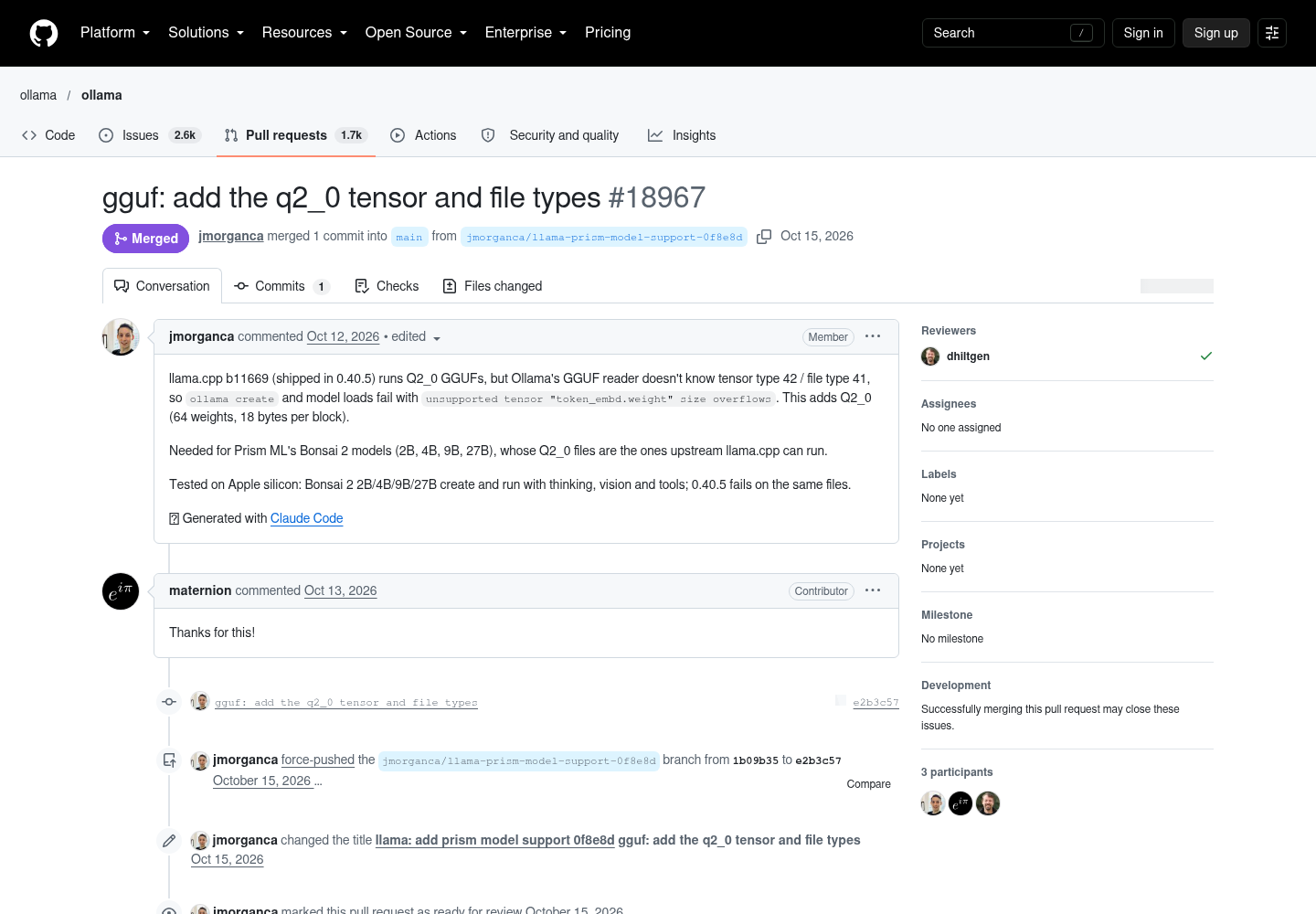
Two facts from the release notes anchor everything below. First, v0.40.6 adds the q2_0 tensor and file types via PR #18967. Second, the same release prevents orphaned runner processes on Windows via PR #18500. The pull request explains the failure you were seeing: llama.cpp b11669, which shipped in Ollama 0.40.5, already ran Q2_0 GGUFs, but Ollama’s own GGUF reader did not know tensor type 42 or file type 41, so ollama create and model loads failed on the very first embedding tensor. Q2_0 packs 64 weights into an 18-byte block. That single ratio — 18 bytes per 64 weights, or 2.25 bits per weight — is the number the whole memory budget below hangs on.
The same PR names the concrete models this was built for: Prism ML’s Bonsai 2 family at 2B, 4B, 9B and 27B parameters, whose Q2_0 files upstream llama.cpp could already run, and whose create-and-run path — including thinking, vision and tools — was tested on Apple silicon, with 0.40.5 failing on the same files. That gives us a worked example with real parameter counts instead of invented ones, and every number in this guide’s worksheets uses those sizes or the other documented sizing case, Reflection’s Beam, discussed in Step 2.
Step 1: Confirm the version before anything else
Do this before you download a multi-gigabyte file. A q2_0 GGUF handed to 0.40.5 fails with the overflow error above, and the failure looks like a corrupt download if you don’t know the history. The version check is the cheapest diagnostic in the whole procedure, so spend the thirty seconds on it before any bandwidth.
- Run
ollama --versionand confirm it reports 0.40.6 or newer. Expected observation: the version string prints immediately; anything older means the q2_0 reader is absent and every later step will fail for reasons that have nothing to do with your file. - If it reports older, upgrade with the official installer for your platform; the releases feed lists signed install assets for macOS, Linux amd64/arm64 and Windows, each with a published sha256 you can check against your download.
- Re-run
ollama --versionafter upgrading. An unchanged string means the upgrade did not take, usually because a package-managed copy shadows the official one — find and remove one of the two binaries before continuing, or you will keep testing the wrong build. - Run
ollama listas a library sanity check. The expected observation is your existing models still listed, which confirms the upgrade did not disturb local blobs. Per the v0.40.2 notes, models upgraded by newer versions keep their original copies as disk backups so downgrading stays safe — that behavior matters in Step 6.
This preflight is the same discipline our CLI upgrade canary guide recommends for any coordinator change: verify the binary before you blame the model. An operator who skips it typically re-downloads a 7 GB file twice, then files a bug against a model that was never broken. Write the version string into your notes alongside the GGUF filename so that when something fails three weeks from now, the first fact on the page is which binary was in play.
Step 2: Do the memory math with real numbers
2-bit quants tempt people into skipping arithmetic. Don’t. The q2_0 format gives you an exact bytes-per-weight figure, so the weights portion of your budget is computable, not a guess. Use 18 bytes per 64 weights — that is 2.25 bits per weight, or 0.28125 bytes per parameter. Multiply total parameter count by that constant and you have a floor that cannot move.
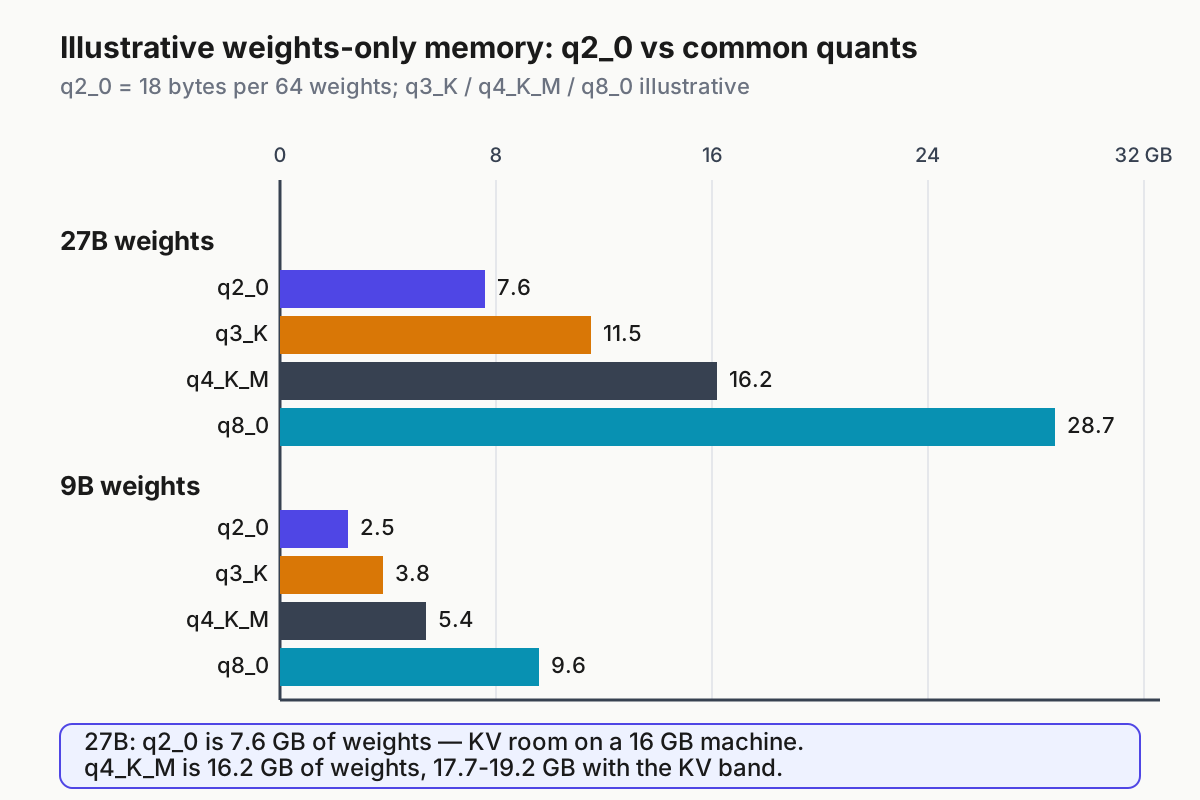
The chart and the worksheet below state one budget: the q2_0 bars come from the documented 0.28125 bytes-per-parameter constant, the q4_K_M figures from the illustrative 4.8 bits per weight used in the worksheet, and every total is the weights figure plus the same KV band. Nothing in the figure is measured — treat the non-q2_0 formats as planning estimates only.
Here is a filled worksheet for the models the pull request actually tested — Bonsai 2 at 27B and 9B — with the action spelled out as arithmetic and the expected outcome as a decision:
| Concrete input (model + quant) | Action (weights math) | Expected outcome (decision) |
|---|---|---|
| Bonsai 2 27B, q2_0, 32k ctx | 27e9 params x 0.28125 B = 7.6 GB of weights; add a 1.5-3 GB KV band | Total 9.1-10.6 GB once the KV band is added: a 16 GB machine loads it with room to spare — proceed to import |
| Bonsai 2 27B, q4_K_M (illustrative 4.8 bits/wt) | 27e9 x 0.6 B = 16.2 GB of weights (illustrative 4.8 bits/weight); add the same KV band | Total 17.7-19.2 GB with overhead: no room on 16 GB; a 24 GB GPU is barely viable — q2_0 is the only local path at this size |
| Bonsai 2 9B, q2_0, 32k ctx | 9e9 x 0.28125 B = 2.5 GB of weights; add a 0.5-1 GB band | Total 3.0-3.5 GB: fits comfortably everywhere — import and compare against q4 for quality, not fit |
| Bonsai 2 9B, q4_K_M (illustrative) | 9e9 x 0.6 B = 5.4 GB of weights; same band | Total 5.9-6.4 GB: also fits, so prefer q4 unless you are running a second model beside it |
Read the table this way. The action column is arithmetic, not an estimate — 27 billion times 0.28125 bytes is 7.59 GB, and that number cannot move no matter what the loader does. The outcome column is the decision: at 27B, the q4 copy needs 16.2 GB of weights before any overhead, while the q2_0 copy leaves room for context, a browser and the agent harness itself. That is the entire reason q2_0 exists — it is often the only way a consumer machine loads the model at all. The KV cache band is the honest unknown: it scales with context length, architecture and batch size, so treat the illustrative range as a planning band and verify against the loader’s own report in Step 3 rather than trusting it.
Two consequences follow from the arithmetic that are worth stating plainly. First, halving the bits does not halve the total footprint once overhead is included, because KV cache does not shrink with weight quantization; on small models the overhead band can dominate the weights. Second, the bits-per-weight constant applies to weights only — embedding tables, output heads and non-quantized tensors may be stored differently in a given file, which is why Step 3 verifies the loaded size instead of declaring victory from the worksheet. Use the worksheet to decide whether a download is plausible; use ollama ps to decide what is true.
One boundary case worth naming. The same week’s Beam release is a 501B-total-parameter MoE with 23B active per token, Apache 2.0, with a 1M-token context window. At 0.28125 bytes per weight, 501B is roughly 141 GB of weights — a q2_0 copy does not magically fit that on a desktop, and pretending otherwise is how operators end up with a full disk and no model. What total-versus-active parameters change is compute and token throughput, not the memory needed to hold all experts resident. The open-weight models for agents guide covers the capability side; the memory rule stays: total parameters set the RAM floor, active parameters set the speed.
Step 3: Import the q2_0 GGUF with a Modelfile
Ollama’s import documentation is explicit that it does not quantize GGUF models during import — you prepare and quantize first with a GGUF tool such as llama.cpp’s llama-quantize, then hand Ollama the finished file. The import itself is a short Modelfile plus one command, which makes it easy to reproduce exactly. The format facts you are relying on — the 18-bytes-per-64-weights block and the exact overflow error that used to stop this import — come straight from the pull request that added the support:
- Put the quantized file somewhere stable, for example
/models/bonsai2-27b-q2_0.gguf. Keep the original until the import is verified;ollama createcopies the file into its blob store, so the source is your rollback artifact. - Create
Modelfile.bonsai-q2next to it with the complete contents below — this is the copyable worked configuration for the 27B case from the worksheet:
# Modelfile.bonsai-q2 — worked import configuration for a 27B q2_0 GGUF
FROM /models/bonsai2-27b-q2_0.gguf
PARAMETER num_ctx 32768
PARAMETER temperature 0.2
PARAMETER num_predict 2048
SYSTEM "You are a careful coding assistant. Prefer minimal, correct diffs. Emit tool calls as strict JSON."
- Build, run and verify it with these supported commands, watching for the documented observations:
ollama create bonsai2-27b:q2_0 -f Modelfile.bonsai-q2
# Expected on 0.40.6: create completes with no tensor error; on 0.40.5 the same command fails with unsupported tensor "token_embd.weight" size overflows.
ollama run bonsai2-27b:q2_0 "Write a Python function that retries a flaky HTTP call with exponential backoff."
# Expected: a first answer streams; first-token latency is longer than your q4 baseline because of the larger load.
ollama ps
# Expected: the model appears loaded at a size near the Step 2 total (about 9-11 GB for the 27B case); a wildly larger number means the wrong variant loaded.
- For a split GGUF, keep the original shard filenames and use a wildcard:
FROM /models/bonsai2-27b-q2_0-*.gguf— the documented form for sharded files. Renaming shards breaks the match and produces a confusing not-found error rather than a quant error. - If
ollama psdisagrees with the worksheet, runollama show bonsai2-27b:q2_0and confirm which file the manifest points at before touching memory settings.
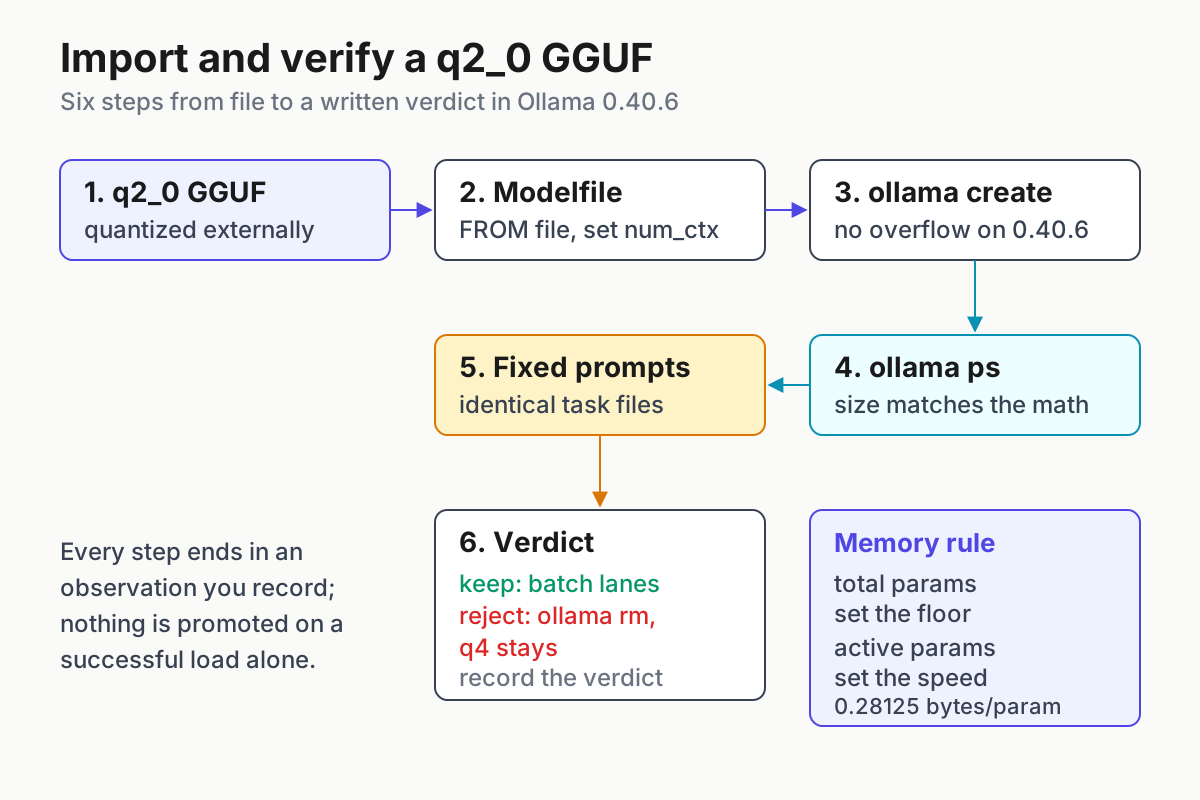
Three failure modes have distinct signatures, and separating them quickly is the difference between a five-minute fix and an evening lost. An out-of-memory kill at load means your overhead band was optimistic — drop num_ctx to 8192 and retry; context is the cheapest lever you have, and quartering it often moves the load from impossible to comfortable. A repeat of the unsupported-tensor error means either the binary is still pre-0.40.6 or the file uses a quant type Ollama’s reader still doesn’t know; re-check Step 1 before blaming the file. And note that one open GitHub issue linked from the PR reports a similar overflow message on a different custom quant scheme, so an overflow error does not by itself prove the file is q2_0 — inspect the file’s metadata or re-quantize if in doubt.
Step 4: Measure quality against your q4 baseline
A 2-bit quant that loads is not a 2-bit quant you can trust. Agentic coding work is exactly where quantization damage shows up — not in fluent prose but in tool-call JSON that must be exactly valid and diffs that must actually apply. A model that writes beautiful explanations but emits a tool call with a malformed argument is worse than useless in an agent lane, because the failure surfaces three steps later as a confused harness. Before the q2_0 copy earns a slot in any lane, run a fixed-prompt comparison against the q4 baseline you already trust.
Build a prompt set of five to ten real tasks from your own week: one refactor with a subtle edge case, one bug whose fix spans two files, one tool-call formatting task, one long-context question over a real file, one strict-JSON output. Save them as files so the run is repeatable months from now, then score both models on the same inputs with sampling held constant between runs — the point of a fixed set is that only the quant changes.
ollama run bonsai2-27b:q4 --verbose < task-1.txt > q4-1.outollama run bonsai2-27b:q2_0 --verbose < task-1.txt > q2-1.out- Score each output pair on three pass/fail questions: does the code run, is the tool call or JSON parseable, is the answer faithful to the provided context.
- Record results in a filled register like this:
| Concrete input (task file) | Action on q4 and q2_0 | Expected outcome and decision |
|---|---|---|
| task-1.txt — retry-with-backoff refactor | Run both models with --verbose, score runnable code | Identical pass on both: keep q2_0 eligible for batch lanes |
| task-2.txt — two-file bug fix | Run both, check each edited file against the intended fix | If q2_0 edits the wrong file, that is a regression — route interactive work to q4 |
| task-3.txt — strict JSON tool call | Run both, parse output with a JSON validator | Malformed quotes from q2_0 mean a schema check is mandatory before any agent lane |
| task-4.txt — long-context question over a real file | Run both, compare faithfulness to the file | Slower prefill only: fine for overnight batch, not a rejection |
The rows above are an illustrative filled example of the register shape, not measured results — your numbers come from your runs. What the register buys you is a written keep-or-reject decision instead of a vibe. If q2_0 drops only on speed, it’s a batch-lane model: point overnight bulk work at it and keep the interactive lane on q4. If it mangles tool calls, it is not eligible for any agentic lane no matter how cheaply it fits in RAM — the per-task cost math in free open weights, priced per completed task only works when tasks actually complete, and a task that completes with a broken tool call is a task you pay for twice.
Keep the register with the Modelfile and the version string. When a 3-bit or improved 2-bit quant lands next quarter, you re-run the same files against the same baseline and get an honest delta in an afternoon, which is the whole difference between an evaluation practice and a one-off impression.
Step 5: Clean up orphaned runners on Windows
The second half of this release matters to anyone running ollama serve from a terminal on Windows. PR #18500 assigns runner processes — llama-server and MLX subprocesses — to a singleton Windows Job Object configured with JOB_OBJECT_LIMIT_KILL_ON_JOB_CLOSE. When the Ollama process exits, Windows itself terminates the children, including cases where graceful cleanup never runs, such as a forced kill of the parent. The author’s framing: desktop app users were already fine because the app shuts the server down gracefully; CLI users had no good tool, and taskkill and stop-process are not graceful, so zombie runners accumulated. A reviewer question in the thread also surfaced a useful detail: the Job Object assignment retries on every model load rather than wedging after a transient failure, so one bad moment at startup does not permanently break cleanup.
For an operator importing large quants, this fix is not cosmetic. Every orphaned runner holds a model’s worth of RAM — on the 27B worksheet above, that is roughly 10 GB held by a process you thought was gone. The next model load then fails with an out-of-memory condition that looks exactly like the Step 3 sizing failure, sending you to re-do correct memory math while the real culprit is a zombie from yesterday’s terminal session.
The practical checks are short:
- After upgrading to 0.40.6, start
ollama serve, load your imported model, then close the terminal or kill the server process. - Run
tasklist | findstr /i "llama" - If you find zombies from a pre-upgrade session, terminate them explicitly:
taskkill /f /im llama-server.exe. Then repeat the check after a normal exit to confirm the fix works on your machine. - Add the tasklist check to weekly fleet hygiene — orphaned runners are invisible until the next load OOMs, and a one-line check on Friday is cheaper than an hour of debugging the wrong layer on Monday.
Unexplained memory pressure after model loads is a fleet-level symptom, not a local one; the AgentOps guide covers the broader discipline of watching what your local stack actually leaves running, of which zombie runners are just the most common Windows instance.
Step 6: Rollback and the keep-or-reject decision
If quality fails or the import misbehaves, roll back deliberately rather than deleting things in frustration:
ollama rm bonsai2-27b:q2_0removes the imported model and frees the blob. Your original GGUF file is untouched on disk —ollama createcopied it, it did not consume it.- Keep serving the q4 baseline — it never moved. Record the rejection in the register with the failing task IDs so a future 3-bit or improved quant gets re-tested against the same inputs rather than re-argued from scratch.
- If you need to downgrade Ollama itself, note from the v0.40.2 notes that models upgraded by newer versions keep their original copies as disk backups so downgrading stays safe; if you go back before 0.40, expect to re-pull models whose backups were cleaned.
- Keep the Modelfile. It is a few lines, and re-importing a re-quantized file is then a single
ollama createagainst a version you already verified — the whole import procedure reduces to one command once the fixture exists.
The durable lesson survives the release announcement: whenever a runner adds a new quant format, the operator sequence is the same — confirm the binary knows the format, compute the bytes-per-weight budget, import via a Modelfile, score against your baseline with fixed prompts, and keep a written keep-or-reject verdict with a rollback path. The llama.cpp port-change upgrade runbook is the same pattern on the engine side. q2_0 is just this week’s instance of it; the next format will get the same treatment, and the operator who has the fixture files already in place will answer it in an afternoon.
FAQ
Does Ollama quantize a model to q2_0 for me during import?
No. Ollama’s import documentation states it does not quantize GGUF models during import. Produce the q2_0 file yourself with a tool such as llama.cpp’s llama-quantize, then import it with a Modelfile and ollama create. Version 0.40.6’s contribution is reading the resulting tensor and file types, which previously failed with an unsupported-tensor overflow.
How much memory does a q2_0 model actually need?
The weights portion is arithmetic: q2_0 stores 64 weights in an 18-byte block, which is 0.28125 bytes per parameter. A 27B model is therefore about 7.6 GB of weights, and a 9B model about 2.5 GB. Add KV cache and runtime overhead, then verify the loaded total against ollama ps after the first load.
Is a 2-bit model good enough for coding agents?
Sometimes, and the answer comes from your own fixed-prompt comparison. Run the same five to ten tasks through the q2_0 copy and your q4 baseline, score pass/fail on runnable code, parseable tool calls and faithful context use, then write the verdict down. Degraded tool calls disqualify it from agentic lanes regardless of memory savings.
Sources
- Release v0.40.6 · ollama/ollama (GitHub) — primary source for the release, its date and the change list.
- gguf: add the q2_0 tensor and file types · PR #18967 (GitHub) — the 18-bytes-per-64-weights format detail, the tensor type 42 / file type 41 failure, and the tested Bonsai 2 sizes.
- win: prevent orphaned runners · PR #18500 (GitHub) — the Windows Job Object mechanism and the CLI zombie-runner context.
- Importing a Model — Ollama documentation — the supported Modelfile
FROMsyntax, split-GGUF wildcards and the no-quantize-during-import rule. - Reflection’s Beam on Ollama — Ollama blog — the 501B-total / 23B-active MoE sizing example.
- Releases · ollama/ollama (GitHub) — v0.40.5 llama.cpp b11669 confirmation and the v0.40.2 model-backup downgrade behavior.