Git HTTPS Authentication GitHub Playbook: Authenticate Every Agent Clone Path Before It Stalls Your CI
Git HTTPS authentication GitHub guide: inventory each clone path, wire the right token per lane, and set a typed fallback before the next protection window.

Go deeper. Build your own.
On October 19, 2026, the subject every agent-fleet operator suddenly had to master was git HTTPS authentication GitHub had just made conditional: the company’s changelog announced that during periods of unusual traffic it may temporarily require authentication for some clones and fetches of public repositories over HTTPS. Your batch job has fetched a public repo at 02:00 for six months without a token in sight; affected operations now fail with a message indicating that authentication is required. Anonymous public cloning still works almost all of the time — GitHub is explicit that this is not a general authentication requirement for public repositories — but “almost all of the time” is not an availability contract your unattended lanes can lean against anymore.
This guide turns that announcement into fleet configuration. You will inventory every path in your pipelines that clones or fetches from github.com, reproduce the failure shape safely so your alerting matches the real message, wire a credential into each lane with the right token for the right surface, write a fallback rule that parks a lane honestly instead of looping retries or fleeing to unofficial mirrors, and prove the whole setup with a nightly authenticated canary. The lesson outlives the announcement: unauthenticated access to a public service is a hidden dependency, and the fix is to make every fetch path authenticate by default.
What GitHub actually changed
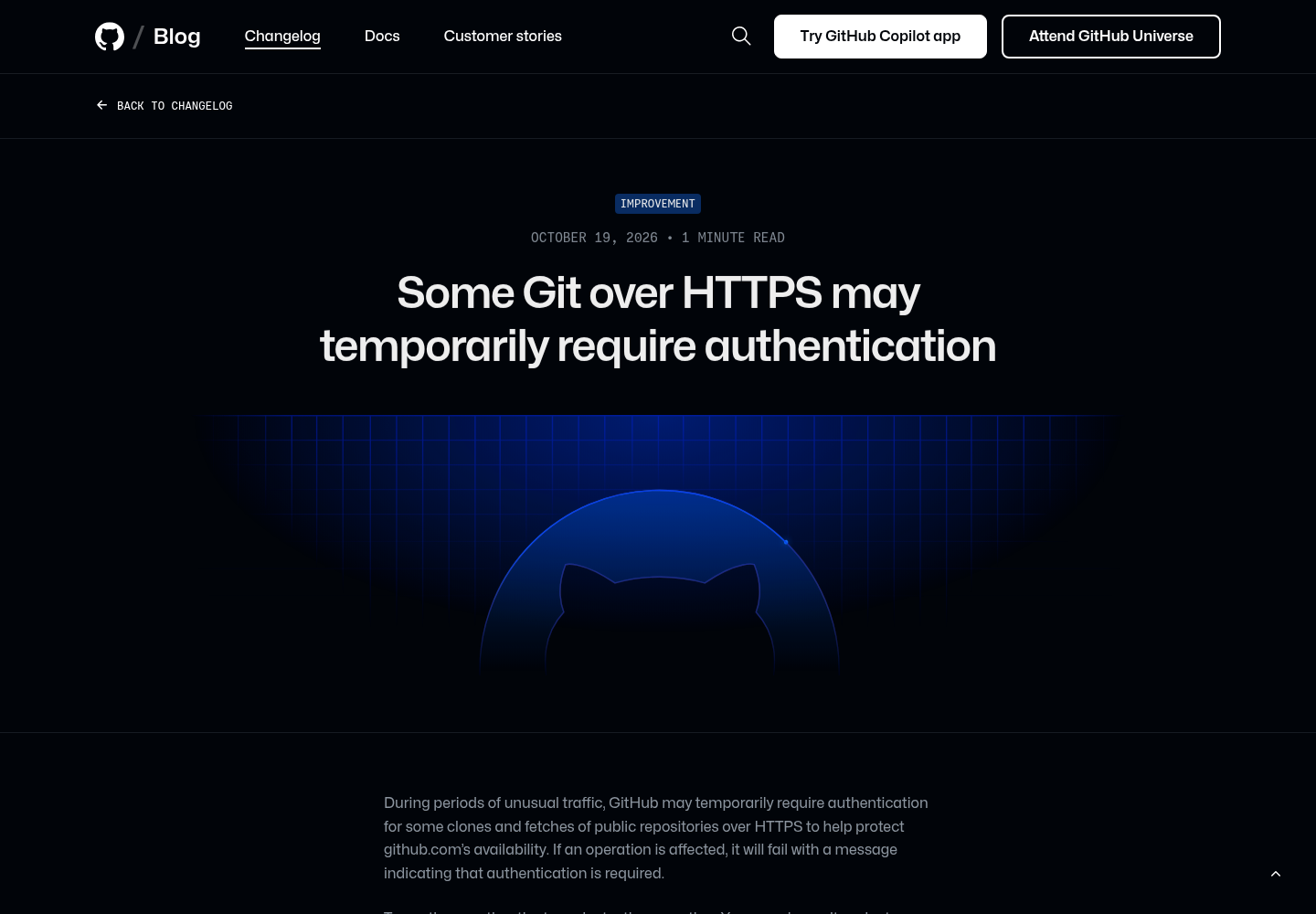
The changelog entry is short and worth reading precisely. During periods of unusual traffic, GitHub may temporarily require authentication for some clones and fetches of public repositories over HTTPS to protect github.com’s availability. If an operation is affected, it fails with a message indicating that authentication is required. To continue, you authenticate and retry — or you wait and retry anonymously after the temporary protection lifts.
Three details matter for fleet operators. First, GitHub applies the protection as narrowly as possible using signals associated with anomalous traffic, but legitimate and anomalous traffic can share those signals, so legitimate unauthenticated operations may occasionally be caught. Second, the unaffected list is explicit: authenticated Git operations over HTTPS, Git operations over SSH, pushes, and unrelated web and API traffic. Third, GitHub names its own remediation: use the built-in GITHUB_TOKEN in GitHub Actions, prefer a GitHub App installation access token (a personal access token also works) in other CI systems, and if an operation genuinely cannot authenticate, retry after the protection is lifted.
The mechanics around this are unchanged from how Git over HTTPS has always worked. As GitHub’s remote repository documentation notes, HTTPS clone URLs such as https://github.com/user/repo.git are available on all repositories regardless of visibility and usually work through strict firewalls and proxies — which is exactly why so many pipelines quietly rely on them anonymously.
GitHub’s official changelog entry of October 19, 2026, as captured from github.blog, announcing that some clones and fetches of public repositories over HTTPS may temporarily require authentication during periods of unusual traffic.
Why agent fleets feel this first
The same day, GitHub Status opened and resolved a real incident: degraded availability for GitHub Actions, GitHub Pages and Webhooks, investigated from 15:49 UTC, recovering by 16:30, and resolved at 16:56 UTC. The two events are separate things — the status incident did not announce the protection, and the changelog did not report the incident — but together they demonstrate the operating condition you should plan for: authentication-requirement windows can coincide with genuine capacity stress, which is precisely when your retry logic is busiest.
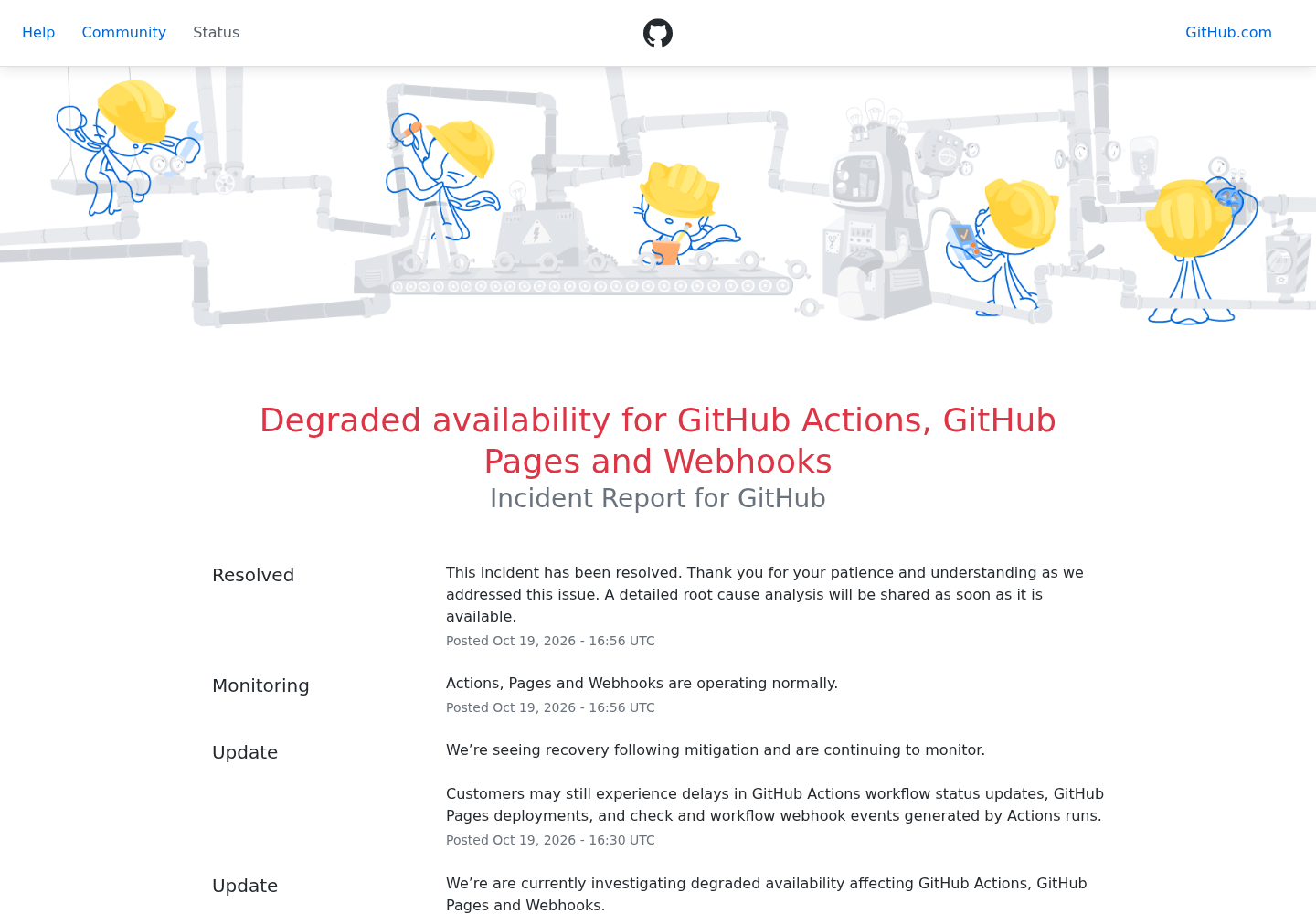
GitHub Status incident page, captured from githubstatus.com, showing the October 19, 2026 degradation of Actions, Pages and Webhooks from investigation at 15:49 UTC to resolution at 16:56 UTC.
Human developers barely notice a window like this: they see a prompt, authenticate, and move on — GitHub’s credentials documentation notes that Git prompts for credentials on HTTPS remotes and that a credential helper such as Git Credential Manager can cache a personal access token so the prompting stops. An unattended lane notices differently. A coding agent mid-task hits a clone failure it was never taught to classify, a CI job with set -e dies on a nonzero exit, and a Docker build that fetches a public repo at image-build time fails in a layer that worked yesterday. The failure is fast and typed, but only if something in your stack is looking for the message. If nothing is, it becomes a mystery red build at 03:00.
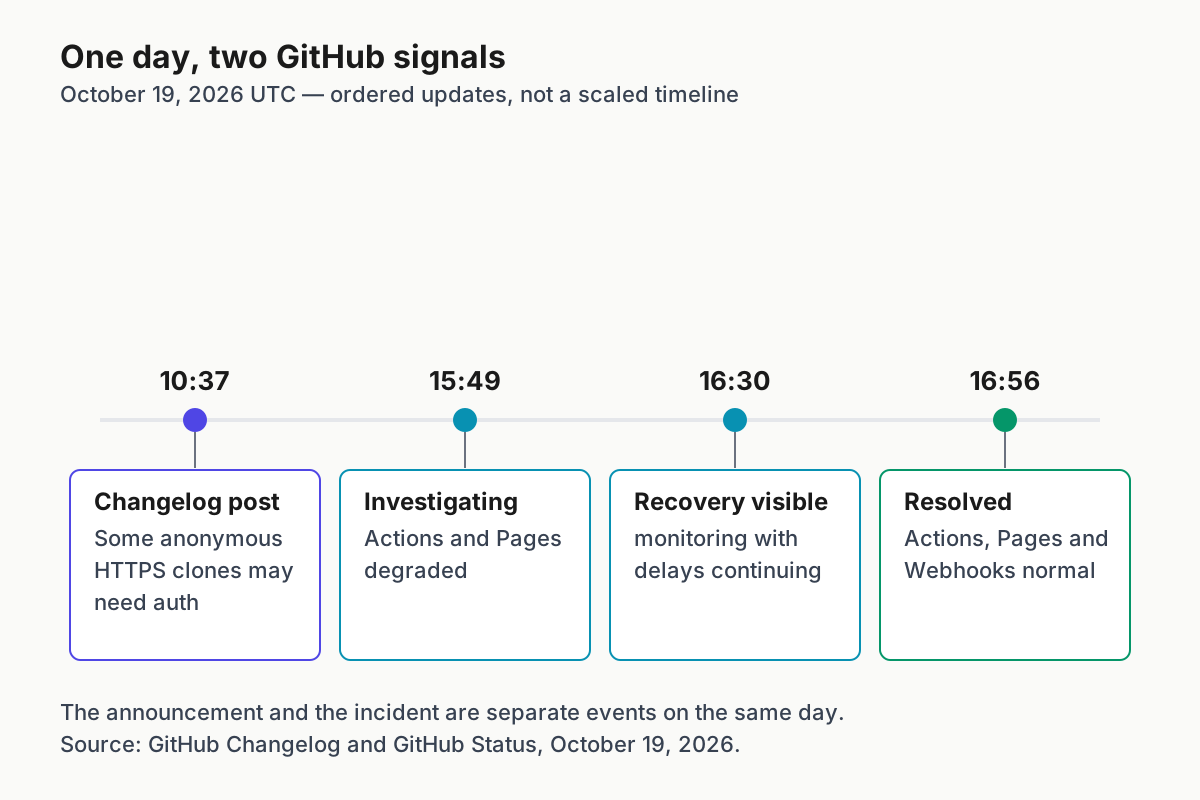
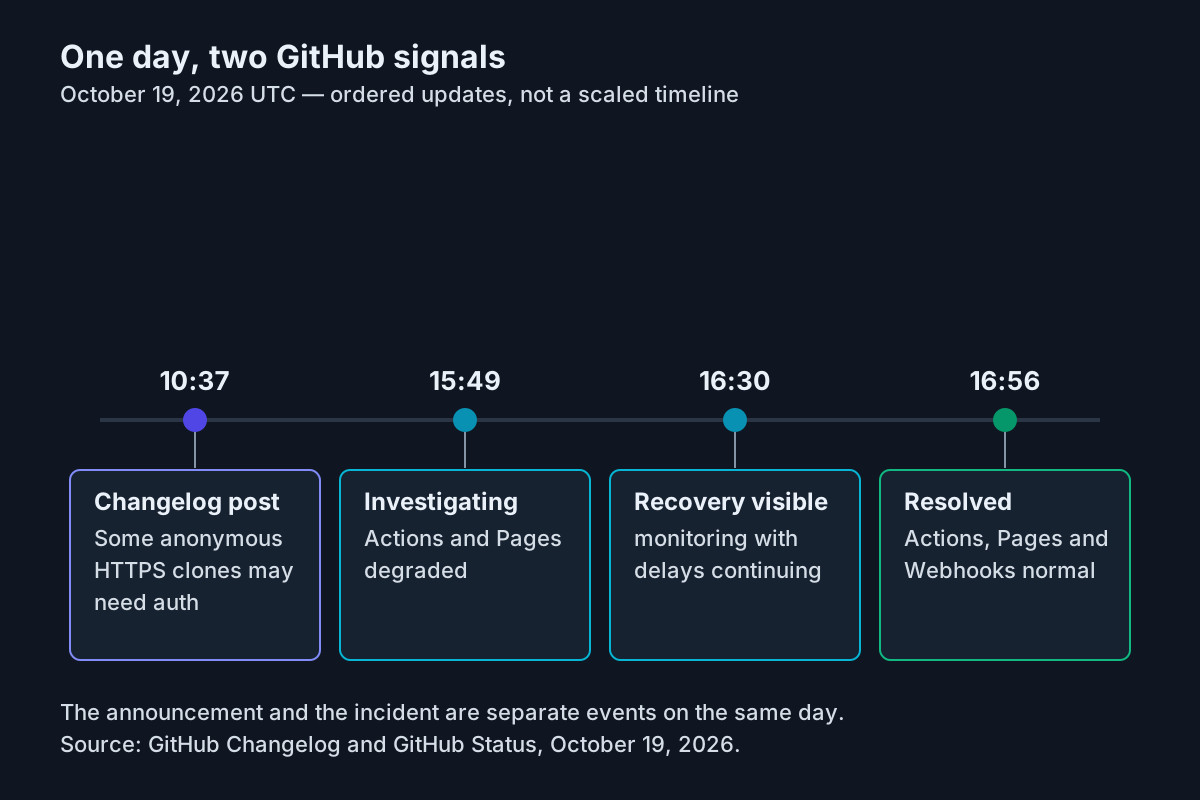
Original editorial timeline of October 19, 2026 (UTC), shown as ordered updates rather than a scaled clock. Source: GitHub Changelog and GitHub Status, October 19, 2026.
That is the operator framing this guide owns. Our agentic CI/CD guide covers self-healing pipelines and our repo intake checklist covers untrusted repos; neither owns this lane. This one does: prove that every clone and fetch path in an agent pipeline authenticates by default, so a protection window cannot stall overnight work, and so the failure — when it still happens — surfaces as a typed, actionable error rather than a timeout you debug from scratch.
Step 1: Inventory every fetch path in the fleet
You cannot authenticate a path you have never listed. The register below is the first artifact of this playbook: one row per place your systems run git clone, git fetch, git pull or a fetch-equivalent against github.com. Grep for it — git clone https://github.com, git fetch, actions/checkout, go get, dependency mirrors that proxy github.com — across workflow files, Dockerfiles, entrypoint scripts, agent sandbox definitions, cron jobs and vendor agent configuration. For each hit, record the input (where the fetch happens), whether it authenticates today, the action you will take (the credential to wire), and the expected outcome when the fix is in.
Here is a filled example register for a small agent fleet, with concrete decisions:
| Input: lane and where it fetches github.com | Authenticates today? | Action: credential to wire | Expected outcome and fallback |
|---|---|---|---|
Nightly agent batch (cron on a VM) runs git clone https://github.com/octocat/Hello-World.git in run-batch.sh |
No — anonymous HTTPS | Fine-grained PAT in AGENT_GIT_TOKEN env, read-only, 90-day expiry |
Authenticated clone completes; on any other failure, retry once then park lane and page on-call |
CI build job (GitHub Actions) uses actions/checkout on a public repo in the same org |
No — assumes anonymous is fine | Built-in GITHUB_TOKEN, permissions: contents: read |
Clone succeeds inside protection windows; job fails loudly on genuine errors |
Docker image build runs RUN git clone https://github.com/… in a Dockerfile |
No | Build-arg token via one-shot helper, never baked into a layer | No token in any image layer; fallback moves the clone to a CI step before docker build |
Developer machines run interactive git clone by humans and local agents |
Mixed — some cached credentials | gh auth login with HTTPS as the git protocol |
Prompt-free authenticated clones; humans authenticate when prompted |
| Vendor agent sandbox fetches with the agent’s own repo tool | Unknown | Documented vendor token setting; verify with the Step 2 probe | Marked availability-dependent and scheduled around protection windows |
Two columns do the teaching. “Authenticates today?” is usually the surprise — fleets discover that four of five paths silently assumed anonymous access. “Expected outcome and fallback” forces the decision before the incident, which is the difference between a parked lane and a 3 a.m. improvisation. Keep the register in the repo that owns the fleet; every later step updates a row rather than starting a discussion.
The unknown rows deserve honesty. If you cannot inspect a vendor sandbox’s fetch behavior, run the Step 2 probe inside it and record the observation. A lane you cannot authenticate is not a failure of this playbook; it is a lane you have now correctly marked as availability-dependent, which is exactly the classification the register exists to hold.
Step 2: Reproduce the failure safely
Before wiring credentials everywhere, see the failure shape with your own eyes in a controlled run. You want to know what your lane actually observes when GitHub requires authentication, so your alerting matches the real message instead of a guessed string.
- Open a throwaway machine or container — never a production lane — and pick a small public repository to keep the probe cheap.
- Run the one-shot anonymous probe below, which empties the credential helper for this single command so no cached token rescues you.
- Record the exact stderr wording your git version prints on failure; that string, or its stable prefix, is what your error classifier and alert rule must match.
- Run the authenticated twin probe with a test token to confirm the fix path end to end.
- Delete the probe directories and any temporary token you minted for the exercise.
The empty-helper mechanism comes straight from the gitcredentials specification: configuring credential.helper to the empty string resets the helper list to empty, letting you override helpers set by lower-priority config files for one invocation:
# One-shot anonymous probe: empty helper list for this command only
git -c credential.helper= clone https://github.com/octocat/Hello-World.git probe-repo
# Expected on a normal day: clone succeeds. During a protection window: fails
# with a message indicating authentication is required.
Do not copy a paraphrase from a blog post into your alerting — match what your own toolchain emits. Then run the authenticated twin of the same probe:
# Same clone, with a token supplied through a one-shot shell-snippet helper
GITHUB_TOKEN="$AGENT_GIT_TOKEN" \
  git -c credential.helper= \
      -c credential.helper='!f() { test "$1" = get && echo "username=agent" && echo "password=$GITHUB_TOKEN"; }; f' \
      clone https://github.com/octocat/Hello-World.git probe-repo-auth
# Expected: clone completes even while the anonymous probe fails.
This helper form is also specified by gitcredentials: a helper string beginning with ! is a shell snippet, invoked with a get operation, that writes username= and password= attributes on stdout in the same format git-credential uses. The A/B pair is the whole argument of this guide in one test. If instead you see a 401- or 403-flavored invalid-credentials failure, the token itself is wrong or expired — fix the credential, not the code, before touching anything else.
Step 3: Wire credentials into each lane
Each surface in your register gets the token GitHub recommends for it. The changelog is explicit about the mapping: GITHUB_TOKEN for GitHub Actions, a GitHub App installation access token preferred (personal access token acceptable) for other CI systems. The table summarizes the wiring decisions before the per-lane detail:
| Surface (input) | Action: token to wire | Expected outcome |
|---|---|---|
| GitHub Actions job fetching a public repo | Built-in GITHUB_TOKEN, permissions: contents: read |
Clone succeeds even inside a protection window |
| Other CI system or cron lane | Fine-grained PAT, contents: read, real expiry, stored as a CI secret env var |
Authenticated fetch; no token in logs or transcripts |
| Docker image build cloning at build time | Build-arg token through the one-shot helper, or move the clone before docker build |
No token baked into any image layer |
| Developer machine, humans and local agents | gh auth login with HTTPS as the git protocol |
Prompt-free authenticated clones |
GitHub Actions jobs. Workflows reference the built-in token with the standard secrets syntax, ${{ secrets.GITHUB_TOKEN }}, and GitHub’s security guidance is to grant it the least access required via the permissions key. If your job calls git directly rather than through an action, pass the token through the environment and reuse the one-shot helper:
name: Fetch fixture repo
on: [push]
jobs:
  fetch:
    runs-on: ubuntu-latest
    permissions:
      contents: read
    steps:
      - name: Authenticated clone of a public repo
        env:
          GH_TOKEN: ${{ secrets.GITHUB_TOKEN }}
        run: |
          git -c credential.helper= \
              -c credential.helper='!f() { test "$1" = get && echo "username=agent" && echo "password=$GH_TOKEN"; }; f' \
              clone https://github.com/octocat/Hello-World.git fixture
          test -d fixture/.git && echo "fixture: authenticated clone OK"
Note the job-level permissions: contents: read — least privilege applies even though the repo is public, because the token’s capabilities follow the grant, not the repo’s visibility.
Other CI systems and cron lanes. Mint a fine-grained personal access token: GitHub’s token guidance recommends fine-grained tokens over classic wherever possible, because each is limited to selected repositories with specific permissions — and fine-grained tokens always include read-only access to public repositories, which is exactly the capability this playbook needs. Give it contents: read at most, a real expiration (the docs note a 30-day default and organization lifetime policies), and a name that names the lane, so a leaked token’s blast radius and owner are obvious. Deliver it as a secret environment variable in your CI, feed it to git through the helper pattern from Step 2, and never write it into a file inside the repo or a Docker layer. GitHub’s token-security guidance is blunt here: treat tokens like passwords, and prefer a secret store over a plaintext file.
Developer machines. Use the GitHub CLI rather than hand-managed tokens. The gh auth login manual describes the default browser-based flow, secure storage in the system credential store, and the --git-protocol option that configures https for git operations on the host — after which local clones of public repos are authenticated without anyone pasting anything:
gh auth login --hostname github.com --git-protocol https
# Expected: login completes; subsequent https clones of public repos carry credentials.
For machines without a browser, the CLI supports --with-token to read a token from stdin, and headless automation can simply set GH_TOKEN in the environment, which the manual documents as the suitable method for unattended use. Update the register row for each lane as you wire it; the register is the source of truth for which lanes are covered.
Step 4: Write the fallback rule
Authentication removes the most likely failure; it does not remove failure. Your lanes still need one written rule for what to do when a github.com fetch fails, decided now instead of at 03:00. The rule below is deliberately small — four branches, one retry, one honest stop:
- Classify before acting. Capture stderr and match it. If the message indicates authentication is required, the lane hit the temporary protection; if the failure is a 401/403 invalid-credentials shape while a token was supplied, the credential is bad; if it is a timeout or connection error with no auth message, treat it as capacity or network.
- Auth-required: retry exactly once, authenticated. If the lane was anonymous, retry with the token wired in Step 3. If the lane was already authenticated and still sees the message, do not retry — go to step 4.
- Bad credential: fix the credential, not the code. Rotate or re-authorize the token, update the secret, rerun. Never widen scopes to fix an auth failure.
- Still failing: park the lane, visibly. Emit a human-readable notice — lane name, error class, timestamp, next scheduled attempt — and stop. No retry loops, no exponential thundering herds against a service that just told you it is protecting availability, and under no circumstances a silent switch to an unofficial mirror of the repository, which trades an availability problem for an integrity problem.
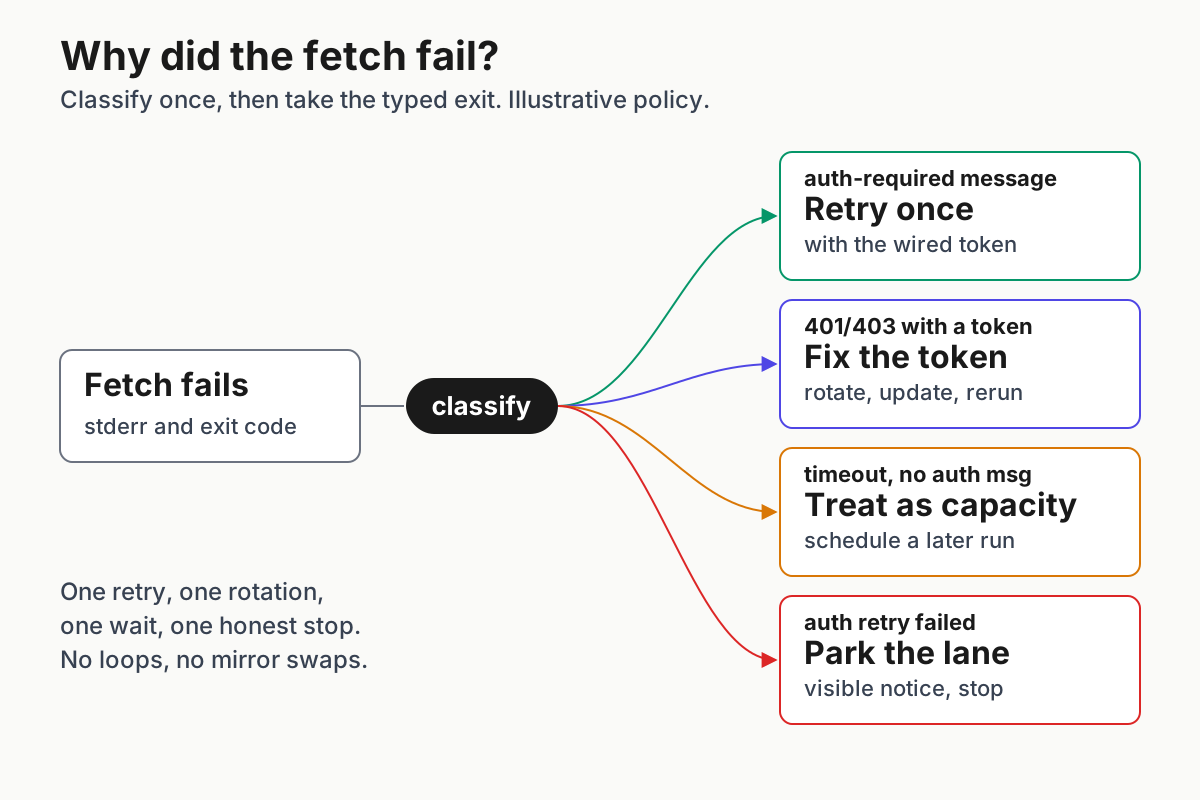
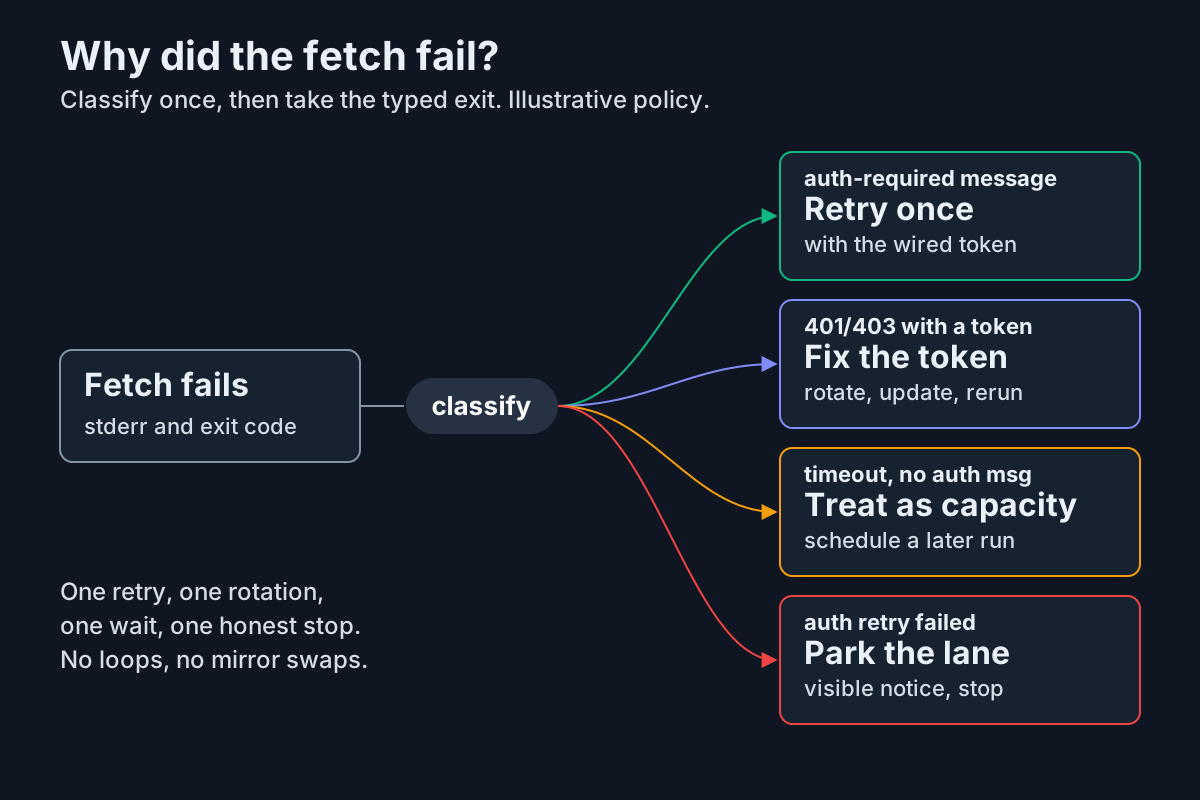
Original editorial diagram: a failed anonymous fetch is classified once into four typed responses — retry once authenticated, fix the credential, treat as capacity, or park the lane. Illustrative operator policy built on GitHub’s documented failure message and Git’s credential-helper behavior; not a shipped GitHub product screen.
The “park, do not loop” branch deserves its own sentence: the changelog’s remedy for operations that cannot authenticate is to wait and retry after the protection lifts, which is a scheduled future attempt — not a tight retry loop. A lane that parks with a notice is debuggable in the morning; a lane that retried four hundred times overnight burned CI minutes and left a log nobody can read.
Step 5: Run a nightly authenticated canary
Configuration drifts: tokens expire, helpers get removed, new lanes get added without wiring. A canary proves nightly that the authenticated path still works and that you find out from the canary rather than from a broken batch. The CLI upgrade canary habit applies here unchanged — the canary’s job is to fail first, loudly, cheaply:
name: Nightly git-auth canary
on:
  schedule:
    - cron: "17 3 * * *"
jobs:
  canary:
    runs-on: ubuntu-latest
    permissions:
      contents: read
    steps:
      - name: Authenticated fetch must succeed
        env:
          GH_TOKEN: ${{ secrets.GITHUB_TOKEN }}
        run: |
          rm -rf canary-repo
          git -c credential.helper= \
              -c credential.helper='!f() { test "$1" = get && echo "username=agent" && echo "password=$GH_TOKEN"; }; f' \
              clone --depth 1 https://github.com/octocat/Hello-World.git canary-repo
          test -d canary-repo/.git && echo "canary: authenticated fetch OK"
Expected observation: green nightly, with the success line in the log. Two failure readings are meaningful. A 401/403 invalid-credentials failure means the token path broke — expired, revoked, or the helper config was edited; fix it per Step 4’s branch 3. An auth-required message despite the helper means the token never reached git — usually a misquoted helper string or a missing env var — and the canary just caught a wiring bug before your production lanes did. Check the canary every morning with a short checklist:
- [ ] Canary ran last night and stayed green
- [ ] The
canary: authenticated fetch OKline is present in the log - [ ] No 401/403 invalid-credentials failure appeared
- [ ] Register rows still match the lanes actually wired
Either way, the canary alerts, not the overnight batch. This is the same discipline our agent environment readiness guide argues for generally: prove the environment before the prompt runs.
Rollback and register upkeep
Everything in this playbook is configuration, so rollback is removing configuration — per lane, deliberately, and recorded. Because authentication is also the state GitHub recommends for reliable automation, “rollback” here means reverting a botched wiring job, not returning to anonymous access as a goal:
| Action | Command or change | Verify by |
|---|---|---|
| Remove a one-shot helper wiring | Delete the -c credential.helper='!f()…' arguments from the lane’s script |
Lane runs as before wiring; register row updated |
| Remove a persistent helper for github.com | git config --global --unset credential.https://github.com.helper |
git config --get-all credential.https://github.com.helper returns nothing |
| Retire a CI token | Delete the fine-grained PAT in GitHub settings and remove the CI secret | Canary fails with invalid credentials, as expected |
| Log out a developer machine | gh auth logout for the host (per the gh auth manual) |
gh auth status shows no github.com account |
Keep the register current: every new Dockerfile, workflow, sandbox or script that touches github.com gets a row before it merges, with its credential and fallback filled in. Review token expirations on a schedule — the personal access token docs note GitHub removes unused tokens after a year and organizations can enforce maximum lifetimes, so a 90-day token that quietly lapsed is the most likely future failure this canary will catch. And treat the broader lesson as reusable: this is one instance of the provider-cutoff drill our fleet continuity guide generalizes, and the same register-and-canary shape works for any dependency your unattended lanes assume is free.
Running a fleet of agents means owning exactly this kind of hidden assumption; the agentic ops overview covers the rest of the stack. The lanes that survived this announcement unchanged were the ones that never depended on anonymity in the first place.
FAQ
Does GitHub now require login for all public repository clones?
No. The changelog states this is not a general authentication requirement for public repositories. The protection applies narrowly during unusual traffic, using signals tied to anomalous traffic, so legitimate unauthenticated operations can occasionally be caught. Authenticated HTTPS, SSH, pushes and unrelated traffic are unaffected; anonymous access resumes when the protection lifts.
Which token should an agent lane use for public repo fetches?
In GitHub Actions, use the built-in GITHUB_TOKEN with minimal permissions. Other CI systems should prefer a GitHub App installation access token, with a personal access token as an alternative. Fine-grained PATs always include read-only access to public repositories, so a minimal grant covers fetch-only lanes; developer machines can simply use gh auth login.
Sources
- Some Git over HTTPS may temporarily require authentication — GitHub Changelog (Oct 19, 2026)
- Degraded availability for GitHub Actions, GitHub Pages and Webhooks — GitHub Status
- Why is Git always asking for my credentials? — GitHub Docs
- About remote repositories — GitHub Docs
- Managing your personal access tokens — GitHub Docs
- Use GITHUB_TOKEN for authentication in workflows — GitHub Docs
- gh auth login — GitHub CLI manual
- gitcredentials — Git documentation