We use cookies to measure how the site is used and how our ads perform (Google Analytics and Ads, Microsoft Clarity, and the Meta, OpenAI and X ad pixels). “Essentials only” turns off advertising cookies everywhere, and analytics too in the EEA, UK and Switzerland. Privacy Policy
Find every session. See who needs you. Track your usage across your AI tools.Find every session. See who needs you. Track your usage.
Search your session history
See when an agent needs you
Track usage across 9 providers
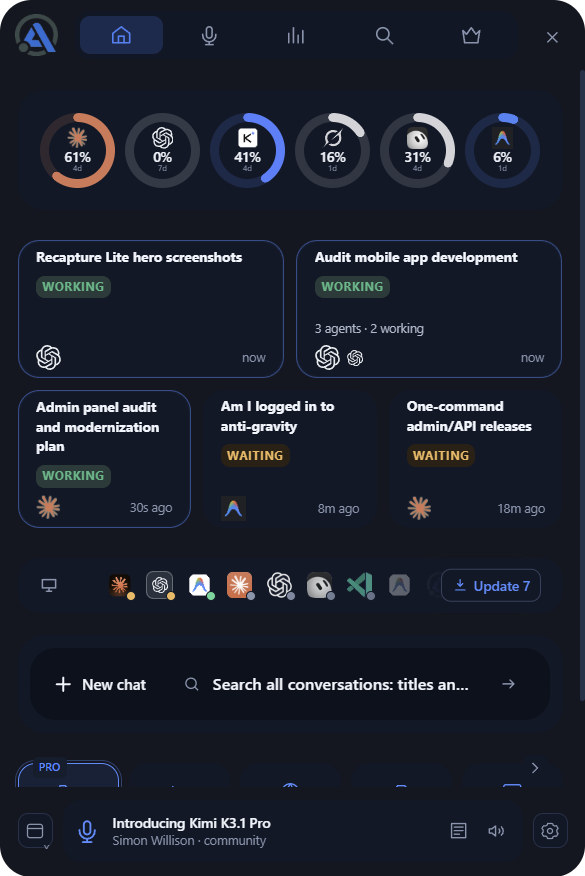
One tray panel for every AI CLI and desktop app on your machine. A searchable library of every session, a flag the moment an agent is waiting on you, and one usage meter across 9 providers. Free. Local. No signup required. Optional paid upgrades available.
Keep your AIs organized and in view.
Automater Lite pulls every AI CLI and desktop session on your machine into one searchable local library, and keeps an eye on every agent from your tray.
Pinned to the desktopPin it and Lite keeps its own strip of screen, and your other windows make room instead of hiding behind it. On Windows. to the Auto-hide at the edgePark it off-screen. Point at the right edge and it slides in; move away and it slides back out. or use it as a As a plain windowTurn Always on top off and Lite is just another window: drag it anywhere, stack it with the rest, alt-tab back to it.
See when an agent needs you
Permission prompts, questions and approvals are easy to miss. See who is waiting and which app needs your attention.
Search every session
Search one local library across your AI tools. Find the conversation you need and resume supported sessions in their own CLI.
Track usage across 9 providers
See what is left on each connected plan, watch reset windows and spot heavy usage before a limit interrupts your work.
Agent activity
Stop hunting through terminals and desktop apps.
Every AI tool keeps its history in its own window, folder and format. Lite watches all of them from one panel in your tray.
What changes on day one.
Without Lite: Five windows open. Which agent is waiting on you?
With Lite: The session that needs your answer is flagged.
Without Lite: That fix from Tuesday is in some session, somewhere.
With Lite: One search finds it, across all 41 apps and CLIs.
Without Lite: Usage lives in a dashboard per provider.
With Lite: Nine providers, side by side in your tray.
Without Lite
gemini, ~/web
> make the hero responsive
Editing Hero.astro
Thinking
cursor, checkout.ts
const total = items.reduce(
(sum, i) => sum + i.price, 0
);
codex, ~/api
$ codex "add rate limits"
Applying patch to routes/orders.ts
Done. 3 files changed.
Usage, five tabs
Anthropic: 71% of plan
OpenAI: see dashboard
Gemini: sign in again
claude, ~/shop
> fix the flaky payments test
Running tests
? Overwrite jest.config.ts (y/n)
With Lite
Needs you
Voice · free in Lite
Say the prompt. Lite types it.
Press your hotkey and speak. On Windows, the words land in the focused window: Claude Code, a terminal, a browser. On macOS and Linux, copy your take from the Voice tab. Transcription runs on your own hardware, and every take is saved.
Pasted into Claude Code, and saved to your history.
Try it in
Listening…0:00
Ctrl+Alt+Space
claude · ~/shop
~/shop on fix/retry-backoff
Ready. Type a request, or dictate one.
›refactor the retry queue to use exponential backoff
$ git status
On branch fix/retry-backoff
Changes to be committed: 2 files
$ git commit -m ""
What can I help with?
Message
A
••••Ctrl+Alt+Space
Dictation history13
refactor the retry queue to use exponential backoff
Claude Code · just nowCopy
explain why the payments test is flaky
Claude Code · 12 min agoCopy
open a pull request for the cart fix and ask for review
Terminal · 34 min agoCopy
SearchA9:41
And it talks back
Hear when an agent needs you.
Claude Code can read its status and questions aloud through Lite, in a local voice, so you know without watching the terminal. Cloud voice, for when this PC is busy, is part of PRO.
“Your agent needs your input in ~/shop.”Spoken by Lite · local voice
A signed installer for Windows, macOS (Apple silicon) and Linux. Authenticode on Windows, signed and notarized on macOS (Apple silicon). It installs offline and updates itself with minisign-verified payloads.
2
It finds the sessions your tools already save
Every AI CLI and desktop app writes its transcripts somewhere on your disk. Lite knows where 41 of them write, in 45 formats, and indexes those files on your machine. Session content stays on your disk.
3
One panel, four ways to work
Click the tray icon for the panel: search sessions, reopen one in its own CLI, see who is waiting, check usage.
From the tray
Click the tray icon and Lite comes up over whatever you’re doing. It stays put while you work; click the icon again and it’s gone.
Pinned to the desktop
Pin it and Lite keeps its own strip of screen, and your other windows make room instead of hiding behind it. On Windows.
Auto-hide at the edge
Park it off-screen. Point at the right edge and it slides in; move away and it slides back out.
As a plain window
Turn Always on top off and Lite is just another window: drag it anywhere, stack it with the rest, alt-tab back to it.
Privacy
What stays on your machine, and what can leave it
Your machine
Session files
Right where 41 apps and CLIs already save them.
Claude Code, Codex, Cursor and 38 more
A
Lite reads them
45 formats, indexed here
Your library
A local file. It stays on your disk and searchable, whether or not you ever pay.
Local voice is transcribed on this machine too. Lite needs no account.
Beyond your machine
Usage statistics
On by default. Counts, never your content. Switch them off in Settings at any time.
On by default
Leaderboard
Nothing is published unless you choose to publish it.
Off until you publish
PRO cloud voice and rewrite
Cloud dictation sends audio; cloud playback and optional cloud rewrite send text. These run only when you choose them.
Off until you use it
No sign-up
Install and go. No account, no card, no time limit.
Signed installer
Authenticode on Windows, signed and notarized on macOS (Apple silicon). Installs offline.
Verified updates
Every update is minisign-checked before it installs.
Your update schedule
Switch auto-update off and stay on the build you have.
Automater PRO
Lite watches. PRO operates.
Everything in Lite stays free, including chat through your own AI apps. PRO adds the parts that act: control and tools, all from the same tray panel.
Managed SessionsStart, steer, interrupt and stop agent sessions from the panel.
Computer ControlLet agents drive the mouse, keyboard and apps, with your permission.
Built-in toolsBETATerminal, repo and file browser, web browser and markdown viewer, inside Lite.
FleetBETASee every machine's agents, status and KPIs in one view.
Camera FXBETAA virtual camera for your meeting app: put on a blazer, change your shirt color, or go cartoon.
Grok BotsAn enhanced Grok Bots card with roster and Latest views, included in PRO.
Resource monitorSee each running AI app's live CPU, memory and I/O hog score, 0 to 100 over the last minute.
Cloud voiceRoute speech-to-text and text-to-speech through Automater Cloud when this machine is busy.
AUTOMATER PRO · YEARLY
Introductory offer
$50/ year
For the developer who steps in. Everything in Lite, plus the controls. Renews until you cancel; your library stays yours either way.
We only use this to reply. No newsletter unless you ask.
Is Automater Lite free?
Yes. Running Lite costs nothing and needs no sign-up. The library and its search, the usage meters, the Needs You flags, local voice and chat through your own AI apps are all free. PRO is a separate yearly upgrade that adds to Lite; it never removes anything Lite already does.
What does PRO add?
PRO adds the parts that act: computer control from the tray, managed sessions and inline replies, Fleet and Integration Health, built-in tools and pop-out mini-apps, and metered cloud voice.
What happens to my library if I stop paying?
Your library is a local file. It stays on your disk, searchable, whether or not you pay. Needs You and approval visibility are never gated.
Where does my data live?
Session content stays on your machine: Lite reads each tool's own session files and keeps the normalized library locally. Usage statistics are on by default (counts, never your content) and can be switched off in Settings. Publishing to the leaderboard and PRO cloud voice are opt-in.
Which tools does it read?
45 session formats from 41 apps and CLIs: Claude Code, Codex, Cursor, Gemini, Grok, Copilot, Windsurf, Aider, Kimi, Qwen Code, Z.ai GLM, OpenCode, Antigravity, VS Code, Warp, Pi, Muse Code, MiniMax, DeepSeek, Kiro, Kilo Code, OpenHands, Amp, Mistral Vibe, gptme, iFlow, Poolside, Shelley, Posit Assistant, MiMoCode, Claude Cowork, QwenPaw, Codebuff, Command Code, IcodeMate, Omnigent, and 5 more. Eleven of those also support one-click resume back into their own CLI.
Which operating systems?
Windows x64, macOS on Apple silicon, and Linux x86_64 as an AppImage or a .deb. The download page lists only the builds that are published right now.
Does it run on an Intel Mac?
Not yet. The macOS build is Apple silicon only. If you download it on an Intel Mac the installer will not open; there is no Intel build to fall back to today.
How do updates work?
Every build ships as a signed installer, and update payloads are minisign-verified before they install. On Windows the signature is Authenticode and the WebView2 runtime is embedded, so the first install needs no network. You can switch auto-update off and stay on the build you have.
Why did you build this?
I run about ten assistants at once — Claude Code, Codex, Gemini, Grok, Kimi, Qwen and a few more — across one Windows machine and the WSL box inside it. That is a good problem to have, right up until you cannot see it.
The losses were always the same three: sessions buried in a different folder for every tool, an agent parked on a permission prompt for an hour, and no single meter.
So I built the tray app I wanted. It archives every session on your own disk, flags the moment an agent needs you, and stays free, because the archive belongs to the person who made it. PRO pays for the parts that act on it, and for the cloud. If it misses something you do every day, write to me.