Postgres MCP Server Setup for Claude Code, Codex and Cursor: Make Read-Only Mean Read-Only With a Database Role
Connect a Postgres MCP server to Claude Code, Codex and Cursor through a least-privilege role, then prove a COMMIT-stacking probe fails before trusting it.

Go deeper. Build your own.
You want Claude Code, Codex or Cursor to read your schema, answer “which table holds refunds?” and help you fix a slow query. You do not want it to change a single row. The usual move is to install a Postgres MCP server whose README promises read-only access and trust the promise. This guide replaces that promise with a guarantee the database itself enforces.
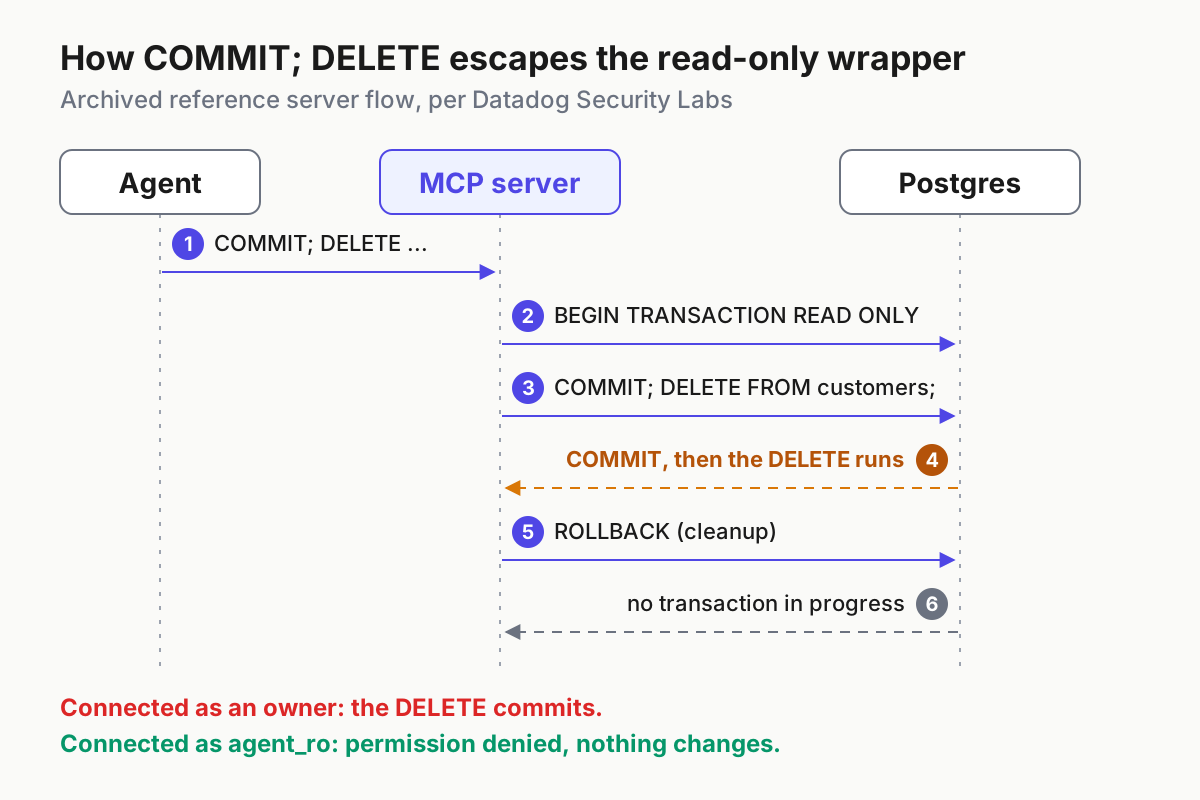
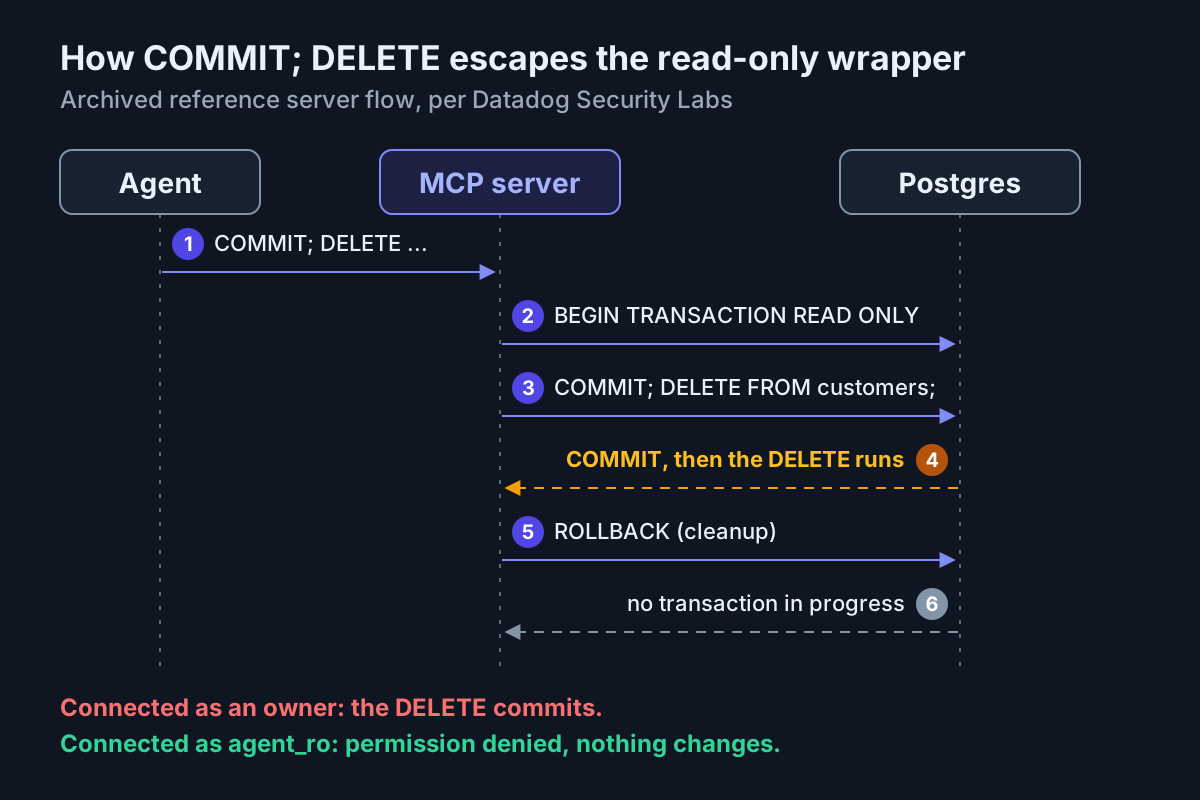
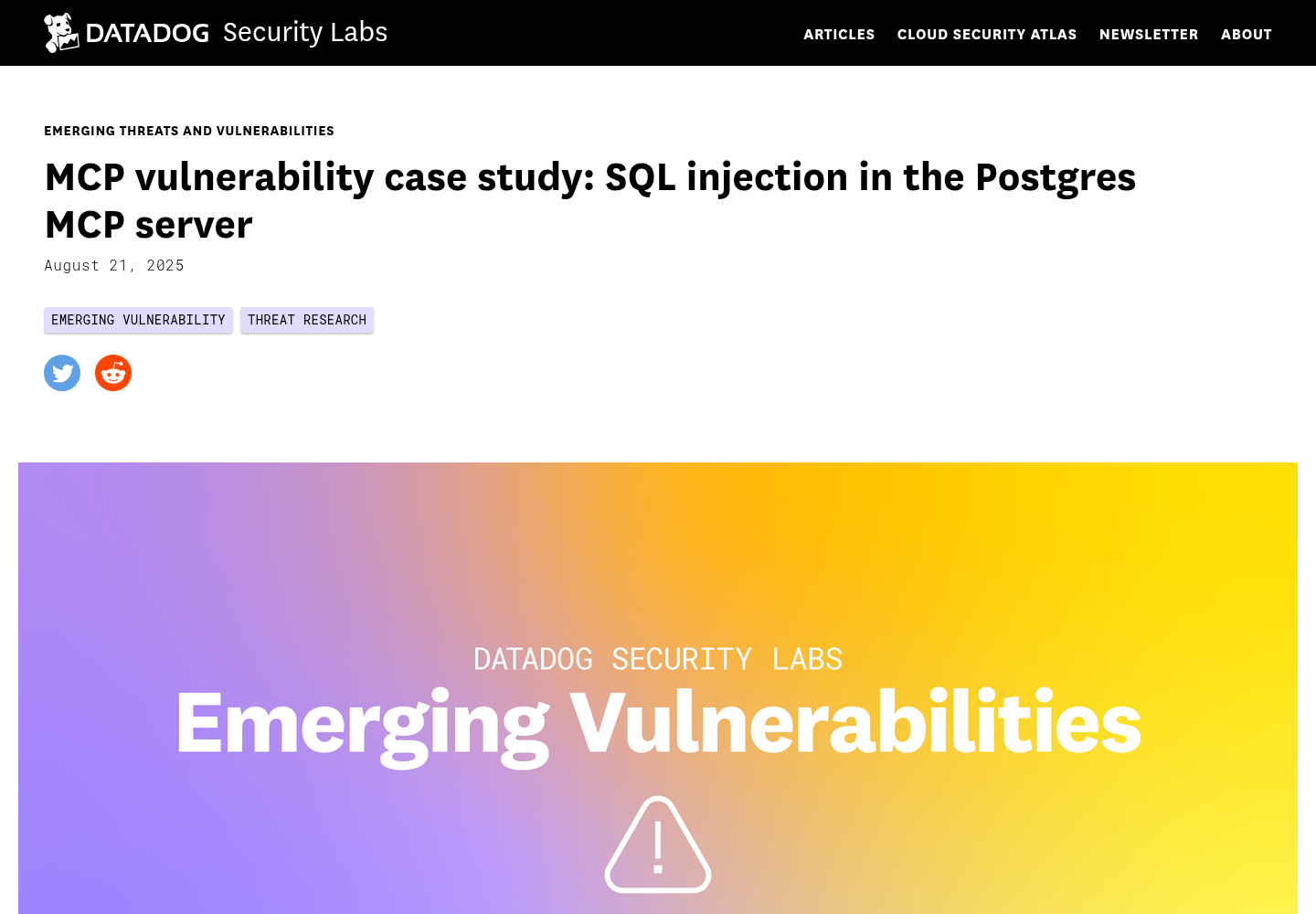
The reminder came on X on October 27, 2026, when johntanzer wrote that “a read-only transaction isn’t a safety net”: COMMIT; DELETE FROM customers; ends the transaction and then runs the delete. The failure is older than the post. Datadog Security Labs documented it in Anthropic’s reference Postgres server: every query ran inside a read-only transaction, but the server handed the whole string to the database, stacked statements included. A leading COMMIT closed the protection, and whatever followed ran with the connecting user’s full privileges.
By the end of this guide you will have a dedicated agent_ro role that can read the schemas you choose and nothing else, one server configured the same way in all three agents, a bypass probe that must fail before the agent is trusted, and a rollback. The SQL, commands and config files follow documented syntax from the Postgres, Anthropic, OpenAI, Cursor and server project pages linked below. Where this guide describes output, it is the expected observation, not something we ran and recorded.
If you want the wider picture first, hardening MCP in production covers allowlisting and tool poisoning, and treating agents as privileged users makes the identity argument in general terms. This is the concrete database version of both.
Why the read-only transaction let the DELETE through
Datadog’s case study reprints the reference server’s query handler, and it is short. For each tool call the server took a client from a connection pool, sent BEGIN TRANSACTION READ ONLY, sent the agent’s SQL, and sent ROLLBACK in a cleanup block. A plain write inside that transaction fails the way you would hope: Postgres answers DROP SCHEMA public CASCADE with an error saying it cannot run that command in a read-only transaction.
The gap sits in the driver. Datadog points out that node-postgres client.query accepts a string holding several statements separated by semicolons and runs them in one shot. So COMMIT; DROP SCHEMA public CASCADE; does three things in order. The COMMIT ends the read-only transaction. The DROP runs outside it, with whatever rights the connection role holds. The server’s cleanup ROLLBACK arrives too late and draws the warning “there is no transaction in progress.”
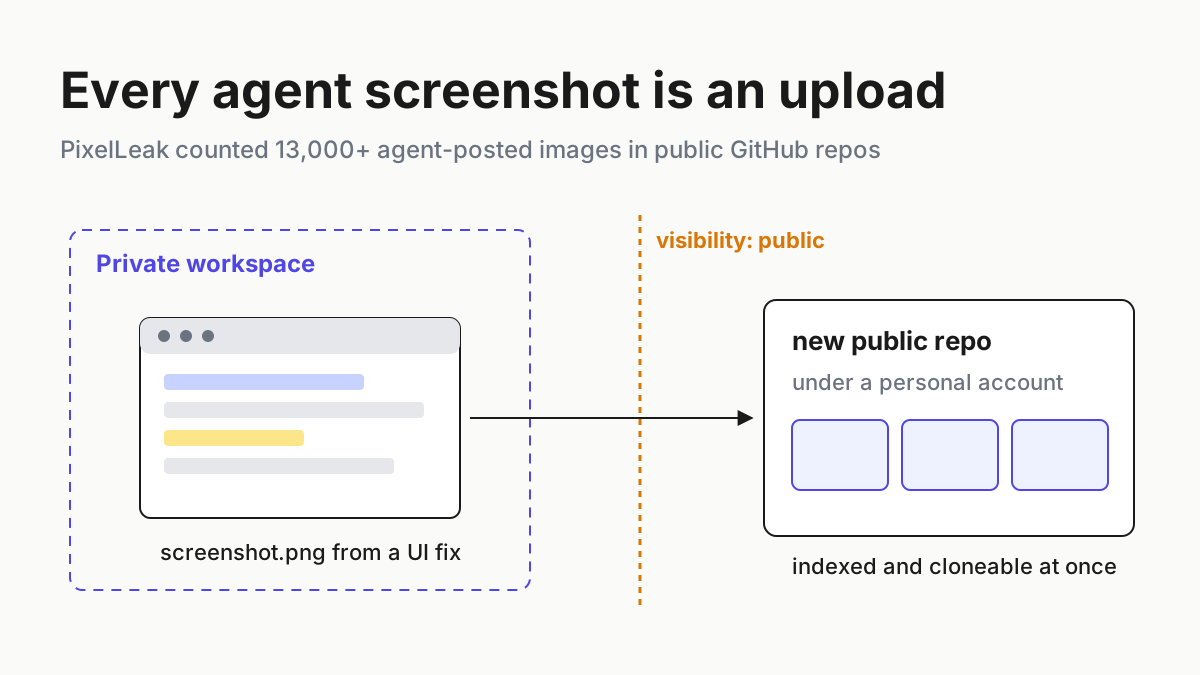
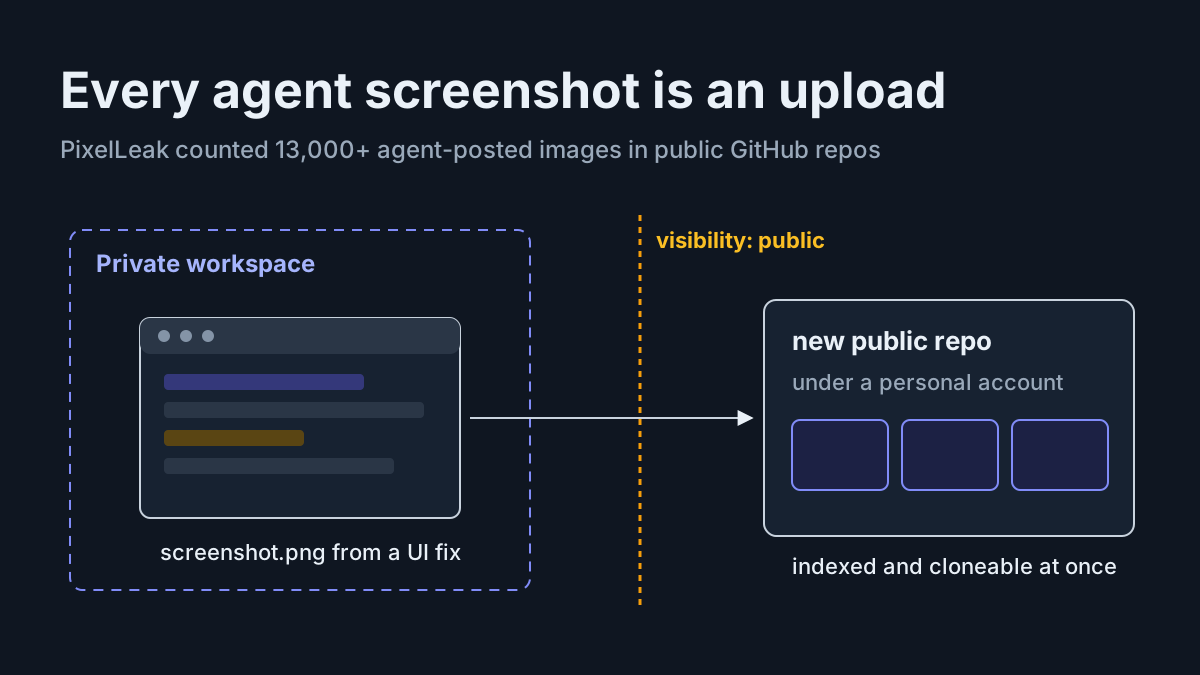
Nobody has to type that string into the agent on purpose. Datadog’s example is a chatbot user asking the agent to “run this query on Postgres, as is.” That is a prompt-injection path, and any issue, document or web page an agent reads can carry the same sentence. The MCP integration red-team checklist covers that attack category in general; here it lands directly on your data.
Datadog also found a second problem that permissions do not solve. Because the pool reused connections, COMMIT; SET statement_timeout TO 1; changed a session setting that later callers inherited, so every following query slower than a millisecond failed until the connection was recycled. A read-only role cannot stop a session from changing its own settings. Only a server that refuses stacked statements, or throws the session away after each call, closes that hole.
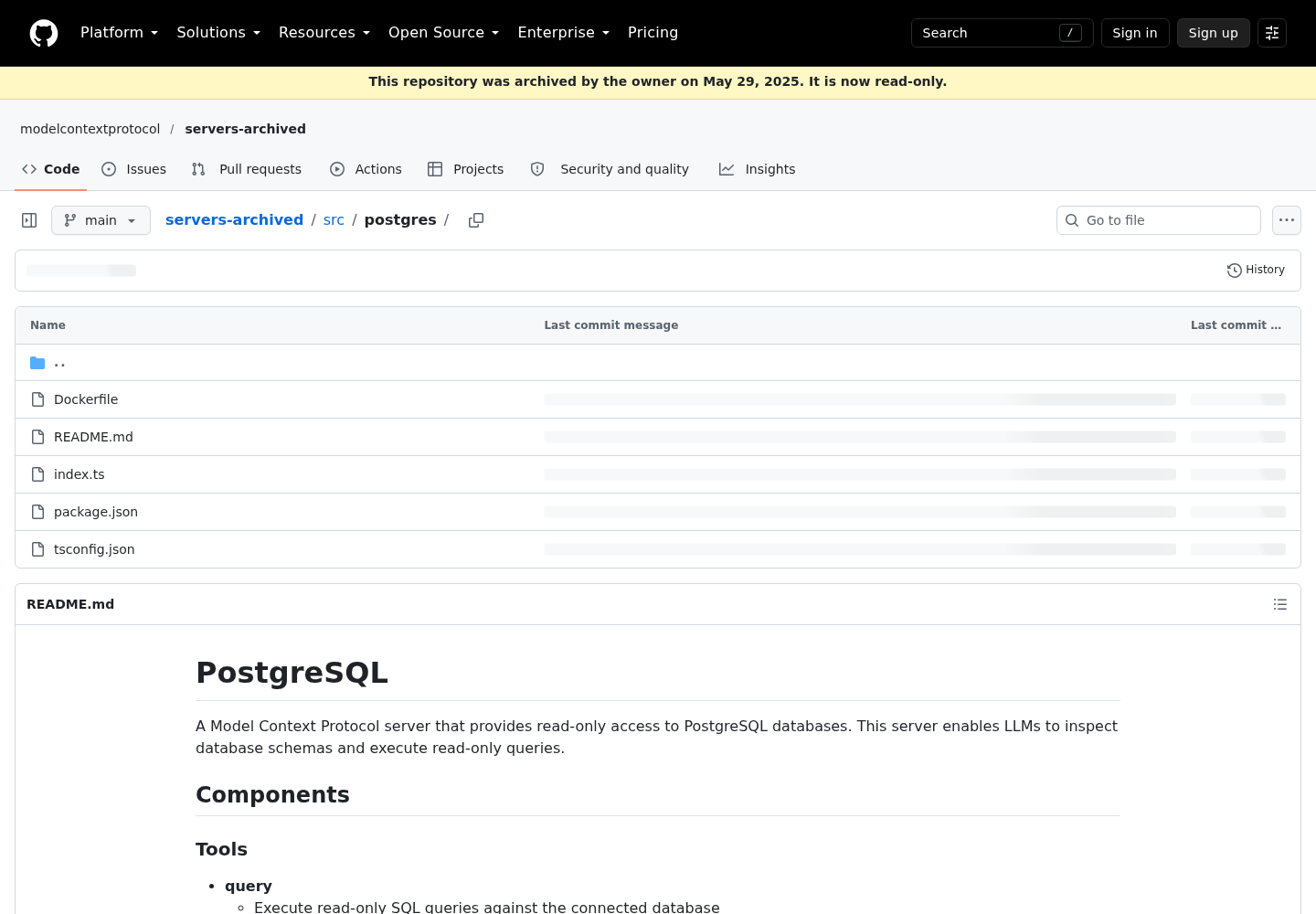
The server’s status matters because people still install it. Per Datadog, @modelcontextprotocol/server-postgres was deprecated on July 10, 2025 and archived. Anthropic fixed the bug in its git repository on May 29, 2025, yet version 0.6.2 on npm and Docker Hub stayed unpatched while drawing about 21,000 weekly npm downloads and 1,000 weekly Docker pulls. The archived README still describes its query tool with the line “All queries are executed within a READ ONLY transaction.” That sentence is accurate. It is not a security boundary.
That shapes everything below. Put the write ban in the database role, where no string the agent sends can lift it, and pick a server that refuses transaction-control statements so session poisoning is off the table too. Either layer alone leaves a gap. Together they cover each other.
Before you start: what this setup needs
- [ ] A Postgres database you administer: a local install, a Docker container, or a cloud development instance. For anything holding customer data, point the agent at a copy rather than the primary.
- [ ] A superuser or the database owner role, so you can create a role and grant privileges.
- [ ]
psqlon your machine, to run the SQL and the probe as the new role. - [ ]
uv(foruvx) or Docker. The server used here, Postgres MCP Pro, ships as a Python package and a Docker image, and its README asks for Python 3.12 or later. - [ ] At least one of Claude Code, Codex or Cursor installed and signed in.
- [ ] A home for the password that is not the repository: a shell profile, a secrets manager or a git-ignored env file.
The worked example uses a database named appdb with application tables in a schema named app, owned by a role named app_owner. Swap in your own names wherever they appear. If your team already branches a database per agent worktree, the Lakebase branching coverage describes that pattern; the role below still applies inside each branch.
Create the agent_ro role and its grants
Run this as a superuser or the database owner. The syntax follows the Postgres GRANT, ALTER ROLE and predefined roles reference pages; the names are illustrative.
-- 1. A login role with no special attributes
CREATE ROLE agent_ro LOGIN;
ALTER ROLE agent_ro WITH NOSUPERUSER NOCREATEDB NOCREATEROLE NOBYPASSRLS CONNECTION LIMIT 5;
-- Set the password interactively so it stays out of history and logs:
--   \password agent_ro

-- 2. Let it reach the database and one schema
GRANT CONNECT ON DATABASE appdb TO agent_ro;
GRANT USAGE ON SCHEMA app TO agent_ro;

-- 3. Read tables and views; read (but never advance) sequences
GRANT SELECT ON ALL TABLES IN SCHEMA app TO agent_ro;
GRANT SELECT ON ALL SEQUENCES IN SCHEMA app TO agent_ro;

-- 4. Session defaults, applied at every new login
ALTER ROLE agent_ro SET default_transaction_read_only = on;
ALTER ROLE agent_ro SET statement_timeout = '15s';
ALTER ROLE agent_ro IN DATABASE appdb SET search_path = app;
Each choice, and why it is there:
- No attributes beyond LOGIN. The ALTER ROLE page lists SUPERUSER, CREATEDB, CREATEROLE, REPLICATION and BYPASSRLS as role attributes; the agent needs none of them. The GRANT page states that superusers can access all objects regardless of privilege settings, so a superuser connection string turns every later step into decoration. NOBYPASSRLS keeps row-level security policies in force.
- A connection limit. Five concurrent sessions is plenty for one developer’s agents and stops a runaway loop from eating the server’s connection slots. If several people share the database, give each person their own role instead of raising the limit; separate roles make the logs readable.
\passwordinstead ofPASSWORD '...'. The ALTER ROLE page warns that a cleartext password in the command can end up in client history or the server log, and points to psql’s\passwordcommand.- CONNECT and USAGE are the doors; SELECT is the only key. Without USAGE on
app, the table grants are unreachable. No INSERT, UPDATE, DELETE, TRUNCATE, TRIGGER, REFERENCES or MAINTAIN appears anywhere. - Sequences get SELECT, not USAGE. The GRANT page explains that table grants do not extend to sequences, and that the sequence USAGE privilege corresponds to
nextval, which advances the sequence. SELECT lets the agent read a sequence without moving it. - No ownership, ever. The GRANT page says the right to drop or alter an object is inherent in its owner and cannot be granted or revoked. If
agent_roowns a table, it can drop it. That is why the troubleshooting table says to grant a table, never to hand it over. - Session defaults are a seatbelt, not the lock. ALTER ROLE makes a value the session default at login, and a default is only a default: a session can override it with
SETor open a read-write transaction, just as Datadog’s stackedSET statement_timeoutchanged a setting. The Postgres MCP Pro README makes the same point: Postgres does not provide a way to place a connection or session into read-only mode. Keepdefault_transaction_read_onlyto catch accidents and the timeout to stop runaway scans. The grants carry the guarantee.
Two decisions remain, and both are worth a minute.
Per-schema grants or pg_read_all_data. The predefined-roles page describes pg_read_all_data as SELECT on all tables, views and sequences plus USAGE on all schemas, and notes it does not bypass row-level security. GRANT pg_read_all_data TO agent_ro; is faster to set up but exposes every schema, including authentication tables you may not want in a model’s context window. Prefer per-schema grants unless the database holds nothing sensitive. Never grant pg_write_all_data, and never grant pg_read_server_files, pg_write_server_files or pg_execute_server_program; the same page warns those can be used to gain superuser-level access.
Tables created later. GRANT ... ON ALL TABLES IN SCHEMA covers tables that exist when you run it. After a migration adds a table, rerun the grant, or set default privileges for the owning role; the GRANT page links to ALTER DEFAULT PRIVILEGES for exactly this.
Optional, for the performance tools: Postgres MCP Pro’s get_top_queries relies on the pg_stat_statements extension, and its health checks read statistics views. If those tools come back empty or denied, GRANT pg_read_all_stats TO agent_ro; is the narrow fix. Skip pg_monitor unless you need all of it: it includes pg_stat_scan_tables, which the docs warn can take ACCESS SHARE locks on tables for a long time.
Finish by checking the result while connected as agent_ro itself:
-- psql "postgresql://agent_ro@localhost:5432/appdb"
SELECT current_user;                     -- expected: agent_ro
SHOW default_transaction_read_only;      -- expected: on
SHOW statement_timeout;                  -- expected: 15s
SELECT count(*) FROM pg_class
 WHERE relowner = 'agent_ro'::regrole;   -- expected: 0
Pick a Postgres MCP server that refuses stacked statements
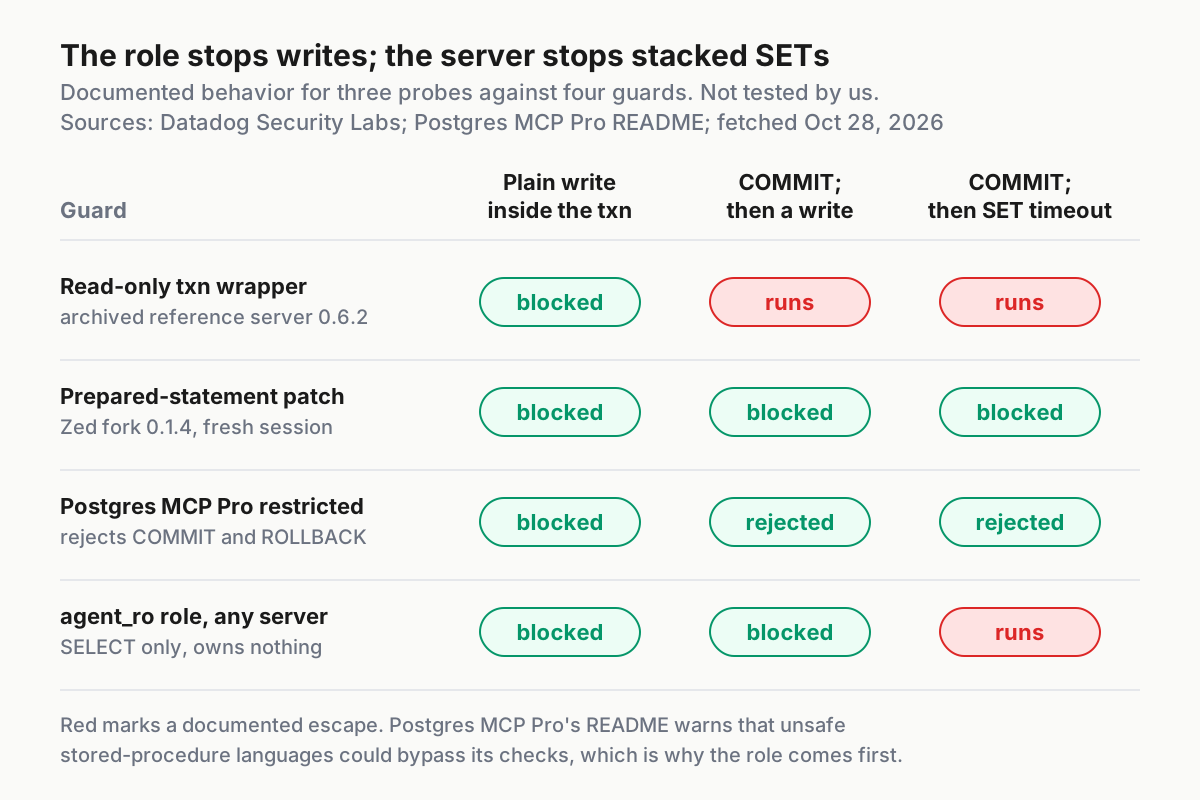
The role stops writes whichever server you run. The server still decides whether session settings can be poisoned and how much a server bug can attempt before the role catches it. The table uses only behavior each project or Datadog documents.
| Option | Documented behavior | Verdict |
|---|---|---|
Archived reference server (@modelcontextprotocol/server-postgres 0.6.2, mcp/postgres image) |
Read-only transaction wrapper; a stacked COMMIT escapes it; deprecated and unpatched on npm and Docker Hub |
Remove it from every config |
Zed fork (@zeddotdev/postgres-context-server 0.1.4) |
Prepared statements, which reject multiple statements, plus a destroyed session after each call | Acceptable stopgap if you cannot migrate yet |
Postgres MCP Pro with --access-mode=restricted |
Read-only transactions; parses SQL with pglast and rejects any COMMIT or ROLLBACK; limits execution time |
Use this, connected as agent_ro |
Postgres MCP Pro with --access-mode=unrestricted |
Full read and write access to data and schema; the mode its sample configs show | Never with this guide |
| A hosted provider’s own MCP server | Provider management APIs; the Postgres MCP Pro README lists Supabase, Neon and Nile examples | Consider when the database lives there; outside this guide |
The worked example uses Postgres MCP Pro in restricted mode, and two README details deserve attention. Every sample config passes --access-mode=unrestricted, so a copied snippet hands the agent write access; the README tells you to swap in --access-mode=restricted. And the project’s own caveat: if unsafe stored-procedure languages are enabled on the database, its read-only protections could be circumvented. That caveat is the clearest reason to build the role first.
Its tools fit the job: list_schemas, list_objects, get_object_details, execute_sql, explain_query, get_top_queries, analyze_workload_indexes, analyze_query_indexes and analyze_db_health. With agent_ro underneath, every one of them can only read.
The decision, in order:
- If any config on your machine names
@modelcontextprotocol/server-postgresormcp/postgres, remove it now, whatever else you choose. - If you can run Python 3.12 or Docker, use Postgres MCP Pro with
--access-mode=restricted. - If a tool you depend on only speaks the old server’s interface, switch to the Zed fork until you can migrate.
- If the database is hosted by a provider with its own MCP server, compare that option on the agent access ladder before running your own.
- Whatever you choose, connect it as
agent_ro, never asapp_owneror a superuser.
Step 1 matters because the old package still looks official. Its home is now an archived, read-only repository:
The MCP server inventory ritual is a practical way to find stray old entries from step 1 across every machine you use.
Build the connection string for local, Docker and cloud
All three clients pass the same URI to the server through DATABASE_URI, the variable Postgres MCP Pro reads. Keep the URI in an environment variable named PG_AGENT_URI, never in a committed file. Every value below is illustrative.
| Where Postgres runs | Illustrative URI | Notes |
|---|---|---|
Local install, server via uvx |
postgresql://agent_ro:PASSWORD@localhost:5432/appdb |
Same host, default port |
| On the host, server in the Postgres MCP Pro Docker image | postgresql://agent_ro:PASSWORD@localhost:5432/appdb |
The README says the image remaps localhost to host.docker.internal on macOS and Windows, and to an address such as 172.17.0.1 on Linux |
| On the host, another containerized server | postgresql://agent_ro:PASSWORD@host.docker.internal:5432/appdb |
The archived reference README gives this rule for Docker on macOS |
| Cloud development instance or copy | postgresql://agent_ro:PASSWORD@db.example.com:5432/appdb?sslmode=require |
sslmode is a libpq parameter; Postgres MCP Pro connects through psycopg3, which uses libpq. Use your provider’s required mode |
- Percent-encode any
@,:or/in the password, or generate a password without them. - Export the variable in the shell you start agents from:
export PG_AGENT_URI='postgresql://agent_ro:PASSWORD@localhost:5432/appdb'. - Test it before involving any agent:
psql "$PG_AGENT_URI" -c 'SELECT current_user;'should printagent_ro. If it prints anything else, stop and fix the URI.
The Postgres MCP Pro README is candid that this is the weak spot: few MCP clients store server configuration securely, and credentials passed through tool calls land in chat history. A password that only opens a read-only role on a copy of the data limits what a leaked config file is worth.
Connect Claude Code
Claude Code’s MCP reference adds a local stdio server with claude mcp add, where -- separates Claude’s own options from the command that starts the server. Its own PostgreSQL example tells you to put a read-only database user in the connection string so Claude’s queries cannot modify data.
# Local scope (the default): stored in ~/.claude.json for this project, never in the repo
claude mcp add --env DATABASE_URI="$PG_AGENT_URI" --transport stdio postgres \
  -- uvx postgres-mcp --access-mode=restricted
For a definition the whole team shares, commit a project .mcp.json that references the variable instead of containing it:
{
  "mcpServers": {
    "postgres": {
      "type": "stdio",
      "command": "uvx",
      "args": ["postgres-mcp", "--access-mode=restricted"],
      "env": { "DATABASE_URI": "${PG_AGENT_URI}" },
      "timeout": 30000
    }
  }
}
- Choose the scope. Local scope keeps the entry private to you and out of version control; the docs recommend it for servers with credentials. Project scope writes
.mcp.jsonfor everyone, and Claude Code asks each person to approve it in an interactive session. - Keep
--envaway from the server name. The docs warn that a name placed directly after--envis read as another KEY=value pair, which is why--transport stdiosits between them. - The
timeoutfield is a per-server tool timeout in milliseconds. At 30 seconds it sits above the role’s 15-secondstatement_timeout, so Postgres cancels a slow query before the client gives up. - Run
claude mcp get postgres. Expect the entry with a connected status; a failure shows anIssue:line with the error detail. - Inside a session, run
/mcp. Expectpostgreswith a tool count; Postgres MCP Pro exposes everything as tools. - If
claude mcp listwarns about a missing environment variable,PG_AGENT_URIwas not set in the shell that started Claude Code, and the server received the unexpanded text.
Scope trade-offs are covered in more depth in Claude Code MCP setup and scopes.
Connect Codex
Codex reads MCP servers from config.toml: ~/.codex/config.toml by default, or a project .codex/config.toml in trusted projects only. The Codex CLI, the IDE extension and the ChatGPT desktop app share that file.
[mcp_servers.postgres]
command = "uvx"
args = ["postgres-mcp", "--access-mode=restricted"]
env_vars = ["DATABASE_URI"]          # forwarded from your shell; nothing secret stored here
startup_timeout_sec = 30             # the first uvx run downloads the package
tool_timeout_sec = 60                # stays above the role's statement_timeout
default_tools_approval_mode = "prompt"
enabled_tools = ["list_schemas", "list_objects", "get_object_details",
                 "execute_sql", "explain_query"]
- Export the variable under the name the server reads, because
env_varsforwards by name:export DATABASE_URI="$PG_AGENT_URI". env_varsforwards the value from Codex’s local environment instead of writing it into the file. A[mcp_servers.postgres.env]table would store the literal password, so avoid it.startup_timeout_secdefaults to 10 seconds, which a firstuvxdownload can exceed.tool_timeout_secdefaults to 60.default_tools_approval_mode = "prompt"asks before each tool call while you are still building trust. The docs also listauto,writesandapprove.enabled_toolsis an allow list. Start with the five above and addget_top_queriesoranalyze_db_healthlater if you grant the stats role.- Run
codex mcp listand expectpostgres; inside the Codex TUI,/mcpshows the active servers.
The CLI form, codex mcp add postgres --env DATABASE_URI=... -- uvx postgres-mcp --access-mode=restricted, follows the documented codex mcp add shape but writes the value into config.toml. The env_vars table keeps the secret out of the file.
Connect Cursor
Cursor reads mcp.json from .cursor/mcp.json in a project or ~/.cursor/mcp.json globally, and interpolates ${env:NAME} in command, args, env, url and headers.
{
  "mcpServers": {
    "postgres": {
      "type": "stdio",
      "command": "uvx",
      "args": ["postgres-mcp", "--access-mode=restricted"],
      "env": { "DATABASE_URI": "${env:PG_AGENT_URI}" }
    }
  }
}
- Put it in
~/.cursor/mcp.jsonto make the server available in every project, or.cursor/mcp.jsonwhen only one project should see this database. A project file is safe to commit only because it holds a reference, not the URI. - If Cursor was launched from the dock and cannot see your shell variables, use the stdio-only
envFilefield, for example"envFile": "${workspaceFolder}/.env.agent", and add that file to.gitignore. - Open Customize in the sidebar and confirm
postgresis enabled and lists its tools. - Leave tool approval on. Cursor asks before running MCP tools by default and lets you expand the arguments, which is where you will see the exact SQL the agent wants to run.
- If the server fails to start, open the Output panel and choose MCP Logs to read initialization and connection errors.
Cursor’s own security guidance lines up with this setup: keep secrets in environment variables, run sensitive servers locally over stdio, and give keys the minimum permissions they need.
Run the bypass probe before the agent touches real work
Two layers, two tests. First prove the role directly in psql, so no server logic is involved. Then prove the server through the agent. Run the role probe against a writable development copy: a physical read replica refuses read-write transactions on its own, which would hide whether the grants work.
Create a scratch table as the owner:
-- as app_owner or a superuser
CREATE TABLE app.mcp_probe_scratch (id int PRIMARY KEY, note text);
INSERT INTO app.mcp_probe_scratch VALUES (1, 'unchanged');
GRANT SELECT ON app.mcp_probe_scratch TO agent_ro;
Then run the probes. Probes 1 to 3 use psql as agent_ro; probes 4 and 5 go through the agent’s execute_sql tool.
psql "$PG_AGENT_URI" -c "BEGIN READ WRITE; UPDATE app.mcp_probe_scratch SET note = 'changed' WHERE id = 1; COMMIT;"
psql "$PG_AGENT_URI" -c "BEGIN READ WRITE; CREATE TABLE app.mcp_probe (id int); COMMIT;"
psql "$PG_AGENT_URI" -c "COMMIT; UPDATE app.mcp_probe_scratch SET note = 'changed' WHERE id = 1;"
| # | Path | What it tries | Expected observation | If it succeeds |
|---|---|---|---|---|
| 1 | psql as agent_ro |
Overrides the read-only default with BEGIN READ WRITE, then updates a row |
An error saying permission is denied on the table | Stop: look for an UPDATE grant, pg_write_all_data membership or ownership |
| 2 | psql as agent_ro |
Same override, then creates a table in app |
An error saying permission is denied on schema app |
Stop: someone granted CREATE on the schema |
| 3 | psql as agent_ro |
The stacked COMMIT, then an update |
A warning that no transaction is in progress, then an error (read-only or permission denied) | Stop |
| 4 | Agent, execute_sql |
Prompt: run exactly COMMIT; UPDATE app.mcp_probe_scratch SET note = 'changed' WHERE id = 1; |
The client asks for approval; approve it for this test only; Postgres MCP Pro rejects the statement because it contains COMMIT |
Stop: the server is not in restricted mode |
| 5 | Agent, execute_sql |
SELECT note FROM app.mcp_probe_scratch WHERE id = 1 |
Returns unchanged |
The data changed: stop and restore |
Read the results this way. Probes 1 and 2 are decisive for the role: they deliberately switch off the session default, so only the grants stand between the agent and the write. A permission error is the success signal. A read-only error there means you are on a replica or the override did not take, so the probe told you nothing about the grants. Probe 4 tests the server layer, and probe 5 confirms nothing moved.
Any probe that succeeds is a stop-and-revoke event, not something to debug while the agent stays connected:
- Disable the server in every client (the rollback section lists how).
- Run
REVOKE ALL ON ALL TABLES IN SCHEMA app FROM agent_ro;as the owner. - Find the cause: an extra grant, a membership, ownership, or a URI that was never
agent_ro. - Restore the scratch row, rebuild the role from the SQL above, and rerun all five probes.
When everything fails as expected, drop the scratch table with DROP TABLE app.mcp_probe_scratch; as the owner.
First prompts: schema questions and EXPLAIN-based debugging
These prompts exercise the read-only setup on real work and show you which tool each answer came from. Phrase them to name the server so the agent does not reach for a shell instead.
- “Using the postgres tools only, list the schemas, then the tables in
app. Do not attempt any writes.” Expect calls tolist_schemasandlist_objects. Objects outside your grants may be listed in metadata but will refuse reads. - “Describe
app.orders: columns, constraints and indexes.” Expectget_object_details, and an answer you can check against your migration files. - “Which tables reference
app.customers? Answer from foreign-key constraints, not from column names.” This forces the agent to read constraints rather than guess from naming. - “This query is slow:
SELECT ... FROM app.orders JOIN app.customers .... Useexplain_query, tell me which plan node dominates the cost, propose one index, and compare the plan with that index as a hypothetical index.” The README saysexplain_querycan simulate hypothetical indexes, which needs thehypopgextension. Installing an extension is a privileged step you run as the owner withCREATE EXTENSION; the agent cannot and should not. - “Write the migration for that index as a file in the repository. Do not run it.” The agent produces code; your normal migration path applies it. The role turns “do not run it” from a request into a fact.
An EXPLAIN ANALYZE actually executes the statement it measures, so the role’s statement_timeout and Postgres MCP Pro’s execution-time limit are what keep a careless analysis from scanning a large table for minutes.
Troubleshooting the connection and the grants
| Symptom | Likely cause | Fix | Expected after the fix |
|---|---|---|---|
claude mcp get postgres shows a failed status with an Issue: line |
uvx missing from PATH, or the first package download outran startup |
Install uv, or start Claude Code with a longer startup timeout such as MCP_TIMEOUT=30000 claude |
/mcp lists postgres with its tools |
claude mcp list warns about a missing environment variable |
PG_AGENT_URI unset in that shell |
Export it before launching, or add it to your profile | Warning gone; the server connects |
| Codex starts without the postgres tools | The 10-second default startup timeout, or DATABASE_URI not exported |
Raise startup_timeout_sec, export DATABASE_URI, and set required = true so a failed start is loud |
codex mcp list and /mcp show the server |
| Connection refused from a container | The server in Docker dials its own localhost |
Postgres MCP Pro’s image remaps localhost; for other images use host.docker.internal on macOS and Windows or the bridge address on Linux, and make sure Postgres accepts connections from that network |
SELECT current_user through the agent returns agent_ro |
| An error that SSL is required | The cloud instance enforces TLS | Add ?sslmode=require, or your provider’s stricter mode, to the URI |
Connects and answers queries |
| Permission denied on a table the agent needs | The table is outside the grant, often created after it | GRANT SELECT ON app.that_table TO agent_ro; and never ownership or pg_write_all_data |
The agent reads that table; all probes still fail |
| The tool call ends with a client timeout while the query keeps going | The client limit is shorter than statement_timeout |
Keep statement_timeout below the client limit: Codex tool_timeout_sec, the Claude Code timeout field |
Postgres cancels first with a statement-timeout error the agent can read |
Cursor ignores ~/.cursor/mcp.json |
Wrong path, invalid JSON, the same name defined in both files, or no shell variables in a dock-launched app | Validate the JSON, give each definition a distinct name, use envFile, read MCP Logs |
The server appears in Customize with its tools |
| A write probe succeeded | The server runs unrestricted, or the URI names an owner role | Stop and follow the rollback below, then fix the config | Every probe fails as expected |
Roll back cleanly
Rolling back takes a few minutes and leaves nothing behind. Do it when you stop using the setup, when a probe succeeds, or when someone who knew the password leaves.
- Remove the client entries. In Claude Code run
claude mcp remove postgres, adding--scope projector--scope userif you added it there. In Codex delete the[mcp_servers.postgres]table or setenabled = false. In Cursor delete the entry frommcp.jsonor toggle it off in Customize. - Revoke the grants and drop the role as the owner, using the SQL block after this list. Postgres refuses to drop a role that still holds privileges or owns objects, and the error names what is left, which doubles as a final ownership check.
- Rotate credentials. If you dropped the role, its password is dead. If you are keeping the role, run
\password agent_roand update the environment variable everywhere it lives. - Delete
PG_AGENT_URIandDATABASE_URIfrom shell profiles and env files, then confirm the URI never reached git withgit log -p -S 'agent_ro:'. - Drop the scratch table if it still exists.
REVOKE SELECT ON ALL TABLES IN SCHEMA app FROM agent_ro;
REVOKE SELECT ON ALL SEQUENCES IN SCHEMA app FROM agent_ro;
REVOKE USAGE ON SCHEMA app FROM agent_ro;
REVOKE CONNECT ON DATABASE appdb FROM agent_ro;
REVOKE pg_read_all_stats FROM agent_ro;   -- only if you granted it
DROP ROLE agent_ro;
Sign-off: when the agent is trusted
Treat the setup as done only when every box is ticked on the same day, against the same config files.
- [ ] Probes 1 and 2 return permission errors, probe 4 is rejected by the server, and probe 5 returns
unchanged. - [ ] The agent answers the schema and EXPLAIN prompts correctly from tool output.
- [ ]
SELECT count(*) FROM pg_class WHERE relowner = 'agent_ro'::regrole;returns 0. - [ ] Every client config says
--access-mode=restricted, and none names the archived reference server. - [ ]
git grep -n 'agent_ro:'finds nothing in any repository.
The failure signals are just as concrete. If SELECT current_user through the agent returns an owner or superuser, or a connection string appears in a committed file, the setup has failed, whatever the probes said earlier. When several agents and CLIs share a machine, these checks belong in one policy rather than three habits; permission modes as fleet policy covers that next step.
Sources
- johntanzer on X: “A read-only transaction isn’t a safety net” (Oct 27, 2026)
- Datadog Security Labs: MCP vulnerability case study: SQL injection in the Postgres MCP server
- modelcontextprotocol/servers-archived: PostgreSQL server README
- crystaldba/postgres-mcp: Postgres MCP Pro README
- PostgreSQL documentation: Predefined Roles
- PostgreSQL documentation: GRANT
- PostgreSQL documentation: ALTER ROLE
- Claude Code Docs: Connect Claude Code to tools via MCP
- OpenAI: Codex Model Context Protocol
- Cursor Docs: Model Context Protocol (MCP)