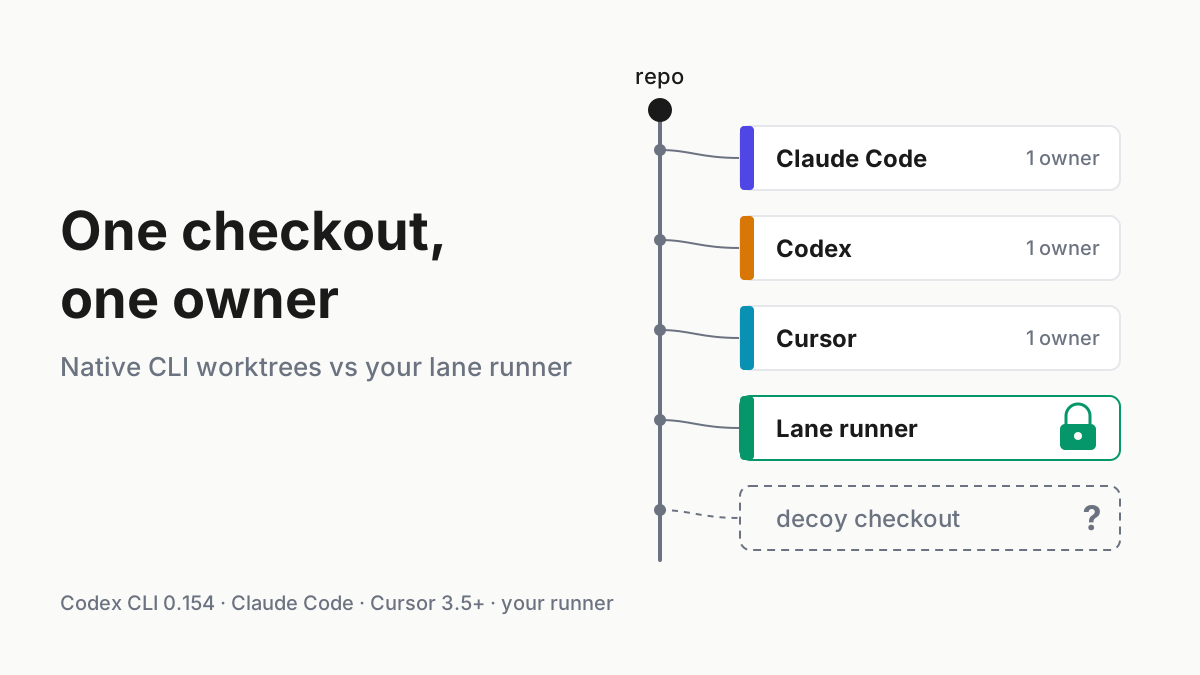
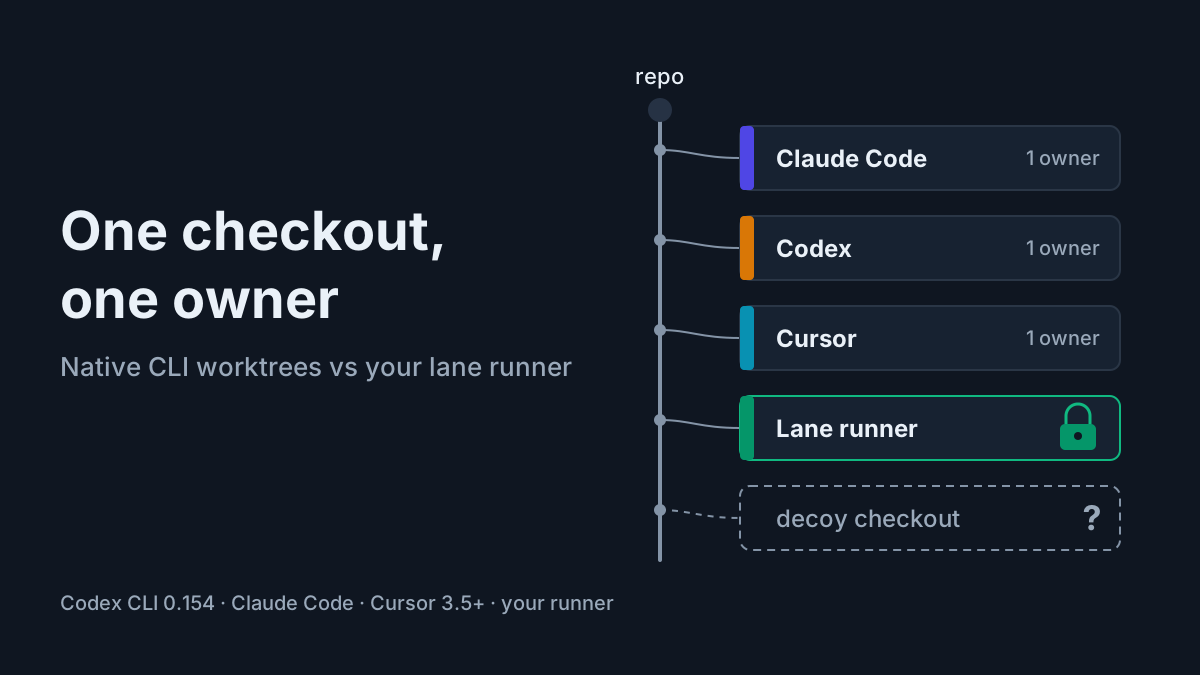
Runs Locally Is Not Stays Local: Audit What Your Agent's Remote Control Stores
Coding agent remote control keeps code on your desk but relays the transcript. Build a per-lane residency table, set off-switches, archive what stays local.

Go deeper. Build your own.
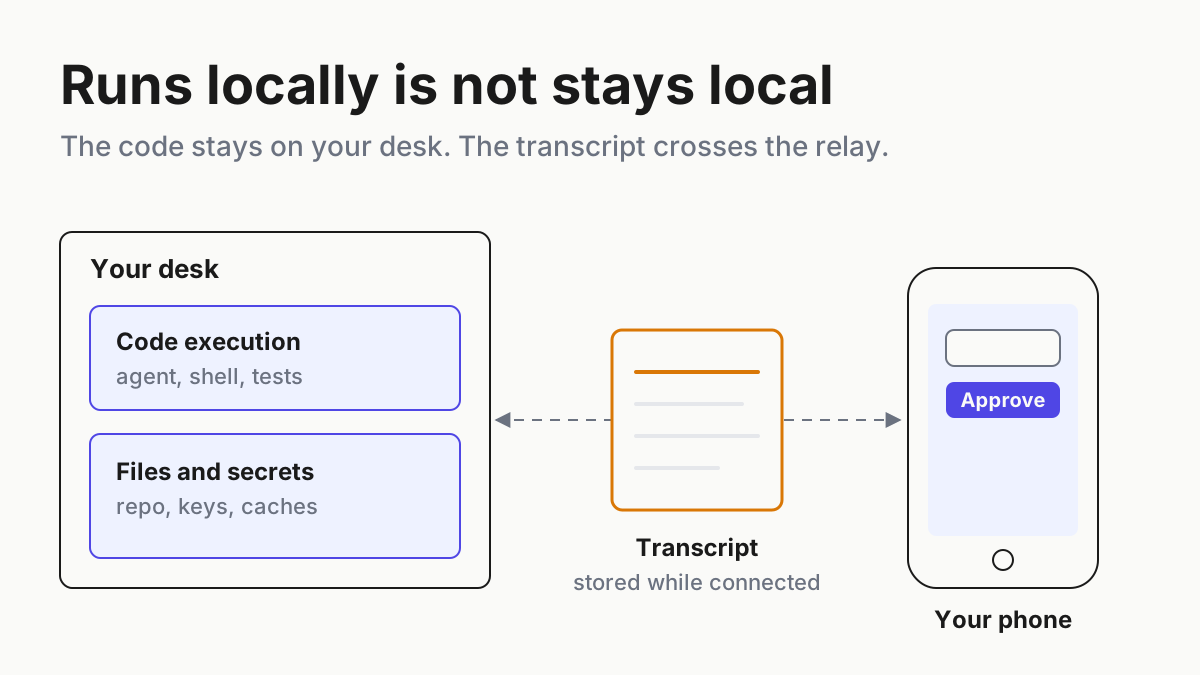
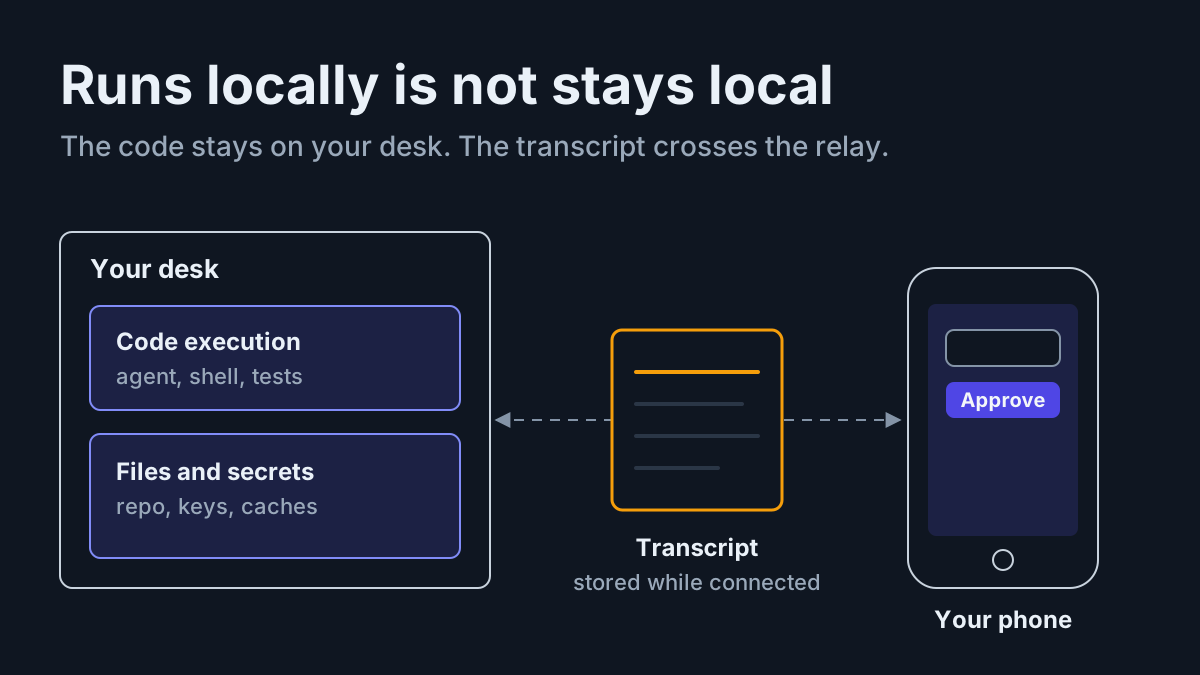
The test suite is running on the workstation under your desk, and the approval for its next shell command came from your phone on the train. That is coding agent remote control doing exactly what it was built to do. The code never left the desk. The conversation that produced the approval did.
Anthropic says so in plain words in its Remote Control docs: your code execution and filesystem access stay on your machine, but “While Remote Control is connected, the session transcript, including your messages, Claude’s responses, and tool activity, is stored on Anthropic servers.” Four other vendors shipped the same feature this year, and most of their docs say less. “The docs do not say” is a finding to write down, not a gap to fill with hope.
By Tuesday you want three things on file. First, a residency table with one row per lane: where code runs, where the transcript lives while remote is on, the retention policy, Zero Data Retention (ZDR) compatibility, who can read it, and the off-switch. Second, a rule by data class that says which repos may relay, and third, a local archive for the sessions that must never cross. After that, the honest answer to “does it sync?” is a list of lanes, not a yes or a no.
Five vendors shipped coding agent remote control between February and September
Anthropic went first. Claude Code v2.1.51 shipped claude remote-control on Feb 24, 2026, and Anthropic’s launch post went out the same day. The Week 34 digest (Aug 17–21) turned every machine running it into a device card in the Claude app’s Code tab, so a phone can now start a session on the desk, and it took Remote Control out of research preview.
The stored transcript “keeps the conversation in sync across your devices and lets the session reconnect after a network drop,” and stored transcripts “are retained under the Data usage policy.” Stored while connected is not deleted on disconnect. A reconnect after compaction or /resume archives the server session, and archived sessions stay findable.
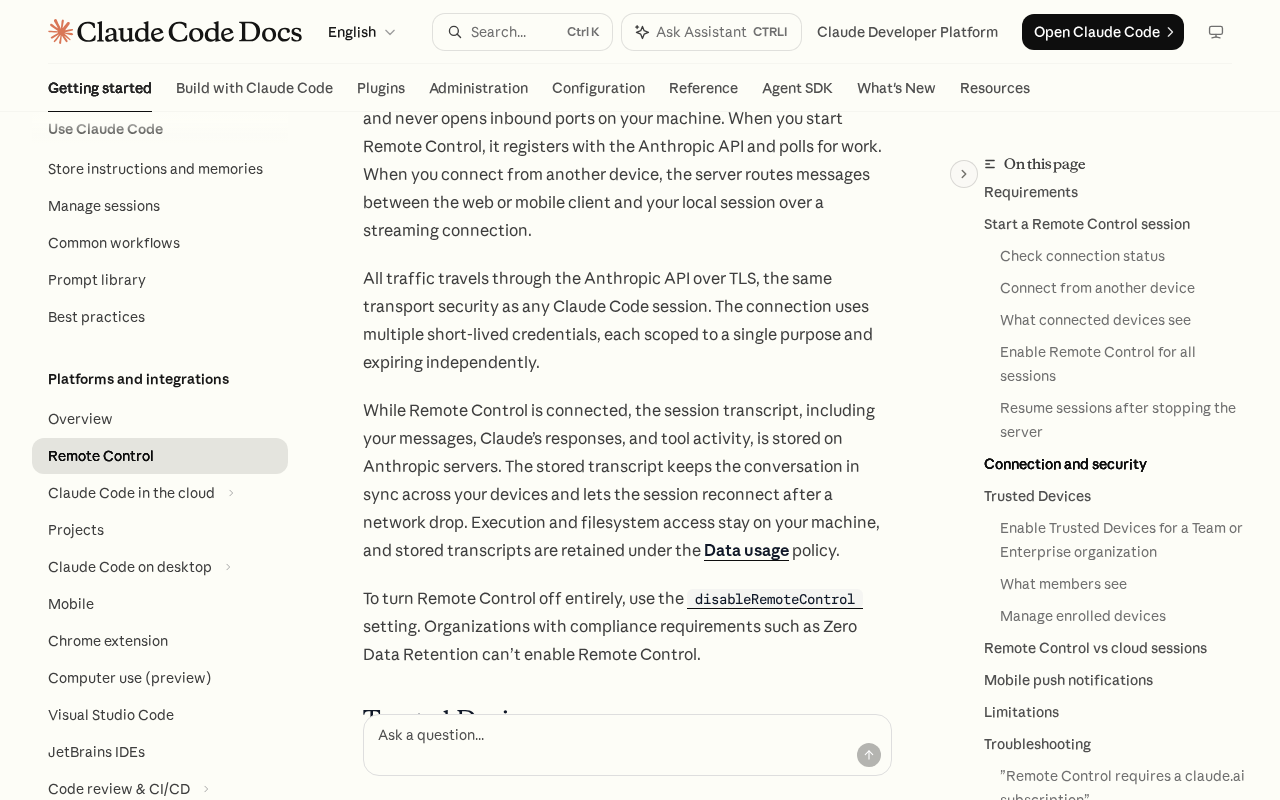 Screenshot: Claude Code Docs, “Continue local sessions from any device with Remote Control - Claude Code Docs” (undated page), captured Sep 28, 2026.
OpenAI followed on May 14 with a preview of Codex inside the ChatGPT app on iOS and Android, paired at first with the Codex Mac app. Today OpenAI’s docs call it Remote: the ChatGPT app on your phone drives the ChatGPT desktop app on a Mac or Windows host, and the remote connections page says remote access “uses the connected host’s projects, chats, files, credentials, permissions, plugins, Computer Use, browser setup, and local tools.” A “secure relay layer” connects your devices. The page says nothing about what that layer stores, for how long, or whether ZDR applies.
Cursor 3.9 (Jun 29) brought an iOS public beta with Remote Control on paid plans, and per Cursor’s docs its design is different in a way that matters for residency: the agent loop moves into Cursor’s cloud while tool calls keep running on your computer. Google’s Antigravity 2.9.1 (Aug 20, announced Aug 21) added Remote Control “from any browser”, rolling out first to Ultra subscribers, and Antigravity CLI 1.2.6 added a session-scoped version on Sep 18 (changelog).
Kimi Code arrived last. Per its changelog, version 0.39.0 (Aug 27) added Remote Control as an experiment, and 0.42.0 (Sep 9) removed the experimental flag. The release note says the feature “is now always on”; read that as “no flag needed”, not as sessions connecting themselves. You still start it on purpose.
Why “it runs locally” stopped answering the residency question
A local CLI used to settle the residency question by itself. Remote control adds a second copy with its own clock. On Anthropic’s data usage page, retention is 30 days for commercial accounts (Team, Enterprise, API); for consumer accounts (Free, Pro, Max) it is 30 days, or five years if the user allows model improvement. The local copy has a clock too: plaintext under ~/.claude/projects/ for 30 days by default.
So a client repo steered from a personal Max seat with model improvement switched on leaves a five-year copy of every message, response and piece of tool activity that crossed while Remote Control was connected. Nobody decided that; it fell out of which account was signed in.
Chatbots suggest; agents act. An agent that acts on a phone’s say-so writes the say-so into the transcript, next to the tool output that justified it. That record is often more sensitive than the diff.
Step 1: Inventory every lane that can relay, including the ones nobody started
List every agent CLI and desktop app on every machine you own, then answer three questions per lane: can this plan use remote control, is it on right now, and what starts it.
- Claude Code. Check
/configfor “Enable Remote Control for all sessions”; afalsein project or local settings turns auto-connect off even over a managedtrue. Then open the claude.ai session list, where remote sessions are titled with the machine’s hostname by default. - Codex. Pairings persist. Signing out of ChatGPT turns Remote Control off but keeps existing pairings, and a pairing unused since June 8, 2026 has to be redone. List the paired phones per host.
- Cursor. Remote Control needs client 3.9.8 or later and Cloud Agents access; on Teams and Enterprise an admin must enable it. Record who did.
- Antigravity. Look for the headless daemon. Per the Remote Control docs,
agy remote-control startregisters “an always-on headless CLI instance” as a systemd user service, a LaunchAgent or a Scheduled Task, and it survives reboots. The interactive tunnel ends with the session; the daemon does not. - Kimi Code. Remote Control needs a paid membership and allows about three devices per account. Its Remote Control guide says the link “is a remote control entry point to this machine — anyone who has it may control your sessions and files.” Find out where those links have been pasted.
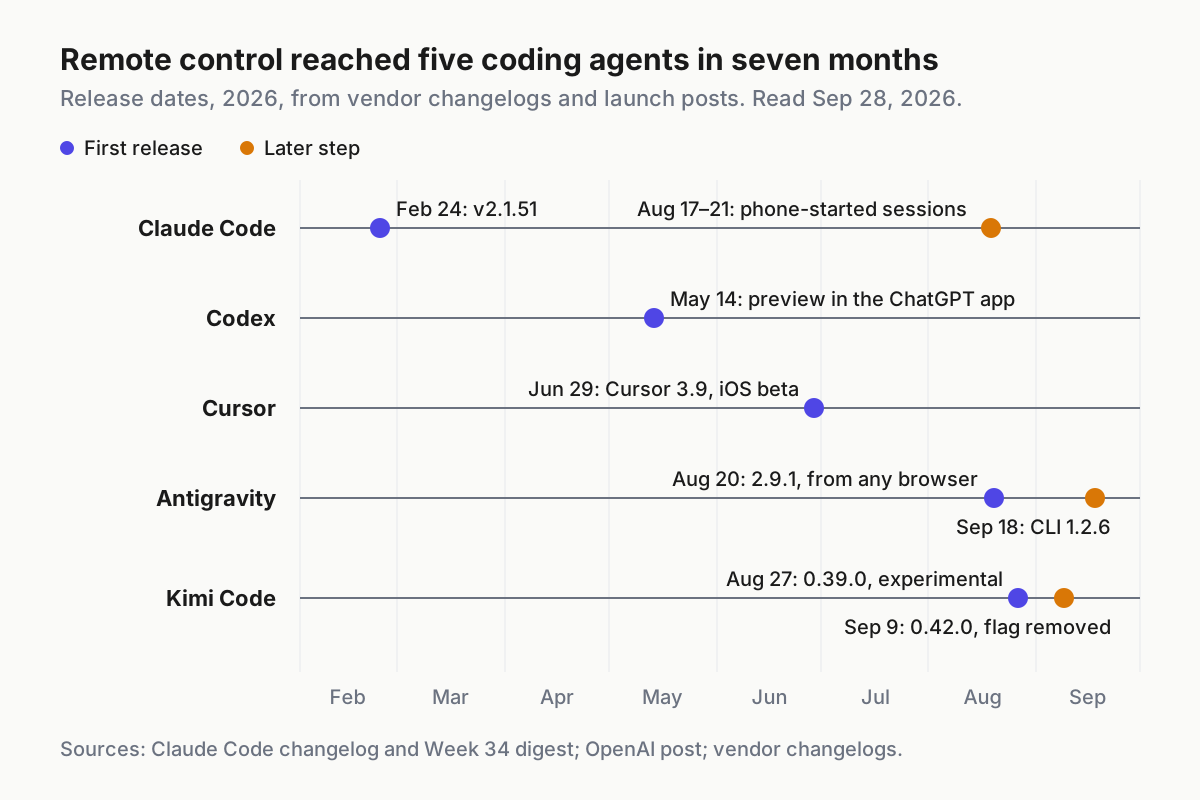
 Eight dated releases from five vendors in seven months, from each vendor’s changelog or launch coverage. An inventory from spring is already stale.
The chart is the argument for a monthly re-audit. Four of the five vendors changed the feature after first release, Codex by moving its host to the ChatGPT desktop app and Antigravity with a CLI variant ten days before this piece.
Step 2: Fill the residency table from the docs, not the launch posts
Launch posts describe the phone; the docs describe the relay, when they do. Start from what each vendor documents today, and write “not documented” wherever a page is silent.
| Vendor pattern | Agent loop runs | What the docs say reaches the vendor | Documented retention | ZDR or privacy mode | Admin gate |
|---|---|---|---|---|---|
| Claude Code Remote Control | Your machine | Transcript: messages, responses, tool activity | Data usage policy: 30 days commercial; 30 days or 5 years consumer | ZDR orgs can’t enable; HIPAA configuration incompatible | Off by default on Team and Enterprise; Owner enables |
| Codex Remote (ChatGPT app to desktop host) | The connected host | Prompts, approvals and follow-ups over a “secure relay layer” | Not documented | Not documented | Workspace admin “may need to enable” |
| Cursor Remote Control | Cursor’s cloud; tools on your machine | “conversation state and model context”, tool results | Cloud Agents history kept indefinitely by default; Enterprise can pick 90 days (Remote Control section silent) | Unavailable when cloud data storage is disabled | Teams and Enterprise admins must enable |
| Antigravity Remote Control | Your machine, over a reverse tunnel | Not documented | Not documented | Not documented | Account or organization policy flag |
| Kimi Code Remote Control | Your machine | Session sync “Via the Kimi service” | Not documented | Not documented | Paid membership; no admin controls documented |
Cursor is the row people misfile. Its docs are candid that “The agent loop moves to the cloud while its tools keep running on your machine,” and that “Only tool results and the context the model needs cross to Cursor.” Your repository, secrets and build caches stay local. The reasoning about them does not.
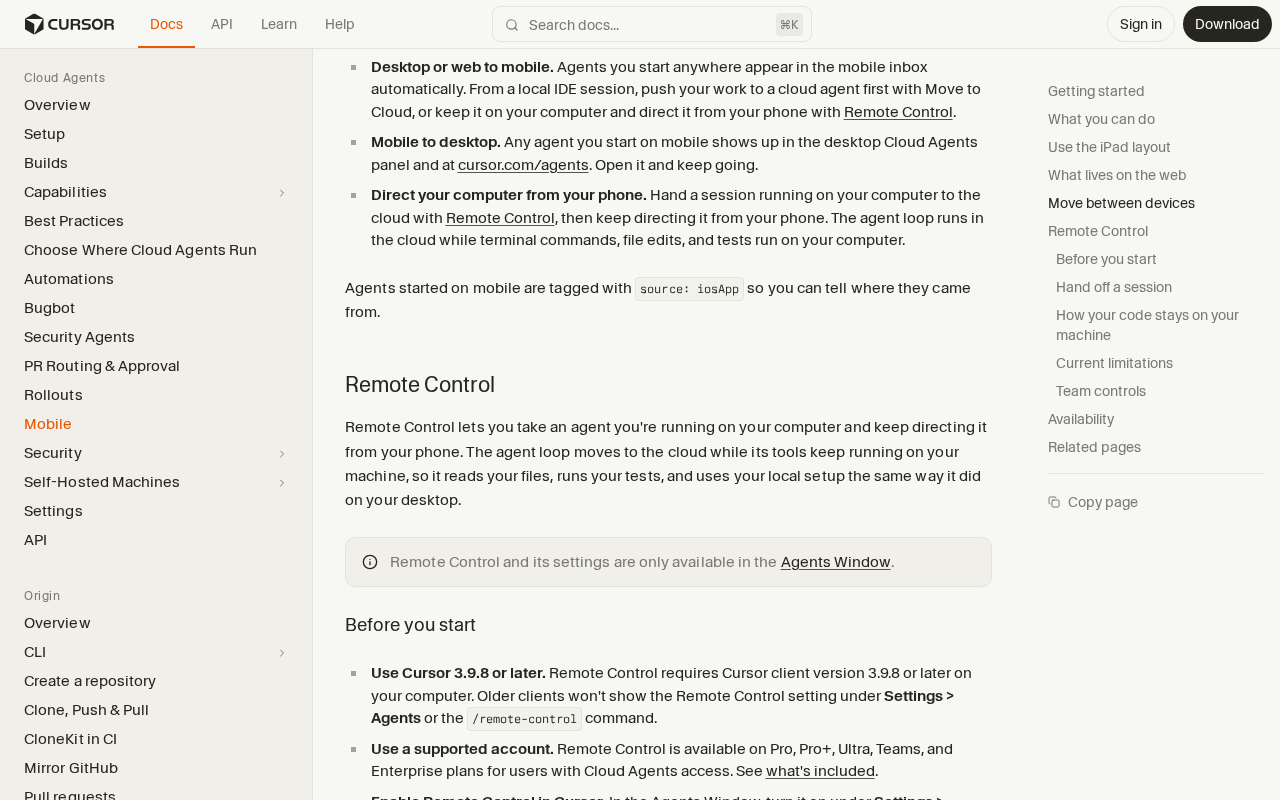 Screenshot: Cursor Docs, “Cursor for iOS | Cursor Docs” (undated page), captured Sep 28, 2026.
Cursor’s retention line comes from its Cloud Agents security page: “Conversation history is kept indefinitely by default.” The Remote Control section names no period of its own, so treat the Cloud Agents rule as the likely one and mark it as an inference in your table.
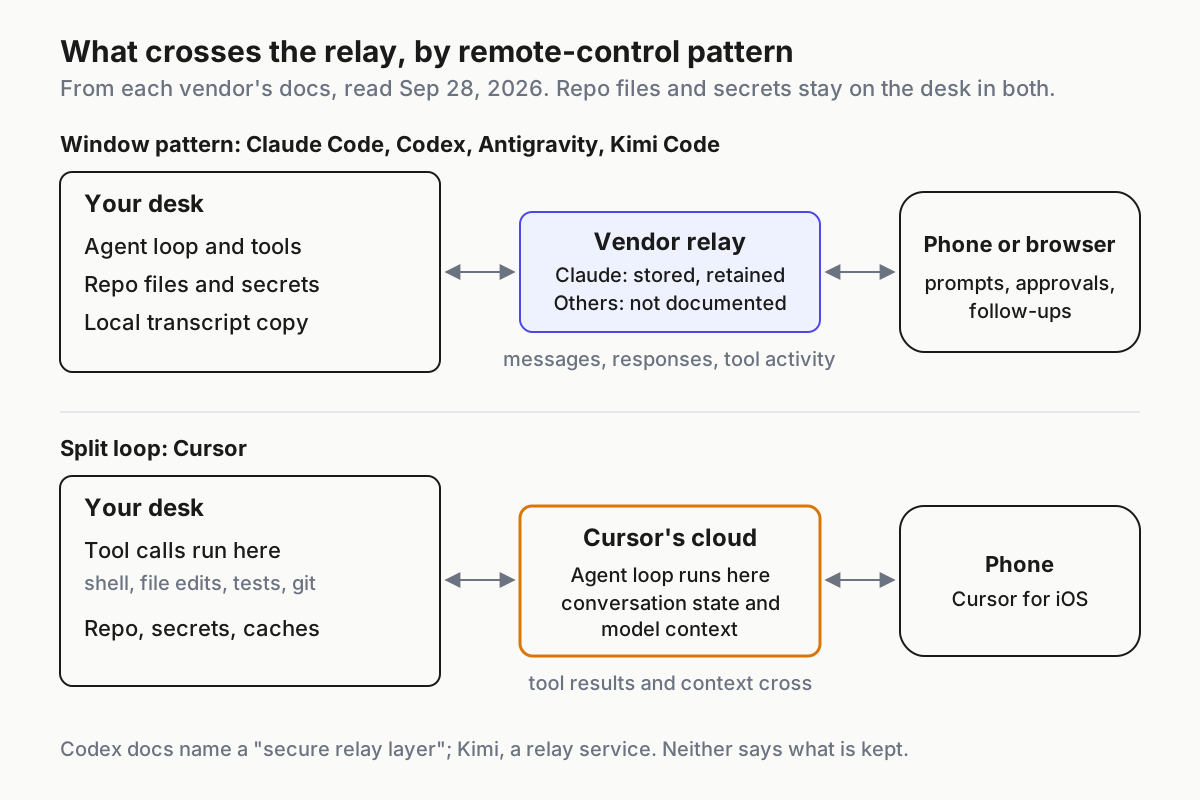
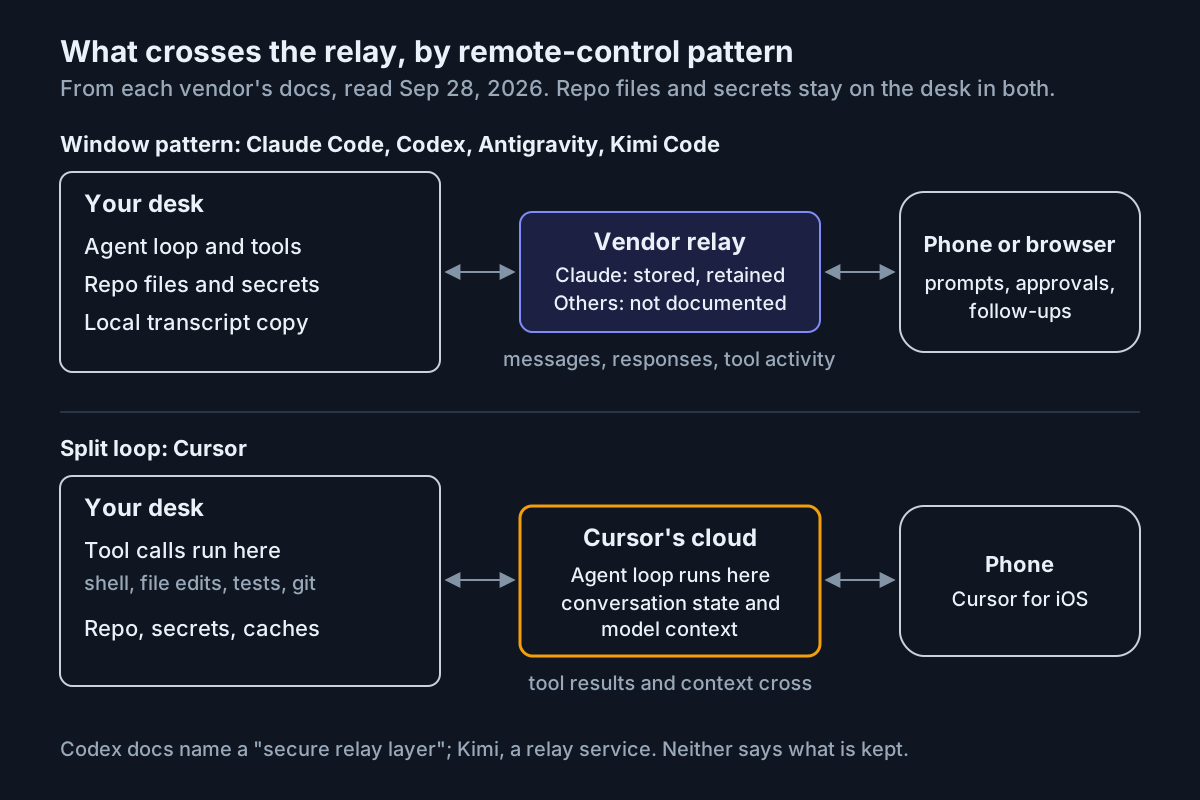 Two patterns. In both, the files stay home. What crosses is the conversation, and in the split loop, the thinking too.
Now write your own rows. One lane is one tool on one seat on one class of repo, because the same CLI on a Max seat and on an Enterprise seat has different retention. These example rows use documented values only.
| Lane (example) | Where code runs | Transcript while remote is on | Retention policy | ZDR-compatible | Who can read it | Off-switch |
|---|---|---|---|---|---|---|
| Claude Code, client repo, Enterprise org under ZDR | Desk | Nowhere: ZDR orgs can’t enable Remote Control | None created | Yes, because it stays off | Nobody off the desk | Org toggle off; managed disableRemoteControl |
| Claude Code, internal tools, Max seat | Desk | Anthropic servers | 30 days, or 5 years with model improvement allowed | No | Your signed-in devices; kept under Anthropic’s data usage policy | Managed disableRemoteControl; repo remoteControlAtStartup: false |
| Codex, desktop host, ChatGPT workspace | The connected host | OpenAI’s relay; storage not documented | The docs do not say | The docs do not say | Your authorized ChatGPT devices | Admin enablement; sign out (pairings survive) |
| Cursor, Teams seat | Tools on desk; loop in Cursor’s cloud | Cursor’s cloud | Indefinite by default (inferred from Cloud Agents) | Unavailable with cloud data storage off | Your Cursor account | Admin enablement; the privacy setting |
| Antigravity CLI, headless daemon | Desk | The docs do not say | The docs do not say | The docs do not say | Your Google Account’s sessions | Org policy flag; remove the OS service |
Kimi Code, started with kimi rc |
Desk | “Via the Kimi service” | The docs do not say | The docs do not say | Anyone holding the link | Don’t start it; revocation UI not final |
Codex, Antigravity and Kimi leave most of their columns at “the docs do not say”. That is the finding: a lane whose relay storage is undocumented can’t carry a repo whose contract names a retention period, however good the product is.
Step 3: Write the rule by data class, then map every repo to a class
The table describes the lanes. The rule decides what may cross them, and it has to answer three questions: which repos may run with remote control on, which lanes get it switched off by managed setting, and where the sessions that must stay local are archived.
| Data class | Remote control | How it is enforced | Where sessions are archived |
|---|---|---|---|
| Regulated: ZDR, HIPAA or a contractual no-retention clause | Never, on any lane | Managed disableRemoteControl on every device that clones the repo; vendor org toggles off; lanes with undocumented relays excluded |
Local archive on an encrypted disk, on the client’s retention clock |
| Client confidential, no retention clause | Only on lanes with documented commercial retention, started by hand | Checked-in remoteControlAtStartup: false; never from a consumer seat |
Local archive; a note in the table for each relayed session |
| Internal | Documented lanes; consumer seats only with model improvement off | Owner enables per seat; monthly inventory | Local archive |
| Open source and scratch | Any lane | Nothing beyond the inventory | Optional |
The second row is where the arguments happen. A 30-day commercial retention period is a documented fact you can put in a contract; an undocumented relay is not, even if it is probably fine, and no security questionnaire accepts “probably”.
Keep the archive out of any folder a sync client watches. An archive inside a synced folder is a relay with a different logo.
Step 4: Switch it off per device and per repo, and know what each switch misses
Below the org toggle, Anthropic documents two switches with different reach. disableRemoteControl turns Remote Control off entirely; the settings reference says to “Place it in managed settings for per-device MDM enforcement,” and it applies independently of the organization-wide toggle. remoteControlAtStartup: false, checked into a repository, turns auto-connect off for that repo. A checked-in true is ignored, so a repo can opt out but never opt in.
Both keys are Booleans in the settings reference, and the two minimal files below follow its examples; the comments are ours.
// managed settings, pushed by MDM to every device in the regulated class
{
  "disableRemoteControl": true
}

// project settings, checked into the client-confidential repo
{
  "remoteControlAtStartup": false
}
Neither switch is a boundary on its own. The managed setting covers devices you manage and nothing else, so a personal laptop that clones a regulated repo is outside it; the wall behind the setting is repository access, and the org toggle for seats you administer. The repo setting only stops auto-connect; anyone can still start a session by hand.
The other vendors document no managed per-device setting, so their off-switches are coarser:
- Codex: in a ChatGPT workspace, your admin may need to enable Remote Control before any phone can connect. On a solo seat, signing out turns it off but leaves the pairings, so remove them too.
- Cursor: admins enable it on Teams and Enterprise, and it is unavailable when privacy settings disable cloud data storage. That privacy setting is the strongest switch Cursor documents.
- Antigravity: an account or organization policy flag, plus removing the daemon’s OS service wherever Step 1 found one.
- Kimi Code: nothing documented beyond not starting it. Treat every Remote Control link as a credential until the revocation UI ships.
Step 5: Archive the sessions that must stay local, before their local clock runs out
Switching the relay off solves half the problem. The regulated class still produces sessions that must stay searchable and resumable, then get deleted on the client’s schedule rather than a vendor’s. Claude Code’s local copy lasts 30 days by default, and every other CLI keeps its own format in its own folder.
Pick one archive location per machine, outside every synced folder, on an encrypted disk, and copy each lane’s session files into it on a schedule. Keeping a local-first archive of agent sessions covers the mechanics; the residency table tells you which lanes feed it.
This is where our own product fits, and the only place in this piece we’ll name it. Automater Lite is a free desktop tray companion for Windows, macOS and Linux. It reads 45 session formats and pulls the AI CLI and desktop sessions on your machine into one searchable local library, with one-click resume on the 11 CLIs that support it. Sessions stay on your machine.
The trade-off is plain: Lite has no cloud sync, no mobile app and no web app, so it isn’t the thing on your phone. For the regulated class, that absence is the feature. The Lite walkthrough shows the library.
Automater Lite is free on automater.ai; PRO is $15 first year, then $50/year.
Step 6: Answer “does it sync?” with a lane list, and re-audit monthly
When a client asks whether your agents sync, read them the table. A good answer sounds like this: “Claude Code on our internal repos relays the transcript to Anthropic while Remote Control is connected, kept 30 days on our Team plan. Codex relays through OpenAI, whose docs don’t say what is stored, so it never touches your repo. Your repo’s devices carry a managed setting that disables remote control, and its sessions are archived on the machine.” That is longer than “no”. It is also true, which “no” usually isn’t.
Then keep it true. Once a month:
- Re-run the Step 1 inventory on every machine, including the service list for daemons.
- Search each vendor’s session list for your regulated machines’ hostnames. Any hit is a relayed session the rule forbids.
- Re-read each vendor’s remote-control page and changelog, and diff your table against them.
- Confirm the managed setting is present on every device in the regulated class, and that the org toggles are where you left them.
- Revoke pairings and links for phones and people who have left.
The admin toggles in item 4 belong in the same sweep as every other vendor default; snapshotting agent admin toggles before they flip is the sibling runbook. And residency is only half of remote control. The other half is what a phone may approve once it is connected, which is the remote-approval policy.
Coding agent remote control failure modes, and the signal for each
The daemon nobody remembers starting. Antigravity’s headless instance registers as an OS service, and on Linux it starts at boot without anyone logging in. Signal: a systemd user unit, LaunchAgent or Scheduled Task you can’t attribute. Fix: remove it from regulated machines, and give it a row wherever it stays.
“Disconnected” read as “deleted”. Signal: a retention cell that reads “until disconnect”, or an old session still findable under archived sessions. Fix: put the data usage policy’s clock in the retention column, not the connection time.
The wrong seat on the right repo. The five-year consumer clock applied to client code, or a developer in a ZDR org signing in with a personal account to get remote control back. Signal: a regulated machine’s hostname in a personal account’s session list. Fix: map seats to data classes in the table, and let the managed setting catch the rest; it applies per device, whichever account signs in.
The link in the ticket. A Kimi Remote Control link pasted into a ticket is a control surface for that machine, not a status page. Signal: link strings in chat exports or ticket history. Fix: stop Remote Control on that machine, treat the link as leaked until Kimi ships its revocation UI, and add remote-control links to your secret-scanning patterns.
Residency is a property of the fleet, not of any one vendor’s toggle
Every control above lives in a different console. Anthropic’s org toggle knows nothing about Cursor’s dashboard, and neither knows that the same repo is open in both. The only place the whole answer exists is the table on your desk, and keeping it current is operating-layer work: the inventory, the rule, the switches, the archive and the monthly diff. That layer is what a multi-agent command center is once you strip the dashboard away.
It also settles an old argument. A hybrid laptop-and-cloud fleet was never about syncing everything; it was about choosing what crosses. The model calls themselves carry their own retention column, covered in zero retention versus agent memory. Remote control adds a third copy; write it down, per lane, before the next phone does.
FAQ
Does Claude Code Remote Control upload my code?
Not as a repository. Anthropic’s docs say code execution and filesystem access stay on your machine. While Remote Control is connected, the session transcript, meaning your messages, Claude’s responses and tool activity, is stored on Anthropic servers and retained under its data usage policy, not deleted when you disconnect.
Can I use coding agent remote control under Zero Data Retention?
Not with Claude Code: Anthropic says organizations with compliance requirements such as Zero Data Retention can’t enable Remote Control. OpenAI, Antigravity and Kimi don’t document ZDR for their relays, and Cursor’s Remote Control is unavailable when privacy settings disable cloud data storage. Treat undocumented as no until the vendor says otherwise.
How do I turn off remote control across a whole fleet?
For Claude Code, push disableRemoteControl in managed settings to every device through MDM; it works independently of the organization toggle. Check remoteControlAtStartup: false into repos that must not auto-connect. For other vendors, use admin enablement or policy flags, remove Antigravity’s headless service, and re-audit monthly.
Sources
- Claude Code Docs: Remote Control — transcript storage, ZDR, org default
- Claude Code Docs: Data usage — retention periods
- Claude Code Docs: settings reference —
disableRemoteControl - Codex docs: Remote connections — relay, host, admin enablement
- Cursor Docs: Cursor for iOS — Remote Control data flow
- Cursor Docs: Cloud Agents security — history retention
- Antigravity changelog — 2.9.1 (Aug 20) and CLI 1.2.6 (Sep 18)
- Antigravity Docs: Remote Control — tunnel and headless daemon
- Kimi Code changelog — 0.39.0 and 0.42.0
- Kimi Code Docs: Remote Control — relay, limits, link warning