Hybrid Agent Fleets: Laptop + Cloud VM Without the Sync-Everything Fantasy
Run a hybrid agent fleet across laptop, cloud VM, and a vendor's computer: per-host identity, transcript provenance, a kill switch per host, git-only hand-offs.

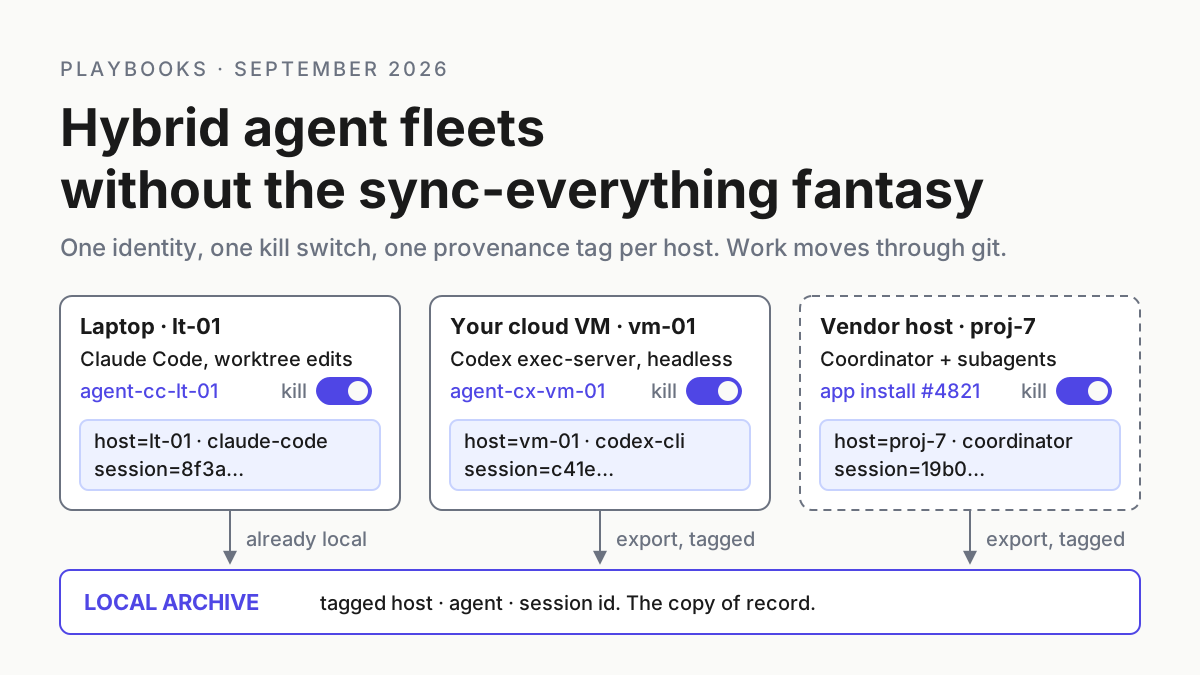
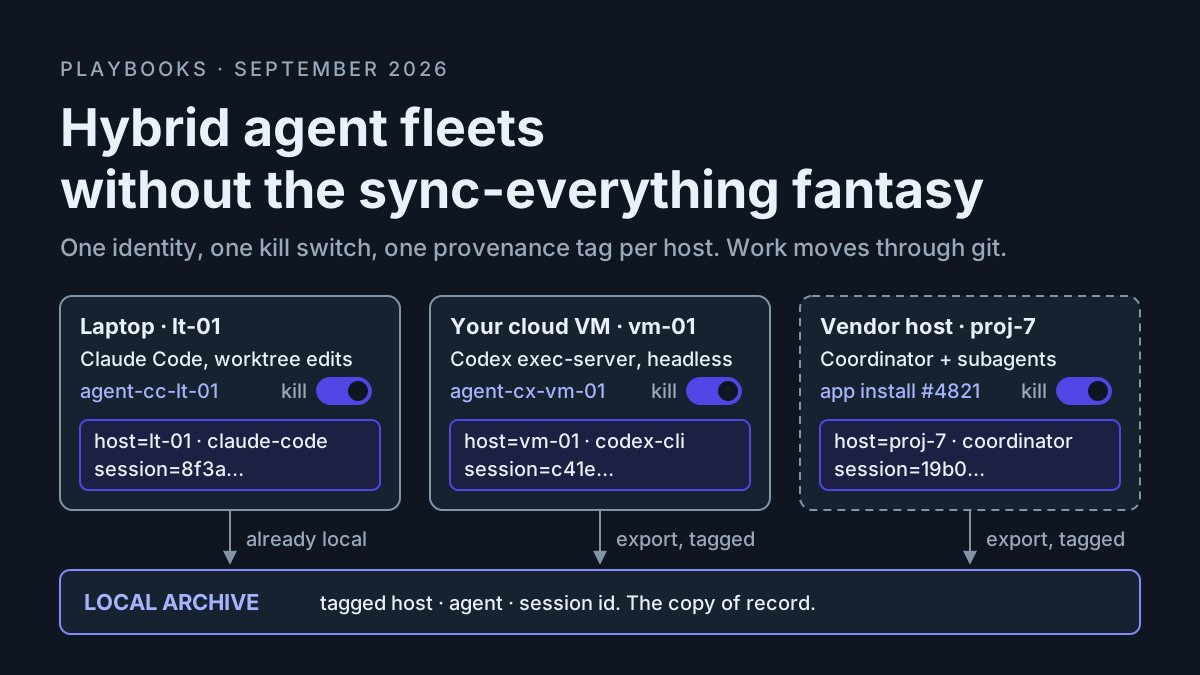
At 9:40 a.m. the fleet on your desk is not on your desk. One Claude Code session is editing a worktree on the laptop. A Codex job is running headless on a cloud VM you rented because the laptop cannot hold six containers and a browser. And a coordinator you did not start this morning is still working a migration on a computer a vendor owns, because you told it to on Friday and closing the lid did not stop it. Three hosts, three credentials, three places a transcript can land, one meter that is yours.
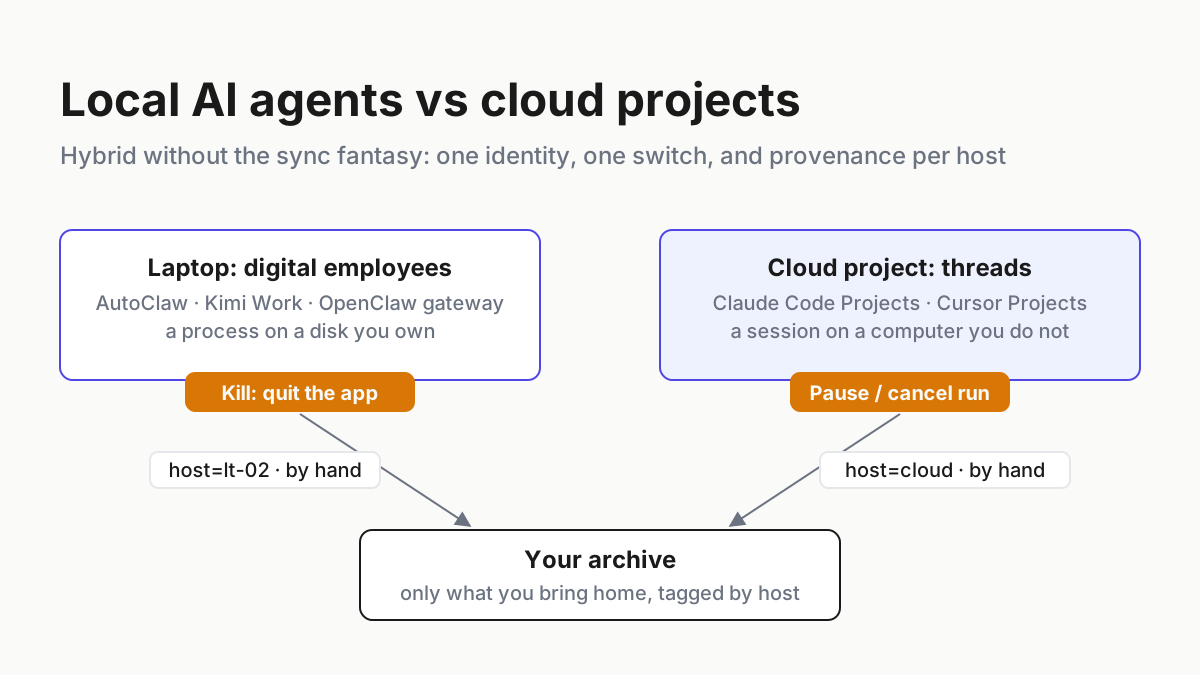
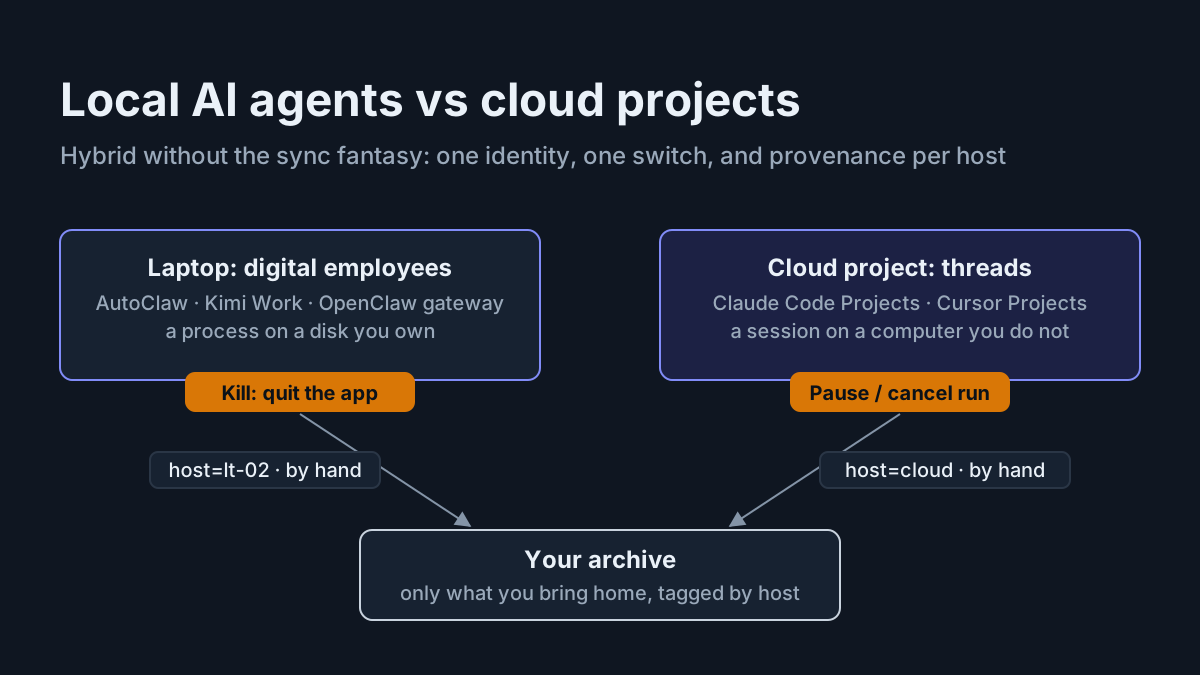
That is a hybrid agent fleet, and most operators are running one without having named it. The fantasy version is that a vendor syncs everything: code, context, secrets, transcripts, approvals, all flowing into one workspace you trust by default. The disciplined version is smaller and duller. Per-host identity. Provenance on every transcript. A kill switch per host. An inventory you actually keep. One rule for moving work between laptop and VM that does not hand the whole desk to anyone.
This is the runbook for the disciplined version. It works with Cursor Projects, with the OpenAI Agents API, or with a plain VM, a CLI, git, and a text file. Where Automater Lite fits, and where it does not, is stated near the end.
Three launches in eight days put the same agent on three machines
On September 2, 2026, Cursor’s changelog added “Self-hosted machines,” which “let you keep tool execution entirely in your own network. Your codebase, build outputs, and secrets all stay on internal machines running in your infrastructure, while the agent handles tool calls locally” (Cursor changelog). Read it as topology: the model is theirs, the machine is yours, the boundary is the tool call.
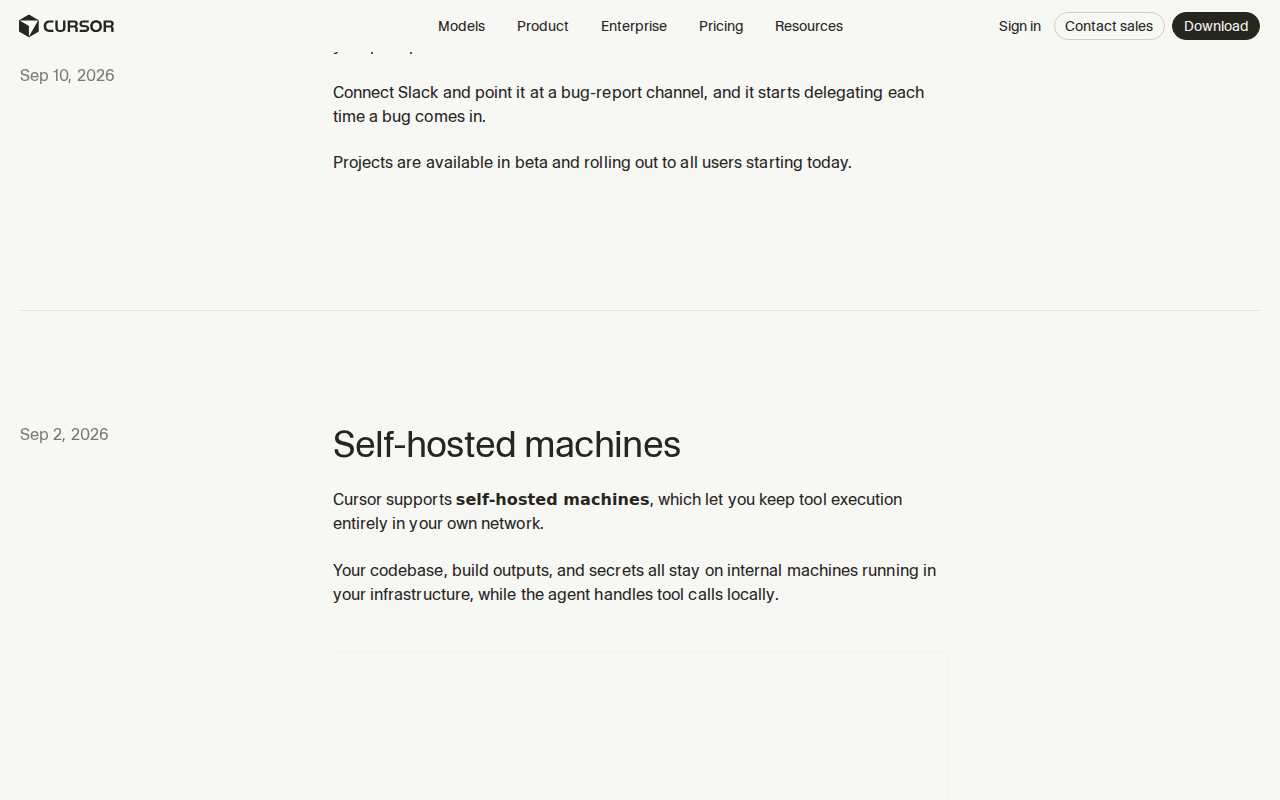 Screenshot: Cursor changelog, “Self-hosted machines” (Sep 2, 2026), captured Sep 13, 2026.
On September 10, the same changelog announced Cursor Projects, in beta and “rolling out to all users starting today.” The topology takes two sentences: “A Project runs on its own computer in the cloud, so closing your laptop doesn’t stop it. When something needs testing on your machine, the coordinator spins up a local agent to run it there.” And: “Each Project maintains a set of files that sync across every cloud and local machine its agents use” (Cursor changelog; Introducing Projects). The changelog says nothing about permissions, limits, or pricing, so neither does this article.
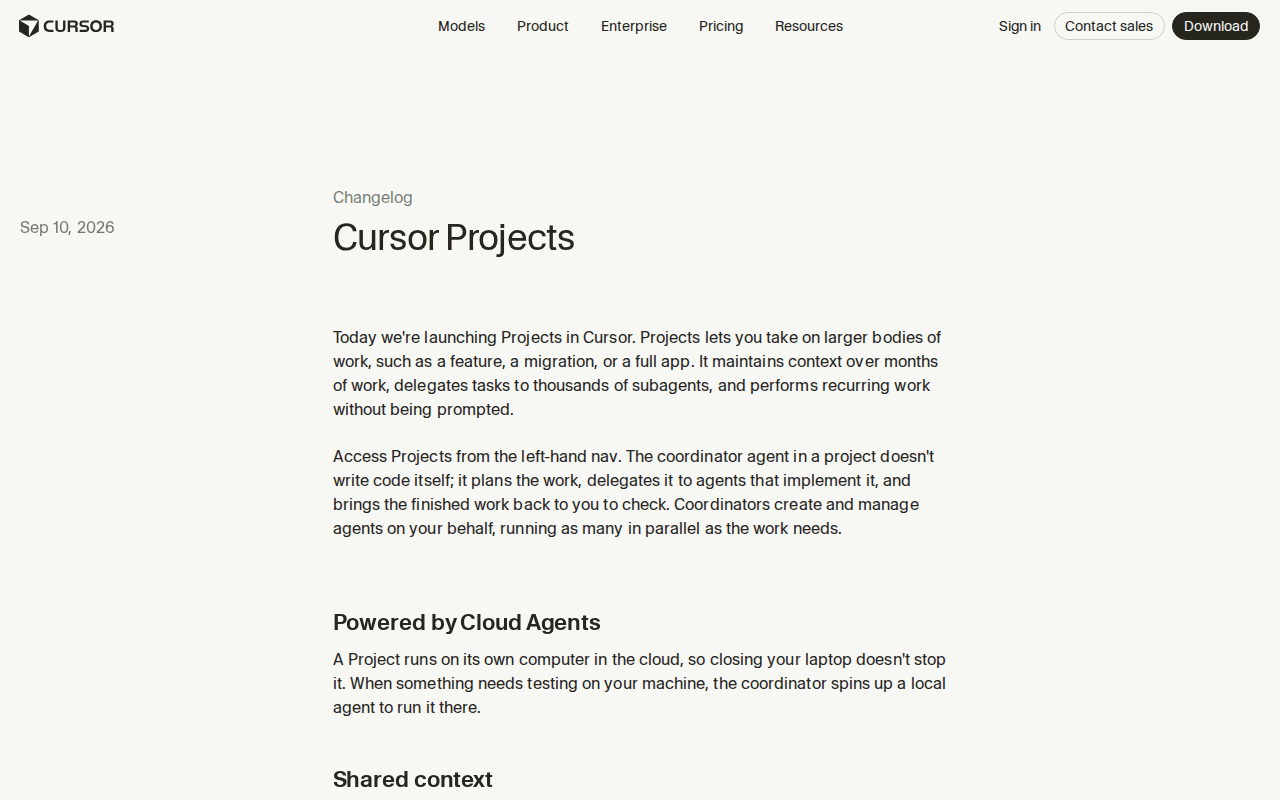 Screenshot: Cursor changelog, “Cursor Projects” (Sep 10, 2026), captured Sep 13, 2026.
Also on September 10, OpenAI opened the Agents API public beta: “Build and run cloud agents with the Codex harness, fully managed by OpenAI,” with four primitives (Agent, Environment, Session, Events) and a choice of sandbox. OpenAI hosts one, or you run codex exec-server on your own machines, or you pick one of nine partner sandboxes, from Cloudflare and Modal to E2B and Vercel (OpenAI; Agents API docs). InfoWorld’s September 11 read, in five words: “Lock-in is the biggest concern” (InfoWorld).
Three vendors, one week, one shape: a model somewhere else, execution wherever you put it, a coordinator that outlives your laptop session. The Agents API continuity drill and the Projects-versus-tray comparison are written separately. The news stops here.
A chat window never needed a host list. An acting agent does.
When the model only suggested, “which machine” was trivia: you typed the command yourself, on the host you sat at, with your own credentials. An agent in a hybrid agent fleet acts on a host you may not be logged into, with a credential you forgot you minted, writing a transcript to a disk you may never mount. Every question an incident asks (who ran this, where, with what, can it be stopped) now has a per-host answer. The runbook makes those answers boring.
The hybrid agent fleet runbook: five disciplines, one afternoon each
Every file and command below is a shape, labeled illustrative; substitute your hosts, your git host, your harnesses. None of it requires a vendor feature, and all of it survives one.
1. Give every host its own identity, and never lend it a human’s
A hybrid fleet has at least three principals that act: the harness on the laptop, the harness on the VM, and the vendor’s coordinator. Give each its own credential, scoped to the repos and services that host touches, with an expiry. The point is not paranoia; it is that revoking one host’s access should stop exactly one host.
| Host | Identity to issue | Issued where | Revoked where | TTL (illustrative) |
|---|---|---|---|---|
| Laptop | agent-cc-lt-01: a fine-grained token scoped to the repos you edit locally |
git host | git host, one click | 30 days |
| Your cloud VM | agent-codex-vm-01: an instance identity (IAM role or managed identity) plus a deploy key per repo |
cloud console; git host | detach the role; delete the key | 7-day tokens; keys rotated monthly |
| Vendor computer | the vendor’s app installation or token, limited to the Project’s repos | git host, when you connect the vendor | git host, without touching your own login | what the vendor allows; reviewed monthly |
Use the git host’s own primitives: fine-grained tokens and per-repository deploy keys with an expiry, and an app installation for the vendor rather than your personal OAuth grant (GitHub Docs). On the VM, prefer an instance role or a managed identity over a key pasted into an environment file, because a role is revoked by detaching it and a pasted key is revoked by finding every copy (AWS; Microsoft Learn). The fuller argument is the service-principal playbook; this step is the minimum.
Name them agent-<harness>-<host>. When agent-codex-vm-01 appears in the audit log, the incident thread already knows the host, the harness, and which switch to throw.
2. Stamp provenance on every transcript before it leaves the host
A transcript that cannot answer “which host, which agent, which session” is a story, not evidence. Harnesses expose different session formats and local or hosted storage boundaries, and none supplies the cross-host inventory in this runbook. The on-machine map of that mess is the Desktop ADE piece; across machines, the map is something you write.
Three fields are mandatory, and three more cost nothing:
// illustrative: provenance.json, written beside every archived session
{
  "host": "vm-01",
  "agent": "codex-cli 0.152",
  "session_id": "rollout-2026-09-08T23-14-07-8f3a",
  "started_at": "2026-09-08T23:14:07Z",
  "cwd": "/srv/work/api",
  "git": { "branch": "feat/rate-limit--vm-01", "head": "c41e9d2" },
}
Write the sidecar from a wrapper, not from memory. The wrapper knows the host because it runs there. Codex supports --json, which emits a JSONL event stream including the thread.started event and its thread ID, so the wrapper can archive the run without guessing at a private session-file layout (Codex non-interactive docs):
#!/usr/bin/env bash
# illustrative: run-agent.sh, launch Codex and archive its event stream with provenance
set -euo pipefail
HOST=$(hostname -s); RUN=$(date -u +%Y%m%dT%H%M%SZ); DEST="$HOME/fleet-archive/$HOST/$RUN"
mkdir -p "$DEST"
codex exec --json "$@" | tee "$DEST/events.jsonl"
SID=$(jq -r 'select(.type=="thread.started") | .thread_id' "$DEST/events.jsonl" | head -1)
jq -n --arg h "$HOST" --arg a "codex-cli $(codex --version | head -1)" --arg s "$SID" \
  --arg c "$PWD" --arg b "$(git branch --show-current)" --arg d "$(git rev-parse --short HEAD)" \
  '{host:$h, agent:$a, session_id:$s, cwd:$c, git:{branch:$b, head:$d}}' > "$DEST/provenance.json"
For sessions on the vendor’s computer, the provenance is the vendor’s session id plus the Project or Agent id, written at export time; what to export, and how often, is its own runbook. The scheme fleet-archive/<host>/<session-id>/ does the rest: a search that hits vm-01 has answered the first incident question, and the replay playbook built for one disk works across three.
3. Build one kill switch per host, and define “quiet” for each
A kill switch is three actions, in order: stop the process, revoke the identity, fence the blast radius. Stopping the process alone is the common half-measure: a stopped process on the VM leaves a live token behind, and the next cron tick starts a new process with it.
| Host | Stop | Revoke | Fence | Time to quiet (illustrative target) |
|---|---|---|---|---|
| Laptop | end the terminal session; on Windows, Stop-Process -Name codex,claude |
delete the token at the git host; clear the keychain entry | lock the screen; pull the branch’s push rights | under 10 s |
| Your cloud VM | sudo systemctl stop agent-exec.service |
detach the instance role; delete the deploy key | security group to deny egress; snapshot the disk first | under 60 s |
| Vendor computer | stop the session or Project in the vendor’s UI or API | revoke the vendor’s app installation at the git host | remove its repo access; disable its subscriptions | under 5 min |
The third row has a lever the first two do not need: the git host. If the vendor’s console is slow, down, or confusing at 2 a.m., revoking its installation at your git host stops every push from that computer, whatever its coordinator believes it is doing. That lever is yours. Keep it in the inventory, not in someone’s head.
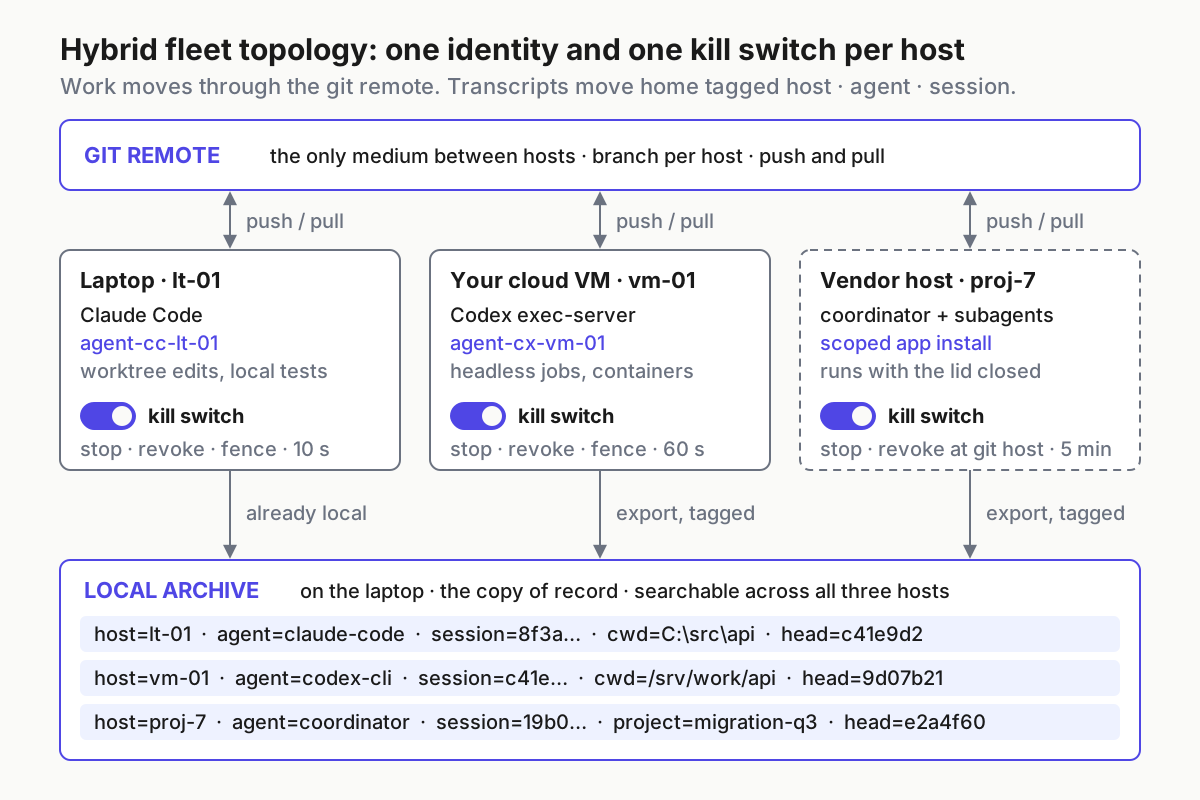
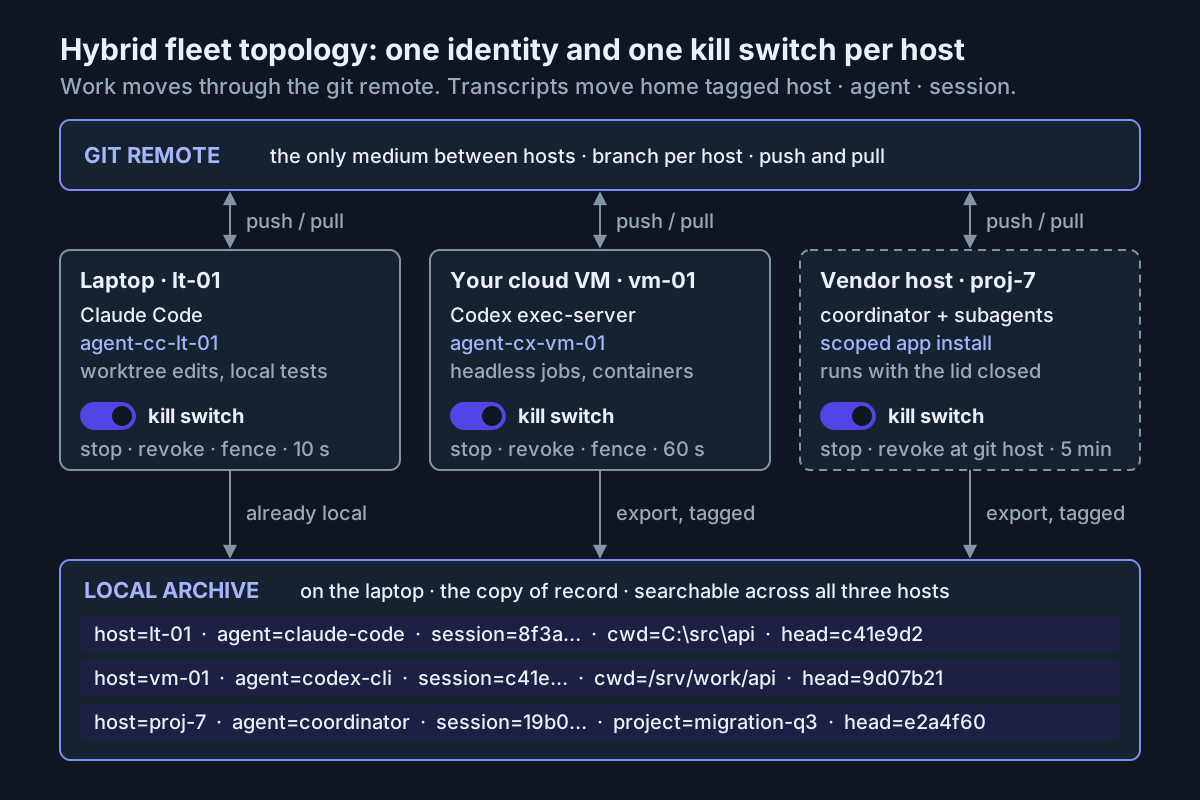 Work moves through the git remote; transcripts move home tagged host, agent, session; every host has its own switch.
Test each switch monthly on a harmless session and watch for three signals: the process is gone, the next push from that identity is rejected, the host’s meter flattens. I have yet to meet an operator who regretted a kill switch they had tested, and I have met several who regretted one they had not.
4. Keep the inventory by hand or by script, never by memory
The inventory is a file listing every host that runs an agent, what runs there, which identity it holds, how to kill it, where its transcripts land, and when it was last seen. Three hosts is ten minutes a week by hand. Past five, script the last_seen column with an ssh loop that runs pgrep on each VM; vendor rows come from the vendor’s session list.
# illustrative: fleet.yaml, the hybrid fleet inventory
hosts:
  - name: lt-01
    kind: laptop # laptop | vm | vendor
    agents: [claude-code, codex-cli]
    identity: agent-cc-lt-01
    kill: 'Stop-Process -Name codex,claude; revoke token at git host'
    transcripts: 'C:/Users/me/fleet-archive/lt-01'
    last_seen: 2026-09-13T08:40:00Z
  - name: vm-01
    kind: vm
    agents: [codex-cli exec-server]
    identity: agent-codex-vm-01
    kill: 'ssh vm-01 sudo systemctl stop agent-exec.service; detach role'
    transcripts: 'vm-01:/srv/fleet-archive/vm-01, copied nightly to lt-01'
    last_seen: 2026-09-13T08:41:12Z
  - name: vendor-proj-7
    kind: vendor
    agents: [coordinator, subagents]
    identity: 'app installation #4821, repos: acme/api'
    kill: 'stop the Project in the vendor UI; revoke #4821 at git host'
    transcripts: 'exported per session to lt-01:fleet-archive/vendor-proj-7'
    last_seen: 2026-09-12T23:58:00Z
Three rules keep the file honest. A host not in the inventory gets no identity. An identity not in the inventory is revoked on the Friday sweep. A vendor row whose last_seen is older than its last exported session is a session you have not exported.
5. Move work between laptop and VM through git, not through a sync folder
The medium between hosts is the git remote, and only the git remote. Work leaves a host as a pushed branch and arrives as a pull. Not a shared drive, not a sync folder, not rsync of a working tree, and never an archive with an intact .git directory inside it, the delivery vector the GitSpawn intake checklist exists to block.
- Branch per host.
feat/rate-limit--vm-01tells the next host, and the audit log, where the last commits were made. Two hosts on one branch produce non-fast-forward rejections at 2 a.m. and a harness that decides a force-push would be helpful. - Context travels in the repo. Projects keeps “a set of files that sync across every cloud and local machine its agents use.” Outside Projects, that sync is you: commit
AGENTS.md,CLAUDE.md, and the working notes, so the VM’s harness pulls the context the laptop’s harness wrote. - Secrets never travel with the work. Each host holds its own short-lived credential from step 1. The branch carries none, and a pre-push secret scan on every host enforces that where memory would not.
# illustrative hand-off, laptop to VM
git switch -c feat/rate-limit--lt-01 && git push -u origin HEAD
ssh vm-01 'cd /srv/work/api && git fetch \
  && git switch -c feat/rate-limit--vm-01 origin/feat/rate-limit--lt-01 \
  && ~/run-agent.sh "continue the rate-limit refactor; the suite must pass before you stop"'
What lives where is the last question, and the honest answer is a matrix, modeled rather than measured:
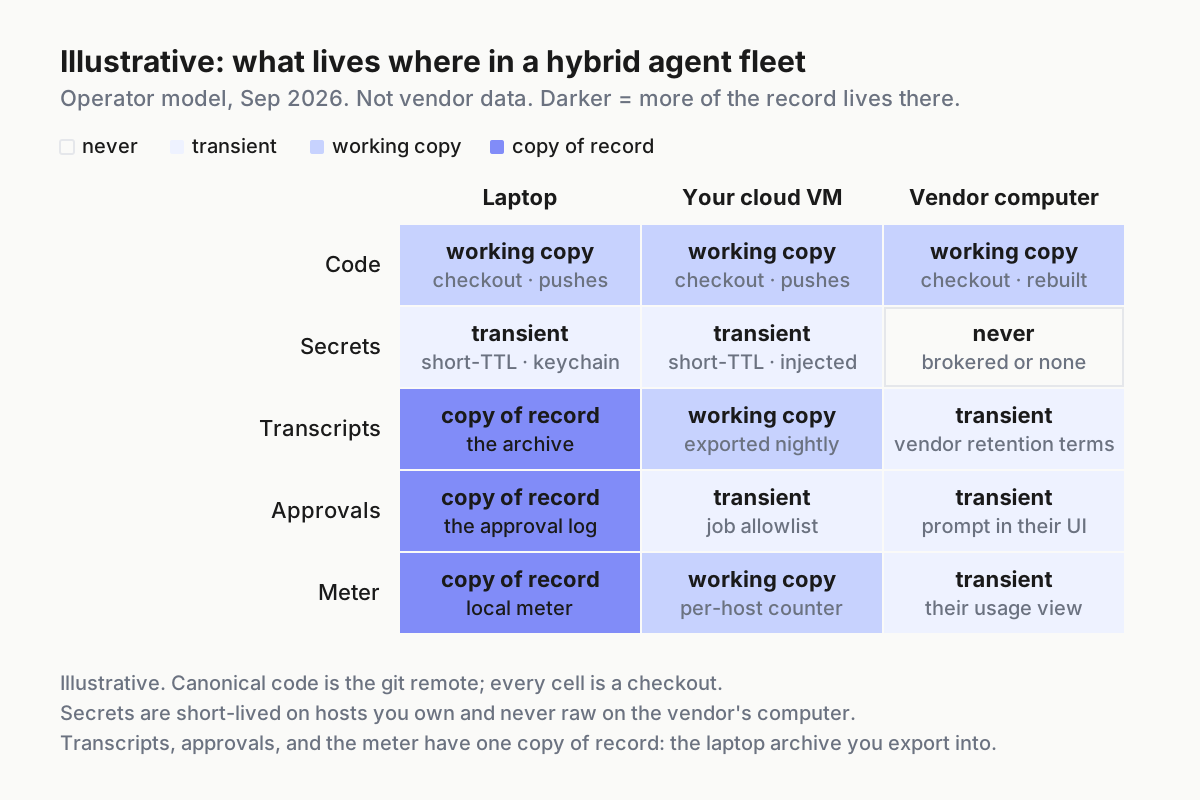
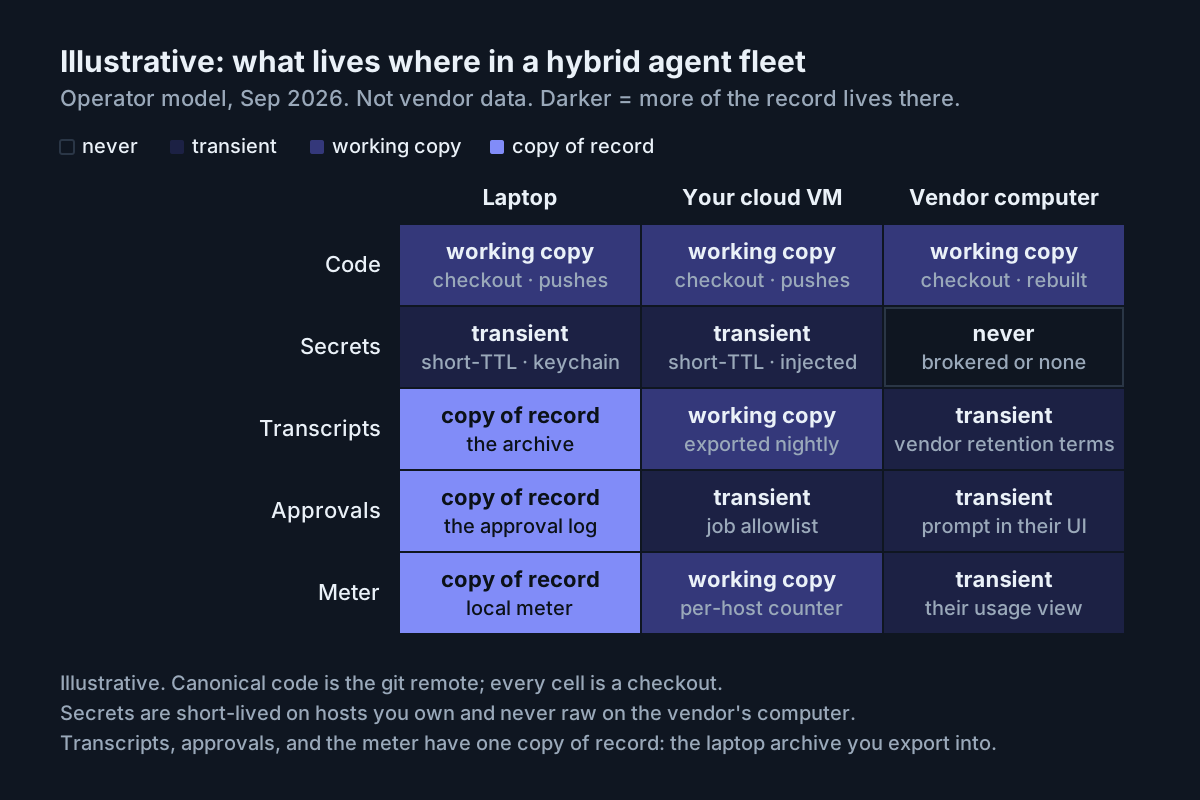 Illustrative. Darker cells hold more of the record: code is a checkout everywhere, secrets are short-lived on your hosts, and transcripts, approvals, and the meter have one copy of record, on the laptop.
Two cells carry the argument: transcripts on the vendor’s computer remain subject to its access and retention terms, so the copy of record is the one you exported; secrets there are absent by design, which is what “secrets all stay on internal machines” means once tool execution is self-hosted.
What breaks in a hybrid agent fleet, and the signal that tells you
| Failure | The signal | First move |
|---|---|---|
| Orphan on the VM: the laptop slept, the job kept going, nobody owns it | last_seen is fresh, no hand-off branch has moved in hours, the host’s meter climbs with no PR to show for it |
throw the VM switch; find the missing hand-off note |
| One credential on two hosts | revoking the VM stops the laptop too; one identity pushes from two networks | reissue per step 1 |
| A transcript with no provenance | an archive search returns a session you cannot place on any host | the step 2 wrapper becomes mandatory; tag the orphan unknown-host |
| The kill stopped the process, not the token | the git host’s audit log shows a push from that identity after the kill time | revoke at the git host; add the revoke to the switch’s script |
| The vendor computer worked all night, by design | a 7 a.m. PR from a coordinator you forgot was subscribed to CI | narrow its subscriptions and repo access; the feature works as documented |
The last row is the one the launch copy sells as a benefit, and it is exactly right. It means the vendor row of your inventory needs a switch you have practiced, not one you assume.
The operating layer is the part nobody syncs for you
Chatbots suggest; agents act, and in a hybrid agent fleet they act on three machines with three credentials. No model gets better at inventory, identity, provenance, or kill switches. Those are operating-layer functions that sit beneath every harness you run, and they are why a fleet command center is a control surface rather than a nicer chat window.
Automater Lite sits in that layer, requirements first. Lite is a free, local-first tray companion available for Windows x64, Apple-silicon macOS, and Linux x86_64. On one host, it sees installed CLIs, flags stalls, keeps sessions alive across reboots, meters tokens locally, redacts secrets through the vault, and keeps a local Library where sessions are imported, tagged, searched, and resumed. There is no cloud sync in Lite, and none is implied here. Sessions from your VM or a vendor’s computer appear in the Library only when you bring their transcripts home and import them, which steps 2 and 5 produce. Lite issues no identities, enforces no kill switch, and does not know the VM exists until a transcript from it lands on the laptop. It makes the laptop half of this runbook visible; the other hosts are yours to run, and the tray piece has the full scope. Automater Lite is a free download for Windows, macOS and Linux at automater.ai/downloads.
FAQ: hybrid agent fleets
What is a hybrid agent fleet?
A hybrid agent fleet runs AI coding sessions across a local computer, infrastructure you control, and vendor-hosted machines. Treat each location as a separate host with its own identity, kill switch, transcript provenance, inventory record, and handoff path through git.
How should work move between a laptop and cloud VM?
Move work through a git remote on a branch named for the host. Commit the instructions and working notes with the code, scan before each push, and give every host a separate short-lived credential. Do not copy working trees or intact .git directories between machines.
Sources
- Cursor changelog: “Self-hosted machines” (Sep 2, 2026) and “Cursor Projects” (Sep 10, 2026)
- Cursor: “Introducing Projects” (Sep 10, 2026)
- OpenAI: “Introducing the Agents API” (Sep 10, 2026)
- OpenAI: Agents API docs overview
- OpenAI: Codex non-interactive mode
- InfoWorld: “OpenAI launches managed Agents API” (Sep 11, 2026)
- GitHub Docs: fine-grained tokens, deploy keys, GitHub Apps
- AWS: IAM roles and instance identities
- Microsoft Learn: managed identities and Entra workload identities