Claude Code Permission Modes, Codex Sandboxes, One House Dialect
Map Claude Code permission modes and Codex sandbox flags onto three house tiers, encode them once, audit which host drifted, and learn what subagents inherit.

Go deeper. Build your own.
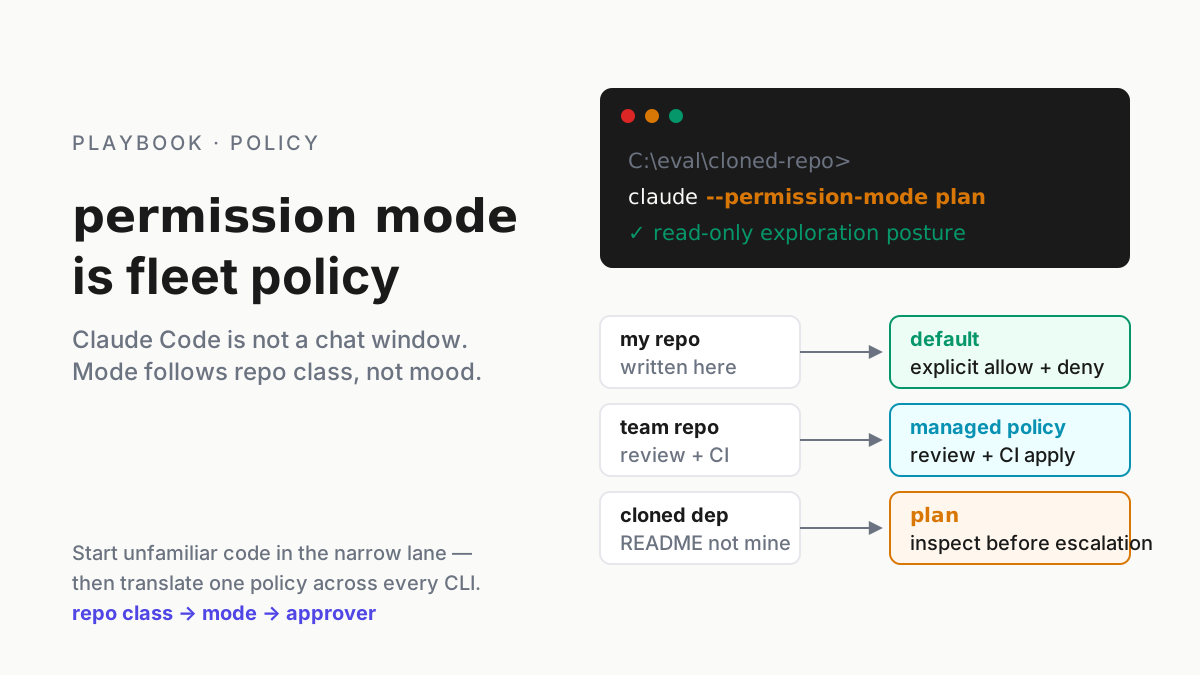
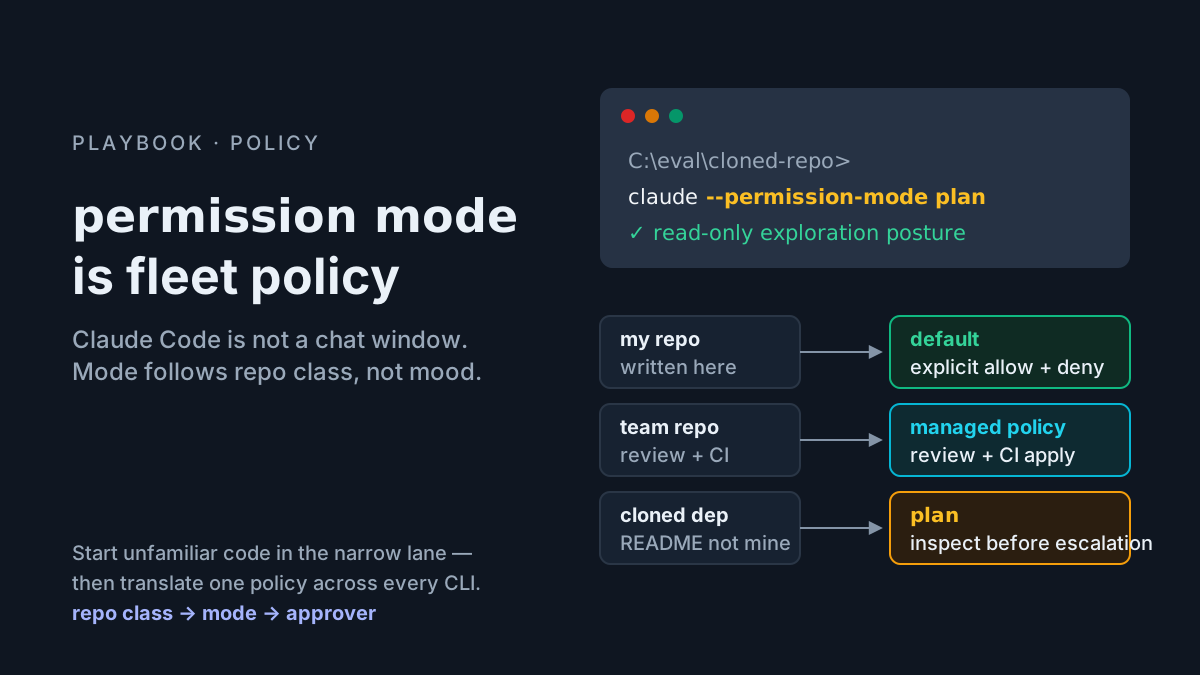
Suppose it is 9:40 a.m. and three sessions have the same repo open. One is Claude Code in acceptEdits, because that is what the laptop’s settings file says. One is a Codex worker launched with --sandbox workspace-write, because that is what the runbook for that box says. The third is a subagent the first session spawned, and it is running in acceptEdits too, whatever its own definition asked for, because that is the inheritance rule. Claude Code permission modes, Codex sandbox flags, and whatever a coordinator hands its children are three dialects for one policy, and the policy exists only if all three say the same thing on the same day.
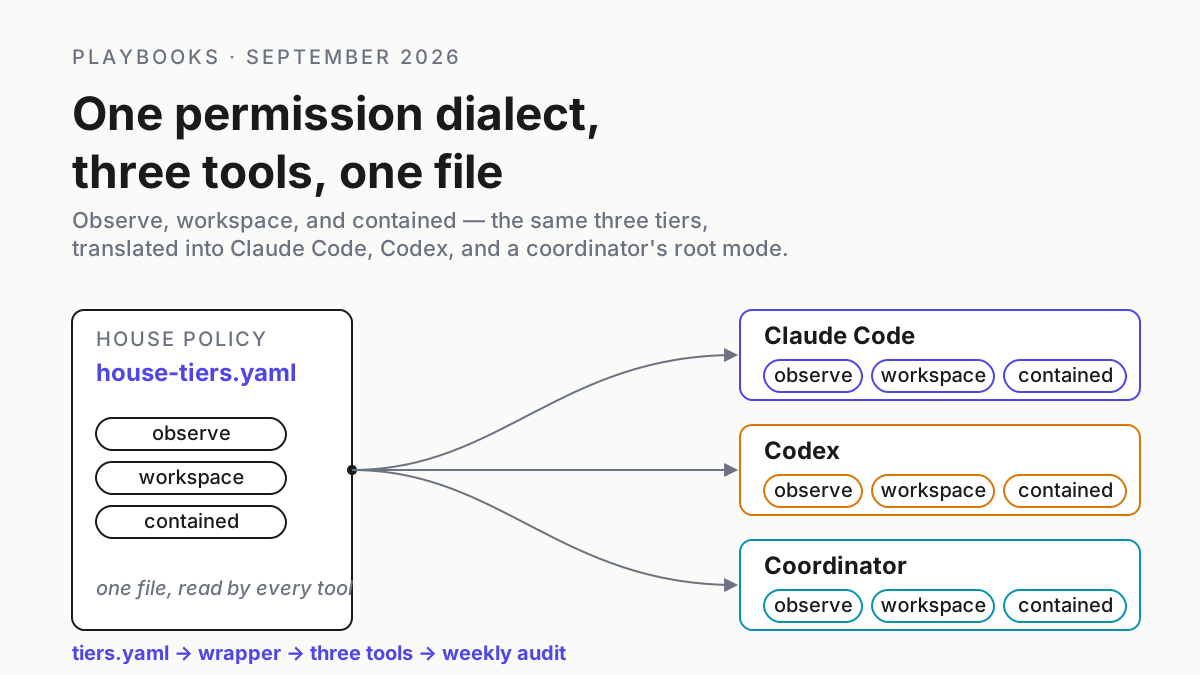
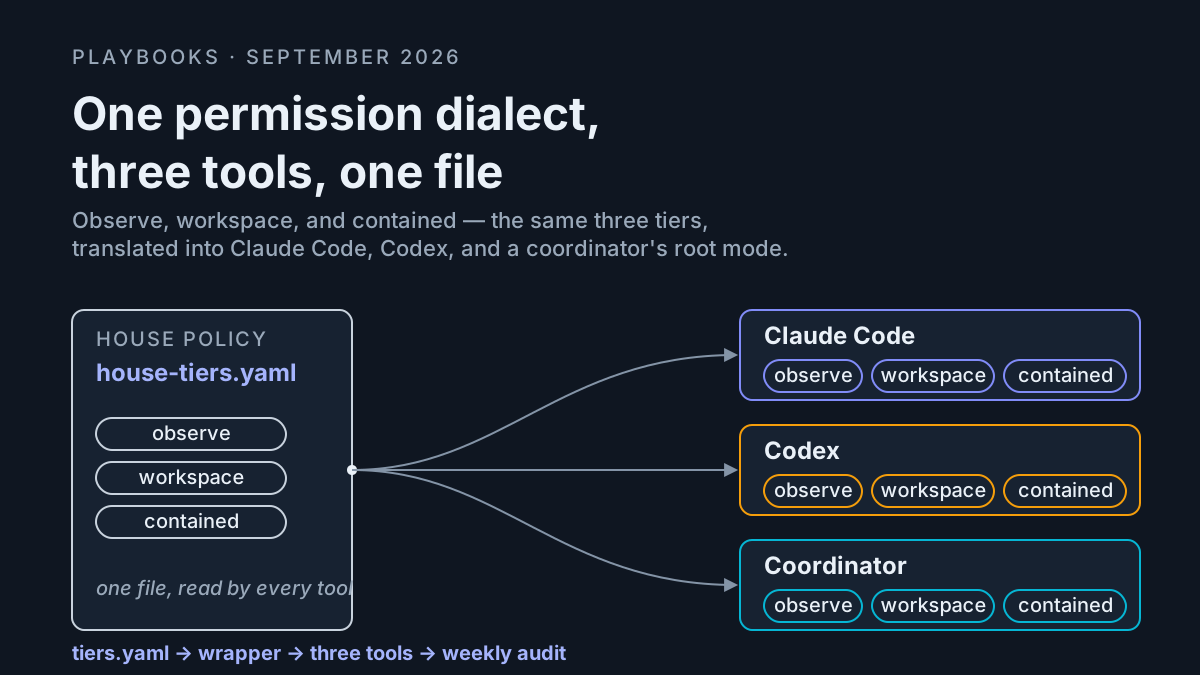
This piece builds the dialect: three house tiers named for what they may touch, a translation table from each tier into each tool’s flags, the settings that encode the tiers once, a drift audit that says which host runs which tier right now, and the inheritance rule that decides what a coordinator’s subagents actually get. None of it needs a new product. It needs one file, one wrapper, and a weekly look.
The move you can make Tuesday: pick the three tiers, write the wrapper, run the audit once. The audit will find a host in the loosest mode outside a container. It always does.
The news, once: restricted mode is policy, Projects is a new surface, and the docs moved
The restricted-mode fleet policy is live: a repo-class table that decides which Claude Code launch mode a repo gets and who approves an escalation, ending on the honest problem that every CLI spells the policy differently. Two things have happened since.
Cursor’s changelog entry “Cursor Projects” (Sep 10, 2026, cursor.com/changelog) describes a coordinator that can delegate work to many subagents, and the launch blog says coordinators create and manage those agents (cursor.com/blog/projects). Neither cited launch page documents pricing, limits, a permission mode for spawned agents, or what a human may deny. For this runbook, that leaves the coordinator unmapped until Cursor publishes the missing controls.
The Claude Code permissions page (code.claude.com) lists six modes: default (labeled Manual in the CLI and extensions, with manual as an alias), acceptEdits, plan, auto, dontAsk, and bypassPermissions. auto delegates approval to a classifier. The subagent documentation says sessions on Pro, Max, and Team start in auto unless settings or the organization change it, so set the starting mode explicitly instead of relying on the plan default.
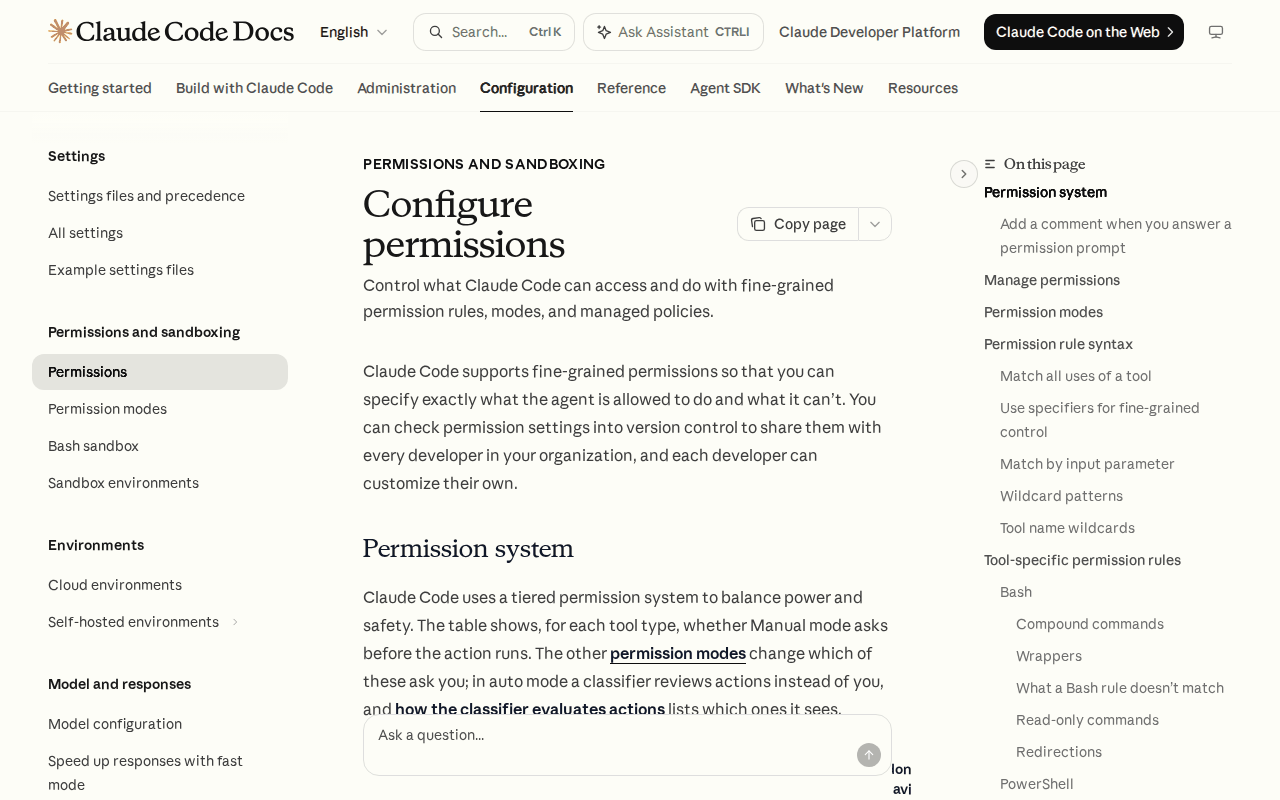 Screenshot: Claude Code docs, “Configure permissions,” captured Sep 13, 2026.
Codex’s half of the dictionary, per its CLI docs (developers.openai.com/codex/cli): --sandbox takes read-only, workspace-write, or danger-full-access; --ask-for-approval takes on-request or never; --dangerously-bypass-approvals-and-sandbox (alias --yolo) bypasses both controls; and --full-auto is a deprecated compatibility flag that prints a warning. codex exec accepts the same safety flags non-interactively (developers.openai.com/codex/noninteractive), and the CLI source (github.com/openai/codex) is the tie-breaker when a pinned binary and the current documentation differ.
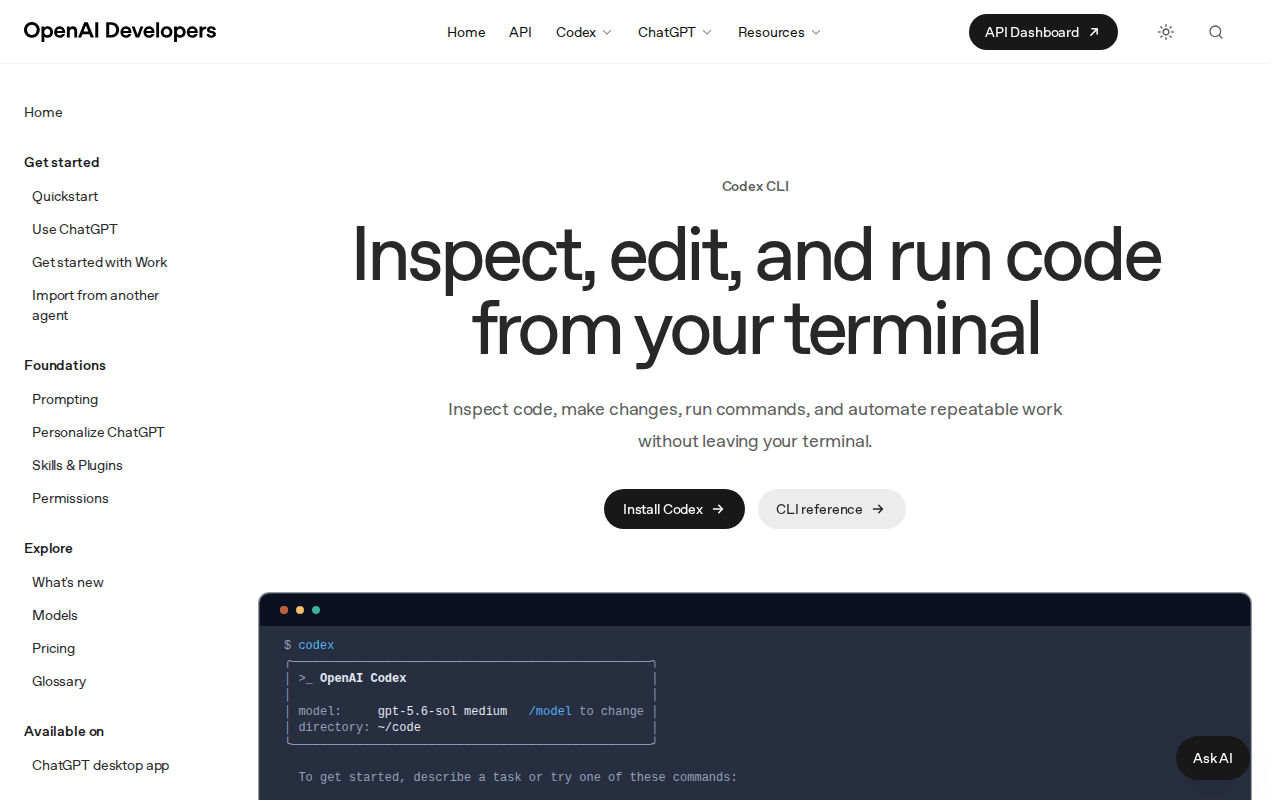 Screenshot: OpenAI Developers, Codex CLI docs, captured Sep 13, 2026.
The mode belongs to the process tree, and the tree’s mode is set at its root
Two rules from the docs carry the design. Permission rules are enforced by Claude Code rather than the model, so a prompt or CLAUDE.md cannot grant access; settings, modes, and hooks decide what runs (code.claude.com). For subagents, a parent in bypassPermissions, acceptEdits, or auto passes that mode to its children and overrides their declared permissionMode (docs.claude.com).
Chatbots suggest; agents act, and a coordinator acts through children it configured. So the unit of policy is the process tree, and a dialect that only describes single sessions covers the part of the fleet least likely to hurt you.
Three house tiers, named for what they may touch
Name each tier for its environment as much as its mode. A tier called “full access” that does not also say “inside a container with no production credentials” is a mode with ambitions.
| Tier | Reads | Writes | Shell | Network and push | Runs where | Approver |
|---|---|---|---|---|---|---|
T0 observe |
working directory | nothing | read-only commands only | none | anywhere | none needed |
T1 workspace |
working directory plus declared extra directories | files in the working tree | prompts beyond read-only | no push or outbound writes; prompt on the rest | a laptop, trusted repo class | you, per prompt |
T2 contained |
the container | anything in the container | unprompted | allowlisted hosts; no production credentials mounted | a container or VM built for it | whoever built the container, once |
Three is the number because the fourth tier every team invents, “workspace, but it can push,” is T2 with the container removed, which is the incident.
The translation table for Claude Code permission modes and Codex flags
Each cell is the flag or setting that tier means in that tool, checked against the cited documentation on Sep 13, 2026. Re-check the current reference before you paste it into fleet policy.
| House tier | Claude Code session | Codex CLI | Claude Code subagent (agent file) | Cursor Projects coordinator |
|---|---|---|---|---|
T0 observe |
--permission-mode plan, with permissions.disableAutoMode set to "disable" |
--sandbox read-only --ask-for-approval on-request |
permissionMode: plan, honored only when the parent is in default, dontAsk, or plan |
unmapped in the cited launch pages |
T1 workspace |
--permission-mode acceptEdits plus deny rules for git push, git -c, and WebFetch |
--sandbox workspace-write --ask-for-approval on-request |
inherits acceptEdits; its own permissionMode is ignored |
unmapped |
T2 contained |
--permission-mode bypassPermissions inside the container only; disableBypassPermissionsMode set to "disable" in managed settings everywhere else |
--dangerously-bypass-approvals-and-sandbox inside the container only |
inherits bypassPermissions; cannot request it under a stricter parent |
unmapped; treat the coordinator’s own computer as the container |
auto is the cell that needs a decision rather than a translation. Either it is T1 on trusted repos, with the same deny rules for push and network, or it is off, with permissions.disableAutoMode set to "disable" in managed settings. Pick one; a mode that means “the classifier decides” with no row in the tier table is a fourth dialect.
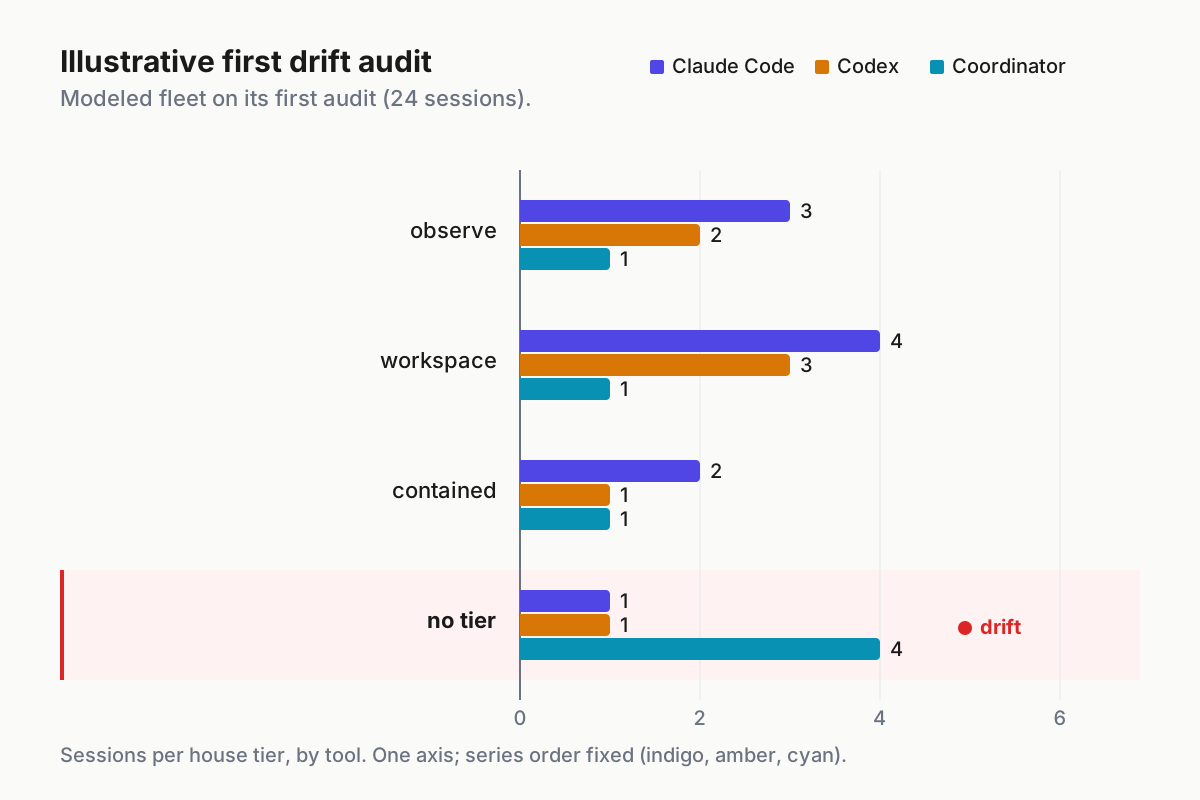
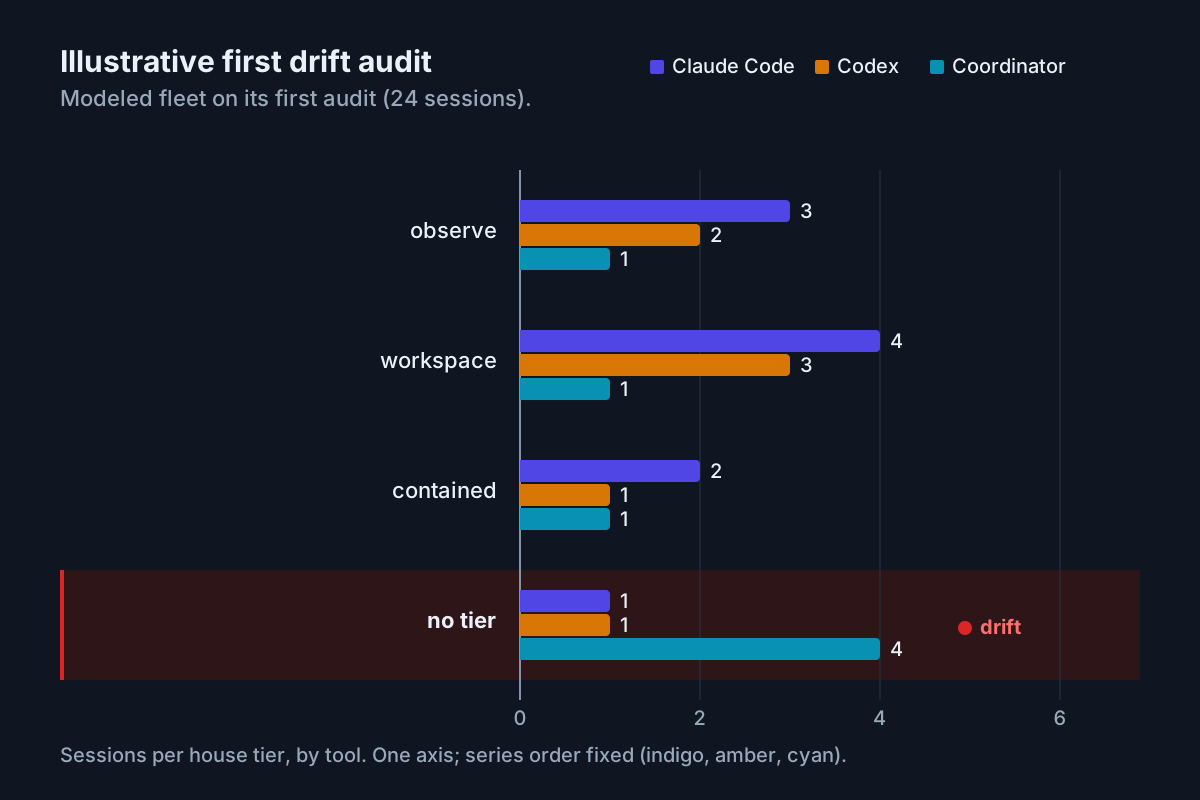 Illustrative. A modeled fleet on its first audit: six of 24 sessions map to no tier at all, which is the row the wrapper exists to drive to zero.
Encode the dialect once, in files the tools already read
Claude Code: settings before launch flags
Flags are how a person launches a session; settings are how a fleet does. defaultMode sets the starting mode, the deny list is the tier’s fence, and managed settings are where the fence has to live, because “no other level, including command line arguments, can override a managed permission rule” (code.claude.com).
// managed settings, delivered by your endpoint tool -- illustrative T1 for laptops
{
  "permissions": {
    "defaultMode": "acceptEdits",
    "allow": ["Bash(npm run *)", "Bash(git commit *)", "Bash(git diff *)"],
    "deny": ["Bash(git push *)", "Bash(git -c *)", "WebFetch"],
    "ask": ["Bash(rm *)"],
    "disableBypassPermissionsMode": "disable",
    "disableAutoMode": "disable"
  }
}
Two rules from the docs shape the deny list. Deny rules from any scope are evaluated before allow rules, so a user-level allow never beats a project-level deny. And a prefix rule is only a prefix rule: Bash(git push *) does not match git -C . push, and Bash(git * main) in an allow list matches git -c core.fsmonitor=<script> diff main, which is the GitSpawn trick with a permission rule holding the door. Deny git -c outright, and let T2’s container be the fence for everything else.
Codex: profiles, so the flags have a name
Codex’s CLI reference layers $CODEX_HOME/<name>.config.toml on top of the base config when you pass --profile <name>, so two profile files named for the tiers turn a launch line into a tier name.
# ~/.codex/observe.config.toml -- illustrative T0; load with: codex --profile observe
sandbox_mode    = "read-only"
approval_policy = "on-request"

# ~/.codex/workspace.config.toml -- illustrative T1; load with: codex --profile workspace
sandbox_mode    = "workspace-write"
approval_policy = "on-request"
T2 has no profile file on purpose. --dangerously-bypass-approvals-and-sandbox is typed by the wrapper, inside the container, or not at all.
One wrapper, so nobody types a mode
# agent-run -- illustrative. usage: agent-run <observe|workspace|contained> <claude|codex> [args...]
tier="$1"; tool="$2"; shift 2
in_container() { [ -f /.dockerenv ] || [ -n "${AGENT_CONTAINER:-}" ]; }
printf '%s\t%s\t%s\t%s\t%s\n' "$(date -Is)" "$(hostname)" "$tier" "$tool" "$$" >> "$HOME/.agent-tier.log"
case "$tier:$tool" in
  observe:claude)   exec claude --permission-mode plan "$@" ;;
  workspace:claude) exec claude --permission-mode acceptEdits "$@" ;;
  contained:claude) in_container || { echo "contained runs only inside a container" >&2; exit 2; }
                    exec claude --permission-mode bypassPermissions "$@" ;;
  observe:codex)    exec codex --profile observe "$@" ;;
  workspace:codex)  exec codex --profile workspace "$@" ;;
  contained:codex)  in_container || { echo "contained runs only inside a container" >&2; exit 2; }
                    exec codex --dangerously-bypass-approvals-and-sandbox "$@" ;;
  *) echo "usage: agent-run <tier> <tool> [args]" >&2; exit 2 ;;
esac
The log line is the ledger the audit reads: the difference between “I think that box runs workspace” and a timestamp.
The drift audit: which host runs which mode
Drift is a session whose effective tier differs from the tier the ledger says. Managed Claude settings can constrain command-line choices, while Codex combines its base config, selected profile, and launch flags. The starter audit below reads process arguments and one local Claude setting; use /status and your managed-settings inventory to confirm the effective policy before closing a finding.
# tier-audit.sh -- illustrative: effective tier per live session on this host
ps -eo pid,etimes,args | awk '/[c]laude|[c]odex/ {
  t = "unmapped"
  if ($0 ~ /bypassPermissions|dangerously-bypass|--yolo|danger-full-access/) t = "contained"
  else if ($0 ~ /acceptEdits|workspace-write|--profile workspace/)           t = "workspace"
  else if ($0 ~ /--permission-mode plan|read-only|--profile observe/)        t = "observe"
  printf "%s\t%s\t%s\t%ss\n", ENVIRON["HOSTNAME"], $1, t, $2 }'
echo "defaultMode: $(jq -r '.permissions.defaultMode // "unset"' ~/.claude/settings.json 2>/dev/null)"
unmapped next to defaultMode: unset means the plan default may be in effect. On Pro, Max, and Team that can be auto; /status shows which settings sources are active. Treat the script as an inventory prompt, not proof of the resolved policy.
| Audit finding | Meaning | Action |
|---|---|---|
contained on a host with no container marker |
the loosest mode, unfenced | kill the session and find who launched it; the wrapper would have refused |
unmapped above 10% of sessions |
the dialect is not installed on those hosts | ship the wrapper and managed settings before the next audit |
defaultMode unset on a laptop |
plan default in effect | set it in managed settings today |
a Codex process with --full-auto |
deprecated flag, still running | replace with a profile; grep CI logs for the warning line |
allow lists growing in settings.local.json |
“don’t ask again” answers accumulating per repo | review monthly; approval fatigue is its own runbook |
Run it weekly, on the same day as the MCP inventory, because the two ledgers answer adjacent questions: what a session may do, and what it may reach.
What a coordinator’s subagents inherit
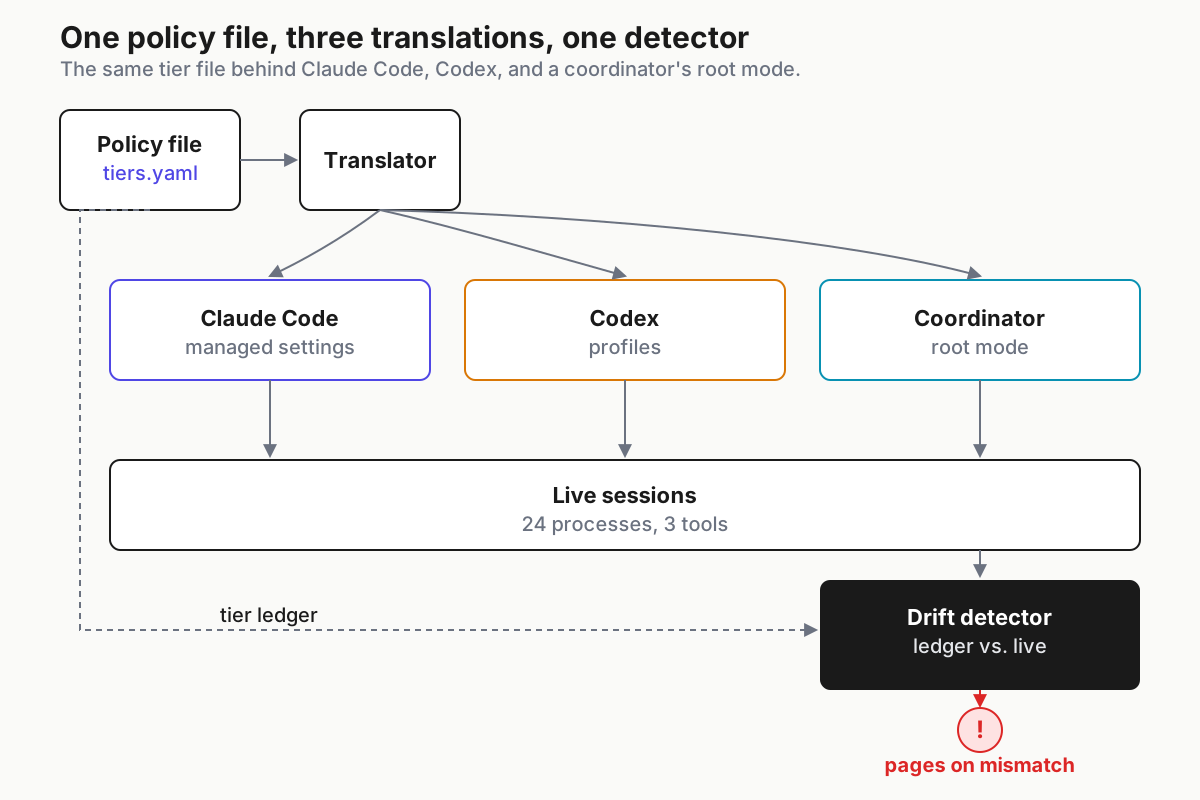
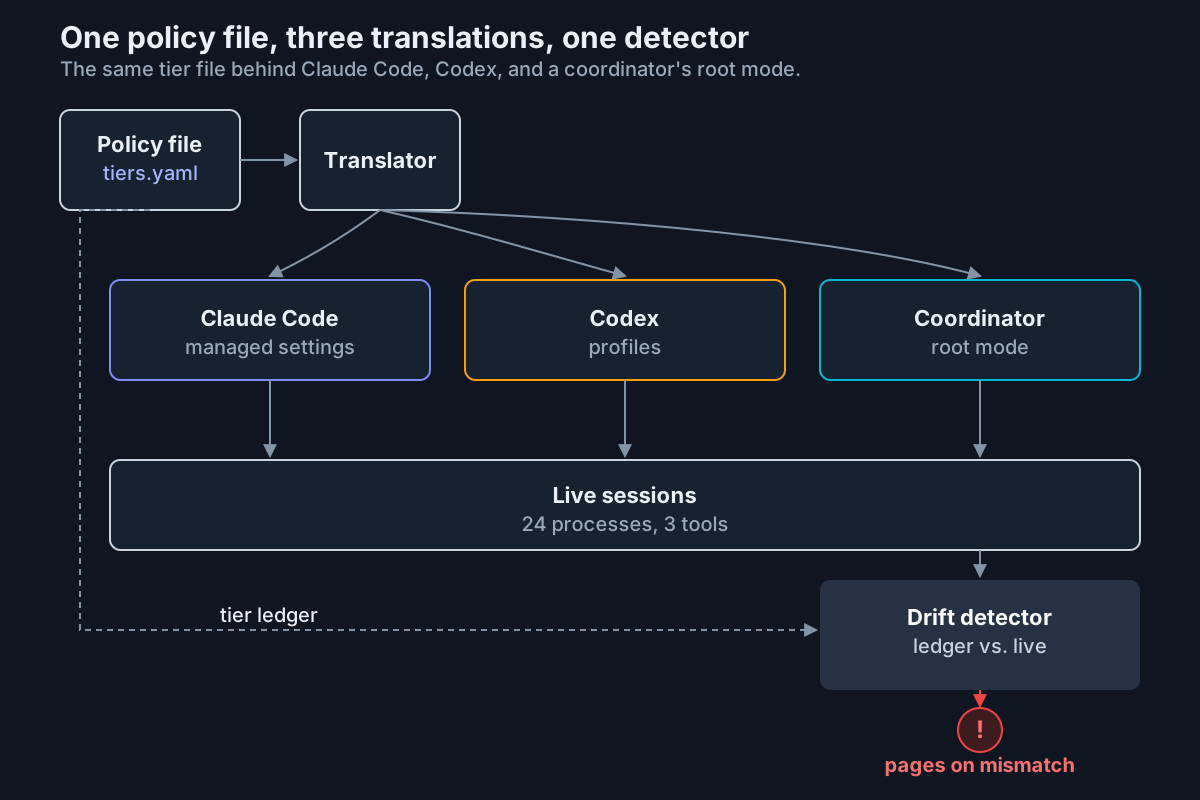 One policy file, one translator, three tools, one detector. The detector compares processes to the ledger and pages on a mismatch.
The rule, once more, because it decides the design: under a parent in bypassPermissions, acceptEdits, or auto, a subagent runs in the parent’s mode and its own permissionMode is ignored; under a parent in default, dontAsk, or plan, it gets the mode it declares, except bypassPermissions (docs.claude.com). Subagents can spawn their own, up to three layers below the main conversation.
Three consequences, in operator terms.
- The tree’s tier is its root’s tier. A coordinator launched at T1 runs every subagent at T1, three layers deep, whatever the agent files say. You cannot tighten a child under a loose parent; you can only loosen the whole tree by launching the root loosely. So the wrapper decides the tier once, at the root.
- A stricter root is the only way to get a stricter child. Under a
defaultorplanroot, apermissionMode: planresearch subagent is honored. That is the shape for T0 coordinators: root inplan, children inplan, nothing writes, and subagent orchestration covers how much work that shape can still do. - T2 is a place. A subagent that declares
bypassPermissionsunder a stricter parent keeps the parent’s mode, so the only tree that runs at T2 is one whose root was launched at T2, which the wrapper allows only inside a container. Codex has the same shape:codex execchildren get the flags the coordinator passes them, so a coordinator that shells out without--profileproducesunmappedchildren, and unattended runs are where those hide.
For a Cursor Projects coordinator, with no documented mode, the translation is environmental: its own computer is the container, so it gets T2’s environment, T2’s rules about credentials, and nothing it cannot afford to have run unprompted.
What breaks, and how you’ll know
The default is looser than the runbook. Signal: defaultMode: unset on any laptop. On Pro, Max, and Team, an unset default can leave the session in auto, where a classifier approves actions your tier table never described. Fix it in managed settings, never in a wiki.
Deprecated flags keep working. --full-auto prints a warning and runs. Signal: the warning in CI logs, or the audit’s contained row on a build box with no container marker. A deprecation is a suggestion; the audit is the enforcement.
Wildcards that grant more than they read. Bash(git * main) in an allow list covers git -c core.fsmonitor=<script> diff main. Signal: any allow rule with * before the subcommand. Rewrite with the subcommand fixed, Bash(git log * main), and deny git -c.
The deny list lives in the wrong scope. A deny in a project’s .claude/settings.json holds against a user’s allow, but the user can delete the file. Signal: the audit sees the deny on some laptops and not others. Managed settings are the only scope nothing else can override, and allowManagedPermissionRulesOnly can restrict permission rules to managed policy.
Headless sessions in untrusted folders connect project MCP servers without asking. The permissions page says so in its trust table and gives the fix: --bare or --setting-sources user before claude -p in a repo you did not write. Signal: MCP calls in a build box’s transcripts for servers the inventory never approved.
Approval fatigue turns T1 into T2 one click at a time. “Yes, and don’t ask again” for a Bash command persists “per repository and command.” Signal: the allow list in settings.local.json growing week over week on a repo nobody re-classed.
One dialect is operating-layer infrastructure
A permission mode is a property of a process; a policy is a property of a fleet, and the fleet runs three tools that spell the same intent three ways. The tier file, the wrapper, the profiles, the managed settings, and the audit are the operating layer that makes one intent hold across all of them, and none of it is a smarter prompt. It is the argument agentic ops makes for every other control: agents act, so the desk needs infrastructure rather than advice.
A command center for a fleet has a column for tier next to the column for host, and the audit fills it. Restricted mode gave the fleet its first row of policy. The dialect gives every tool the same rows.
FAQ: Claude Code permission modes across a fleet
What are the Claude Code permission modes?
As listed on the permissions page on Sep 13, 2026: default (labeled Manual), acceptEdits, plan, auto, dontAsk, and bypassPermissions. Set the starting mode with defaultMode in settings or --permission-mode at launch, and lock out bypassPermissions and auto fleet-wide with the matching disable keys in managed settings.
Do Claude Code subagents inherit the permission mode?
Under a parent in bypassPermissions, acceptEdits, or auto, yes, and the subagent’s own permissionMode is ignored. Under a parent in default, dontAsk, or plan, the subagent runs in the mode it declares, except bypassPermissions, which it cannot claim. Set the tier at the root of the tree.
How do Codex sandbox flags map to Claude Code permission modes?
By what each tier may touch: --sandbox read-only with --ask-for-approval on-request maps to plan with auto mode disabled; --sandbox workspace-write with on-request maps to acceptEdits plus deny rules; --dangerously-bypass-approvals-and-sandbox maps to bypassPermissions and belongs inside a container only. Pin the mapping in a table and wrapper rather than in memory.
Sources
- Claude Code docs: Configure permissions. Modes,
defaultMode, rule syntax and wildcard examples, managed-settings precedence, and the headless trust table. - Claude Code docs. Subagents:
permissionMode, the inheritance rule, spawn depth, and plan defaults. - OpenAI Codex: CLI.
--sandbox,--ask-for-approval,--dangerously-bypass-approvals-and-sandbox, the--full-autodeprecation, and--profile. - OpenAI Codex: Non-interactive mode.
codex exec. - Cursor changelog: “Cursor Projects” (Sep 10, 2026). Coordinator and subagent language; no permission language.
- Cursor blog: Introducing Projects (Sep 10, 2026). “Coordinators create and manage agents on your behalf.”
- github.com/openai/codex. CLI source, the tie-breaker for flag names between releases.