llama-server Flags for Coding Agents: Context Size, GPU Layers, KV Cache, Slots and --jinja, Then Prove What Loaded
Set llama-server flags for a coding agent on purpose: context, GPU layers, KV cache, slots and --jinja, then prove them with /props, /slots and a tool call.

Go deeper. Build your own.
You moved your coding agent from Ollama to llama.cpp for control: an exact GPU-layer count for a 12 GB card, a context size you picked, a cache type you understand. A day later OpenCode prints a tool call as raw JSON in the chat, or forgets a file it read ten turns ago, and nothing in your copied llama-server flags tells you which choice broke it. This guide replaces copied flags with chosen ones. You finish with a launch script where every flag has a reason, a matching OpenCode provider block, four HTTP checks that show what the server actually loaded, a benchmark you rerun after each change, and a rollback that moves one flag at a time.
The prompt for this guide was a short post on X by Arkon (@roberto84816516) on October 20, 2026 contrasting the two tools. Ollama is one install, a model library and a local API on port 11434. With llama.cpp you build or download the binary, point llama-server at a GGUF file and tune flags such as context size and GPU layers yourself. That second half is where coding agents fail without an error message, and it is the whole subject here.
Who this is for. One developer, one GPU (NVIDIA, AMD or Apple silicon), one coding agent. OpenCode is the client in the worked example; a mapping for other OpenAI- or Anthropic-compatible clients follows the OpenCode setup. Reaching the server from another machine is covered in llama-server remote access for coding agents, and the default-port change and MoE cache flag are covered in the llama.cpp port change upgrade runbook. Choosing the hardware itself belongs to the local AI workstation guide.
How to read the commands. Flag names, defaults and endpoint fields come from the llama.cpp server README as fetched on October 22, 2026. Defaults move between builds, so compare against llama-server --help on your own binary. Every command here is documented syntax that we did not execute for this article. The “expected” lines describe the response shapes the documentation shows, not results we measured. Any number labelled Illustrative comes from a stated model, not a benchmark.
What you need before you touch a flag
Get these six things in place first. Each one removes a cause that would otherwise look like a flag problem later.
- [ ] A current llama-server binary. The README builds it with
cmake -B buildand thencmake --build build --config Release -t llama-server, leaving the binary at./build/bin/llama-server. Runllama-server --versionand write down the build string./propsreports the same value later asbuild_info, which is how you prove the server you are testing is the binary you just built. - [ ] Your device list.
llama-server --list-devicesprints the devices llama.cpp can see and exits. If the GPU is missing here, no flag below will help: the build lacks the backend, or an environment variable such asCUDA_VISIBLE_DEVICEShides the card. - [ ] One tool-capable coding GGUF. The worked case uses a Qwen2.5 Coder 7B Instruct file at Q4_K_M on local disk. The llama.cpp function-calling documentation lists Qwen 2.5 Coder among the native tool-call formats, and its template table maps the Qwen2.5 Coder 7B Instruct template to the Hermes 2 Pro handler. If you are still choosing a model, start from open-weight models that can drive a harness.
- [ ] A VRAM budget written as a number. Total card memory minus what the desktop and other apps hold. The worked case assumes a 12 GB card with roughly 11 GB usable.
- [ ] OpenCode installed, plus curl and jq. The verification steps are plain HTTP requests piped through jq.
- [ ] A folder for versioned launch scripts, such as
~/llama/. Rollback later depends on never editing a script in place.
Why a bare launch command hides its choices
The README’s quick start is llama-server -m models/7B/ggml-model.gguf -c 2048. Drop -c and the server still starts, which is exactly the problem. Three of the flags that matter most to an agent default to automatic behavior in the current README:
-c, --ctx-sizedefaults to0, meaning the context size is loaded from the model.-ngl, --gpu-layersdefaults toauto. It also accepts an exact number orall.-np, --paralleldefaults to-1, meaning the number of slots is chosen automatically.
On top of those, -fit, --fit is on by default and adjusts unset arguments to fit device memory. It keeps a margin per device (--fit-target, default 1024 MiB) and will not shrink context below --fit-ctx (default 4096). That is helpful for a first start and unhelpful for an agent. A server that launched cleanly may have quietly given your agent a few thousand tokens of context, or left layers on the CPU, and the agent only shows symptoms much later.
The multi-GPU guide adds one detail worth knowing: fit is not supported with --split-mode tensor, so multi-GPU tensor users must size context manually anyway. On a single GPU it works, and you can use it as a discovery tool rather than a permanent setting.
Use this discover-then-pin routine once per model:
- Start the server with only the model, an alias,
--jinja, host, port and API key. Leave-c,-ngland-npunset so fit chooses. - Read
default_generation_settings.n_ctxandtotal_slotsfromGET /props, and per-slotn_ctxfromGET /slots(both shown in the verification section). - Decide whether that context is enough for your agent. If it is lower than your target, fit is telling you the target does not fit with the current cache type.
- Write your chosen values into the launch script as explicit flags. Fit only touches unset arguments, so explicit values stop it from moving them.
- From then on, change only explicit values, one per script version.
One trade-off follows from step 4. With -c and -ngl pinned, a configuration that does not fit fails at load instead of being shrunk. That is the behavior you want for an agent: a loud failure at startup beats a silent context cut that shows up as forgetfulness three hours into a task.
The flag decision table
This table covers every flag in the worked command. The “Default” column quotes the current README; the “Start” column is our recommendation for the worked case, not a documented value.
| Flag | What it controls | Memory or quality cost | Default (README) | Start (worked case) | Change it when |
|---|---|---|---|---|---|
-m / -hf |
Model source: local path or Hugging Face repo (user/model[:quant]) |
-hf downloads, and also fetches an mmproj file when one exists |
unused | -m with a local path |
Use -hf repo:Q4_K_M for reproducible pulls; add --no-mmproj for text-only agents |
-c |
Prompt context size | KV cache grows roughly in proportion to context | 0 (from model) |
32768 |
Raise if /slots shows less than the agent needs; lower it first on out-of-memory |
-ngl |
Maximum layers stored in VRAM (N, auto, all) |
Layers left on CPU run much slower | auto |
all |
Lower only after reducing -c and the cache type |
-fa |
Flash attention (on, off, auto) |
Rarely a cost; required for a quantized V cache | auto |
on |
Set off only if your backend rejects it, and then use an f16 V cache |
-ctk / -ctv |
KV cache data type for K and V | Lower precision saves memory; extreme types hurt tool calls | f16 |
q8_0 |
Return to f16 if tool calls degrade and memory allows |
-np |
Number of server slots | Each concurrent sequence needs its own KV space | -1 (auto) |
1 |
Use 2 or more only for parallel agents, then resize -c |
--fit |
Auto-adjusts unset arguments to device memory | Hides what you actually got | on |
leave on |
Turn off if you want any unpinned value to fail loudly |
--host / --port |
Listen address and port | Exposure beyond loopback | 127.0.0.1 / 9931 |
127.0.0.1 / 8080 |
Keep explicit; the default port has changed before |
--api-key-file |
File of accepted API keys, one per line | None | none | ~/.secrets/llama-key |
Use always, even on loopback |
-a, --alias |
Model name the API reports | None | model path | qwen-coder-7b |
Must match the client’s model key |
--jinja |
Jinja chat template engine, needed for tool calls | None | enabled | pass explicitly | Add --chat-template-file when the template lacks tool support |
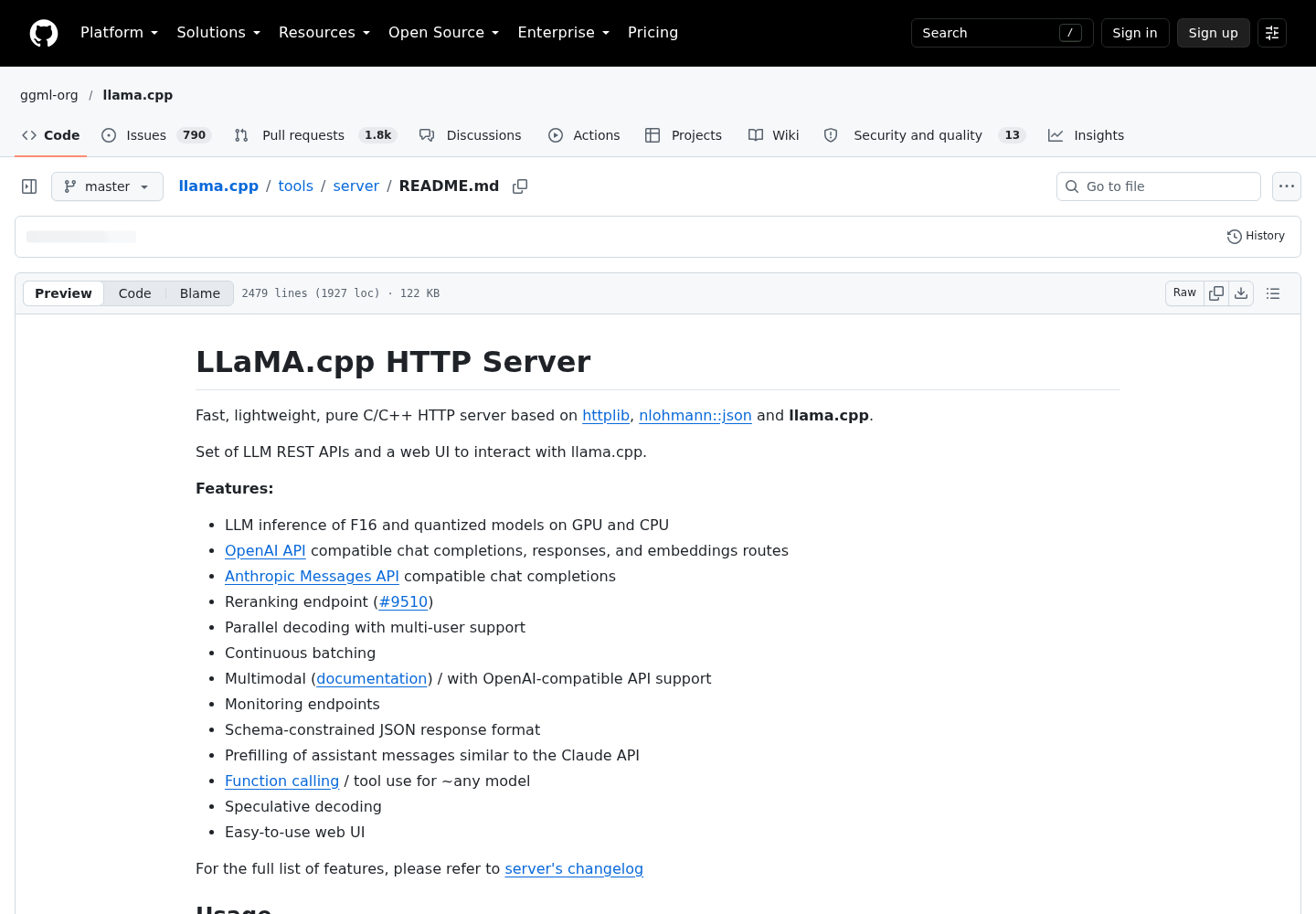
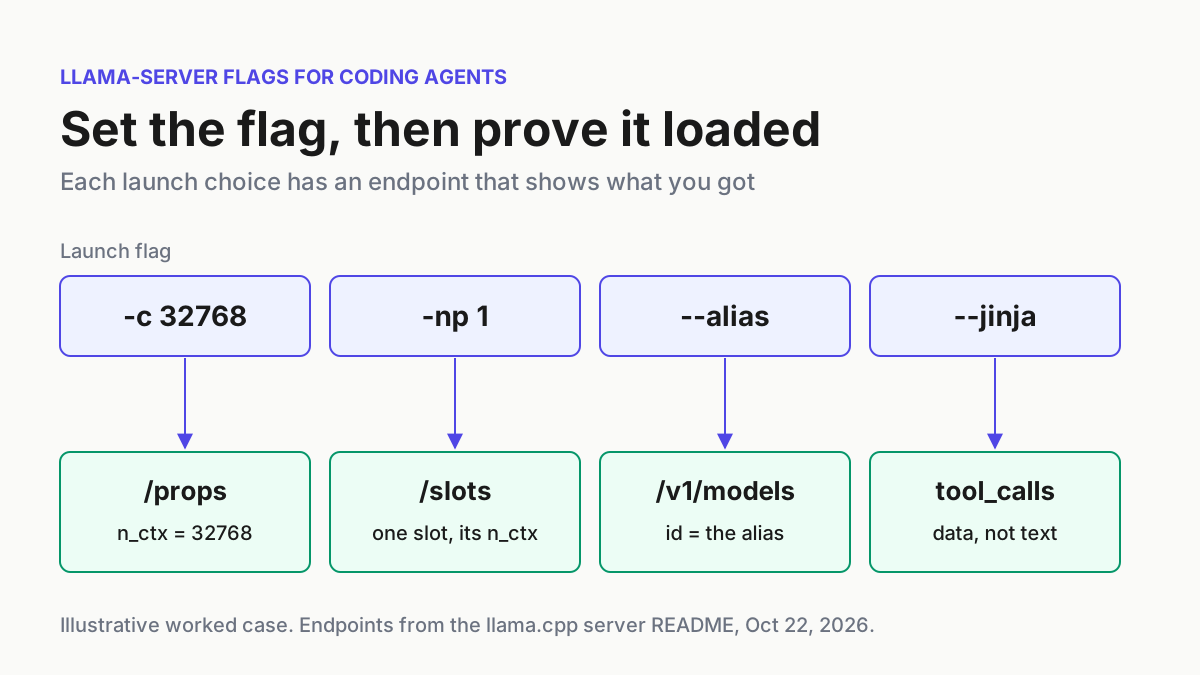
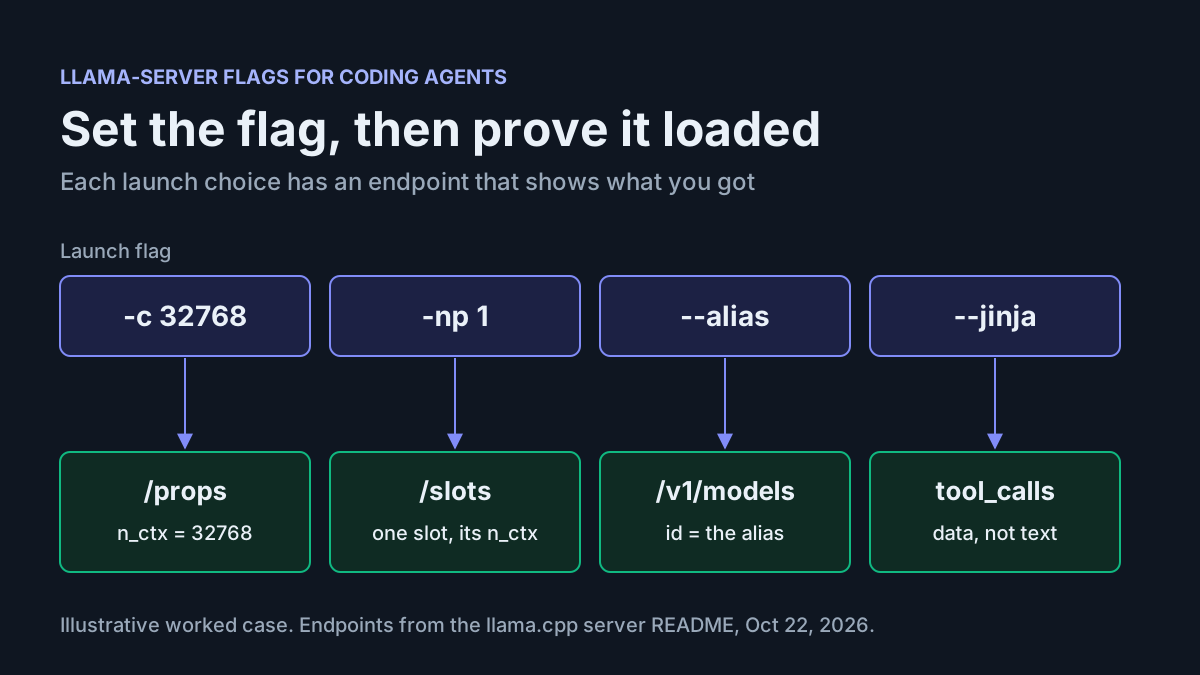
Two rows deserve more words. First, --jinja. The README’s tool-call section says OpenAI-style function calling is supported with the --jinja flag, and may need a --chat-template-file override to get a tool-capable template. The current flag table lists --jinja as enabled by default, so on a fresh build passing it changes nothing. Pass it anyway. The README notes that a command-line argument beats an environment variable for the same parameter, so an explicit --jinja overrides a stray LLAMA_ARG_JINJA left in a shell profile or container. It also tells the next reader of your script that tool calls are a requirement, not an accident.
Second, the API key. GET /health is public by design (the README says it skips the key check), so it works for liveness probes, while chat endpoints answer 401 with Invalid API Key when the key is missing or wrong. Prefer --api-key-file over --api-key KEY: the key stays out of your shell history and the process list, and OpenCode can read the same file.
What a longer context really costs
Context is the flag agents feel most, and its cost is almost entirely the KV cache. The multi-GPU guide puts it plainly: the KV cache is roughly proportional to n_ctx, and for llama-server a slot KV cache is allocated per concurrent sequence. Two levers follow: fewer slots, and a cheaper cache type.
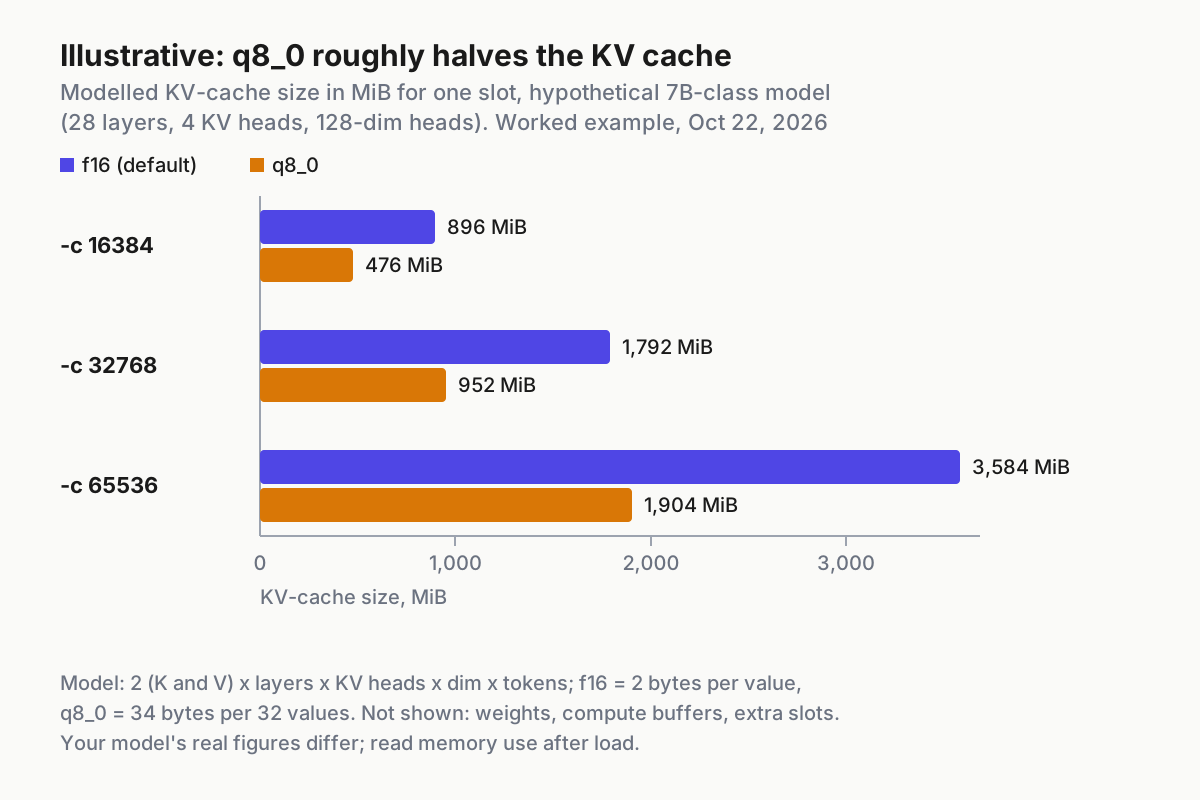
The chart is a model, not a measurement. It assumes a hypothetical 7B-class model with 28 layers, 4 KV heads and 128-dimension heads, stores f16 at 2 bytes per value, and stores q8_0 as 34 bytes per 32 values. Under those assumptions one token of f16 cache costs 56 KiB, so 32768 tokens cost 1,792 MiB in f16 and 952 MiB in q8_0. Your model’s layer and head counts will differ, so treat the shape as the lesson: q8_0 cuts the cache roughly in half at every size, and doubling -c doubles the cache.
That makes q8_0 the first move when memory is tight, ahead of offloading fewer layers. It is not free. The function-calling documentation warns that extreme KV quantizations such as -ctk q4_0 can substantially degrade a model’s tool-calling performance. q8_0 sits between f16 and those extremes, which is why the worked case uses it, and why the smoke test later re-checks tool calls after any cache change. The same guide also states that flash attention is required when the V cache is quantized, so -ctv q8_0 and -fa on travel together.
Slots interact with all of this. The /slots endpoint reports an n_ctx per slot, and depending on the KV mode (--kv-unified is enabled by default only when the slot count is automatic) slots either share or divide the -c budget. Do not reason about it from memory: measure it. If you later run two agents against one server, --kv-unified-per-slot N sets a context limit per slot and, when -c is unset, sizes the shared pool to the slot count times N.
Size the window for your own model in this order:
- Start with
-np 1and the context you want, for example-c 32768, so one agent owns the whole budget. - Load the server and read the per-slot
n_ctxfromGET /slots; that number, not-c, is what the agent gets. - If the load fails on memory, switch to
-ctk q8_0 -ctv q8_0with-fa onbefore touching-ngl. - If memory still runs out, lower
-cone step (for example to 24576) and reload, rather than spilling layers to the CPU. - For a second agent, set
-np 2, leave-cunset and add--kv-unified-per-slot N, then confirm in/slotsthat each slot reports then_ctxyou planned.
How much of that window your agent should actually fill is a separate discipline; the context engineering playbook covers what to keep in it.
Starting values by VRAM tier (Illustrative)
The worksheet below gives first-launch values for two model shapes. It is Illustrative: the 7B weight size comes from the llama-bench README, whose example qwen2 7B Q4_K - Medium file is 4.36 GiB, and we assume a Qwen2.5 Coder 7B Q4_K_M lands close to that. The MoE column uses ggml-org/gemma-4-26b-a4b-it-GGUF:Q4_K_M, the repository Hugging Face’s local agents guide launches, with weights assumed at about 16 GiB; check the actual file size on the model page before trusting the row. KV figures in the 7B column come from the chart’s model.
| VRAM | 7B-class coder, Q4_K_M (about 4.4 GiB weights) | ~26B MoE, Q4_K_M (weights assumed about 16 GiB) |
|---|---|---|
| 8 GB | -ngl all -c 16384 -ctk q8_0 -ctv q8_0 (KV about 476 MiB) |
-ngl all -cmoe -c 16384 -ctk q8_0 -ctv q8_0; all experts on CPU, expect slow generation |
| 12 GB | -ngl all -c 32768 -ctk q8_0 -ctv q8_0 (KV about 952 MiB): the worked case |
-ngl all -ncmoe N -c 16384 -ctk q8_0 -ctv q8_0; start N high, lower it while load succeeds |
| 16 GB | -ngl all -c 65536 -ctk q8_0 -ctv q8_0 (KV about 1.9 GiB), if the model was trained for that length |
-ngl all -ncmoe N -c 32768 -ctk q8_0 -ctv q8_0, N smaller than at 12 GB |
| 24 GB | -ngl all -c 65536 with f16 cache (about 3.5 GiB), or q8_0 for a longer window |
-ngl all -c 32768 -ctk q8_0 -ctv q8_0, no CPU experts if it loads |
Read the table as a trade between two axes. Moving down a row buys either more context or less CPU offload. Moving right trades a smaller dense model that sits fully on the GPU for a larger MoE model that needs some weights on the CPU. On 8 and 12 GB cards, the dense 7B keeps everything on the GPU and spends the spare memory on context. That is usually the better agent experience, because a coding agent rereads files constantly and suffers more from a short window than from a slightly weaker model. The model’s training length caps the useful window: GET /v1/models reports it as meta.n_ctx_train, and context beyond it relies on RoPE scaling flags this guide does not cover.
The worked launch command, flag by flag
The worked case: a developer with a 12 GB GPU, a Qwen2.5 Coder 7B Instruct Q4_K_M file in ~/models/, OpenCode as the agent, one agent at a time. First create the shared key file, then the versioned launch script.
# One key, read by both llama-server and OpenCode
mkdir -p ~/.secrets && chmod 700 ~/.secrets
openssl rand -hex 24 > ~/.secrets/llama-key
chmod 600 ~/.secrets/llama-key
#!/usr/bin/env bash
# ~/llama/serve-coder.v2.sh  (documented syntax; v1 is the previous known-good script)
exec llama-server \
  -m "$HOME/models/Qwen2.5-Coder-7B-Instruct-Q4_K_M.gguf" \
  --alias qwen-coder-7b \
  -c 32768 \
  -ngl all \
  -fa on \
  -ctk q8_0 -ctv q8_0 \
  -np 1 \
  --jinja \
  --host 127.0.0.1 --port 8080 \
  --api-key-file "$HOME/.secrets/llama-key"
Why each line is there:
-mwith a full path. The file is pinned./propsreportsmodel_path, so you can prove which file loaded. With-hf, the README notes the quant defaults to Q4_K_M and an mmproj projector downloads automatically when available; a text-only agent would add--no-mmprojto keep that memory free.--alias qwen-coder-7b. Without it,/v1/modelsreports the model file path as the id. A short alias gives OpenCode a stable model key that survives renaming the file.-c 32768. Large enough for a coding agent to hold several files plus tool output, and about 952 MiB of cache under the chart’s model. Pinning it stops fit from shrinking it.-ngl all. The whole 7B model fits on 12 GB, so every layer goes to the GPU. The multi-GPU guide’s troubleshooting table names a low-nglas the cause when the GPU is not used at all.-fa on. Required for the quantized V cache on the next line. Explicitonturns an unsupported backend into a startup error instead of a silent fallback.-ctk q8_0 -ctv q8_0. Halves the cache relative to f16 in the model above and stays clear of the q4_0 extreme the function-calling page warns about. On 12 GB, f16 at 32k would also fit; q8_0 leaves headroom to try 49152 or 65536 later without touching-ngl.-np 1. One agent, one slot, the whole window available to it. Auto slot counts are for shared servers.--jinja. Tool calls depend on the Jinja template engine; explicit beats inherited.--host 127.0.0.1 --port 8080. Loopback only. The port is explicit because the README’s default is now 9931 while OpenCode’s and Hugging Face’s llama.cpp examples point at 8080; naming it removes a guess on both sides.--api-key-file. Chat requests now need the key;/healthstays open for probes.
Make it executable and point a stable name at it:
chmod +x ~/llama/serve-coder.v2.sh
ln -sfn ~/llama/serve-coder.v2.sh ~/llama/serve-coder.sh
~/llama/serve-coder.sh
Expected observation: the server logs model loading and then begins listening on 127.0.0.1:8080. Failure observation: an out-of-memory error during load means the pinned values do not fit; follow the out-of-memory row of the troubleshooting table rather than removing flags at random.
Point OpenCode at the server
The OpenCode providers documentation shows a llama.cpp provider using the @ai-sdk/openai-compatible package, a baseURL, a models map and optional limit values. Its custom-provider section adds options.apiKey, and its examples show both {env:...} and {file:...} substitution. Put this in the project’s opencode.json, or in ~/.config/opencode/opencode.json as the Hugging Face guide does:
{
  "$schema": "https://opencode.ai/config.json",
  "provider": {
    "llama.cpp": {
      "npm": "@ai-sdk/openai-compatible",
      "name": "llama-server (local)",
      "options": {
        "baseURL": "http://127.0.0.1:8080/v1",
        "apiKey": "{file:~/.secrets/llama-key}"
      },
      "models": {
        "qwen-coder-7b": {
          "name": "Qwen2.5 Coder 7B (local)",
          "limit": {
            "context": 28672,
            "output": 4096
          }
        }
      }
    }
  }
}
The choices that matter:
baseURLends in/v1and uses the same host and port as the script. A mismatch here is the most common cause of connection refused.- The model key
qwen-coder-7bequals--alias. The README states that/v1/modelsreports the alias as the model id. OpenCode’s docs ask for the same match for another local server (each id must match the id fromGET /v1/models); apply the same rule here so the picker, the logs and the server agree. In llama-server’s router mode themodelfield actually routes requests, so a mismatch there fails outright. limit.contextpluslimit.outputequals the slot’sn_ctx. OpenCode describeslimit.contextas the maximum input tokens and uses it to track how much context remains; the server’s window must hold the prompt and the generated tokens together. 28672 plus 4096 is 32768, so OpenCode starts trimming before the server runs out. Settingcontextto the full 32768 invites a request the server cannot finish.apiKeyreads the same file the server reads, so rotating the key means editing one file.
Then open OpenCode, run /models, and pick “Qwen2.5 Coder 7B (local)”. Expected: the model appears under the llama-server provider. Failure: if it is missing, OpenCode’s own troubleshooting list says to check the npm package and the baseURL field first.
Wire up other OpenAI- and Anthropic-compatible clients
OpenCode is the worked client, but the same server answers other clients too. Keep claims to what the README documents. The table maps each client family to the endpoint it calls, how the key travels, and which values it needs from your launch script.
| Client family | Endpoint on llama-server | How the key travels | Values to copy from the script |
|---|---|---|---|
| OpenAI-compatible clients | /v1/chat/completions, or /v1/responses, which the README says works by converting Responses requests into Chat Completions |
Authorization: Bearer header, as in the smoke test below |
baseURL http://127.0.0.1:8080/v1 and model id qwen-coder-7b |
| Anthropic Messages clients | POST /v1/messages; the README states tool use there requires --jinja |
x-api-key header in the README’s example |
Model id; set the custom base URL as your client’s own documentation describes |
| Other harnesses in Hugging Face’s guide, such as Pi and Hermes Agent | The /v1 base URL |
An API key field in their config | Base URL, API key and model id |
This guide does not cover client-side configuration for the Anthropic-style tools; check each client’s documentation for how it sets a custom base URL. Whatever the client, the proof is unchanged: /props, /slots, the smoke test and one real task. If you run several agents against several local servers, the operating habits in the agentic ops guide help keep track of which agent talks to which configuration.
Prove what loaded
A running server is not proof. The checks below run in a fixed order, each one ruling out a cause before the next depends on it.
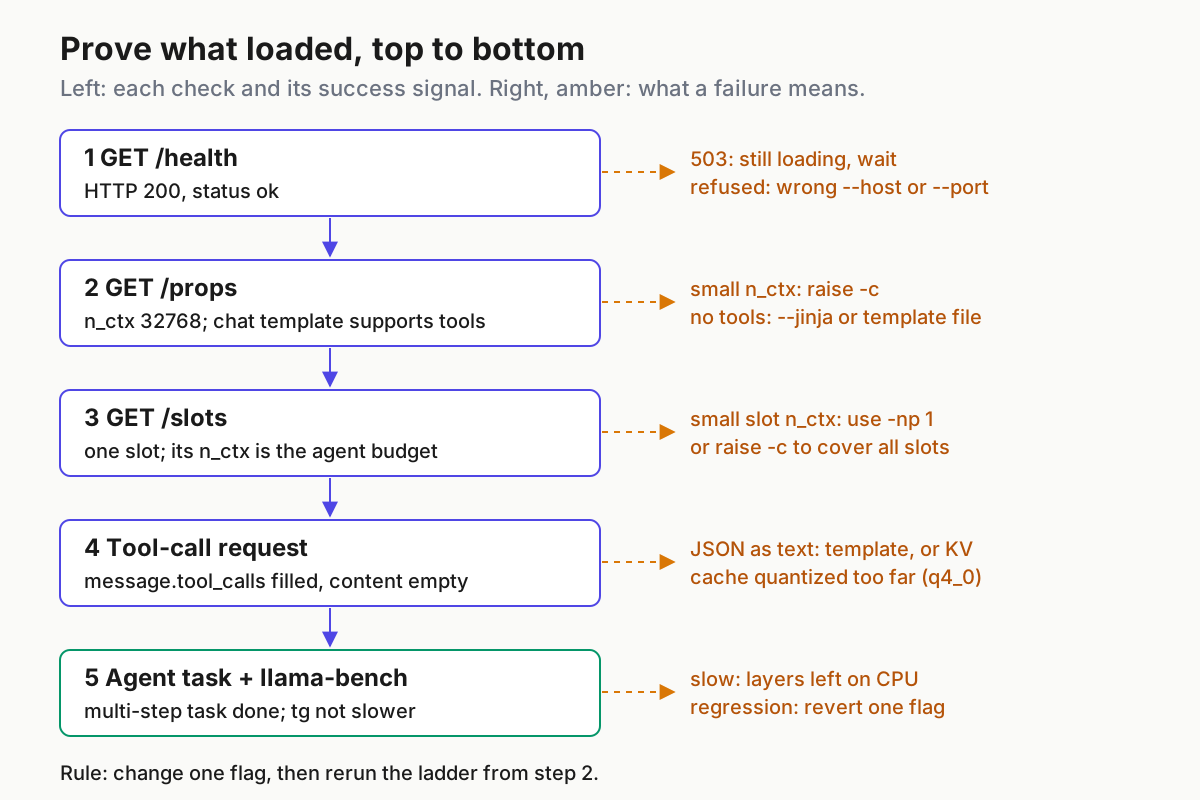
Set a helper variable first, then run each step:
KEY="$(cat ~/.secrets/llama-key)"
BASE=http://127.0.0.1:8080
- Liveness.
curl -s $BASE/health. Expected: HTTP 200 with{"status": "ok"}. A 503 withLoading modelmeans wait; connection refused means the host or port differs from the script. - Global properties.
Expected:curl -s -H "Authorization: Bearer $KEY" $BASE/props \ | jq '{n_ctx: .default_generation_settings.n_ctx, total_slots, model_path, build_info, caps: .chat_template_caps}' curl -s -H "Authorization: Bearer $KEY" $BASE/props | jq -r '.chat_template' | grep -c toolsn_ctx32768,total_slots1,model_pathending in your file name,build_infomatchingllama-server --version. The function-calling page says to verify a tools-enabled template by inspecting thechat_template(orchat_template_tool_use) property at/props; the grep is a quick heuristic for that, andchat_template_capslists the template’s capabilities (the README points tocommon/jinja/caps.hfor field names). A count of 0 is a warning sign, not proof of failure; the smoke test in step 5 is the real check. - Per-slot context.
Expected: one entry,curl -s -H "Authorization: Bearer $KEY" $BASE/slots \ | jq '.[] | {id, n_ctx, chat_format: .params.chat_format}'id0,n_ctx32768. This is the number the agent actually gets. Thechat_formatfield names the parser in use; the function-calling page says an unrecognized template falls back to a generic format, logged asChat format: Generic, which works but may use more tokens than the native format. - Model id.
curl -s -H "Authorization: Bearer $KEY" $BASE/v1/models | jq '.data[0] | {id, n_ctx_train: .meta.n_ctx_train}'. Expected:idequalsqwen-coder-7b, andn_ctx_trainis at least your-c. - Tool-call smoke test. Adapted from the function-calling documentation’s own example:
Expected:curl -s $BASE/v1/chat/completions \ -H "Content-Type: application/json" \ -H "Authorization: Bearer $KEY" \ -d '{ "model": "qwen-coder-7b", "messages": [{"role": "user", "content": "What is the weather in Istanbul?"}], "tools": [{ "type": "function", "function": { "name": "get_current_weather", "description": "Get the current weather in a given location", "parameters": { "type": "object", "properties": {"location": {"type": "string"}}, "required": ["location"] } } }] }' | jq '{message: .choices[0].message, timings, usage}'message.contentis null andmessage.tool_callsnamesget_current_weatherwith an argument mentioning Istanbul. Failure: the call appears as text insidecontentandtool_callsis empty. That means the template or parser did not produce a structured call; see the first troubleshooting row. - Agent task. In OpenCode, give a multi-step task that forces tool use, for example: list the files under
src/, open the largest one, and summarise its exported functions. Expected: OpenCode shows separate tool steps (a listing, a read) and a summary that names real functions. Failure: the agent narrates commands instead of running them, or repeats the listing because it lost earlier output.
During longer sessions, the timings object on each response is your context gauge. The README says the total tokens in context equal prompt_n + cache_n + predicted_n, and cache_n shows how much of the prompt was reused from the prompt cache (enabled by default). When that sum approaches the slot’s n_ctx, the agent is near its limit. Context shift is disabled by default, so the server does not silently slide old tokens out; plan for the agent to compact or start a fresh session.
Benchmark before and after a change
Verification proves the configuration; llama-bench proves it did not get slower. It runs prompt-processing (pp) and text-generation (tg) tests, repeats each five times by default and reports average tokens per second with a standard deviation. Its -d option prefills the KV cache to a given depth, which matters for agents because generation speed late in a long session is what you feel.
- Record the baseline with the current cache type:
MODEL="$HOME/models/Qwen2.5-Coder-7B-Instruct-Q4_K_M.gguf" llama-bench -m "$MODEL" -ngl 999 -fa on -ctk f16 -ctv f16 -d 0,16384 -o md | tee ~/llama/bench-f16.md - Run the candidate with only the changed flag different:
llama-bench -m "$MODEL" -ngl 999 -fa on -ctk q8_0 -ctv q8_0 -d 0,16384 -o md | tee ~/llama/bench-q8.md - Compare the
tg128rows at depth 0 and atd16384. Expected output is a Markdown table with model, size, params, backend, ngl, test and t/s columns, like the README’s examples. - Accept the change if generation at depth is no worse than the baseline within the reported deviation, and the smoke test still returns
tool_calls. Reject it otherwise and keep the previous script. - To find where offload stops paying, sweep layers:
llama-bench -m "$MODEL" -ngl 20,24,28,999 -p 512 -n 128. The README’s own layer sweep shows generation speed climbing as more layers move to the GPU, which is the pattern to look for on your card.
Two caveats from the llama-bench README: its timings exclude tokenization and sampling, and the benchmark does not exercise the server’s slots or templates. It measures the engine, while the smoke test measures the agent path. You need both.
Where a MoE model changes the plan
A mixture-of-experts model such as the Gemma 4 26B A4B build in Hugging Face’s guide activates only part of its weights per token, so llama.cpp offers a middle path between all-GPU and fewer layers. Place the experts in this order:
- Keep
-ngl allthroughout. The MoE flags decide where expert weights live, while-ngldecides how many layers go to VRAM at all. - Start with
-cmoe, --cpu-moe, which keeps all MoE expert weights in system memory while attention and other layers stay on the GPU. Confirm the model loads and/healthreturns 200. - Switch to
-ncmoe, --n-cpu-moe N, which keeps the expert weights of only the first N layers on the CPU. Begin with a high N and lower it one step per reload until load fails, then keep the last value that worked. - If generation is still slow with experts on the CPU,
--moe-cache-mib Nadds a GPU cache for those experts; the port change and MoE cache runbook covers it. - Run the full verification ladder, including the tool-call smoke test, on the final launch line.
An Illustrative 12 GB launch, with N to be found by the sweep in step 3:
llama-server -hf ggml-org/gemma-4-26b-a4b-it-GGUF:Q4_K_M --no-mmproj \
  --alias gemma-4-26b-a4b -c 16384 -ngl all -ncmoe 20 -fa on -ctk q8_0 -ctv q8_0 \
  -np 1 --jinja --host 127.0.0.1 --port 8080 --api-key-file "$HOME/.secrets/llama-key"
The function-calling page does not list this model family among its native formats, so step 2 of the verification ladder and the smoke test in step 5 decide whether its template handles tools well enough for your agent.
Troubleshooting table
Each row pairs a symptom with its usual cause, the fix, and what you should observe once it works.
| Symptom | Likely cause | Fix | Expected after the fix |
|---|---|---|---|
Tool calls appear as text in content; tool_calls empty |
Jinja disabled by an inherited setting, or the model’s template lacks tool support (log shows Chat format: Generic) |
Pass --jinja; add --chat-template-file with a tool-use template, as the function-calling page does for several models |
Smoke test returns tool_calls, content null |
| Tool calls got worse after a cache change | KV cache quantized too far (-ctk q4_0) |
Return to q8_0 or f16 |
Smoke test passes again |
| Agent forgets earlier files or stops at a length limit | Slot n_ctx too small: low -c, fit shrank an unset -c, or the budget is split across slots |
Pin -c, set -np 1, match OpenCode limit.context plus limit.output to the slot |
/slots shows the intended n_ctx |
| Out of memory at load | Pinned -c, f16 cache and -ngl all exceed VRAM |
In order: lower -c, switch to q8_0, lower -np, then lower -ngl |
/health returns 200 |
| Generation slow | Layers or MoE experts on the CPU | Check the ngl column in llama-bench; run an -ngl sweep; reduce -ncmoe |
Generation near the all-GPU figure |
| GPU not used at all | -ngl 0, GPU hidden by CUDA_VISIBLE_DEVICES, or build lacks the backend |
-ngl all; check --list-devices; rebuild with the right backend |
Device listed and layers offloaded |
| Startup error with a quantized V cache | Flash attention off or unsupported | -fa on, or use an f16 V cache |
Server loads |
401 Invalid API Key |
Client and server read different keys | Point both at the same key file | Chat request returns 200 |
| Connection refused | Port or host mismatch (README default 9931 versus client 8080) | Explicit --port; same port in baseURL |
/health returns 200 |
| Model missing from picker or wrong name in logs | Client model key differs from --alias |
Make the OpenCode key equal the alias | /v1/models id equals the key |
Rollback: one flag at a time
The rollback plan is the reason the script carries a version number. Every change produces a new file, and the stable name serve-coder.sh points at whichever version is live.
- Copy the live script before changing anything:
cp ~/llama/serve-coder.v2.sh ~/llama/serve-coder.v3.sh. - Change exactly one flag in v3, for example
-c 32768to-c 49152. - Confirm the change is one line:
diff ~/llama/serve-coder.v2.sh ~/llama/serve-coder.v3.sh. - Repoint and restart: stop the running server, run
ln -sfn ~/llama/serve-coder.v3.sh ~/llama/serve-coder.sh, then start~/llama/serve-coder.sh. - Rerun the verification ladder from step 2, then the llama-bench pair.
- If any check fails or generation regresses, repoint the link to v2, restart, and confirm
/propsshows the v2 values (n_ctx32768 here). Keep v3 on disk with a note on why it failed. - If the OpenCode limits changed with the server, revert
opencode.jsonin the same step; keep it under version control next to the scripts.
Done means: /props and /slots show the context and slot count you chose, the template handles tools, the smoke test returns structured tool_calls, OpenCode completes a multi-step task, and llama-bench shows no regression at depth. Not done means: any troubleshooting row reappears. For a second machine, home AI without a workstation covers what smaller hardware can reasonably run before you start this process again with different starting values.
Sources
- Arkon (@roberto84816516) on X, October 20, 2026: What each is for: Ollama versus llama.cpp
- ggml-org/llama.cpp: LLaMA.cpp HTTP Server README
- ggml-org/llama.cpp: Function Calling documentation
- ggml-org/llama.cpp: Using multiple GPUs with llama.cpp
- ggml-org/llama.cpp: llama-bench README
- OpenCode: Providers documentation
- Hugging Face: Local Agents with llama.cpp