EmbeddingGemma 2 on a Laptop: Run a Twenty-Item Recall Test Before an Agent Searches Your Media
EmbeddingGemma 2 puts memos, screenshots and clips in one Apache 2.0 vector space. Prove recall on twenty of your own items and write an index manifest first.

Go deeper. Build your own.
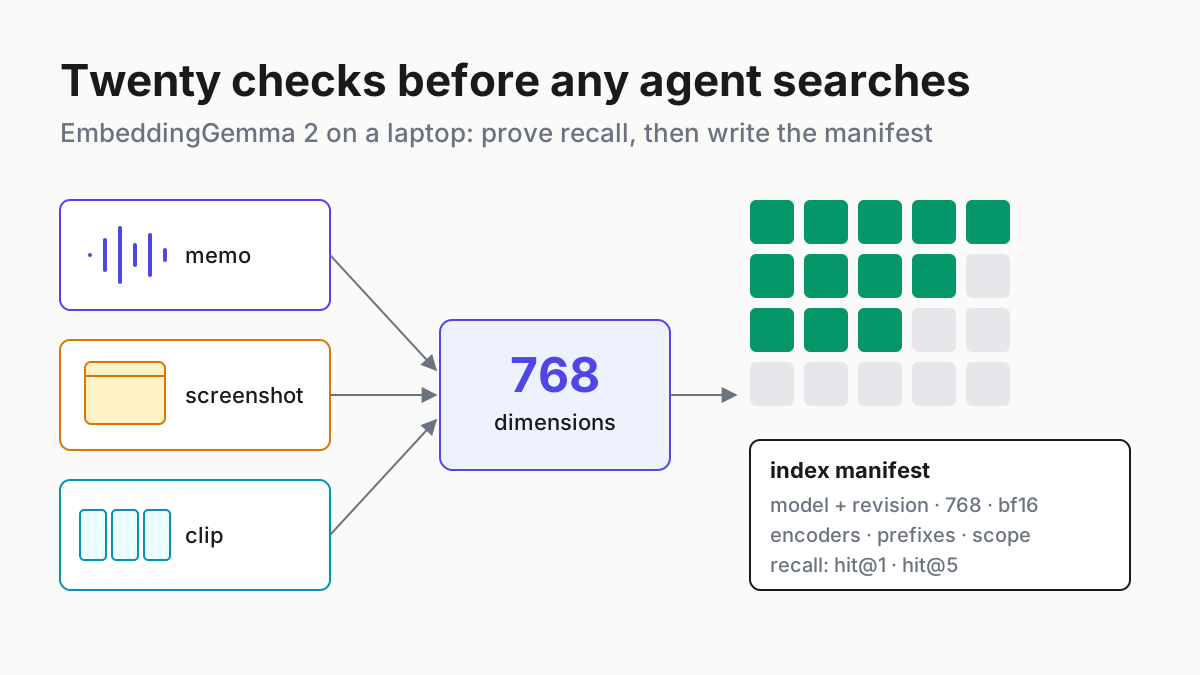
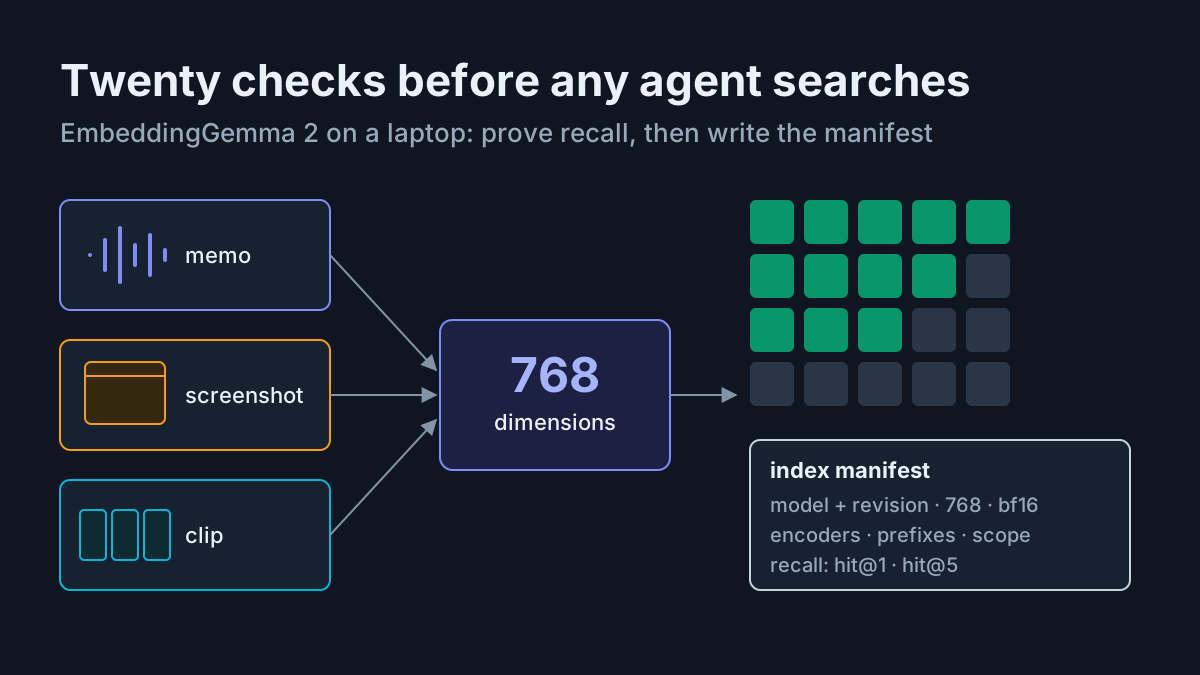
Google measured EmbeddingGemma 2’s memory on a phone, not a server, and that tells you the size class: one 740M-parameter model that turns a voice memo, a screenshot and a short screen recording into points in the same 768-number space. It is open weights under Apache 2.0, and the obvious next thought is to point it at your own folders and let an agent search them. The less obvious thought is the one that matters: before an agent reads that index, prove it finds things, and write down what built it.
This is a field note for doing exactly that on a laptop. You build a twenty-item recall test from your own media with an answer key written first, log every run in one table, read hit@1 and hit@5 by modality, and then write an index manifest that a retrieval tool checks before it answers anything. An afternoon covers the first pass. The manifest is what keeps the index honest after that.
Nothing here assumes any product ships on-device search. It describes what an operator can build and measure with the published model and their own hardware.
What Google released on Oct 6: one 740M model, five input types, Apache 2.0
Google DeepMind released EmbeddingGemma 2 on October 6, 2026, with a launch post on Google’s blog by Sahil Dua and Henrique Schechter Vera and a developer guide the same day. The model card on Hugging Face describes “an open multimodal embedding model” that maps “text (incl. code), images, video, and audio inputs” into “a single, unified 768-dimensional vector space.” The 740M parameters split into a 270M text model, a 170M vision encoder and a 300M audio encoder, and the developer guide shows the model loading as 270M, 440M, 570M or the full 740M depending on which encoders you need.
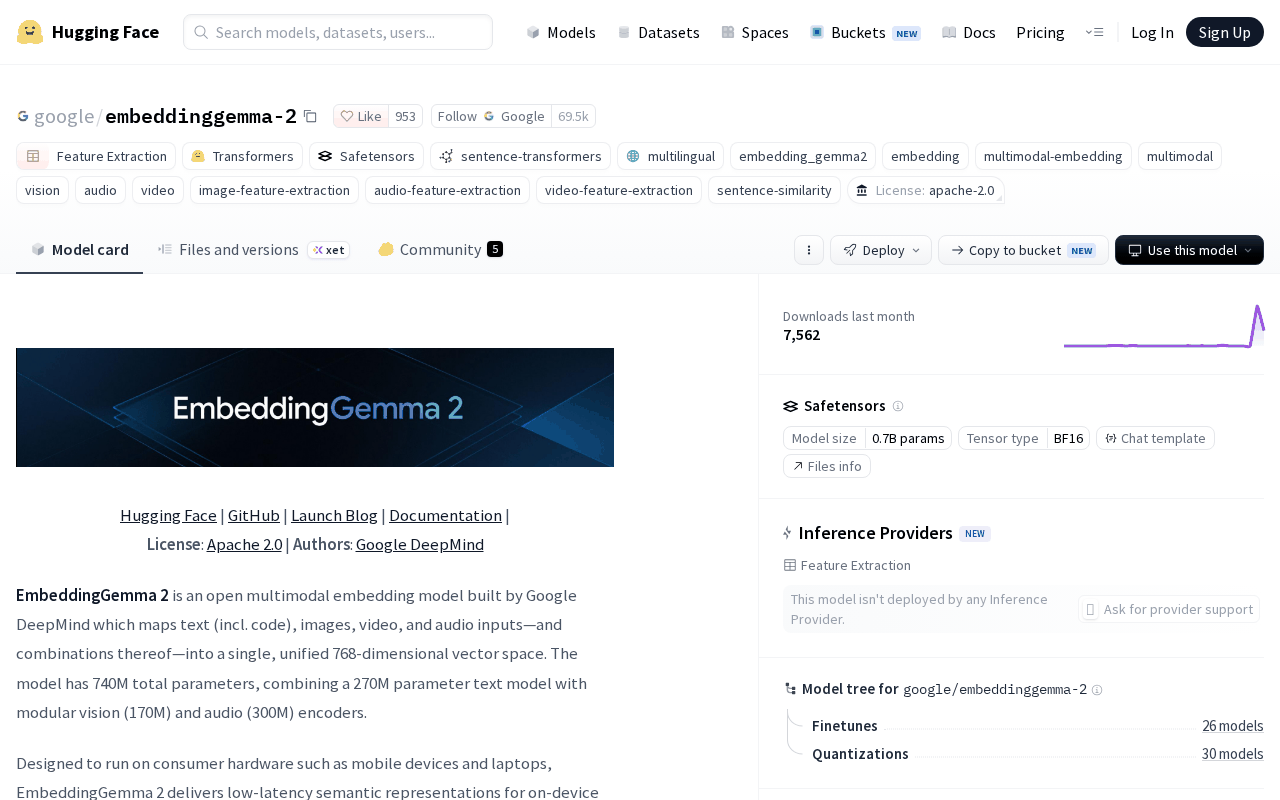 Screenshot: Hugging Face, “google/embeddinggemma-2 · Hugging Face” (model card, Oct 6, 2026), captured Oct 7, 2026.
The context window is 8,192 tokens, shared across modalities. Per the card, an image costs 280 tokens, a video frame 140 tokens at a default of one frame per second, and audio 25 tokens per second of 16 kHz mono, which works out to roughly 29 images, 58 frames or about 327 seconds of audio in one input. Output vectors can be truncated Matryoshka-style to 512, 256 or 128 dimensions. The licence is Apache 2.0, and the card’s metadata carries no access gate. That is a change: the first EmbeddingGemma, google/embeddinggemma-300m, was text-only with a 2,048-token window and shipped under the gated Gemma licence.
Second, Google’s blog lists runtimes from transformers and sentence-transformers to llama.cpp, Ollama and LM Studio, but not which inputs each accepts. On Oct 8, Ollama’s library page listed text and image input for its 440M and 740M tags and text only for the rest, with no audio; ggml-org’s GGUF conversion for llama.cpp ships a separate multimodal projector file but documents no modalities. Third, every benchmark gain on the card is Google’s own number; the headline code result, MTEB code 78.68 against 68.76 for the first model, has no independent replication we could find, and multilingual text quality is roughly flat (61.36 against 61.15).
Fourth, and most practical: the card tells you to run inference in bfloat16 or float32 and says “Do not use float16.” Its reason is specific, and it is the reason this article insists on a recall test.
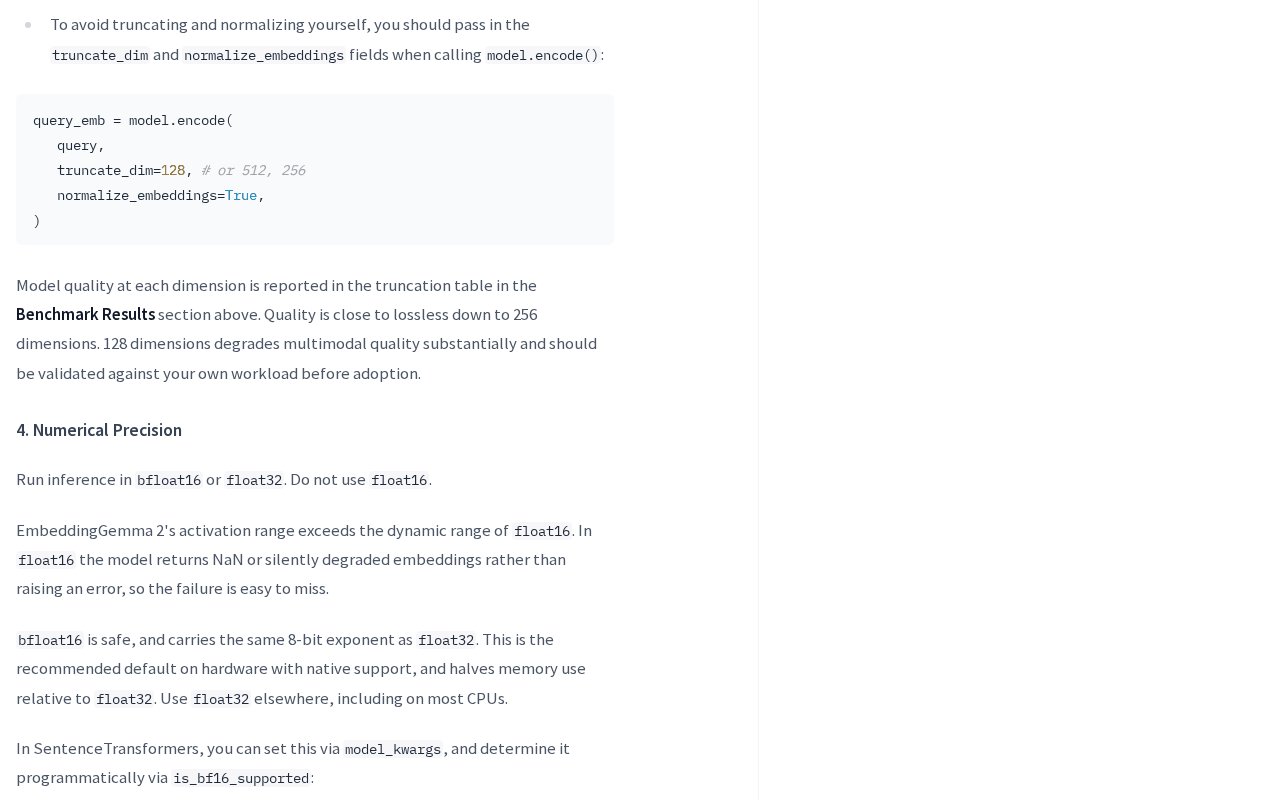 Screenshot: Hugging Face, “google/embeddinggemma-2 · Hugging Face” (Numerical Precision section, Oct 6, 2026), captured Oct 7, 2026.
In float16, the card says, “the model returns NaN or silently degraded embeddings rather than raising an error, so the failure is easy to miss.” A wrong precision setting does not crash. It produces an index that looks fine and finds the wrong things. TheNextWeb’s launch coverage adds context on the on-device pitch; the specifications above come from Google’s own pages.
Why an agent’s media search needs a recall proof
When you search your own screenshots by hand, a bad result costs you a second look. When an agent searches them, it takes the top hit and acts on it: quotes the wrong memo in a reply, attaches the wrong screenshot to a ticket, or tells you a recording does not exist. The agent cannot tell a weak index from a missing file, so the proof has to exist before the agent does.
The other reason is drift. An index built in October with one model, one precision and one dimension can be read in December by a tool configured for something else. Vectors from two configurations are not comparable, and nothing in a plain vector file says which configuration built it. The manifest in Step 6 fixes that.
The twenty-item recall test, step by step
The format borrows from the Docling vs MarkItDown intake bake-off: a frozen test set, an answer key written before anything runs, pinned configurations and one log row per item. The subject is different. Here you are testing retrieval over your own media, not conversion.
Step 1: Pick twenty items and write the answer key first
Pull twenty real items from the folders you would want searched: five voice memos, five screenshots, five short screen clips and five mixed cases, such as a screenshot of a slide that a memo also describes. For each, write the natural-language query you would actually type and the item ID that must come back. Write it before you embed anything, so you cannot grade the model toward its own answers.
Add five distractors per modality: items that look or sound similar but are wrong. A recall test without near-misses only proves the model can tell a memo from a screenshot, which nobody doubted.
Write each query the way you would phrase it on a bad day, not the way the file is named. “The memo where I listed three vendors for the Q4 shortlist” is a fair test; “Q4 vendors memo” is a filename lookup with extra steps. Keep one line per item in a plain file: item ID, modality, query, expected ID, and the distractor IDs that should rank below it.
Respect the window. A memo longer than about five and a half minutes or a clip longer than about a minute will not fit one input, so decide now whether you chunk it and how, and write the chunk rule into the answer key.
Step 2: Write the privacy allowlist before the first embedding
Decide which media classes may be embedded at all. Voice memos from a work folder may be fine; screenshots of banking apps, health portals or password managers should never become vectors, because a vector index is a copy of the meaning of the file. Write the allowlist as folder paths plus media classes, and write the denylist beside it. The local-first vault policy decides where those archives live; this list decides which of them become searchable.
Screenshots deserve extra care. They capture whatever was on screen, which is why the screenshot egress audit treats them as data you keep local. Embedding them locally is consistent with that. Embedding them with a hosted API is not.
Step 3: Pin the model, the encoders and the precision
Record the exact model revision from the Hub, not just the name, and load only the encoders the test needs. An illustrative shape for the text side with sentence-transformers, using the search-query prefix from the v2 card’s prompt table (read Oct 8, 2026):
import numpy as np, torch
from sentence_transformers import SentenceTransformer

model = SentenceTransformer(
    "google/embeddinggemma-2",
    revision="<commit hash from the Hub>",
    model_kwargs={"torch_dtype": torch.bfloat16},  # float32 on CPUs without bf16
)
q = model.encode(
    ["task: search result | query: screenshot of the 0x80070005 error dialog"],
    normalize_embeddings=True,
)
assert not np.isnan(q).any(), "NaN embedding: check precision"
Load the smallest configuration each modality needs and log it per row. Screenshots need the text model plus the vision encoder (440M); memos need text plus audio (570M); only mixed items that combine sound and pictures need all 740M. On a laptop with little memory to spare, that choice decides whether the indexing run competes with everything else you have open.
Embed the image, audio and video items with the card’s own multimodal example for your installed version rather than a snippet from a blog, and log which runtime ran. If you try a GGUF build in llama.cpp or Ollama, check whether it actually accepts the media type before you trust a result; a runtime that silently embeds a file name or a transcript instead of the audio is a different test.
The weights download once, before the test. Run the twenty queries with the network off, or with an egress log open, so “what left the machine” is a measurement.
Step 4: Run the twenty queries and log one row per item
This is the artifact. Every row is the same shape, and the five rows below are illustrative, invented to show how a filled log reads; your wall times and memory will differ by machine.
| Item | Modality | What the answer key says | Model + revision | Encoders loaded | Quantization and precision | Runtime | Wall time | RAM | Hit@1 | Hit@5 | What left the machine |
|---|---|---|---|---|---|---|---|---|---|---|---|
| V-03 | Voice memo, 48 s raw audio | “memo listing three vendors for the Q4 shortlist” returns V-03 | google/embeddinggemma-2 @ a1b2c3d | text + audio (570M) | none, bf16 | sentence-transformers, CPU | 2.4 s | 3.1 GB | yes | yes | nothing (egress log empty) |
| S-01 | Screenshot, PNG | “error dialog with code 0x80070005” returns S-01 | google/embeddinggemma-2 @ a1b2c3d | text + vision (440M) | none, bf16 | sentence-transformers, CPU | 0.9 s | 2.2 GB | yes | yes | nothing |
| C-04 | Screen clip, 52 s at 1 fps | “recording where the export button greys out” returns C-04 | google/embeddinggemma-2 @ a1b2c3d | text + vision (440M) | none, bf16 | sentence-transformers, CPU | 3.8 s | 2.6 GB | no (rank 3) | yes | nothing |
| M-02 | Mixed: slide screenshot + memo | “slide about churn that I talked through” returns M-02 | google/embeddinggemma-2 @ a1b2c3d | all (740M) | none, bf16 | sentence-transformers, CPU | 2.9 s | 3.9 GB | yes | yes | nothing |
| C-02 | Screen clip, 3 min, chunked to 60 s | “the part where the build fails at the linker” returns C-02 chunk 3 | google/embeddinggemma-2 @ a1b2c3d | text + vision (440M) | none, bf16 | sentence-transformers, CPU | 7.1 s | 2.6 GB | no | no | nothing |
The revision a1b2c3d is a placeholder; log the real commit hash. Record the RAM figure from your operating system’s process monitor at peak, and record wall time per query with indexing timed separately.
Step 5: Read hit@1 and hit@5 by modality, then decide
Sum the log by modality, not overall. In the illustrative run charted below, the twenty items score 12 of 20 at hit@1 and 18 of 20 at hit@5, which sounds acceptable until you split it: screenshots land 4 of 5 at hit@1, clips only 2 of 5. An agent that takes the top hit would be wrong on clips more often than right.
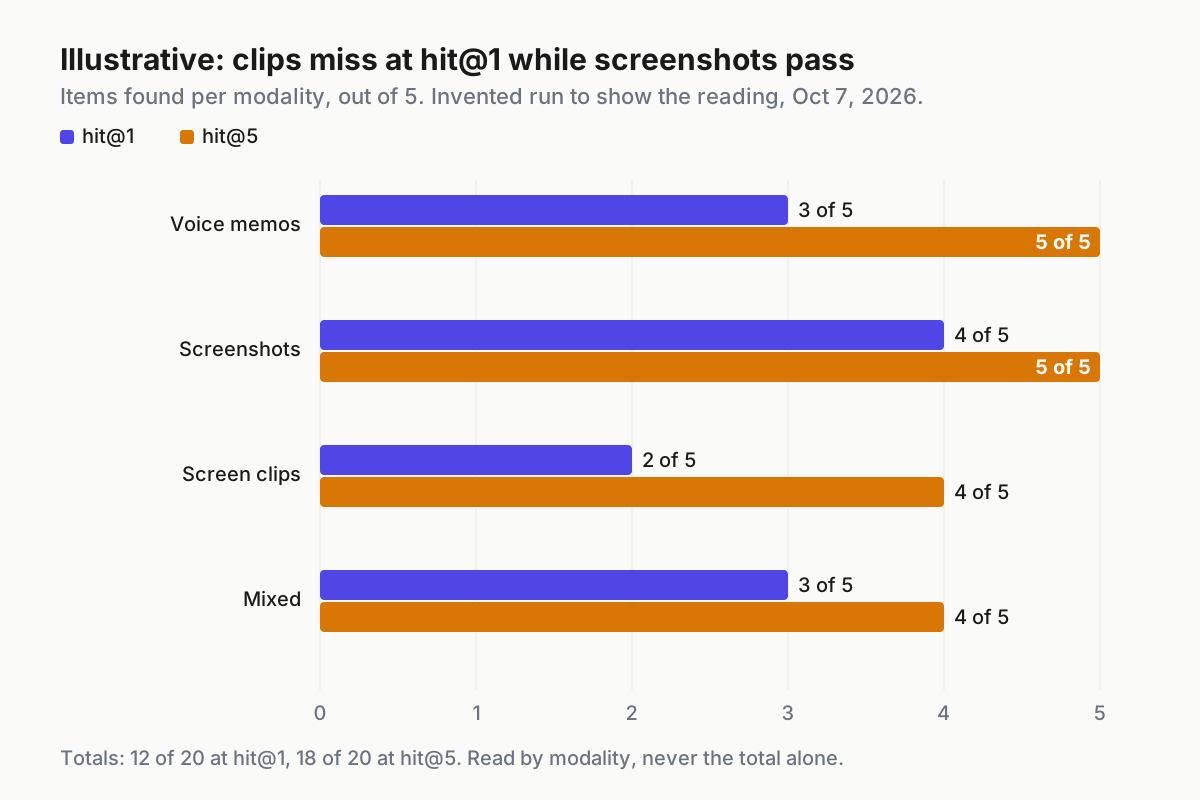
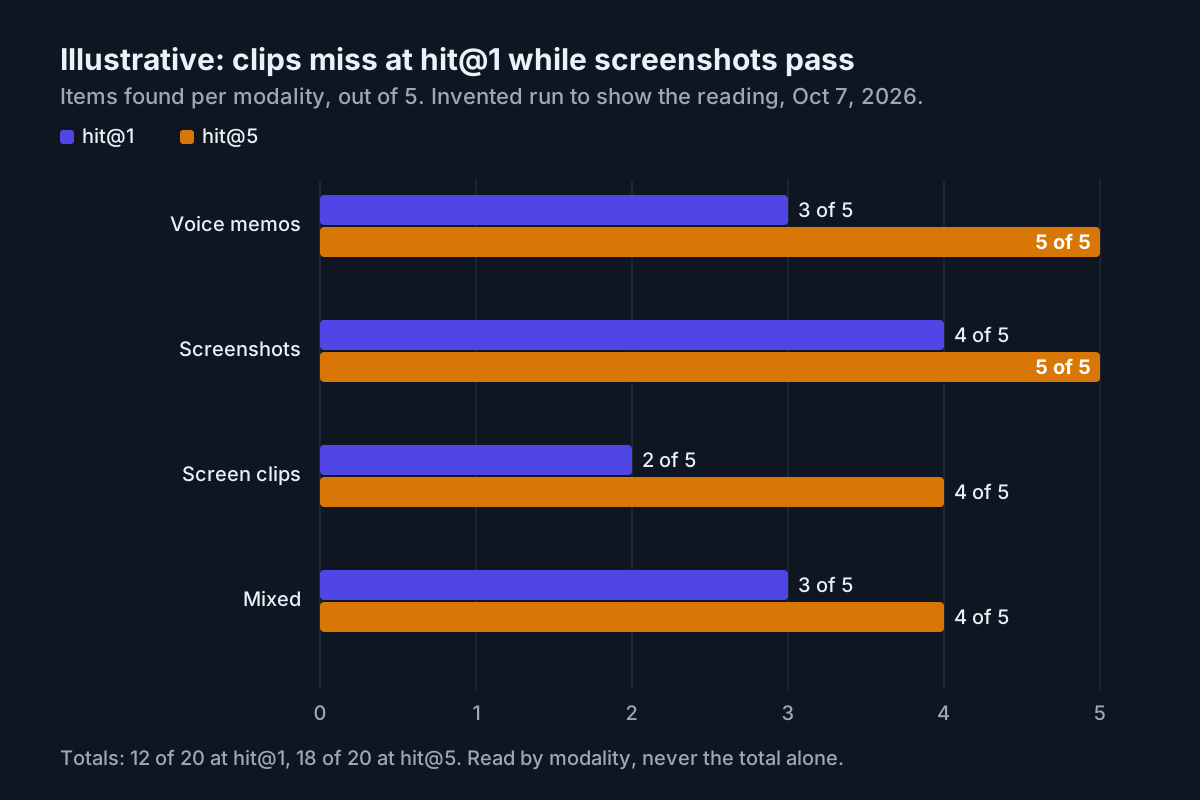 Illustrative: one twenty-item recall run on a laptop, hit@1 and hit@5 by modality; numbers invented to show the reading, not measured.
Set the bar per modality before you look, and write the decision down. A reasonable starting rule has three tiers.
A modality goes live for agent search if hit@5 is 5 of 5 and hit@1 is at least 4 of 5. It is suggest-only, meaning the agent proposes candidates for a person to confirm, if hit@5 is at least 4 and hit@1 at least 3. Anything lower stays off. In the illustrative run, screenshots go live, memos and mixed items are suggest-only, and clips stay off until chunking improves.
Then rerun the clips with one change at a time: shorter chunks, a different frame rate, or a transcript embedded beside the frames. Log each as its own run. Do not drop to 128 dimensions to save space without re-testing; the card says 128 dimensions “degrades multimodal quality substantially and should be validated against your own workload before adoption,” while 256 is “close to lossless.”
Step 6: Write the index manifest
Every index gets a manifest file stored beside it, and the manifest is the only thing a retrieval tool is allowed to believe about the index. An illustrative manifest for the run above:
index: personal-media-v1
model: google/embeddinggemma-2
revision: a1b2c3d
dimension: 768
precision: bfloat16
quantization: none
encoders: [text, vision, audio]
query_prefix: "task: search result | query: {query}"
document_prefix_text: "title: {title} | text: {content}"
chunking: {audio_max_s: 300, video_max_s: 60, video_fps: 1}
corpus_scope: [~/Recordings/memos, ~/Pictures/Screenshots/work, ~/Videos/screen-clips]
media_allowlist: [voice-memo, screenshot, screen-clip]
media_denylist: [banking, health, password-manager]
build_date: 2026-10-07
recall_test: {items: 20, hit_at_1: 12, hit_at_5: 18, run_date: 2026-10-07}
live: [screenshot]
suggest_only: [voice-memo, mixed]
off: [screen-clip]
The prefixes in this example are the v2 card’s web and document search pair (use title: none when a document has no title; images, audio and video take no prefix); record whatever scheme you used, because a query embedded with one prefix and documents with another is a quiet way to lose recall.
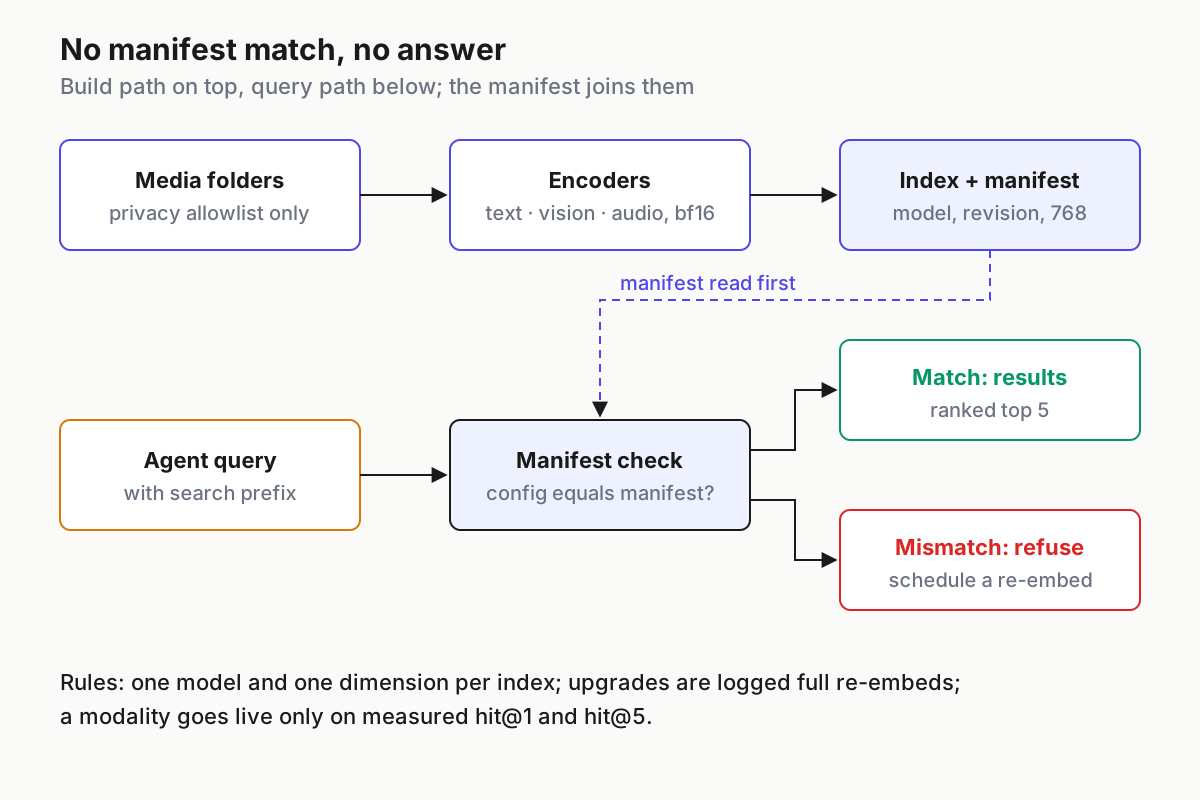
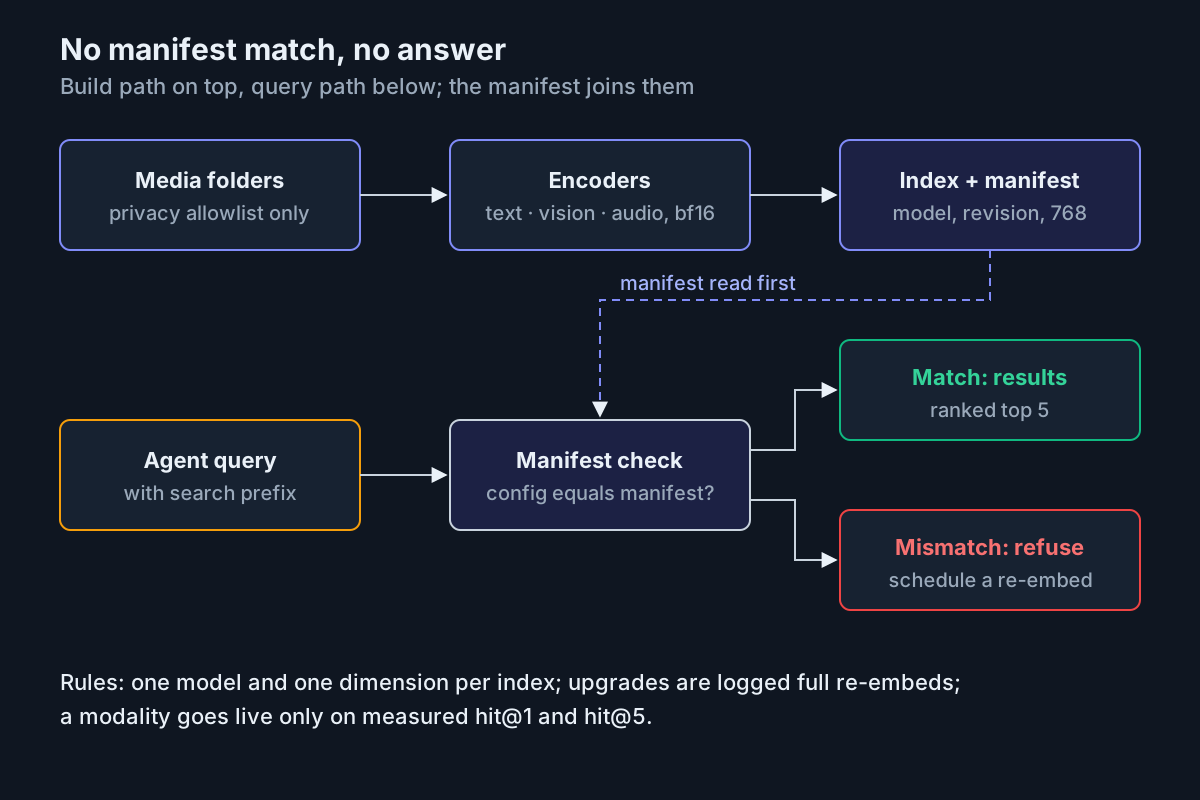 The manifest check sits between the agent and the index: a mismatch is a refusal, not a warning.
Step 7: Make the retrieval tool refuse a mismatched index
Four rules, written where the agent’s tool configuration lives:
- Never mix two models or two dimensions in one index. A new model or a new truncation is a new index.
- A model upgrade is a scheduled, logged full re-embed, followed by the same twenty-item test, never a silent swap.
- The retrieval tool compares its configured model, revision, dimension, precision and encoders against the manifest, and refuses to answer on any mismatch.
- Adopt an index for agent search only on measured recall, per modality, as recorded in the manifest.
The refusal itself is a few lines. An illustrative check:
def open_index(manifest: dict, configured: dict) -> None:
    for key in ("model", "revision", "dimension", "precision", "encoders"):
        if manifest[key] != configured[key]:
            raise RuntimeError(
                f"{manifest['index']}: built with {key}={manifest[key]!r}, "
                f"tool expects {configured[key]!r}; re-embed or reconfigure"
            )
EmbeddingGemma 2 index failures and how each one shows up
| What breaks | The signal you would see | First action |
|---|---|---|
| Index built in float16 | NaN values in stored vectors, or recall far below the test run with no error | Scan vectors for NaN; rebuild in bf16 or fp32 and rerun the twenty items |
| Two models or dimensions in one index | Similarity scores cluster oddly; new items never rank near old ones | Split by manifest; re-embed the minority set into the index’s configuration |
| Long memo or clip silently truncated | Hits only on the first minutes of long recordings | Chunk to the window (about 327 s audio, about 58 frames video) and log the chunk rule |
| Runtime embeds text, not media | Audio or image recall near random while text recall looks normal | Confirm the runtime accepts the media type; fall back to a runtime that does |
| Denylisted media embedded | A denylisted folder path appears in the index’s source list | Delete those vectors, fix the scope, and add a path check before embedding |
| Tool upgraded, index not | Manifest revision differs from tool config; tool refuses | Schedule the re-embed and the recall test; do not override the refusal |
Index manifests are fleet state, not personal notes
An agent’s retrieval is only as trustworthy as the manifest of the index it reads. Across a fleet, that means every index an agent can query has a manifest, every manifest has a recall result, and every model upgrade shows up as a scheduled re-embed in the same place other fleet changes do. That is ordinary agentic ops discipline applied to a vector file.
The test set itself becomes a fixture. Keep the twenty items, their answer key and the distractors frozen, the way a synthetic company fixture is frozen for agent evaluation, and rerun them on every model or runtime change. Compare the results the way the memory-layer bake-off compares memory systems: same inputs, pinned arms, decision written down. If the laptop is the limit, home AI without a workstation covers what that class of hardware can carry.
FAQ
Can EmbeddingGemma 2 run on a laptop?
Google designed it for consumer hardware, but its published memory figures, about 191 MB text-only and 567 MB fully multimodal, were measured quantized on a Pixel 11 Pro phone. Google gives no laptop number. Load it in bfloat16 or float32, measure peak RAM yourself, and record it in your recall log.
Can I search screenshots and voice memos locally with EmbeddingGemma 2?
Yes, in principle: it embeds text, images, audio and video into one 768-dimension space under Apache 2.0, so queries and media can stay on your machine. Prove it on your own files first, with a twenty-item answer key, and confirm your runtime actually accepts image and audio inputs.
Why does EmbeddingGemma 2 return NaN embeddings?
The model card says its activation range exceeds float16’s dynamic range, so float16 inference returns NaN or silently degraded embeddings without raising an error. Use bfloat16 where supported or float32 elsewhere, and add a NaN check to your indexing script before any vector is written.
Sources
- Google DeepMind, google/embeddinggemma-2 model card: licence, parameters, input limits, precision and benchmarks (Oct 6, 2026)
- Google, “EmbeddingGemma 2 is a best-in-class open model for natively multimodal embeddings”, Sahil Dua and Henrique Schechter Vera (Oct 6, 2026)
- Google Developers Blog, EmbeddingGemma 2 developer guide (Oct 6, 2026)
- Google DeepMind, google/embeddinggemma-300m model card: first EmbeddingGemma, gated Gemma licence (Sep 2025)
- TheNextWeb, EmbeddingGemma 2 launch coverage (Oct 6, 2026)