llama.cpp Speculative Decoding for Local Coding Models: Draft Models, N-gram Drafting and MTP in llama-server, Measured Before You Trust the Speedup
Set up llama.cpp speculative decoding in llama-server with a draft model, n-gram drafting or MTP, then benchmark tokens/s against --spec-type none first.

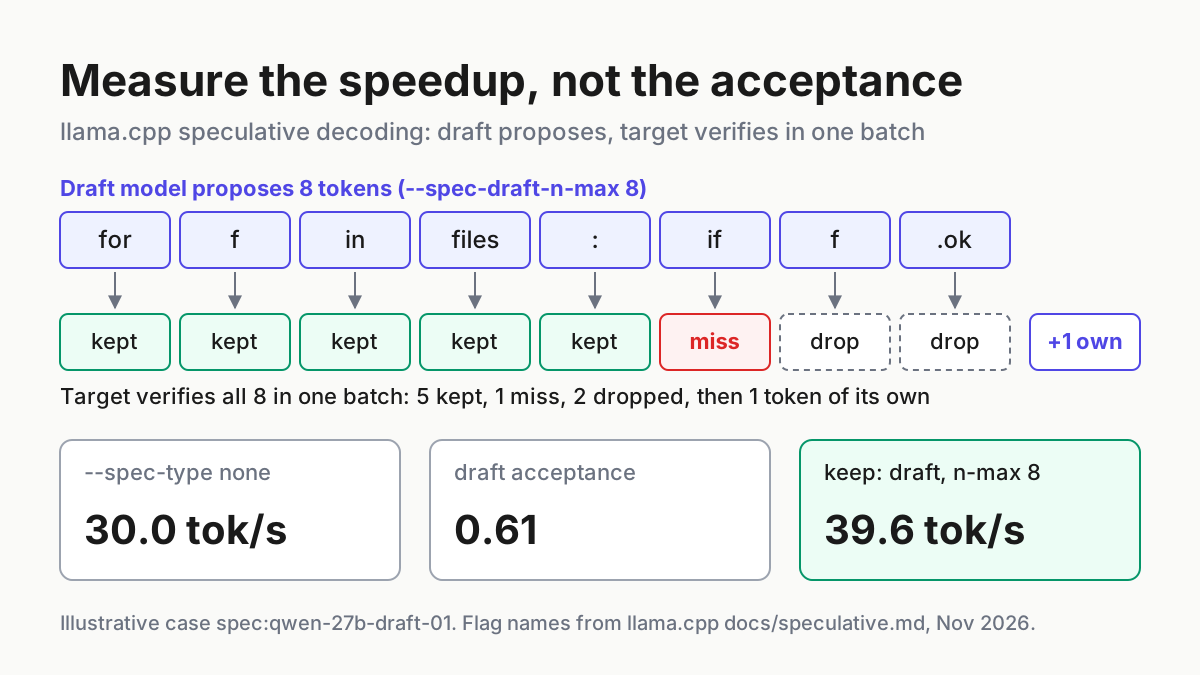
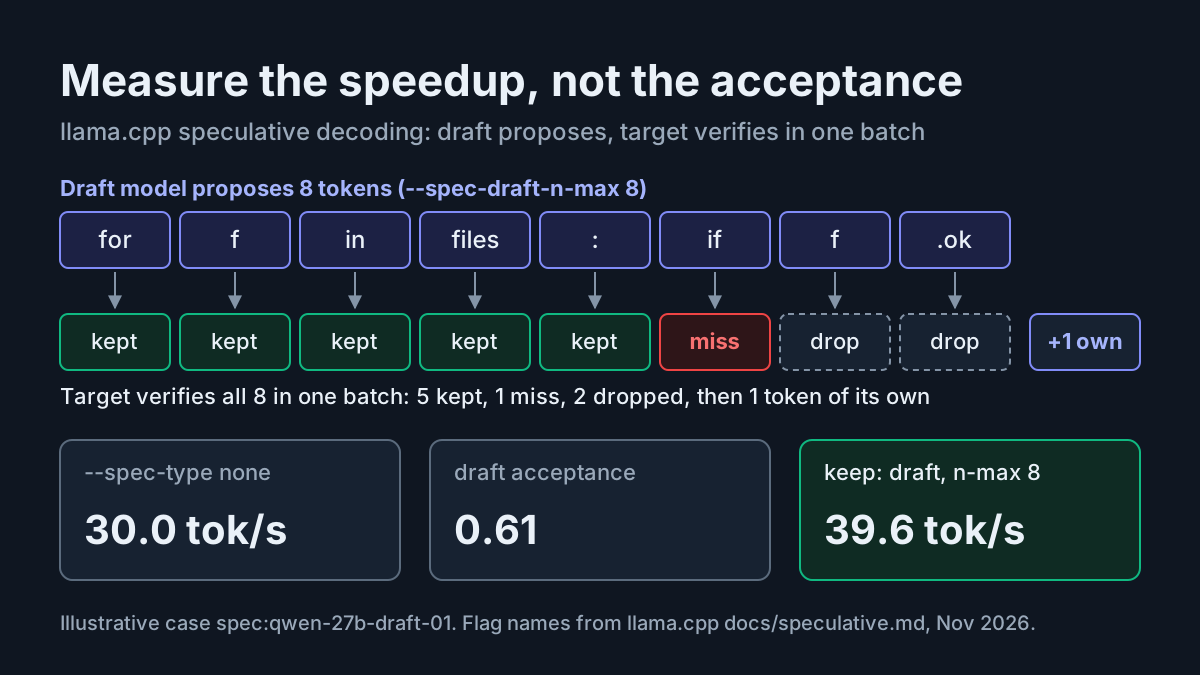
Your coding agent is connected to a local 27B model through llama-server, and every multi-file edit arrives one token per forward pass of that model. llama.cpp speculative decoding is the documented way to get more tokens per second from the same target model. Something cheaper guesses several tokens ahead, and the target checks every guess in a single batch. This tutorial sets it up three ways in llama-server: with a separate draft model, with n-gram drafting from the conversation’s own history, and with multi-token-prediction (MTP) heads where a model has them. Each setup is then measured against a plain baseline, so you keep only a speedup you have actually observed.
This week gave a good reason to measure. An X post from Nov 17, 2026 on NVIDIA’s 4B speculative-decoding draft model for Qwen3.8-27B on Hugging Face reports a 46% improvement in token acceptance over the model’s built-in speculative decoding head. The same post adds that acceptance rate is not the same as a 46% increase in tokens per second. It lists draft-model speed, verification cost, GPU memory and bandwidth, and the engine configuration as the factors between those two numbers. That warning applies to every drafter you try, not just this one, and it is the main lesson of this guide.
When you finish you will have:
- a llama-server launch command with an explicit
--spec-type - a benchmark script that sends a fixed set of coding prompts and records tokens per second, wall time and an output hash
- a filled results table for the illustrative case
spec:qwen-27b-draft-01 - a keep-or-revert rule, plus a rollback that is a single flag
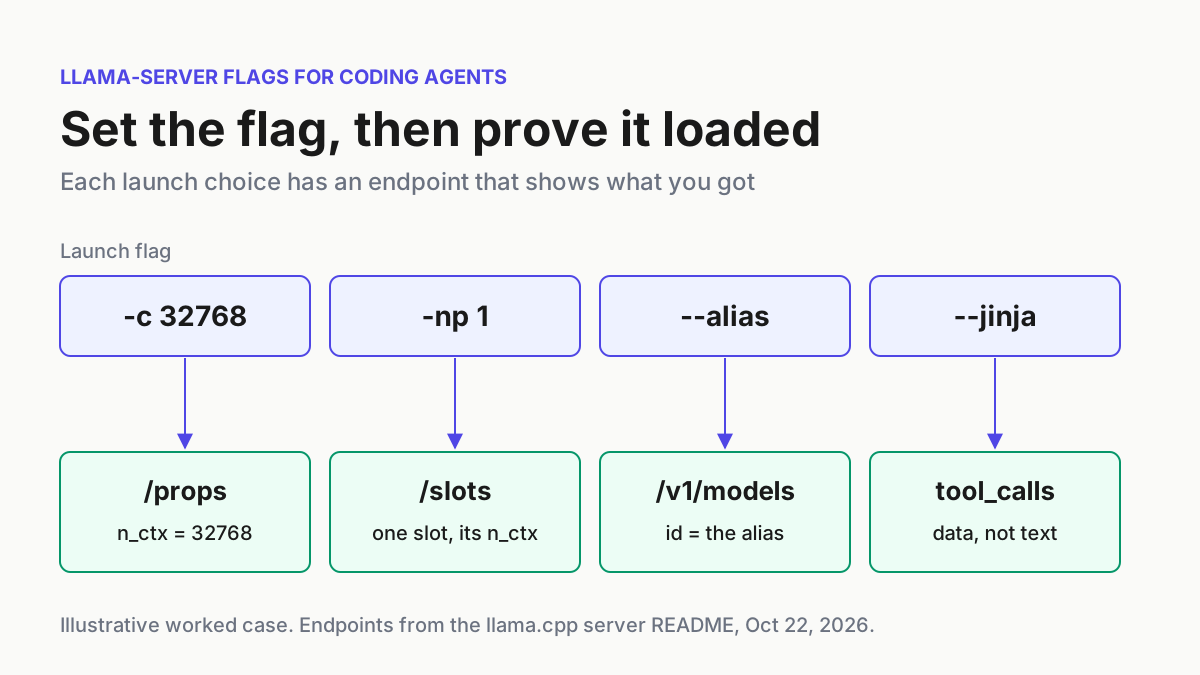
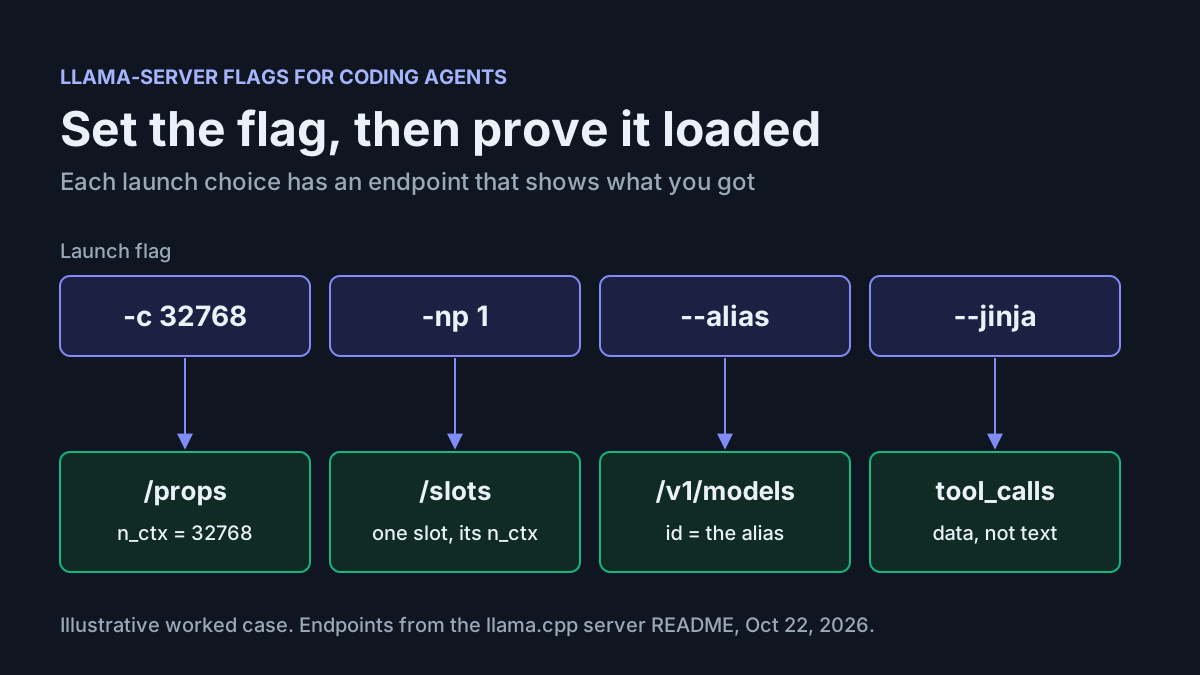
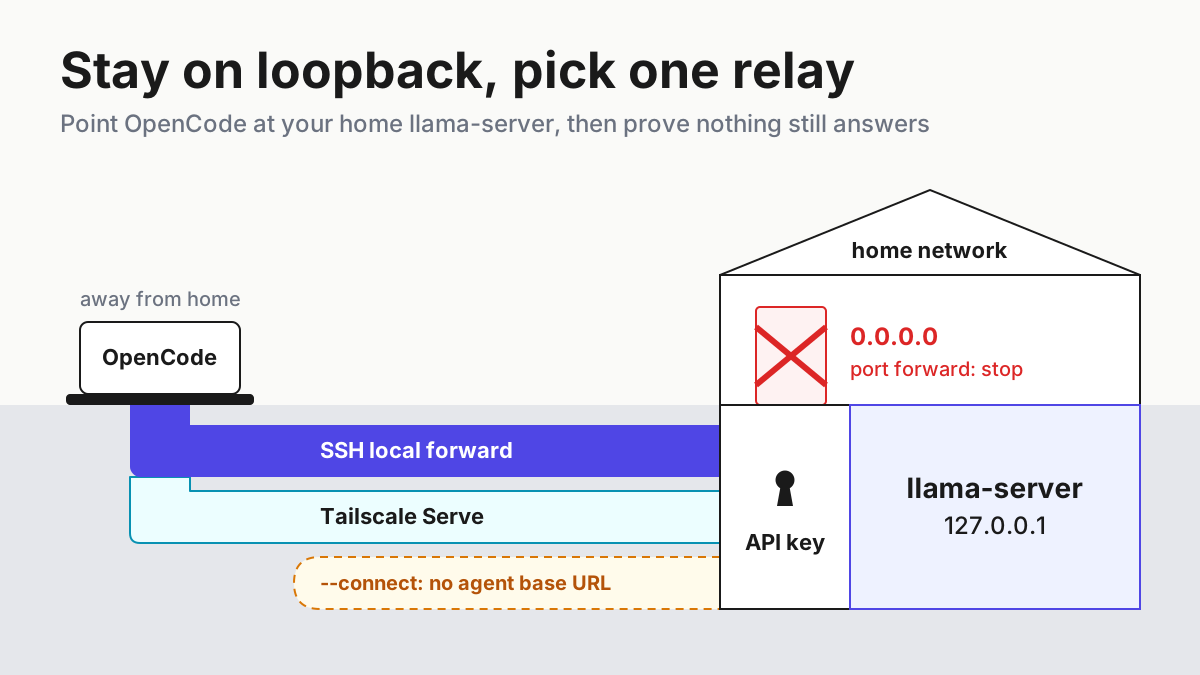
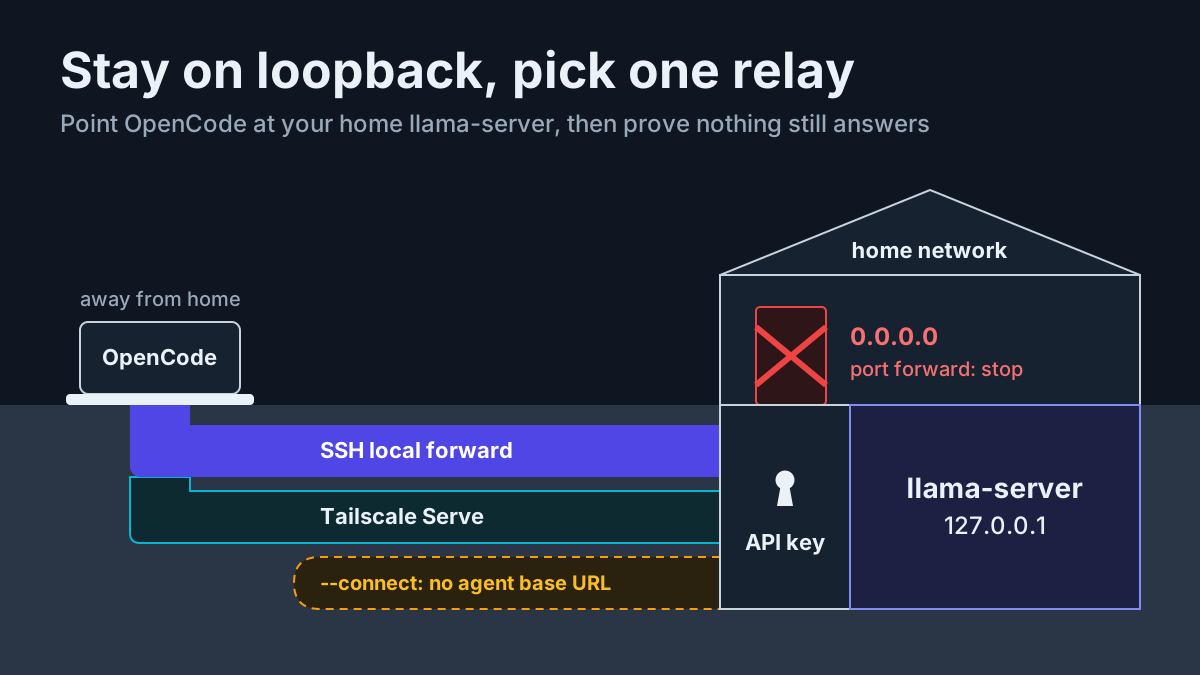
This guide assumes the base server already runs well. Context size, GPU layers, KV cache types, slots and --jinja are covered in llama-server flags for coding agents, and network exposure is covered in llama-server remote access for coding agents. Neither is repeated here.
What to have ready before you touch a spec flag
Speculative decoding adds load. It needs a second model in VRAM, or extra bookkeeping, plus a verification batch on every step. Start from a target configuration you already trust, so that any change in speed comes from the spec flags and not from something you adjusted on the way.
- [ ] A current llama.cpp build. Run
llama-server --helpand check that it lists--spec-type. Packaged builds can trail upstream. The Debian unstable manpage for llama.cpp-tools 1:0.9.0+dfsg-1 listsnone,draft-simple,draft-eagle3,draft-mtp,draft-dflash,draft-dsparkand the n-gram types. The upstream llama-server README also listsdraft-dflash2anddraft-lilicorr. Treat your own help output as the authority. - [ ] A target GGUF that runs without speculation. Use your usual quantization, with context pinned by
-c. If you are still choosing a quant, work through the memory math in the GGUF import and memory guide first. - [ ] For a separate draft model, a smaller GGUF with the same tokenizer. Unsloth’s llama.cpp speculative decoding page says the draft model must have the same tokenizer. LM Studio’s speculative decoding guide says it must have the same vocabulary. N-gram drafting needs no second model at all.
- [ ] VRAM headroom for the draft weights and the draft’s KV cache. Without it, the draft runs on CPU or squeezes the target’s context, and both outcomes cost more than speculation saves.
- [ ]
curlandjqfor the benchmark and the checks below. - [ ] Six saved prompts that look like your agent’s real work. The benchmark section explains how to pick them.
- [ ] An idle server during tests. Pause the agent so its requests do not land between benchmark runs.
The server listens on 127.0.0.1:9931 by default. If old scripts still assume a different port, the llama.cpp port change runbook covers that migration.
Why acceptance and tokens per second come apart
The llama.cpp speculative decoding document explains the core trick. Computing n tokens in one batch, as in prompt processing, is more efficient than computing n tokens one after another, as in response generation. A drafter produces candidate tokens quickly, and the target verifies them all in a single batch. The document says this can give substantial speedups when the draft predictions are frequently correct. LM Studio’s guide adds the rule that preserves output: the main model only accepts tokens that match what it would have generated, and after the last accepted draft token it always generates one more token of its own.
One generation step therefore has three costs and one payoff:
- Drafting cost. A draft model runs its own forward passes. N-gram lookups are cheap but are not free.
- Verification cost. The target processes a batch of draft length plus one, which costs more than a single token.
- Wasted work. Every draft token after the first rejection is thrown away.
- Payoff. Each accepted token is one sequential target step you no longer pay for.
Acceptance rate measures only the fourth item. A draft can get more of its guesses accepted and still lose overall if it is slow, if its weights push the target out of VRAM, or if longer drafts make verification heavier. LM Studio says this directly: if the draft model is not fast enough or effective enough, generation speed will not increase and could decrease. That is why the decision metric in this guide is generation tokens per second and end-to-end tokens per second at identical settings, with acceptance used only to explain the result.
Prompts matter as much as the drafter. LM Studio contrasts a factual question, where a small and a large model tend to produce the same text, with open-ended story writing, where the large model rejects most guesses. Coding agents land in between. A rewrite of an existing function repeats a lot of text that is already in the context. A brand-new module repeats much less. Your benchmark therefore needs both kinds of prompt.
Migrate old --draft-max recipes to the new spec flags
Many blog recipes and compose files still use the old draft flags. The current README lists them as removed arguments and names their replacements. Your old launch line needs to change before anything else in this guide will apply. The reference table, built from the README’s own entries:
| Old flag or variable | Status in current help | Use instead |
|---|---|---|
--draft, --draft-n, --draft-max N |
argument has been removed | --spec-draft-n-max N, or --spec-ngram-mod-n-max N for ngram-mod |
--draft-min, --draft-n-min N |
argument has been removed | --spec-draft-n-min N, or --spec-ngram-mod-n-min N |
--spec-ngram-size-n N |
argument has been removed | the type-specific --spec-ngram-*-size-n, or --spec-ngram-mod-n-match |
--spec-ngram-size-m N |
argument has been removed | the type-specific --spec-ngram-*-size-m |
--spec-ngram-min-hits N |
argument has been removed | the type-specific --spec-ngram-*-min-hits |
LLAMA_ARG_DRAFT_MAX in a compose file |
env of the removed argument | LLAMA_ARG_SPEC_DRAFT_N_MAX |
-md, --model-draft |
still valid alias | same, or --spec-draft-model |
-ngld, --gpu-layers-draft |
still valid alias | same, or --spec-draft-ngl |
--draft-p-min |
still valid alias | same, or --spec-draft-p-min |
Follow these steps in order:
- Search your launch scripts, systemd units, compose files and preset INI files for
draft-max,draft-min,DRAFT_MAXandspec-ngram-size. - Replace each entry using the table above.
- Add an explicit
--spec-type. The documented default isnone. For some draft families the document also says the type is detected from the draft model when--spec-typeis omitted. An explicit type removes that guesswork from your recipe and from your results. - Start the server once and read the log before going further. If it rejects an argument, the help text for that argument names its replacement.
Version drift in flags is the main reason to treat every llama.cpp upgrade as a canary run, as described in canary every CLI upgrade.
Choose a spec type for your model and your prompts
--spec-type takes a comma-separated list. The document groups the options into implementations that need a draft model and implementations that don’t, and says one of each can be combined. When both are active, the draftless one has higher precedence. Use this decision table to pick a starting candidate:
| Your situation | --spec-type |
What you add | What to watch |
|---|---|---|---|
| A smaller model with the same tokenizer fits beside the target | draft-simple |
-md DRAFT.gguf, -ngld all, --spec-draft-n-max N (default 3) |
draft VRAM, tokenizer match, draft speed |
| The target GGUF carries multi-token-prediction heads | draft-mtp |
nothing else; the document describes it as using MTP heads from the main model | whether your build and file actually start drafting |
| The agent mostly rewrites code that is already in context | ngram-map-k |
--spec-draft-n-max 64 per the document’s example |
flat results on new code |
| Long repeated blocks, such as reasoning restated in the answer | ngram-mod or --spec-default |
--spec-ngram-mod-n-match 24 --spec-ngram-mod-n-min 48 --spec-ngram-mod-n-max 64 |
shared hash pool across slots |
| You want a draft model plus history matching | draft-simple,ngram-map-k |
both sets of flags | the draftless type wins when both propose |
| A trained EAGLE-3 or DFlash-family drafter exists for this exact target | draft-eagle3, draft-dflash and relatives |
a checkpoint converted with --target-model-dir |
beyond this guide’s worked example |
| None of the above, or nothing beats the baseline | none |
nothing | this is also the rollback |
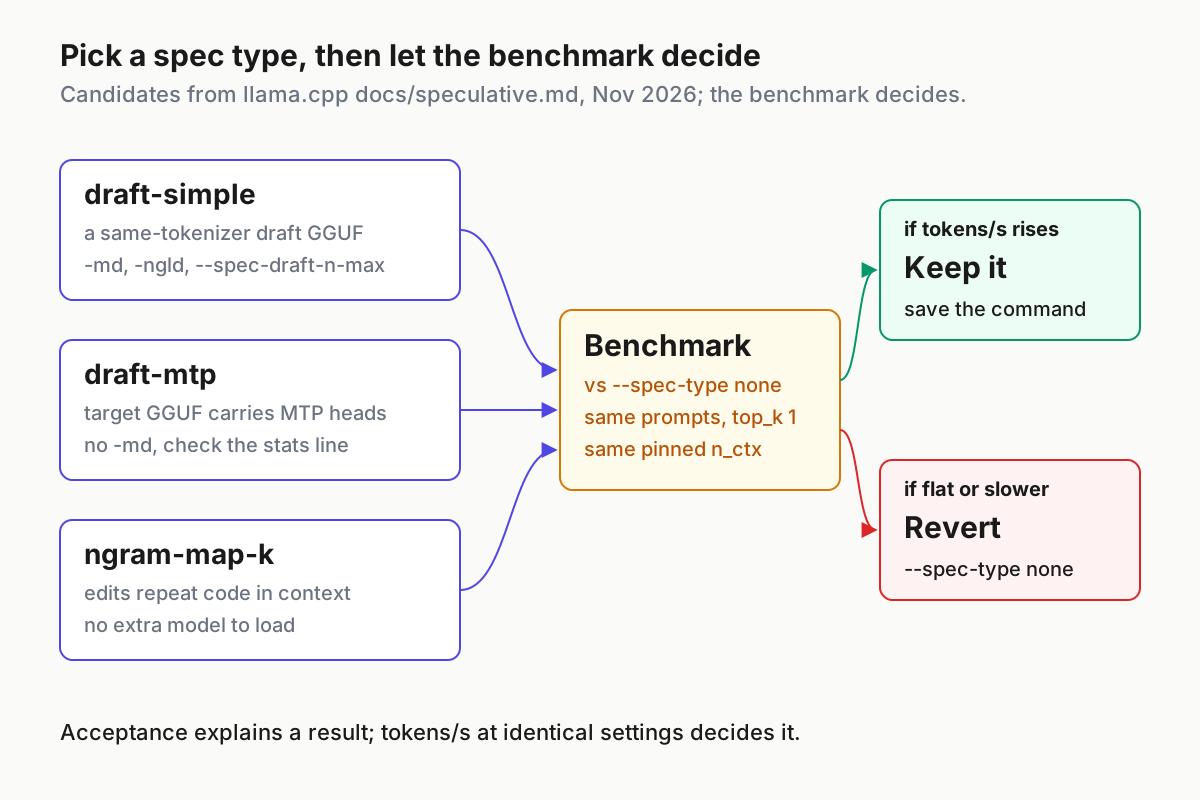
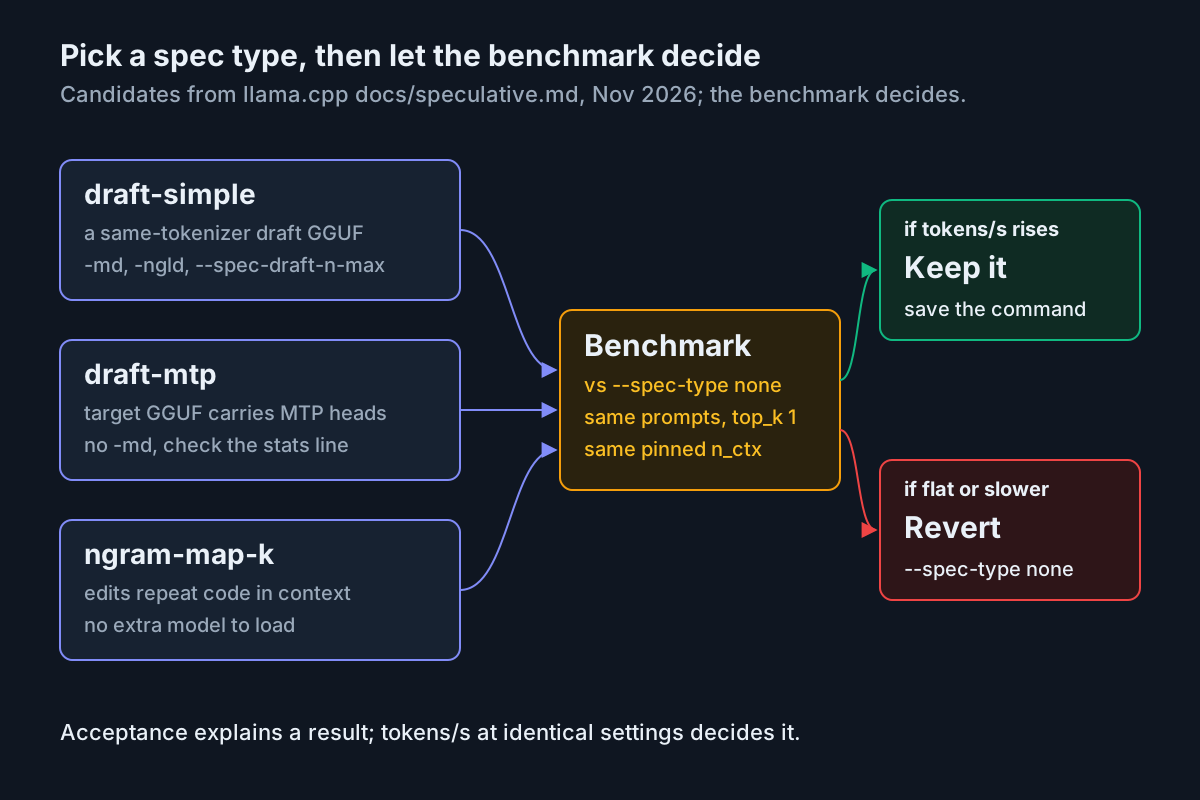
Some notes on how to read the table.
draft-simple is the type the document calls the most used approach: a much smaller model writes the drafts. LM Studio’s sizing guidance gives a rough upper bound on draft size. For a 14B main model, expect speedups only with drafts up to about 3B. For 32B, up to about 7B. At 7B, up to about 1B. A 4B drafter for a 27B target, like the one in the X post, sits inside that guidance, but only your benchmark can tell you whether it helps on your GPU.
ngram-map-k looks up the current n-gram, the key, in the token history. If that key has been followed by the same m tokens, it drafts those tokens, after a minimum number of hits (--spec-ngram-map-k-min-hits, default 1). The defaults are a 12-token key and a 48-token draft m-gram. The document names rewriting source code as a typical use. That matches what an agent does when it re-emits a file with a small change.
draft-mtp is listed in the spec-type table as using the main model’s MTP heads. The selected documentation does not say which GGUF conversions include those heads, or what the server logs when a file has none. Treat it as a candidate you confirm from the statistics output, as described below, never as an assumption.
Trained drafters. The document says EAGLE-3 drafts are trained for one specific target model and are converted with --target-model-dir so they inherit the target’s tokenizer. It also says that for the DFlash family, a head that does not match the requested type means speculative decoding is not initialized. If you plan to test a newly announced drafter such as NVIDIA’s, first check its model card for the format it ships in and the llama.cpp spec type it maps to, if any. Our news item on EAGLE-4 covers a research drafter aimed at vLLM and SGLang, which is a different deployment path.
Prove the draft model shares the target’s tokenizer
A draft whose token IDs differ from the target’s produces guesses the target will almost never accept. You pay the drafting cost and get nothing back. Check the match before benchmarking, using two endpoints from the README. GET /v1/models returns a meta object with vocab_type and n_vocab, and POST /tokenize returns the token IDs for a string.
- Start the target on the default port, then start the draft by itself on a second port. CPU is fine for this check.
- Compare the vocabulary metadata from both servers.
- Tokenize the same code file on both servers and compare a hash of the token arrays.
- Stop the draft-only server.
# terminal 1: target on the default port 9931
llama-server -m "$TARGET" -c 4096
# terminal 2: draft alone on port 9932, CPU only
llama-server -m "$DRAFT" -c 4096 -ngl 0 --port 9932

# terminal 3: vocabulary metadata (meta can be null while a model is still loading)
for port in 9931 9932; do
  curl -s "http://127.0.0.1:$port/v1/models" | jq -c '.data[0].meta | {vocab_type, n_vocab}'
done

# same file, same token IDs?
for port in 9931 9932; do
  jq -n --rawfile c sample.py '{content:$c}' |
    curl -s "http://127.0.0.1:$port/tokenize" -H 'Content-Type: application/json' -d @- |
    jq -c '.tokens' | sha256sum
done
What to expect. Both metadata lines show the same vocab_type and n_vocab, and both token hashes are identical. Use a sample.py that contains indentation, string escapes and a non-ASCII comment, because these are where related tokenizers tend to differ. A matching hash on one file is necessary but not proof. Repeat with a second file in another language your agent writes.
If it fails. If n_vocab differs, or the hashes differ, stop. Pick a draft from the same model family and the same tokenizer release. LM Studio’s advice also applies here: use a lower-parameter variant of the model you are running where one exists.
Build a fixed benchmark you can rerun
The benchmark has to hold everything constant except the spec flags. That means the same prompts, the same generation length, the same sampling, the same context size and one slot. The document points to a SPEED-Bench client in tools/server/bench/speed-bench for broader comparisons. The script below is a smaller, self-contained version for one machine and one agent workload, built only from endpoints the README documents.
Pick the prompts. Save six files in prompts/:
edit-rename.txt: a 150-line Python module pasted in full, with a request to rename one function and update its callers, returning the whole file.edit-types.txt: a TypeScript file pasted in full, with a request to add type annotations and return the whole file.edit-tests.txt: an existing test file, with a request to add two cases in the same style.new-cli.txt: a request for a new argparse CLI with three subcommands.new-sql.txt: a request for a migration plus a query layer for a described schema.explain-diff.txt: a diff pasted in, with a request for a review comment.
The first three repeat context heavily and favour n-gram drafting. The next two are mostly new text. The last is prose about code. If a spec type helps only the first group, you will see it, and you can decide whether your agent’s real mix justifies keeping it.
Fix the sampling. The document says to use greedy sampling when exact output matching is required. The script sets top_k: 1, which limits selection to the single most probable token, and a fixed seed. It also sets cache_prompt: false, so a configuration doesn’t benefit from cache reuse left by the previous run. A second pass at your agent’s real temperature comes later.
#!/usr/bin/env bash
# bench-spec.sh LABEL : run each prompt in ./prompts three times against llama-server
set -euo pipefail
LABEL="${1:?usage: bench-spec.sh LABEL}"
URL="${URL:-http://127.0.0.1:9931}"
OUT="results-${LABEL}.tsv"
printf 'prompt\trun\tpredicted_n\tpredicted_per_second\twall_s\tcontent_sha\n' > "$OUT"
for f in prompts/*.txt; do
  for run in 1 2 3; do
    body=$(jq -n --rawfile p "$f" \
      '{messages:[{role:"user",content:$p}], max_tokens:512, top_k:1, seed:42, cache_prompt:false}')
    resp=$(curl -s -w '\n%{time_total}' "$URL/v1/chat/completions" \
      -H 'Content-Type: application/json' -d "$body")
    wall=$(printf '%s\n' "$resp" | tail -n 1)
    json=$(printf '%s\n' "$resp" | sed '$d')
    sha=$(jq -r '.choices[0].message.content' <<<"$json" | sha256sum | cut -c1-12)
    printf '%s\t%s\t%s\t%s\t%s\t%s\n' "$(basename "$f")" "$run" \
      "$(jq -r '.timings.predicted_n' <<<"$json")" \
      "$(jq -r '.timings.predicted_per_second' <<<"$json")" "$wall" "$sha" >> "$OUT"
  done
done
curl -s "$URL/metrics" | grep -E '^llamacpp:(spec_decode|predicted_tokens_seconds)' > "metrics-${LABEL}.txt" || true
curl -s "$URL/props" | jq '.default_generation_settings.n_ctx' > "nctx-${LABEL}.txt"
The fields come from the README. The chat response includes a timings object with predicted_n and predicted_per_second. /metrics exposes llamacpp:spec_decode_num_draft_tokens_total, llamacpp:spec_decode_num_accepted_tokens_total, llamacpp:spec_decode_num_drafts_total and a per-position accepted counter, all of which read zero when spec decoding is off. /props reports n_ctx under default_generation_settings. /metrics only answers when the server is started with --metrics. This script is an illustrative example assembled from that documentation and has not been run for this article.
Summarise each results file in two ways:
for t in results-*.tsv; do
  awk -F'\t' -v f="$t" 'NR>1 {tok+=$3; wall+=$5; rate+=$4; n++}
    END {printf "%-28s gen %.1f tok/s | end-to-end %.1f tok/s | %d runs\n", f, rate/n, tok/wall, n}' "$t"
done

# did greedy output stay the same? compare prompt, run and content hash
diff <(cut -f1,2,6 results-none.tsv) <(cut -f1,2,6 results-draft8.tsv)
Generation tok/s is the server’s own rate for the decode phase. End-to-end tok/s divides generated tokens by curl’s total time, so it includes prompt processing and HTTP overhead. That second figure is closer to what your agent feels. Restart the server for every configuration so the cumulative /metrics counters start from zero.
Worked example: case spec:qwen-27b-draft-01
This case is illustrative. It shows the procedure and the kind of results to expect, not a measurement taken for this article. The setup is a single 24 GB GPU, a Qwen3.8-27B target at Q4_K_M, and a smaller draft from the same family that passed the tokenizer check. File names are placeholders, so substitute your own.
TARGET=models/qwen3.8-27b-Q4_K_M.gguf          # illustrative file name
DRAFT=models/draft-same-tokenizer-Q8_0.gguf     # illustrative file name
COMMON="-m $TARGET -c 32768 -ngl all -np 1 --metrics"

# A: baseline, no speculation
llama-server $COMMON --spec-type none

# B: separate draft model, all draft layers on GPU; rerun with n-max 3, 8 and 16
llama-server $COMMON --spec-type draft-simple -md "$DRAFT" -ngld all --spec-draft-n-max 8

# C: n-gram drafting from token history, no second model (document's example value)
llama-server $COMMON --spec-type ngram-map-k --spec-draft-n-max 64

# D: only if the target GGUF carries MTP heads
llama-server $COMMON --spec-type draft-mtp
Each consequential choice has a reason:
-c 32768is pinned. According to the README,--fitis on by default and adjusts unset arguments to fit device memory. If you leave context unset, loading a draft can silently shrink the context your agent gets, and the comparison stops being fair.-np 1gives one slot. That matches a single agent session and keeps batching from other requests out of the numbers.-ngld allasks for every draft layer in VRAM. The default isauto, and a draft running on CPU is a common reason for no gain.--spec-draft-n-maxis swept. The default is 3. Longer drafts save more steps when they are right and waste more verification when they are wrong, so the right length is found by measurement.--metricsturns on the counters the script reads.
Run ./bench-spec.sh none, ./bench-spec.sh draft3, ./bench-spec.sh draft8, ./bench-spec.sh draft16 and ./bench-spec.sh ngram, restarting the server with the matching flags before each one.
| Input | Action | Expected result (illustrative) |
|---|---|---|
spec:qwen-27b-draft-01/A: target Q4_K_M, -c 32768 -np 1 --metrics --spec-type none |
./bench-spec.sh none, then read metrics-none.txt and nctx-none.txt |
18 rows in results-none.tsv, spec_decode counters at 0, n_ctx 32768, about 30.0 generation tok/s |
spec:qwen-27b-draft-01/B1: --spec-type draft-simple -md $DRAFT -ngld all --spec-draft-n-max 3 |
restart server, ./bench-spec.sh draft3 |
log prints a draft acceptance rate line and a statistics draft: line, acceptance about 0.74, about 34.8 tok/s |
spec:qwen-27b-draft-01/B2: same as B1 with --spec-draft-n-max 8 |
restart server, ./bench-spec.sh draft8, diff hashes against baseline |
acceptance about 0.61, about 39.6 tok/s, n_ctx still 32768, content hashes match on nearly every row |
spec:qwen-27b-draft-01/B3: same as B1 with --spec-draft-n-max 16 |
restart server, ./bench-spec.sh draft16 |
acceptance falls to about 0.44, about 31.2 tok/s, barely above baseline, so this setting is rejected |
spec:qwen-27b-draft-01/C: --spec-type ngram-map-k --spec-draft-n-max 64 |
restart server, ./bench-spec.sh ngram |
statistics ngram_map_k: line appears, edit prompts speed up, new-code prompts stay flat, about 36.9 tok/s overall |
spec:qwen-27b-draft-01/old: a copied recipe that still passes --draft-max 8 |
start the server with the old line | startup refuses the removed argument; the fix is --spec-draft-n-max 8 |
spec:qwen-27b-draft-01/R: rollback to --spec-type none, -md removed |
restart server, ./bench-spec.sh rollback |
spec_decode counters back at 0, /slots shows "speculative": false, rate returns to about 30 tok/s |
The illustrative results, side by side:
| Configuration | Draft acceptance | Generation tok/s | Change vs none | Verdict |
|---|---|---|---|---|
--spec-type none |
not applicable | 30.0 | baseline | reference |
draft-simple, n-max 3 |
0.74 | 34.8 | +16% | works, not best |
draft-simple, n-max 8 |
0.61 | 39.6 | +32% | keep |
draft-simple, n-max 16 |
0.44 | 31.2 | +4% | reject |
ngram-map-k, n-max 64 |
0.68 | 36.9 | +23% | good fallback with no second model |
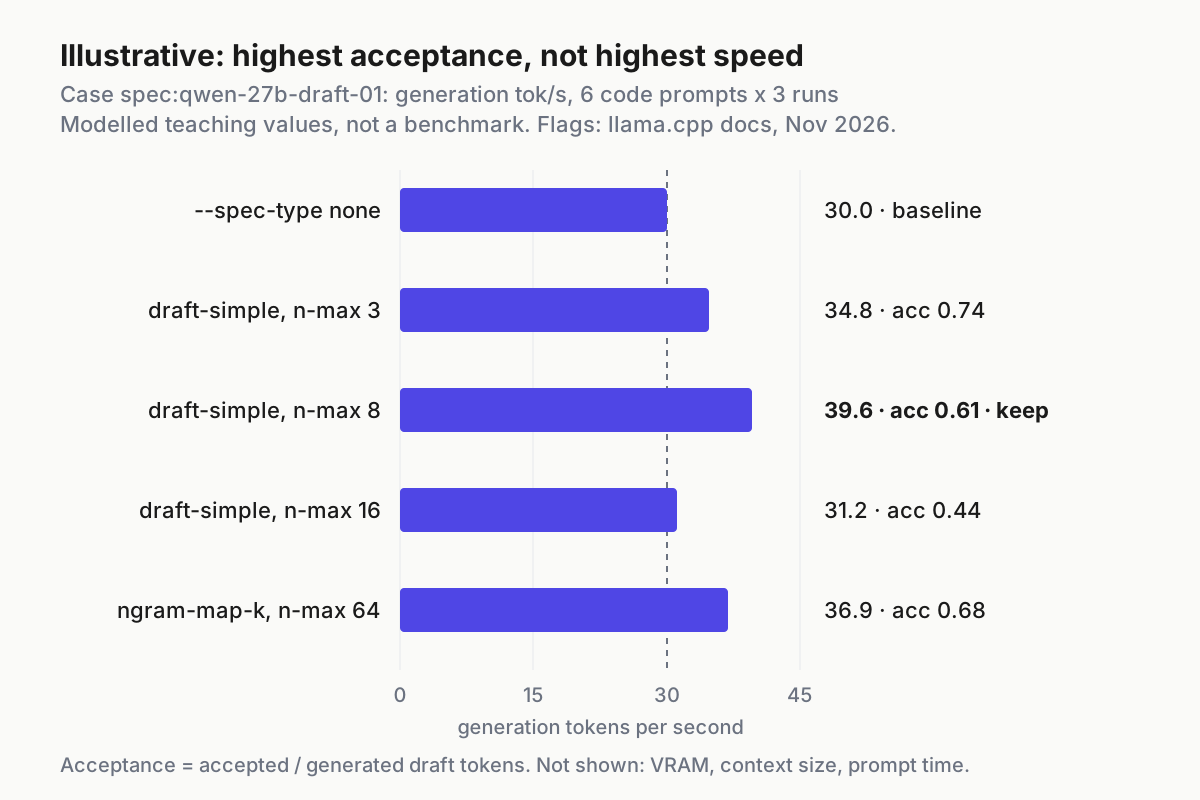
The table shows the pattern the X post warned about, on a small scale. The configuration with the highest acceptance, n-max 3, is not the fastest, because each verification step can only bank up to three tokens. The longest drafts, n-max 16, keep enough guesses to look reasonable but waste so much verification that most of the gain disappears. In this example the middle setting wins. On your hardware it could be a different setting, which is why the sweep is part of the procedure.
Read the statistics lines and the /metrics counters
The document says each speculative implementation prints statistics. Its examples look like this:
draft acceptance rate = 0.57576 (  171 accepted /   297 generated)
statistics draft: #calls = 10, #gen drafts = 10, #acc drafts = 10, #gen tokens = 110, #acc tokens = 98
statistics ngram_map_k: #calls(b,g,a) = 6 1690 26, #gen drafts = 26, #acc drafts = 26, #gen tokens = 1248, #acc tokens = 968, dur(b,g,a) = 2.234, 1.427, 0.016 ms
Those are the document’s sample lines, not output from this article’s case. Read your own in this order:
- Check that a statistics line exists for the type you asked for. If you started
draft-mtpordraft-simpleand no matching statistics line appears, the implementation is not drafting. Fix that before reading any speed numbers. - Read
#gen tokensagainst#acc tokens. These are the tokens the implementation generated, including rejected ones, and the tokens the main model accepted. Their ratio is the acceptance figure in the first line. - Read
#gen draftsagainst#acc drafts. The document defines accepted drafts as drafts accepted at least partially. When many drafts are generated and few are accepted, the drafter is guessing blind on this workload. - For n-gram types, read
#calls(b,g,a)anddur(b,g,a). These count and time the begin, generation and accumulation phases. A large generation call count with few drafts means the lookup rarely found a match. That is normal on new code and is not a fault. - Cross-check with
/metrics. Compute acceptance and the mean number of accepted tokens per verification step from the saved counters:
awk '/spec_decode_num_accepted_tokens_total/{a=$2} /spec_decode_num_draft_tokens_total/{d=$2} /spec_decode_num_drafts_total/{s=$2}
  END {if (d>0) printf "acceptance %.2f, accepted per step %.2f\n", a/d, a/s; else print "no drafts: speculation is off"}' metrics-draft8.txt
- Use the per-position counter to tune draft length.
llamacpp:spec_decode_num_accepted_tokens_per_pos_totalis labelledposition="N". If counts drop to near zero after position 4 or 5, a draft length of 16 is mostly wasted verification. Lower--spec-draft-n-maxand run the benchmark again.
The X post asks for two measurements: average accepted tokens per verification step, and actual tokens per second. Steps 5 and 6 give you the first. The benchmark summary gives you the second. Only the second decides.
Keep it or roll it back
Write the rule down before the numbers arrive, so a promising acceptance rate can’t change your mind. The rule this guide recommends, with thresholds that are a starting point rather than a documented standard:
- Keep a configuration only if end-to-end tok/s, not just generation tok/s, rises by at least 10% over
noneon the full six-prompt set. - Require
nctx-*.txtto match the baseline exactly. A speedup paid for with a smaller context is a regression for a coding agent. - Require content hashes to match on the large majority of rows. The README warns that logits are not guaranteed to be bit-for-bit identical across batch sizes on some backends, so an occasional greedy divergence on a long generation is not automatically a bug. Frequent divergence is, and it should send you back to the troubleshooting table.
- Repeat the winning configuration at your agent’s real sampling settings. Remove
top_kandseedfrom the request body, set the temperature your client sends, and run again. Keep the configuration only if it still wins. - Record the final command, the build’s
--versionoutput, the results files and the date next to your launch script.
Rolling back is one flag. The steps differ by how you launch:
- Command line. Change
--spec-typetononeand remove-md,-ngldand the--spec-draft-*flags. - Environment or compose. Set
LLAMA_ARG_SPEC_TYPE=noneand removeLLAMA_ARG_SPEC_DRAFT_MODEL. The README notes that a command-line argument overrides an environment variable when both are set, so also check that no wrapper script passes--spec-typeitself. - Router presets. In the
--models-presetINI file, setspec-type = nonein the model’s section and delete itsmodel-draftline. Keys are command-line arguments without the leading dashes. The README orders precedence as command line, then model section, then the global[*]section. - Verify. Restart, then confirm that
/metricsshows the spec_decode counters at 0 after a request,/slotsshows"speculative": false, andbench-spec.sh rollbacklands near your baseline.
Once a configuration earns its place, point your agent at it as before. The base server guide covers client wiring and flags. For a broader view of running several agents on shared local inference, see AgentOps for agent fleets. A faster server also changes the economics of a session. Cost per completed task explains how to count that properly.
Troubleshooting speculative decoding in llama-server
Use this table when a result looks wrong:
| Symptom | Likely cause | What to do |
|---|---|---|
| Server refuses to start after an upgrade | an old --draft-max, --draft-min or --spec-ngram-size-* flag |
replace it using the migration table, and remember LLAMA_ARG_DRAFT_MAX in compose files |
| No statistics line and spec counters stay at 0 | --spec-type is none, or the requested type did not initialize |
set the type explicitly and read the startup log; for DFlash-family drafts the document says a head mismatch means speculative decoding is not initialized |
| A spec type from a blog post is not accepted | your build predates it | compare with llama-server --help; the Debian 0.9.0 list, for example, lacks draft-dflash2 and draft-lilicorr |
draft-simple acceptance near zero |
the draft’s tokenizer or vocabulary differs from the target’s | run the tokenizer check, then pick a same-family draft |
Startup runs out of memory, or n_ctx is smaller than the baseline’s |
the draft weights and the draft KV cache compete with the target | pin -c; reduce --spec-draft-n-ubatch to spare VRAM; set draft KV types such as -ctkd q8_0 -ctvd q8_0; use a smaller draft quant; or place the draft on another GPU with -devd |
| High acceptance, lower tok/s | the draft is too large or partly on CPU, or drafts are too long | set -ngld all, try a smaller draft within LM Studio’s sizing guidance, and lower --spec-draft-n-max |
| Fast under greedy, slow at the agent’s temperature | the draft is sampled greedily by default while the target samples at the request’s temperature | test --spec-draft-sampling probabilistic, which the README describes as sampling the draft and verifying by rejection sampling, and keep whichever measures faster |
ngram-map-k gives no gain |
the prompts produce new code with little repetition | expected behaviour; keep it only if the agent’s real work is mostly rewrites, or combine it with a draft model |
| Greedy outputs differ from the baseline on many rows | an incompatibility beyond the documented batch-size nondeterminism | revert to none, recheck the tokenizer, and retest with backend sampling off (--no-spec-draft-backend-sampling) to isolate it |
Two checks are worth doing before any of these. Run curl -s http://127.0.0.1:9931/props | jq .default_generation_settings.n_ctx to see what context the server actually loaded. Then read the first screen of startup log for the draft model’s load lines. Most problems in the first five rows show up in one of those two places.
LM Studio: the same test with a draft model setting or the SDK
If you run models in LM Studio rather than in llama-server directly, the concepts carry over, and so does the rule of measuring before keeping.
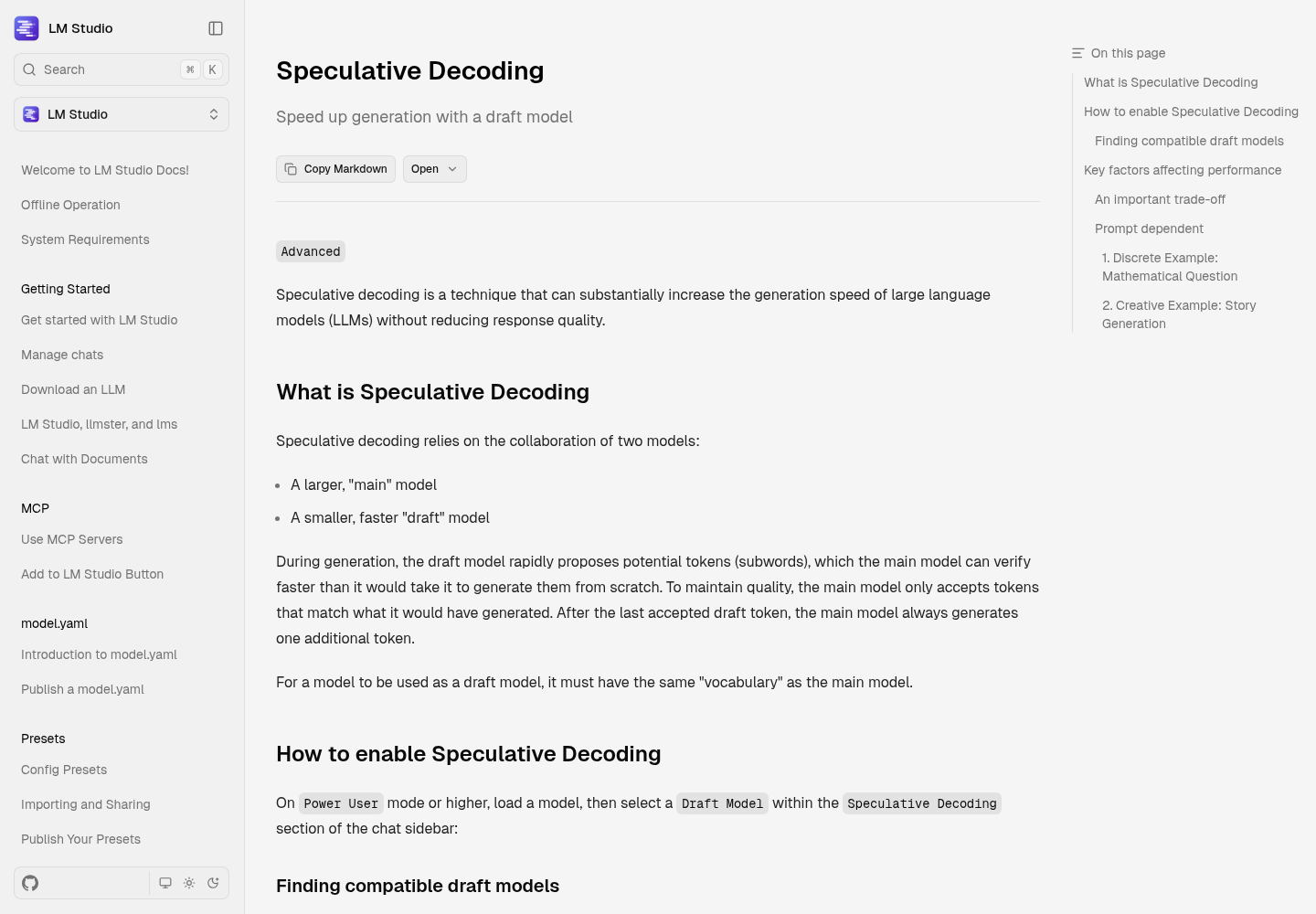
In the app, following LM Studio’s speculative decoding guide:
- Switch to Power User mode or higher.
- Load the main model.
- In the chat sidebar, open the Speculative Decoding section and choose a Draft Model. The dropdown only offers compatible models, meaning models with the same vocabulary as the main model. If it lists none, download a lower-parameter variant of your model family.
- Run the same six prompts with and without the draft model, at the same settings, and compare speed.
For a scripted comparison, the LM Studio TypeScript SDK takes a draftModel parameter on the prediction call and does not require you to load the draft separately. The result’s stats include acceptedDraftTokensCount and predictedTokensCount. The following adaptation of the documented example adds a no-draft baseline and wall-clock timing. It is illustrative and has not been run for this article:
import { LMStudioClient } from "@lmstudio/sdk";
import { readFileSync } from "node:fs";

const client = new LMStudioClient();
const model = await client.llm.model("qwen2.5-7b-instruct");
const prompt = readFileSync("prompts/edit-rename.txt", "utf8");

for (const draftModel of [undefined, "qwen2.5-0.5b-instruct"]) {
  const t0 = Date.now();
  const result = await model.respond(prompt, draftModel ? { draftModel } : {});
  const secs = (Date.now() - t0) / 1000;
  const { stats } = result;
  console.info(
    draftModel ?? "no draft",
    `${(stats.predictedTokensCount / secs).toFixed(1)} tok/s end-to-end`,
    `accepted ${stats.acceptedDraftTokensCount ?? 0}/${stats.predictedTokensCount}`,
  );
}
The decision rule is unchanged. Keep the draft model only if end-to-end tokens per second rises across your prompt set at the same settings. LM Studio itself warns that a draft that is not fast or accurate enough can slow generation down. If you also drive coding agents from LM Studio’s local server, the LM Studio setup for Claude Code, Codex and OpenCode covers that side.
Sources
- FHILY on X: NVIDIA’s 4B speculative decoding draft model for Qwen3.8-27B (Nov 17, 2026)
- llama.cpp: docs/speculative.md
- llama.cpp: tools/server/README.md (llama-server)
- Debian manpage: llama-server(1), llama.cpp-tools 1:0.9.0+dfsg-1
- LM Studio: Speculative Decoding (app)
- LM Studio: Speculative Decoding (TypeScript SDK)
- Unsloth: Speculative Decoding in llama.cpp, llama-server