llama.cpp Default Port Change: A v0.7.0 Upgrade Runbook
The llama.cpp default port change moves bare servers to 9931. Audit clients, preserve Docker mappings, test MoE cache budgets and coordinate RPC builds safely.

Go deeper. Build your own.
The llama.cpp default port change in v0.7.0 needs an endpoint migration decision before the next restart. A bare llama-server that previously inherited port 8080 now inherits 9931. An agent still addressing 8080 can lose its backend even when the new server starts successfully. Pin the existing port or migrate every consumer, then verify the actual listener and a representative request before returning work to it.
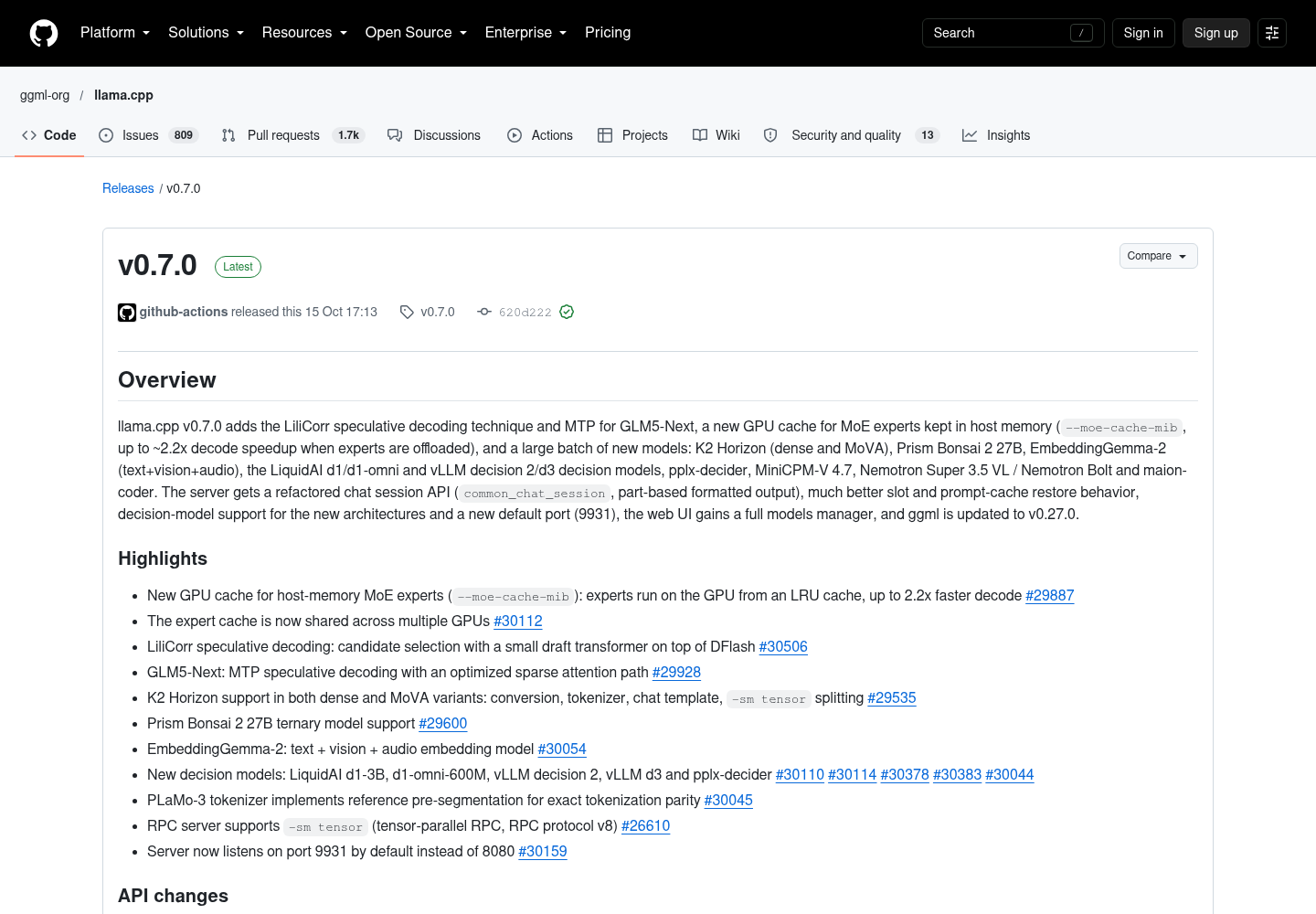
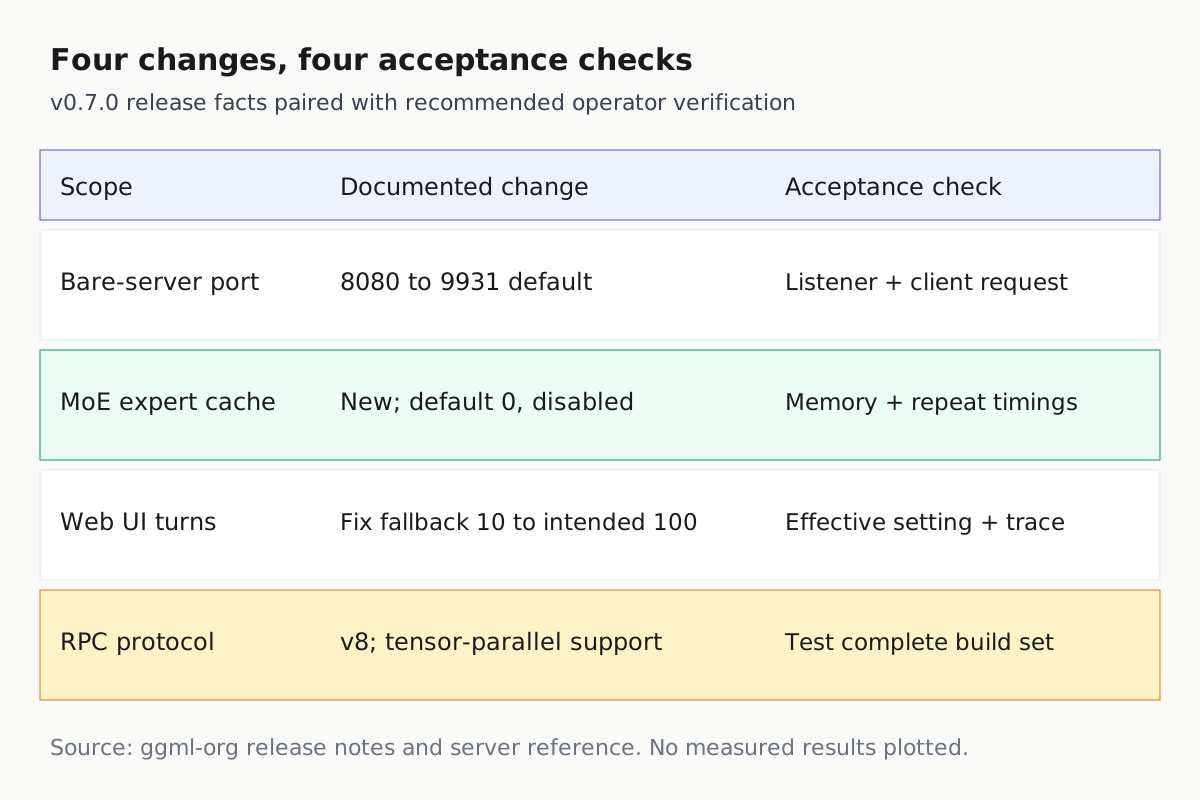
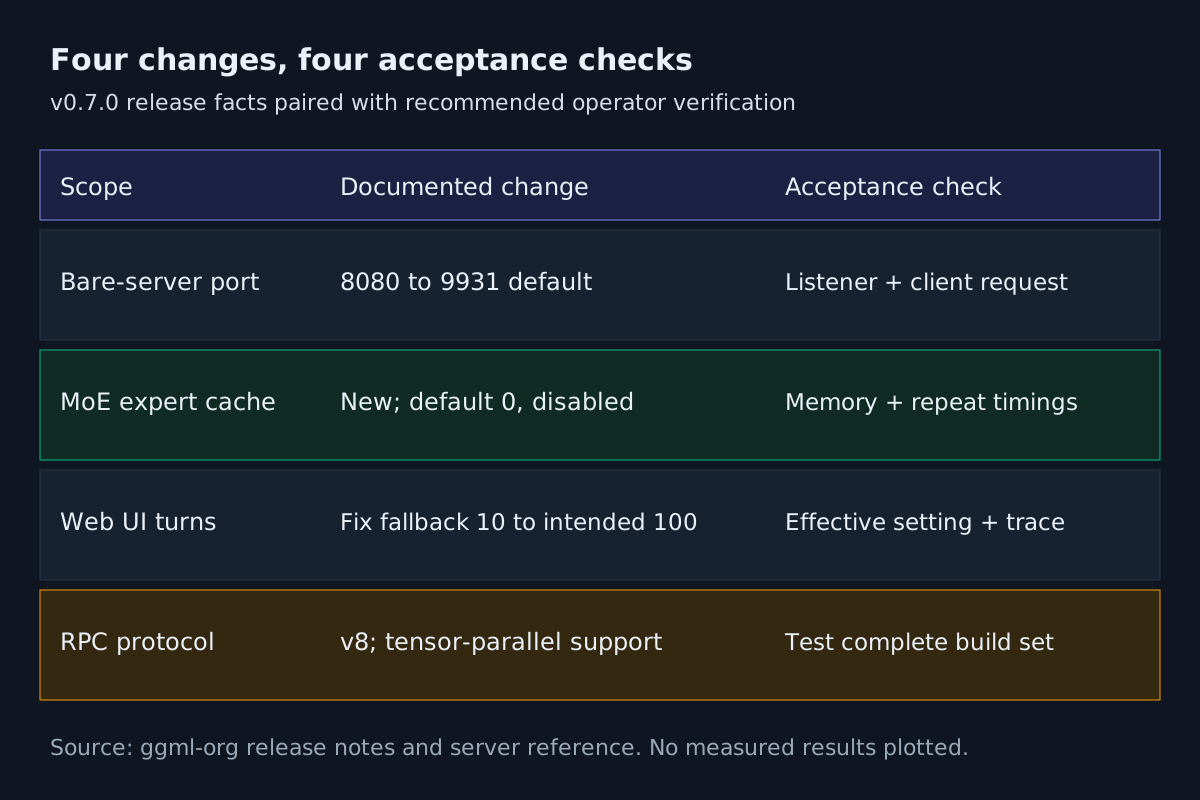
The event is ggml-org’s v0.7.0 release, published October 15, 2026 at 17:13:19 UTC. Its other operational changes include a GPU cache for host-resident MoE experts, tensor-parallel RPC on protocol v8, and a Web UI agentic-turns default fix. These changes deserve separate acceptance checks: reachability, resource use, distributed execution and application behavior prove different things.
The GitHub capture shows the release’s Overview and Highlights. The agentic-turns fix appears further down the source page and is outside this screenshot. The image documents the announcement; it supplies no benchmark results or evidence that a particular deployment works. The procedures below are recommended acceptance checks, not tests performed for this article.
Record the endpoint contract before changing the binary
Start with the service that agents actually consume. A useful inventory follows the request from client configuration through any host mapping or proxy to the process listener. Record the complete endpoint, including scheme, hostname, port and API prefix. A port-only search can miss a hostname alias whose destination changes elsewhere, or a shared environment value injected by a launcher.
- List each server process, its executable or image identity, model file, launch owner and current startup arguments. Include scheduled jobs and development instances that run outside the normal service manager.
- Inspect client configuration, service units, environment files, Compose definitions, launch scripts and readiness probes for 8080, 9931,
LLAMA_ARG_PORT,--portand base URL settings. Search the actual directories your tools use; client-specific filenames differ. - Pair every consumer with its server. Mark whether its port is explicit, supplied by an environment variable or inherited from the binary.
- Save the current configuration and a successful request result before installing the replacement. Record model identity and effective runtime settings alongside executable identity.
The advance-notice pull request dates to August 3 and describes the planned change to 9931, calling the number leetspeak for GGML. That notice establishes prior warning, while the October release establishes the shipped event covered here. It does not establish that this release was the earliest build or downstream package to use the port.
For a shared machine, attach an owner to the endpoint decision. Otherwise one operator may migrate a launcher while another preserves an old client configuration. The practical register needs one row per deployment: build, startup configuration, observed listener, consumer endpoint and rollback location. Its value comes from tracing dependencies, as in the MCP server inventory ritual, rather than collecting unrelated configuration files.
Include the consumer’s execution location in that row. A loopback address is interpreted by the environment making the request. A terminal on the host and an agent inside a container may therefore reach different destinations despite displaying the same URL. During acceptance, make the request from the consumer’s environment and record where it ran. This avoids mistaking a successful administrator check for a successful agent connection.
This guide addresses the inference runtime beneath the agents. The broader AgentOps operating model explains why several workers need shared operational visibility; here, the concrete deliverable is a tested backend contract those workers can rely on.
Choose an explicit port and test readiness
The current server reference documents --port PORT, its LLAMA_ARG_PORT environment equivalent and the 9931 default. It also states that command-line arguments take precedence over environment variables. Inspect both: changing an environment value has no effect if the service command still supplies a conflicting port. These current master-branch instructions should also be checked against the installed binary’s help before applying them to a pinned older build.
| Situation | Deliberate choice | Acceptance evidence |
|---|---|---|
| Many clients already use 8080 | Pin the server to 8080 | Observed listener and successful client request |
| One centrally managed endpoint can move | Pin 9931 and migrate its consumers | Every consumer and monitor uses the chosen endpoint |
| A proxy provides a stable client address | Preserve the front door and verify its upstream | Request succeeds through the proxy |
| Several local instances share a machine | Allocate an explicit port per instance | Each endpoint serves its intended model |
An illustrative bare-server invocation is llama-server -m model.gguf --host 127.0.0.1 --port 8080. Substitute an existing model path and preserve your other deployment arguments. Choosing 9931 is equally valid; writing that choice explicitly prevents a later default from making another operational decision for you.
- Start the candidate with the chosen explicit port and retain its startup output.
- Poll
/healthon that endpoint within a startup budget appropriate to the model. The documented single-model responses are HTTP 503 while loading and HTTP 200 withstatus: okwhen ready. - Retry initial connection failures and loading responses within that same bounded budget. On expiry, hold work and inspect the process and listener. A refusal can also mean startup failure or a wrong address.
- After readiness, send a representative request through the same route the agent uses. Check the returned model identity and response structure.
Health is a necessary check, but it does not exercise an agent’s chat template, streaming parser or tool-call handling. In router deployments, verify the intended model and its actual request path as well. Current documentation notes that health requests do not wake sleeping models; a health probe alone cannot substitute for a generation request after idle.
Do not repair a connection failure by changing several layers at once. Compare the configured destination with the observed listener, make the smallest justified adjustment, and repeat the same request. Preserve the failing response or connection error beside the successful result. That pairing explains the fix more clearly than a list of edits that happened to work.
Preserve the container boundary
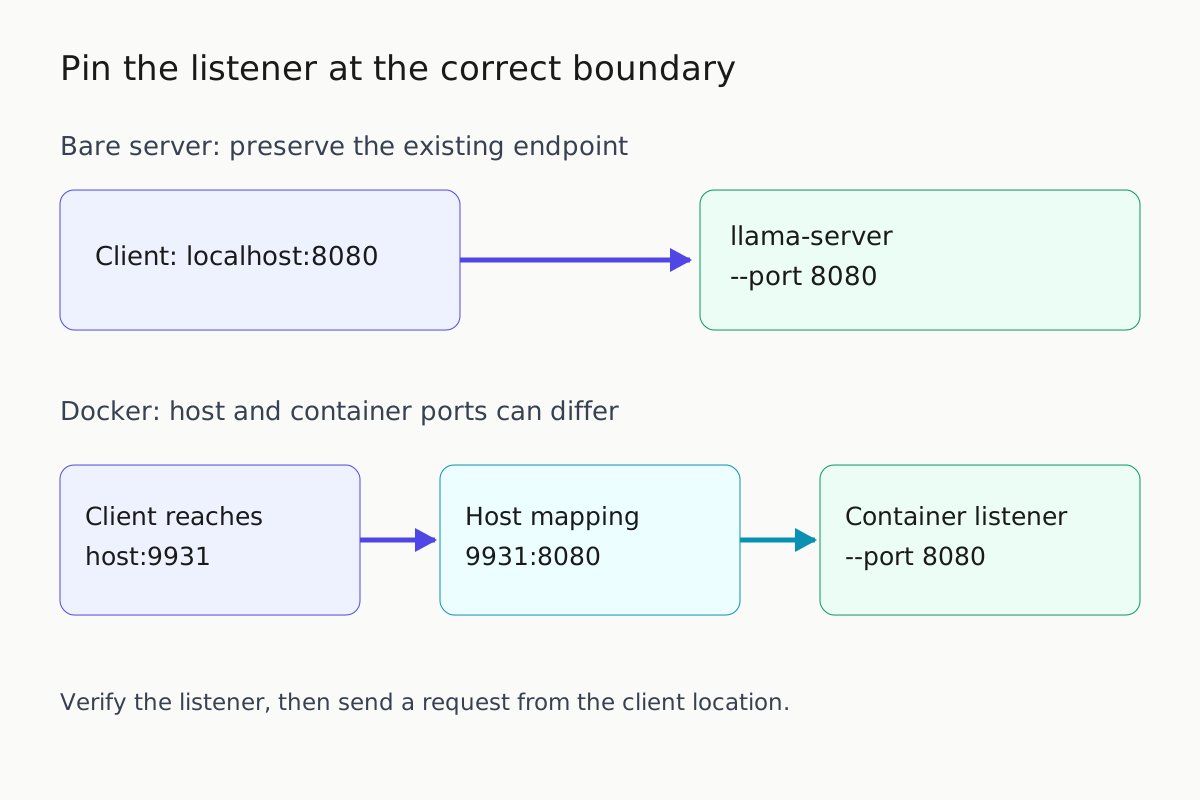
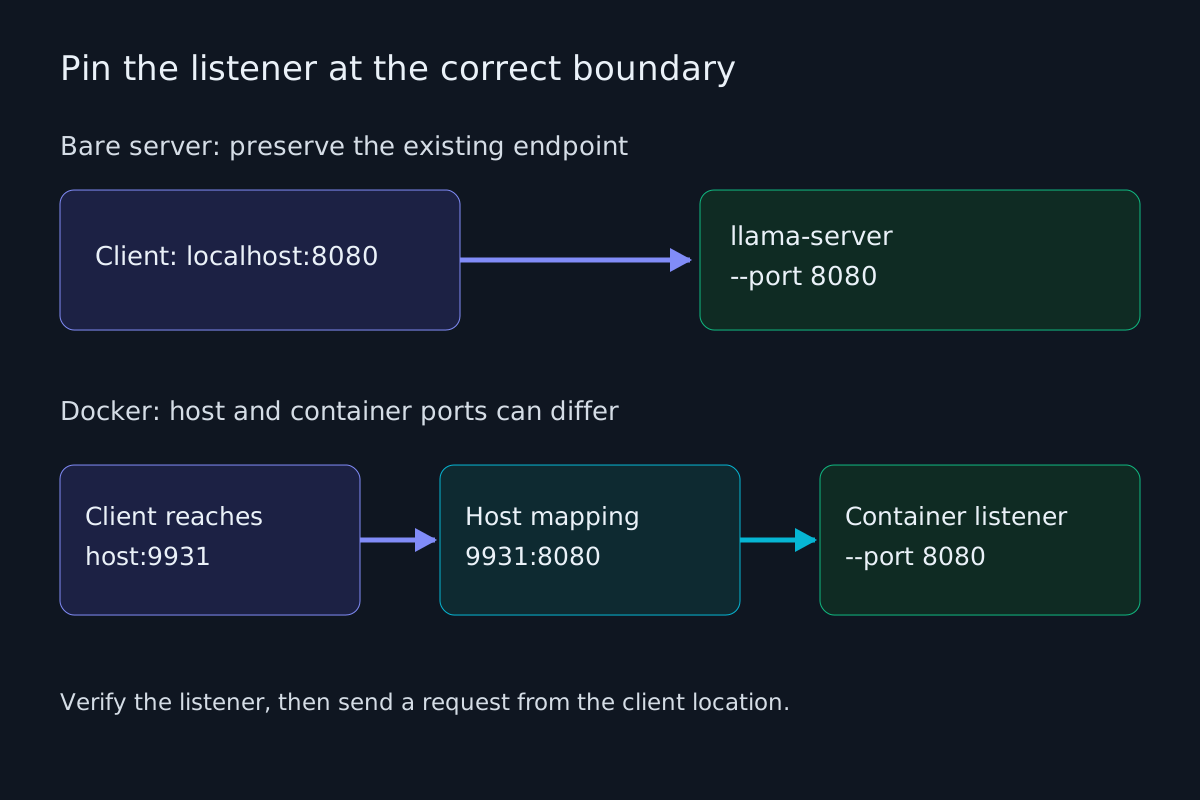
The release notes explicitly say Docker images keep port 8080 inside the container. The Docker documentation reinforces that contract with examples combining -p 8080:8080 and --port 8080. The host’s bare-server default does not require changing the container’s internal listener.
- Record the host-facing port separately from the container-facing port. In a mapping such as
9931:8080, clients reach host port 9931 while the container receives traffic on 8080. - Preserve an explicit internal port in the container startup configuration. The server README also provides a Compose example using
LLAMA_ARG_PORT: 8080. - Inspect custom entrypoints, wrappers and command overrides against the exact image you deploy. A custom process launched without the official image’s configuration may inherit the binary default.
- Test the published host endpoint, then test from the agent’s actual network location. A successful request inside the container does not establish that host publishing works.
For a documented 8080:8080 deployment that explicitly starts the server on 8080, the port portion of the upgrade can remain unchanged. If you intentionally move only the host-facing port to 9931, retain 8080 on the container side and update consumers to the new host endpoint. Changing both sides automatically creates unnecessary work and can hide which boundary failed.
Keep image identity in the acceptance record. A mutable image tag and a readable configuration file do not prove which artifact executed. The project’s Docker documentation says GPU-enabled images are not tested by CI beyond being built, so a successful image build is insufficient evidence for your GPU workload. Include loading, generation and representative memory pressure in the deployment check.
Also distinguish preserving an endpoint from widening its exposure. A port migration does not require changing the intended access boundary. Review the published address and existing authentication arrangement when inspecting the mapping, and retain the deployment’s established restrictions. The server’s internal container binding and its externally reachable host address are separate configuration decisions. Record both so a connectivity repair does not accidentally become a network-access change.
These steps specialize the broader CLI upgrade canary procedure for an inference service. The distinguishing check is the complete endpoint contract, including the network boundary that the container introduces.
Budget the expert cache on every GPU
The release adds --moe-cache-mib, a device LRU cache serving MoE experts otherwise kept in host memory. The publisher reports up to roughly 2.2 times faster decode when experts are offloaded. That is a release-note result, not a measurement reproduced for this guide or a promise for your model.
The server reference gives a default of zero, meaning disabled. It documents --cpu-moe for retaining all MoE weights on CPU and --n-cpu-moe N for retaining the expert weights of the first N layers there. --override-tensor provides a more specific placement mechanism. Preserve the offload method already used by your deployment while isolating the cache experiment.
- Confirm that your workload uses an MoE model with host-resident experts. Record its quantization, placement, context size, batch settings and concurrency.
- Measure device memory after loading and during representative requests. Listing available devices is an inventory action; it does not establish workload memory headroom.
- Select a trial cache budget below the available margin, leaving room for the workload’s observed peak and other processes. There is no universal cache size supported by these sources.
- Restart with the candidate budget, verify successful loading and generation, then compare repeated results against cache disabled.
- Reject a setting that improves a short request but fails the intended context length or concurrency.
On multiple GPUs, the documentation says the cache is split among devices like the layers through --tensor-split. Treat the configured MiB value as a distributed total rather than a per-device allocation. Inspect each GPU’s margin: adequate aggregate free memory cannot rescue an individual device whose share leaves insufficient room for its other allocations.
Illustrative arithmetic: a 2048 MiB cache divided evenly across two devices suggests approximately 1024 MiB per device for planning. This is not a measured allocation guarantee; verify actual device use and backend overhead. Do not copy the number without measuring your deployment.
Choose the trial workload before choosing the winning cache size. Include the longest routine prompt, the concurrency you intend to permit and a repeatable generation request. If those conditions cannot run together, document the supported operating envelope instead of reporting only the best short-request throughput. A smaller cache with reliable headroom can be a better production choice than the largest setting that starts successfully.
Hardware selection belongs in the local AI workstation guide. This procedure starts after hardware exists and asks which runtime configuration earns deployment. Changing the GPU, model, context and cache simultaneously makes that question harder to answer.
Separate build benchmarking from cache measurement
Use two experiments. First compare the old and candidate builds under matching benchmark settings. Then compare cache disabled and enabled within the candidate server build. The llama-bench reference documents prompt processing, generation and combined tests, repetitions and structured output. Its supplied option list does not expose --moe-cache-mib; do not assume a benchmark invocation accepts that flag.
- Run a matched
llama-benchworkload before and after the binary upgrade. Keep the model, placement, prompt length, generation length, context depth, threads and backend settings comparable. - Retain structured results, including build identity, averages, variation and individual samples where available.
- For the cache experiment, use the same candidate server build with cache zero and a trial nonzero cache. Fix placement and context settings, and inspect effective values at startup.
- Send identical representative requests to each configuration, retaining complete responses and timings. Repeat each condition and separate first-request behavior from steady state.
- Finish with a representative agent task, measuring completion and correctness alongside elapsed time.
The server’s fitting behavior matters here. Its documented --fit default is on and adjusts unset arguments to fit device memory. For an isolated comparison, use explicit known-good settings and disable automatic fitting with --fit off, then verify both launches actually use matching placement and context. A cache experiment that silently changes another resource allocation does not isolate the cache’s effect.
A request payload for the native /completion route can hold these fields constant:
{
  "prompt": "Explain why an explicit server port helps an upgrade.",
  "n_predict": 256,
  "cache_prompt": false,
  "temperature": 0,
  "seed": 42
}
This route is explicitly documented as non-OpenAI-compatible; keep it separate from an agent’s /v1/chat/completions acceptance test. Inspect timings.predicted_per_second, generated token count and stopping behavior. A maximum of 256 tokens does not force every response to reach that length. Reject truncated, failed or materially incomparable runs before calculating an improvement, while retaining them in the reliability record.
Disabling prompt reuse controls one source of variation; it does not disable the new expert cache. For both cache settings, use the same warmup policy and report cold and warm requests separately. Retain errors as failed trials instead of discarding them from the performance story.
Write the acceptance rule before reading the results. Specify which representative tasks must complete, which memory failures are unacceptable and which timing measure matters to the user. Alternate test conditions when practical and record competing GPU activity, so an unrelated workload does not masquerade as a cache regression. If the observed timing ranges overlap substantially, report the result as inconclusive and keep the simpler accepted configuration until further measurement resolves it.
Also remember that llama-bench excludes tokenization and sampling time. Its throughput is valuable evidence about inference, but an agent task includes requests, parsing, tools and waiting. The economic decision should follow cost per completed self-hosted task: faster decode is useful only when the whole job remains reliable.
Upgrade RPC participants as one tested set
The release notes identify RPC protocol v8 and tensor-parallel RPC support through -sm tensor. The current server reference marks tensor split mode experimental. The selected documents do not establish the exact negotiation or failure behavior of mixed protocol versions. Coordinating builds is the operating policy recommended here; undocumented incompatibility is not presented as a verified fact.
- Inventory the initiating host, every RPC endpoint and the build each participant runs. Record device selection and split settings as well as addresses.
- Drain agent traffic and prepare a matching candidate build set in a maintenance window. Preserve the previous complete set for rollback.
- Start the candidate workers and initiating process, verify device participation, then run representative inference through the intended topology.
- If adopting tensor splitting, test it explicitly. An existing layer-split workload succeeding does not validate a new tensor-split workload.
- Restore the complete prior set if acceptance fails, then repeat readiness and client checks before reopening work.
A benchmark that merely registers RPC addresses is not enough to prove the intended devices carried useful work. Inspect placement and runtime output, and compare a known workload’s correctness and timing. Keep endpoint migration separate from adopting a new split strategy whenever possible, so a failure has fewer plausible causes.
Make rollback ownership explicit before the maintenance window. One person should know when traffic is drained, which participants have changed and whether reopening work is authorized by the test results. If a worker cannot be upgraded or verified, hold the candidate topology rather than quietly excluding it and calling the original fleet validated. A smaller topology can be tested as a separate deployment, with its own capacity expectations and acceptance record.
Verify the Web UI loop and retain a rollback receipt
The release lists the agentic-turns fix under UI changes: the default had fallen back to 10 instead of 100. This does not establish that an external coding client’s own loop limit changed. Treat Web UI configuration, external harness limits and per-request token limits as separate controls.
- If you use the Web UI agent loop, inspect its effective turns setting after upgrading. Check existing saved preferences as well as the intended default.
- Use a bounded test fixture with more than ten harmless sequential tool interactions, then inspect the trace and termination reason. Do not enable additional tools merely to exercise the release.
- Test external clients through their normal workflow independently. Preserve their configured limits unless your own acceptance procedure justifies changing them.
- Store the build, endpoint decision, effective memory settings, RPC participant list and accepted test results together.
More allowed turns create room for useful work and repeated mistakes. The acceptance condition is that the expected sequence completes and stops for the intended reason. Preserve a trace the next operator can inspect, following the evidence discipline in fleet replay.
Finally, test one restart using the saved launch configuration. An interactive command that works once can conceal a service definition that still contains the old assumptions. Repeat the listener check, readiness check and consumer request after that restart. Retain both the candidate configuration and the previous working configuration so rollback includes the endpoint decision as well as the binary.
Before reopening scheduled work, require an observed listener, a successful request from each consumer class, a stable representative memory workload and a rehearsed rollback route. The result should be a dated deployment receipt showing which configuration passed, rather than an assumption that installing v0.7.0 completed the upgrade.