OpenAI Codex: Startup and Configuration Diagnosis After 0.162.1
OpenAI Codex after 0.162.1: diagnose background-server startup, configuration layers, MCP failures and output contracts with a practical fleet diagnostic guide.

Go deeper. Build your own.
OpenAI Codex earns a fleet lane when operators can explain how it started, which settings it consumed, and what its output proves. A working terminal alone does not answer those questions. This guide retains its August 27, 2026 publication date and public URL; the October refresh centers on startup diagnosis using official documentation retrieved October 10.
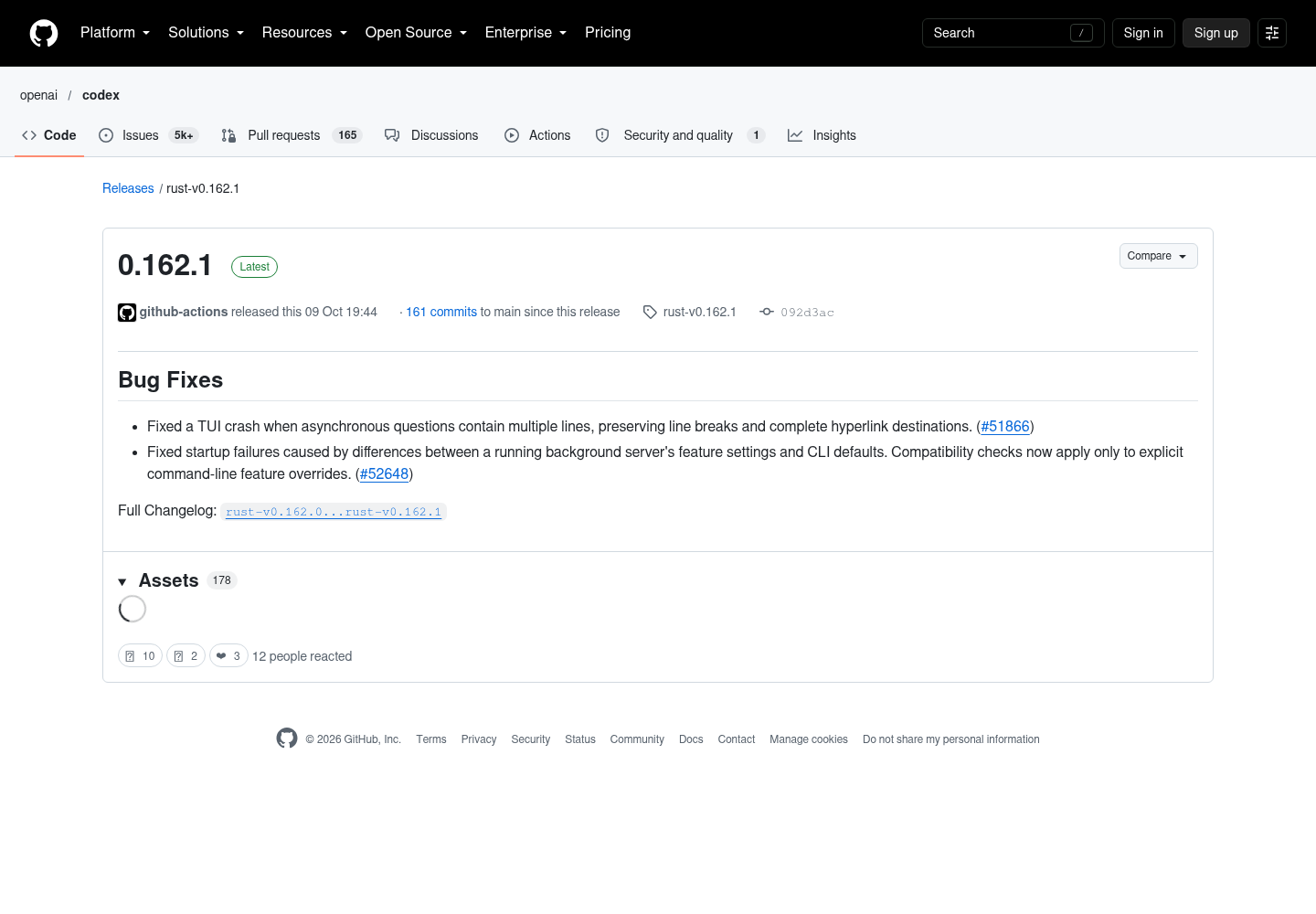
OpenAI’s October 9 release notes identify two repairs in Codex 0.162.1: startup failures caused by differences between a running background server’s feature settings and CLI defaults, and TUI crashes when asynchronous questions contain multiple lines. Compatibility checks now apply only to explicit command-line feature overrides. The question repair preserves line breaks and complete hyperlink destinations. Neither statement guarantees that every startup failure is resolved.
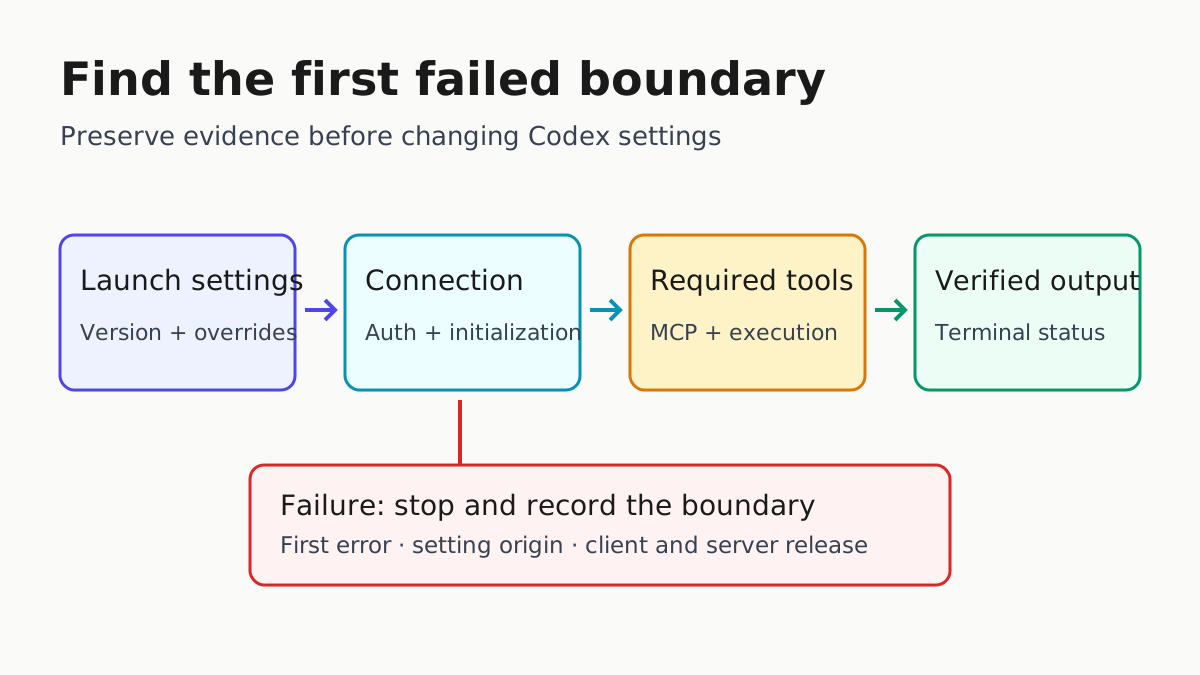
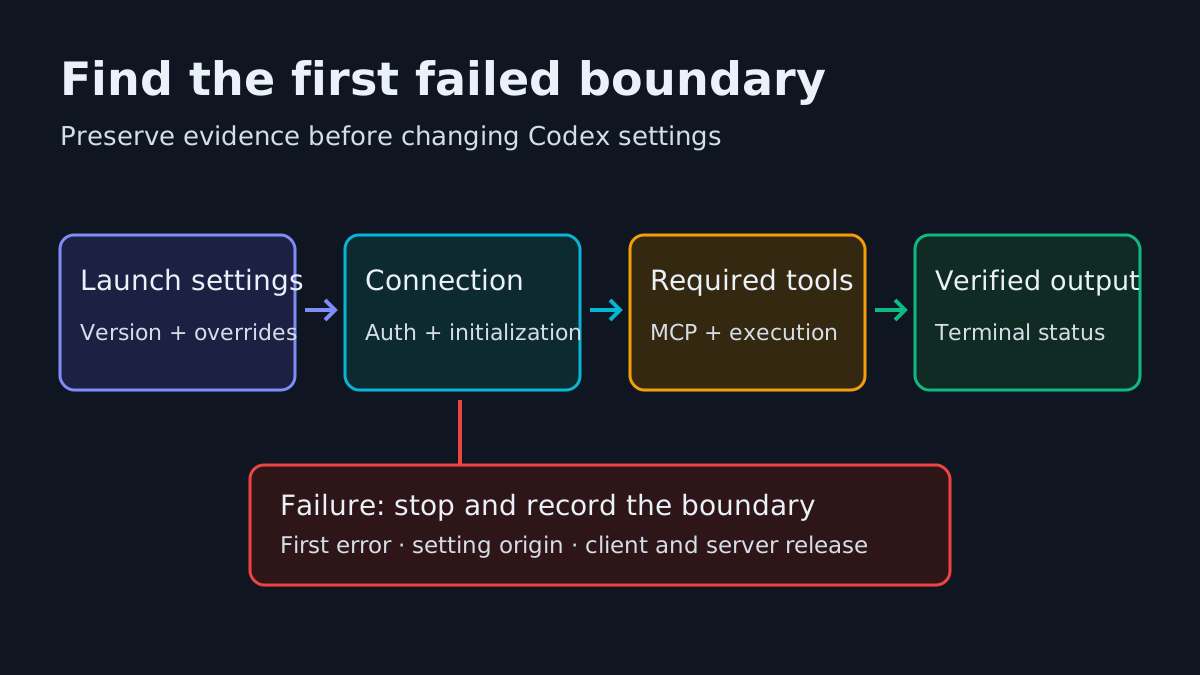
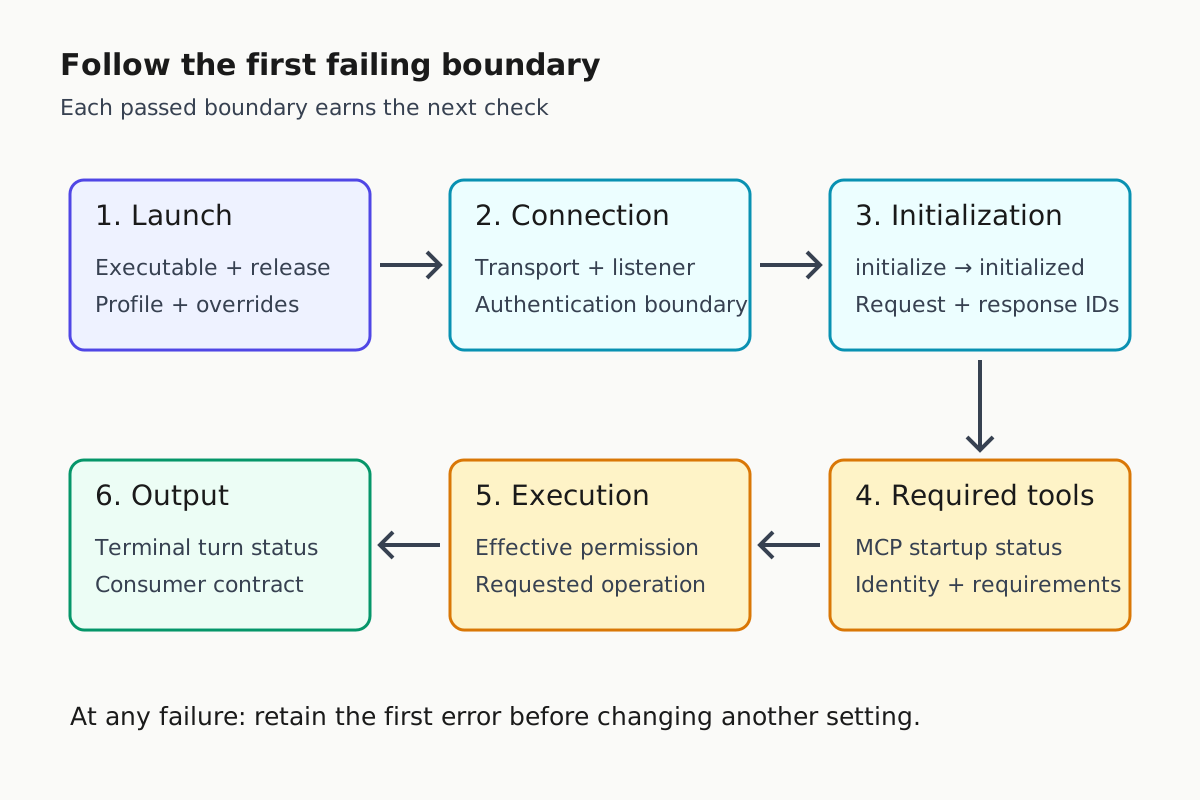
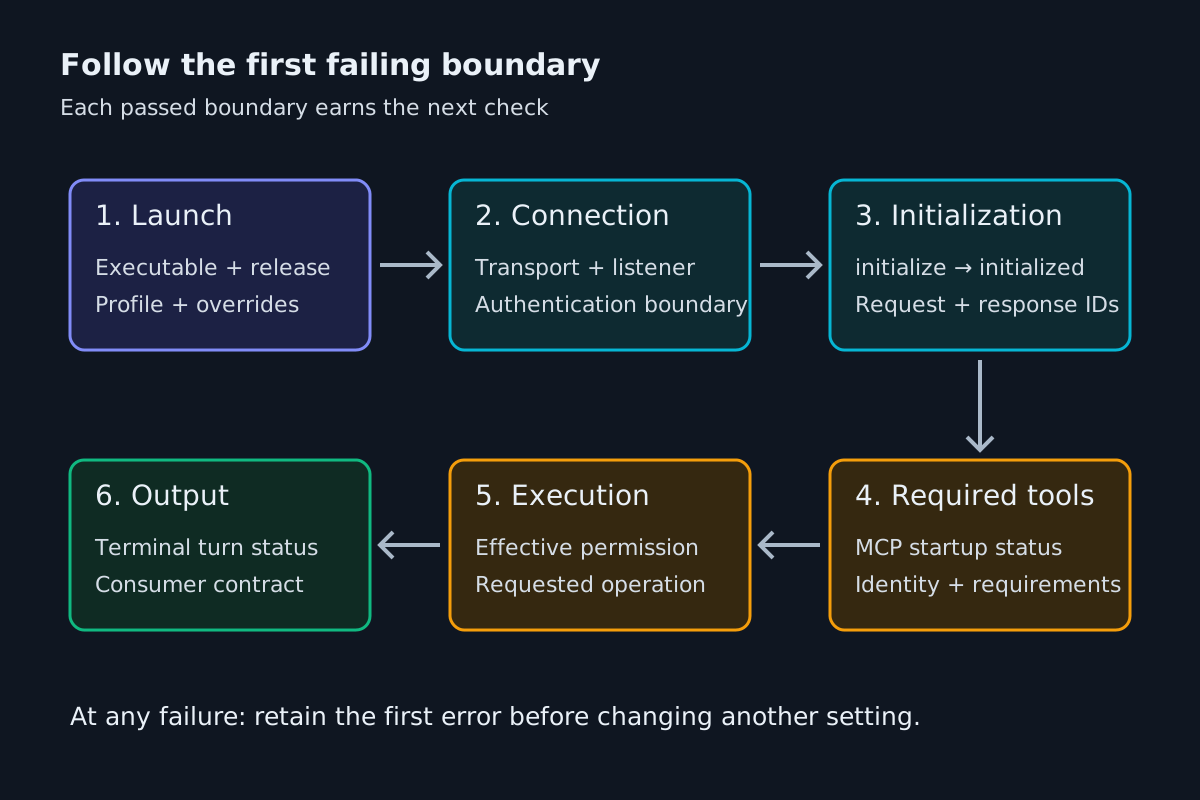
The practical lesson is to identify the failing boundary before changing configuration. A client can reach a server yet fail initialization, initialize yet fail required-tool startup, or complete a turn while producing output its downstream consumer misreads. Keep those outcomes separate in the incident record.
What the current evidence changes
The earlier review ranked Codex’s extensibility against other harnesses. Current configuration documentation documents skills, lifecycle hooks, custom agent roles and plugin marketplaces. The CLI reference documents plugin commands, hook inspection and agent-thread switching. Retire the old blanket claim that Codex has no equivalents in those categories.
Presence does not establish parity. Command and MCP hook handlers are supported, while prompt and agent handlers are parsed but skipped. Several app-server plugin APIs remain under development. Evaluate a named extension path on a named execution surface, with a specific expected behavior. These sources establish neither comparative reliability nor a universal ecosystem winner.
The app-server documentation describes the interface behind rich clients such as the VS Code extension: authentication, conversation history, approvals and streamed events. Diagnose that integration as a client, rather than assuming it is merely a review panel. The selected evidence also cannot substantiate current plan-price comparisons or promises about how much work a subscription sustains.
Use Companion vs Harness vs Computer to keep the operating layers distinct. This refresh evaluates the Codex runtime and its clients; the operator still needs an account of launch settings, dependencies and completion outside any one session’s reassuring status display.
Record the launch before changing it
Start with a launch record that distinguishes the process you opened from the process doing the work. A wrapper, editor or existing daemon can introduce settings absent from the terminal command an operator remembers. Record observed values, including unknowns. A teammate’s successful machine is a comparison point, not a substitute for the failing machine’s evidence.
- Record the installed CLI release, executable location, operating system and runtime boundary: native host, WSL, container or remote machine. Include the launcher that selected that executable.
- Record the working directory, selected profile, user configuration location, trusted project configuration and explicit command-line overrides. Redact credential values and private headers.
- Identify whether the session uses a running background server or a separately launched app-server. Record its version and launch settings when available.
- Preserve the first error, its timing and the last completed boundary. Distinguish connection failure, thread-creation failure and failure after a turn began.
For a session that opens, the documented /status command reports the active model, approval policy, writable roots and token usage. Remote sessions also show the remote address and server version. /debug-config prints configuration-layer diagnostics and policy sources. A session that never opens cannot supply these observations; use its launcher record and existing diagnostics instead.
The CLI reference documents codex doctor as checking installation, configuration, authentication, runtime, Git, terminal, app-server and thread inventory health. Inspect reports locally before sharing. Another operator should be able to understand the failure without receiving tokens, repository secrets or an entire private transcript.
This is the Codex-specific evidence packet. General rollout selection and widening criteria belong in Canary Every CLI Upgrade. Keep the launch record small enough to compare before and after the repair, while retaining the original error separately.
Separate defaults from explicit feature overrides
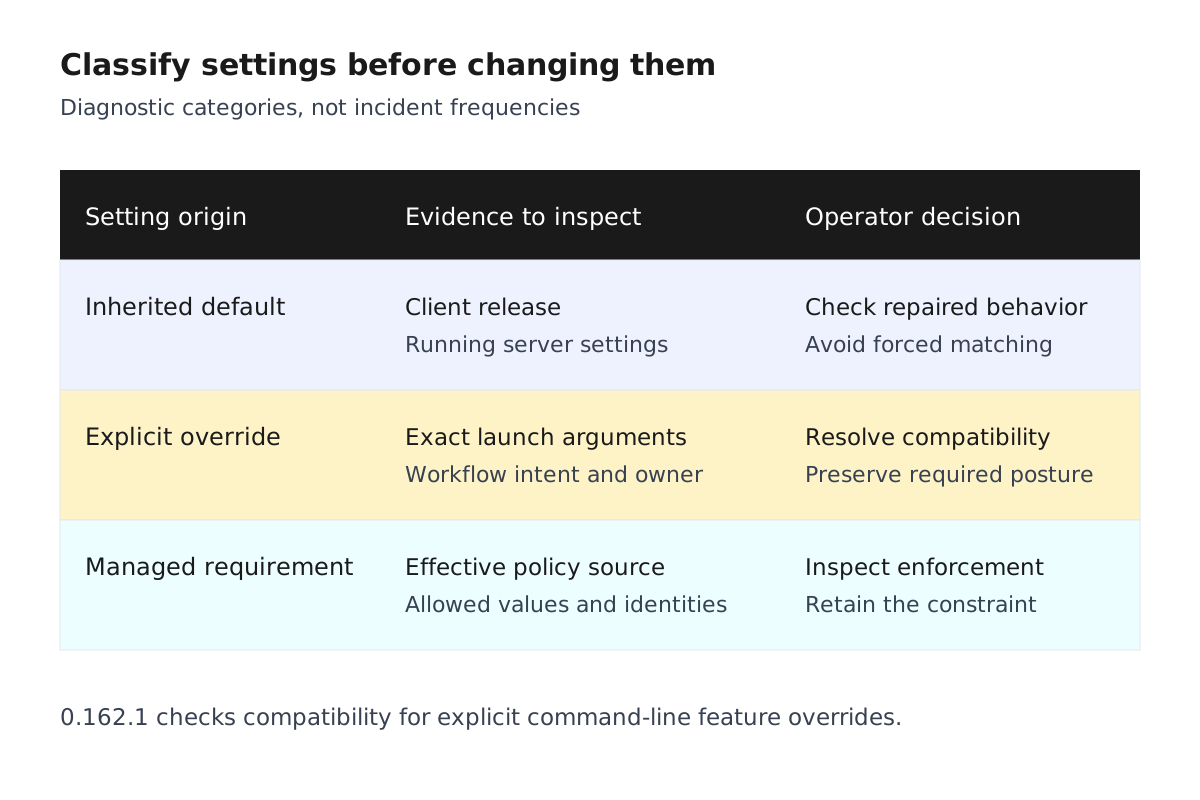
The 0.162.1 startup repair matters because an inherited default and a deliberate launch request are different inputs. The release limits compatibility checks to explicit command-line feature overrides. It does not require background-server feature settings to equal every connecting CLI’s defaults, or tell operators to force them to match.
| Observation | Next diagnostic action | Evidence to retain |
|---|---|---|
| Error mentions server and CLI feature differences | Establish both releases and exact launch arguments | First error and explicit overrides |
| Launcher supplies feature overrides | Identify which requests the workflow needs | Launcher configuration and owner |
| Defaults are the only observed difference | Check whether the tested client includes the repair | Release and reproduction result |
| Failure persists after the repair | Classify the next failing boundary | Connection, initialization or tool evidence |
Avoid adding feature switches merely to make a launch resemble another machine. That creates a configuration whose intent is unclear. Equally, removing a deliberate operating constraint to obtain green startup changes the workflow. Resolve the compatibility problem while preserving the posture the lane requires.
The CLI reference distinguishes invocation overrides from persisted feature changes. features enable and features disable write settings for future sessions, and the features subcommand does not accept --profile. Mark persisted changes separately. When a controlled reproduction changes one setting, retain its previous value and restore it after the test.
An editor launcher might deliberately disable a feature while a terminal launcher accepts the installed default. Label those origins differently even when their effective values match today. After an upgrade, values can diverge without anyone editing a file. Origin, as well as value, belongs in the diagnostic record.
Trace configuration to its effective source
The configuration reference puts user settings in ~/.codex/config.toml and allows project-scoped .codex/config.toml files only for trusted projects. Profiles live beside user configuration as $CODEX_HOME/profile-name.config.toml. This makes the earlier two-file sketch inadequate for diagnosing layered launches.
- Compare explicit
-c key=valuesettings with user configuration and the selected profile. The CLI reference says command-line overrides take precedence for that invocation. - Check project trust before expecting project configuration, hooks or rules to load. Untrusted projects skip project-scoped
.codex/layers. - Check whether the setting is permitted in that layer. Provider routing, profile selection and telemetry routing have documented project-layer exclusions.
- Inspect applicable requirements before treating a local edit as effective. Administrative constraints can restrict values ordinary configuration supplies as defaults.
- Compare intended settings with
/debug-configand/statuswhere available. Retain each discrepancy and its source.
For a narrow attended diagnostic posture, these exact keys and values are documented:
approval_policy = "on-request"
sandbox_mode = "read-only"
This fragment requests an approval policy and a command sandbox. It does not establish every permission in a deployment. Do not combine legacy sandbox_mode configuration with default_permissions; the reference explicitly prohibits that combination. Use the family your deployment manages.
Check copied settings against the installed release’s supported help and current documentation before adopting them. Explicit approval_policy = "untrusted" is unsupported, while project trust_level = "untrusted" remains supported. Similar words describe different controls. Model and reasoning choices likewise depend on account availability and advertised options.
Our Unified Permission Modes guide owns the house permission dialect. Here the task is proving which source supplied an effective Codex value. If the relevant layer is unknown, record that uncertainty instead of presenting a proposed file edit as a verified repair.
Diagnose connection and initialization separately
App-server is a protocol boundary. Its default transport is JSONL over stdio; other options include Unix sockets and experimental WebSockets. A connected terminal does not prove a thread can start or the intended execution environment is available.
For a localhost development reproduction, the official page supplies these commands, run in separate terminals:
codex app-server --listen ws://127.0.0.1:4500
codex --remote ws://127.0.0.1:4500
The documentation calls WebSocket transport experimental and unsupported, and says the app-server command and WebSocket transport are unsupported for production workloads. Keep this arrangement within development testing. A successful local reproduction does not justify deploying a remote listener.
- Verify which process accepts the connection and which transport the client selected.
- Establish whether authentication failed before JSON-RPC initialization. Non-local testing requires documented WebSocket authentication and TLS; non-loopback listeners can allow unauthenticated connections by default during rollout.
- For a custom client, send
initialize, then theinitializednotification, before other methods. Incorrect ordering produces documented initialization errors. - Establish whether thread creation succeeded, then whether a turn started. Preserve request IDs and corresponding errors without credentials.
Health probes answer narrower questions. /readyz indicates the WebSocket listener accepts new connections. /healthz has documented behavior dependent on the absence of an Origin header. Neither proves model access, required MCP readiness or execution success.
Distinguish --listen, the inbound client connection, from --code-mode-host, the outbound Code Mode host connection shared by threads in the process. Failure on one is not evidence about the other. Generated integration schemas are specific to the installed Codex version.
Keep reconnect attempts separate in the trace. Initialization belongs to each transport connection. Otherwise, an earlier successful handshake can conceal a lifecycle error on the connection that failed. This is an incident-recording recommendation, not an additional protocol requirement.
Identify required-tool and execution failures
A reachable server can still reject a thread because a required tool cannot initialize. Both the non-interactive guide and app-server documentation say an enabled MCP server marked required = true causes startup or resume failure when initialization fails. Separate that outcome from the background-server compatibility bug.
| Failing boundary | Inspect first | Completion criterion |
|---|---|---|
| Required MCP initialization | Enablement, identity and launch or connection error | Required server initializes |
| Model authorization | Account state and available model catalog | Available intended model accepts a turn |
| Command sandbox | Effective policy, requested path and executor error | Allowed diagnostic operation succeeds |
| Upstream connection | Connection error and supplied HTTP status | Turn reaches a terminal status |
- Read MCP startup diagnostics before changing timeouts. Startup timeout and per-tool timeout govern different phases. A long-running tool is not a server that never initialized.
- Check administrative MCP allowlists as well as local enablement. Identity mismatch can disable a configured server.
- Retain
requiredwhen the workflow depends on that server. Making it optional silently changes the task’s assumptions. - For execution failures, retain the requested operation and effective permission boundary. A restrictive denial can be expected behavior.
Command-network policy does not cover every network-capable tool. The configuration reference separates command networking from apps, MCP and hosted search. A successful MCP call therefore does not prove command-network access, and a blocked command does not prove every tool is offline.
The Codex Security page describes an application-security agent for finding, confirming and fixing vulnerabilities. It directs sandbox, approval and network-control questions elsewhere. Installing a scanner is not a startup-permission repair. Follow the headless trust-tier guide for unattended authority rather than weakening controls during diagnosis.
Test asynchronous questions as a UI contract
The multiline repair concerns presentation of an asynchronous question. A generic pasted multiline prompt is not equivalent evidence. Use a controlled workflow that produces the affected question type. If it never occurs, describe the check as inconclusive.
- Use a disposable development task with no consequential write requirement. Record the client release and terminal environment.
- Exercise an asynchronous question containing multiple lines and a hyperlink through the intended workflow. Avoid private links and credentials.
- Check that the terminal remains running, line breaks remain intelligible and the complete hyperlink destination survives.
- Answer through the intended UI and record the subsequent task state. Repeat through relevant local and server-connected arrangements.
A rendered question is not approval evidence by itself. App-server documents separate request and resolution events, including cleanup when a turn ends or is interrupted. Custom integrations must distinguish an answered question from a request cleared by lifecycle changes.
If the exact path is unavailable, keep the check open. OpenAI’s release note establishes what shipped; an operator’s test establishes whether the relevant fleet path behaves as expected. Retain both records without turning an unexercised scenario into a pass. A harmless question also keeps this regression test separate from authorization of real changes.
Verify non-interactive output before restoring the lane
Non-interactive documentation says codex exec streams progress to stderr and prints the final agent message to stdout. Adding --json changes stdout into JSON Lines events. Downstream scripts must know which contract they consume.
The official guide documents this JSONL invocation:
codex exec --json "summarize the repo structure"
The guide states that codex exec defaults to a read-only sandbox. Before running this example, inspect the effective configuration and applicable requirements to confirm the intended diagnostic posture. The example relies on the documented default; it does not explicitly select a sandbox. If the deployment supplies different settings, resolve that difference through the existing lane controls before testing.
Use the intended diagnostic repository, assigned authentication and existing operating controls. This invokes model work; it is not an offline configuration validator. Do not change account, endpoint or spending settings to make the test succeed.
- Capture stdout and stderr separately through the existing runner. Confirm the event consumer handles one JSON object per line.
- Check terminal events, including
turn.completed,turn.failedanderror, alongside the process result. A partial stream is not completed work. - If the consumer needs a structured final answer, use documented
--output-schemabehavior and validate that response separately from events. - Check required-MCP failure handling. The runner should report a failed dependency rather than ingest a partial summary as success.
- Compare resulting repository state with the diagnostic task’s expectations before restoring queued work.
Avoid deprecated --full-auto in new scripts; current documentation recommends explicit sandbox settings. Avoiding rollout persistence with --ephemeral also does not make the surrounding runner free of logs or artifacts.
State-isolation testing belongs in Headless Lane Reproducibility. Preserve the credential arrangement during startup investigation. The documentation warns that repository-controlled code can read job-level API-key variables. A startup repair is no reason to introduce that exposure. Record whether the consumer rejected failures correctly, not merely whether it produced readable output.
Close the incident with a reproducible result
Close on an observed result, rather than installation of a newer binary. The handoff should let another operator assess the repair without repeating every exploratory change. Treat unresolved checks as named limitations with owners.
- Record the failing boundary, first error and relevant client/server releases.
- Name each relevant setting’s origin: default, launch override, trusted-project configuration or administrative requirement.
- State the repair and checks that passed afterward.
- List uncertainties, including unexercised asynchronous-question paths.
- Preserve sanitized diagnostics and output evidence under the team’s retention policy.
Keep worktree and command-center behavior with the 0.162.0 release coverage. That neighboring release does not explain every 0.162.1 startup failure. Use Fleet Replay for evidence retention and the multi-agent command-center thesis for visibility across harnesses.
The broader AgentOps operating model supplies the responsibility around this runbook: someone owns the lane, interprets failures and decides when work resumes. Record that person in the handoff. The useful completion artifact connects launch settings, required dependencies, effective permissions and output behavior, with enough evidence to explain each boundary.