MCP Explained: The Model Context Protocol for Power Users
Anthropic MCP explained for power users: how the Model Context Protocol works after the 2026 stateless spec, real client configs, security, and server builds.

Go deeper. Build your own.
Why MCP is suddenly everywhere
Open the settings of whatever agentic client you used this morning — Claude Code, Cursor, Codex CLI, GitHub Copilot — and you will find the same three letters. Anthropic’s MCP, the Model Context Protocol, has become the default answer to the question every piece of agentic software eventually asks: how does the model reach your files, your database, your issue tracker? In under two years it went from an Anthropic side project to a spec that AWS, Google Cloud, Microsoft Foundry, and Cloudflare ship against, and in July 2026 it survived the most disruptive rewrite in its short life.
This guide is for people past the paste-a-config stage. It covers the mechanism — hosts, clients, servers, and what the agent loop actually does with them — plus the 2026 stateless overhaul, working configs for three clients, an afternoon server build, the security model, and the parts of the ecosystem that deserve criticism. By the end you should be able to wire, audit, and build MCP servers instead of trusting READMEs on faith.
What MCP solves: the M×N integration problem
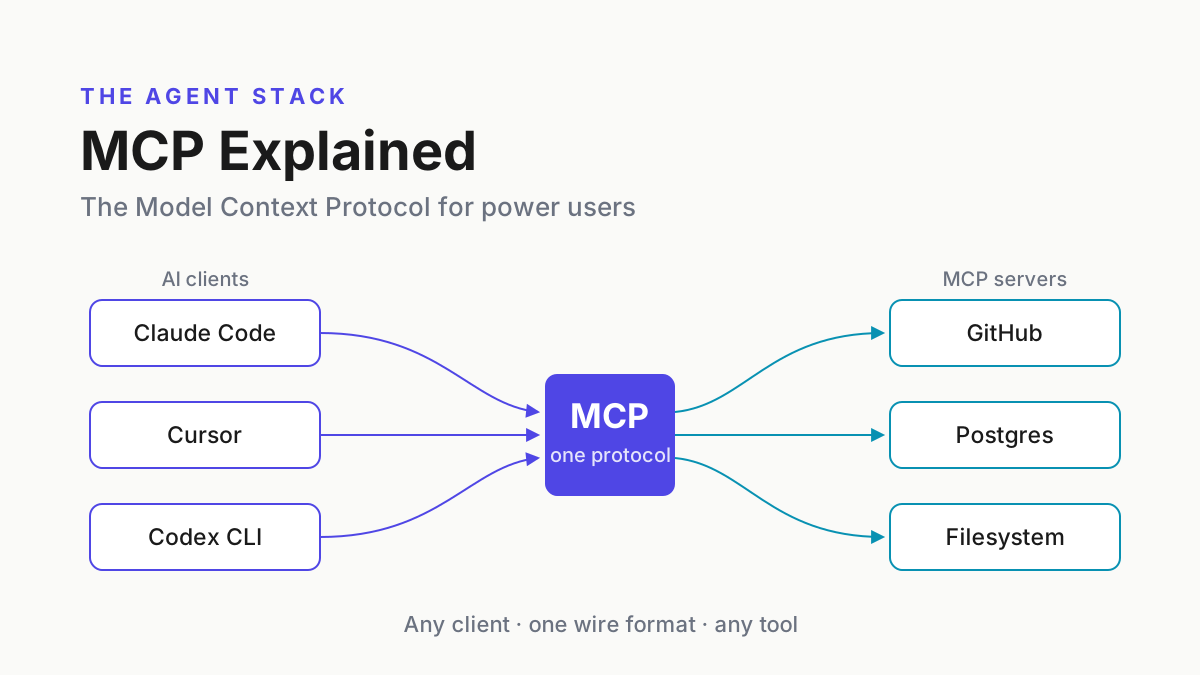
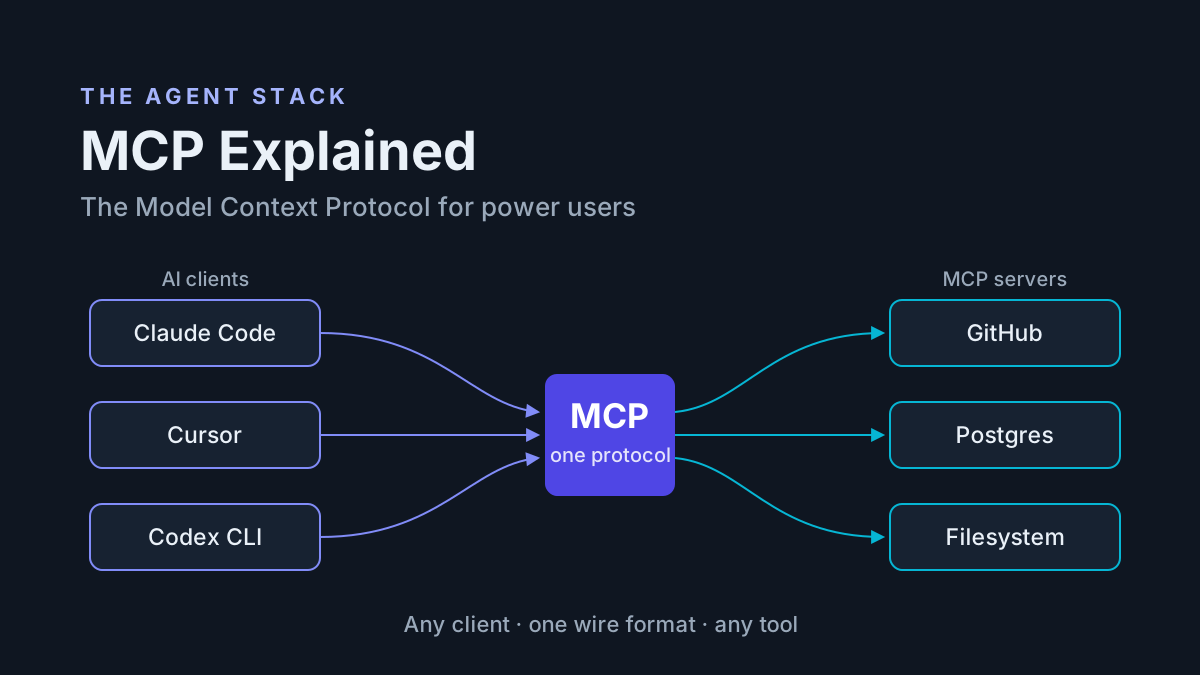
The Model Context Protocol (MCP) is an open standard that connects AI applications to external tools and data sources over one wire format. Instead of a custom integration for every app–tool pair, each application implements one MCP client and each tool ships one MCP server, and every pairing works.
The problem it kills is quadratic growth. Before a shared protocol, M apps times N tools meant M×N bespoke integrations: GitHub access required one plugin for Claude Desktop, another for Cursor, a third for ChatGPT, each with its own auth handling and update cadence. With MCP the count drops to M+N. One GitHub MCP server now serves every compliant client on the market. The “USB-C for AI” analogy that beginner explainers lean on is accurate as far as it goes — and this is the last time it appears in this article.
Three things MCP is not, because the label gets stretched. It is not a model API — you still pay Anthropic or OpenAI for inference. It is not an agent framework — it runs no loops and manages no agent state. And it is not a replacement for function calling; it standardizes how tools reach the model, and the model still invokes them the ordinary way (full comparison in a later section).
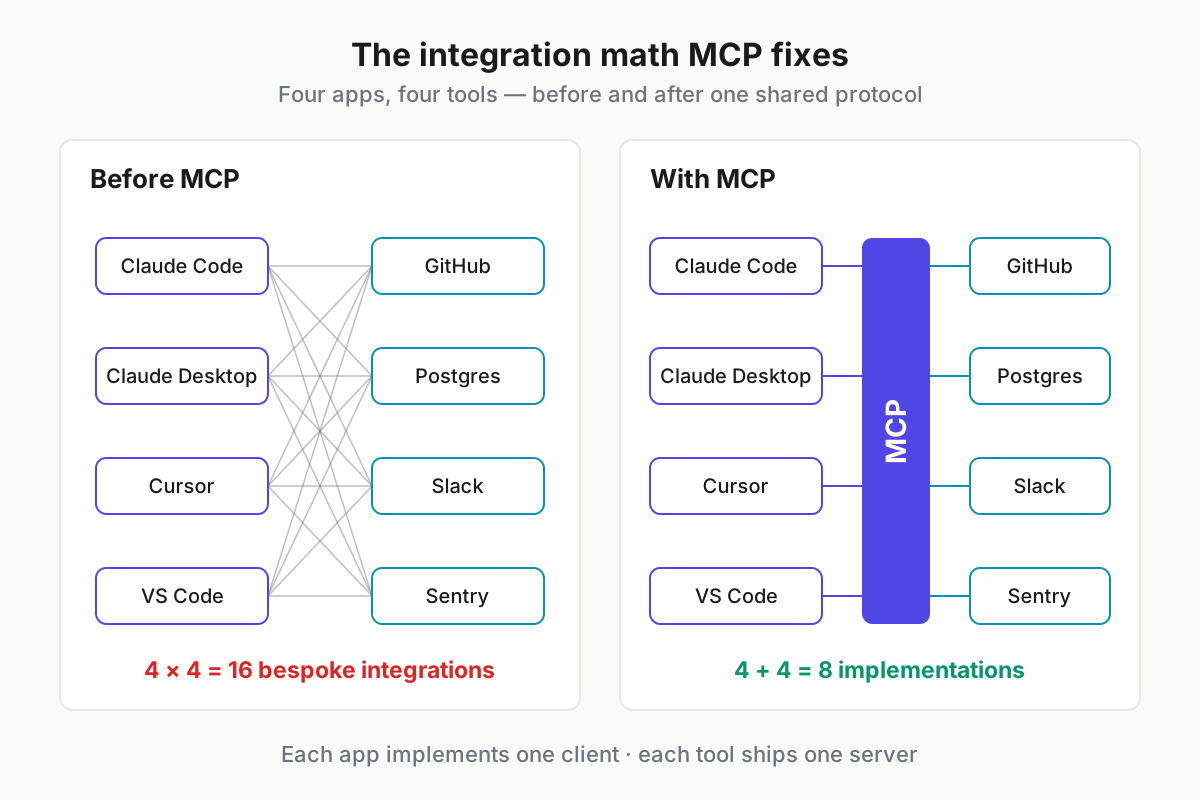
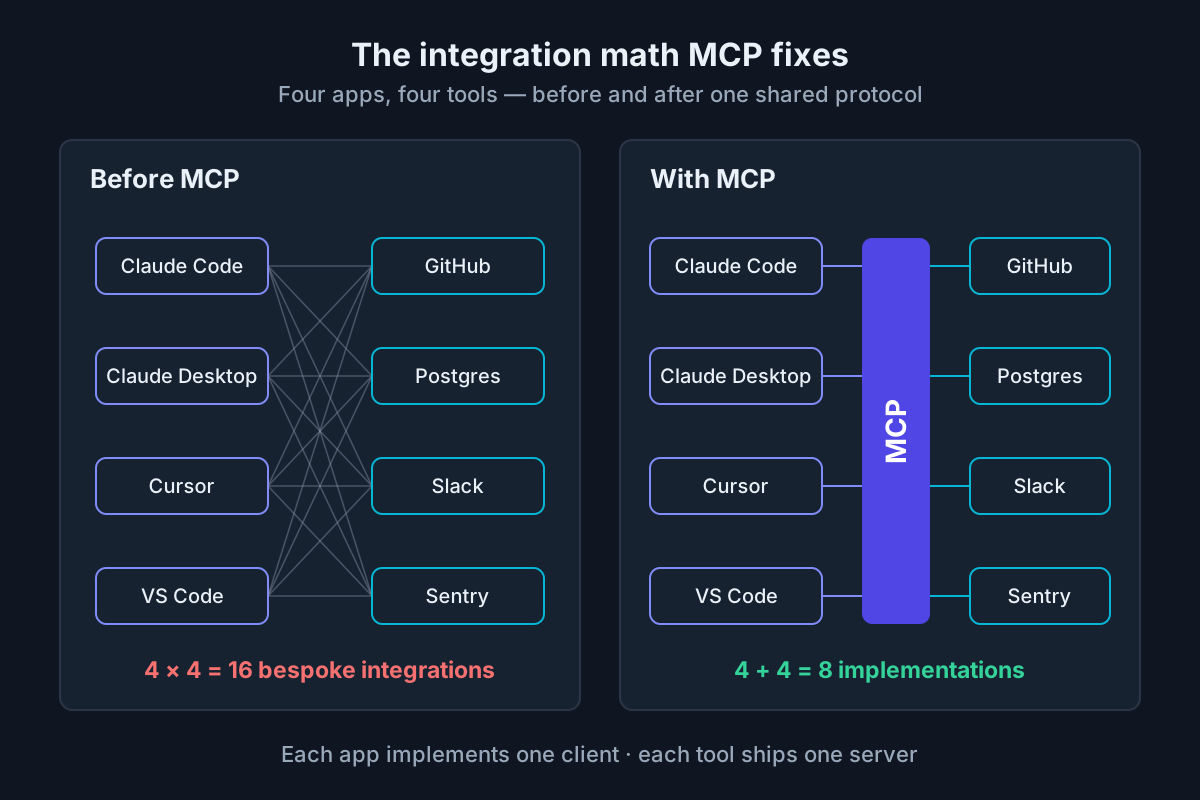 Four apps and four tools: 16 bespoke integrations before MCP, 8 protocol implementations after.
Where Anthropic’s MCP came from and who adopted it
The history fits on a napkin, which is exactly why revision awareness matters — the napkin keeps changing.
- November 2024 — Anthropic announces MCP and open-sources the spec, SDKs, and a batch of reference servers on day one.
- Spring 2025 — the adoption dam breaks: OpenAI adds MCP support across its Agents SDK and desktop apps, Google DeepMind commits Gemini support, and Microsoft wires it into Copilot surfaces and Windows.
- 2025 spec revisions — Streamable HTTP replaces the original HTTP+SSE transport and OAuth arrives (2025-03-26); elicitation, structured tool output, and the OAuth resource-server model land (2025-06-18).
- June 2026 — the US government publishes dedicated MCP security guidance. A protocol gets its own CSI when it reaches critical mass.
- July 28, 2026 — the 2026-07-28 MCP spec rebuilds the core: sessions retired, Multi Round-Trip Requests added, auth hardened, old primitives put on deprecation clocks. Early adopters include Amazon Bedrock AgentCore, AWS, Cloudflare, Figma, Google Cloud, Microsoft Foundry, Netlify, Supabase, and Xero. TechCrunch covered the draft a week before it landed; our MCP 2026 spec breakdown covers the migration in depth.
Governance broadened alongside adoption. Anthropic created the protocol, but the spec now moves through public working groups with maintainers drawn from multiple vendors, and the process is visible on modelcontextprotocol.io. For power users the practical takeaway is simpler: no single vendor can quietly break your servers, but you do have to track revisions.
Revisions are dated, not semver: 2025-03-26, 2025-06-18, 2026-07-28. Client and server negotiate a shared revision, and the gap between them is where bugs live — a server built against 2025-06-18 sampling meets a 2026-07-28 client that expects MRTR instead. When something breaks after an update, check which revision each side speaks before blaming your config.
Architecture in plain terms: hosts, clients, servers
Three roles, one instance each. The host is the AI application itself — Claude Code, Claude Desktop, Cursor. The client is a connector the host runs, one per server, strictly 1:1. The server is the process exposing capabilities — a Postgres server, a GitHub server, a filesystem server.
The host/client split looks like protocol pedantry until you run five servers at once. Each client isolates one server behind its own connection and its own capability negotiation, so a flaky community server never sees what your GitHub server returned, and the host multiplexes all of them into a single model conversation.
One request, end to end. You ask Claude Code about a production error. The model decides the Sentry server’s get_issue tool would help and emits a tool call. The client wraps it in a JSON-RPC request and sends it to the server, which hits Sentry’s actual API and returns the stack trace. The harness folds that result into context, and the model answers with the real error, not a guess.
On the wire it is JSON-RPC 2.0 — tools/list, tools/call, resources/read. The lifecycle got dramatically simpler in 2026: the old initialize handshake and Mcp-Session-Id header are retired, and each HTTP request now stands alone, carrying everything the server needs to answer it. Discovery happens through list calls whose results are cacheable (servers attach a ttlMs), and gateways route on the new Mcp-Method and Mcp-Name headers without parsing request bodies. That is enough detail to debug with; resist the urge to reimplement.
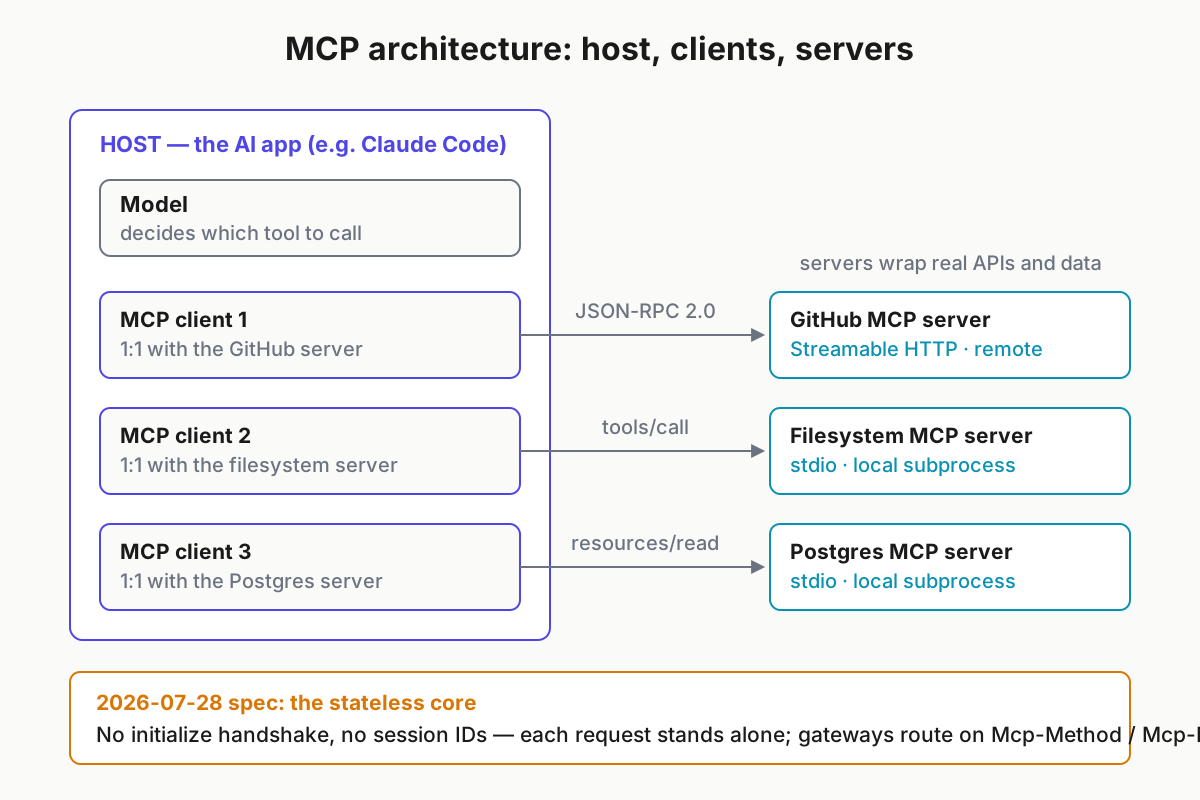
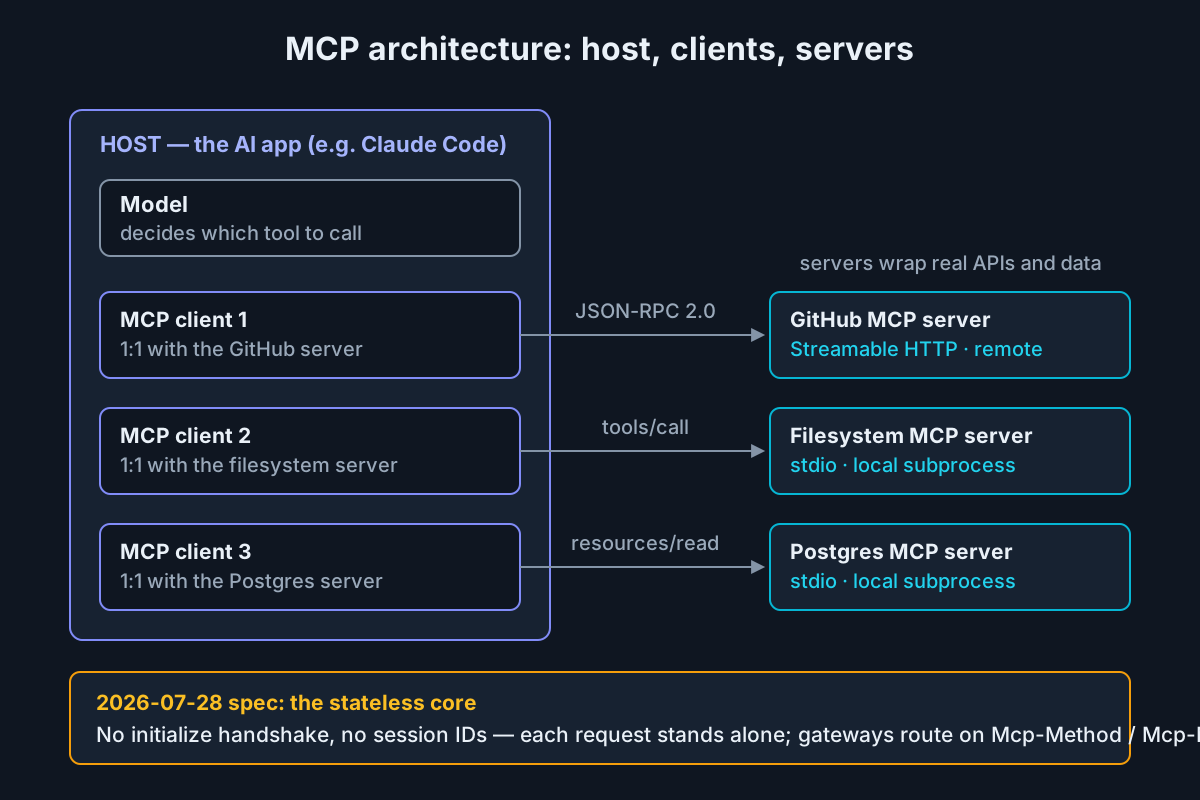 One host, one client per server, JSON-RPC 2.0 over stdio or stateless Streamable HTTP.
The three primitives: tools, resources, prompts
Servers expose three kinds of capability, distinguished by who controls their use.
Tools: model-controlled actions
Tools are functions the model chooses to call. Each one declares a name, a description, and a JSON Schema for its input:
{
  "name": "create_issue",
  "description": "Create a GitHub issue in the given repository.",
  "inputSchema": {
    "type": "object",
    "properties": { "repo": { "type": "string" }, "title": { "type": "string" } },
    "required": ["repo", "title"]
  }
}
Two things ride on that description field: selection quality, because it is the only evidence the model has when choosing among dozens of tools, and security, because the model reads it as trusted instruction — more on that below.
Resources: application-controlled context
Resources are data the host attaches as context — files, schemas, log streams — addressed by URI and read on demand:
{ "method": "resources/read", "params": { "uri": "file:///repo/README.md" } }A filesystem server exposing file:///repo/README.md is the canonical example; a database server exposing schema://orders is the more useful one. The application, not the model, decides what gets attached.
Prompts: user-controlled templates
Prompts are workflows the server ships and the user invokes — slash-command material:
{
  "name": "review_pr",
  "description": "Structured pull-request review with severity ratings",
  "arguments": [{ "name": "pr_number", "required": true }]
}
A GitHub server bundling a /review_pr prompt means the team’s review checklist travels with the integration instead of living in someone’s notes app.
The older “advanced” primitives are mid-transition as of August 2026. Server-initiated sampling (the server asks the client’s model to generate something) and server-initiated elicitation (the server asks the user a question) are replaced by Multi Round-Trip Requests (MRTR): the server returns an intermediate response saying what it needs, and the client answers inside the same logical request — no reverse channel. Roots, sampling, and logging are formally deprecated with a 12-month window, and client support for MRTR is still uneven, so check your client’s changelog before depending on any of this.
Transports at practitioner depth: stdio and Streamable HTTP
stdio could not be simpler: the host spawns the server as a subprocess and speaks JSON-RPC over stdin/stdout. No port, no TLS, no network surface — the server runs as your user, with your environment. That makes it the right answer for local tools: filesystem, git, a local database. When the client exits, the subprocess dies, and there is nothing to reconnect.
Streamable HTTP is the remote transport: a single endpoint accepting POSTed JSON-RPC, with optional server-sent-event streaming for responses that arrive in pieces. It replaced the original two-endpoint HTTP+SSE design in the 2025-03-26 revision, and the legacy transport was formally deprecated in 2026-07-28 — a README that still says “SSE endpoint” is telling you how old the server is.
Statelessness matters most here. Under the old model, clients held an initialize handshake and a session ID; a dropped connection or restarted client meant re-handshaking and, too often, orphaned state on the server. Now each request is self-contained: a failed request is simply retried, work that outlives a request moves to the formalized tasks extension (submit now, poll for the result), and anything interactive happens through MRTR inside the request itself. Load balancers stopped needing sticky sessions — which, as The Register noted, is most of why the hosted-MCP platforms adopted the revision within weeks.
| Transport | Use it for | Auth story | When things break |
|---|---|---|---|
| stdio | Personal local tools: filesystem, git, local DBs | Inherits your shell environment; nothing on the network | Subprocess dies with the client; restart is a respawn |
| Streamable HTTP | Shared, hosted, and team servers | OAuth with RFC 9207 issuer validation and Client ID Metadata Documents | Stateless retry; long jobs run through tasks |
| Legacy HTTP+SSE | Nothing new — deprecated July 2026 | Mostly bearer tokens | Dropped sessions and re-handshakes; the pain the 2026 spec removed |
The decision rule: personal and local, use stdio; shared, hosted, or team-scoped, use Streamable HTTP with real auth.
Wiring MCP into your clients — the section to keep open
Every client on our best agentic AI tools list speaks MCP; no two configure it identically. Paths and flags below are current as of August 2026.
Claude Code manages servers with claude mcp add across three scopes — local (you, this project), project (a .mcp.json checked into the repo), and user (you, everywhere). Wiring GitHub’s hosted server at project scope:
claude mcp add --transport http --scope project github https://api.githubcopilot.com/mcp/That writes a .mcp.json your whole team inherits:
{
  "mcpServers": {
    "github": {
      "type": "http",
      "url": "https://api.githubcopilot.com/mcp/",
      "headers": { "Authorization": "Bearer ${GITHUB_PAT}" }
    }
  }
}
Run /mcp inside a session to see connection status and the tool list; the full flag reference is in our Claude Code field guide.
Cursor reads ~/.cursor/mcp.json globally or .cursor/mcp.json per project. The same server, second client:
{
  "mcpServers": {
    "github": {
      "url": "https://api.githubcopilot.com/mcp/",
      "headers": { "Authorization": "Bearer ${GITHUB_PAT}" }
    }
  }
}
Zero new integration code — that is the M+N payoff made tangible in two files. (Env-var expansion syntax varies by client; check yours before assuming ${VAR} works. )
Claude Desktop uses claude_desktop_config.json (under Settings → Developer), and is where stdio servers shine — local capability for an app that otherwise has none:
{
  "mcpServers": {
    "notes": {
      "command": "npx",
      "args": ["-y", "@modelcontextprotocol/server-filesystem", "/Users/you/notes"]
    }
  }
}
Scope deliberately. Project-scoped .mcp.json is the team play: checked in, reviewed like code, and pointing at env vars — never containing tokens, because a token in git history is a token you rotate. Give each server the narrowest credential that works; provisioning and metering keys on the Anthropic side is covered in our Anthropic API and Console guide.
Then the honest part: three clients means three config files, three auth stores, and silent drift. The GitHub server you upgraded in Claude Code last month is still the old version in Cursor, and nothing will tell you.
Product note: Running MCP across three clients means three configs and N provider accounts. Automater Lite’s Toolbelt manages provider accounts (OAuth and API keys) in one place and syncs skills across your CLIs, so the sprawl stays coherent — free on automater.ai.
Building your own server in an afternoon
The SDKs do the protocol work — lifecycle, transport, serialization — and you write the capability functions. Official SDKs cover TypeScript, Python, Go, C#, and Rust (the last still in beta), all updated for the stateless revision; Java and Kotlin exist too.
- Write the server. A log-reading server in Python, complete:
# logserver.py
from pathlib import Path
from mcp.server.fastmcp import FastMCP

LOGS = Path("/var/log/myapp")
mcp = FastMCP("logs")

@mcp.tool()
def read_log(service: str, lines: int = 100) -> str:
    """Return the last `lines` lines of a service's log.
    Valid services: api, worker, cron."""
    path = LOGS / f"{service}.log"
    if not path.exists():
        return f"error: unknown service '{service}' (valid: api, worker, cron)"
    return "\n".join(path.read_text().splitlines()[-lines:])

@mcp.resource("logs://recent")
def recent_errors() -> str:
    """ERROR-level lines across all services, last hour."""
    return collect_errors(LOGS, since_minutes=60)

if __name__ == "__main__":
mcp.run() # stdio by default-
Exercise it before any client sees it.
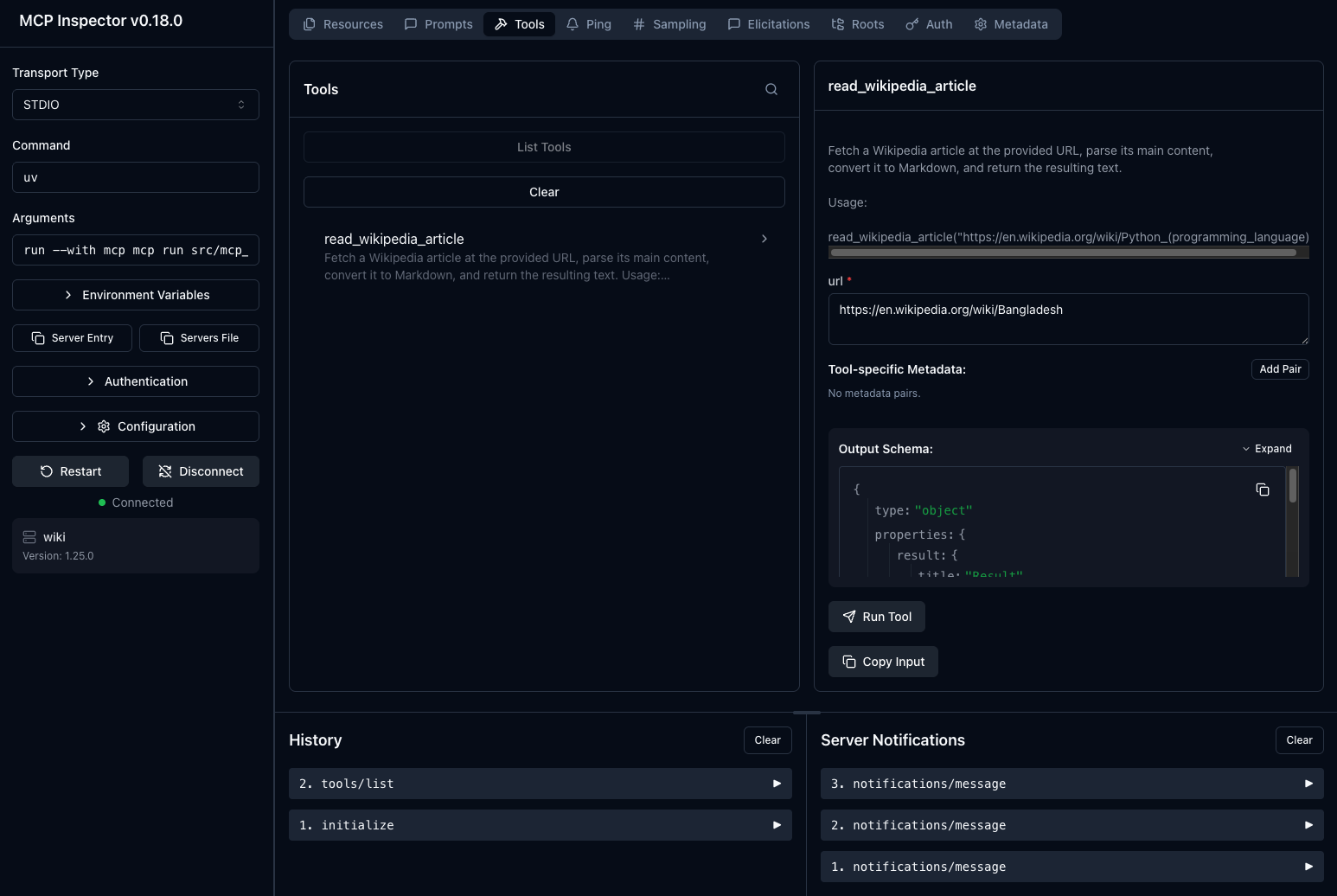
npx @modelcontextprotocol/inspector python logserver.pygives you a UI to call the tool, read the resource, and watch the raw JSON-RPC. Debugging here beats debugging through a chat window every time. -
Register it:
claude mcp add logs -- python /abs/path/logserver.py. -
Confirm it landed. Open a session, run
/mcp, andread_logappears in the tool list. Done.
What tutorials skip is the part the model experiences. Tool descriptions are prompts: “Return the last N lines of a service’s log. Valid services: api, worker, cron” gets selected correctly; “get logs” does not. Validate inputs, and return errors the model can act on — unknown service 'web' (valid: api, worker, cron) invites a sensible retry, while a stack trace invites hallucinated fixes.
The security section nobody should skip
The attack classes have names now. Learn all four:
- Malicious servers. Installing a server is running someone else’s code with your credentials — and over stdio, with your filesystem.
- Tool poisoning. Hostile instructions embedded in tool descriptions, which the model reads as trusted context.
- Rug pulls. A server that behaved at install time ships an update that changes descriptions or behavior after you approved it.
- Prompt injection through content. A resource or tool result — a webpage, an issue comment — carries instructions the model follows.
One asymmetry enables all four: the model treats tool descriptions and results as context worth trusting, while the human who installed the server almost never reads them. These are the same prompt injection and least-privilege problems every agent surface has — concentrated, because MCP is where the credentials live.
Auth, at least, has grown up fast. The 2024-era answer was bare tokens in env vars. The 2025 revisions brought OAuth with the server cast as a resource server, and 2026-07-28 hardened it further: RFC 9207 issuer validation kills a class of token mix-up attacks, and Client ID Metadata Documents replace the Dynamic Client Registration flow that enterprises never wanted to run. Remote servers finally have an auth story worth deploying — the same conclusion the June 2026 government CSI reaches by a more bureaucratic route.
The audit-before-install checklist:
- Read the source. Most servers are small; ten minutes of reading is the whole diligence.
- Verify the publisher — official org repos and registry-verified publishers over search results.
- Pin the version, and re-review before upgrading. Rug pulls arrive as updates.
- Prefer registries, but remember listing is not audit.
- Issue least-privilege credentials: a fine-grained PAT scoped to one repo, a read-only DB user.
- Sandbox what you can — containerize stdio servers; run agent work under a separate OS account.
Our production MCP hardening guide turns this checklist into infrastructure.
MCP vs plain function calling vs vendor plugin systems
These three get conflated constantly, and the confusion sells frameworks. The positioning:
| Plain function calling | MCP | Vendor plugin systems | |
|---|---|---|---|
| What it is | A model-API capability: tools defined in your code, per app | An open protocol that makes tools portable across apps | Marketplace distribution inside one vendor’s ecosystem |
| Integration cost | Every app wires every tool | One server serves every compliant client | One listing per ecosystem, on their terms |
| Best when | Single app, few tools, tight latency budget | Same tools across clients and teams; local data; community servers | You want their distribution and managed auth UX |
| Lock-in | Low — it is your code | Low — open spec, many clients | High, by design |
The honest overlap: MCP does not replace function calling, it feeds it. Tools a client discovers over MCP are handed to the model through the provider’s ordinary tool-calling interface — the protocol standardizes packaging and transport, not the model mechanism. So if you are building one app with four tools and no reuse ambitions, plain function calling is fewer moving parts, and you should use it without guilt. Vendor app stores keep mutating — ChatGPT apps, Claude extensions, marketplace-of-the-month — so check the current shape before betting a product on one.
Ecosystem state: registries, notable servers, and the bloat problem
Discovery runs through the official MCP registry plus community indexes — mcp.so, Smithery, PulseMCP, Docker’s MCP Catalog. Treat all of them as phone books, not background checks: listing is not audit.
The servers power users actually run, with the reason to run them:
- GitHub — issues, PRs, and CI status inside any client; almost everyone’s first server.
- Filesystem — scoped directory access for clients that lack it natively.
- Playwright — the agent can see and drive a real browser.
- Postgres — schema-aware queries; read-only credentials, please.
- Sentry — stack traces and triage without tab-switching.
- Slack — search and post; the audit trail writes itself.
- Linear / Notion — tickets and docs as context instead of copy-paste.
- Docs-context servers (Context7-class) — current library documentation on demand, patching training-cutoff drift.
Now the critique this ecosystem has earned. Every connected server preloads its tool definitions — names, descriptions, JSON Schemas — into the model’s context. Wire up six servers with fifteen tools each and you have burned thousands of tokens before the first message, and degraded tool selection too: models choose worse from ninety tools than from nine. Power users discover this the day their client feels dumber with every server they add.
Mitigations, in the order to try them: enable servers per project instead of globally; allowlist the specific tools you use where your client supports it; put an aggregator or gateway in front so the model sees a curated subset; prefer clients that lazy-load tool schemas on demand. The 2026 spec helps at the margins — cacheable list results cut refetch chatter, and the gateway routing headers make the aggregator pattern cheaper to operate — but context discipline is still your job.
What’s next for the protocol
Four threads worth watching, each anchored to something shipped:
- Tasks maturing. Formalized as an extension in 2026-07-28; expect long-running agent work — multi-hour builds, batch jobs — to standardize on submit-and-poll. The official roadmap tracks it.
- Auth hardening continues. Client ID Metadata Documents roll out across clients next, per the maintainers’ roadmap post; enterprise SSO patterns are the open question.
- Registry and governance maturation. Verification and namespace rules are what turn the phone book into something closer to an app store review queue.
- The deprecation clock. Roots, sampling, and logging expire within 12 months of July 2026, and legacy HTTP+SSE is formally deprecated alongside them. A server not migrated by mid-2027 will start failing against current clients — schedule the work now.
On adjacency: agent-to-agent protocols solve a different lane — agents delegating to agents — while MCP stays app-to-tool. They compose rather than compete; a subagent reached over an A2A-style protocol may itself hold MCP connections to its own tools.
The grounded position: MCP’s bet is that context integration is infrastructure, and after the stateless revision it finally behaves like infrastructure — boring, cacheable, load-balanceable. Use it freely for local and dev workflows today. For team-wide remote servers, the 2026 auth stack makes a yes defensible — provided the security section above becomes policy first.
FAQ: Anthropic MCP and the Model Context Protocol
What is Anthropic’s MCP?
MCP — the Model Context Protocol — is an open standard Anthropic announced in November 2024 that lets AI applications connect to tools and data sources through one protocol. Apps implement an MCP client once, tools ship an MCP server once, and any compliant pairing works together.
Is MCP only for Claude?
No. The spec is open and the client list is long: Claude Code and Claude Desktop, Cursor, Codex CLI, GitHub Copilot, plus platform adopters like AWS, Google Cloud, Microsoft Foundry, and Cloudflare shipping against the 2026-07-28 revision. Claude popularized it; nobody owns the client side.
What is an MCP server?
An MCP server is a program that exposes tools, resources, and prompts to AI applications over the protocol — locally as a subprocess (stdio) or remotely over Streamable HTTP. GitHub’s server, for example, gives any compliant client issue, PR, and repository operations without custom integration code.
Is MCP secure?
The protocol now ships a serious auth model — OAuth, issuer validation, Client ID Metadata Documents — but your real exposure is the servers you install. Read the source, verify the publisher, pin versions, run least-privilege tokens, and re-review on every update. Treat servers like production dependencies.
What is the difference between MCP and an API?
An API exposes a service’s functionality; MCP standardizes how AI applications consume such services. An MCP server typically wraps an existing API — GitHub’s REST endpoints, a Postgres connection — and presents it as tools and resources a model can use. MCP complements APIs rather than replacing them.
Sources
- Model Context Protocol — specification and documentation
- MCP 2026-07-28 release: the stateless core, MRTR, and auth hardening
- MCP development roadmap
- MCP maintainers’ roadmap post
- Anthropic newsroom — Model Context Protocol announcement
- Cybersecurity Information Sheet: Securing the Model Context Protocol (June 2026)
- TechCrunch: “AI’s most important protocol is getting a little bit easier to use” (July 20, 2026)
- The Register: “Model Context Protocol prepares to break with its stateful past” (July 23, 2026)