Claude Code Mods Are In-Process Code: Keep an Extension Manifest for Every Machine
Claude Code mods run in-process, can approve tool calls and aren't sandboxed. Keep a manifest per machine, pick a managed-settings policy, pin and roll back.

Go deeper. Build your own.
A Claude Code mod can approve a tool call before the permission prompt appears, and it does so with the full permissions of the user who installed it. Since v2.1.287 shipped on Oct 1, 2026, Claude Code mods are on by default, and the built-in guard Anthropic ships with them protects what you manage without sandboxing anything else.
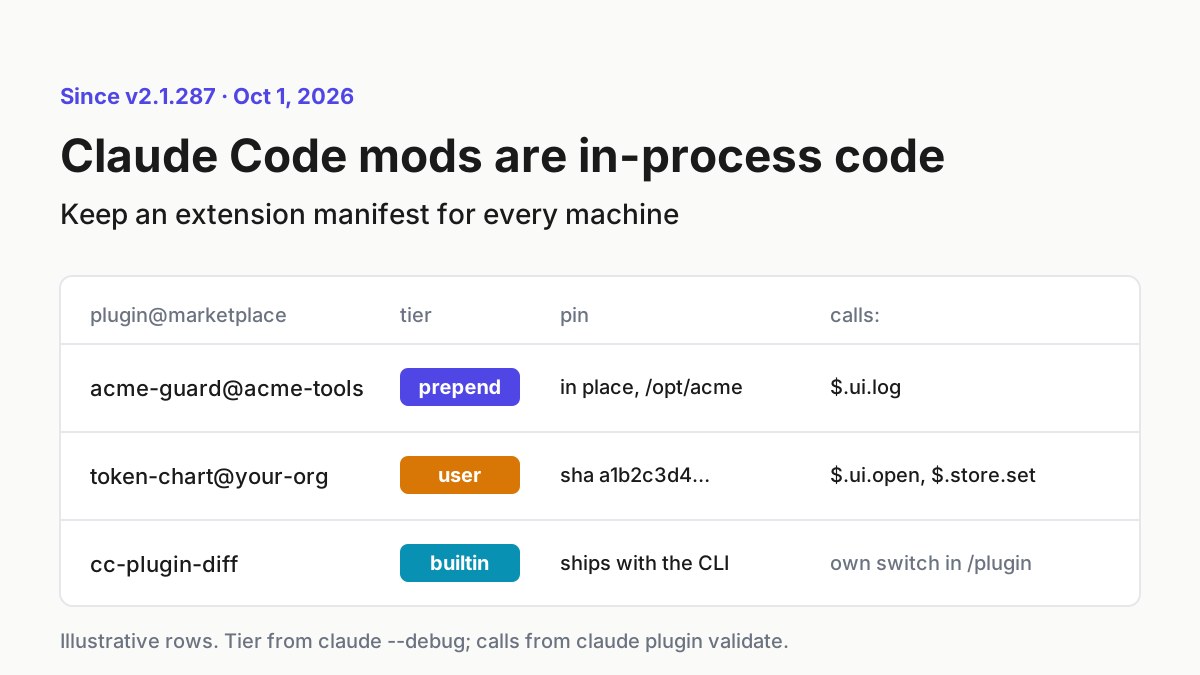
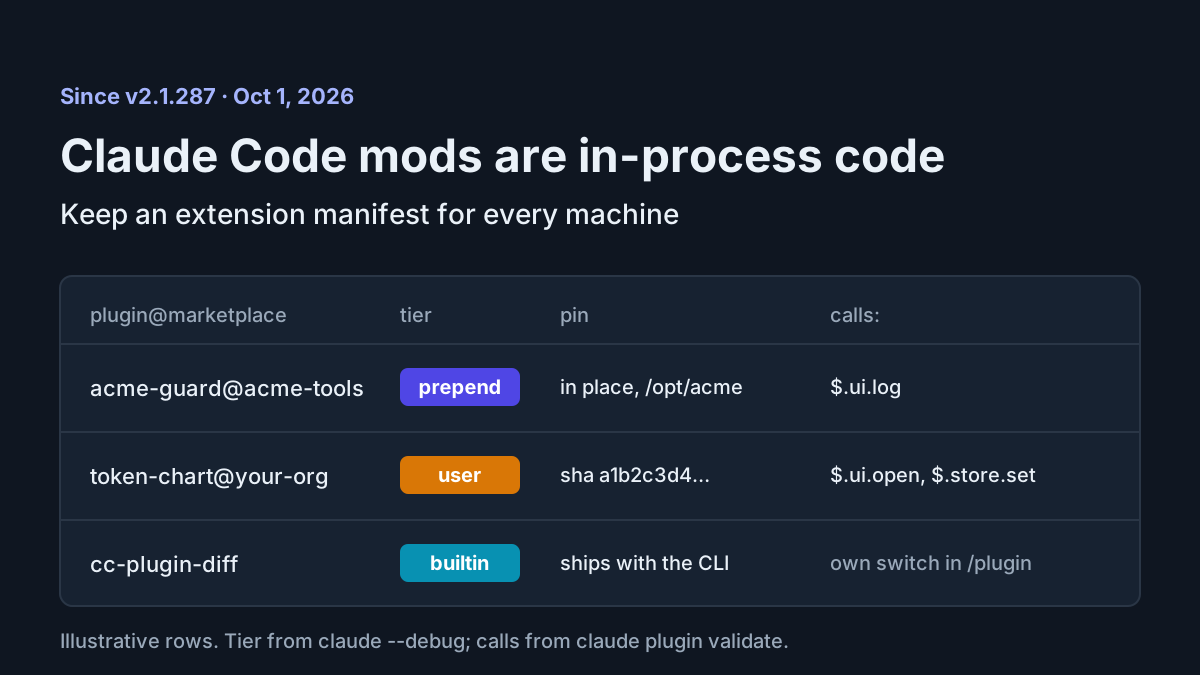
That changes what “we allow plugins” means on a fleet. A plugin used to add commands, skills, settings hooks and MCP servers. A plugin with a mod now puts code inside Claude Code’s own process, in the middle of every prompt and tool call. The move this week is an extension manifest per machine: every plugin, whether it carries a mod, the tier it runs at, what it is pinned to, what its code calls, who reviewed it, and how to roll it back.
This playbook covers the manifest, a four-row policy choice built on real managed-settings keys, and the author, review, pin, canary and rollback runbook around it.
What shipped with Claude Code mods on Oct 1, 2026 (v2.1.287)
The Claude Code changelog entry for v2.1.287, dated Oct 1, 2026, reads “Added Claude Mods: plugins may now modify deeper behavior.” The same release added “You should know,” a built-in mod that runs a side agent to flag things you might miss; it is off by default. Anthropic’s launch post, Customize Claude Code with mods, calls mods “small TypeScript functions that change how Claude Code works” and says “Mods ship inside plugins, so you install and share them like any plugin.” It is direct about the risk: “They aren’t sandboxed, and you should only install mods from sources you trust.”
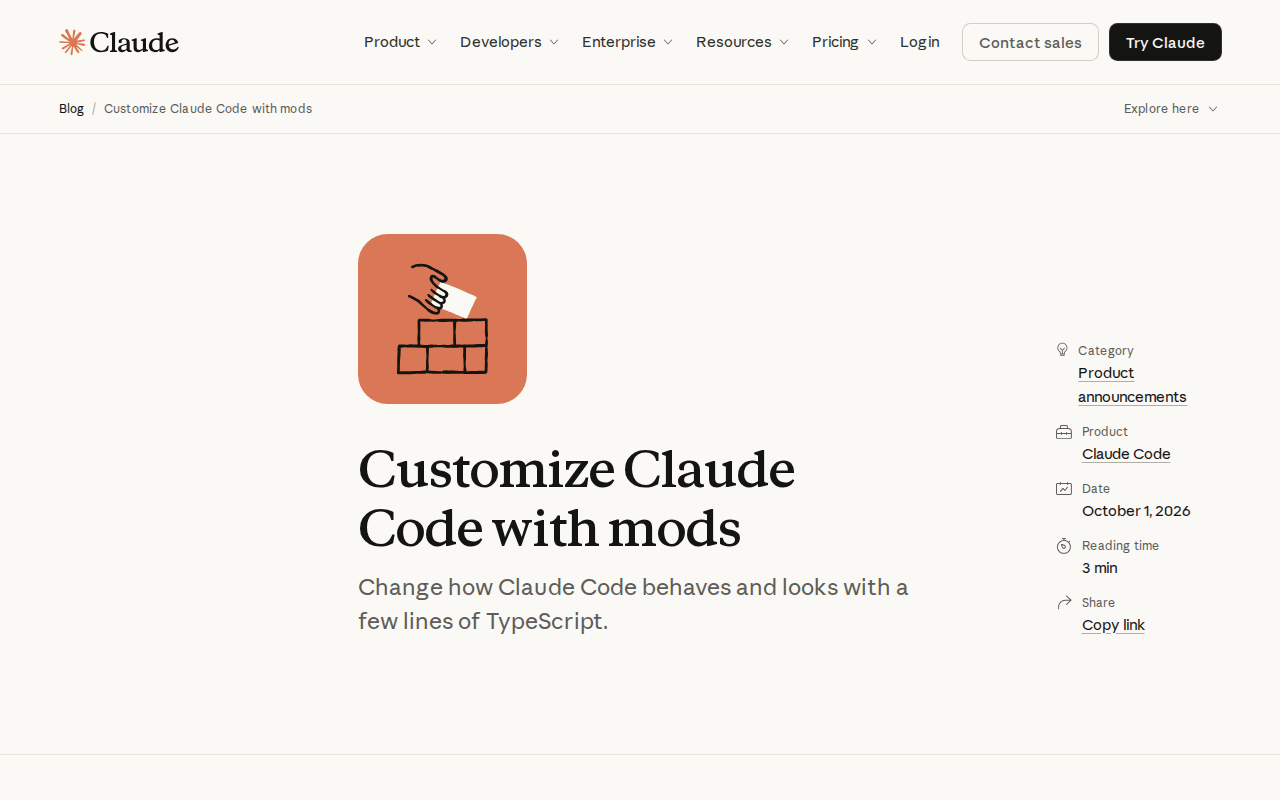 Screenshot: Claude blog, “Customize Claude Code with mods” (Oct 1, 2026), captured Oct 5, 2026.
“Mods” is the official name. During early access the feature went by function hooks, and the mods overview says v2.1.287 and later ignore the old CLAUDE_CODE_ENABLE_FUNCTION_HOOKS variable, “so setting it to 0 doesn’t keep mods off.” If your fleet set that variable during early access, it is doing nothing now.
The overview lists what a loaded mod can reach: it can act on the machine as the user, read environment variables and settings files that hold API keys, see every prompt and tool call, rewrite them, “approve a tool call before you’re asked,” and spend usage by calling a model on the user’s plan or key. The claude.dev tutorial Getting started with Claude Code mods adds that the module runs “with no DOM and no Node, so everything outside it goes through” the mods API. That is what makes a mod’s calls listable before it runs. It is not a security boundary, because the API itself reaches files, processes and the network.
The admin page, Manage mods for your organization, describes the default guard, sec-default@builtin. It loads when the machine has managed settings or the user signs in on a Team or Enterprise plan, and it stops a user’s mod from changing your managed hooks, system prompt, managed CLAUDE.md or managed MCP tools. Deny rules beat a user’s mod where the guard loads, but not a mod’s own calls: “with Read(.env) denied, a mod can still read that file with $.fs.read.” The page’s summary line is the one to put in your policy doc: “None of these controls sandboxes a mod.”
The same page carries the fleet gotcha. A plugin Claude Code copies into its cache “counts as a user’s, even when managed enabledPlugins enables it,” which covers every plugin from a GitHub, git, URL or npm source.
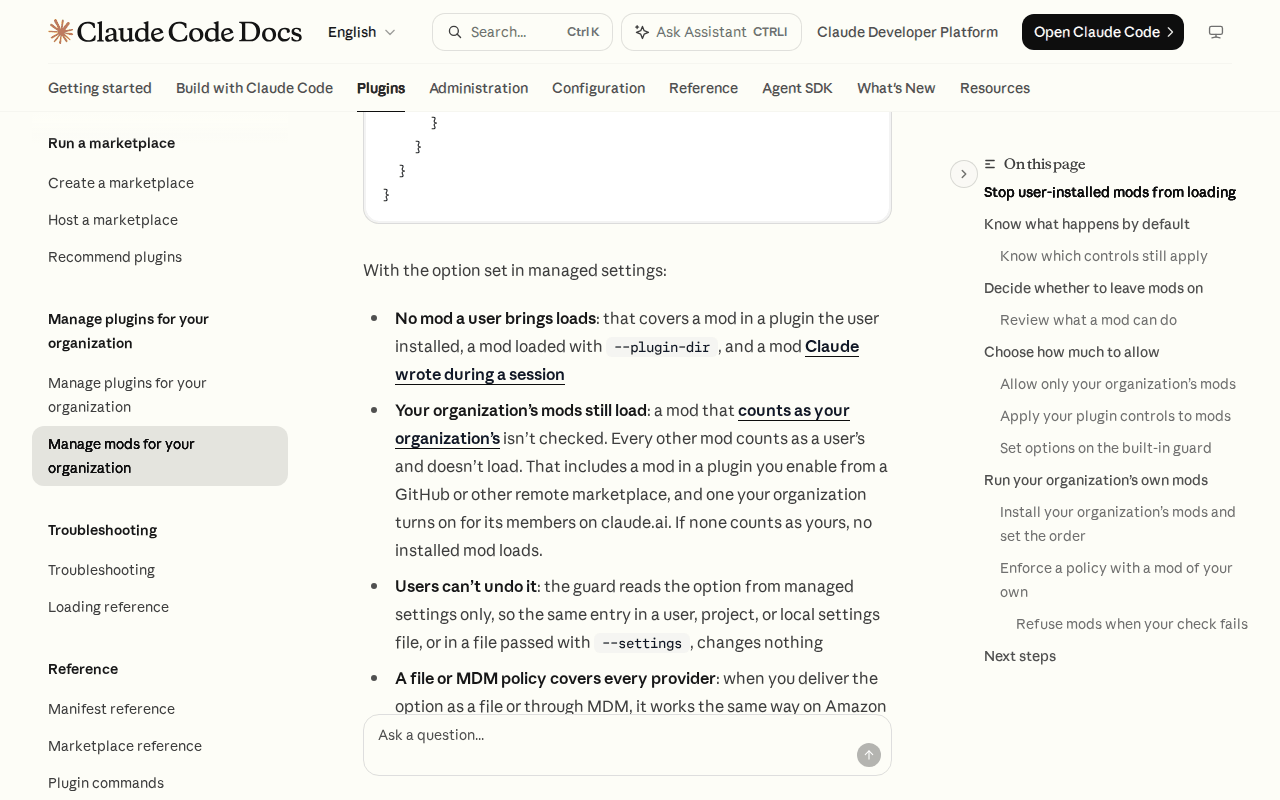 Screenshot: Claude Code Docs, “Manage mods for your organization” (living docs page, undated), captured Oct 5, 2026.
The surface is moving. v2.1.288 (Oct 2) and v2.1.289 (Oct 3) were full of mod fixes, including one where a deny or ask rule on a nested part of a compound shell command didn’t hold over a user-installed mod’s approval on managed machines. v2.1.290 reached npm on Oct 5 with no release notes yet.
Why in-process code changes the plugin inventory
A settings hook is a script Claude Code runs at a lifecycle event; it gets JSON in and returns a decision. The unauthored-hooks piece covers how those persist and how to prove them gone. A mod is different in kind. Hooks on the same event form one middleware chain inside Claude Code, the first mod in the chain sees the event first and the result last, and any mod in it can rewrite or answer the event.
So “which plugins are installed” no longer tells you what runs. You need the order each mod runs in, the calls its code makes, and the surfaces where it runs.
Hooks run in the terminal, the Desktop Code tab, the VS Code chat panel, claude -p and the Agent SDK, Remote Control, and cloud sessions the plugin reaches. Drawing is narrower: only the terminal and Desktop show a mod’s panes and bands. Desktop’s WSL sessions run no plugins at all. An unattended -p lane runs every mod’s hooks while drawing nothing, so nobody sees a mod there unless you look for it.
The extension manifest: one row per plugin per machine
Build it from the machine, not from the marketplace. The columns below are the minimum; the example rows are illustrative.
| plugin@marketplace | Mod? | Tier | Source and pin | calls: line |
Owner | Reviewer | Pinned on | Rollback target |
|---|---|---|---|---|---|---|---|---|
acme-guard@acme-tools |
yes | prepend | directory, in place, /opt/acme/claude-plugins |
$.ui.log |
platform | security | 2026-10-05 | previous directory snapshot |
token-chart@your-org |
yes | user | github, ref v1.2.0, 40-char sha |
$.ui.open, $.store.set |
dev-ex | platform | 2026-10-05 | prior sha |
formatter@your-org |
no | none | github, sha |
none | dev-ex | platform | 2026-09-30 | prior sha |
cc-plugin-diff |
yes | builtin | ships with the CLI version | not reviewed | Anthropic | n/a | CLI 2.1.289 | its own switch in /plugin |
How to fill each column on a real machine:
- Mod? A plugin carries a mod when its
hooks/hooks.jsonpoints at a hooks module, theregister.jsfile that exportsregister(on). - Tier. Start a session with
claude --debugand read the hooks-module line for each id. Your organization’s mods should saytier prepend; a mod that saystier useris treated as a user’s, whatever your managed settings meant. - Loaded count.
/pluginshows a dim line such as1 mod active · first-mod. Built-in mods are listed under Built-in on the Installed tab and left out of that count. - Calls. Run
claude plugin validateon the plugin’s directory and copy thehooks:andcalls:lines into the row. - Pin. Copy the
ref,sha,sha256orversionfrom the marketplace entry. “Latest” isn’t a pin.
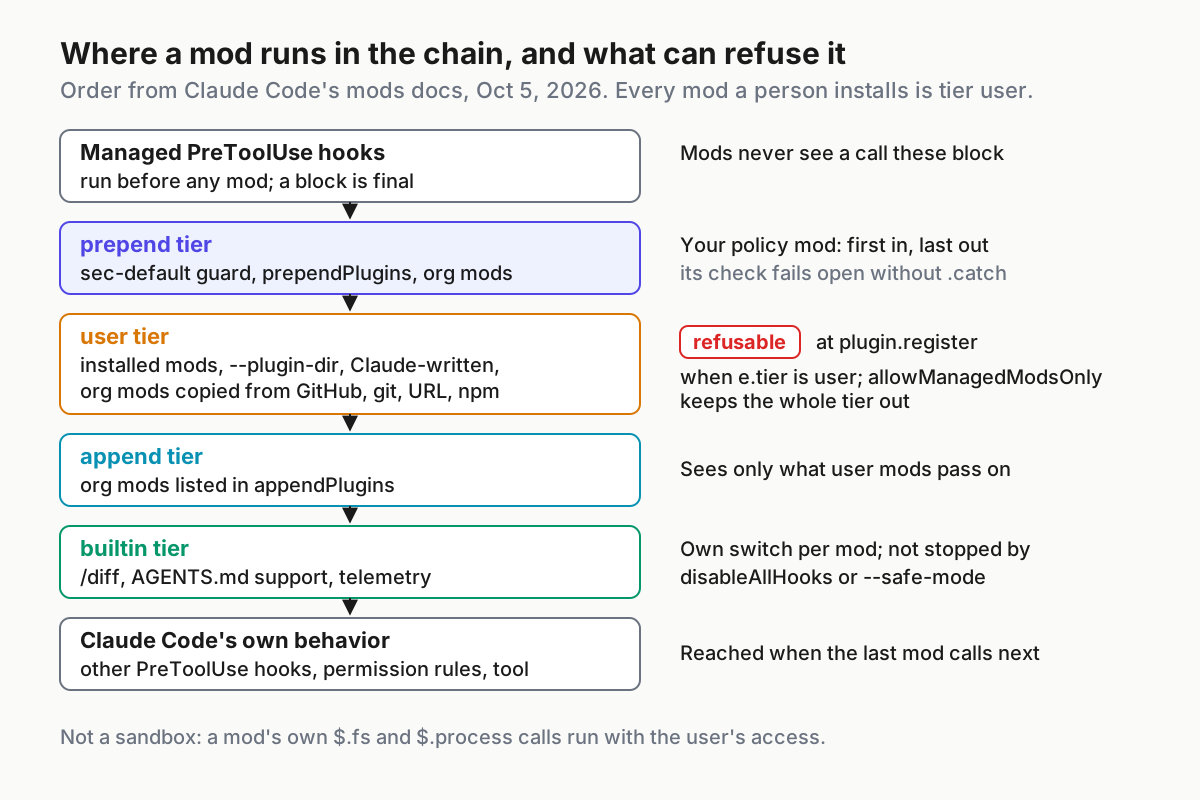
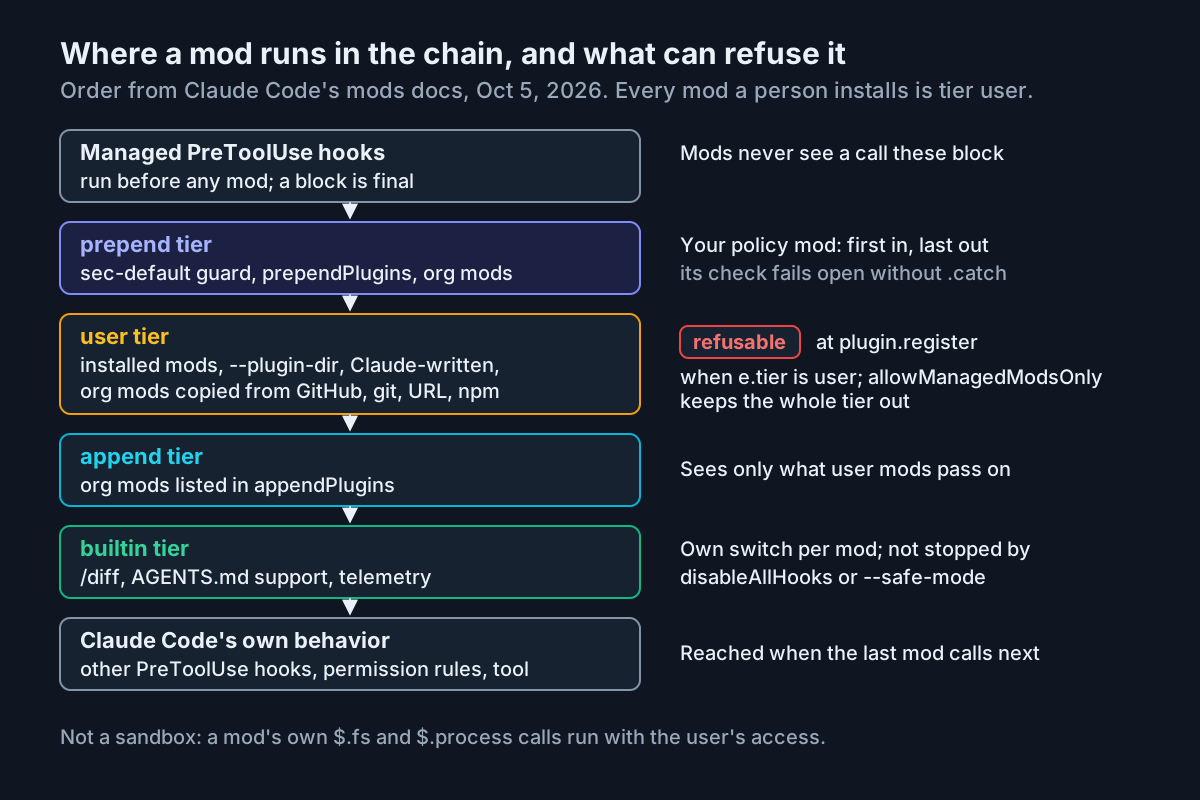 The tier column decides where a mod sits in the chain, and only the user tier is what a prepend policy mod refuses at load.
Pick a Claude Code mods policy on real managed-settings keys
Choose one row per machine group, strictest first. Every key below is from Anthropic’s mods admin docs and marketplace reference.
| Policy | What loads | Managed settings | What it costs you |
|---|---|---|---|
| 1. No user mods | Your organization’s mods, loaded in place, and built-in mods | pluginConfigs → cc-plugin-sec-default@builtin → options.allowManagedModsOnly: true, plus disableSideloadFlags: true |
Org mods from GitHub or a remote marketplace, or turned on through claude.ai, don’t load either. Settings hooks, status lines and /goal keep working |
| 2. Approved marketplaces only | Any mod from the marketplaces you list | strictKnownMarketplaces (and blockedMarketplaces), plus disableSideloadFlags: true |
Every mod in an approved marketplace loads unreviewed unless you review the marketplace. strictKnownMarketplaces stops skills-directory plugins until you add {"source": "skills-dir"} |
| 3. Every mod checked by your policy mod | Any user mod your plugin.register check passes |
Your mod in place via extraKnownMarketplaces (directory) and enabledPlugins, listed first in prependPlugins with sec-default@builtin |
The check fails open if it throws or times out, unless you add a .catch. A crashed mods worker unloads it |
| 4. Open (the default) | Mods from any allowed marketplace, --plugin-dir, and mods Claude writes in a session |
None; the guard loads only with managed settings or a Team or Enterprise sign-in | A user’s mod can approve a call an ask rule would prompt for; in auto mode, a call it approves skips the classifier |
Two wider switches sit outside the ladder. allowManagedHooksOnly loads only your organization’s mods and built-ins and also blocks hooks in users’ own settings files. disableAllHooks in managed settings stops every installed mod, yours included, and every settings hook, so your managed PreToolUse block stops blocking; keep that one as break-glass. Leave allowModsToOverrideDenyRules unset unless you want a user’s mod to approve calls your deny rules refuse.
For row 1 with your own policy mod loaded first, combine the two managed-settings.json examples in Anthropic’s admin docs, the guard-option block and the in-place marketplace block, into one file (the acme names are the docs’ example values):
{
  "extraKnownMarketplaces": {
    "acme-tools": {
      "source": { "source": "directory", "path": "/opt/acme/claude-plugins" }
    }
  },
  "enabledPlugins": { "acme-guard@acme-tools": true },
  "prependPlugins": ["acme-guard@acme-tools", "sec-default@builtin"],
  "pluginConfigs": {
    "cc-plugin-sec-default@builtin": {
      "options": { "allowManagedModsOnly": true }
    }
  },
  "disableSideloadFlags": true
}
For row 2, the marketplace reference shows an allowlist that admits one GitHub owner and one internal host (owner and host are the docs’ placeholders):
{
  "strictKnownMarketplaces": [
    { "source": "github", "repo": "your-org/*" },
    { "source": "hostPattern", "hostPattern": "^git\\.example\\.com$" }
  ]
}
Users can’t loosen any of this from their side. The guard reads its options from managed settings only. On a managed machine, Claude Code ignores prependPlugins and appendPlugins in user settings, and it never reads them from a repository’s settings file.
Runbook: review, pin, canary and roll back Claude Code mods
1. Review the calls line before anyone installs
claude plugin validate ./some-mod prints two lines that describe the mod’s code without running it. Anthropic’s example output:
  ❯ ./register.js hooks: session.start, tool.call, ui.render{component=Pane}
  ❯ ./register.js calls: $.fs.read, $.http.fetch, $.store.set, $.ui.open
Route any of these to a second reviewer, using the meanings from the admin docs:
| In the output | Why it needs a second look |
|---|---|
$.process.run, $.process.spawn |
Starts programs as the user, outside any sandbox Claude’s Bash runs in |
$.fs.read, $.fs.write |
Reads or writes anywhere the user can, past your deny rules |
$.http.fetch |
Network requests; org network policy covers this call, not programs the mod starts |
$.env.get, $.settings.read, $.env.set |
Reads keys, or changes what later commands and MCP servers run |
$.model.complete, $.prompt.submit, $.session.send |
Spends usage, speaks as the user, or messages another session |
hooks tool.check, tool.call, prompt.submit, session.append |
Approves or denies calls before the prompt, sees and rewrites every call and prompt, or rewrites stored conversation rows |
Claude Code refuses to load a mod that uses the API in a way validate can’t read, so the calls line is complete for what loads.
2. Test without a session
claude plugin test runs a mod’s automated tests from your shell without a session. Make a passing test a merge requirement for any mod in your marketplace, and keep a test that fires the tool calls your reviewers care about.
3. Pin every source, and link the pin to a reviewed commit
Marketplace entries pin by source type: github, url and git-subdir take ref plus a full 40-character sha; archive takes sha256; npm takes version. The marketplace reference’s example:
{
  "name": "formatter",
  "source": {
    "source": "github",
    "repo": "your-org/formatter",
    "ref": "v2.0.0",
    "sha": "a1b2c3d4e5f6a7b8c9d0e1f2a3b4c5d6e7f8a9b0"
  }
}
A pin is only as good as the check that the checkout matches it. That drill, version floors plus a post-checkout HEAD assert, is in the Plugin4Shell pin-and-verify piece; run it rather than rebuilding it here. The broader intake review for marketplaces is in marketplace hygiene.
Two update facts belong in the manifest’s notes. Auto-update is on by default only for most of Anthropic’s official marketplaces and for ones added from claude.ai, and off for third-party, community and local ones, per Install plugins. And installed copies are cached by version, so a change to a plugin doesn’t reach machines until the version goes up and it installs again.
4. Ship your organization’s mods in place, or they aren’t yours
A mod counts as your organization’s only when all three hold: managed enabledPlugins sets it to true; managed settings name its marketplace as a directory on the machine by absolute path; and the marketplace lists the plugin by a relative path so Claude Code loads it in place. Have device management copy the directory to the same path on every machine, writable only by an administrator. Anyone who can write there can rewrite your mod.
If you host your policy mod on GitHub and enable it through managed settings, it runs among users’ mods, prependPlugins skips it, and allowManagedModsOnly refuses it. The debug log shows a line that starts with the plugin’s id and is enabled by managed settings, but.
5. Canary, then widen
- Pick canary machines from each group: interactive terminal, Desktop, VS Code, and at least one headless
-plane. - On each, run
claude --debugand confirm the tier lines; with row 1, tryclaude --plugin-dir ./any-modand expect a refusal: the flag rejected underdisableSideloadFlags, or, without that key, the guard’s message naming the mod andallowManagedModsOnly. - Start the first session after a CLI upgrade on purpose. v2.1.289 fixed “installed mods not loading in the first session after an upgrade,” and the CLI upgrade canary is where that check belongs.
- Widen by group once the canaries hold for a soak period you set in advance. Record the date in the manifest’s Pinned on column.
Hot reload is not a rollout channel. Create a mod describes it as the authoring loop: it applies to directories loaded with --plugin-dir and to mods Claude writes into ~/.claude/dev-mods/<session-id>/ after the user picks “Enable for this session.” Installed mods change through a version bump, the marketplace and /reload-plugins or a new session.
6. Write the policy mod to fail closed
If you run row 3, start from the admin docs’ example: a prependPlugins mod that receives plugin.register with e.tier and e.uses.calls and refuses a user-tier mod whose code calls process.run or process.spawn. Then add the docs’ .catch handler, because a check that throws or times out is skipped and the mod it was checking loads. Two more limits go in the policy doc: if the mods worker crashes three times, Claude Code unloads every mod that isn’t built in, yours included, until /reload-plugins or a new session; and claude --safe-mode runs without installed mods, yours included.
7. Roll back in this order
- Revert the
shain the marketplace entry to the manifest’s rollback target and bump the plugin version. - If the plugin must stop now, set it to
falsein managedenabledPlugins. On a single machine, disable it from the Installed tab in/plugin. - Remove it from the marketplace with
forceRemoveDeletedPluginsset if it should be uninstalled on users’ machines. - Triage a misbehaving session with
claude --safe-mode, which turns installed mods off and leaves built-in mods running. - Use managed
disableAllHooksonly as break-glass, knowing it also disables your managed hooks.
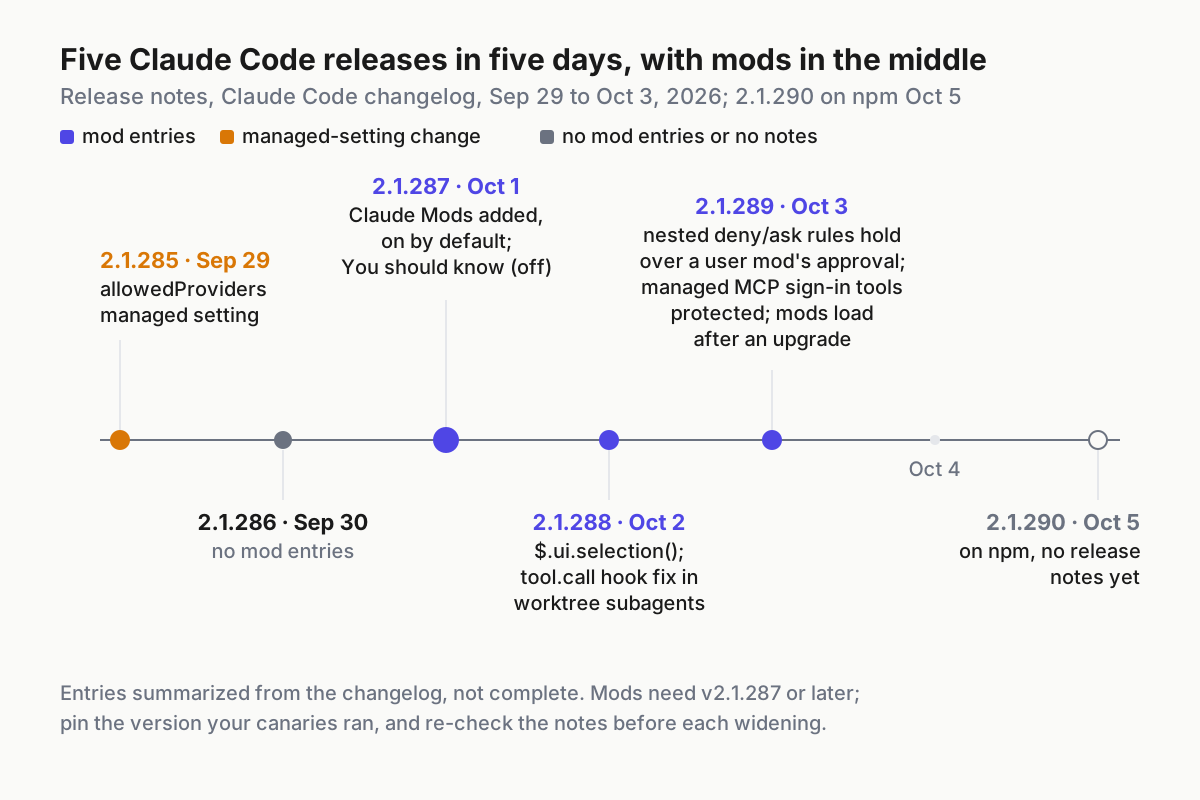
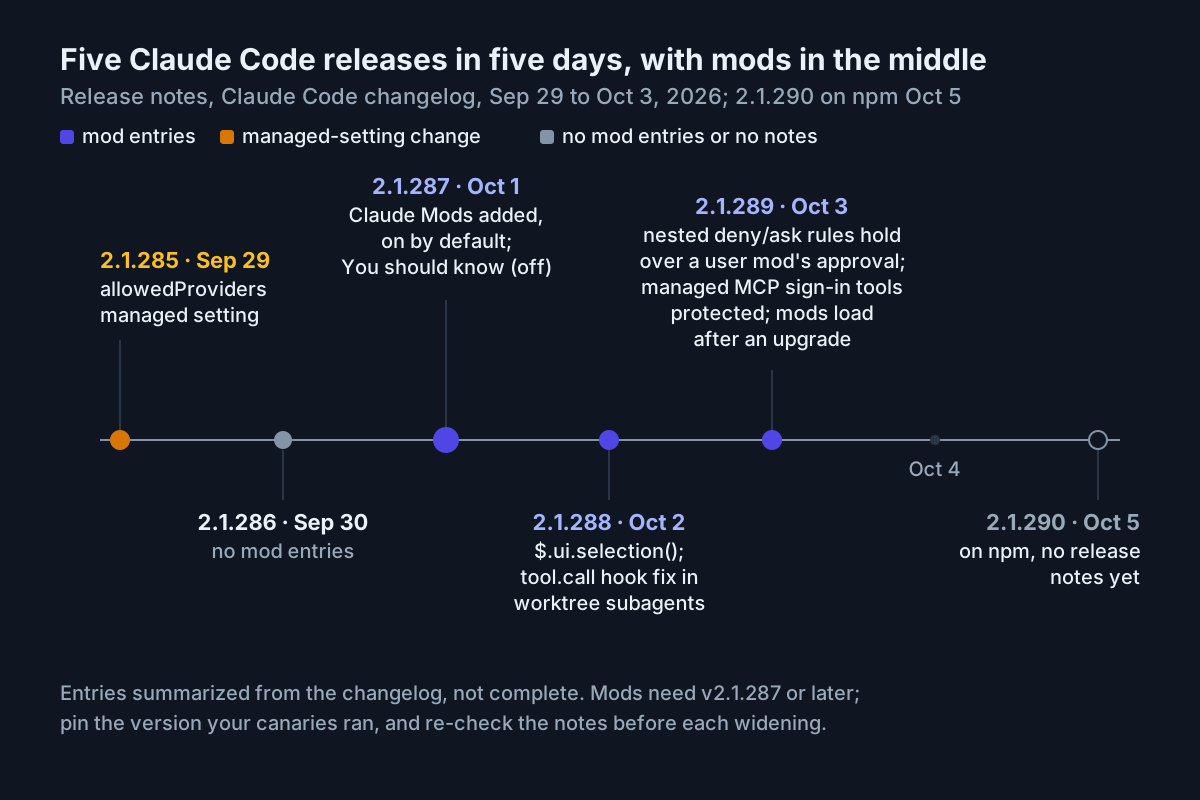 Five documented releases in five days: pin a version you’ve canaried, not the newest one.
Claude Code mods failure modes and the signal for each
| Failure | Signal | Fix |
|---|---|---|
| Org mod copied from GitHub, git, URL or npm | tier user in claude --debug; a line ending is enabled by managed settings, but |
Move it to an admin-only directory marketplace, loaded in place |
prependPlugins set without the guard |
No cc-plugin-sec-default in the chain on managed machines |
The list replaces the default; add sec-default@builtin |
| Early-access off switch still in place | CLAUDE_CODE_ENABLE_FUNCTION_HOOKS=0 in fleet env, mods loading anyway |
Replace it with allowManagedModsOnly |
| Policy check fails open | A user mod loads while your check logs an error | Add the .catch refusal handler |
| Policy mod gone mid-session | Worker crashed three times; your audit lines stop | /reload-plugins or a new session; alert on missing audit lines |
| Deny rule assumed to cover mods | A mod with $.fs.read or $.process.run on a machine with Read(.env) denied |
Refuse those calls in your policy mod, or keep the mod out |
| No guard on API-key or provider logins | Bedrock, Agent Platform, Foundry or API-key users without managed settings | Deliver managed settings as a file or through MDM |
| Writable marketplace directory | Non-admin write access on the directory or a parent | Fix permissions; diff the directory against its snapshot |
| “We’ll hot-reload the fix” | Fix landed in the repo, machines still on the old version | Bump the version, update the marketplace, reload |
Where the mods manifest sits in Claude Code fleet policy
Mods are permission policy now. A user’s mod can approve a call your ask rule would have prompted for, which puts the mods policy row next to the permission mode in the same decision, the one Claude Code permission modes as fleet policy asks you to make per repository trust level. Keep both in one document, reviewed by the same people.
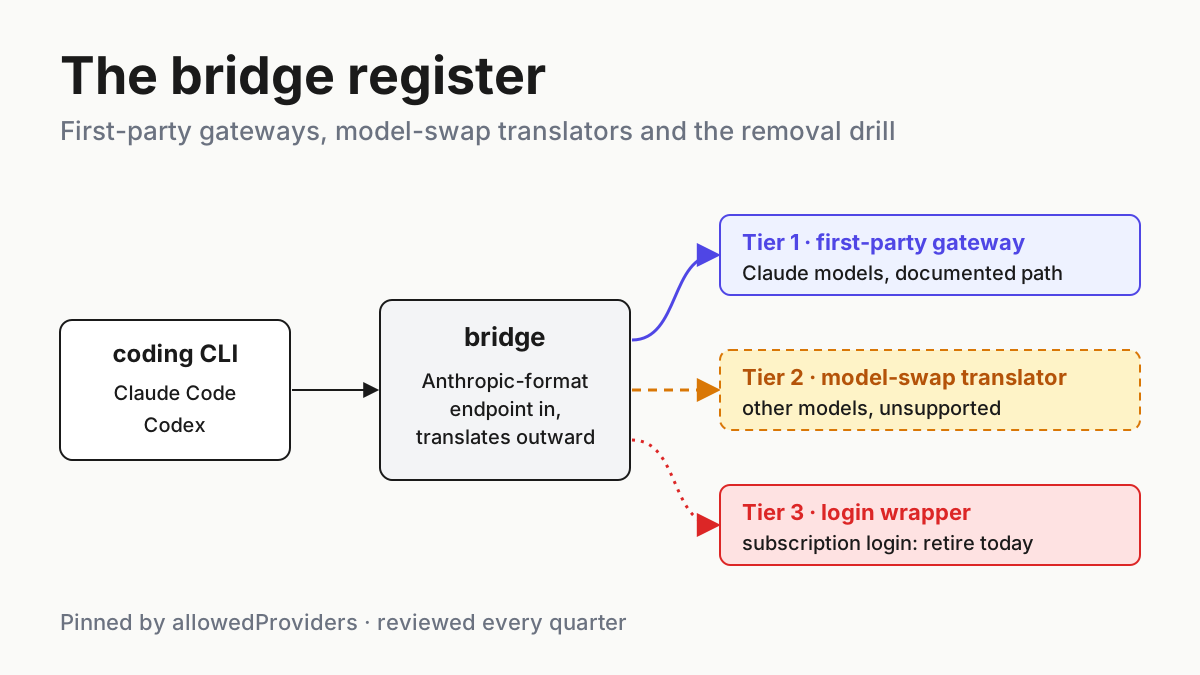
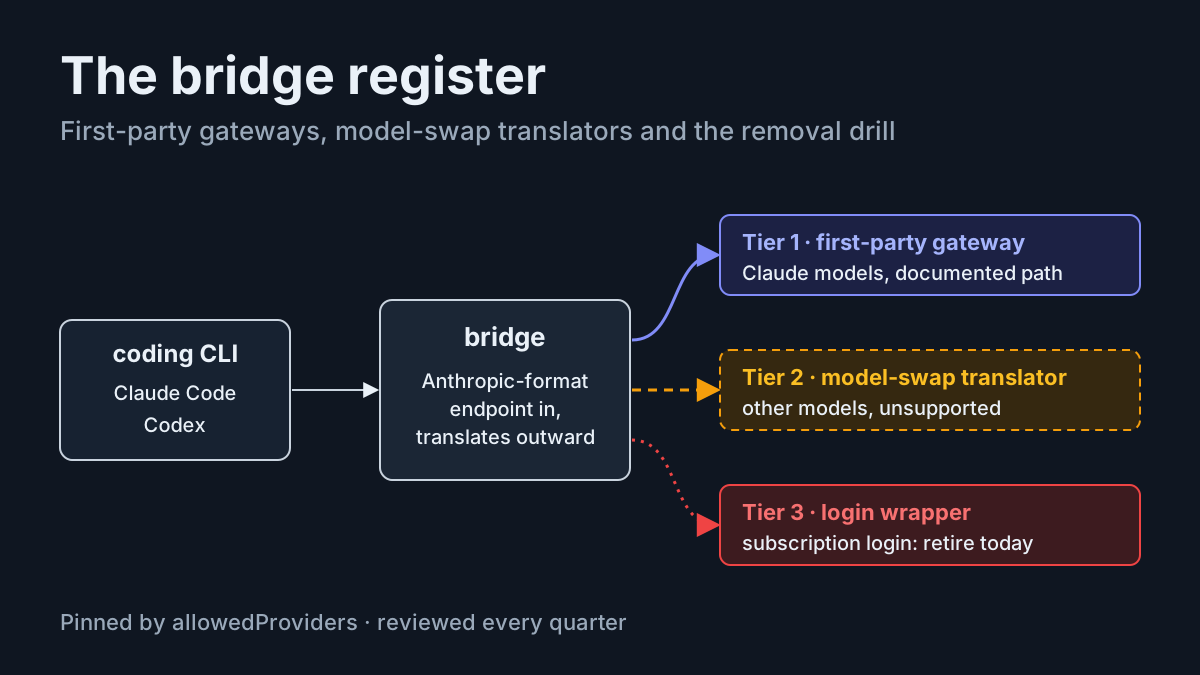
Provider routing sits in the same file. v2.1.285 added the allowedProviders managed setting two days before mods, and machines that reach Claude through a gateway or a cloud provider with an API key get the guard only when they have managed settings. The bridge register is where those machines are listed. And the habit is the same one a read-only standing brief needs for a channel agent: every piece of code that acts on your behalf has a row, an owner and a way to stop it.
FAQ
Are Claude Code mods sandboxed?
No. Anthropic’s docs say mods aren’t sandboxed and run with the user’s access to files, processes and the network. The built-in guard protects managed hooks, instructions and MCP tools, and deny rules beat a user mod’s approvals, but a mod’s own file and process calls still run outside those rules.
How do I stop users from installing Claude Code mods?
Set allowManagedModsOnly to true under pluginConfigs for cc-plugin-sec-default@builtin in managed settings, and add disableSideloadFlags. Users’ mods, plugin-dir mods and Claude-written mods stop loading; your in-place organization mods and built-ins keep running, and users can’t undo it from their own user, project or local settings.
Do Claude Code mods work in VS Code and claude -p?
Their hooks do. Mods run in the VS Code chat panel, claude -p, the Agent SDK, Remote Control and reachable cloud sessions, but only the terminal and the Desktop Code tab draw their panes and bands. Desktop WSL sessions don’t load plugins at all, so no mod runs there.
Sources
- Claude Code changelog (2.1.285 to 2.1.289), Anthropic, Sep 29 to Oct 3, 2026
- Customize Claude Code with mods, Anthropic, Oct 1, 2026
- Getting started with Claude Code mods, Anthropic, claude.dev, Oct 1, 2026
- Mods overview, Claude Code Docs, fetched Oct 5, 2026
- Manage mods for your organization, Claude Code Docs, fetched Oct 5, 2026
- Create a mod, Claude Code Docs, fetched Oct 5, 2026
- Marketplace reference, Claude Code Docs, fetched Oct 5, 2026
- Install plugins, Claude Code Docs, fetched Oct 5, 2026