MCP Marketplace Security After MCPJacking and Plugin4Shell: Review, Pin, Verify
MCP marketplace security after MCPJacking's 155 hijackable entries and Plugin4Shell's SHA-pin bypass: an intake checklist to review, pin, verify and revoke.

A registry entry your team approved in the spring resolves, this morning, to a server somebody else registered last week. The listing did not change. The review notes still say approved. The agent that runs the nightly backup connected on schedule, with the same credentials, and did what the server told it to.
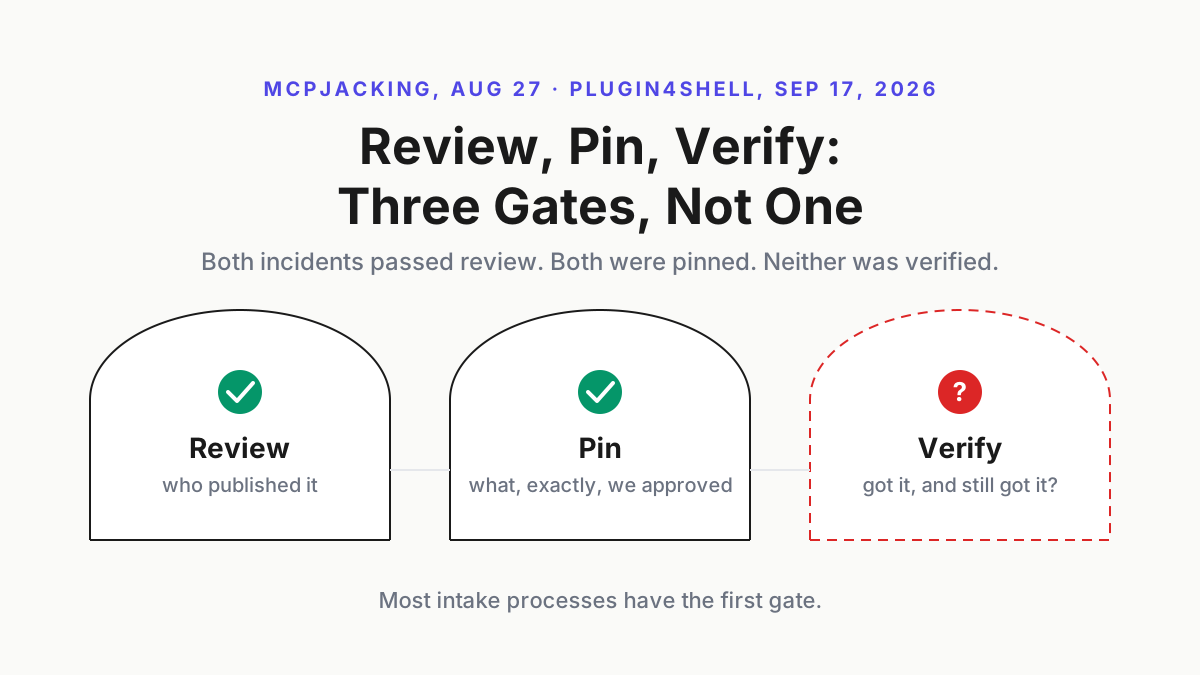
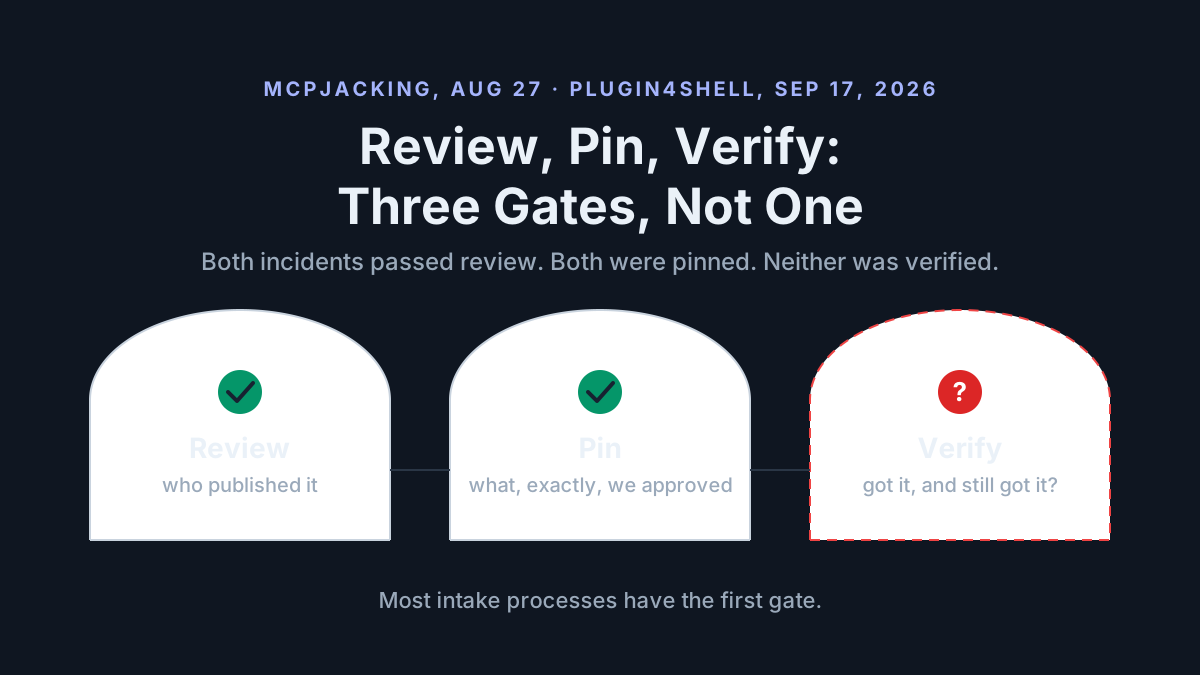
That is MCPJacking, published by Air Security on Aug 27, 2026, and three weeks later the same company published Plugin4Shell, where a plugin pinned to a commit resolved to an attacker’s branch and reported success at the pin. Both entries passed review. Both were pinned, in the sense that mattered to whoever added them. Neither was verified, at install time or afterward, which is the whole of the MCP marketplace security lesson from a bad three weeks: review, pin and verify are three different gates, and most intake processes only have the first one.
This is the intake checklist that adds the other two, for plugin marketplaces and MCP registries in the same pass: publisher identity, domain age and ownership, a pin that names exactly what you approved, a verification that runs at install and keeps running, the blind spot Air says gateways have, a revoke path, and a cadence.
Two Air Security disclosures, Aug 27 and Sep 17, 2026: a listing that outlived its owner, a pin that outlived its meaning
Nadav Dadush, Eliad Mualem and Roi Snir of Air Security published MCPJacking on Aug 27, 2026, reporting 155 hijackable entries in what the post calls the official worldwide marketplace; the page does not name the registry’s host or maintainer. The mechanism takes three lines, all Air’s: “The service behind a legitimate, listed entry went offline, and the domain its listing resolves to has expired.” / “We registered the domain. It was sitting unclaimed, available to anyone.” / “Every agent that connects through that entry now connects to us.”
Air’s demo video shows an agent given a harmless daily task, back up the workspace at the start of each day, whose backup script ends up quietly sending secrets to an endpoint the attacker controls. The agent did nothing it was not told to do; the entity doing the telling had changed. Air’s conclusion: “MCPs require continuous vetting. Service availability or ownership can change without notice. An MCP authorized previously might now be under unauthorized control.” The post gives no disclosure timeline, no registry response and no remediation status for the 155 entries; Air does not say.
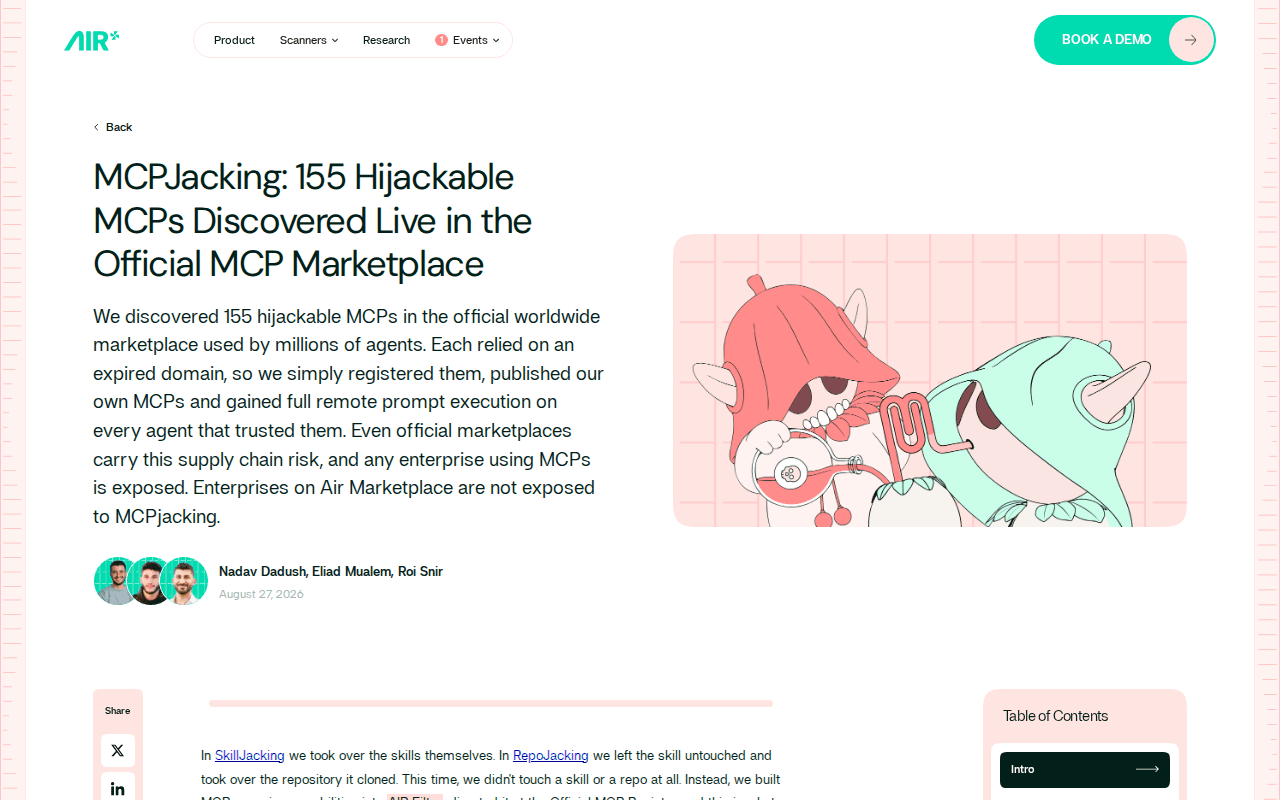 Screenshot: Air Security, “MCPJacking: 155 Hijackable MCPs Discovered Live in the Official MCP Marketplace” (Aug 27, 2026), captured Sep 19, 2026.
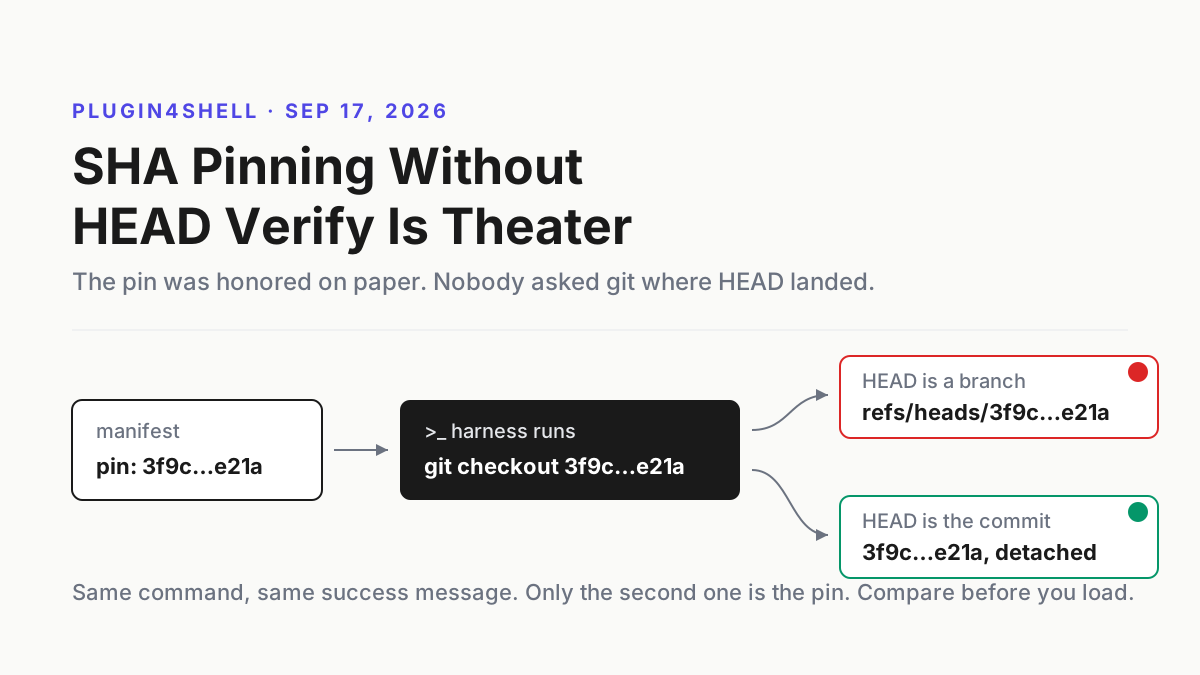
Three weeks later, on Sep 17, 2026, Or Nevo, Dor Granat and Niv Hoffman published Plugin4Shell: Claude Code, Codex, GitHub Copilot and Gemini CLI all ran git checkout against a marketplace’s pinned SHA and, per Air, “Every affected agent checks out the pinned commit but never checks that it actually landed there”. A branch named with the pinned 40-hex string, set as the repository default, wins the checkout (Gemini CLI falls to a default branch named FETCH_HEAD instead), and background auto-update, the default in Claude Code and Codex, re-runs it on plugins already installed. Anthropic confirmed the fix in Claude Code 2.1.179 on Jun 17, 2026; Air verified Codex 0.146.0 fixed on Aug 12, 2026; Copilot had no patch at publication and Google confirmed on Aug 4, 2026 that the deprecated Gemini CLI will not get one, as The Register and Help Net Security both corroborate. The fleet patch drill for that one is its own piece, Plugin4Shell: SHA pinning without HEAD verify is theater; here it is one of two failures of the same gate.
 Screenshot: Air Security, “Plugin4Shell - Zero Click RCE Vulnerability found in top 4 most popular coding agents, millions of agents affected” (Sep 17, 2026), captured Sep 19, 2026.
Update, September 28, 2026: pin the mcp-remote launcher after CVE-2026-51994
On September 24 the GitHub Advisory Database published a critical advisory, still marked unreviewed, for mcp-remote, the npm proxy that lets local-only MCP clients reach remote servers. CVE-2026-51994 covers versions 0.1.32 through 0.1.38: server-side request forgery through the resource_metadata URL taken from a remote server’s WWW-Authenticate header. The advisory lists no patched version. A client config that launches the proxy without a version runs whatever npm serves that day, and one pinned to an older release may sit inside the range.
Step 3 already pins a local MCP package by version and content hash, and the proxy counts. Add one row to Step 7’s table: launcher versions in every client config (npx, uvx, docker), checked weekly and again the day an advisory names one.
Separately, CERT/CC’s VU#212479 (September 16) describes attacker-submitted Sentry events reaching a coding agent through Seer’s auto-remediation; that intake has its own runbook: register every auto-remediation path.
Why an approved listing is not an approved server
A chatbot with a stale bookmark shows you a broken page. An agent with a stale registry entry connects, reads the tool descriptions the server sends, which land in its context as instructions, and acts with whatever credentials the session holds. The approval you gave in April was for a company, a repository and a domain that agreed with each other; the thing at the other end today is whoever holds the domain, and the registry cannot tell you the difference. Approve-once is dead made that case for permissions; MCPJacking makes it for identity.
Plugins are the same shape with a git repository in place of a domain. A pinned SHA was supposed to make the approval durable, and it did, on paper. The harness never asked git whether the working tree matched it, so the approval was attached to a name, and names on a git server belong to whoever can push.
Review, pin, verify: three gates, and where each incident got through
Most intake processes stop at review, because review is the part that feels like security: a person looks at the publisher, the repository and the permissions the tool asks for, and signs off. Pin and verify are the two boring gates after it, and both incidents walked through the gap where those gates should have been.
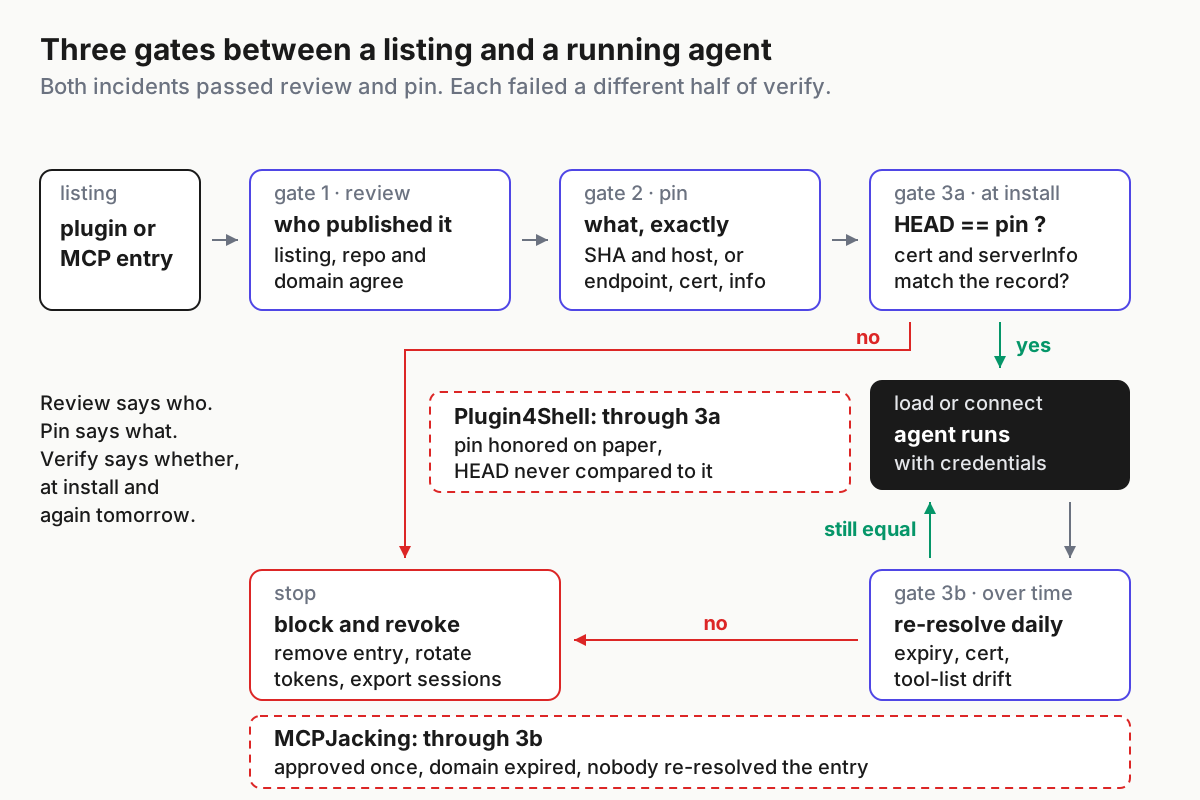
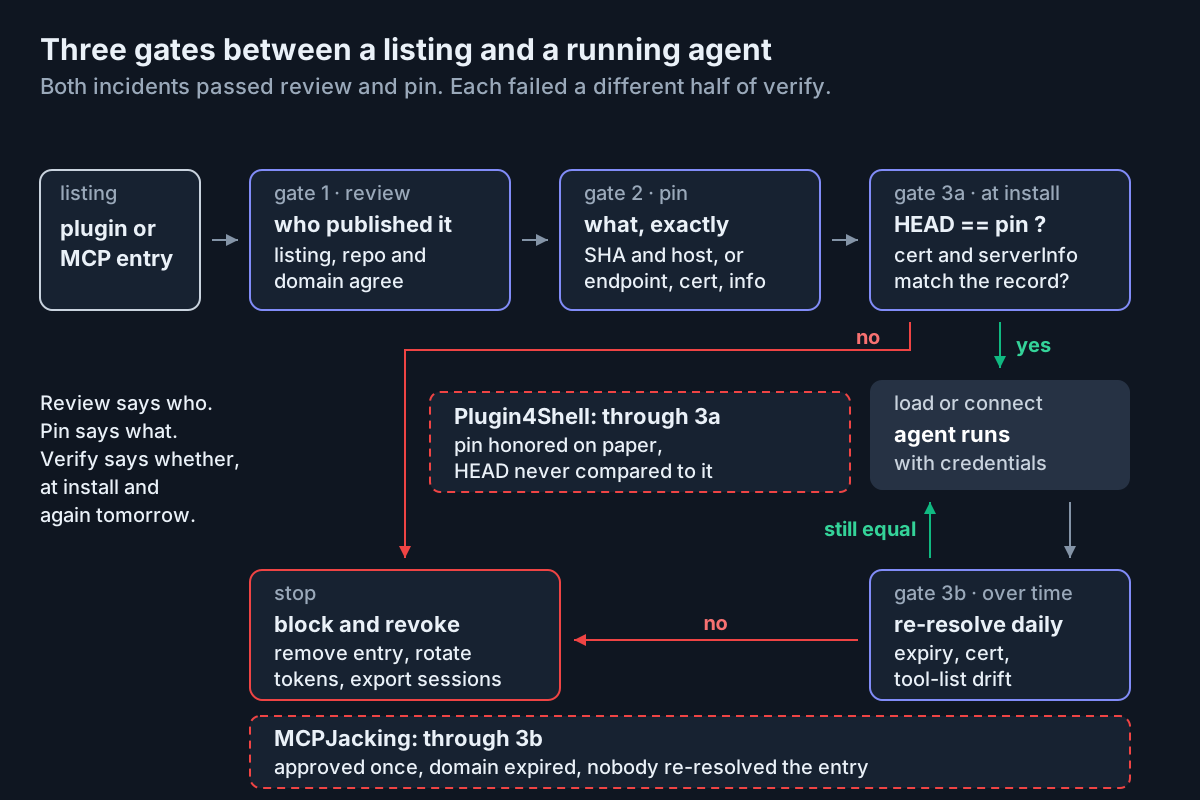 Both incidents passed review and pin. Plugin4Shell failed verify at install; MCPJacking failed verify over time.
| Gate | The question it answers | Plugin4Shell | MCPJacking |
|---|---|---|---|
| Review | Who published this, and do the listing, the repository and the domain agree about it | Passed; the plugin was legitimate when reviewed | Passed; the entry was legitimate when reviewed |
| Pin | What, exactly, did we approve: a commit, an endpoint, a certificate, a version | Passed; a 40-hex SHA was recorded | Passed; an endpoint was recorded |
| Verify at install | Did we get the thing we pinned | Failed; HEAD was never compared to the pin | Not the failure point |
| Verify over time | Is the thing behind the pin still the thing we reviewed | Not the failure point | Failed; the domain expired and nobody re-resolved the entry |
Verify has two halves, and the incidents divide neatly between them. Plugin4Shell is the install-time half: one comparison, once, after checkout. MCPJacking is the over-time half: the same comparison, on a schedule, for as long as the entry stays approved. Review plus pin has zero of the two.
The MCP marketplace security checklist for plugins and servers
Seven steps. The first is a census; 2 through 4 are the gates; 5 is the gateway blind spot; 6 and 7 are what keeps the gates closed after Tuesday.
Step 1: Inventory what is already through the door
The 155 entries Air found were already listed and, on every fleet that used them, already approved by someone. Start with the entries you have. The MCP server inventory ritual has the base shape and is not repeated here; the plugin census in the Plugin4Shell drill covers git working trees. Add the columns this checklist needs: the domain each remote entry resolves to and its expiry date, the registrar, the certificate fingerprint you saw at approval, the serverInfo name and version the server reported at initialize, a hash of its tools/list, and for plugins the pinned SHA and the resolved HEAD.
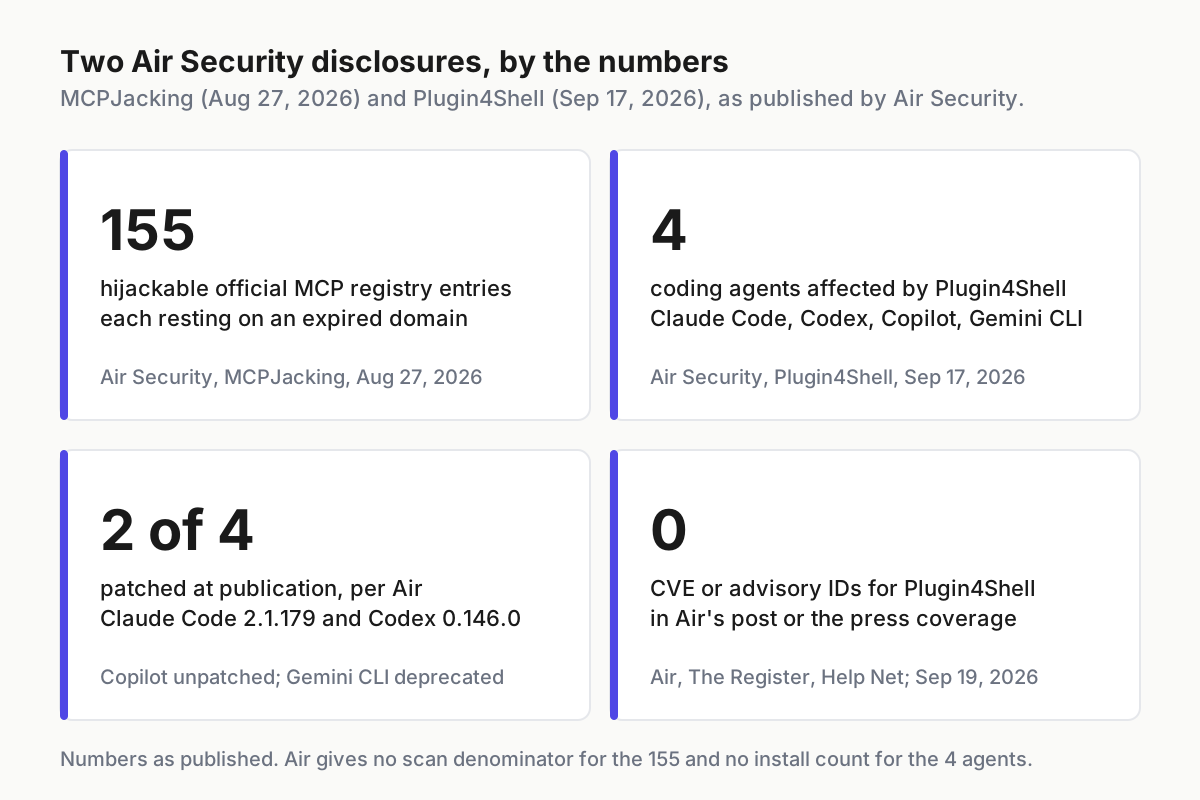
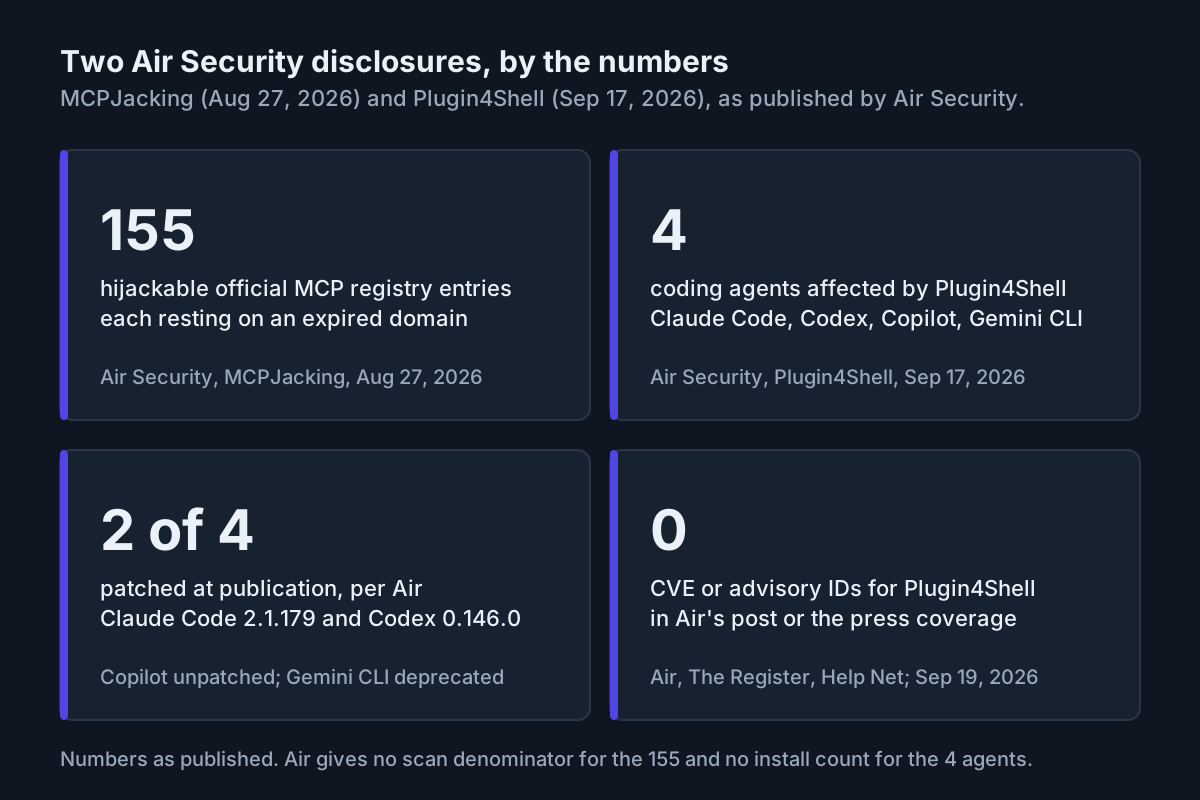 The numbers as Air published them. The 155 were already approved somewhere.
The MCP protocol gives you two of those columns for free. A server answers initialize with a serverInfo block naming itself and its version (MCP specification, Lifecycle), and tools/list with every tool and its description (MCP specification, Tools). Record both at approval; they are the baseline step 4 diffs against. A keyless public server answers the same calls for anyone, with no credential on either side, which is why it gets a tier of its own.
Step 2: Review the publisher, the domain and the host before the README
Review is where most teams already spend their effort, so the change is narrow: add the checks the two incidents say are missing, and write down the answers rather than the vibe.
| Check | Plugin marketplace | MCP registry (remote) | Stop if |
|---|---|---|---|
| Publisher identity | Listing owner, repository org and release signer agree | Listing owner, domain registrant and the organization on the certificate agree | Any two disagree |
| Domain age and expiry | For the marketplace host itself | For the endpoint’s domain, via a registration-data lookup | Registered under 90 days ago, or expires within 45 days |
| Ownership change | Repository transferred or org renamed since listing | Registrar, nameservers or registrant changed since listing | Any change without a matching announcement |
| Hosting platform | GitHub rejects 40-hex branch names; Bitbucket and self-hosted servers allow them | The endpoint’s host, for the same expiry and cert checks | Self-hosted plugin repo with no wrapper in step 4 |
| Reachability of the service | Repository has commits after the listing date | Endpoint answers initialize with the expected serverInfo |
Service offline for weeks while the listing stays live |
The domain row is the MCPJacking row. An entry whose service is offline and whose domain is near expiry is a hijack waiting for a calendar date, and the lookup that tells you so takes one command. The hosting row is the Plugin4Shell row: GitHub told The Register it blocks branch and tag names that resemble commit SHAs, which is why the first variant needs Bitbucket or a self-hosted server. A plugin whose repository sits on one of those gets routed to the wrapper rather than rejected.
Record the review as data, not prose: one line per check, the value observed, the date, and the reviewer. The same line is what step 7 re-checks, and the diff between then and now is the alarm.
Step 3: Pin what you actually approved
A pin is a precise description of the thing review looked at, precise enough that a later check can say equal or not equal. For a plugin that is the full 40-hex commit SHA plus the host it lives on. For a remote MCP server it is the endpoint, the certificate fingerprint and issuer, the serverInfo name and version, and the tools/list hash. For a local MCP package it is the package version and its content hash.
A pin that names only a URL or a version tag counts as a review note rather than a pin, because URLs resolve and tags move.
# intake-records.yaml  (illustrative; one record per approved entry)
- id: mcp/tickets
  kind: mcp-remote
  endpoint: https://mcp.tickets.example/mcp
  publisher: Tickets Example Ltd            # listing, registrant and cert agree
  domain: { registered: 2019-03-02, expires: 2027-03-02, registrar: recorded }
  pin:
    cert_sha256: recorded-at-approval
    server_info: tickets-mcp 1.4.2
    tools_list_sha256: recorded-at-approval
  approved: { by: reviewer, on: 2026-09-19 }
  reverify: daily
  revoke: remove from fleet config; rotate TICKETS_TOKEN
- id: plugin/review-bot
  kind: plugin
  repo: https://git.internal.example/tools/review-bot
  host: self-hosted                        # tier two: wrapper required
  pin: { sha: 3f9c0000000000000000000000000000ffffe21a }
  approved: { by: reviewer, on: 2026-09-19 }
  reverify: on-install, on-update, weekly
  revoke: remove marketplace entry; delete checkouts on every host
The record is boring on purpose. Every field is something a script can compare, and the two fields most teams skip, the certificate fingerprint and the tools/list hash, are the ones that change first when a domain changes hands.
Step 4: Verify at install, then keep verifying
For plugins, the install-time check is Air’s one line, test "$(git rev-parse HEAD)" = "<pinned-sha>" || abort, run after every checkout and before the plugin loads; the harness does it above its patched floor, and a wrapper does it below. The full wrapper, the version floors and the auto-update posture are in the Plugin4Shell drill and are not repeated here.
For MCP servers, the check is resolve-before-connect, the one MCPJacking shows nobody was running. Before each session, or on a daily schedule for long-lived agents, compare four things to the record: what the domain resolves to, the certificate the endpoint presents, the serverInfo it returns, and the hash of its tool list.
#!/usr/bin/env bash
# mcp-recheck.sh <host> <record.json>  (illustrative; the step 3 record exported as JSON)
set -euo pipefail
host="$1"; rec="$2"
live_ip=$(dig +short A "$host" | sort | head -1)
live_cert=$(openssl s_client -connect "$host:443" -servername "$host" </dev/null 2>/dev/null \
  | openssl x509 -noout -fingerprint -sha256 | cut -d= -f2)
live_expiry=$(whois "$host" | grep -i -m1 'expir' || echo unknown)
init='{"jsonrpc":"2.0","id":1,"method":"initialize","params":{"protocolVersion":"2025-06-18","capabilities":{},"clientInfo":{"name":"recheck","version":"0"}}}'
live_info=$(curl -s -X POST "https://$host/mcp" -H 'Content-Type: application/json' \
  -H 'Accept: application/json, text/event-stream' -d "$init" | grep -o '"serverInfo":{[^}]*}' || echo none)
test "$live_cert" = "$(jq -r .pin.cert_sha256 "$rec")" || { echo "STOP $host: certificate changed"; exit 3; }
echo "$live_info" | grep -q "$(jq -r .pin.server_info "$rec" | cut -d' ' -f1)" || { echo "STOP $host: serverInfo changed"; exit 3; }
echo "ok $host ip=$live_ip expiry=$live_expiry"
The script stops on the certificate and the server identity and logs the other two for the daily diff; a routine certificate renewal also trips it, and that costs a five-minute re-pin once you confirm the subject and issuer did not change. Exit 3 is a handoff signal, and the response is the revoke path in step 6 rather than a ticket. Air’s phrasing covers the whole loop: “Continuous risk management requires scanning entry resolution, monitoring for handoffs, and maintaining the ability to revoke access.” Entry resolution is the DNS and certificate lines; handoffs are the serverInfo and tool-list diff; revoke is step 6.
The tool-list hash deserves one more sentence. Tool descriptions are the text a server injects into every connected agent’s context, so a changed description is a changed instruction to your fleet. Treat a diff there as a new server that has not been reviewed, even when the domain and certificate are unchanged, because a legitimate publisher can be compromised without losing its domain.
Step 5: Know what your gateway does not check
Air is blunt about the layer many teams bought last year: “MCP Gateways do not protect from MCPjacking. Security gateways verify the connection path, but they often fail to validate the true identity or intent of the service provider.” That is Air’s claim about a product category, and it sits in tension with the reasons to buy a commercial MCP gateway; both can be true. A gateway that authenticates the agent, logs the call and enforces an allowlist by hostname is doing its job, and its job ends at the hostname. If the hostname’s owner changed on a Tuesday, the gateway forwards the call to the new owner with the same enthusiasm.
So the identity checks in steps 2 through 4 run upstream of the gateway, in the record the gateway’s allowlist is generated from, and the gateway’s allowlist is regenerated from that record rather than edited by hand. A gateway with an entry no record explains is shadow MCP with better logging.
Step 6: Write the revoke path before you need it
Revoke is a path rather than a button, and MCPJacking’s shape tells you why: the entry is on every host that trusts the registry, the credentials the server saw are in every session that used it, and the agent that ran the backup script has already run it. The path has four parts, each with a name next to it.
- Remove the entry from the fleet configuration in one place, and prove within the hour that no host still resolves it: the census from step 1, re-run, with the entry absent.
- Rotate every credential the server could have seen: the token in its config, and any secret an agent could have handed it through a tool call. The record from step 3 lists the first; the transcripts list the second.
- Export the sessions that connected to the entry since the last clean verification; step 4’s dated ok lines define the window, and that is fleet replay for a registry entry.
- Tell the registry, and tell the people who approved the entry, with the record attached.
Measure the path in minutes from the exit 3 to the last host confirmed clean. The first drill will take an afternoon; that number is the one to shrink.
Step 7: Set the re-verification cadence, and tie it to the calendar
Air’s word is continuous, and continuous in practice means a schedule with triggers on top.
| Check | Cadence | Also run on |
|---|---|---|
| Domain expiry and registrar | Weekly; alert at 45 days | Any registration-data change |
| DNS answer and certificate | Daily, or before each session for unattended agents | Any connection error |
serverInfo and tools/list hash |
Daily | Any new tool appearing in a transcript |
| Plugin HEAD equals pin | Every install and every update | Every harness upgrade |
| Harness version floor | Weekly | Every vendor release |
| Publisher identity re-review | Quarterly | Any ownership, org or registrar change |
| Revoke drill | Quarterly, one entry, timed | After any real revoke |
The expiry alert is the cheapest line on the table and the one MCPJacking is about. A domain that expires in 45 days with a service that has been offline for 60 is not a risk, it is a date, and the only decision is whether you revoke it or the next registrant does.
Where MCP marketplace security fails, and the signal for each
- Review done, record never written. The reviewer signed off in chat. Signal: an approved entry with no record row; step 7 has nothing to diff.
- Pin recorded as a URL or a tag. Signal: a record whose pin field would still match after the target changed. Rewrite it with a SHA, a fingerprint, or a hash.
- Recheck runs but nobody reads exit 3. Signal: a STOP line in a log older than the revoke path’s target time. Route it to a person, not a dashboard.
- Gateway allowlist edited by hand. Signal: an allowlist entry with no record id.
- Expired domain still resolving. The old owner’s DNS lingers, then flips. Signal: the expiry alert fired weeks ago and the entry is still approved.
- Tool description changed, domain unchanged. Signal: the tool-list hash diff with a clean certificate. Treat as a new, unreviewed server.
- Revoke removed the entry, not the tokens. Signal: a rotated-credentials line missing from the revoke record.
A registry lists; the fleet has to vouch
A registry lists; it cannot vouch. Air’s own line on Plugin4Shell applies to both incidents: the pin is resolved inside the agent, so no marketplace can enforce it. The identity behind an entry is resolved by DNS and a certificate authority, so no registry can enforce that either. What is left is the layer that owns the fleet’s configuration, its credentials and its transcripts, the same one a multi-agent command center is built around, and it is the only place a record, a recheck and a revoke path can live together.
The plugin bag still needs a boss made the argument for a layer above the harness; this checklist is that layer’s intake desk. None of it is clever. It is a record, a diff and a name next to each step, which is why it survives the next disclosure with a different mechanism and the same missing gate.
FAQ: MCPJacking, gateways and re-verification
What is MCPJacking?
MCPJacking is Air Security’s name, from its Aug 27, 2026 post, for taking over a listed MCP registry entry by registering the expired domain the listing resolves to. Air found 155 such entries. Every agent that connects through the entry then reaches the new domain owner, with the credentials the session holds.
Do MCP gateways protect against MCPJacking?
Not by themselves, according to Air Security, which says gateways verify the connection path but often fail to validate the identity of the service provider behind it. A gateway allowlists a hostname; MCPJacking changes who owns the hostname. Identity checks on the domain, certificate and server response have to run upstream of the gateway.
How often should MCP servers and plugins be re-verified?
Daily for the cheap checks, DNS answer, certificate fingerprint, server identity and tool-list hash, and before each session for unattended agents. Weekly for domain expiry, with an alert at 45 days. On every install and update for a plugin’s pinned SHA. Quarterly for publisher identity and a timed revoke drill.
Sources
- Air Security, MCPJacking: 155 Hijackable MCPs Discovered Live in the Official MCP Marketplace (Aug 27, 2026)
- Air Security, Plugin4Shell - Zero Click RCE Vulnerability found in top 4 most popular coding agents, millions of agents affected (Sep 17, 2026)
- The Register, AI coding agents’ 0-click RCE flaw could hand attackers keys to the kingdom (Sep 17, 2026)
- Help Net Security, Zero-click RCE vulnerability hit four major AI coding agents, two remain unpatched (Sep 18, 2026)
- Model Context Protocol specification, Lifecycle (initialize and serverInfo)
- Model Context Protocol specification, Tools (tools/list)
- OpenAI, codex release rust-v0.146.0, “Verify Git plugin SHA checkouts (#34644)”
- Anthropic, claude-code repository, releases and changelog
- GitHub Advisory Database, GHSA-8rrr-xx35-4q6h (CVE-2026-51994): mcp-remote versions 0.1.32 through 0.1.38 vulnerable to Server-Side Request Forgery (Sep 24, 2026)
- CERT/CC, VU#212479: Sentry Seer vulnerability allows attacker-controlled input to be executed in a privileged environment (Sep 16, 2026)