Nightfall's MCP Gateway: Buy the Proxy or Build the Six Checks
A buying guide for the MCP gateway decision: score Nightfall's proxy against six checks, run a two-week acceptance test, and see what no SaaS gateway covers.

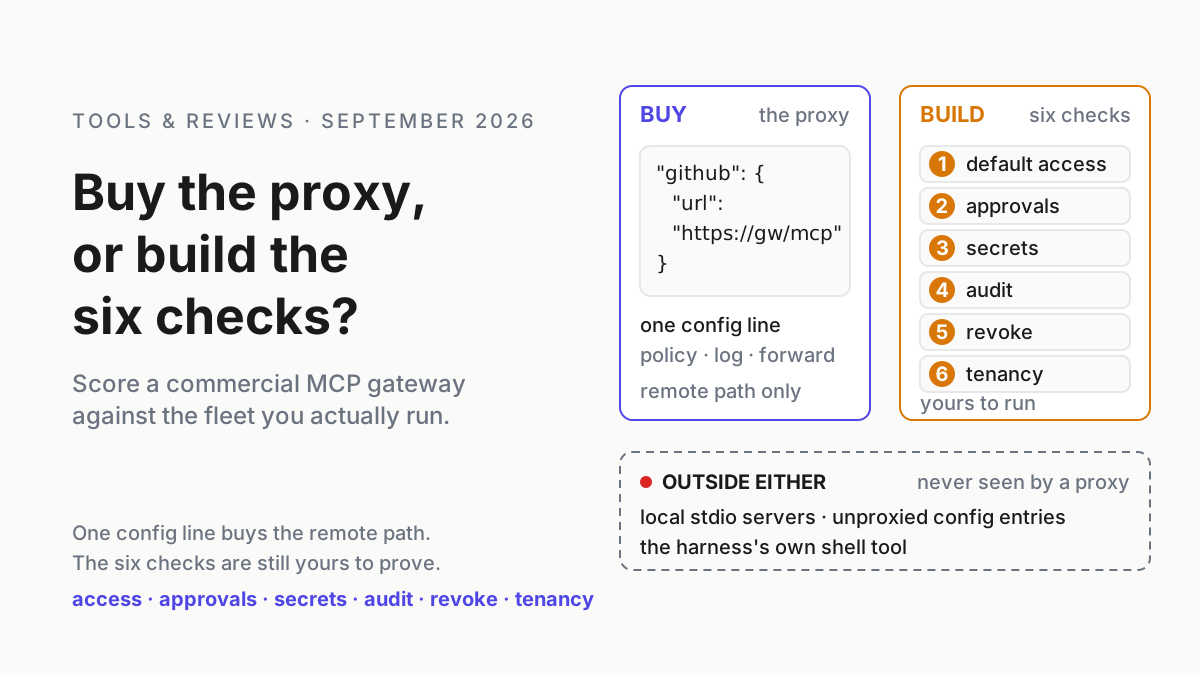
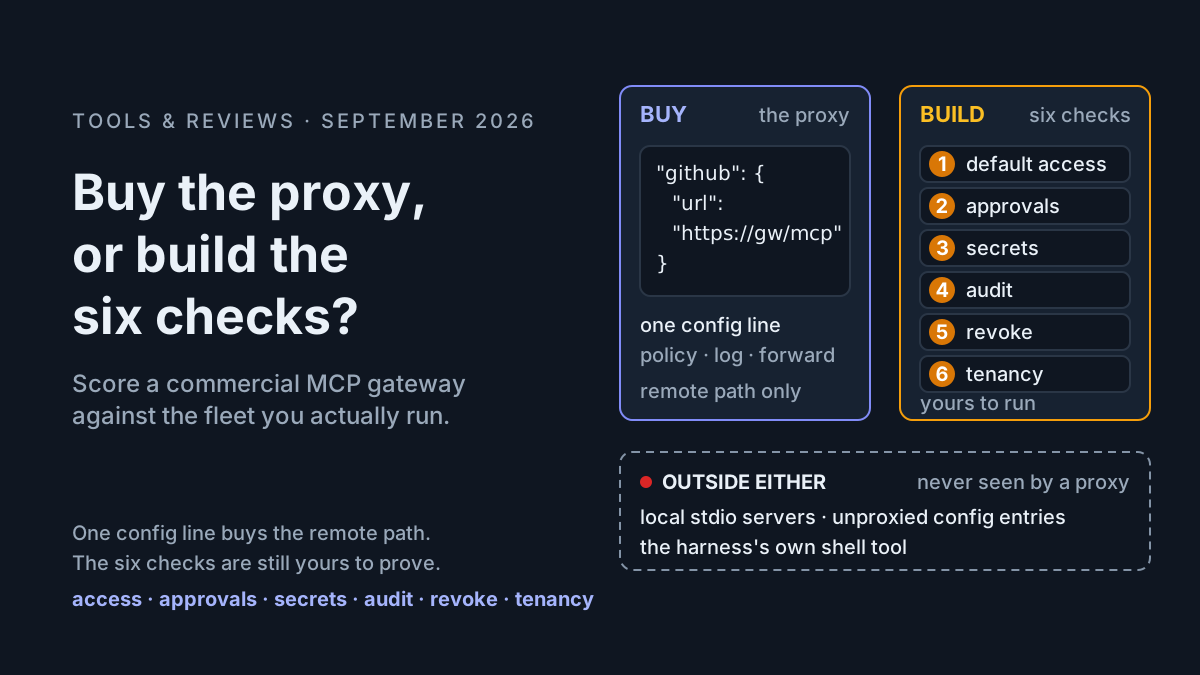
The whole pitch fits in one config line. Point your MCP client at a proxy instead of at the server, and every tool call an agent makes gets a policy check, a log line, and a forward. That is what a commercial MCP gateway is, and Nightfall’s product page says it in nearly those words: “Every tool call flows through the gateway. Policies are enforced, requests are logged, and approved calls are forwarded to actual MCP servers.”
This guide answers a narrower question than whether the product is good: which of the six controls you already owe your agents does the proxy cover, for the fleet you actually run, and what stays outside any SaaS gateway once the invoice is paid. You leave with a scored sheet, a two-week acceptance test, and a plain answer on who should buy.
The quiet part goes first. A proxy sees only traffic somebody routed through it. Two common laptop paths never do.
What Nightfall’s MCP Gateway page promises, in its own words
Nightfall’s product page (nightfall.ai/products/mcp-security) describes a proxy with a catalog behind it. The verbatim claims that matter for a buying decision:
- Deployment: “Developers add a single line to their MCP configuration pointing to the gateway.” Named clients: Cursor, Claude Desktop, VS Code, and custom integrations.
- Catalog: “20,000+ MCP Servers Tracked”; “Real-time configuration scanning (detects new MCPs in 60 seconds)”; “Approve the 50 MCPs that serve 90% of use cases, block 17,950+ others by default.”
- Prune and drift: “Allow a server but block specific high-risk tools. Example: allow GitHub but block create_branch.” “Alert on MCP version changes,” with a scenario of a new
export_channel_historytool appearing in an approved server. - Data handling: “LLM-powered, 95% accuracy,” “<5% false positives.”
- Roles and rollout: “Engineering gets code analysis tools, Sales gets CRM access, Finance gets read-only access”; time-based policies; exception workflows where users “request access with business justification”; “Production in 2 weeks.”
- Audit: “Every request and response logged in plain text for DLP, compliance, and forensics.”
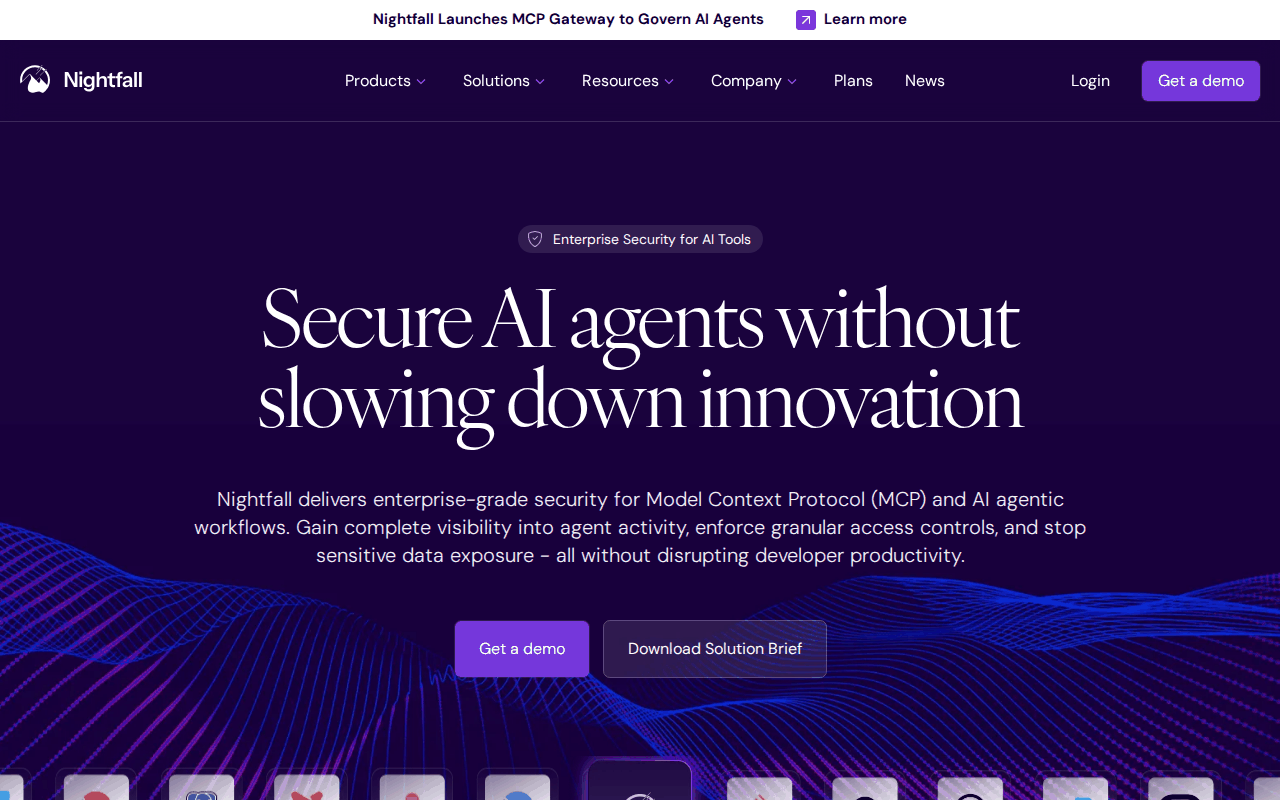 Screenshot: Nightfall, “MCP Security” product page, captured Sep 13, 2026.
Four things you may hear on a sales call are not substantiated on that page: an early-access date, clients beyond the four named, credential brokering, and an audit mode that retains no prompts. Leave them out of the scorecard until Nightfall documents them. The page explicitly promises plain-text request and response logging, which is a different data-handling posture from prompt-free audit.
Nightfall’s blog post of August 3, 2026 (nightfall.ai/blog/mcp-access-control) supplies the honest half: “IDE hooks for Cursor, Claude Code, and VS Code on macOS and Windows,” positioned to cover “local stdio servers, IDE and CLI agents, and the file on disk an agent just touched.” That is an endpoint agent rather than a proxy, and the distinction is most of the buying decision.
Why a proxy is the right shape and the wrong boundary
A chatbot’s worst output is a paragraph you delete. An agent’s worst output is a branch, a customer message, or an emptied bucket, made with a credential while the human was looking elsewhere. A proxy is the right shape because the tool call is the last moment a decision can change the outcome; gates belong before the action, and a proxy is a gate by construction.
The boundary it draws is the network, though. The stdio transport in the protocol spec (modelcontextprotocol.io) has the client launch the server as a child process and talk to it over stdin and stdout: nothing to proxy, nothing to log, and on most laptops that is where the filesystem and database servers live.
The buying pass: six MCP gateway checks, scored against the proxy
Budget a working week for the scoring and two for the pilot. The six checks are the TeamCopilot questions (teamcopilot.ai); the pass and fail lines for each live in the gateway control-plane runbook. This piece scores one product shape against them.
Step 1: draw where the proxy sits, and the two paths around it
Draw it for your fleet before the vendor draws it for theirs. The proxied path is the config entry that names a URL. The paths around it name a command, or a URL other than the proxy’s.
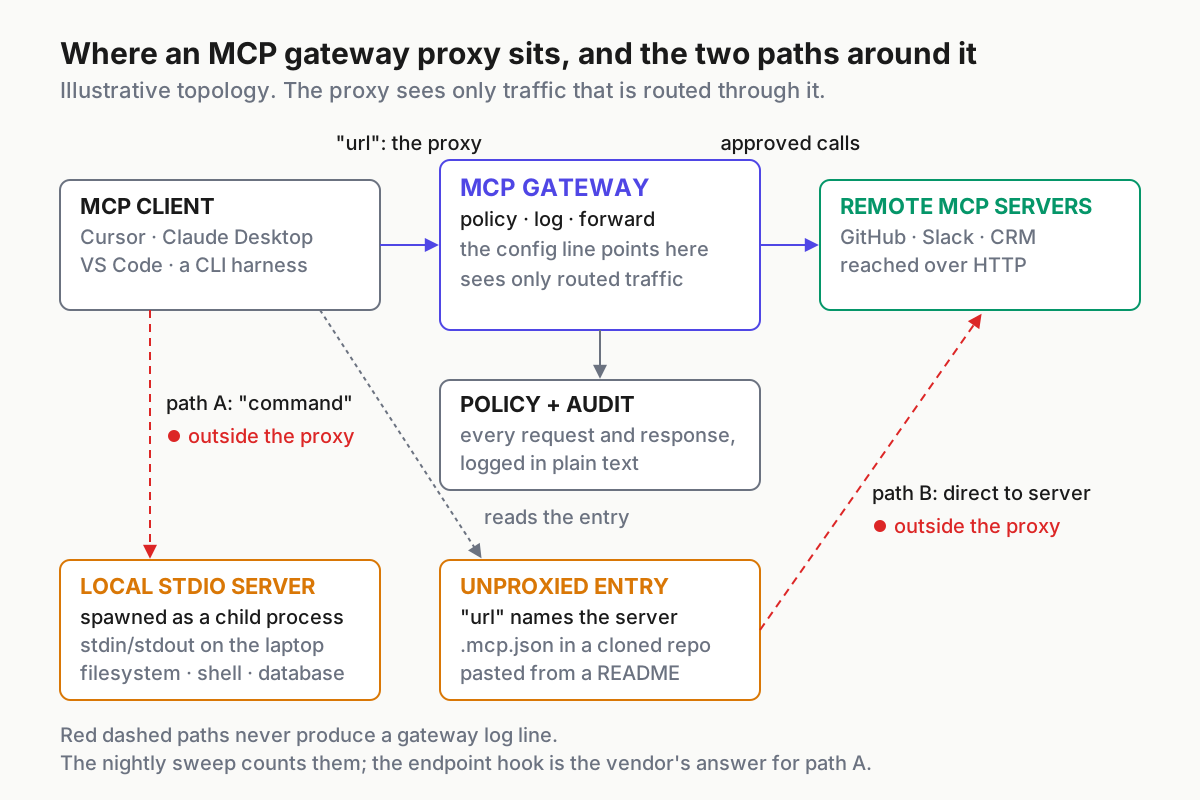
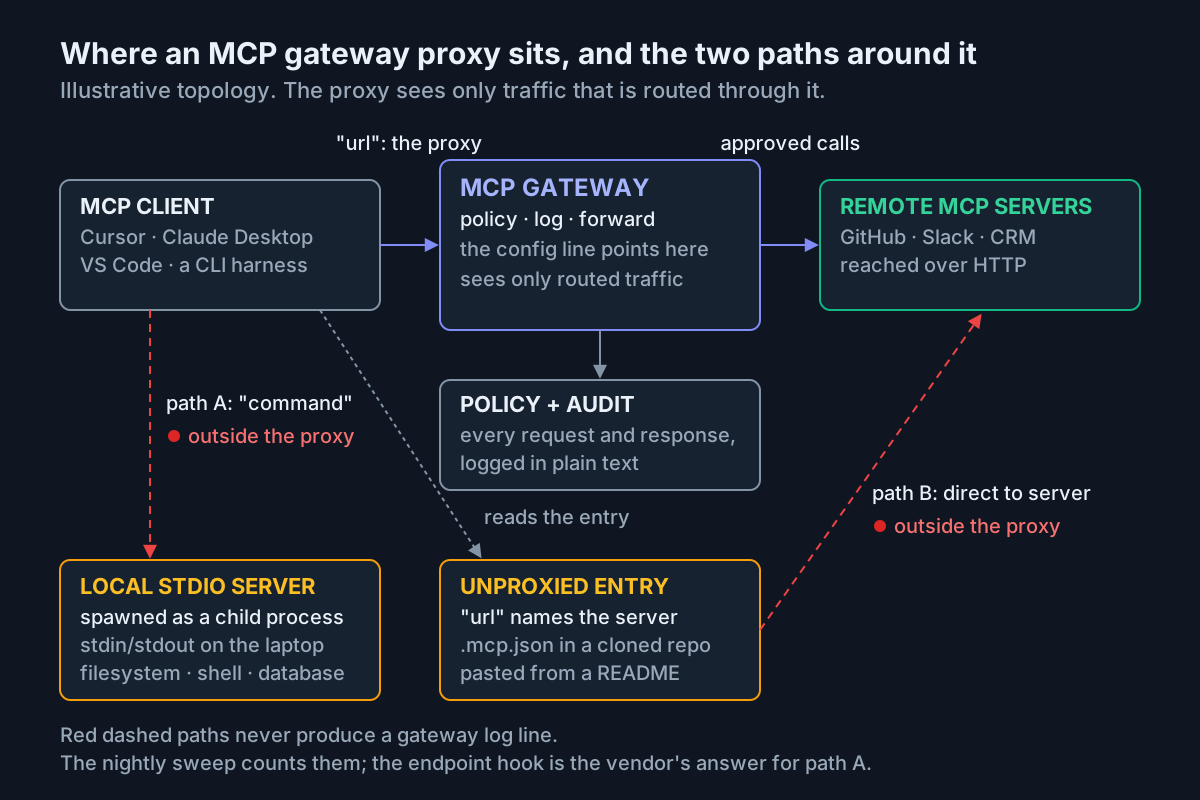 The proxy sees the top path. The bottom two are on your laptop fleet already; step 5 counts them.
// mcp.json — illustrative shape, not vendor syntax
{
  "mcpServers": {
    "github": { "url": "https://mcp-gateway.example.internal/github" }, // proxied
    "repo-fs": { "command": "npx", "args": ["-y", "some-fs-server", "/work/repo"] }, // stdio: never crosses the proxy
  },
}
Path A is the command entry. The client runs that program with the developer’s privileges, and the proxy never hears about it. That local transport exists by design in MCP, so the path belongs in the acceptance test even when the vendor quote covers only remote traffic.
Path B is a url entry that points at a server directly: a .mcp.json committed in a cloned repo, a [mcp_servers.x] table in a Codex config, a Cursor entry pasted from a README. The single line was never added to that file. A third thing is not a path at all: the harness’s own shell tool is not an MCP call, and no MCP proxy will ever see rm -rf. The vendor’s answer for path A is the endpoint hook from the August 3 post; ask which you are being quoted.
Step 2: score the six checks against the page
One row per check. Require a pass or fail plus one evidence artifact for each row: an exported policy, a denied-call record, a timed revoke receipt, or a partition test. A sales-demo checkmark is not acceptance evidence.
| Check | What the page covers | What stays yours | Read |
|---|---|---|---|
| Access by default | Curated registry (50 approved, 17,950+ blocked); tool-level block; RBAC; time-based policies | Which 50, who owns each entry, and every stdio server the proxy cannot see | Buy the enforcement, own the list |
| Approvals | Exception workflows with a business justification; “explicit on-demand approval by SecOps” | A per-call gate for writes is not described; ask whether create_pull_request can park pending a named approver with an expiry |
Ask, then build the gate table |
| Secrets | Not on the page | Brokering: forwarding a request the client already authenticated is not brokering | Build, or verify first |
| Audit | Every request and response, in plain text | Retention price, export format, who can delete, who can read a log of every prompt | Buy, with export terms in the order |
| Revoke | Version-change alerts; block-by-default catalog | The drill: seconds from revoke to first denied call; no number on the page | Build the drill; time it in the pilot |
| Tenancy | Roles: engineering, sales, finance | Roles are not tenants; audit partitions, budgets, and revoke scopes per team | Ask; run the partition test |
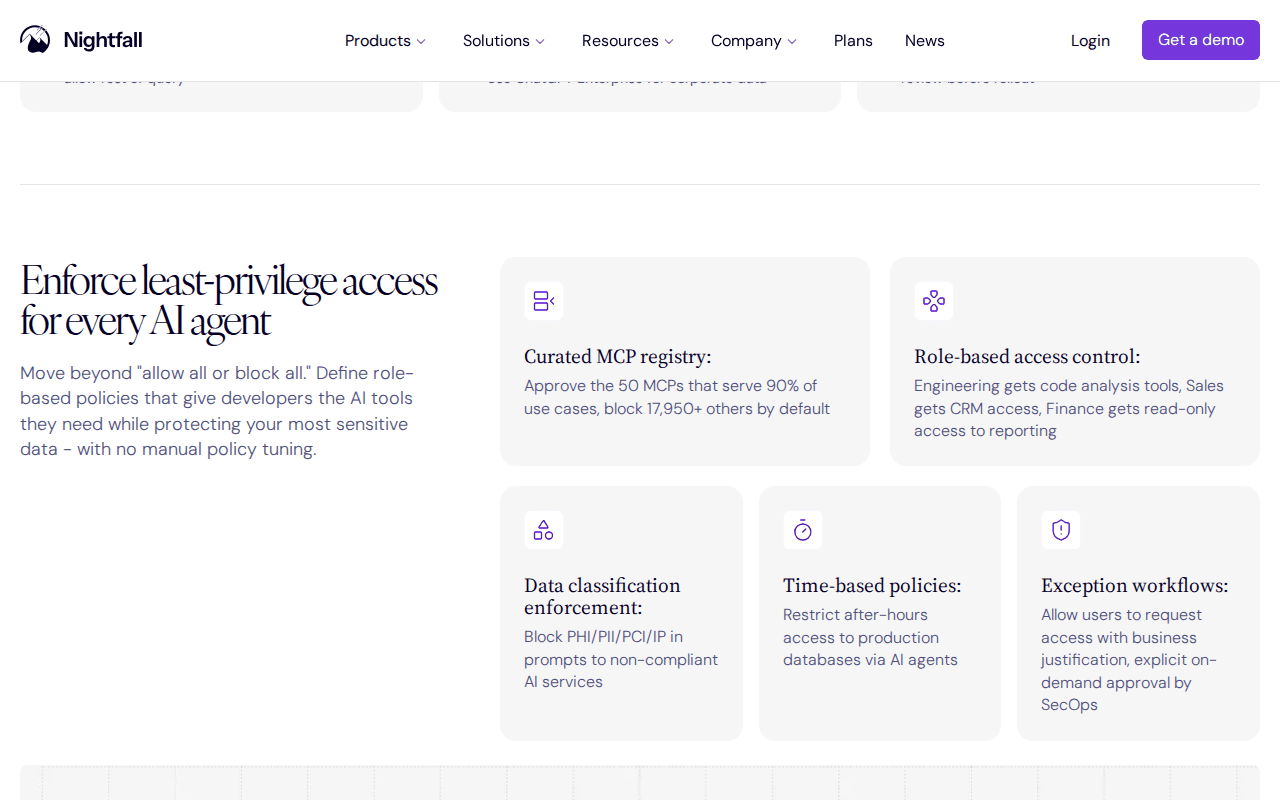 Screenshot: Nightfall, “MCP Security” product page, “Enforce least-privilege access for every AI agent,” captured Sep 13, 2026.
Two rows deserve a sentence. Secrets: an agent with its own service principal is the prerequisite for any broker, bought or built. Tenancy: roles decide who gets which tool; tenancy decides whether team A’s revoke can touch team B.
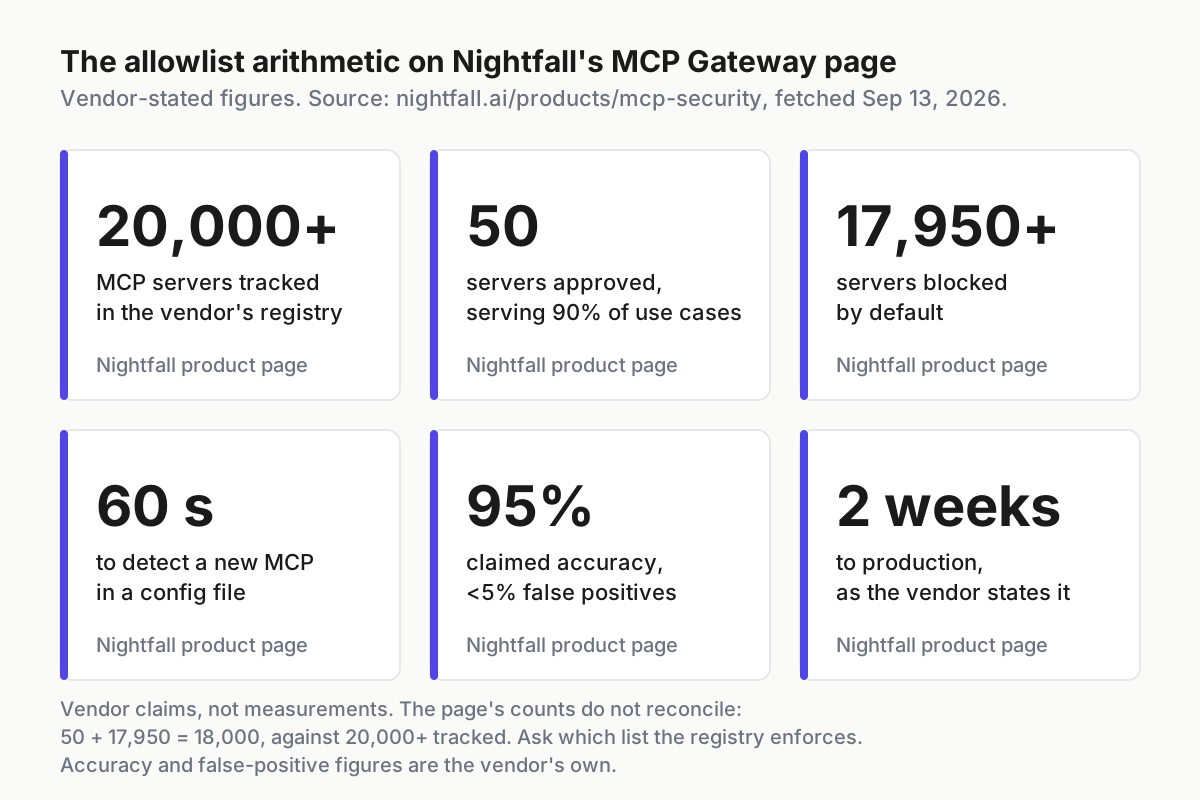
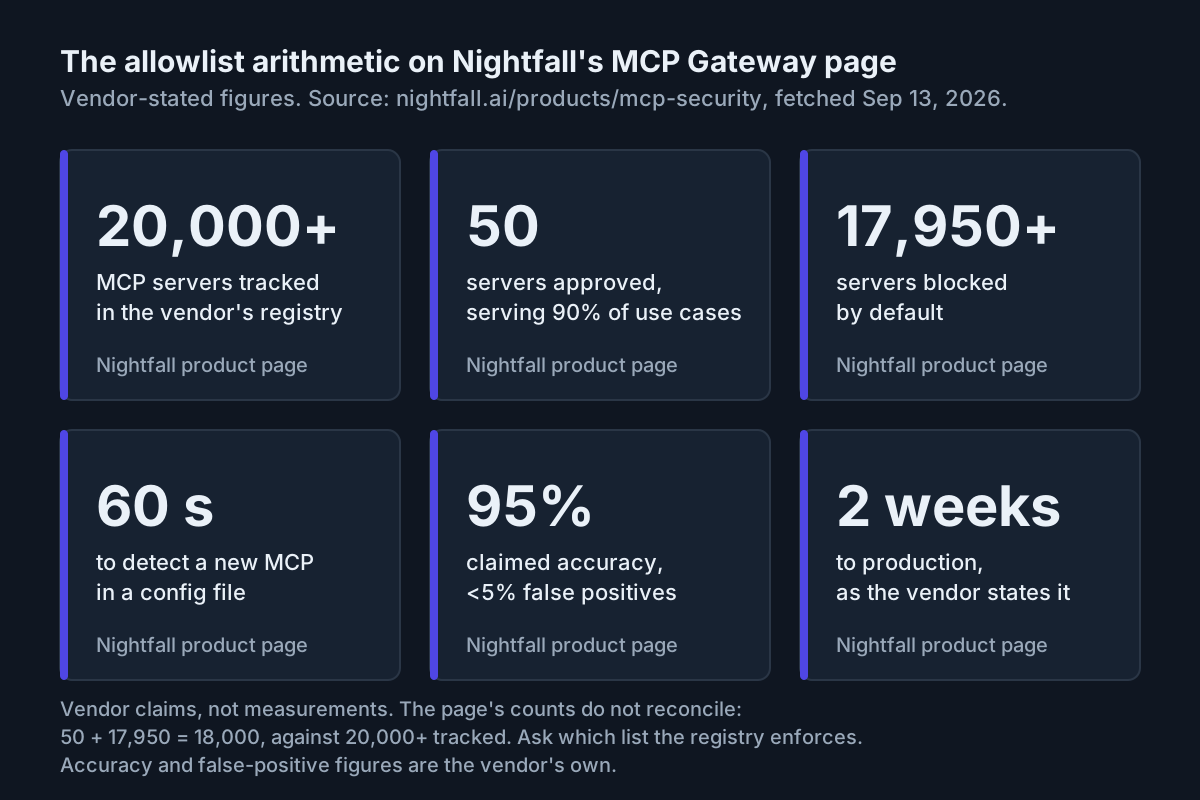 Vendor-stated figures, not measured. Fifty plus 17,950 is 18,000, and the page also says 20,000+ tracked; ask which list the registry enforces.
Step 3: decide who buys and who keeps building
The decision is by fleet shape, not by feature count.
| Your fleet looks like | Call |
|---|---|
| Three or more teams on managed laptops, running Cursor, Claude Desktop, or VS Code against remote MCP servers | Buy. The registry, prune, and audit are a quarter of platform work you do not have |
| One team, one repo, mostly stdio servers on developer machines | Skip. The proxy would see almost nothing; the endpoint hook or your own sweep is the control |
| An open gateway already at the boundary | Skip the proxy; buy discovery and detection as telemetry consumers, per open gateway vs vendor suite |
| No platform team, no security engineer, agents in production anyway | Buy this week, then run step 6 before you trust it |
Step 4: price the build honestly
The DIY six-check pass is not free, and the honest number is the recurring one. The effort figures are an operator model, labeled illustrative; the last column is the part nobody budgets.
| Check | Build (illustrative, engineer-days) | Run (recurring) | The part nobody budgets |
|---|---|---|---|
| Default-deny list with tool-level prune | 3–5 | weekly review | the 17,950 “no” answers arriving as tickets |
| Per-call approval gate | 5–10 | an approver on call | approvals nobody reads |
| Credential broker | 5–10 | rotation, per team | the CI runner that still holds a personal access token |
| Append-only audit store | 3–5 | the retention bill | the query nobody can run without a console |
| Revoke drill | 1–2 | monthly | the identity nobody can find at 3 a.m. |
| Per-team partitions | 5–10 | per new team | labels called tenancy |
Twenty-two to forty-two engineer-days to stand up, illustrative, plus a person on call for approvals for as long as agents run. The CI runner row is the cheapest fix and the most often skipped; fine-grained personal access tokens with an expiry (GitHub Docs) cost an afternoon. The trade is not really days against dollars. It is whether you want to own the enforcement or only the list; my answer for most teams past two: own the list, rent the enforcement, keep the evidence.
Step 5: keep the two outside paths under your own control
Whatever you buy, paths A and B are yours. The tooling is a sweep and a diff, taught in the shadow MCP catalog and quarantine path and the weekly server inventory ritual. The one command shape worth adding finds config entries that name a URL other than the proxy’s.
# illustrative: MCP config entries that do not route through the proxy
rg -n --hidden -g '.mcp.json' -g 'mcp.json' -g 'claude_desktop_config.json' -g 'config.toml' \
  -e '"url"\s*:\s*"https?://' -e '^\s*url\s*=\s*"https?://' ~ /work 2>/dev/null \
  | rg -v 'mcp-gateway\.example\.internal'
# expect zero lines; each hit is a server the proxy never sees.
# count '"command":' entries the same way: programs the client will launch.
Run it nightly, keep both counts, and treat a rising stdio count as a signal rather than as growth. For servers that stay local, the harness is the only gate: Claude Code’s allow and deny rules can name an MCP tool in settings.json (Claude Code docs), a per-machine control rather than an org policy, and still better than none. An endpoint hook, if you buy one, is a third source for the same inventory, not a replacement for the diff you can read without a console.
Step 6: run the two-week pilot as an acceptance test
“Production in 2 weeks” is a claim; make it a test with pass lines. Ten laptops, one team.
- Days 1–2, the single line. Add it on ten laptops. Pass: the proxy’s log shows every remote call from those users, and the step 5 sweep finds zero
urlentries that bypass it. - Days 3–5, the allowlist canary. A fresh identity requests a server outside the approved 50. Pass: blocked by default; the exception request lands with a named approver and an expiry.
- Days 6–8, the prune canary. Allow GitHub, block
create_branch, have an agent try it. Pass: denied at the proxy with a policy reference in the log, and a clear denial to the agent rather than a timeout it retries. - Days 9–10, the drift canary. Add a tool named like
export_channel_historyto a test server. Pass: the alert lands inside the 60-second window the page claims, and the tool stays uncallable until someone re-approves it, because approving a server once does not approve its next version. - Days 11–12, the revoke drill. Pull one identity with a stopwatch running. Pass: first denial under sixty seconds, and the audit line names the identity rather than a key.
- Days 13–14, the replay. From the export alone, rebuild one agent’s Tuesday. Pass: every line carries identity, tool, decision, and policy reference, in a file you can query without the console.
Fail any two and “production in two weeks” becomes “pilot extended,” the cheapest outcome you will get all year.
What breaks, and how you’ll know
The default-deny list becomes a ticket queue. Seventeen thousand “no” answers are a policy; a thousand exception requests a month are a backlog. Signals: exception requests climbing week over week, approval latency past a day, requests for a “temporary” allow-all. Fix: an owner per approved entry and exception reviews batched on a fixed weekday.
The single line disappears. Someone removes it to “fix” latency and the laptop keeps working, which is the problem. Signal: a user’s proxied call count drops to zero while their config still names remote servers. Fix: the step 5 diff, nightly, and the line delivered by a managed profile.
Remote servers get gated, so stdio servers multiply. Say no slowly to remote servers and the fleet answers with command entries. Signal: the stdio count growing faster than the proxied count. Fix: same-day answers to exception requests, and a quarantine that holds a new stdio server until someone signs for it.
The classifier’s error budget. “95% accuracy” and “<5% false positives” are separate vendor claims, not a measured confusion matrix. Track false-positive and false-negative rates independently during the pilot; even a sub-five-percent false-positive rate can create enough denial volume to teach developers to route around the proxy.
The operating-layer frame: the org rents the boundary, the desk keeps the record
Whether you buy the proxy or build the six checks, the gateway is the organization’s control plane: it decides per call, for every agent that crosses it, and its log is the record. It is operating-layer infrastructure, not a smarter prompt; no system prompt gets you a denial with a policy reference or a revoke that lands in sixty seconds. IT standing up agents on company PCs needs that boundary before it needs a better model.
The proxy sees none of the operator’s desk. An endpoint hook may inventory local servers and touched files, but it is not a complete session-operational record: which of nine sessions on one machine stalled at 9:40, or what a transcript was doing when the proxy logged a deny. That is the second layer of a multi-agent command center, and it stays local whatever you sign. Buy the boundary. Keep the record, the list, and the paths around the proxy.
FAQ: MCP gateway buying decisions
What is an MCP gateway?
An MCP gateway is a proxy between MCP clients and MCP servers. Every tool call passes through it, so it can enforce an allowlist, block specific tools, require approval, log the request and response, and revoke access without touching the client. It sees only calls routed through it.
Does an MCP gateway see local stdio MCP servers?
No. A stdio server is launched by the client as a child process and speaks over stdin and stdout on the same machine, so a network proxy never sees the traffic. Covering it takes an endpoint hook, a harness deny rule, or a config sweep that finds every command entry.
Sources
- Nightfall — MCP Security product page
- Nightfall — Best AI Agent Security & MCP Security Platforms for MCP Access Control (August 3, 2026)
- TeamCopilot — What is an agent gateway (July 8, 2026)
- Model Context Protocol — specification and transports
- Claude Code docs — Configure permissions
- GitHub Docs — fine-grained personal access tokens