Claude Code: The Power User's Field Guide
Master Claude Code beyond the basics: CLAUDE.md discipline, hooks, subagents, headless CI runs, and cost control — the field guide daily drivers bookmark.

Go deeper. Build your own.
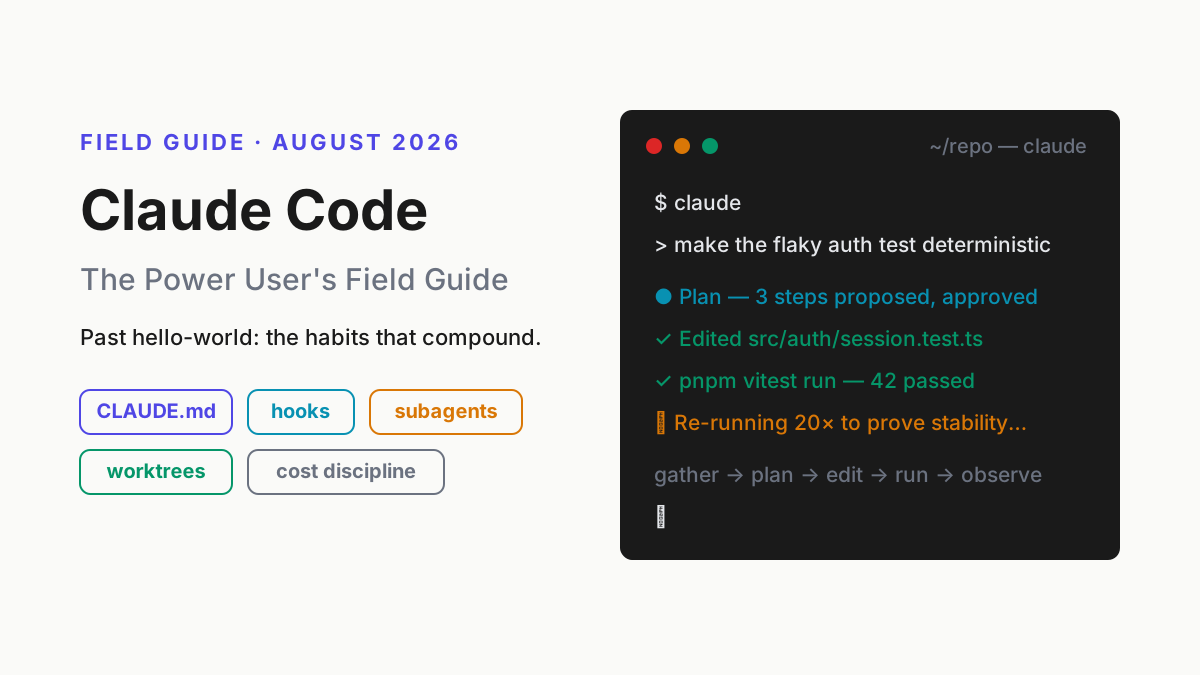
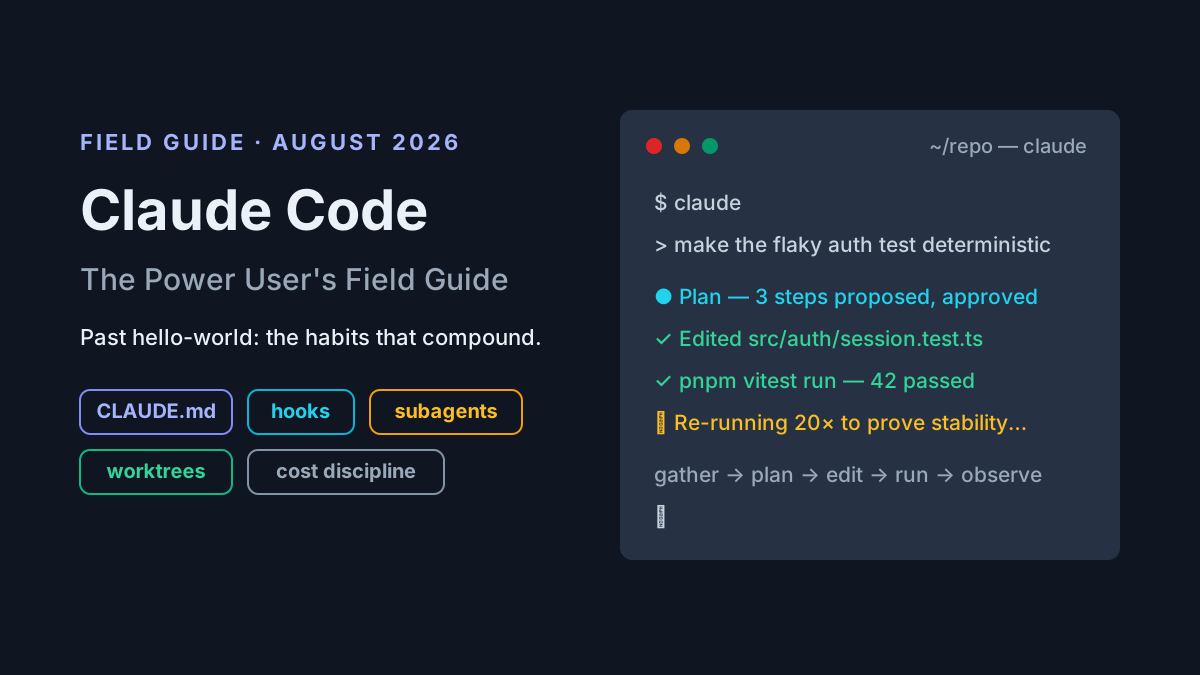
Claude Code rewards a particular kind of user: the one who treats it less like a chatbot and more like a fast junior engineer with a shell. This is not another Claude Code tutorial. It is a field guide for developers already past hello-world — the people shipping with it weekly who suspect, correctly, that the compounding gains hide in the parts the getting-started docs skim: CLAUDE.md craft, hooks, subagents, parallel sessions, and cost discipline.
We wrote it from daily-driver experience, and we will be honest about the rough edges. Claude Code has recognizable failure modes — context rot, over-eager edits, permission fatigue — and there are workflows where an IDE agent is simply the better call. Both get their own sections here, and the full head-to-head lives in our Claude Code vs Cursor comparison.
Claude Code in five minutes: install, auth, price
Claude Code is Anthropic’s terminal-based agentic coding tool: a CLI that reads your repository, plans an approach, edits files, and runs commands under your supervision. You describe the outcome; it does the work; you review the diff. It is the reference implementation of agentic coding, and the official documentation at docs.claude.com covers the beginner track well.
Setup compresses to four steps:
- Install:
npm install -g @anthropic-ai/claude-code, or use the native installer script from Anthropic’s docs. - Start:
cdinto a repository and runclaude. - Authenticate: sign in with a Claude subscription account, or connect Claude Console billing to pay per token.
- Orient: run
/initonce so it drafts a starter CLAUDE.md from your repo.
Claude Code price, in one block: Pro ($20/month) covers light daily use; Max 5x ($100/month) and Max 20x (~$200/month) raise the ceiling for heavy agent work; Team and Enterprise plans add seats and admin controls. All subscription tiers meter through rolling usage windows plus weekly caps rather than fixed token counts. The alternative is metered API billing through the Console — our Anthropic API and Console guide covers when that path wins, and plan changes tend to land on Anthropic’s newsroom before they land in your invoice. Under the hood you get Anthropic’s current model line: Claude Sonnet 5 as the workhorse, with Claude Fable 5 — the Mythos-class flagship Anthropic shipped on June 9, 2026 — available when the task earns it; the model documentation covers the tier differences.
That is the whole orientation. Everything below assumes it.
The mental model: an agentic loop living in your terminal
Every behavior Claude Code exhibits — the impressive ones and the maddening ones — falls out of one loop. It gathers context, forms a plan, edits files, executes something to check its work, observes the output, and iterates until the task is done or you stop it. That is the same loop that defines agentic software generally; Claude Code is the version that lives where your tools already are.
- Gather context — read files, grep the repo, inspect
git log, run exploratory commands. - Plan — decide the approach, ideally out loud where you can veto it.
- Edit — make the changes, often across many files.
- Execute — run tests, builds, linters, scripts.
- Observe and iterate — read the output, adjust, repeat.
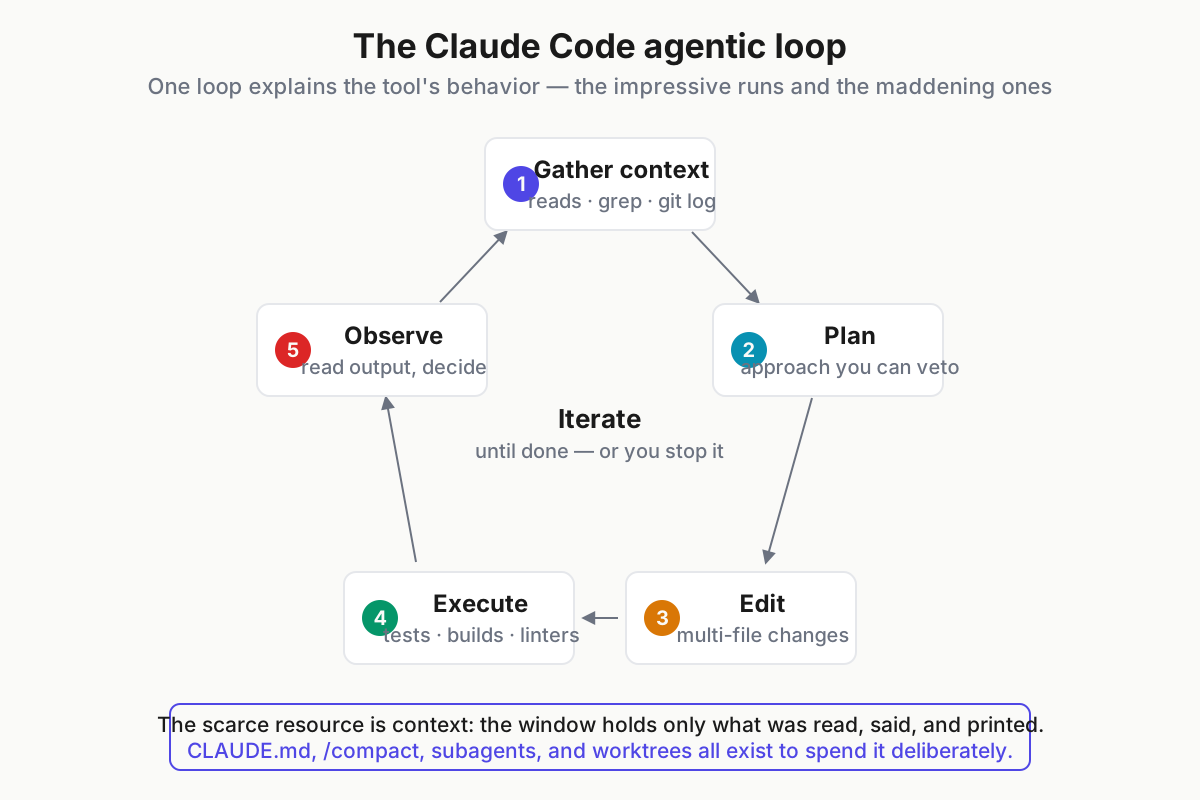
 The loop predicts the tool. Strong feedback signals — tests, types, linters — make every pass smarter.
Two contrasts matter. Against autocomplete-era tools, Claude Code works at task granularity — “make the flaky auth test deterministic,” not next-token suggestions — so your job shifts from typing to specifying and reviewing. And against IDE-embedded agents, the terminal is not a limitation but the point: the agent inherits your entire toolchain — git, package managers, test runners, gh, docker, anything your shell reaches — with zero integration work.
The scarce resource in this loop is context. The model knows exactly what is in its window: what it read, what you said, what commands printed. Nothing else. Almost every power technique in this guide — CLAUDE.md, /compact, subagents, worktrees — is a way of spending that window deliberately.
The loop also predicts the failure modes before you hit them. Weak feedback signals produce weak iterations: a repo with no tests gives the observe step nothing to observe, so the agent declares victory on code that merely compiles. And a polluted window produces confident nonsense, because step one — gather context — happily gathers the debris of the last three tasks. Fix the signals and the window, and most “the model is being dumb today” complaints evaporate.
CLAUDE.md engineering as a craft
CLAUDE.md is the highest-leverage file in your repository. Claude Code loads it at session start, every session, which makes it persistent memory for the things you would otherwise repeat: build and test commands, conventions, gotchas, and “never touch X” rules. A good CLAUDE.md is the difference between an agent that behaves like a contractor on day one and one that behaves like a teammate in month three.
What belongs: exact test invocations with their flags, style rules that differ from ecosystem defaults, architectural boundaries, deploy rituals, and known traps. What does not: long prose, anything the agent can discover by reading code, or a stale copy of the README. Every line costs context in every session, so the file earns its keep line by line.
The test for a candidate line is simple: would the agent get this wrong without being told, and does getting it wrong cost you something? “We use TypeScript” fails the test — it is discoverable in one directory listing. “Our pnpm test spawns watch mode and hangs CI” passes it, because nothing in the code announces that trap. Style-guide dumps fail too; if a rule matters enough to enforce, it belongs in a linter config the hooks section below can run, not in prose.
A ten-line CLAUDE.md that pulls its weight:
# CLAUDE.md — payments-api

- Test: `pnpm vitest run --silent` (never bare `pnpm test`; it starts watch mode)
- Type-check before calling any task done: `pnpm tsc --noEmit`
- Use the repo logger (`src/lib/log.ts`); never `console.log`
- Migrations: add new files in `db/migrations/`; never edit an applied one
- Feature flags come from `flags.yaml`; do not hardcode gates
- Do not touch `src/legacy/**` — scheduled for deletion, no new imports from it
- Commits: conventional commits, scope = package name
- Flaky test? Quarantine it per `docs/testing.md`; do not retry-loop
Memory is hierarchical, and the hierarchy is worth learning. An enterprise-managed policy file (if your org sets one) loads first; then your user-global ~/.claude/CLAUDE.md, for preferences that follow you across repos; then the repo-root CLAUDE.md, checked in for the whole team; then CLAUDE.local.md for personal, gitignored notes. Per-directory CLAUDE.md files load as the agent works inside those subtrees — which is how a monorepo gives each package its own rules without bloating every session. Files can pull in others with @path/to/file imports, so @docs/testing.md keeps canonical text in one place.
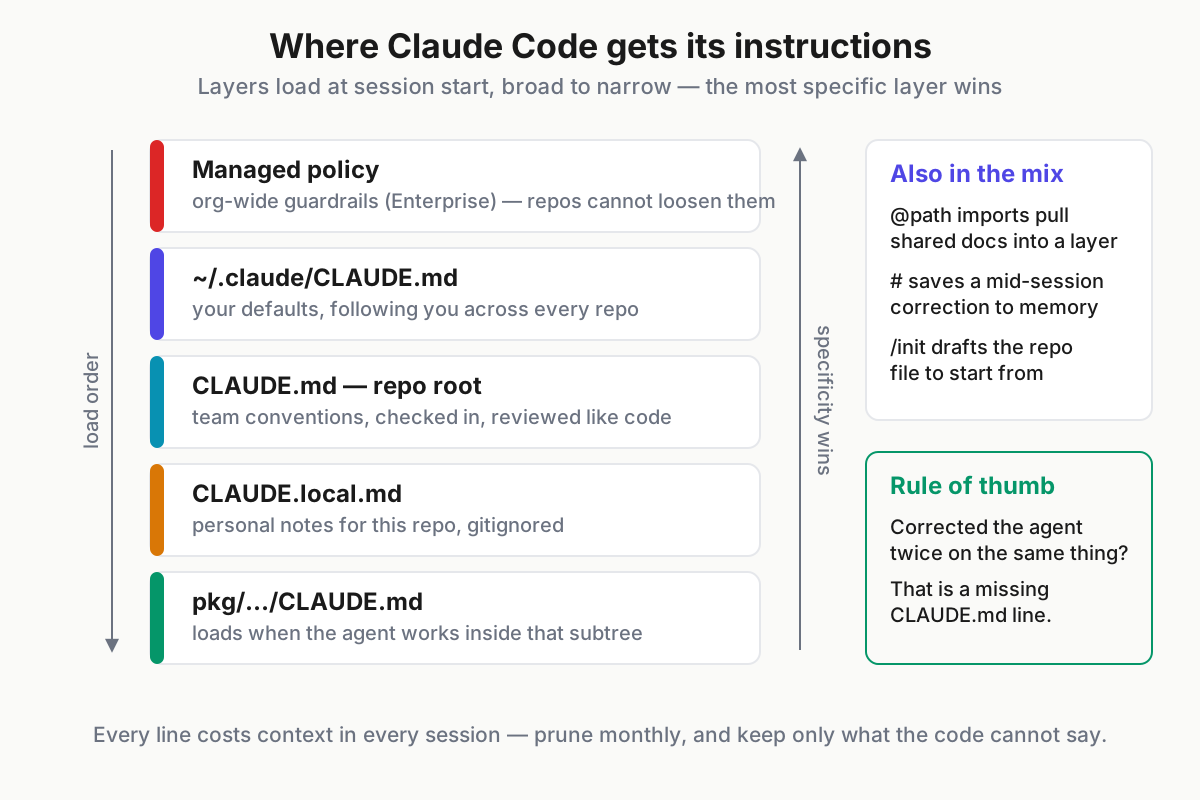
 Instruction layers, top to bottom: broader scope loads first, more specific scope wins.
Then iterate on it like code, because it is code. Start a message with # mid-session and Claude Code offers to save the correction into memory — the cheapest capture mechanism you have. Prune monthly. And adopt the one rule that keeps the file honest: any correction you have made twice is a missing CLAUDE.md line.
Slash commands and skills: package the prompts you repeat
The built-ins power users live in. /clear wipes context for a fresh task; /compact summarizes the session in place to reclaim window; /resume reopens a previous session; /model switches model tiers mid-session; /permissions edits tool allowlists; /init bootstraps CLAUDE.md; /cost shows session spend on API billing. Learn these seven before anything fancier.
Custom slash commands are Markdown files in .claude/commands/, invoked by filename, with $ARGUMENTS interpolated. They exist for the prompts you retype weekly. A /fix-issue 4182 that earns its slot:
---
description: Investigate a GitHub issue and propose a fix plan
allowed-tools: Bash(gh issue view:*), Read, Grep, Glob
---

Pull issue #$ARGUMENTS with `gh issue view $ARGUMENTS --comments`.
Find the implicated code paths. Reproduce the bug if a repro is included.
Propose a fix plan: files you will touch, tests you will add, risks you see.
Do not edit anything until I approve the plan.
Skills are the model-triggered counterpart: folders under .claude/skills/, each with a SKILL.md plus any scripts or templates, loaded when the skill’s description matches the task at hand. Where a command packages your intent, a skill packages a capability. A release-notes skill fires when you ask for release notes, without being named:
---
name: release-notes
description: Draft release notes from merged PRs, matching this repo's changelog format
---

1. List merges since the last tag (`git describe --tags --abbrev=0`)
   with `gh pr list --state merged --base main --limit 100`.
2. Group entries under Added / Changed / Fixed, matching CHANGELOG.md style.
3. Put breaking changes first. Link every PR number.
The dividing line: commands are user-triggered, skills are model-triggered. A command is the right container when you know the moment you will want it; a skill is right when the model should recognize the moment for you. Both come in project scope (.claude/ in the repo, shared with the team) and personal scope (~/.claude/, following you across repos), and both belong in the repo whenever a teammate would benefit — checked in, they upgrade everyone’s sessions at once.
Hooks: deterministic guardrails around a probabilistic agent
CLAUDE.md is advice the model weighs. Hooks are enforcement: shell commands bound to lifecycle events — PreToolUse, PostToolUse, UserPromptSubmit, Stop, and friends — whose exit codes can block or annotate what the agent does. Anything that must always happen belongs in a hook, not in prose the model might deprioritize on turn forty.
Configuration lives in .claude/settings.json. Three patterns cover most of the value:
{
  "hooks": {
    "PostToolUse": [
      {
        "matcher": "Edit|Write",
        "hooks": [
          {
            "type": "command",
            "command": "npx prettier --write \"$CLAUDE_FILE_PATHS\" 2>/dev/null || true"
          }
        ]
      }
    ],
    "PreToolUse": [
      {
        "matcher": "Bash",
        "hooks": [
          { "type": "command", "command": "\"$CLAUDE_PROJECT_DIR/.claude/hooks/block-prod.sh\"" }
        ]
      }
    ]
  }
}- Auto-format after every edit. The
PostToolUseentry above runs Prettier (swap inruff formatfor Python) on touched files, so formatting stops being something you nag about. - Hard-block dangerous commands. The
PreToolUsescript inspects the proposed Bash command; if it references production credentials or a protected host, it exits with code 2 — which blocks the action and feeds the script’s stderr back to the model as the reason. - Feed lint output back. A hook that runs the linter and prints violations turns every edit into a self-correction pass; the agent fixes what the hook reports without you in the loop.
The exit-code contract is the whole API: 0 means proceed, 2 means block and explain (stderr goes back to the model), anything else surfaces as a non-blocking warning. A Stop hook rounds out the set — it fires when the agent believes it is finished, which is the right moment to run the full test suite and refuse the “done” claim if anything is red. That single hook converts “it says it works” into “the suite says it works,” which is a different sentence.
The sharp edge: hooks run with your shell permissions, outside the permission prompts. Review hook scripts like production code — especially ones arriving via plugins — because a careless or malicious hook is exactly the kind of agent attack surface worth taking seriously.
Subagents: delegation without context pollution
A subagent is a named configuration — a Markdown file in .claude/agents/ — with its own system prompt, its own tool allowlist, and, critically, its own separate context window. The main session dispatches a task; the subagent burns its own window doing it; only the condensed result returns. That makes subagents the primary defense against context rot on long tasks.
A complete, useful one:
---
name: code-reviewer
description: Reviews diffs for correctness, security, and convention drift.
  Use after any multi-file change.
tools: Read, Grep, Glob, Bash(git diff:*)
model: sonnet
---

You are a strict senior reviewer. Read the diff, then the surrounding code.
Check against CLAUDE.md conventions. Report correctness risks, security
issues, and violations as a ranked list with file:line references.
You may not edit files. End with a merge / needs-work verdict.
Two use cases recur. The code-reviewer above audits a large diff without dragging thirty files of review chatter into your main thread. A test-runner subagent iterates on failures — run, read, hypothesize, run again — and returns only “3 failures, root cause X, fix applied in Y.” In both cases the expensive exploration happens off the books.
Write the description field like a job ad, because it is one: the main agent reads descriptions when deciding whom to dispatch, so “reviews diffs after multi-file changes” gets invoked at the right moments and “helpful reviewer agent” never does. The /agents command manages the roster interactively; project-scoped agents live in the repo for the team, personal ones in ~/.claude/agents/.
The honest costs: dispatch latency, duplicated file reads (the subagent starts cold), and results exactly as good as the prompt in that frontmatter. Do not spawn a subagent for what a grep answers. And when running several in parallel becomes a habit, you have graduated to subagent orchestration patterns proper.
MCP servers and plugins: wiring in the outside world
Out of the box, Claude Code touches your filesystem and shell. MCP — the Model Context Protocol — is how it reaches everything else: GitHub, Playwright, Sentry, Postgres, your internal APIs. MCP is the industry-standard tool interface documented at modelcontextprotocol.io, substantially revised by the 2026-07-28 spec release, and Claude Code speaks it natively.
Servers attach at three scopes — local (you, this repo), user (you, everywhere), and project, a .mcp.json checked into the repo so the whole team shares the wiring:
{
  "mcpServers": {
    "github": {
      "command": "npx",
      "args": ["-y", "@modelcontextprotocol/server-github"],
      "env": { "GITHUB_TOKEN": "${GITHUB_TOKEN}" }
    },
    "playwright": {
      "command": "npx",
      "args": ["-y", "@playwright/mcp@latest"]
    }
  }
}
The Playwright server is the one to try first: the agent drives a real browser to reproduce the UI bug it is about to fix, then verifies the fix the same way — closing a loop the terminal alone cannot.
Plugins are the distribution wrapper above all of this: bundles of commands, agents, hooks, and MCP servers installed from marketplaces, which is how a team’s workflow travels between repos without copy-paste. One caution applies to the whole section: every connected server’s tool descriptions consume context on every turn. Wire in what the current work needs, not everything you might someday want.
Plan mode and permission modes: choosing your supervision level
Claude Code’s permission system is a dial, and power users move it constantly. Press Shift+Tab to cycle modes: the default asks before consequential actions; auto-accept applies edits without asking; and plan mode makes the session read-only — the agent researches and proposes an approach, touching nothing until you approve. Force plan mode for unfamiliar codebases, wide refactors, and anything you want argued first. A rejected plan costs a few thousand tokens; a reverted refactor costs an afternoon.
| Supervision level | What it does | When to use it |
|---|---|---|
| Plan mode | Read-only research, proposed plan | New codebases, wide refactors, “convince me first” |
| Default (ask per action) | Prompts before consequential actions | Mixed work; anything touching state you care about |
| Auto-accept + allowlists | Applies edits, runs pre-approved commands | Well-specified tasks in a repo with tests and hooks |
The anti-fatigue pattern matters more than any mode: use /permissions to allowlist the safe verbs you approve reflexively — Bash(git status:*), Bash(npm test:*), the linters — and keep destructive ones manual. Approving forty prompts an hour trains you to stop reading them; allowlisting the boring 90% means the remaining prompts get your actual attention.
Then there is --dangerously-skip-permissions, which the flag name describes accurately. In a disposable container or CI sandbox with nothing to lose, it is a reasonable throughput tool. On a laptop holding your SSH keys, browser sessions, and cloud credentials, it is how you end up starring in someone’s incident writeup.
Headless Claude Code: -p mode, CI, and automation
Everything above assumed you were watching. claude -p "prompt" runs without you: non-interactive print mode, with --output-format json or stream-json for machine-readable results, and --resume <session-id> or --continue to pick up prior sessions programmatically.
claude -p "Triage today's new GitHub issues: reproduce if quick, label per \
.github/triage.md, and post one summary comment each" \
  --allowedTools "Bash(gh issue list:*),Bash(gh issue view:*),Bash(gh issue edit:*),Bash(gh issue comment:*),Read,Grep" \
  --output-format json --max-turns 25
The recurring wins: an issue-triage job like that one on a schedule; a nightly pass reviewing dependency-update PRs; commit-message generation wired into a git hook. For PR-triggered runs, Anthropic ships an official GitHub Action that responds to mentions and review requests — run it with pinned, minimal workflow permissions and a CI-scoped CLAUDE.md written for unattended work. A sketch of the nightly job:
# .github/workflows/dep-review.yml (sketch)
- name: Review dependency PRs
  env:
    ANTHROPIC_API_KEY: ${{ secrets.ANTHROPIC_API_KEY }}
  run: |
    claude -p "Review open Renovate PRs; comment risk notes; never merge" \
      --allowedTools "Bash(gh pr list:*),Bash(gh pr diff:*),Bash(gh pr comment:*)" \
      --output-format json --max-turns 15
The JSON output is designed to be parsed: it carries the result, the session ID, turn counts, and cost, so a wrapper script can log spend per job and re-enter a specific session with --resume when a human needs to pick up where the bot stopped. Treat those logs as artifacts, not noise.
Headless work is the on-ramp to agentic CI/CD, and it demands structural discipline precisely because nobody is watching: explicit --allowedTools lists instead of broad grants, spend caps on the billing side, --max-turns so a doom loop terminates, and retained logs so Tuesday’s weird merge can be reconstructed on Thursday.
Multi-session workflows: worktrees, parallel agents, and when to focus
One session per task is the rule that keeps quality high. The trick for running several tasks at once without collisions is git worktrees — separate checkouts of the same repo, one branch each, one Claude Code session each:
git worktree add ../app-auth-fix -b fix/auth-timeout
git worktree add ../app-test-backfill -b chore/test-backfill
# terminal 1
cd ../app-auth-fix && claude
# terminal 2
cd ../app-test-backfill && claude
Each session gets its own files, its own branch, its own context. Nothing collides until merge time, which git already knows how to referee.
The parallelism heuristic: fan out tasks that are independent and well-specified — test backfill, docs updates, isolated bug fixes. Stay single-session for design-heavy work where your judgment is the bottleneck; three parallel sessions each waiting on your thinking is slower than one session getting it. Two or three parallel sessions is the sweet spot for most people. Beyond that, review becomes the constraint, and unreviewed parallel output is just deferred rework with better branding.
Hygiene at volume: claude --continue reopens the most recent session in a directory; /resume lists prior ones to pick up; name worktree directories after their branches so ls ~/code reads like a task list. A heavy week genuinely produces dozens of sessions — which exposes the bookkeeping gap. CLI history is per-tool and per-machine, and the moment Codex CLI or another harness joins the rotation, “which session solved this exact problem last month?” has no native answer anywhere. That problem, at fleet scale, is what our guide to running multiple AI coding agents is about.
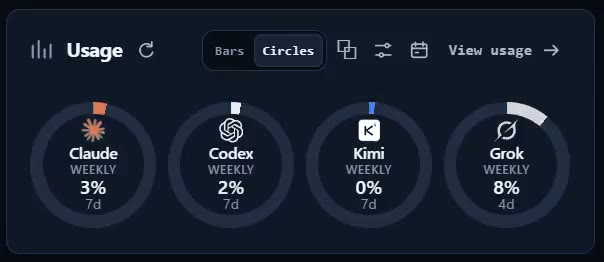
Product note: Automater Lite keeps a heavy Claude Code habit organized: a local-first archive of sessions from 10+ AI CLIs, with full-text search, session resume, and per-provider token metering — free, on automater.ai.
Cost and usage discipline
Know which cost model you are on, because they fail differently. Subscriptions (Pro, Max) meter through rolling usage windows plus weekly caps — you cannot overspend, but you can hit a wall mid-task. API billing through the Console never walls you, but a runaway refactor can quietly cost more than a month of Max.
| Lever | The move | Effect |
|---|---|---|
| Model choice | Sonnet 5 by default; Fable 5 for architecture and gnarly debugging | Largest single cost factor |
| Context hygiene | /clear between tasks, /compact at checkpoints |
Cheaper and smarter turns at once |
| Delegation | Subagents for exploration and digressions | Keeps the main window lean |
| Supervision | Plan mode before wide changes | Prevents expensive wrong turns |
Model selection is the first lever: the workhorse tier handles most daily work, and the flagship earns its premium on problems where a wrong approach is expensive. Context hygiene is the second, and it is not only about money — a bloated window degrades answer quality at the same rate it inflates spend, so /clear and /compact pay twice.
The third lever is task framing. One well-specified ask (“fix these three call sites, run the suite, stop”) finishes in a fraction of the tokens of a vague one (“clean up the auth module”) that sends the agent wandering. Specificity is a cost control, not just a quality control.
Track actuals, not vibes. /cost reports per-session spend on API billing; subscription users get plan usage views; cross-tool metering fills the gap once several CLIs share your week. The pattern to catch is the one everyone eventually hits: the Friday refactor that burned a third of the weekly cap while you were in meetings.
Failure patterns and the fixes that work
- Context rot in marathon sessions. Symptom: forgotten constraints, self-contradiction, re-asking settled questions. Fix: shorter sessions,
/compactat milestones, and promoting every durable rule into CLAUDE.md so it survives the next/clear. - Over-eager edits. Symptom: files touched beyond the ask, drive-by “improvements.” Fix: plan mode first, tighter specs (“change only X”), hooks blocking protected paths, worktrees as a blast-radius limiter.
- Permission fatigue. Symptom: approving prompts without reading them. Fix: allowlist the safe 90% via
/permissionsso the prompts that remain deserve, and get, real attention. - Doom loops. Symptom: variation after variation on a failing approach, each burning tokens. Fix: interrupt, demand three distinct root-cause hypotheses before any new edit — or
/clearand reframe the task from scratch.
When an IDE agent fits better
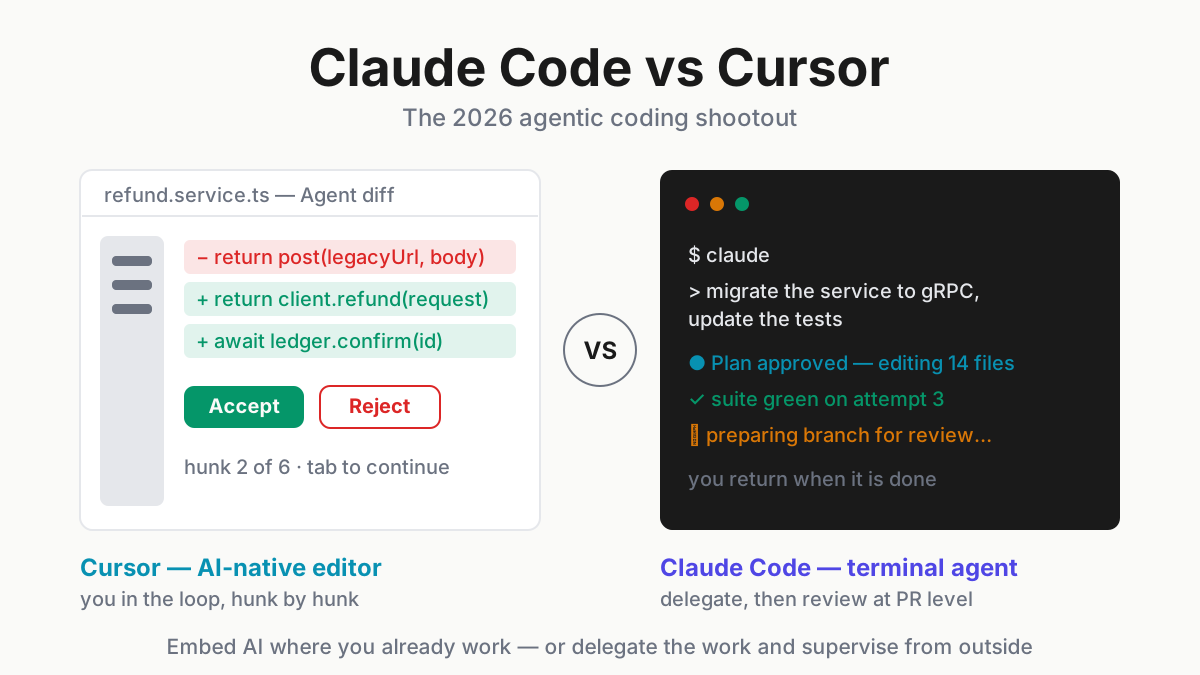
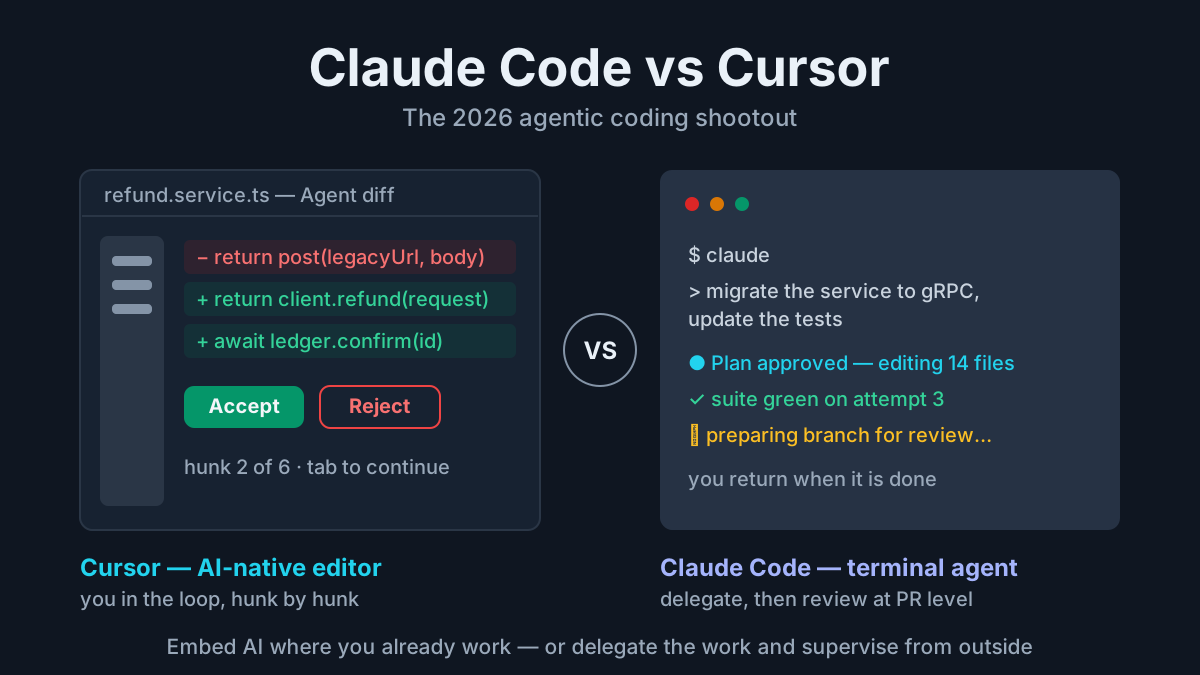
Some workflows are genuinely better inside an editor: hunk-by-hunk review with accept and reject per change, tab-completion flow states, and visual navigation of a large changeset with jump-to-definition on hand. If your day is mostly interactive editing with an agent assisting, an AI-native IDE serves that shape of attention better than a terminal does.
The split is supervision style, not a quality ranking: watch-every-edit suits an IDE agent; delegate-and-review suits the terminal. There is also a middle path — Claude Code’s VS Code and JetBrains extensions render the same agent’s changes in editor diff views, softening the review gap without changing the delegation model. For the full argument on both sides, see Claude Code vs Cursor.
Running Claude Code on a team
- The shared CLAUDE.md is team memory. Conventions, build rituals, and review rules live in the repo and upgrade everyone’s sessions at once — the first artifact worth engineering deliberately.
- Check in
.claude/— commands, agents, hooks, project MCP config. Review changes to these files like code, because they are code that steers code. - Use the admin surface. Team and Enterprise plans add managed settings, SSO, per-developer spend visibility, and data-retention controls; managed policy files let a platform team pin guardrails no individual repo can loosen.
- Keep review culture explicit. Agent diffs get human-diff scrutiny, and commit trailers mark agent involvement so repo archaeology stays possible a year later.
The adoption sequence that works, in order:
- Pilot — two or three enthusiasts run it on real work for a month, no mandate.
- Conventions — write down what they learned: the CLAUDE.md rules, the commands worth keeping, the hooks that saved them.
- Shared config — check in
.claude/and the project.mcp.json; now every new adopter starts from the veterans’ setup. - Policy — only now formalize permissions, spend visibility, and review requirements, because now the rules describe something real.
Policy written before practice is fiction with a signature line.
FAQ: Claude Code
What is Claude Code?
Claude Code is Anthropic’s terminal-based agentic coding tool. Started inside a repository, it reads code, plans, edits files, and runs commands under your supervision, using Anthropic’s Claude models. Access comes through Claude subscription plans or metered API billing via the Claude Console.
How do I use Claude Code?
Install it with npm install -g @anthropic-ai/claude-code, run claude inside your repository, and sign in with a Claude subscription or Console account. Then describe a task in plain language, review the plan and diffs it proposes, and approve or redirect. The orientation section above covers setup in five minutes.
Is Claude Code free?
No standing free tier exists as of August 2026. The paid paths: a Claude subscription — Pro at roughly $20/month, Max tiers near $100–$200 for heavier usage windows — or pay-per-token API billing through the Claude Console, which suits occasional use better than a flat plan.
What is the difference between Claude and Claude Code?
Claude is the model family and the chat product; Claude Code is the agentic CLI built on those models. In chat, you exchange messages. In Claude Code, the model acts — reading your repository, editing files, and running commands in a loop you supervise from the terminal.