How AI Agents Actually Work: The Loop Behind the Magic
Artificial intelligence agents are a loop: a model deciding, tools acting, results feeding back. See a real annotated trace, then build one in 50 lines.

Go deeper. Build your own.
What is an AI agent? Start with the definition
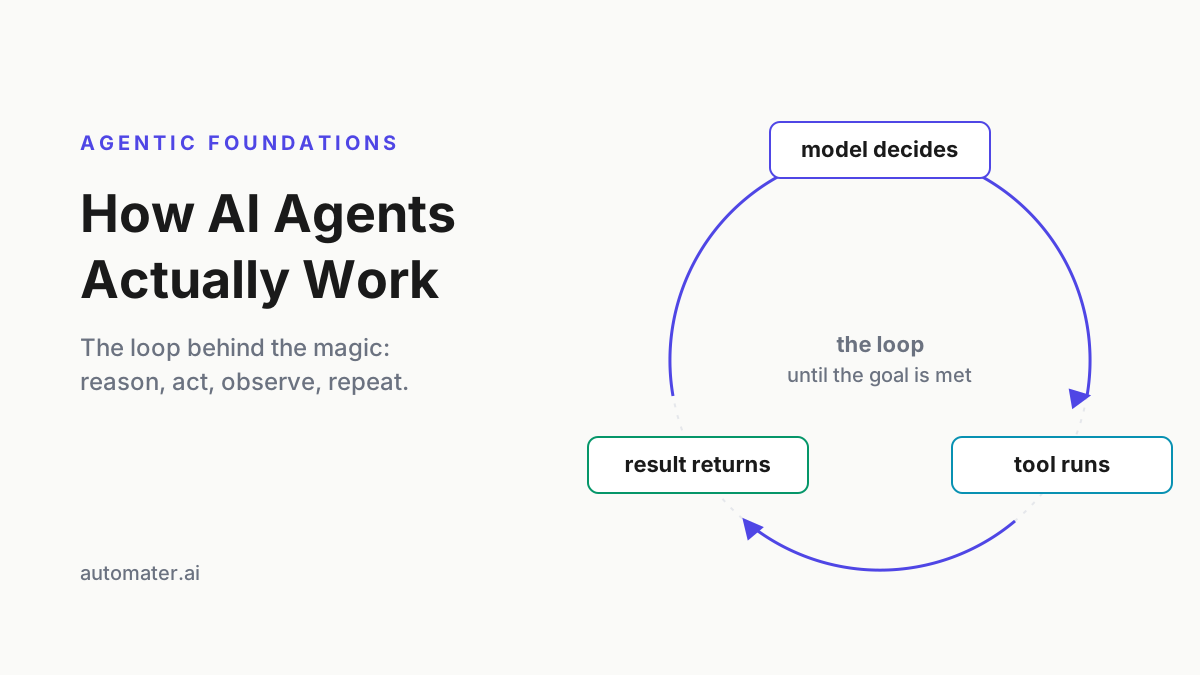
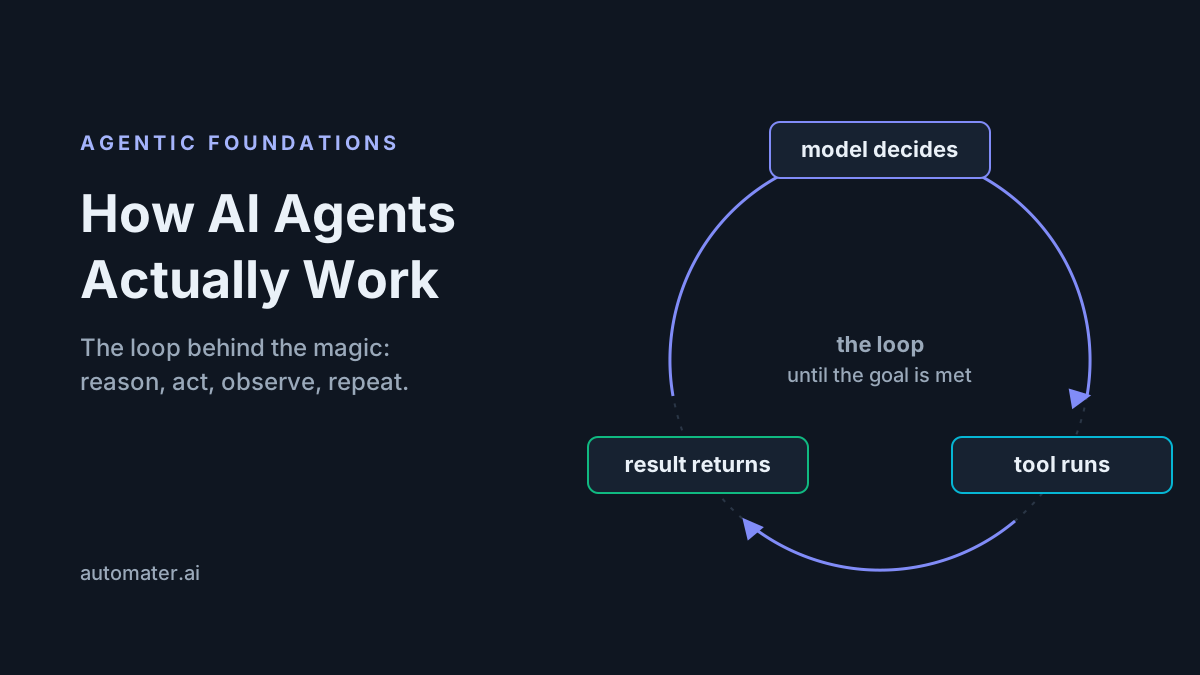
Artificial intelligence agents are programs that pursue a goal by repeatedly asking a model what to do next, executing that decision through tools, and feeding the result back in as context for the following decision. An agent is a loop, not a single answer: reason, act, observe, repeat until done.
Marketing will also hand you “agent AI,” “agentic AI,” and half a dozen other spellings. The vocabulary wobbles; the mechanism does not. Underneath every serious product in the category sits the same loop.
That definition sounds grander than the implementation. Strip the branding from any coding agent you use — Claude Code, Codex CLI, OpenCode — and the core is a while-loop around a model API with tool dispatch bolted on. Everything else is engineering wrapped around that loop: permission prompts, context management, sandboxes, retry logic. This article proves the claim twice — once with a real turn-by-turn trace of an AI agent fixing a failing test, and once with a working agent in about 50 lines of Python.
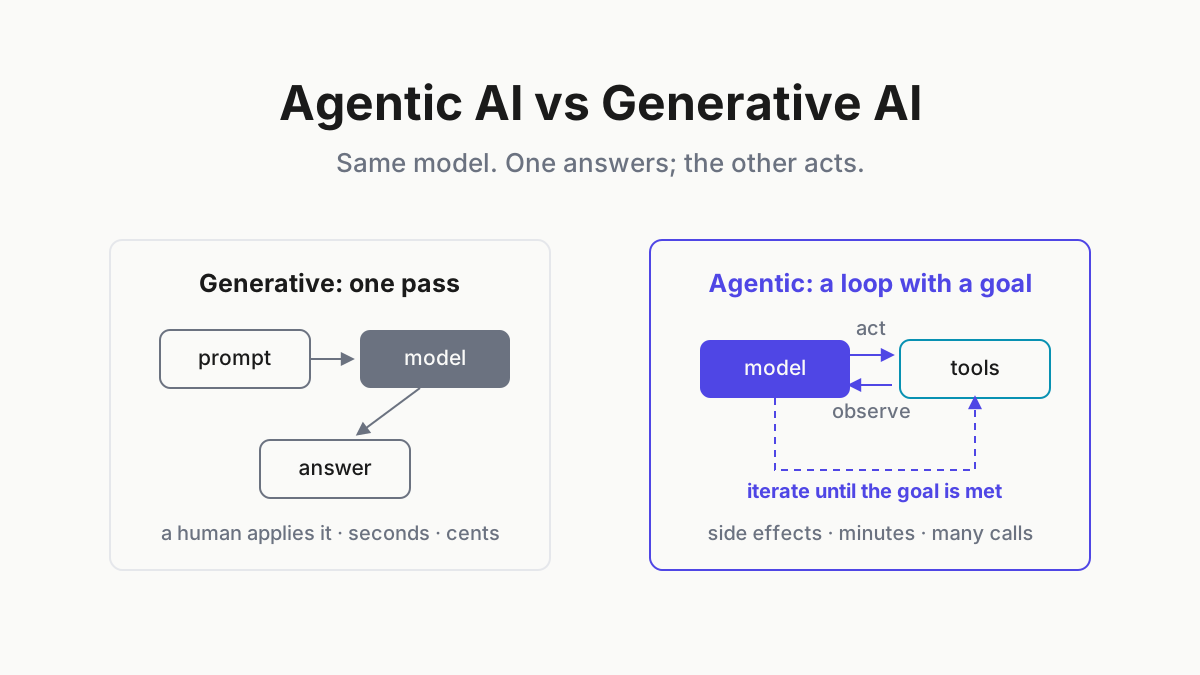
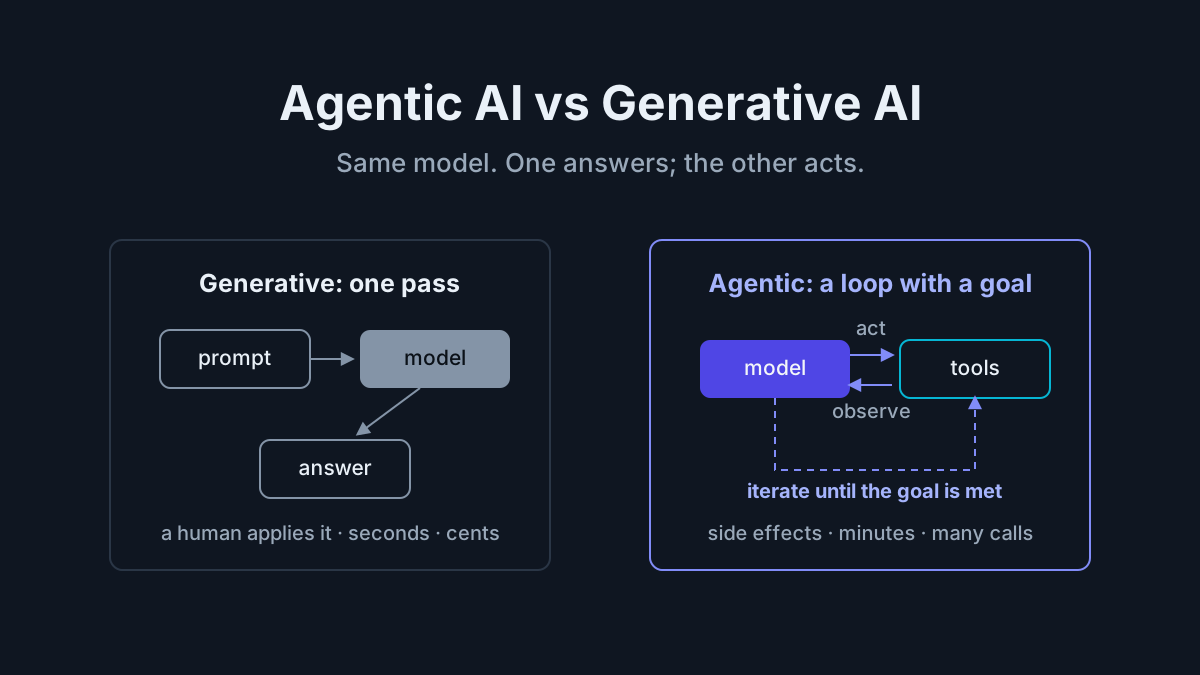
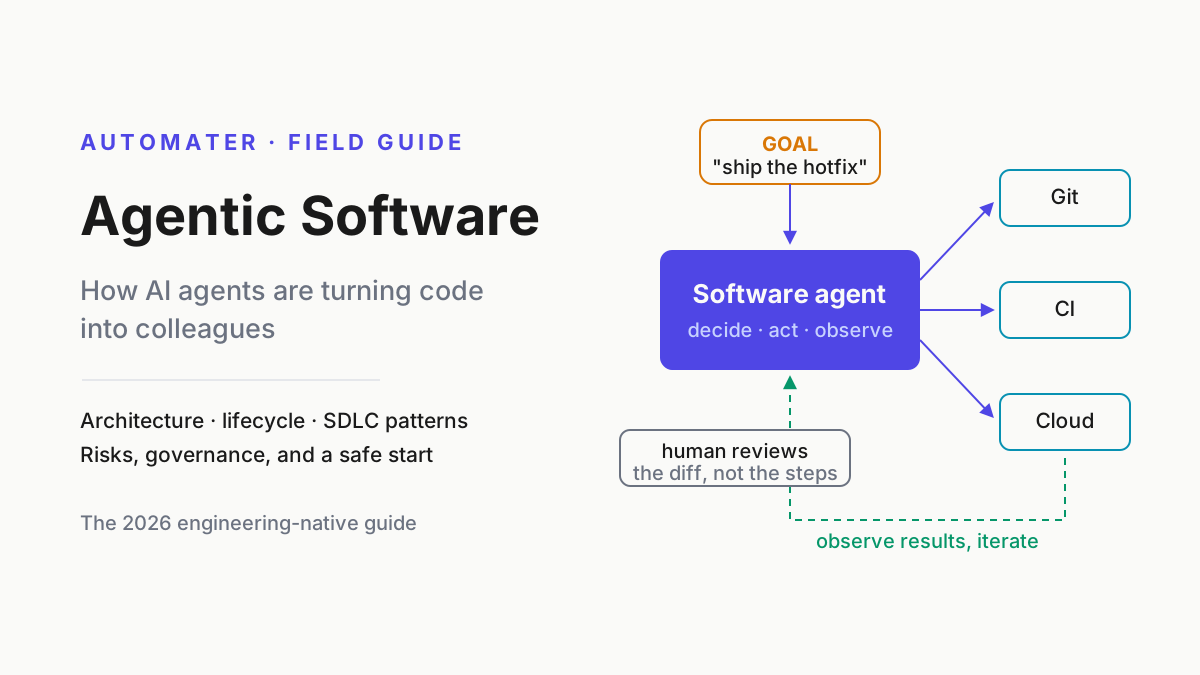
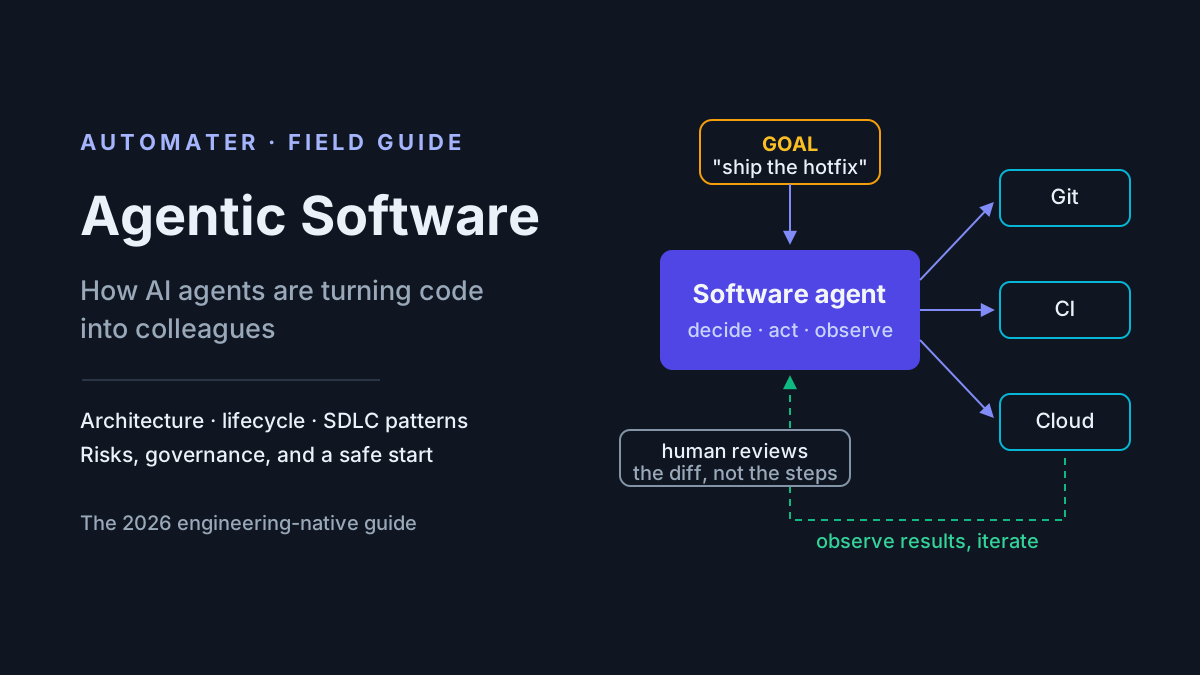
Three neighbors, so the terms stop blurring. Generative AI is one pass: prompt in, content out, a human decides what happens next. An agentic workflow is fixed orchestration: the steps are decided in advance and the model fills in slots. Agentic software is the wider discipline of building and operating systems where the loop does real work.
If you run these tools daily, you can already drive the car. What follows is the engine teardown: what actually happens between “CI is red, fix it” and the finished diff.
The core loop: perceive, reason, plan, act, observe
Every turn of an agent cycles through five phases, and they map cleanly onto what your CLI prints while you watch it work.
- Perceive. The agent ingests state: your instructions, project files, the last tool result. Concretely, the failing pytest output lands in the message array.
- Reason. The model interprets what it sees against the goal. “Expected 10.35, got 10.34 — a rounding discrepancy, not a logic error.”
- Plan. It chooses the next action, and only the next action. “Read the pricing module before touching anything.”
- Act. It emits a structured tool call —
read_file("src/pricing.py")— which the harness executes on its behalf. - Observe. The result is appended to the conversation, where it becomes part of what the agent perceives on the next turn.
Two refinements on the clean picture. Turns can batch: when actions are independent — reading three files, say — modern models emit several tool calls in a single turn and the harness runs them together. And the phases blur in practice: perceiving and reasoning happen in the same forward pass. The five labels are a lens for reading what your CLI prints, not five modules you could point to in the source.
The load-bearing property is that each loop’s output is the next loop’s input. An agent genuinely gets smarter within a task, because every tool result updates its picture of the world. Turn one guesses; turn six knows.
Be a little suspicious of the word “plan,” though. In shipping 2026 systems, planning is usually the model’s own reasoning plus a todo list the harness renders as checkboxes — not a symbolic planner out of a textbook. When Claude Code shows you its thinking, then a tool call, then a result, you are not watching a simplified visualization of something deeper. That display is the loop, rendered as UI.
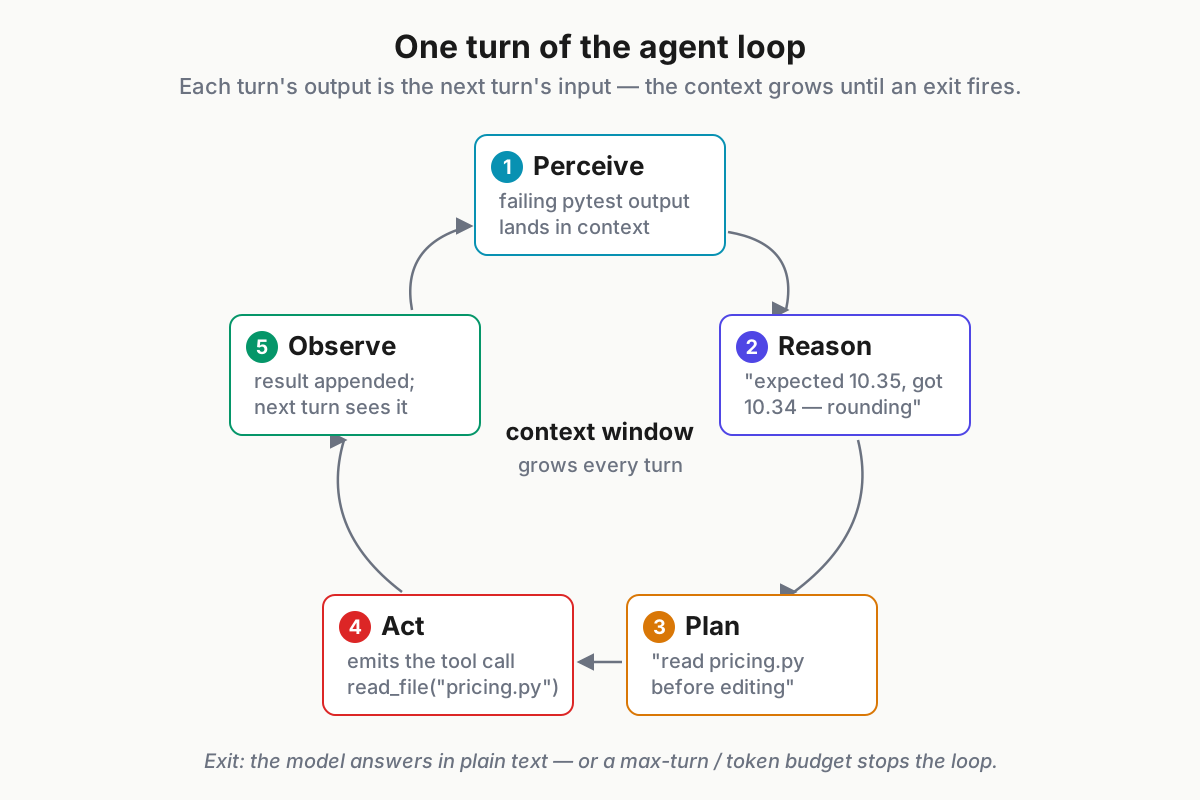
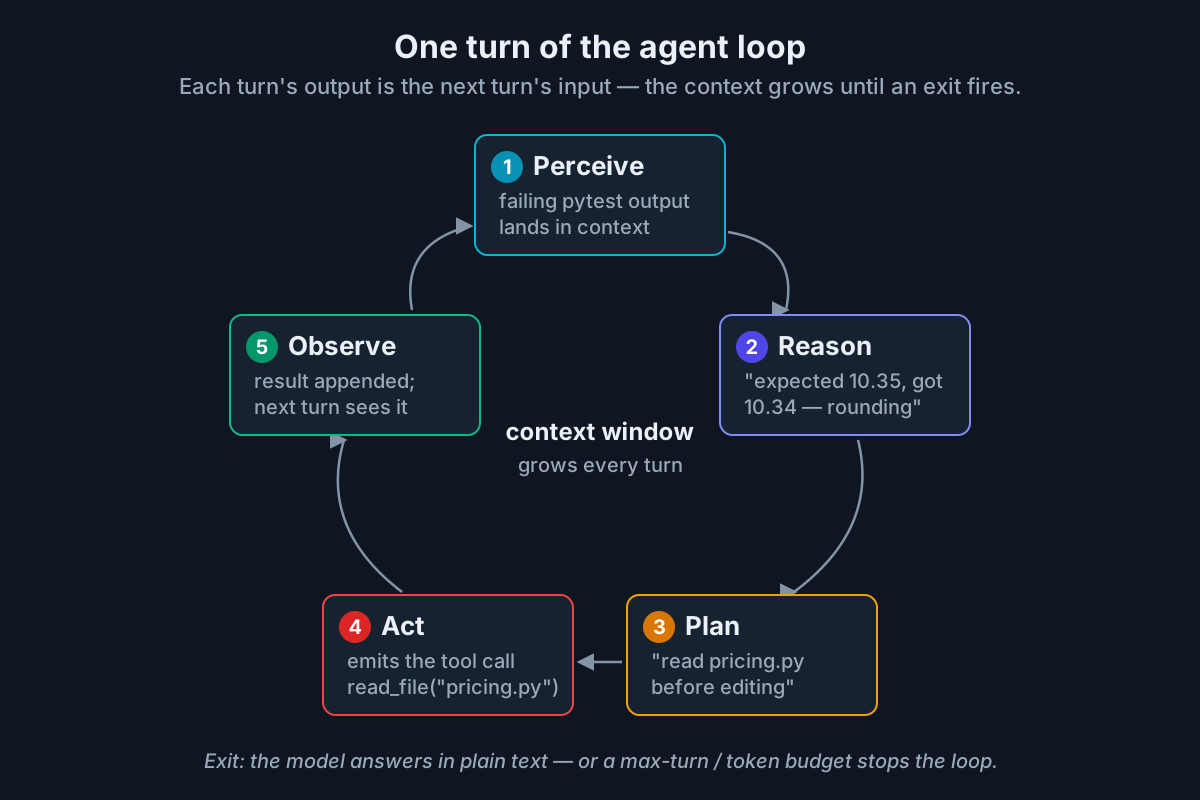 One turn of the loop. The only exits: the model answers in plain text instead of calling a tool, or a turn/token budget runs out.
The trace: watch an agent fix a failing test, turn by turn
Here is the loop doing real work. The setup: a Python repo where CI has gone red. The user’s entire prompt is one line; everything after it is the agent. The transcript is condensed to essentials, with our annotations marked ».
USER: CI is red on main — fix it.

TURN 1
  model  → "Reproduce before diagnosing. Running the suite."
  tool   → run_bash("pytest -x -q")
  result ← FAILED tests/test_pricing.py::test_discount_rounding
           assert apply_discount(20.69, 0.50) == 10.35
           AssertionError: expected 10.35, got 10.34
           1 failed, 41 passed
  » No guessing from the prompt. First move: turn "CI is red"
    into a specific, reproducible fact.

TURN 2
  model  → "One failing test. Reading it and the code it exercises."
  tool   → read_file("tests/test_pricing.py")
  tool   → read_file("src/pricing.py")
  result ← apply_discount() computes price * (1 - rate), then
           rounds with Python's built-in round(value, 2)
  » Failure and implementation are now both in context.

TURN 3
  model  → "A codebase this size likely has a shared money-rounding
            helper. Searching before I patch locally."
  tool   → run_bash("grep -rn 'round_money\|to_cents' src/")
  result ← (exit 1 — no matches)
  model  → "No helper exists. My assumption was wrong — the fix
            belongs in apply_discount() itself."
  » The recovery beat. A wrong hypothesis cost one grep, and the
    zero-hit result visibly changed the plan.

TURN 4
  model  → "Diagnosis: 20.69 × 0.5 = 10.345. Python's round() uses
            round-half-even, and the float nearest 10.345 sits just
            below it — so 10.34. The test encodes a half-up money
            rule. Switching to Decimal with ROUND_HALF_UP."
  tool   → edit_file("src/pricing.py", …)
  result ← wrote src/pricing.py (+7 −2)

TURN 5
  tool   → run_bash("pytest -q")
  result ← 42 passed in 3.11s
  » Verification is a tool call like any other. The agent does not
    trust its own edit until the suite confirms it.

TURN 6
  model  → "Root cause: banker's rounding in round() vs the half-up
            rule the test expects. Fixed with Decimal and
            ROUND_HALF_UP in apply_discount(). Suite is green.
            Diff ready for review."
  » Plain text, no tool call: the loop's exit condition. The session
    ends with a claim you can check — a diff and a green suite.
Six turns, one human sentence, and a mistaken assumption corrected mid-flight for the price of a grep. Hold onto turn 3. Chat assistants make wrong assumptions too; the difference is that an agent’s wrong assumptions collide with tool results and die, usually within a turn. That collision is the mechanism the rest of this article takes apart.
The five components of an artificial intelligence agent
Every agent you will ever run — the 50-line toy at the end of this piece and the production CLI you used this morning — decomposes into the same five components: model, instructions, tools, memory, environment.
The decomposition earns its keep as a diagnostic. Practitioners do not debug agents by concluding “the model is dumb.” They ask which component failed: did a tool return garbage? Were the instructions vague? Did the context window silt up? And note that rival harnesses often run the same frontier models — as of August 2026, Claude Fable 5 is drivable from half a dozen competing CLIs — so the differences you feel between products live almost entirely in components two through five.
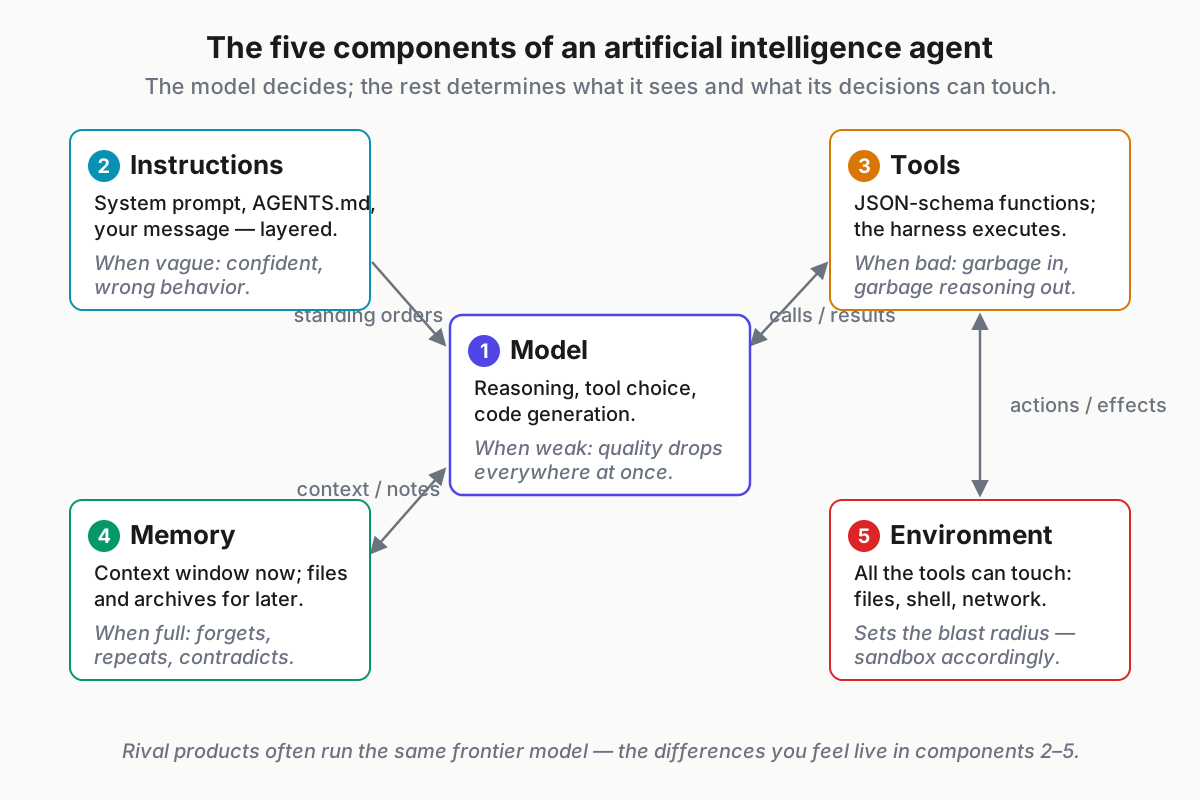
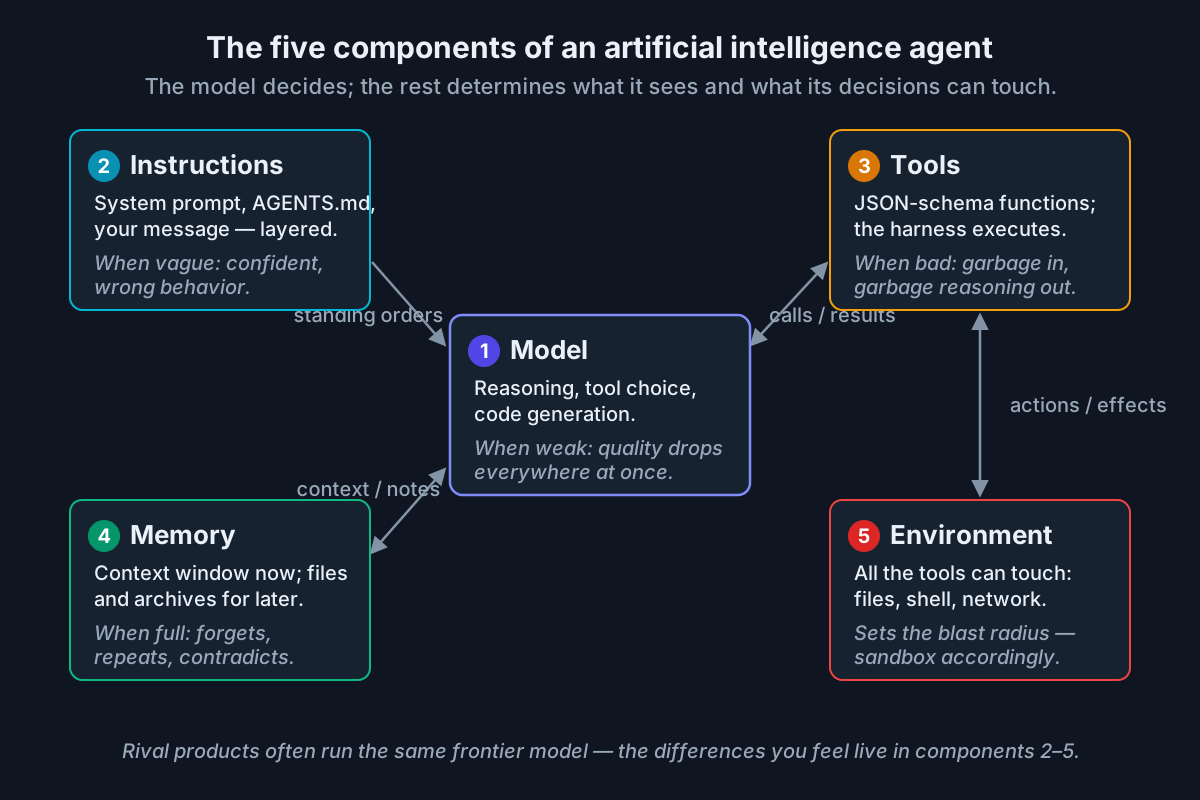 The model decides; everything around it determines what the model sees and what its decisions can touch.
The model and the system prompt
The model supplies the reasoning, the tool selection, and the code. Agent quality tracks model quality — each generation’s jump is real, whether the badge says Fable 5, GPT-5.6, or Gemini 3.1 — but harness design decides how much of that quality you actually collect. A strong model with vague instructions and sloppy tool descriptions plays far below its rating.
The system prompt is the standing orders: persona, constraints, tool-usage rules, when to ask versus act. Published CLI system prompts run thousands of words, and most of that length is edge-case handling — what to do with merge conflicts, when not to commit, how to present a plan.
Instructions also layer. The harness’s system prompt loads first, project instruction files come next, and your message arrives last:
# AGENTS.md (excerpt)

- Run tests with `pnpm test`; never commit on a red suite.
- Use pnpm, not npm. Node 22.
- API handlers live in src/api/; files in generated/ are never edited by hand.
- Prefer small diffs: one logical change per commit.
- Never touch .env.\* — ask instead.
This is why repo-level files like AGENTS.md and CLAUDE.md exist: they are the accumulated memory of every correction you got tired of typing. In our experience, vague instructions cause more visible misbehavior than model weakness does — the agent that “went rogue” usually did exactly what an underspecified prompt permitted.
Tools and function calling
Tools are how a text-only model gets hands, and the mechanics are less magical than the effect. Each tool is advertised to the model as a name, a description, and a JSON Schema for its arguments. When the model wants to act, it emits a structured call; the harness — not the model — executes it and returns the result as a message. The model never touches your filesystem. It writes requests, and the harness decides what happens. Anthropic’s and OpenAI’s tool-use documentation describe the same basic contract.
{
  "name": "run_tests",
  "description": "Run the project test suite and return summarized output. Prefer the narrowest useful scope: pass `path` or `keyword` when you already know the failing area, because full-suite runs are slow and flood the context.",
  "input_schema": {
    "type": "object",
    "properties": {
      "path": { "type": "string", "description": "Optional file or directory to scope the run" },
      "keyword": { "type": "string", "description": "Optional pytest -k expression" },
      "timeout_seconds": { "type": "integer", "default": 300 }
    },
    "required": []
  }
}
The canonical coding-agent toolset is short: read, write, and edit files; run shell commands; search the repo; fetch the web. MCP, the Model Context Protocol, extends that set to anything with a server — Slack, GitHub, databases, browsers. It has become the standard connector for agent tools (modelcontextprotocol.io), and the 2026-07-28 spec revision moved it to a stateless request/response core largely because so much production agent traffic now flows through gateways.
Two insights worth internalizing:
- Tool descriptions are prompts. The
descriptionfield above steers behavior as surely as the system prompt does — notice how it nudges the model toward scoped test runs. Vague descriptions produce vague usage. - Permissions, not model choice, set blast radius. Serious harnesses gate dangerous calls behind approval modes: auto-allow reads, prompt on writes, always-ask on shell and network. Which tools exist, and who approves them, matters more to safety than which model reasons about them.
Memory: short-term and long-term
An agent’s short-term memory is the context window — the session’s growing message array of instructions, tool results, and its own reasoning. Long-term memory does not exist unless someone engineers it: instruction files, agent-written notes, vector stores, archived transcripts. Nothing survives the end of a session unless it was written down.
The lived consequence is familiar: this morning’s session re-explores the codebase yesterday’s session already mapped, because yesterday’s discoveries lived in yesterday’s context and died with the terminal window. This is the CLI generation’s continuity problem.
The mitigations all work, and all leak:
- Compaction summarizes a long session so it can continue — but summaries keep conclusions and drop the reasoning, so revisiting a decision later gets harder.
- Memory files (AGENTS.md and friends, agent-maintained notes) persist knowledge — and drift stale unless someone curates them.
- Resumable sessions restore old context — inside one tool’s own silo, in one tool’s own format.
The most complete record of what an agent knew and why is the transcript itself: every turn, call, and result in order. Keep that thought; it returns in the production section.
The environment and the sandbox
The environment is everything the tools can touch: filesystem, shell, network, credentials, APIs. It defines the agent’s reality — a repo the agent cannot read may as well not exist, and an API it can call is part of its world whether you intended that or not.
Real systems tier the environment. Read-only plan modes let the agent explore before it may edit. Workspace-scoped writes confine changes to the project directory. Containerized execution — the pattern behind OpenHands and most cloud coding agents — hands the agent a disposable machine. Fully remote sandboxes run background agents like Codex cloud tasks on infrastructure where the blast radius is a VM, not your laptop.
The safety point generalizes: blast radius is an environment property, not a model property. The same model is harmless in a read-only sandbox and genuinely dangerous with production credentials. That is why securing AI agents is mostly environment work — least privilege, scoped tokens, egress control — and why the June 2026 US government security guidance for MCP deployments reads like an environment-hardening checklist. A useful side effect: the environment is where actions become auditable. Shell logs, diffs, and transcripts all live here.
Why the loop feels smart: grounding through tool feedback
Ask a chat assistant about our failing test and you get a plausible essay: “this might be a rounding issue; check whether you’re using banker’s rounding.” Ask an agent and it runs the test, reads the digits, and reports: round-half-even, here is the failing assertion, here is the fix, verified. The content overlaps. The epistemic status does not.
Every tool result replaces an assumption with a fact — and that substitution is what reads as intelligence.
You can test this yourself by subtraction. Take the same model, revoke its tools, and paste the same failing test into a chat window: the diagnosis turns hedged, generic, and occasionally confidently wrong, because nothing forces its claims into contact with the actual repo. The weights did not change. The intelligence you lost was grounding.
The loop also changes the economics of being wrong. In chat, a wrong hypothesis becomes a wrong answer you may act on. In the loop, a wrong hypothesis costs one cheap turn: the grep returns zero hits, the model revises, the session moves on. The loop converts fallibility into search — many small, checkable bets instead of one unchecked one.
Temper it, though: feedback only grounds what tools can measure. Tests, compilers, and diffs generate hard signals. “Is this what the customer meant” and “should this be fixed here or upstream” generate none, so requirements intent and judgment stay human. That gap is exactly where the failure modes below come from.
Context windows and context engineering
The constraint under everything: each turn replays the conversation into a finite context window, where tool outputs, diffs, and instructions compete for the same space. Practical windows in 2026 run from a couple hundred thousand tokens to about a million , which sounds infinite and is not — one verbose test run can eat tens of thousands of tokens.
As a session grows, the failure is qualitative, not just quantitative: early instructions dilute, stale tool results linger and mislead, and the window’s signal-to-noise sags. Practitioners call it context rot; most users feel it without naming it. By turn 30 of a heavy session, an illustrative census of the window looks like: tool results 50–70 percent, the model’s own reasoning and diffs 20–35 percent, system prompt and instruction files 5–10 percent, your actual words under 5 percent. The thing steering the session is mostly its own exhaust.
The mitigations, in the order you will reach for them:
- Compaction — summarize and restart when the window fills.
- Scoped retrieval — read the relevant function, not the whole file; search, don’t dump.
- Subagents — delegate bounded subtasks to fresh windows that return only conclusions: a research subagent reads forty files and hands back three paragraphs, not forty files’ worth of tokens.
- Session boundaries — end sessions deliberately at task edges instead of running one immortal session.
The habit that falls out: treat context as a budget. Heavy users run focused sessions per task and archive them, the way you end a shell session rather than keeping one open for a month. There is enough craft here that context engineering is now its own playbook.
Failure modes, and how real agents mitigate them
| Failure mode | What it looks like | Mitigations that work |
|---|---|---|
| Unproductive loops | Retrying a failing approach with cosmetic variations | Max-turn budgets, loop detection, an “ask for help” escape hatch |
| Hallucinated tool arguments | Calling files, flags, or tools that do not exist | Strict schemas, validation errors returned as observations |
| Stale context | Acting on file state an earlier edit already changed | Re-read before write, edit-conflict detection in the harness |
| Over-eager action | “Fixing” what nobody asked about; deleting tests to go green | Permission gates, plan-then-approve modes, tight task scoping |
Each row is a story every daily driver recognizes.
Unproductive loops. An agent renames a variable, reruns the tests, watches the same assertion fail, and renames it again. Nothing in the loop forbids orbiting a bad plan — so harnesses impose turn budgets, and the better ones detect repetition and force a strategy change or a question to the human.
Hallucinated arguments. The model calls read_file("src/utils/helpers.py") in a repo with no such path. The cure is boring: strict schemas reject malformed calls, and a crisp error — “file not found; nearest match: src/util/helper.py” — goes back as an observation the next turn corrects. In a well-built harness, hallucination becomes a self-healing event.
Stale context. Forty turns in, the agent edits a function based on the version it read at turn 5 — two of its own edits ago. Good harnesses re-read before writing and refuse any edit whose target text no longer matches the file.
Over-eager action. Asked to fix one test, the agent “tidies” three adjacent files — or, in the worst version, deletes the failing test. Technically green. The mitigations are the security stack: permission gates, plan approval before execution, and scoping in the prompt itself (“touch only src/pricing.py”).
The pattern across all four: mitigations live in the harness, not the model. Which is why the next section will feel underwhelming, in the best possible way.
Build a minimal agent in about 50 lines
Here is the introduction’s claim, paid in full: a working coding agent with the same architecture as the CLIs you use, minus the hardening. A messages array, a loop, three tools, and two real stop conditions — a plain-text response, and a max-turn budget.
# minimal_agent.py — a working coding agent in ~50 lines.
# pip install anthropic ; export ANTHROPIC_API_KEY=...
import json, subprocess, sys
from anthropic import Anthropic

client = Anthropic()

TOOLS = [
    {"name": "run_bash",
     "description": "Run a shell command in the repo and return stdout+stderr. "
                    "Use it to run tests, grep, and inspect state.",
     "input_schema": {"type": "object",
                      "properties": {"command": {"type": "string"}},
                      "required": ["command"]}},
    {"name": "read_file",
     "description": "Return the text of a file at a relative path.",
     "input_schema": {"type": "object",
                      "properties": {"path": {"type": "string"}},
                      "required": ["path"]}},
    {"name": "write_file",
     "description": "Overwrite (or create) a file with the given content.",
     "input_schema": {"type": "object",
                      "properties": {"path": {"type": "string"},
                                     "content": {"type": "string"}},
                      "required": ["path", "content"]}},
]

def execute(name, args):
    print(f"  -> {name}({json.dumps(args)[:100]})")
    try:
        if name == "run_bash":
            p = subprocess.run(args["command"], shell=True, capture_output=True,
                               text=True, timeout=120)
            return (p.stdout + p.stderr)[-4000:] or "(no output)"
        if name == "read_file":
            return open(args["path"]).read()[:8000]
        if name == "write_file":
            open(args["path"], "w").write(args["content"])
            return f"wrote {args['path']}"
    except Exception as e:
        return f"TOOL ERROR: {e}"  # errors are observations, not crashes

SYSTEM = ("You are a careful coding agent. Reproduce the problem before fixing "
          "it. Make the smallest change that works. Verify with run_bash after "
          "every edit. When the goal is met, reply in plain text with a summary.")

def run(goal, max_turns=20):
    messages = [{"role": "user", "content": goal}]
    for _ in range(max_turns):
        r = client.messages.create(model="claude-fable-5", max_tokens=4096,
                                   system=SYSTEM, tools=TOOLS, messages=messages)
        messages.append({"role": "assistant", "content": r.content})
        if r.stop_reason != "tool_use":  # plain text: the agent says it's done
            return print(next(b.text for b in r.content if b.type == "text"))
        messages.append({"role": "user", "content": [
            {"type": "tool_result", "tool_use_id": b.id,
             "content": execute(b.name, b.input)}
            for b in r.content if b.type == "tool_use"]})
    print("Stopped: hit the max-turn budget without finishing.")

if __name__ == "__main__":
    run(" ".join(sys.argv[1:]) or "Run the test suite and fix the first failure.")
A sample run against a repo with a broken slug helper:
$ python minimal_agent.py "tests/test_slug.py is failing — fix it"
  -> run_bash({"command": "pytest -x -q tests/test_slug.py"})
  -> read_file({"path": "src/slug.py"})
  -> write_file({"path": "src/slug.py", "content": "import re\n\ndef slugi...
  -> run_bash({"command": "pytest -q tests/test_slug.py"})
Fixed. slugify() tried to collapse repeated separators with
re.sub("-", "-", s), which is a no-op. Replaced it with
re.sub(r"-{2,}", "-", s) and re-ran the tests: 5 passed.
Read the loop body once more, slowly. Call the model. If it answered in plain text, stop. Otherwise execute its tool calls, append the results, go again. That is the entire idea.
Notice what the toy already gets right. Errors return as observations rather than exceptions, so a failed command becomes something the model can react to instead of a crash. The tool descriptions do quiet prompting work. And there are two genuine stop conditions; production adds a third, a token budget, because the loop bills by the turn and an agent that cannot finish should at least stop spending.
The punchline: this toy is architecturally identical to the CLI you ran this morning. The production tool differs in components two through five — hardened instructions, richer tools, managed memory, a real sandbox — not in kind.
From demo to production: what the pros add
Four things separate the toy from a tool you would trust, and none of them changes the loop.
- Retries and resumability. APIs rate-limit, networks blip, and a crash at turn 30 of 45 must not orphan a half-edited repo. Production harnesses persist state so a run can re-enter the loop; the demo just dies. The practice: checkpoint the message array, and make every tool action re-entrant or explicitly rolled back.
- Guardrails. Permission tiers, allowlisted tools, sandbox-by-default, secret redaction before anything reaches the model. The practice: default-deny on shell and network, and never store credentials where a tool result can echo them into context.
- Evals. Recorded tasks with graded outcomes, re-run on every prompt, tool, or model change. Without evals for AI agents, every prompt edit is vibes. The practice: turn your last ten real sessions into regression tasks.
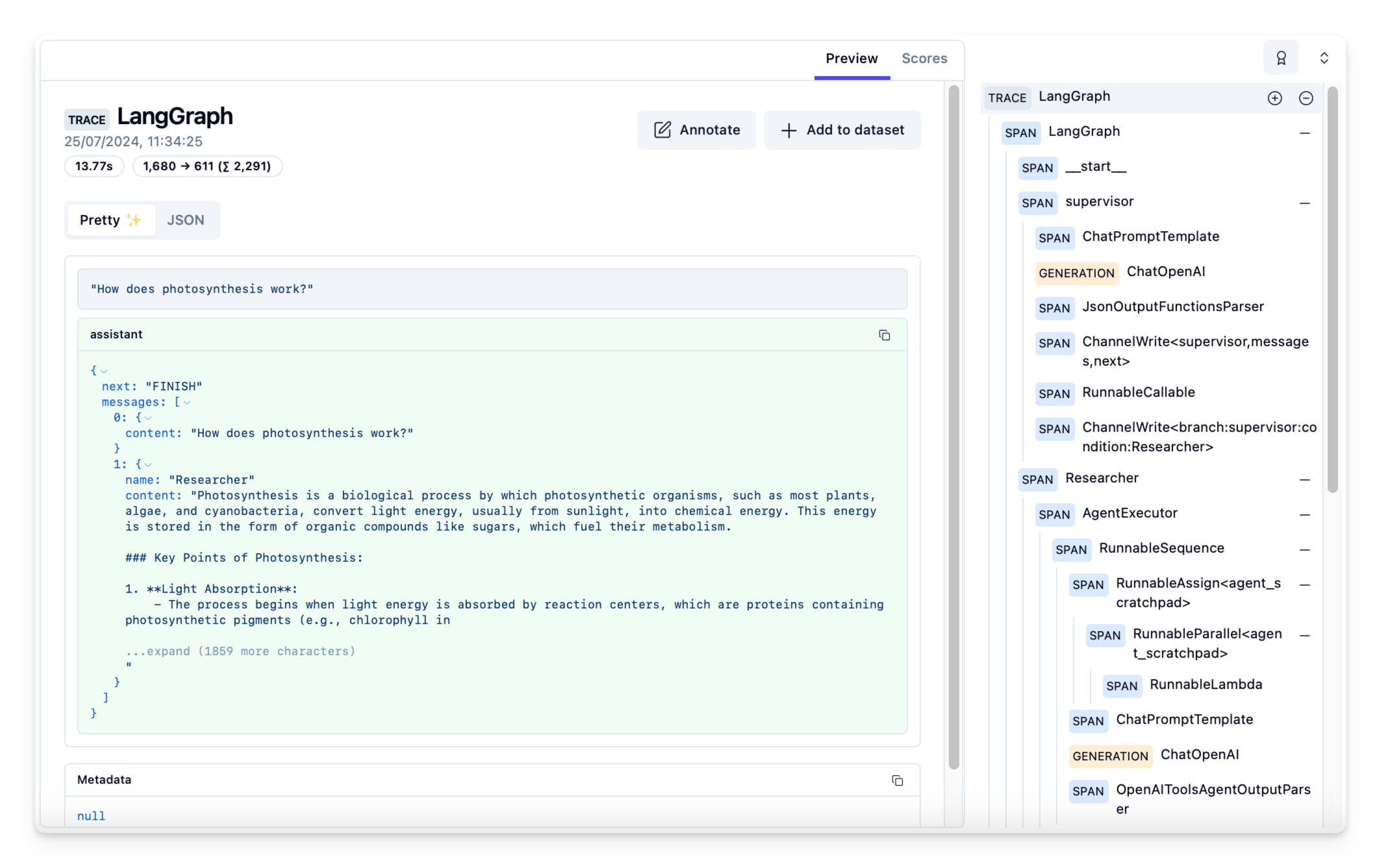
- Observability. Every run captured as a transcript — the trajectory: turns, tool calls, results, cost. Transcripts are how you debug (replay the turn that went wrong), audit (prove what ran), and improve (mine failures for eval cases). Teams pipe trajectories into tracing platforms; individuals need the same thing at personal scale, because the reasoning behind Tuesday’s diff lives in Tuesday’s transcript and nowhere else.
The order is not accidental — it is roughly the order teams discover they need each one. Missing resumability fails loudly in week one. Missing evals fail quietly, months later, as a prompt “improvement” that regressed six workflows nobody re-ran.
There is enough craft in these four that “harness engineering” became a named discipline in 2026, complete with its own awesome-list. And once you run several agents in parallel, observability stops being optional — running a fleet without transcripts is flying without instruments.
Product note: The transcript is the agent’s flight recorder. Automater Lite archives every session from 10+ CLIs into one local, full-text-searchable library — with per-provider token metering — so yesterday’s reasoning is never lost with the terminal window. Free on automater.ai.
Glossary: the vocabulary that gets thrown around
| Term | What it means in the loop |
|---|---|
| Agent | The whole system — model, tools, loop — pursuing a goal |
| Tool | A schema-described function the model can request; the harness executes it |
| MCP | The open Model Context Protocol for connecting tools and data to agents |
| Orchestrator | An agent that decomposes work and delegates it to subagents |
| Trajectory | The recorded run — every turn, tool call, and result; the unit of debugging and evals |
| Context window | Short-term memory: the finite token budget each turn replays into |
| Compaction | Summarizing a session so it can continue past a full window |
| Sandbox | The contained environment where tool actions are allowed to land |
| Handoff | One agent passing a task, plus the needed context, to another |
The loop is the product
Nothing mystical survived the teardown, which was the point. An agent is a model plus tools plus a loop plus feedback, with memory and environment deciding how far a session can go and how much damage it could do. The five components are a complete parts list — for the 50-line toy and for the priciest CLI on the market.
Understanding the engine changes how you drive. You debug by component instead of blaming the model. You prompt with verifiable goals — “make pytest green,” not “improve the code.” And when you evaluate tools, you compare harnesses — instructions, tools, memory, environment — rather than model badges, because the badge is often identical. The practice to build starting today: watch each tool result change the plan, and keep the transcript.
FAQ: artificial intelligence agents
What is an AI agent in simple terms?
An AI agent is a program that uses a language model to decide actions, tools to take them, and the results to decide again — looping until a goal is met or a budget runs out. Chat answers you once; an agent keeps working: run, check, fix, verify.
How do AI agents actually work?
Each turn, an agent perceives its context (instructions, files, prior results), reasons about the goal, plans one next action, acts by emitting a structured tool call the harness executes, and observes the result appended back into context. The loop repeats until the model answers in plain text — done.
What are examples of artificial intelligence agents?
Coding agents like Claude Code and Codex CLI; research agents like the deep-research modes in ChatGPT and Claude; browser and computer-use agents like OpenAI’s Atlas that operate real interfaces; and support agents that triage tickets end to end. All types of AI agents run the same loop with different tools and autonomy.
What is a trajectory in AI agents?
A trajectory is the complete recorded run of an agent: every model turn, tool call, tool result, and the final outcome, in order. It is the fundamental unit of agent observability — the thing you replay to debug a run, audit what actually happened, and grade when building evals.
Sources
- Anthropic — Claude Fable 5 and Claude Mythos 5 announcement
- OpenAI — GPT-5.6 announcement
- Anthropic — Claude Developer Platform documentation (tool use)
- OpenAI — platform documentation (function calling and agents)
- Model Context Protocol — official site
- Model Context Protocol — the 2026-07-28 specification revision
- NSA/CISA — Cybersecurity Information Sheet: Model Context Protocol security (June 2026)
- awesome-harness-engineering — curated resources for the harness-engineering discipline