Codex MCP Setup: codex mcp add, config.toml Tables, OAuth Login and Fixing Servers That Won't Start
Codex MCP setup, end to end: add Context7 over stdio and GitHub's remote server, keep tokens out of config.toml, verify with /mcp, fix timeouts and roll back.

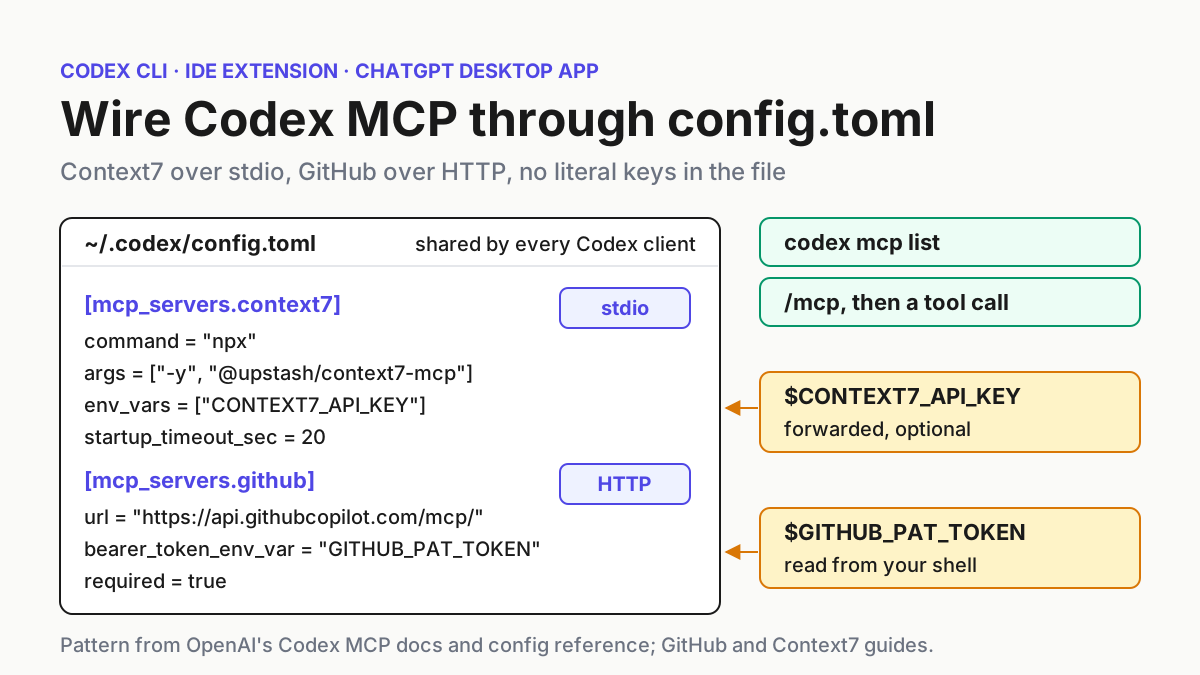
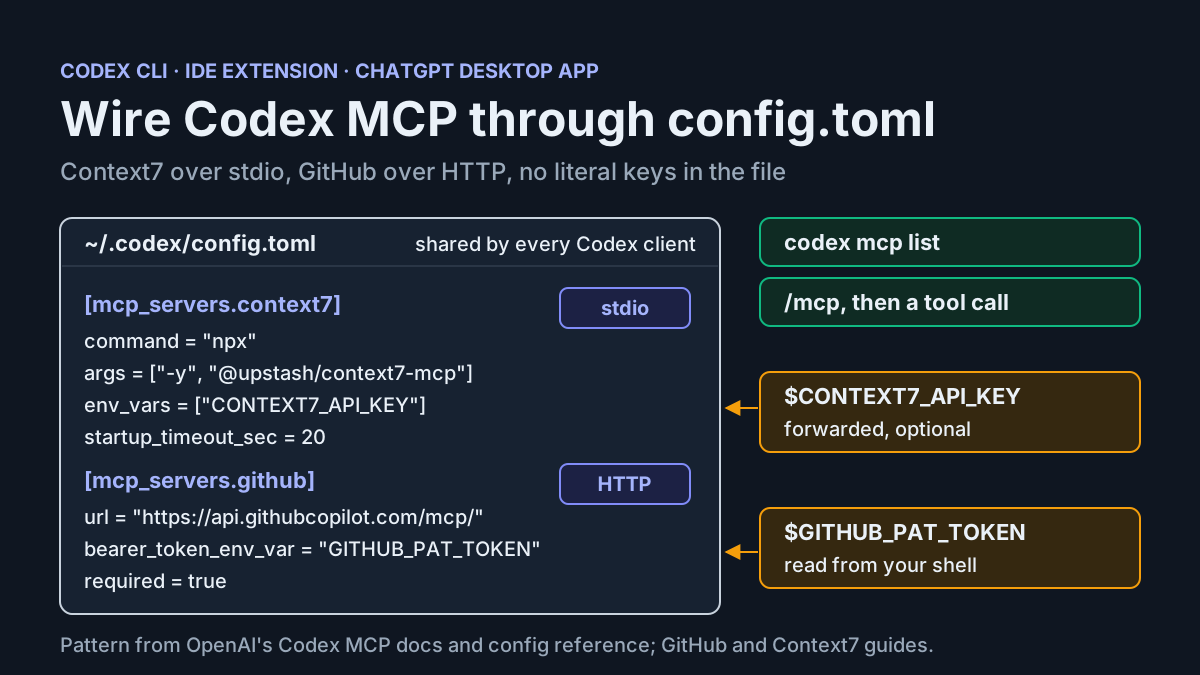
Codex MCP setup usually starts with a snippet copied out of a README. A week later the same setup has a server that never starts, a GitHub token in plain text in ~/.codex/config.toml, and a tool list nobody chose. This tutorial builds the setup on purpose. You’ll connect Codex to two Model Context Protocol servers: Context7, a documentation server that runs on your machine over stdio, and GitHub’s hosted MCP server over Streamable HTTP. Neither will have a literal secret in the config file. You’ll verify both servers, break each one on purpose so you know what failure looks like, and practice rolling back.
The guide is for developers who use the Codex CLI, the Codex IDE extension or the ChatGPT desktop app. OpenAI’s Codex MCP documentation says those three clients support MCP servers and share MCP configuration for the same Codex host. One config.toml therefore covers all three, and a mistake in it shows up in all three. When you finish, you’ll have:
- two servers that Codex lists and starts reliably;
- a complete, annotated
config.tomlthat reads credentials from environment variables; - a rule for deciding between user-level and project-level placement;
- a troubleshooting table and a rollback procedure you’ve rehearsed.
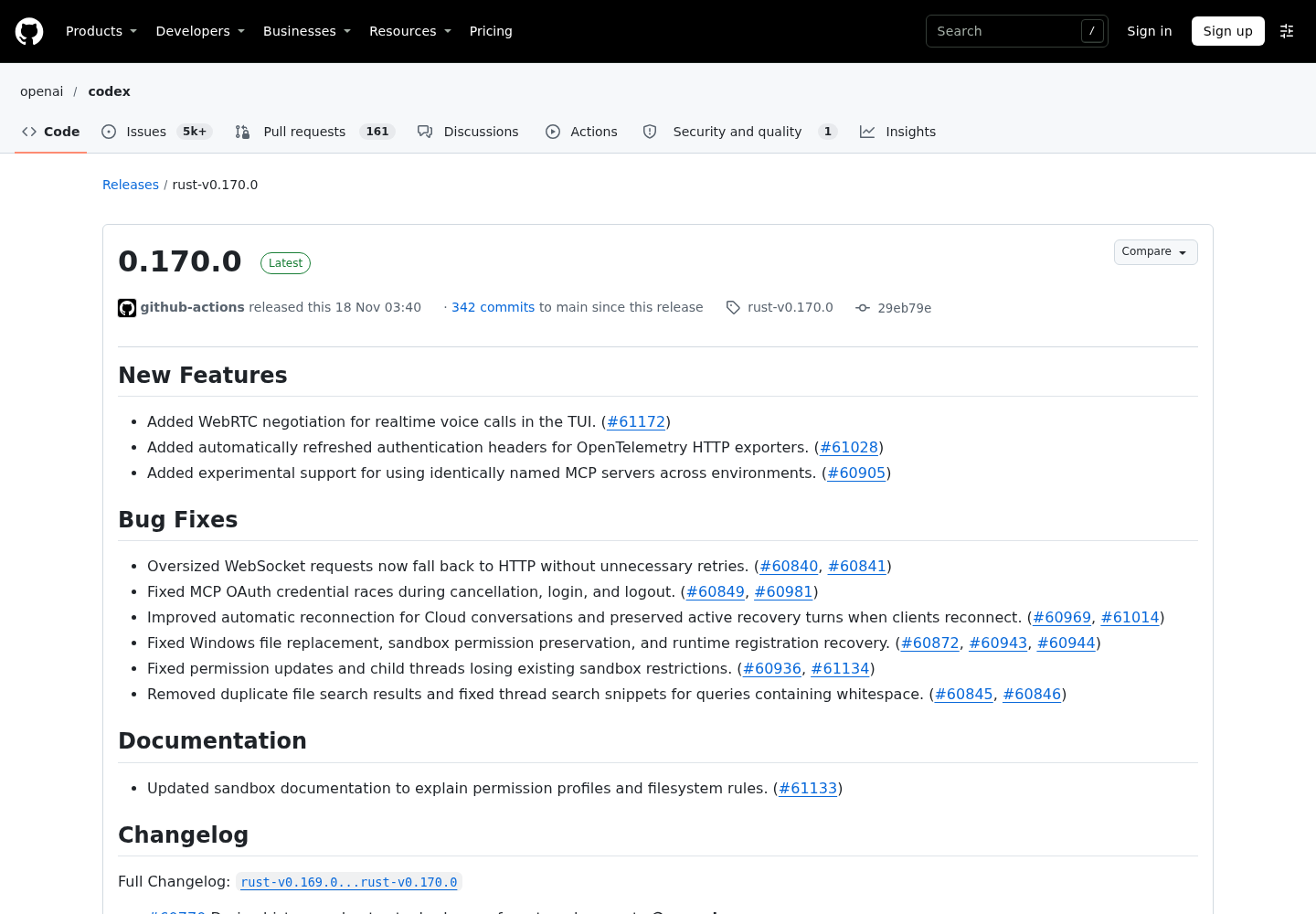
The release date is a reason to tidy up now, but it isn’t the lesson. OpenAI’s Codex 0.170.0 release, published on GitHub on November 18, 2026, added experimental support for identically named MCP servers across environments (#60905). It also fixed MCP OAuth credential races during cancellation, login and logout (#60849, #60981). If an OAuth login has been flaky for you, upgrade before doing anything else. The rest of this guide applies to any recent build.
On evidence: every command and key below comes from OpenAI’s MCP page and its configuration reference, GitHub’s Codex install guide, or Context7’s client documentation. The expected observations describe what those pages say should happen. They are illustrative and weren’t captured from a run for this article.
If you already run MCP in Claude Code, the Claude Code MCP setup guide covers the same ideas through claude mcp add and JSON scopes. Codex differs in three ways that change how you work. Servers are TOML tables, not entries in an mcpServers JSON object. Project-level config loads only after you trust the project. And startup timeouts, tool filters and approval behavior all sit in the same table as the server itself.
What you need before adding a Codex MCP server
Gather these before you run any command. Most failures later in the guide trace back to one of them.
- [ ] A current Codex install. For anything involving OAuth, use 0.170.0 or later, because of the credential-race fixes above. If you’re unsure which version you have or how to update it, follow the Codex CLI install and update guide.
- [ ] Node.js with
npx. Context7 runs locally throughnpx -y @upstash/context7-mcp. The first start may download the package, which matters for timeouts later. - [ ] A GitHub personal access token with the fewest scopes that work. GitHub’s Codex install guide lists
repo,workflow,read:org,projectandgistas scopes to add as tools need them. It recommends adding a scope only when a tool request fails for lack of permission. - [ ] Optional: a Context7 API key. The Context7 README recommends a free key from its dashboard for higher rate limits. The server also runs without one.
- [ ] A scratch repository you own. You’ll point GitHub tools at it, and you’ll use it to test project-level config.
- [ ] A backup of your current config. Run
cp ~/.codex/config.toml ~/.codex/config.toml.bakif the file exists. Every rollback step below assumes you have this copy.
One habit before you begin: keep a terminal open on the config file. codex mcp add writes to it, and reading the table it produced is quicker than guessing.
Decide where each server lives: user config or a trusted project
Codex stores MCP configuration in config.toml next to its other settings. The default is ~/.codex/config.toml. You can also scope servers to one project with .codex/config.toml, but the MCP documentation marks that path “trusted projects only”. The configuration reference is more specific: “Codex loads project-scoped config files only when you trust the project.” Trust is recorded in user config as projects.<path>.trust_level, set to "trusted" or "untrusted". Untrusted projects skip every project-scoped .codex/ layer, including project-local config, hooks and rules.
Work out placement before the first add command, because the right place depends on who should run the server and where its credentials come from.
| Situation | Put the [mcp_servers.<name>] table in |
Why |
|---|---|---|
| A tool you want in every repo, such as Context7 docs lookup | ~/.codex/config.toml |
It loads everywhere and doesn’t depend on any project’s trust decision |
| A server that authenticates with your personal token, such as GitHub | ~/.codex/config.toml, referencing the variable name only |
The variable name is harmless to share, but your token shouldn’t follow a repo you hand to others |
| A server only one team repo needs, with a command the whole team agrees on | .codex/config.toml in that repo, committed |
Teammates get it after they trust the project; untrusted clones ignore it |
| A repo you cloned to read or review | Nothing; leave it untrusted | Its .codex/config.toml may start a program on your machine |
| A pre-registered OAuth client with a secret | User config only, kept out of version control | OpenAI’s docs say Codex saves --oauth-client-secret as mcp_servers.<name>.oauth.client_secret in config.toml |
Two details are easy to miss. First, project config can’t override provider, auth, notification, profile or telemetry keys. The reference lists keys such as model_provider, notify and otel that Codex ignores in a project-local file. MCP server tables aren’t on that list, so a trusted project can add servers. Second, trust is a property of the path. Trusting ~/src/team-app doesn’t trust a sibling clone at ~/src/team-app-review.
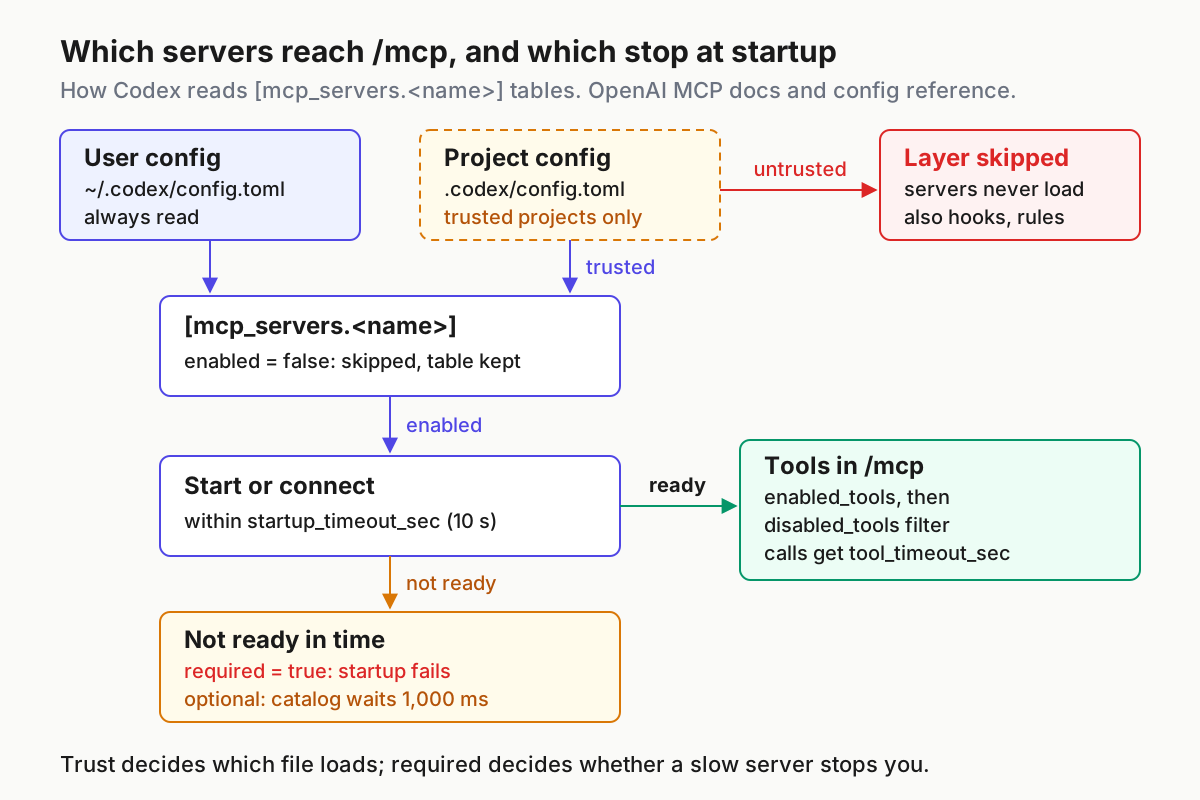
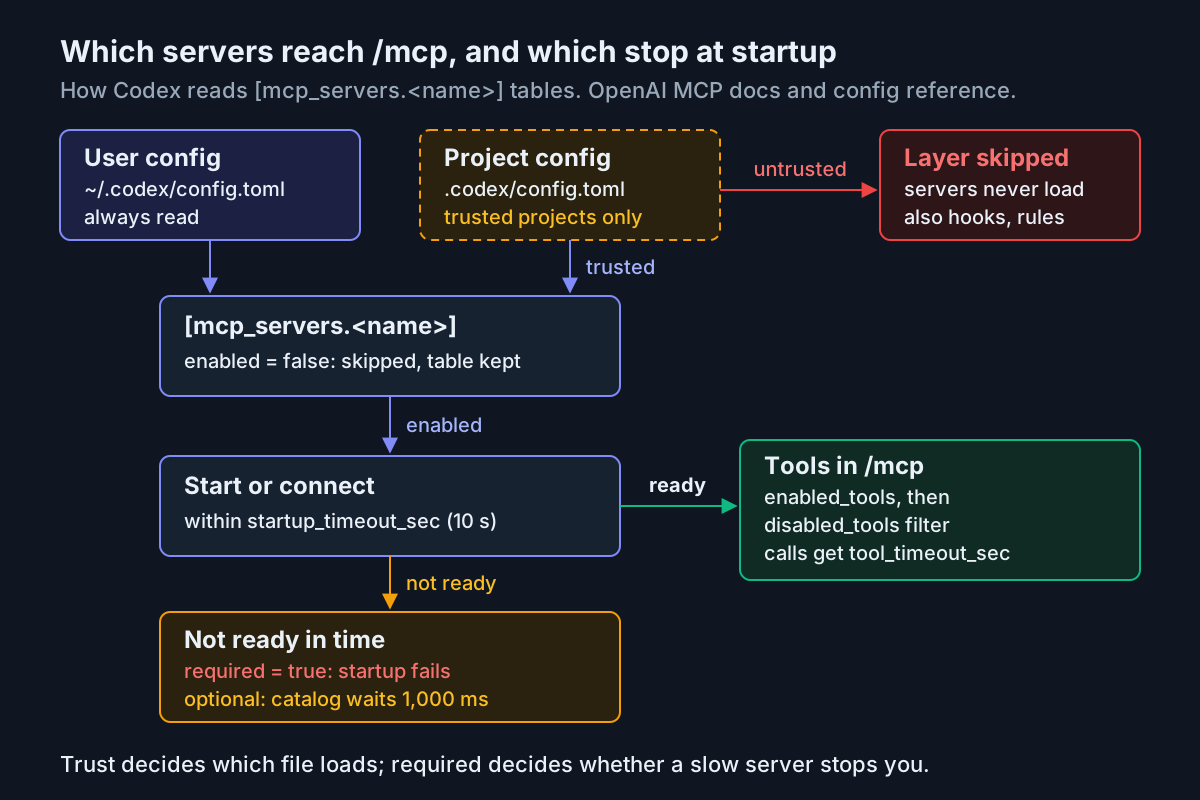
The diagram is the mental model for the rest of the guide. Trust decides which file is read at all. enabled decides whether a table is used. startup_timeout_sec and required decide what happens when a server is slow. enabled_tools and disabled_tools decide what reaches the model.
Add Context7 over stdio with codex mcp add
Context7 is the example OpenAI uses on its MCP page, and it’s a good first server. It’s free, runs locally and exposes two tools. The Context7 client documentation names them resolve-library-id and query-docs.
-
Add the server with the documented command:
codex mcp add context7 -- npx -y @upstash/context7-mcpEverything after
--is the stdio command Codex will launch. Before the--go Codex’s own flags, such as--env VAR=VALUE. Expected:~/.codex/config.tomlgains a[mcp_servers.context7]table withcommand = "npx"andargs = ["-y", "@upstash/context7-mcp"]. That’s the shape of the config example on OpenAI’s page. -
Leave the API key out of
args. Context7’s generic examples append--api-key YOUR_API_KEYto the arguments, which would write the key intoconfig.tomlin plain text. Use Codex’senv_varskey instead. OpenAI’s docs describe it as “environment variables to allow and forward” to a stdio server. In its Pi and Factory examples, Context7’s client guide passes the key to this same npm package as aCONTEXT7_API_KEYenvironment variable. Add this line under the table:env_vars = ["CONTEXT7_API_KEY"]Then export the key in the shell that starts Codex. If the variable isn’t set, Context7 runs without a key and gets the lower rate limit.
-
Don’t use
--env CONTEXT7_API_KEY=...on theaddcommand for this. Per the docs,--envsets a value for the server, and that value lives in the config file. Keep--envfor settings that aren’t secret. -
Raise the startup timeout. Codex’s default
startup_timeout_secis 10 seconds. Context7’s Codex example sets 20, and its troubleshooting note says to try 40 if you see startup timeout errors. A first-timenpxdownload can easily need more than 10 seconds. -
On Windows, launch
npxthroughcmd. Context7’s Windows section says configuration “is slightly different” and runscmd /c npx .... That example is written in generic JSON. In a Codex table, the same command is:command = "cmd" args = ["/c", "npx", "-y", "@upstash/context7-mcp"]
Run the server once from the CLI before you use it from the IDE extension or desktop app. Whichever client starts it first pays the download cost, and the CLI is where a timeout is easiest to read.
Add GitHub’s remote server without pasting the token
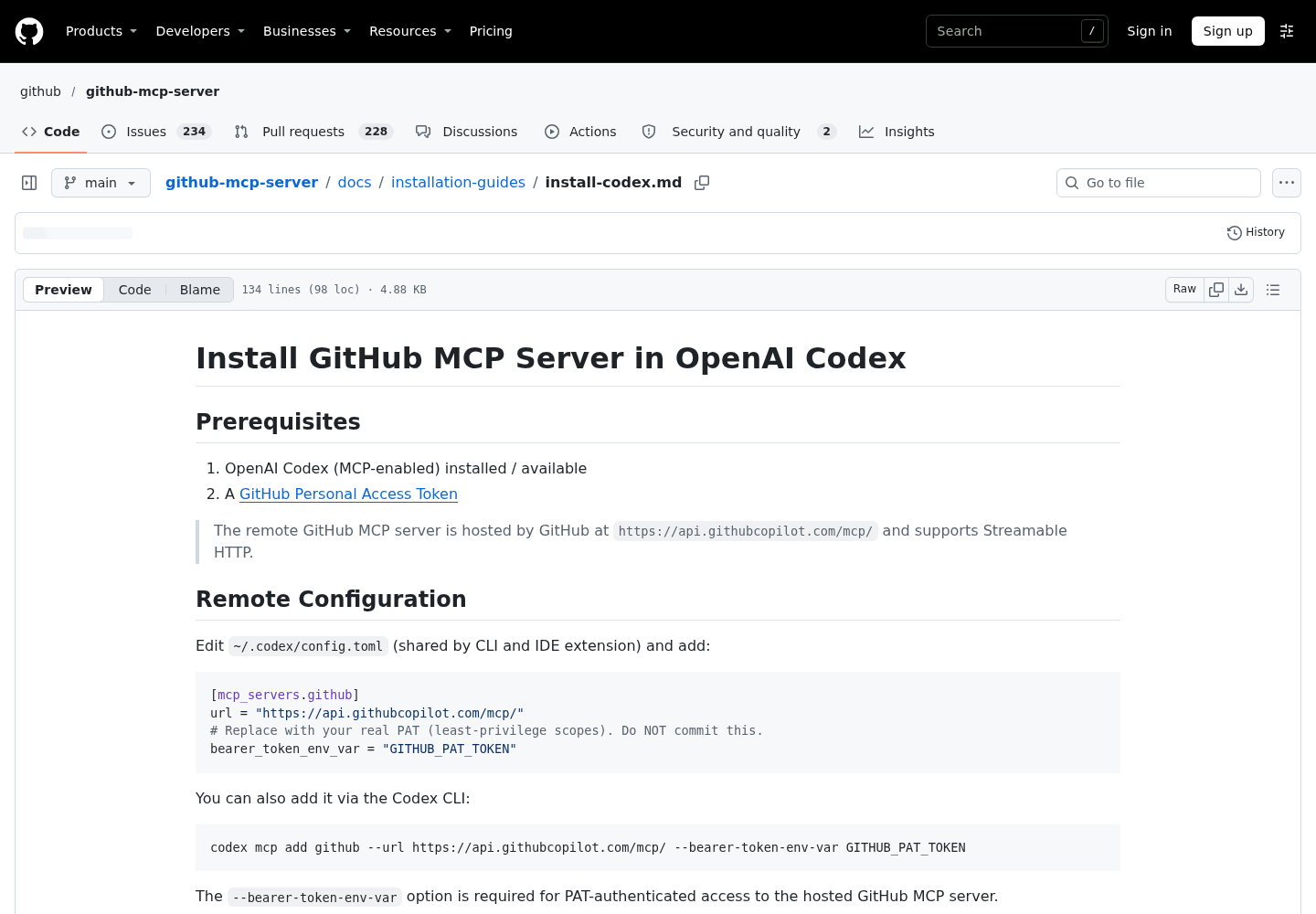
GitHub hosts its MCP server at https://api.githubcopilot.com/mcp/ over Streamable HTTP, according to GitHub’s install guide. Nothing runs on your machine. The only local question is where the token comes from.
-
Create a personal access token with the scopes you need today. Starting narrow means a missing scope shows up as a clear failure, not a silent capability.
-
Put the token in the environment of the shell that will run Codex, without echoing it into your shell history:
read -rs GITHUB_PAT_TOKEN && export GITHUB_PAT_TOKENTo make it persistent, use your secret manager or a shell profile file you never commit. GitHub’s guide suggests a
.envfile plus a.gitignoreentry. OpenAI’s docs don’t say Codex reads.envfiles, so make sure the variable is actually exported in the process that starts Codex. If you launch Codex from the IDE extension or desktop app, confirm that process can see the variable. The docs don’t say how each client inherits its environment. -
Register the server with the command GitHub documents:
codex mcp add github --url https://api.githubcopilot.com/mcp/ --bearer-token-env-var GITHUB_PAT_TOKENGitHub’s guide says the
--bearer-token-env-varoption is required for PAT-authenticated access to the hosted server. Expected result: a[mcp_servers.github]table withurlandbearer_token_env_var = "GITHUB_PAT_TOKEN". The file holds the variable’s name. Codex reads the value at connection time and sends it in theAuthorizationheader, as the reference describes forbearer_token_env_var. -
Gate writes before the first call. GitHub’s tools can create issues, comment on pull requests and trigger workflows. Add
default_tools_approval_mode = "writes"to the table. OpenAI’s MCP page says thewritesmode “prompts for tools that aren’t marked read-only.” The other supported values areauto,promptandapprove, andtools.<tool>.approval_modeoverrides the mode for a single tool. For the sandbox and approval policies that sit around this setting, see Codex approval modes and sandbox.
GitHub’s guide also documents a local Docker variant of the server. That variant uses command = "docker", and in its PAT example the token sits in an env map. If you use it, replace the literal token with an env_vars entry, as you did for Context7. Literal values in env end up in the config file.
The complete config.toml, annotated
This is the artifact the guide builds toward. It’s the user-level file after both add commands plus the edits above. Merge it into your own file rather than overwriting it, and keep whatever unrelated settings you already have.
#:schema https://developers.openai.com/codex/config-schema.json

# How long Codex waits for optional (not required) servers while it builds
# the first tool catalog. 1000 ms is the documented default; 0 means wait
# for each server's own startup_timeout_sec instead.
mcp_optional_startup_grace_ms = 1000

# ---------- mcp:context7-stdio-01 ----------
[mcp_servers.context7]
command = "npx"
args = ["-y", "@upstash/context7-mcp"]
# Forward the key from your shell. The value is never written here.
env_vars = ["CONTEXT7_API_KEY"]
startup_timeout_sec = 20        # default is 10; npx may download on first start
tool_timeout_sec = 60           # the default, written out for the next reader
enabled_tools = ["resolve-library-id", "query-docs"]
enabled = true                  # set false to pause without deleting

# ---------- mcp:github-remote-01 ----------
[mcp_servers.github]
url = "https://api.githubcopilot.com/mcp/"
bearer_token_env_var = "GITHUB_PAT_TOKEN"
default_tools_approval_mode = "writes"   # prompt for tools not marked read-only
startup_timeout_sec = 20
tool_timeout_sec = 90           # longer calls such as large diffs
required = true                 # fail startup loudly if GitHub isn't ready
Each key does one job, and every value has a reason:
| Key | Value here | Why it’s set this way |
|---|---|---|
#:schema |
Codex config schema URL | The reference says this line, with the Even Better TOML extension in VS Code or Cursor, gives autocompletion and diagnostics against the published schema |
mcp_optional_startup_grace_ms |
1000 |
The default. Optional servers that aren’t ready by then don’t hold up the initial catalog |
command, args |
npx -y @upstash/context7-mcp |
The stdio command from OpenAI’s docs |
env_vars |
["CONTEXT7_API_KEY"] |
Allows and forwards a local variable; string entries read from Codex’s local environment |
startup_timeout_sec |
20 on both |
Double the 10-second default, matching Context7’s Codex example |
tool_timeout_sec |
60, 90 |
60 is the default; raise it per server when real calls run long |
enabled_tools |
Context7’s two tools | An allowlist. A tool the server adds later won’t appear until you add it here |
enabled |
true |
Flip to false to disable the server without deleting its table |
url |
GitHub’s hosted endpoint | Streamable HTTP; nothing runs locally |
bearer_token_env_var |
GITHUB_PAT_TOKEN |
The token’s variable name, sent as a bearer token |
default_tools_approval_mode |
writes |
Approval before any GitHub tool that isn’t marked read-only |
required |
true on GitHub only |
OpenAI’s docs say this makes startup fail if the enabled server isn’t ready |
Why required goes on GitHub and not Context7: if your session depends on GitHub, a loud startup failure is better than a session that quietly runs without those tools. Context7 is a convenience, so let it be optional. If GitHub’s latency makes every start slow, the docs offer startup_readiness = "catalog". With it, a valid cached tool catalog satisfies startup while the connection opens. Tool calls still need a live connection.
You can’t allowlist GitHub’s tools yet, because you don’t know their names. Read them from /mcp in the next section, then decide whether to pin them with enabled_tools or block specific ones with disabled_tools. The docs apply disabled_tools after enabled_tools. To keep a server’s tools out of one surface instead of blocking them, the reference documents omit_tools_from with direct, deferred or code_mode.
The reference also documents environment_id, which picks the environment a server runs or connects in. It defaults to local. The 0.170.0 release made experimental changes to how identically named servers in different environments are kept apart. If you run remote executors, treat that behavior as experimental and check the release notes before relying on it.
Verify in three places: codex mcp list, /mcp and a real tool call
A config file that parses only proves the TOML is valid. Check three things in order, because each check catches a different failure.
- Run
codex mcp listin a terminal where both environment variables are exported. Both names,context7andgithub, should appear. This confirms Codex read the tables. It doesn’t prove either server starts. - Run
codex mcp --helponce and note the subcommands your build offers. This guide uses onlyadd,listandlogin, which are the ones OpenAI’s MCP page documents. - Start
codexin your scratch repository and type/mcp. The docs say this shows your active MCP servers. GitHub’s guide uses the same check to confirmgithubshows tools. - Ask a question that forces a tool call on each server, and watch the approval behavior on the GitHub call.
- Break each server on purpose, as in the last rows below, and confirm you recognize the failure.
The rows below are the worked example. Expected results are illustrative observations based on the cited documentation, not output recorded for this guide.
| Input | Action | Expected result |
|---|---|---|
mcp:context7-stdio-01: the [mcp_servers.context7] table above, CONTEXT7_API_KEY exported |
codex mcp list |
context7 appears among configured servers, alongside github |
mcp:context7-stdio-01, inside a codex session in the scratch repo |
/mcp |
context7 is active and exposes exactly resolve-library-id and query-docs, the two names in enabled_tools |
mcp:context7-stdio-01, prompt: “Use context7 to find how to set up middleware in Next.js” |
Send the prompt | Codex calls resolve-library-id with libraryName Next.js, then query-docs with the returned ID, such as /vercel/next.js, and answers from the returned docs text |
mcp:github-remote-01: the [mcp_servers.github] table, GITHUB_PAT_TOKEN exported, scope repo |
/mcp |
github is listed with its tools; note their names for a later enabled_tools allowlist |
mcp:github-remote-01, prompt: “List my GitHub repositories” (GitHub’s own verification prompt) |
Send the prompt | Your repositories, including the scratch repo; an approval prompt appears first only if that tool isn’t marked read-only |
mcp:github-remote-02: same table, but run unset GITHUB_PAT_TOKEN before starting codex |
Start a new session | No token resolves, so GitHub rejects the request; because required = true, startup fails instead of opening a session without GitHub |
mcp:context7-stdio-02: temporarily set startup_timeout_sec = 1 on a machine with an empty npm cache |
Start a new session | Context7 isn’t ready in time; as an optional server, the session still opens, but /mcp may not list its tools |
Two of those rows deserve a closer look. For mcp:github-remote-02, OpenAI’s docs say that if no credential source resolves, Codex can connect without authentication. GitHub’s troubleshooting table lists “401 Unauthorized” and “Authentication failed” for missing or bad tokens. Exact message text isn’t documented, so read whatever error you get for the word “unauthorized” or the server name. For mcp:context7-stdio-02, restore the timeout to 20 right after the test.
OAuth servers: codex mcp login, headless sign-in and the 0.170.0 fixes
Some servers expect you to sign in instead of handing them a token. Codex supports OAuth for Streamable HTTP servers, including Client ID Metadata Documents (CIMD) and Dynamic Client Registration (DCR). Context7 offers an OAuth endpoint at https://mcp.context7.com/mcp/oauth and notes that OAuth is “only available for remote HTTP connections.” That makes it a reasonable practice target.
-
Pause the stdio server so the model doesn’t see two copies of the same tools. Set
enabled = falsein[mcp_servers.context7]. -
Add the remote endpoint under a separate name:
codex mcp add context7-remote --url https://mcp.context7.com/mcp/oauth -
Start the login. Codex docs say to run
codex mcp login <server-name>separately to start an MCP OAuth login:codex mcp login context7-remoteOn a machine without a local browser, add
--no-browser. Open the printed authorization URL elsewhere, sign in, then paste the full redirect URL back into the terminal. The docs say to do this even if the browser can’t load the callback page. -
Request scopes only if the server needs them. Without a
scopeskey or--scopes read,write, Codex requests the scopes in the server’s initialWWW-Authenticatechallenge, falling back to the protected resource metadata. -
If registration fails, force a method for one attempt with
--oauth-client-registration cimdor--oauth-client-registration dcr. The default isauto, and per the docs the choice isn’t stored inconfig.toml. -
Choose where tokens are kept with the top-level
mcp_oauth_credentials_storekey. It acceptsauto,fileorkeyring.
Neither OpenAI nor Context7 documents whether Context7’s authorization server registers with Codex through CIMD or DCR. If step 3 fails both ways, re-enable the stdio server and keep using the forwarded key. That’s a supported path, not a downgrade.
For a server that requires a pre-registered client, pass --oauth-client-id to codex mcp add. Register the exact callback URL the command prints. If the authorization server doesn’t advertise issuer support, Codex appends a server-specific callback ID such as http://127.0.0.1/callback/XuuuHAzzHOni, and registering the bare /callback won’t match.
If the login prompt keeps coming back, or a cancelled login leaves stale credentials, the release history matters. 0.170.0 “fixed MCP OAuth credential races during cancellation, login, and logout,” and the linked changes include “Protect MCP OAuth persistence from stale credential writes” and “Make reactive MCP OAuth refreshes cancellation-safe.” Upgrade, then re-run codex mcp login once from a clean terminal before you dig further.
Fix servers that won’t start
Most startup failures fall into a few patterns. Work from the symptom.
| Symptom | Likely cause | Fix |
|---|---|---|
Context7 missing from /mcp on the first start of the day |
npx download or cold start took longer than the 10-second default |
Set startup_timeout_sec = 20; Context7 says try 40 if timeouts continue |
| Context7 never starts on Windows | npx isn’t launched the way Windows expects |
Use command = "cmd" with args = ["/c", "npx", "-y", "@upstash/context7-mcp"] |
A server isn’t listed by codex mcp list at all |
Wrong table name or a TOML syntax error | GitHub’s guide: use [mcp_servers.github] exactly and validate the TOML |
| A setting seems ignored | The key is misspelled or isn’t a real key | Add the #:schema line and read the editor diagnostics; compare names with the configuration reference |
github lists zero tools or reports authentication failed |
Variable not exported, or token expired, revoked or missing a scope | Export the variable in the process that starts Codex; regenerate the PAT; add only the scope the failing tool needs |
| A project’s server is missing | The project isn’t trusted, so its .codex/config.toml isn’t read |
Trust the project deliberately, or move the table to user config |
| A server is in the file but never starts | enabled = false, or an admin requirements.toml allowlist disabled it |
Check the table; ask your admin whether a managed mcp_servers allowlist applies |
| OAuth login repeats or fails after a cancel | A build earlier than 0.170.0, or a callback that doesn’t match what was registered | Upgrade; register the exact callback codex mcp add printed; run login again |
| The model has too many tools to choose from | No allowlist on a large server | Pin enabled_tools; block specific tools with disabled_tools |
| Long tool calls stop partway | The 60-second tool_timeout_sec default |
Raise it on that server only |
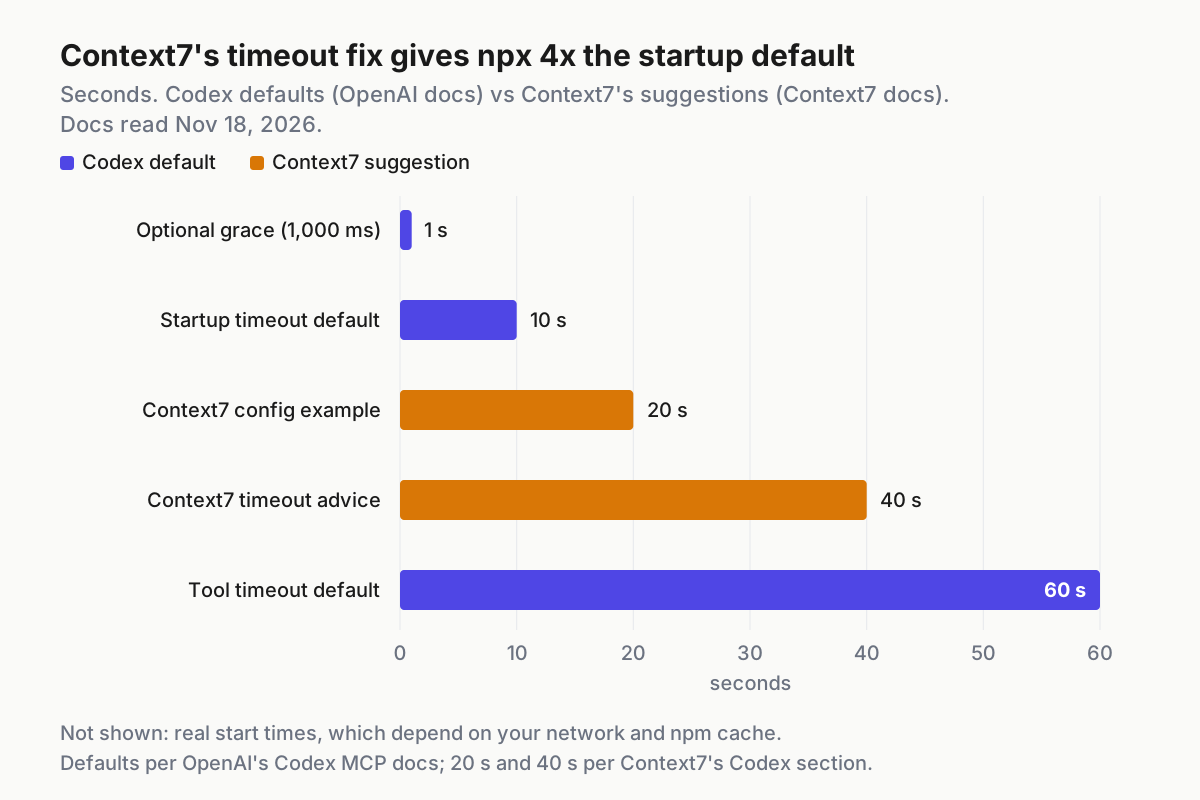
The chart puts the documented numbers side by side. The optional-server grace is 1 second, the startup default is 10, Context7’s two suggestions are 20 and 40, and the tool-call default is 60. The gap between 10 and 40 explains most “Context7 doesn’t work in Codex” reports. Raise the timeout on the slow server, not on every table, so a hung server elsewhere still fails fast.
The managed allowlist row needs more context. In requirements.toml, administrators can list mcp_servers.<id>.identity rules with an exact command or url. The reference says any configured server not in the allowlist, or with a mismatched identity, is disabled. If your table looks right and the server never starts on a company machine, ask before you edit anything.
Roll back one server or the whole file
Rollback should be boring, so rehearse it once while nothing is broken.
- Pause one server. Set
enabled = falsein its table and start a new session. OpenAI’s docs describe this as disabling a server without deleting it, so its timeouts, filters and comments stay in place. - Remove one server. Delete its
[mcp_servers.<name>]table and any subtables, such as[mcp_servers.<name>.tools.<tool>]or[mcp_servers.<name>.oauth]. Ifcodex mcp --helpon your build lists a removal subcommand, you can use that instead. This guide doesn’t depend on it. - Restore the whole file. Run
cp ~/.codex/config.toml.bak ~/.codex/config.toml, then runcodex mcp listto confirm you’re back to the previous set of servers. - Revoke what you issued. Delete or rotate the GitHub token in your GitHub account settings and unset the variable. GitHub’s guide recommends rotating tokens periodically and removing unused ones. For OAuth servers, the release notes mention MCP logout, but the MCP page doesn’t show its syntax, so look for it in
codex mcp --help. - Check that every client sees the rollback. The CLI, IDE extension and desktop app share this configuration. Open a new session in the client you use most and run
/mcpor its MCP panel.
OpenAI’s requirements documentation mentions a --config override flag. The pages selected for this guide don’t show its syntax for MCP keys, so this procedure doesn’t depend on a one-run override. enabled = false plus the backup covers the same need.
If you run several agents side by side, keep the backup next to the record of which server set each agent was using. The multi-agent command center guide explains why that record matters once more than one client shares a machine.
Untrusted repositories and project MCP servers
A project .codex/config.toml can name a command. When Codex loads that table, it starts the command on your machine. That’s why the trust gate exists, and why it’s worth treating the gate as a deliberate decision.
- [ ] Leave unfamiliar repos untrusted. Clones you’re reviewing, forks from strangers and anything downloaded as an archive stay at
trust_level = "untrusted"until you’ve read the.codex/directory. - [ ] Read the project tables before trusting. Look at
command,args,urland anyenv_varsentries. A forwarded variable such asGITHUB_PAT_TOKENin a project file is a request for your credential. - [ ] Keep Codex current. On X, developer Om Londhe reported on November 15, 2026 that on 0.168,
codex exec --sandbox workspace-writestarted an untrusted repo’s MCP server “anyway, outside the sandbox,” and that 0.169 fixes it, with a caveat about--trust. That’s one user’s report and hasn’t been confirmed by the OpenAI pages cited here. Still, it’s a cheap reason to run a current build and to avoid running headless commands in repos you haven’t read. - [ ] Prefer user-level tables for anything holding a credential. Project files should name servers the team agrees on, not tokens.
- [ ] For teams, use the managed allowlist. An
mcp_serversidentity allowlist inrequirements.tomlstops an unexpected project server from enabling itself, however the trust prompt is answered. - [ ] Inventory what’s configured. Run
codex mcp listacross your machines on a schedule, and compare the result with what you expect. The same habit applies to other gateways and clients.
The same steps carry over to other servers. Atlassian, Linear and Docker-hosted servers follow the same add, verify, gate writes and roll back pattern. The Linear MCP setup guide shows it with an OAuth-first service. The Docker MCP Gateway guide puts many servers behind one containerized entry, which is a reasonable next step once a single config.toml holds more than a handful of tables. If your Codex setup also uses skills that depend on MCP tools, the Codex skills guide covers how those dependencies are declared.
The outcome to check before you close the terminal: both servers listed, both visible in /mcp, one completed call on each, a GitHub write that asked for approval, a backup you’ve restored once, and no secret anywhere in config.toml.
Sources
- OpenAI, Codex release 0.170.0 on GitHub, published November 18, 2026.
- OpenAI, Model Context Protocol in Codex, read November 18, 2026.
- OpenAI, Codex configuration reference, read November 18, 2026.
- GitHub, Install GitHub MCP Server in OpenAI Codex, read November 18, 2026.
- Upstash, Context7 MCP clients documentation, read November 18, 2026.
- Upstash, Context7 repository and README, read November 18, 2026.
- Om Londhe on X, report on an untrusted repo’s MCP server starting under codex exec, posted November 15, 2026.