Codex Approval Modes and Sandbox Explained: Auto vs --yolo, workspace-write, --add-dir and When danger-full-access Is Justified
Codex approval modes and sandbox settings explained: set a workspace-write default, widen access with --add-dir, verify with /status and keep --yolo in a VM.

Go deeper. Build your own.
You read that --full-auto makes Codex stop asking, pasted it into a script, and the script broke. Or someone told you to just run --yolo. Both shortcuts skip what matters: Codex approval modes are only half of its permission system, and the other half decides what the agent can actually touch. This guide gets Codex CLI to the setup most developers want. It edits and tests inside your repo without prompts, asks before it writes anywhere else or reaches the network, and widens access one folder at a time instead of switching the sandbox off.
This guide was prompted by a post on X by developer Rohan Bhanot on Oct 26, 2026 recommending codex --sandbox workspace-write --ask-for-approval on-request, --add-dir when the agent needs another folder, and keeping --dangerously-bypass-approvals-and-sandbox inside a throwaway VM. That advice lines up with OpenAI’s documentation. The rest of this guide explains why it works, turns it into a config file, and walks a real task through it with the prompts you should expect.
Who this is for. You use Codex CLI, possibly alongside the IDE extension, which follows the same sandbox rules. You want fewer approval prompts without handing an agent your whole machine, and you may have scripts that still pass the removed --full-auto flag or a config that still sets approval_policy = "untrusted". When you finish you will have a ~/.codex/config.toml default, a per-task override pattern, a way to confirm the active policy with /status, a safe unattended command and a rollback path.
Every flag, key and behavior below comes from OpenAI’s Codex documentation as read on Oct 29, 2026. Commands are documented syntax. The expected observations describe documented behavior; they are not output captured from a test machine, and your CLI version can differ.
How the two permission layers split the work
OpenAI’s Agent approvals & security page describes two layers that work together. The sandbox mode is what Codex can do technically when it runs model-generated commands: where it can write and whether it can reach the network. The approval policy is when Codex must stop and ask you before acting, for example before leaving the sandbox or using the network.
The Sandbox concepts page adds the detail that makes this matter: the sandbox applies to spawned commands, not only to Codex’s own file edits. When the agent runs git, a package manager or a test runner, those processes inherit the same boundary. macOS enforces it with Seatbelt, Linux and WSL2 with bwrap plus seccomp, and native Windows with its own sandbox.
Three consequences follow, and most “full auto” confusion comes from missing one of them:
--ask-for-approval neverremoves prompts, not walls. OpenAI saysneverworks with every sandbox mode and that Codex makes a best effort within the constraints you set. A command the sandbox blocks stays blocked; you are just not asked about it.- Widening the sandbox is a different move from silencing approvals. If a task needs one more folder, add that folder as a writable root.
danger-full-accessremoves the filesystem and network boundaries altogether. - The workspace is bigger than your current directory and much smaller than your home folder. It includes the current directory and temporary directories such as
/tmp, and/statusshows which directories are in it.
Some paths stay protected even inside writable roots. Under workspace-write, <writable_root>/.git is read-only, as are .agents, .codex and .aws directories when they exist. When .git is a pointer file, as in a linked Git worktree, the resolved Git directory is protected too. That is why a commit from inside the sandbox needs your approval, and why it is usually simpler to commit from your own shell.
If you also run Claude Code and want one vocabulary for both tools, Claude Code permission modes, Codex sandboxes, one house dialect maps the two systems onto a shared policy, and Claude Code Sandbox Setup covers Anthropic’s equivalent. This guide stays on Codex.
Read the sandbox and approval matrix
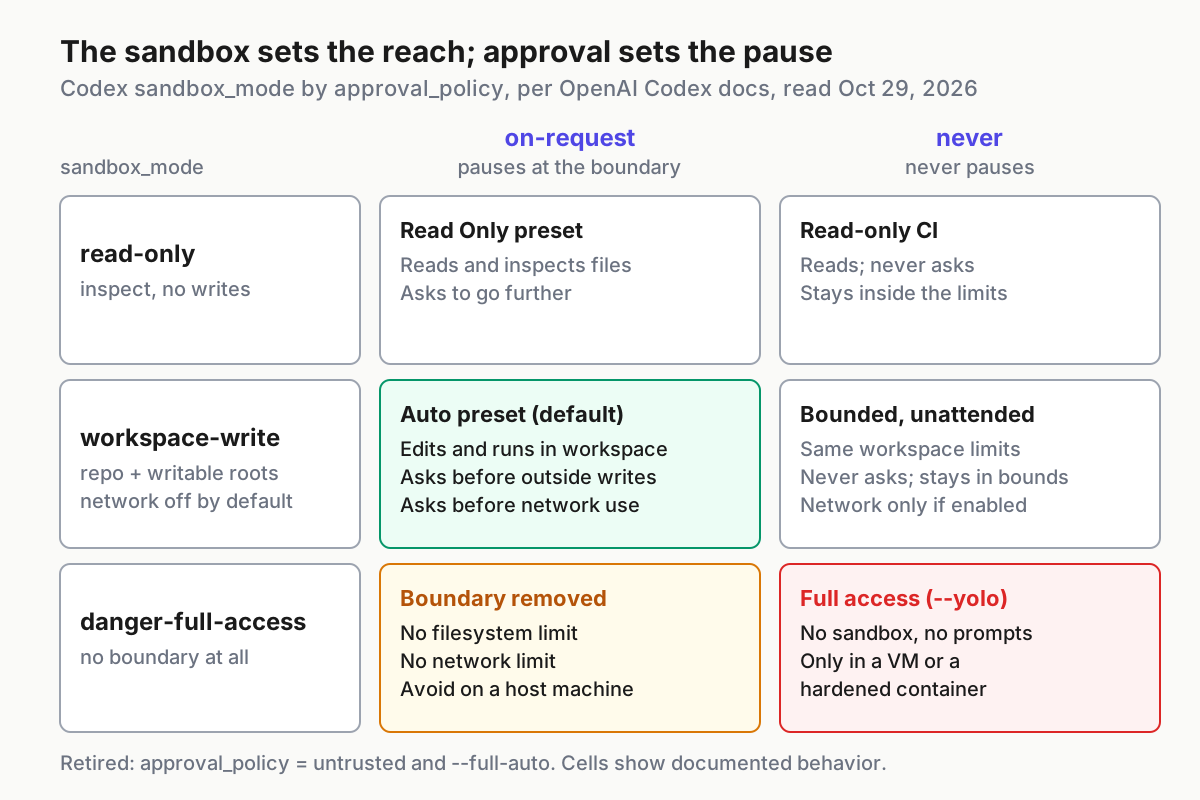
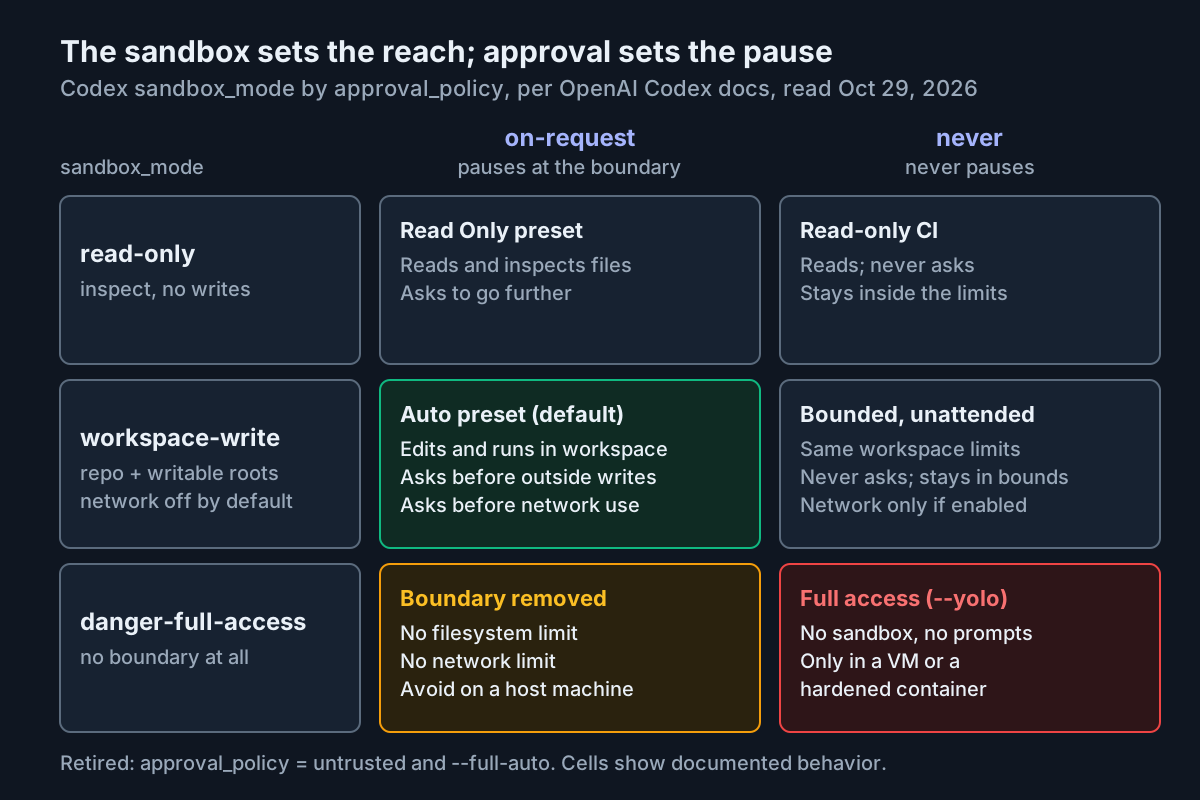
Here are the six combinations of the three sandbox modes and the two supported approval values, filled in from the approvals page and the Sandbox page. Pauses means Codex stops and waits for you.
| Sandbox mode | Approval | Reads | Writes | Network for commands | Pauses when | Use it for |
|---|---|---|---|---|---|---|
read-only |
on-request |
Yes | No | No | An action needs more than the sandbox allows | Reading unfamiliar code, planning and review (the Read Only preset) |
read-only |
never |
Yes | No | No | Never | Read-only CI jobs such as summaries and reports |
workspace-write |
on-request |
Yes | Workspace and writable roots | Off unless network_access = true |
Writes outside the workspace, network commands | Daily interactive work (the Auto preset) |
workspace-write |
never |
Yes | Workspace and writable roots | Off unless network_access = true |
Never; blocked actions stay blocked | Bounded scripted work you review afterward |
danger-full-access |
on-request |
Everything | Everything | Yes | No sandbox boundary is left to cross | Rarely worth it on a host; prefer a narrower fix |
danger-full-access |
never |
Everything | Everything | Yes | Never | Full access, only inside an externally hardened VM or container |
Two notes on the matrix. The docs describe read-only slightly differently in two places: the combinations table says Codex can read files and run commands within the read-only sandbox, while the Sandbox concepts page says the agent can inspect files but can’t edit files or run commands without approval. Treat it as look-but-don’t-touch and expect a prompt for anything more. And never is not the same as full access. OpenAI defines full access as sandbox_mode = "danger-full-access" together with approval_policy = "never".
Decode full auto, yolo and the other names you will find
Search results and old scripts use names that no longer line up with current Codex. This decoder maps each to what it does today, per the non-interactive mode page, the Configuration Reference and the approvals page.
| Term you saw | What it means today | Current equivalent |
|---|---|---|
| Auto (preset) | Workspace writes and routine commands without prompts; asks for outside edits and network | --sandbox workspace-write --ask-for-approval on-request, the recommendation for version-controlled folders |
| Read Only (preset) | Look, don’t change | --sandbox read-only --ask-for-approval on-request |
Approve for me, --approve-for-me |
Approval requests go to a reviewer agent instead of you; the sandbox boundary does not change | approvals_reviewer = "auto_review" with on-request; in codex exec, --approve-for-me uses the workspace-write sandbox |
| Full access | No sandbox, no prompts | sandbox_mode = "danger-full-access" plus approval_policy = "never" |
--yolo |
Alias for --dangerously-bypass-approvals-and-sandbox |
Use only inside a dedicated sandbox VM or hardened container |
--full-auto |
No longer supported | --sandbox workspace-write, or --approve-for-me for automatic review |
approval_policy = "untrusted" |
Retired; can stop Codex from starting | Remove it; use read-only plus on-request, or a project trust_level = "untrusted" entry |
on-failure |
Deprecated | on-request for interactive runs, never for non-interactive runs |
Approve for me is the one most often misread as a renamed --full-auto. It does not widen anything. The reviewer only sees actions that already need approval, such as sandbox escalations, blocked network requests and side-effecting tool calls; work inside the sandbox continues without review. Per the approvals page, the reviewer checks for data exfiltration, credential probing, persistent security weakening and destructive actions, denies critical-risk actions, and fails closed when prompt building, the review session or parsing fails. It also uses extra model calls, which add to your Codex usage. In the terminal UI, /approve retries one recent action the reviewer denied.
The retired untrusted value deserves its own note. If you relied on it to make Codex ask before most commands, OpenAI’s migration path is to omit an explicit approval_policy and add a project entry with trust_level = "untrusted" to your user-level config. Commands then require approval unless an execution-policy rule allows them, and project-local configuration is disabled for that folder. Setting on-request explicitly overrides the project-derived policy.
Check prerequisites and back up your config
Do these before changing anything. The backup is your rollback.
- [ ] Codex CLI is installed and signed in.
codex login statusexits with 0 when credentials are present. - [ ] You have a Git test repository on a feature branch with a clean
git status. OpenAI recommends a clean tree before delegating so Codex patches are easy to isolate and revert. - [ ] On Linux or WSL2,
bubblewrapis installed:sudo apt install bubblewrapon Ubuntu or Debian,sudo dnf install bubblewrapon Fedora. Codex shows a startup warning whenbwrapis missing or cannot create the user namespace it needs. WSL1 is no longer supported. - [ ] You can edit
~/.codex/config.toml, and you have copied it:cp ~/.codex/config.toml ~/.codex/config.toml.bak. Skip the copy if the file does not exist yet. - [ ] Optional, for the worked example: a second folder the agent must write to, such as a shared library checked out next to your repo.
- [ ] You have searched scripts and config for retired values, for example
grep -rnE -- '--full-auto|untrusted' ~/.codex ~/bin. Adjust the paths to wherever you keep scripts and CI files. Atrust_level = "untrusted"line is valid and can stay; onlyapproval_policy = "untrusted"must go.
Set a deliberate default in ~/.codex/config.toml
At launch, Codex detects whether the folder is version-controlled and recommends Auto for Git folders and read-only otherwise, and some setups start read-only until you trust the directory. Writing the default yourself removes the guesswork. The keys and types below are from the Configuration Reference.
#:schema https://developers.openai.com/codex/config-schema.json

# Layer 1: what spawned commands can reach
sandbox_mode = "workspace-write"

# Layer 2: when Codex stops and asks
approval_policy = "on-request"

# Who answers approval prompts: "user" (you) or "auto_review"
approvals_reviewer = "user"

# Optional hardening from OpenAI's example config
allow_login_shell = false

[sandbox_workspace_write]
# Commands get no network; approve per command or override per run
network_access = false
# Extra folders Codex may write to in every session. Keep this empty.
writable_roots = []
Why each line is there:
sandbox_mode = "workspace-write"lets the agent read, edit within the workspace and run routine local commands inside that boundary. The Sandbox page calls it the default low-friction mode for local work.approval_policy = "on-request"keeps Codex working inside the sandbox and makes it ask when it needs to go beyond. That pairing is the Auto preset.approvals_reviewer = "user"is the default. Switch toauto_reviewonly after you have watched a week of prompts and know what kind of requests your work generates.allow_login_shell = falseappears in OpenAI’s sample config as optional hardening: shell tools can no longer request login-shell semantics.network_access = falserestates the default so that anyone reading the file sees the decision. A latertrueis then a visible change, not an accident.writable_roots = []stays empty in the global file because a persistent root applies to every repo you open. Add folders per task with--add-dirinstead.
How the layers stack: the CLI inherits defaults from ~/.codex/config.toml, and anything you pass on the command line, including -c key=value overrides, wins for that invocation. A project can carry its own .codex/config.toml, but Codex loads it only after you trust the project. Saved presets live next to the main file as profile files and are selected with --profile:
# ~/.codex/deps.config.toml  (use with: codex --profile deps)
approval_policy = "on-request"
sandbox_mode    = "workspace-write"

[sandbox_workspace_write]
network_access = true
A profile like this gives you a named, reviewable way to say this session installs dependencies, instead of editing the global file and forgetting to change it back. Permission profiles, a newer beta mechanism with built-ins such as :read-only and :workspace, express the same boundaries by name. If you adopt them with default_permissions, do not combine that key with sandbox_mode or [sandbox_workspace_write] in the same config.
Check the result: open your test repo, run codex, and type /status. You should see approval policy on-request and writable roots containing the repo and temporary directories. Anything else means a flag, profile, project file or managed requirement is winning; /debug-config shows which.
Worked example: edit a sibling library and install one package
The setup, illustrative. ~/src/invoice-api is a Node service that imports helpers from ~/src/shared-lib, a separate Git checkout next to it. Invoices due on the last day of a month show the wrong date. The faulty parser lives in shared-lib/src/dates.ts, the fix needs a regression test, and the test wants a date library added as a dev dependency. The task touches two folders and needs the network once.
The tempting move is codex --yolo, because it makes all three needs disappear along with every safeguard. Here is the narrow version.
-
Confirm both trees are clean.
cd ~/src/invoice-api
git status --short
git -C ~/src/shared-lib status --short
Expected: both commands print nothing. If not, commit or stash first so Codex’s changes are the only changes.
-
Start Codex with the Auto preset written out plus one extra writable root.
codex --sandbox workspace-write --ask-for-approval on-request --add-dir ~/src/shared-libworkspace-writelets Codex edit and run routine commands ininvoice-api.on-requestmakes it stop at the boundary.--add-dirextends the boundary to exactly one more folder for this session; your config file stays untouched. OpenAI’s CLI reference says to prefer--add-dirover forcing--sandbox danger-full-accesswhen Codex needs write access to more directories. -
Type
/status. Expected: approval policyon-requestand writable roots listinginvoice-apiandshared-libalong with temporary directories. Ifshared-libis missing, type/quit, fix the path and relaunch; otherwise every edit there turns into a prompt. -
Give the task: Fix the off-by-one due date for invoices on the last day of a month. The parser is in …/shared-lib/src/dates.ts. Add a regression test in shared-lib, add date-fns as a dev dependency there, then run the tests in both repos. Do not commit.
-
Watch for the documented behavior at each step. Codex may take the steps in a different order.
Codex action Expected with this launch Reason Edit ../shared-lib/src/dates.tsRuns without a prompt shared-libis a writable root via--add-dirEdit tests in invoice-apiRuns without a prompt Inside the workspace Run npm testin both reposRuns without a prompt if the tests need no network Local commands inherit the same boundary npm install --save-dev date-fnsinshared-libApproval request Network is off in workspace-writegit commitApproval request or a write failure .gitis read-only inside writable rootsWrite to ~/.npmrcor another checkoutApproval request Outside the workspace and writable roots -
When the install prompt appears, read the exact command, then approve once. If the prompt offers a choice between approving once and approving for the session, the Sandbox page advises the narrowest scope that lets the task continue.
-
If you know before starting that the session needs the network, use a one-run override instead of a prompt.
codex --sandbox workspace-write --ask-for-approval on-request --add-dir ~/src/shared-lib -c 'sandbox_workspace_write.network_access=true'This gives every command in the session unrestricted direct outbound access. To narrow it, also turn on the experimental network proxy with a domain rule:
codex --sandbox workspace-write --ask-for-approval on-request --add-dir ~/src/shared-lib -c 'features.network_proxy.enabled=true' -c 'features.network_proxy.domains={ "registry.npmjs.org" = "allow" }' -c 'sandbox_workspace_write.network_access=true'The registry host is illustrative; confirm which hosts your package manager contacts. The proxy changes how enabled network access is enforced but does not grant it, and it does not filter web search, MCP servers or app connectors.
-
Review and commit yourself. Type
/diffto see staged, unstaged and untracked changes, then commit in each repo from your own terminal. The.gitprotection stays in place, which is the point. -
Run
git status --shortin both repos again. Only the files you expected should appear.
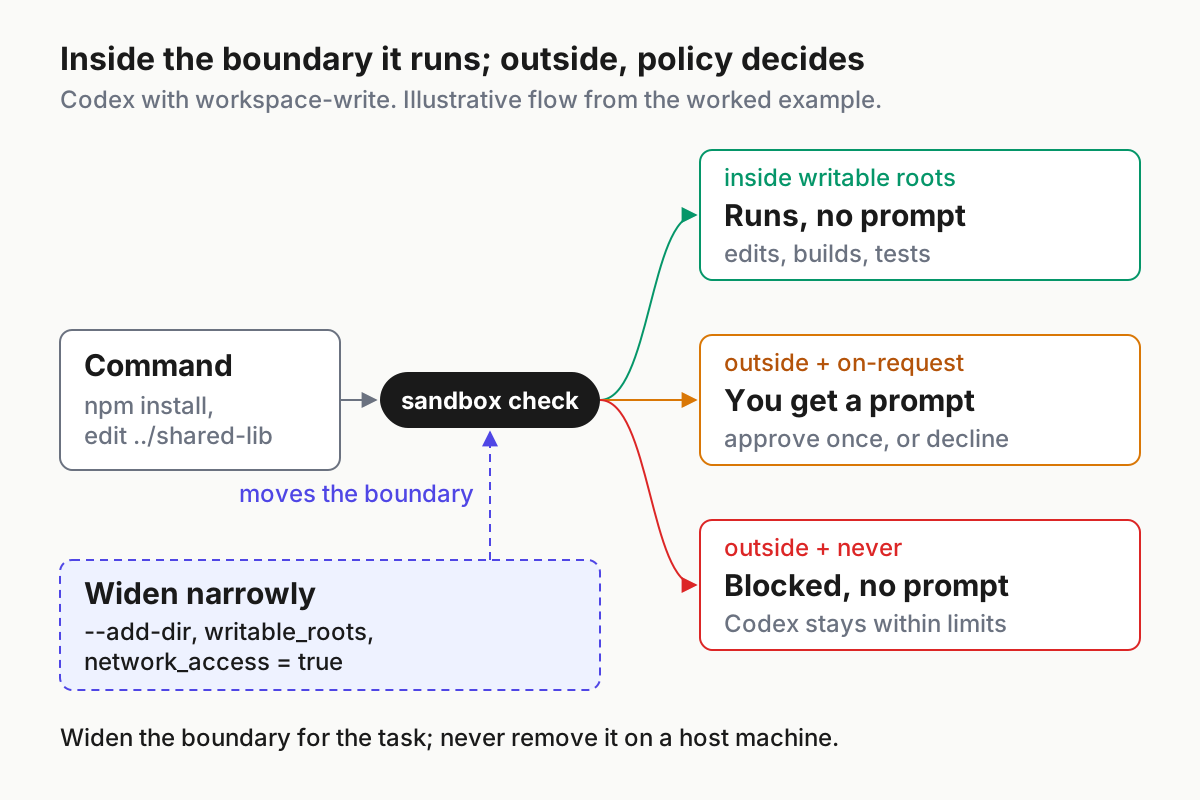
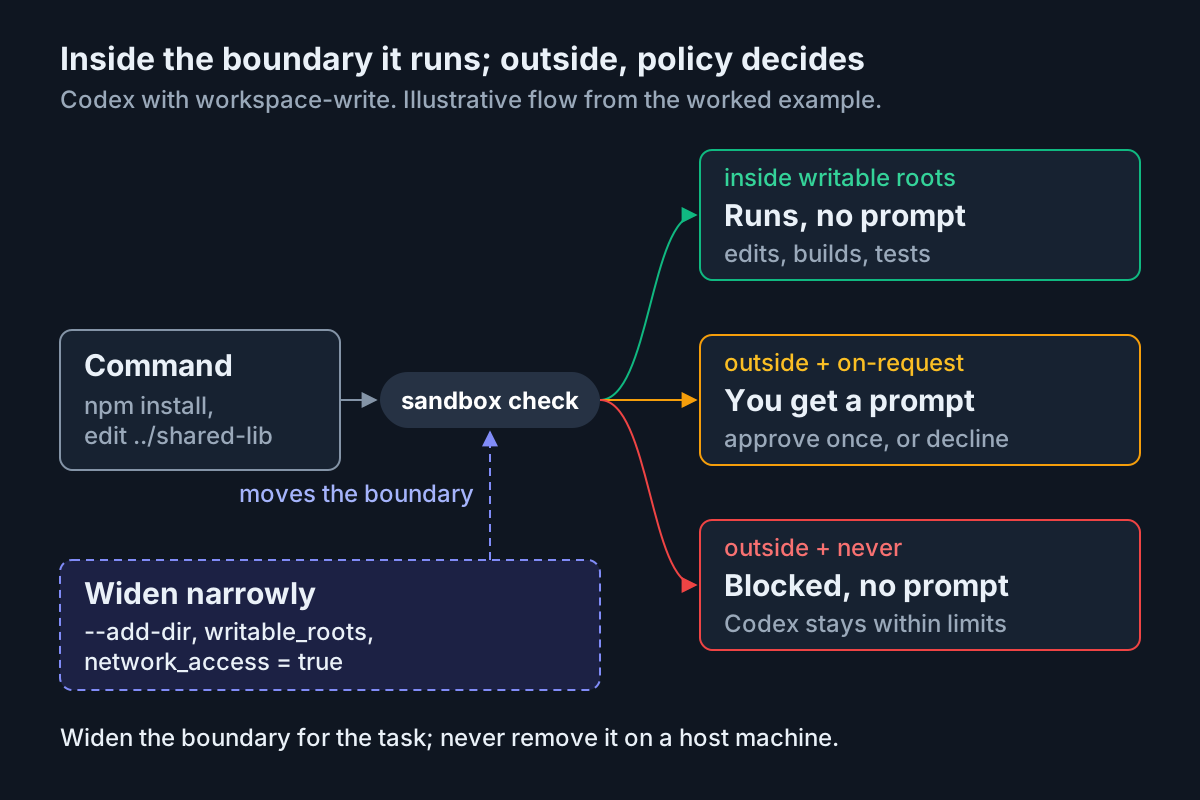
The failure you will see if you skip step 2’s extra root. The first edit to shared-lib raises an approval request for an edit outside the workspace, and so does every edit after it. Approving each one works, but it trains you to click yes without reading, which is how approval queues turn into rubber stamps; human-in-the-loop queues that don’t become rubber stamps covers that failure. Decline, quit and relaunch with --add-dir.
What you did not need at any point: danger-full-access, --yolo or a permanent change to writable_roots.
Switch modes mid-session with /permissions and /status
The slash-command reference documents two commands for changing and checking the policy without restarting. Use them as a pair: one changes the mode, the other proves the change.
- Open an unfamiliar repo in Read Only:
codex --sandbox read-only --ask-for-approval on-request. - Ask questions and get a plan. Nothing changes on disk.
- Type
/permissionsand choose Auto. Expected: Codex announces the updated policy, and future actions follow it until you change it again. If named permission profiles are active, the picker also lists them with their descriptions. - Type
/status. Expected: the active model, approval policy, writable roots and token usage. Trust this output over your memory of which flags you typed. - Before reviewing a large diff or moving to a sensitive repo, return with
/permissionsand choose Read Only. - If
/statusdisagrees with your config file, type/debug-config. It prints config layers from lowest to highest precedence plus requirements such asallowed_approval_policiesandallowed_sandbox_modes.
While Codex is working you can type a slash command and press Tab to queue it for the next turn. In the IDE extension the same choice lives in the permissions control beneath the composer, which can show Ask for approval, Approve for me, Full access and named profiles. On Windows, setting "chatgpt.runCodexInWindowsSubsystemForLinux": true in VS Code settings keeps the extension inside WSL2 so it inherits Linux sandbox semantics.
Run unattended with codex exec instead of full access
Scripts and CI jobs use codex exec, which the non-interactive page says runs in a read-only sandbox by default. That default is safe for reports and reviews. For edits, raise it one step, not three.
# Read-only by default: summaries, reviews, reports
codex exec "summarize the open TODOs in src/ and list the five riskiest areas"

# Edits allowed inside the repo; command network stays off
codex exec --sandbox workspace-write --json -o last-message.md "run the unit tests, fix the failing date parser test, then stop"

# Same workspace-write boundary, approval requests routed to automatic review
codex exec --approve-for-me "fix the lint errors in src/ without changing behavior"

# Ignore ~/.codex/config.toml so the run depends only on what the command states
codex exec --ignore-user-config --sandbox workspace-write "regenerate the API client from openapi.yaml"
--json streams newline-delimited events to stdout, and -o writes the final message to a file while still printing it; the CLI reference recommends pairing the two in CI. codex exec also refuses to run outside a Git repository unless you pass --skip-git-repo-check, a check worth keeping. If a job truly needs the network, add -c 'sandbox_workspace_write.network_access=true' to that job only and write down why.
A checklist for each unattended job:
- [ ] The command line states
--sandboxexplicitly, even when it matches your config. - [ ] Network is off unless the job’s definition says it needs it.
- [ ] The run starts on a branch with a clean tree, so the diff is the job’s output.
- [ ] Output is captured with
--jsonand-ofor later review. - [ ] A human reads the diff before it merges.
- [ ] No
--yoloordanger-full-accesson a machine that holds your credentials. - [ ] In GitHub Actions, the job uses OpenAI’s Codex GitHub Action rather than a job-level
OPENAI_API_KEY, which build scripts and tests in the same job could read.
For how unattended runs differ from interactive ones as a matter of trust, see codex exec headless modes.
Decide when danger-full-access or --yolo is justified
Full access has legitimate uses. They all share one property: something other than Codex provides the isolation. Use this table before reaching for it.
| Situation | Use this | Why |
|---|---|---|
| The task needs to write one more folder | --add-dir <path> or a writable_roots entry |
The CLI reference says to prefer --add-dir over forcing danger-full-access |
| The task needs the network for an install | Approve that command once, or set network_access = true for that run |
A narrow network grant is not full sandbox escalation |
| One command must run outside the sandbox every time | An execpolicy rule that allows, prompts for or forbids that command prefix | The Sandbox page calls rules a better fit than broadly expanding access |
Linux container where bwrap cannot build its sandbox, and the container is your security boundary |
--sandbox danger-full-access inside the container |
OpenAI documents this so Codex does not try to create a second sandbox layer |
| A throwaway VM with no secrets and nothing you would mind losing | --yolo is defensible |
The CLI reference reserves it for a dedicated sandbox VM |
| Your laptop or workstation with SSH keys, cloud credentials and other repos | Never full access | Nothing stands between a bad command and everything on the machine |
Two cautions from the approvals page. First, containers are not perfect: if you run full access inside a dev container, a malicious project can exfiltrate anything available inside that container, including Codex credentials, so OpenAI limits the pattern to trusted repositories. Second, under --yolo or another full-access setting, web search defaults to live results instead of the cached index, which widens exposure to prompt injection from arbitrary pages. Set web_search = "cached" explicitly if you want the cache back.
Sandboxes themselves can fail, which is another reason to keep one even when you trust the agent; The Sandbox Is a Suggestion covers escapes and compensating controls. If you want a disposable environment that is not your laptop, Docker Sandboxes for coding agents walks through one.
Pin the limits for a team with managed configuration
Personal config is a preference; a team that must guarantee nobody runs --yolo on a laptop needs enforcement. OpenAI’s Managed configuration page documents admin requirements that users cannot override. This example blocks --ask-for-approval never and --sandbox danger-full-access, including --yolo:
# /etc/codex/requirements.toml on Linux and macOS
allowed_approval_policies = ["untrusted", "on-request"]
allowed_sandbox_modes = ["read-only", "workspace-write"]
The untrusted entry permits the stricter policy Codex derives from a project’s trust_level = "untrusted"; it does not make approval_policy = "untrusted" valid again. When a user’s config or flags conflict with a requirement, the client falls back to a compatible value and notifies the user.
For Codex 0.138.0 or later, OpenAI prefers permission profiles:
default_permissions = ":workspace"

[allowed_permission_profiles]
":read-only" = true
":workspace" = true
# ":danger-full-access" is omitted, so it is denied.
Roll it out in this order:
- Choose the allowed values with the people who will live with them, and write down the reason for each restriction.
- Deliver the requirements through Agent security in the Admin Console, a system
requirements.toml, or macOS MDM, depending on how your clients are managed. - Use
allowed_permission_profilesonly after every managed client runs 0.138.0 or later; earlier versions ignore it. Keepallowed_sandbox_modesfor deployments that still configuresandbox_mode. - Ship a conservative managed default alongside the requirement, such as
sandbox_mode = "workspace-write",approval_policy = "on-request"andnetwork_access = false. - Test on one machine: launch with
--yolo, confirm the fallback notice, then check/debug-configfor the requirement source.
The broader argument for treating permission modes as policy rather than personal taste is in Claude Code permission modes are fleet policy, and managed permissions users can’t override shows how to test that the enforcement actually holds across tools.
Confirm the setup with four probes
Run these in your test repo after any change to config, profiles or managed requirements. Ask Codex to perform each action and decline the prompts it raises.
| Probe | How | Expected under Auto | A different result means |
|---|---|---|---|
| Active policy | Type /status |
Approval policy on-request; writable roots are the repo, temporary directories and any --add-dir folder |
A flag, profile, project config or managed requirement overrode your default; check /debug-config |
| In-workspace edit | Ask Codex to add a line to README.md |
Runs without a prompt | You are in Read Only, or Codex launched from a different directory |
| Out-of-workspace write | Ask Codex to create ../codex-probe.txt |
An approval request for an edit outside the workspace | No prompt and the file exists: full access is on, or the parent folder is a writable root |
| Network call | Ask Codex to run curl -I https://example.com |
An approval request for network access | It ran without asking: network_access = true is set in some layer, or the sandbox is off |
If you created the probe file by accident, delete it and find out why before you continue. The point of the probes is that a wrong result is visible today rather than discovered after an agent has written somewhere it should not.
Troubleshoot Codex sandbox and approval problems
| Symptom | Likely cause | Fix | What you should see after |
|---|---|---|---|
A script that used to work now fails on --full-auto |
The flag is no longer supported | Replace it with --sandbox workspace-write, or --approve-for-me for automatic review |
The script runs with the workspace-write boundary |
| Codex fails to start after an upgrade | approval_policy = "untrusted" in user, project or profile config, a startup script or managed defaults |
Remove it; use read-only with on-request, or a project trust_level = "untrusted" entry with no explicit approval_policy |
Codex starts; /status shows the policy you chose |
An old config sets approval_policy = "on-failure" |
Deprecated value | Use on-request interactively, never for non-interactive runs |
The config matches current values |
npm install, pip install or git push stops for approval or fails |
Command network is off in workspace-write |
Approve that command, or rerun with -c 'sandbox_workspace_write.network_access=true' or a profile that sets it |
The install reaches the registry; other sessions stay offline |
| Edits to a sibling folder or another checkout raise prompts | The folder is outside the workspace and writable roots | Relaunch with --add-dir <path> or add it to writable_roots |
/status lists the folder; edits there run without prompts |
git commit inside the session prompts or fails, including in a linked worktree |
.git, and a worktree’s resolved Git directory, are read-only by design |
Review with /diff, then commit from your own shell |
Commits land and the protection stays |
Linux: startup warning about bwrap or user namespaces |
bubblewrap missing, or AppArmor restricts unprivileged user namespaces, as on Ubuntu 24.04 |
Install bubblewrap; on Ubuntu 24.04 load the AppArmor profile shown below |
The warning is gone on the next launch |
| Linux in Docker: sandboxed commands fail | The container blocks namespaces, setuid bwrap or seccomp |
Grant the capabilities bwrap needs, or make the container the boundary and run danger-full-access inside it |
Commands run; isolation comes from the container |
You set never and work is still blocked |
never removes prompts, not the sandbox |
Widen the boundary for the specific folder or network need | The task proceeds without full access |
| A config value is silently replaced | A managed requirement disallows it and Codex fell back to a compatible value | Run /debug-config to find the layer and its owner |
You know which source won |
OpenAI’s Sandbox page gives these commands for the Ubuntu 24.04 AppArmor case:
sudo apt update
sudo apt install apparmor-profiles apparmor-utils
sudo install -m 0644 /usr/share/apparmor/extra-profiles/bwrap-userns-restrict /etc/apparmor.d/bwrap-userns-restrict
sudo apparmor_parser -r /etc/apparmor.d/bwrap-userns-restrict
To see what a single command does under the sandbox, the approvals page documents a helper: codex sandbox macos --log-denials <command> on macOS, codex sandbox linux <command> on Linux and codex sandbox windows <command> on Windows. If Codex will not start at all and the cause is not an approval value, OpenAI Codex startup and configuration diagnosis walks through the rest of the startup checks.
Roll back to the Auto preset
If a change made Codex too loose, too strict or confusing, return to a known state in this order.
- Remove per-task overrides from shell aliases and scripts:
--add-dir,-cnetwork settings and--profileselections you added for this guide. - Restore the backup:
cp ~/.codex/config.toml.bak ~/.codex/config.toml. If you keep the new file instead, make surewritable_rootsis empty andnetwork_accessisfalse. - In a running session, type
/permissionsand choose Auto. - Type
/statusand confirm approval policyon-requestwith only the repo and temporary directories as writable roots. - Rerun the four probes. The out-of-workspace write and the network call should each raise an approval request.
- If any value still differs, use
/debug-configbefore editing anything else, so you fix the layer that is actually winning.
Sources
- Rohan Bhanot on X: set these 2 codex flags before you let it work unattended (Oct 26, 2026)
- OpenAI: Agent approvals & security
- OpenAI: Sandbox
- OpenAI: Codex CLI reference
- OpenAI: Codex slash commands
- OpenAI: Configuration Reference
- OpenAI: Non-interactive mode
- OpenAI: Managed configuration