Vercel AI Gateway Now Shows Session Affinity and Per-Session Cost Tracking for Coding Agents
Vercel AI Gateway now groups requests into sessions with cache hit rate, per-session cost, and coding agent tracking. Session affinity keeps turns on one provider by default.
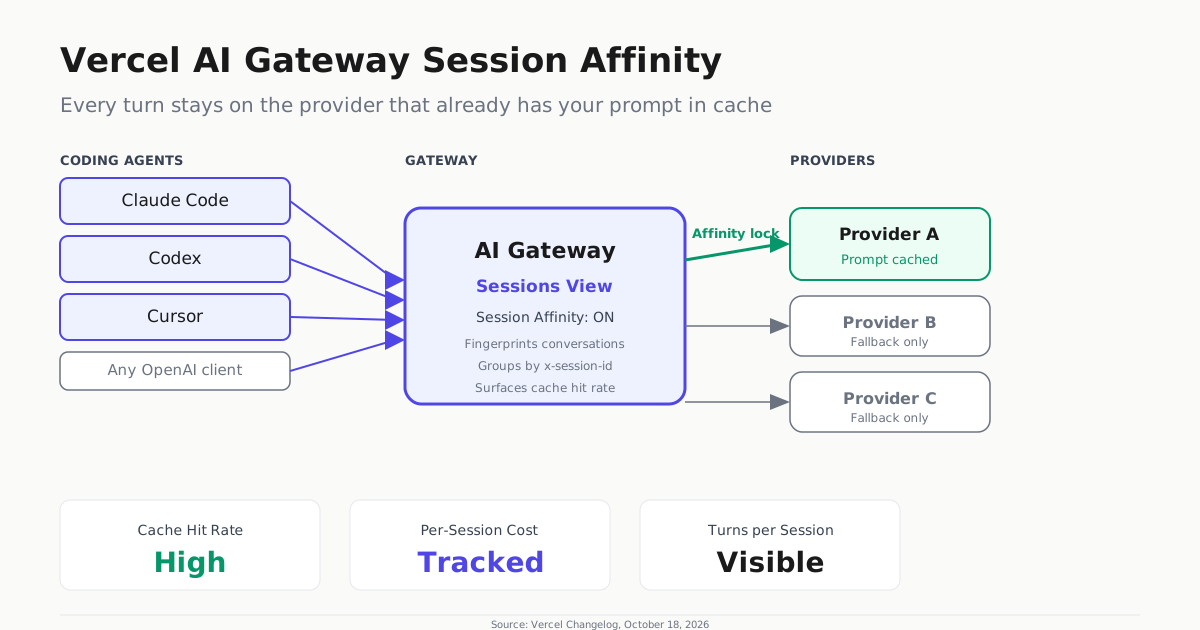
Vercel AI Gateway now groups every API request into sessions, showing operators exactly what each coding agent conversation cost, which models it used, and how much of its input was read from cache instead of recomputed. The October 18 update adds a Sessions view alongside the existing request logs, with session affinity turned on by default for text and chat requests.
Session affinity is the mechanism that makes the cost numbers work. When a coding agent sends a chain of turns — user prompt, tool call, response, follow-up — the gateway routes each subsequent turn to the same inference provider that handled the previous one. That provider already holds the conversation prefix in its prompt cache, so each turn reads more tokens from cache and bills fewer compute tokens. A session that stays on one provider saves real money across a long agent run, and the Sessions view now surfaces that cache hit rate as a first-class metric.
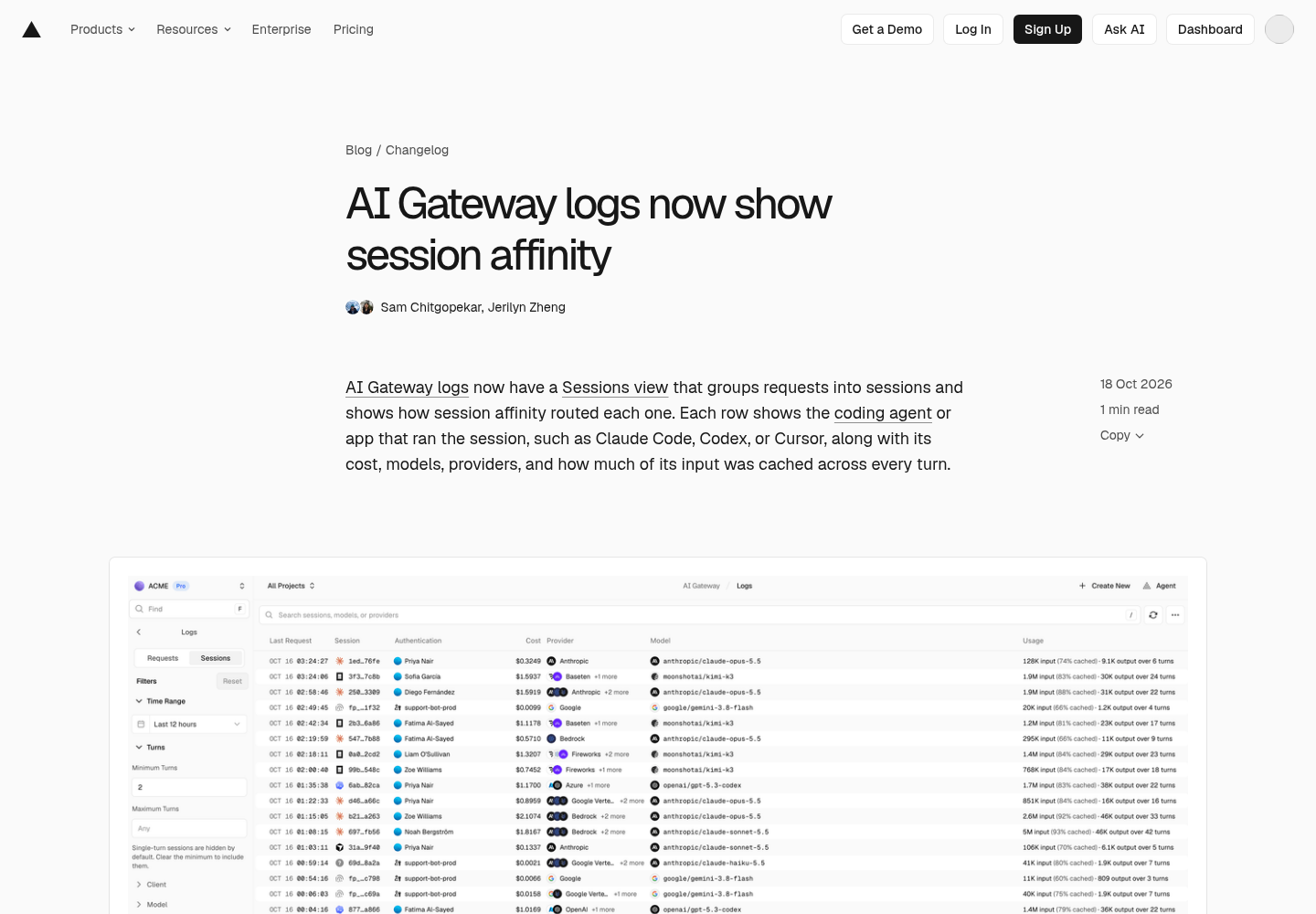
Each session row names the coding agent or application that ran the conversation — Claude Code, Codex, and Cursor appear in the changelog announcement — and surfaces the aggregate cost, the models and providers involved, and the overall cache hit rate. Opening a session reveals a turn-by-turn path: each request’s model, latency, and which provider served it, along with any earlier providers the session touched before affinity locked in. This is the observability layer that was missing: operators can now see which agent is spending the most, whether it is getting good cache reuse, and whether a fallback provider kicked in mid-conversation.
For teams that want explicit control over grouping, AI Gateway accepts a custom sessionId in providerOptions.gateway or an x-session-id header. Send the same value across every request in a conversation, and the gateway groups them under your identifier. This means a project that spawns three parallel Claude Code sessions, each hitting the gateway through different routes, can pass the same project-level session ID to get a unified cost view. The header approach also works regardless of which AI SDK or client library you use — it is an HTTP-header-level concern that any OpenAI-compatible or Anthropic Messages client can set.
A quick curl example makes the pattern concrete:
curl https://ai-gateway.vercel.sh/v1/chat/completions \
  -H "Authorization: Bearer $AI_GATEWAY_API_KEY" \
  -H "Content-Type: application/json" \
  -H "x-session-id: project-audit-q4" \
  -d '{"model": "openai/gpt-6-astra", "messages": [{"role": "user", "content": "Review this PR."}]}'
Requests without a session identifier are grouped by a fingerprint of the conversation’s opening and labeled as fingerprinted sessions — a sensible default that requires zero code changes for most setups.
The Sessions view also adds filter dimensions that the raw request log does not expose directly. Filter sessions by minimum turns (single-turn sessions are hidden by default, stripping out one-shot queries and leaving the agent conversations), client, model, provider, authentication method, or cost range. This turns the log from a firehose into a triage surface for operators managing fleets of coding agents.
The timing matters because AI Gateway has become a central control plane for coding-agent spend. Vercel’s own Gateway Index showed open-weight models hitting 71.5% of token volume in October, with coding agents driving much of that usage through the gateway. As outlined in the AI Gateway documentation, the Gateway already centralizes credentials, logs every request, and enforces budgets per team, project, or API key. Session affinity and per-session cost tracking layer agent-level accounting on top of that infrastructure.
There is also a subtle cost-control angle. When a session bounces between providers, each bounce incurs a cold-start cost because no provider has the full prompt in cache. Affinity eliminates that bounce by design. As an illustrative example, a coding agent might run dozens of turns in a single session — especially with tool calls and subagent fan-out — where the cumulative savings from avoided cold starts can be substantial. The Sessions view lets operators quantify that saving for the first time.
For debugging, the session detail view names every provider that served the session and marks earlier providers the session touched before affinity locked in. This is useful when a session starts on one provider, fails over to another, and then affinity keeps it on the second provider for the remaining turns. Operators can see the failover event right in the session path instead of reconstructing it from raw request logs.
The feature defaulting to on also matters operationally: teams do not need to configure anything to get the cache benefit. The gateway fingerprints each conversation and keeps turns on the same provider. The Sessions view then surfaces the evidence — the provider path for every turn, the overall cache hit rate, and the total session cost — so operators can verify that affinity is working rather than trusting it blindly. Sam Chitgopekar and Jerilyn Zheng authored the update, as recorded in the Vercel Changelog.