Codex Skills Setup: Write a SKILL.md, Put It Where Codex Finds It, Install Shared Skills and Keep the Skill List Cheap
Codex skills setup, step by step: write a spec-valid SKILL.md, place it where Codex finds it, test triggers, vet shared skills and cap the catalog budget.

![Diagram of Codex skill discovery: Repo, User, Admin and System scope cards feed a skill catalog of names, descriptions and paths, with a [[skills.config]] enabled = false card keeping a skill out; explicit $name or /skills use and implicit description matches lead to the full SKILL.md loading.](https://app-objects.automater.ai/newsroom/d4176a1d58aeee9912cb0bf439d8be3d1c93b7a5ba493a74dd7208806cdf3d19.svg)
![Diagram of Codex skill discovery: Repo, User, Admin and System scope cards feed a skill catalog of names, descriptions and paths, with a [[skills.config]] enabled = false card keeping a skill out; explicit $name or /skills use and implicit description matches lead to the full SKILL.md loading.](https://app-objects.automater.ai/newsroom/6ed76eccd68cd97f39d46b8aedc76330208088cb704cfc796e37d1593cc10ac1.svg)
Go deeper. Build your own.
You keep pasting the same block into Codex every time a release goes out: find the last tag, list what merged since, group it, draft the changelog section, and do not push anything. Codex skills exist for exactly that block. A skill is a folder holding a SKILL.md file plus optional scripts, references and assets, and Codex discovers it from fixed locations on disk instead of from your clipboard. This tutorial builds one real skill from an empty folder to a tested result: a repo-scoped release-notes skill that Codex runs when you name it and picks up on its own when a request matches. Along the way you install a shared skill after reading it, disable a skill without deleting it, size the skill catalog so a large library does not crowd every request, and load the same folder in Claude Code.
This is written for someone who uses Codex CLI or the IDE extension most days and keeps retyping the same multi-step instructions. If you are still deciding whether a rule belongs in a skill at all, Plugins, Gists, and Rotting AGENTS.md covers what should stay in AGENTS.md. Here the answer is already a skill, and the job is to make it work.
Skills got a public airing this week. On Oct 25, 2026, Oleg Berger posted on X that he spoke at OpenAI’s Community Dev Day about what skills in Codex are and how to work with them, and showed a skill he created and used at a hackathon. The post is the prompt for this guide; the procedure comes from OpenAI’s Build skills documentation, the Codex configuration reference, the open Agent Skills specification and Anthropic’s Claude Code skills documentation. Every command and config block below is documented syntax or ordinary shell and git. The expected observations describe what those documents say should happen; none of them is output captured for this article.
What you need before you start
- [ ] Codex CLI or the Codex IDE extension, updated and signed in. OpenAI lists standalone skills for the ChatGPT desktop app, Codex CLI and the IDE extension.
- [ ] A git repository with at least one tag and a few commits after it. The worked example calls the repo
acme-api, its last tagv2.2.0and the next releasev2.3.0. - [ ] Permission to edit
~/.codex/config.tomland to commit to the repository. - [ ]
bashandgiton your PATH, because the example skill ships one short shell script. - [ ] Optional: Claude Code, for the portability test near the end.
- [ ] Optional: the
skills-refvalidator from the Agent Skills project, for a frontmatter check before any live test.
When you finish, five things will be true. /skills lists release-notes with its description. $release-notes v2.3.0 drafts a changelog section and stops before writing it. A plainly worded release request triggers the skill, and two near-miss requests do not. A reviewed shared skill sits in your user folder next to a skill you disabled without deleting it. Claude Code runs the same folder as /release-notes.
Where Codex looks for SKILL.md folders
Codex does not read every skill on every request. The Build skills page describes progressive disclosure: Codex starts with a catalog holding each skill’s name, description and file path, and reads the full SKILL.md only when it decides to use that skill. Scripts, references and assets come in later still, when the instructions call for them. That split is why a skill’s location and the wording of its description matter more than the length of its body.
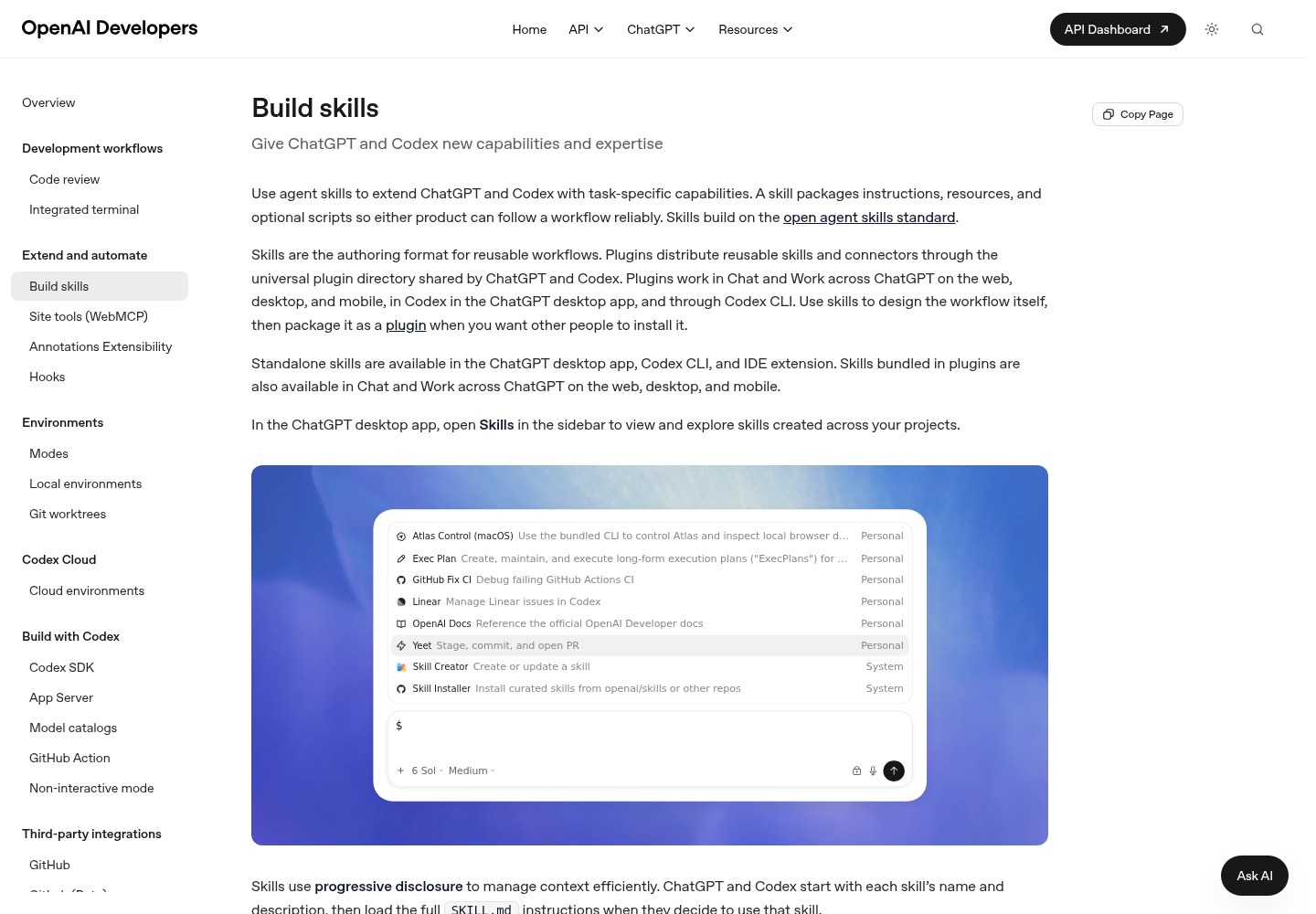
For local discovery the documentation names repository, user, admin and system locations. Inside a repository, Codex scans .agents/skills in every directory from where you launched it up to the repository root. Here is that map filled in for the worked example, using only the paths on the Build skills page:
| Scope | Path | Use it for | In this guide |
|---|---|---|---|
| REPO | $CWD/.agents/skills |
Skills for one service or module, seen when you launch Codex in that folder | Not used |
| REPO | $CWD/../.agents/skills |
Skills for a shared area of a nested repository | Not used |
| REPO | $REPO_ROOT/.agents/skills |
Team skills every subfolder should see; commit them with the code | release-notes |
| USER | $HOME/.agents/skills |
Your own skills, available in any repository | A reviewed gh-fix-ci copy and a disabled jira-triage |
| ADMIN | /etc/codex/skills |
Machine or container defaults, SDK scripts and automation | Not used |
| SYSTEM | Bundled with Codex by OpenAI | Broad skills such as the skill creator and plan skills | $skill-creator, if you want a guided start |
Four rules sit under that table:
- No scope wins. If two skills share a
name, Codex does not merge them, and both can appear in skill selectors. Keep names unique across scopes instead of hoping for precedence. - Symlinks are followed. Codex follows a symlinked skill folder to its target, which the Claude Code section uses to keep one copy of the files.
- The launch directory matters. Because the scan runs upward from the working directory, a skill in
services/billing/.agents/skillsis invisible when you launch at the repository root. That keeps service-specific skills out of everyone else’s catalog. - Trust governs project config, not this table. The configuration reference says Codex loads a project-scoped
.codex/config.tomlonly when you trust the project, and that untrusted projects skip project-local config, hooks and rules. It does not say trust gates.agents/skills, so keep skill overrides in your user-level~/.codex/config.toml, where trust is not a factor.
One inconsistency is worth knowing before you debug. OpenAI’s Save workflows as skills use-case page says skills in ~/.codex/skills are available from any repo, while the Build skills location table lists $HOME/.agents/skills for user scope. This guide follows the location table. If a user skill never appears, check which folder your Codex version reads before you rewrite the skill.
Write the release-notes skill
The bundled creator can scaffold this for you: type $skill-creator in Codex and it asks what the skill does, when it should trigger, and whether it should stay instruction-only, which is the default. Writing the files by hand teaches the format faster, so the steps below build each one directly.
- Create the folder at the repository root. The folder name is the skill name.
cd ~/code/acme-api
mkdir -p .agents/skills/release-notes/scripts .agents/skills/release-notes/assets
- Save the instructions as
.agents/skills/release-notes/SKILL.md.
---
name: release-notes
description: >-
  Use this skill when the user wants release notes, a changelog entry or a
  "what shipped" summary for this repository, even if they only say "write up
  the release" or name a version such as v2.3.0. It collects commits since the
  last git tag, groups them by Conventional Commit type and drafts a
  CHANGELOG.md section for review. Do not use it to review a single pull
  request, write a commit message, or create, tag or publish a release.
license: MIT
metadata:
  owner: platform-team
  version: "1.0"
---

# Release notes

Draft a changelog section from the commits since the last release. Never
publish anything.

## Inputs

- Target version, for example `v2.3.0`. If the user did not give one, ask once.
- Optional starting ref (tag or commit). Default: the most recent tag.

## Steps

1. From the repository root, run `scripts/collect-changes.sh` from this skill's
   folder, passing the starting ref if the user gave one.
2. If the script exits with code 2, ask the user for a starting ref and stop.
3. Sort each commit by its Conventional Commit prefix:
   - `feat:` goes under Added
   - `fix:` goes under Fixed
   - `perf:` and `refactor:` go under Changed
   - any prefix with `!` before the colon, such as `feat!:`, goes under Breaking
   - everything else goes under Other; never guess a type
4. Rewrite each subject as one plain sentence a user would understand. Keep the
   short SHA in parentheses at the end.
5. Fill `assets/changelog-section.md` with the version, today's date and the
   non-empty groups. Delete empty headings.
6. Show the draft in the chat. Do not edit CHANGELOG.md, create a tag or push
   until the user approves the draft.

## Edge cases

- No commits in range: say so and stop.
- More than 60 commits: group as usual, then put the ten most user-visible
  changes first under a short Highlights line.
- A commit that reverts another in the same range: drop both and mention it.
- Save the helper as
.agents/skills/release-notes/scripts/collect-changes.sh, then make it executable withchmod +x .agents/skills/release-notes/scripts/collect-changes.sh.
#!/usr/bin/env bash
# Print commits since a starting ref, one per line: <short-sha> <subject>
# Usage: collect-changes.sh [starting-ref]   (default: most recent tag)
set -euo pipefail

since="${1:-}"
if [ -z "$since" ]; then
  if ! since="$(git describe --tags --abbrev=0 2>/dev/null)"; then
    echo "No tag found. Pass a starting ref, for example: collect-changes.sh v2.2.0" >&2
    exit 2
  fi
fi

echo "# range: ${since}..HEAD"
git log --no-merges --pretty=format:'%h %s' "${since}..HEAD"
echo
- Save the template as
.agents/skills/release-notes/assets/changelog-section.md.
## [{{version}}] - {{date}}

### Breaking

### Added

### Fixed

### Changed

### Other
- Validate the frontmatter before any live test. The specification says
skills-ref validatechecks that the frontmatter is valid and follows the naming conventions.
skills-ref validate .agents/skills/release-notes
- Commit the folder so teammates load the same skill from
$REPO_ROOT/.agents/skills.
git add .agents/skills/release-notes
git commit -m "Add release-notes skill"
Each choice in those files has a reason:
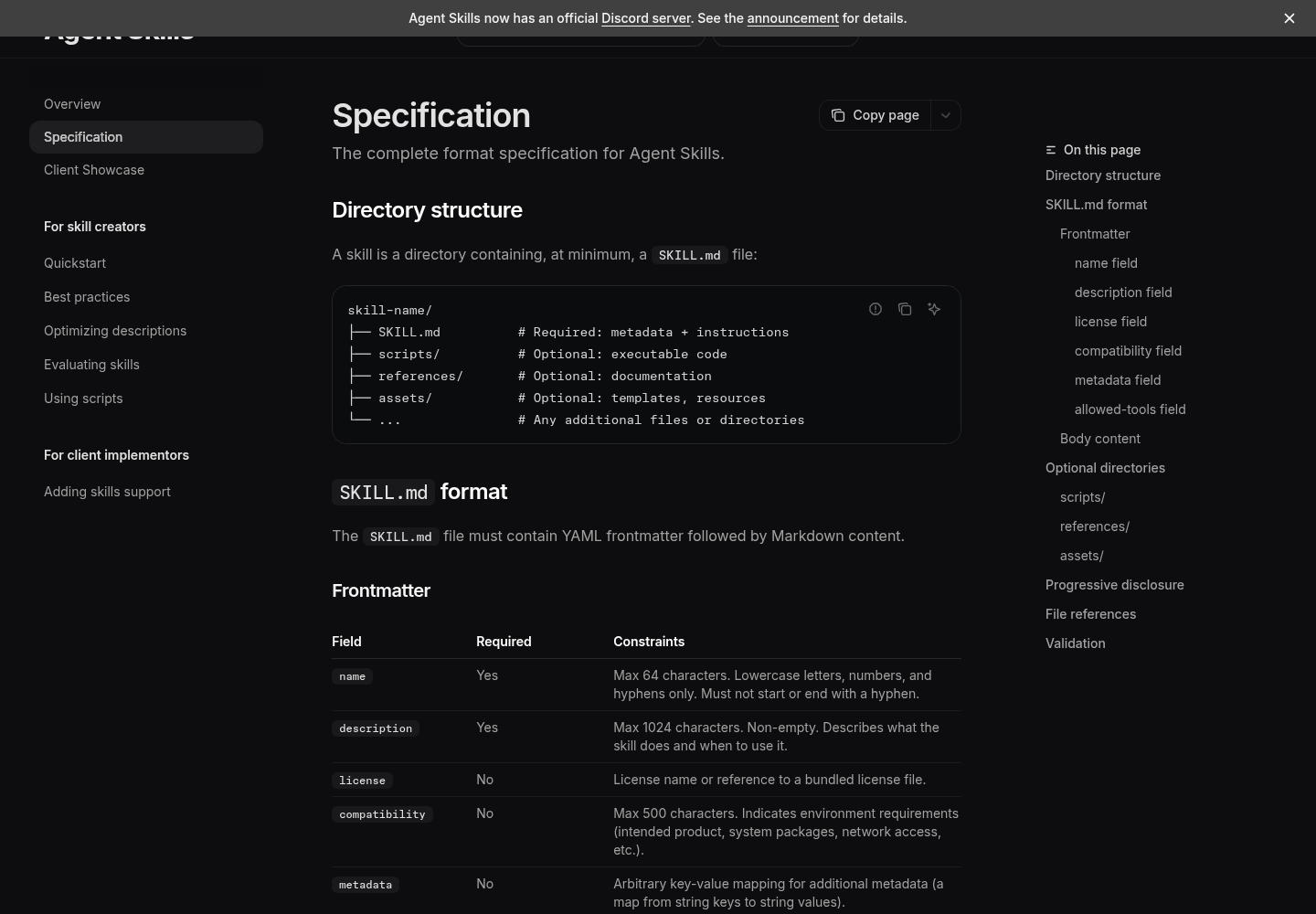
- Name. The specification requires 1 to 64 characters, lowercase letters, digits and hyphens only, no leading or trailing hyphen, no double hyphen, and a match with the parent directory.
release-notesin a folder namedrelease-notespasses.Release-Notesfails on case,release--notesfails on the double hyphen, and a folder namedchangelogholdingname: release-notesfails the directory match. - Description. It opens with the trigger, lists phrasings a user might choose without ever saying release notes, and closes with what the skill does not cover. The next section tests it.
- Frontmatter fields.
name,description,licenseandmetadataare all defined in the specification, so the same file stays valid for any client that follows it. - A script for the exact part. OpenAI’s best practices say to prefer instructions over scripts unless you need deterministic behavior or external tooling. Finding the last tag and listing a commit range is that case. Grouping and rewording take judgment, so they stay in the instructions.
- A stop before side effects. Step 6 of the skill forbids editing
CHANGELOG.md, tagging or pushing until you approve. A skill that can fire implicitly should end at a draft. - A small body. The specification recommends an instruction body under 5,000 tokens and a
SKILL.mdunder 500 lines, with longer material moved into files referenced one level deep. This body is a few hundred words, and the template sits inassets/.
Make the description route the right tasks
Implicit invocation in Codex means Codex picks a skill because your task matches its description. OpenAI’s advice is to write concise descriptions with clear scope and boundaries, and to front-load the key use case and trigger words so the skill still matches if Codex shortens descriptions. The Agent Skills guide to optimizing skill descriptions is blunter: the description carries the entire burden of triggering. Too narrow and the skill never fires; too broad and it fires on the wrong work.
The example description follows that guide’s four writing rules. It uses imperative phrasing, starting with Use this skill when. It describes what the user is trying to achieve rather than the script. It is a little pushy, naming contexts where the user never says release notes. And it stays short, well inside the specification’s 1,024-character limit.
Testing needs labelled prompts. The guide recommends about 20, split between should-trigger and should-not-trigger, with the negatives built from near misses that share words with the skill but need something else. Here are ten to start. Save them as evals/release-notes-queries.json, outside the skill folder, so they never load into context:
[
  { "query": "we're cutting 2.3.0 tomorrow, can you write up what shipped since the last tag?", "should_trigger": true },
  { "query": "Draft the CHANGELOG entry for v2.3.0 from everything merged since v2.2.0", "should_trigger": true },
  { "query": "my manager wants a non-technical summary of what landed since the last release for the customer email", "should_trigger": true },
  { "query": "release notes pls, version 2.3.0, short", "should_trigger": true },
  { "query": "before I tag this, list the user-facing fixes and features since the previous release", "should_trigger": true },
  { "query": "write a commit message for my staged changes", "should_trigger": false },
  { "query": "review PR #412 and suggest inline comments", "should_trigger": false },
  { "query": "create the v2.3.0 tag and push it to origin", "should_trigger": false },
  { "query": "summarize the diff in my working tree and flag anything risky", "should_trigger": false },
  { "query": "why does git describe --tags print v2.2.0-14-g3f9c2ab here?", "should_trigger": false }
]
Then run the loop:
- Split the set once and keep it fixed: six queries for tuning (three positive, three negative) and four held back for validation (two of each). The guide suggests roughly 60/40, with the mix kept proportional.
- Run each query in a fresh Codex session launched in
acme-api, so leftover context from writing the skill does not help it. - Record whether Codex read
.agents/skills/release-notes/SKILL.mdor rancollect-changes.shbefore it started working. That is the guide’s own test: the skill triggered if the agent loaded itsSKILL.md. - Run every query three times, because model behaviour is nondeterministic, and score it with the table below.
- Change the description using tuning failures only. If positives miss, widen the description of when to use it; if near misses fire, add a boundary. Do not paste words from a failing query into the description, which overfits.
- Stop after about five rounds, or when tuning failures stop shrinking, and keep the version with the best validation pass rate. That may not be the last version you wrote.
- Confirm the final description is still under 1,024 characters before you commit it.
| Runs that loaded the skill | Trigger rate | Query should trigger | Query should not trigger |
|---|---|---|---|
| 0 of 3 | 0.00 | Fail | Pass |
| 1 of 3 | 0.33 | Fail | Pass |
| 2 of 3 | 0.67 | Pass | Fail |
| 3 of 3 | 1.00 | Pass | Fail |
The cutoff is the guide’s default threshold of 0.5. One caution from the same guide: agents tend to consult skills only for work they cannot handle alone, so a one-step request may skip even a perfect description. A release write-up is multi-step and specific to the repository, which makes it a fair test.
Invoke it three ways and read the result
Codex offers two explicit routes and one implicit one. In the CLI or IDE extension, run /skills or type $ to mention a skill; otherwise Codex can choose it when the task matches the description. Run these tests in order inside acme-api, with at least one commit after v2.2.0:
| Test | What you type | Expected observation | If it does not happen |
|---|---|---|---|
| Picker | /skills |
release-notes appears with the start of its description |
Work through the first row of the troubleshooting table |
| Mention | Type $ and pick release-notes, or type $release-notes v2.3.0 |
Codex reads the skill, runs collect-changes.sh over v2.2.0..HEAD, and shows a grouped draft headed ## [v2.3.0] without touching CHANGELOG.md |
If Codex writes notes without running the script, the body was not read; restart Codex and retry |
| Implicit | we're cutting 2.3.0 tomorrow, can you write up what shipped since the last tag? |
Codex loads the skill without being named, then behaves as in the mention test | Rerun the description loop and widen the trigger wording |
| Near miss | write a commit message for my staged changes |
Codex writes the message without opening the skill | Add or sharpen the boundary sentence |
| Near miss | create the v2.3.0 tag and push it to origin |
Codex handles or questions the tag request without the skill | Same fix; the boundary already names tagging and publishing |
Running collect-changes.sh may raise an approval prompt, depending on your sandbox and approval settings. That prompt is expected and is not a fault in the skill. If the script exits with code 2, the repository has no reachable tag, and the skill should ask you for a starting ref instead of guessing.
Some skills should run only when named. For a companion publish-release skill that tags and pushes, add agents/openai.yaml beside its SKILL.md:
policy:
  allow_implicit_invocation: false
With that file, Codex will not pick the skill from a prompt, and $publish-release still works. The same file can carry display metadata and tool dependencies. Leave it out of release-notes, which is meant to trigger on its own. Once the skill has run cleanly by hand across a few releases, Scheduled AI Agent Skills Earn Their Cron covers when it has earned a schedule.
Install a shared skill without trusting it blindly
For curated skills beyond the built-ins, the Build skills page documents $skill-installer, with $skill-installer linear as its example, and says you can prompt the installer to download skills from other repositories. The openai/skills README adds the forms below: a curated skill by name, which defaults to skills/.curated, an experimental skill by folder, or a GitHub directory URL. It also says to restart Codex after installing.
$skill-installer gh-address-comments
$skill-installer install the create-plan skill from the .experimental folder
$skill-installer install https://github.com/openai/skills/tree/main/skills/.experimental/create-plan
Two facts shape the review. First, that README now marks the repository deprecated and points to the OpenAI Plugins repository for current examples, and the Build skills page recommends plugins when you want to distribute skills to other people; the installer remains documented for local setup and experimentation. Second, the documented installer forms name a skill or a branch URL, and none shows pinning to a commit. When you want the exact files you reviewed, copy the folder yourself from a recorded commit into the user scope:
git clone https://github.com/openai/skills.git ~/src/openai-skills
cd ~/src/openai-skills
git log -1 --format='%H %cs' -- skills/.curated/gh-fix-ci   # record this SHA
git checkout <reviewed-sha>
find skills/.curated/gh-fix-ci -type f                      # every file you must read
mkdir -p "$HOME/.agents/skills"
cp -R skills/.curated/gh-fix-ci "$HOME/.agents/skills/gh-fix-ci"
Work through this checklist before the folder reaches any scanned location:
- [ ] Read
SKILL.mdend to end. Note every command it tells Codex to run and every file it tells Codex to edit. - [ ] Read every file under
scripts/. Look for network calls, credential reads, writes outside the repository and anything that deletes. - [ ] Open
agents/openai.yamlif present. Itsdependencies.toolscan declare MCP servers, and the configuration reference saysfeatures.skill_mcp_dependency_install, on by default, lets Codex prompt for and install missing MCP dependencies for skills. - [ ] Check any
allowed-toolsfrontmatter. The specification marks the field experimental with client-dependent support; in Claude Code it pre-approves the listed tools for the invoking turn, and workspace trust does not gate it. - [ ] Check
policy.allow_implicit_invocation. A skill with side effects that can fire on its own deserves a second reader. - [ ] Read the skill’s own license file; the README says each skill carries a
LICENSE.txtin its directory. - [ ] Record the commit SHA, the date and the reviewer next to the copied folder or in your team notes.
- [ ] After any installer run, list the installed folder’s files and compare them with what you reviewed. Anything new is unreviewed.
- [ ] Restart Codex, open
/skills, and confirm the skill appears exactly once.
The same pin-and-verify habit applies to MCP servers and plugins; MCP Marketplace Security After MCPJacking and Plugin4Shell walks through it for those artifacts.
Run the same folder in Claude Code
Claude Code follows the same Agent Skills standard, so the folder needs no edits. Anthropic documents project skills at .claude/skills/<skill-name>/SKILL.md and personal skills at ~/.claude/skills/<skill-name>/SKILL.md, and says an entry in the project location can be a symlink to a directory elsewhere on disk. Because Codex also follows symlinks, one copy can serve both tools.
- Link the Codex folder into Claude Code’s project location.
mkdir -p .claude/skills
ln -s ../../.agents/skills/release-notes .claude/skills/release-notes
- If
.claude/skillsdid not exist when your Claude Code session started, run/reload-skills; Claude Code watches existing skill directories but not a top-level one created mid-session. - Check that the frontmatter parses with
claude plugin validate .claude/skills, which needs Claude Code v2.1.233 or later. - Invoke the skill explicitly with
/release-notes v2.3.0. The body has no$ARGUMENTSplaceholder, so Claude Code appendsARGUMENTS: v2.3.0to the skill content and the version still arrives. - Test implicit use with
what shipped since the last tag?and confirm Claude loads the skill, then run/skillsto see it listed. - Commit the symlink so teammates on either tool get the skill.
The file is shared; the controls around it are not:
| Behavior | Codex | Claude Code |
|---|---|---|
| Repo location | .agents/skills, scanned from the launch folder up to the repo root |
.claude/skills, loaded from the start folder and its parents up to the repo root |
| Personal location | $HOME/.agents/skills |
~/.claude/skills |
| Explicit use | $release-notes or the /skills picker |
/release-notes |
| Arguments | Plain text after the mention | Appended as ARGUMENTS: v2.3.0 when the body has no placeholder |
| Block implicit use | policy.allow_implicit_invocation: false in agents/openai.yaml |
disable-model-invocation: true in frontmatter |
| Disable without deleting | [[skills.config]] with enabled = false |
skillOverrides entry set to off |
| Catalog budget | 2% of the window by default; skills.max_context_tokens up to 10,000 tokens |
1% of the window; skillListingBudgetFraction; 1,536 characters per entry |
allowed-tools |
Not described in the Codex skill docs | Pre-approves listed tools for the invoking turn; not gated by workspace trust |
To keep the file portable, stay with the six specification fields: name, description, license, compatibility, metadata and allowed-tools. Claude Code extensions such as context: fork, argument-hint or disable-model-invocation are not part of the specification, Anthropic notes that spec-only upload paths reject them with an unexpected-key error, and the Codex docs do not list them. Claude Code’s ! dynamic context injection is likewise Claude-only. If a task genuinely needs isolated execution in Claude Code, a custom subagent is the better home than a fork field in a shared skill. Codex’s agents/openai.yaml is a separate file that Claude Code’s documentation does not describe, so it can sit in the folder without touching the shared frontmatter.
Keep the skill catalog inside its budget
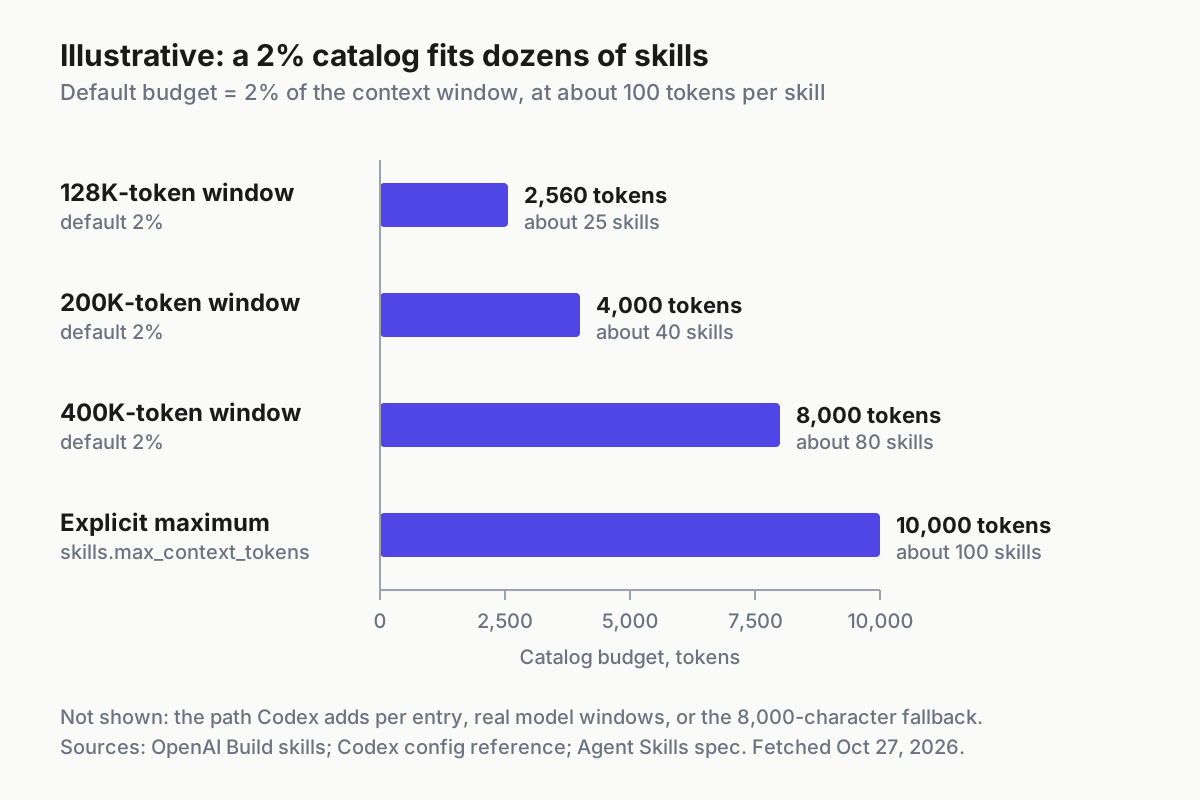
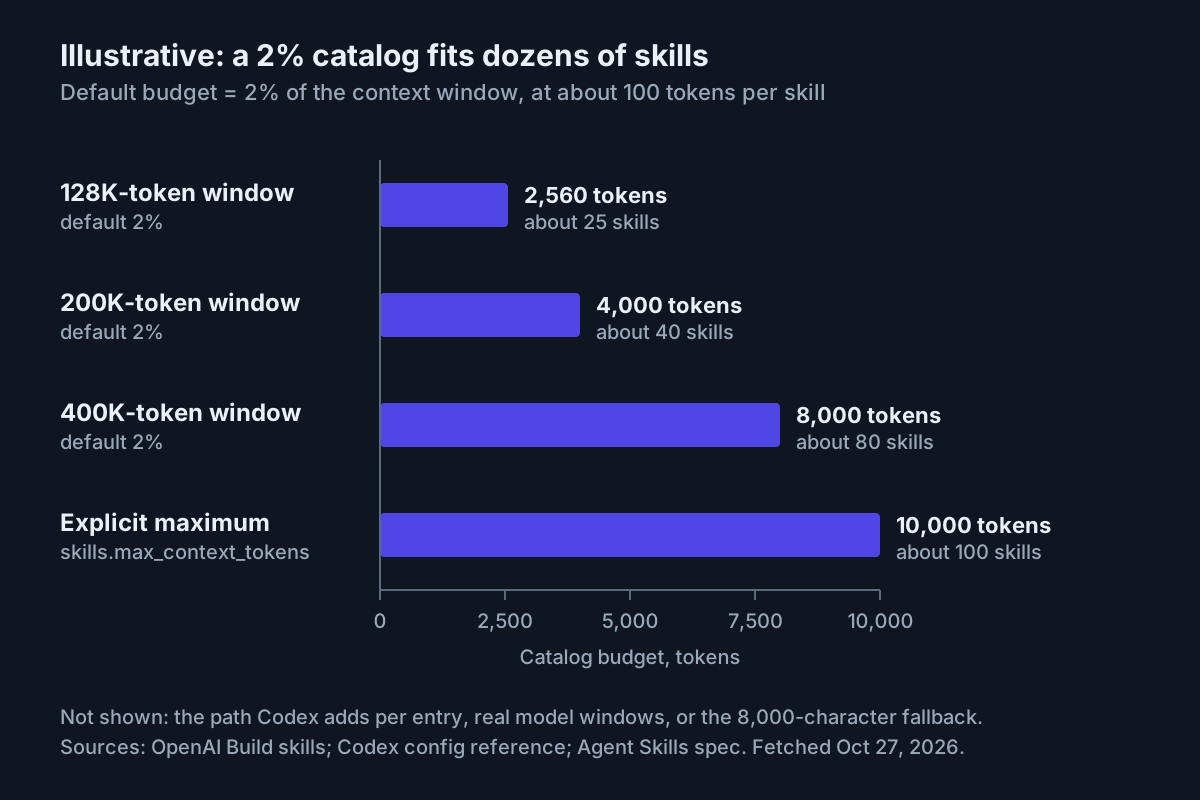
Every enabled skill puts its name, description and path into the catalog Codex starts with. By default that list uses at most 2% of the model’s context window, or 8,000 characters when the window is unknown. When many skills are installed, Codex shortens descriptions first; for large sets it may omit some skills from the initial list and show a warning. The configuration reference defines skills.max_context_tokens as a positive integer whose explicit values are capped at 10,000 tokens. The budget covers only the initial list: a selected skill still has its full SKILL.md read.
To translate that into skill counts, take the specification’s figure of roughly 100 tokens of name and description metadata per skill. The context windows below are illustrative examples, not specific models:
| Context window (example) | Default catalog budget (2%) | Entries at about 100 tokens each |
|---|---|---|
| 128,000 tokens | 2,560 tokens | about 25 |
| 200,000 tokens | 4,000 tokens | about 40 |
| 400,000 tokens | 8,000 tokens | about 80 |
skills.max_context_tokens = 10000 |
10,000 tokens | about 100 |
Codex also adds each skill’s path to its entry, so real counts land lower. The conclusion holds anyway: the default fits dozens of skills, not hundreds, and a team library plus a few installed collections can pass that sooner than expected.
Catalog tokens are context spent before your task begins. Claude Code Context Window Explained shows why fixed startup overhead matters across a long session in that tool, and the same budgeting logic applies here. Decide between pruning and raising the budget with this table:
| What you observe | Do this | Why |
|---|---|---|
| Codex warns that skills were omitted, and some skills have not been used in weeks | Disable them with [[skills.config]] |
Every enabled skill takes catalog space in every session |
| Two skills fire on the same requests | Merge them, or add a do-not-use sentence to each | Overlap spends budget twice and splits triggers |
| Skills that matter to one service sit at the repo root | Move them to that service’s .agents/skills |
They enter the catalog only when you launch there |
| Descriptions run to several hundred characters | Trim to trigger, job and boundary | Codex shortens descriptions first, and front-loaded wording is what survives |
| Many skills in daily use, descriptions still shortened, and plenty of window to spare | Raise skills.max_context_tokens, up to 10,000 |
The cap is explicit and the cost is a known number |
| The window is already tight for code and conversation | Prune before raising | Budget spent on the catalog is budget not spent on your code |
Disabling jira-triage without deleting it, and setting an explicit budget, both happen in one file:
# ~/.codex/config.toml (user level)
[skills]
max_context_tokens = 6000   # example value; explicit values are capped at 10000

[[skills.config]]
path = "/home/dev/.agents/skills/jira-triage/SKILL.md"
enabled = false
- Get the absolute path with
ls -d "$HOME"/.agents/skills/*/SKILL.mdand paste it in full; do not rely on~inside TOML. - Add the entry above, with your path, to
~/.codex/config.toml. - Restart Codex. The Build skills page says to restart after changing
~/.codex/config.toml. - Open
/skillsand confirmjira-triageis gone while its folder is still on disk. - If it still appears, compare the path character for character. The Build skills example points at the
SKILL.mdfile, while the configuration reference describespathas the skill folder containingSKILL.md; if the file form is ignored in your version, try the folder path.
Troubleshooting Codex skills
| Symptom | Likely cause | Fix | Expected observation after the fix |
|---|---|---|---|
Skill missing from /skills |
Folder outside the scanned paths, name not matching the folder, or frontmatter that fails to parse |
Move it under a path from the location table, run skills-ref validate, and restart Codex if the change still does not show |
release-notes listed once with its description |
| Listed but never triggers implicitly | Vague description, allow_implicit_invocation: false in agents/openai.yaml, or a test request too simple to need a skill |
Rewrite the description and rerun the eval set; check the YAML policy | Should-trigger prompts load it in two or three of three runs |
| The wrong skill triggers | Two descriptions overlap | Add a boundary sentence to both, or merge them if they do the same job | Near-miss prompts load it in at most one of three runs |
| Two entries with the same name | The same name in two scopes; Codex does not merge them |
Rename one or remove the duplicate | One entry in the picker |
| Disable entry ignored | Wrong or relative path, no restart after editing, or file versus folder form |
Use the absolute path, restart, then try the folder form | The skill disappears from /skills |
| Descriptions cut short, or a warning that skills were omitted | Catalog over budget | Prune, move service skills down a level, then raise skills.max_context_tokens if still needed |
Warning gone and full descriptions visible |
| Project skill not loading | Codex launched outside the repository, or in a folder that is not the skill’s folder or below it | Launch from the repository or from the service folder that holds the skill | Skill listed from that launch directory |
| Skill override in project config has no effect | The entry sits in a project .codex/config.toml and the project is untrusted |
Move it to ~/.codex/config.toml, or mark the project trusted with projects.<path>.trust_level |
The override applies after a restart |
| Newly installed skill absent | Codex has not picked up the new folder | Restart Codex, as the Build skills page and the openai/skills README both advise | Skill listed once |
If Codex itself fails to start after a config edit, OpenAI Codex: Startup and Configuration Diagnosis covers that layer. The configuration reference also links a JSON schema you can attach to config.toml for editor autocompletion and diagnostics, which catches a mistyped [[skills.config]] key before you restart.
Roll back cleanly
- Remove the repo skill and its Claude Code link in one commit.
git rm -r .agents/skills/release-notes
git rm .claude/skills/release-notes
git commit -m "Remove release-notes skill"
- Remove a copied shared skill from the user scope with
rm -rf "$HOME/.agents/skills/gh-fix-ci", or disable it with a[[skills.config]]entry if you may want it back. - Delete the
[[skills.config]]and[skills]entries you added to~/.codex/config.toml. - Restart Codex.
- Open
/skillsand type$: neither should offer the removed skill. If one still does, a second copy exists in another scope; check each.agents/skillsfolder from your launch directory to the root, then$HOME/.agents/skillsand/etc/codex/skills. - In Claude Code, deleting a personal or project skill folder drops it from
/skillsin the current session, per Anthropic’s documentation; confirm there as well.
Prove it worked
Success checks:
- [ ]
/skillslistsrelease-noteswith its description. - [ ]
$release-notes v2.3.0runscollect-changes.sh, shows a grouped draft and leavesCHANGELOG.mduntouched. - [ ] The implicit release prompt loads the skill in at least two of three fresh sessions.
- [ ] Both near-miss prompts load it in at most one of three.
- [ ] The four held-back validation queries pass at the 0.5 threshold.
- [ ]
gh-fix-cisits in$HOME/.agents/skillsfrom a commit you recorded, and someone read every script in it. - [ ]
jira-triageno longer appears in/skillsafter the restart, and its folder still exists. - [ ] Claude Code runs
/release-notes v2.3.0from the symlinked folder.
Failure checks:
- [ ] No installed third-party skill contains a script nobody on the team has read. If one does, remove it now and reinstall only after review.
- [ ] No two skills share a name across scopes.
- [ ] No skill override lives only in the project config of an untrusted project.
Once Codex and Claude Code both read the same folder, the skill is a shared asset across tools, and a change to it changes both. Ten Assistants, One Boss covers running several coding CLIs side by side without losing track of which one did what.
Sources
- Oleg Berger, post on X about speaking on skills in Codex at OpenAI’s Community Dev Day, Oct 25, 2026.
- OpenAI, Build skills, fetched Oct 27, 2026.
- OpenAI, Codex configuration reference, fetched Oct 27, 2026.
- OpenAI, Save workflows as skills, fetched Oct 27, 2026.
- Agent Skills, Specification, fetched Oct 27, 2026.
- Agent Skills, Optimizing skill descriptions, fetched Oct 27, 2026.
- Anthropic, Extend Claude with skills, fetched Oct 27, 2026.
- OpenAI, openai/skills repository README, fetched Oct 27, 2026.