Claude Code Context Window Explained: How Big It Is, How to Read /context, and Why It Fills Up
The Claude Code context window explained: check your model's 1M or 200K size, read /context, show usage in the status line and set an auto-compact window.

Go deeper. Build your own.
Your status line says the session is at 35 percent. /context agrees that a few hundred thousand tokens are in play. Then the /usage Session block, or a cost readout, reports tens of millions of tokens for the same afternoon, and you start to wonder which number is wrong. Neither is. The Claude Code context window is what the model can see on the next request; the processed total is what every request so far has carried. Developer Ashish Kattamuri summed it up in a post on X on Oct 25, 2026: his window said 348k tokens, the session had processed 46.4M, and “both are true.”
This guide is for a developer who runs Claude Code every day on a subscription or Console account and wants to know which of those numbers to manage, and how. By the end you will know how big your model’s window is. You will be able to read a /context breakdown and attribute every row to the thing that loaded it, keep live context percentage in your status line, pick an auto-compact threshold on purpose rather than inheriting one, and use a filled decision table to choose between /clear, /compact, a subagent and a fresh session. A complete worked diagnosis near the end ties all of it together with copyable files. Every command and setting shown is documented syntax from Anthropic’s Claude Code docs. Nothing below is presented as captured output, and where a number is modelled rather than measured, it is labelled Illustrative.
Two numbers in one session: the window and the processed total
Anthropic’s context window page describes the window as everything Claude knows about your session: your instructions, the files it reads, its own responses, and content that never appears in your terminal. It is a snapshot. It grows as you work, and it shrinks when the conversation is compacted or cleared.
The processed total is a running sum, and the Claude Code costs documentation explains why it runs away from the window. Claude Code sends your full conversation with every request, and each time Claude uses tools it sends another request carrying that batch of tool results. A one-line question late in a long session therefore pays for the whole history again. Prompt caching makes those re-reads cheaper, but they are still reads, and they still appear as cache-read input in the per-model line of the /usage Session block.
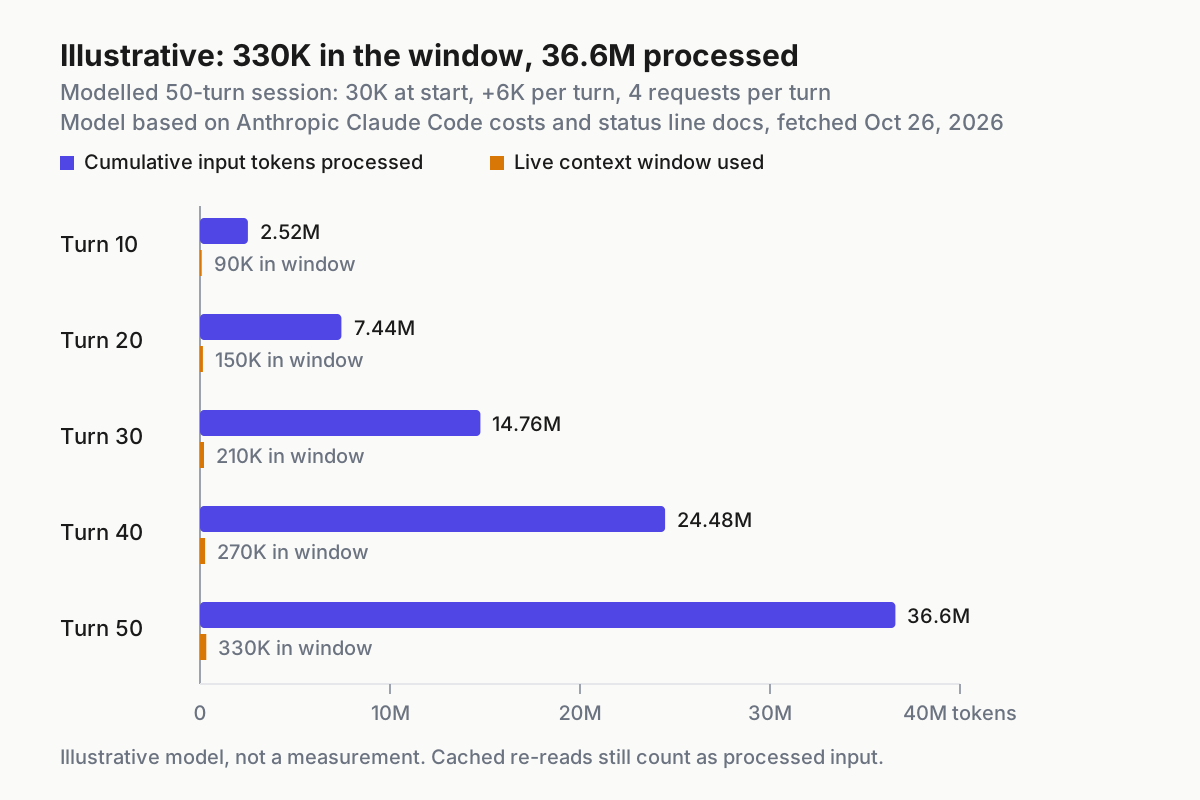
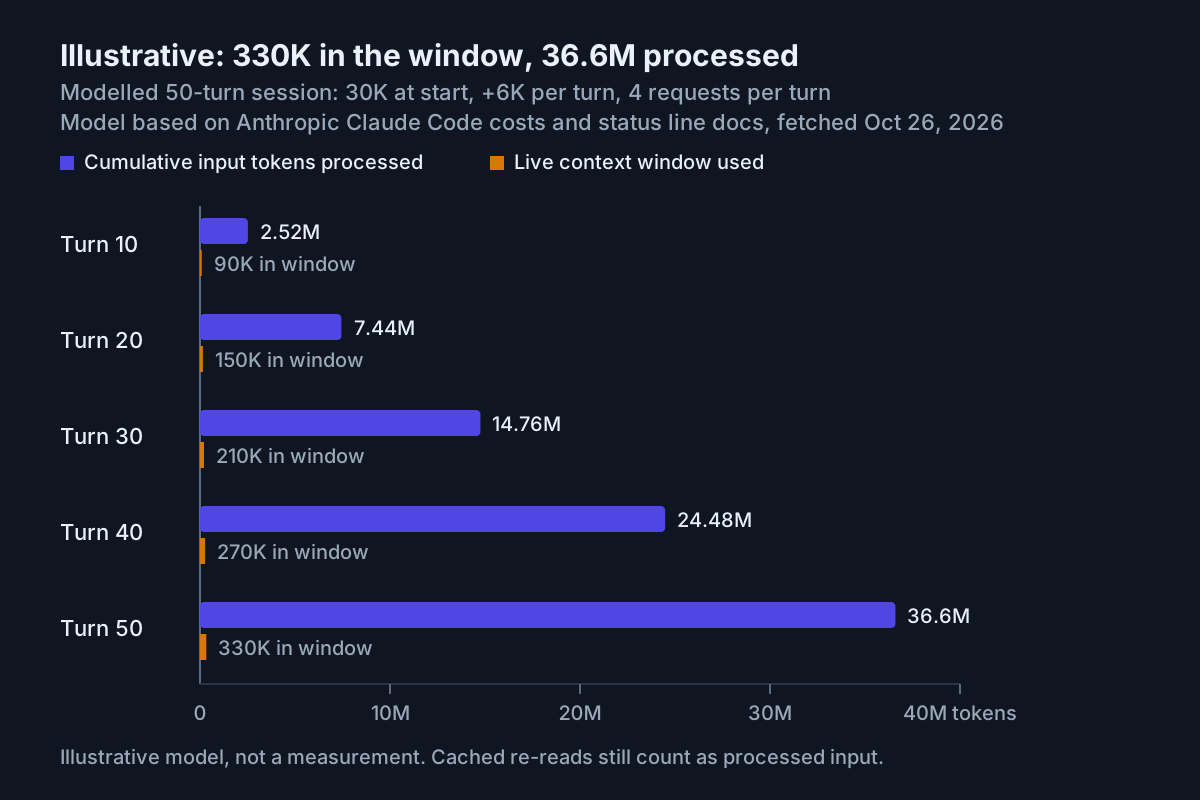
The table makes the arithmetic visible. It is an Illustrative model, not a measurement: the session starts with 30K tokens of startup content, each turn adds 6K, and each turn makes four requests that each carry the context as it stands at the end of that turn. Real requests early in a turn carry a little less, so the model overstates slightly.
| Turn | Live window used (Illustrative) | Cumulative input processed (Illustrative) |
|---|---|---|
| 10 | 90K | 2.52M |
| 20 | 150K | 7.44M |
| 30 | 210K | 14.76M |
| 40 | 270K | 24.48M |
| 50 | 330K | 36.6M |
Read the last row the way the X post reads. On a model with a 1M window, the conversation ended about a third of the way to the default compaction point near 967K, so nothing compacted and the session felt healthy. Meanwhile the processed column, which is the one plan limits and API bills follow, passed 36 million. Two rules come out of that:
- The window number governs quality and compaction. When it nears the auto-compact window, Claude Code summarizes older history to make room.
- The processed number governs spend. Because every request repeats everything before it, it grows roughly with the square of session length, not in a straight line.
So the answer to a large processed total is rarely a bigger window. It is a smaller conversation per request: clearing between unrelated tasks, keeping verbose output inside subagents, and trimming what loads before you type. The steps below cover each move with the commands involved. For the general discipline behind them, the context engineering playbook is the broader reference, and memory that burns quota looks specifically at how memory files inflate the processed side.
Before you start
- [ ] A current Claude Code install. If
/modeldoes not list a model you expect, runclaude update; the model docs tie newer models to minimum versions. - [ ] A real repository with a CLAUDE.md at its root, so the memory part of
/contexthas something to show. If you have none,/initgenerates a starting file. - [ ] Ideally one MCP server configured, so you can see what tool listings cost. The Claude Code MCP setup guide covers adding one at the right scope.
- [ ] jq on your PATH for the status line script, and permission to edit
~/.claude/settings.json. - [ ] A session you can throw away. Every change below lives in your user settings, your project’s local settings or your shell, and the rollback section undoes all of it.
Step 1: Confirm which model and window you are on
Window size belongs to the model and your configuration, so check both before trusting any percentage. The model configuration docs say Fable 5.1, Fable 5, Sonnet 5 and later, Haiku 5.5 and Opus 4.7 and later run with a 1 million token window by default, with no suffix needed. Because the default setting resolves to Opus 5.5 on Pro, Max, Team, Enterprise and the Anthropic API, most daily users are already on 1M without having chosen it.
- Run
/status. The docs name it, alongside a configured status line, as the place to see the current model; it also shows your account information. - Run
/modelwith no argument to open the picker and look at the highlighted row. Pressing Enter switches and saves the choice as your default by writing themodelfield in~/.claude/settings.json; pressingsswitches for this session only. - Find your model in the table below and write down its window.
- Check whether
CLAUDE_CODE_DISABLE_1M_CONTEXT=1is set in your shell or in theenvblock of a settings file. If it is, models that normally run at 1M are treated as 200K regardless of the table. - If you route through a gateway or use a custom model ID, read the startup lines. A warning such as
Model "my-gateway-opus" isn't recognized · context assumed to be 200k tokensmeans Claude Code is guessing your window and will compact at 200K.
| Model | Window in Claude Code | How 1M is reached |
|---|---|---|
| Fable 5.1, Fable 5 | 1M by default | Native, no suffix |
| Sonnet 5 and later, including Sonnet 5.5 | 1M by default | Native; sonnet[1m] has no effect |
| Haiku 5.5 | 1M on every plan | Native; prompts over 100K tokens cost more per token on the API |
| Opus 4.7 and later, including the default Opus 5.5 | 1M by default | Native; opus[1m] has no effect |
| Opus 4.6 | 200K | opus[1m] or claude-opus-4-6[1m]; included on Max, Team and Enterprise, usage credits on Pro |
| Sonnet 4.6 | 200K | claude-sonnet-4-6[1m]; usage credits on every subscription plan |
Any model with CLAUDE_CODE_DISABLE_1M_CONTEXT=1 |
200K | [1m] variants removed from the picker |
The pricing detail matters more than it looks. On the Anthropic API the 1M window uses standard pricing with no premium for tokens beyond 200K, except on Haiku 5.5. A bigger window does not make each token more expensive; it lets a conversation grow longer before compaction, and a longer conversation is exactly what raises the processed total. Step 4 is where you choose that trade-off instead of inheriting it.
If Claude Code assumed the wrong window for a gateway or custom ID, the docs list four corrections. Work through them in this order:
- Run
claude update, in case the ID is newer than your install. - Map the ID to a model Claude Code knows with a
modelOverridesentry, for example"claude-opus-4-8": "my-gateway-opus". - For a model that really has a 1M window, append
[1m]where you set the model, such asclaude --model 'my-gateway-opus[1m]'. - For any other size, set
CLAUDE_CODE_MAX_CONTEXT_TOKENSin the environment that starts Claude Code, after checking the docs’ rules for which IDs it applies to.
When you finish this step you should be able to write one sentence, such as “Opus 5.5, 1,000,000-token window, auto-compaction near 967K” or “Sonnet 4.6, 200K, compacts at the boundary.” Everything after this depends on that sentence being right.
Step 2: Read /context fresh, then again mid-task
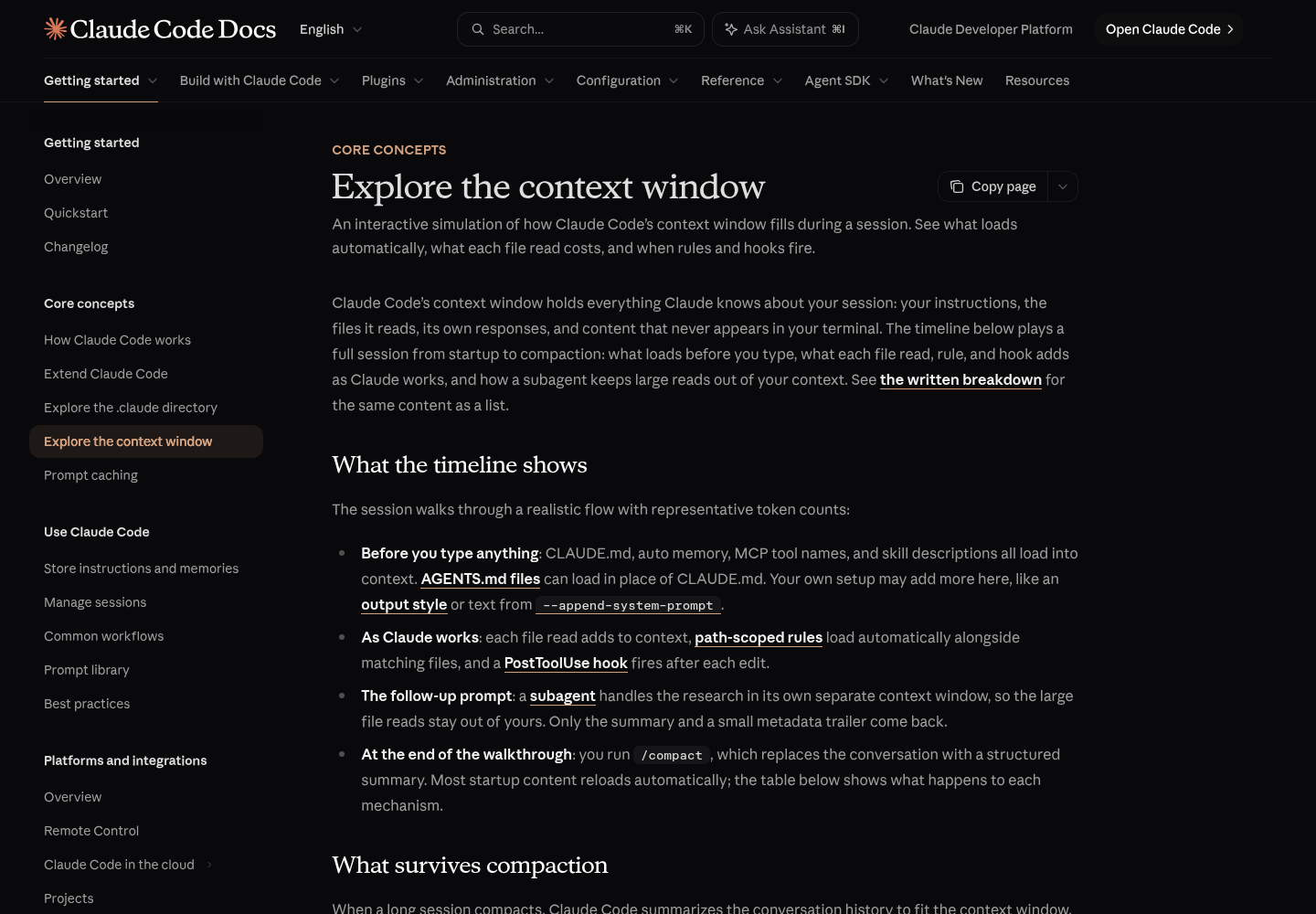
/context is the instrument for the window side. The context window page describes it as a live breakdown by category with optimization suggestions, including which CLAUDE.md and auto memory files loaded. Category labels can shift between versions, so the reliable approach is to map each row back to the mechanism that loaded it rather than memorizing a layout.
- Open a terminal in your repository root and start
claude. Before typing a prompt, run/context. - Copy the total and each category into a scratch note. This is your fixed cost: content present on every request before you have asked anything.
- Work on a real task for twenty or thirty minutes: let Claude read files, run tests and edit code.
- Run
/contextagain and compare it with your note. - For any memory file that looks oversized, run
/memory, which lists your CLAUDE.md, CLAUDE.local.md and auto memory locations and opens the one you select.
Use this table to attribute what you see. The middle columns come from the context window and memory docs; the last column is the lever for that row.
| Row you see | What loaded it | What normal looks like | What to change |
|---|---|---|---|
| System prompt and output style | Claude Code itself, plus any output style or --append-system-prompt text |
Constant for your setup; both still apply after compaction | Only your custom appends are yours to remove |
| Tools and MCP | Built-in tools, MCP tool names and server instructions; full MCP definitions are deferred until a tool is used | Grows with each server you add | Disable idle servers in /mcp; prefer CLIs such as gh |
| Memory files | CLAUDE.md and CLAUDE.local.md from your directory and every parent, unscoped rules, the first 200 lines or 25KB of MEMORY.md | Each file listed by path under Memory files | Keep each CLAUDE.md under 200 lines; move procedures to skills or path-scoped rules |
| Skills and subagents | Skill descriptions and custom subagent descriptions | Small per item | Trim description fields; Claude Code warns above 15,000 tokens of combined custom subagent descriptions |
| Messages | Your prompts, Claude’s replies, every file read and tool result | The only row that should grow during work | /clear, /compact or a subagent, chosen in Step 5 |
Interpret the two readings differently. In the fresh reading, everything except messages is a tax charged on every request for the rest of the session. If that tax is large, it is the quiet multiplier behind a huge processed total, because a 40K startup block resent on four hundred requests is 16 million tokens before you count a single message. In the mid-task reading, messages should dominate. If they do, the session is behaving normally, and the question becomes when to compact or clear.
If messages grew faster than your conversation explains, look for on-demand loads. Nested CLAUDE.md files and path-scoped rules enter message history when Claude reads, writes or edits a file they match, and every large file read or tool result lands there too.
Three details save confusion here. First, @path imports in CLAUDE.md help organization but do not reduce cost, because imported files load with the file that imports them. Second, block-level HTML comments in CLAUDE.md are stripped before injection, so maintainer notes kept in such comments cost nothing. Third, /context can read slightly higher than your status line: the status line docs explain that /context adds an estimate for messages added since the last API response, while the status line reports the counts from that response.
When a context-low or auto-compact notice appears during the mid-task reading, the costs page is explicit that it is not a usage limit. It means the conversation is close to the session’s auto-compact window. Your plan allowance is a separate meter.
Step 3: Put context percentage in the status line
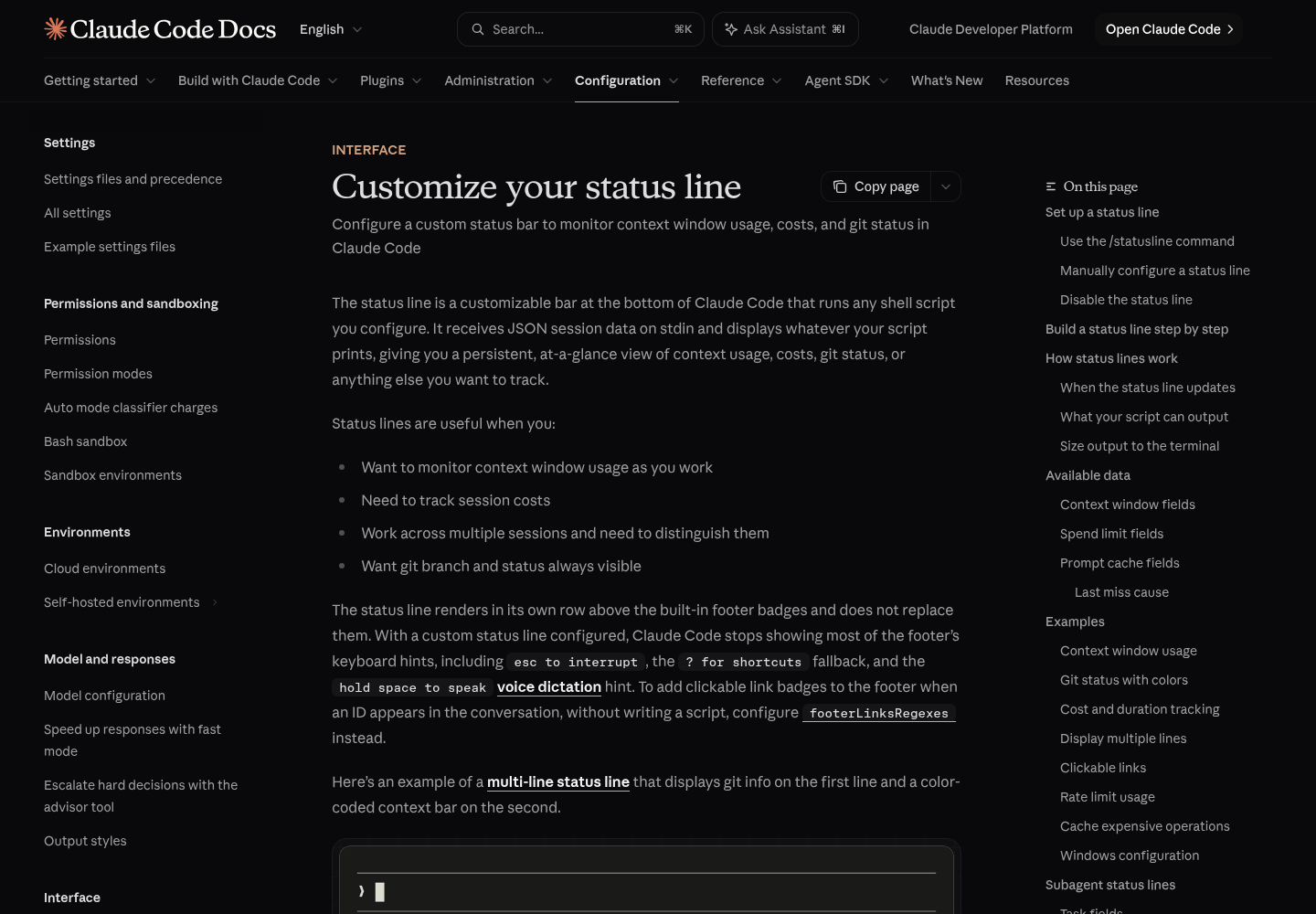
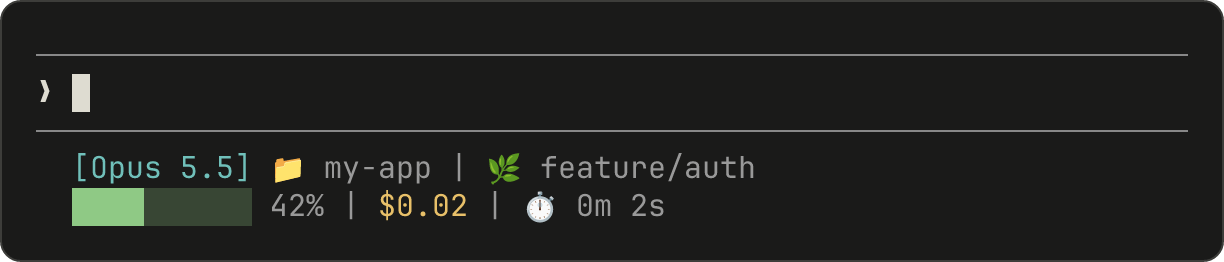
/context is a command you have to remember to run; a status line is always on screen. The status line docs describe it as a script Claude Code runs locally, which receives JSON session data on stdin, prints whatever you want, and consumes no API tokens. The script below uses only fields that page documents: model.display_name, context_window.used_percentage, context_window.context_window_size and context_window.total_input_tokens.
- Save the script as
~/.claude/statusline.sh. - Make it executable with
chmod +x ~/.claude/statusline.sh. - Test it with mock input before wiring it in.
- Merge the
statusLineblock into~/.claude/settings.jsonwithout replacing your other keys. Claude Code reloads settings and runs the script as soon as you save. - Send one message in a session and confirm the line updates when the reply arrives.
#!/bin/bash
# ~/.claude/statusline.sh: model, context percentage, window size
input=$(cat)

MODEL=$(echo "$input" | jq -r '.model.display_name')
PCT=$(echo "$input" | jq -r '.context_window.used_percentage // 0' | cut -d. -f1)
SIZE=$(echo "$input" | jq -r '.context_window.context_window_size // 0')
USED=$(echo "$input" | jq -r '.context_window.total_input_tokens // 0')

# Thousands, so 1000000 reads as 1000K and a 200K fallback is obvious
SIZE_K=$((SIZE / 1000))
USED_K=$((USED / 1000))

# Same thresholds as the multi-line example in Anthropic's status line docs
if [ "$PCT" -ge 90 ]; then COLOR='\033[31m'
elif [ "$PCT" -ge 70 ]; then COLOR='\033[33m'
else COLOR='\033[32m'; fi
RESET='\033[0m'

echo -e "[$MODEL] ${COLOR}${PCT}%${RESET} of ${SIZE_K}K (${USED_K}K in window)"
{
  "statusLine": {
    "type": "command",
    "command": "~/.claude/statusline.sh"
  }
}
Test it with a mock payload, the same technique the docs recommend:
echo '{"model":{"display_name":"Opus"},"context_window":{"used_percentage":34,"context_window_size":1000000,"total_input_tokens":340000}}' | ~/.claude/statusline.sh
From the script’s logic, that mock should print [Opus] 34% of 1000K (340K in window) with the percentage in green. A blank result usually means the file is not executable or jq is missing; a jq error on stderr points at a quoting mistake in the script.
Why these choices work:
used_percentageinstead of your own maths. The docs say it is calculated from input tokens only (input, cache creation and cache read) and excludes output tokens. If you compute a percentage yourself, use the same formula or the two will disagree.// 0fallbacks. Percentages can be null early in a session, andcurrent_usageis null again right after/compactuntil the next request, so the line should fall back to 0% rather than print an error.- The window size on screen. Showing “of 1000K” or “of 200K” turns Step 1 into a permanent check. If a gateway, a
CLAUDE_CODE_DISABLE_1M_CONTEXTsetting or a model switch drops you to 200K, you see it on the next reply. - 70 and 90 percent colour thresholds, borrowed from the docs’ multi-line example. Treat them as prompts to look at
/context, not as automatic triggers.
One caveat governs how you read the percentage: used_percentage measures against the model’s full context window, not against the auto-compact window. With the defaults on a 1M model, compaction lands near 97 percent. If you set a 400K window in Step 4, compaction arrives near 40 percent and the line never reaches amber. The docs make the same point explicitly for the environment variable: while CLAUDE_CODE_AUTO_COMPACT_WINDOW is set, the percentage does not indicate when compaction will run.
If you would rather not write the script, running /statusline show model name and context percentage with a progress bar asks Claude Code to generate one in ~/.claude/ and update your settings, prompting you to approve the file edits.
Step 4: Choose an auto-compact window on purpose
The auto-compact window is how full the conversation can get before Claude Code summarizes it. Leave it unset and models with a native 1M window compact before the window fills, at about 967K tokens. Sonnet 4.6 and Opus 4.6 without extended context compact at the 200K boundary, and with CLAUDE_CODE_DISABLE_1M_CONTEXT=1 the native-1M models compact at 200K too. Setting it lower trades continuity for smaller requests: every request after the conversation passes 400K carries more than 400K tokens, so an earlier threshold directly cuts the processed total of long sessions.
The documented ways to set it, inside a session:
/autocompact 500k        # current model: this session and later ones
/autocompact 200         # a bare number from 100 to 1000 means thousands: 200,000
/autocompact auto        # back to the window tuned for this model
At launch, or for scripts and cloud environments:
claude --autocompact 400k                         # one launch; saved setting unchanged
claude --autocompact auto                         # one launch at the tuned window
CLAUDE_CODE_AUTO_COMPACT_WINDOW=200000 claude     # environment variable, highest priority
And as a settings key that applies to every model:
{
  "autoCompactWindow": 400000
}
The command and the flag accept 100K to 1M, as a plain token count, a k or M suffix, or a bare number from 100 to 1000 meaning thousands. Since v2.1.288, /autocompact saves the value under the current model in your user settings; earlier versions saved one top-level autoCompactWindow for every model.
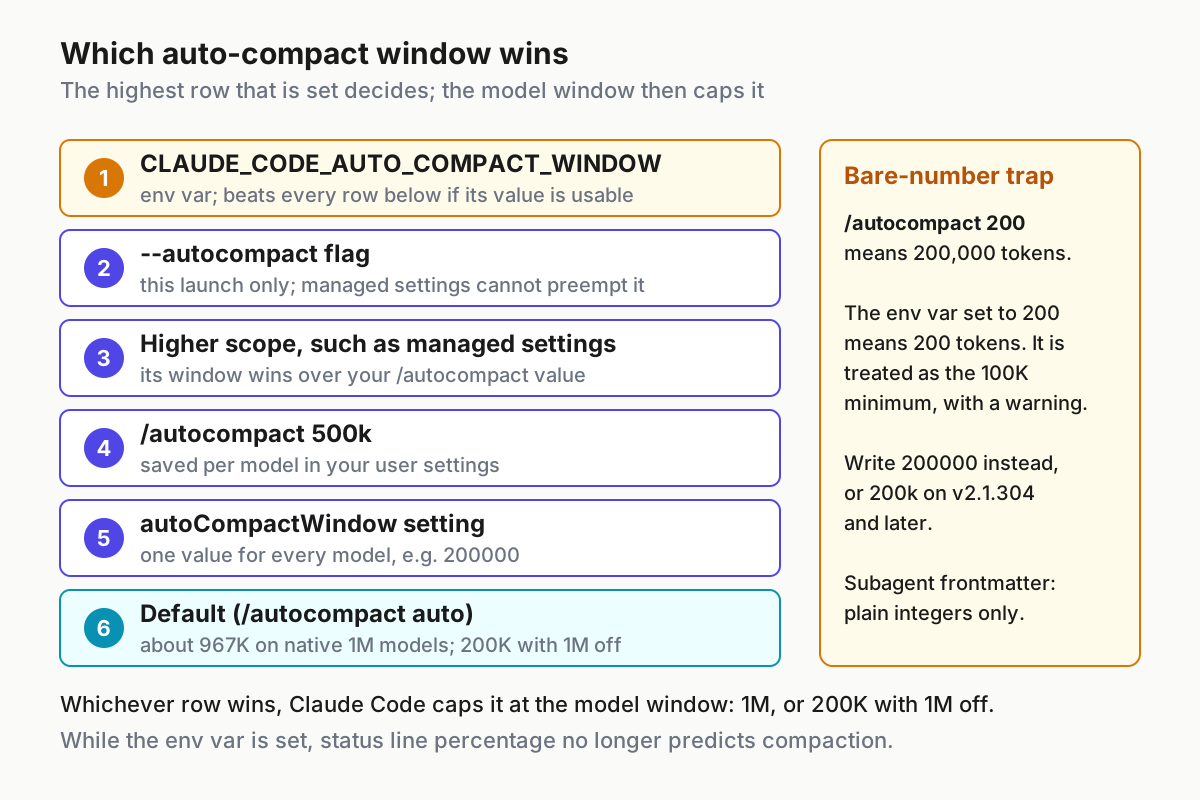
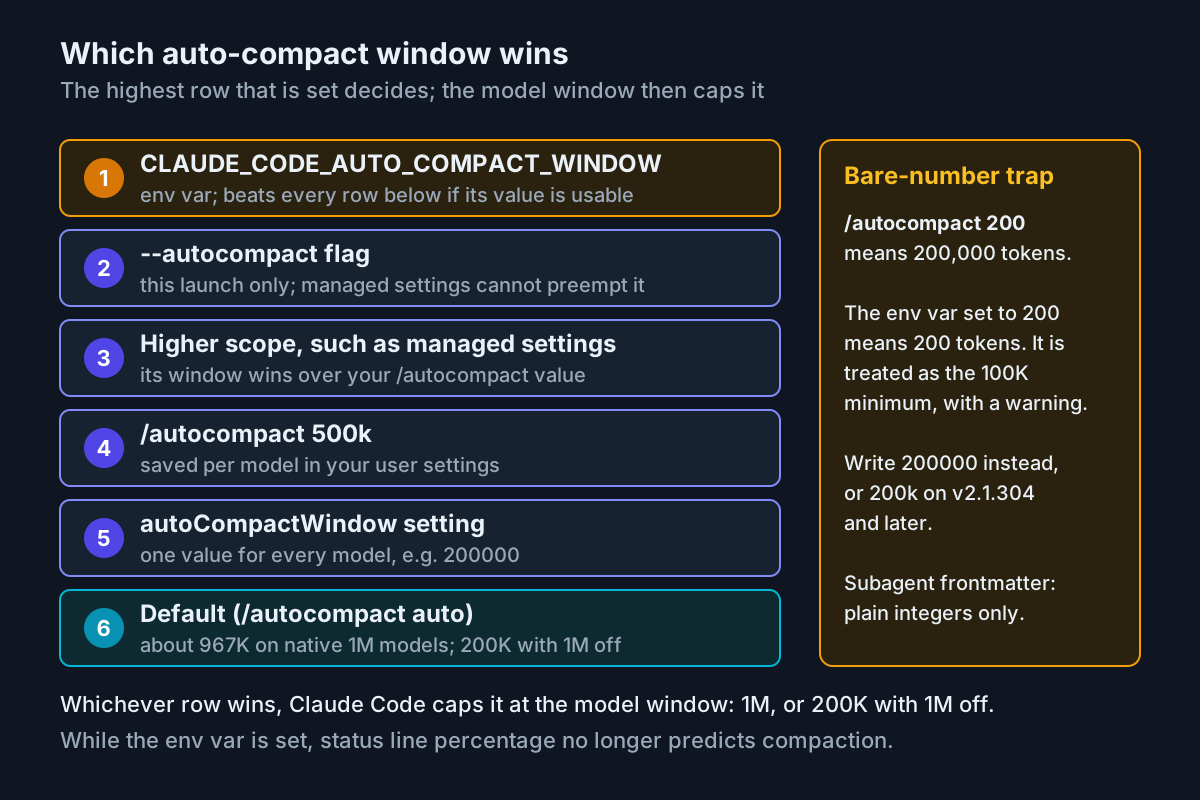
Several of these can be set at once, so learn the order. Read the diagram from the top:
CLAUDE_CODE_AUTO_COMPACT_WINDOW, when Claude Code accepts its value, beats the command, the flag and the setting./autocompactthen reports the override without saving.- The
--autocompactflag overrides your saved setting for that launch, and unlike the command, a higher-priority settings scope does not preempt it. - A higher-priority scope, such as managed settings, that sets a window for the model or for every model wins over your
/autocompactvalue; the command still saves your value and tells you the session keeps the other one. - A per-model value saved with
/autocompactbeatsautoCompactWindowin the same file for that model. autoCompactWindowapplies to every model.- With nothing set, the tuned default applies.
Whichever row wins, Claude Code caps it at the model’s context window, which is why a 500K setting cannot lift the 200K hold that CLAUDE_CODE_DISABLE_1M_CONTEXT imposes.
Now the trap. In the command, /autocompact 200 means 200,000. In the environment variable, a number with no suffix is read as that many tokens, so CLAUDE_CODE_AUTO_COMPACT_WINDOW=200 means 200 tokens; Claude Code warns that the value reads as 200 tokens and treats it as the 100K minimum. Write 200000, or 200k on v2.1.304 and later, which accept k and M in the variable. Subagent frontmatter has a similar trap: the subagent docs say autoCompactWindow: 200k is read as 200, falls outside the allowed range and is ignored, so write a plain integer there. The subagent field itself requires Claude Code v2.1.296 or later.
Here is a filled set of choices for one developer’s week. They are recommendations for the situations named, not documented defaults:
| Situation | Setting | Why it fits |
|---|---|---|
| Daily feature work on the default Opus 5.5 | /autocompact 400k |
Most feature tasks fit well under 400K; compacting there keeps late-session requests smaller |
| Quick edits on Haiku 5.5 | /autocompact 100k while Haiku 5.5 is the active model |
Per-model saving leaves Opus alone, and prompts stay near the 100K line above which Haiku 5.5 costs more on the API |
| Gateway that rejects requests above 200K | CLAUDE_CODE_AUTO_COMPACT_WINDOW=200000 in the launching environment |
The docs’ own fix, because Claude Code cannot detect a lower limit the gateway enforces |
| A long refactor that needs many files at once | claude --autocompact auto for that launch |
Uses the tuned window without touching your saved value |
| A subagent that reads long logs | autoCompactWindow: 200000 in its frontmatter, on Claude Code v2.1.296 or later |
Compacts that subagent earlier without changing the main session; check claude --version first, because the field requires v2.1.296 |
After setting a value, read the command’s reply: it should either confirm the value was saved for the current model or say that an environment variable or a higher scope overrides it. The visible proof comes later, when compaction happens close to the threshold you chose rather than near 967K. For lanes that run unattended, where nobody is watching the threshold, who owns compaction on an unattended lane covers the policy side.
Step 5: Pick the right move when the window fills
The context window page lists the moves you can make before the automatic pass runs, and the costs page adds one fact that changes which to pick: /compact reads the whole conversation it summarizes, so compacting a large context is itself a large request, while /clear costs nothing. The decision table is filled for a typical day.
| Symptom | What /context shows | Move | What you should see afterwards |
|---|---|---|---|
| You are switching to unrelated work | Messages large, all from the old task | /rename the session, then /clear |
Messages near zero, fixed rows unchanged, /usage Session totals back to $0; /resume finds the old session |
| Same task, long history, nearing your threshold | Messages dominate | /compact focus on the auth bug fix |
Messages replaced by a summary that keeps what you named; root CLAUDE.md and auto memory re-injected |
| The early part of the conversation is noise | Messages, with an exploratory phase at the start | /rewind, select a message, choose Summarize up to here |
The selected part condensed; the docs’ Rewind and summarize section states what each option keeps |
| The next step means reading logs, docs or a whole test suite | Messages about to jump | Ask Claude to delegate it to a subagent | Only the subagent’s summary and a small metadata trailer enter your window |
| A fresh session already looks heavy | Memory files large | Trim CLAUDE.md; move workflows to skills and file-specific rules to path-scoped rules | A smaller memory row on the next launch |
| Tools row heavy, servers idle | Tools and MCP | Disable idle servers in /mcp, ideally between sessions |
A smaller tools row; a mid-session tool change can show as a tools_changed cache miss |
| Instructions vanished after compaction | Summary in place, a rule missing | Move the rule to project-root CLAUDE.md or drop its paths: frontmatter; start fresh if the summary went badly wrong |
The rule is re-injected after every compaction |
Know what compaction brings back, so the last column does not surprise you. Right after compaction, Claude Code re-reads up to five of the files Claude read or edited, most recently modified first, and a file over 5,000 tokens returns as a path reference. Invoked skill bodies are re-injected, capped at 5,000 tokens per skill and 25,000 in total. Background commands and subagents keep running, and context that hooks added earlier is summarized with everything else. A session therefore never compacts to zero: it lands at your fixed cost, plus the summary, plus those re-reads.
Subagents deserve one more note. The subagent docs say each one sends its own requests, which count toward the same usage limits as your main conversation. They protect your window, not your bill, although a smaller main window does shrink every later main-conversation request. The subagents guide shows how to write one that runs on a cheaper model. Running several sessions at once multiplies the fixed cost from Step 2 by the number of sessions, and parallel sessions in a shared usage window works through that arithmetic.
Worked example: one heavy afternoon, diagnosed end to end
Here is the whole procedure applied to one case. The scenario and every reading in it are Illustrative inputs chosen to match the steps above, not captured output from a real session. A developer on a Max plan is on the default model. Their service lives at ~/code/monorepo/services/api, which has a 320-line CLAUDE.md. The monorepo root has its own CLAUDE.md written by another team. Two MCP servers are configured: GitHub, used daily, and a browser tool nobody has touched in weeks. After four hours, the status line reads 33 percent while the /usage Session block shows tens of millions of input tokens, almost all cache reads.
This is the filled worksheet they would end up with after Steps 1 and 2:
CONTEXT DIAGNOSIS WORKSHEET            (Illustrative values, not captured output)

Model and window     Opus 5.5 · 1,000,000 tokens · default compaction near 967K
1M opt-out           CLAUDE_CODE_DISABLE_1M_CONTEXT unset
Auto-compact window  nothing set -> tuned default

Fresh /context       fixed cost 42K, resent on every request
  system prompt      12K   Claude Code base; no custom appends
  memory files       18K   ./CLAUDE.md (320 lines) + ~/code/monorepo/CLAUDE.md
  tools and MCP       9K   github (used) + browser (unused)
  skills, subagents   3K   descriptions only

Mid-task /context    330K total · messages 288K (330K minus 42K fixed)
Status line          [Opus] 33% of 1000K (330K in window)
Processed readout    tens of millions of input tokens, mostly cache reads

Diagnosis            Window is healthy and far from compaction.
                     Processed total is driven by session length plus a 42K
                     fixed cost on every request.

Decisions
  1. /rename then /clear before the next, unrelated task
  2. Exclude the monorepo-root CLAUDE.md in .claude/settings.local.json
  3. Cut ./CLAUDE.md under 200 lines; move the release workflow to a skill
  4. Disable the unused browser server in /mcp
  5. Set autoCompactWindow to 400000 so long tasks compact earlier
  6. Delegate the next log-reading step to a subagent
The two files below implement decisions 2 and 5 alongside the status line from Step 3. The first is the complete user settings file. If yours already has other keys, merge these three in rather than replacing the file. The model field accepts an alias, as in the model docs’ own example. Leave it out if you would rather keep the account default.
{
  "model": "opus",
  "autoCompactWindow": 400000,
  "statusLine": {
    "type": "command",
    "command": "~/.claude/statusline.sh"
  }
}
The second is .claude/settings.local.json in the service directory. The memory docs recommend that file for exclusions so they stay on your machine. Patterns are globs matched against absolute paths, and this one uses the same form as the documented example:
{
  "claudeMdExcludes": [
    "**/monorepo/CLAUDE.md"
  ]
}
Why each decision is the right one for this reading: the window was never the problem, so no window setting alone would fix the bill. The 42K fixed cost is the multiplier. The monorepo-root file and the idle browser server are the two parts of it that do nothing for this work. The 320-line CLAUDE.md is over the memory docs’ 200-line target, and imports would not help because imported files still load. autoCompactWindow caps how big any one request can get on long tasks. /clear between tasks removes the 288K of messages from every request after the switch.
Then check each change against what you should see:
| Action | Where | Expected observation | If you see this instead |
|---|---|---|---|
| Exclude the monorepo-root CLAUDE.md | .claude/settings.local.json |
Next launch: /context no longer lists ~/code/monorepo/CLAUDE.md under Memory files, and the memory row shrinks |
Still listed: the glob does not match its absolute path, so check the path; a managed CLAUDE.md cannot be excluded at all |
Cut ./CLAUDE.md under 200 lines |
/memory, then edit |
No length warning at startup or in /status; a smaller memory row |
Warning remains: content moved into @path imports still counts |
| Disable the browser server | /mcp, between sessions |
A smaller tools and MCP row on the next fresh /context |
No change: the server is defined at another scope, so check where it was added |
| Compact earlier on long tasks | autoCompactWindow: 400000 |
Compaction near 400K; status line drops from about 40 percent afterwards | Compaction near 967K instead: an environment variable or a per-model /autocompact value is winning, as in the precedence diagram |
| Clear between tasks | /rename, then /clear |
Messages near zero; /usage Session totals start again at $0; /resume lists the renamed session |
Messages still large: you ran /compact, which summarizes rather than clears |
| Delegate log reading | Prompt: use a subagent to read the logs and report only errors | Messages grow by roughly the subagent’s summary, not the log size | Messages jump by the log size: Claude read the logs itself, so ask again and name the subagent |
The success condition for this case is concrete. The next fresh /context should show a fixed cost smaller by about what the excluded file and the browser server contributed. The status line should keep its window size of 1000K. The next long task should compact near 400K instead of running toward 967K. The processed readout for a comparable afternoon should then grow more slowly, because every request carries less.
Troubleshooting the common surprises
| Symptom | Likely cause | What to do |
|---|---|---|
| Window looks full right after start | A long CLAUDE.md chain from parent directories, auto memory, many MCP servers, or large skill and subagent descriptions | Read the fresh /context row by row; trim with /memory, disable servers in /mcp, and skip other teams’ files in a monorepo with claudeMdExcludes |
| Compaction fires every few turns | A threshold set close to the post-compaction baseline: fixed cost plus summary plus re-read files and skills | Raise the window or run /autocompact auto; trim startup content so the baseline drops |
| Compaction fails and shows the original error | Every model in your fallback chain has a smaller window than the primary, and Claude Code will not summarize on a smaller one | Retry; add a model with the same window to the chain |
A [1m] model is missing or refused |
Opus 4.6 or Sonnet 4.6 at 1M needs usage credits on your plan, or CLAUDE_CODE_DISABLE_1M_CONTEXT removed the variants |
Use a native-1M model such as the default Opus 5.5, turn on usage credits, or unset the variable |
| Startup says context assumed to be 200k | Claude Code does not recognize the model ID | claude update, modelOverrides, a [1m] suffix or CLAUDE_CODE_MAX_CONTEXT_TOKENS, as in Step 1 |
| Status line is blank | Script not executable, output on stderr, a non-zero exit, workspace trust not accepted, or disableAllHooks or allowManagedHooksOnly in effect |
chmod +x; run the script by hand; claude --debug logs its stderr, and for trust it logs Status line command skipped: workspace trust not accepted |
| Status line shows 0% for a while | Fields are null before the first response and right after /compact |
Wait for the next reply; restart if values stay empty after several messages |
Status line and /context disagree |
/context adds an estimate for messages since the last response |
Expected; the gap closes on the next response |
/autocompact saved a value but compaction ignores it |
CLAUDE_CODE_AUTO_COMPACT_WINDOW or a higher settings scope overrides it |
Check env in your shell and settings files; ask your admin about managed settings |
A startup warning quotes your CLAUDE_CODE_AUTO_COMPACT_WINDOW value |
A bare number such as 200, a value outside 100,000 to 1,000,000, or something that is not a token count | Set 200000, or unset the variable |
One failure never triggers a warning: the processed total growing in a session whose window looks fine. That is the X post in a sentence. The costs page lists why usage climbs in long sessions: the full conversation rides on every request, the first message after a break longer than the cache lifetime misses the cache and reprocesses everything, and scheduled tasks, cross-session messages and subagents each send their own full-context requests. If a readout climbs while /context looks calm, check how long the session has been open before you change any window setting. On subscription plans those tokens count toward weekly limits, which Claude Code after September 14 puts in numbers.
Roll back every change
- For each model where you used
/autocompact, switch to that model and run/autocompact auto. - Delete
autoCompactWindowfrom~/.claude/settings.json. - Remove
CLAUDE_CODE_AUTO_COMPACT_WINDOWfrom your shell profile and from any settingsenvblock, then rununset CLAUDE_CODE_AUTO_COMPACT_WINDOWin open shells. - Do the same for
CLAUDE_CODE_DISABLE_1M_CONTEXTif you set it while testing. - Remove the status line with
/statusline delete, or delete thestatusLinefield and the~/.claude/statusline.shfile. - Delete the
claudeMdExcludesentry from.claude/settings.local.jsonif you added one, and re-enable any MCP server you disabled in/mcp. - If you changed the saved model, open
/modeland choose Default, which clears the override and returns to your account’s runtime default. - Restart Claude Code, run
/statusand/context, and compare them with the note you took in Step 2.
Success checks
- [ ] You can state your model, its window and where compaction runs.
- [ ] A fresh
/contextreading is attributed row by row to the mechanisms in Step 2, and you know your fixed cost per request. - [ ] The status line shows the model, a percentage and the window size, and it updates after each reply and after
/compact. - [ ]
/autocompactreports the value you chose with no override notice, or you know which override wins and why. - [ ] Compaction, when it happens, arrives near your chosen threshold, and the status line percentage drops afterwards.
- [ ] When a cost or usage readout shows millions of tokens, you read it as the processed total and look at session length, not window size.
The window is the number you manage turn by turn; processed tokens are the bill for how long you let a conversation run. Once both are visible, the remaining questions sit above any single session: how many run at once, who watches them, and when one should end. The AgentOps guide is where to take those next.
Sources
- Ashish Kattamuri (@ashishkattamuri), post on X about a 348k context window and 46.4M processed tokens, Oct 25, 2026.
- Anthropic, Explore the context window, Claude Code Docs, fetched Oct 26, 2026.
- Anthropic, Model configuration, Claude Code Docs, fetched Oct 26, 2026.
- Anthropic, Customize your status line, Claude Code Docs, fetched Oct 26, 2026.
- Anthropic, Manage costs effectively, Claude Code Docs, fetched Oct 26, 2026.
- Anthropic, How Claude remembers your project, Claude Code Docs, fetched Oct 26, 2026.
- Anthropic, Create custom subagents, Claude Code Docs, fetched Oct 26, 2026.