Claude Code Statusline Setup: Build a statusLine Script for Model, Context and Usage Limits Without Lag
Build a Claude Code statusline script showing model, folder, branch, context, cost and 5-hour and weekly limits that degrades cleanly and stays responsive.

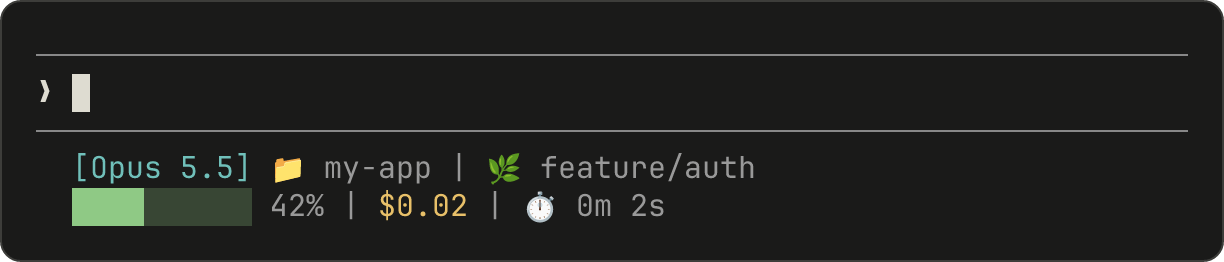
Go deeper. Build your own.
You are three hours into a refactor, the terminal is full of diffs, and you still can’t answer three questions at a glance: how full is the context window, what has this session cost, and how close are you to the end of your 5-hour usage window? A Claude Code statusline puts those answers on one row under the prompt and refreshes them after every turn. Building one yourself takes about twenty minutes. Building a bad one takes the same twenty minutes: a script that prints null on a fresh session, goes blank when a field is missing, or adds a delay you feel on every reply.
This tutorial is for a developer who uses Claude Code daily in a terminal, on a Pro or Max subscription or a Console API key. By the end you will have:
- a bash script that shows model, folder, git branch, context use, estimated session cost, the 5-hour and 7-day usage windows and a prompt-cache countdown, with every field guarded;
- a degraded fallback for machines without jq, and a PowerShell version for native Windows;
- three fixture files that prove the script behaves before Claude Code ever runs it;
- the exact
statusLinesettings block, a troubleshooting table and a one-line rollback.
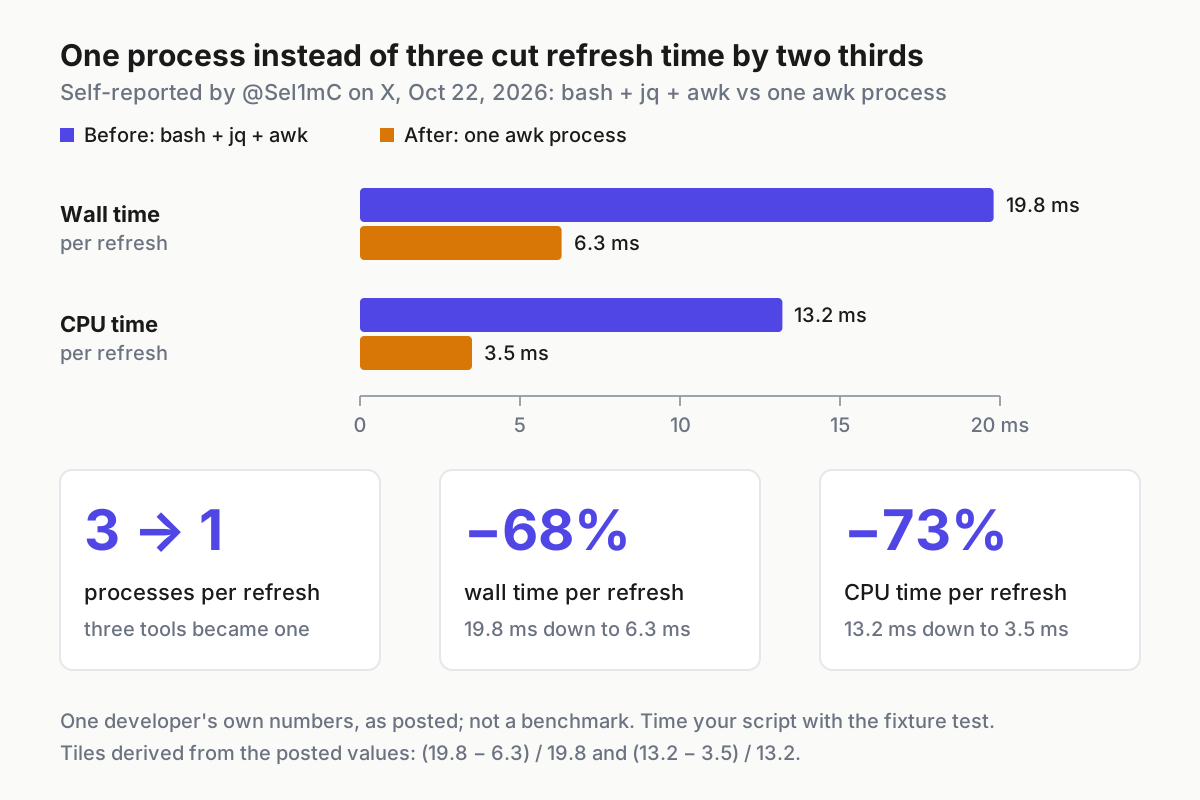
The prompt for this guide was a post by @Sel1mC on X on Oct 22, 2026. They rewrote their status line “from bash + jq + awk into one awk process”, reported each refresh falling from 19.8 ms to 6.3 ms, and added two fields from the docs they hadn’t been using: a timer for when the prompt cache goes cold, and the time a low rate limit resets. Everything below follows Anthropic’s status line documentation. The scripts are documented syntax adapted for this guide, and every output line shown is illustrative: it is what the code should print, not a capture from a live session.
What you need before you start
Work through this list once. Each item maps to a step later, so a gap here shows up as a specific failure there.
- [ ] Claude Code installed and signed in. The core fields used here have been in the status line input for many releases. One optional field is version-gated: the docs say
prompt_cacherequires Claude Code v2.1.251 or later. - [ ] A git repository to test in. The branch segment and the fixture tests run inside it. The examples use a repo called
checkout-apionmain; substitute your own. - [ ] Write access to
~/.claude/settings.json, or to a project’s.claude/settings.jsonor.claude/settings.local.json. Installing Claude Code doesn’t create these files, so you may be creating the user file for the first time. - [ ] jq on your PATH for the main bash script. The docs call it “a command-line JSON parser you may need to install”. Check with
command -v jq; no output means it is missing, and the fallback script covers that case. - [ ] PowerShell on native Windows if you don’t have Git Bash. The Windows script parses input with ConvertFrom-Json, which Microsoft documents as available since PowerShell 3.0.
- [ ] A git repo for the script itself, such as a dotfiles repo at
~/dotfiles, so every change is a commit you can diff and revert.
One account detail decides whether the usage segments appear at all. The docs say rate_limits is present only for Claude.ai Pro and Max subscribers, or behind a Claude apps gateway that sets a spend limit for you, and only after the first API response in a session. On a Console API key you will see model, context and cost while the 5h and 7d segments stay empty. The script treats that as a normal result, not an error.
Let /statusline draft it, then take ownership
The fastest first version comes from Claude Code itself. The /statusline command accepts plain-language instructions, generates a script in ~/.claude/ and updates your settings for you.
- In a Claude Code session, run:
/statusline show model name, folder, git branch, context percentage, session cost, and 5-hour and weekly usage - Approve the file-edit prompts if Claude Code asks for permission. Expected observation: a new row appears above the built-in footer badges.
- Open the generated file in
~/.claude/and read it line by line. List which JSON fields it reads and whether each one has a fallback for null or absent values. - Decide whether to keep it. If it already guards every field and you never plan to change it, you can stop here.
Most people should keep going, for three reasons. A generated script is a one-off: when it misbehaves after an update there is no history to diff. It was shaped by whatever your session looked like that moment, which is rarely a fresh session, so the missing-field paths are untested. And it may start one parser process per field, the shape the X post above moved away from for speed.
The same caution applies to community status lines. The docs point to projects such as ccstatusline and starship-claude for prebuilt themes. Read any of them before you install it, and don’t pipe a remote script from curl straight into a shell to set one up. A status line command runs as you, on your machine, after every assistant message in every folder you trust.
Wire the statusLine key in the right settings file
Your script will live in your dotfiles repo, and Claude Code will call it there. Settings files are strict JSON: a // comment or a trailing comma is a syntax error that Claude Code reports as a Settings Error at the next start. Add this to ~/.claude/settings.json, as a sibling of any keys already in the file:
{
  "statusLine": {
    "type": "command",
    "command": "~/dotfiles/claude/statusline.sh"
  }
}
Before the first edit, copy the file so rollback is one command: cp ~/.claude/settings.json ~/.claude/settings.json.bak. Then check each key against the status line docs:
| Key | Value in this guide | What it controls |
|---|---|---|
type |
"command" |
Run a shell command and display what it prints |
command |
the script path | A script path or an inline shell command; ~ expands to your home directory |
padding |
omitted, so 0 | Extra horizontal spacing in characters, on top of the interface’s built-in spacing |
refreshInterval |
omitted for now | Re-runs the command every N seconds, minimum 1, in addition to event-driven updates |
hideVimModeIndicator |
omitted | Set true only if your script prints vim.mode itself |
Claude Code reloads settings automatically and runs a changed command right away, so no restart is needed. Run /status afterwards: the Setting sources line should list User settings, which confirms the file loaded.
Pick the file by who should get the status line. The Claude Code settings documentation defines four scopes and their precedence, highest first: managed settings, --settings on the command line, project local, shared project, then user.
Where statusLine goes |
Who gets it | Use it when |
|---|---|---|
~/.claude/settings.json |
You, in every project on this machine | The default for a personal status line |
.claude/settings.local.json |
You, in this one project | A project-specific variant; it overrides your user value there |
.claude/settings.json, committed |
Everyone who clones the repo, once they trust the folder | Rarely: it runs a shell command on teammates’ machines |
| Managed settings | Everyone your organization deploys to | Only an administrator sets this |
Expect two side effects. With a custom status line configured, Claude Code stops showing most of the footer’s keyboard hints, including esc to interrupt and the ? for shortcuts fallback, so learn the bindings from our Claude Code keyboard shortcuts guide if you relied on them. And a separate subagentStatusLine key formats the rows for subagents in the agent panel under the same trust and policy gates; if you build helpers with the Claude Code subagents guide, that key is where their row format lives.
Read the JSON Claude Code pipes to your script
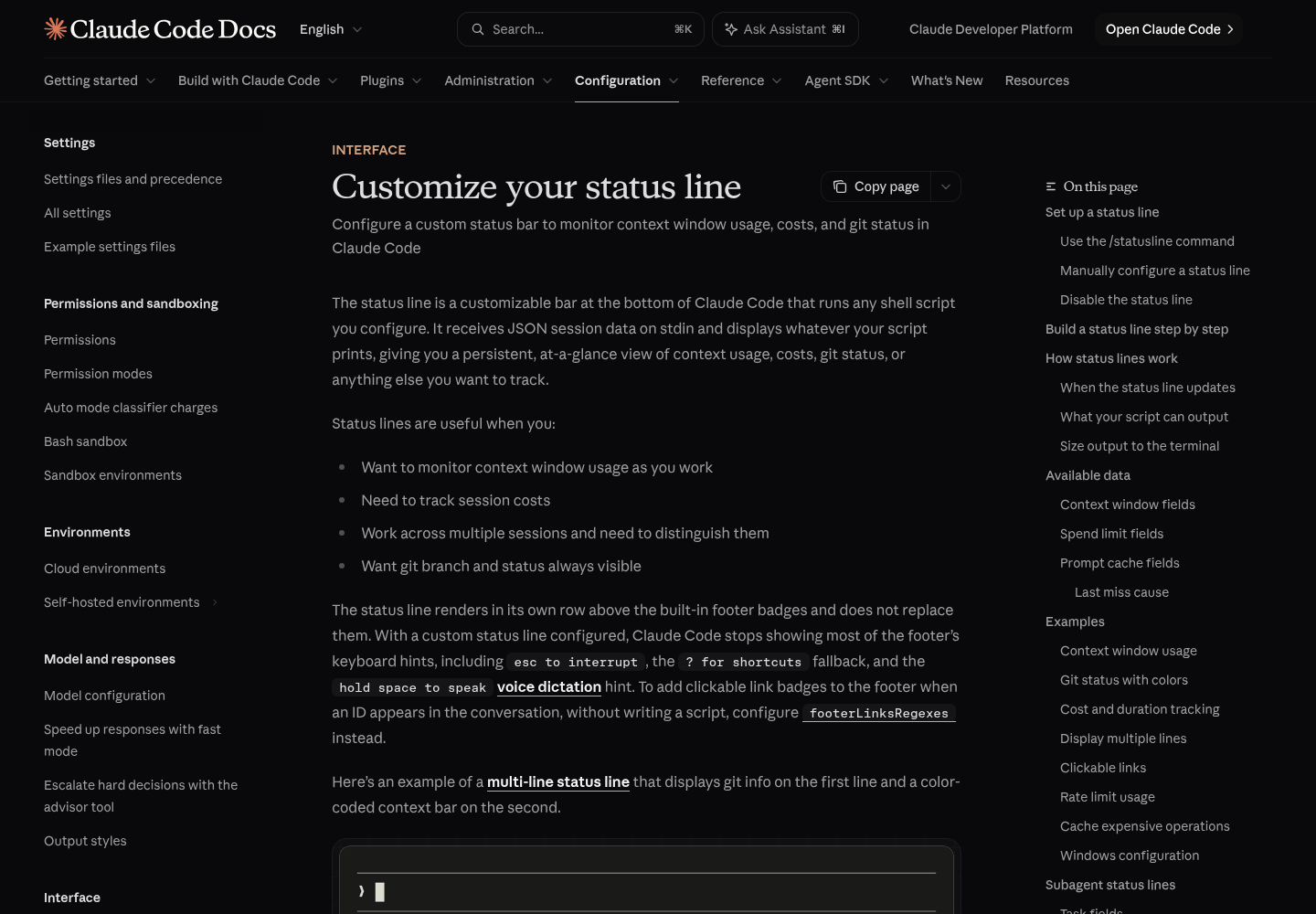
Claude Code runs your command with session data as JSON on stdin and displays whatever the command prints to stdout. The main script reads eleven documented values. For each one, what matters is whether it is always present, sometimes null, or sometimes absent, because that decides how you guard it:
| Field | Used for | When it is missing or null |
|---|---|---|
model.display_name |
[Opus] prefix |
Always present |
workspace.current_dir (same value as cwd) |
Folder name, and where git runs | Always present |
session_id |
A stable name for the branch cache file | Always present |
context_window.used_percentage |
ctx 8% |
May be null early in a session |
cost.total_cost_usd |
$0.01 |
Present; resets to $0 when /clear starts a new session |
rate_limits.five_hour.used_percentage and resets_at |
5h 24% and a reset countdown |
Absent on non-subscriber accounts, before the first response, and once that window’s resets_at passes |
rate_limits.seven_day.used_percentage and resets_at |
7d 41% and a reset countdown |
Same rules; each window can be absent independently |
prompt_cache.warm and expires_at |
cache 11m countdown |
Absent until the main conversation’s first response; expires_at is null when the last response reported no cache tokens |
Here is the shape of that input, trimmed from the full schema in the docs to the fields this guide reads and pretty-printed for reading. The values are the docs’ own samples:
{
  "cwd": "/current/working/directory",
  "session_id": "abc123...",
  "model": { "id": "claude-opus-5-5", "display_name": "Opus" },
  "workspace": {
    "current_dir": "/current/working/directory",
    "project_dir": "/original/project/directory"
  },
  "cost": { "total_cost_usd": 0.01234, "total_duration_ms": 45000 },
  "context_window": {
    "context_window_size": 200000,
    "used_percentage": 8,
    "remaining_percentage": 92
  },
  "prompt_cache": { "warm": true, "ttl": "1h", "expires_at": 1738429200 },
  "rate_limits": {
    "five_hour": { "used_percentage": 23.5, "resets_at": 1738425600 },
    "seven_day": { "used_percentage": 41.2, "resets_at": 1738857600 }
  }
}
Three details in the docs change how you read the numbers. used_percentage counts input tokens only (input plus cache creation plus cache reads, not output) from the most recent API response, so /context can read higher until the next response arrives; our Claude Code context window explainer covers what fills that window. total_cost_usd is estimated client-side at list price and may differ from your bill. And every resets_at and expires_at is Unix epoch seconds, so the script compares them with the current time instead of printing them raw.
The 5-hour and 7-day percentages describe your plan’s usage windows rather than one session, so every Claude Code window on the same login moves them. If you run several sessions at once, One Login, Many Lanes covers the habits that keep them from starving each other, and Claude Code After September 14 works through the usage-limit math behind the 7d number.
Build the main script: one jq call, guarded fields, cached branch
Save this as ~/dotfiles/claude/statusline.sh. It is adapted from the docs’ context, git, cost, rate-limit and caching examples, merged into one script that starts one jq process per refresh.
#!/bin/bash
# statusline.sh: model, folder, branch, context, cost, 5h/7d limits, cache timer.
# Adapted from Anthropic's status line docs. One jq call per refresh,
# git branch cached for 5 seconds, every field guarded.
export LC_NUMERIC=C
input=$(cat)

# No jq: hand off to the degraded script, which prints model and folder only.
if ! command -v jq >/dev/null 2>&1; then
  printf '%s' "$input" | "${0%/*}/statusline-nojq.sh"
  exit 0
fi

# One jq process; // "" turns null or absent fields into empty strings.
IFS='|' read -r MODEL DIR SESSION PCT COST FIVE FIVE_AT WEEK WEEK_AT WARM CACHE_AT <<EOF
$(printf '%s' "$input" | jq -r '"\(.model.display_name // "?")|\(.workspace.current_dir // .cwd // "")|\(.session_id // "none")|\(.context_window.used_percentage // "")|\(.cost.total_cost_usd // 0)|\(.rate_limits.five_hour.used_percentage // "")|\(.rate_limits.five_hour.resets_at // "")|\(.rate_limits.seven_day.used_percentage // "")|\(.rate_limits.seven_day.resets_at // "")|\(.prompt_cache.warm // "")|\(.prompt_cache.expires_at // "")"' 2>/dev/null)
EOF
MODEL=${MODEL:-?}; COST=${COST:-0}; SESSION=${SESSION:-none}

NOW=$(date +%s)
GREEN='\033[32m'; YELLOW='\033[33m'; RED='\033[31m'; DIM='\033[2m'; RESET='\033[0m'
pick_color() {  # sets C for an integer percentage
  if [ "$1" -ge 90 ]; then C=$RED; elif [ "$1" -ge 70 ]; then C=$YELLOW; else C=$GREEN; fi
}

# Branch: refresh at most every 5 seconds per session (Linux stat first, then macOS).
CACHE_FILE="/tmp/statusline-branch-$SESSION"
MTIME=$(stat -c %Y "$CACHE_FILE" 2>/dev/null || stat -f %m "$CACHE_FILE" 2>/dev/null || echo 0)
if [ $((NOW - MTIME)) -gt 5 ]; then
  (cd "$DIR" 2>/dev/null && git branch --show-current 2>/dev/null) > "$CACHE_FILE"
fi
BRANCH=""
read -r BRANCH < "$CACHE_FILE"

OUT="[$MODEL] ${DIR##*/}"
[ -n "$BRANCH" ] && OUT="$OUT on $BRANCH"

if [ -n "$PCT" ]; then
  P=${PCT%.*}; pick_color "$P"
  OUT="$OUT | ${C}ctx ${P}%${RESET}"
else
  OUT="$OUT | ${DIM}ctx --${RESET}"
fi

# Estimated cost at list price; dropped on narrow terminals.
if [ "${COLUMNS:-120}" -ge 100 ]; then
  printf -v COST_FMT '$%.2f' "$COST"
  OUT="$OUT | $COST_FMT"
fi

LIMITS=""
limit() {  # $1 label, $2 used_percentage, $3 resets_at (epoch seconds)
  [ -z "$2" ] && return
  printf -v L '%.0f' "$2"; pick_color "$L"
  SEG="${C}$1 ${L}%${RESET}"
  if [ "$L" -ge 70 ] && [ -n "$3" ] && [ "$3" -gt "$NOW" ]; then
    M=$(( ($3 - NOW) / 60 ))
    SEG="$SEG ${DIM}resets $((M / 60))h$((M % 60))m${RESET}"
  fi
  LIMITS="${LIMITS:+$LIMITS }$SEG"
}
limit 5h "$FIVE" "$FIVE_AT"
limit 7d "$WEEK" "$WEEK_AT"
[ -n "$LIMITS" ] && OUT="$OUT | $LIMITS"

# Prompt cache: minutes until a warm cache goes cold (Claude Code v2.1.251+).
if [ "$WARM" = "true" ] && [ -n "$CACHE_AT" ] && [ "$CACHE_AT" -gt "$NOW" ]; then
  OUT="$OUT | ${DIM}cache $(( (CACHE_AT - NOW) / 60 ))m${RESET}"
fi

printf '%b\n' "$OUT"
exit 0
Make it executable and commit it:
chmod +x ~/dotfiles/claude/statusline.sh
cd ~/dotfiles && git add claude/statusline.sh && git commit -m "Add Claude Code status line"
Every line in the script is there for a reason you can check:
| Choice in the script | Why it is there |
|---|---|
One jq call using string interpolation |
The docs’ examples call jq once per field, and each call is another process on every refresh. One call returns all eleven values on one line. |
// "" after every field |
jq’s alternative operator replaces null or absent values with an empty string, so nothing prints null. The docs’ // empty is right for one-field calls, but inside a combined string an empty result would suppress the whole output line. |
Split on a pipe character with read |
A bash builtin, the same pattern the docs’ caching example uses. A non-whitespace separator keeps empty fields in their positions. |
The command -v jq check |
Hands off to the degraded script instead of printing an error or a blank row. |
Branch cached in /tmp/statusline-branch- plus the session ID |
Git is the slowest call. The docs recommend caching it and keying the file on session_id, because process IDs such as $$ change on every run and defeat the cache. |
stat -c %Y before stat -f %m |
Linux form first, macOS second: the order the docs specify, because the macOS form on Linux prints a filesystem report that breaks the arithmetic. |
| Colors at 70% and 90% | The same thresholds as the docs’ multi-line example: green below 70, yellow from 70 to 89, red at 90 and above. |
| Reset countdown only at 70% or more | A reset time is worth the space when you are close to a limit. Below that it is noise. |
| Cost dropped under 100 columns | Claude Code sets COLUMNS and LINES before running the script, because tput cols can’t see the terminal from inside it. Notifications share the row on narrow terminals and can truncate it. |
printf '%b\n' and exit 0 |
%b interprets the color escapes more reliably than echo -e, per the docs, and Claude Code shows output only after exit code 0. |
LC_NUMERIC=C |
Keeps printf '%.2f' from rejecting 0.01234 in locales that write decimals with a comma. |
The prompt-cache segment is the timer the X post mentions. When warm is true, expires_at is the moment the cached prefix leaves its TTL; the next request after that re-caches the conversation. Seeing cache 2m before a coffee break tells you the first prompt afterwards will cost more.
Add the fallbacks: a no-jq script and a PowerShell version
Degraded: model and folder without jq
On a fresh machine without jq, the main script hands its input to this one. It is the grep-and-cut approach from the docs’ Git Bash example, with a visible (no jq) suffix so you notice you are running degraded:
#!/bin/bash
# statusline-nojq.sh: degraded status line for machines without jq.
# Model and folder only, using the grep pattern from Anthropic's Windows example.
input=$(cat)
cwd=$(printf '%s' "$input" | grep -o '"cwd":"[^"]*"' | cut -d'"' -f4)
model=$(printf '%s' "$input" | grep -o '"display_name":"[^"]*"' | cut -d'"' -f4)
echo "[${model:-?}] ${cwd##*[/\\]} (no jq)"
exit 0
- Save it next to the main script as
~/dotfiles/claude/statusline-nojq.sh. - Run
chmod +x ~/dotfiles/claude/statusline-nojq.sh. - Leave settings pointing at the main script; it finds this file through its own path.
Its limits are deliberate. The patterns assume compact JSON with no space after each colon, which is what the docs’ example relies on, and display_name appears only under model in the documented schema. It reads no context, cost or limits, because pattern-matching nested numbers without a parser is how status lines start printing wrong values. Install jq and the full line returns on the next update.
PowerShell for native Windows
On Windows, the docs say Claude Code runs status line commands through Git Bash when it is installed and through PowerShell when it is not. Git Bash treats backslashes as escapes, so write every path in the command with forward slashes. If you have Git Bash, you can point command at the bash script above. Without it, use this PowerShell version:
# statusline.ps1: model, folder, context, cost and usage limits for native Windows.
# Adapted from Anthropic's Windows example; ConvertFrom-Json does the parsing.
$data = $input | Out-String | ConvertFrom-Json
if (-not $data) { Write-Host "[status line: no input]"; exit 0 }

$parts = @("[$($data.model.display_name)] $(Split-Path $data.cwd -Leaf)")

$pct = $data.context_window.used_percentage
if ($null -ne $pct) { $parts += "ctx $([math]::Floor($pct))%" } else { $parts += "ctx --" }

$cost = $data.cost.total_cost_usd
if ($null -ne $cost) { $parts += ('${0:F2}' -f $cost) }

$limits = @()
$five = $data.rate_limits.five_hour.used_percentage
$week = $data.rate_limits.seven_day.used_percentage
if ($null -ne $five) { $limits += "5h $([math]::Round($five))%" }
if ($null -ne $week) { $limits += "7d $([math]::Round($week))%" }
if ($limits.Count -gt 0) { $parts += ($limits -join ' ') }

Write-Host ($parts -join ' | ')
exit 0
Wire it with the invocation the docs show, which works whether Claude Code routes the command through Git Bash or PowerShell:
{
  "statusLine": {
    "type": "command",
    "command": "powershell -NoProfile -File C:/Users/username/dotfiles/claude/statusline.ps1"
  }
}
- Save the script to
C:/Users/username/dotfiles/claude/statusline.ps1, replacingusername. - Add the settings block to
%USERPROFILE%\.claude\settings.json, which is where~/.claudepoints on Windows. - Test it with the fixture in the next section before relying on it.
Two behaviors from Microsoft’s ConvertFrom-Json reference shape the script. The cmdlet turns the JSON string into a custom object with a property for each field, which is why $data.rate_limits.five_hour.used_percentage reads naturally and comes back $null when the window is absent. And an empty input string produces no output at all, so the first if prints a placeholder and exits 0 instead of leaving the row blank. The branch segment is left out to keep each run to one process; add a git call if you need it.
Test with fixtures before Claude Code runs it
The docs’ first tip is to test with mock input. Fixtures make that repeatable: three saved inputs that cover a fresh session, a normal subscriber session and a session close to its limits. Run these commands from inside your test repository so the fixtures carry a real folder and branch:
cd ~/code/checkout-api            # any git repository
mkdir -p ~/.claude/statusline-fixtures
NOW=$(date +%s)

cat > ~/.claude/statusline-fixtures/fresh.json <<EOF
{"session_id":"fixture-fresh","cwd":"$PWD","model":{"id":"claude-opus-5-5","display_name":"Opus"},"workspace":{"current_dir":"$PWD","project_dir":"$PWD"},"cost":{"total_cost_usd":0},"context_window":{"context_window_size":200000,"used_percentage":null,"remaining_percentage":null,"current_usage":null}}
EOF

cat > ~/.claude/statusline-fixtures/full.json <<EOF
{"session_id":"fixture-full","cwd":"$PWD","model":{"id":"claude-opus-5-5","display_name":"Opus"},"workspace":{"current_dir":"$PWD","project_dir":"$PWD"},"cost":{"total_cost_usd":0.01234},"context_window":{"context_window_size":200000,"used_percentage":8,"remaining_percentage":92},"rate_limits":{"five_hour":{"used_percentage":23.5,"resets_at":$((NOW + 7200))},"seven_day":{"used_percentage":41.2,"resets_at":$((NOW + 302400))}}}
EOF

cat > ~/.claude/statusline-fixtures/hot.json <<EOF
{"session_id":"fixture-hot","cwd":"$PWD","model":{"id":"claude-opus-5-5","display_name":"Opus"},"workspace":{"current_dir":"$PWD","project_dir":"$PWD"},"cost":{"total_cost_usd":4.5},"context_window":{"context_window_size":200000,"used_percentage":91,"remaining_percentage":9},"rate_limits":{"five_hour":{"used_percentage":92,"resets_at":$((NOW + 8100))},"seven_day":{"used_percentage":41.2,"resets_at":$((NOW + 302400))}},"prompt_cache":{"warm":true,"ttl":"1h","expires_at":$((NOW + 700))}}
EOF
The unquoted EOF lets bash fill in your folder and future reset times. Those times freeze when you create the files, so regenerate hot.json before each test run. Then run all three:
for f in fresh full hot; do
  ~/dotfiles/claude/statusline.sh < ~/.claude/statusline-fixtures/$f.json
  echo "exit: $?"
done
Expected output, illustrative and shown without colors, for a repo named checkout-api on main:
[Opus] checkout-api on main | ctx -- | $0.00
exit: 0
[Opus] checkout-api on main | ctx 8% | $0.01 | 5h 24% 7d 41%
exit: 0
[Opus] checkout-api on main | ctx 91% | $4.50 | 5h 92% resets 2h14m 7d 41% | cache 11m
exit: 0
Read each line against what it is meant to prove:
| Fixture | What to look for | What a failure means |
|---|---|---|
fresh.json |
ctx --, $0.00, no null, no 5h or 7d segment |
A field is read without a fallback |
full.json |
ctx 8% in green, 5h 24% 7d 41%, no reset times |
Rate-limit parsing or rounding is off |
hot.json |
ctx 91% and 5h 92% in red, a reset countdown near 2h14m, cache countdown near 11m |
Thresholds or epoch arithmetic are wrong |
| Every run | exit: 0 |
Claude Code would show a blank row |
Three more checks finish the test pass:
- Narrow terminal:
COLUMNS=80 ~/dotfiles/claude/statusline.sh < ~/.claude/statusline-fixtures/full.jsonshould print the same line without$0.01. - Degraded path:
~/dotfiles/claude/statusline-nojq.sh < ~/.claude/statusline-fixtures/full.jsonshould print[Opus] checkout-api (no jq). - Speed: run
time ~/dotfiles/claude/statusline.sh < ~/.claude/statusline-fixtures/full.jsontwice. The first run includes the git call; the second reads the cache. Record bothrealvalues in your commit message so the next change has a baseline.
On Windows without Git Bash, save this fixture as full.json, then from Command Prompt run type full.json | powershell -NoProfile -File C:/Users/username/dotfiles/claude/statusline.ps1. The expected line is [Opus] checkout-api | ctx 8% | $0.01 | 5h 24% 7d 41%.
{"session_id":"fixture-full","cwd":"C:\\Users\\username\\code\\checkout-api","model":{"display_name":"Opus"},"workspace":{"current_dir":"C:\\Users\\username\\code\\checkout-api"},"cost":{"total_cost_usd":0.01234},"context_window":{"used_percentage":8},"rate_limits":{"five_hour":{"used_percentage":23.5,"resets_at":1893456000},"seven_day":{"used_percentage":41.2,"resets_at":1893456000}}}
Keep every refresh cheap
The status line runs locally and doesn’t consume API tokens, but it runs often. Per the docs, the script runs at session start and resume, then again when a new assistant message arrives, when /compact finishes, when the permission mode or vim mode changes, when you change the command, when a refreshInterval timer elapses, when a rate-limit window reaches its resets_at, and when a warm prompt cache reaches its expires_at. Claude Code debounces those triggers at 300 ms. If a new trigger fires while your script is still running, the in-flight run is cancelled, and a slow script blocks the row from updating until it finishes.
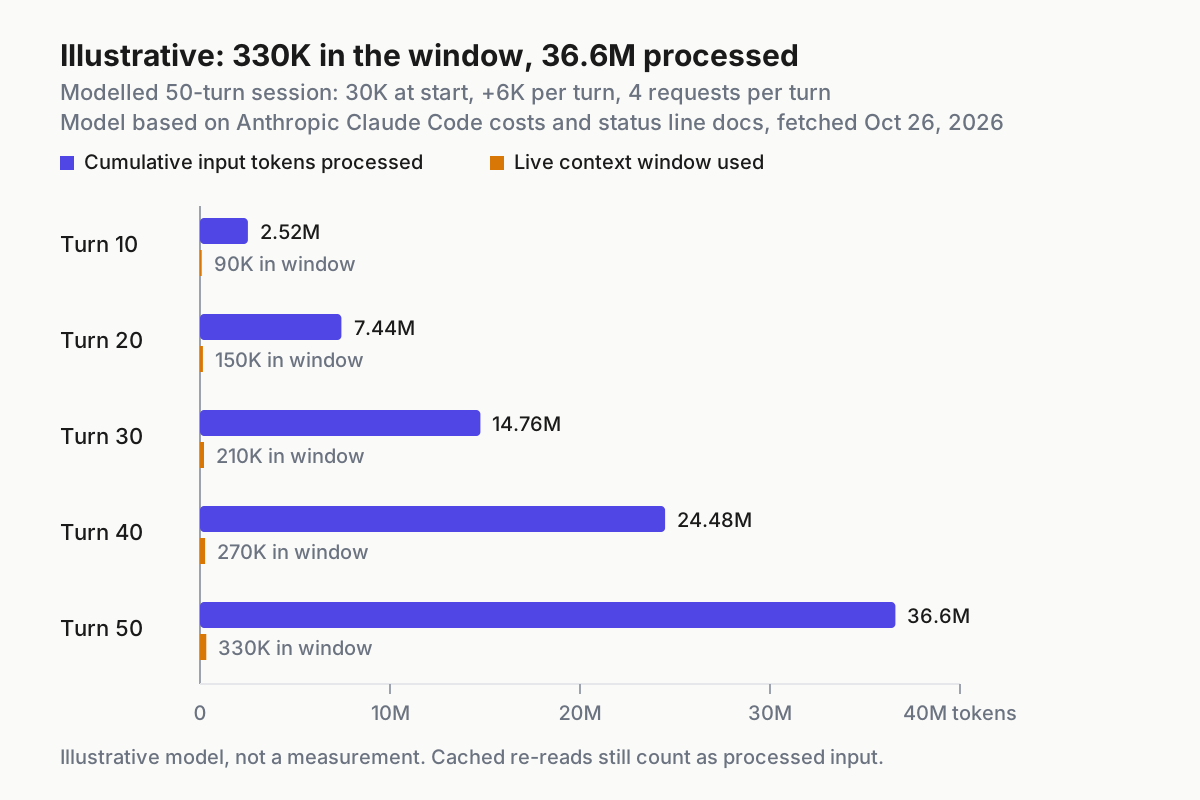
The chart shows why process count matters. In the X post, cutting three processes to one took that developer’s refresh from 19.8 ms to 6.3 ms and CPU time from 13.2 ms to 3.5 ms. Those are one person’s numbers on one machine, not a benchmark, but the direction holds generally: every extra process costs a fork and exec on every update. The rules below keep the worked script in that spirit without asking you to write awk:
- Start one parser process per refresh. The main script calls jq once. If you add fields, extend the interpolated string instead of adding another jq call.
- Cache anything that touches git.
git statusandgit diffcan be slow in large repositories; the docs’ caching example refreshes every 5 seconds, keyed onsession_id. If you add staged or modified counts, put them in the same cache file. - Make no network calls. A commenter on GitHub issue #40094 posted a workaround that reads the OAuth token from
~/.claude/.credentials.jsonand calls a usage endpoint withcurl, caching the result for 300 seconds. It is outside the status line docs, it handles your credential in a script that runs constantly, and it adds a network round trip. Leave it out. - Add
refreshIntervalonly for countdowns. Event triggers can go quiet while the session is idle, so the reset and cache countdowns go stale between turns. Setting"refreshInterval": 60keeps minute-resolution countdowns honest at the cost of one run per minute. Claude Code already re-runs the script when a window or warm cache reaches its reset or expiry time. - Measure after every change. Rerun the
timecheck from the fixture section and compare it with the baseline in your last commit message. Aim to stay well inside the 300 ms debounce.
If you want this kind of at-a-glance state across more than one agent, the AgentOps guide covers the wider monitoring layer. The status line is the cheapest piece of it.
How an update reaches your screen
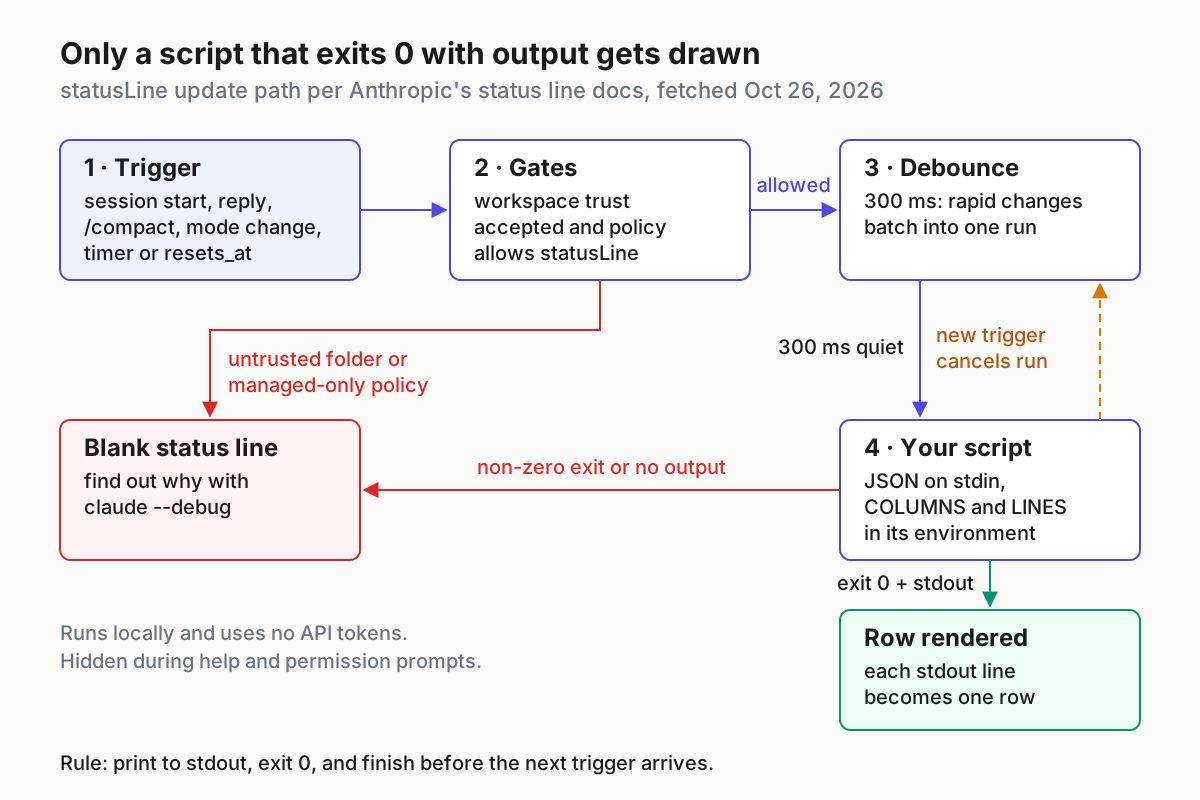
When the row misbehaves, it helps to know which stage failed. The path, assembled from the status line and managed settings docs, runs in this order:
- A trigger fires. Any of the events listed above, from a new assistant message to a cache expiry.
- Gates apply. Because
statusLineexecutes a shell command, Claude Code runs it under the same workspace trust rule as hooks: until you accept the trust dialog for the folder, the row stays blank. Organization policy can also restrict whichstatusLineruns. - The debounce waits 300 ms. Rapid changes batch into one run. A change to the command itself skips the debounce.
- Your script runs. It receives the JSON on stdin, with
COLUMNSandLINESset to the terminal size. A new trigger arriving now cancels this run. - Exit 0 with output gets drawn. Each printed line becomes a row; ANSI colors and OSC 8 links work where the terminal supports them.
- Anything else goes blank. A non-zero exit or empty output leaves the row blank. The row also hides temporarily during the help menu and permission prompts, which is expected.
Troubleshoot a blank, null or missing status line
Start every investigation with claude --debug: the docs say it logs your script’s stderr on every status line invocation and its exit code on the first invocation in a session. Then match the symptom:
| Symptom | Likely cause | Fix | What you should see after |
|---|---|---|---|
| Row never appears | Script not executable, or wrong path in command |
chmod +x the script; check the path; on Windows with Git Bash, use forward slashes |
The row appears on the next trigger |
| Row blank, though the script works by hand | Non-zero exit, output only on stderr, or a hang | End with exit 0; print to stdout; test with fixtures |
The debug log shows a 0 exit code |
| Blank only in some folders | Workspace trust not accepted there | Restart Claude Code in the folder and accept the trust dialog | The debug line Status line command skipped: workspace trust not accepted stops appearing |
null in the row |
A field read without a fallback | Add // "" in the combined call, or // empty or // 0 in single-field calls |
fresh.json prints ctx -- and $0.00 |
| 5h and 7d never appear | Console or API-key account, no response yet, window past resets_at, or a regression |
Check your plan; send one prompt; inspect the raw input as described below | Real percentages after the first response on Pro or Max |
| Status line vanished after an IT change | allowManagedHooksOnly in managed settings, or disableAllHooks set to true |
Run /status and ask your administrator |
The Setting sources line names the managed source |
| Each turn feels slower | Uncached git, a network call, or many processes per run | Apply the rules in Keep every refresh cheap; re-time | Lower real time with fixtures |
| Settings Error at startup | A comment or trailing comma in settings.json |
Remove it; settings files are strict JSON | Clean start; /status lists User settings |
Literal \033[32m in the row |
Escapes printed without interpretation | Print with printf '%b' |
Colored text |
Context differs from /context |
/context adds an estimate for messages since the last response |
Nothing to fix; used_percentage is the simplest accurate value |
The two converge after the next response |
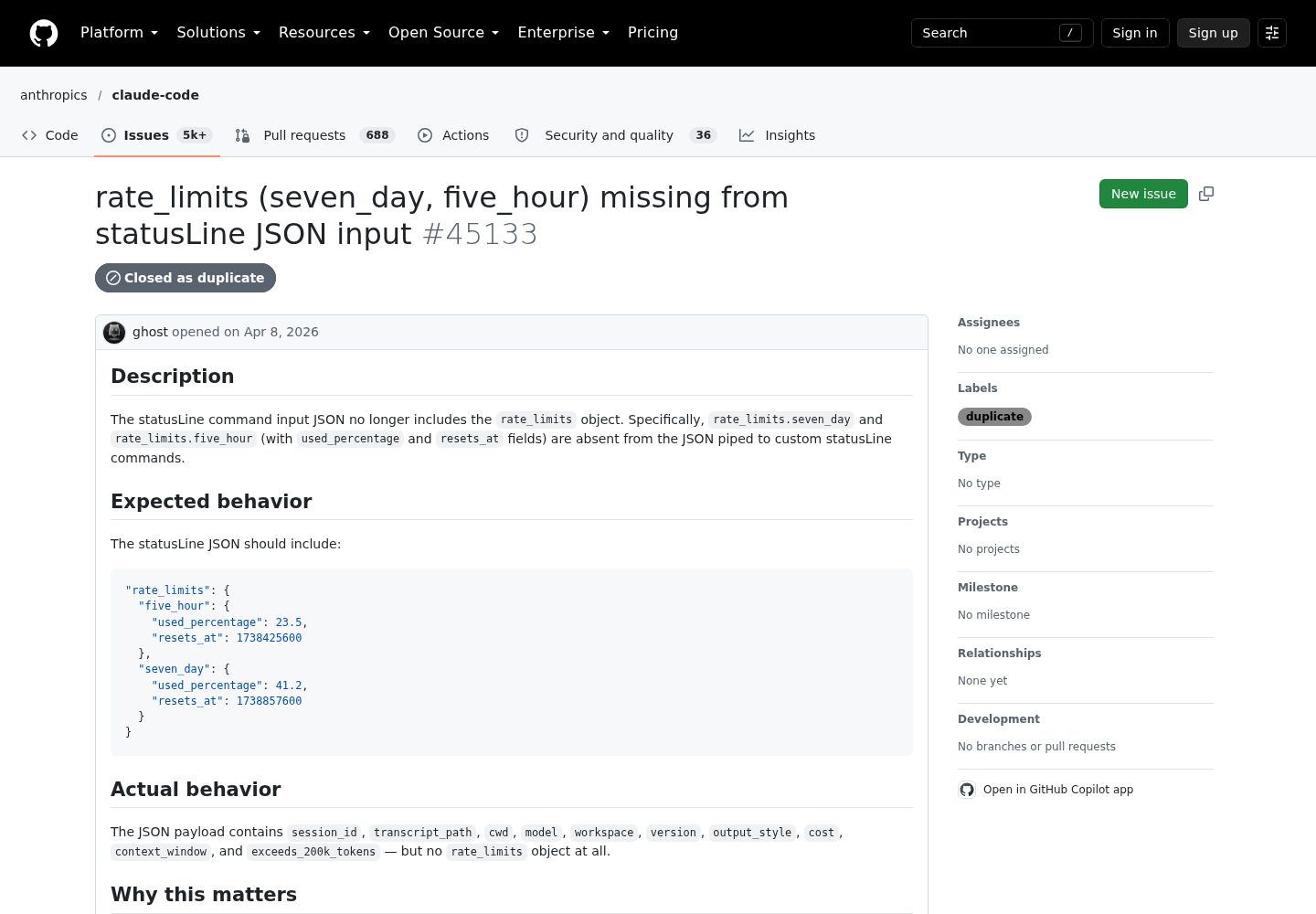
Missing usage windows deserve a closer look, because subscribers have reported them missing when they expected them. Issue #40094, opened Mar 28, 2026, described rate_limits being absent for a Max 20x account on v2.1.86 with no error, and was closed as not planned on May 1, 2026 after going inactive. Issue #45133, opened Apr 8, 2026 on v2.1.96, reported the same symptom and was closed as a duplicate on Apr 12. To check what your session actually receives:
- Temporarily add
printf '%s' "$input" > /tmp/statusline-last.jsonon the line afterinput=$(cat). - Send one prompt so the session has had a response.
- Run
jq '.rate_limits' /tmp/statusline-last.json, the same check used in #45133. - If it prints
null, Claude Code didn’t send the object; the script is behaving correctly by showing nothing. If it prints the windows, the problem is in your parsing. - Remove the debug line and commit nothing from this step.
For managed environments, the status line docs warn that if your organization sets allowManagedHooksOnly in managed settings, a custom status line disappears without warning, and only a statusLine value in those managed settings can show. The managed settings documentation lists allowManagedHooksOnly as a key only a managed source can set, and explains that /status names the active source, for example Enterprise managed settings (file). Nothing in your own files overrides it, so the fix is a conversation with your administrator, not a settings edit.
Roll back to the default footer
Rollback is one change, and the script stays in git either way:
- Run
/statusline delete(or/statusline clear), or delete thestatusLineobject from~/.claude/settings.jsonyourself. - If you edited by hand, save the file. Claude Code reloads it automatically.
- Confirm the custom row is gone and the built-in footer hints, such as
? for shortcuts, are back. - If the settings file itself is damaged, restore it with
cp ~/.claude/settings.json.bak ~/.claude/settings.json. - To return later, add the block back. To undo a bad script change instead, run
git login your dotfiles repo andgit checkout <commit> -- claude/statusline.sh.
If you set the status line in .claude/settings.local.json for one project, remove it there too; a project local value overrides the user file in that project.
Success checks for a working status line
Tick these off in a real session, not just against fixtures:
- [ ] A brand-new session shows
[Model] folder on branch | ctx --before the first prompt, with nonullanywhere. - [ ] After the first response,
ctxshows a real percentage and changes after each turn. - [ ] On a Pro or Max plan,
5hand7dappear after the first response; on a Console key they stay absent and nothing errors. - [ ] All three fixtures print one line each and exit 0, and the narrow-terminal test drops the cost segment.
- [ ]
timereports arealvalue well inside the 300 ms debounce, and the second, cached run is no slower than the first. - [ ]
/statuslists the settings source you intended, andclaude --debugshows no stderr from the script. - [ ] The script and its fallbacks are committed, with the timing baseline in the commit message.
When every box is ticked, you have a status line you can read at a glance, test before you change it, and remove in one step.
Sources
- SelimA (@Sel1mC) on X: rewriting a Claude Code status line, Oct 22, 2026
- Anthropic, Customize your status line, Claude Code Docs
- Anthropic, Settings files and precedence, Claude Code Docs
- GitHub, anthropics/claude-code issue #45133: rate_limits (seven_day, five_hour) missing from statusLine JSON input
- Microsoft Learn, ConvertFrom-Json (Microsoft.PowerShell.Utility)
- GitHub, anthropics/claude-code issue #40094: rate_limits field missing from statusLine JSON for Claude Max 20x plan
- Anthropic, Deploy managed settings, Claude Code Docs