Ollama Cloud Usage Limits for Coding Agents: Find Your Plan, Read /api/usage and Wire Claude Code, Codex and OpenCode
Ollama Cloud usage limits explained for coding agents: spot a legacy weekly-cap plan, read /api/usage by model, price a plan switch and wire Claude Code.

Go deeper. Build your own.
Alexandre Joly’s post on X on Monday, October 26, 2026 was one line: it was Monday, and they had already used more than 25% of their Ollama Cloud weekly limit. If you run a coding agent on Ollama’s hosted models, you have probably had the same week. Before you start rationing prompts, find out which kind of Ollama Cloud usage limits apply to your account. There are now two kinds, and they work very differently.
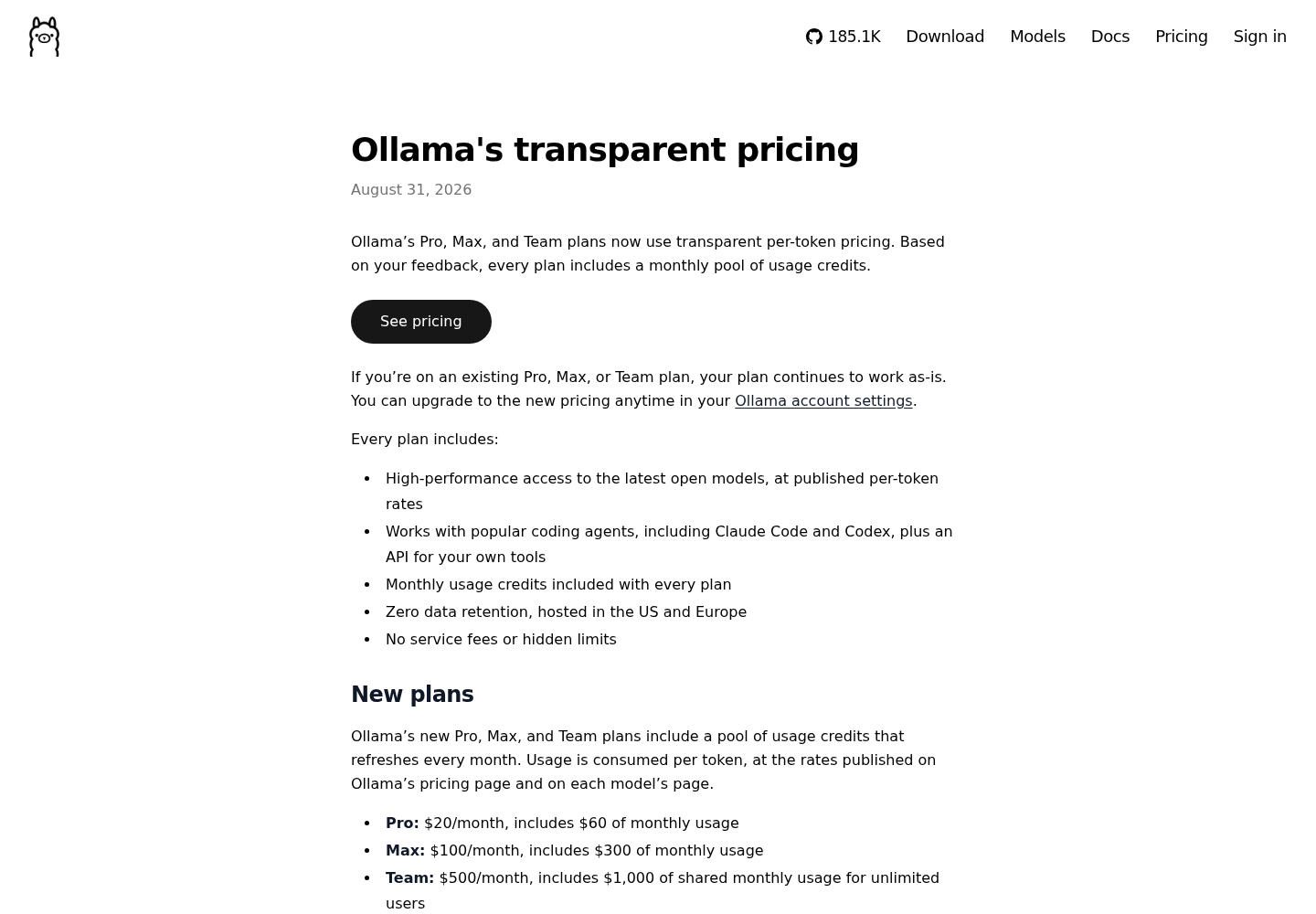
Ollama’s transparent pricing post of August 31, 2026 moved new Pro, Max and Team plans to per-token billing. Each plan draws on a monthly pool of included usage, and the post says the new pricing has “no 5-hour or weekly limits.” Existing subscribers kept their old plans, and the 5-hour session limit and the weekly limit survive only there. So if you have a weekly limit at all, you are on a legacy plan.
This guide is for developers who run Claude Code, Codex or OpenCode on Ollama cloud models through a Free, Pro or Max account and keep hitting a cap without knowing exactly what counts against it. By the end you will have five things:
- a verdict on which meter your account uses
- a script that prints your usage by model
- a filled worksheet that prices a month on the per-token plans
- each agent pointed at a cloud model on purpose, not by accident
- a written plan for the day the limit hits
Prices, included pools and concurrency figures come from Ollama’s pricing page as read on October 28, 2026. Ollama adds models and changes rates, so check them again before you act on the worksheet. All commands and configuration come from Ollama’s documentation. Output blocks show the expected shape; we did not observe them from a live account.
Before you start: accounts, keys and tools
You need less than the agent docs suggest, but each item matters for a specific step.
- [ ] An ollama.com account on Free, Pro, Max or Team. Note which tier you pay for and whether you subscribed before August 31, 2026. Step 1 depends on both.
- [ ] An API key created on ollama.com. Ollama’s cloud documentation exports it as
OLLAMA_API_KEYin Bash or Zsh and warns you to keep it out of browser code and source control. The usage endpoint and the direct Claude Code connection both read it. - [ ] Ollama installed and signed in with
ollama signin, listed in the CLI reference, if you will useollama launch. The launch path handles sign-in for the agents it starts. - [ ] At least one agent installed: Claude Code, the Codex CLI or OpenCode.
- [ ]
curl,jq,awkandcolumnon your PATH for the measurement script.awkreads theRetry-Afterheader andcolumnaligns the final table. Runcommand -v curl jq awk columnand expect four paths. On a minimal Linux imagecolumnis often missing; install it from your distribution’s util-linux or bsdmainutils package, or delete the script’s final| column -t -s $'\t'pipe and read the tab-separated output as it is. - [ ] A fresh terminal. You will set and later unset several environment variables, and a clean shell lets you see exactly what you changed.
One sizing rule applies to every agent. Ollama’s integration pages call for a context window of at least 64k tokens for Codex and OpenCode, and recommend 64k or more for Claude Code on larger repositories. A model with a short window fails in confusing ways, so check it before you blame the plan.
Step 1: Find out which meter your account is on
The two plan models differ in what they count, when they reset, and what happens at the cap. Compare them before you read any numbers.
| Question | Legacy Pro, Max or Team (kept since before Aug 31, 2026) | Per-token Pro, Max, Team, Free and pay as you go |
|---|---|---|
| What is limited | A 5-hour session limit and a weekly limit | A monthly dollar pool: Pro $60, Max $300, Team $1,000 shared; Free gets a starter amount for starter models |
| What counts | Use within the session and weekly windows; Ollama says the old GPU-time billing was hard to predict | Tokens: input, cached input and output, each at the model’s published rate |
| When it resets | When the session or weekly window ends | Monthly, on the day of the month your plan started; unused pool does not roll over |
| At the cap | You wait for the window to reset | You keep going at the same per-token rate, paid from purchased usage credits |
| Requests at once | Not stated in the sources used here | Pay as you go and Pro: 3; Max and Team: 10 |
What /api/usage returns |
Request counts only | Request counts, usage_usd and token totals |
Work through these checks in order:
- Open billing settings on ollama.com and note your tier, your billing cycle and your plan start date. Ollama’s FAQ says existing Pro, Max and Team subscribers stay on their current plan until they upgrade in billing settings, and that every new signup starts on the new plans.
- Run the Step 2 script with
30d. If the header line says LEGACY, at least some requests in that window came from a legacy plan, because the usage docs return only request counts for that usage. - Check how you describe your own cap. If you think of it as a weekly or 5-hour allowance, as Joly did, you are on a legacy plan, because the new plans have neither.
- Write the verdict down: legacy or per-token, tier, and the day of the month your plan started. Step 3 needs all three.
Three actions convert a legacy plan whether you mean them to or not: switching the billing cycle between monthly and annual, changing tier, and cancelling then resubscribing later. If you converted by mistake and had an active subscription when the new pricing launched, the FAQ says support can move you back to your original plan on the same cycle and tier. For the general difference between credit meters and token meters, see AI credits vs tokens. This step is narrower: it only reads your own account.
Step 2: Measure usage by model with /api/usage
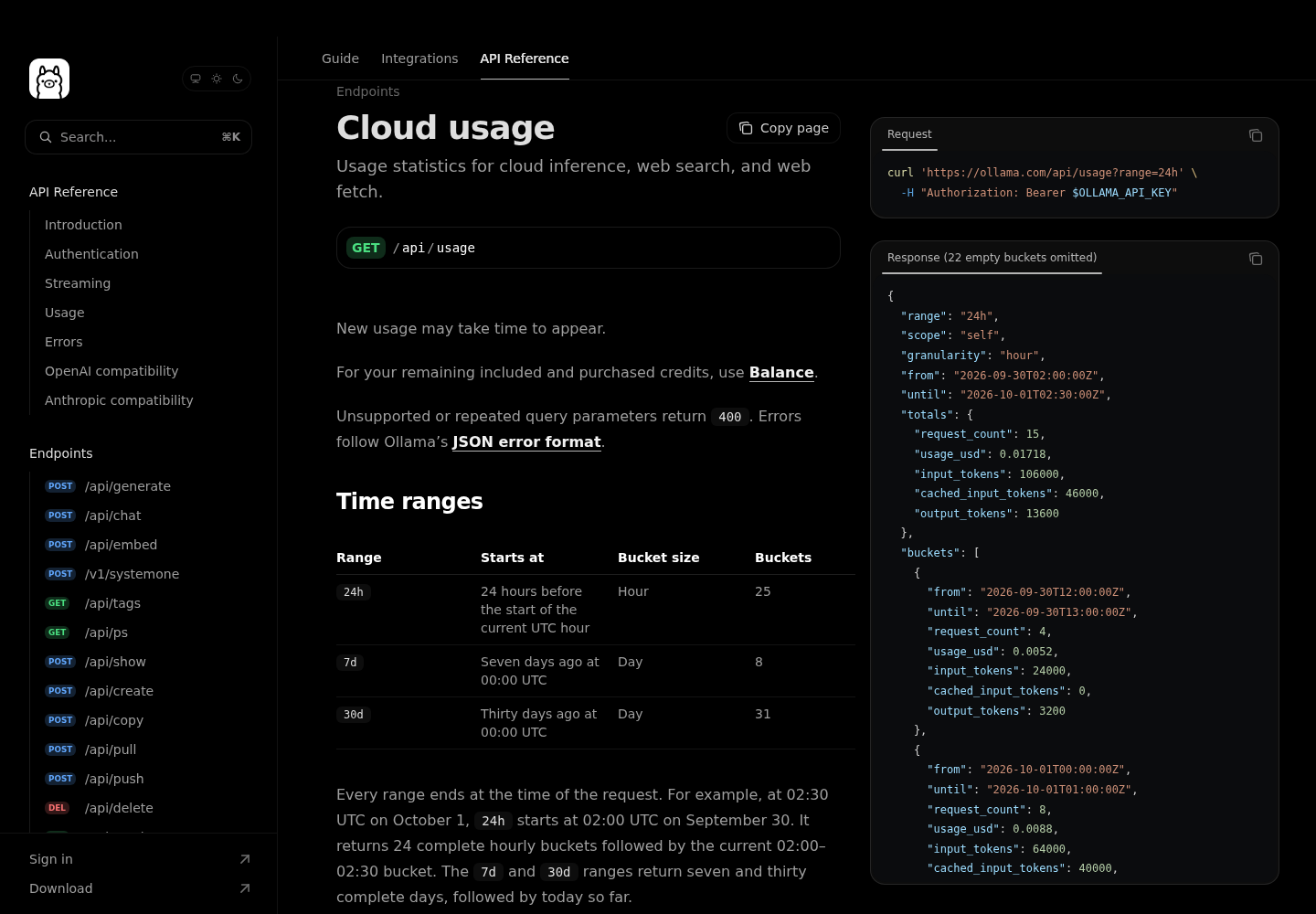
Ollama documents an account usage endpoint: GET https://ollama.com/api/usage, authenticated with your API key as a bearer token. Three query parameters matter:
range:24hreturns 25 hourly buckets;7dand30dreturn 8 and 31 daily buckets. The default is7d. Every range ends at the moment of the request, and the last bucket is the current hour or day, markedpartial: true.group_by=model: adds agroupsarray tototalsand to every bucket. Up to 10 models appear, ranked byusage_usd. Any others are combined into a remainder, andtotalsalways includes all usage.scope:selfby default.teamworks only for team admins.
Two documented limits shape the script. The endpoint allows 10 requests per minute per user, shared across all your API keys and devices, and Ollama recommends polling once per minute. A 429 response includes a Retry-After header giving the seconds to wait. Unsupported or repeated query parameters return 400, so the script builds the URL once and never appends to it.
Save this as ollama-usage.sh:
#!/usr/bin/env bash
# ollama-usage.sh: print Ollama Cloud usage by model.
# Usage: ./ollama-usage.sh [24h|7d|30d]   (default 30d)
set -euo pipefail

RANGE="${1:-30d}"
: "${OLLAMA_API_KEY:?export OLLAMA_API_KEY first}"
BODY="$(mktemp)"; HEADERS="$(mktemp)"
trap 'rm -f "$BODY" "$HEADERS"' EXIT

fetch() {
  curl -sS -o "$BODY" -D "$HEADERS" -w '%{http_code}' \
    "https://ollama.com/api/usage?range=${RANGE}&group_by=model" \
    -H "Authorization: Bearer ${OLLAMA_API_KEY}"
}

status="$(fetch)"
if [ "$status" = "429" ]; then
  wait_s="$(awk 'tolower($1)=="retry-after:" {print $2+0}' "$HEADERS")"
  echo "429: rate limited, sleeping ${wait_s:-60}s per Retry-After" >&2
  sleep "${wait_s:-60}"
  status="$(fetch)"
fi
if [ "$status" != "200" ]; then
  echo "HTTP $status" >&2
  cat "$BODY" >&2
  exit 1
fi

jq -r '
  def v(x): if x == null then "n/a" else (x | tostring) end;
  "range \(.range)  \(.from) -> \(.until)  scope \(.scope)",
  (if .totals.usage_usd == null
     then "LEGACY requests in range: request counts only, groups ranked by requests"
     else "per-token usage: groups ranked by usage_usd" end),
  "TOTAL  requests=\(.totals.request_count)  usd=\(v(.totals.usage_usd))  input=\(v(.totals.input_tokens))  cached=\(v(.totals.cached_input_tokens))  output=\(v(.totals.output_tokens))",
  "",
  (["model","requests","usd","input","cached","output"] | @tsv),
  ((.totals.groups // [])[]
     | [.model, (.request_count | tostring), v(.usage_usd), v(.input_tokens),
        v(.cached_input_tokens), v(.output_tokens)] | @tsv)
' "$BODY" | column -t -s $'\t'
What each choice does: -D saves the response headers so the script can read Retry-After. The awk expression lowercases the header name and adds zero to the value, which drops the trailing carriage return. On a 429 the script retries once, then exits with the error body instead of hammering the endpoint. The v helper prints n/a for any missing field, so the same script runs unchanged on legacy and per-token accounts.
Run it:
- Export the key in the shell you will use:
export OLLAMA_API_KEY="your_api_key". - Make the script executable:
chmod +x ollama-usage.sh. - Run
./ollama-usage.sh 30dfor the month view, or./ollama-usage.sh 24hfor today in hourly buckets. - To watch a heavy session live, poll at the recommended rate:
while true; do ./ollama-usage.sh 24h; sleep 60; done. - Don’t run the loop on two machines at once. The 10-per-minute allowance is shared across devices, and a second poller pushes both into 429s.
The expected output below is built from the example response in Ollama’s documentation, not from a run on a real account:
range 7d  2026-09-24T00:00:00Z -> 2026-10-01T02:30:00Z  scope self
per-token usage: groups ranked by usage_usd
TOTAL  requests=16  usd=0.0268  input=116000  cached=60000  output=15000
model          requests  usd     input  cached  output
glm-5.3-flash  12        0.0132  96000  60000   12000
glm-5.3        2         0.01    4000   0       1000
gpt-oss:120b   2         0.0036  16000  0       2000
How to read it:
inputincludescached. That is the only reading under which the docs’ example matches the pricing table. For glm-5.3-flash: (96,000 − 60,000) × $0.15 + 60,000 × $0.03 + 12,000 × $0.50, all per million tokens, comes to $0.0132, which is exactly theusage_usdthe example reports. The gpt-oss:120b and glm-5.3 rows check out the same way. Step 3 uses this formula.- If the window includes legacy usage, the second line says LEGACY and the money and token columns show
n/a. Groups are then ranked by request count, not cost. - All timestamps are UTC. If the last day looks short, that is the partial current day, not missing data.
- The docs warn that new usage can take time to appear, so a request you sent seconds ago may not be counted yet.
- This endpoint reports what you have spent, not what you have left. The docs point to a separate Balance reference for remaining included and purchased credits. The pricing FAQ adds that paid plans get an email at 90% of included monthly usage.
Step 3: Price a month and decide whether to switch
On a per-token plan, the 30d output is already your bill: add the usd column and compare it with your pool. On a legacy plan you only have request counts, so you have to assume a token profile per request. The worked example below does exactly that, and every assumption is labelled as one.
Illustrative worked example. A legacy Pro subscriber runs ./ollama-usage.sh 30d and gets 2,400 requests to glm-5.3-flash, 900 to kimi-k2.7-code and 300 to glm-5.3. Assume each request sends 40,000 input tokens, of which 32,000 are cached, and returns 1,200 output tokens. Those are planning assumptions, not measurements. Rates are the pricing page’s standard per-million-token prices on October 28, 2026.
| Model | 30-day requests (Illustrative) | Uncached / cached / output tokens per request (Illustrative) | Input / cached / output rate per 1M tokens | Cost per request | 30-day cost |
|---|---|---|---|---|---|
| glm-5.3-flash | 2,400 | 8,000 / 32,000 / 1,200 | $0.15 / $0.03 / $0.50 | $0.00276 | $6.62 |
| kimi-k2.7-code | 900 | 8,000 / 32,000 / 1,200 | $0.95 / $0.19 / $4.00 | $0.01848 | $16.63 |
| glm-5.3 | 300 | 8,000 / 32,000 / 1,200 | $1.40 / $0.26 / $4.40 | $0.02480 | $7.44 |
| Total | 3,600 | $30.70 |
Here is the kimi-k2.7-code row worked out: 8,000 × $0.95 = $0.0076, plus 32,000 × $0.19 = $0.00608, plus 1,200 × $4.00 = $0.0048, all divided by a million tokens, gives $0.01848 per request. Times 900 requests, that is $16.63. The whole month comes to $30.70, about half of Pro’s $60 pool. Notice that the 300 glm-5.3 requests cost more than the 2,400 glm-5.3-flash requests. Model choice moves the bill far more than request count does.
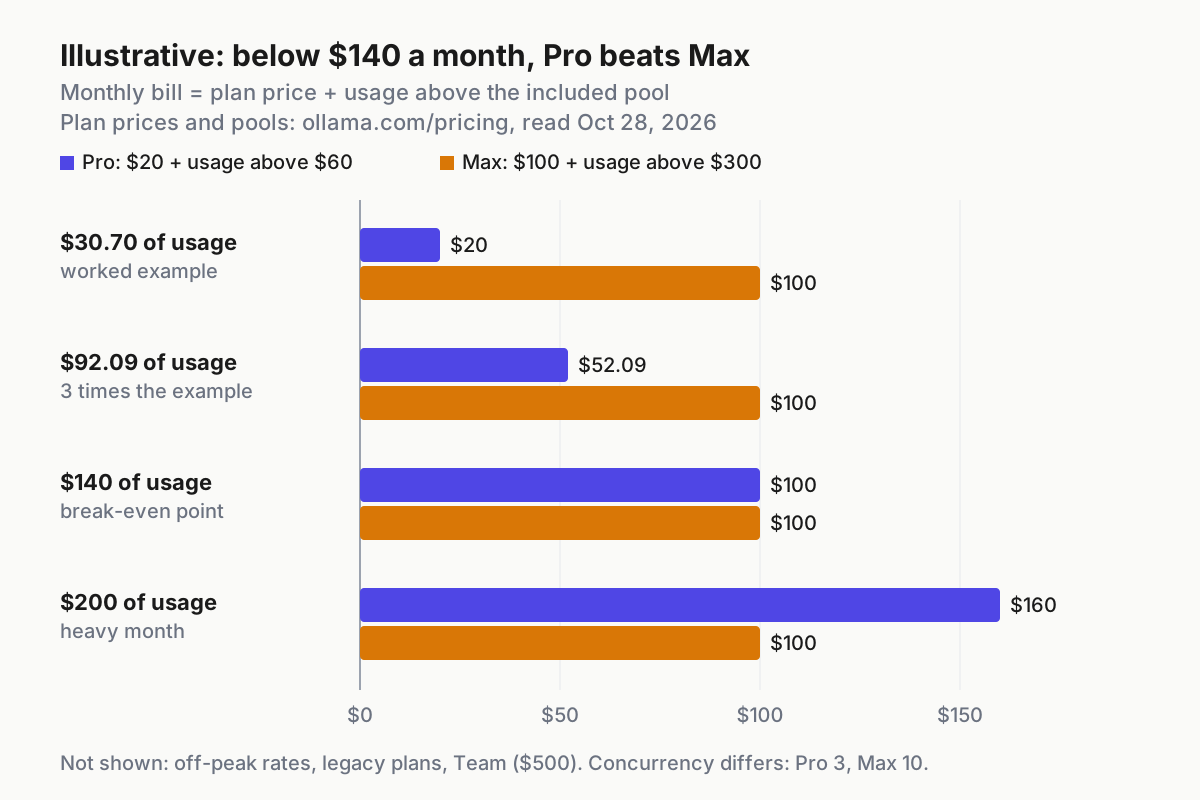
Now compare plan bills. On the per-token plans, a month costs the plan price plus any usage above the included pool. Pro costs $20 plus usage above $60. Max costs $100 plus usage above $300. Those two lines cross at $140 of usage.
| Projected monthly usage (U) | Cheapest per-token plan for one person | Monthly bill | Check before choosing |
|---|---|---|---|
| U ≤ $60 | Pro | $20 | Need more than 3 requests at once? Price Max anyway |
| $60 < U < $140 | Pro, paying overage | $20 + (U − $60) | Overage draws on purchased usage credits |
| $140 ≤ U ≤ $300 | Max | $100 | You also get 10 concurrent requests |
| U > $300 | Max, paying overage | $100 + (U − $300) | Team ($500 with a $1,000 shared pool) costs less than Max only above $700, and it is built for organizations |
Apply the table to the example. At $30.70, switching from legacy Pro to new Pro costs the same $20 and removes the weekly cap. If the same developer worked three times as hard, usage would be $92.09: new Pro would bill $52.09 and Max $100, so Pro plus overage still wins.
Use this procedure for the stay-or-switch decision on a legacy plan:
- If the worksheet total fits your current tier’s pool, switch. The price stays the same and the 5-hour and weekly caps disappear. Ollama says switching resets usage, so the full monthly amount is available immediately and your reset date stays on your original start date. If you are capped on a Monday, switching gets you working again that day.
- If the total falls between the pool and $140 on Pro, switching adds overage. Compare that dollar figure with the cost of waiting out legacy caps. Some people would rather wait than pay, and the legacy cap is a hard spending ceiling.
- If the total is above $140, price Max. You get both the larger pool and 10 concurrent requests.
- Stress-test the guess. Double the per-request input tokens and run the table again. If that flips the decision, the decision is fragile. Switch only if you can absorb the higher figure, then re-measure with real token data after a week.
- Write the decision down with the date and the price-list date. If the per-token plan turns out wrong and you were subscribed at launch, the FAQ says support can convert you back.
For how other vendors’ flat plans compare, see Token Plans Decoded. The worksheet above stays focused on this one account.
Step 4: Wire Claude Code, Codex and OpenCode to a cloud model
Get the model name right first, because most “model not found” errors are naming errors. The Cloud page describes two forms. For API requests to ollama.com, use the name that curl https://ollama.com/api/tags returns, such as gemma4:31b. In the Ollama app or CLI, use the :cloud form, such as gemma4:cloud. Cloud models never need downloading. The Codex page’s manual example uses a third spelling, gpt-oss:120b-cloud. Copy whichever form the relevant doc shows rather than converting between them.
Then choose a model that supports tool calls. The pricing FAQ says cloud models trained for tools are tested with real agent workflows. A model without tool support will chat but will not edit files or run commands.
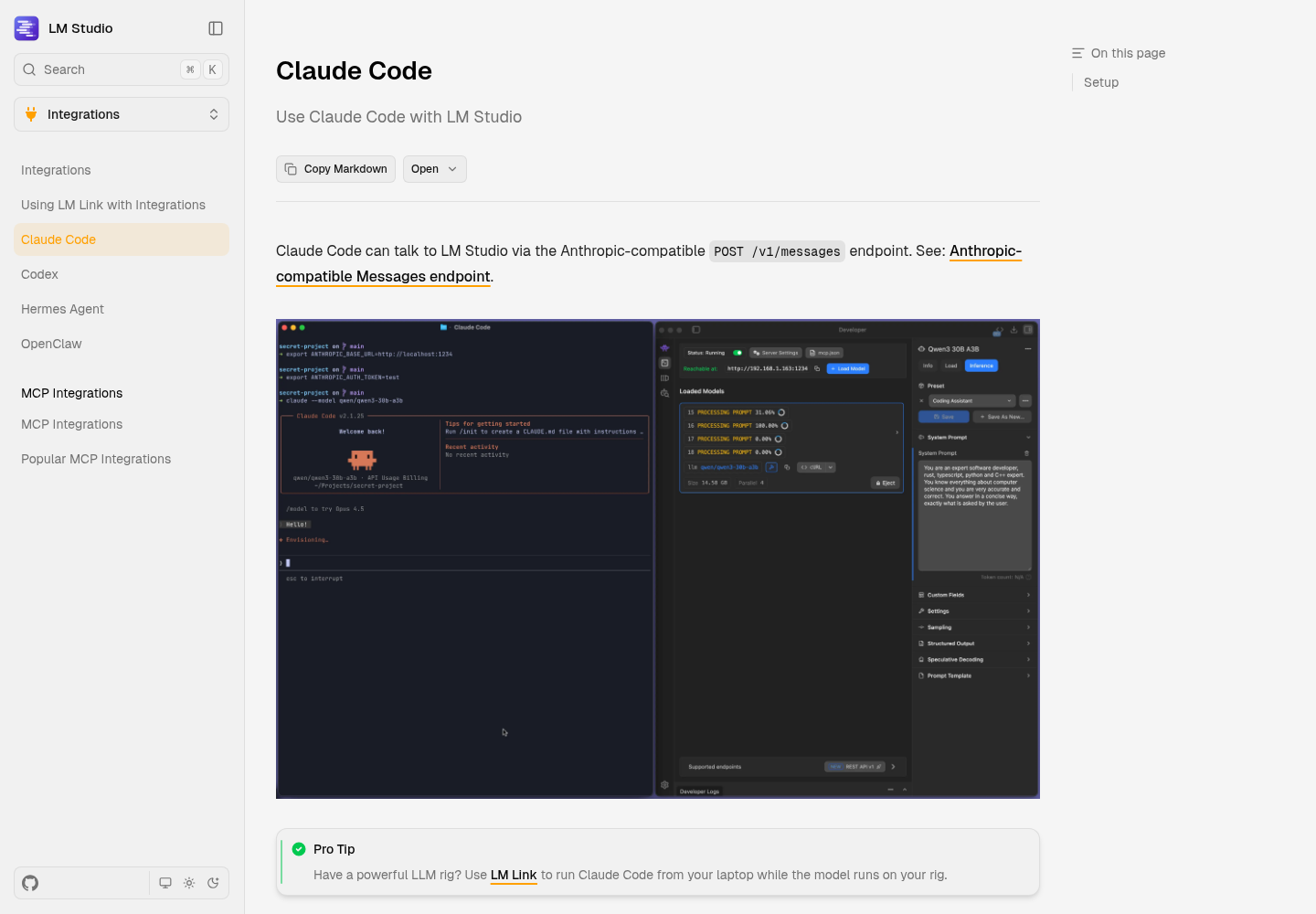
Claude Code. The Claude Code integration page documents two routes. The launch route goes through your signed-in local Ollama:
# Interactive: pick a model from the selector
ollama launch claude

# Scripted: --yes skips selectors and requires --model; arguments after -- go to Claude Code
ollama launch claude --model gemma4:cloud --yes -- -p "how does this repository work?"
The direct route skips the local install and talks straight to ollama.com, using the API-form model name:
ANTHROPIC_BASE_URL=https://ollama.com \
ANTHROPIC_AUTH_TOKEN="$OLLAMA_API_KEY" \
ANTHROPIC_API_KEY="" \
claude --model glm-5.3-flash
ANTHROPIC_AUTH_TOKEN carries the bearer key. The empty ANTHROPIC_API_KEY stops an Anthropic key from being used instead. Setting the variables inline, rather than exporting them, confines them to this one process. Inside the session, run /status: the connection should show https://ollama.com. Ollama warns that Claude settings can override shell variables. If /status still shows Anthropic, fix the base URL and credentials in your Claude settings. Hosted WebSearch and advanced tool controls are not fully supported on this route.
Codex. The Codex integration page recommends the launch command, which refreshes the model catalog and uses a dedicated profile for that session:
ollama launch codex            # launch with an Ollama profile
ollama launch codex --config   # write the configuration without launching
codex --oss -m gpt-oss:120b-cloud   # manual: documented cloud model through --oss
If you want a persistent profile, the docs show ~/.codex/ollama-launch.config.toml. The version below is that documented profile with the documented cloud model name from the manual example swapped in. Replace you in the catalog path with your own user name:
model = "gpt-oss:120b-cloud"
model_provider = "ollama-launch"
model_catalog_json = "/Users/you/.codex/model.json"

[model_providers.ollama-launch]
name = "Ollama"
base_url = "http://localhost:11434/v1/"
wire_api = "responses"
Start it with codex --profile ollama-launch. Inside Codex, /model switches between installed models that can call tools. Web-search requests on this profile are executed by Ollama, which needs ollama signin. To turn them off, run codex --profile ollama-launch -c 'web_search="disabled"'.
OpenCode. The OpenCode integration page recommends ollama launch opencode. That command passes an inline config for the selected model and does not overwrite ~/.config/opencode/opencode.json, so your existing OpenCode settings still apply. The manual route adds a provider to opencode.json. The docs’ example lists a local model. The version below swaps in kimi-k2.7-code:cloud, the CLI-form cloud name used on the Claude Code page. That is an adaptation, and it needs a signed-in local Ollama:
{
  "$schema": "https://opencode.ai/config.json",
  "provider": {
    "ollama": {
      "npm": "@ai-sdk/openai-compatible",
      "name": "Ollama",
      "options": { "baseURL": "http://localhost:11434/v1" },
      "models": {
        "kimi-k2.7-code:cloud": { "name": "kimi-k2.7-code:cloud" }
      }
    }
  }
}
Models defined only in opencode.json do not show up in the ollama launch picker. That is expected, not a failure.
Prove each wiring with one task that uses tools:
- In a scratch repository, ask the agent: “Run ls at the repository root and write the output to OLLAMA_CHECK.md.”
- Expect a permission prompt to run a command and then to write a file. A reply that only describes the steps means the model is not calling tools.
- Confirm
OLLAMA_CHECK.mdexists, then delete it. - A minute later, run
./ollama-usage.sh 24h. The model you chose should show a higher request count in the current hour. If it doesn’t, allow for the documented reporting delay before deciding the agent went somewhere else.
Step 5: Fit agent fan-out to your concurrency slots
On the per-token plans, concurrency sets how fast your work runs and the pool sets what it costs. The pricing FAQ says pay as you go and Pro allow 3 concurrent requests, while Max and Team allow 10. Requests beyond the limit are queued and run as soon as a slot frees up. The queue holds requests up to a fixed limit, and once it is full, new requests are rejected until a slot opens. Claude Code and OpenCode both list subagents among their Ollama capabilities. A session that fans out to five subagents on Pro therefore runs three requests at once, and the other two wait.
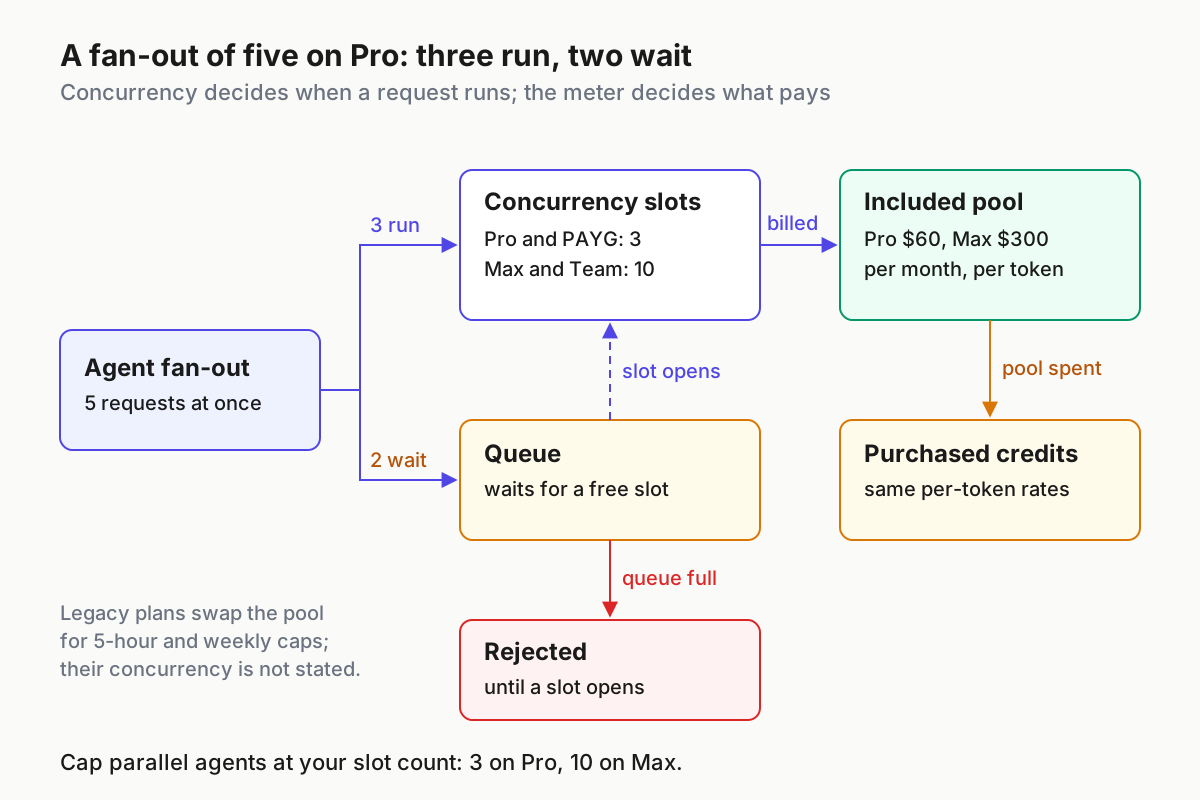
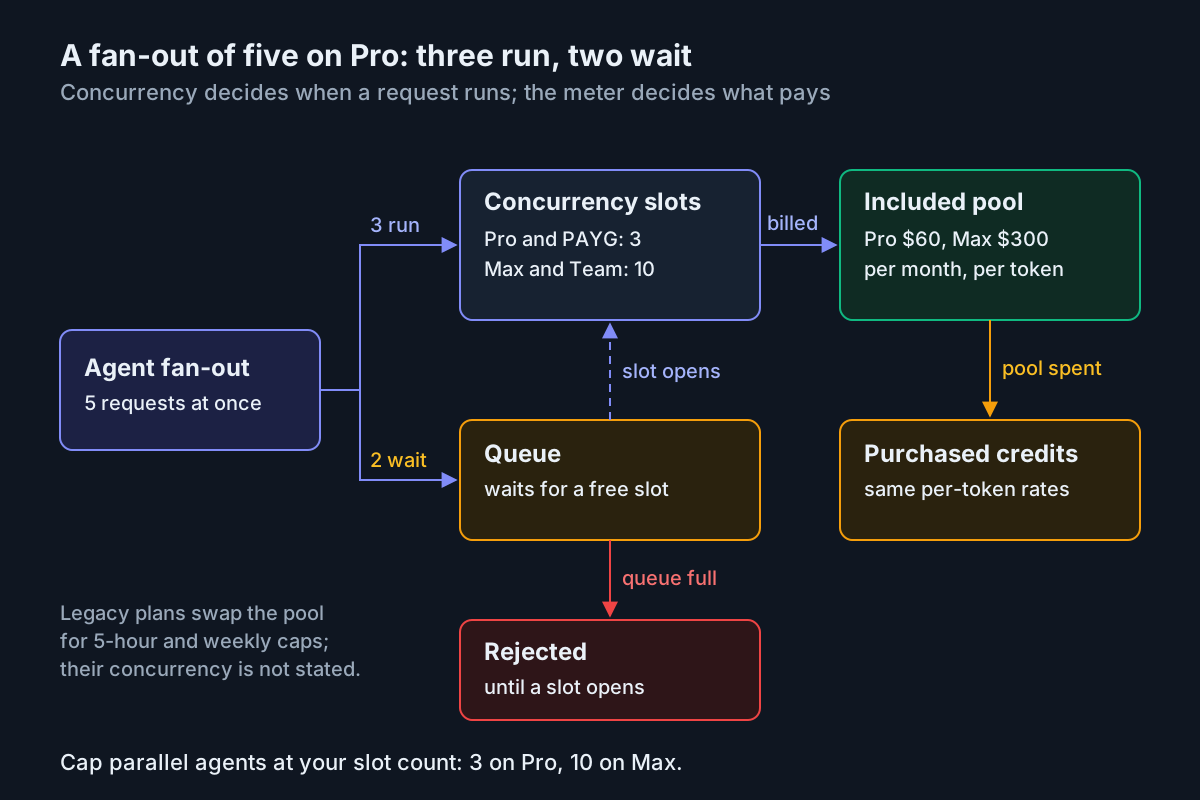
Treat the slot count as shared by everything on the account. The FAQ describes concurrency per plan, not per tool, so a Codex session and an OpenCode session compete for the same three slots.
| Plan | Concurrent requests | Example layout that stays inside the limit (Illustrative) | Symptom when you exceed it |
|---|---|---|---|
| Pay as you go | 3 | One agent session, at most two parallel subagents | Turns slow down while requests queue |
| Pro | 3 | Same as pay as you go | Long runs stall; requests rejected once the queue fills |
| Max | 10 | Three sessions with two subagents each, leaving one slot spare | Same, at a higher ceiling |
| Team | 10 | Coordinate who runs parallel fleets and when | Teammates queue behind each other |
| Legacy plans | Not stated in the sources used here | Measure with Step 2 before you scale out | Unknown; watch for stalls |
To size a fan-out:
- Count your peak: main sessions plus the most subagents any one of them launches at once.
- If the peak is above your slot count, lower it in the agent’s subagent definitions. The Claude Code subagents guide shows how to write those files.
- Run the fan-out while
./ollama-usage.sh 24hpolls once a minute. Requests should rise in step with completed subagent tasks. - If a run stalls with nothing new counted, you are queued or rejected. Reduce parallelism before you upgrade.
- Remember that every subagent is billed. For metering a fan-out, see subagent fan-out metering. For running many sessions without losing track of them, see the multi-agent command center guide.
When the limit hits: pick a move
Decide this before Monday morning, not during it. The right move depends on which meter you are on.
| Situation | Move | Cost | When it is the right call |
|---|---|---|---|
| Legacy plan, weekly limit reached early | Wait for the window to reset | Time | The work can wait and the week was unusual |
| Legacy plan, weekly limit reached early | Switch to per-token in billing settings | Same plan price; overage only above the pool | Step 3 says your month fits the pool; usage resets to the full monthly amount right away |
| Per-token plan, 90% email arrives | Check ./ollama-usage.sh 30d and move routine turns to cheaper models |
None | One expensive model dominates the usd column |
| Per-token plan, pool spent | Keep going at the same per-token rate on purchased usage credits | Per-token overage | The deadline matters more than the overage |
| Per-token plan, pool spent repeatedly | Change tier using the Step 3 break-even | Plan difference | Usage is routinely above $140 on Pro |
| Flexible batch work | Schedule it off-peak | Lower rates on models with off-peak rows | The pricing page lists off-peak rates outside 12:00 to 18:00 UTC on weekdays and all weekend; see off-peak scheduling |
| Any plan, work must continue for free | Fall back to a local model | Your own hardware | Use Ollama local-only mode, or a shared local server with LM Studio |
One caution about falling back to local: the pricing FAQ says running models on your own hardware is always unlimited, but your laptop’s memory still limits which models and context sizes you can run. Test the fallback on a quiet day so you know it works before you need it.
Troubleshooting Ollama Cloud agent sessions
| Symptom | Likely cause | Fix | What you should see after |
|---|---|---|---|
Script prints HTTP 401 |
Key missing, mistyped or exported in a different shell | Run echo ${OLLAMA_API_KEY:+set}; re-export or create a new key |
The range header line prints |
Script prints HTTP 400 |
Unsupported or repeated query parameter | Use only 24h, 7d or 30d, and group_by=model once |
Normal output |
Script prints 429: rate limited |
More than 10 calls a minute across all keys and devices | Stop the extra pollers and poll once a minute | The retry after Retry-After returns 200 |
usd and token columns show n/a |
Legacy usage in the range | Expected; use request counts plus the Step 3 assumptions | LEGACY header line |
Claude Code /status shows Anthropic, not ollama.com |
Claude settings override shell variables | Update the base URL and credentials in Claude settings | /status shows https://ollama.com |
| “Model not found” | Name form mismatch | API name from /api/tags for direct calls; :cloud form in the CLI; doc spelling for Codex |
Session starts on the model |
| Agent describes edits but never makes them | Model without tool support | Choose a tool-capable cloud model; in Codex, pick from /model |
Permission prompt for the file write |
| Subagent run stalls or requests are refused | Over the concurrency limit; queue full | Cap parallel agents at 3 on Pro, 10 on Max | Steady request growth in 24h output |
| Web search fails in Claude Code on the direct route | Hosted WebSearch is not fully supported | Leave it off for this route, or use the launch route’s Ollama web search | No search tool errors |
| Codex or OpenCode loses track of the repository | Context window below 64k | Choose a model and setting with at least 64k | Agent references files from earlier turns |
An agent quietly billing a different provider is the worst failure here, because nothing errors. Two checks catch it. First, /status in Claude Code should show the Ollama base URL. Second, the Step 4 proof task should add a request to your Ollama usage within a few minutes. If the task succeeds but Ollama counts nothing new, after allowing for the reporting delay, assume the request went somewhere else and recheck the settings files.
Rollback and recovery
Each change in this guide can be undone separately. Undo them in this order:
- Close any shell where you exported variables, or run
unset ANTHROPIC_BASE_URL ANTHROPIC_AUTH_TOKEN ANTHROPIC_API_KEY. Variables set inline on theclaudecommand line disappear when that process exits. - Revert any base URL or credential you changed in Claude settings. Then run
/statusin a new session and confirm it shows your normal provider. - Run
ollama launch codex --restoreto remove the Ollama launch profile and the generated model catalog. Delete~/.codex/ollama-launch.config.tomlif you created it by hand. - Delete the
ollamaprovider block fromopencode.json.ollama launch opencodenever wrote to that file, so nothing else needs undoing. - Delete the API key in your ollama.com account, then
unset OLLAMA_API_KEY. Any script still using that key should now get a 401. - Run
ollama signoutto sign the CLI out. - If you switched plans and want the legacy plan back, contact Ollama support. The FAQ offers that only to accounts that had an active subscription when the new pricing launched.
Done means these checks pass
- [ ] You have written down your meter (legacy or per-token), tier and monthly reset day.
- [ ]
./ollama-usage.sh 30dprints a header line, a TOTAL line and one row per model without a 429. - [ ] The worksheet is filled with your counts and today’s rates, and it ends in a dated stay-or-switch decision.
- [ ]
/statusin Claude Code showshttps://ollama.comwhen you use the direct route. - [ ] Each agent you use completed the
OLLAMA_CHECK.mdtask on a cloud model, and the request showed up in24husage. - [ ] Your peak fan-out is at or below your plan’s concurrency slots.
- [ ] A local fallback has been tested, and the rollback steps are saved where you will find them.
The announcement will date; the habit of naming your meter, measuring by model and pricing the month before reaching for a bigger plan won’t.
Sources
- Alexandre Joly on X, October 26, 2026: post about using over 25% of the Ollama Cloud weekly limit by Monday
- Ollama Blog, August 31, 2026: Ollama’s transparent pricing
- Ollama docs: Cloud usage API reference (GET /api/usage)
- Ollama: Pricing, plans, concurrency and model rates (read October 28, 2026)
- Ollama docs: Cloud
- Ollama docs: Claude Code integration
- Ollama docs: Codex CLI integration
- Ollama docs: OpenCode integration
- Ollama docs: CLI reference