Claude Code Sandbox Setup: Turn On /sandbox, Write the settings.json Block, and Fix Commands That Fail Only in the Sandbox
Set up the Claude Code sandbox: run /sandbox, write a reviewed settings.json block, prove each boundary with probes, and fix commands that only fail inside it.

Go deeper. Build your own.
You turned on the Claude Code sandbox to stop approving every npm test, and the next npm install failed with a network error you never see in your own terminal. Or you have not turned it on yet, because nobody on the team can say exactly what it fences, what it leaves alone, or how to back out if it breaks a build. This guide covers both cases on one test repository.
By the end you will have checked your version and release channel, run /sandbox and recorded what it reported, committed a reviewed .claude/settings.json sandbox block for a Node project, proved each boundary with eight probes that you ask Claude to run, and worked through the failures that appear only inside the sandbox. You will also have the exact steps to turn it off again.
Who this is for. A developer who uses Claude Code daily on macOS, Linux or WSL2 and wants fewer permission prompts without giving shell commands free rein over the home directory and the network. You need a current Claude Code install, a disposable git repository with a package.json, permission to edit .claude/settings.json, and on Linux or WSL2 the ability to install two packages with sudo. If settings files are new to you, the power user’s field guide to Claude Code covers the basics this guide assumes.
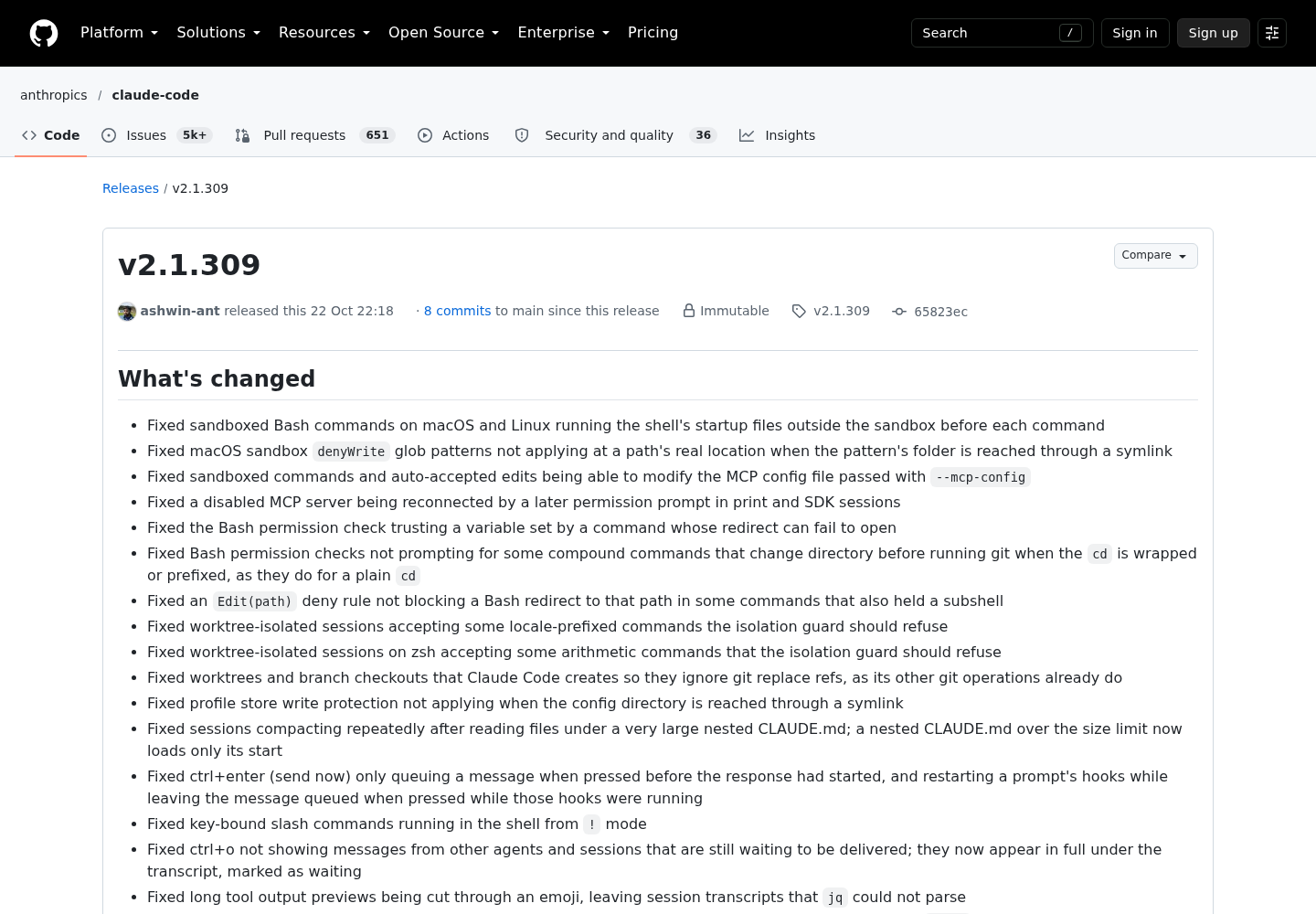
Why the version check comes first. On October 25, 2026, developer Syb posted on X that sandboxed Bash in Claude Code had been running the shell’s startup files outside the sandbox before every command, and that the fix had not reached the stable channel or the Homebrew claude-code cask, which the post reported were both still on 2.1.308 that day. The fix shipped in Claude Code v2.1.309, released October 22, alongside fixes for macOS denyWrite globs that missed folders reached through a symlink and for Linux write denies that lifted when a background command outlived the session. Those were rules people had written and believed were enforced. The lesson outlasts the patch: a sandbox setting is only as good as the binary reading it, so you check the version before you configure, and you rerun your probes after every update.
What the Claude Code sandbox fences, and what it leaves alone
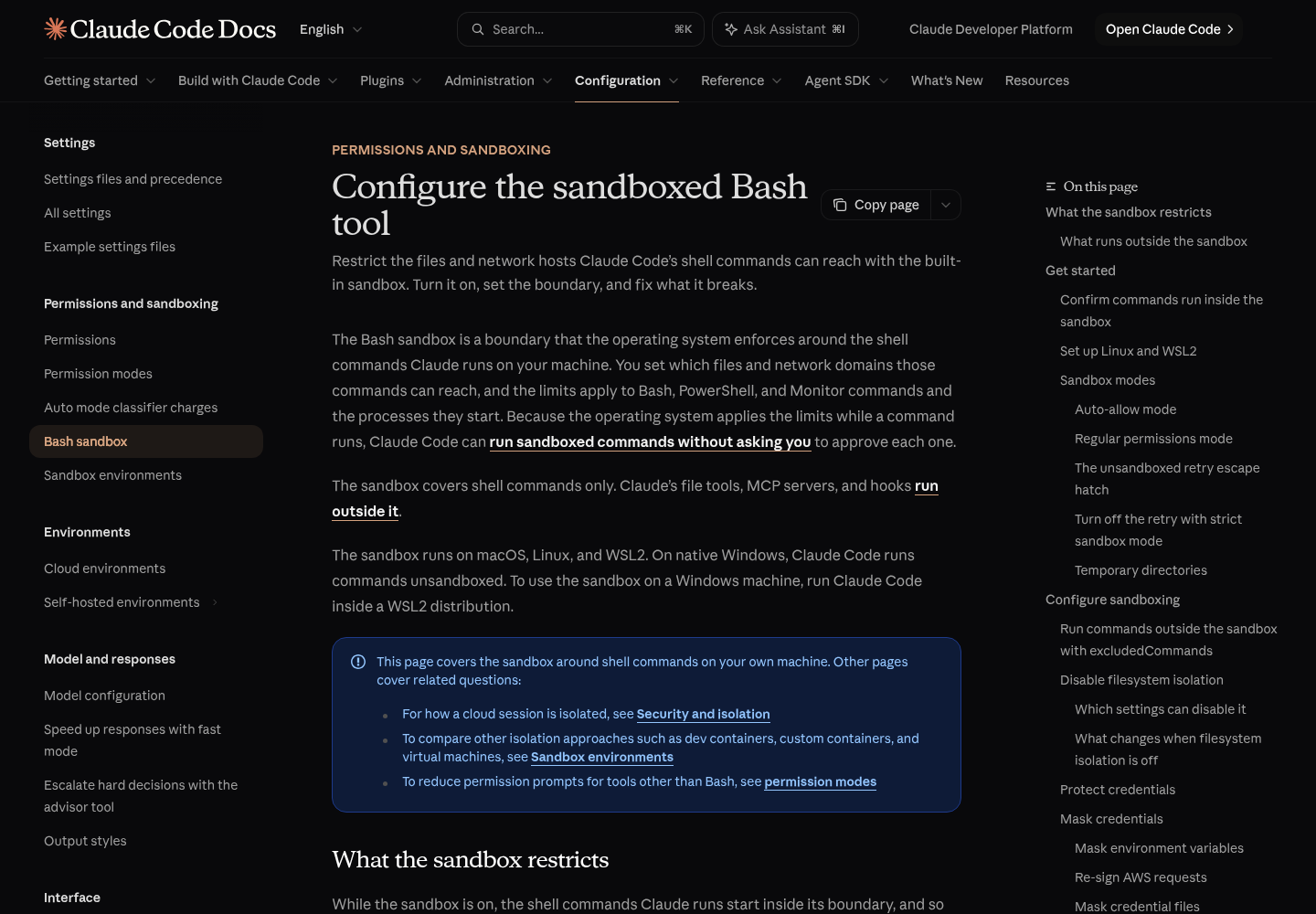
Anthropic’s sandboxing documentation describes the sandbox as a boundary the operating system enforces around the shell commands Claude runs: Bash, PowerShell and Monitor commands, plus every process they start. macOS uses the built-in Seatbelt framework. Linux and WSL2 use bubblewrap, with socat relaying network traffic to a proxy. Native Windows has no sandbox; commands there run unsandboxed, so Windows users get it by running Claude Code inside a WSL2 distribution. The sandbox is off by default.
Because the operating system applies the limits while a command runs, Claude Code can approve sandboxed commands without asking you each time. That is the bargain: you trade per-command prompts for a boundary you configured in advance and can test.
The defaults are asymmetric, and that asymmetry drives most of the configuration below:
| Access | Default inside the sandbox | Settings that change it |
|---|---|---|
| Writes | The working directory, a per-user temp directory and directories you added; protected paths stay write-denied | filesystem.allowWrite, filesystem.denyWrite |
| Reads | Most of the machine, including ~/.ssh and ~/.aws/credentials |
filesystem.denyRead, credentials |
| Network | No direct route out; a local proxy checks each host against allowedDomains, which starts empty |
network.allowedDomains, network.deniedDomains |
| Environment variables | Inherited from Claude Code, secrets included | credentials, CLAUDE_CODE_SUBPROCESS_ENV_SCRUB |
Reads are open and the network is closed. So a first configuration has two jobs: close the reads that matter, which means credentials, and open only the hosts your build needs.
The case for doing this carefully comes from Anthropic’s own account of how it contains Claude across products. Its telemetry showed users approving roughly 93% of permission prompts, and after the OS-level sandbox shipped, permission prompts fell by 84%. In an internal red-team exercise, a phished prompt that asked Claude to read ~/.aws/credentials and post the contents to an external endpoint succeeded in 24 of 25 attempts, because the instruction arrived through the user and looked like routine setup work. Anthropic’s conclusion was that egress controls and filesystem boundaries are the defense that holds when model-level judgment has nothing anomalous to catch. If you want the wider threat model first, the primer on securing AI agents sets it out.
Check your version, channel and platform before you configure
Run these steps in a normal terminal, outside Claude Code.
- Print the version with
claude --version. A working install prints the version and product name, in the2.1.211 (Claude Code)form that Anthropic’s setup guide shows. For the fixes above you want 2.1.309 or later; per the v2.1.310 release notes, 2.1.310 also makes/sandboxname Ubuntu’s AppArmor user-namespace restriction when it keeps bubblewrap from starting. - Work out how Claude Code was installed, because that decides whether it updates itself. Use the table below.
- Update if needed, then run
claude --versionagain and confirm the number moved. - On Linux or WSL2, install the two sandbox dependencies.
- On Ubuntu 24.04 or later, including inside WSL2, check the AppArmor user-namespace restriction.
- On Windows, confirm the distribution runs WSL2, not WSL1.
| Install method | Updates itself? | Upgrade command | Channel |
|---|---|---|---|
| Native installer | Yes, in the background; takes effect at next start | claude update |
autoUpdatesChannel: latest (default) or stable |
Homebrew claude-code cask |
No, unless you set CLAUDE_CODE_PACKAGE_MANAGER_AUTO_UPDATE=1 |
brew upgrade claude-code |
stable |
Homebrew claude-code@latest cask |
No, same opt-in | brew upgrade claude-code@latest |
latest |
| WinGet | No, same opt-in | winget upgrade Anthropic.ClaudeCode |
Irrelevant here: native Windows runs unsandboxed |
| npm global package | Yes, when the npm global directory is writable | npm install -g @anthropic-ai/claude-code@latest |
latest |
| apt, dnf or apk repository | Through your system upgrade | sudo apt update && sudo apt upgrade claude-code (apt) |
Chosen by repository URL |
Two details from the setup guide matter for sandbox users. The stable channel serves a version that is typically about a week old and skips releases with major regressions, which is how a sandbox fix can sit on latest for days. And if you switch from latest to stable in /config, choosing to stay on the current version sets minimumVersion, so stable will not drop you below a build that already has the fix. A successful claude update reports Successfully updated from <old version> to version <new version>.
On Linux and WSL2, install bubblewrap and socat with your package manager, then check the AppArmor setting:
# Ubuntu or Debian
sudo apt-get install bubblewrap socat
# Fedora
sudo dnf install bubblewrap socat

# Ubuntu 24.04+ (also inside WSL2): is the user-namespace restriction on?
sysctl kernel.apparmor_restrict_unprivileged_userns
Read the last result this way. 0, or a No such file or directory error, means you can skip the next block. 1 means bubblewrap cannot create the user namespaces it needs, and the sandbox will not start until you add an AppArmor profile for bwrap. This is the profile from Anthropic’s documentation; it applies to bwrap itself, not to the commands it runs:
sudo tee /etc/apparmor.d/bwrap > /dev/null <<'EOF'
abi <abi/4.0>,
include <tunables/global>

profile bwrap /usr/bin/bwrap flags=(unconfined) {
  userns,
  include if exists <local/bwrap>
}
EOF
sudo systemctl reload apparmor
The sandbox-runtime README also shows lifting the restriction machine-wide with sysctl -w; the per-binary profile is the narrower change and the one Claude Code’s own docs give. On Windows, run wsl -l -v from PowerShell. If Claude Code later reports Sandboxing requires WSL2, the distribution is on WSL1 and has to be upgraded.
Restart Claude Code after installing packages. The dependency check runs at startup, so an open session will not notice them.
Turn it on with /sandbox and record what it reports
Start a fresh session in your test repository and run /sandbox.
- Read which tabs appear. A healthy panel shows Mode, Overrides and Config. On Linux a Dependencies tab also appears when the optional seccomp filter is missing; it lists which of ripgrep, bubblewrap, socat and the seccomp filter your platform lacks. If Dependencies is the only tab, a required package is missing: install it, restart, and run
/sandboxagain. - Choose a mode on the Mode tab. Auto-allow runs sandboxed commands without prompting. Regular permissions keeps every prompt even for sandboxed commands. Both enforce the same filesystem and network limits. This guide uses auto-allow, because fewer prompts is the reason you are here.
- Leave the Overrides tab alone for now. It controls
allowUnsandboxedCommands, the escape hatch that lets Claude retry a failed command outside the sandbox. Turning the retry off is what the panel calls strict sandbox mode. - Open the Config tab. It shows the resolved settings, including the protected paths listed under “Denied within allowed”.
- Note where your choice went. The panel saves the mode to
.claude/settings.local.json, which Claude Code adds to your global gitignore. That file is yours alone, which is why the next section commits a separate project block for the team.
Auto-allow is not a blanket yes. The docs list what still prompts or blocks: Bash deny rules, rm or rmdir aimed at a critical path, content-scoped ask rules such as Bash(git push *), Monitor commands, and commands whose shape can change which program runs, such as FOO=bar npm test, make CC=clang or eval "ls". Auto-allow is also separate from the auto permission mode: the sandbox restricts what a command can reach once it runs, while a permission mode decides whether it runs at all. If your team mixes several agents, the guide to aligning permission modes across tools shows where this layer sits.
Write down what you saw. A filled record for one machine looks like this (illustrative values, not an observed run):
| Field | Recorded value (illustrative) |
|---|---|
claude --version |
2.1.310 (Claude Code) |
| Install method and channel | Native installer, latest |
| Platform | Ubuntu 24.04 inside WSL2 |
| AppArmor sysctl | Returned 1; bwrap profile added, AppArmor reloaded |
Tabs shown by /sandbox |
Mode, Overrides, Config |
| Mode chosen | Auto-allow |
| Strict sandbox mode | Off |
To trial the sandbox for one session without touching any file, start Claude Code with --settings. Anthropic’s example turns the sandbox on and removes the unsandboxed retry:
claude --settings '{"sandbox": {"enabled": true, "allowUnsandboxedCommands": false}}'
Know what that flag does to the rest of your configuration. Disabling the retry through --settings makes the sandbox admin-required for that session, so Claude Code ignores the loosening keys in the repository’s settings files. That is useful for a strict test and confusing if you then wonder why the project’s allowedDomains has no effect.
The worked example: a reviewed settings.json for a Node repository
The file below uses only keys from Anthropic’s sandboxing, permissions and settings documentation. It targets a Node project that installs from the public npm registry, clones from GitHub over HTTPS and runs one Docker Compose stack. Save it as .claude/settings.json in the repository and commit it. Settings files are strict JSON, and the settings documentation warns that a comment or trailing comma is a syntax error, so the annotations live in the table after the file.
{
  "$schema": "https://json.schemastore.org/claude-code-settings.json",
  "sandbox": {
    "enabled": true,
    "autoAllowBashIfSandboxed": true,
    "filesystem": {
      "allowWrite": ["~/.npm"],
      "denyRead": ["~/.aws/credentials", "~/.ssh"]
    },
    "credentials": {
      "envVars": [
        { "name": "NPM_TOKEN", "mode": "deny" }
      ]
    },
    "network": {
      "allowedDomains": ["registry.npmjs.org", "github.com", "*.github.com"],
      "deniedDomains": ["gist.github.com"]
    },
    "excludedCommands": ["docker compose *"]
  },
  "permissions": {
    "deny": ["Read(~/.aws/**)", "Read(~/.ssh/**)"],
    "ask": ["Bash(dangerouslyDisableSandbox:true)", "Bash(git push *)"]
  }
}
| Line | Why it is there | What changes if you remove it |
|---|---|---|
"enabled": true |
Turns the sandbox on for everyone who opens the repository | Each person’s local panel choice decides alone |
"autoAllowBashIfSandboxed": true |
States auto-allow as the team default; it is also the documented default | Nothing, unless a higher-priority file sets false |
"allowWrite": ["~/.npm"] |
Illustrative: npm’s default cache sits outside the working directory. List the cache path your package manager really uses | Cache writes fail with a read-only or not-permitted error |
denyRead entries |
Reads are open by default; this closes the AWS credentials file and the SSH directory to sandboxed commands at the OS level | Any script Claude runs can read them |
credentials.envVars deny for NPM_TOKEN |
Unsets the variable before each sandboxed command; public-registry installs do not need it | A sandboxed command can read the token from its environment |
allowedDomains |
Opens only the hosts the build needs: the npm registry and GitHub | Each host triggers a network prompt the first time |
deniedDomains |
Carves gist.github.com back out of *.github.com; a denied host is refused in every permission mode |
A command could post to gists through the wildcard |
excludedCommands |
Docker is incompatible with the sandbox; this narrow pattern runs docker compose subcommands outside it |
docker compose calls fail inside the sandbox |
permissions.deny Read rules |
The sandbox does not cover Claude’s built-in Read tool; these rules do | The Read tool can still open the files |
Ask rule for dangerouslyDisableSandbox:true |
Prompts on every unsandboxed retry, including in auto and bypass modes, and outranks a matching allow rule | A broad allow rule such as Bash(curl *) silently approves the retry |
Ask rule for Bash(git push *) |
Content-scoped ask rules still prompt for sandboxed commands | Pushes run without a prompt under auto-allow |
Three choices in this file deserve a second look. First, ~/.ssh is denied, which works because the remote uses HTTPS. On Linux and WSL2, git over SSH needs the key files readable, so a repository with SSH remotes must drop that entry. Second, Anthropic’s docs warn that allowing a broad domain such as github.com creates exfiltration paths, because the built-in proxy decides on the requested hostname and does not inspect TLS by default. Keep the list as short as the build allows. Third, the Docker exclusion runs docker compose with your full access. Claude can edit the compose file in the working directory and then run it outside the sandbox, so treat that entry as a trust decision, not a convenience.
Some keys belong in your user file, ~/.claude/settings.json, instead of the repository. failIfUnavailable: true makes Claude Code exit at startup when the sandbox cannot run, instead of quietly running commands unsandboxed. That is a sensible default for you on a Mac or Linux machine, but committed to a team repository it would also stop a teammate on native Windows from starting at all. Other keys, such as filesystem.disabled and allowAppleEvents, are never honored from project files. A user-level addition looks like this:
{
  "sandbox": {
    "failIfUnavailable": true
  }
}
When the same filesystem array appears in several scopes, Claude Code merges the paths instead of replacing one list with another, and edits to those lists apply to the running session at the next sandboxed command. Sandbox paths use ordinary conventions (~/ for home, a single / for absolute), unlike Read and Edit permission rules, where // marks an absolute path. Allow rules in a committed .claude/settings.json also wait until each teammate accepts the workspace trust dialog, while deny and ask rules apply immediately.
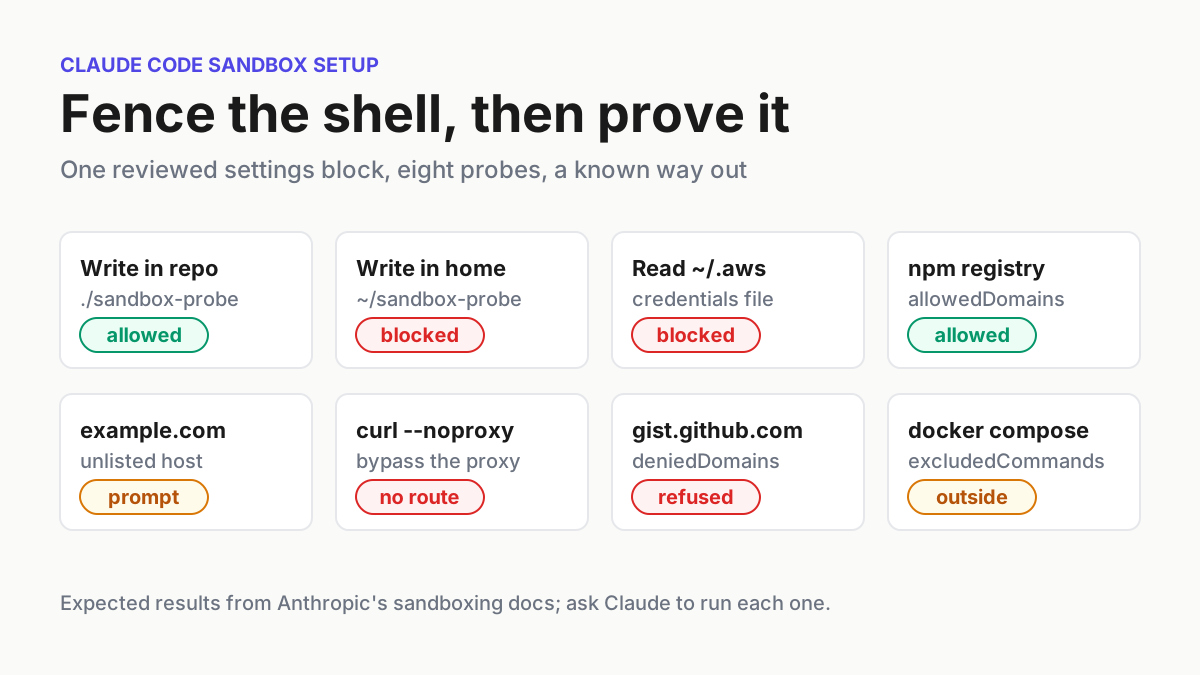
Prove each boundary with the eight-probe table
A configuration you have not tested is a guess. Open a fresh session so the committed file loads, confirm with /sandbox that the mode is set, and ask Claude to run each command below. Do not type them at the ! prompt yourself: commands entered there usually run outside the sandbox, so they test nothing. If Claude offers to retry a failed probe outside the sandbox, decline.
| # | Ask Claude to run | Expected on macOS | Expected on Linux and WSL2 | If you see something else |
|---|---|---|---|---|
| 1 | touch sandbox-probe && rm sandbox-probe |
Succeeds with no output and no prompt | Same | Working-directory writes are broken; check the Config tab |
| 2 | touch ~/sandbox-probe |
Fails with Operation not permitted |
Fails with Read-only file system |
The sandbox is off or home is writable; delete ~/sandbox-probe, rerun /sandbox |
| 3 | node -e "console.log(require('fs').readFileSync(require('os').homedir()+'/.aws/credentials').length)" |
An error or 0, never the real file size |
Same | The read deny is not applied; check the version and Config tab |
| 4 | curl -sS -o /dev/null -w '%{http_code}' https://registry.npmjs.org/ |
Prints an HTTP status code with no network prompt | Same | The host is not allowed, or your network needs a corporate proxy |
| 5 | curl -sS -o /dev/null -w '%{http_code}' https://example.com/ |
A network prompt in Manual or acceptEdits mode; decline it | Same | No prompt and a status code means bypass mode or an existing WebFetch(domain:...) allow rule; no prompt and a refusal means a refusing mode such as auto or dontAsk, or a strictAllowlist setting |
| 6 | curl --noproxy '*' https://example.com |
Fails with Could not resolve host |
Same | A command found a route around the proxy; stop and investigate |
| 7 | curl -sS -o /dev/null https://gist.github.com/ |
Refused in every permission mode; the result names the denied host | Same | deniedDomains did not load; check /status for a settings error |
| 8 | In Manual mode: docker compose up -d |
A prompt titled “Bash command (unsandboxed)”; decline it | Same | No such title means the pattern did not match the call |
Each probe was chosen for a reason. Probe 3 has Node open the file itself, on purpose. Claude Code’s permission rules apply Read deny rules to file commands it recognizes in Bash, such as cat, so a cat probe would be stopped by the permission layer before the sandbox was ever tested. A script that opens files on its own is not covered by those rules, which is exactly the case the OS boundary exists for. If you have no AWS credentials file, the probe is inconclusive; point it at another path you denied. Probe 5 depends on your permission mode: run it in Manual mode to see the prompt, because auto mode refuses an unlisted host unless the command named it for the classifier, and dontAsk refuses it outright. Probe 6 comes straight from Anthropic’s verification table: with no direct route out, a command that refuses the proxy cannot even resolve a name. Probe 8 uses a command that changes something because the docs note that read-only excluded commands can run without a prompt, which would hide whether the pattern matched.
The error text differs by platform, and so do several behaviors you will meet in troubleshooting. Use this matrix to read a failure before you change a setting:
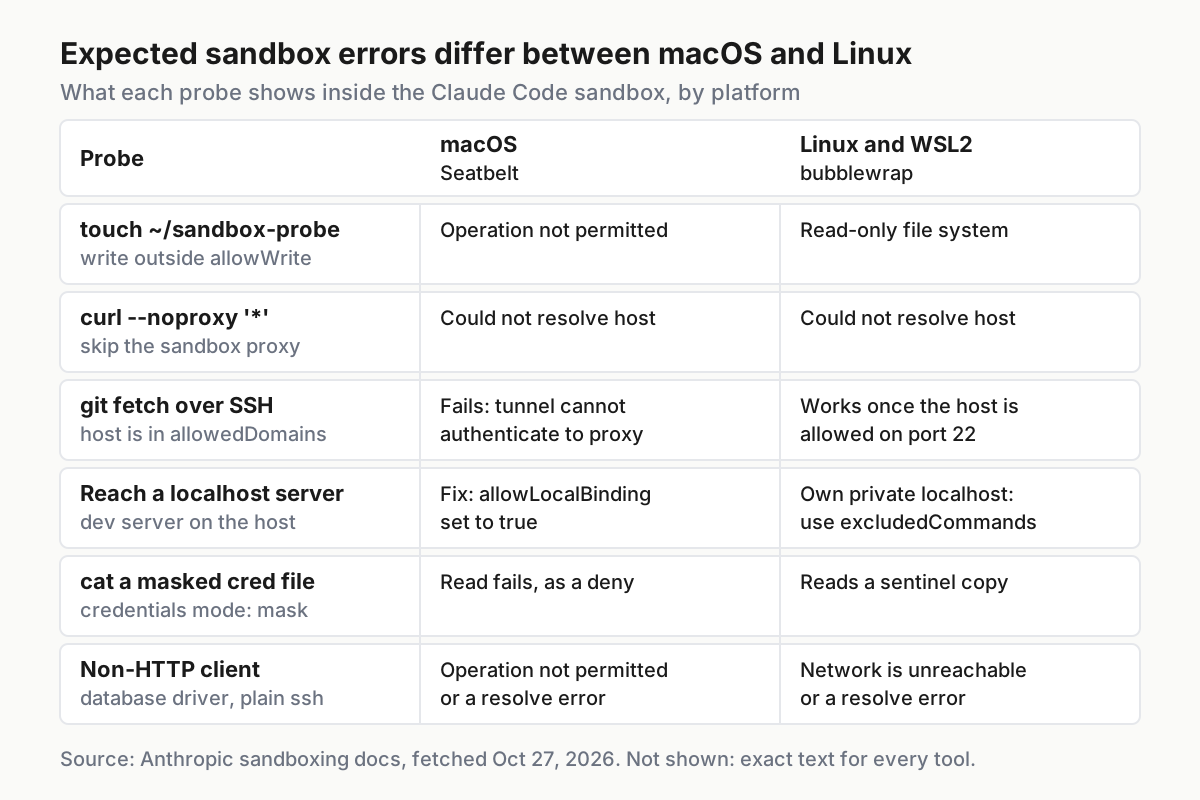
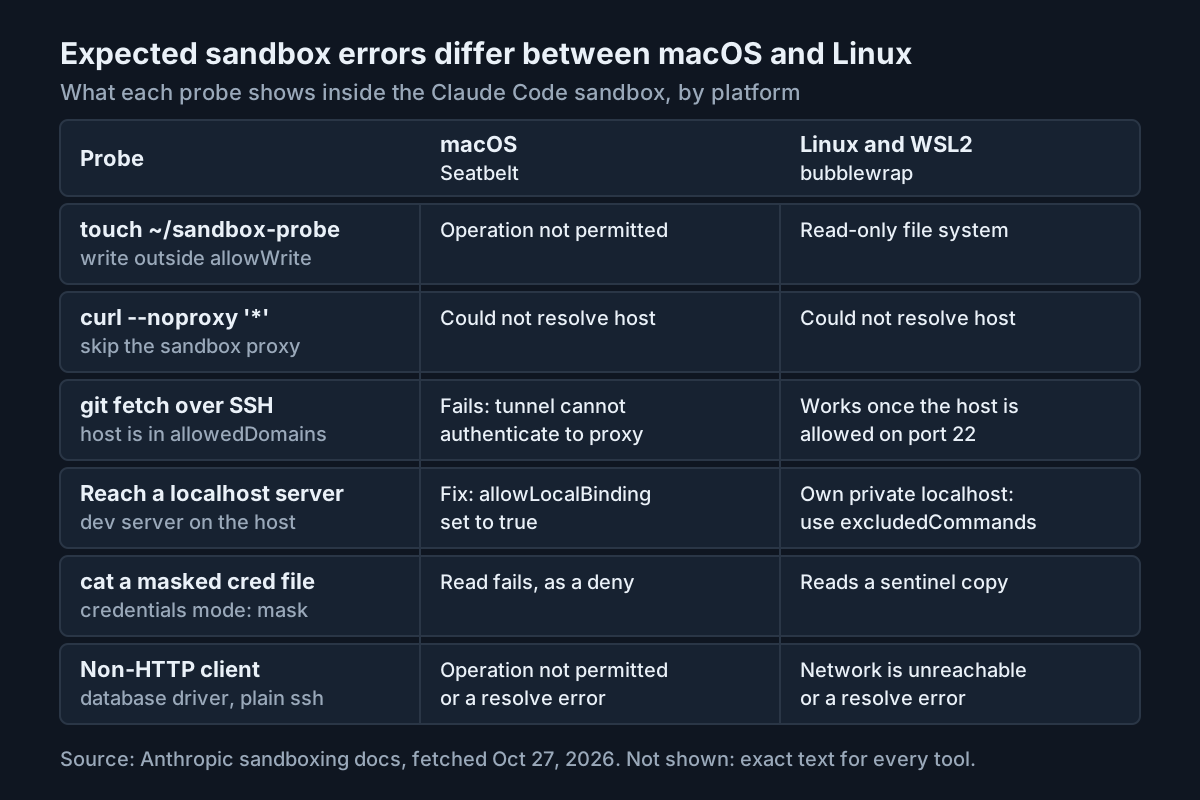
A pass is all eight rows matching in a fresh session, and again after each Claude Code update. A failure is any row that should block and does not. Treat that as an incident, not a tuning problem: switch the Mode tab to regular permissions until you know why.
What runs outside the sandbox, and when to step up
The sandbox wraps shell commands, and a lot of Claude Code is not a shell command. Anthropic’s guide to choosing a sandbox environment states that the sandboxed Bash tool alone is not enough for fully unattended runs, and the reality check on sandbox escapes explains why one layer should never be your only control. Work through this checklist for the same repository:
- [ ] Built-in file and web tools (Read, Edit, Write, WebFetch, WebSearch) follow permission rules, not the sandbox. A
denyReadentry does not stop the Read tool, andallowedDomainsdoes not limit WebFetch. The worked example mirrors its credential denies asRead(...)rules for this reason. - [ ] Command hooks, local MCP servers, plugin monitors, LSP servers, the status line command and
apiKeyHelperrun with your full access. List every hook and MCP server the repository configures and review them as code you would run yourself. The MCP scopes guide shows where each server definition lives. - [ ] Commands typed at the
!prompt run unsandboxed in most sessions, even with strict sandbox mode on. - [ ] Environment variables are inherited. Deny the secrets sandboxed commands should not see under
sandbox.credentials, or setCLAUDE_CODE_SUBPROCESS_ENV_SCRUBto strip credentials from every subprocess. - [ ] Protected paths are already handled. Inside writable directories, the sandbox still denies writes to
.claudesettings files,.mcp.json,.claude/hooks, shell startup files such as.bashrcin the working directory, and hooks and config inside.git. You do not needdenyWriteentries for those.
To bring the excluded pieces behind a boundary, run the whole Claude Code process inside something. The open-source sandbox runtime wraps any process in the same Seatbelt or bubblewrap isolation. Its README shows wrapping a local MCP server by putting srt in front of the command in .mcp.json:
{
  "mcpServers": {
    "filesystem": {
      "command": "srt",
      "args": ["npx", "-y", "@modelcontextprotocol/server-filesystem"]
    }
  }
}
The runtime reads its own policy from ~/.srt-settings.json, and it starts even when that file is missing, with no network access and writes confined to a few built-in paths, so a clean start does not prove your settings loaded. Running srt claude puts file tools, hooks and MCP servers inside one boundary, but the runtime is a beta research preview whose configuration format may change. Claude Code also needs write access to the project, ~/.claude, ~/.claude.json and its temp directory, plus network access to api.anthropic.com and the sign-in hosts. Anthropic’s environments page says to always run --dangerously-skip-permissions sessions inside a container, a VM or the sandbox runtime. For a microVM with its own network policy, the Docker Sandboxes setup guide walks through sbx end to end.
Choose allowWrite or allowedDomains before excludedCommands
Almost every sandbox-only failure tempts you toward excludedCommands, because it makes the error disappear. It also removes both the filesystem limits and the network proxy for every matching call. Anthropic’s docs recommend widening the sandbox first and excluding last. Use this decision table:
| The command needs | Use | Still sandboxed? | Cost |
|---|---|---|---|
One more directory to write, such as a tool cache or ~/.kube |
filesystem.allowWrite |
Yes, child processes included | Avoid directories on $PATH, shell config and system config |
| One more HTTPS host reached through the proxy | network.allowedDomains, or approve the prompt |
Yes | Broad domains widen exfiltration paths |
A host reached by a tool that ignores proxy variables (database drivers, plain ssh, UDP) |
A narrow excludedCommands pattern plus a matching ask rule |
No | Full access for matching calls |
| Docker | excludedCommands such as docker compose * |
No | docker * covers everything Docker can do |
| A dev server on the host’s localhost (macOS) | network.allowLocalBinding: true |
Yes | Exposes every localhost port, including unauthenticated services |
| A dev server on the host’s localhost (Linux, WSL2) | excludedCommands for that command |
No | allowLocalBinding has no effect there |
| Chromium, Electron or rootless Podman on Linux | --no-sandbox for the browser, an exclusion, or allowNestedUserNamespaces in user settings (v2.1.305+) |
Partly | The last option turns off a security boundary |
When you do exclude something, the matching rules are strict, and they explain most reports of an exclusion being ignored:
- Entries use
Bash(...)rule syntax. End the pattern with a space and*:dockermatches only a baredocker, whiledocker *matches it with or without arguments. - Every command in the call must match.
npm ci && docker compose buildstays sandboxed unless another entry coversnpm ci. - Matching is on the text Claude sends. A script or make target that runs docker internally does not match, and neither does
/usr/local/bin/docker. - A redirect to a file, a
cd, or a command substitution such as$(...)keeps the whole call sandboxed. For excluded git commands, a call that usesgit -Calso stays sandboxed. - Under an admin-required sandbox, entries in
.claude/settings.jsonand.claude/settings.local.jsonare ignored.
For a non-HTTP tool, pair the exclusion with an ask rule so each run stops for review. This is Anthropic’s documented pattern for one database loading script:
{
  "sandbox": {
    "excludedCommands": ["python scripts/load_orders.py *"]
  },
  "permissions": {
    "ask": ["Bash(python scripts/load_orders.py *)"]
  }
}
To confirm an exclusion matches, switch to Manual mode and ask Claude to run a matching command that changes something. The prompt title should read “Bash command (unsandboxed)”, exactly as probe 8 expects.
When managed settings overrule the repository file
If your organization deploys managed settings, parts of the worked example may be ignored without any error. The sandbox becomes admin-required while allowUnsandboxedCommands is false in managed settings or through --settings, or while allowManagedDomainsOnly is true in managed settings. Those keys do not turn the sandbox on by themselves; they change whose loosening keys count. The fleet policy guide to restricted modes covers why administrators set them.
| In the repository’s settings files | Under an admin-required sandbox |
|---|---|
excludedCommands, network.allowedDomains, Unix socket and proxy-port keys, ignoreViolations |
Every entry ignored |
filesystem.allowWrite, Edit(...) allow rules, additionalDirectories |
The write access they grant sandboxed commands is ignored |
WebFetch(domain:...) allow rules |
The host is not added to the sandbox allowlist; the WebFetch tool still honors the rule |
enableWeakerNestedSandbox, enableWeakerNetworkIsolation, network.allowAllUnixSockets, network.allowLocalBinding |
true ignored; false still applies |
Deny entries and autoAllowBashIfSandboxed |
Still applied |
Work through it in this order:
- Run
/statusand read the Setting sources line. “Enterprise managed settings” or “Command line arguments” there means a higher level may own sandbox keys; the settings precedence rules put managed settings above the command line, local, project and user files. - If
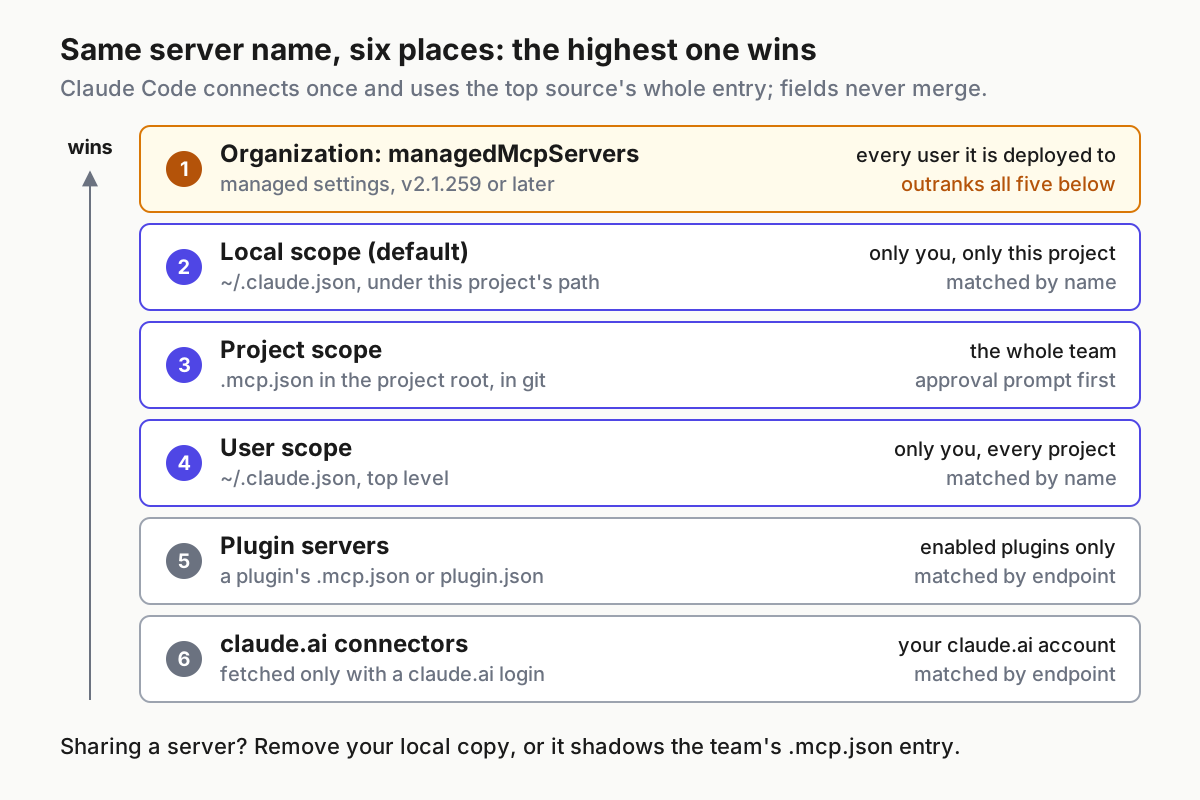
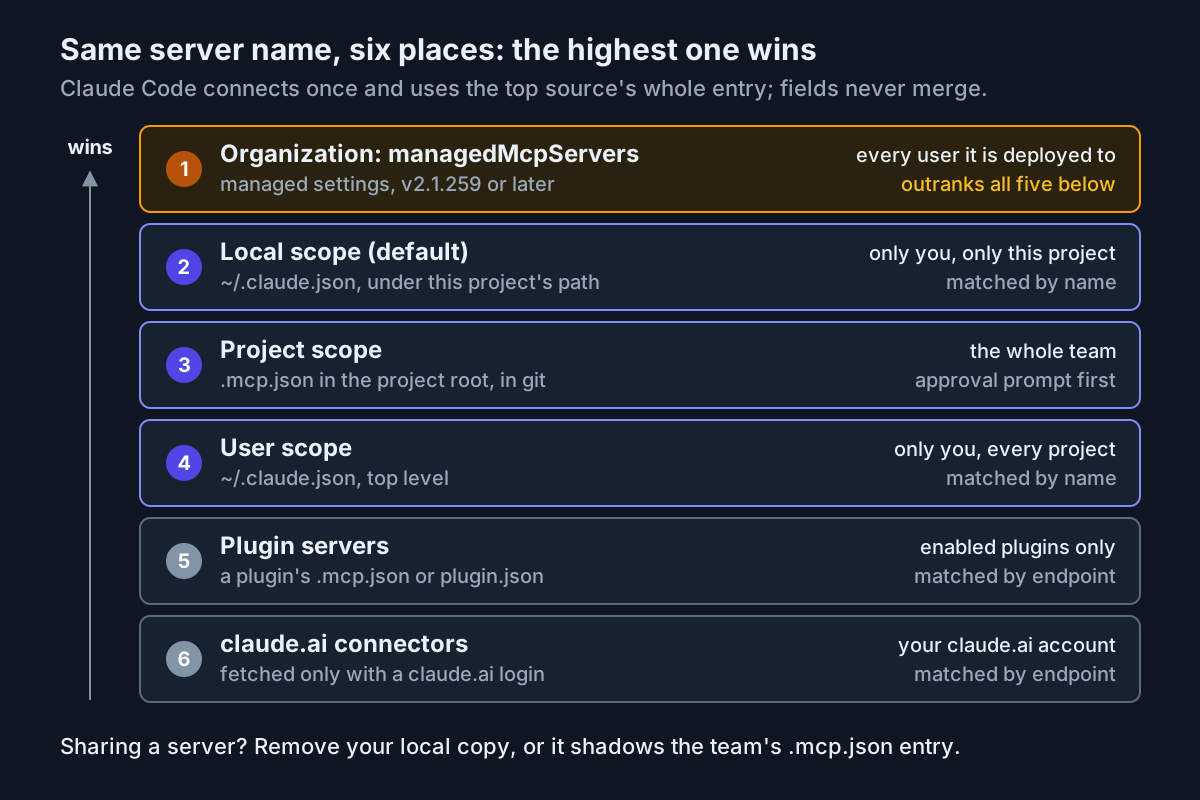
/sandboxprintsSandbox settings are overridden by a higher-priority configuration and cannot be changed locally, a higher level setsenabled,autoAllowBashIfSandboxedorallowUnsandboxedCommands, and no file you control can change them. - Move the entries your tools need, such as the npm cache path and registry host, into
~/.claude/settings.json. User settings still apply under an admin-required sandbox unless a managed-only lock such asallowManagedDomainsOnlycovers that key. - Where a lock applies, ask the administrator to add the entry to managed settings. With
allowManagedDomainsOnlyon, hosts outside the managed list are refused without a prompt. - Rerun probes 4 and 8. They are the two whose results change when repository keys stop counting.
This repository behavior requires v2.1.285 or later; before that version, a project’s true for allowUnsandboxedCommands overrode a false in user settings.
Fix commands that fail only in the sandbox
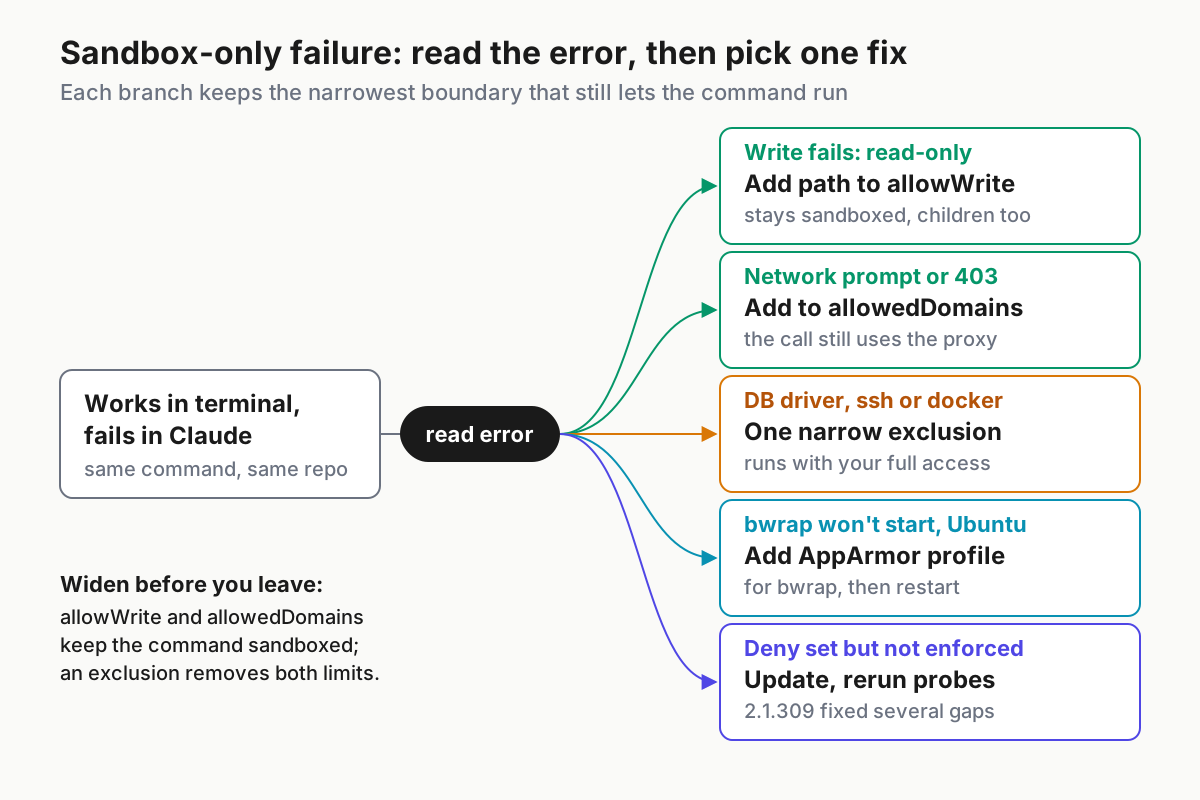
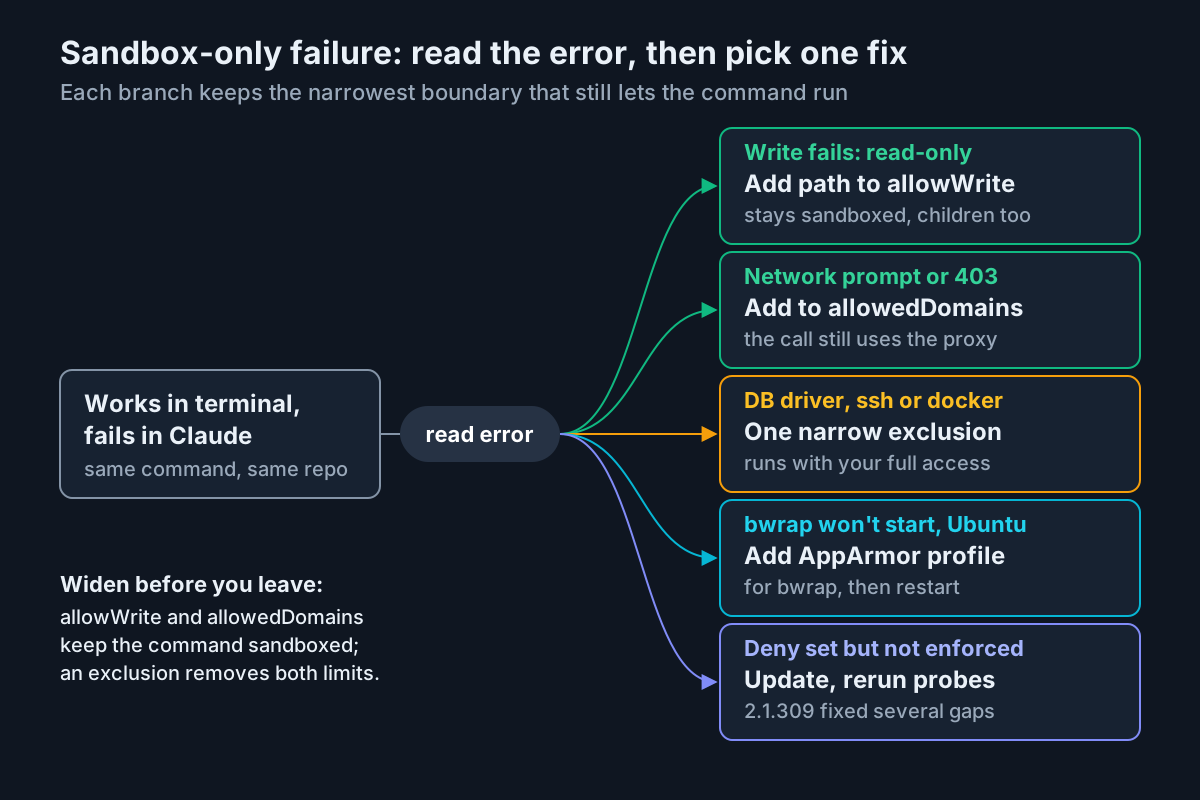
Start from the error text, not the tool name. The diagram sorts the common cases into one fix each; the table after it covers the rest, with the observation that confirms each fix worked.
| Symptom | Likely cause | Fix | Expected after the fix |
|---|---|---|---|
/sandbox names Ubuntu’s AppArmor restriction, or bwrap cannot start on Ubuntu 24.04+ |
kernel.apparmor_restrict_unprivileged_userns is 1 |
Add the bwrap AppArmor profile, reload AppArmor, restart Claude Code | Mode, Overrides and Config tabs appear; probe 2 fails as expected |
/sandbox shows only a Dependencies tab |
bubblewrap or socat missing | Install them and restart; the check runs at startup | The normal tabs appear |
npm install hits a host-not-allowed error, a network prompt or a 403 |
The registry host is not in allowedDomains |
Approve the host or add it to allowedDomains |
Probe 4 prints a status code with no prompt |
A database client or plain ssh fails with Network is unreachable (Linux) or Operation not permitted (macOS) |
The tool ignores proxy variables and has no route out | A narrow excludedCommands entry plus an ask rule |
The prompt reads “Bash command (unsandboxed)” |
docker commands fail |
Docker is incompatible with the sandbox | excludedCommands such as docker compose * |
Probe 8 shows the unsandboxed prompt |
An excludedCommands entry seems ignored |
The call adds a cd, redirect, $(...), an uncovered chained command or a full path, or the sandbox is admin-required |
Run the bare command, or move the entry to user settings | The unsandboxed prompt appears |
git push over SSH fails on macOS with the host allowed |
The macOS tunnel cannot authenticate to the sandbox proxy | Switch the remote to HTTPS, or exclude git fetch *, git pull * and git push * |
The push completes; excluded git commands can reach any host |
jest hangs or fails |
watchman is incompatible with the sandbox | Run jest --no-watchman |
Tests run inside the sandbox |
gh, gcloud or terraform fail TLS verification on macOS |
Go-based TLS under Seatbelt | Exclude that tool, such as gh * |
The tool runs with your full access and stored credentials |
git merge or git checkout fails with unable to unlink old |
The file is under a protected path, a denyWrite entry, or outside writable directories |
Approve Claude’s unsandboxed retry, or run git yourself | The merge completes |
Can't mount proc on /newroot/proc inside a container |
An unprivileged container | enableWeakerNestedSandbox: true, only when the container is the real boundary |
Sandboxed commands start |
| Deny rules set but not enforced | An older build | Update to 2.1.309 or later, start a fresh session, rerun all probes | Probes 2, 3, 6 and 7 block |
| No sandbox at all on Windows | Native Windows runs commands unsandboxed | Run Claude Code inside a WSL2 distribution | /sandbox opens normally in WSL2 |
Two of these fixes carry a cost worth stating. The unsandboxed retry is convenient for a one-off git operation, but the ask rule in the worked example exists so each retry is a decision you see. And enableWeakerNestedSandbox exposes process information that a fresh /proc mount would hide, so use it only when the outer container already isolates the work.
Roll back without leaving loose ends
Rolling back is a settings change followed by a check. Do it in this order:
- Decide the scope. A team rollback edits the committed
.claude/settings.json; a personal one edits only your own files. - In the project file, set
"enabled": falseinsidesandbox, or delete thesandboxblock, and commit. Keep thepermissions.denyRead rules: they protect the credential files from Claude’s Read tool whether or not the sandbox is on. - Open
.claude/settings.local.jsonand remove thesandboxentries that the/sandboxpanel saved. A local value sits above the project file, so a leftover mode setting there survives the project change. - Check
~/.claude/settings.jsonfor asandbox.enabledyou added for all projects, and removefailIfUnavailableif you no longer want startup to fail without a sandbox. - Start a fresh session, run
/statusto confirm which files loaded, then run/sandboxand read the Mode tab. - Ask Claude to run probe 2. It should now succeed, which proves commands run unsandboxed. Delete
~/sandbox-probeafterwards. - On Linux and WSL2, run
claude doctorin a terminal. If it warnsSandbox mask files left behind at write-deny paths, delete the listed 0-byte placeholder files withrmwhile no other Claude Code session is running in that project.
If managed settings set enabled to true, you cannot turn the sandbox off locally; /sandbox will print the override error from the previous section. Keep the probe table in the repository either way, so turning the sandbox back on is a short check, not a fresh investigation.
Checks to rerun after every update
Updates are when sandbox behavior changes, usually for the better and occasionally in ways you need to notice. After claude update, a Homebrew upgrade or a package-manager upgrade, run this list in a fresh session:
- [ ]
claude --versionshows the build you expected, at 2.1.309 or later. - [ ]
/sandboxopens with Mode, Overrides and Config, and the Mode tab shows the mode you chose. - [ ] Probes 2, 3, 6 and 7 still block, with the platform-specific errors from the matrix.
- [ ] Probe 4 still succeeds without a prompt, and probe 5 still prompts in Manual mode.
- [ ] Probe 8 still shows “Bash command (unsandboxed)” in Manual mode.
- [ ]
/statuslists the settings sources you expect, with no new managed source. - [ ] Any probe that should block and now succeeds is logged, the mode is switched to regular permissions, and the cause is found before auto-allow comes back.
That last item is the point of the whole exercise. The October 2026 fixes were for rules that were configured but not enforced. A probe table you rerun is how you find that out before a careless script or an attacker does.
Sources
- Syb (@DegenOfWallSt), post on X about sandboxed Bash and v2.1.309, October 25, 2026.
- Anthropic, Configure the sandboxed Bash tool, Claude Code Docs, fetched October 27, 2026.
- Anthropic, Choose a sandbox environment, Claude Code Docs, fetched October 27, 2026.
- Anthropic, Configure permissions, Claude Code Docs, fetched October 27, 2026.
- Anthropic, Settings files and precedence, Claude Code Docs, fetched October 27, 2026.
- Anthropic, Advanced setup, Claude Code Docs, fetched October 27, 2026.
- Anthropic, Claude Code release v2.1.309, GitHub, October 22, 2026.
- Anthropic, Claude Code release v2.1.310, GitHub, October 23, 2026.
- Anthropic, Sandbox Runtime (srt) README, GitHub, fetched October 27, 2026.
- Anthropic Engineering, How we contain Claude across products, fetched October 27, 2026.