Claude Code Environment Variables: Where to Set Them, Which Ones Matter, and How to Prove What Is Active
Claude Code environment variables: where to set them, which scope wins, the empty-value rule, a grouped reference and a drill that proves what is active.

Claude Code environment variables are the controls most developers set by pasting a line from a README or a colleague’s dotfiles, then forget about. Months later a session bills a Console API key instead of a subscription, a proxy reaches the terminal but not a background agent, or DISABLE_TELEMETRY=0 does the opposite of what it appears to say. All three failures have the same cause: nobody can say which source supplied the value the running session actually holds.
This guide is for a developer who runs Claude Code every day, in a terminal or the VS Code extension, on macOS, Linux, WSL or Windows, and who wants to be able to answer that question on demand. You will finish with five things:
- A filled precedence table that says where a value can come from, who it reaches and what overrides it.
- Three complete settings files that give every variable one owner and one scope.
- A grouped reference table of variables worth knowing, with a safe default for each and the risk of getting it wrong.
- A ten-minute drill that proves what a running session holds and how quickly an edit reaches it.
- A troubleshooting table and a rollback you can run under pressure.
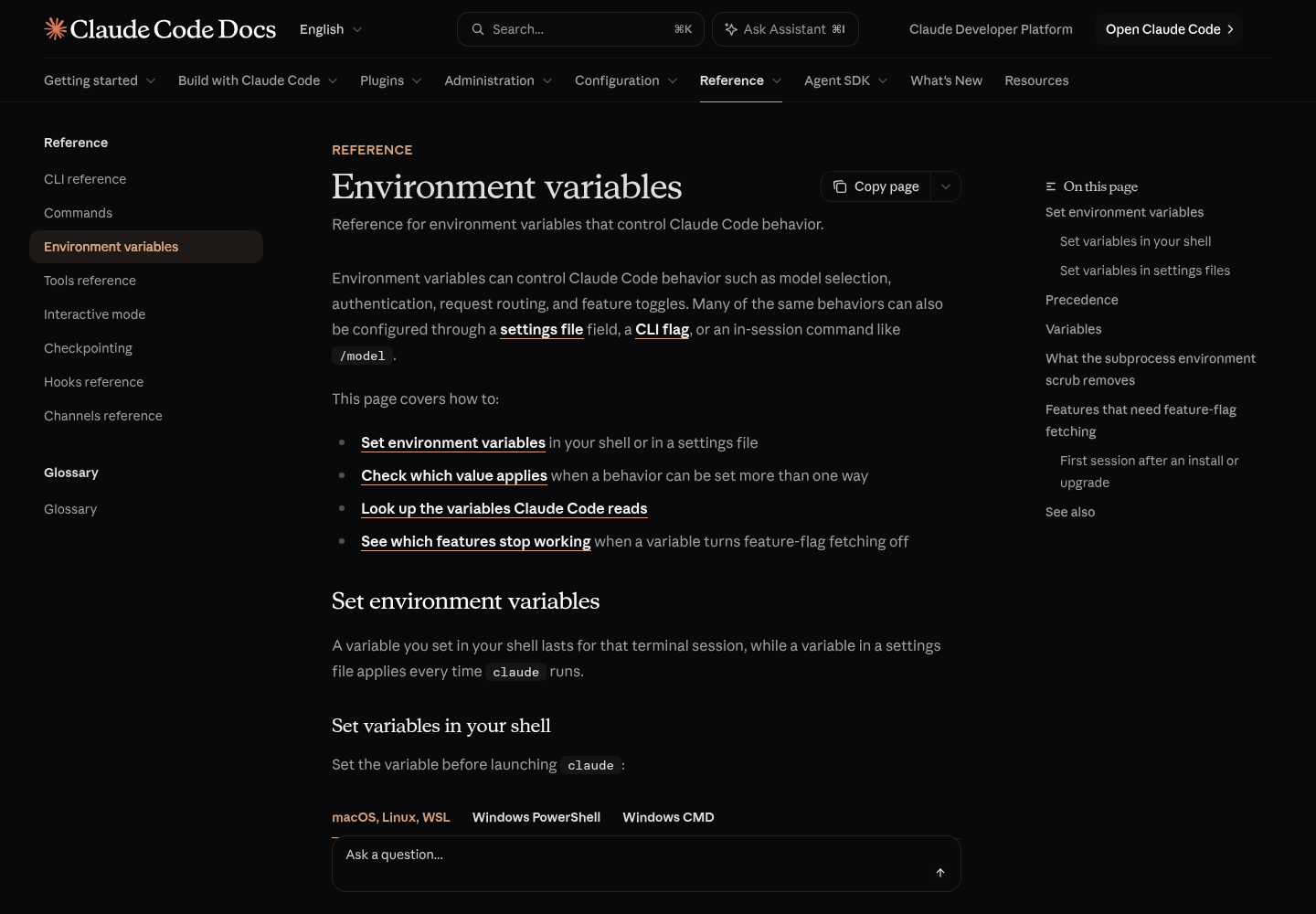
Commands, keys and behaviors come from Anthropic’s Environment variables reference and the pages it links. We did not run these steps for this article, so every “expected” line describes what the documentation says should happen, not output we captured. Paths, hosts and values in the examples are illustrative.
What v2.1.316 added, and why the release is only the trigger
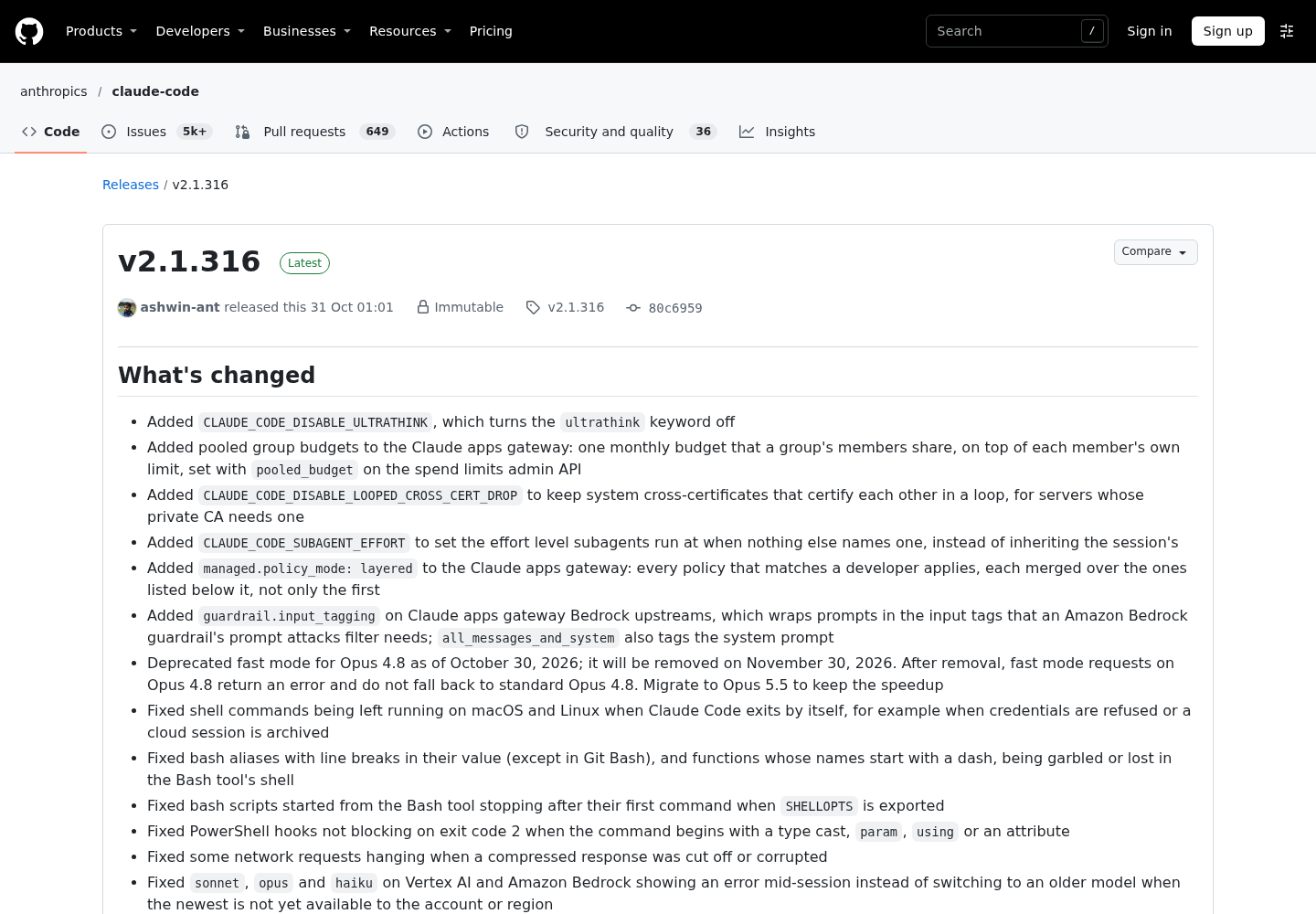
Anthropic published Claude Code v2.1.316 on GitHub on October 31, 2026 at 01:01 UTC, the evening of October 30 in New York. Its notes add three variables and fix a fourth:
CLAUDE_CODE_DISABLE_ULTRATHINKturns the ultrathink keyword off.CLAUDE_CODE_SUBAGENT_EFFORTsets the effort level subagents run at when nothing else names one, instead of inheriting the session’s.CLAUDE_CODE_DISABLE_LOOPED_CROSS_CERT_DROPkeeps system cross-certificates that certify each other in a loop, for servers whose private CA needs one.CLAUDE_CODE_AUTO_MODE_SERVER=1is no longer ignored in sessions that a host application such as Claude Desktop starts behind a proxy or LLM gateway with experimental betas turned off.
The same release changed server-managed settings for Team and Enterprise logins: settings fetched from Anthropic’s API now apply without an approval prompt. If your organization delivers an env block that way, its values now reach you without a click.
The pattern matters more than any single entry. Variables keep arriving and changing behavior, and a one-line release note never says which file a variable belongs in or how to confirm it took effect. When we read the reference page for this guide, the three new names were not yet in its table, so their exact value formats are known only from the release notes. Everything below is built so that it also works for the next variable you find in a changelog.
Before you start: what you need on the machine
The drill and the worked example only prove something if you start from a known state. Check these first.
- [ ] Claude Code is installed and
claude --versionprints 2.1.316 or later if you plan to use the three new variables. Older builds ignore names they don’t know. - [ ] You have a throwaway git repository that you have opened in Claude Code and trusted. Project env values wait for workspace trust, so an untrusted test repo gives misleading results.
- [ ] You can edit your shell profile (
~/.zshrc,~/.bashrc,~/.profile) or, on Windows, your user environment variables. - [ ] You can create and edit
~/.claude/settings.json,.claude/settings.jsonand.claude/settings.local.json. On Windows,~/.claudemeans%USERPROFILE%\.claude. - [ ]
jqis available for reading env blocks from the command line. It is optional; any JSON viewer works. - [ ] No other Claude Code session is open in the test repository while you run the drill.
According to Anthropic’s settings documentation, settings files are strict JSON. A // comment or a trailing comma is a syntax error, and Claude Code reports it as a Settings Error at the next start. Keep a second terminal open where you can run claude doctor, which lists the entries Claude Code rejected.
The five places a value can come from
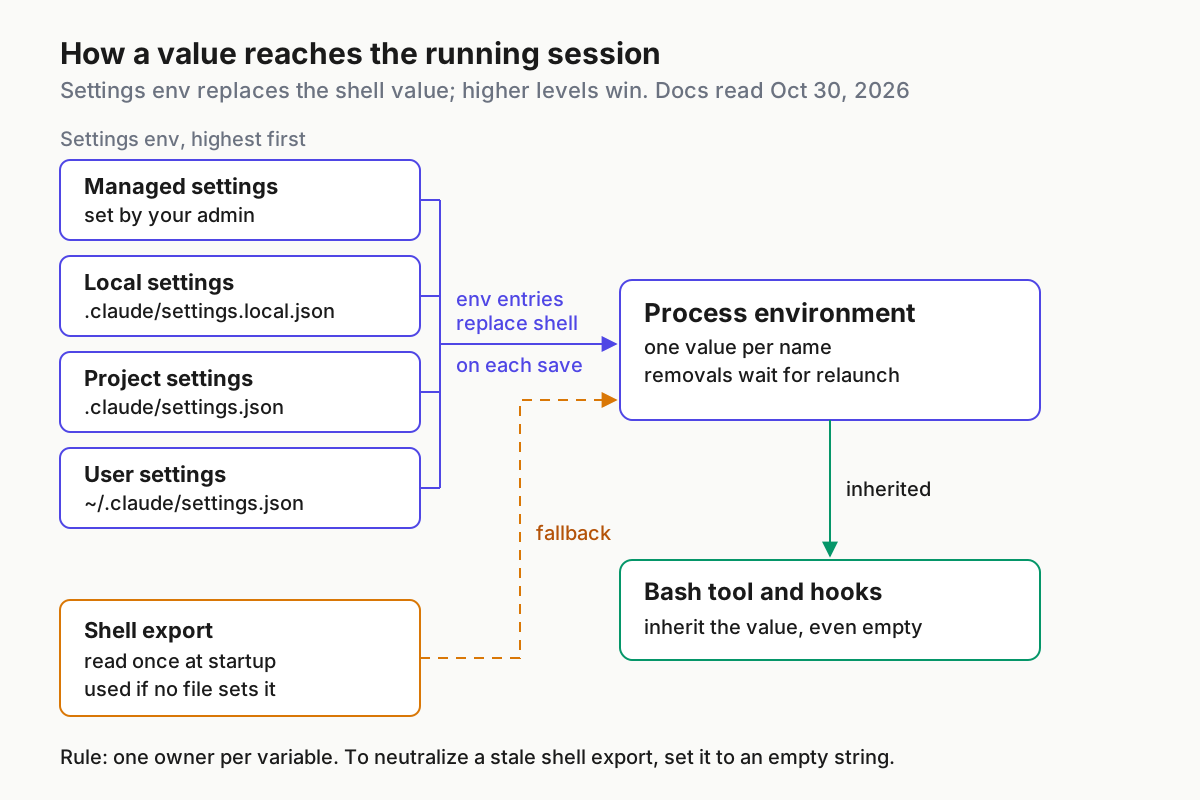
A session can receive a variable from your shell, or from the env key of four kinds of settings file. A shell value lasts only for the terminal session you exported it in. A settings value applies every time claude runs, however it was launched, because Claude Code reads the file directly. That second property is why an env block fixes the familiar “works in my terminal, missing in the editor” problem covered in the VS Code extension setup guide.
When the same name is set in more than one place, two rules decide. First, a settings env entry replaces the value inherited from the shell in most sessions, because Claude Code writes each entry into its process environment. Second, between settings files, env values follow ordinary settings precedence, so a managed entry beats the same name in user or project settings.
| Source | Where it lives | Who it affects | Committed to git? | When the session reads it | What overrides it |
|---|---|---|---|---|---|
| Shell export | ~/.zshrc, ~/.bashrc, PowerShell $env:, setx or [Environment]::SetEnvironmentVariable |
You, in sessions launched from that shell | No | Once, at startup | Any settings env entry with the same name, in most sessions |
| User settings env | ~/.claude/settings.json |
You, in every project on this machine | No | At start, and again on each save | Project, local, --settings and managed |
| Project settings env | .claude/settings.json |
Everyone who clones the repo, after they trust the folder | Yes, deliberately | At start, and again on each save | Local, --settings and managed |
| Local settings env | .claude/settings.local.json |
You, in this project only | No. Claude Code adds it to your global git excludes when it writes the file; add it to .gitignore yourself if you create it by hand |
At start, and again on each save | --settings and managed |
| Managed settings env | managed-settings.json, an MDM policy or server-managed settings |
Everyone your organization deploys it to | No; an admin owns it | On a schedule for MDM and server delivery; restart to be sure | Nothing in your own files |
Two cases sit outside that table. A --settings JSON passed at launch sits above every file except managed settings, for that one session only. And cloud sessions read neither your user file nor your local file, since both stay on your machine.
Some behaviors have both a variable and a settings key, and for those the winner is decided per pair rather than by level. Check this table before you blame precedence:
| Behavior | What wins | Consequence |
|---|---|---|
| Session model | --model and /model beat ANTHROPIC_MODEL, which beats the model key in any file |
A model exported in your profile returns on every launch, whatever you saved with /model |
| Default model for new sessions | ANTHROPIC_DEFAULT_MODEL applies only when no flag, variable, settings file or organization default selects a model |
It is a fallback, not a pin (v2.1.236 or later) |
| Effort | CLAUDE_CODE_EFFORT_LEVEL beats --effort, /effort and the effort settings |
Set it and /effort stops changing anything |
| IDE auto-connect | CLAUDE_CODE_AUTO_CONNECT_IDE beats the autoConnectIde setting |
The setting applies only when the variable is unset |
The model rows come from Anthropic’s model configuration page, which is the page to check when a session starts on a model you didn’t pick.
Read each variable’s own rules before copying it
The name tells you what a variable controls. Its row in the reference tells you how the value is parsed and which sources Claude Code will accept it from. Five rules cover most surprises.
- Values are literal strings. Claude Code copies env values exactly as written and no shell processes them, so
~and$HOMEstay as typed. Write absolute paths, for example"CLAUDE_CONFIG_DIR": "/home/you/.claude-work", and quote numbers. - Most on/off variables accept
1,true,yesoronto turn the behavior on, and0,false,nooroffto turn it off, in any casing. - Five variables only check whether they are set at all:
CLAUDE_CODE_DISABLE_NONESSENTIAL_TRAFFIC,DISABLE_TELEMETRY,DISABLE_ERROR_REPORTING,CLAUDE_CODE_TMUX_TRUECOLORandIS_DEMO. For these,0turns the behavior on. Turn them off by unsetting them or setting an empty value.FORCE_HYPERLINKhas its own rule: it reads a number, so only0disables it, andfalseturns hyperlinks on. - Numeric variables accept
2e3and64_000as well as plain digits, except where a row says plain digits only. Before v2.1.211, those spellings could silently set a much smaller value. - Some variables refuse some sources. One group is ignored in project and local settings. Another works only in the environment that launches Claude Code and is ignored in every settings env block.
Use the row text to choose the file:
| If the variable’s row says | Put it in | Why |
|---|---|---|
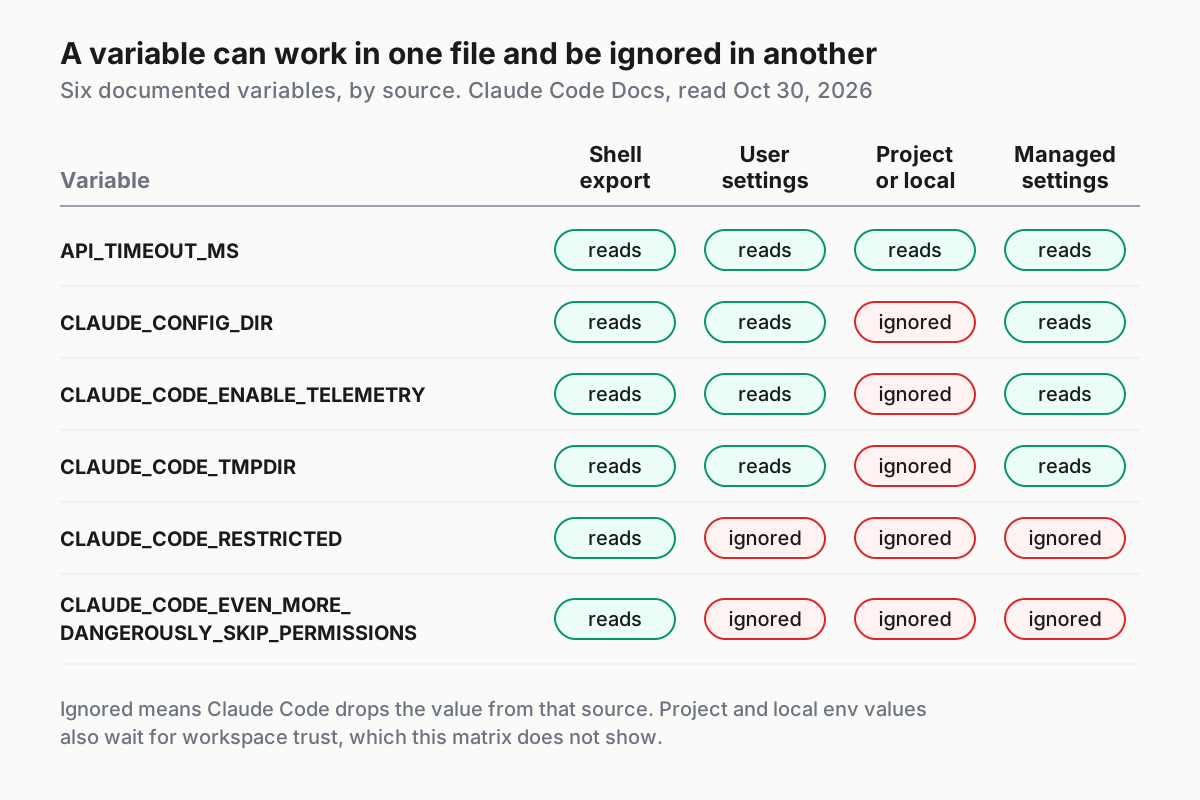
Ignored in project and local settings (CLAUDE_CONFIG_DIR, CLAUDE_CODE_TMPDIR, CLAUDE_CODE_ENABLE_TELEMETRY and the OpenTelemetry export variables) |
User settings, managed settings or your shell | A committed file can’t redirect your config directory, temp files or telemetry |
Set it in the environment that launches Claude Code (CLAUDE_CODE_RESTRICTED, CLAUDE_CODE_DISABLE_DANGEROUS_RM_TIMEOUT, CLAUDE_CODE_WARN_DISK_FREE_GIB) |
Your shell or a wrapper script | A copy in a settings env block is ignored |
Set it in user or managed settings, not as a shell export (CLAUDE_CODE_PROCESS_WRAPPER) |
User or managed settings | The detached background service has to inherit it |
Read once per launch (OpenTelemetry monitoring, CLAUDE_CODE_WEBFETCH_CACHE_TTL_MS) |
Any allowed file, then relaunch | Saving the file doesn’t reach a feature that already started |
| No restriction | The narrowest scope that covers everyone who needs it | That keeps one owner per variable |
Worked example: audit a shell profile and give each variable one home
The scenario is illustrative. A developer on macOS with zsh works in a large repository called payments-api behind a corporate proxy. Their ~/.zshrc has grown over two years: an API key from an old script, a timeout someone recommended, a telemetry line, and a work profile that a dotfiles repo they don’t control sources from ~/.profile. The goal is to move every value into a deliberate home and delete what nobody needs.
- List what the shell will hand to
claudeat startup, with secrets redacted:
# macOS, Linux, WSL: names and values the next claude launch inherits
env | grep -E '^(ANTHROPIC_|CLAUDE_|DISABLE_|DO_NOT_TRACK|IS_DEMO|API_TIMEOUT_MS|BASH_|HTTPS?_PROXY|https?_proxy|NO_PROXY|NODE_EXTRA_CA_CERTS|MAX_THINKING_TOKENS)' \
  | sed -E 's/(KEY|TOKEN)=.*/\1=<redacted>/'

# where each export lives
grep -nE 'export +(ANTHROPIC_|CLAUDE_|DISABLE_|DO_NOT_TRACK|API_TIMEOUT_MS|BASH_|HTTPS?_PROXY|NO_PROXY|NODE_EXTRA_CA_CERTS)' \
  ~/.zshrc ~/.zprofile ~/.bashrc ~/.profile 2>/dev/null

# what the settings files already set (run from the repository root)
for f in ~/.claude/settings.json .claude/settings.json .claude/settings.local.json; do
  [ -f "$f" ] && echo "== $f" && jq '.env // {}' "$f"
done
On Windows PowerShell, list names only, so that no secret lands in your scrollback: Get-ChildItem Env: | Where-Object Name -Match '^(ANTHROPIC_|CLAUDE_|DISABLE_|DO_NOT_TRACK|API_TIMEOUT_MS|BASH_|HTTPS?_PROXY|NO_PROXY|NODE_EXTRA_CA_CERTS)' | Select-Object Name.
- Fill one row per variable and decide. This is the completed audit for the example:
| Variable | Value found | Set in | What it actually does | Decision | New home |
|---|---|---|---|---|---|
ANTHROPIC_API_KEY |
an old Console key | ~/.zshrc line 41 |
Once approved, it is used instead of the subscription; with -p it is always used |
Remove, then sign in with /login |
None |
CLAUDE_CODE_USE_VERTEX |
1 |
~/.profile, from a dotfiles repo you don’t control |
Selects Google Cloud as the provider | Neutralize it, because you can’t delete the line | User env, as "" |
API_TIMEOUT_MS |
1200000 |
~/.zshrc |
Gives each request attempt 20 minutes to receive response headers (default 600000) | Keep; this is personal | User env |
HTTPS_PROXY |
http://proxy.example.com:8080 |
~/.zshrc |
Routes traffic through the corporate proxy | Keep | User env, so background agents get it too |
DISABLE_TELEMETRY |
0 |
~/.zshrc |
Presence-only, so this value still opts out | The intent was “keep telemetry on”, so remove it | None |
BASH_DEFAULT_TIMEOUT_MS |
300000 |
~/.zshrc |
5-minute foreground Bash timeout; the repo’s test suite needs it | Share with the team | Project env |
CLAUDE_CODE_EFFORT_LEVEL |
high |
~/.zshrc |
Overrides /effort in every project |
Remove; save a level with /effort instead |
None |
CLAUDE_CODE_AUTO_COMPACT_WINDOW |
400000 |
~/.zshrc |
Compacts at 400K tokens in every project | Limit it to the large repo | Local env |
The API key row is the expensive one. The authentication page ranks ANTHROPIC_API_KEY above subscription credentials from /login. In interactive mode you approve it once and that choice is remembered. If the key belongs to a disabled or expired organization, you get authentication failures even though your subscription is fine.
- Back up the profile, delete the exports you decided to move or remove, and clear them from the current shell:
cp ~/.zshrc ~/.zshrc.pre-claude-env
# edit ~/.zshrc and delete the export lines for:
#   ANTHROPIC_API_KEY  API_TIMEOUT_MS  HTTPS_PROXY  DISABLE_TELEMETRY
#   BASH_DEFAULT_TIMEOUT_MS  CLAUDE_CODE_EFFORT_LEVEL  CLAUDE_CODE_AUTO_COMPACT_WINDOW
unset ANTHROPIC_API_KEY API_TIMEOUT_MS HTTPS_PROXY DISABLE_TELEMETRY \
      BASH_DEFAULT_TIMEOUT_MS CLAUDE_CODE_EFFORT_LEVEL CLAUDE_CODE_AUTO_COMPACT_WINDOW
Then open a new terminal, so that nothing from the old profile lingers.
- Write the three files. The user file,
~/.claude/settings.json:
{
  "$schema": "https://json.schemastore.org/claude-code-settings.json",
  "env": {
    "API_TIMEOUT_MS": "1200000",
    "HTTPS_PROXY": "http://proxy.example.com:8080",
    "NO_PROXY": "localhost,127.0.0.1,.example.com",
    "CLAUDE_CODE_USE_VERTEX": ""
  }
}
The project file, .claude/settings.json, committed in payments-api:
{
  "$schema": "https://json.schemastore.org/claude-code-settings.json",
  "env": {
    "BASH_DEFAULT_TIMEOUT_MS": "300000",
    "BASH_MAX_TIMEOUT_MS": "900000"
  }
}
The local file, .claude/settings.local.json, which never leaves this machine:
{
  "env": {
    "CLAUDE_CODE_AUTO_COMPACT_WINDOW": "400000"
  }
}
Why each choice works:
- The proxy lives in user settings rather than the shell because, according to the network configuration page, background agents run under a per-user supervisor that inherits whichever shell started it first. A shell-only proxy reaches them by luck. The scheme matters too: a proxy URL Claude Code can’t parse, such as one missing
http://, stops launch with an error that names the variable. CLAUDE_CODE_USE_VERTEXis set to an empty string because a settings file can set a variable but can’t remove one. Claude Code treats the empty value as unset for provider selection. If you do run on a cloud provider, the Bedrock and Vertex AI setup guide shows the full env block instead.- The two Bash timeouts are team values, so they belong in the committed file. The ceiling is the larger of the two values, and a value above the default background limit also changes unattended sessions.
- The compaction window affects only you, in only this repository, so it goes in the local file. The context window explainer covers when an earlier compaction point is worth it.
- Every value is a quoted string, because env values are copied verbatim.
- Prove the local file stays out of git and the shared file goes in:
git check-ignore -v .claude/settings.local.json   # prints the matching ignore rule; no output means NOT ignored
git ls-files .claude                              # should list .claude/settings.json and nothing personal
# if check-ignore printed nothing:
echo '.claude/settings.local.json' >> .gitignore
Never put ANTHROPIC_API_KEY or any other secret in .claude/settings.json. If a script really needs a key, export it on that one command line instead of in a profile.
Reference: variables worth knowing, grouped by job
The reference page lists far more variables than any one developer needs. These rows cover the ones most likely to change who pays, which model answers, how traffic leaves the machine and what gets reported. Every name and behavior is from Anthropic’s pages or the v2.1.316 notes, and the three new variables are marked.
| Variable | What it does | Safe default | Risk if wrong | Where to set it |
|---|---|---|---|---|
ANTHROPIC_API_KEY |
API key sent as X-Api-Key; replaces your subscription once approved, always used with -p |
Unset for subscription users | Billing goes to a Console organization without you noticing | One command line for scripts; never a project file |
ANTHROPIC_AUTH_TOKEN |
Authorization: Bearer value for gateways |
Unset | Ranks above the API key and /login |
User env, for gateway users |
CLAUDE_CODE_OAUTH_TOKEN |
Long-lived token from claude setup-token for CI |
Unset on laptops | Read again in every new session until you remove it | The CI secret store |
CLAUDE_CODE_USE_BEDROCK, CLAUDE_CODE_USE_VERTEX, CLAUDE_CODE_USE_FOUNDRY |
Select a cloud provider | Unset | Outranks every Anthropic credential | User or managed; "" to neutralize |
ANTHROPIC_BASE_URL |
Routes requests through a proxy, gateway or local server, as in the LM Studio setup | Unset | Remote Control is disabled for hosts other than api.anthropic.com | User env |
ANTHROPIC_MODEL |
Session model; read before the model key |
Unset; use /model |
Overrides your saved choice on every launch | Shell, for one session |
ANTHROPIC_DEFAULT_MODEL |
Starting model when nothing else selects one | Unset | Silently ignored when any file sets model |
User env |
CLAUDE_CODE_EFFORT_LEVEL |
Effort level (low to max, or auto); beats --effort and /effort |
Unset | /effort stops having any effect |
Shell, for one session |
CLAUDE_CODE_SUBAGENT_MODEL |
Default model for subagents with no other assignment | Unset | Subagent cost rises or falls without anyone noticing | User or project |
CLAUDE_CODE_SUBAGENT_EFFORT (new in v2.1.316) |
Effort for subagents when nothing else names one | Unset | Value format isn’t on the reference page yet | Local, while you test |
CLAUDE_CODE_DISABLE_ULTRATHINK (new in v2.1.316) |
Turns the ultrathink keyword off | Unset | Teammates lose a one-turn effort raise | Project, once everyone is on v2.1.316 |
HTTPS_PROXY, HTTP_PROXY, NO_PROXY |
Proxy routing; lowercase forms are read first; SOCKS isn’t supported | Unset | A missing scheme stops launch | User env |
NODE_EXTRA_CA_CERTS |
Adds your corporate CA file | Unset | A relative or ~ path won’t resolve |
User env |
CLAUDE_CODE_CERT_STORE |
Trusted CA sources; default bundled,system |
Default | Narrowing it can break TLS-inspecting proxies | User env; it has no dedicated settings key |
CLAUDE_CODE_DISABLE_LOOPED_CROSS_CERT_DROP (new in v2.1.316) |
Keeps looped system cross-certificates for a private CA | Unset | Only needed for servers whose CA requires it | User env, after a TLS error points there |
DISABLE_TELEMETRY, DO_NOT_TRACK |
Opt out of telemetry; both also stop feature-flag fetching | Your choice | DISABLE_TELEMETRY=0 still opts out; some features become unavailable |
User or managed |
CLAUDE_CODE_DISABLE_NONESSENTIAL_TRAFFIC |
Stops updates, telemetry, error reports and release notes | Unset | Remote Control becomes unavailable | Managed, for locked-down machines |
DISABLE_AUTOUPDATER, DISABLE_UPDATES |
Stop background updates, or block all updates | Unset | You miss fixes, including env fixes like v2.1.316’s | Managed |
CLAUDE_CODE_SUBPROCESS_ENV_SCRUB |
Strips credentials from Bash, hook and MCP subprocess environments | Unset | Removes variables a script needs; leaves GITHUB_TOKEN |
User or project |
CLAUDE_CODE_EVEN_MORE_DANGEROUSLY_SKIP_PERMISSIONS |
In bypassPermissions mode, runs dangerous rm commands with no prompt (v2.1.311 or later) |
Unset | Removes a destructive-delete safety prompt | Launch environment only |
The scrub row pairs with sandboxing. The sandbox setup guide covers the other half of keeping credentials away from commands the agent runs.
The last row deserves a closer look because it is circulating. A post on X on October 27 described CLAUDE_CODE_EVEN_MORE_DANGEROUSLY_SKIP_PERMISSIONS=1 as bypassing permission checks, including safeguards around rm -rf ~. The reference row is narrower. It applies in bypassPermissions mode, removes the prompt for dangerous deletes, needs v2.1.311 or later, and is ignored in a settings env block. So it can’t arrive through a committed project file, but a shell profile or wrapper script can carry it. Search those files for it, and decide permission modes as policy rather than per terminal, as the restricted mode fleet policy guide recommends.
To adopt a variable the reference page doesn’t document yet, such as the three v2.1.316 additions:
- Confirm
claude --versionis at least the release that added it. - Set it in
.claude/settings.local.jsonfirst, so a mistake affects only you. - Treat the general on/off rule (
"1"to turn something on) as an assumption until the variable’s row appears, because five documented variables break that rule. - Find something you can observe. Typed in the terminal prompt,
ultrathinkshows in rainbow colors when it can raise that turn’s effort (v2.1.311 or later). WithCLAUDE_CODE_DISABLE_ULTRATHINKset, we’d expect the keyword to stop doing that, but we haven’t verified it. - For
CLAUDE_CODE_SUBAGENT_EFFORT, the model configuration page saysCLAUDE_CODE_EFFORT_LEVELoverrides a subagent’s own effort field. The release note doesn’t say how the new variable interacts with it, so don’t set both and expect the subagent value to win. The subagents guide covers the per-agenteffortfield, which is the documented alternative. - Move it to the project file only after every teammate runs a version that understands it.
The drill: prove what a running session actually uses
/status tells you which files loaded, but not which file supplied each key. To learn which value a session actually holds, ask a subprocess that the session spawned. Claude Code sets CLAUDECODE=1 in Bash tool, hook and status line subprocesses, so a probe that prints it proves the output came from inside the session.
The probe uses a made-up variable called ENV_DRILL, so nothing real changes. Claude Code writes every env entry into the process environment, including names it doesn’t recognize, which is also how teams pass project values such as an Azure DevOps project name to their tools.
# Probe: ask Claude to run this with the Bash tool and show the raw output
echo "CLAUDECODE=${CLAUDECODE:-missing}"; if [ -z "${ENV_DRILL+x}" ]; then echo "ENV_DRILL is unset"; else echo "ENV_DRILL='${ENV_DRILL}'"; fi
Start from a new terminal in the test repository with export ENV_DRILL=shell, then run claude. Work through the steps in order:
| Step | Action | Expected observation | What it proves |
|---|---|---|---|
| 1 | Run the probe | CLAUDECODE=1 and ENV_DRILL='shell' |
Shell exports reach Bash tool subprocesses |
| 2 | Add "ENV_DRILL": "user-1" to the user file’s env, save, and probe again without restarting |
ENV_DRILL='user-1' |
A settings entry replaces the shell value and applies on save |
| 3 | Change it to "user-2", save, probe |
ENV_DRILL='user-2' |
Changed values apply live |
| 4 | Delete the entry, save, probe | Still ENV_DRILL='user-2' |
A removal doesn’t unset anything until you relaunch |
| 5 | Exit and relaunch from the same shell, probe | ENV_DRILL='shell' |
With no settings entry, the shell value applies again |
| 6 | Set "user" in the user file and "project" in .claude/settings.json, probe |
ENV_DRILL='project' |
Project beats user |
| 7 | Add "local" to .claude/settings.local.json, probe |
ENV_DRILL='local' |
Local beats project |
| 8 | Change the local value to "", probe |
ENV_DRILL='': set, but empty |
An empty value is still passed to subprocesses |
| 9 | Run /status |
The Setting sources line lists User, Project and Project local settings | Which files loaded, but not which key came from where |
| 10 | Remove every ENV_DRILL entry, run unset ENV_DRILL, relaunch, probe |
ENV_DRILL is unset |
Clean state again |
If step 6 or 7 shows an unexpected value, relaunch and probe again before concluding that precedence is broken. The documentation also notes that some sessions keep the inherited shell value instead, and that a few variables are special-cased, so check the env setting’s exceptions before filing a bug.
Three more checks complete the picture:
- Credentials. Run
/status. When a login and an API key are both configured, it marks the credential that isn’t in use. The “Use custom API key” toggle in/configappears only whileANTHROPIC_API_KEYis set, which is itself a quick test. - Model and effort.
/modeland/effort statusshow what applies.Effort level: automeans no effort level is sent. - Network. Start
claude --debugand read~/.claude/debug/<session-id>.txtfor lines such asCA certs: Appended extra certificates from NODE_EXTRA_CA_CERTS (...). In/status, the Proxy row shows the active proxy URL and marks a value it couldn’t parse as invalid and ignored.
On Windows, read one result with care. GitHub issue #20112, opened in January 2026 and closed as a duplicate, reported that env values from .claude/settings.json weren’t visible to the Bash tool. Treat that as a reported issue, not documented behavior. The report tested with echo %AZURE_DEVOPS_PROJECT%, and a bash shell prints %NAME% literally whether or not the variable is set, so repeat the test with the probe above (or $env:ENV_DRILL in the PowerShell tool) before concluding anything. If the value really is missing, set it in the launch environment with setx or [Environment]::SetEnvironmentVariable("ENV_DRILL", "value", "User") and open a new terminal.
Clear a variable on purpose: the empty-value rule
Clearing a variable is where most copied snippets go wrong, because “clear” means different things in different places.
- In your shell,
unset NAME(orRemove-Item Env:NAMEin PowerShell) removes it from that terminal. Delete the export line from the profile too, or it comes back in the next terminal. - In a settings file, deleting the entry stops the file from setting the variable, but it doesn’t remove a value inherited from the shell, and a running session keeps the old value until you relaunch.
- To override a value you can’t unset, such as a stale
CLAUDE_CODE_USE_VERTEXfrom a profile you don’t control, set it to""in a settings env block. Claude Code treats the empty value as unset for provider selection. - Remember that subprocesses still receive the empty string. A tool that checks only whether a variable exists, rather than whether it has a value, will still see it as set.
- For the presence-only variables, both deleting the variable and setting it to an empty value turn the behavior off.
"0"doesn’t. - For
CLAUDE_CODE_EFFORT_LEVEL,autoorunsettells Claude Code to send no effort level at all, which is different from deleting the variable.
Troubleshooting: symptom, cause, fix, expected observation
| Symptom | Likely cause | Fix | Expected observation after the fix |
|---|---|---|---|
| A value you exported is ignored | A settings env entry with the same name replaced it | Remove the entry, or make the file the single owner | The probe shows the value you intended |
| A teammate gets your personal value | It was put in .claude/settings.json |
Move it to .claude/settings.local.json and commit the removal |
A fresh clone’s project file no longer contains it |
| An edit didn’t reach the session | It was a shell variable, a removal, or a feature that reads once per launch | Relaunch claude |
The probe or feature reflects the new value |
| Usage is billed to an API key instead of your plan | ANTHROPIC_API_KEY exported and approved earlier |
Unset it, remove the export, relaunch, run /status |
/status shows your subscription login, with the key not in use or gone |
| The session starts on a provider you didn’t choose | A stale CLAUDE_CODE_USE_* export |
Set it to "" in user settings |
/status shows the intended login |
Telemetry is off although you set 0 |
DISABLE_TELEMETRY is presence-only |
Delete the variable | Feature-flag features return in later sessions |
| Launch stops with an error naming the proxy variable | The proxy URL has no scheme | Use http://host:port |
Launch proceeds; /status shows a Proxy row |
| A path value doesn’t work | ~ or $HOME isn’t expanded |
Write the absolute path | The feature finds the file |
| A project value works for you but not for a new teammate | They haven’t trusted the folder yet, or the variable is ignored in project settings | Have them trust the folder, or move the variable to user settings | Their probe shows the value |
| The Windows Bash tool can’t see a settings value | Wrong probe syntax, or the reported issue | Re-test with $NAME; if it is still missing, set it in the launch environment |
The probe shows the value |
| A background agent ignores the proxy | The supervisor inherited a different shell | Put the network variables in user or managed settings | New background sessions use the proxy |
| A value you set never applies | A managed settings entry overrides it | Check the managed source on /status, then ask your admin |
Nothing in your own files changes it, which is expected |
| Settings Error at startup | A JSON comment or trailing comma | Fix the file; run claude doctor |
The session starts without the dialog |
Claude Desktop sessions where the app manages the provider connection are a special case. There, proxy and TLS variables are read only from managed settings and ~/.claude/settings.json, so a value in a repository’s own settings file won’t apply.
Roll back a change
When a variable change makes things worse, undo it in the order it was applied, then verify.
- Restore the shell profile from the backup (
cp ~/.zshrc.pre-claude-env ~/.zshrc), or delete the export you added, and open a new terminal. - Remove the entry from the settings file that owns it and save. The audit table tells you which file that is.
- Exit and relaunch
claude, because removals take effect only at the next launch. - Run the probe for that variable, then
/statusfor login, model and setting sources, andclaude doctorto confirm that no file has errors. - For a committed project change, run
git revert <sha>so teammates get the previous file on their next pull, instead of deleting the line locally. - If the value comes from managed settings, stop there and contact the administrator. Nothing in your own files can roll it back.
Done means: success and failure checks
You are finished when every box below is true for your machine and your repository:
- [ ] Every variable in the audit has exactly one owner and one scope, and no name appears in two files with different intent.
- [ ]
/statusshows the login method and model you expect, with no unexpected API key in use. - [ ] A fresh clone of the repository contains only the shared
.claude/settings.jsonvalues, andgit check-ignore -v .claude/settings.local.jsonprints a rule. - [ ] The drill’s final probe prints
ENV_DRILL is unset. - [ ]
claude doctorreports no rejected settings entries.
Treat these as failures, even if everything seems to work:
- [ ] A key or token appears anywhere in
.claude/settings.jsonor its git history. - [ ] A variable you use doesn’t appear in Anthropic’s reference or a release note. Copied blog snippets with undocumented names do nothing at best.
- [ ] A launch-only variable such as
CLAUDE_CODE_EVEN_MORE_DANGEROUSLY_SKIP_PERMISSIONSsits in a profile nobody reviewed.
Sources
- Anthropic, Claude Code v2.1.316 release notes (GitHub), Oct 31, 2026 01:01 UTC
- Anthropic, Claude Code Docs: Environment variables
- Anthropic, Claude Code Docs: Settings files and precedence
- Anthropic, Claude Code Docs: Authentication
- Anthropic, Claude Code Docs: Model configuration
- Anthropic, Claude Code Docs: Enterprise network configuration
- GitHub issue #20112: environment variables from .claude/settings.json not injected into Bash on Windows
- @heyshambhavi on X, Oct 27, 2026