Claude Code Bedrock and Vertex AI Setup: Pin Model IDs, Verify With /status and Fix Access Errors
Claude Code Bedrock and Vertex AI setup: settings.json env blocks, SSO and gcloud auth refresh, pinned model IDs, the v2.1.312 prompt change, and error fixes.

Go deeper. Build your own.
Your company buys Claude through its AWS or Google Cloud agreement, so signing in with an Anthropic plan isn’t an option, and you’ve been asked to get Claude Code working against that contract this week. This Claude Code Bedrock guide, with a parallel path for Vertex AI, takes one developer or platform engineer from a working install to a session whose provider, region or project, and model read correctly in /status, with model IDs pinned so nobody drifts onto whatever the built-in default becomes next month.
You’ll leave with five things to copy: a filled Bedrock-versus-Vertex decision table, a complete ~/.claude/settings.json for each provider, a modelOverrides map that routes model versions to application inference profile ARNs, a per-lane decision on the system-prompt and fallback changes in Claude Code v2.1.312, and an error-to-fix table with a rollback. Commands and settings come from Anthropic’s pages on Claude Code with Amazon Bedrock and Claude Code with Google Cloud’s Agent Platform (the product formerly called Vertex AI), and from the model configuration reference. We haven’t run these configurations for this article. Account IDs, profile names and project names are illustrative, and every “expected” observation is what the documentation says you should see, not output we recorded.
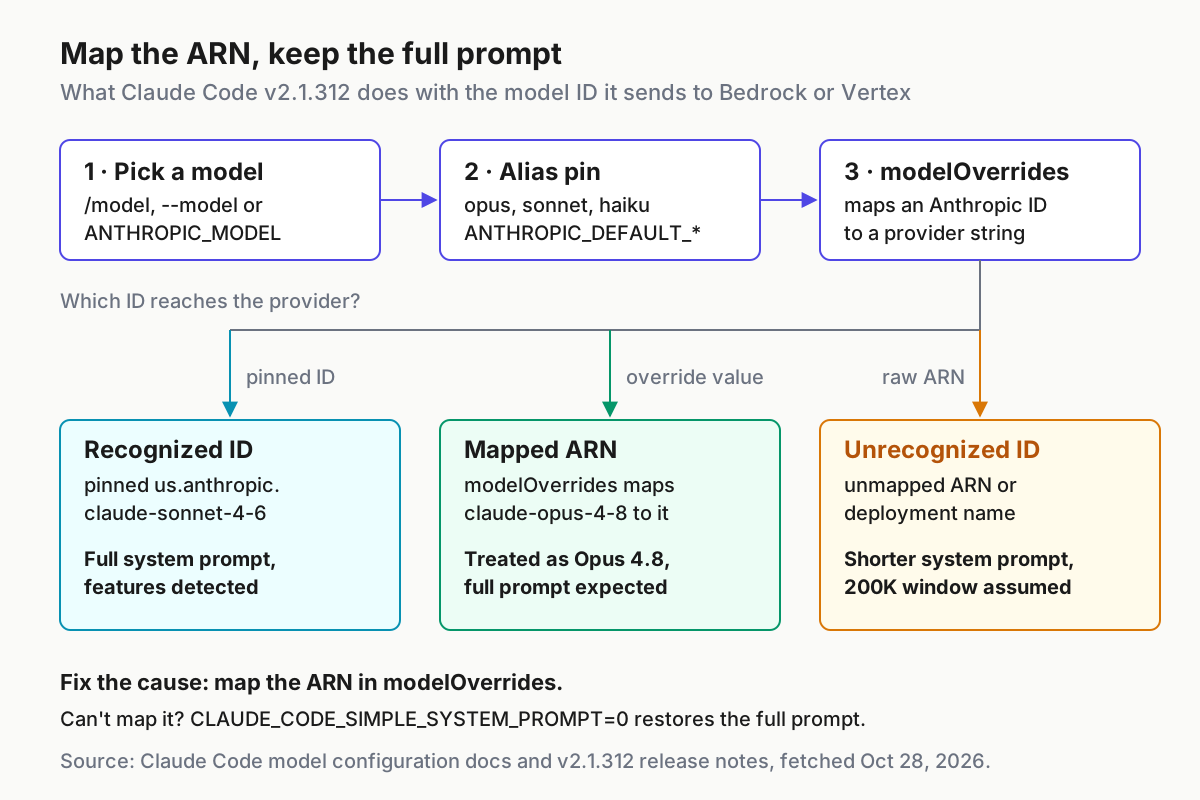
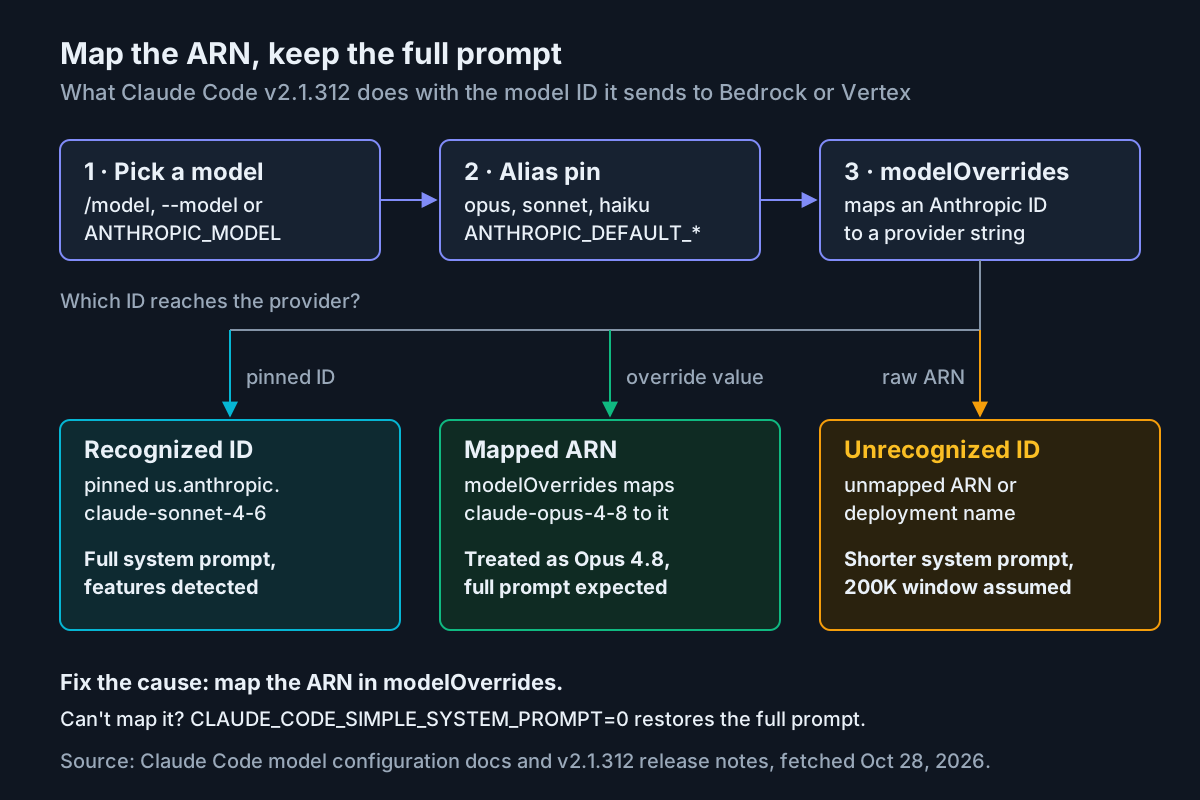
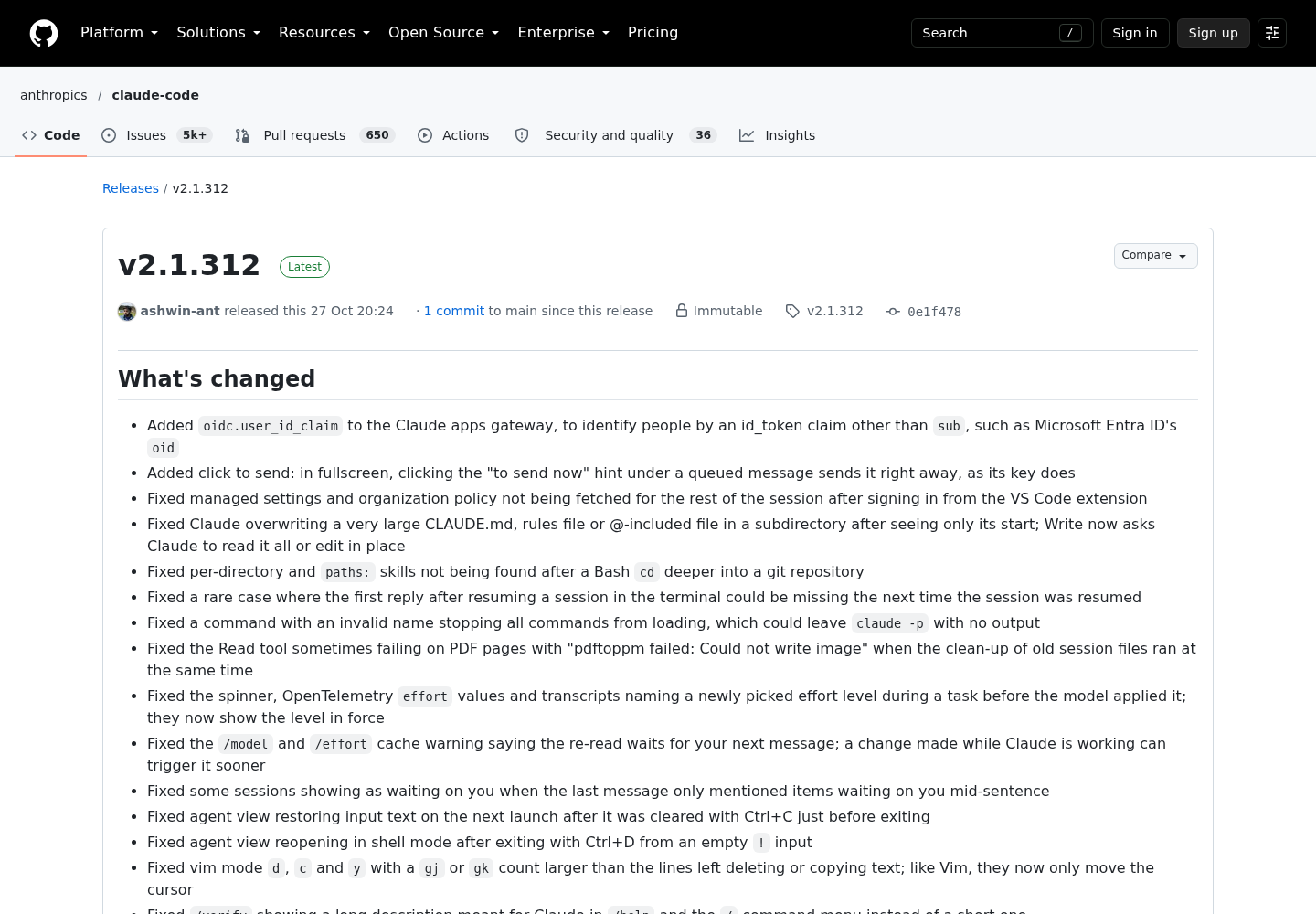
One release explains why the pinning details matter now. On Oct 27, 2026, Anthropic published Claude Code v2.1.312, which changes Bedrock, Vertex, Foundry and Mantle sessions whose model name Claude Code doesn’t recognize, “such as custom deployment names and inference profile ARNs, even when they front Sonnet or Haiku.” Those sessions now get the shorter system prompt, and automatic model switches after a flagged message now cover them as well. The day before, v2.1.311 started loading model settings on those providers from a signed file on downloads.claude.ai. If your cost tracking points Claude Code at raw ARNs, both changes reach you, and the fix lives in how you pin models.
The demand is real. On Oct 25 a developer asked on X who is already running Claude Code through Bedrock, noting that most big companies can’t use the Anthropic API directly and go through their cloud contract instead. This guide stays on the provider connection itself. Gateways and model-swap translators in front of coding CLIs are covered in the bridge register, and choosing a managed agent platform for failover is a separate decision.
Before you start: accounts, permissions and version
Most failed first sessions on a cloud provider aren’t Claude Code problems. They’re an account that never submitted the model use case form, a role missing one IAM action, or a project that never enabled the API. Clear these before you touch a settings file.
- [ ] Claude Code is current. Run
claude --version. You need v2.1.312 or later for the behavior described in the v2.1.312 section. Other version floors in Anthropic’s docs: v2.1.200 formodelOverridesto apply to--modelandANTHROPIC_MODEL, v2.1.261 for the Bedrock wizard’s credential lookup to trust your OS certificate store, and v2.1.287 forenforceAvailableModelsto govern startup model checks. - [ ] Bedrock: model access is granted. In the Bedrock console, open the Model catalog, select an Anthropic model and submit the use case form. Access is granted immediately after submission, and you do it once per AWS account. Under AWS Organizations, the management account can submit once through the
PutUseCaseForModelAccessAPI (it needsbedrock:PutUseCaseForModelAccess), and approval extends to child accounts. - [ ] Bedrock: the role carries the right actions.
bedrock:InvokeModel,bedrock:InvokeModelWithResponseStream,bedrock:ListInferenceProfilesandbedrock:GetInferenceProfile, plus two AWS Marketplace actions. The full policy is in the Bedrock section. - [ ] Bedrock: you have a credential path. An SSO profile,
aws login(AWS CLI 2.32.0 or later), an access key, a machine role such as an EC2 instance profile, or a Bedrock API key. The AWS CLI itself is optional when something else already feeds the default credential chain. - [ ] Vertex: the project is ready. Billing enabled, the Agent Platform API (
aiplatform.googleapis.com) enabled, Claude models requested in Model Garden, and quota in the region you plan to use. Anthropic warns that model approval may take 24 to 48 hours, so request it first. - [ ] Vertex: your identity can invoke. The
roles/aiplatform.userrole, which includesaiplatform.endpoints.predict, and thegcloudCLI installed and configured. - [ ] A throwaway git repository for the verification step, so the first approved edit lands somewhere harmless.
Both provider pages recommend a dedicated AWS account or GCP project for Claude Code “to simplify cost tracking and access control.” If your organization will create one, ask for it now; it removes most of the cost-allocation work later in this guide.
Bedrock or Vertex AI: the filled decision table
If your company has a contract with only one cloud, that’s your answer, and this table becomes a map of what that choice brings with it. If you have both, the rows that usually decide it are cost allocation and model ID format.
| Question | Amazon Bedrock | Vertex AI (Google Cloud’s Agent Platform) |
|---|---|---|
| How Claude Code authenticates | AWS default SDK credential chain: SSO profile, aws login, access keys, instance or task roles; or a Bedrock API key in AWS_BEARER_TOKEN_BEDROCK |
Application Default Credentials from gcloud, a service account key through GOOGLE_APPLICATION_CREDENTIALS, or Workload Identity Federation |
| Automatic credential refresh | awsAuthRefresh, which runs when credentials are expired; awsCredentialExport for cross-account credentials |
gcpAuthRefresh, which runs when credentials are expired or can’t be loaded |
| Model ID format | Cross-region inference profile ID such as us.anthropic.claude-sonnet-4-6, or an application inference profile ARN |
Version name such as claude-opus-4-8 or claude-haiku-4-5@20251001 |
| Region choice | AWS_REGION; the prefix (us., eu., apac., global., us-gov.) follows the region unless ANTHROPIC_BEDROCK_REGION_PREFIX sets it |
CLOUD_ML_REGION set to global, a multi-region such as eu or us, or a region such as us-east5; per-model VERTEX_REGION_CLAUDE_* overrides |
| Region when nothing is set | The active profile’s region, then us-east-1 |
us-east5 |
| Per-team cost allocation | Application inference profiles carrying cost allocation tags | A separate project per team; ANTHROPIC_VERTEX_PROJECT_ID decides which project pays |
| Raising limits | Bedrock quotas (the doc links AWS’s token burndown and quotas page); ANTHROPIC_BEDROCK_SERVICE_TIER trades cost against latency |
Regional quota; Anthropic’s page says to contact Google Cloud support |
| Gateway or proxy caveat | The binary event stream and its Content-Type header must pass through unmodified |
ANTHROPIC_VERTEX_BASE_URL for custom endpoints; no streaming caveat stated |
| Not available | WebSearch tool; /logout |
/logout |
| Setup wizard | Login prompt, or /setup-bedrock once signed in |
Login prompt, then /setup-vertex to reopen it |
Three rows deserve a sentence each. Application inference profiles are a resource “that a user creates to track costs and model usage,” and AWS’s inference profile guide says you can attach cost allocation tags to them and collect CloudWatch usage metrics per profile. That makes them the cleanest per-team chargeback either cloud offers for Claude Code, and the pinning section shows how to wire one in. Google’s Claude on Google Cloud model page lists the Claude models served through Agent Platform, from Haiku 4.5 up to Opus 5.5 and Fable 5.1, billed pay as you go or as a fixed fee with provisioned throughput, so confirm your target model is enabled in your chosen location before you pin it. And the gateway row matters if your network team already proxies model traffic: Bedrock’s streaming format survives only a gateway that leaves the response alone.
The decision procedure, in order:
- Use the cloud where your committed spend and data agreement already sit. Claude Code’s setup, pinning and verification work almost identically on both.
- If finance needs per-team cost tags inside one account, prefer Bedrock with application inference profiles.
- If your billing pattern is already one project per team, Vertex fits it without extra resources.
- If data must stay in Europe, compare the
eu.Bedrock prefix withCLOUD_ML_REGION=eu, and check model availability for that geography on each side before deciding. - Whichever you pick, roll it out with pinned model versions. Both Anthropic pages ask you to pin before deploying to a team.
Bedrock path: the setup wizard or a settings.json env block
You have two routes. The wizard is fastest for one person on one laptop; the manual env block is what you commit to a dotfiles repository, a CI image or a scripted rollout.
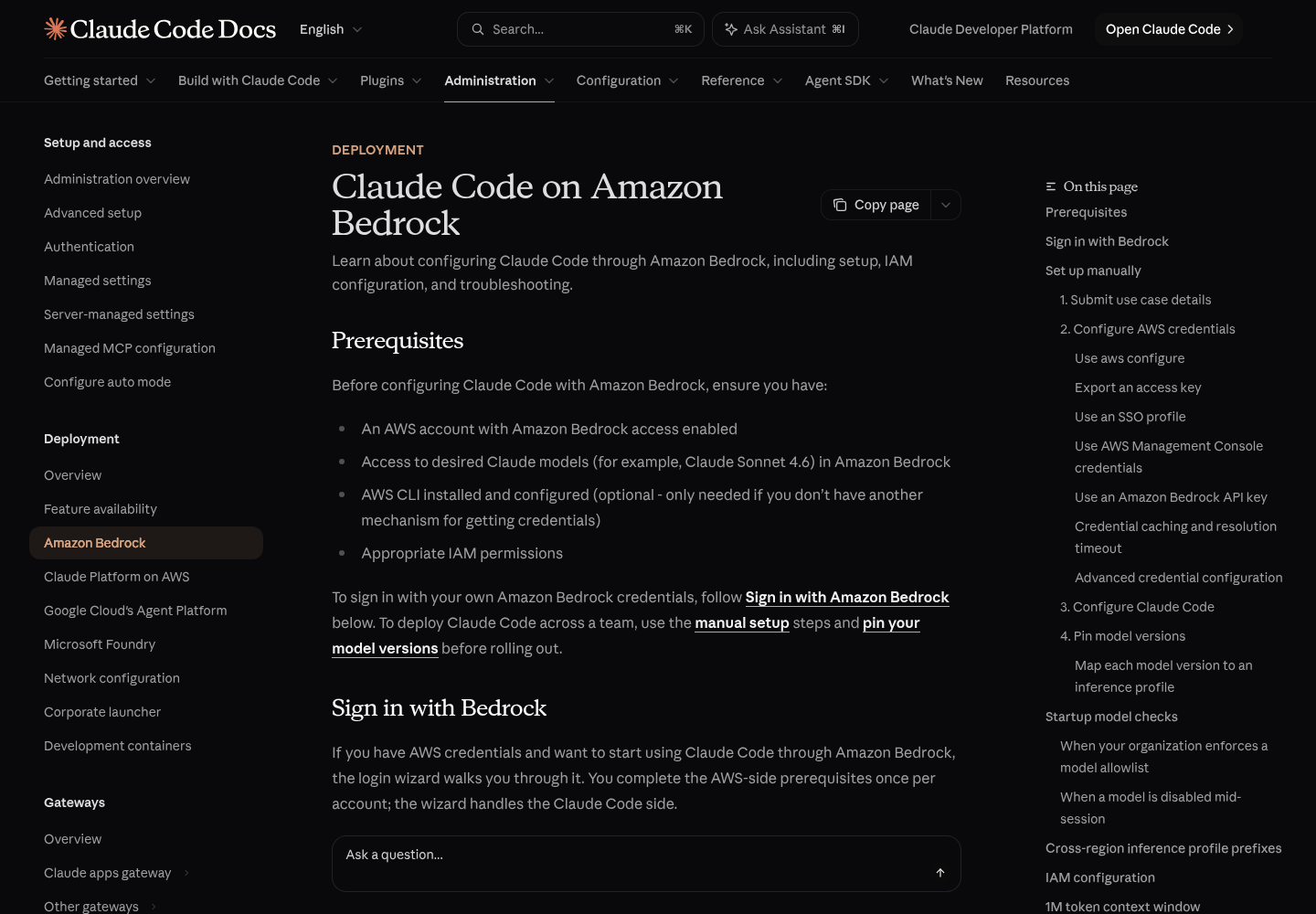
Wizard route. It handles the Claude Code side once the AWS prerequisites are done.
- Run
claude. At the login prompt, select 3rd-party platform, then Amazon Bedrock. - If you’re already signed in and see the chat prompt, type
/setup-bedrockin full. Claude Code hides the command from the command menu untilCLAUDE_CODE_USE_BEDROCK=1is set, so it won’t autocomplete. - Choose how you authenticate: a profile detected in
~/.aws, a Bedrock API key, an access key and secret, or credentials already in your environment. - Enter the region. The wizard verifies which Claude models your account can invoke and lets you pin them.
- Expect the result in the
envblock of~/.claude/settings.json, or$CLAUDE_CONFIG_DIR/settings.jsonwhen that variable is set. Rerun/setup-bedrockany time to change credentials, region or pins; the pin step starts from your current pins.
Manual route. Sign in with an SSO profile first. Replace claude-bedrock with your own profile name.
# One time: create the profile (asks for your IAM Identity Center start URL and role)
aws configure sso

# Each working day, or let awsAuthRefresh run it when credentials expire
aws sso login --profile=claude-bedrock

# See which inference profiles this region offers your account
aws bedrock list-inference-profiles --region us-east-1 --profile claude-bedrock
Claude Code requests role credentials from the IAM Identity Center region named by the profile’s sso_region, which doesn’t need to match the region you run Bedrock in, so a London-based Identity Center with a us-east-1 Bedrock region is fine.
Now the settings file. This is documented configuration assembled from the Bedrock and model configuration pages, not a captured run; change the names to yours.
{
  "awsAuthRefresh": "aws sso login --profile claude-bedrock",
  "model": "sonnet",
  "env": {
    "CLAUDE_CODE_USE_BEDROCK": "1",
    "AWS_PROFILE": "claude-bedrock",
    "AWS_REGION": "us-east-1",
    "ANTHROPIC_DEFAULT_OPUS_MODEL": "us.anthropic.claude-opus-4-8",
    "ANTHROPIC_DEFAULT_SONNET_MODEL": "us.anthropic.claude-sonnet-4-6",
    "ANTHROPIC_DEFAULT_HAIKU_MODEL": "us.anthropic.claude-haiku-4-5-20251001-v1:0"
  }
}
Why each line is there:
awsAuthRefreshruns only when Claude Code detects expired credentials, locally or from an API credential error. It first makes an STSGetCallerIdentitycall to confirm they’re really expired, sends that check throughHTTPS_PROXYandNO_PROXY, and then retries the request. It shows the command’s output but can’t send keystrokes, which suits the browser-based SSO flow.AWS_PROFILElives in the settings file rather than your shell profile so it doesn’t leak to other processes, a pattern the Bedrock page recommends. It also reaches sessions launched from an editor; the VS Code extension guide explains why shell exports often don’t.AWS_REGIONis optional when the profile sets a region. Claude Code resolvesAWS_REGION, thenAWS_DEFAULT_REGION, then the active profile’s region, thenus-east-1, and it treats a value containing a slash, dot or space as unset and moves down the list.- The three pins use the
us.cross-region inference profile prefix because the region is aus-*region. Ineu-*regions the preferred prefix iseu., inap-*it’sapac., in GovCloud it’s alwaysus-gov., and other regions getglobal.. "model": "sonnet"starts sessions on the pinned Sonnet. Without a primary model selection, sessions start on the Opus default, and Anthropic’s page states the consequence plainly: “if you don’t pin a primary model, you’re billed at the Opus rate.” Developers can still switch to the pinned Opus with/model opuswhen a task needs it.
The IAM policy from Anthropic’s Bedrock page follows. You can narrow Resource to specific inference profile ARNs once you know which ones the team uses.
{
  "Version": "2012-10-17",
  "Statement": [
    {
      "Sid": "AllowModelAndInferenceProfileAccess",
      "Effect": "Allow",
      "Action": [
        "bedrock:InvokeModel",
        "bedrock:InvokeModelWithResponseStream",
        "bedrock:ListInferenceProfiles",
        "bedrock:GetInferenceProfile"
      ],
      "Resource": [
        "arn:aws:bedrock:*:*:inference-profile/*",
        "arn:aws:bedrock:*:*:application-inference-profile/*",
        "arn:aws:bedrock:*:*:foundation-model/*"
      ]
    },
    {
      "Sid": "AllowMarketplaceSubscription",
      "Effect": "Allow",
      "Action": ["aws-marketplace:ViewSubscriptions", "aws-marketplace:Subscribe"],
      "Resource": "*",
      "Condition": { "StringEquals": { "aws:CalledViaLast": "bedrock.amazonaws.com" } }
    }
  ]
}
Don’t trim bedrock:GetInferenceProfile to save a line. It lets Claude Code resolve an application inference profile ARN to the foundation model behind it, which decides the request shape. Without it, Claude Code retries once with the alternate shape, so requests still succeed but each new model costs an extra round trip. ListInferenceProfiles earns its place too: when Claude Code can list your profiles, it checks that a profile with your preferred prefix exists before using it, instead of guessing.
Two credential behaviors help when a session stalls. Claude Code resolves the credential chain once and reuses the result until five minutes before it expires, or for one hour when it carries no expiry, so an SSO profile asks Identity Center for credentials about once per lifetime. The resolve that fills that cache times out after 60 seconds; if your chain runs an interactive sign-in through a wrapper such as aws-vault, raise the limit with CLAUDE_CODE_AWS_CHAIN_RESOLVE_TIMEOUT_MS. If you authenticate with a Bedrock API key instead, AWS_BEARER_TOKEN_BEDROCK wins over every other credential and the chain isn’t consulted at all.
Vertex AI path: env block, gcpAuthRefresh and the project trap
The wizard works here too: run claude, choose 3rd-party platform, then Google Vertex AI (the label the login prompt still uses), and pick Application Default Credentials, a service account key file or credentials already in your environment. /setup-vertex reopens it later. For a scripted setup, follow these steps.
- Point
gcloudat the project and enable the API. - Request the Claude models you need in Model Garden and wait for approval.
- Create Application Default Credentials.
- Write the settings file below into
~/.claude/settings.json. - Start
claudeand run the verification section.
gcloud config set project acme-claude-code
gcloud services enable aiplatform.googleapis.com
gcloud auth application-default login
{
  "gcpAuthRefresh": "gcloud auth application-default login",
  "model": "sonnet",
  "env": {
    "CLAUDE_CODE_USE_VERTEX": "1",
    "CLOUD_ML_REGION": "global",
    "ANTHROPIC_VERTEX_PROJECT_ID": "acme-claude-code",
    "VERTEX_REGION_CLAUDE_HAIKU_4_5": "us-east5",
    "ANTHROPIC_DEFAULT_OPUS_MODEL": "claude-opus-4-8",
    "ANTHROPIC_DEFAULT_SONNET_MODEL": "claude-sonnet-5",
    "ANTHROPIC_DEFAULT_HAIKU_MODEL": "claude-haiku-4-5@20251001"
  }
}
The consequential choices:
CLOUD_ML_REGION=globalplus a per-model override. Claude Code picks the right hostname for global, multi-region and regional endpoints, but not every model is served on every endpoint type. Anthropic’s own example sends Haiku 4.5 tous-east5withVERTEX_REGION_CLAUDE_HAIKU_4_5while everything else uses global. Check each model’s Supported features in Model Garden. A malformed value is treated as unset: a badVERTEX_REGION_CLAUDE_*falls back toCLOUD_ML_REGION, and a badCLOUD_ML_REGIONfalls back tous-east5, without failing loudly.ANTHROPIC_VERTEX_PROJECT_IDis the project trap. Claude Code addresses requests to this project “even when GCLOUD_PROJECT, GOOGLE_CLOUD_PROJECT, or the credential file referenced by GOOGLE_APPLICATION_CREDENTIALS carries a different project.” If a developer’sgclouddefault points at a sandbox and a shared settings file names the platform team’s project, the platform team pays. Set it explicitly per team, and read the GCP project line in/statusbefore anyone runs a long session.gcpAuthRefreshbelongs in user settings. Before running the command, Claude Code requests a token with your current credentials and skips the refresh when they still work. If that check takes more than five seconds, it waits until a request actually fails with a credential error, and the refresh itself times out after three minutes. In project settings such as.claude/settings.json, it runs under the same workspace trust rule as hooks, including-psessions in folders you’ve never trusted, which is a good reason to keep it out of repositories.- The pins. Sonnet 5 runs with the 1M token context window by default on Agent Platform. The Haiku pin carries its
@date; if you later add anavailableModelsallowlist, include that date in the entry, becauseclaude-haiku-4-5on its own won’t match it.
Pin model IDs before the setup leaves your machine
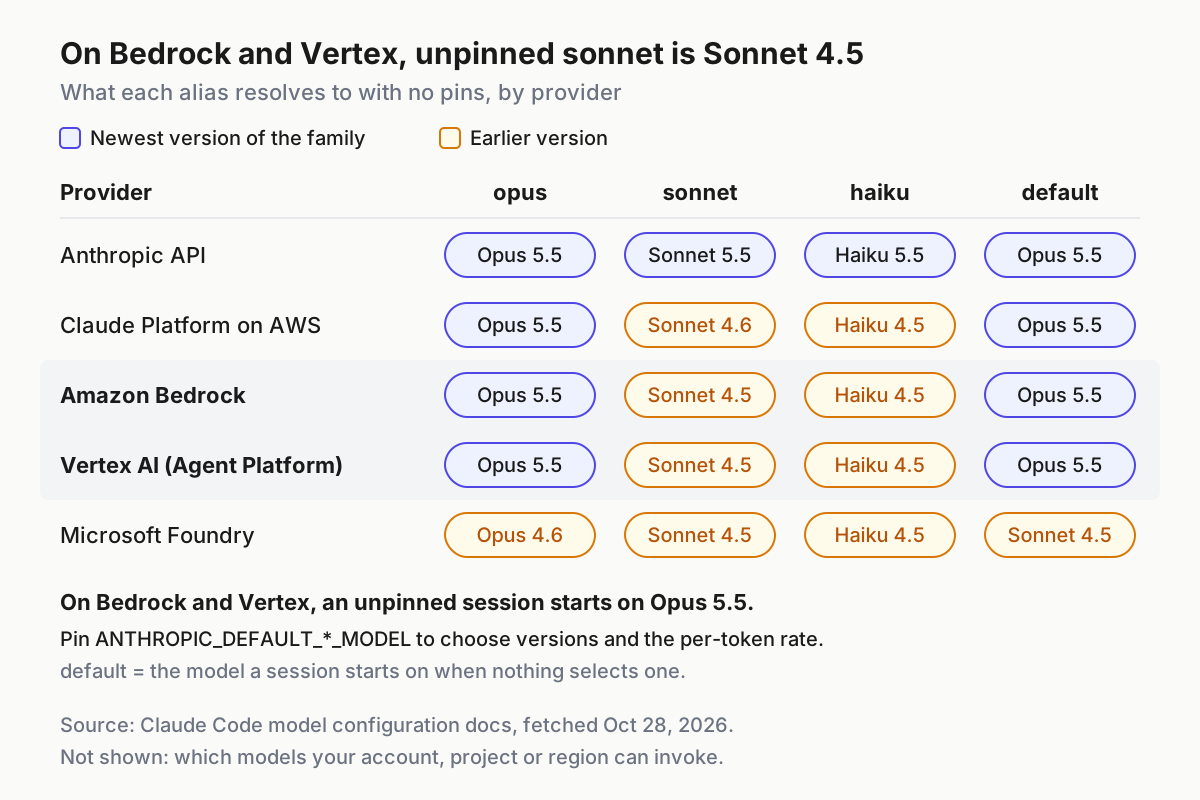
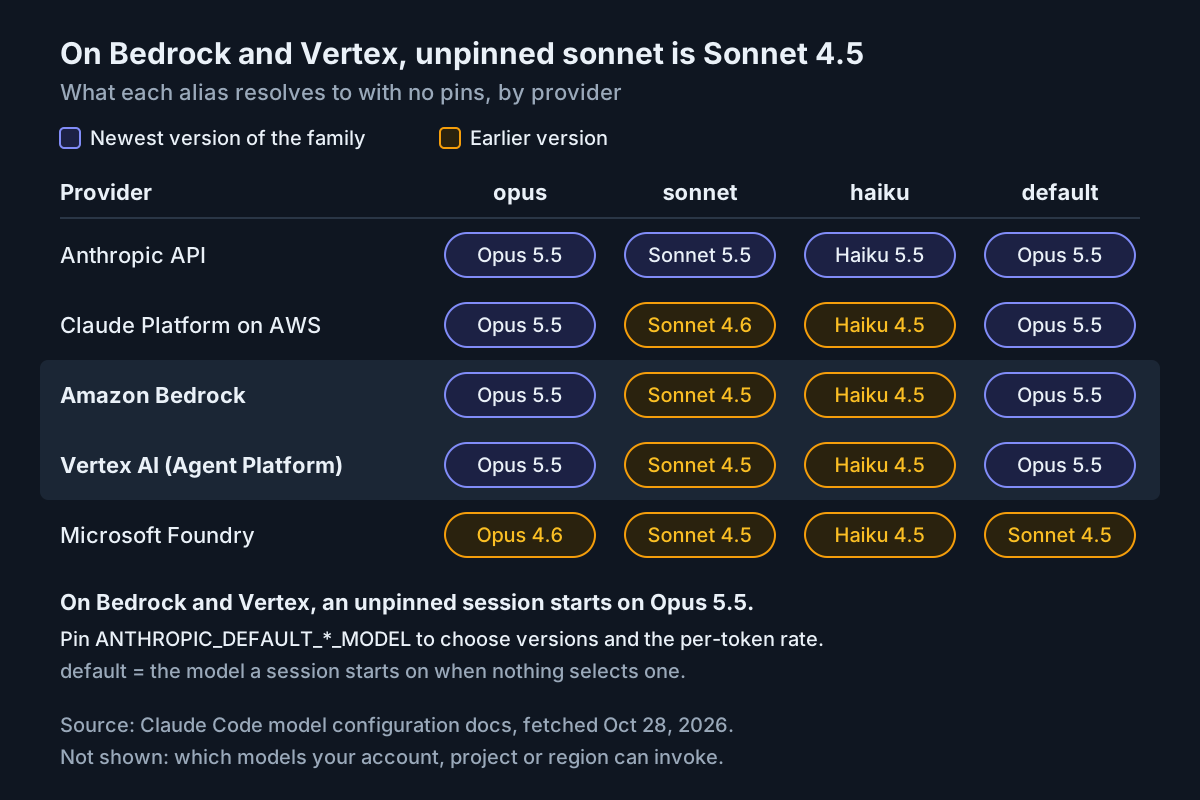
Without pins, the aliases resolve to Claude Code’s built-in defaults for each provider, which lag the Anthropic API. On Bedrock and Vertex, sonnet means Sonnet 4.5, haiku means Haiku 4.5, and an unpinned session starts on Opus 5.5, according to the alias table in the model configuration reference. That has two costs. The first is money: Opus has a higher per-token price than Sonnet. The second is availability: the default may not be enabled in a given account or region. Claude Code then falls back for that session with a notice, but the fallback isn’t saved, so every developer can end up on a different model on the same morning.
Pick a pinning method by what you need to control:
| Method | What it controls | Use it when | Watch for |
|---|---|---|---|
ANTHROPIC_DEFAULT_OPUS_MODEL, _SONNET_MODEL, _HAIKU_MODEL |
One provider ID per alias family | Most teams: one approved version per family | Setting only the Opus pin also moves background tasks onto the session model |
modelOverrides in a settings file |
Each Anthropic model ID mapped to a provider string | Several versions in /model, or ARNs for cost tags |
Keys must be Anthropic model IDs; unknown keys are ignored |
model setting, ANTHROPIC_MODEL or --model |
The model a session starts on | Making Sonnet the daily default | --model and ANTHROPIC_MODEL apply only to the launch that sets them |
ANTHROPIC_BEDROCK_REGION_PREFIX |
The prefix tried first for built-in defaults | Keeping defaults but routing through global. or eu. |
It isn’t a pin; defaults still move with releases |
availableModels and enforceAvailableModels in managed settings |
What users may select, including Default | Team rollouts with a model allowlist | Third-party providers don’t receive server-managed settings |
That last row is worth a sentence for anyone rolling out to a team: on Bedrock and Vertex, an allowlist arrives only through MDM or a managed settings file, the same delivery path that treating permission modes as fleet policy relies on.
Worked example: application inference profile ARNs for a payments team. Finance wants Claude Code usage from the payments team tagged separately in AWS Cost Explorer.
- In Bedrock, create one application inference profile per model the team uses, created from the system-defined cross-region profile so requests still route across Regions, and attach the team’s cost allocation tag. AWS bills an inference profile at “the price of the model in the Region from which you call the inference profile,” so the tag changes reporting, not the rate.
- Map those ARNs to Anthropic model IDs and pin the aliases to the Anthropic IDs, not to the ARNs:
{
  "modelOverrides": {
    "claude-opus-4-8": "arn:aws:bedrock:us-east-1:123456789012:application-inference-profile/cc-payments-opus48",
    "claude-sonnet-4-6": "arn:aws:bedrock:us-east-1:123456789012:application-inference-profile/cc-payments-sonnet46"
  },
  "model": "sonnet",
  "env": {
    "CLAUDE_CODE_USE_BEDROCK": "1",
    "AWS_PROFILE": "claude-bedrock",
    "AWS_REGION": "us-east-1",
    "ANTHROPIC_DEFAULT_OPUS_MODEL": "claude-opus-4-8",
    "ANTHROPIC_DEFAULT_SONNET_MODEL": "claude-sonnet-4-6",
    "ANTHROPIC_DEFAULT_HAIKU_MODEL": "us.anthropic.claude-haiku-4-5-20251001-v1:0"
  }
}
- Restart Claude Code. Since v2.1.200, overrides apply when an Anthropic ID arrives through
--model,ANTHROPIC_MODELor anANTHROPIC_DEFAULT_*_MODELvariable, so the Sonnet pin reaches Bedrock as the payments Sonnet ARN. On Bedrock, override entries also take precedence over inference profiles Claude Code discovers at startup. - Open
/model. The documentation says a pinned row shows the model’s name when Claude Code recognizes the ID, with the pinned ID in its description, and the raw ID when it doesn’t.
Why route through modelOverrides instead of putting the ARN straight into ANTHROPIC_DEFAULT_SONNET_MODEL? Both send the same ARN, but only one is recognized. The model configuration page defines an unrecognized pin as “any other ID, such as an application inference profile ARN or a model version Claude Code doesn’t know, unless a modelOverrides entry maps a model to that ID.” A recognized ID gets its real context window and feature detection; the Bedrock page adds that an ARN “gets the 1M window when a modelOverrides entry maps its model to it,” while an unmatched pinned ID runs at 200K by default. After v2.1.312, recognition decides the system prompt as well, which is the next section.
A few interactions to keep in mind while pinning:
- Priority.
/modelduring a session beats--model, which beatsANTHROPIC_MODEL, which beats themodelsetting, which beatsANTHROPIC_DEFAULT_MODEL. - Managed allowlists. When
availableModelsis set in managed settings, onlymodelOverridesfrom managed settings apply to Anthropic IDs passed through--modelor the environment variables. Ship the map in the managed file too, or your user-level map is silently ignored. - Resumed sessions. On Bedrock and Vertex,
claude --resumedoesn’t restore the transcript’s model; the session resolves its model through the normal priority order, so pins decide it. - Startup checks. If a pin is older than the current default and your account can invoke the newer version, Claude Code offers to update it. ARN pins are skipped, because an administrator manages them.
- Subagents and background work. A subagent whose frontmatter says
haikuresolves throughANTHROPIC_DEFAULT_HAIKU_MODEL, so pin Haiku to an ID your account can invoke. Without a Haiku pin, Bedrock and Vertex run background tasks such as title generation on the default Sonnet, or on your selected primary model once you choose one.
Decide what v2.1.312 does on each lane
The v2.1.312 notes contain two lines for cloud-provider sessions. Bedrock, Vertex, Foundry and Mantle now “use the shorter system prompt for model names Claude Code doesn’t recognize,” with CLAUDE_CODE_SIMPLE_SYSTEM_PROMPT=0 to keep the full prompt. And automatic model switches after a flagged message now “also cover model names Claude Code doesn’t recognize,” with CLAUDE_CODE_DISABLE_REFUSAL_FALLBACK=1 to turn them off. The notes don’t describe what the shorter prompt leaves out, so treat the change as something to decide on deliberately rather than something to measure from the outside.
Start by finding out which of your lanes send an unrecognized ID. The recognition rules come from the model configuration page; the last column is the v2.1.312 consequence.
| What the lane sends | Recognized? | After v2.1.312 |
|---|---|---|
A pinned inference profile ID such as us.anthropic.claude-sonnet-4-6 |
Yes: it contains the Anthropic ID | No change |
A Vertex version name such as claude-haiku-4-5@20251001 |
Yes: Claude Code strips the @ date when reading it |
No change |
An application inference profile ARN reached through a modelOverrides entry |
Yes, by the docs’ definition | Expected no change; confirm with the checks below |
An ARN set directly in ANTHROPIC_MODEL or an ANTHROPIC_DEFAULT_*_MODEL pin |
No | Shorter system prompt, flagged-message switches now apply, 200K window assumed |
| A custom-model ARN, a provisioned throughput ARN or a gateway alias with no mapping | No | Same as the row above |
The third row is our reading of two documents rather than a statement in the release notes: v2.1.312 keys the change to names Claude Code “doesn’t recognize,” and the model configuration page counts a mapped ARN as recognized. That’s why the checks below matter.
Then choose settings per lane. Each is a trade, and the right answer differs between an interactive developer machine and an unattended job.
| Setting | What it does | Trade-off | Set it when |
|---|---|---|---|
A modelOverrides entry for the ID |
Makes the ID recognized as a known model | You maintain one map entry per version | Always, when the ID fronts a model Claude Code knows |
CLAUDE_CODE_SIMPLE_SYSTEM_PROMPT=0 |
Keeps the full prompt for unrecognized names | Doesn’t fix the 200K window or feature detection | You can’t map the ID, or want pre-v2.1.312 behavior while you test |
CLAUDE_CODE_DISABLE_REFUSAL_FALLBACK=1 |
Turns off automatic switches after a flagged message | The flagged request ends with a refusal instead of re-running | Change control names the model, or an unattended lane must never switch |
switchModelsOnFlag: false in settings |
Asks each time before switching | Needs a person; non-interactive runs end the turn with a refusal | Interactive lanes where developers should choose |
CLAUDE_CODE_DISABLE_MODEL_ACCESS_FALLBACK=1 |
Fails requests when your account loses access to the model, instead of switching | A different mechanism from flagged-message fallback | Pinned-version lanes that prefer a clear failure |
CLAUDE_CODE_MODEL_CATALOG=off |
Stops loading model settings from the signed file on downloads.claude.ai (v2.1.311) | The release notes don’t list what the file changes | Egress rules block that host, or a lane must behave the same on every run |
Two cautions apply. On Bedrock and Vertex, fallback targets resolve through your deployment’s model IDs, and the model configuration page says an Opus pin or an Opus 4.8 entry has to resolve before any flagged request can re-run, so a lane that switched is also a lane whose served model you should be logging; logging the served model when safety fallbacks swap it covers that. And for unattended lanes, the catalog file is one more input that can change between runs, which is the kind of undeclared state proving headless runs ignore it is about.
To check what a lane actually gets:
- Read the startup header. A warning such as
Model "my-gateway-opus" isn't recognized · context assumed to be 200k tokensmeans the ID is unrecognized, so it now gets the shorter prompt unless you set the variable. - Open
/model. A recognized pin shows the model’s name; an unrecognized one shows the raw ARN or deployment name. - Run
/status. The Model line shows the resolved model for the session. - For headless lanes, read the result. Run
claude -p --output-format json "Reply with OK"and read the actual model from themodelUsagefield of the result message; the model warning isn’t written to stderr in JSON output. - Watch the transcript. A flagged-message fallback shows a notice, and the session stays on the fallback model until you run
/model.
No documented readout names the system prompt variant a request used, so recognition is your proxy. If you can’t map an ID at all, add the capability variables the model configuration page provides, such as ANTHROPIC_DEFAULT_OPUS_MODEL_SUPPORTED_CAPABILITIES, and set CLAUDE_CODE_MAX_CONTEXT_TOKENS to the real window. How the window drives compaction is covered in the context window explainer.
Verify with /status, a read-only prompt and one approved edit
Run this sequence in the throwaway repository, once per provider and once per machine image. Each row says what Anthropic’s documentation leads you to expect; anything else sends you to the error table. Run step 2 or step 3, whichever matches your provider.
| Step | Action | Expected observation | If you see something else |
|---|---|---|---|
| 1 | cd ~/scratch/provider-check && claude |
The session opens with no login prompt and no “isn’t recognized” warning for your pins | A login prompt means the provider variable didn’t reach the process |
| 2 | /status on Bedrock |
An API provider line naming Amazon Bedrock (the docs show it as Amazon Bedrock (Mantle) when Mantle is on), the resolved region with a note on its source when it came from config files or the default, and a Model line with your pinned Sonnet | Wrong region: check AWS_REGION, AWS_DEFAULT_REGION and the profile, in that order |
| 3 | /status on Vertex |
API provider Google Vertex AI, plus GCP project, Default region and Model lines with your values | Wrong project: set ANTHROPIC_VERTEX_PROJECT_ID explicitly |
| 4 | Read-only prompt (below) | Claude reads files, the answer streams in, nothing is edited | A reply that appears only when complete points at a gateway on Bedrock |
| 5 | Approved edit (below) | A permission prompt to edit NOTES.md; after you approve, git diff shows one added line |
Access or model errors: see the error table |
| 6 | /model |
One row per pinned family showing model names | Raw IDs mean the ID is unrecognized; revisit the v2.1.312 section |
| 7 | Next business day | Usage under the payments tag in AWS cost reports, or in the project you set on Google Cloud | Charges elsewhere: recheck the project or the profile ARNs |
The two prompts, written so the expected result is easy to judge:
- Read-only:
List the top-level files in this repository and summarize README.md in three sentences. Do not edit anything. - Approved edit:
Append one line to NOTES.md that reads "provider check passed". Make no other changes.
If both pass and /status shows the provider, region or project, and model you intended, the setup is ready to hand to someone else.
Error-to-fix table for Bedrock and Vertex sessions
The left column is what you see; the messages in backticks are quoted from Anthropic’s docs. Fix the most specific row first.
| Symptom | Likely cause | Fix | Expect after the fix |
|---|---|---|---|
/status has no provider line for Bedrock or Vertex |
Environment variables aren’t reaching the process | Export them in the shell that launches claude, or move them into the settings env block, then restart |
The provider line appears |
A request fails with AWS authentication failed and a hint to enable the model |
No model the session can switch to is enabled in the account | Submit the use case form for the model, and compare the role with the IAM policy above | The read-only prompt answers |
| A model you just enabled is still skipped at startup | Claude Code remembers a refusal on this machine for up to a day | Launch once with CLAUDE_CODE_SKIP_MODEL_ACCESS_MEMORY=1, or wait; a remembered default is rechecked after ten minutes |
The model is used at startup |
on-demand throughput isn't supported |
A foundation model ID was used directly | Pin an inference profile ID such as us.anthropic.claude-sonnet-4-6 |
Requests succeed |
A 400 error after setting ANTHROPIC_BEDROCK_REGION_PREFIX, or a subagent on haiku failing |
The prefix’s profiles aren’t enabled and profile discovery couldn’t check | Grant bedrock:ListInferenceProfiles, run aws bedrock list-inference-profiles, and pin ANTHROPIC_DEFAULT_HAIKU_MODEL to a listed ID |
The subagent runs on the pinned ID |
AWS default-chain credential resolve timed out |
A step in the chain, such as a credential_process helper, is waiting for input |
Fix the helper, or raise CLAUDE_CODE_AWS_CHAIN_RESOLVE_TIMEOUT_MS for a slow interactive sign-in |
The session starts |
| Browser sign-in tabs keep opening | A VPN or TLS-inspecting proxy interrupts the SSO flow, so awsAuthRefresh reruns |
Remove awsAuthRefresh and run aws sso login yourself before starting Claude Code |
One sign-in per credential lifetime |
| Startup hangs on an egress-only proxy network | Before v2.1.239, the expiry check bypassed the proxy | Update Claude Code | Startup completes |
unable to get local issuer certificate, or the wizard shows models as unreachable |
An older version trusted only the runtime’s certificate store | Update to v2.1.261 or later; keep the corporate root in the OS store or NODE_EXTRA_CA_CERTS |
The wizard lists your models |
An error beginning Bedrock streaming response has content-type |
A gateway rewrote Content-Type, often to text/event-stream |
Have the gateway forward the response body and headers unmodified; if it speaks the Messages API, connect with ANTHROPIC_BASE_URL instead |
Responses stream again |
| Every reply appears only once complete | A gateway dropped the header and re-emitted the stream as server-sent events | Fix the gateway, or set CLAUDE_CODE_DISABLE_BEDROCK_CONTENT_TYPE_DEFAULT=1 |
Streaming returns |
| Cache token counts stay at zero on Bedrock | Prompt caching isn’t available in that region | Check supported models and regions, or move regions | Cache reads appear |
Could not load the default credentials on Vertex |
No Application Default Credentials | Run gcloud auth application-default login, or set GOOGLE_APPLICATION_CREDENTIALS |
/status shows the project |
A Vertex 404 model not found |
The model isn’t enabled, isn’t offered in that location, or doesn’t support global | Enable it in Model Garden, pick a supported location, or set its VERTEX_REGION_CLAUDE_* variable |
Requests succeed |
| Vertex 429 errors | Regional quota, or a primary or small/fast model not supported in the region | Confirm both models are served in the region, try CLOUD_ML_REGION=global, or request more quota |
Throttling stops |
| Charges land on the wrong GCP project | ANTHROPIC_VERTEX_PROJECT_ID is unset or differs between machines |
Set it in the settings env block for each team |
/status shows the intended project |
Roll back to your Claude subscription login
Rollback is a settings change, not a cloud change. Keep the AWS profile, IAM policy, inference profiles and GCP project in place so rolling forward again is a file copy.
- Save the working file first:
cp ~/.claude/settings.json ~/.claude/settings.cloud-backup.json. - Quit every running Claude Code session.
- Remove the provider keys from
~/.claude/settings.jsonand from any project.claude/settings.json:CLAUDE_CODE_USE_BEDROCKorCLAUDE_CODE_USE_VERTEX,AWS_PROFILE,AWS_REGION,ANTHROPIC_VERTEX_PROJECT_ID,CLOUD_ML_REGION, anyVERTEX_REGION_CLAUDE_*,awsAuthRefreshorgcpAuthRefresh, andmodelOverrides. - Remove the
ANTHROPIC_DEFAULT_*_MODELpins as well. They hold provider-shaped IDs such asus.anthropic.claude-sonnet-4-6or ARNs, which you shouldn’t expect the Anthropic API to accept. - Clear the same names from the shell you launch from, with the command below.
- Start
claude. If you aren’t already signed in, the login prompt appears; choose your Claude account./logoutwas unavailable on the provider and works again once the provider is gone. - Run
/statusand confirm the provider line no longer names Amazon Bedrock or Google Vertex AI.
# Clears these only in the current shell; other tools that need AWS_PROFILE are unaffected elsewhere
unset CLAUDE_CODE_USE_BEDROCK CLAUDE_CODE_USE_VERTEX AWS_PROFILE AWS_REGION \
  ANTHROPIC_VERTEX_PROJECT_ID CLOUD_ML_REGION ANTHROPIC_MODEL \
  ANTHROPIC_DEFAULT_OPUS_MODEL ANTHROPIC_DEFAULT_SONNET_MODEL ANTHROPIC_DEFAULT_HAIKU_MODEL
To roll forward, copy the backup back over settings.json, restart and repeat the verification table.
What changes on the bill and the limits
On a cloud provider you pay the cloud for tokens, under your existing contract. The model configuration page notes that on providers such as Bedrock “your provider or gateway determines what you pay,” so /model picker rows show no price there. On AWS, an application inference profile is billed at the model’s price in the Region you call it from, and its tags let finance split the bill by team. On Google Cloud, Claude models are billed pay as you go or through provisioned throughput for a fixed fee.
Limits work differently too. Usage-limit wording such as the “5-hour limit” that v2.1.312 introduced describes subscription plans; Anthropic’s Bedrock and Vertex pages point you to provider quotas instead, and the Vertex page says to contact Google Cloud support to raise rate limits. Two smaller cost levers stay in your hands on both clouds: prompt caching is on by default, and ENABLE_PROMPT_CACHING_1H=1 requests a one-hour cache lifetime billed at a higher rate than the five-minute default. Turn that on only for long sessions where cache misses dominate.
Sources
- Claude Code v2.1.312 release notes, Anthropic on GitHub, Oct 27, 2026
- Claude Code on Amazon Bedrock, Claude Code Docs (Anthropic), fetched Oct 28, 2026
- Claude Code on Google Cloud’s Agent Platform, Claude Code Docs (Anthropic), fetched Oct 28, 2026
- Model configuration, Claude Code Docs (Anthropic), fetched Oct 28, 2026
- Set up a model invocation resource using inference profiles, Amazon Bedrock User Guide (AWS), fetched Oct 28, 2026
- Anthropic’s Claude on Google Cloud models, Google Cloud Documentation, updated Oct 28, 2026
- Claude Code v2.1.311 release notes, Anthropic on GitHub, Oct 26, 2026
- Post by Paulo Pierrondi on running Claude Code through Bedrock, X, Oct 25, 2026