Ollama Does Not Support Tools Error: Check a Model's Capabilities, Pick a Tool-Capable Model and Fix It in Claude Code, Codex and OpenCode
Fix the ollama does not support tools error: read capabilities with ollama show, swap to a tool-capable model, set a 64k context and wire Claude Code or Codex.

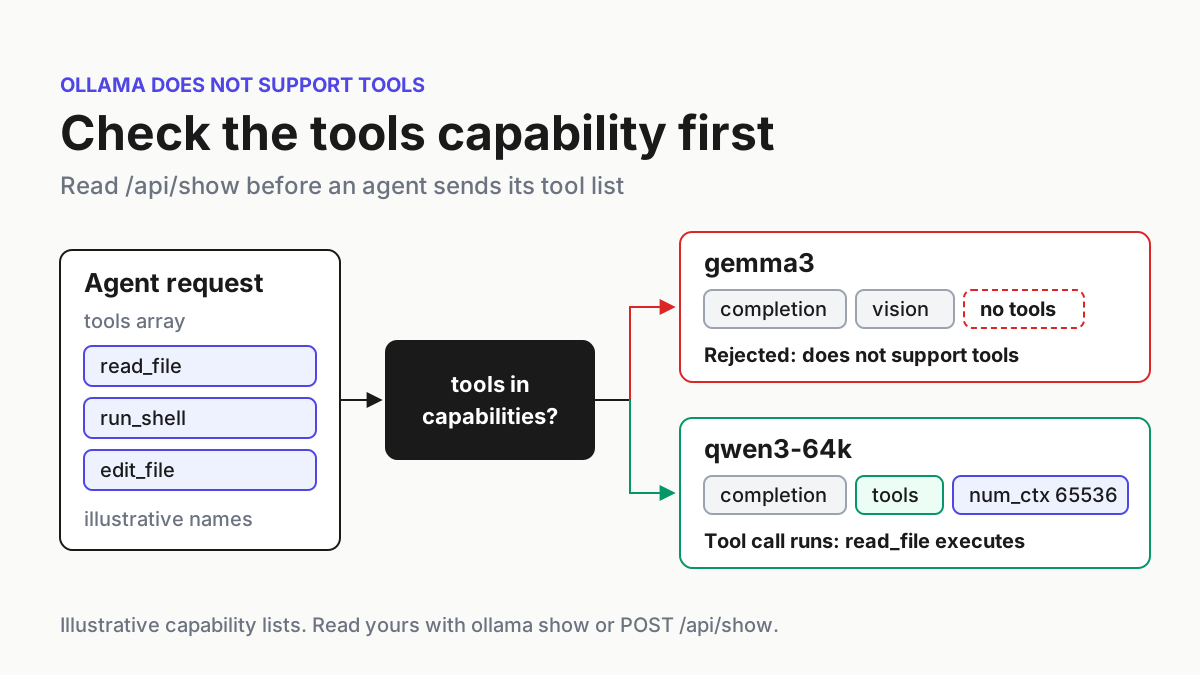
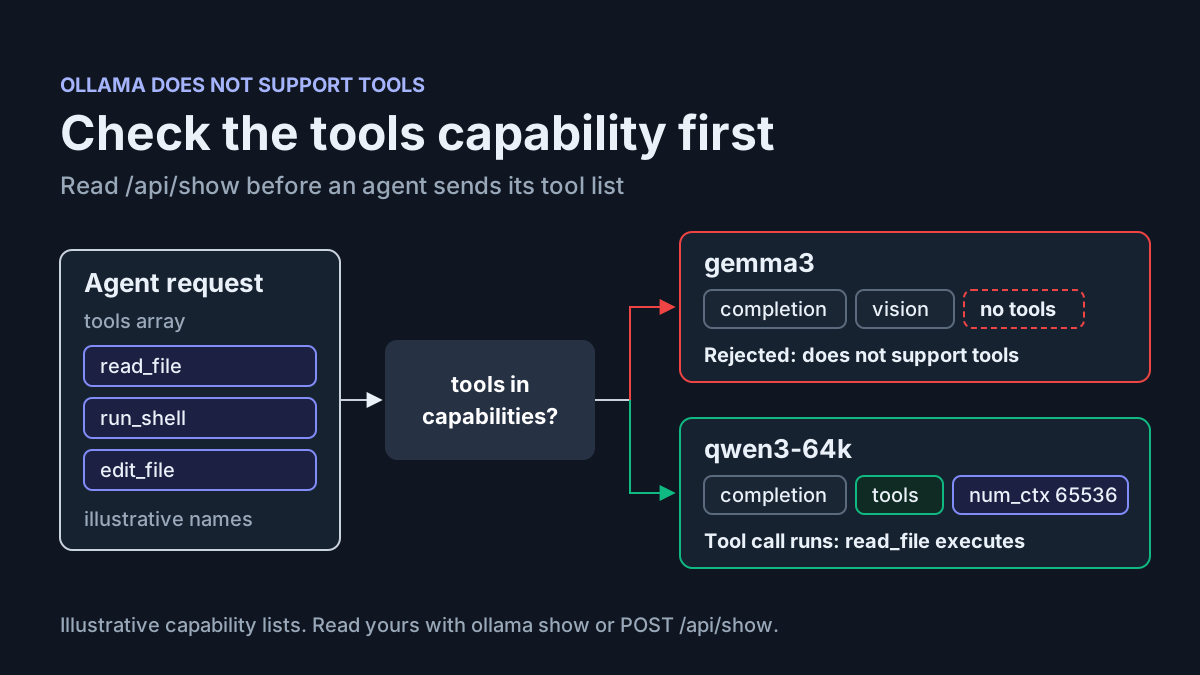
You point Claude Code at a local Ollama model and type a request. The session stops before the agent has opened a single file, and the error names your model and says it does not support tools. If you searched for ollama does not support tools, the short answer is that nothing in Ollama is broken. Your agent attached a list of tools to the request. The model you picked does not advertise the tools capability, so Ollama refused the request instead of letting the model guess.
This guide is for developers running Claude Code, Codex or OpenCode against a local Ollama server who hit that error. It also covers the quieter version of the same problem, where tool calls come back as printed text instead of running. You will reproduce the rejection with one curl request and read a model’s capabilities the way Ollama reports them. Then you will switch to a tool-capable model with a context window big enough for an agent, reconnect each agent and prove that a real tool call ran. One worked case, labelled task:tools-400-01, takes you from a failing gemma3 setup to a working agent session.
Every output block in this guide is an illustrative expected observation, built from the request and response shapes in Ollama’s documentation. None of them was captured from a live run for this article. Your tags, capability lists and timestamps will differ, and that is exactly why the guide has you check your own server instead of trusting a list.
What the error actually means
On November 17, 2026, Toolbox Design put the diagnosis in one line in a post on X: “Nothing is broken: the app sends a tool list and gemma3 isn’t trained to call tools.” The post’s check is ollama show gemma3. Its fix for Open WebUI users is to edit the model and turn Builtin Tools off under Capabilities.
That fix is right for chat, where tools are an extra. It is wrong for a coding agent. Ollama’s Claude Code integration page lists tool calling, command-line work and file edits among the things Claude Code does with an Ollama model, and the agent does all of them through tools. An agent that cannot call tools cannot read the repository, run the tests or apply an edit. For Claude Code, Codex and OpenCode, the fix is a different model, not fewer tools.
Three things in Ollama decide whether a request that carries tools works:
- The capability list. Every model reports a
capabilitiesarray throughPOST /api/show, which the reference describes as the “list of supported features.” Whentoolsis absent, a request with atoolsarray gets the does-not-support-tools error. - The prompt template. Ollama’s template documentation says tools support “can be added to a model by adding a
{{ .Tools }}node to the template,” and that this is useful for “models trained to call external tools.” The template is how the tool definitions reach the model’s prompt. - The context window. Agents send a long system prompt and a large set of tool schemas on every turn. Ollama’s Modelfile reference sets the
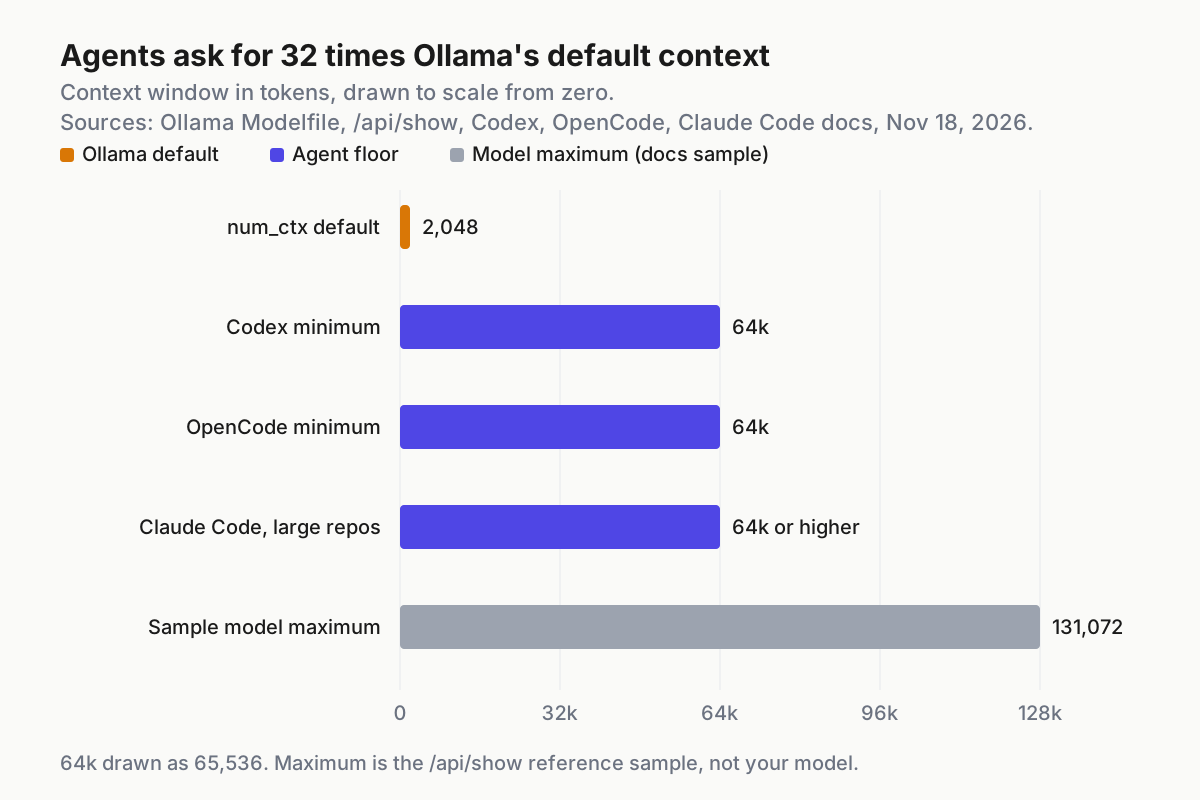
num_ctxdefault at 2048 tokens, while the Codex and OpenCode integration pages ask for at least 64k.
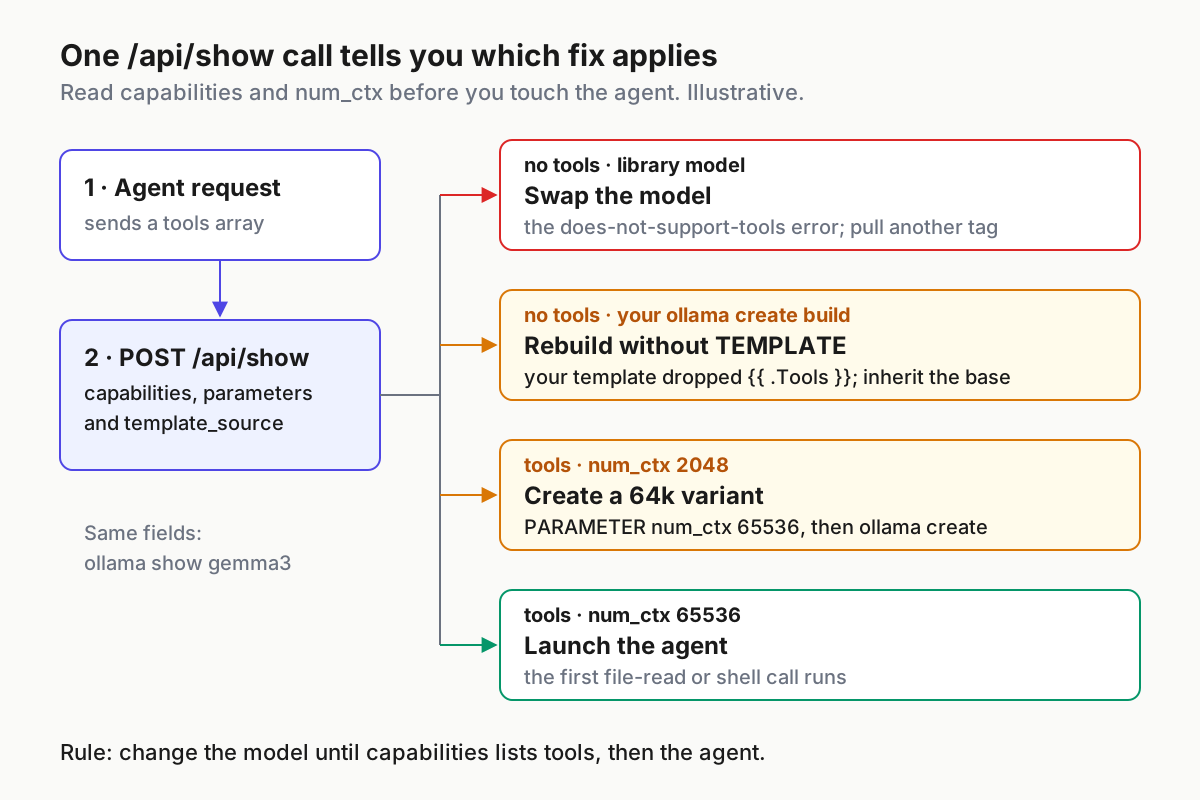
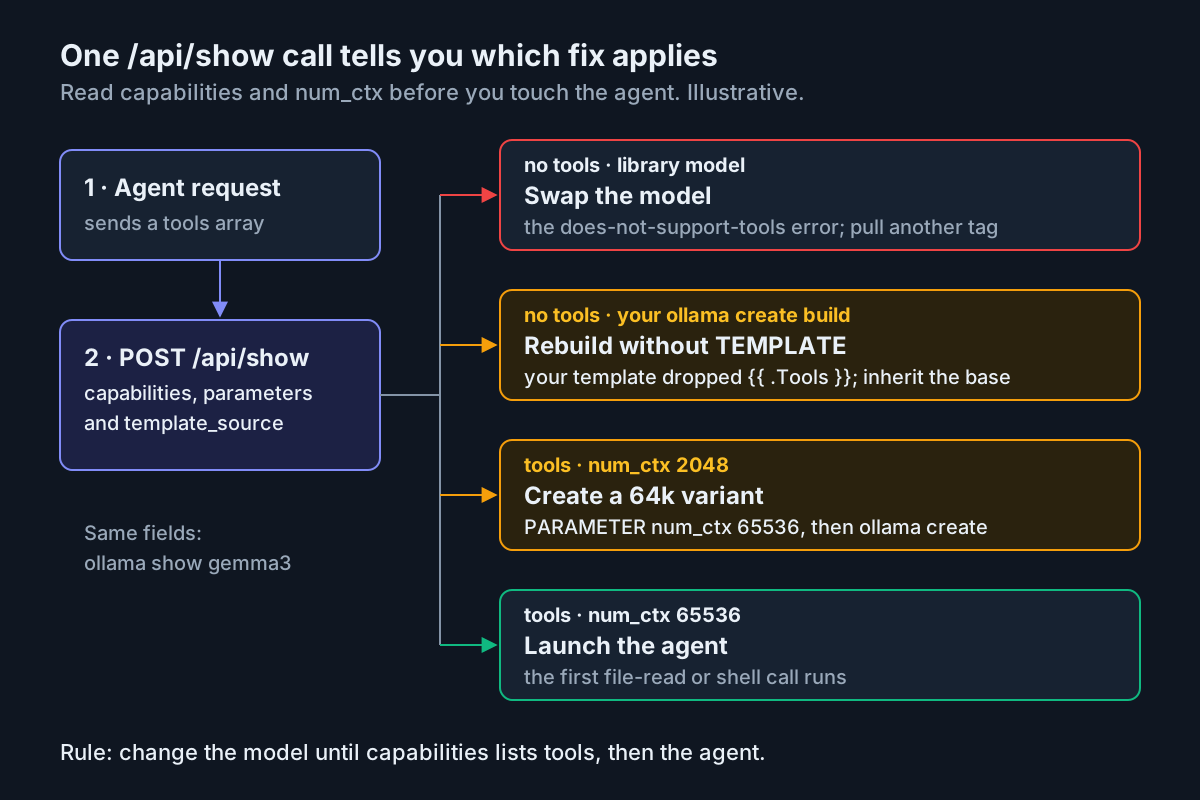
The first one produces the loud error. The second and third produce the quiet failures. Those are harder to spot because nothing returns an error code; the agent just stops acting like an agent.
Before you start: check the machine
You need very little, but each item below is used in a specific step.
- [ ] Ollama is installed and answering on
http://localhost:11434. If the app is not running,ollama servestarts the server, as the CLI reference shows. - [ ] At least one agent is installed. Ollama’s Codex page installs the Codex CLI with
npm install -g @openai/codex, and the Claude Code and OpenCode pages give their own installers. - [ ]
curlandjqare on your PATH. Runcommand -v curl jqand expect two paths back. - [ ] You have room for a second model. You will pull a tool-capable model alongside the one that fails, and a 64k window needs noticeably more memory than the 2048-token default.
- [ ] You have a small scratch repository with a
README.mdin it, so the agent’s first tool call reads something harmless.
If you want certainty that nothing in this test leaves the machine, enforce Ollama’s Local Only mode first. If you run LM Studio instead of Ollama, the agent wiring is different, and the LM Studio guide for Claude Code, Codex and OpenCode covers it.
Step 1: Reproduce the rejection with one curl request
Reproduce outside the agent first. If the bare API rejects the request, the agent’s configuration is not the cause, and you avoid editing three config files for nothing.
- Make sure the failing model is present:
ollama pull gemma3. - Send the single-tool request from Ollama’s tool-calling documentation, with the model changed to gemma3.
- Read the reply.
- Send the same request again with the
toolsarray deleted. - If you want the HTTP status as well, add
-ito the curl command and read the first line.
The request for step 2 is the documentation’s own example, unchanged apart from the model name:
curl -s http://localhost:11434/api/chat -H "Content-Type: application/json" -d '{
  "model": "gemma3",
  "messages": [{"role": "user", "content": "What is the temperature in New York?"}],
  "stream": false,
  "tools": [
    {
      "type": "function",
      "function": {
        "name": "get_temperature",
        "description": "Get the current temperature for a city",
        "parameters": {
          "type": "object",
          "required": ["city"],
          "properties": {
            "city": {"type": "string", "description": "The name of the city"}
          }
        }
      }
    }
  ]
}'
Illustrative expected observation. The error text matches the one Toolbox Design quotes; the JSON wrapper is illustrative:
{"error":"gemma3 does not support tools"}
Step 4 is the control. With the tools array removed, the same model should answer the question in plain text. That pairing isolates the cause: the model works, and the tool list is what Ollama will not accept. The sources used for this guide do not say which HTTP status code Ollama returns for this rejection, so the -i output in step 5 is the place to confirm it on your build rather than assuming.
The weather tool here is a stand-in. An agent’s tools are file reads, shell commands and edits, but Ollama treats them all the same way, so a one-tool request reproduces the agent’s failure without starting the agent.
Step 2: Read the capabilities array
The post’s check is the human-readable one: ollama show gemma3 prints the model’s details, including its capabilities. For scripting, and for the two extra fields you need later, ask the API directly.
- Run
ollama show gemma3and look for a capabilities section that liststools. - Run the API call below to get the same answer as JSON.
- Note the three fields it prints:
capabilities,template_sourceandparameters. - Run the loop below once to sort every installed model by whether it can take tools.
curl -s http://localhost:11434/api/show -d '{"model": "gemma3"}' \
  | jq '{capabilities, template_source, parameters}'
Illustrative expected observation for the failing model:
{
  "capabilities": ["completion", "vision"],
  "template_source": "go_template",
  "parameters": "stop \"<end_of_turn>\""
}
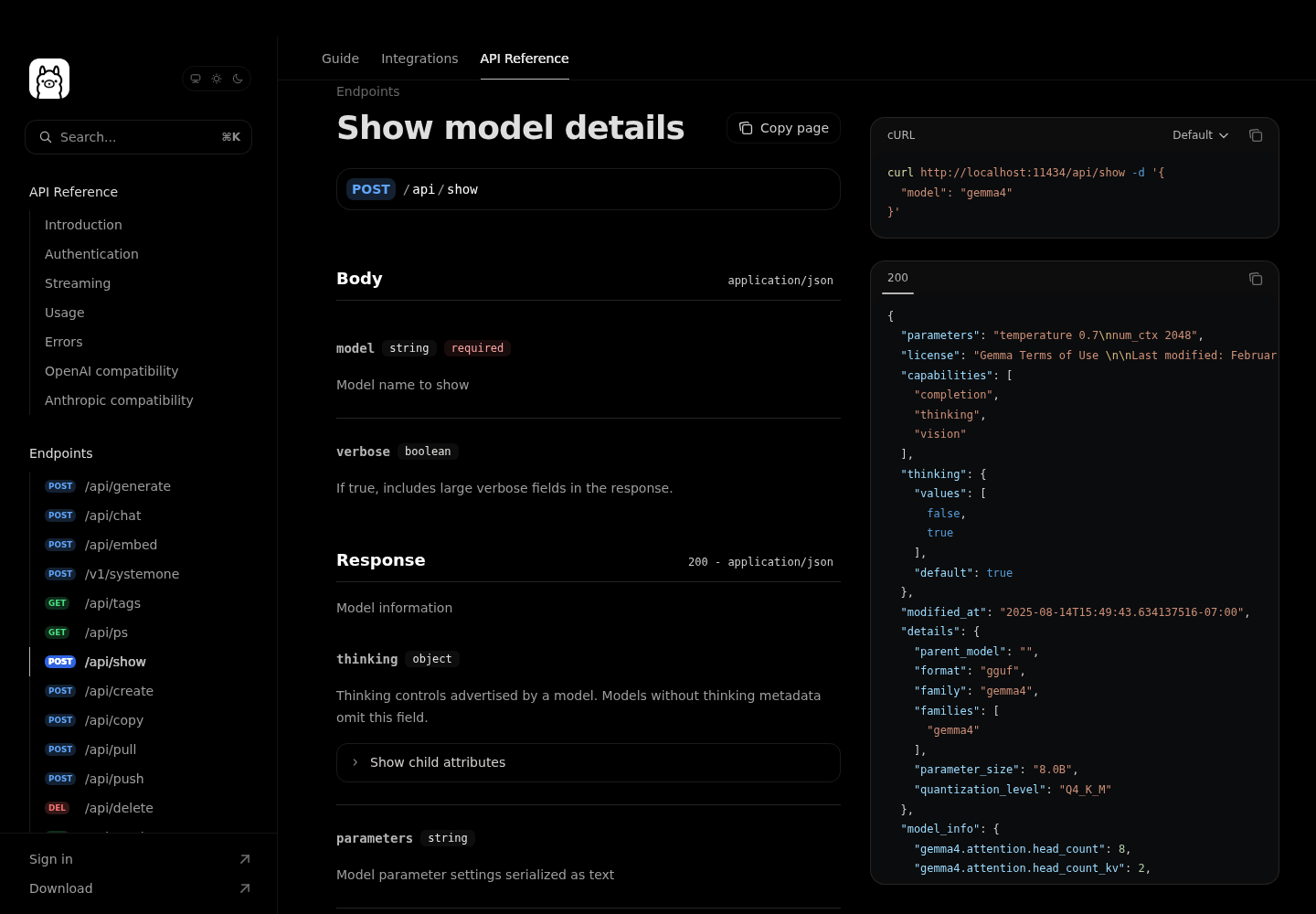
Read the three fields like this. capabilities is the verdict: no tools string, no tool calls. template_source tells you where the chat prompt actually comes from. The /api/show reference lists its values as renderer_parser, renderer, parser, harmony, go_template, gguf_chat_template or none, and says that with the renderer and parser values “a Go renderer runs and any packaged template is inert.” That matters later, when you decide whether editing a template can change anything. parameters is the model’s parameter settings as text. If it has no num_ctx line, the documented 2048-token default is the one to assume.
The reference’s own sample response lists completion, thinking and vision for its example model. Treat that as a picture of the format, not as a fact about any model you have installed. Capability lists are per model and per tag, and only your server can tell you what yours says.
To check everything on the machine at once:
ollama ls | awk 'NR>1 {print $1}' | while read -r m; do
  caps=$(jq -n --arg m "$m" '{model: $m}' \
    | curl -s http://localhost:11434/api/show -d @- \
    | jq -c '.capabilities')
  printf '%-28s %s\n' "$m" "$caps"
done
The loop assumes ollama ls prints a header line followed by one model per line with the name in the first column. If your build formats it differently, adjust the awk expression. Each output line pairs a model name with its capability array, so the tool-capable models stand out at a glance.
Use this table to decide what to do next:
| What /api/show reports | What it means | Next move |
|---|---|---|
tools missing, model pulled from the library |
The model does not advertise tool calling | Step 3: pick a different model |
tools missing, model you built with ollama create |
Your Modelfile probably dropped it | Read the template section below |
tools present, num_ctx 2048 or no num_ctx line |
Requests are accepted, but the window is too small for an agent | Step 3: create a 64k variant |
tools present, num_ctx 65536 |
Ready for an agent | Step 4 |
Step 3: Swap to a tool-capable model and give it 64k of context
For the worked case, use qwen3. It is the model Ollama’s tool-calling page uses in every example, so it is the documented path. Ollama’s other integration pages use other models in their examples: qwen3.5 for Claude Code and OpenCode, gpt-oss for Codex. Any of them is a reasonable candidate, but verify whichever you choose with Step 2 rather than trusting a name. You can browse Ollama’s model library for candidates; the pages used for this guide do not document how the library’s filters work, so the /api/show check remains the authority.
- Pull the candidate:
ollama pull qwen3. - Run the Step 2 API call against
qwen3and confirmtoolsappears incapabilities. - Rerun the exact Step 1 request with
"model": "qwen3". - Write the two-line Modelfile below and build a 64k variant with
ollama create. - Run the Step 2 call against
qwen3-64kand confirm bothtoolsandnum_ctx 65536.
Illustrative expected observation for step 3. The tool_calls shape is the one Ollama’s documentation uses when it sends a model’s tool call back in the follow-up request:
{
  "model": "qwen3",
  "message": {
    "role": "assistant",
    "content": "",
    "tool_calls": [
      {"type": "function", "function": {"index": 0, "name": "get_temperature", "arguments": {"city": "New York"}}}
    ]
  },
  "done": true
}
That is the moment the error is fixed at the API level: no error, and the model asks to call get_temperature with city set to New York. In a real loop your code would run the function and send the result back as a message with "role": "tool" and the matching tool_name, which is the second example on the tool-calling page. An agent does that loop for you.
Now the context window. Save this as Modelfile:
FROM qwen3
PARAMETER num_ctx 65536
Then build it:
ollama create qwen3-64k -f Modelfile
Why a new model instead of a per-request setting? Codex and OpenCode talk to Ollama’s OpenAI-compatible endpoints. The OpenCode provider points at http://localhost:11434/v1, and the Codex profile uses http://localhost:11434/v1/. Ollama’s OpenAI compatibility page lists tools among the supported features of /v1/chat/completions and the Responses API. It also says the OpenAI API has no way to set the context size, and it tells you to create a Modelfile with PARAMETER num_ctx and run ollama create instead. A named 64k model works the same way for all three agents, so you configure the window once and every agent inherits it.
The number 65536 is 64k, the floor that the Codex and OpenCode pages state, and the level the Claude Code page recommends for larger repositories. It is 32 times the 2048-token default. Agent tool schemas and system prompts take a large share of the window before your code is even read, which is why the integration pages set the floor where they do. For why agents fill a window so fast, see how Claude Code’s context window fills up.
A larger window costs memory. If qwen3-64k loads slowly or fails to load, do not quietly step below 64k for Codex or OpenCode, because their pages call 64k a requirement. Choose a smaller tool-capable model instead, or move this agent to a cloud model and read how Ollama Cloud usage limits apply to coding agents. The same trade-off appears on other local servers; the llama-server flags guide walks through it for llama.cpp.
Why a custom Modelfile can drop tools without warning
The Modelfile above has no TEMPLATE line, so qwen3-64k inherits the base model’s template and, with it, the tools capability. That is deliberate. Most tools-missing reports on custom models come from a template that someone wrote, copied or imported, rather than from the weights.
There are three ways to lose tools, and one tempting non-fix:
- You wrote your own TEMPLATE. The Modelfile reference’s ChatML-style example handles
.System,.Promptand.Responseand nothing else. Paste a template like that and the{{ .Tools }}node is gone. The template page’s Mistral example shows what a tools-aware template carries instead: it renders$.Toolsas JSON inside[AVAILABLE_TOOLS]and replays.ToolCallsand tool results. - You imported a GGUF file. The template page says imported models get a default template of
{{ .Prompt }}, which sends user input verbatim. That template carries no tool definitions at all. If you build models this way, the q2_0 GGUF import guide covers the import side. - You edited a template that is not in charge. If
template_sourcereportsrenderer,parserorrenderer_parser, the reference says a Go renderer runs and any packaged template is inert. EditingTEMPLATEon such a model changes nothing, for better or worse. - The non-fix: CAPABILITY. The Modelfile reference describes
CAPABILITYas adding a capability “without removing inherited or inferred capabilities.” Its only example isCAPABILITY decision, with a warning to declare it only for weights trained for that purpose. The reference does not listtoolsas a value. Even if a declaration were accepted, it would not teach the weights to emit tool calls, which is the Toolbox Design point. Pick a model trained for tools.
To audit a custom model against its base:
- [ ] Dump both Modelfiles:
ollama show --modelfile qwen3 > base.Modelfileandollama show --modelfile qwen3-64k > custom.Modelfile. - [ ] Compare them with
diff base.Modelfile custom.Modelfile. Expect the only difference to be yourPARAMETER num_ctxline, apart from the generated header and the blob path inFROM. - [ ] Compare the capability arrays from Step 2 for both names. They should match.
- [ ] If the custom model lost
tools, delete yourTEMPLATEline, rebuild withollama create, and check again.
Trust the capability array over a text search of the Modelfile. When a Go renderer produces the prompt, the printed template may not mention .Tools even though tool calling works, so grep can mislead you in both directions.
Step 4: Reconnect Claude Code, Codex and OpenCode
Each agent has a quick route through ollama launch and a manual route. The CLI reference lists OpenCode, Claude Code and Codex among the supported integrations, and shows ollama launch claude --model qwen3.5 as the way to launch with a specific model. Use qwen3-64k in its place.
Claude Code
- Quick route: run
ollama launch claude --model qwen3-64kfrom your scratch repository. - Manual route: set the three variables from the integration page and start Claude Code with the model name.
- Inside the session, run
/status. The connection should point at your local Ollama server. - Ask for something that forces a tool call: “Read README.md and summarise it in two sentences.”
export ANTHROPIC_AUTH_TOKEN=ollama
export ANTHROPIC_API_KEY=""
export ANTHROPIC_BASE_URL=http://localhost:11434
claude --model qwen3-64k
The integration page warns that Claude settings can override shell variables. If /status shows a different endpoint, or the old gemma3 model keeps returning the same error, find the base URL or model in your Claude settings and correct it there. For scripted checks, the page documents --yes, which skips selectors and requires --model, with arguments after -- passed to Claude Code: ollama launch claude --model qwen3-64k --yes -- -p "Read README.md and summarise it".
Codex
- Configure without starting:
ollama launch codex --config. - Start it:
ollama launch codex, then selectqwen3-64k. - Type
/modeland look at the list. - Manual alternative:
codex --oss -m qwen3-64k.
Step 3 is a free diagnostic. Ollama’s Codex page says /model switches between your “installed, tool-capable Ollama models.” If gemma3 is missing from that picker while qwen3-64k is there, Codex is telling you the same thing /api/show did. Models must be pulled or created before launch to appear in the picker.
OpenCode
- Quick route:
ollama launch opencode, then selectqwen3-64k. - Manual route: add the provider block below to
~/.config/opencode/opencode.jsonand runopencode. - Ask it to run
lsin the scratch repository and read the output back to you.
{
  "$schema": "https://opencode.ai/config.json",
  "provider": {
    "ollama": {
      "npm": "@ai-sdk/openai-compatible",
      "name": "Ollama",
      "options": { "baseURL": "http://localhost:11434/v1" },
      "models": {
        "qwen3-64k": { "name": "qwen3-64k" }
      }
    }
  }
}
Ollama’s OpenCode page explains how the two routes interact. ollama launch opencode starts OpenCode with an inline config for the selected model and does not overwrite opencode.json, so your existing settings still apply. Models defined only in opencode.json do not appear in the launch picker. If you are unsure which config won, the OpenCode setup guide covers its precedence rules.
| Agent | Quick route | Manual route | Context requirement on Ollama’s page |
|---|---|---|---|
| Claude Code | ollama launch claude --model qwen3-64k |
Three ANTHROPIC_* variables, then claude --model qwen3-64k |
64k+ recommended for larger repositories |
| Codex | ollama launch codex |
codex --oss -m qwen3-64k |
At least 64k |
| OpenCode | ollama launch opencode |
Provider block in opencode.json |
64k or higher required |
Prove a real tool call ran: the task:tools-400-01 worksheet
The error disappearing is not the finish line. An agent that never calls a tool also produces no error. The proof is a tool call that ran and changed what the agent knows. Work down the table and compare each row with what you see. Every expected result is illustrative, built from documented behavior, not from a recorded run.
| Input | Action | Expected result |
|---|---|---|
task:tools-400-01-a: model gemma3, /api/chat request with the get_temperature tool, city New York |
Run the Step 1 curl request unchanged | Illustrative: an error reading gemma3 does not support tools; no tool_calls field anywhere in the reply |
task:tools-400-01-b: same gemma3 request with the tools array deleted |
Rerun the curl request without tools |
Illustrative: a plain-text answer about New York weather, proving the model itself loads and replies |
task:tools-400-01-c: model gemma3, POST /api/show |
curl -s http://localhost:11434/api/show -d '{"model":"gemma3"}' | jq .capabilities |
Illustrative: an array such as ["completion","vision"] with no "tools" string |
task:tools-400-01-d: model qwen3, same Step 1 request with the weather tool |
Change only the model field and rerun |
Illustrative: message.tool_calls[0].function.name is get_temperature with arguments {"city":"New York"} |
task:tools-400-01-e: Modelfile FROM qwen3 plus PARAMETER num_ctx 65536 |
ollama create qwen3-64k -f Modelfile, then the /api/show call |
Illustrative: capabilities still includes "tools" and parameters contains num_ctx 65536 |
| task:tools-400-01-f: Claude Code in the scratch repo, prompt “Read README.md and summarise it” | ollama launch claude --model qwen3-64k |
Illustrative: the session shows a file-read tool step for README.md, then a summary quoting its contents, with no tools error |
task:tools-400-01-g: Codex started by ollama launch codex |
Type /model inside Codex |
Illustrative: qwen3-64k appears in the picker of installed, tool-capable models and gemma3 does not |
task:tools-400-01-h: OpenCode with the qwen3-64k provider block, prompt “run ls and list the files” |
Run opencode in the scratch repo |
Illustrative: a shell tool step runs ls and the reply names the real files, not a block of JSON printed as text |
You are done when three checks hold:
- [ ]
toolsappears in the model’scapabilitiesarray, andnum_ctx 65536appears in its parameters. - [ ] The agent’s first file-read or shell tool call actually runs, and its output shows up in the agent’s reply.
- [ ] No “does not support tools” error appears in the agent or in the curl test.
Still failing: symptom-to-fix table
Most failures after the swap are configuration drift: the agent is still talking to the old model, or the new model is not quite what you think it is. Work through the table from the top.
| Symptom | Likely cause | Fix |
|---|---|---|
| Still “does not support tools” after switching | The agent is still configured with the old model | Check /status and your Claude settings, the Codex profile’s model value, or the models block in opencode.json |
| The error names a model you did not choose | A wrong tag, or a saved default is overriding your flag | Run ollama ls, copy the exact name, and pass it with --model or -m |
tools missing on your custom model |
Your Modelfile’s TEMPLATE dropped the {{ .Tools }} node |
Remove the TEMPLATE line, rebuild with ollama create, and recheck /api/show |
| Tool calls printed as text, or the agent narrates instead of acting | A small window, or a template that does not render tools | Confirm num_ctx 65536 and template_source with /api/show; use the 64k variant |
| Works early in a session, then stops calling tools | The conversation outgrew the window | Start a fresh session, keep the 64k model, and keep prompts focused |
The model is missing from Codex /model |
It is not installed or not tool-capable | Pull or create it before launching, then confirm tools with /api/show |
ollama launch is unknown, or /api/show has no capabilities field |
Your Ollama build predates the documentation used here | Update Ollama, then rerun Steps 1 and 2 |
| The 64k model fails to load or crawls | Not enough memory for that window | Choose a smaller tool-capable model or a cloud model; do not drop below 64k for Codex or OpenCode |
One pattern deserves a note. When several agents share one Ollama server, it is easy to fix one and forget the others. Each agent reads its own config, so check each one against the worksheet rather than assuming the first fix carried over. Running several agents side by side is its own operating problem, which the multi-agent command center guide treats in depth.
Roll back without leaving debris
If you want the machine back the way it was, undo the steps in reverse. The documentation used here describes a --restore flag only for Codex. For the other agents, rollback means removing what you added.
- Codex: run
ollama launch codex --restore. The Codex page says this removes the Ollama launch profile and the generated model catalog. - Claude Code, manual route:
unset ANTHROPIC_AUTH_TOKEN ANTHROPIC_API_KEY ANTHROPIC_BASE_URL, and remove any base URL or model you wrote into Claude settings. Run/statusto confirm the endpoint is back to what you expect. - OpenCode: delete the
ollamaprovider block from~/.config/opencode/opencode.json. The launch route never wrote to that file, so there is nothing else to undo. - Models:
ollama rm qwen3-64kremoves the derived model, andollama rm qwen3removes the base if you do not want to keep it. Runollama lsto confirm. - Keep gemma3 for chat. In Open WebUI, turn Builtin Tools off for that model, as the Toolbox Design post shows, and it will stop receiving tool lists it cannot use.
Rollback is safe to rehearse. Nothing in this guide changes the base models you pulled, so deleting qwen3-64k leaves qwen3 untouched, and rebuilding it is one ollama create away.
Sources
- Toolbox Design on X: “gemma3 does not support tools”, November 17, 2026
- Tool calling, Ollama documentation, read November 18, 2026
- Show model details (POST /api/show), Ollama API reference, read November 18, 2026
- Modelfile reference, Ollama documentation, read November 18, 2026
- Template, Ollama documentation, read November 18, 2026
- CLI reference, Ollama documentation, read November 18, 2026
- Claude Code integration, Ollama documentation, read November 18, 2026
- Codex CLI integration, Ollama documentation, read November 18, 2026
- OpenCode integration, Ollama documentation, read November 18, 2026
- OpenAI compatibility, Ollama API reference, read November 18, 2026