OpenCode Setup for V2: Write opencode.jsonc, Connect a Provider, Order Permission Rules and Add MCP Servers
OpenCode setup for V2: write a global opencode.jsonc, connect a provider, order last-match-wins permission rules, add MCP servers and avoid V1 config traps.

Most OpenCode setup trouble in version 2 starts with a file written for version 1. You paste an opencode.json from an older tutorial, the editor underlines half of it, git push runs without asking, and the MCP server you added never appears. This guide is for developers installing or reconfiguring OpenCode 2, in the terminal client or Desktop, who want one working provider, permission rules that stop risky commands, and one or two MCP servers, all in the shape V2 actually documents.
You will finish with four things: a global ~/.config/opencode/opencode.jsonc, a project override at .opencode/opencode.jsonc, a connected provider with a pinned default model, and a rollback you have rehearsed. The global rules ask before git push and before the agent reads or edits outside the project. The repository override turns that push prompt into a hard deny. One local and one remote MCP server connect, and a third stays parked until a project needs it.
Every key in the examples comes from the OpenCode V2 documentation pages listed under Sources. Treat the JSON as a worked example to adapt, not captured output. We did not run these files for this guide, and where the docs are silent the text says so.
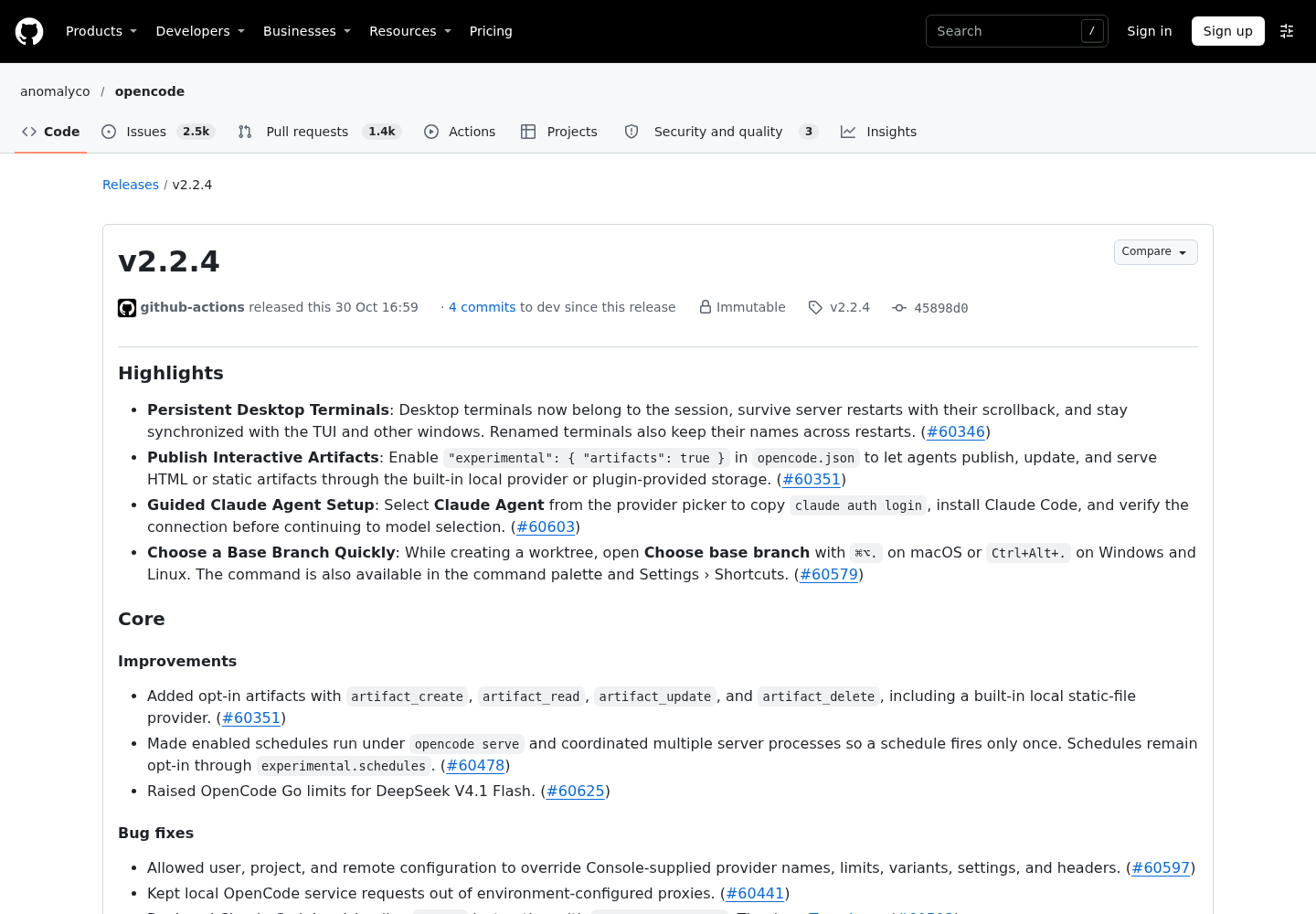
The timing hook is small. Anomaly published OpenCode v2.2.4 on GitHub on Oct 30, 2026. It added persistent Desktop terminals, an opt-in "experimental": { "artifacts": true } setting and a guided Claude Agent setup. Earlier the same day, v2.2.3 introduced the Claude Agent provider itself. The configuration lessons below apply to any 2.x build that follows the current V2 docs. For the reasoning-variant side of model config, see our guide to validating OpenCode reasoning-variant overrides. The open-source coding agent roundup shows where OpenCode sits among its peers.
Before you start: version, test repo and credentials
Check these before you touch any file. Each one removes a failure that would otherwise look like a config bug.
- [ ] OpenCode 2.x is the binary on your PATH. The V1 migration guide says V1 and V2 both use the
opencodecommand and are no longer installed side by side by default. Remove a V1 install managed by a package manager first, because the V2 curl installer replaces the V1 binary. In Desktop, Settings › About has had one-click version copying since v2.2.3. - [ ] A disposable git repository. You will ask the agent to push and then reject the request, so use a repo where an accidental push costs nothing.
- [ ] Credentials for one provider. That means an API key, a subscription sign-in (ChatGPT Plus or Pro, a Claude Code login or OpenCode Go) or a local runtime such as Ollama.
- [ ] Write access to
~/.config/opencode/and to the repository’s.opencode/directory. - [ ] Node.js with
npx. The local MCP example starts its server withnpx -y. - [ ] A copy of your existing config. V1 and V2 read the same locations, so a file converted to V2-only shapes can confuse a V1 binary later.
# Back up the existing global config (either extension), then list project config files
mkdir -p ~/opencode-config-backup
cp ~/.config/opencode/opencode.json* ~/opencode-config-backup/ 2>/dev/null
ls opencode.json opencode.jsonc .opencode/opencode.json .opencode/opencode.jsonc 2>/dev/null
The ls line matters later. If it prints more than one project file, you already have the precedence ambiguity described in the next section.
Where OpenCode 2 reads configuration, and which file wins
V2 reads the same system, global and project locations as V1. It normalizes supported V1 fields and native V2 fields in memory and never rewrites the file. That helps a migration but makes debugging harder: an old key can keep working quietly while a different file overrides the new one you are editing.
| Location | Scope | Precedence the docs state | What goes here in this guide |
|---|---|---|---|
/etc/opencode/opencode.json(c), /Library/Application Support/opencode/opencode.json(c), %ProgramData%\opencode\opencode.json(c) |
Machine (system) | Highest: overrides global and project files | Nothing, unless you administer the machine |
macOS managed preferences (ai.opencode.managed.plist) |
Machine (MDM) | Highest, alongside system config | Nothing |
~/.config/opencode/opencode.json(c) |
You, in every project | Below project config | Providers, default model, baseline rules, personal MCP servers, policies |
<project>/opencode.json(c) |
One repository | Above global | Leave it absent |
<project>/.opencode/opencode.json(c) |
One repository | Above global. Its order relative to the root-level project file is not stated on the pages used here | Repo-specific rules and MCP overrides |
~/.config/opencode/cli.json |
Terminal client only | Not part of this merge | TUI preferences (replaces V1 tui.json) |
Three consequences follow.
- Pick one project file. The docs list both
<project>/opencode.jsoncand<project>/.opencode/opencode.jsonc, but the pages used here do not say which wins when both set the same key. This guide uses.opencode/opencode.jsoncbecause it sits next to the agents, commands and skills that already live in.opencode/. Iflsfound both, merge them into one file and delete the other. - Admin restrictions belong in policies, not settings. The migration guide notes that overriding a setting cannot stop users from adding providers, MCP servers, agents or plugins. Enforced restrictions should be written as policies, which outrank global and project policies.
- Mixed formats are tolerated only at the top level. Supported V1 and native V2 fields may sit side by side at the top level. When both set the same canonical value, a valid V2 value wins regardless of key order. Inside an individual agent, provider, command or model, keep to one format. OpenCode does not infer mixed formats there, and it logs warnings for conflicting values.
Connect a provider and pin a default model
The V2 Providers page describes setup as two slash commands: connect an account, then select a model. Credentials you enter through /connect stay out of opencode.jsonc, which is exactly where you want them.
- Open OpenCode in the test repository and run
/connect. Choose the provider and enter its credentials. - Run
/modelsand select a model. Note the exact ID it shows, inprovider/modelform. - Paste that ID into the top-level
"model"key of the global file in the next section. With a pinned default, new sessions start on the model you chose rather than whichever one the picker last remembered. - For effort-style variants, use
provider/model#variant. The docs giveclaude-agent/opus#highas an example.
Subscription routes differ only in step 1:
| Route | What you do in step 1 | Where the credential lives | Model ID shape |
|---|---|---|---|
| API key for a catalog provider | /connect, pick the provider, paste the key |
OpenCode’s provider account, not the config file | anthropic/<model> |
| ChatGPT Plus or Pro | /connect, OpenAI, Sign in with ChatGPT |
The plan sign-in. Usage counts against the plan, so models show no cost | openai/<model> |
| Claude Agent | Install Claude Code 2.1.248 or later, run claude auth login, then /connect and select Claude Agent |
Claude Code’s own login | claude-agent/<model>#<effort> |
| OpenCode Go | Subscribe in the console, copy the API key, /connect as OpenCode Go |
OpenCode’s provider account | As listed in /models |
| Custom OpenAI-compatible endpoint | No /connect. Define it under providers |
An environment variable named in env |
<provider key>/<models key> |
Know Claude Agent’s limits before you choose it. Claude Code must be installed on the same machine as the OpenCode server, and Claude Agent is not available in remote workspaces. Claude Code’s system prompt replaces OpenCode’s built-in prompt, sampling options such as temperature are not supported, and the model list comes from Claude Code. v2.2.4 adds a guided flow that copies claude auth login, installs Claude Code and checks the connection before model selection.
If a paid plan does not appear after you subscribe, reconnect rather than editing config. One user reported on X on Oct 26, 2026 that a Go subscription only started working after they reran setup and selected Go on the initial provider screen. They also said they could not find their API key in the console. That is one user’s report, but it fits the documented path: /connect, choose the product, then /models.
The custom provider in the global file below follows the shape documented on the Providers page. The providers object is keyed by the provider ID used in model references, so that block produces the model ID acme/qwen3-coder. Here is what each field does. env lists, in order, the environment variables that can supply the credential. package selects the runtime: @opencode/ai/providers/openai-compatible is for APIs that use the OpenAI request format. settings.baseURL is the endpoint. models maps OpenCode’s model IDs to display names and, if needed, to a different upstream modelID.
The variable must exist in the environment of the OpenCode server process, not only in your interactive shell. OpenCode 2 runs one background service for every client, and the docs’ error table says to set a missing variable on the OpenCode server. The same page uses opencode service set env NAME VALUE to set a server-side variable, with OPENCODE_CLAUDE_PATH as its example. Typing a real key on the command line also puts it in your shell history, so load it from a secret manager or an env file you control.
One v2.2.4 fix matters if your organization pushes provider settings from the OpenCode Console. User, project and remote configuration can now override provider names, limits, variants, settings and headers supplied by the Console.
Write the global opencode.jsonc
This is the complete worked file. Save it as ~/.config/opencode/opencode.jsonc. JSONC allows the comments and trailing commas the V2 docs use. Replace the model ID, the Acme endpoint and the MCP servers with your own.
// ~/.config/opencode/opencode.jsonc  (worked example built from the V2 docs)
{
  "$schema": "https://opencode.ai/config.json",

  // Default model for new sessions. Copy the exact ID from /models.
  "model": "anthropic/claude-sonnet-5-5",

  "providers": {
    // Custom OpenAI-compatible endpoint. The key stays in ACME_API_KEY.
    "acme": {
      "name": "Acme",
      "env": ["ACME_API_KEY"],
      "package": "@opencode/ai/providers/openai-compatible",
      "settings": {
        "baseURL": "https://llm.acme.example/v1",
      },
      "models": {
        "qwen3-coder": { "name": "Qwen 3 Coder" },
      },
    },
    // Catalog provider: override only what you change. Milliseconds.
    "anthropic": {
      "settings": {
        "headerTimeout": 600000,
      },
    },
  },

  // Appended after the base policy (allow everything, ask on .env reads).
  "permissions": [
    { "action": "external_directory", "resource": "*", "effect": "ask" },
    { "action": "shell", "resource": "git push *", "effect": "ask" },
    { "action": "shell", "resource": "git reset --hard *", "effect": "ask" },
    { "action": "shell", "resource": "rm *", "effect": "ask" },
  ],

  // Runs after rules and saved approvals. Can only turn allow/ask into deny.
  "policies": [
    { "action": "tool.use", "resource": "shell:sudo *", "effect": "deny" },
  ],

  "mcp": {
    "timeout": { "startup": 45000, "catalog": 30000, "execution": 600000 },
    "servers": {
      // Local server over stdio.
      "everything": {
        "type": "local",
        "command": ["npx", "-y", "@modelcontextprotocol/server-everything"],
        "environment": { "LOG_LEVEL": "info" },
      },
      // Remote server with a header credential, OAuth off, native tool list.
      "context7": {
        "type": "remote",
        "url": "https://mcp.context7.com/mcp",
        "oauth": false,
        "headers": { "CONTEXT7_API_KEY": "{env:CONTEXT7_API_KEY}" },
        "codemode": false,
      },
      // Parked: configured but not connected until a project re-enables it.
      "sentry": {
        "type": "remote",
        "url": "https://mcp.sentry.dev/mcp",
        "disabled": true,
      },
    },
  },
}
Why each block is there:
$schemapoints editors at the published schema. Keep it for autocomplete, but read the troubleshooting row on schema errors before you change anything an editor flags.modelpins the default. The ID must match a/modelsentry exactly. For a custom provider, use the key from themodelsmap, not themodelIDvalue.providers.acmeis the documented custom-provider shape, with no key in the file.providers.anthropicshows that a catalog provider needs only the fields you change. HereheaderTimeoutraises the wait for response headers from the five-minute default to ten minutes.permissionsis appended after OpenCode’s base policy, which allows every action and asks before reading.envfiles. The first rule brings back V1’s prompt for paths outside the project. The next three ask before pushes, hard resets andrm.policiesblockssudoin every project. A policy runs after rules and saved approvals and can only turn allow or ask into deny, so no repository file can turnsudoback on.mcp.timeoutsets defaults for every server. Startup gets 45 seconds because the firstnpxrun downloads a package. Listing tools keeps the default 30 seconds. Tool calls get ten minutes instead of the 12-hour default, so a stuck tool fails while you are still watching.mcp.serversholds one local server, one remote server that uses a header credential with OAuth off, and one remote server parked withdisabled: true.
Order permission rules so the last match is the one you meant
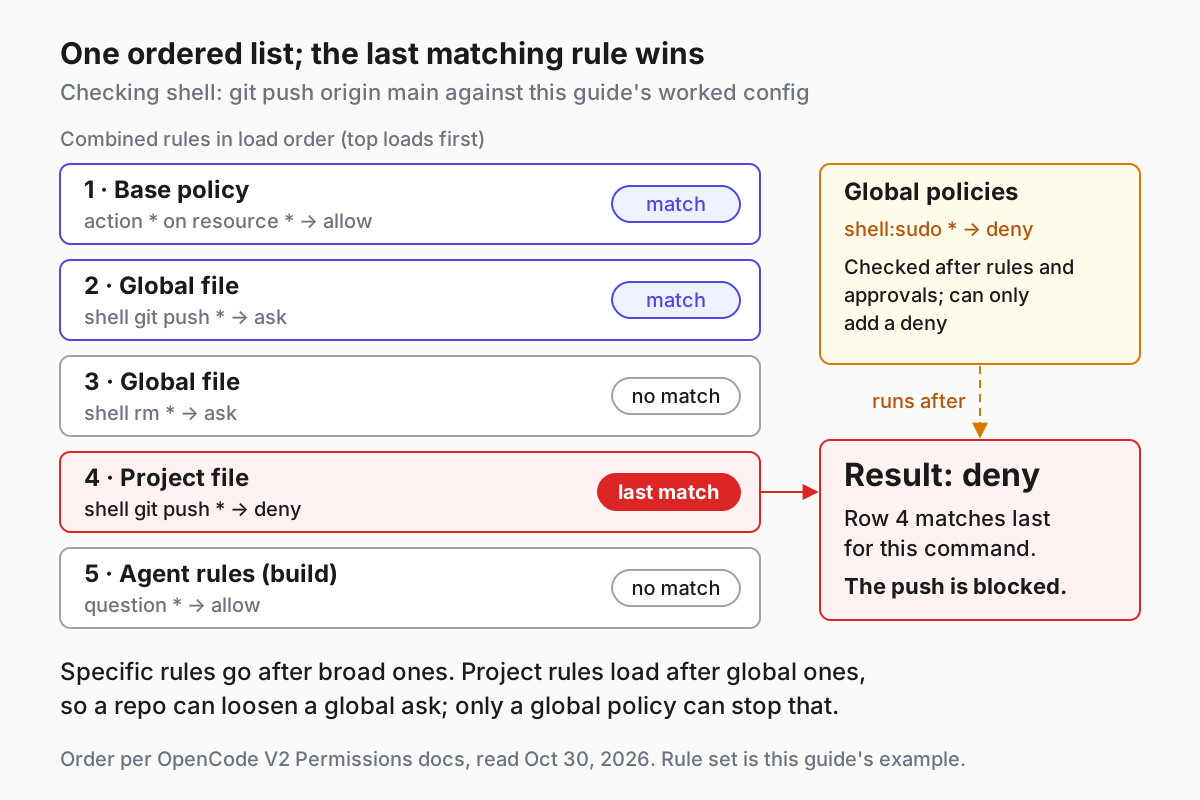
V2 replaces V1’s per-tool permission map with one ordered array of { action, resource, effect } rules. The V2 Permissions page puts the rule in one sentence: OpenCode combines rules in order and uses the last match. When no rule matches, the effect is ask.
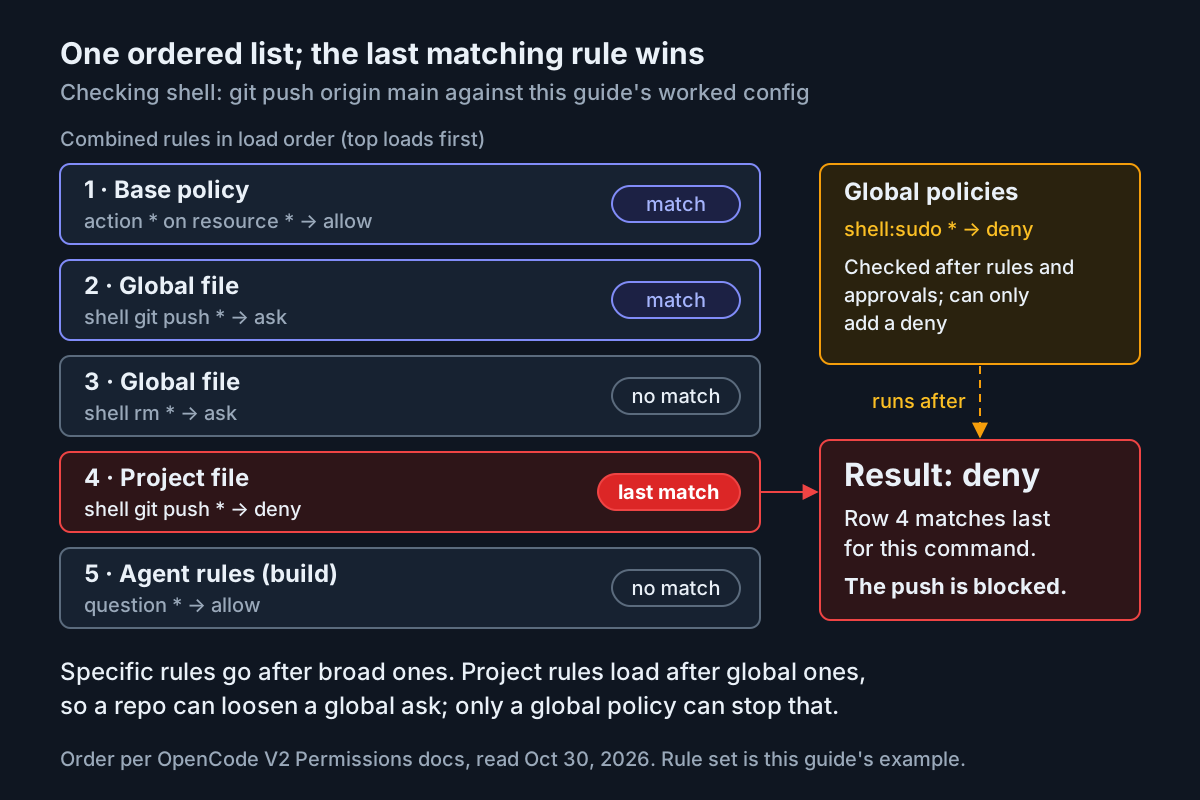
OpenCode builds the combined list in layers. The base policy comes first, then lower-priority configuration before higher-priority configuration, and agent rules come last. The project file outranks the global file, so its rules land later in the list and win when several rules match. The diagram shows this for git push origin main in this guide’s setup: three rules match, and the project’s deny is the last of them.
Effects and wildcards take a minute to learn:
| Element | Values | Behaviour to remember |
|---|---|---|
effect |
allow, deny, ask |
ask waits for a decision from the client |
* in action or resource |
Zero or more characters, including / |
Matches the whole normalized value, not a substring |
? |
Exactly one character | Useful for single-character variants |
Shell pattern ending in * |
git status * |
Also matches the bare command git status |
| Several resources in one operation | A patch touching many files, a compound shell command | Any deny denies. Otherwise any ask asks. Otherwise the operation is allowed |
| Home paths | ~, ~/, $HOME |
Expanded for external_directory, read and edit. Shell resources stay raw text |
Action names are where V1 configs break. Use shell, not bash. Use subagent, not task. Use edit for edit, write and patch. MCP tools use <server>_<tool>, and external_directory covers paths outside the active location and its worktree. execute controls Code Mode. doom_loop and lsp are not current V2 Core actions.
Here is the most common ordering mistake next to its fix:
| Version | Rules, top to bottom | git push origin main |
Why |
|---|---|---|---|
| Broken | shell git push * ask, then shell * allow |
Runs without a prompt | The broad allow is the last match |
| Fixed | shell * allow, then shell git push * ask |
Prompts | The specific ask is the last match |
| Stricter | shell * ask, shell git status * allow, shell git diff * allow, shell git push * deny |
Blocked | The docs’ own example: ask by default, allow inspection, deny pushes |
Two behaviours make the rules stronger than they look. First, compound commands are split. The built-in scanner, which handles Bash, Zsh, POSIX sh and PowerShell, extracts every subcommand, so git status && git push still hits the push rule. A command with syntax it cannot safely analyse returns a scanner error instead of running. Second, the docs warn that shell runs with your user’s full filesystem, process and network authority, and that directory inference from command text is best effort. Prefer a narrow allowlist to patterns that try to list every dangerous command. For a repository you do not trust, the Stricter row is the better baseline.
When a rule resolves to ask, the client offers Allow once, Allow always and Reject. Allow always saves the tool’s proposed pattern as a durable allow rule scoped to the project. For shell, that pattern is a command prefix such as git status *. Saved approvals never override a configured deny, but they can quietly turn an ask into an allow, so never choose Allow always on a push prompt. Reject also rejects every other pending permission request in the session.
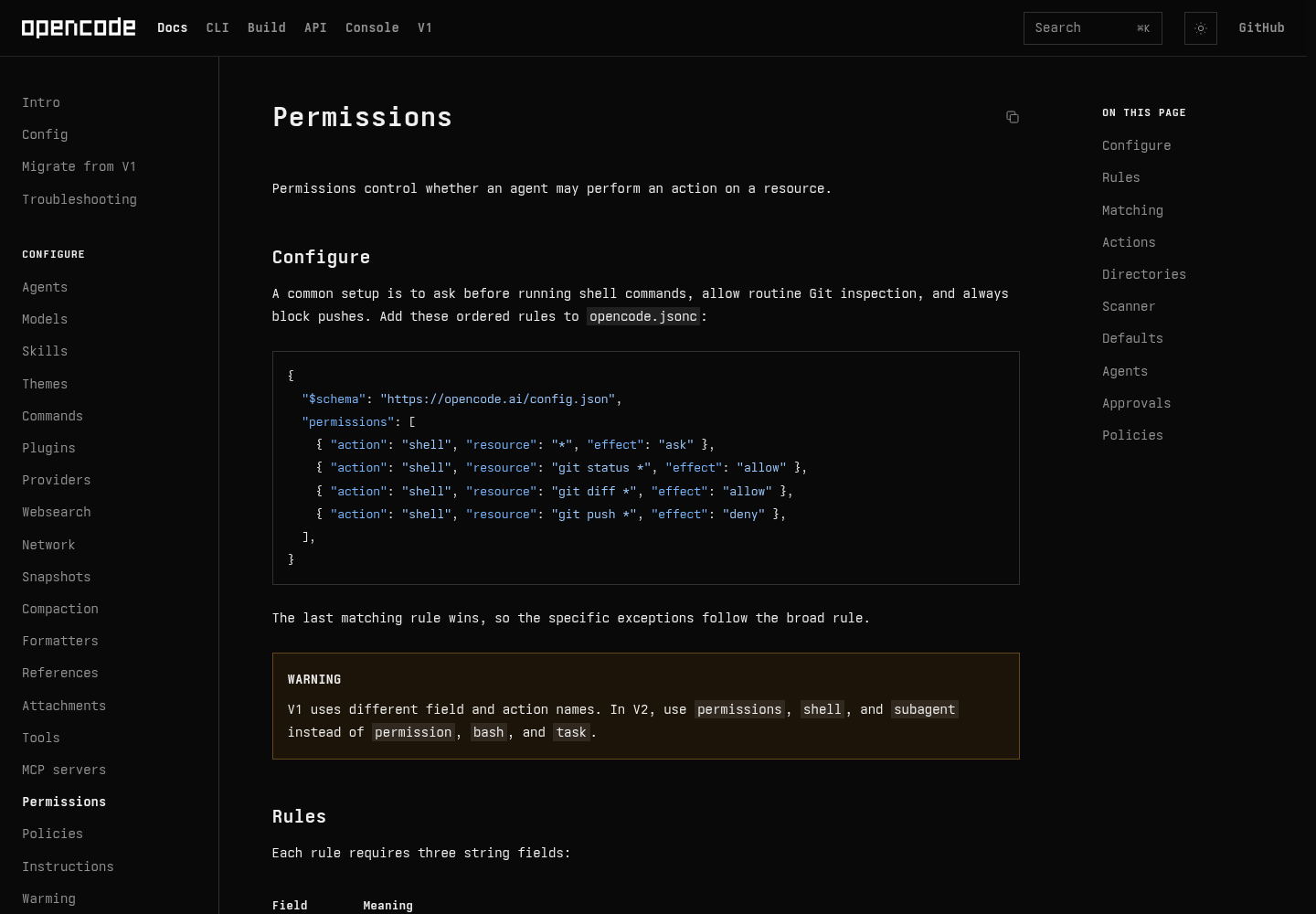
The external_directory change needs its own warning. V1 asked before touching paths outside the project, but V2 allows external_directory by default. Without a rule, reads and edits outside the location and worktree go ahead with no prompt. The first line of the global permissions array brings the V1 prompt back. You can add narrower rules after it, for example allowing reads but denying edits under ~/projects/reference/*.
If you run several agents and want one policy across them, our piece on restricted mode as fleet policy argues for writing these rules down once per machine. The Codex approval modes and sandbox guide shows how a different harness splits the same decision between a sandbox and approvals.
Add one local and one remote MCP server
The V2 MCP servers page offers two routes: the opencode mcp CLI or hand-written config. The CLI is quicker for a first connection. Config is needed for working directories, OAuth client settings, timeouts and parking a server. If you already saved the global file above, steps 1 and 2 are the CLI equivalent and you can skip them.
- Add the remote server for this project.
opencode mcp add context7 --url https://mcp.context7.com/mcpwrites it to the project configuration. Add--globalto make it available in every project. For a header credential, quote the placeholder so your shell writes it literally. - Add the local server. Everything after
--is the command, and OpenCode starts it over stdio. Pass environment variables with repeated--envflags. - Check connection state with
opencode mcp list. A connected server prints a line like✓ context7 connected. A remote server that needs sign-in shows needs authentication. Fix that by opening OpenCode, running/mcps, selecting the server and signing in, or by runningopencode mcp auth <name>. - Move anything beyond the basics into config, as the global file does. Pass secrets through
{env:NAME}. Shell expressions such as$NAMEare not expanded inside JSON strings. - Park a server with
disabled: true. V2 has noenabledfield. Disconnecting a server in/mcpsdoes not change configuration, so it reconnects on the next start.
# CLI equivalents of the config above (commands from the V2 MCP servers page)
opencode mcp add context7 --url https://mcp.context7.com/mcp \
  --header 'CONTEXT7_API_KEY={env:CONTEXT7_API_KEY}'
opencode mcp add everything --env LOG_LEVEL=info -- npx -y @modelcontextprotocol/server-everything
opencode mcp list
opencode mcp auth sentry     # OAuth sign-in for a remote server
opencode mcp logout sentry   # remove stored OAuth credentials
Three V2 defaults are easy to miss:
| Setting | Default | What it changes |
|---|---|---|
codemode |
true |
Tools are grouped per server behind Code Mode (tools.context7.<tool>). false puts them on the provider’s native tool list |
oauth |
On for remote servers | OpenCode discovers the authorization server, signs in with PKCE, refreshes tokens and stores credentials outside project config. Set false only for servers that use headers alone |
protocol |
legacy |
auto probes for the 2026-07-28 revision and falls back. Use it only for servers that need it, because probing a local legacy server can wait out the startup timeout |
Tool names are normalized. OpenCode names each tool <server>_<tool> and replaces every character other than letters, numbers, _ and - with _. That name is the permission action, so { "action": "context7_*", "resource": "*", "effect": "deny" } hides every Context7 tool without disconnecting the server. If an agent’s permissions deny all of a server’s tools, or deny execute for a server that uses Code Mode, OpenCode also leaves that server’s instructions out of the system prompt.
MCP timeouts now come in three kinds, and the error you see depends on which one fired. The chart puts the defaults next to the provider-side HTTP limits, because a slow tool and a slow model look much the same from the chat.
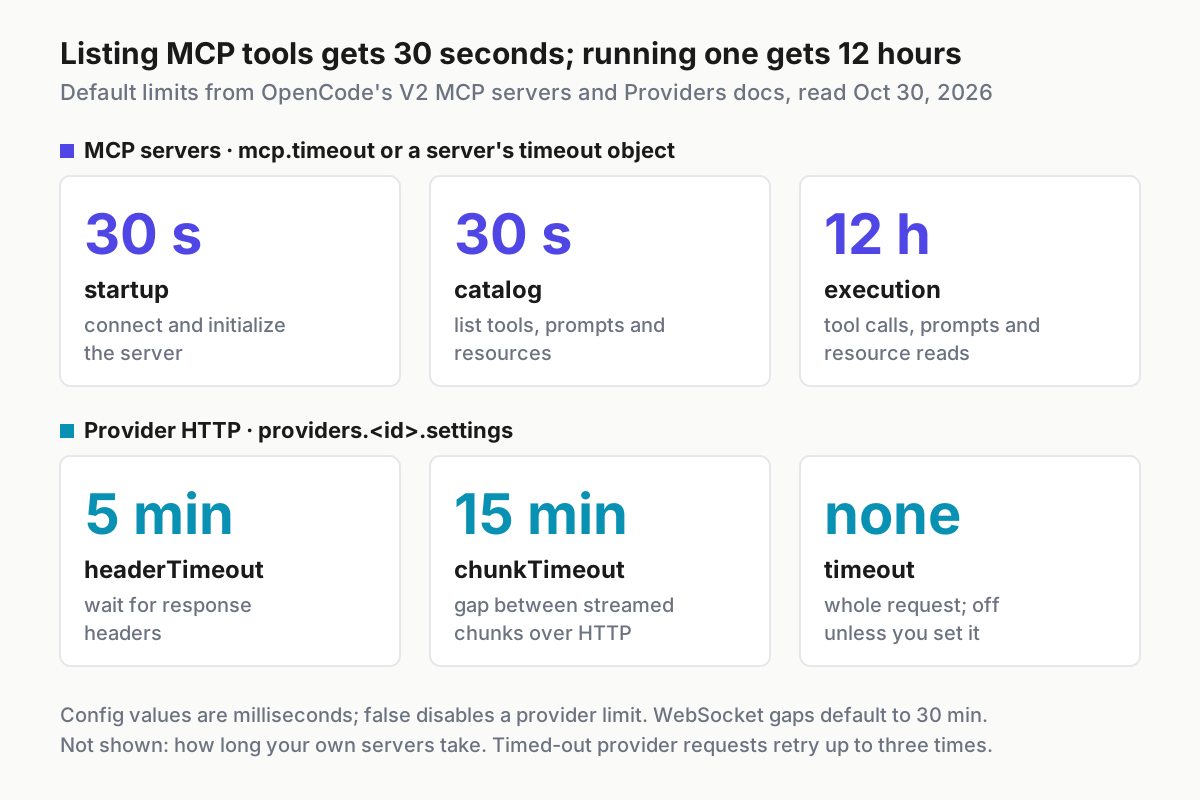
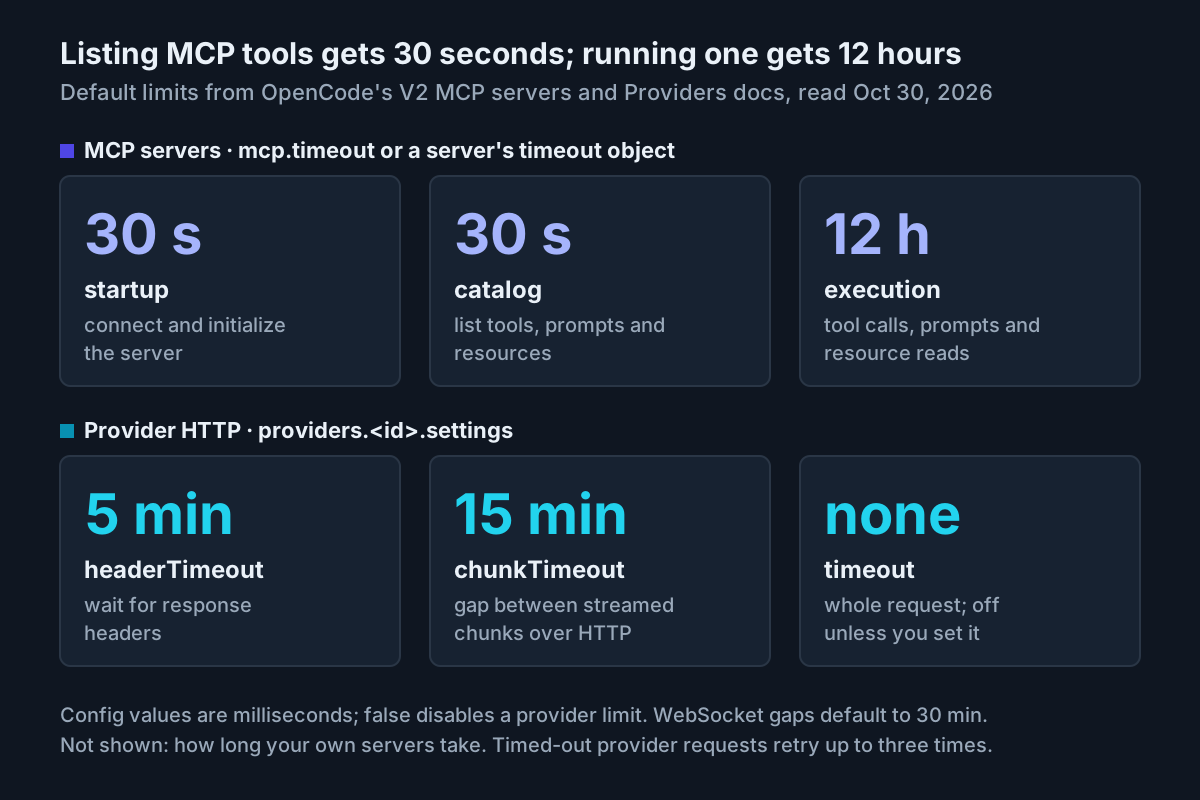
If a server fails while listing tools, raise catalog for that server only. If it fails partway through a call, look at execution. If it never connects, the culprit is startup. A server’s own timeout object overrides the matching keys in mcp.timeout. If you keep a long list of servers, the MCP server inventory ritual is a good weekly habit. The Claude Code MCP setup guide is the equivalent walkthrough for that client.
Tighten one repository with .opencode/opencode.jsonc
The project file narrows the global baseline for one codebase. It is meant to be committed, so it holds no keys.
// <repo>/.opencode/opencode.jsonc  (commit this file; it holds no secrets)
{
  "$schema": "https://opencode.ai/config.json",
  "permissions": [
    { "action": "shell", "resource": "git push *", "effect": "deny" },
    { "action": "edit", "resource": "migrations/*", "effect": "ask" },
    { "action": "read", "resource": "secrets/*", "effect": "deny" },
    { "action": "sentry_*", "resource": "*", "effect": "ask" },
  ],
  "mcp": {
    "servers": {
      // Replaces the whole global "sentry" object, so disabled is omitted (false).
      "sentry": {
        "type": "remote",
        "url": "https://mcp.sentry.dev/mcp",
      },
    },
  },
  "agents": {
    "reviewer": {
      "description": "Review code without changing it",
      "mode": "subagent",
      "permissions": [
        { "action": "edit", "resource": "*", "effect": "deny" },
      ],
    },
  },
}
What each entry does in practice:
git push *→ deny replaces the global ask with a hard block in this repository. The agent can still commit, but only a human pushes.migrations/*→ ask gates edits to one directory. Edit rules match the target path for edit, write and patch.secrets/*→ deny blocks reads from a directory that should never reach a model.sentry_*→ ask prompts before any Sentry MCP tool runs. Once/mcpsshows the real tool names, add narrower rules after this line, such as a deny for a specific write tool.mcp.servers.sentryre-enables the server parked in the global file. A higher-precedence project config replaces the entire server object with the same name. That is why this entry repeatstypeandurland leaves outdisabled, which defaults to false. Forgettingurlin an override is a classic bug.agents.revieweradds a subagent whose own rules deny every edit. Agent rules are appended after top-level rules rather than replacing them, and a custom subagent uses its own permissions, not a subset of its parent’s.
This setup has an asymmetry. A repository can loosen your global asks by adding allows later in the list. Only a global or Console-managed policy can stop that, which is why sudo sits in policies in the global file. Admins using managed policy should also note a v2.2.3 change. integration.use now covers integration accounts only. MCP servers, skills and plugins have their own mcp.use, skill.use and plugin.use actions, and a bare integration.use rule no longer applies to them.
Translate V1 keys you copied from old tutorials
V2 still accepts supported V1 configuration, so you do not have to convert everything at once. Convert each block when you touch it anyway: the current docs, examples and error messages all describe native V2. This table covers the renames from the migration guide that turn up most often in pasted configs.
| V1 key or value | V2 replacement | Note |
|---|---|---|
permission (object per tool) |
permissions (ordered array) |
Order now decides precedence |
bash action |
shell |
Same commands, new name |
task action |
subagent |
Resource is the target agent ID |
write, patch actions |
edit |
One action for all three tools |
tools.websearch: false |
{ "action": "websearch", "resource": "*", "effect": "deny" } |
Tool switches become rules |
mcp.<name> |
mcp.servers.<name> |
V2 does not put server names directly under mcp |
enabled: true/false |
disabled: false/true |
Inverse meaning |
MCP timeout: 30000 |
timeout: { catalog, execution } |
startup is separate |
clientId, clientSecret, callbackPort, redirectUri |
client_id, client_secret, callback_port, redirect_uri |
OAuth fields use snake case |
provider |
providers |
Keyed by provider ID |
npm, api, options.apiKey |
package (AI SDK packages get the aisdk: prefix), settings.baseURL, settings.apiKey |
Options split into settings, headers and body |
agent and mode maps |
agents |
prompt → system, disable → disabled, maxSteps → steps |
Separate variant |
model#variant |
anthropic/claude-sonnet-5-5#high |
command, subtask |
commands, subagent |
Markdown command files still work |
snapshot, attachment, plugin |
snapshots, media, plugins |
V1 plugin code does not run in V2 |
skills: { paths, urls } |
skills: [ ... ] |
One ordered array |
small_model |
agents.title.model |
Model for the built-in title agent |
azure-cognitive-services, google-vertex-anthropic |
azure, google-vertex |
V2 rejects the retired IDs |
Some V1 fields have no V2 behaviour and are ignored with a warning. They include logLevel (use OPENCODE_LOG_LEVEL when starting OpenCode), server, top-level subagent_depth (now experimental.subagent_depth), compaction.tail_turns, compaction.prune and an MCP entry that has enabled but no type. There are two more traps. V1 plugin implementations do not run in V2 at all. And an agent Markdown file that uses any of permissions, request, system or disabled is read entirely as V2, so V1 fields left in the same frontmatter are ignored. The migration guide also suggests asking OpenCode itself to convert the file while preserving its behaviour. If you do, check the diff against this table.
Verify the setup in seven checks
Run these in order after restarting OpenCode. The expected observations come from the documentation. They describe what a correct setup should produce, not output captured for this article.
| # | Do this | Expected observation | If not |
|---|---|---|---|
| 1 | opencode mcp list in the test repo |
everything and context7 connected. sentry listed, probably needing authentication because the project re-enabled it |
See the startup and catalog rows under troubleshooting |
| 2 | /mcps, select sentry and sign in, or run opencode mcp auth sentry |
sentry connected |
Check the URL in the project override |
| 3 | /models, then ask “Reply with one sentence naming your model.” |
Your pinned model is selected and answers. acme/qwen3-coder appears as Qwen 3 Coder if ACME_API_KEY reaches the server |
“Model unavailable” means the ID or provider is wrong |
| 4 | Prompt: “Run git status, then push this branch.” | git status runs without a prompt. The project deny blocks the push |
A push prompt means the project file did not load, or its rules landed too early |
| 5 | Repeat check 4 in a repo with no override | A permission request for the push. Choose Reject | No prompt: look for a later broad allow or a saved approval |
| 6 | Prompt: “Read …/another-repo/README.md.” | An external_directory approval request before the read |
No prompt: the first global rule is missing or overridden |
| 7 | Append the context7_* deny rule to the project rules, restart, ask for library docs |
No Context7 tools offered. Remove the rule afterwards | Tools still offered: check the normalized server name |
Finish with a secrets check before you commit the project file:
git status --short
git grep -nIE "apiKey|Bearer |sk-[A-Za-z0-9]" -- .opencode opencode.json opencode.jsonc
The status should list only .opencode/opencode.jsonc, and the grep should print nothing. The pattern is an illustrative starting point, so adapt it to your providers’ key formats. If anything matches, move the value into an environment variable referenced with {env:NAME}. Then rotate the key, because it may already be in history. Our coverage of the OpenCode breach that exposed stored provider API keys is a reminder that where a key lives is a security decision.
People reporting on the schema issue also used opencode debug config. They said it exited 0 and printed the normalized configuration for files the runtime accepted. The documentation pages used here do not cover that command, so treat it as a convenience rather than a guarantee.
Troubleshooting: symptom, cause, fix
| Symptom | Likely cause | Fix | Expected after the fix |
|---|---|---|---|
Editor flags permissions, mcp.servers, providers or an array-shaped skills as invalid |
The schema at opencode.ai/config.json was generated from V1 shapes (issue #43748). SchemaStore applies it to opencode.json(c) by filename even without $schema |
Trust the runtime over the editor and reload the editor’s schema cache. Never add enabled to satisfy it |
Diagnostics only on genuine typos |
| A V1 key seems to do nothing | The field is one V2 ignores with a warning, or the entry mixes V1 and V2 fields | Convert the whole entry with the table above and check the log for warnings | The setting takes effect |
| Shell command runs without prompting | A broad allow sits after the specific rule, or an earlier Allow always saved a project-scoped allow |
Put specific rules last. Review and remove broad saved approvals | The command prompts |
| Project rules seem ignored | Two project files, or rules in the file that loses | Keep only .opencode/opencode.jsonc |
Check 4 shows a deny |
| MCP server never connects | startup exceeded, often during a first npx download |
Raise timeout.startup for that server |
connected in opencode mcp list |
| Server connects but lists no tools | catalog exceeded |
Raise timeout.catalog for that server only |
Tools appear in /mcps |
| Tool call dies partway through | execution limit reached |
Raise that server’s execution only if the tool is legitimately slow |
The call completes |
| Server shows needs authentication | OAuth not completed | /mcps or opencode mcp auth <name>. Use opencode mcp logout <name> to switch accounts |
connected |
| Project override broke a global server | The override replaced the whole object and dropped url or type |
Repeat every required field, or use a different server name | Server connects |
| “No model is available for session” | No provider has finished setup | Finish /connect, then pick a model in /models |
Session starts |
| “Model unavailable: provider/model” | Wrong ID, inactive provider or disabled model | For custom aliases, check the models key, not modelID |
Model is selectable |
| “NAME is required to resolve the provider endpoint” | A ${NAME} placeholder in baseURL is unset on the server |
Set it for the OpenCode server process or write the full URL | Provider initializes |
| Paid plan missing after subscribing | The account is not connected to the new product | Rerun /connect and choose the product |
Its models appear in /models |
| “Claude Code is not logged in” or “too old” | Claude Agent prerequisites missing | Run claude auth login, then connect again. Run claude update for an old version |
Claude Agent models listed |
Be precise about the schema issue’s status. Issue #43748 was opened on Aug 21, 2026. On Sep 24 a commenter confirmed that the published schema still had no servers key on released v2.0.13, and on Oct 6 another said it was still unfixed. The issue was closed as completed via #55524 on Oct 14, 2026. If your editor still complains, it may be holding a cached copy. One commenter worked around the problem with a vendored, patched schema referenced by a relative $schema path until the published file caught up. Throughout, the runtime was the authority: reporters noted that it accepted the V2 fields the schema rejected. A September commenter on v2.0.13 also reported that the runtime dropped the singular V1 provider key with no diagnostic, even though the migration guide says supported V1 fields keep working. That report is one more reason to write providers natively.
Roll back cleanly
Rehearse this once now, while nothing depends on the new setup.
- Remove the project override. Rename it so OpenCode stops reading it:
mv .opencode/opencode.jsonc .opencode/opencode.jsonc.off. If it is already committed, revert that commit instead. Some guides mention anOPENCODE_DISABLE_PROJECT_CONFIGvariable, but it does not appear on the V2 pages used here, so this guide renames the file. - Restore the global file from
~/opencode-config-backup/. If you had no previous file, delete the new one. - Clear MCP sign-ins you no longer want with
opencode mcp logout sentry. Stored OAuth credentials live outside project config, so deleting the config entry alone leaves them behind. - Review saved approvals. They are durable allow rules scoped to the project, and the docs advise removing broad ones you no longer need.
- Restart OpenCode and rerun checks 1, 3 and 4. You should see the old behaviour: no project deny, and whatever model your restored file pins.
- If you are going back to a V1 binary, point it only at V1-shaped files. The migration guide warns against pointing V1 at configuration converted to native V2-only shapes.
What to add next
Once the baseline holds, add providers one at a time and repeat checks 3 and 4 after each one. If you serve local models, the LM Studio setup guide for Claude Code, OpenCode and Codex covers the server side. Keep experimental keys such as artifacts out of the baseline until you have a reason to turn them on, because the release notes mark them opt-in.
Sources
- Release v2.2.4, anomalyco/opencode on GitHub, Oct 30, 2026
- Providers, OpenCode V2 docs
- Permissions, OpenCode V2 docs
- MCP servers, OpenCode V2 docs
- Migrate from V1, OpenCode V2 docs
- Issue #43748: published schema rejects documented V2 fields, anomalyco/opencode
- Release v2.2.3, anomalyco/opencode on GitHub, Oct 30, 2026
- cyber-ipman (@Cyberipman) on X, Oct 26, 2026