LangSmith Tool Gateway Enters Public Beta: Credential Custody, Policies and Traces for Every Agent Tool Call
LangSmith Tool Gateway enters public beta: one URL that holds credentials, enforces policies and traces every agent tool call. What it means for operators.
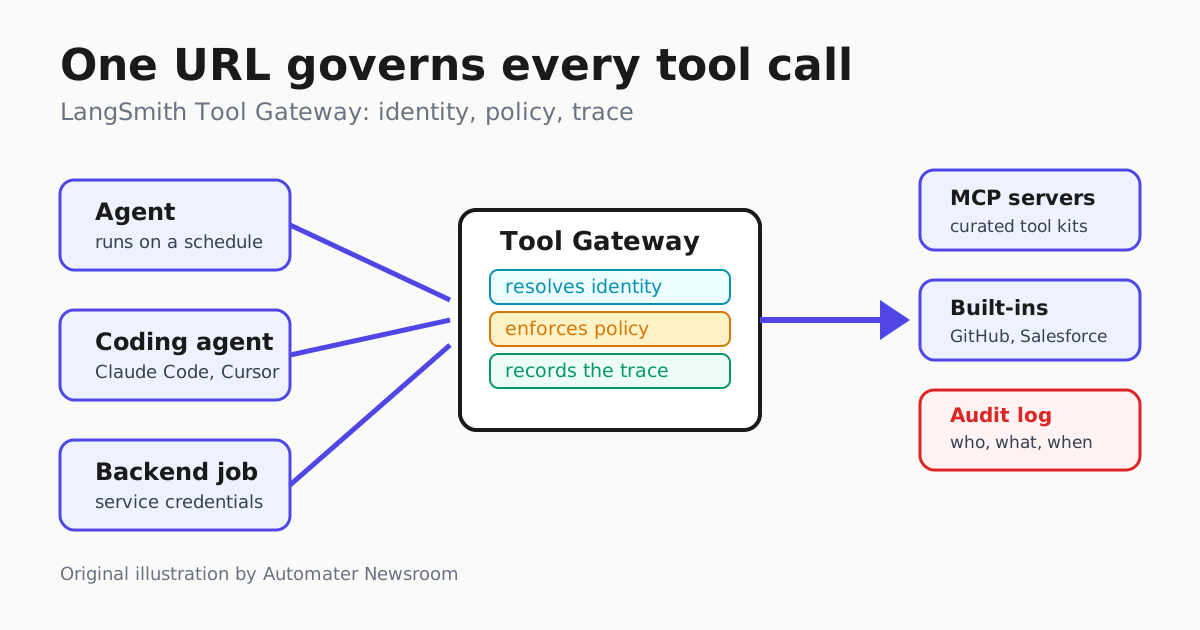
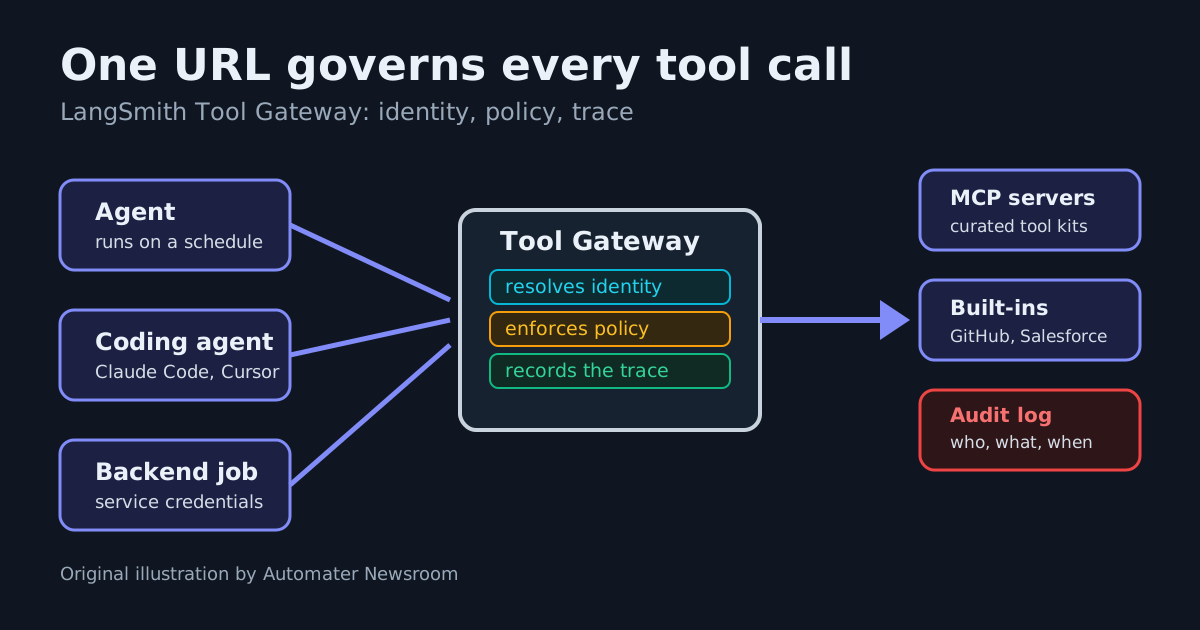
LangChain has put LangSmith Tool Gateway into public beta, and it aims squarely at the gap most agent operators know personally: the moment an agent moves from a chat window into scheduled or event-driven work, someone still has to decide which tools it may call, whose credentials it acts with, and how anyone proves afterward what it did. Tool Gateway is a managed layer that takes all three jobs for every tool call routed through a single URL.
What shipped
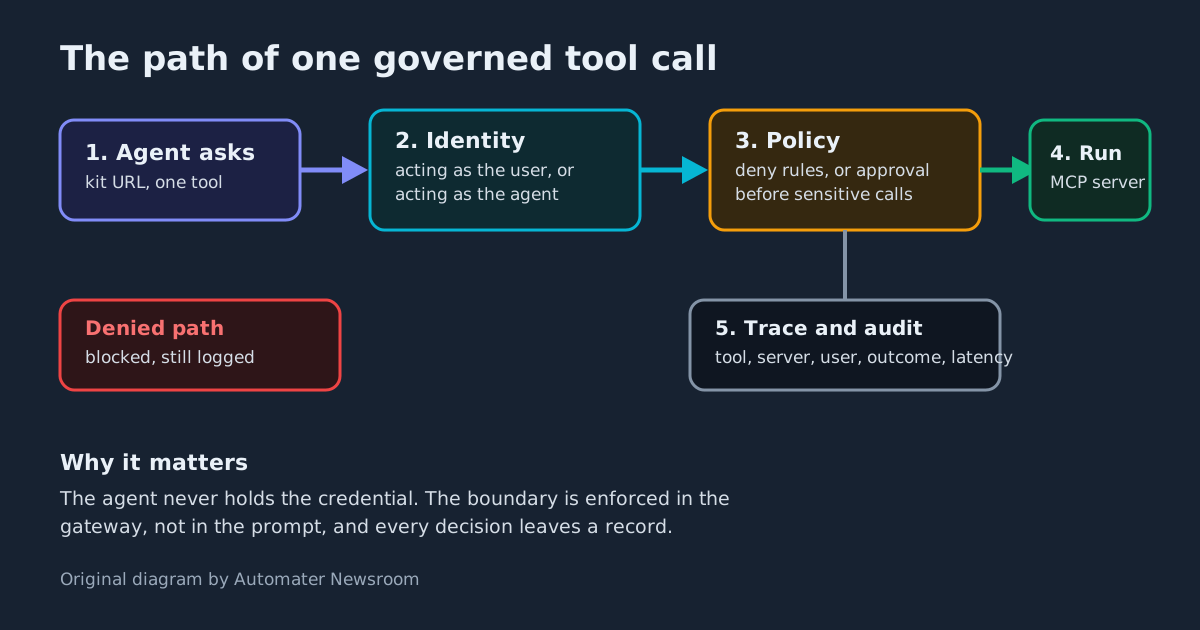
Tool Gateway sits in LangSmith next to the existing LLM Gateway, which governs model calls. Where LLM Gateway handles spend limits, model fallbacks and secret redaction, Tool Gateway governs the other half of an agent’s reach: the tools it invokes. For each call it resolves identity, manages access, and writes a trace. Adoption is deliberately incremental — the kit you publish is one MCP URL, and LangChain says it works with any MCP client, including LangChain, Deep Agents, Claude Code and Cursor.
The core unit is a tool kit: a curated set of tools published at a single URL. Register any MCP server by URL or switch on a built-in server — Google, Microsoft, Salesforce, GitHub, Linear and LinkedIn are hosted by LangSmith, with no OAuth app for you to register, and API-key tools like Exa, Tavily and Parallel search are one key away. An agent connected to a kit only sees the tools bundled in it. In practice, that means you could give a coding agent a kit containing nothing but read-only GitHub search tools, and it would never be presented with a write tool elsewhere in your estate — the discovery boundary is the kit, not the agent’s good behavior. LangChain’s own illustration of the approval side is a data-warehouse write tool: before exposing one, admins can require a human-in-the-loop confirmation each time the agent attempts the write. For kits with hundreds of tools, a search mode has the agent query the kit and load only what the current task needs instead of inflating context and latency with a full tool list.
Identity is the real feature
The part operators should look at hardest is credential custody — the same pay-per-call key-custody question we have framed before: who holds the keys when one token can call thousands of paid tools. Every call through the gateway maps to one of two identities:
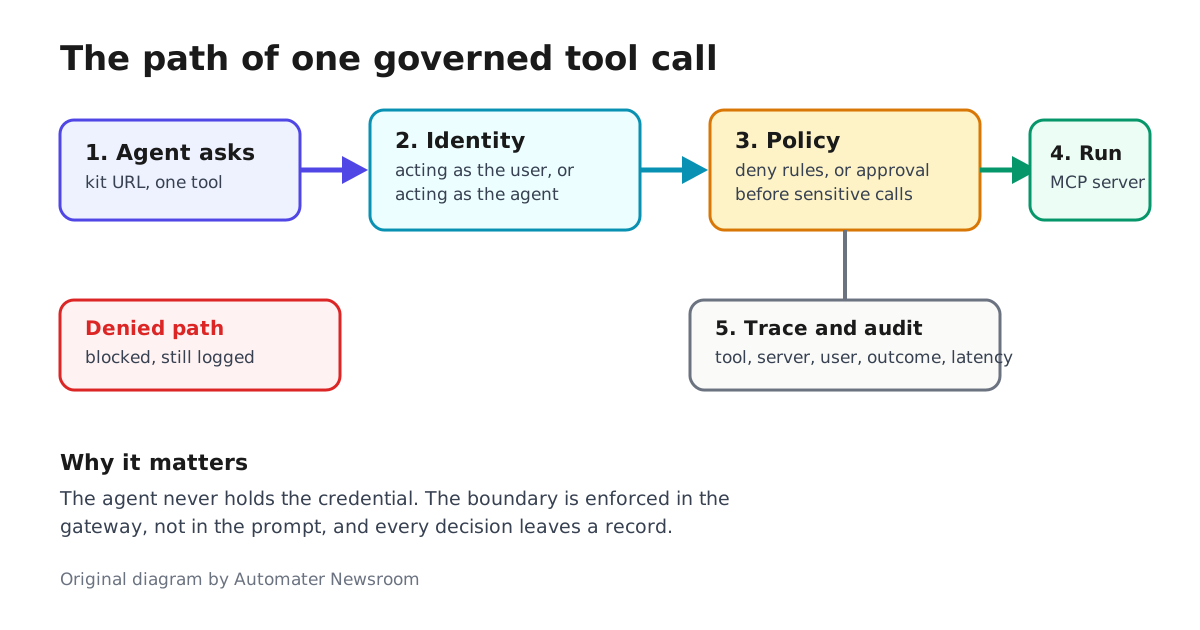
- Acting as the user. Your identity provider (Okta, Entra ID) identifies the person; they connect their account once. If they haven’t connected yet, the call returns a sign-in link, waits for authentication, then continues — on-behalf-of-user without hand-rolled OAuth per agent.
- Acting as the agent. Autonomous background agents use credentials tied to the agent itself, either via agent auth or a profile: shared credentials a workspace admin connects once and reuses across agents.
That split matches how real deployments behave. LangChain describes a US retailer running a store assistant on each associate’s own credentials (inventory, schedules, email) and a 3 a.m. inventory-reconciliation agent on service credentials — over 50 MCP servers, more than a thousand tools, and no deterministic check, in the hand-rolled setup, preventing an agent from grabbing the wrong credential or an unapproved tool.
Policies, approvals and traces
Control comes in two forms. Deny policies block tools at granularities down to a specific user or service key, with exceptions, set at org or workspace level. Approval policies gate sensitive calls in the user’s MCP client before they run — the canonical example being a human-in-the-loop confirmation each time an agent tries to write to the data warehouse.
Every call is traced inside the agent’s existing LangSmith trace with the tool, server, user, outcome and latency — and, notably, the payloads are not: data sent to or by a tool is not stored, which keeps credentials and customer data out of the observability record. On Enterprise plans an org-wide audit log answers questions like “which credentials did the 3 a.m. agent use last night” from one place. That record feeds the improvement loop LangSmith already runs: traces have long been convertible into annotation queues and evaluation datasets, a workflow LangChain documented when it introduced Data Annotation Queues.
The same week as Docker’s governance push
Tool Gateway is not an isolated launch. A day earlier, Docker published its AI Governance position: sandbox policies define where an agent operates, MCP tool governance defines what it can do through Docker’s MCP Gateway (policies written in Cedar, requests denied unless a matching policy permits them), and structured audit records show what happened. If you run Docker’s side of that stack, our Docker MCP Gateway profile setup guide covers the containerized path. Docker states the shared premise plainly: “A model decision is not automatically an authorized action.” The boundary has to live in infrastructure the agent cannot negotiate with, not in the prompt.
What this means for operators
For teams currently handing API keys to agent harnesses, Tool Gateway is a credible path to centralized custody: one place to register servers, scope kits, hold OAuth, and produce the audit trail security asks for. The trade is architectural — routing tool traffic through a vendor-held control plane is exactly the agent-gateway-as-control-plane bet we have covered before, and it makes LangSmith the choke point for both model calls and tool calls. Deny policies and the audit log require talking to LangChain’s team, so the governance story is not fully self-serve yet. But the pattern is now shipping from two major vendors in two days: agent tool access is becoming a policy product, not a per-agent integration project.
If you already run agents on LangSmith — whose recent rebuild around a single agent record we covered — the quickstart is short: open Tools in LangSmith, add a server, connect an account, build a kit, point your MCP client at the kit URL. Start with a read-only kit, watch the traces, and only then widen what the agent may touch.