Ollama OpenAI Compatible API: Base URL, API Key, curl and SDK Calls, Remote Access and Coding Agents
Use the Ollama OpenAI compatible API at localhost:11434/v1: list models, call chat and Responses from curl and SDK, wire Codex and OpenCode, expose it safely.

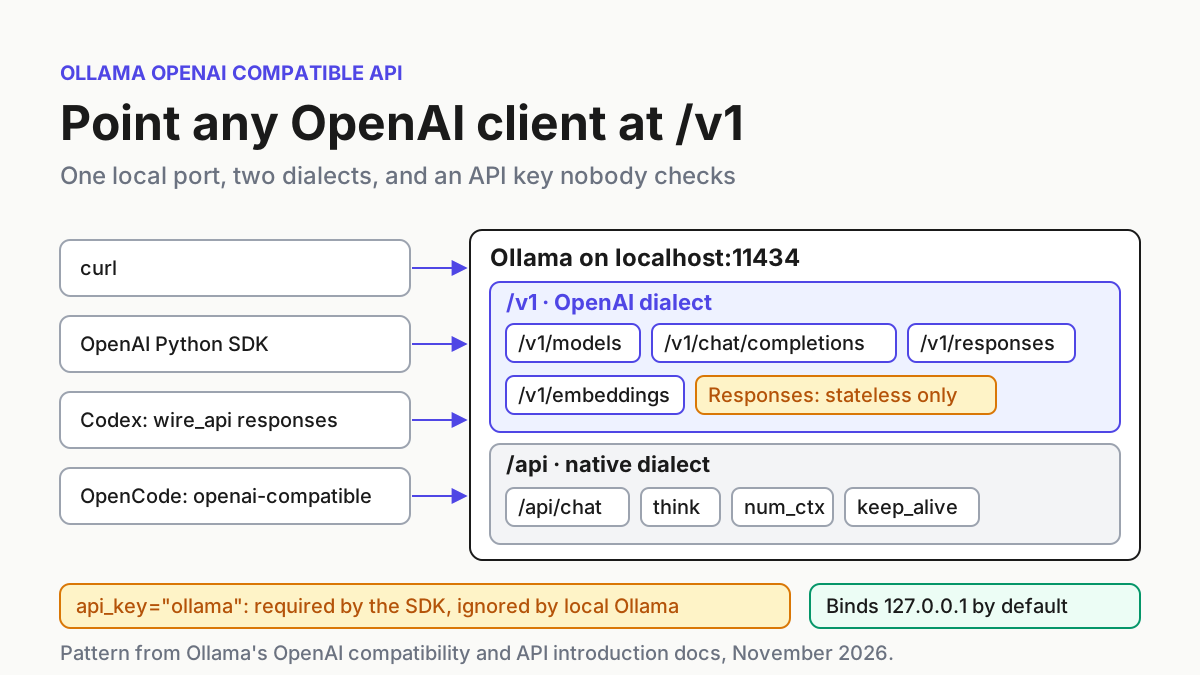
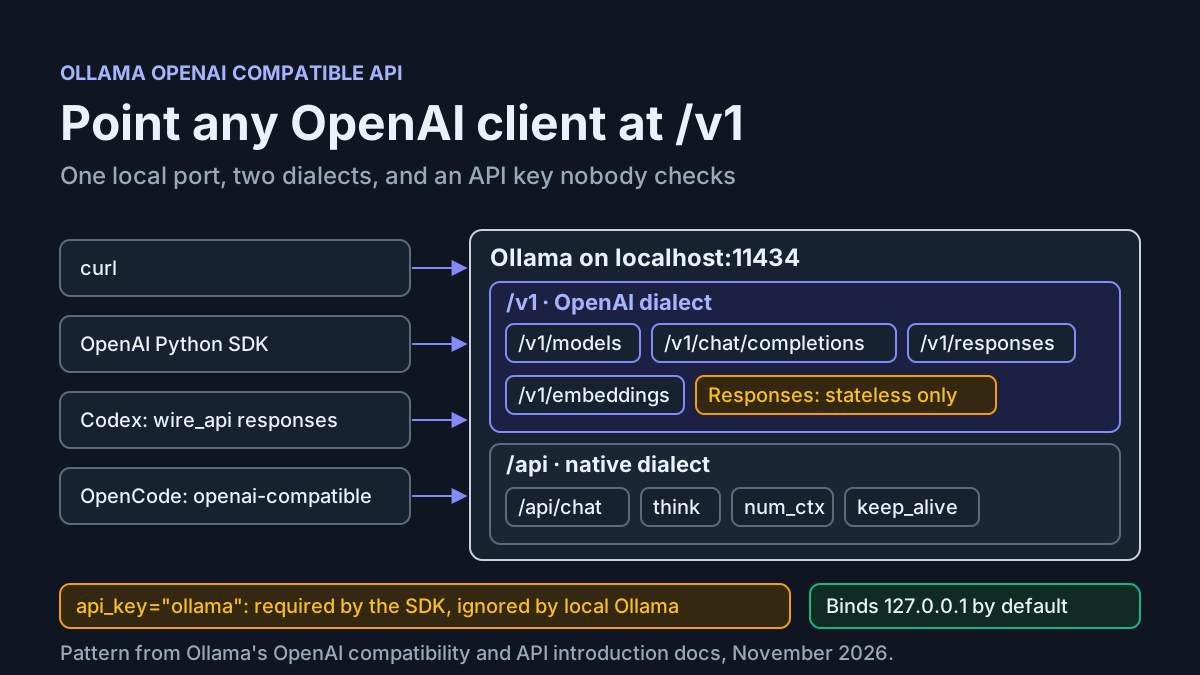
You have Ollama serving a model on your laptop, and you have a script, SDK app or coding agent that only knows how to talk to OpenAI. The Ollama OpenAI compatible API connects the two. Point the client at http://localhost:11434/v1, give it any API key, and most requests work. The trouble is in “most”. A Responses call comes back 404. A thinking model returns an empty string. A second machine gets connection refused. An agent’s first tool call fails on a model that was never built to call tools.
This tutorial follows one case, labelled task:ollama-v1-01, from a first GET /v1/models request through chat, streaming, Responses, tools and embeddings, then the OpenAI Python SDK, a Codex profile and an OpenCode provider block. It ends with a remote-access setup you can undo with a couple of commands, a map of the common failures and a rollback.
The prompt for this guide is a question, not a release. On November 18, 2026, a developer posting as @jiangxingfan asked @ollama on X whether there is a supported way to see cached prefix tokens separately from re-evaluated tokens while testing Ollama inside Open Agent API. They wanted to tell gateway overhead apart from prompt prefill. The documentation reviewed here does not answer that, as the usage section explains. The question also shows that people are routing /v1 through gateways and agents without a clear picture of what /v1 covers. Ollama’s OpenAI compatibility documentation gives that picture. It says Ollama supports a subset of the OpenAI API and lists which endpoints and fields are in it.
Who this is for. A developer who already runs Ollama locally and wants OpenAI-style clients to use it without rewriting them. For tool-by-tool wiring, see our guides to LM Studio with Claude Code, Codex and OpenCode and Qwen Code with Ollama, LM Studio and OpenRouter. This guide covers the /v1 contract that all of those tools depend on.
How to read the commands. Every command, path and field comes from the Ollama pages and GitHub issues linked inline, fetched on November 19, 2026. We did not run them for this article. Lines marked “expected” describe what the documentation or the issue reports show. They are illustrative, not captured output.
What you need before the first request
- [ ] A running Ollama server. The local FAQ says Ollama binds
127.0.0.1on port11434by default. The macOS and Windows apps start the server for you. On Linux it usually runs as theollamasystemd service. - [ ] Version 0.13.3 or later if you want Responses.
/v1/responsesarrived in v0.13.3. GitHub issue #13595, which asked for the version note now on the docs page, reports that older versions answer that path with HTTP 404. Codex’s Ollama profile uses Responses, so Codex users need this version. To upgrade, the FAQ says to click “Restart to update” from the menu bar or taskbar on macOS and Windows, and to re-runcurl -fsSL https://ollama.com/install.sh | shon Linux. - [ ] One pulled model that can call tools. The worked case uses
qwen3:8b, the model the compatibility page uses in its Responses examples. Ollama’s tool-calling page uses theqwen3family for function calls. Pull it withollama pull qwen3:8b. Local inference needs the model on disk first. Only direct cloud requests skip the pull. - [ ] curl, plus
jqif you want readable JSON. - [ ] Python with the
openaipackage (pip install openai) for the SDK step. - [ ] Optionally, a coding agent. Install Codex with
npm install -g @openai/codex, as Ollama’s Codex page shows. Install OpenCode withcurl -fsSL https://opencode.ai/install | bashornpm install -g opencode-ai, as Ollama’s OpenCode page shows. - [ ] A context size chosen in advance. Both agent pages ask for at least 64k tokens of context. The default is often lower, and the context section shows how to check it.
Which endpoints the v1 path serves
Ollama serves two API styles on one port. The API introduction lists the base URLs:
http://localhost:11434/apifor Ollama’s native API.http://localhost:11434/v1for OpenAI compatibility.http://localhost:11434for Anthropic clients, which add/v1/messagesthemselves.
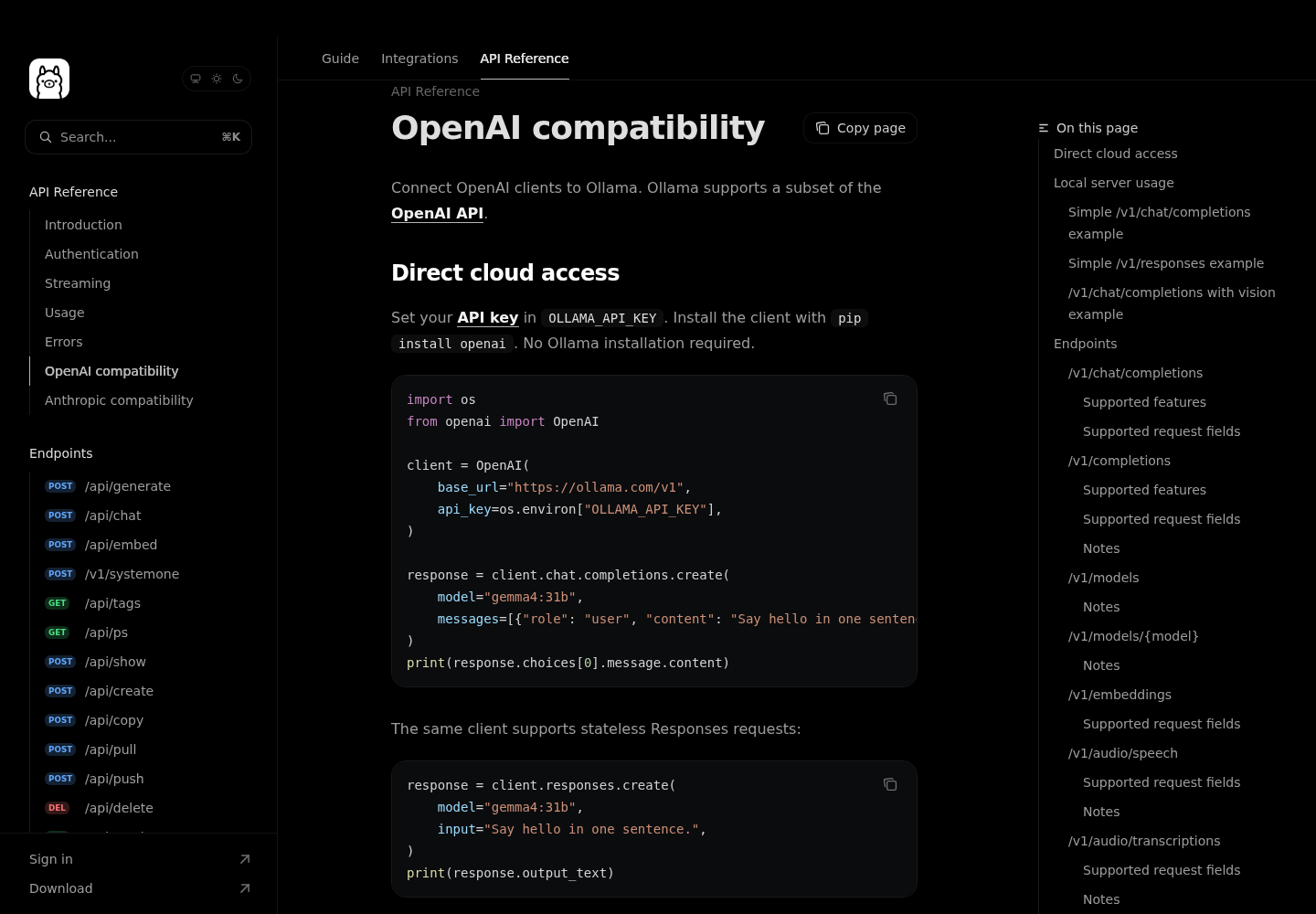
The cloud equivalents are https://ollama.com/api and https://ollama.com/v1. The rest of this guide is about the local /v1 endpoints. The compatibility page documents these:
| Endpoint | What it is for | Detail that matters in practice |
|---|---|---|
/v1/chat/completions |
Chat, streaming, JSON mode, vision, tools | reasoning_effort (or reasoning.effort) controls thinking. Images go in as base64 or an image URL inside content parts |
/v1/completions |
Plain prompt completion | prompt accepts only a string |
/v1/responses |
OpenAI Responses API | Added in v0.13.3. Stateless only: no previous_response_id and no conversation |
/v1/models, /v1/models/{model} |
List or describe local models | created is the last-modified time. owned_by is the Ollama username, library by default |
/v1/embeddings |
Vectors for search and retrieval | input can be a string, an array of strings, an array of tokens or an array of token arrays |
/v1/audio/speech, /v1/audio/transcriptions, /v1/audio/translations |
Speech output and audio to text | Speech arrived in v0.40.8 and translations in v0.40.12. Speech returns a 400 error for unsupported values rather than ignoring them |
Three details from that page affect every integration:
- There is no way to set context size through /v1. The page says the OpenAI API cannot set a model’s context size. You set it on the server or build it into a model, as the context section shows.
- The page lists some fields that are not supported. Each request field is marked as supported or not.
tool_choice,logit_bias,userandncome at the end of the chat-completions list. Check their markers on the live page before you depend on them. - Tools that require OpenAI model names can be given one. For a tool that only accepts a name like
gpt-3.5-turbo, runollama cp llama3.2 gpt-3.5-turbo, which copies an existing model under that name.
Why the API key is required but ignored
The OpenAI SDKs refuse to create a client without an API key, so you have to pass one. The compatibility page’s Python and JavaScript examples pass api_key='ollama' with the comment “required but ignored”. The API introduction says local requests do not need a key. Pick the value based on where the request goes:
- Local server and local model: any non-empty string. Use
ollama, so the next person who reads the config knows it is a placeholder and not a leaked secret. - Direct cloud access at
https://ollama.com/v1: a real key. The page’s cloud example reads it fromOLLAMA_API_KEY. Plan limits for that route are covered in Ollama Cloud usage limits for coding agents. - Cloud models through your local server: this is still a local request, so the key is still ignored. The compatibility page says to sign in to Ollama instead. If you want the opposite, so that nothing leaves the machine, see Ollama local-only mode.
- A gateway in front of Ollama: whatever key the gateway checks. Ollama still ignores it.
The fourth case leads to the most important consequence. A local Ollama server does not check keys, so anything that can reach the port can use every model on it. While the server stays on loopback, that means only programs on your own machine. Once you bind it to another address, it means anyone who can reach that address.
Worked example, one call at a time
The setup for case task:ollama-v1-01 is one laptop with Ollama on its default loopback address and qwen3:8b pulled. The goal is to check each /v1 endpoint before any agent uses it. Run the steps in order, because each one tests for a different failure.
- List models. This checks the base URL and the server without loading a model.
curl http://localhost:11434/v1/models
- Send one chat completion. This loads the model and shows the response shape your client will read.
curl -X POST http://localhost:11434/v1/chat/completions \
  -H "Content-Type: application/json" \
  -d '{
    "model": "qwen3:8b",
    "messages": [{ "role": "user", "content": "Say this is a test" }]
  }' | jq '.choices[0].message'
- Stream a request and ask for usage.
streamandstream_options.include_usageare both on the supported list.-Nstops curl from buffering, so you can watch the chunks arrive.
curl -N -X POST http://localhost:11434/v1/chat/completions \
  -H "Content-Type: application/json" \
  -d '{
    "model": "qwen3:8b",
    "messages": [{ "role": "user", "content": "Count from one to five." }],
    "stream": true,
    "stream_options": { "include_usage": true }
  }'
- Call Responses. This request tells a v0.13.3-or-later server apart from an older one.
curl -X POST http://localhost:11434/v1/responses \
  -H "Content-Type: application/json" \
  -d '{
    "model": "qwen3:8b",
    "input": "Write a short poem about the color blue"
  }'
- Offer the model a tool. The schema is the
get_temperaturefunction from Ollama’s tool-calling page, sent in the OpenAI tools format that the compatibility page lists as supported.
curl -X POST http://localhost:11434/v1/chat/completions \
  -H "Content-Type: application/json" \
  -d '{
    "model": "qwen3:8b",
    "messages": [{ "role": "user", "content": "What is the temperature in New York?" }],
    "tools": [{
      "type": "function",
      "function": {
        "name": "get_temperature",
        "description": "Get the current temperature for a city",
        "parameters": {
          "type": "object",
          "required": ["city"],
          "properties": { "city": { "type": "string", "description": "The name of the city" } }
        }
      }
    }]
  }' | jq '.choices[0].message'
- Repeat chat and Responses from the OpenAI Python SDK. Save this as
v1_check.pyand runpython v1_check.py. The client setup matches the compatibility page, with the trailing slash on the base URL.
# v1_check.py: task:ollama-v1-01, step 6
from openai import OpenAI

client = OpenAI(
    base_url="http://localhost:11434/v1/",
    api_key="ollama",  # required by the SDK, ignored by local Ollama
)

chat = client.chat.completions.create(
    model="qwen3:8b",
    messages=[{"role": "user", "content": "Say this is a test"}],
)
print("chat:", chat.choices[0].message.content)

resp = client.responses.create(
    model="qwen3:8b",
    input="Write a short poem about the color blue",
)
print("responses:", resp.output_text)
- Create embeddings. The pages used for this guide do not name an embedding model. Pull one of the models Ollama documents for embeddings and put its name in
EMBED_MODEL. The request shape below is the documented one, with an array of strings asinput.
EMBED_MODEL="replace-with-your-pulled-embedding-model"
curl -X POST http://localhost:11434/v1/embeddings \
  -H "Content-Type: application/json" \
  -d "{\"model\": \"$EMBED_MODEL\", \"input\": [\"local models\", \"OpenAI clients\"]}"
- Check what loaded.
ollama psshows which models are in memory, whether they run on GPU or CPU, and on current builds the allocated context.
ollama ps
The table records each call in the case and what you should see. These are illustrative expected results drawn from the docs and the linked issues, not output from a test run.
| Input | Action | Expected result (illustrative, not run for this article) |
|---|---|---|
task:ollama-v1-01a: server on 127.0.0.1:11434, qwen3:8b pulled |
curl http://localhost:11434/v1/models |
A JSON list that includes qwen3:8b, with owned_by set to library and created set to the model’s last-modified time |
| task:ollama-v1-01b: same server, prompt “Say this is a test” | POST /v1/chat/completions with model: qwen3:8b |
choices[0].message.content holds a short, non-empty reply. The first call is slower because the model has to load |
task:ollama-v1-01c: prompt “Count from one to five.” with stream: true and include_usage: true |
POST /v1/chat/completions with curl -N |
The text arrives as a series of chunks rather than one body, and the stream reports token usage at the end |
| task:ollama-v1-01d: input “Write a short poem about the color blue” | POST /v1/responses |
A Responses object, whose text the SDK exposes as output_text. An HTTP 404 means the server is older than v0.13.3 |
task:ollama-v1-01e: tool get_temperature, prompt about New York |
POST /v1/chat/completions with tools |
The assistant message contains a call to get_temperature with city set to New York, not a prose answer |
task:ollama-v1-01f: v1_check.py with api_key="ollama" |
python v1_check.py |
Two printed lines, chat: and responses:, each with non-empty text. Changing the key to any other string makes no difference |
task:ollama-v1-01g: two strings as input, embedding model pulled |
POST /v1/embeddings |
One vector per input string, or an error naming the model if it cannot produce embeddings |
| task:ollama-v1-01h: after steps 2 to 6 | ollama ps |
A row for qwen3:8b showing SIZE, PROCESSOR (for example 100% GPU) and the allocated CONTEXT |
Read the results in order, because the first failure tells you the most:
- Step 1 fails: nothing later will work. Check that the server is running and that the URL includes
/v1. - Step 1 passes but step 2 returns an error naming the model: the model is not on disk.
/v1/modelsonly lists local models, so the list from step 1 is the definitive check. - Step 2 passes but step 4 returns 404: the server is older than v0.13.3.
- Step 2 returns empty
content: see the section on thinking models. - Step 5 returns prose or an error: the model, not the endpoint, is the likely problem. Our guide to the Ollama “does not support tools” error shows how to check a model’s capabilities.
Streaming, usage counts and the cached-token question
Back to the question on X. The developer wanted prefix-cache hits reported separately from re-evaluated prompt tokens, measured through /v1. Here is what the sources support, and what they don’t:
- Request usage when you need token counts.
stream_options.include_usageis on the supported list for both/v1/chat/completionsand/v1/completions. Add it to any streamed request whose cost or latency you want to track. - Don’t expect a cached-token field from /v1. The compatibility page lists no field that splits cached prefix tokens from re-evaluated ones. Don’t build a dashboard that assumes one exists.
- Check the native usage documentation before you conclude. The API reference links a separate Usage page for the native API. That page is outside the sources for this guide, so read it yourself before deciding the information isn’t available anywhere.
- Separate gateway time from model time by measuring at both ends. This is our recommendation, not a documented feature. Send the same prompt once through the gateway and once straight to
localhost:11434, and compare the timings. Prefill should cost about the same both ways, so most of the remaining difference is the gateway’s overhead. - Plan for the server’s queue limits. The FAQ says Ollama answers
503when its queue is full.OLLAMA_MAX_QUEUEsets the limit (512 by default), andOLLAMA_NUM_PARALLELsets how many requests each model processes at once (1 by default). A gateway that sends many requests at once reaches these limits quickly.
Thinking models that return empty content
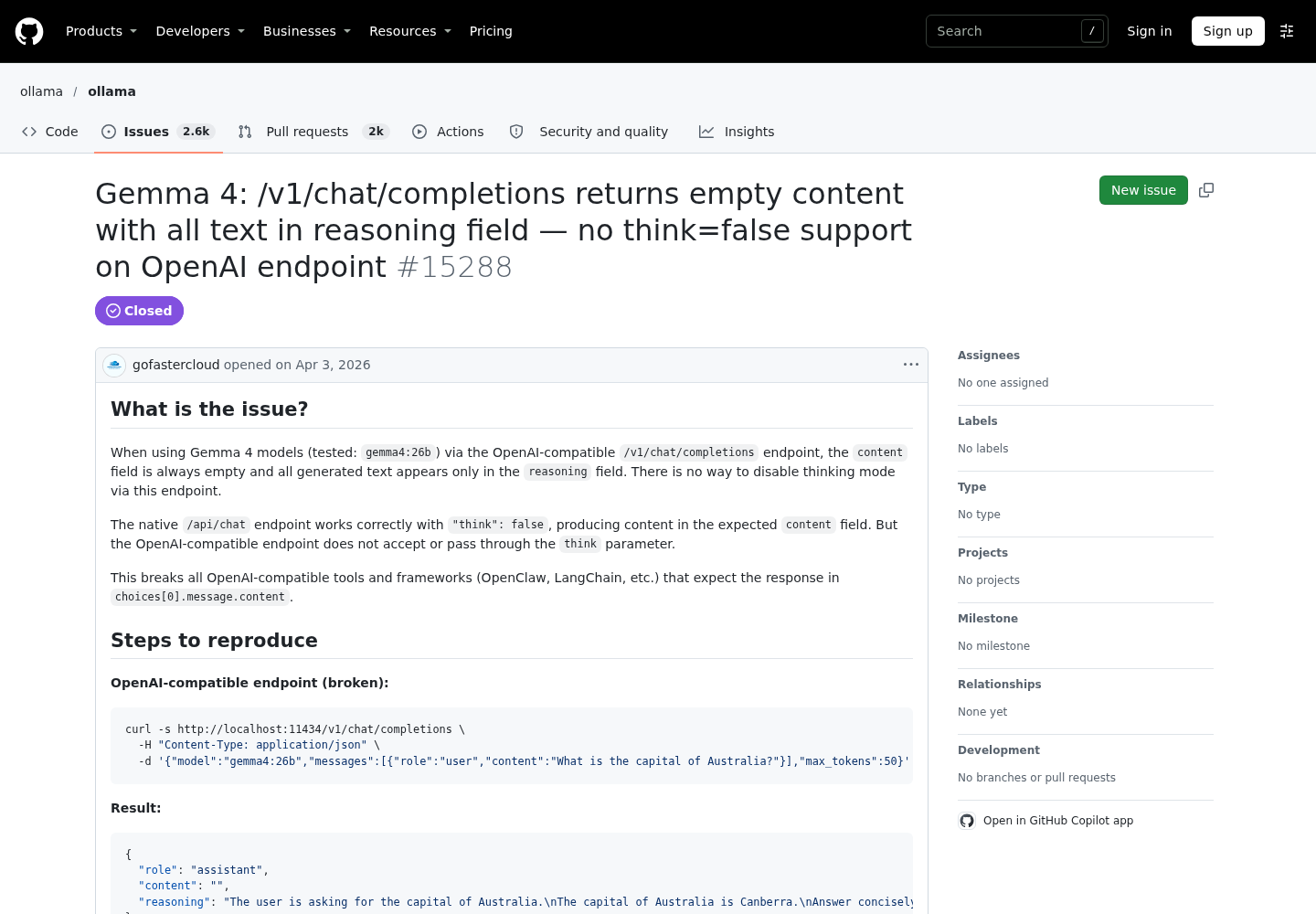
This failure looks like a broken endpoint, but it isn’t one. In GitHub issue #15288, a user running gemma4:26b on Ollama 0.20.0 got "content": "" from /v1/chat/completions, with the whole answer in a reasoning field. OpenAI-style frameworks read choices[0].message.content, so they treated the reply as empty. A collaborator replied that adding "reasoning_effort": "none" produced the answer in content. A maintainer added that the request’s "max_tokens": 50 was the cause: the thinking text used up the whole token budget. Later comments from users of other agent frameworks reported the same symptom with Qwen3.
Work through it in this order:
- Look at the whole message, not just
content. Usejq '.choices[0].message', as in step 2. If there is areasoningfield with text in it, you have this problem. - Raise or remove a small
max_tokens. Thinking tokens count against the cap. A limit that suits a short chat reply can run out before the model writes any answer. - Set the effort level explicitly.
reasoning_effortandreasoning.effortare both supported. The compatibility page says to use/api/showto find each model’s supported values and its default. - Expect
noneto behave differently by model. For models that can only switch thinking on or off,"none"turns it off. GPT-OSS cannot turn thinking off, so the page says"none"maps to"low"for that family. - On Responses, use
reasoning.effortor thethinkextension. The Responses field list includesthink, an Ollama extension that accepts a boolean, a model-defined string or null.
curl -s http://localhost:11434/v1/chat/completions \
  -H "Content-Type: application/json" \
  -d '{
    "model": "qwen3:8b",
    "messages": [{ "role": "user", "content": "What is the capital of Australia?" }],
    "reasoning_effort": "none"
  }' | jq '.choices[0].message'
Expected (illustrative): an answer in content and no long reasoning text. If content is still empty, the model may not support turning thinking off, and the fix is a larger token budget.
Context length when the client cannot set it
Agents fail quietly when the context window is too small. They forget files they read earlier and lose track of tool results. The context length page bases the default on VRAM: 4k below 24 GiB, 32k from 24 to 48 GiB, and 256k at 48 GiB or more. It also says tasks such as agents and coding tools need at least 64,000 tokens. Cloud models default to their maximum.
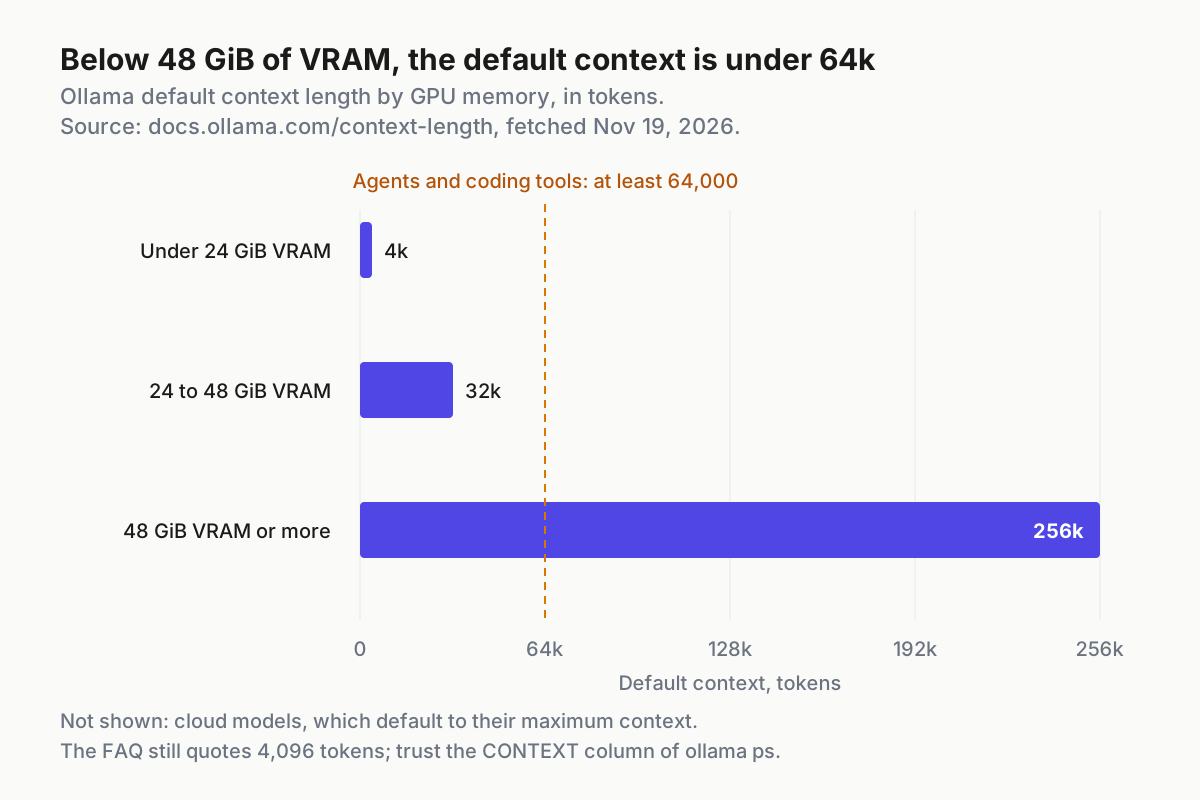
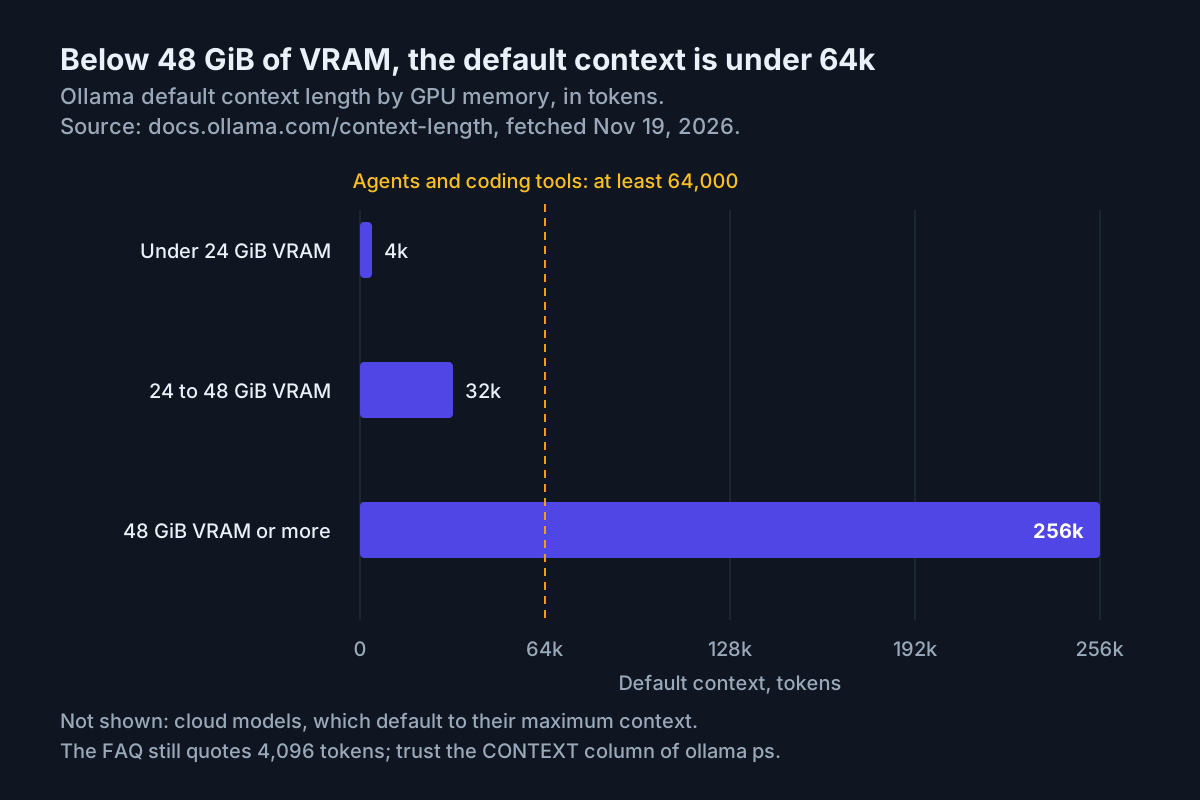
The FAQ still says the default is 4,096 tokens, so don’t rely on either page. Check the actual value:
- Read the allocated context. Run
ollama psafter a request and look at the CONTEXT column. The context page’s example row showsgemma4:latestat131072and100% GPU. - Set a server-wide default if every client needs the same window. Run
OLLAMA_CONTEXT_LENGTH=64000 ollama servein the foreground. If Ollama runs as a systemd service, addEnvironment="OLLAMA_CONTEXT_LENGTH=64000"under[Service]withsystemctl edit ollama.service, the same mechanism the FAQ uses forOLLAMA_HOST. The desktop app has a context-length slider in its settings. - Or create a model with the window built in. The compatibility page’s approach is a Modelfile with
FROM qwen3:8bandPARAMETER num_ctx 64000. Runollama create qwen3-64kin that folder, then send"model": "qwen3-64k"in your /v1 requests. This is the only way to give one client a different window from the rest. - Check memory before you raise the window. The FAQ says required RAM scales with
OLLAMA_NUM_PARALLEL×OLLAMA_CONTEXT_LENGTH. The context page recommends keeping the model fully on the GPU, so check that PROCESSOR still reads100% GPUafter the change.
Wire Codex to the Responses endpoint
Codex uses the Responses dialect, which is why the 0.13.3 version check comes first. Ollama’s Codex page asks for at least 64k of context and documents three routes, from least to most manual:
- Let Ollama configure Codex.
ollama launch codexrefreshes the model catalog and uses a dedicated Codex profile for the session. Typing/modelinside Codex switches between your installed models that can call tools.ollama launch codex --configsets up the profile without starting Codex. - Use the built-in
--ossflag.codex --ossconnects to Ollama.codex --oss -m qwen3:8bpicks a model. The docs’ own examples usegpt-oss:120b. - Write a profile you can keep under version control. The docs show this file at
~/.codex/ollama-launch.config.toml:
model = "qwen3:8b"
model_provider = "ollama-launch"
model_catalog_json = "/Users/you/.codex/model.json"

[model_providers.ollama-launch]
name = "Ollama"
base_url = "http://localhost:11434/v1/"
wire_api = "responses"
Then start Codex with codex --profile ollama-launch.
Why each line matters:
wire_api = "responses"sends requests to/v1/responses, so an older server fails right away with a 404.base_urlends in/v1/, matching the SDK examples.model_catalog_jsonpoints to a model catalog, and the docs’ path is an example for a macOS user calledyou.ollama launch codex --restoreremoves “the Ollama launch profile and generated model catalog”, which tells youollama launchwrites both files. If--confighas already created them, compare your version with theirs before overwriting anything.
Responses is stateless in Ollama. Codex sends the full conversation itself, so you don’t need previous_response_id, but scripts you write against Responses can’t rely on it either. Web-search requests through the profile run on Ollama and need ollama signin. To turn web search off, run codex --profile ollama-launch -c 'web_search="disabled"'.
Expected (illustrative): Codex opens using the model, and ollama ps lists that model while a session runs. If you run several agents against one server, our multi-agent command center guide covers how to keep track of them.
Wire OpenCode through the openai-compatible provider
OpenCode reaches Ollama through the generic @ai-sdk/openai-compatible provider package. Here is the provider block from Ollama’s OpenCode page, with the model key changed to the worked case’s model:
{
  "$schema": "https://opencode.ai/config.json",
  "provider": {
    "ollama": {
      "npm": "@ai-sdk/openai-compatible",
      "name": "Ollama",
      "options": {
        "baseURL": "http://localhost:11434/v1"
      },
      "models": {
        "qwen3:8b": {
          "name": "qwen3:8b"
        }
      }
    }
  }
}
- Add the block to
opencode.json. Each key undermodelsmust be a model name that/v1/modelslists. - Run
opencodeand select the Ollama model. - Or use
ollama launch opencode. This starts OpenCode with an inline config for the model you choose. The docs say it does not overwrite~/.config/opencode/opencode.json, so your existing settings still apply. - Expect two separate model lists. Models defined only in
opencode.jsondon’t appear in theollama launchmodel picker. - Meet the context requirement. OpenCode needs a context length of 64k or more. If an 8B model at that size doesn’t fit in your GPU memory, the docs suggest a cloud model rather than a smaller window. Their example uses
qwen3.5.
The baseURL here has no trailing slash, while Codex and the SDK examples use one. Both are copied from the docs, so leave them as they are. For permissions and MCP servers on OpenCode 2, see our OpenCode V2 setup guide.
Reach the server from another machine or a container
By default the server listens only on 127.0.0.1:11434, which means only your own machine can reach it. OLLAMA_HOST changes the bind address. The FAQ’s example value is 0.0.0.0:11434, which listens on every network interface. Ollama doesn’t check keys, so that example gives every device on your network unauthenticated use of every model. Use it only on a network you trust completely. Where you can, bind a single private address instead, such as 192.168.1.20:11434 (an illustrative address), and allow port 11434 through your firewall only from the machines that need it.
| Platform | Set the bind address | Apply it | Undo it |
|---|---|---|---|
| macOS app | launchctl setenv OLLAMA_HOST "0.0.0.0:11434" |
Restart the Ollama app | launchctl unsetenv OLLAMA_HOST (the FAQ shows only setenv), then restart the app |
| Linux systemd | systemctl edit ollama.service, then add Environment="OLLAMA_HOST=0.0.0.0:11434" under [Service] |
systemctl daemon-reload and systemctl restart ollama |
Delete the line, then reload and restart again |
| Windows | Quit Ollama, then edit the user environment variables and create OLLAMA_HOST |
Start Ollama from the Start menu | Delete the variable, quit, and start it again |
| Docker | The FAQ’s docker run example publishes the port with -p 11434:11434 |
Start the container | Remove or narrow the published port |
Check from the second machine with these steps:
- Run
curl http://192.168.1.20:11434/v1/modelsfrom the other machine. Expected (illustrative): the same list you saw on the laptop. - If the connection is refused, the new bind address hasn’t taken effect yet. Restart the app or service, because environment changes apply only to a newly started server.
- If the request times out instead, a firewall is probably dropping it.
- Change only the host part of each client’s base URL, for example
http://192.168.1.20:11434/v1/in Codex and the SDK.
A container counts as “another machine” here too. Its loopback address is not the host’s, so a containerised agent can reach a host-run Ollama only on an address the server actually listens on.
You can keep the server on loopback and still reach it from elsewhere through a proxy. The FAQ shows Nginx forwarding to http://localhost:11434 with proxy_set_header Host localhost:11434, and it covers ngrok and Cloudflare Tunnel with the same host-header rewrite. None of these adds authentication by itself. If you need a key check, add one at the proxy. Browser clients need their origin added to OLLAMA_ORIGINS. For SSH and tailnet relays that keep the server on loopback, our llama-server remote access guide uses the same pattern.
Choosing native api or v1 for each job
Use /v1 for any client that already speaks OpenAI. Use the native API when you need a control that /v1 doesn’t offer. Decide one job at a time:
| You need | Use | Why |
|---|---|---|
| An existing OpenAI SDK app, framework or agent | /v1 |
No code changes beyond the base URL and a placeholder key |
| A different context window for a single request | /api/generate or /api/chat with options.num_ctx |
The FAQ documents num_ctx on the native API, and /v1 has no equivalent |
| To keep a model loaded or unload it on demand | /api/generate or /api/chat with keep_alive |
keep_alive is documented on the native endpoints only |
| A simple on/off switch for thinking | /api/chat with "think": false |
Issue #15288 shows the native switch working where /v1 needed reasoning_effort |
| A model’s capabilities and supported effort values | /api/show |
The compatibility page itself points here |
| Multi-turn state held on the server | Neither | Responses in Ollama is stateless, so the client has to resend the history |
Troubleshooting v1 failures
Most /v1 problems fall into four patterns. Read the symptom first. None of them is fixed by changing the API key.
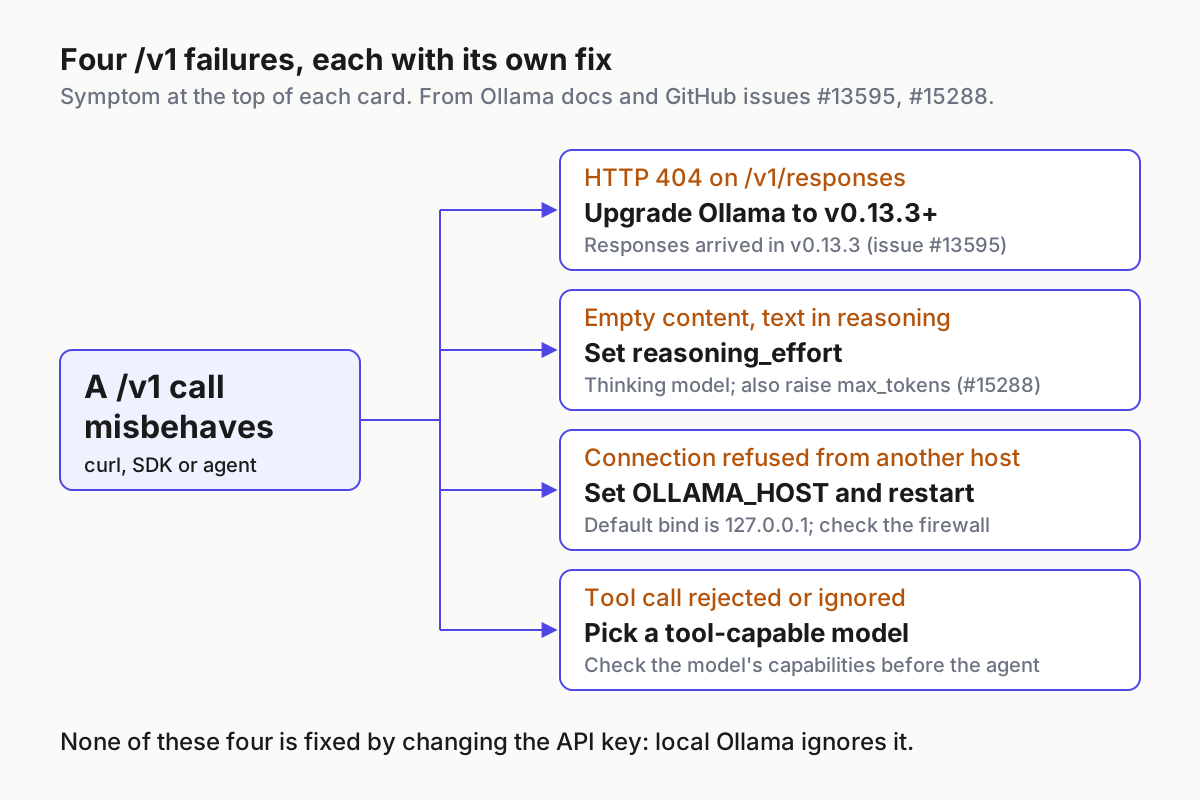
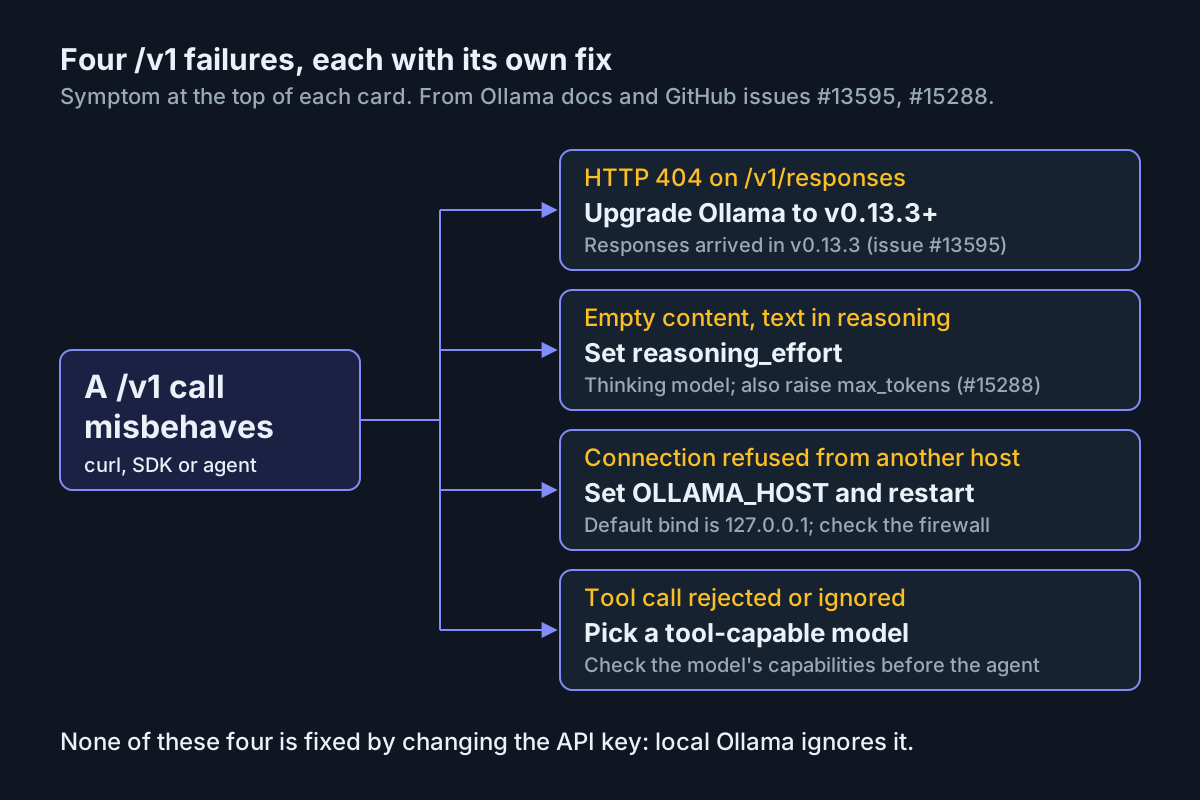
| Symptom | Likely cause | Fix |
|---|---|---|
404 on /v1/responses; chat works |
Ollama older than v0.13.3 (issue #13595) | Upgrade, then repeat step 4 |
content is "" and reasoning contains text |
A thinking model used up max_tokens |
Raise max_tokens, or send reasoning_effort with a value from /api/show |
| Connection refused from another host | OLLAMA_HOST not set, or the server not restarted |
Set it for the right OS and restart the app or service |
| Timeout from another host | Firewall | Allow TCP 11434 only from the machines that need it |
| Error naming the model | Model not pulled | ollama pull qwen3:8b, then check /v1/models |
| Tool call rejected, or prose where a call was expected | Model can’t call tools | Switch to a tool-capable model and check its capabilities |
| Agent forgets files mid-task | Context below 64k | Check CONTEXT in ollama ps, then raise it on the server or with a Modelfile |
503 under load |
Queue full | Raise OLLAMA_MAX_QUEUE, or limit concurrency at the gateway |
Roll back to loopback
Undo the setup in the reverse order you built it:
- Remove the bind address. On Linux, delete the
Environment="OLLAMA_HOST=..."line withsystemctl edit ollama.service, then runsystemctl daemon-reloadandsystemctl restart ollama. On macOS, runlaunchctl unsetenv OLLAMA_HOSTand restart the app. On Windows, delete the variable and restart Ollama. - Confirm the server is back on loopback. The request from step 1 of the remote checks should now fail from the second machine, while
curl http://localhost:11434/v1/modelsstill works on the laptop. - Remove the Codex profile. If you used
ollama launch, runollama launch codex --restore, which removes the profile and the generated model catalog. If you wrote the profile yourself, delete~/.codex/ollama-launch.config.toml. - Remove the OpenCode provider. Delete the
ollamaentry underproviderinopencode.json. Inline configs fromollama launch opencodenever touched that file. - Remove context overrides you no longer need. Delete the
OLLAMA_CONTEXT_LENGTHline, or runollama rm qwen3-64kif you created that model, and restart the server. - Revoke real keys. If any client was pointed at
https://ollama.com/v1with a realOLLAMA_API_KEY, remove that key from the client’s environment.
Sources
- StarFans (@jiangxingfan) on X: question to @ollama about observing cached prefix tokens through the OpenAI-compatible endpoint, Nov 18, 2026
- OpenAI compatibility, Ollama documentation
- Local FAQ, Ollama documentation
- Context length, Ollama documentation
- Codex CLI, Ollama documentation
- OpenCode, Ollama documentation
- Tool calling, Ollama documentation
- API introduction, Ollama documentation
- ollama/ollama issue #13595: version note for /v1/responses support, GitHub, Jan 2026
- ollama/ollama issue #15288: Gemma 4 empty content on /v1/chat/completions, GitHub, Apr 2026