Qwen Code Ollama Setup, Plus LM Studio and OpenRouter: One settings.json, a Tool-Capable Model and Fixes for Common Errors
Qwen Code Ollama setup with LM Studio and OpenRouter: one settings.json with three modelProviders routes, a tool-call check, context sizing and error fixes.

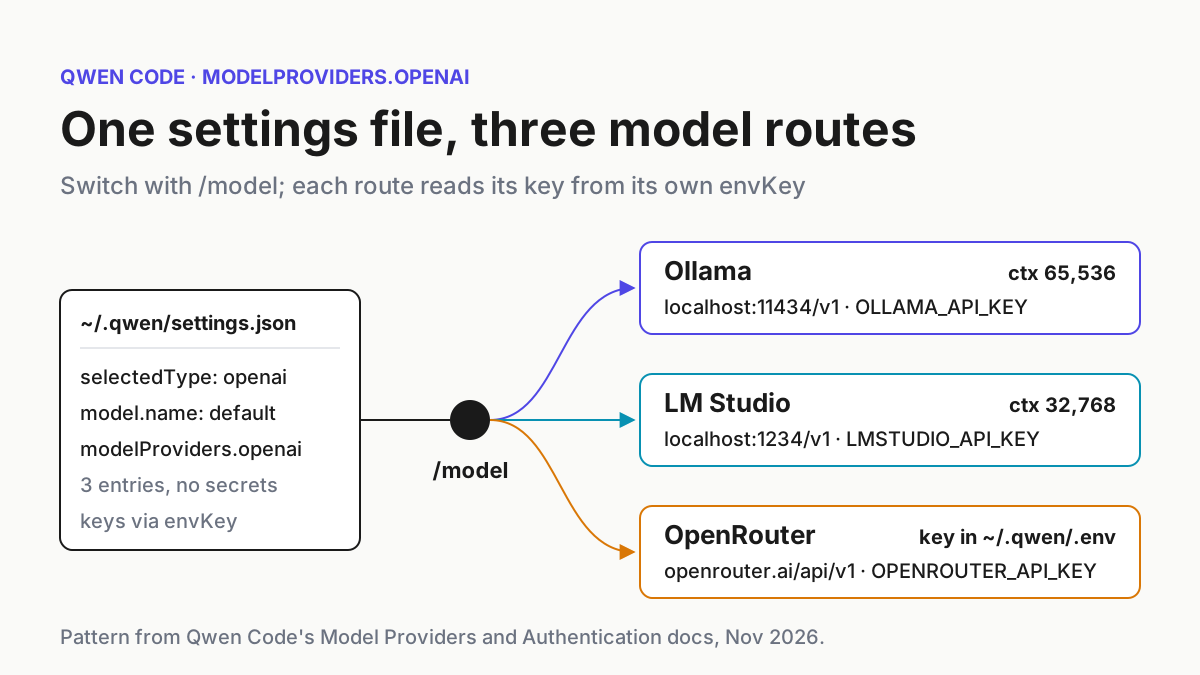
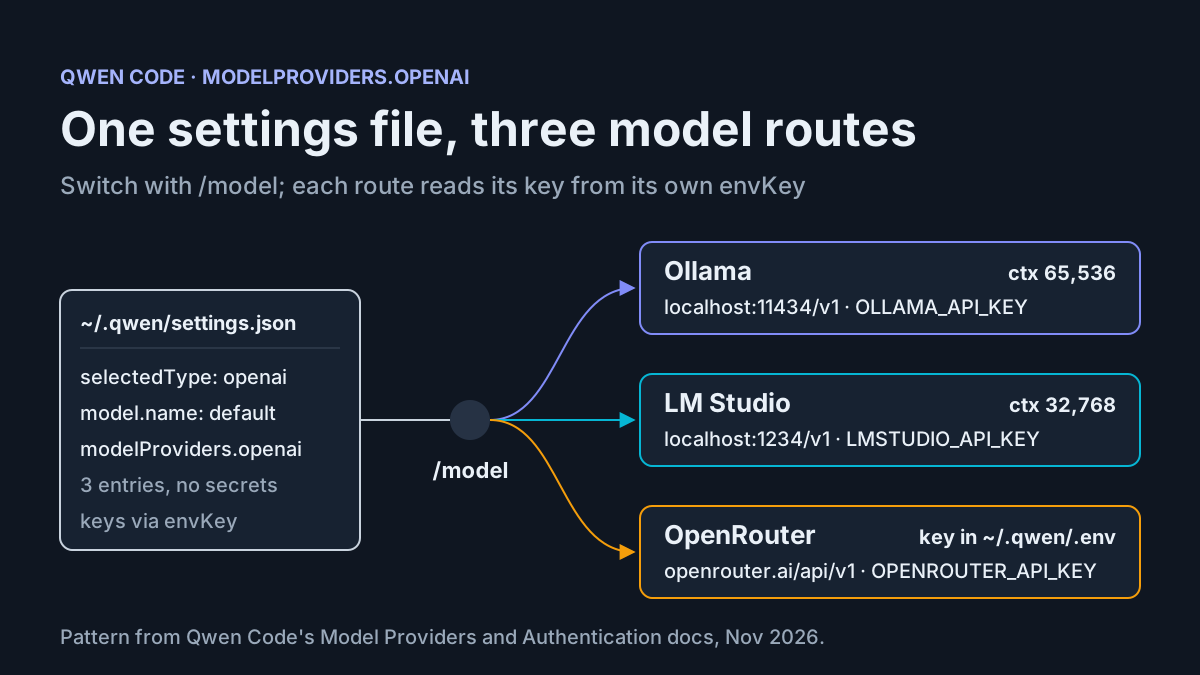
You installed Qwen Code and it works on the default Qwen sign-in. Now you want it to use something else: a coding model in Ollama on your own GPU, a similar model in LM Studio, or a hosted model on OpenRouter for days when the laptop can’t keep up. This Qwen Code Ollama setup covers all three in one file. When you’re done you’ll have a single ~/.qwen/settings.json with three routes under modelProviders.openai, each reading its credential from its own environment variable. You’ll also have a /model picker that switches between them and an ordered set of checks that tells you which layer broke when a route fails.
This guide is for developers who already have Qwen Code installed, are comfortable with JSON and curl, and want a config that works rather than a tour of every field. If Qwen Code is new to you, our field note on the Chinese coding CLIs explains where it fits. The configuration shapes come from Qwen Code’s Model Providers reference and Authentication guide, read on November 18, 2026, plus the Ollama, LM Studio and OpenRouter pages linked in each step.
We did not run these files for this article. Each “expected result” below describes what the documentation says should happen, not output we captured. Model names marked illustrative are placeholders: use whatever your own server reports instead.
One recent report shaped the last troubleshooting section. On November 17, 2026, a user filed QwenLM/qwen-code issue #17536: with a fast local model, the terminal UI kept printing after the inference engine had stopped. A new Qwen Code release shipped the same week, covered in our v0.28.0 news story. Nothing below depends on that release. The rendering symptom gets its own section, including the details the maintainers asked for.
What you need before you start
- [ ] A current Qwen Code build. The troubleshooting FAQ says to rerun the standalone installer, or to run
npm install -g @qwen-code/qwen-code@latestif you installed through npm. - [ ] At least one model server. That means Ollama on
localhost:11434, LM Studio’s server onlocalhost:1234, or an OpenRouter API key. You can start with one route and add the others later. The file below works with any subset as long asmodel.namepoints at a route you actually have. - [ ] A model that can call tools. People skip this one most often. Qwen Code sends tool definitions on every request, as the Model Providers reference notes in its section on self-hosted Qwen models. A model or server without tool calling answers in prose and never reads a file.
- [ ] curl and jq, for the checks that run before Qwen Code is involved.
- [ ] A throwaway repository with a
README.md, so the first test task can’t touch real work. - [ ] A backup of your current settings. Run
cp ~/.qwen/settings.json ~/.qwen/settings.json.bakif the file exists. - [ ] A look at project-level settings. The FAQ lists two settings files:
~/.qwen/settings.jsonand./.qwen/settings.jsonin a project root. If the repository has its ownmodelProvidersblock, that block replaces yours completely. The GitHub copy of the reference calls the merge strategy REPLACE: project settings override the whole section instead of merging into it.
For OpenRouter, we recommend a key you use for nothing else, with a spending limit set in your OpenRouter account so a runaway agent loop has a ceiling. This guide doesn’t rely on how OpenRouter’s spend controls work; check its documentation for that.
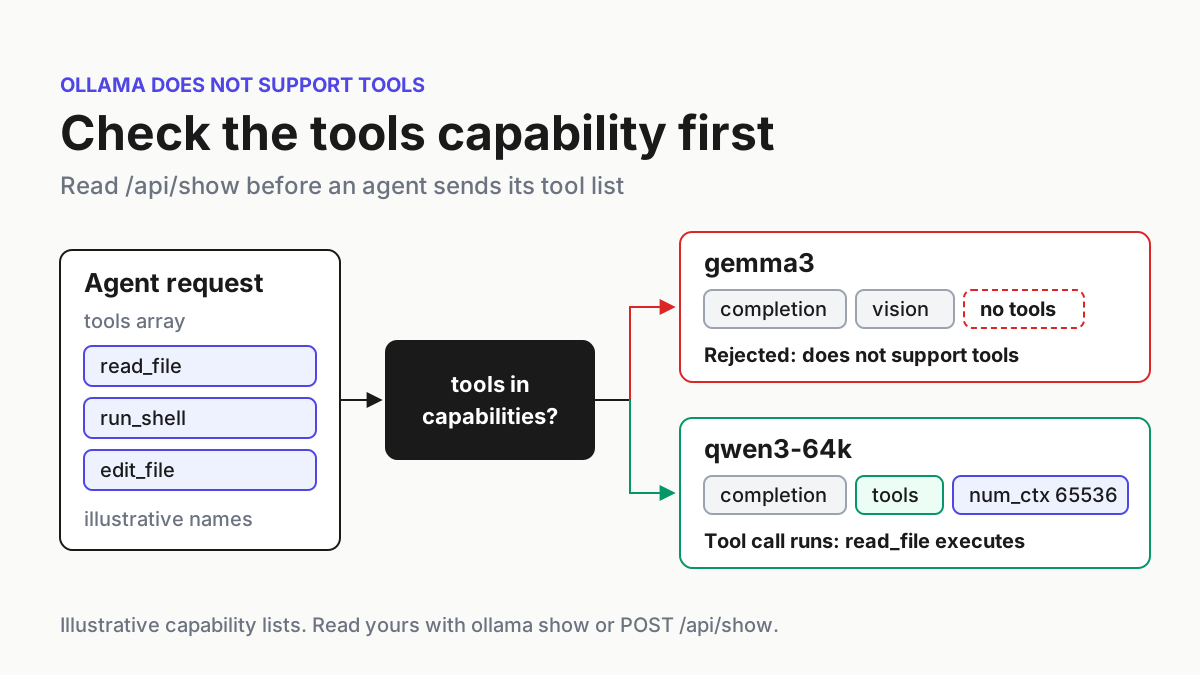
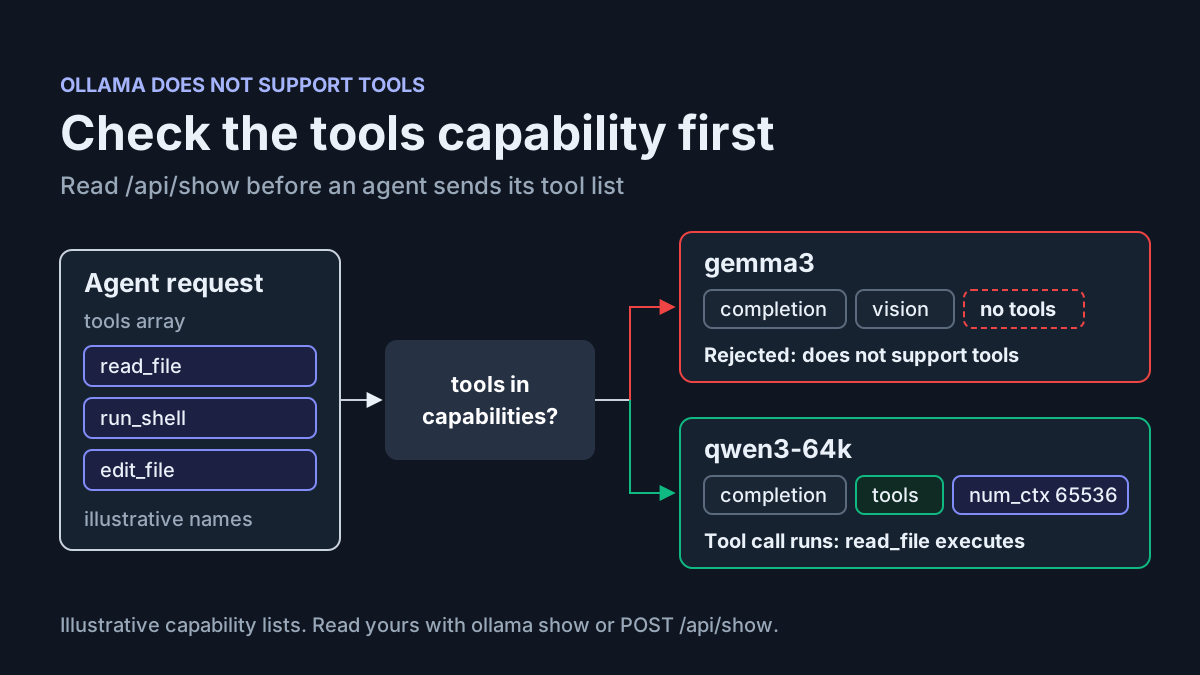
Picking a model is a separate question from wiring it up. If you’re still deciding, start with our survey of open-weight models that can drive a harness. Our guide to Ollama’s “does not support tools” error shows how to read a model’s capabilities before you commit to it.
Give the Ollama model a context window agents can use
Do this before writing any Qwen Code config, because it changes the model name that goes in the file.
Ollama picks a default context length based on your VRAM. Its context length page lists 4k for under 24 GiB, 32k for 24 to 48 GiB, and 256k for 48 GiB or more. The same page recommends at least 64,000 tokens for agents and coding tools. Most single-GPU desktops and laptops fall into the first two rows. A coding agent’s system prompt, tool schemas and file contents can fill a 4k window before your question even arrives. When that happens, the model works from a truncated conversation and nothing warns you.
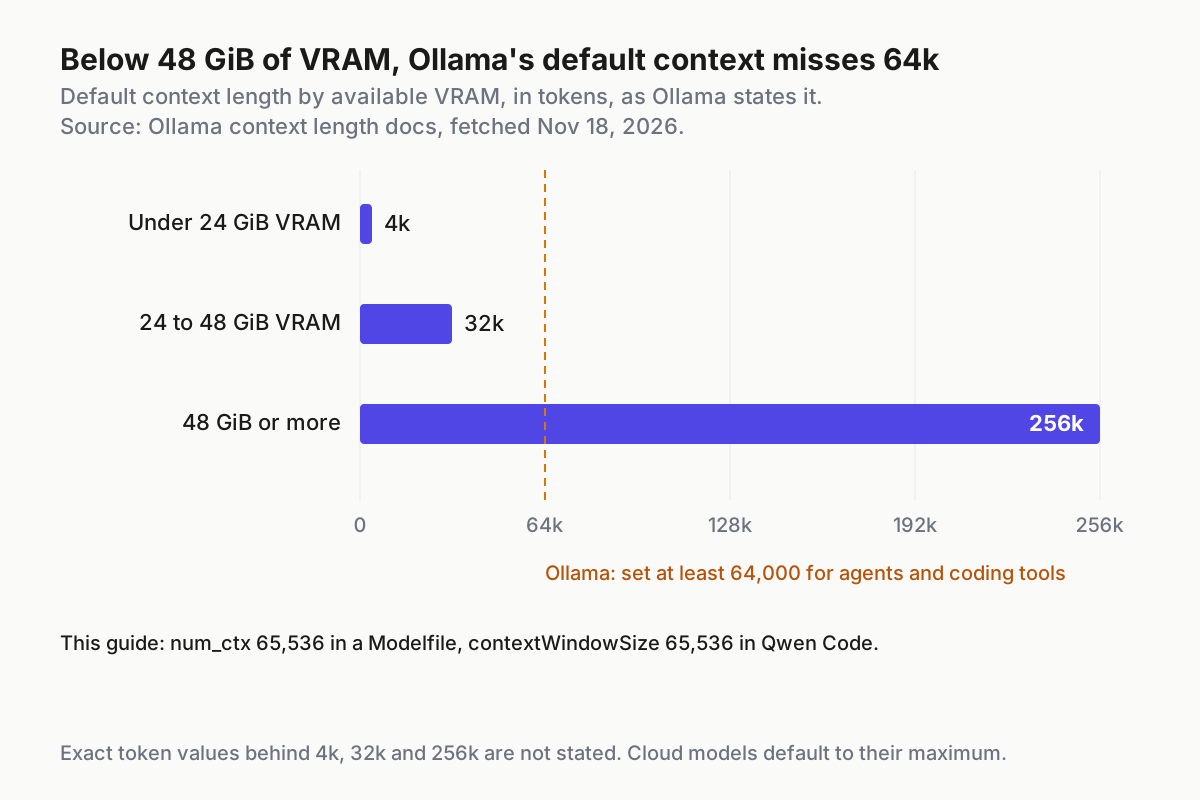
The fix has to happen on the Ollama side. Ollama’s OpenAI compatibility page says the OpenAI API has no way to set context size, so nothing Qwen Code sends can raise it. Instead, you build the size into a new model:
- Pull the base model. The worked example uses
qwen3:8bbecause it appears in Ollama’s own examples. Treat it as illustrative and substitute your own tool-capable model. - Write a two-line Modelfile in an empty directory, as shown below.
- Run
ollama create qwen3-8b-64kin that directory. Ollama’s docs showollama create mymodelbuilding a model with the updated context size. Every later request must use the new name, not the base tag. - Send one request (the probe in the next section does this), then run
ollama ps. The CONTEXT column should read 65536, and the PROCESSOR column shows whether the model fit in GPU memory. Ollama’s docs advise against offloading to the CPU if you want the best performance.
# Modelfile
FROM qwen3:8b
PARAMETER num_ctx 65536
ollama pull qwen3:8b
ollama create qwen3-8b-64k   # run in the directory that holds the Modelfile
ollama ps                     # after the first request: check CONTEXT and PROCESSOR
Why 65,536 rather than exactly 64,000? It clears Ollama’s floor with a little room to spare, and as a round power of two it’s easy to spot in ollama ps. The cost is memory: Ollama warns that a larger context length increases the memory a model needs. If ollama ps shows a CPU/GPU split after the change, either accept slower turns or move to a smaller model. Our local AI workstation guide works through that memory trade-off.
Ollama also documents a server-wide option, OLLAMA_CONTEXT_LENGTH=64000 ollama serve, for when editing the model isn’t possible. It’s quicker, but it applies to every model the server loads. The Modelfile keeps the setting attached to the one model it was sized for.
Next, give Qwen Code the same number. Put contextWindowSize: 65536 in that provider entry’s generationConfig. Two rules in the reference make this necessary.
The first is that the provider layer is “impermeable”. When you select a modelProviders model, top-level model.generationConfig values are ignored for it, contextWindowSize included. A window set anywhere else does nothing.
The second is that context window and thinking control are otherwise inferred from the model id. A renamed model may not match the built-in lookup, and for a Qwen model served under an unrecognised name the reference says the window falls back to a 200K default. If Qwen Code assumes 200K while the server has 64k, it won’t compact the conversation until long after Ollama has started dropping context.
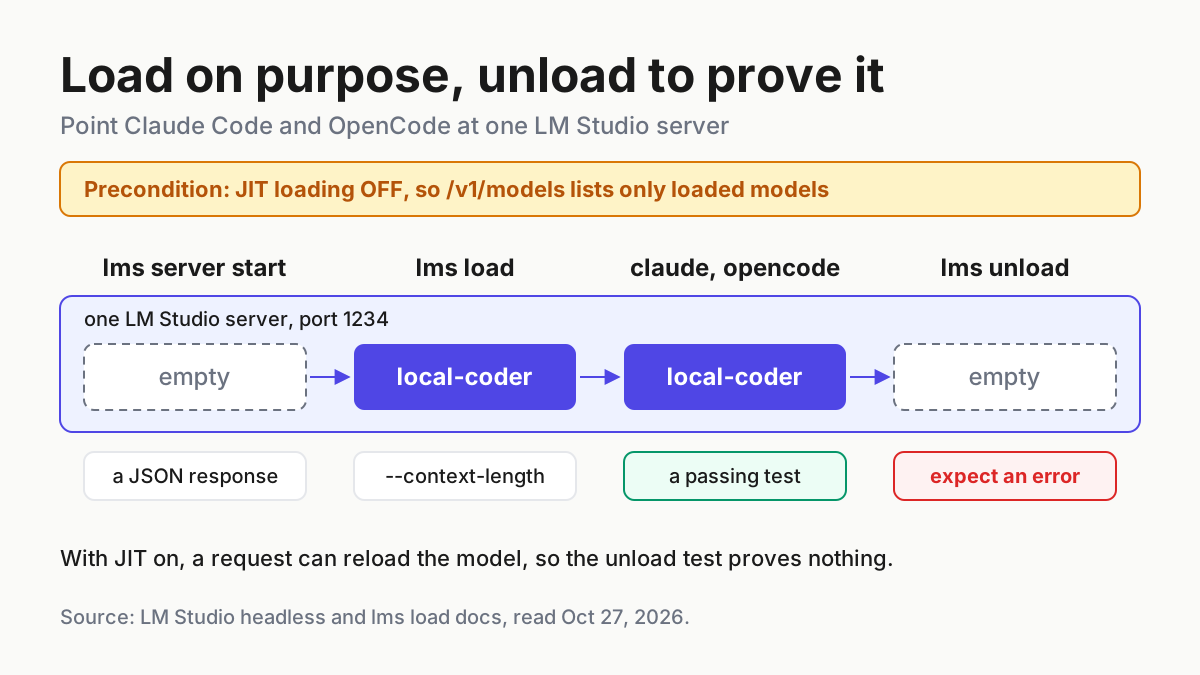
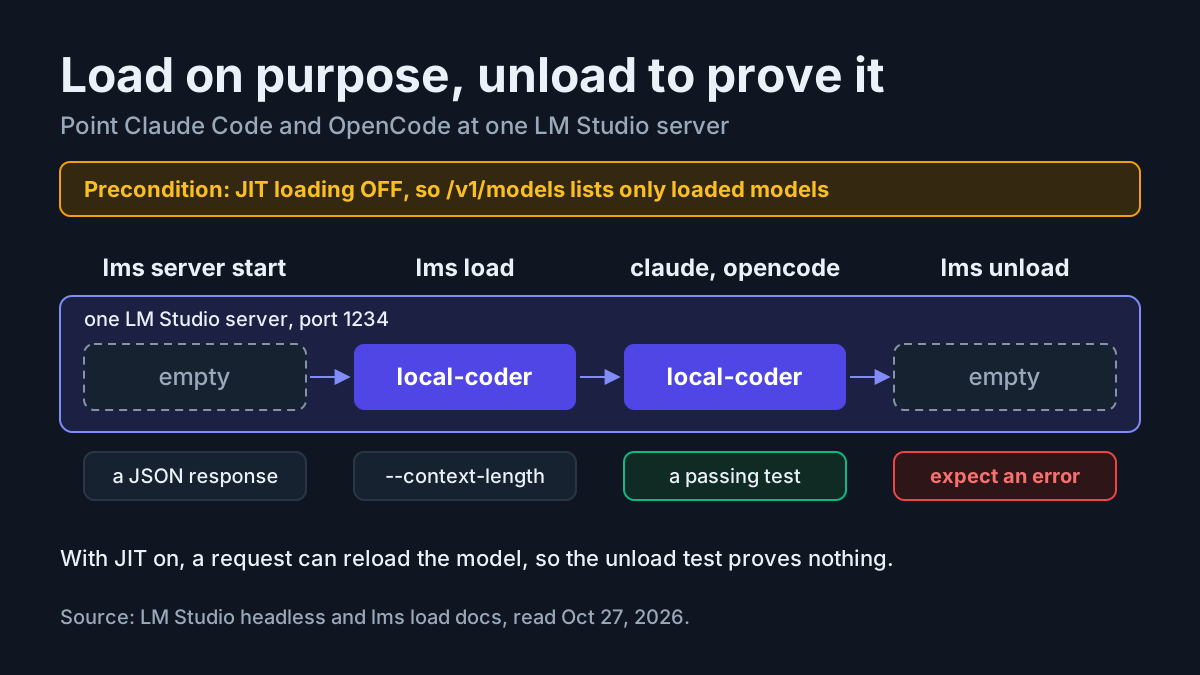
LM Studio sets context when it loads a model, not per request. Its OpenAI compatibility page points to its REST API, which reports model details such as maximum context and whether a model is loaded. Set contextWindowSize to the length the model is actually loaded with. Our LM Studio setup guide covers loading a model at a chosen context length. The worked example assumes 32,768.
Prove each server answers and calls tools
None of the checks in this section involve Qwen Code. If one fails here, no change to settings.json will fix it, and you’ve saved yourself an afternoon of editing the wrong file. The diagram shows the order. Work top to bottom and stop at the first failure.
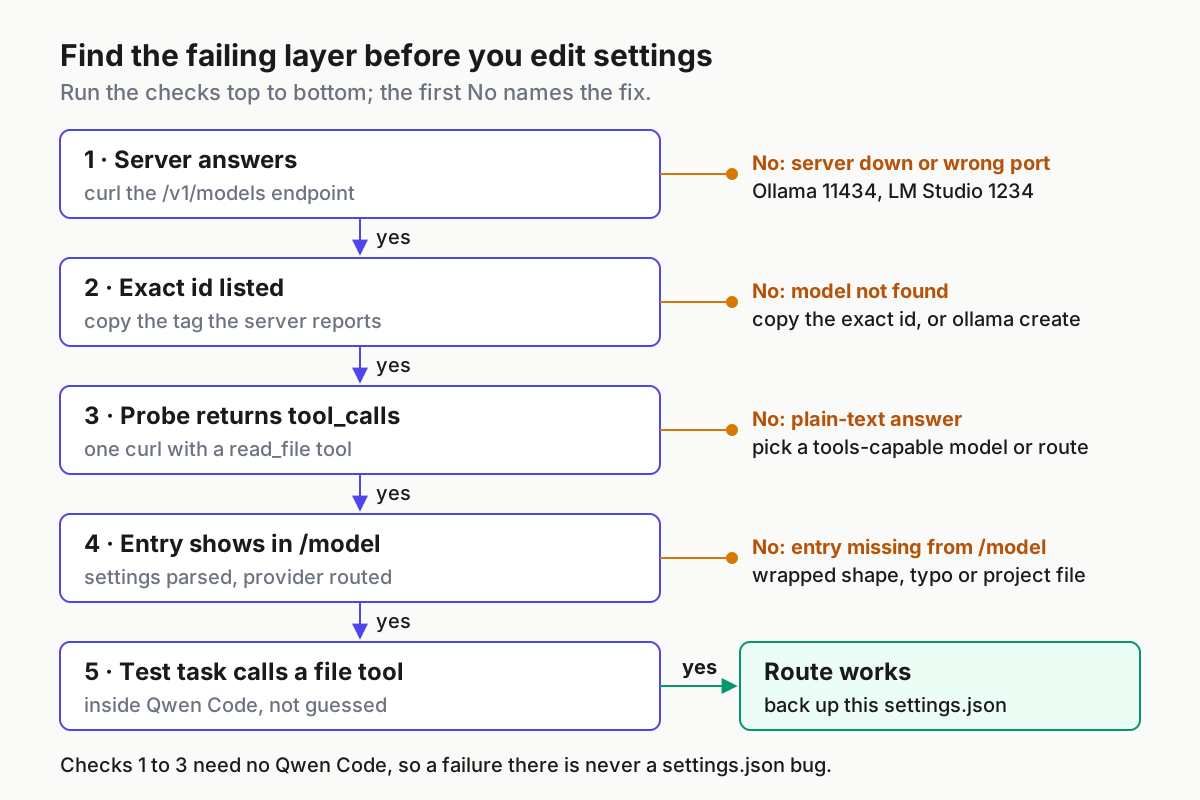
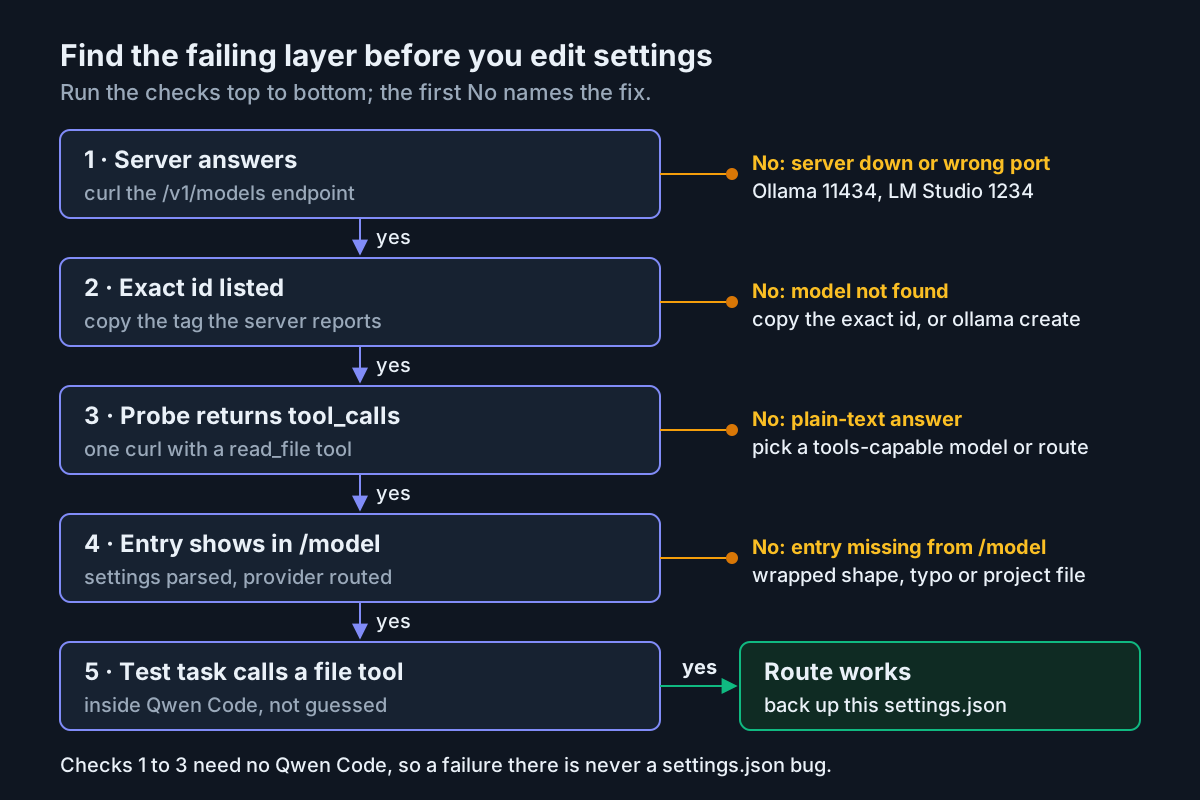
- Ask each local server what it serves. Ollama’s
/v1/modelslists local models. LM Studio exposes the sameGET /v1/modelsendpoint on its default port 1234. Note the exactidstrings: they go into theidfield later, character for character. - Save the probe body. It contains one user message and one tool, in the Chat Completions shape OpenRouter documents for tool calling: function tools nested under
function, with a JSON Schema for the parameters. - Run the probe against each route. A tool-capable model should answer with a
tool_callsentry namingread_file, not with a sentence about what README.md might contain. - Read the result before you move on. A plain-text answer means the model or the route doesn’t support tool calling. On OpenRouter, filter the model list by tool support (
supported_parameters=tools) and pick a model from that list.
# 1. What does each local server serve?
curl -s http://localhost:11434/v1/models | jq .
curl -s http://localhost:1234/v1/models | jq .

# 2. One user message, one tool
cat > /tmp/qwen-probe.json <<'EOF'
{
  "messages": [
    {"role": "user", "content": "Read README.md and report its first line. Use the tool."}
  ],
  "tools": [
    {
      "type": "function",
      "function": {
        "name": "read_file",
        "description": "Read a text file from the current project",
        "parameters": {
          "type": "object",
          "properties": {"path": {"type": "string"}},
          "required": ["path"]
        }
      }
    }
  ]
}
EOF

# 3. Probe one route. Usage: probe BASE_URL KEY MODEL
probe() {
  jq --arg m "$3" '. + {model: $m}' /tmp/qwen-probe.json |
    curl -s "$1/chat/completions" \
      -H "Content-Type: application/json" \
      -H "Authorization: Bearer $2" \
      -d @- | jq '.choices[0].message'
}

probe http://localhost:11434/v1 ollama qwen3-8b-64k
probe http://localhost:1234/v1 lm-studio qwen3-coder-30b-a3b-instruct
probe https://openrouter.ai/api/v1 "$OPENROUTER_API_KEY" qwen/qwen3-coder
A few notes on these choices. Ollama’s docs say OpenAI clients must send an API key value but Ollama ignores it, so ollama is a placeholder that matches Ollama’s own examples. The LM Studio and OpenRouter model ids are illustrative. Replace them with what step 1 printed, or with an id from OpenRouter’s tools-filtered list.
The base URLs stop at /v1 (or /api/v1 for OpenRouter) because that’s also the root Qwen Code needs. The reference says to point baseUrl at the /v1 root rather than the full /v1/chat/completions path, because the SDK adds the request path itself. Getting this right in curl first means the value you paste into the config has already been tested.
Here’s what a passing probe looks like, going by OpenRouter’s description of Chat Completions. You get an assistant message whose tool_calls array holds one entry with "type": "function" and a function named read_file, with arguments containing a path such as README.md. The probe stops there. In a real agent loop, the client runs the tool and sends the result back, and that part is Qwen Code’s job. OpenRouter also notes that the tools parameter has to be included in every request, which Qwen Code already does.
Write the complete ~/.qwen/settings.json
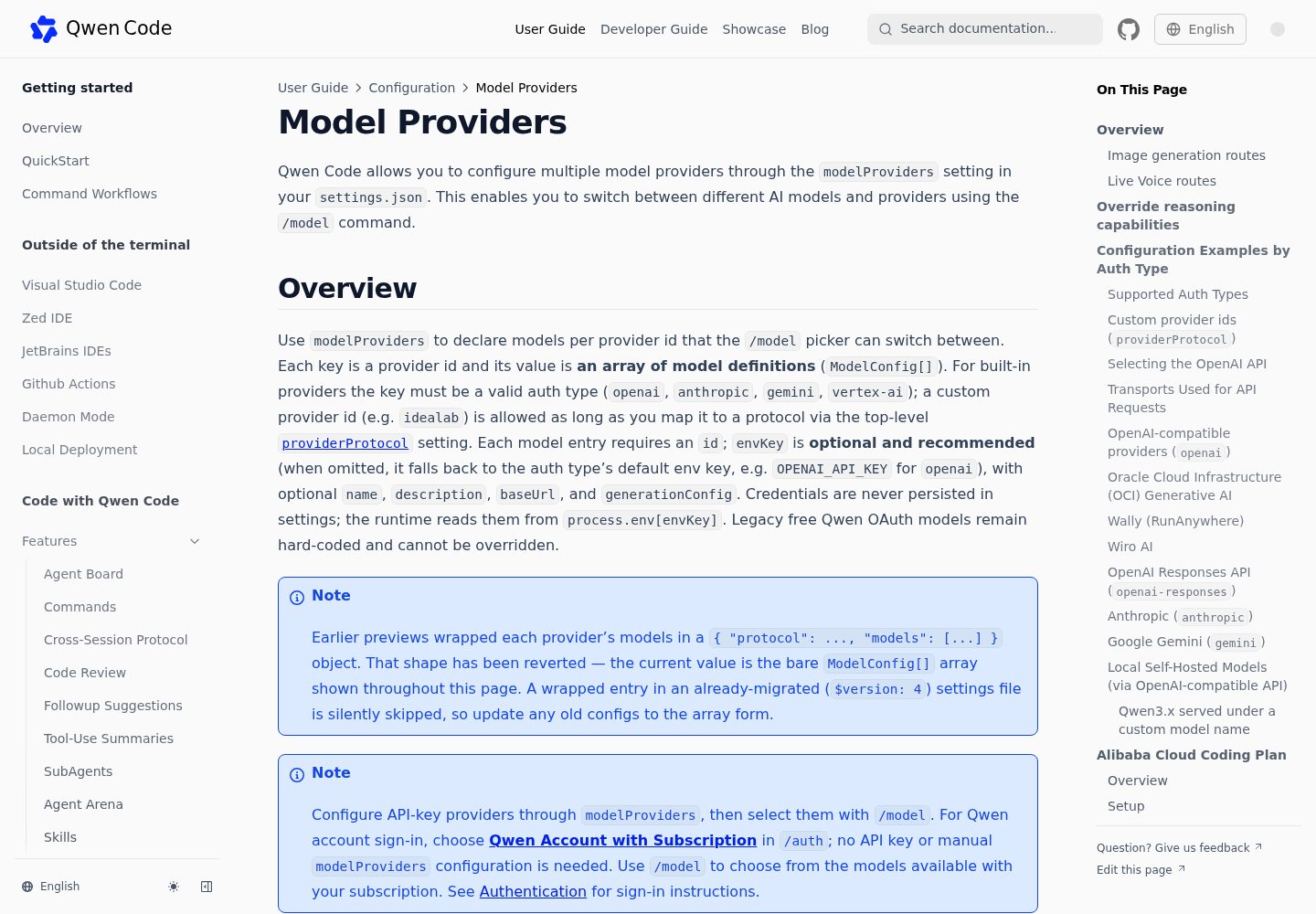
Here is the whole file for the worked example. Save it as ~/.qwen/settings.json. The reference recommends defining modelProviders in this user-scope file so that project and user scopes don’t fight over the provider catalog.
{
  "env": {
    "OLLAMA_API_KEY": "ollama",
    "LMSTUDIO_API_KEY": "lm-studio"
  },
  "modelProviders": {
    "openai": [
      {
        "id": "qwen3-8b-64k",
        "name": "Qwen3 8B, 64k (Ollama)",
        "description": "provider:ollama-local-01",
        "envKey": "OLLAMA_API_KEY",
        "baseUrl": "http://localhost:11434/v1",
        "generationConfig": {
          "timeout": 300000,
          "streamIdleTimeoutMs": 600000,
          "maxRetries": 1,
          "contextWindowSize": 65536
        }
      },
      {
        "id": "qwen3-coder-30b-a3b-instruct",
        "name": "Qwen3 Coder 30B, 32k (LM Studio)",
        "description": "provider:lmstudio-local-02",
        "envKey": "LMSTUDIO_API_KEY",
        "baseUrl": "http://localhost:1234/v1",
        "generationConfig": {
          "timeout": 300000,
          "streamIdleTimeoutMs": 600000,
          "maxRetries": 1,
          "contextWindowSize": 32768
        }
      },
      {
        "id": "qwen/qwen3-coder",
        "name": "Qwen3 Coder (OpenRouter)",
        "description": "provider:openrouter-03",
        "envKey": "OPENROUTER_API_KEY",
        "baseUrl": "https://openrouter.ai/api/v1",
        "generationConfig": {
          "timeout": 120000,
          "maxRetries": 3
        }
      }
    ]
  },
  "security": {
    "auth": {
      "selectedType": "openai"
    }
  },
  "model": {
    "name": "qwen3-8b-64k"
  }
}
| Field | Value in this file | Why it’s set this way |
|---|---|---|
env |
Placeholders for the two local servers only | The Authentication guide calls this block the lowest-priority fallback and warns it’s stored in plain text. A placeholder like ollama is fine here. The real OpenRouter key goes in a .env file (next section). |
modelProviders.openai |
A bare array of three entries | openai is a built-in provider id for OpenAI-compatible APIs, Ollama, LM Studio and OpenRouter included. The value must be an array. The older wrapped form { "protocol": ..., "models": [...] } was reverted and is silently skipped in migrated files. |
id |
The exact string the server reports | This is the model id sent to the API. A Modelfile name, an LM Studio identifier and an OpenRouter slug each have their own form, so copy each from its source. |
name, description |
Display text and the case label | name is what the /model picker shows. description is optional; here it carries the worked example’s case label. |
envKey |
One variable per route | This holds the name of an environment variable, not the key itself. The reference says credentials are never persisted in settings and the runtime reads process.env[envKey]. |
baseUrl |
The /v1 root, or /api/v1 for OpenRouter |
The SDK appends the request path itself. These values match the curl probes. |
timeout, streamIdleTimeoutMs, maxRetries |
Long and patient for local, shorter for hosted | These values come from the reference’s own local and OpenRouter examples. streamIdleTimeoutMs is how long a model may go silent between streamed chunks. |
contextWindowSize |
65,536 and 32,768 for the local routes | Must match what the server actually serves. Lower settings layers can’t supply it for provider models. |
security.auth.selectedType |
openai |
Tells Qwen Code which protocol to use at startup. Without it, Qwen Code asks you to run /auth. |
model.name |
qwen3-8b-64k |
The route that’s active at startup. It must match one of the id values. |
A few more points to understand before you edit the file.
There’s deliberately no samplingParams block. The reference treats samplingParams as an atomic object: a provider’s value replaces the entire object rather than merging with other settings. It also says that, for most OpenAI-compatible models, setting samplingParams makes Qwen Code send those keys exactly as written and skip its separate reasoning injection. Leaving the block out keeps each server’s defaults and Qwen Code’s reasoning handling intact. Add it later, deliberately, if you need it.
Each route has its own envKey, even the local ones. You could leave envKey out, in which case the openai auth type falls back to OPENAI_API_KEY. But then the two local placeholders and the real OpenRouter key would all compete for one variable, and a wrong value would break every route at once. Separate names keep failures separate.
Entries are unique by protocol, id and baseUrl. If two entries share all three values, the first one wins and the later one is skipped with a warning. That’s harmless until you copy and paste an entry and forget to change it. A provider id that’s neither built in nor mapped through providerProtocol (a typo such as openai-custom, for example) has its whole block skipped. The result looks the same: models that never appear in /model.
The OpenRouter entry has no contextWindowSize, and you may need to add one. For the Wiro gateway, the reference explains that the built-in lookup only sees the part of an id after the last /, and that an id whose last segment the lookup doesn’t recognise gets the generic 200K window. If OpenRouter’s page for your chosen model lists a different context length, pin contextWindowSize to that value. One related detail: when reasoning is disabled on an openrouter.ai base URL, Qwen Code sends OpenRouter’s provider-level reasoning: { enabled: false } field, so you don’t need a custom flag for that.
Put the OpenRouter key where Qwen Code reads it
The Authentication guide lists four places a key can come from, highest priority first:
| Priority | Source | Behaviour |
|---|---|---|
| 1 | CLI flags such as --openai-api-key |
Always wins |
| 2 | Shell environment (export, or inline before qwen) |
Overrides .env and the env block |
| 3 | A .env file |
Only sets variables not already in the environment |
| 4 | settings.json → env |
Only applies when neither of the above set the variable |
The .env rule has a catch that causes a lot of mysterious 401 errors. Qwen Code loads only the first .env file it finds and doesn’t merge across files. It searches from the current directory upward, looking for .qwen/.env and then .env at each level, and only checks ~/.qwen/.env and ~/.env if it found nothing on the way up. If a project has its own .qwen/.env, your home-directory key won’t load while you work in that project.
- Create
~/.qwen/.envand add one line:OPENROUTER_API_KEY=sk-or-...with your real key. - Restrict the file to your user with
chmod 600 ~/.qwen/.env. - In any project that has its own
.qwen/.envor.env, either add the key there too (and keep that file out of git) or export it in your shell profile. The shell always wins. - Keep the real key out of the
settings.jsonenvblock. The guide notes that values there are stored in plain text, and settings files tend to get shared or synced. - Confirm the variable is visible without printing it:
printenv OPENROUTER_API_KEY >/dev/null && echo set. If the key is only in.env, this shell check won’t see it, but Qwen Code will, provided no other.envfile takes precedence.
You could also connect OpenRouter interactively. The Authentication guide lists OpenRouter among the built-in Third-party Providers in /auth. Its table of replacements for the removed qwen auth command gives the scripted equivalent as OPENROUTER_API_KEY plus OPENAI_BASE_URL=https://openrouter.ai/api/v1. This guide uses a manual entry instead so all three routes sit side by side in one file you can read and diff. The guide also notes that a provider-specific variable such as OPENROUTER_API_KEY only takes effect once a provider entry names it as envKey. It doesn’t pick the auth type on its own; security.auth.selectedType does that.
Switch routes with /model and check them with /doctor
- Change into the throwaway repository and run
qwen. Because the file setsselectedTypeandmodel.name, it should start on the Ollama route without asking you to authenticate. - Run
/doctor. The Authentication guide names it as the way to check current authentication now thatqwen auth statusis gone. The docs don’t publish its output format, so don’t expect particular wording. What you want to see is that it reflects OpenAI-compatible authentication rather than Qwen OAuth. If your build also shows the base URL, it should match the active entry. - Run
/model. The picker groups models by protocol, and all three display names should appear under openai. Select one. The guide says the selection is saved across sessions. - Check where the selection was written. The reference says
/modeland/authsavemodel.nameandsecurity.auth.selectedTypeto the nearest writable scope that already definesmodelProviders, which here is the user file you just wrote. - Edit freely while Qwen Code is running. Changes to
modelProvidersare picked up without a restart: the file watcher waits about 300ms after a change, and you reopen/modelto see new entries. OnlyproviderProtocolneeds a restart, and this file doesn’t use it. Changes to.envfiles are read from the environment at startup, so restart after editing one. - To pin a route for one terminal, start it with
qwen --model "qwen/qwen3-coder". The guide shows--modelas the way to run different models in different terminals.
If you run several Qwen Code sessions on different routes at the same time, say a local model refactoring in one terminal and a hosted model reviewing in another, the habits in our multi-agent command center guide help you keep track of which session is waiting on you.
Worked example: three routes, one test task
This table follows the three cases from the check ladder through to a real task. All results are illustrative expected observations taken from the documentation, not output we captured.
| Input | Action | Expected result |
|---|---|---|
provider:ollama-local-01: Ollama on localhost:11434, model qwen3-8b-64k built from qwen3:8b with num_ctx 65536 |
curl -s http://localhost:11434/v1/models |
Illustrative: a JSON list that includes the id qwen3-8b-64k. A connection-refused error means Ollama isn’t running on that port. |
| provider:ollama-local-01 | probe http://localhost:11434/v1 ollama qwen3-8b-64k, then ollama ps |
Illustrative: an assistant message with a tool_calls entry naming read_file. ollama ps lists qwen3-8b-64k with CONTEXT 65536. |
provider:lmstudio-local-02: LM Studio server on localhost:1234, illustrative id qwen3-coder-30b-a3b-instruct loaded at 32,768 tokens |
curl -s http://localhost:1234/v1/models, then copy the exact id into settings.json |
Illustrative: the loaded model’s identifier appears. If it differs from the illustrative id, the file must use the printed one. |
| provider:lmstudio-local-02 | probe http://localhost:1234/v1 lm-studio followed by the id from that list |
Illustrative: tool_calls with read_file. Prose instead means this model or server setup won’t drive Qwen Code’s tools. |
provider:openrouter-03: OpenRouter, illustrative id qwen/qwen3-coder, key in ~/.qwen/.env and exported in the test shell |
probe https://openrouter.ai/api/v1 "$OPENROUTER_API_KEY" qwen/qwen3-coder |
Illustrative: tool_calls with read_file. With the variable unset, the same call should be rejected for missing authentication, the same 401 you’d see inside Qwen Code. |
All three routes in ~/.qwen/settings.json |
Start qwen, run /doctor, then /model |
Illustrative: /doctor reflects OpenAI-compatible auth, not Qwen OAuth. /model lists Qwen3 8B, 64k (Ollama), Qwen3 Coder 30B, 32k (LM Studio) and Qwen3 Coder (OpenRouter) under openai. |
| Each route selected in turn, in the throwaway repo with README.md | Send the test prompt below | Illustrative: a file-read tool call appears in the transcript before the answer, and the quoted line matches head -n 1 README.md. |
The test prompt is the same for every route:
Read README.md with your file tools and quote its first line exactly. Do not guess.
Here’s how to read the outcome. A visible tool call followed by the correct line is a pass for that route. A confident answer with no tool call is a failure even if it happens to be right, because it means the model is ignoring the tools Qwen Code offers, and it will do the same on harder tasks. A tool call followed by an error usually points at the file path or a sandbox setting, not at the provider. The FAQ suggests checking paths and permissions first when a file-system tool fails.
Once all three routes pass, copy the file to ~/.qwen/settings.json.good. You’ll want it the next time something changes.
Fix 401, model not found and missing tool calls
Start with the fault ladder above: if a curl check fails, the problem is the server or the key, not Qwen Code. If the curl checks pass and Qwen Code still misbehaves, use this table.
| Symptom | Likely cause | Fix |
|---|---|---|
| 401 on the OpenRouter route only | OPENROUTER_API_KEY isn’t in Qwen Code’s environment. Often a project .env shadowed ~/.qwen/.env, or the envKey spelling differs from the variable name. |
Export the key in the shell that launches qwen, or add it to the project’s .env. Make the envKey value match the variable name exactly. Restart. |
| 401 on every route after an edit | The key itself was pasted into envKey instead of the variable’s name |
Put the variable name back in envKey and the value in .env or env |
| Model not found, or a 404 naming the model | id doesn’t match the server: the Ollama base tag instead of the created name, or a guessed LM Studio identifier |
Copy the id from /v1/models or from OpenRouter’s model list, character for character |
An entry never appears in /model |
Wrapped {protocol, models} shape, a provider-id typo, a duplicate entry, or a project modelProviders block replacing yours |
Use the bare array under openai, look for skip warnings, and check ./.qwen/settings.json |
| The model answers in prose and never reads files | The model or serving path doesn’t support tool calling | Re-run the probe. Pick a tools-capable model. On vLLM, the reference names --enable-auto-tool-choice, a --tool-call-parser and --reasoning-parser. |
| The agent forgets files it read a few turns ago | The server’s context is smaller than contextWindowSize claims |
Compare ollama ps CONTEXT with the entry, then rebuild the model or lower the setting |
| A slow local stream cuts off mid-answer | Idle or lifetime stream limits | Raise streamIdleTimeoutMs (0 disables the idle guard). The reference describes a separate 15-minute lifetime cap, controlled by QWEN_STREAM_MAX_LIFETIME_MS. |
Connection error (cause: fetch failed) against an https local server |
Self-signed certificate | Trust it with NODE_EXTRA_CA_CERTS. Use --insecure or QWEN_TLS_INSECURE=1 only on a network you fully trust. |
| The UI won’t appear after a failed authentication | A failed security.auth.selectedType was saved |
Remove that field from settings.json and restart, as the troubleshooting page describes |
| Qwen Code exits with code 52 | FatalConfigError: settings.json is invalid |
Run jq . ~/.qwen/settings.json to find the JSON error. Code 41 is an authentication failure instead. |
| Reasoning settings seem to be ignored | A samplingParams block makes most OpenAI-compatible routes skip reasoning injection |
Remove samplingParams, or put the provider’s own reasoning knob inside it |
Two general tools help when the table doesn’t. Starting with qwen --safe-mode disables extensions, hooks, skills, settings-based MCP servers and similar customizations for one session. If a problem disappears in safe mode, a customization is the cause, not your provider entry. And if you serve models with llama.cpp rather than Ollama or LM Studio, the same openai entry shape applies; our llama-server flags guide covers the server-side settings that decide context and tool templates.
When the TUI keeps printing after the model has stopped
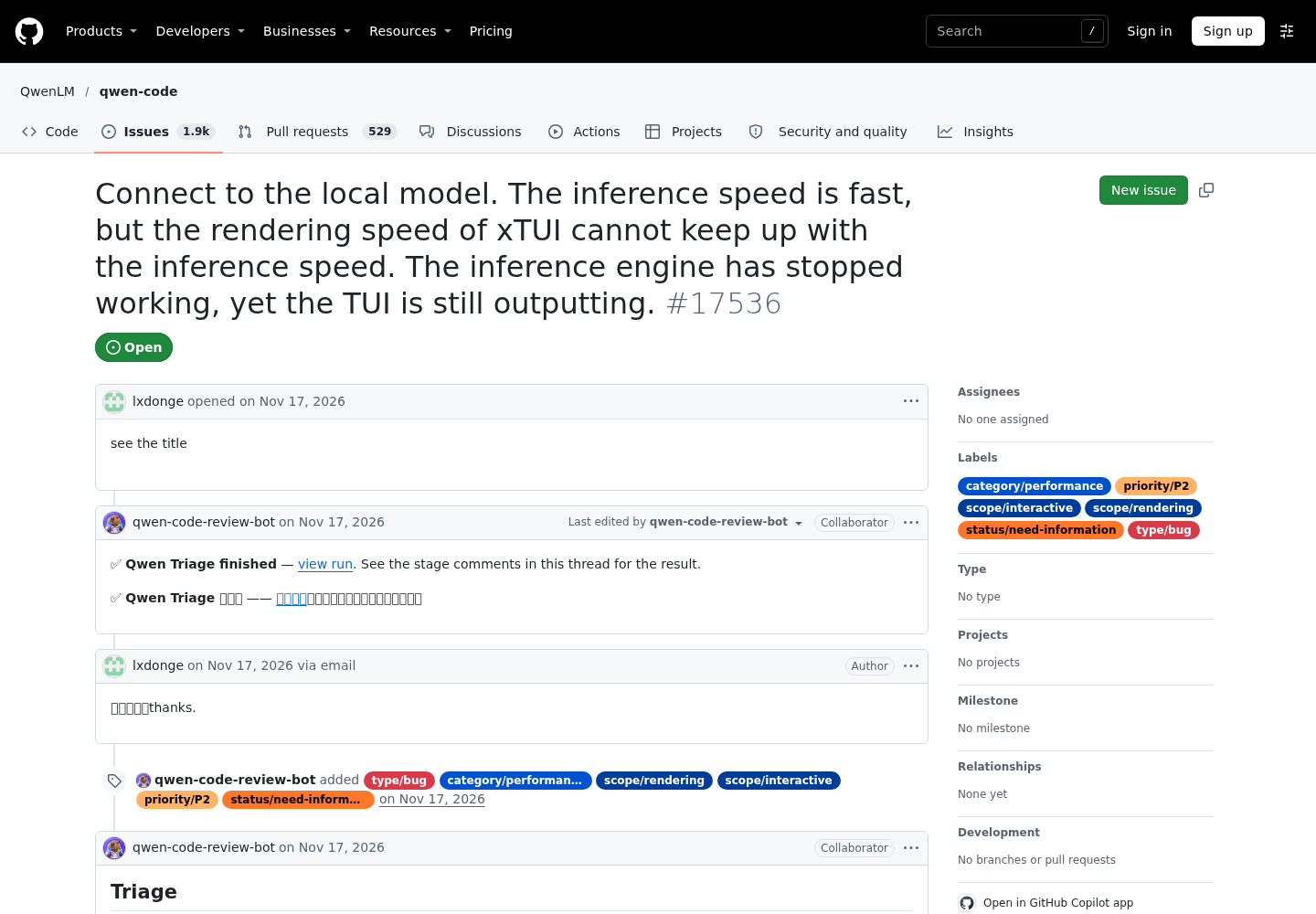
Issue #17536 describes a symptom you may notice right after switching to a fast local route. The inference engine has finished, but Qwen Code’s terminal UI keeps printing for a while. The issue is labelled as a P2 rendering and performance bug and marked as needing more information.
The triage comment includes a static analysis, explicitly marked as plausible and not reproduced. In it, streamed tokens are batched into UI updates roughly every 60 ms, and each update re-parses and re-renders the live Markdown block. Each update therefore costs more as the pending text grows. With a very fast model and a long response, that per-frame work can exceed the frame budget and stall the event loop. Stream events and terminal writes then queue up and keep draining after the server stops. The analysis also says neither renderer paces output with a deliberate typewriter queue.
In practice, this is a display backlog, not a model or provider fault. Your route is probably fine. Don’t restart the server or rewrite settings.json because of it.
If you see it, the most useful thing you can do is add the details the maintainers requested:
- [ ] The output of
/about, which reports the CLI version, operating system and terminal. - [ ] Your terminal emulator, and whether
QWEN_TUI_RENDERERis set. The triage says the default is the ink renderer andopentuiis the experimental one. - [ ] The local backend (for example Ollama or LM Studio), roughly how many tokens per second it produces, and how long the response was when the lag appeared.
- [ ] Whether the lag grows with response length, whether the UI eventually catches up, and how long after the server stops it does so.
- [ ] A short screen recording, which the maintainers said would help a lot.
Two experiments add useful data without pretending to be fixes. First, run the same prompt once under each renderer and note which one falls behind. The triage calls opentui experimental, so treat it as a comparison, not a recommended setting. Second, ask for a shorter answer and see whether the lag shrinks, since the analysis ties the cost to how long the response is. A hard output cap through samplingParams would also shorten responses, but remember the trade-off from the settings section: that block replaces the whole object and changes how reasoning is sent.
Roll back to your Qwen account
- Quit every running
qwensession. - Restore the backup with
cp ~/.qwen/settings.json.bak ~/.qwen/settings.json. If you didn’t make one, delete themodelProviders,security.auth.selectedTypeandmodel.nameentries you added, and theenvplaceholders if you like. - Start
qwenand choose Qwen Account with Subscription from the first-run menu, or run/authand pick it. The Authentication guide says this path signs in through the browser and needs no API key and no manualmodelProvidersconfiguration. - If the UI doesn’t appear after a failed attempt, remove
security.auth.selectedTypefrom~/.qwen/settings.json(and from./.qwen/settings.jsonif a project file set it), then restart. The troubleshooting page documents this exact recovery. - Remove
OPENROUTER_API_KEYfrom~/.qwen/.envand any project.envfile. If the key was ever committed or pasted somewhere public, revoke it in your OpenRouter account rather than just deleting the line. - To go back to the local routes later, copy
~/.qwen/settings.json.goodinto place. Hot reload picks up the provider list, and/modeltakes you back to whichever route you were using.
A partial rollback is often all you need. Keep the file, use /model to choose the route that works, and remove the failing entry. The other routes don’t depend on it.
Sources
- Connect to the local model… the TUI is still outputting, issue #17536, QwenLM/qwen-code on GitHub, filed November 17, 2026
- Model Providers, Qwen Code Docs
- Authentication, Qwen Code Docs
- Troubleshooting, Qwen Code Docs
- docs/users/configuration/model-providers.md, QwenLM/qwen-code on GitHub
- OpenAI compatibility, Ollama docs
- Context length, Ollama docs
- OpenAI Compatibility Endpoints, LM Studio docs
- Tool & Function Calling, OpenRouter docs