OpenCode Context Limit Errors: Fix 413 Request Entity Too Large, Stop Compaction Loops and Recover a Stuck Session
OpenCode context limit errors explained: tell a 413 byte limit from token overflow, save the stuck session, undo or compact, then cap images and set limits.

A post on X dated Nov 24, 2026 describes a failure many OpenCode users will recognise. Partway through a long conversation on deepseek-v4.1-flash, the provider answered with a 413. The agent then got stuck in a loop nobody could break, and the whole conversation was lost. The author asked the useful question: how do you get it back without starting again?
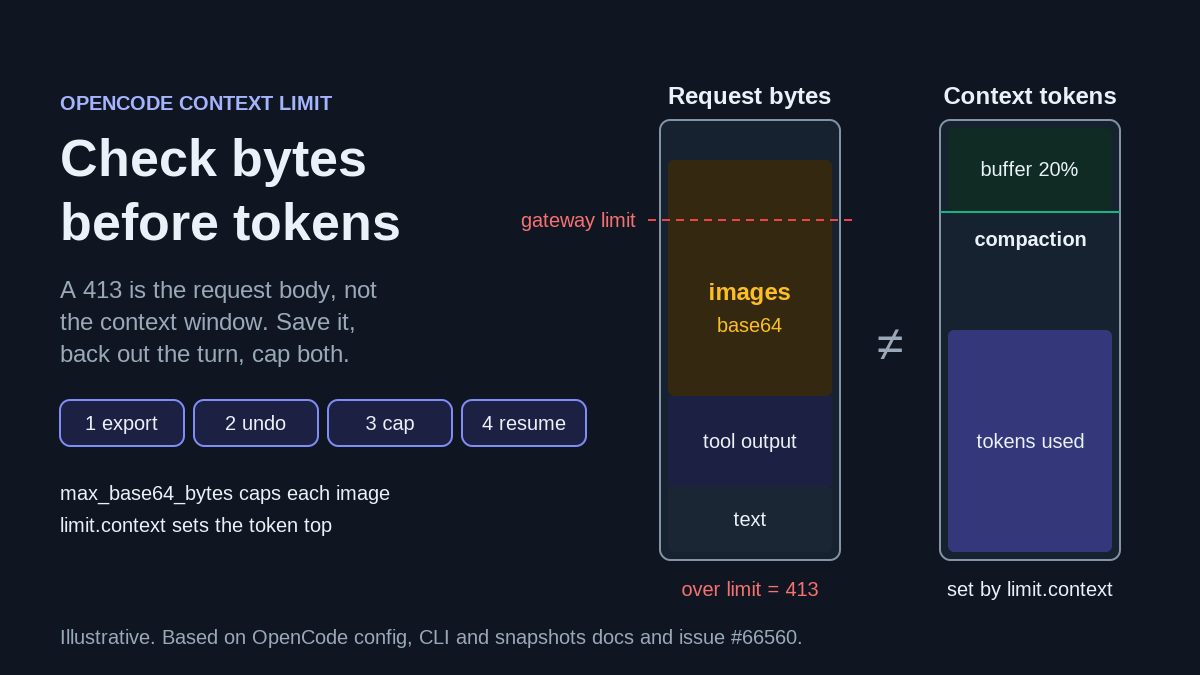
This guide answers that question for OpenCode V2. An OpenCode context limit error is often not about the context window at all. A 413 means some server refused the size of the HTTP request in bytes, and the model’s token budget can be nowhere near full when it happens. The fix depends on which limit you hit. The most important step comes first: save the session before you touch it.
Who this is for. You run OpenCode V2 against a hosted provider, a custom OpenAI-compatible gateway or a local server. You are seeing 413 Request Entity Too Large, a “request too large” message, a 408 that keeps retrying, or a /compact that fails with the same error as the turn it was meant to rescue. If you have not written a V2 config yet, start with our OpenCode V2 setup guide and come back.
What you will have at the end. A JSON export of the stuck session taken before any change, a session that runs again from the point before the oversized turn, and an opencode.jsonc that caps image and tool-output bytes and sets an explicit token limit so automatic compaction starts early. Every value in the worked example is illustrative. Nothing below was run for this article, and the expected observations are what the documentation and the public issue reports say you should see.
Why a 413 Is a Byte Limit, Not a Token Limit
Two different ceilings sit in front of every model call, and they are measured in different units.
The context window is counted in tokens. OpenCode reads it from each model’s limit block, which the providers reference describes as the model’s context, input and output token limits, and it uses that budget to decide when to compact. If the token idea is new to you, our context window explainer covers the same logic for another agent.
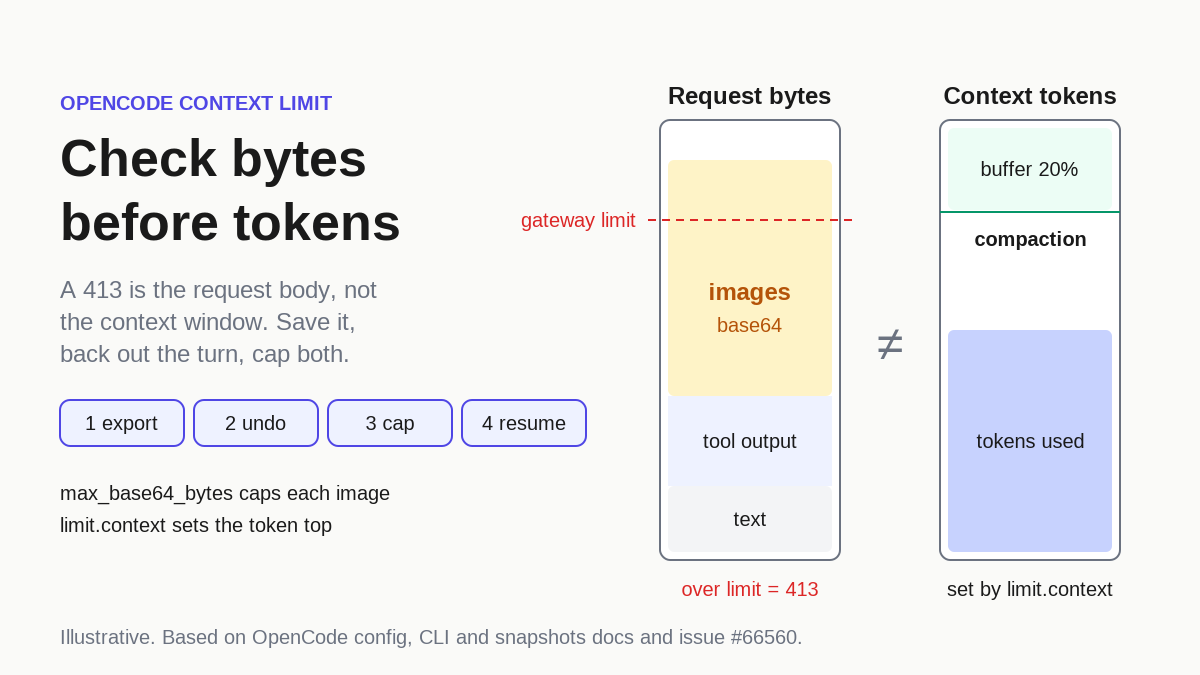
The request body is counted in bytes. Every hop between OpenCode and the model can enforce its own maximum: a company gateway, a reverse proxy, the provider’s front door. HTTP 413 is that second ceiling. It says nothing about tokens.
Images are where the two measures part company. When the read tool loads an image, it travels as base64 inside the request, and it travels again on every later request that still carries that history. OpenCode issue #66560 contains the clearest public measurement. A stuck session carried about 20.5 MB of base64 images in a request of only about 163k tokens. The reporter replaced the image payloads in stored history with one-line placeholders and changed nothing else. The same session then ran five consecutive steps at 157k to 161k tokens. The token count was the same and the body was about 20 MB smaller, and the error was gone.
OpenCode’s automatic compaction watches tokens, not bytes. The config reference defines compaction.buffer as the share of the model’s context window kept free before automatic compaction starts. It also says automatic compaction uses the selected model’s usable input budget. A byte-heavy request can therefore fail long before any token threshold is reached, so compaction never gets a chance to help.
The loop comes from what happens next. If OpenCode files the failure as transient, it resends. In the #66560 reproduction on v2.4.2, a mock gateway received 11 requests in about 85 seconds. Each one was 1,217,507 bytes and carried the same content hash. An older report, issue #14562, described a second trap: compaction itself sent the full base64 images, so /compact failed with the same 413. Either way, the session keeps feeding the same oversized body to the same wall.
How OpenCode v2.4.2 Sorts Size Errors
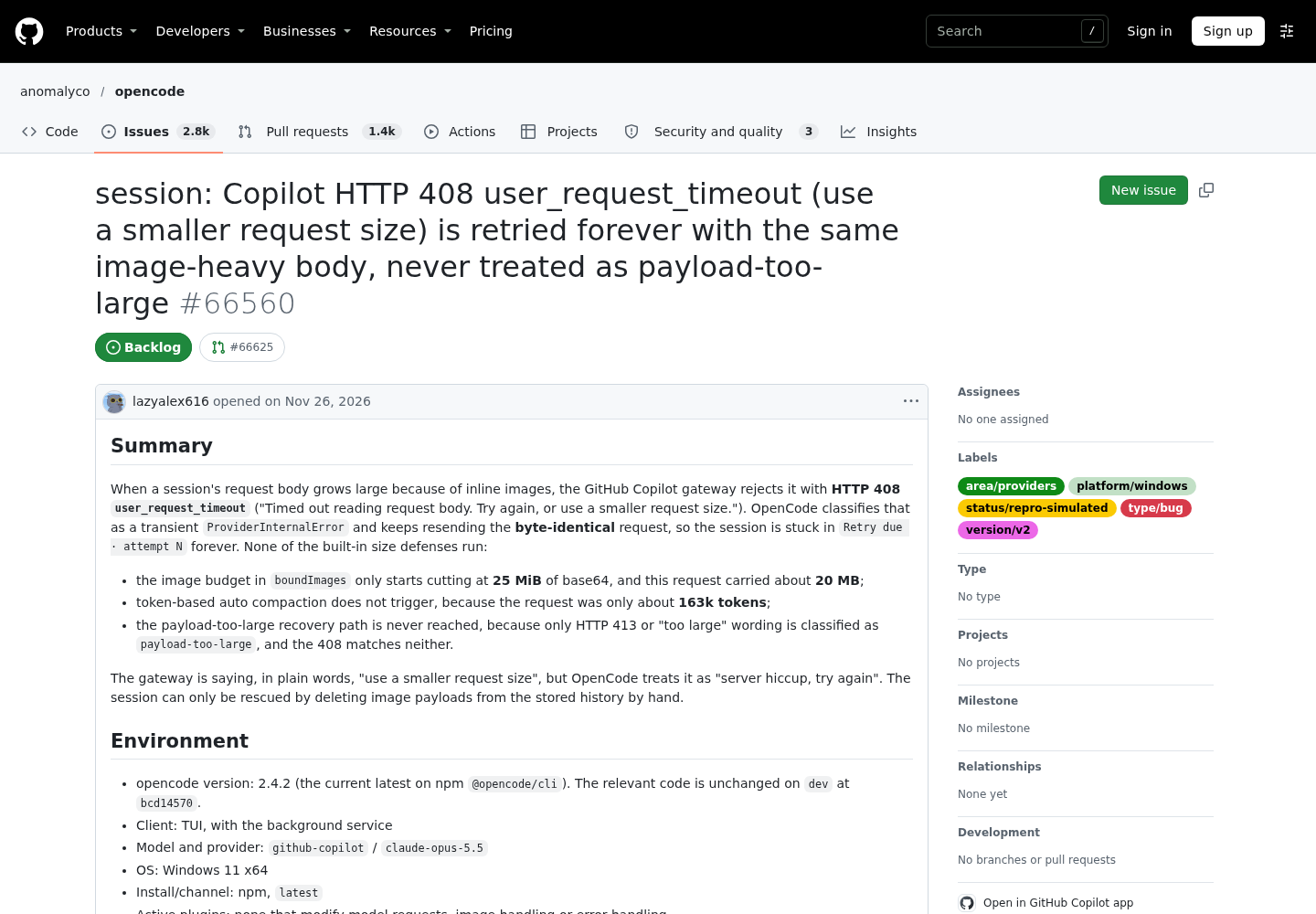
The reporter of #66560 traced the classifier in packages/ai/src/provider-error.ts on v2.4.2. On that code, a failure becomes payload-too-large only when the status is 413 or the message text matches one of three patterns: request entity too large, payload too large or request too large. Anything else is sorted by its status code. A 408 falls into the ProviderInternalError branch, which the session retry policy treats as retryable.
| Provider response | How v2.4.2 treats it, per the issue reports | What it means for you |
|---|---|---|
| HTTP 413 with any body | payload-too-large | Size recognised, but the normal turn does not shrink itself |
| HTTP 400 whose text says “request too large” | payload-too-large by text match | Same as a 413 |
HTTP 408 user_request_timeout, “use a smaller request size” |
provider.internal, retried with identical bytes |
You must stop the retries yourself |
| Azure 400 “Request content length exceeded 32 MB limit.” | Reported unclassified on 1.18.5 in #14562 | Recheck on your version; treat it as size |
| Tokens near the model’s context limit | Automatic compaction, if the limit is right | Fix with limit.context and compaction |
Three more details from #66560 matter for recovery. First, an internal image budget in boundImages starts cutting only above 25 MiB of base64 and cuts down to 15 MiB. Second, transparent PNGs up to 5 MiB of base64 pass through normalisation unchanged, because JPEG re-encoding is skipped for transparency. Third, compaction.ts already knows how to resend a request as text without media when it receives payload-too-large. The maintainer bot that reproduced the report adds that the primary request path has no shrink-and-retry for a plain 413 either, tracked as #53107, and flags its own reproduction as simulated and awaiting maintainer confirmation.
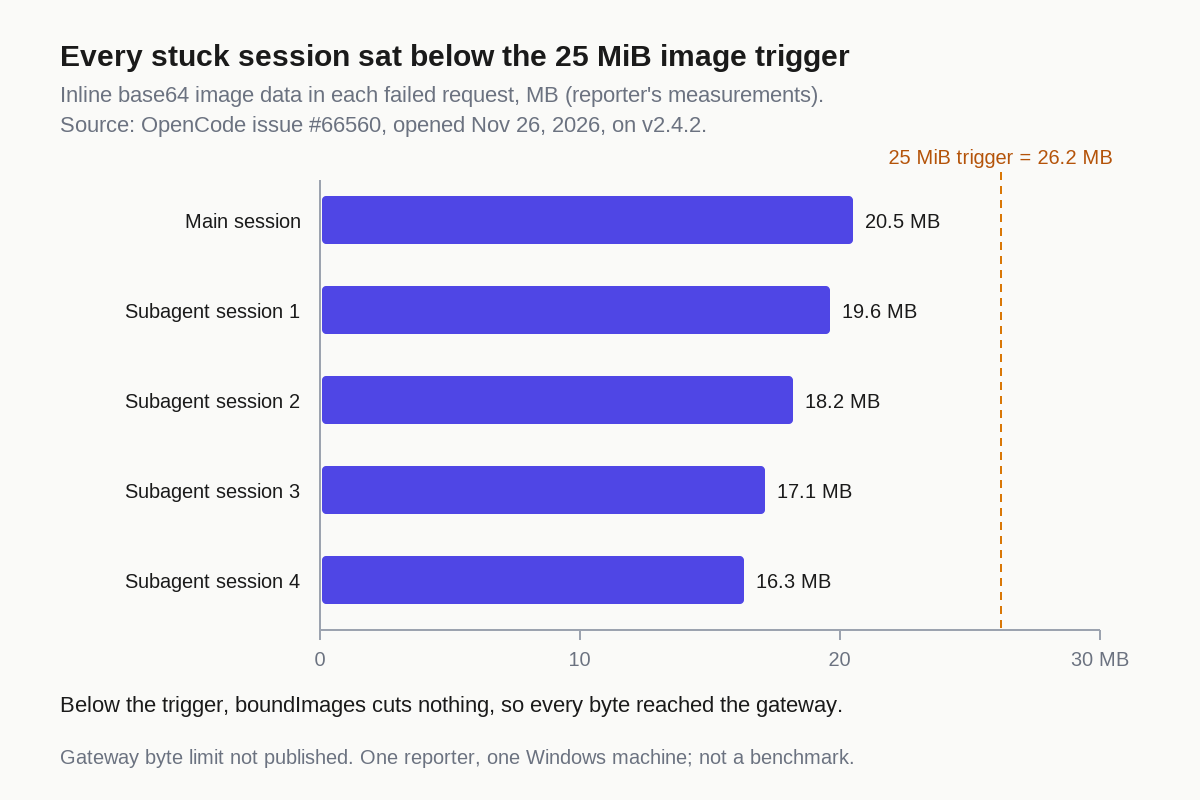
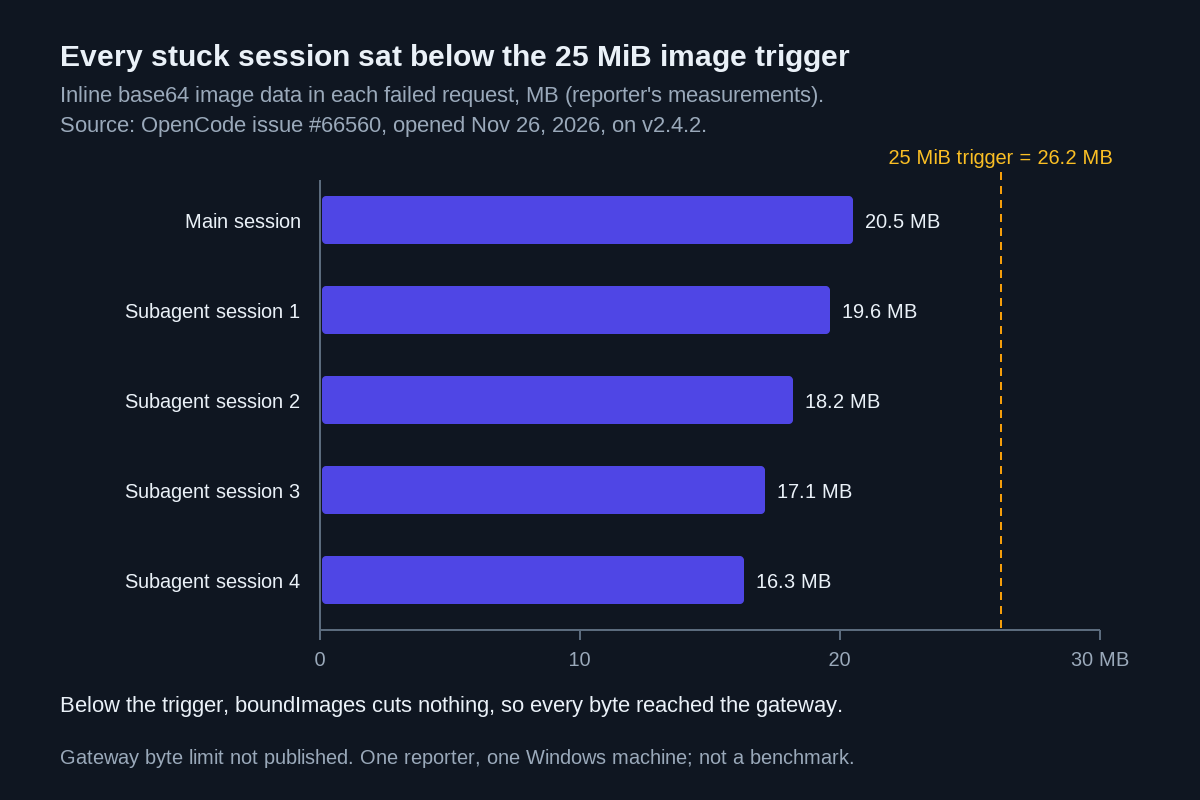
The chart is the practical consequence. Every failed request in that report sat in a band where the gateway already refused the body and OpenCode’s own image budget had not yet started trimming. You cannot rely on the built-in budget to save a session against a gateway with a lower limit; you have to set your own caps.
One loop in this area has already been fixed. The v2.4.2 release notes, published Nov 26, 2026, list a fix for Plan mode re-adding its reminder after every compaction, “which could keep a session running in a loop”. If your loop happened in Plan mode on an older build, upgrade before you debug anything else.
Before You Start: Prerequisites and the Worked Example
Check these before running a single command:
- [ ] OpenCode V2 is installed and
opencode --helpresponds. - [ ] One provider is configured and its model appears in
opencode models. - [ ] The project lives in a Git repository, because filesystem snapshots need one and you will commit before any rollback.
- [ ] You can edit the project’s
opencode.jsoncor.opencode/opencode.jsonc. - [ ]
snapshotsis not set tofalsein any config file, or you accept that undo will roll back conversation only.
The worked example, used in every step below, is illustrative. A developer works in ~/code/billing-api with a custom provider called company, an OpenAI-compatible gateway at https://gateway.example.com/v1. Its model alias flash sends the model ID deepseek-v4.1-flash upstream. The model entry has no limit block. The gateway rejects request bodies above 8 MB with a 413; that limit is invented for the example and is not a published figure for any real service.
Session ses_example has 41 turns. In turn 35 the agent used the read tool on four transparent PNG design exports in design/exports/, each around 3 MB of base64. As #66560 describes, transparent PNGs within the default limits pass through unchanged. In turn 38 a shell command dumped a long test log into the conversation. Turn 41 fails with 413 Request Entity Too Large, and the TUI keeps showing a retry.
The arithmetic is the point of the example. Four images at about 3 MB is about 12 MB of base64 on every request after turn 35, which is over the gateway’s 8 MB. The conversation sits at perhaps 70k tokens, far below anything that would trigger compaction. Tokens look fine; bytes do not.
Step 1: Stop the Loop and Export the Session
A session that is retrying is a running session. The snapshots documentation says OpenCode rejects rollback operations while the session is running, so stopping comes before everything else.
- Stop the response. In the TUI, press Esc. Since v2.4.2, if the model has not written anything or called a tool yet, Esc also removes your last message and puts it back in the composer with its images. For a looping
opencode runscript, interrupt it in the terminal. - Protect the worktree. Snapshots are a convenience, not a transaction or backup, and the docs advise committing or backing up important work before using
/undoon a dirty worktree. - Find the session ID with
opencode session list. - Export a full private copy.
- Export a redacted copy for issues and teammates, using
--sanitize. - Confirm both files exist and parse.
# 2. Protect the worktree before any rollback
git status --short
git add -A && git commit -m "wip: before OpenCode rollback of ses_example"

# 3. Find the stuck session
opencode session list --max-count 20 --format json

# 4-5. Save it twice: a private full copy and a redacted copy for sharing
mkdir -p ~/opencode-rescue
opencode session export ses_example > ~/opencode-rescue/ses_example.json
opencode session export ses_example --sanitize > ~/opencode-rescue/ses_example.sanitized.json

# 6. Confirm both files exist and are valid JSON
ls -l ~/opencode-rescue/
python3 -m json.tool ~/opencode-rescue/ses_example.json > /dev/null && echo "full export ok"
The CLI commands reference documents session list --max-count 20 --format json, session export <id> as exporting session data as JSON, and --sanitize as redacting sensitive transcript and file data. It does not say whether export prints to standard output or writes a file. The redirect above assumes standard output; if your two files come out empty, run opencode session export --help and follow what it prints.
Expected observation, illustrative: the JSON list contains an entry you can match to the stuck conversation by title and time, and both export files are non-empty. A full export several megabytes larger than a text conversation should be is the byte problem made visible, because the images are inside it. Treat the full export as sensitive: it can hold source code, secrets that passed through the terminal and every image the agent read.
This export is your rollback point for the rest of the guide. It is also the record you will want later when someone asks what the agent did, which is the argument of our fleet replay guide.
Step 2: Classify the Error From Its Exact Text
Read the error before choosing a fix. The TUI shows it in the retry line; #66560 quotes one as Retry due · attempt 3 · Timed out reading request body. Try again, or use a smaller request size. With opencode run, the same text appears after retrying (attempt N):. Copy the status and the message word for word.
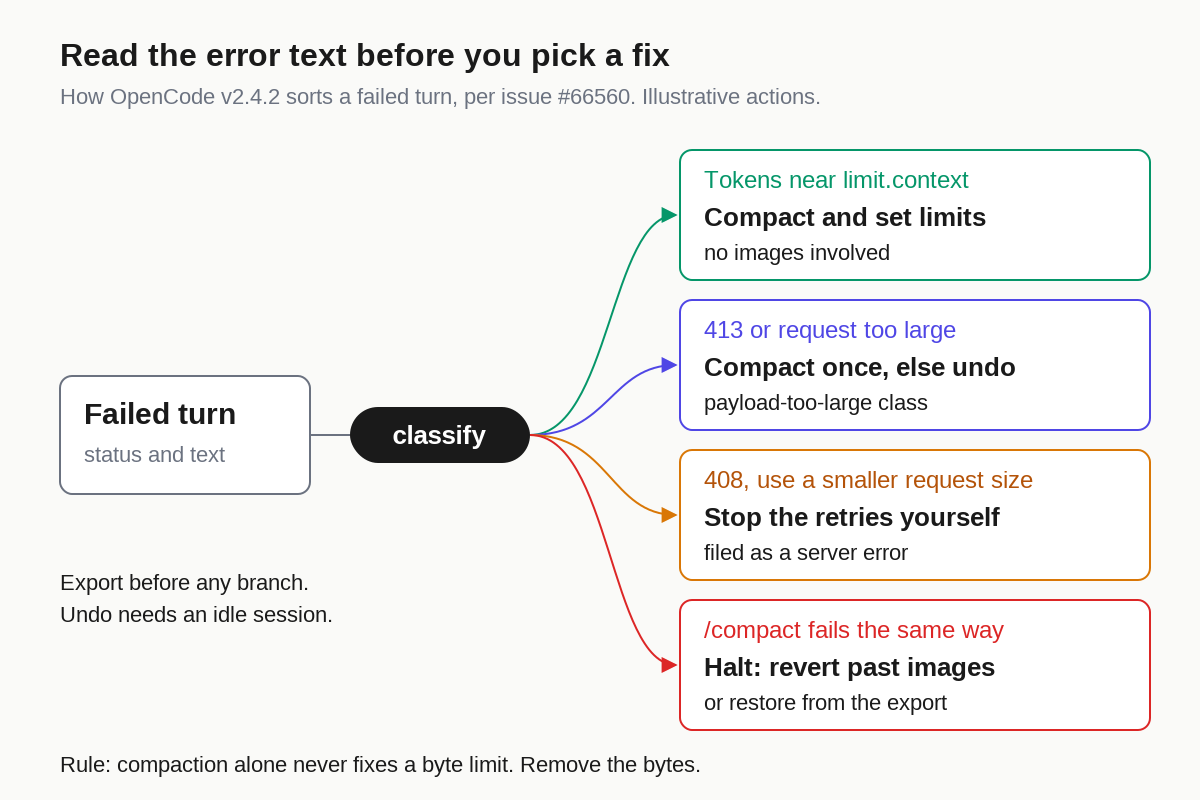
Work through the branches in order:
- If the message is about the context window or token count and no large images are in recent history, you have a token overflow. Go to
/compactin Step 3, then set limits in Step 4. - If the status is 413, or the text says request entity too large, payload too large or request too large, OpenCode classifies it as payload-too-large. Try
/compactonce, because the compaction path can resend as text without media for this class. If that fails, revert. - If the status is 408 and the body mentions
user_request_timeoutor a smaller request size, v2.4.2 treats it as a server hiccup and resends identical bytes. Waiting will not help. Go straight to the revert in Step 3. - If the provider uses its own wording, such as Azure’s 400 about a 32 MB content limit, treat it as a size error even though OpenCode may not.
- If
/compactfails with the same error as the turn, stop compacting. The summary request is carrying the same payload. Revert past the turn that brought the bytes in, or restore from the export.
In the worked example, ses_example failed with a bare 413, so it follows branch 2: one /compact, then a revert if needed.
Step 3: Back Out the Oversized Turn
The goal is to remove the bytes from the active conversation, not just the last message. That decides which rollback you use.
- Try
/compactonce for a token overflow or a recognised 413. If the next turn completes, skip to Step 4. Issue reports confirm/compactas a manual command; the config reference says compaction policy applies to both automatic and manual requests. - If compaction fails, find the first turn that brought in the large content. In the example, that is turn 35, where four PNGs were read, not turn 41, where the error appeared.
- If the large content arrived in the latest turn, run
/undoor press Ctrl+X then U. The TUI guide says this reverts the latest user message and the work that followed it, and puts the prompt back in the composer for editing. - If it arrived earlier, select that earlier message and choose Revert. This stages a rollback to that point, as the snapshots page describes.
- Before you submit anything, inspect the files. A rollback restores only paths attributed to assistant steps after the boundary and can overwrite current edits to those paths.
- Bring back any later edits you want to keep from the commit you made in Step 1.
- If the staged rollback is wrong, run
/redoor press Ctrl+X then R to cancel it. - Submit an edited prompt. Sending a new prompt accepts the revert and continues from that point.
# After staging Revert at turn 35, before submitting the new prompt
git diff --stat
git diff

# Keep the good edits from turns 36-40 that the revert rolled back
git diff --stat HEAD
git restore --source=HEAD -- src/invoices/render.ts
The file path in the last line is illustrative. Restore only the paths you have read in the diff. Reverting to turn 35 rolls back the files touched by turns 35 to 40, so the commit is how you keep good work while dropping the images from the conversation.
An edited prompt for the example might read: “Continue the invoice layout fix. Do not read the PNGs in design/exports again. Downscaled copies are in design/exports-small. Ask me in text if you need a detail from them.” The issue’s own workaround suggests reading large images in a subagent or downscaling them first; our guide to OpenCode background subagents shows how to give that reading job to a read-only explorer.
Know what the rollback does not do. Shell commands can change services, processes, databases, Git state, ignored output and files outside the active directory, and restoring a snapshot does not reverse those effects. Committing a rollback removes messages from the active view, not from durable session history or snapshot storage, so it is not secure erasure. Our checkpoints and rewind guide makes the same point for another agent.
Expected observation, illustrative: after the revert and the edited prompt, turn 36 of the new branch completes, and the conversation no longer includes the four images.
Step 4: Cap Bytes and Tokens in opencode.jsonc
Recovery without a config change only buys time. Two settings families fix the two ceilings: media.image and tool_output limit bytes, while limit and compaction control tokens. Put this in ~/code/billing-api/opencode.jsonc:
{
  "$schema": "https://opencode.ai/config.json",
  "model": "company/flash",

  // Token side: compact early and keep a modest recent tail
  "compaction": {
    "auto": true,
    "keep": { "tokens": 15000 },
    "buffer": "20%",
  },

  // Byte side: shrink or reject big images before they are sent
  "media": {
    "image": {
      "auto_resize": true,
      "max_width": 1600,
      "max_height": 1600,
      "max_base64_bytes": 1048576,
    },
  },

  // Byte side: retain less of each tool result, such as long test logs
  "tool_output": {
    "max_lines": 1000,
    "max_bytes": 32768,
  },

  "providers": {
    "company": {
      "name": "Company gateway",
      "env": ["COMPANY_GATEWAY_KEY"],
      "package": "@opencode/ai/providers/openai-compatible",
      "settings": {
        "baseURL": "https://gateway.example.com/v1",
      },
      "models": {
        "flash": {
          "modelID": "deepseek-v4.1-flash",
          "name": "DeepSeek V4.1 Flash via gateway",
          // Illustrative: use the figure your provider documents
          "limit": { "context": 96000, "output": 8000 },
          // Local summary compaction, stated explicitly
          "settings": { "compaction": { "type": "summary" } },
        },
      },
    },
  },
}
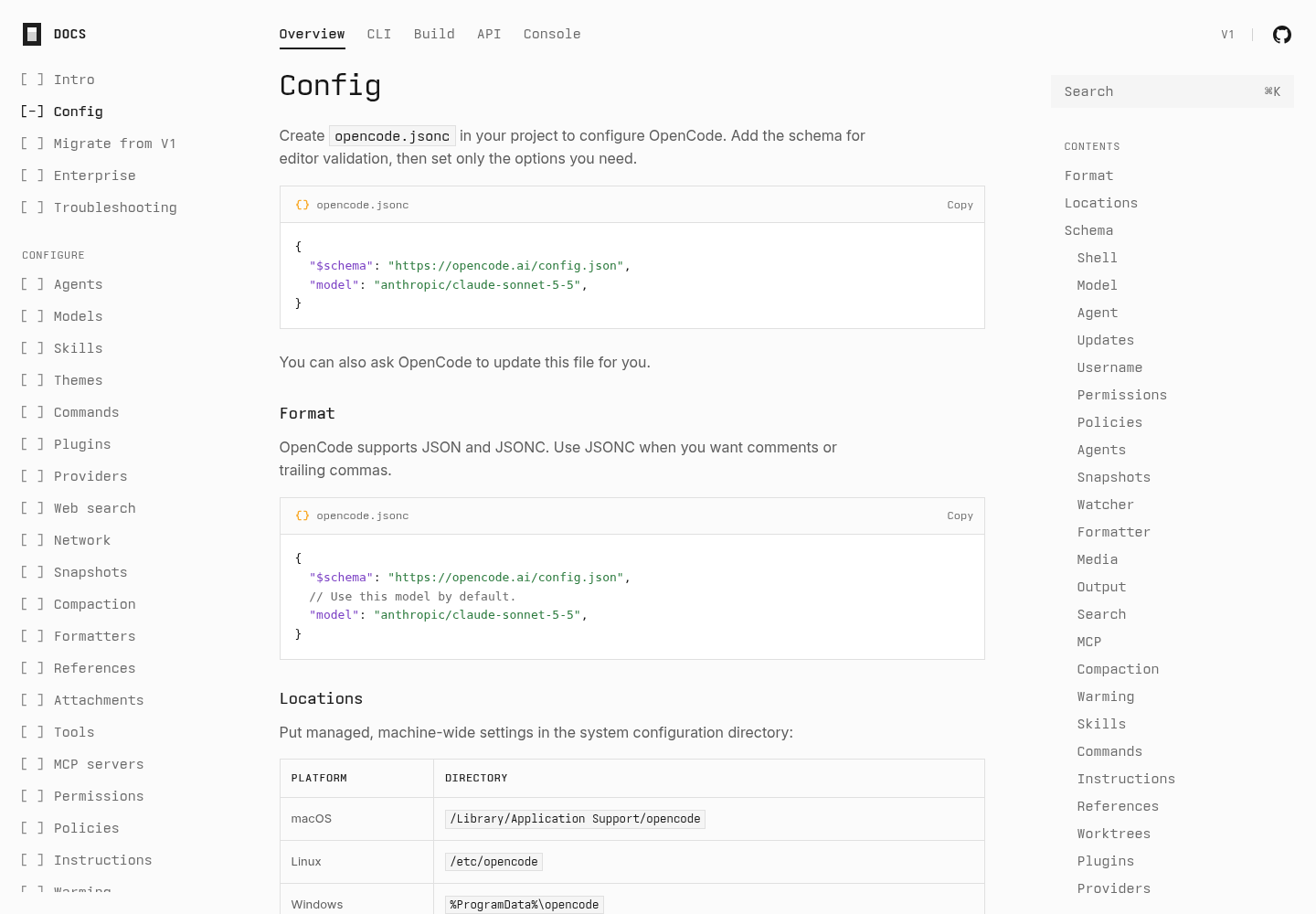
Each choice, and why it is there:
| Key | Example value | Why this value |
|---|---|---|
models.flash.limit.context |
96000 | Gives OpenCode an explicit token budget instead of whatever it would otherwise assume for a model it has no limit for |
models.flash.limit.output |
8000 | Reserves room for the reply inside the same budget |
compaction.buffer |
“20%” | Keeps about a fifth of the window free, so compaction starts near 76,800 tokens on a 96,000 window, roughly |
compaction.keep.tokens |
15000 | The recent tail kept verbatim after a summary; the reference example uses this value |
settings.compaction.type |
“summary” | Local summaries are the default; opt into native only on a provider that supports it |
media.image.max_base64_bytes |
1048576 | One MiB per image, so four reads add about 4 MiB instead of 12 |
media.image.max_width and max_height |
1600 | Lower than the reference’s 2000 so resizing has something to do |
tool_output.max_bytes |
32768 | Keeps a runaway log to 32 KiB per tool result |
A few cautions keep this config honest. The config reference says media.image controls how oversized images loaded by the read tool are resized or rejected. It does not say the same rule covers images pasted into the composer, so keep pasted screenshots small yourself.
The 76,800-token figure is approximate, because the reference says automatic compaction works from the model’s usable input budget rather than the raw window.
A model-level settings.compaction overrides a provider-level one, so put the type where you mean it.
Tokens are not bytes, so limit.context cannot prevent a 413 on its own. A lower context limit makes compaction fire earlier, which trims text bytes as a side effect, but only the media and tool-output caps address the images. For a local server, the server’s own context size is a third ceiling; match limit.context to it, as our llama-server flags guide explains for that runtime.
One tempting shortcut to avoid: compressing request bodies. The providers reference documents settings.encoding with zstd, gzip or none, but warns that most providers and gateways reject compressed bodies. Enable it only when you know the endpoint decodes it.
Step 5: Reload the Config and Resume the Session
- Save the file, then run
opencode debug configto list configuration sources and confirm your project file is among them. Precedence matters: files inside.opencodedirectories override directopencode.jsoncfiles, and the system config overrides both. - Run
opencode reload. The CLI reference says it reloads configuration without restarting the server, and running sessions continue with fresh services at the next step boundary. - If a background service still behaves as though the old config is loaded, restart it with
opencode service restart. Our server troubleshooting guide covers finding which server a client is talking to. - Resume the session: run
/sessionsin the TUI and pick it, open it withopencode mini --session ses_example, or send one scripted turn. - Watch the next turn complete, then keep working and watch for automatic compaction before the buffer is used up.
opencode debug config
opencode reload
opencode mini --session ses_example

# or a single scripted check turn
opencode run --session ses_example "Summarise where the invoice layout fix stands in five bullets."
Expected observation, illustrative: the scripted turn prints a reply instead of a retry line, and later turns show a compaction rather than a provider error as the conversation grows.
The brief for this guide mentioned forking. The CLI reference documents --session and --continue for run and mini, but no fork flag, so this guide does not use one. To keep a second copy of the conversation, import the export into a scratch directory:
mkdir -p ~/code/billing-api-rescue
opencode session import ~/opencode-rescue/ses_example.json --directory ~/code/billing-api-rescue
opencode session list --max-count 5 --format json
The docs do not state whether an import keeps the original session ID or creates a new one, so read the list output before you act on either copy.
Every Error Case: Input, Action and Expected Result
Each row is an illustrative case built on ses_example and the config above. The expected results are what the documentation and issue reports predict, not observed test runs.
| Input | Action | Expected result |
|---|---|---|
case:bare-413-01 — ses_example turn 41 fails with HTTP 413 Request Entity Too Large after four 3 MB transparent PNGs were read in turn 35 |
Esc, commit, export, run /compact once; if it fails, Revert at turn 35 and resend an edited prompt without the PNGs |
Illustrative: the compaction path may resend as text without media; otherwise, after the revert, the new turn completes with about 12 MB less body |
case:too-large-text-02 — gateway answers HTTP 400 with body {"error":"request too large"} on the same turn |
Treat it exactly like case 01; the text matches the request too large pattern | Illustrative: classified as payload-too-large, same recovery path and same result as case 01 |
case:408-timeout-03 — TUI shows Retry due · attempt 3 · Timed out reading request body. Try again, or use a smaller request size. |
Press Esc instead of waiting, export, Revert past the image reads, then set max_base64_bytes to 1048576 |
Illustrative: retries stop when you interrupt; on v2.4.2 nothing shrinks the body automatically, so only the revert and cap prevent a repeat |
case:compact-overflow-04 — /compact on ses_example returns the same 413 as turn 41 |
Stop compacting; Revert at turn 35, or import ses_example.json into ~/code/billing-api-rescue and work from the copy |
Illustrative: a summary request without the PNGs in history fits under the 8 MB gateway limit and completes |
| case:image-heavy-05 — a new turn asks the agent to read three 1536x1024 transparent sprite sheets of about 4 MB base64 each | With the Step 4 config loaded, let the read tool apply max_width 1600 and max_base64_bytes 1048576 |
Illustrative: per the config reference, oversized images are resized or rejected before sending, so no single image adds more than 1 MiB |
| case:token-overflow-06 — no images; a 20,000-line test log from turn 38 pushes the conversation toward 96,000 tokens | Run /compact, then rely on tool_output.max_bytes 32768 and compaction.buffer 20% |
Illustrative: later logs are trimmed to 32 KiB and automatic compaction starts near 76,800 tokens, before the window fills |
case:azure-400-07 — Azure returns HTTP 400 Request content length exceeded 32 MB limit. on an image-heavy turn |
Treat it as a size error even if OpenCode does not; export, Revert past the images and apply the media caps | Illustrative: #14562 reports this wording was unclassified on 1.18.5, so expect no automatic help and recover by hand |
Rollback: Restore the Export, Cancel a Revert, Check Git
If a recovery step makes things worse, back out in this order:
- A staged revert you have not submitted yet: run
/redoor press Ctrl+X then R. The TUI guide says this restores the reverted work. The snapshots page warns that cancelling a staged rollback can also overwrite later edits, so checkgit diffafterwards. - A revert you already submitted: the active conversation now continues from the earlier point. To get the old conversation back, import the full export from Step 1 with
opencode session import ~/opencode-rescue/ses_example.json, optionally with--directoryto keep it apart. - Files that look wrong: compare against the Step 1 commit with
git diff HEAD, then restore individual paths withgit restore --source=HEAD -- <path>. - A config change that broke provider selection: delete or rename your project
opencode.jsonc, runopencode reload, and confirm withopencode debug configthat it no longer appears. The providers reference listsModel unavailable: provider/modelas the symptom when amodelsmap key is wrong. - Side effects outside the worktree: snapshots do not reverse shell effects on services, databases, network resources or Git state. Undo those by hand, using the commands the session ran, which you can read in the export.
The habit worth keeping is the order itself: export, then change. It is the same discipline our AgentOps guide argues for across a whole fleet. A session you saved before touching it can always be put back, and one you retried into a loop often cannot.
What the Documentation Does Not Settle Yet
The sources support the procedure above, but a few gaps remain. Confirm these on your own version with --help rather than assuming:
- Whether
opencode session exportwrites to standard output or to a file. - Whether
opencode session importkeeps the original session ID. - A documented fork flag for resuming into a new branch of a session.
- A configurable whole-request byte budget; #66560 asks for the image budget to become configurable per provider, and on v2.4.2 it is fixed at a 25 MiB trigger.
- Whether
media.imageapplies to pasted images as well as images loaded by the read tool. - Which token limit OpenCode assumes for a custom model with no
limitblock; set it explicitly and the question does not matter.
If a fix lands for the 408 classification or the primary-path recovery, the decision in Step 2 gets simpler, but the export-first order and the byte caps remain worth keeping.
Sources
- Jeandy Bryan on X, Nov 24, 2026: a 413 mid-conversation on deepseek-v4.1-flash leaves the agent looping
- OpenCode: Config
- OpenCode: Providers
- OpenCode: CLI commands
- OpenCode: TUI
- OpenCode: Snapshots
- OpenCode issue #14562: Request Entity Too Large with images blocks session, compaction also fails
- OpenCode issue #66560: Copilot HTTP 408 user_request_timeout retried forever, never treated as payload-too-large
- OpenCode release v2.4.2