OpenCode Background Subagents: Read-Only Explorers, One Writer and Final Reports
Set up opencode background subagents safely: an orchestrator with an allowlist, two read-only explorers, one implementer, and a wait for final reports.

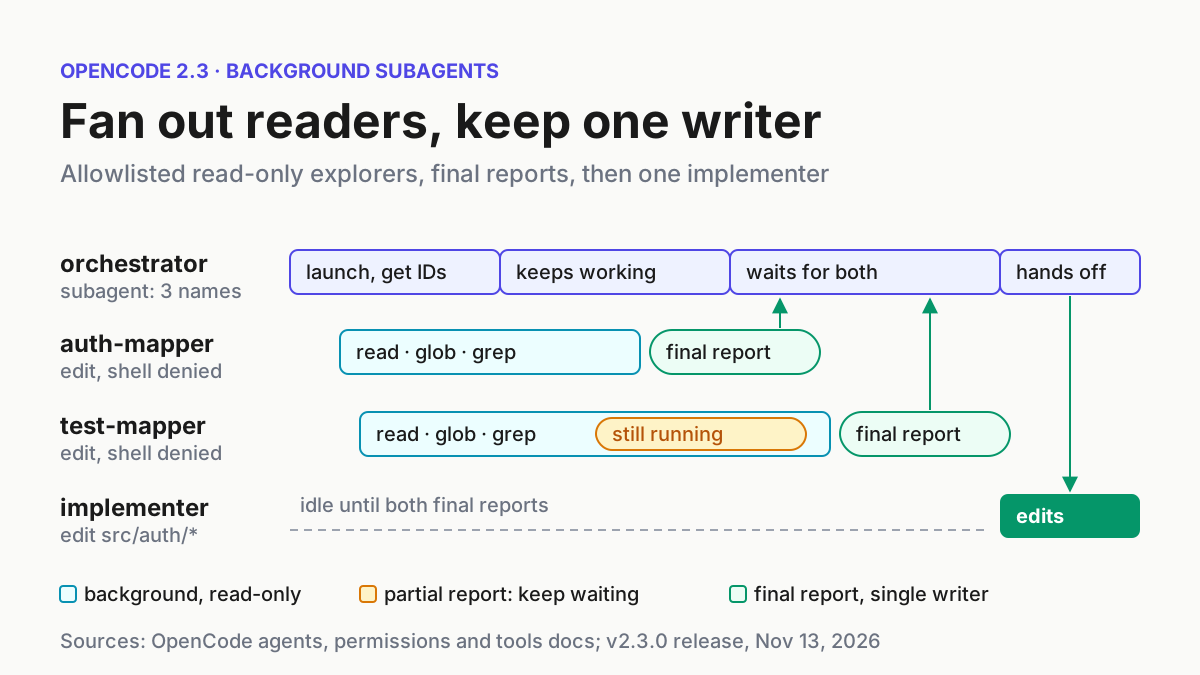
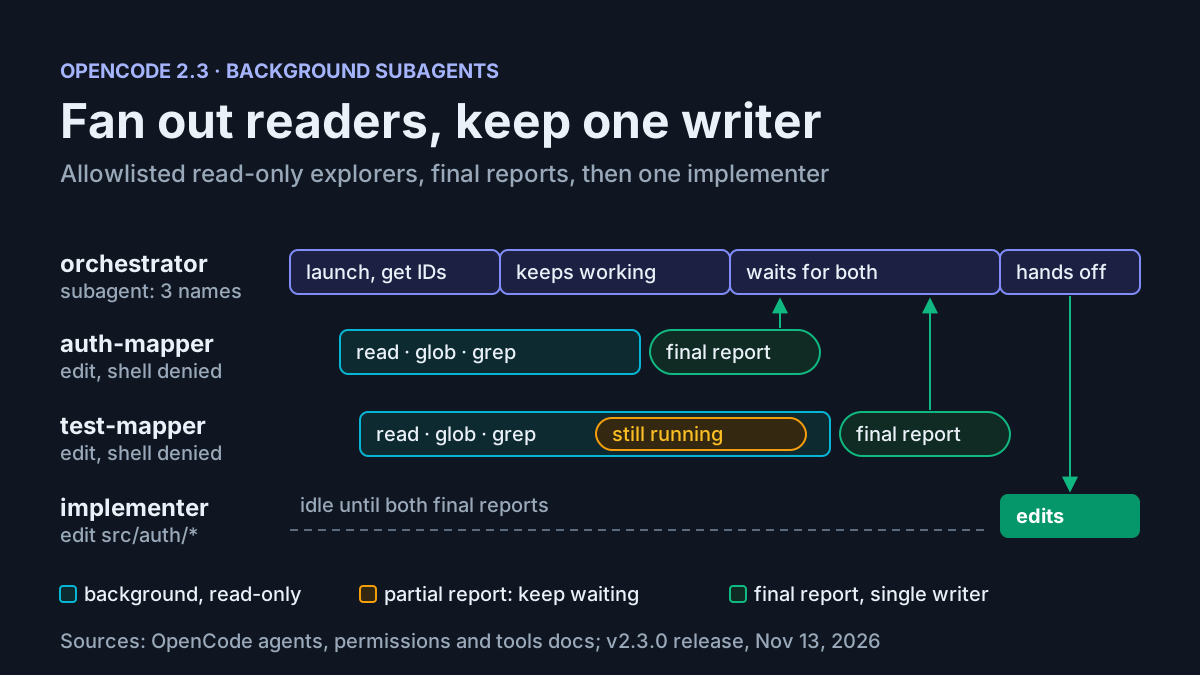
You probably learned a simple habit: ask a subagent to look something up, wait for its answer, then act on it. OpenCode background subagents end that habit on purpose. Since OpenCode v2.3.0, every subagent call returns immediately with a session ID. The child keeps working in its own session, and the parent hears back when the child goes idle. That gets you parallel readers and a prompt that stays usable. It also opens new ways to fail. A primary agent can act on half an answer, a “read-only” helper can quietly edit files, and two agents can end up writing to the same module.
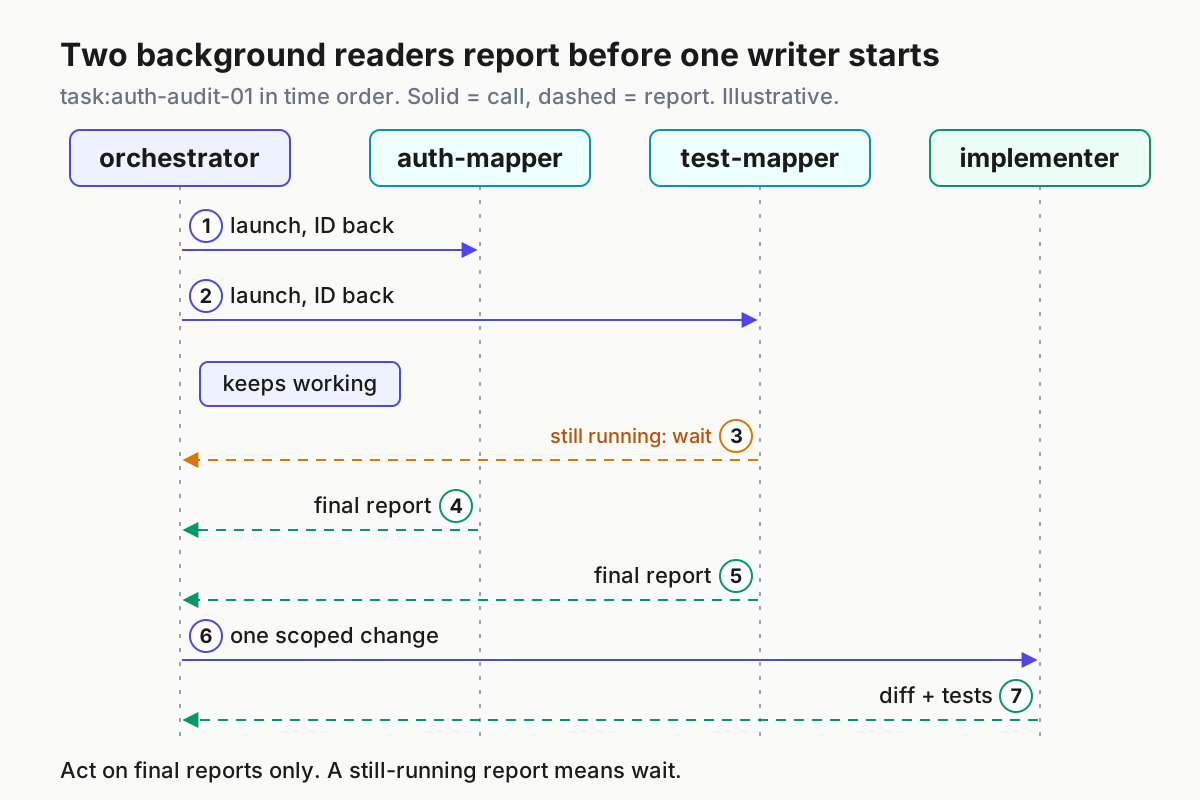
This tutorial builds a project configuration that makes background subagents safe by default. An orchestrator primary agent can launch only three named children. Two explorer subagents can read, glob and grep, and nothing else. One implementer is the only agent in the project that can edit files, and only inside two folders. The worked case, task:auth-audit-01, sends both explorers out to map a login flow and its tests. The parent keeps working, waits for both final reports and then hands one scoped change to the implementer.
Every configurable field below comes from the OpenCode V2 agents, permissions, tools and config documentation. The example repository, its file names and the results in the tables are illustrative expected observations. They are not output from a recorded run.
What v2.3.0 changed, and what it breaks
The v2.3.0 release on GitHub, published Nov 13, 2026, says subagents “now always run in the background, return their session ID immediately, and report results to their parent whenever they become idle” (#63382). The same release fixes a subtler problem. When a subagent goes idle while its own background work is still running, its report to the parent now says it is still running, “so the parent waits for the final report instead of treating the partial answer as done” (#63675). The opencode.ai changelog entry for v2.3.0 lists both items and adds the user-facing promise: you can keep working in the parent session while multiple subagents run concurrently.
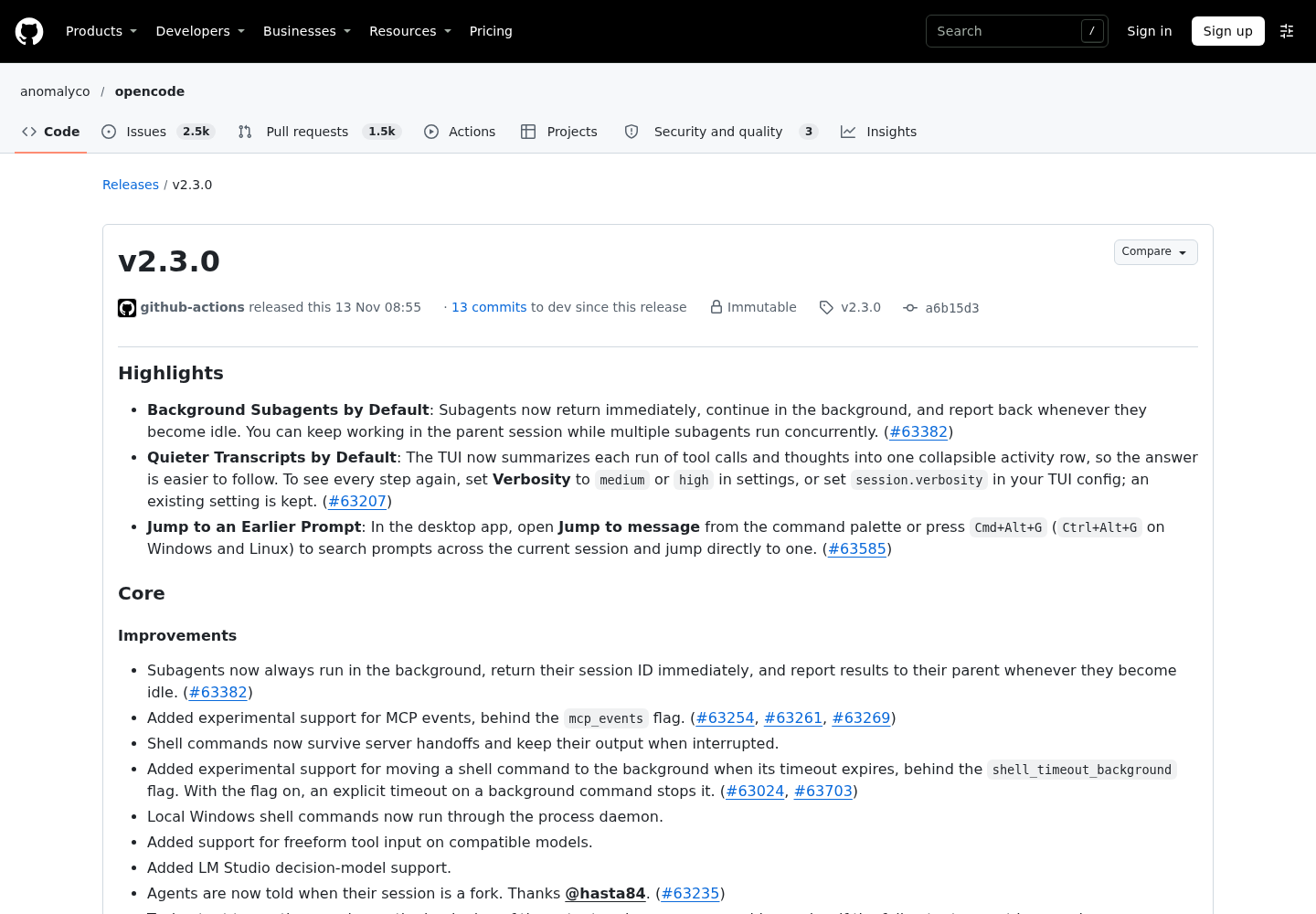
Three habits stop working after this release:
- Treating the subagent call as the answer. The subagent tool reference is explicit. The call returns a
sessionID. Later, the parent receives a<subagent>message when the child goes idle, and another after each later round of work. The result arrives as a message, not as the call’s return value. - Assuming one report is the last one. A child can report more than once, and a report can now say the child is still running. The parent needs a rule for which report it acts on.
- Relying on the parent’s restrictions. The V2 agents page says the parent’s subagent permissions decide which agents it may launch, while “the child uses its own configured permissions.” A locked-down parent can still launch a wide-open child.
The documentation describes background execution as the only behavior. Neither the agents page nor the tools page documents a switch back to a blocking, foreground subagent. Design for background execution instead of trying to work around it.
Prerequisites and the example repository
Check these before you write any configuration:
- [ ] OpenCode 2.3.0 or later is installed and a provider is connected. If you are still setting up V2, the OpenCode V2 setup guide covers
opencode.jsonc, providers and the basics of permission rules. - [ ] You are in a git repository with a clean working tree, so
git status --shortprints nothing. Later, the clean tree is how you prove the explorers changed nothing. - [ ] You can edit
opencode.jsoncat the project root. The config reference notes that config files inside.opencode/override directopencode.json(c)files in the same tree. Check that no.opencode/opencode.jsoncalready defines agents that conflict with yours. - [ ] Your editor validates against
https://opencode.ai/config.json. The docs call that schema the source of truth for fields, accepted values and nested shapes. - [ ] You know the repository’s test command. The example assumes
npm test.
The illustrative repository for task:auth-audit-01 is a small Node service:
src/auth/routes.ts        POST /login route
src/auth/login.ts         credential check and error responses
src/auth/session.ts       session creation and cookie
test/auth/login.test.ts   login tests
package.json              "test" script used by npm test
The audit asks one question: does the login handler return different messages for an unknown user and a wrong password? If it does, an attacker can use the difference to find out which accounts exist. The fix is small and has clear boundaries, so it makes a good first handoff to a single writer.
Assign the roles before you write config
When children run in the background, the roles you assign matter more than how you word the prompts. The decision table below is the whole design. The config in the next section implements it line for line.
| Role | Agent ID | Mode | Can launch | Can edit | Can run shell |
|---|---|---|---|---|---|
| Coordinator | orchestrator |
primary | only auth-mapper, test-mapper, implementer |
nothing | asks, except git status and git diff |
| Login flow reader | auth-mapper |
subagent | nothing | nothing | nothing |
| Test reader | test-mapper |
subagent | nothing | nothing | nothing |
| Single writer | implementer |
subagent | nothing (default nesting depth is one) | src/auth/ and test/auth/ only |
asks, except npm test and git diff; never git push |
The reasons behind each choice:
- The coordinator cannot edit. If the parent can write, it can “fix” a file while a child is still reading the old version. Denying
editon the orchestrator removes that race. - The readers get an allowlist, not a denylist. Each explorer starts with a rule that denies every action, then allows
read,globandgrep. Any tool or plugin action added later is denied by default instead of silently allowed. - The readers are custom agents, not the built-in
explore. The permissions reference lists the shipped explore policy. It denies everything except shell, reads, globs, grep, web fetches, web searches and external directories. Explore cannot edit, but it can run shell commands, and the same page warns that shell “runs with the host user’s filesystem, process, and network authority.” A shell command can change files without ever calling an edit tool. - There is exactly one writer. Two parallel agents editing the same module produce conflicting changes that neither of them reports. If you later need parallel writers, give each one its own checkout. The one checkout, one owner rule explains why.
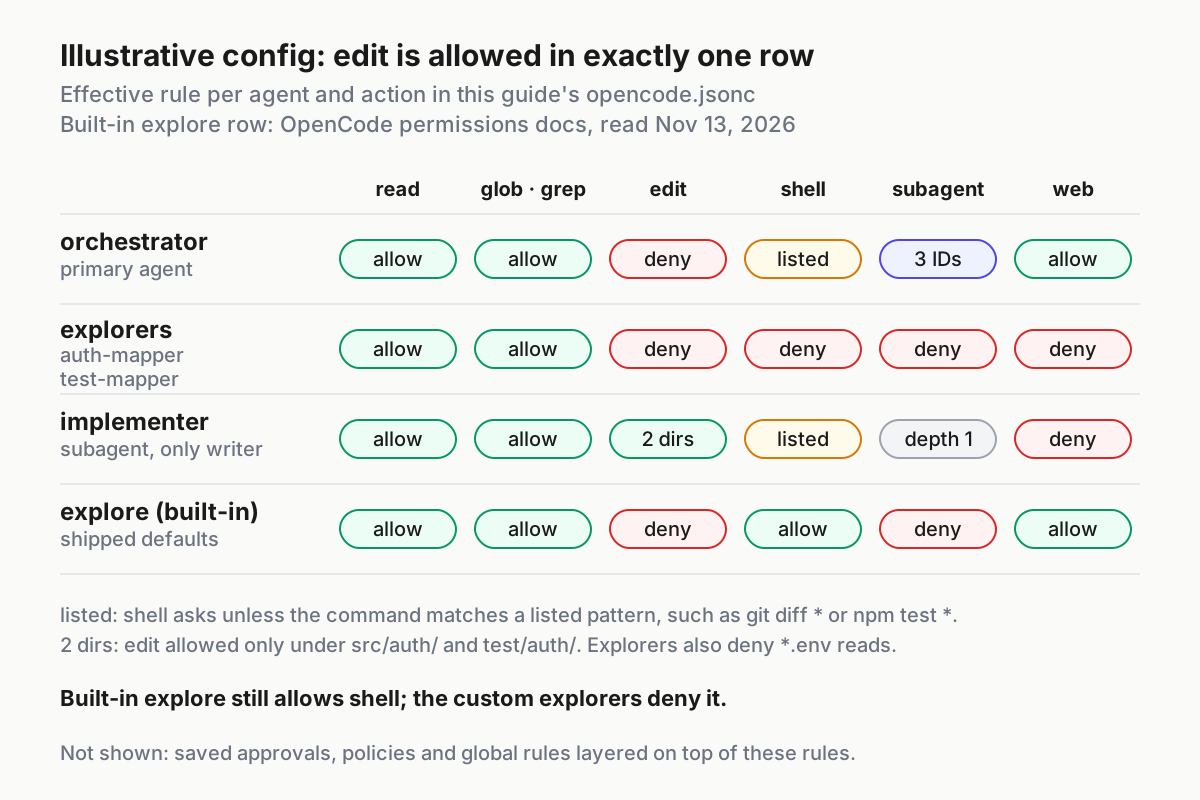
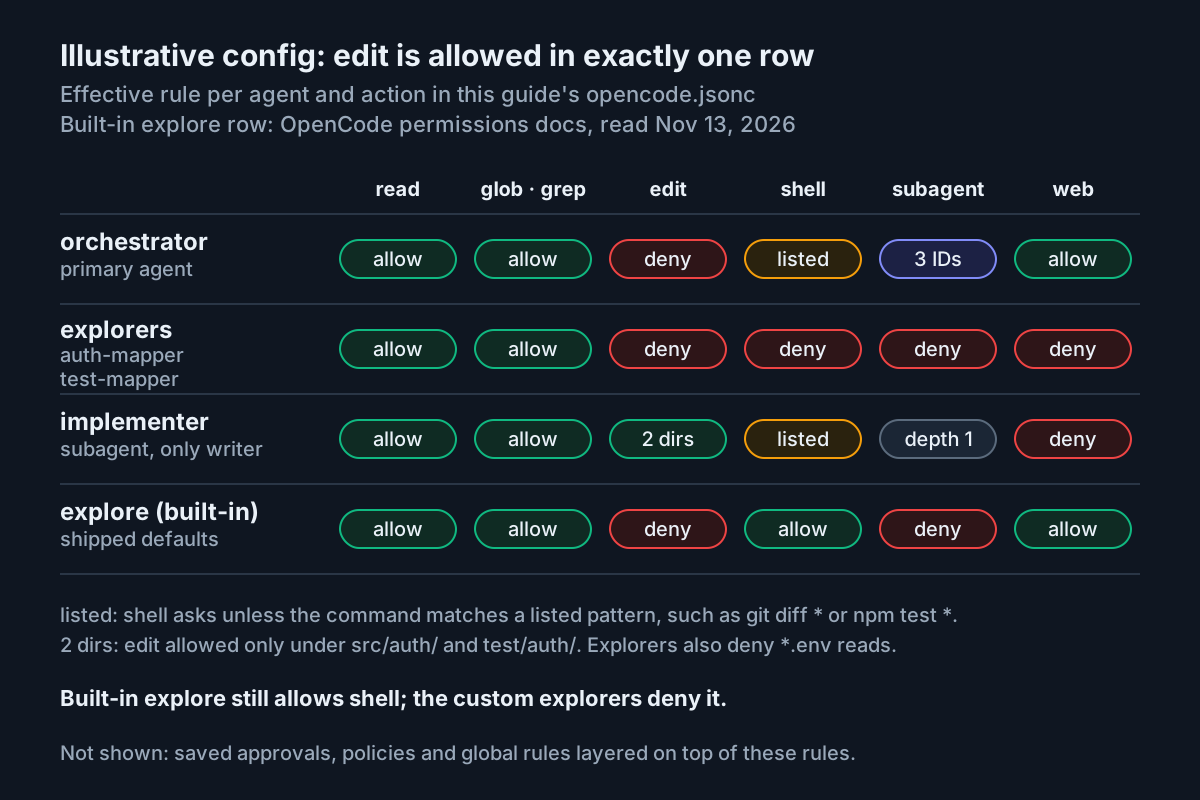
The shape will look familiar if you have used Claude Code’s subagent files. The Claude Code subagents guide shows how that tool restricts each agent’s tools. The subagent orchestration patterns piece covers planner-worker and swarm designs without tying them to one tool. This guide is the OpenCode V2 version of planner-worker with background children.
Write the complete opencode.jsonc
Save this as opencode.jsonc in the repository root. It is the complete artifact for this tutorial: one shared rule, a default agent, and four agent definitions with their prompts in the system field. The field names match the published agents page and the V2 agents reference on dev.opencode.ai, which has the same text.
{
  "$schema": "https://opencode.ai/config.json",
  "default_agent": "orchestrator",

  // Shared rule for every agent: ask before touching paths outside this project.
  "permissions": [
    { "action": "external_directory", "resource": "*", "effect": "ask" },
  ],

  "agents": {
    "orchestrator": {
      "description": "Coordinates auth work. Launches only named subagents and never edits files.",
      "mode": "primary",
      "system": "You coordinate and never edit files. For each task, launch auth-mapper and test-mapper with complete, self-contained prompts and record both returned session IDs. While they run, keep helping the user from what you can read yourself. A subagent report that says the child is still running is partial: note it and wait for that child's final report, which ends with the heading FINAL REPORT. Synthesize only after both final reports. Then give implementer exactly one scoped change: the files it may touch, the behavior to change and the test command to run. When implementer reports, run git diff --stat and summarize which session changed which files.",
      "permissions": [
        { "action": "edit", "resource": "*", "effect": "deny" },
        { "action": "shell", "resource": "*", "effect": "ask" },
        { "action": "shell", "resource": "git status *", "effect": "allow" },
        { "action": "shell", "resource": "git diff *", "effect": "allow" },
        { "action": "subagent", "resource": "*", "effect": "deny" },
        { "action": "subagent", "resource": "auth-mapper", "effect": "allow" },
        { "action": "subagent", "resource": "test-mapper", "effect": "allow" },
        { "action": "subagent", "resource": "implementer", "effect": "allow" },
      ],
    },

    "auth-mapper": {
      "description": "Read-only. Maps a login flow from route to response with file:line references. Cannot edit or run commands.",
      "mode": "subagent",
      "steps": 30,
      "system": "You are read-only. Map the login flow named in the prompt: entry route, handler, credential check, session creation and every error response. Give file:line references and quote exact error strings. Do not propose patches. End with a section headed FINAL REPORT.",
      "permissions": [
        { "action": "*", "resource": "*", "effect": "deny" },
        { "action": "read", "resource": "*", "effect": "allow" },
        { "action": "glob", "resource": "*", "effect": "allow" },
        { "action": "grep", "resource": "*", "effect": "allow" },
        { "action": "read", "resource": "*.env", "effect": "deny" },
        { "action": "read", "resource": "*.env.*", "effect": "deny" },
      ],
    },

    "test-mapper": {
      "description": "Read-only. Finds the tests that cover a flow and names the command that runs them. Cannot edit or run commands.",
      "mode": "subagent",
      "steps": 30,
      "system": "You are read-only. Find the tests that cover the flow named in the prompt. List each test file, what each case asserts and the gaps you see, with file:line references. Name the command the repository uses to run them if you can read it from package.json. Do not run commands. End with a section headed FINAL REPORT.",
      "permissions": [
        { "action": "*", "resource": "*", "effect": "deny" },
        { "action": "read", "resource": "*", "effect": "allow" },
        { "action": "glob", "resource": "*", "effect": "allow" },
        { "action": "grep", "resource": "*", "effect": "allow" },
        { "action": "read", "resource": "*.env", "effect": "deny" },
        { "action": "read", "resource": "*.env.*", "effect": "deny" },
      ],
    },

    "implementer": {
      "description": "The only agent that edits. Makes one scoped change under src/auth/ or test/auth/ and runs npm test.",
      "mode": "subagent",
      "system": "You make exactly one scoped change described in the prompt. Edit only the files it names. Run the test command it names, then report the files you changed, a one-line summary of each change and the test result. If the change needs any other file, stop and say so instead of editing.",
      "permissions": [
        { "action": "edit", "resource": "*", "effect": "deny" },
        { "action": "edit", "resource": "src/auth/*", "effect": "allow" },
        { "action": "edit", "resource": "test/auth/*", "effect": "allow" },
        { "action": "shell", "resource": "*", "effect": "ask" },
        { "action": "shell", "resource": "npm test *", "effect": "allow" },
        { "action": "shell", "resource": "git diff *", "effect": "allow" },
        { "action": "shell", "resource": "git push *", "effect": "deny" },
        { "action": "webfetch", "resource": "*", "effect": "deny" },
        { "action": "websearch", "resource": "*", "effect": "deny" },
      ],
    },
  },
}
Here is what each block does, in the order OpenCode reads it:
$schematurns on editor validation and autocomplete against the published schema.default_agentstarts new sessions on the orchestrator. The agents page says the default must exist, be visible and support primary use; otherwise OpenCode falls back tobuild. Changing the setting does not replace the agent already stored on an existing session, so start a new session after you save.- The top-level
permissionsrule asks before any agent touches a path outside the project. The permissions page says external directories are allowed by default, and this rule brings the prompt back. Agent rules are appended after it, so each agent can refine it. orchestratordenies all edits. It asks before shell commands, except for two git inspection prefixes. It denies every subagent, then allows three IDs.auth-mapperandtest-mapperdeny every action, then allow the three local discovery tools, then deny.envreads.steps: 30caps model steps. On the final step, OpenCode removes tools and asks the model to summarize in text, so a reader that runs too long still ends with a report.implementerdenies edits everywhere, then allows two folders. It asks before shell commands, allowsnpm testandgit diff, and deniesgit push. Web tools are denied because the change needs nothing from the network.
No agent sets a model. The agents page says a subagent uses its configured model, or the parent session’s model when none is configured. All four agents therefore run on whatever model your session uses. If you want cheaper readers, add a model in provider/model form to the two explorers only.
Do not use V1 names here. The permissions page warns that V2 uses permissions, shell and subagent where V1 used permission, bash and task. The agents page also lists legacy agent fields such as prompt, tools and maxSteps that new V2 configuration should not use.
Order the rules so the last match is the one you mean
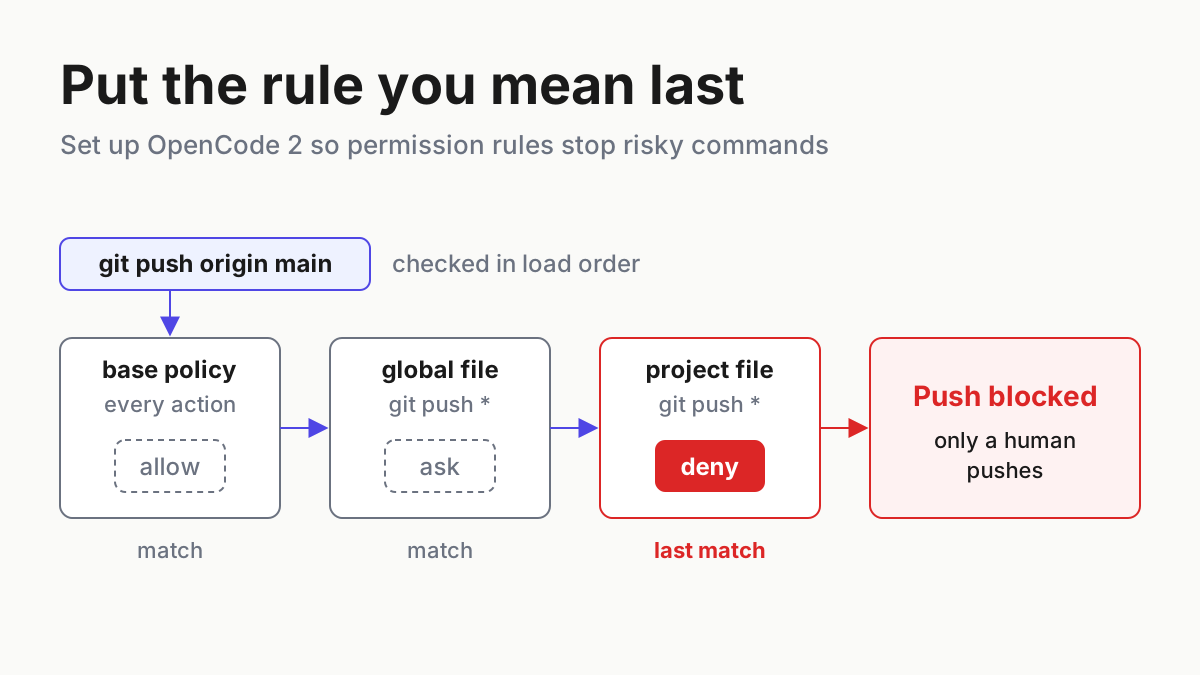
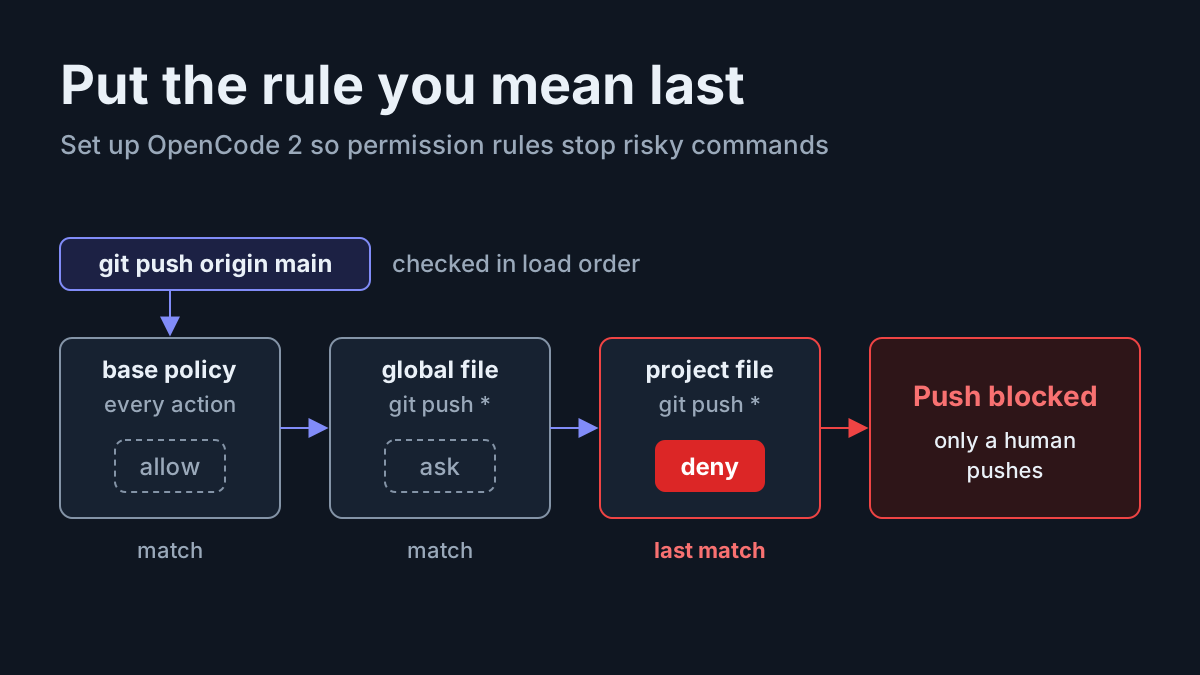
OpenCode builds one ordered list of rules per agent and applies the last rule that matches. Per the permissions page, every agent starts from a base policy: allow everything, ask before .env reads, allow .env.example. Global rules come next and agent rules come last. If nothing matches, the result is ask. When one operation touches several resources, such as a patch across several files, any deny blocks the whole operation.
Walk through these requests against the config above:
| Agent and request | Matching rules, in order | Last match | Outcome |
|---|---|---|---|
orchestrator launches auth-mapper |
base * allow, subagent * deny, subagent auth-mapper allow |
allow | child starts in the background |
orchestrator launches general |
base * allow, subagent * deny |
deny | launch blocked |
auth-mapper edits src/auth/login.ts |
base * allow, * deny |
deny | edit blocked |
auth-mapper reads config/.env |
base read *.env ask, * deny, read * allow, read *.env deny |
deny | read blocked |
implementer edits src/auth/login.ts |
base * allow, edit * deny, edit src/auth/* allow |
allow | edit proceeds |
implementer patches src/auth/login.ts and package.json |
for package.json the last match is edit * deny |
deny on one path | whole patch blocked |
implementer runs npm test |
base * allow, shell * ask, shell npm test * allow |
allow | runs without a prompt |
implementer runs git push origin main |
shell * ask, shell git push * deny |
deny | blocked |
Two rules of thumb follow from the table:
- Put the broad rule first and the exceptions after it. If
subagent auth-mapper allowsits abovesubagent * deny, the deny is the last match and the orchestrator can launch nothing. - Wildcards match whole values, and
*includes/. That is whysrc/auth/*covers nested files. It is also whygit status *matches a baregit status: the permissions page documents that a shell pattern ending in*also matches the command with no arguments.
Saved approvals add one more layer. Choosing “Allow always” saves a project-scoped allow rule, and a subagent launch proposes its agent ID as the saved pattern. The docs say saved approvals never override a configured deny, so an approval saved in another session cannot open edit on an explorer. Global and Console-managed policies run after all of this, and they can only turn allow or ask into deny.
Run task:auth-audit-01 from launch to handoff
Follow these steps in a new session so the orchestrator is the active agent:
- Save
opencode.jsonc, confirm thatgit status --shortprints nothing, and start a new OpenCode session in the repository root. - Paste the task prompt below into the orchestrator.
- Watch for two subagent calls. Each returns immediately with a session ID. The tools reference says the parent can keep working, or end its turn, without waiting.
- While both children run, ask the parent a separate question it can answer from its own reads. Getting an answer proves the prompt stays usable.
- Open a child session to watch it. The v2.3.0 notes say session IDs found in messages can now be opened directly in the terminal UI. Transcript verbosity now defaults to low, which folds each run of tool calls into one activity row. To audit every read an explorer made, set Verbosity to medium or high in settings, or set
session.verbosityin your TUI config. - Wait for both final reports. If a report says the child is still running, note it and take no other action on it.
- Let the orchestrator synthesize the reports and hand one change to
implementer. - When the implementer reports, review the diff yourself before you commit.
The prompt for step 2:
task:auth-audit-01
Audit the login flow under src/auth/ for account enumeration.

1. Launch auth-mapper: trace POST /login from route to response. Quote the exact
   error strings returned for an unknown user and for a wrong password.
2. Launch test-mapper: list the tests in test/auth/ that cover login, what each
   asserts, and the command that runs them.

While they run, tell me which file sets the session cookie.
Do not synthesize until both children have sent a FINAL REPORT.
Then hand implementer one change: return the same message for an unknown user
and a wrong password, in src/auth/login.ts and test/auth/login.test.ts only,
and run npm test.
The prompt does three jobs the config cannot do:
- It gives each child a complete, self-contained brief. The agents page says subagents run with fresh context in their own child sessions, so they never see the parent’s conversation.
- It gives the parent something useful to do while it waits.
- It ties the handoff to two named files and one command. That matches the implementer’s permissions exactly, so the writer never has to ask for more access.
When a report needs a follow-up, pass the returned session ID back through the subagent tool. The tools reference says this continues the same child conversation, and a follow-up sent to a running child joins its current run instead of starting a second one.
Worked example: inputs, actions and expected results
These rows are illustrative expected observations for task:auth-audit-01, based on the documented behavior. They are not output captured from a real run.
| Input | Action | Expected result |
|---|---|---|
task:auth-audit-01 setup: the opencode.jsonc above saved in the repo root, clean working tree |
Start a new session in the repository root | The session opens on orchestrator, the configured default_agent; older sessions keep the agent stored on them |
task:auth-audit-01 prompt pasted into orchestrator |
Orchestrator calls the subagent tool for auth-mapper, then for test-mapper |
Each call returns at once with a sessionID; two child sessions exist and the parent prompt still accepts input |
| Side question while children run: “Which file sets the session cookie?” | Orchestrator uses read and grep on its own | It answers src/auth/session.ts from its own reads, without waiting on either child |
test-mapper goes idle while its own background work continues |
Child sends a <subagent> report that says it is still running |
Orchestrator records the report as partial, says it is waiting, and does not synthesize |
auth-mapper FINAL REPORT: src/auth/login.ts returns “Unknown user” and “Wrong password” |
Orchestrator waits until test-mapper sends its FINAL REPORT listing login.test.ts cases |
After both final reports, it proposes one change: a single shared message for both failures, plus one test |
| Pre-handoff check in your own terminal | Run git status --short and git diff --stat |
Both print nothing, so the explorers made no edits |
Handoff naming src/auth/login.ts, test/auth/login.test.ts and npm test |
Orchestrator launches implementer with that complete brief |
Implementer edits only those two files; npm test runs without a prompt because it matches npm test * |
Negative check: follow-up to the auth-mapper session ID asking it to fix the string itself |
Child attempts the edit tool | Edit blocked by the child’s own * deny rule; git status --short stays empty |
| Negative check: “Use the general subagent to double-check” | Orchestrator attempts the subagent tool with general |
Launch blocked by subagent * deny; the orchestrator reports that it cannot use that agent |
The successful outcome has four visible signs. The parent prompt stayed usable while the children ran. The explorers’ sessions contain reads but no edits. Only the implementer’s session touched files. Both final reports came before the parent’s synthesis.
Tell a partial report from a final one
The parent will receive more than one <subagent> message per child. Before the orchestrator acts on any of them, run this decision procedure:
- Does the report say the child is still running? Since #63675, a child that goes idle while its own background work continues says so in its report. Treat that report as partial: record it and keep waiting.
- Does the report end with the
FINAL REPORTheading the prompt asked for? That heading is a convention from this guide’s system prompts, not an OpenCode feature. It gives you a second marker, visible to the model, that the child believes it is done. - Did the child hit its step limit? An explorer that reached
steps: 30was made to summarize without tools. Its report may be complete or cut short. Read it before trusting it, and if a section is missing, send a follow-up through its session ID. - Are both children final? Only then should the orchestrator synthesize. One final report plus one partial report still means wait.
Other async designs use the same rule. The Deep Agents async subagents guide shows a supervisor that keeps talking while workers run on their own threads. In OpenCode, the protection against early synthesis comes from two places: the product’s still-running marker, and the wait rule in your orchestrator prompt.
Verify the boundaries before you trust the setup
Run this checklist once after writing the config, and again after any change to the agents block:
- [ ] Explorers changed nothing. After both final reports and before the handoff,
git status --shortprints nothing andgit diff --statlists no files. - [ ] An explorer cannot edit when asked. Send
auth-mappera follow-up through its session ID asking it to change the error string. Expect the edit to be blocked by the explorer’s own deny rule and the working tree to stay clean. - [ ] An explorer cannot run shell. Ask
test-mapperto runnpm test. Expect the shell call to be blocked. The report should name the command frompackage.jsoninstead. - [ ] The orchestrator cannot launch unlisted agents. Ask it to use
generalorexplore. Expect the launch to be blocked. - [ ] Only the implementer touched files. After the handoff,
git diff --statlists onlysrc/auth/login.tsandtest/auth/login.test.ts. - [ ] The implementer stays in its folders. In a separate follow-up, ask it to bump the version in
package.json. Expect the edit to be blocked. - [ ] Reports arrived before synthesis. In the parent transcript, the orchestrator’s synthesis comes after both final reports, not after the still-running one.
Keep the output of these checks with the task. A checkmark with no evidence behind it is a guess. The TASKS.md receipts guide describes the habit of attaching the command and its output to each claim a subagent makes.
Troubleshoot denied launches, stray edits and early synthesis
| Symptom | Likely cause | Fix |
|---|---|---|
Orchestrator cannot launch auth-mapper |
subagent * deny sits after the allow rules, or the ID differs: a file at .opencode/agents/team/auth-mapper.md gets the ID team/auth-mapper |
Put the broad deny first, then allow the exact ID |
| Every launch stops for approval | No rule matched the agent ID, so the result was ask | Add an explicit subagent <id> allow rule after the deny |
| The subagent tool refuses a custom agent | mode was omitted; a new custom agent defaults to primary, and only subagent-mode agents can be launched through the tool |
Set "mode": "subagent" on the child |
| An explorer edited a file | Restrictions were written on the parent only; a custom subagent uses its own permissions, not a subset of its parent’s | Put the * deny allowlist on the child itself |
| A reader ran shell commands | You used the built-in explore, which allows shell |
Use the custom explorers, or override explore with a shell deny under the same ID |
| The parent synthesized from half a report | It treated a still-running report as final, or you are on a build older than 2.3.0 | Upgrade, keep the wait rule in the orchestrator prompt, and follow up through the child’s session ID |
You hid general and assumed it was blocked |
hidden removes an agent from listings, discovery and the subagent catalog; the docs say it controls visibility, not security |
Restrict behavior with permissions, or remove the agent with disabled |
New sessions still open on build |
The session kept its stored agent, or orchestrator is not visible or not primary-capable |
Start a new session; check mode and hidden on orchestrator |
| An explorer cannot start a helper of its own | The default nesting depth is one | Expected behavior; leave experimental.subagent_depth at its default for this pattern |
| Rules seem ignored | V1 names such as permission, bash, task or tools |
Rename to permissions, shell and subagent |
Roll back or narrow the setup
- Undo the implementer’s change. Inspect it with
git diff, then restore the two files withgit restore src/auth/login.ts test/auth/login.test.ts. OpenCode’s filesystem snapshots, controlled by thesnapshotssetting, also support undo and revert if you would rather revert inside the session. - Disable one agent without deleting it. Add
"disabled": trueto that agent’s entry. The agents page says this removes a built-in or custom agent at that point in configuration loading. - Remove the pattern. Delete the
agentsblock anddefault_agent. New sessions go back tobuild. Existing sessions keep the agent stored on them, so start a new one. - Remove saved approvals you no longer need. The permissions page says saved approvals are durable, project-scoped allow rules. Review broad ones after the experiment.
- Stop automatic upgrades while you evaluate. In the global config only, set
"update": "notify"or"disable". The config page says project-level values are ignored, and that an automatic install does not restart a running server. - Blocking subagents are not a documented option. The cited pages describe background as the only subagent behavior, and they document neither a foreground switch nor a downgrade command. How you install an earlier release depends on how you installed OpenCode, so check that installer’s own documentation. Expect older versions to lack the still-running report from #63675.
When this pattern is the wrong tool
- A single-file question. If the parent can answer with one read, launching two children costs more context and tokens than it saves.
- Parallel writers. This design has one writer by construction. If two changes are truly independent, run them in separate worktrees with separate implementers rather than two writers in one checkout.
- Unattended runs. Background children make it easy to start work and walk away, but somebody still has to notice a report that has said still running for an hour. The multi-agent command center guide covers how to keep many concurrent sessions visible and see which one needs you.
Sources
- Release v2.3.0, anomalyco/opencode, GitHub, published Nov 13, 2026.
- Background Subagents by Default, OpenCode changelog v2.3.0
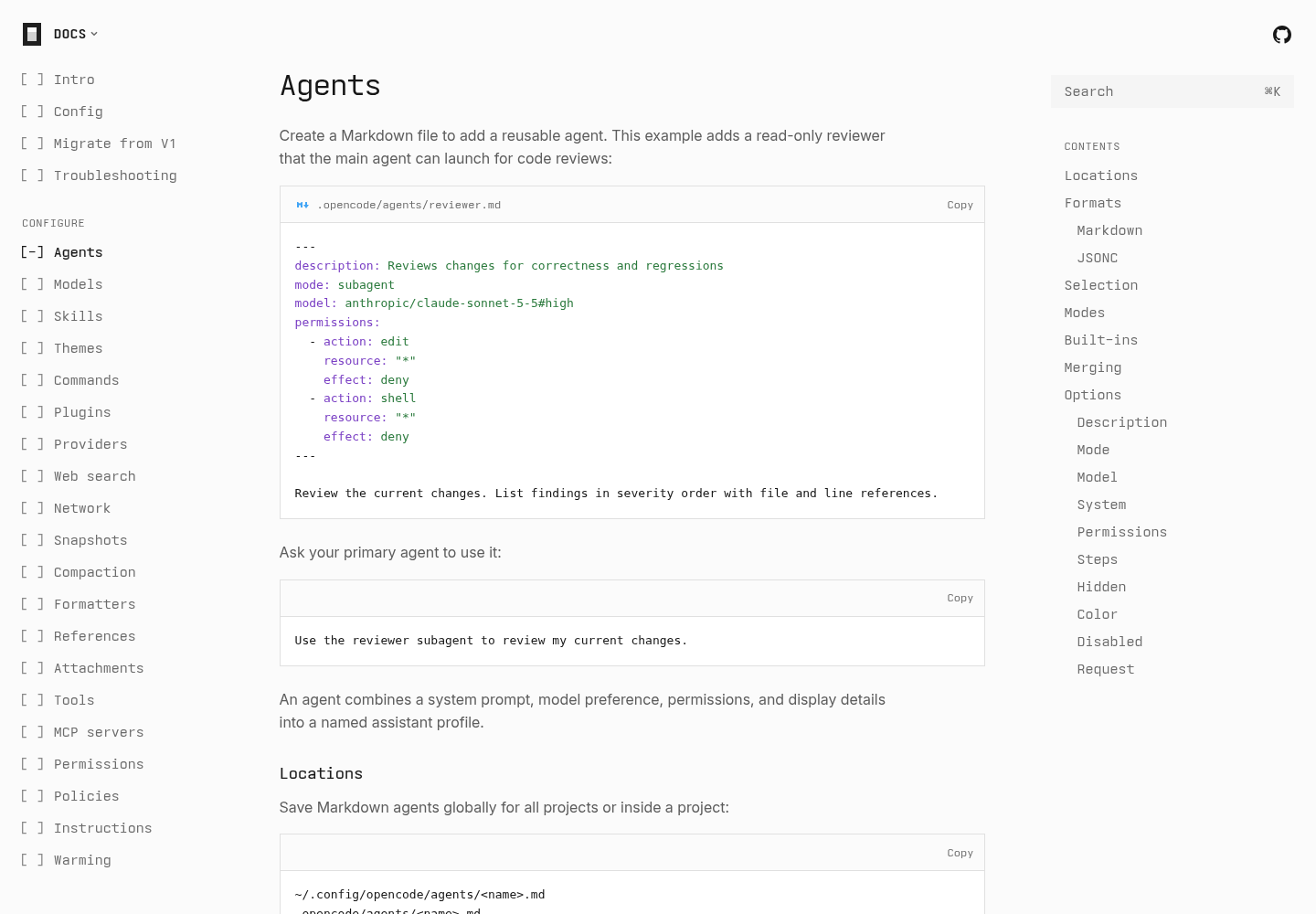
- Agents, OpenCode documentation
- Permissions, OpenCode documentation
- Tools, OpenCode documentation
- Config, OpenCode documentation
- Agents, OpenCode V2 documentation on dev.opencode.ai