Deep Agents Async Subagents: Keep Your Supervisor Responsive
Build Deep Agents async subagents in Python: register graphs, steer a persistent task, answer worker approvals, and diagnose queued or stale background work.

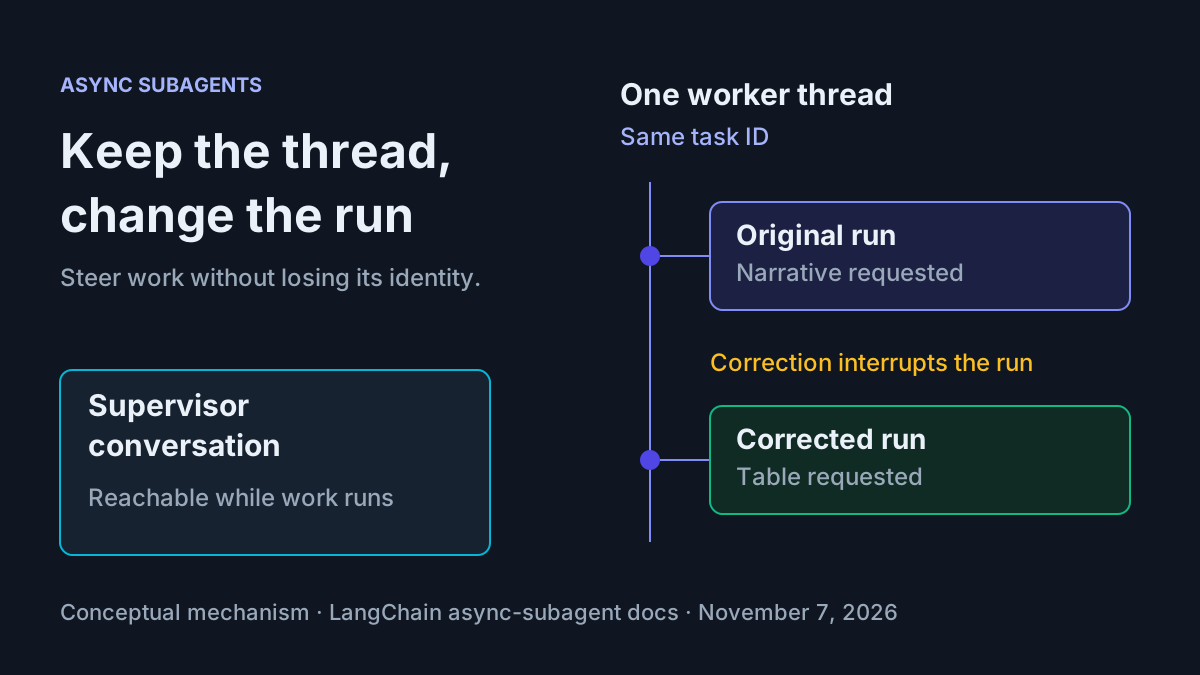
A delegated comparison should not make your agent disappear. You should be able to ask another question, correct the assignment, and answer a worker’s request without losing track of which task is running. Deep Agents async subagents provide that separation: a supervisor handles the conversation while a researcher runs on its own server thread.
This tutorial is for a Python agent developer with an already authorized tool-calling model and a local Agent Server environment. You will register two graphs, compare two supplied fictional project briefs, change the requested output on the existing worker thread, and handle a harmless human approval. The deliverable is complete graph code, server configuration, and a populated conversation exercise.
All results below are illustrative expected observations, not execution results. Model timing and wording vary. LangChain’s November 5 announcement supplies the background; the technical documentation supplies the API behavior. Task notifications and update strategies remain beta.
Build around one persistent worker thread
- Keep the user conversation on the supervisor’s thread.
- Launch the comparison on a separate researcher thread.
- Preserve the returned full task ID through checks, corrections, approval handling, and cancellation.
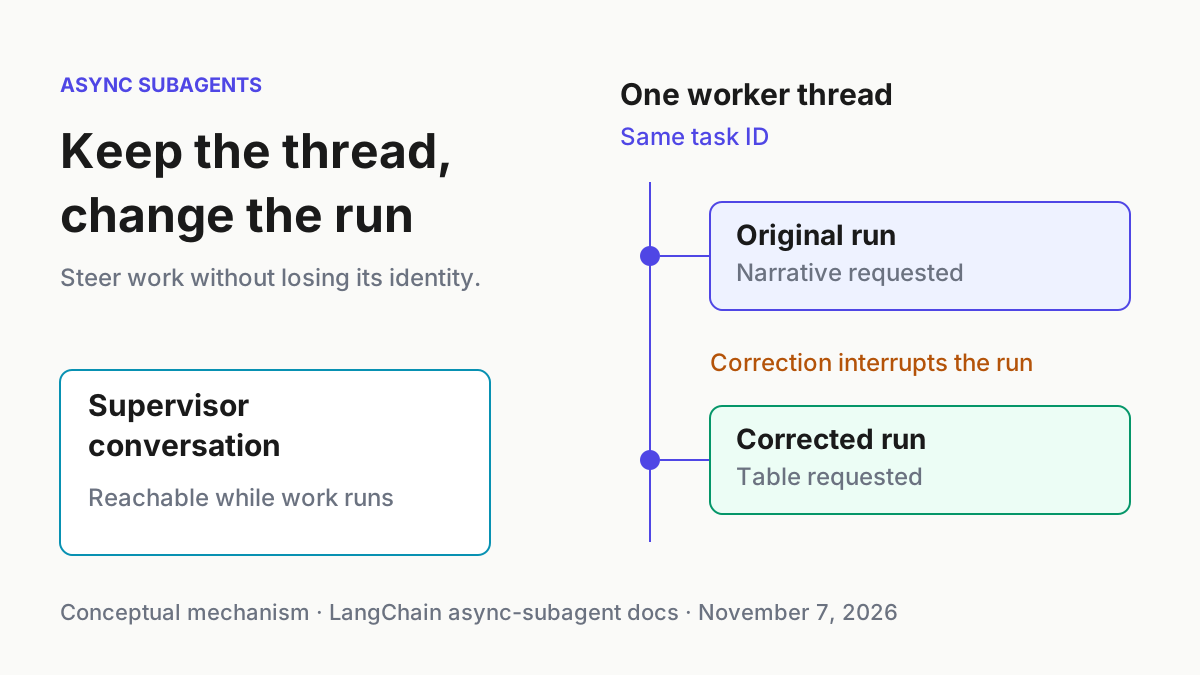
The async-subagent documentation makes a consequential distinction: a task ID is the worker’s thread ID. An update creates another run on that same thread. The thread identifies the continuing assignment; the run identifies a particular execution attempt. Your human label, task:research-01, identifies the exercise and is neither server identifier.
This is an SDK integration, so its category is The Agent Stack. It implements the separation described more broadly in Subagent Orchestration rather than introducing another fleet pattern. The implementation also gives concrete meaning to the redirect and abort distinctions in Interruptible Agent Coordinators.
Use co-deployment here. Omitting url from an AsyncSubAgent selects in-process ASGI transport. Both graphs must be registered in the same langgraph.json; they still have independent threads and state. You avoid configuring a second server just to learn task identity. This choice does not make model inference local or prevent provider requests.
Choose mode="isolated" explicitly. The researcher receives the delegated task description, not everything the supervisor previously discussed. Therefore the launch message must contain both project briefs and the decision rule. A parent-thread association alone does not transfer conversation context.
Fork mode copies an effective conversation snapshot at launch, including compacted context when applicable. Later supervisor messages are not automatically forwarded. It is experimental and unnecessary for this self-contained comparison. If established style or earlier decisions become essential, evaluate that mode separately rather than assuming isolation carries hidden context.
Keep the business label in the assignment text so the final comparison can be matched to its intended case. Separately preserve the actual returned task ID when inspecting server activity. Two tasks can contain identical brief text, so matching their wording is insufficient to establish that a correction reached the original worker. The stable server identifier resolves that ambiguity.
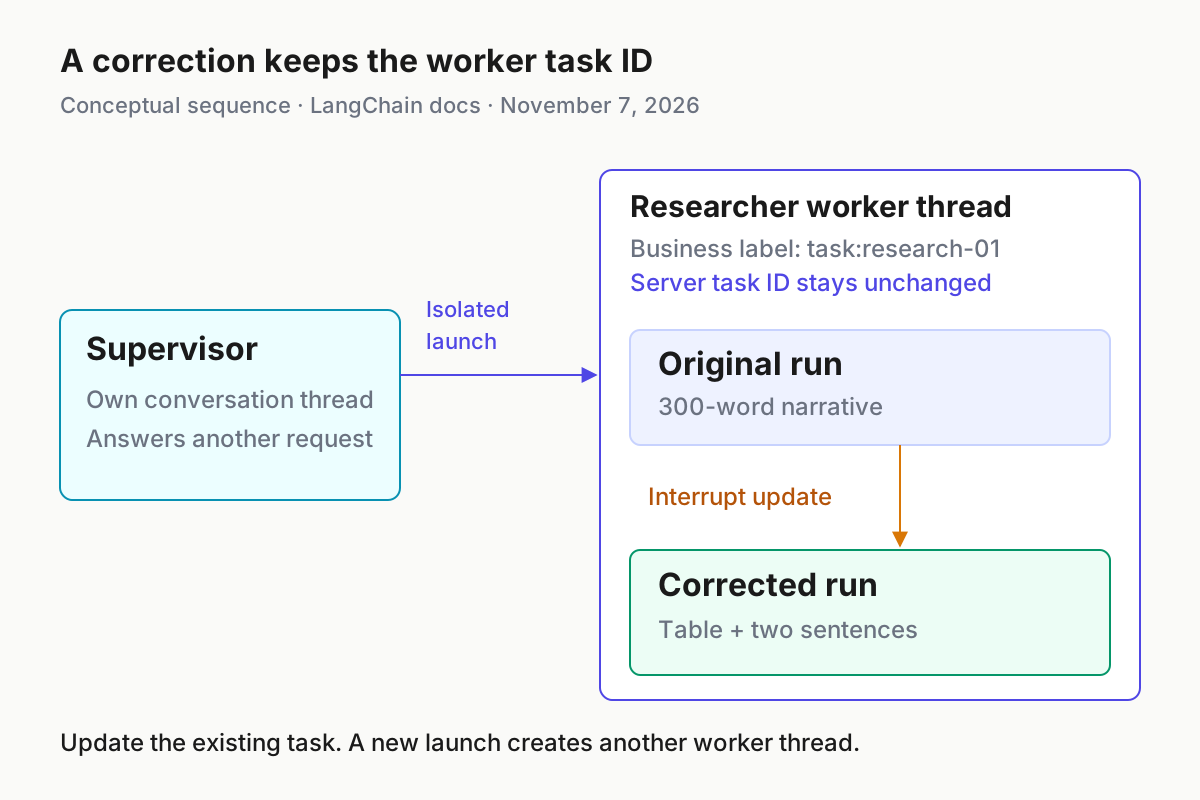
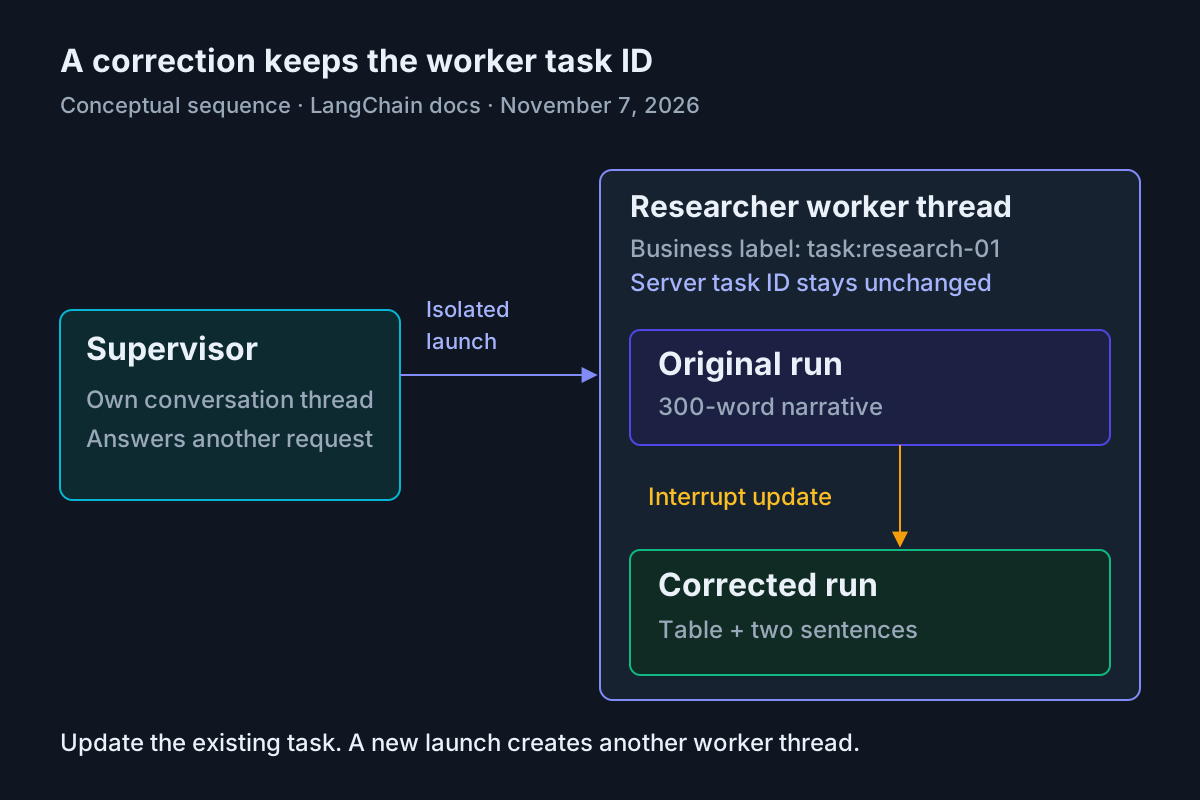
The correction changes the run, while the worker task ID remains its thread ID. Conceptual diagram based on LangChain’s async-subagent documentation, read November 7, 2026.
Prepare the local Python application
- Use Python 3.12 for this example, matching the reference server configuration.
- Use your existing authorized provider credentials and model access. The example model string is from the official quickstart; substitute your already authorized tool-calling model if needed.
- Install the application dependencies in your existing isolated Python environment, then create the files shown below.
The reference repository provides the topology and Python project structure. Its README includes older tool names and optional custom notification wiring. This guide follows the current async documentation’s start_async_task family and built-in server notification behavior instead of mixing those generations.
The reference dependency file allows deepagents>=0.5.0, which is too permissive to establish the newer features used here. Current documentation requires at least 0.7.30 for update_strategy; notifications and waiting status require at least 0.7.26. The example therefore raises the Deep Agents minimum. These are minimum versions, not a tested lockfile or a guarantee about future beta releases.
pip install "deepagents>=0.7.30" "langgraph-cli[inmem]" langchain-anthropic langgraph-sdk
The Deep Agents quickstart documents installation and the requirement for a tool-calling model. The local-server guide documents the in-memory CLI extra. Package resolution must succeed before proceeding; an import error is an environment problem, not evidence that delegation or notifications failed.
Use this small file layout:
comparison-demo/
  pyproject.toml
  langgraph.json
  src/
    agent.py
    researcher.py
The exercise adds no search, email, deployment, or external-write tool. Its custom worker tool only pauses for a decision and returns text. The supervisor uses Deep Agents’ normal stack, which includes other built-in capabilities; prompt instructions below constrain this exercise but should not be mistaken for a general permission boundary. Keep the supplied inputs fictional and do not attach production resources.
If you already maintain the reference checkout, its Makefile provides make install-py and make dev-py. Avoid make bootstrap for a Python-only exercise because that target also installs TypeScript dependencies. The standalone files here do not require that checkout.
Before continuing, decide which model both graphs will use. Keeping the same authorized model in both definitions removes one unnecessary difference when diagnosing the exercise. If your provider rejects the example model name, correct both definitions consistently using your existing supported model configuration. A provider-access error must be resolved before the comparison can demonstrate anything about background execution.
Define the supervisor and researcher
- Save the supervisor definition as
src/agent.py. - Save the researcher definition as
src/researcher.py. - Keep the worker description specific enough that the supervisor selects it for the supplied comparison.
The supervisor definition uses the current documented subagents configuration. It explicitly separates a task’s business label from its full returned server ID. This reduces the common mistake of passing a convenient label into a status or cancellation tool.
# src/agent.py
from deepagents import AsyncSubAgent, create_deep_agent

graph = create_deep_agent(
    model="anthropic:claude-sonnet-5",
    system_prompt="""You coordinate fictional project-brief comparisons.
Delegate requested comparisons to researcher using start_async_task.
Include the complete supplied briefs, task label, and output requirements
in the delegated description because the worker uses isolated mode.
After launching, report the full task ID and return control to the user.
Never call check_async_task immediately after launch or poll in a loop.
Answer simple unrelated questions directly without delegation.
Before reporting task status, call check_async_task or list_async_tasks.
Use the full returned task ID; never abbreviate it or replace it with
a business label such as task:research-01.
For a correction, use update_async_task on the existing task.
For a stop request, use cancel_async_task on the identified task.
Never answer a researcher's human approval on the user's behalf.
For this exercise, do not use filesystem tools or external services.
Do not claim success until the completed result has been inspected.
""",
    subagents=[
        AsyncSubAgent(
            name="researcher",
            description="Compare supplied fictional project briefs using only their stated facts.",
            graph_id="researcher",
            mode="isolated",
            update_strategy="interrupt",
        )
    ],
)
The worker uses LangChain’s create_agent, following the reference architecture. Its approval tool adapts the documented interrupt() pattern from Human-in-the-loop. It performs no business action, regardless of the answer. A rejection prevents the illustrative recommendation from being presented as approved.
# src/researcher.py
from langchain.agents import create_agent
from langchain.tools import tool
from langgraph.types import interrupt

@tool
def request_approval(action_description: str) -> str:
    """Ask the human whether to finalize this fictional comparison."""
    answer = interrupt({
        "type": "approval_request",
        "action": action_description,
        "message": "Approve this fictional recommendation or reject it.",
    })
    if answer.get("approved"):
        return "Human approved finalizing the fictional recommendation."
    return (
        "Human rejected finalization. Do not present an approved recommendation. "
        + answer.get("reason", "No reason supplied.")
    )

graph = create_agent(
    model="anthropic:claude-sonnet-5",
    tools=[request_approval],
    name="researcher",
    system_prompt="""Compare only the fictional briefs in the assignment.
Do not browse, write files, or invent facts. Explain the decision rule.
Prepare the requested output, then call request_approval before your
final response. Include the task label and proposed winner in that call.
If approved, return the comparison in the latest requested format.
If rejected, acknowledge rejection without claiming approval.
Follow later corrections on this thread rather than the original format.
""",
)
This is a server-hosted graph. Use the server’s thread persistence for this exercise rather than copying a standalone invocation’s local checkpointer into the exported definition. The standalone human-in-the-loop examples show why persisted state and a consistent thread matter: the resumed execution must recover the request that was actually paused. Here, resumption goes through the server’s worker thread.
The model must actually call request_approval for the waiting branch to appear. A prompt is not deterministic enforcement. Inspect the tool call and pending interrupt; if the worker returns directly, record that failure and adjust its instruction before claiming the approval exercise succeeded.
The tool deliberately interrupts before returning any approval result. Nothing before that pause changes a project or sends a message elsewhere. That makes it suitable for learning resumption: an incorrect answer can produce an incorrect recommendation, but it cannot approve a real purchase or modify an external record. Preserve that property when adapting the fixture for another harmless comparison.
Register both graphs and launch the server
- Save this configuration as
langgraph.jsonin the application root. - Save the package declaration beside it and launch from that directory.
- Open the Studio URL printed by your server and choose graph
agent.
{
  "python_version": "3.12",
  "dependencies": ["."],
  "graphs": {
    "agent": "./src/agent.py:graph",
    "researcher": "./src/researcher.py:graph"
  }
}
For the dependencies: ["."] configuration, place this complete package declaration in pyproject.toml:
[project]
name = "fictional-comparison-demo"
version = "0.1.0"
requires-python = ">=3.12"
dependencies = [
  "deepagents>=0.7.30",
  "langchain>=1.2.12",
  "langchain-anthropic>=1.4.0",
  "langgraph>=1.1.2",
  "langgraph-sdk>=0.4.4,<0.5"
]
This adapts the repository’s registration by removing the unused coder and pointing to the smaller file layout. The local-server documentation explains how the dependency directory locates package metadata. Both configuration files matter: graph registration does not install missing Python packages.
# Expected: startup prints API, documentation, and Studio addresses.
langgraph dev --config langgraph.json --no-browser --n-jobs-per-worker 10
Those launch flags match the Python Makefile’s server invocation. Expected startup observations include an API address, a documentation address, and a Studio URL; the local-server guide illustrates port 2024. Use the actual printed address if your environment differs. --no-browser prevents automatic browser opening, so a browser staying closed is expected.
Each active run occupies a worker slot. The async documentation’s concrete example requires four slots for one active supervisor and three active subagents. Ten is the documented local-development setting used here, not a measured throughput recommendation. Our one-worker exercise needs capacity for the supervisor and researcher to execute concurrently.
If startup cannot load the researcher graph, compare its registered file path and exported variable with the code above before trying a conversation. The configured graph ID is also the value used by the supervisor’s worker specification. A mismatch at this boundary prevents successful delegation even when the supervisor itself loads normally.
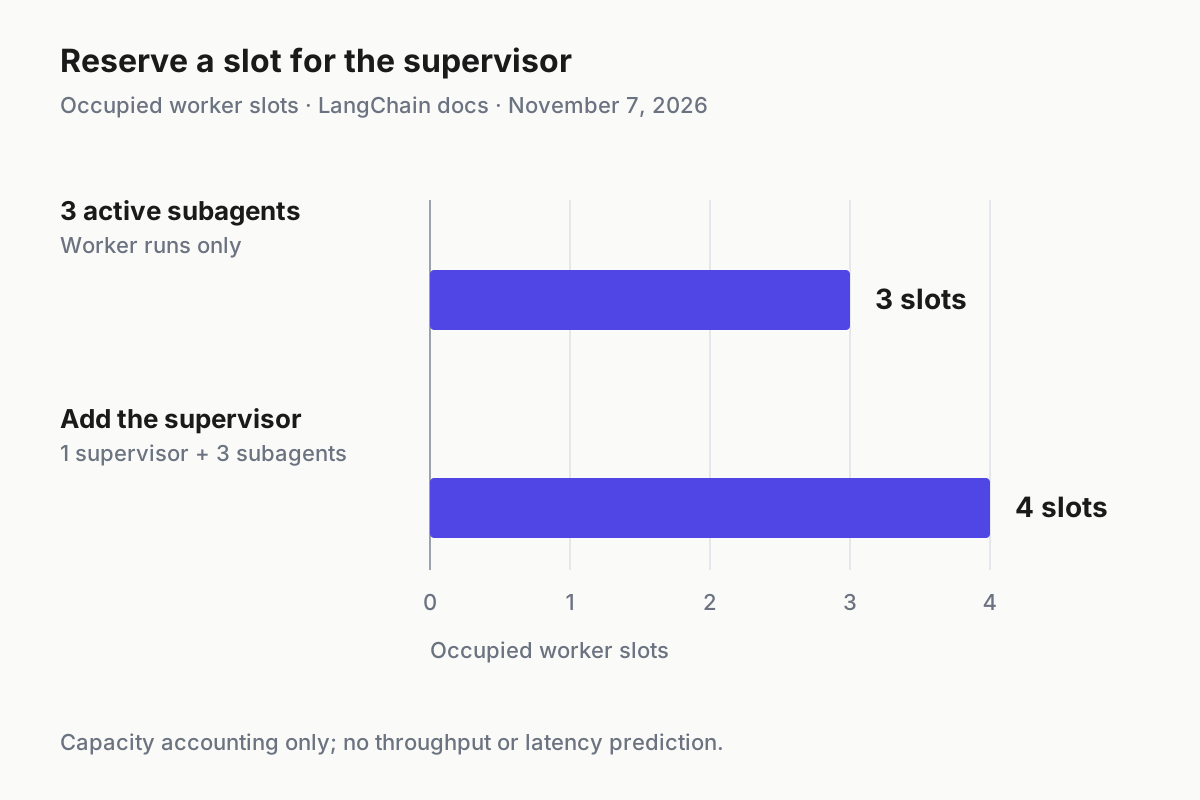
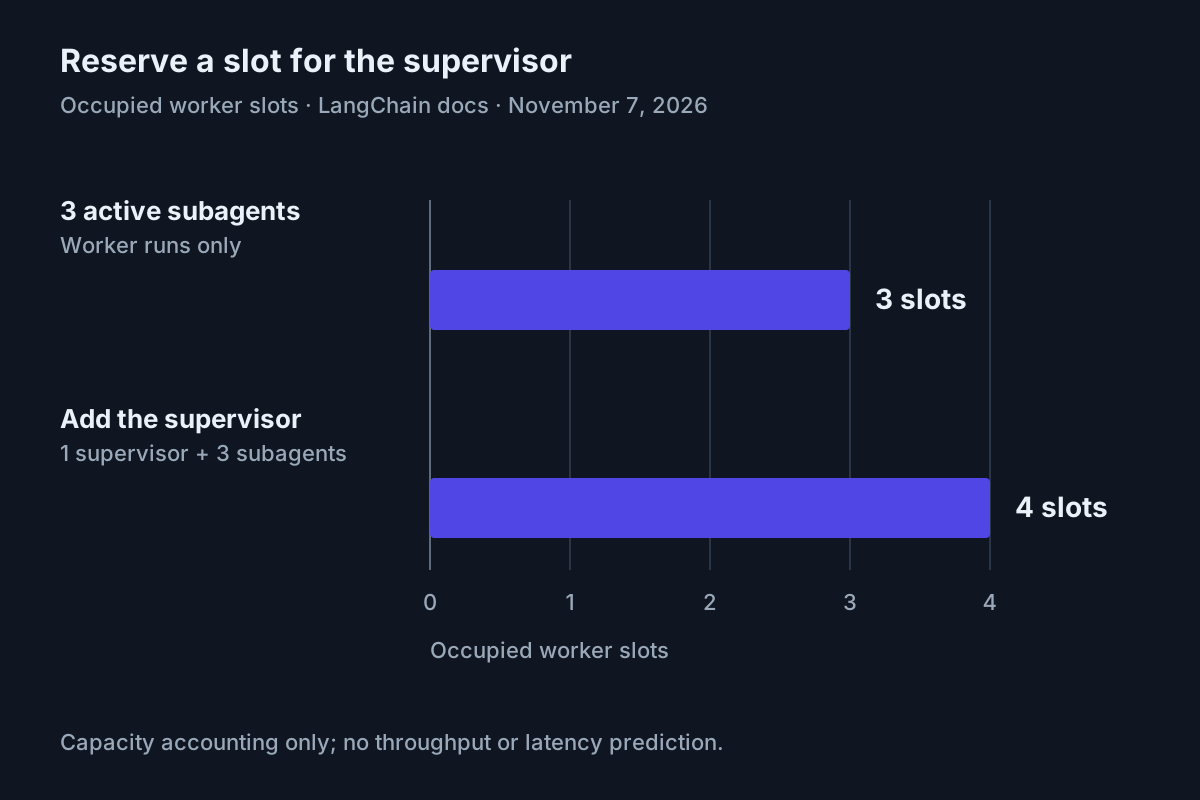
LangChain documents four occupied slots for one supervisor plus three active subagents. This capacity accounting does not predict throughput or model latency. Source: async-subagent documentation, read November 7, 2026.
Run task:research-01 and send a correction
- Start a new supervisor conversation and paste the complete launch prompt below.
- Copy the full returned task ID without altering it.
- Send the unrelated question, followed immediately by the correction.
Launch researcher for task:research-01. Use only these fictional briefs.

Project Cedar: cost $18,000; delivery 6 weeks; needs two engineers;
uses the existing internal reporting interface.
Project Harbor: cost $12,000; delivery 9 weeks; needs one engineer;
requires replacing the internal reporting interface.

Decision rule: delivery within 8 weeks is mandatory. Among qualifying
projects, choose the lower cost. If none qualify, say so.
Initially request a 300-word narrative comparing both options.
Before finalizing, researcher must request human approval.
Return the full task ID and let me continue the conversation.
While task:research-01 runs, answer directly: what is 17 plus 25?
Do not launch another worker for this question.
Correct the existing task:research-01 using its full returned task ID.
Use update_async_task, not a new launch. Replace the 300-word narrative
with a table: Project | Cost | Delivery | Eligible | Decision.
Then add exactly two sentences explaining the winner and the tradeoff.
Keep the 8-week deadline mandatory and keep both original briefs.
The arithmetic answer should be 42. Its diagnostic value is ordering: the supervisor should respond while the researcher remains unfinished. A completed comparison arriving first does not prove responsiveness failed; this fixture is small and may finish quickly. It also does not prove concurrency. Inspect the run ordering and repeat the exercise on a fresh task if the timing leaves no overlap. Do not invent a latency measurement.
With update_strategy="interrupt", the correction interrupts an active worker run and starts a new run on the same worker thread with its history and new instruction. The task ID remains unchanged. With enqueue, the follow-up waits behind the active run, so the original narrative may finish first. Enqueue suits an addition after completion; interrupt suits replacing the requested output.
| Input | Action | Expected result |
|---|---|---|
task:research-01: Cedar costs $18,000 and takes 6 weeks; Harbor costs $12,000 and takes 9 weeks; mandatory deadline 8 weeks. |
Launch researcher with both briefs, then call update_async_task on its full returned ID to replace the narrative with the specified five-column table. |
Illustrative: the correction retains the same task/thread ID; after human approval, Cedar is eligible and selected, while Harbor is ineligible despite its lower cost. |
The same task is unfinished when the user asks 17 plus 25. |
Supervisor answers the arithmetic directly and returns control without polling. | Illustrative: 42 appears before the worker’s final output; traces establish the actual ordering. |
The expected final comparison is concrete enough to inspect:
| Project | Cost | Delivery | Eligible | Decision |
|---|---|---|---|---|
| Cedar | $18,000 | 6 weeks | Yes | Select |
| Harbor | $12,000 | 9 weeks | No | Exclude |
Cedar wins because its six-week delivery meets the mandatory eight-week deadline. Harbor saves $6,000 but misses that deadline by one week.
These are supplied fictional values and arithmetic, not vendor benchmarks. If the worker recommends Harbor because it is cheaper, the orchestration can be functioning while the decision is wrong. Treat semantic correctness and concurrent execution as separate checks, as discussed in Testing Agentic Software.
Check the output constraint independently as well. A correct winner buried in the original narrative does not satisfy the correction. You asked for five named columns and two explanatory sentences, so inspect those exact features after completion. The staffing and reporting-interface facts remain context; neither overrides the mandatory delivery rule or creates an additional eligibility requirement.
Answer approval on the researcher’s thread
- Ask the supervisor for a fresh task check.
- If status is
waiting, inspect the worker’s pending interrupt and proposed recommendation. - Submit the human answer on that worker’s thread, using its task ID and graph ID
researcher.
A waiting worker is not an idle supervisor. The async documentation says the supervisor cannot approve on the user’s behalf. The application answers on the subagent’s own thread. This distinction prevents an unrelated supervisor message from being mistaken for a worker approval.
The following complete helper follows the documented SDK pattern, with an explicit local-server URL for use outside the server process. Save it as answer_worker.py and run it in the same Python environment after the worker reaches waiting. It asks for the actual full task ID and an explicit human decision; it does not invent a server identifier.
# answer_worker.py
import asyncio
from langgraph_sdk import get_client

async def main() -> None:
    task_id = input("Full researcher task ID: ").strip()
    client = get_client(url="http://localhost:2024")
    thread = await client.threads.get(task_id)
    pending = next(iter(thread["interrupts"].values()))[0]
    print(pending)
    choice = input("Approve this displayed request? Type approve or reject: ").strip()
    if choice not in {"approve", "reject"}:
        raise ValueError("No decision submitted: expected approve or reject")
    answer = {
        "approved": choice == "approve",
        "reason": "Human decision for the fictional comparison exercise.",
    }
    await client.runs.create(
        task_id,
        "researcher",
        command={"resume": {pending["id"]: answer}},
    )

if __name__ == "__main__":
    asyncio.run(main())
# Expected: displays the pending worker request before asking for a decision.
python answer_worker.py
Use the server address actually printed during startup if it differs from the documented default. The async documentation’s in-process helper instead uses get_client() without a URL. Both approaches must address the researcher’s existing thread; sending a new supervisor message saying approved is not the same operation.
The helper assumes a pending interrupt exists and selects the first one, matching the focused documentation example. Our tool expects a dictionary containing approved; an interrupt_on tool-review workflow instead expects its documented decisions payload. Do not interchange those answer formats. Multiple pending requests require selecting the intended interrupt rather than blindly approving the first.
If the worker reaches waiting before your correction, pause to choose deliberately. Updating a waiting task drops its pending request. For this fixture, explicitly supersede the obsolete narrative approval with the table correction, then inspect the replacement request. Do not send an answer to the obsolete interrupt ID. An enqueued follow-up can also drop a request if the earlier run pauses before that follow-up starts.
A rejection is a useful second branch for a fresh repetition of the exercise. Choose reject when the displayed proposal is wrong, then expect the worker to acknowledge rejection without claiming human approval. Keep the rejected result distinct from an approved comparison. The approval mechanism records a decision about the displayed proposal; it does not independently establish that the deadline calculation was correct.
Collect the result and recover without duplicates
- Inspect the completion notification or make a fresh
check_async_taskcall. - Verify the full task ID, corrected table, decision rule, and approval outcome together.
- If the task must stop, cancel the identified task and inspect its authoritative state before launching a replacement.
On Agent Server, completion, failure, and requests for input can notify the supervisor. In a single deployment, a finished worker can wake an idle supervisor; a running supervisor receives updates as documented during its execution. A supervisor paused for approval retains that approval. Do not add the repository’s older custom notifier merely because its README describes polling as necessary.
Notifications are HumanMessage objects with task-event metadata under additional_kwargs["deepagents_notification"]. A UI should distinguish them from user-authored instructions. Preserve the task ID, agent name, status, and run ID when presenting an event. Notification delivery is evidence of a state change, not proof that Cedar was correctly selected.
Source capture: LangChain’s “Agents Are Going Async” publisher page. It provides the announcement background; it is not a capture of this example running.
| Observation | Interpretation and next action |
|---|---|
| Launch queues or takes a long time to start | Check shared worker capacity. The documented remedy is increasing --n-jobs-per-worker; do not create duplicate comparison tasks to force progress. |
Supervisor repeats an old running status |
Request check_async_task or list_async_tasks. Conversation history is stale status evidence. |
| Check or cancel cannot find the task | Compare the supplied ID with the full returned task/thread ID. Do not use task:research-01, an abbreviated UUID, or a run ID. |
| Worker finishes but the supervisor stays silent | Check authoritative worker state and beta-version compatibility before blaming the comparison. A missing notification and a failed worker are different faults. |
| Worker returns the old narrative | Inspect whether the correction targeted the same thread and whether enqueue delayed it. Check the latest run and output before accepting success. |
For direct diagnosis in the application, the documented client.threads.get(task_id) retrieves the identified thread. The async documentation also supports finding child threads through client.threads.search(metadata={"parent_thread_id": parent_thread_id}). Verify authorization before trusting editable metadata as an access decision. Inspect thread/run details in Studio rather than reconstructing state from conversational summaries.
Cancellation stops or marks the tracked task according to its state. A waiting task has no active run to stop; cancellation marks it cancelled. With enqueued updates, cancellation also cancels earlier runs still active. Cancellation does not reverse earlier tool effects. Our approval tool has no external business effect, but a real email or database tool would need its own compensating action.
Recovery is therefore: identify the thread, establish its latest state, cancel when appropriate, and only then start a fresh labeled task with the complete current briefs and table requirement. Preserve the old ID for diagnosis. To undo this tutorial’s configuration, restore your prior graph files and registration after resolving active tasks; do not treat restarting the server as a business rollback.
When deciding whether a repetition is necessary, distinguish an inconclusive ordering check from a substantive failure. If the worker finished before you asked the arithmetic question, retain its correct output but do not count that attempt as proof of concurrent responsiveness. If the table selects Harbor, fix the decision instructions before repeating. If the update created a different thread, fix task targeting first. Each observation points to a different repair.
The operating lesson connects to AgentOps and Write a Finish Line the Transcript Can Prove: a visible coordinator needs both reachable conversation and inspectable completion. Here completion means the corrected table on the same task, a valid human answer to the worker request, and a separately observed supervisor response before worker completion.
Sources
- LangChain: Agents Are Going Async, November 5, 2026
- LangChain: Async subagents
- LangChain: async-deep-agents reference repository
- LangChain: Deep Agents quickstart
- LangChain: Human-in-the-loop
- Reference implementation: Makefile
- Reference implementation: langgraph.json
- Reference implementation: Python dependencies
- LangChain: Local development and testing