Claude Code Checkpoints and /rewind: Undo a Bad Edit, Know What Isn't Tracked, and Recover the Rest With Git
Claude Code checkpoints undo Claude's file edits, not Bash or manual changes. Run a /rewind drill, pick the right restore option, and recover the rest with git.

Go deeper. Build your own.
You asked Claude to rework one function, it touched three files, and the tests went red. Claude Code checkpoints exist for that moment. Before each prompt that starts a turn, Claude Code saves the state of the files its editing tools change, and /rewind can put them back. The boundary is what catches people out. Checkpoints only see edits made through Claude’s own file-editing tools. A Bash mv, a fix you typed in your editor, or most subagent work survives a rewind untouched. This tutorial runs a short drill in a throwaway repository so you can watch both sides of that boundary, choose each restore option on purpose, and recover the rest with git.
The reader here uses Claude Code most days inside git repositories and wants a fast undo that never costs work. For a broader tour of the CLI, start with the Claude Code field guide. This piece covers one job only.
This week a short X post stated that boundary cleanly. On October 20, developer Cozy posted that every Claude Code prompt creates a checkpoint, that double-tapping Esc or running /rewind restores the code, the chat or both, and that edits made through Bash aren’t tracked, so keep git. Anthropic’s checkpointing documentation confirms all three points and fills in what a post that short has to leave out. Everything below is documented behavior from Anthropic’s and git’s official pages. The expected observations say what the docs predict should happen. They are not output we captured from a test run.
What Claude Code checkpoints capture, and what they ignore
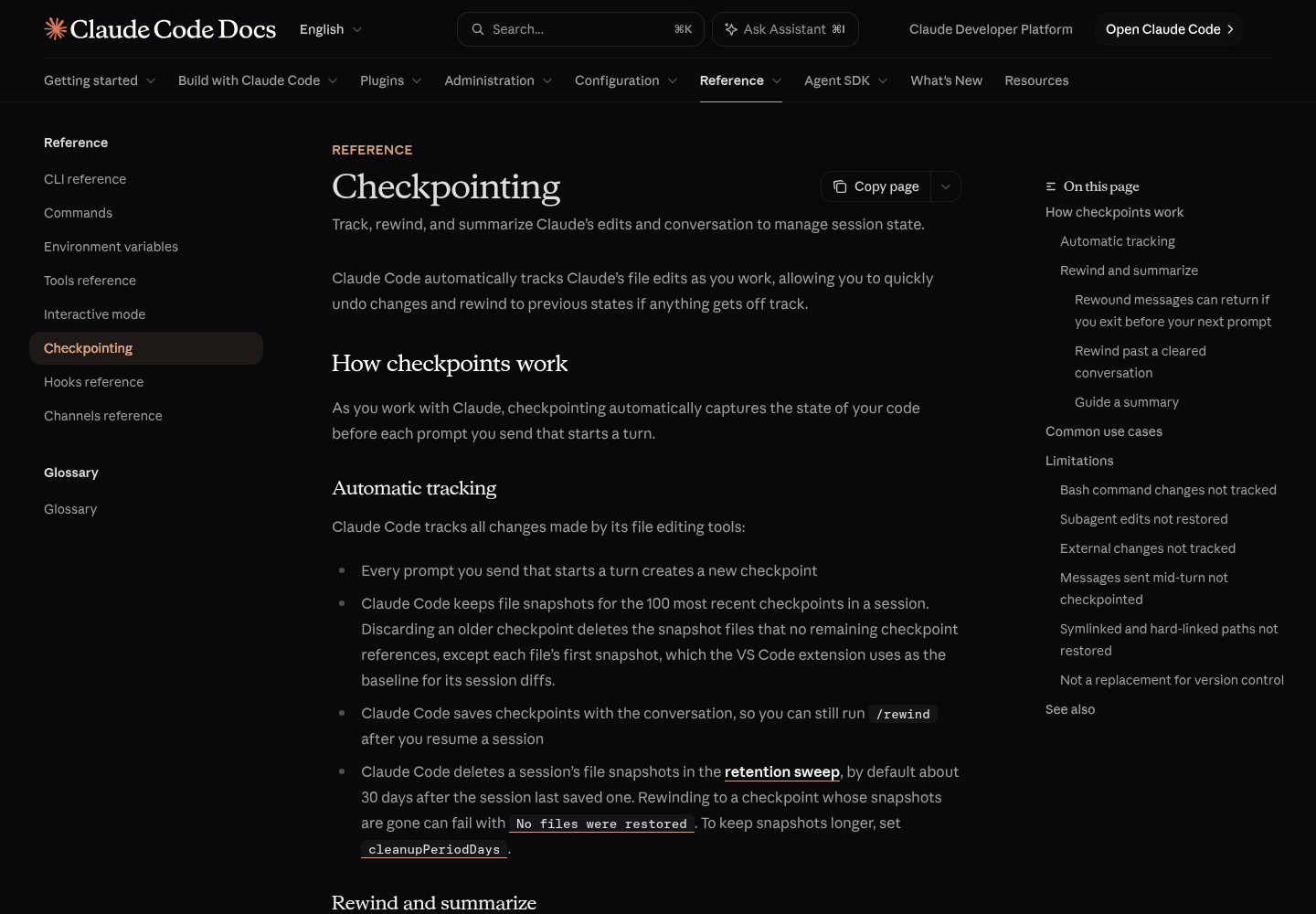
The checkpointing page describes the mechanism in a few sentences. Claude Code captures the state of your code before each prompt you send that starts a turn, so every one of those prompts becomes a restore point. It keeps file snapshots for the 100 most recent checkpoints in a session. Checkpoints are saved with the conversation, which is why /rewind still works after you resume a session. Snapshots are not permanent, though. By default the retention sweep deletes a session’s file snapshots about 30 days after the session last saved one, and rewinding to a checkpoint whose snapshots are gone can fail with No files were restored.
The key word is “tracks”. Claude Code tracks changes made by its file editing tools, and the docs list everything that falls outside them:
| Change | Captured by a checkpoint? | Documented reason |
|---|---|---|
| Claude edits or writes a file with its file-editing tools | Yes | This is what checkpointing tracks |
Claude runs rm, mv or cp through Bash |
No | These modifications cannot be undone through rewind |
| You edit a file in your editor | Normally no | Outside changes are captured only when they touch files the session also edits |
| Another concurrent Claude Code session edits the repo | Normally no | Same rule as manual edits |
A forked skill (context: fork) running in the foreground |
Yes | It edits your working tree during your own turn |
Any other subagent, including a background forked skill or a background /code-review --fix |
Partly | Rewind restores only files Claude had already edited in your conversation |
| A symlinked or hard-linked file | No | Skipped with a Restored the code, but skipped N files warning |
| A message you typed while Claude was still working | No checkpoint of its own | Marked No code restore; its edits count toward the prompt that started the turn |
Two consequences drive the rest of this guide. First, a rewind does not take the whole folder back in time. It puts back the files Claude’s tools changed. Second, if you hand-edit a file that Claude has also edited, a code restore can sweep up your edit too, because that file is tracked. Anthropic’s Agent SDK checkpointing page adds one more limit worth keeping in mind for interactive work: creating, moving or deleting directories is not undone by rewinding.
Before you start: build a scratch repository
You need four things: Claude Code installed and signed in, git on your PATH, a terminal, and an editor that can save a file. Run the drill in a throwaway directory rather than a real project. A code restore overwrites files, and the checkpointing page describes no way to undo a restore.
- Create the repository and three files, then commit them as the baseline:
mkdir rewind-drill && cd rewind-drill
git init
cat > app.js <<'EOF'
function greet(name) {
  return "Hello, " + name;
}
module.exports = { greet };
EOF
printf 'Drill notes\n' > notes.txt
printf '# Rewind drill\n' > README.md
git add app.js notes.txt README.md
git commit -m "baseline"
git status
- Confirm the baseline.
git statusshould report a clean working tree with nothing to commit. That commit is your floor. Whatever the rewind does,git restorecan bring any committed file back to this state. - Open
README.mdin your editor now so it is ready for the manual edit.
Why three files? Each has a different author and sits on a different side of the checkpoint boundary. Only Claude’s edit tool will ever change app.js. Only a shell command will change notes.txt. Only you will change README.md. After the rewind, each file shows you which system owned it.
Run the three-prompt drill
Start a session with claude from inside rewind-drill. Send these prompts one at a time and wait for each turn to finish, because a message typed mid-turn gets no checkpoint of its own.
- Prompt 1:
In app.js, change greet so it returns "Hi, " + name + "." Use your file edit tool, not a shell command.Approve the edit. Claude Code took a checkpoint before this turn began, and that checkpoint holds the baselineapp.js. - Prompt 2:
Run exactly this shell command and nothing else: mv notes.txt NOTES.mdApprove the Bash call. This turn also gets a checkpoint, but the rename itself happens outside the file-editing tools. - Manual edit: in your editor, add the line
Manual line added outside Claude Code.toREADME.mdand save. This creates no checkpoint, because you did not send a prompt. - Prompt 3:
Add a one-line comment above greet in app.js that says what it returns.Approve the edit. This is a second tracked change to the same file. - Run
/diffto preview what the checkpoint layer can see. The interactive mode reference explains that its turn views come from Claude’s file edits rather than from git, so a change Claude makes through a shell command appears only under Current, the working-tree view. You should get turn views for the two prompts that editedapp.js. The rename and the README line should appear only under Current.
Fill in this prediction sheet before you open the rewind menu. It is the core skill of the drill: know the outcome before you press Enter.
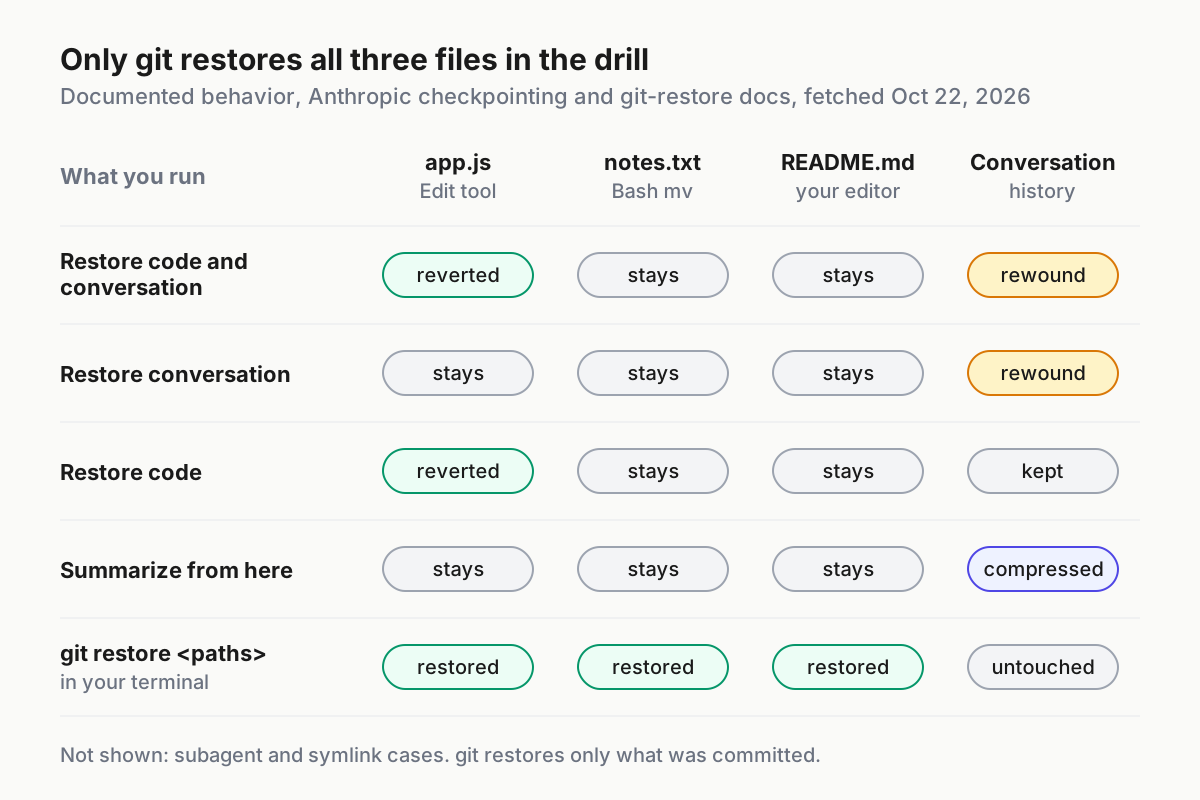
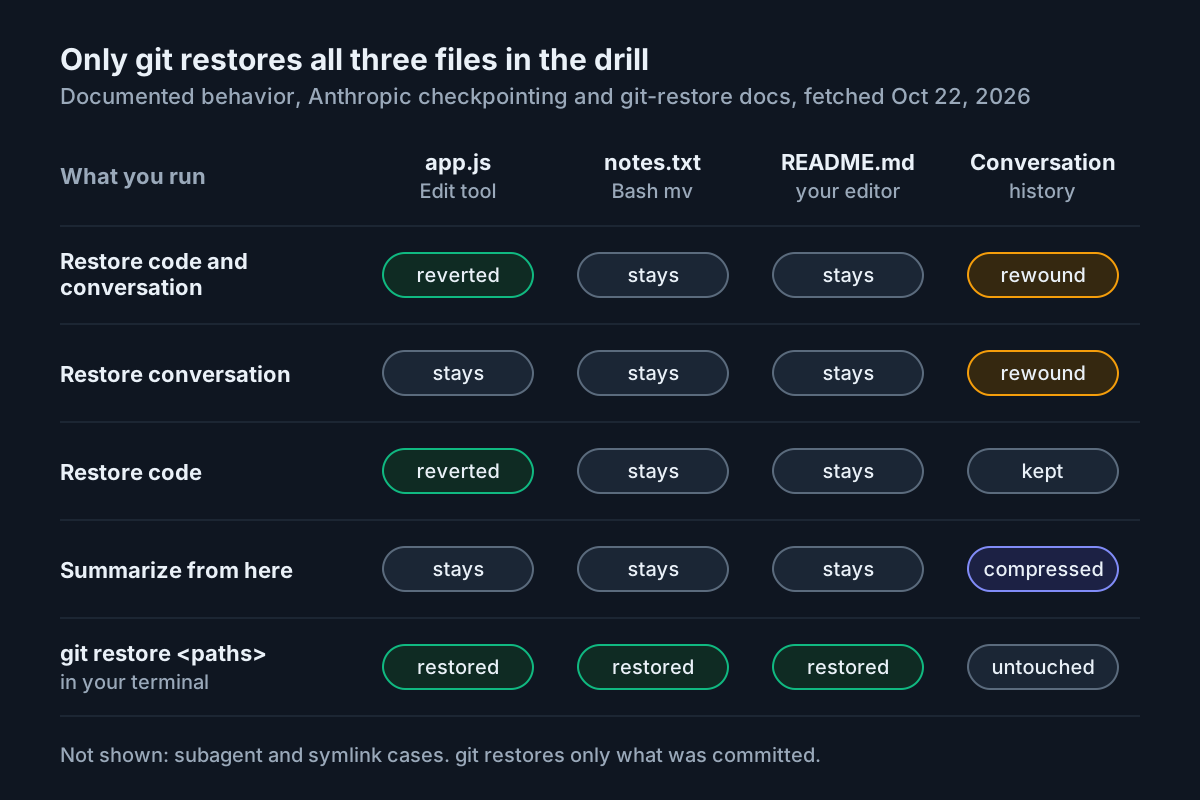
| Change | How it was made | Checkpoint sees it? | Expected after Restore code at prompt 1 |
|---|---|---|---|
greet returns "Hi, " + name + "." |
Prompt 1, file edit tool | Yes | Reverted to baseline |
notes.txt renamed to NOTES.md |
Prompt 2, Bash mv |
No | Rename stays |
Extra line in README.md |
Your editor, between prompts 2 and 3 | No, Claude never edited this file | Line stays |
Comment above greet |
Prompt 3, file edit tool | Yes | Reverted, because it came after the checkpoint |
The last row surprises people. Rewinding to an early prompt reverts every tracked edit made after it, not just that prompt’s own edit. To keep prompt 1’s change and drop only prompt 3’s, select prompt 3 instead.
Open the rewind menu and pick a checkpoint on purpose
- Clear the prompt box first. When it contains text, pressing Esc twice clears the draft instead of opening the menu. The cleared text goes to your input history, so Up brings it back afterwards.
- Press Esc twice on the empty prompt, or type
/rewind. The commands reference lists/checkpointand/undoas aliases. - Read the list of prompts you sent during the session and move to prompt 1, the
app.jschange. Acting on a prompt returns you to the state just before it, which is why a conversation restore hands that prompt back to you to re-send or edit. - Read the actions before choosing. The two code restore options appear only when the selected checkpoint has tracked file changes to revert. On prompt 1 you should see all six: Restore code and conversation, Restore conversation, Restore code, Summarize from here, Summarize up to here, and Never mind.
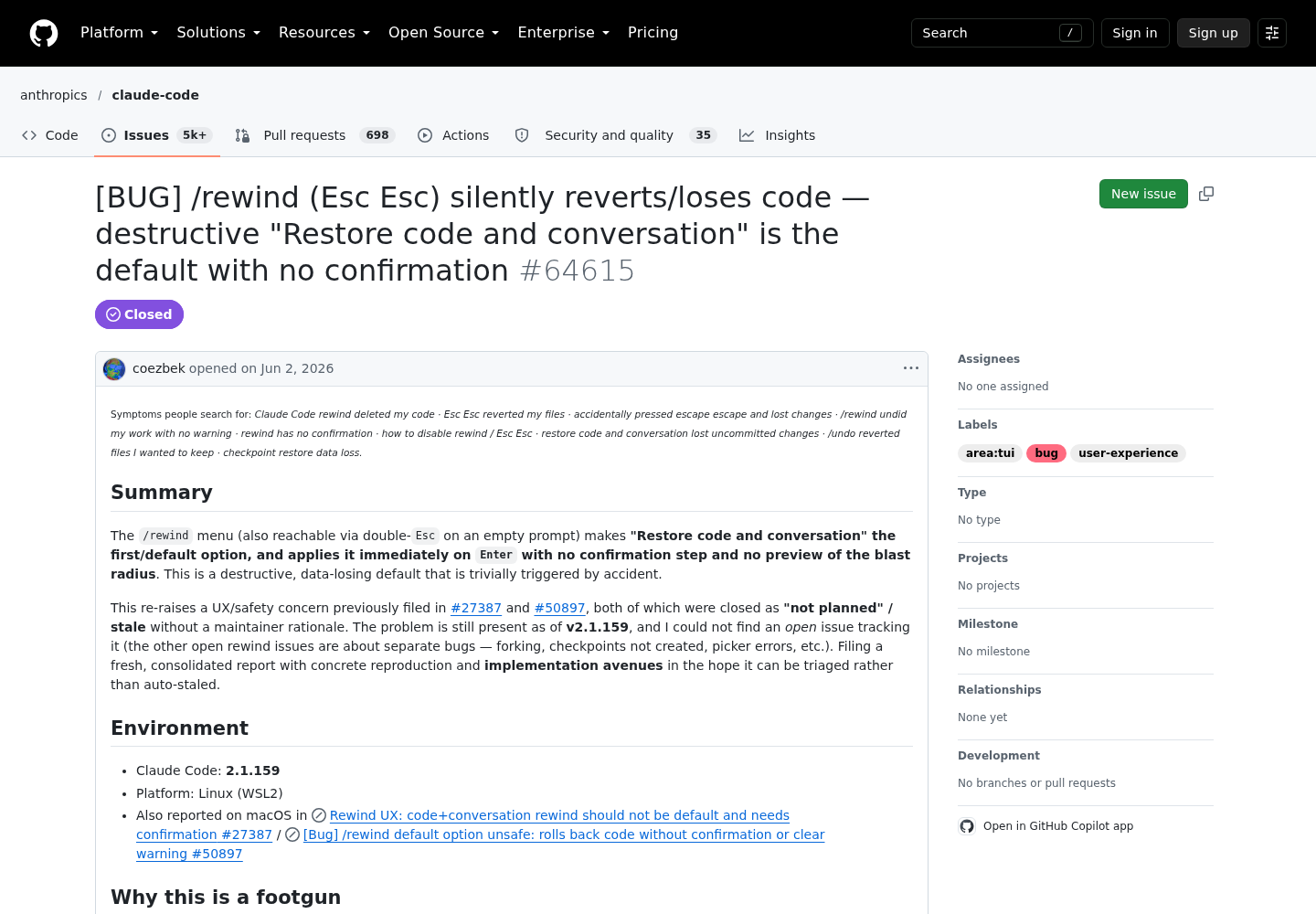
- Choose with the arrow keys, not by reflex. In GitHub issue #64615, the reporter described losing work when a habitual Enter accepted the default. An Anthropic maintainer reproduced the flow on v2.1.233. They found that the picker opens on “(current)”, so one stray Enter changes nothing, and that choosing an older checkpoint leads to a screen headed “Confirm you want to restore…” that previews the code change. The same reply acknowledged that Restore code and conversation is still the default option on that screen, and that the double-Esc trigger cannot currently be disabled or rebound. The issue was closed on Aug 17, 2026. On Aug 25 the reporter replied that a selection screen is not a yes/no confirmation.
- If anything looks unexpected, pick Never mind. It takes you back to the message list without changing anything.
Compare the three restore options on one checkpoint
For the first pass, choose Restore code at prompt 1. It reverts the file changes and keeps the conversation, so Claude’s earlier replies stay on screen while you inspect the files.
| Option | Files on disk | Conversation | Prompt box afterwards | Reach for it when |
|---|---|---|---|---|
| Restore code and conversation | Tracked edits after the point are reverted | Rewound to that message | Original prompt restored for re-sending | The approach and the code are both wrong |
| Restore conversation | Unchanged | Rewound to that message | Original prompt restored | The code is fine but the chat went somewhere unhelpful |
| Restore code | Tracked edits after the point are reverted | Kept as is | Not described in the docs | The reasoning was useful but the edits were bad |
| Never mind | Unchanged | Unchanged | Back to the message list | You are not sure yet |
Here is what the docs predict after Restore code. app.js is back to the baseline, with both the prompt 1 change and the prompt 3 comment gone, because both were tracked edits made after the selected point. NOTES.md still exists and notes.txt is still missing. README.md still has your manual line. Compare that with your prediction sheet. If a row came out differently, the troubleshooting table below names the usual cause.
To try the other two options yourself, roll the scratch repo back as described in the last section, repeat the three prompts, and choose differently. Watch the conversation side the second time. Both conversation restores put the original prompt back into the input field.
One trap applies to every conversation restore. Rewound messages can come back if you exit before your next prompt, because Claude Code saves the rewound conversation together with that next prompt. Send any prompt before you exit. If the messages have already returned, run /rewind, select the same prompt, and choose Restore conversation. Files you restored stay as the rewind left them.
Recover what the rewind left behind with git
The rewind did its part. The rename and the manual edit are now git’s job. git restore restores working-tree paths from the index by default, or from another commit when you pass --source.
# 1. See what is still different from the baseline
git status
# 2. Read the manual edit before deciding to keep or drop it
git diff README.md
# 3. Bring back the file that Bash renamed away
git restore notes.txt
# 4. Remove the untracked copy the rename created
rm NOTES.md
# 5. Optional: drop the manual line too
git restore README.md
# 6. Confirm you are back at the floor
git status
- Run
git status. You should seenotes.txtreported as deleted,NOTES.mdas untracked, andREADME.mdas modified.app.jsshould not appear, which shows the rewind restored it to exactly the committed content. - Run
git diff README.mdand read the added line. This step protects real work. In a real project the manual edit might be the fix you wanted to keep. - Run
git restore notes.txt. The file comes back from the index. - Delete
NOTES.md. It was never committed, so git has nothing to restore it from, andgit restorewill not remove it for you. - Run
git restore README.mdonly if you want the manual line gone. - Run
git statusagain. A clean working tree means recovery is complete.
For a bigger mess, restore the whole tree from the last commit, including the index, with the top-of-tree pathspec documented on the same page:
git restore --source=HEAD --staged --worktree :/
If you committed during the session and want an older baseline, put that commit in --source. Afterwards, check git status for untracked files and delete the ones you do not want.
Notice the division of labour. Git returns everything to the last commit. Rewind is finer-grained between commits: it can drop prompt 3’s edit while keeping prompt 1’s, which git cannot do unless you committed between them.
Free context with Summarize from here and Summarize up to here
The same menu manages context, and neither summarize option touches files on disk. The original messages stay in the session transcript, so Claude can still refer back to them.
| Action | What it compresses | Where you land | Use it for |
|---|---|---|---|
| Summarize from here | The selected message and everything after it | The original prompt is back in the input field | A long debugging tangent you want out of the way |
| Summarize up to here | Everything before the selected message | End of the conversation, empty input | A long setup preamble that is crowding out recent work |
/compact |
The whole conversation so far | Same session | General space-saving when no single tangent stands out |
/clear |
Nothing; it starts a new conversation | A new session | A new task |
/branch or claude --continue --fork-session |
Nothing; it copies | A branch you can return from | Trying a different approach while keeping the original intact |
- Open the menu, select the message at the boundary, and highlight a Summarize option with the arrow keys.
- To steer the summary, type instructions where the row reads add context (optional), then press Enter. Pressing the option’s number key summarizes immediately with no instructions.
- Look for the Summarized conversation marker where the compressed messages were. That marker is your confirmation that it worked.
The docs call summarizing “like a targeted /compact”. The same caution applies: a summary can drop the one detail your next step needs. The checks in our compaction-summary lint carry over directly. One more recovery path: if you ran /clear earlier in the same Claude Code process, the rewind menu shows a /resume <session-id> (previous session) entry at the top that reopens the conversation you cleared. It disappears when you exit.
Decision table: which undo to reach for
Decide by who wrote the change, then by what you want to keep.
| Situation | Choose | What changes | What stays | Is git needed? |
|---|---|---|---|---|
| Wrong approach: code and chat both went bad | Restore code and conversation at the prompt before the detour | Tracked files and chat | Bash, manual and most subagent changes | Yes, if any of those happened |
| Bad code, useful chat | Restore code | Tracked files | The conversation | Only for untracked changes |
| Good code, chat drifted | Restore conversation | Chat only | All files | No |
| Long tangent eating context | Summarize from here | Chat is compressed | Files, transcript | No |
| Long preamble eating context | Summarize up to here | Earlier chat is compressed | Later messages, files | No |
| Bash deleted or moved files | git restore <path> |
Committed paths | Untracked files | Yes, rewind cannot help |
| Background subagent edited files | Rewind for files the main chat had edited, git for the rest | Shared files | The subagent’s other files | Yes |
| Symlinked or hard-linked file | Ask Claude to reverse the edit, edit it yourself, or use git | That file only | Everything else | If committed |
| Resumed session from days ago | /rewind as normal |
Tracked files, if snapshots remain | Anything past retention | Yes, if No files were restored |
| Message marked No code restore | Select the prompt that started the turn | Edits from the whole turn | Earlier turns | No |
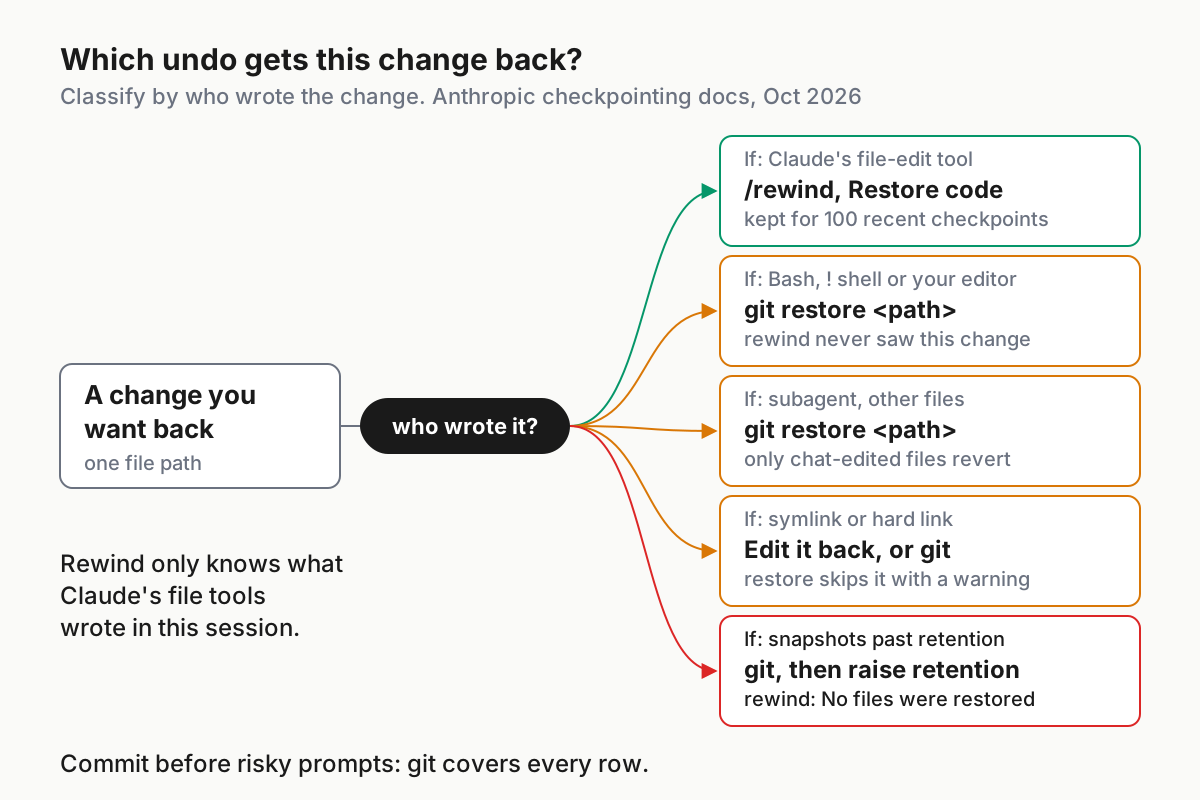
The subagent row deserves care. Per the checkpointing docs, a forked skill running in the foreground is rewound as usual, while any other subagent’s edits to files the main conversation had not touched stay put. If your team has started using forked subagents in scripts, the fork subagents migration runbook explains which ones run where.
Build the safety net before risky prompts
Checkpoints are, in Anthropic’s words, “designed for quick, session-level recovery” and are “not a replacement for version control”. Set up the floor before you need it.
- [ ] Make a deliberate commit before any prompt you would hesitate to run twice, such as a refactor, a dependency upgrade or a migration.
- [ ] Give risky work its own branch or worktree, so a full reset never touches your main line.
- [ ] In prompts, ask Claude to change files with its edit tools when you want the change to be rewindable, and save shell
rm/mvsteps until after a commit. - [ ] Run
git statusbefore opening the rewind menu, so you know which uncommitted changes a code restore could overwrite. - [ ] Raise retention if you often rewind sessions that are weeks old.
- [ ] Keep enough local history to reconstruct a bad night. Our fleet replay guide covers transcript evidence beyond a single session.
The checkpointing page says to set cleanupPeriodDays to keep snapshots longer. User settings live in ~/.claude/settings.json, and the settings reference warns that the file is strict JSON: comments or trailing commas produce a Settings Error at the next start. The value below is an example, not a recommendation:
{
  "$schema": "https://json.schemastore.org/claude-code-settings.json",
  "cleanupPeriodDays": 60
}
After saving, run /status and check that the Setting sources line includes User settings. The same key governs automatic session cleanup more broadly, so read the session cleanup and retention audit before raising it on a shared machine.
Some people would rather have no code restore at all. The environment variables reference documents CLAUDE_CODE_DISABLE_FILE_CHECKPOINTING: set it to 1 and /rewind cannot restore code changes. It overrides the fileCheckpointingEnabled setting, and it can go in a settings env block:
{
  "env": {
    "CLAUDE_CODE_DISABLE_FILE_CHECKPOINTING": "1"
  }
}
In the issue thread, one user reported that with it set, the rewind went straight to a conversation rollback with no menu. That is one person’s observation, not documented behavior. For most readers the better trade is to keep checkpoints, commit often, and choose each option deliberately.
Scripted rollback with the Agent SDK
If you run agents from code, the Agent SDK has the same safety valve. File checkpointing backs up files before Claude changes them with the Write, Edit and NotebookEdit tools. rewind_files() in Python, or rewindFiles() in TypeScript, restores those files. It does not rewind the conversation. On a rewind, Claude Code deletes files it created and restores modified files to their content at that point.
- Enable checkpointing and ask for user-message UUIDs in the stream. Without
replay-user-messages,message.uuidis missing. - Capture the first user message UUID and the session ID while the stream runs.
- To rewind after the stream completes, resume the session with an empty prompt, enable checkpointing on the resumed session too, and call the rewind from inside the response loop.
This is Anthropic’s lead Python example from that page:
import asyncio
from claude_agent_sdk import (
    ClaudeSDKClient,
    ClaudeAgentOptions,
    UserMessage,
    ResultMessage,
)


async def main():
    # Step 1: Enable checkpointing
    options = ClaudeAgentOptions(
        enable_file_checkpointing=True,
        permission_mode="acceptEdits",  # Auto-accept file edits without prompting
        extra_args={
            "replay-user-messages": None
        },  # Required to receive checkpoint UUIDs in the response stream
    )

    checkpoint_id = None
    session_id = None

    # Run the query and capture checkpoint UUID and session ID
    async with ClaudeSDKClient(options) as client:
        await client.query("Refactor the authentication module")

        # Step 2: Capture checkpoint UUID from the first user message
        async for message in client.receive_response():
            if isinstance(message, UserMessage) and message.uuid and not checkpoint_id:
                checkpoint_id = message.uuid
            if isinstance(message, ResultMessage) and not session_id:
                session_id = message.session_id

    # Step 3: Later, rewind by resuming the session with an empty prompt
    if checkpoint_id and session_id:
        async with ClaudeSDKClient(
            ClaudeAgentOptions(enable_file_checkpointing=True, resume=session_id)
        ) as client:
            await client.query("")  # Empty prompt to open the connection
            async for message in client.receive_response():
                await client.rewind_files(checkpoint_id)
                break
        print(f"Rewound to checkpoint: {checkpoint_id}")


asyncio.run(main())
The acceptEdits permission mode approves edits without asking, so use it only in a scratch project. Once you have both IDs, you can also rewind from a shell. The bare CLI needs the environment variable, and the --rewind-files flag is accepted even though claude --help does not list it:
CLAUDE_CODE_ENABLE_SDK_FILE_CHECKPOINTING=true claude -p --resume <session-id> --rewind-files <checkpoint-uuid>
On success the docs say it prints Files rewound to state at message <checkpoint-uuid> and exits without sending a prompt. The SDK has the same blind spots as the interactive feature: Bash changes are not tracked, subagent edits are not tracked except a foreground forked skill, checkpoints belong to the session that created them, and directory operations and remote files are out of scope. From v2.1.216, a rewind skips symlinks, hard links and other non-regular files and counts them in skippedLinks on the result.
Troubleshooting rewinds that did not do what you expected
| Symptom | Likely cause | Fix | What you should see after the fix |
|---|---|---|---|
| Only Restore conversation, the summarize options and Never mind appear | No tracked file edits after that checkpoint, or file checkpointing is disabled | Select an earlier prompt that preceded an edit; check that CLAUDE_CODE_DISABLE_FILE_CHECKPOINTING is unset |
Restore code options appear for a prompt that preceded a tracked edit |
Restored the code, but skipped N files |
Those tracked paths are symlinks or hard links, for example dotfile-manager configs or pnpm hard links | Run /debug before restoring; the log at ~/.claude/debug/<session-id>.txt names each skipped path. Then reverse those edits by hand, or ask Claude to reverse the edit or edit the file yourself |
Skipped files show the content you intended |
| A rewind wiped a manual edit | You edited a file the session had also edited, so it was tracked | Recover from git if the edit was committed; otherwise retype it. Commit before restoring next time | git diff shows your edit back |
No files were restored |
The snapshots were deleted by the retention sweep | Use git; raise cleanupPeriodDays for future sessions |
The file matches the git baseline |
| Rewound messages are back after you resumed | You exited before sending another prompt | /rewind, same prompt, Restore conversation, then send a prompt before exiting |
The rewound turns stay gone on the next resume |
| The checkpoint you wanted is missing after a resume or reboot | You are in a different session, for example after /clear |
Use the /resume <session-id> (previous session) entry, or /resume the right session; see what survives a cold restart |
The original prompts are listed in the menu |
| Subagent changes were not reverted | A background subagent edited files the main conversation never touched | git restore those paths |
git status lists no subagent leftovers |
| A message is marked No code restore | You typed it mid-turn, so it has no checkpoint of its own | Select the prompt that started that turn and restore code | The whole turn’s edits are reverted |
Success checks and full rollback
You have finished the drill when every box below is ticked.
- [ ] Before opening the menu, you predicted correctly which of the three changes each option would restore, and the prediction sheet matched the result.
- [ ] After recovery,
git statusreports a clean working tree. - [ ] You can say, without checking, why the prompt 3 comment disappeared when you restored at prompt 1.
- [ ] Your real projects have a deliberate commit before any prompt you consider risky.
To back out at any point:
- Inside the rewind menu, choose Never mind to leave without changes.
- To return the scratch repo to its baseline, run
git restore --source=HEAD --staged --worktree :/, then delete any untracked leftovers thatgit statuslists, such asNOTES.md. - When you are done practising, exit Claude Code and delete the
rewind-drilldirectory.
The habit worth keeping is the order of questions: who wrote this change, is it tracked, and is it committed. Answer those three before pressing Enter and the rewind menu becomes a precise tool rather than a gamble.
Sources
- Cozy (@Cozy2054934) on X, post of Oct 20, 2026: Every prompt creates a checkpoint; Bash edits aren’t tracked
- Anthropic, Claude Code Docs: Checkpointing
- Anthropic, Claude Code Docs: Rewind file changes with checkpointing (Agent SDK)
- Anthropic, Claude Code Docs: Interactive mode
- Anthropic, Claude Code Docs: Commands
- Anthropic, Claude Code Docs: Environment variables
- Anthropic, Claude Code Docs: Settings files and precedence
- GitHub, anthropics/claude-code: Issue #64615, /rewind default restores code without confirmation
- Git project: git-restore documentation