Verify That Each User Sees Only Their Tasks on a Neon MCP Server
Build a read-only task tool on a Neon MCP server, bind queries to the verified user ID, and check the results with two test accounts and a signed-out request.

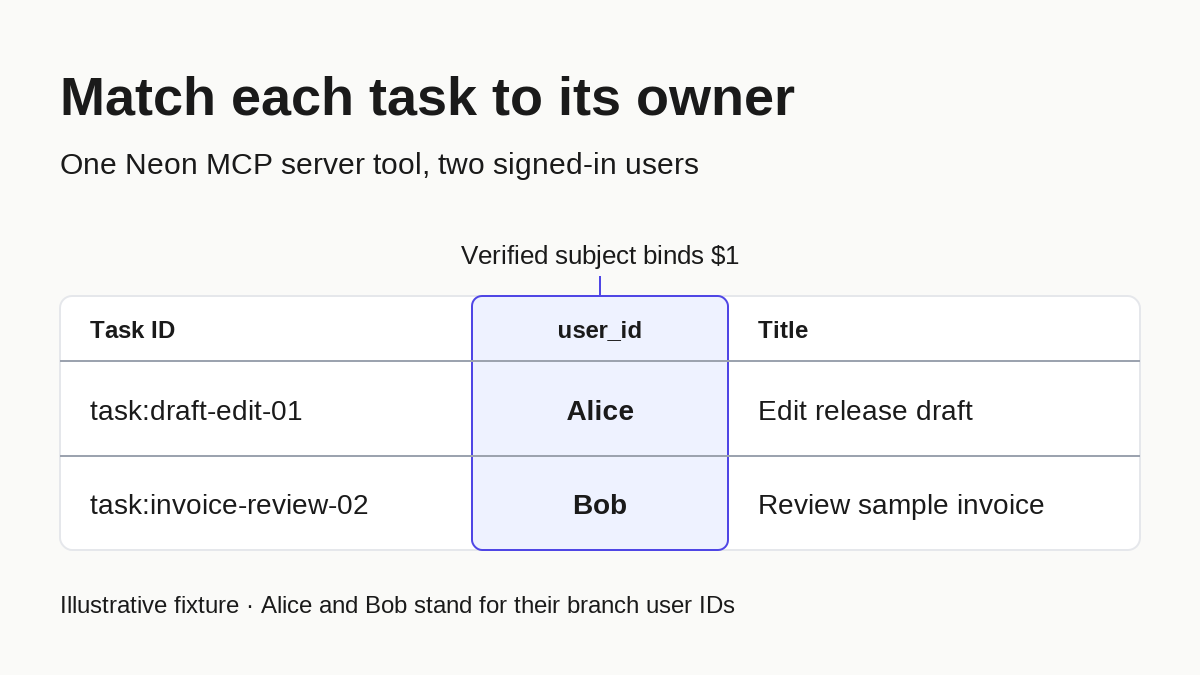
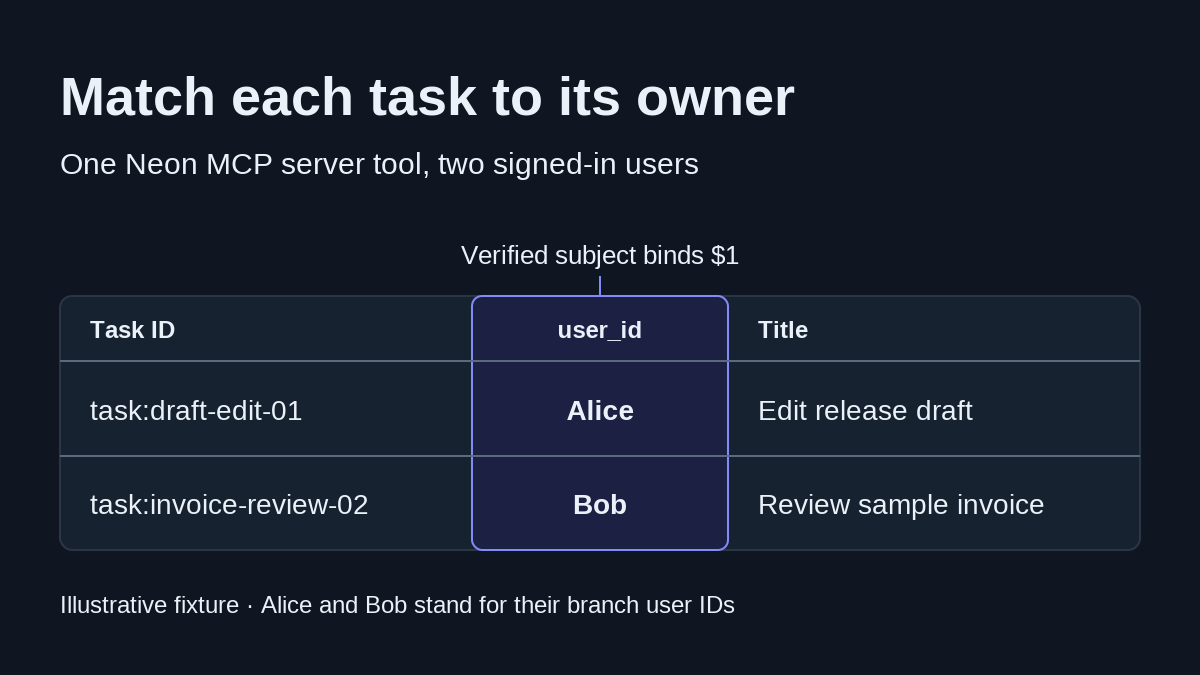
Your Neon MCP server accepts a sign-in and lists a tool called list_tasks. Now you need to see what happens when two people call that same tool. If you test with Alice alone, a query that returns every row can look correct. Give Alice and Bob a different task each, and the same call has two different correct answers. Make a third request without credentials to check that the server challenges callers before they reach the tool.
This tutorial is for a TypeScript developer who can deploy to a disposable Neon branch. You’ll create the two rows, deploy a complete handler with one read-only tool, and compare the raw MCP responses. Start with an app that already uses Managed Better Auth and has working sign-in and consent pages on a public HTTPS origin. You’ll also need a signed-in Neon CLI, access to the branch’s SQL Editor, and an OAuth-capable MCP client that can invoke tools directly. All example responses below are illustrative expectations.
Neon’s November 25, 2026 article demonstrates an app exposing a tool through Neon Functions and Managed Better Auth. Its companion technical guide uses the same platform to implement per-user to-dos. This exercise adapts that design to a fixture small enough to account for every row. Neon’s November 25 article
Prepare a branch and two independent sign-ins
- Start with a Neon project that contains synthetic data. In the test app’s working directory, link the project and check out the new branch using the commands below. Open the branch in the Neon Console and record its name, project ID and database. Use those values when you move between the CLI, the app and SQL Editor.
- Run the Auth status command. Confirm Managed Better Auth is enabled and record the branch Auth URL. Configure the test app’s public HTTPS deployment to use that branch’s
NEON_AUTH_BASE_URL. If the app itself reads data, check that its database configuration also points at the test branch. - Create Alice and Bob through the test app’s sign-up flow. Use two separate browser profiles and verify that each can sign in to the test app. Record each account’s user ID from its authenticated app session before seeding the fixture.
- Confirm that your MCP client supports Streamable HTTP, OAuth and a client onboarding method accepted by Managed Better Auth. Use a client that gives you access to the actual tool response. The invocation instructions use MCP Inspector’s Tools screen once an OAuth connection is available.
neon link
neon checkout --create mcp-owner-test
neon neon-auth status --branch mcp-owner-test
Run checkout immediately after link, since link pins the project’s default branch. The following commands assume you are still in that linked test app directory. If you need to distinguish projects with similarly named branches, add --project-id to the Functions and Auth commands and specify the branch ID in --branch. The Auth status output identifies which branch configuration you are using. Neon Auth CLI reference
Host the login and consent pages in the test app. Deploy the /mcp route as a Neon Function. During OAuth the client opens the app’s pages in the browser, then uses the function URL to discover and call the tool. Choose a Neon region with Functions support, such as AWS US East (Ohio). Each branch runs its own deployment against its own data. Neon Functions overview
A newly created branch can copy its parent’s data and Auth settings. Use a synthetic parent so the exercise starts with synthetic data throughout. Check the URLs inherited by the branch before opening an MCP connection. An inherited consent URL can still point to the parent app even when you’ve selected the child branch’s function. The same distinction matters when two worktrees both expose a database named neondb. Neon branching · Verify each Git worktree’s database branch
For each account, sign in through your normal app flow. In the app’s client code, await authClient.getSession() returns session data, and data?.session?.user identifies the signed-in user in Neon’s user management example. Read the id from the authenticated user object. A display name or email address can help you recognize the account in the browser. The fixture uses the ID because the query compares it with the token subject. Record only the ID alongside the Alice or Bob label. Neon user management
Before proceeding, open the test app in each of the two browser profiles and confirm the account shown there. The two sessions should yield two distinct IDs on the same branch. This check gives you an ownership record independent of the tool output. You will use it if a later browser authorization goes through under a previously signed-in account or if an authorized tool call receives an empty list.
Seed a fixture that exposes a wrong result
- In SQL Editor select
mcp-owner-testand the database the function will use. ReplaceALICE_TEST_USER_IDandBOB_TEST_USER_IDin the two insert tuples with the exact IDs from the preceding step. Confirm the two IDs differ before running the SQL. - Run the block once. Its final query should show exactly two rows, one for each owner. Compare both
user_idvalues with the IDs you recorded from the app sessions. - Keep both rows present for both client calls. Alice should own
task:draft-edit-01, titledEdit release draft. Bob should owntask:invoice-review-02, titledReview sample invoice.
BEGIN;

CREATE TABLE public.mcp_owner_test_tasks (
  id text PRIMARY KEY,
  user_id text NOT NULL,
  title text NOT NULL
);

CREATE INDEX mcp_owner_test_tasks_user_id_idx
  ON public.mcp_owner_test_tasks (user_id);

INSERT INTO public.mcp_owner_test_tasks (id, user_id, title)
VALUES
  ('task:draft-edit-01', 'ALICE_TEST_USER_ID', 'Edit release draft'),
  ('task:invoice-review-02', 'BOB_TEST_USER_ID', 'Review sample invoice');

COMMIT;

SELECT id, user_id, title
FROM public.mcp_owner_test_tasks
ORDER BY id;
The SQL Editor runs the final query with your database connection. The query is deliberately unfiltered, so use its two rows as the fixture inventory. If you copied Alice’s ID into both insert tuples, both rows would legitimately belong to Alice under the rule you are testing. Correct the fixture before running either client call. Changing ownership between the two calls would also make the comparison ambiguous because the input data would differ along with the caller.
The example uses a dedicated public table and stores user IDs as text, following Neon’s documented pattern of storing the access token’s sub in an app table. The two task IDs are stable fixture labels. The app-generated user IDs you substitute are the ownership values. The table name is specific to this exercise so a naming conflict stops creation. If creation reports that the relation already exists, confirm the branch and check the existing relation before rerunning setup. Neon’s MCP server implementation guide
The index gives Postgres a way to find rows by owner as the table grows. For this fixture the planner can scan both rows and still apply the same predicate. Compare the output values with the fixture inventory. The query plan has no bearing on which of these two task IDs belongs to Alice or Bob.
Bind the query to the verified subject
- Install the function dependencies in the test app project. Use
@neon/oauth0.3.0 or later and a compatible 1.x release of the MCP TypeScript SDK at 1.25.0 or later for the documented web-standard transport. - Save the complete handler below as
functions/taskscope/index.ts. Leave the tool’s input schema empty. The same input will be sent from both client sessions, with identity arriving through the access token on each HTTP request. - Trace the owner value from
c.get('auth').subthroughcreateServerto the query’s[userId]parameter. Confirm the result includesidandtitle. This is the path to inspect if the two accounts later get the same result.
npm install @neon/oauth @neon/functions @modelcontextprotocol/sdk@1 hono pg zod
npm install -D @types/pg
import { Hono } from 'hono';
import { McpServer } from '@modelcontextprotocol/sdk/server/mcp.js';
import { WebStandardStreamableHTTPServerTransport } from '@modelcontextprotocol/sdk/server/webStandardStreamableHttp.js';
import { createMcpAuth } from '@neon/oauth/mcp';
import { honoMcp, type McpAuthVariables } from '@neon/oauth/mcp/hono';
import { attachDatabasePool } from '@neon/functions';
import { Pool } from 'pg';

type Task = { id: string; title: string };

function databaseUrl() {
  const url = new URL(process.env.DATABASE_URL!);
  if (url.searchParams.get('sslmode') === 'require') {
    url.searchParams.set('sslmode', 'verify-full');
  }
  return url.toString();
}

const pool = new Pool({ connectionString: databaseUrl(), max: 5 });
attachDatabasePool(pool);

const mcpAuth = createMcpAuth({
  baseUrl: process.env.NEON_AUTH_BASE_URL!,
  resource: process.env.MCP_RESOURCE!,
});

function createServer(userId: string) {
  const server = new McpServer({ name: 'taskscope', version: '1.0.0' });

  server.registerTool(
    'list_tasks',
    {
      title: 'List tasks',
      description: 'List tasks owned by the signed-in user.',
      inputSchema: {},
      annotations: { readOnlyHint: true },
    },
    async () => {
      const { rows } = await pool.query<Task>(
        'SELECT id, title FROM public.mcp_owner_test_tasks WHERE user_id = $1 ORDER BY id',
        [userId],
      );
      return { content: [{ type: 'text' as const, text: JSON.stringify(rows) }] };
    },
  );

  return server;
}

const app = new Hono<McpAuthVariables>();
app.use(honoMcp(mcpAuth, { path: '/mcp' }));

app.all('/mcp', async (c) => {
  const server = createServer(c.get('auth').sub);
  const transport = new WebStandardStreamableHTTPServerTransport({
    sessionIdGenerator: undefined,
  });
  await server.connect(transport);
  return transport.handleRequest(c.req.raw);
});

export default app;
The middleware validates the access token before the route creates the server. The OAuth SDK verifies the signature, issuer and audience. The issuer identifies the branch’s Managed Better Auth service. The audience must include the resource URL configured for this function. Both checks matter because branches in a project share signing keys. After verification, the sub claim identifies the user whose ID goes into the query. Neon OAuth provider reference
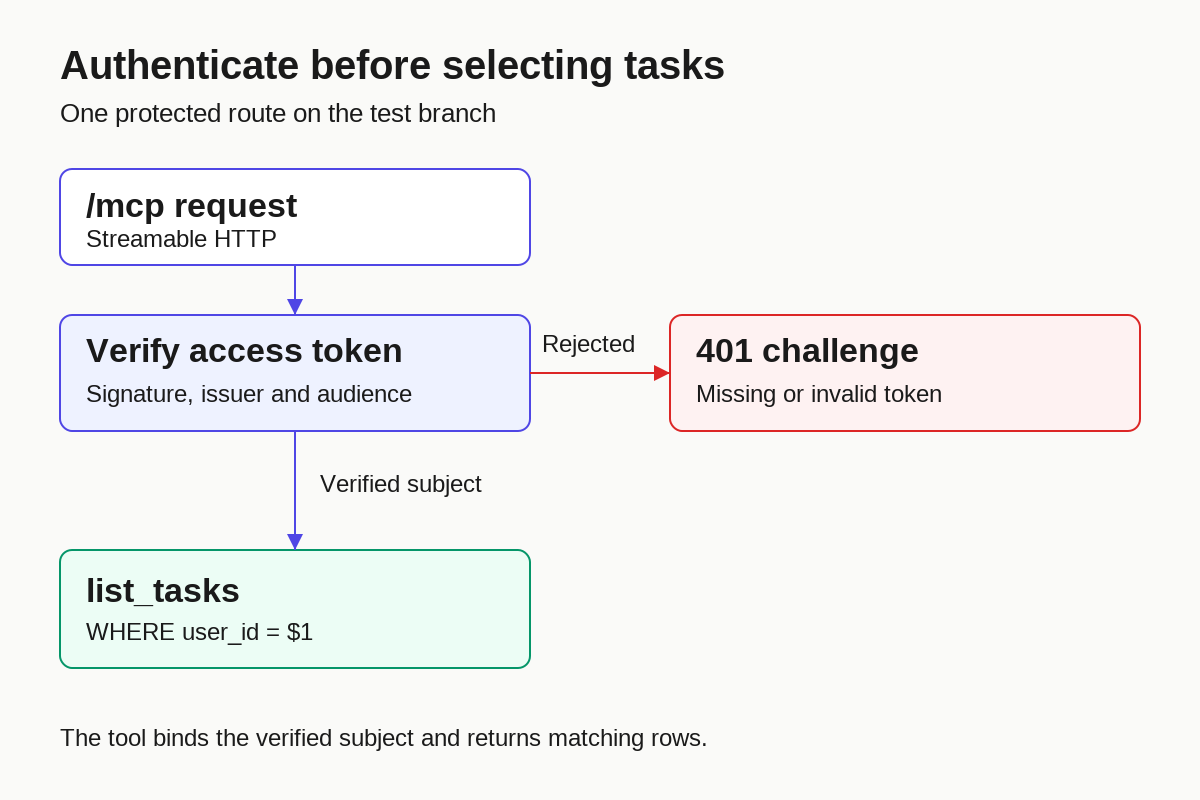
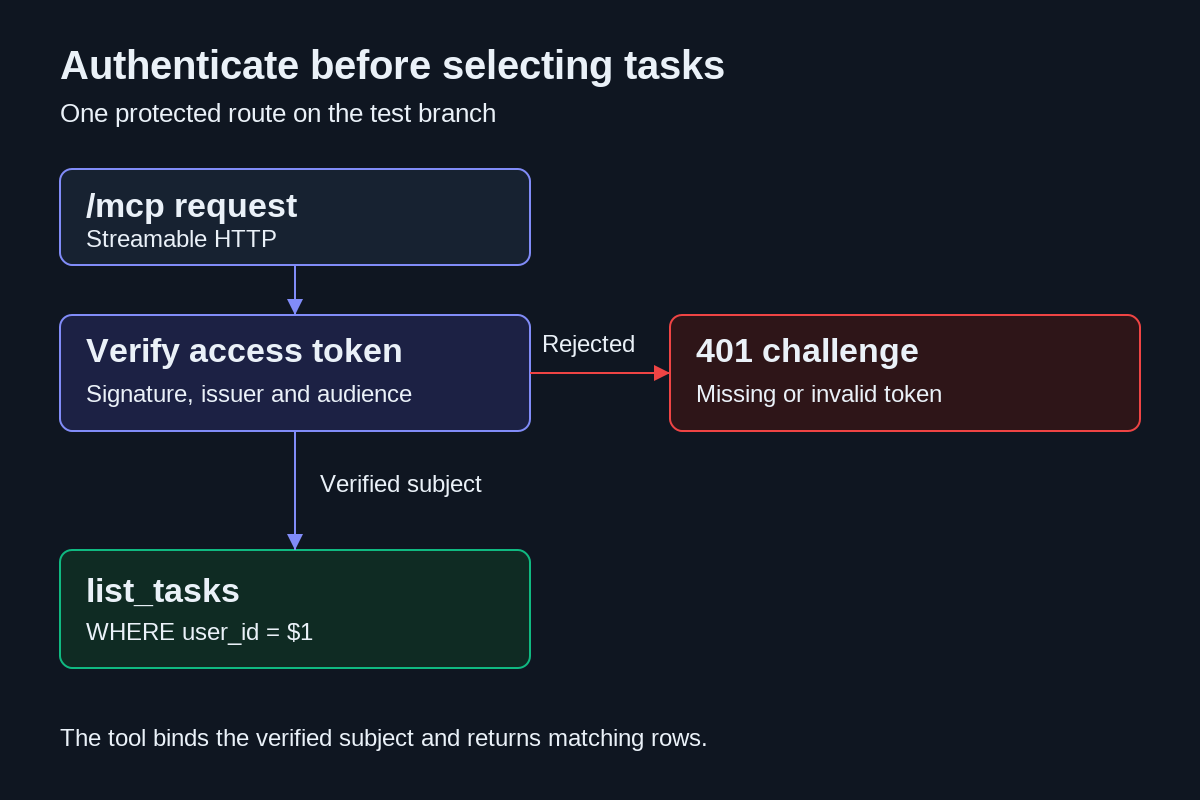
The pool lives at module scope and holds the database connections. The stateless transport, MCP server and tool callback belong to the request. If Alice’s and Bob’s requests arrive close together, each call to createServer captures its own userId in the callback. The pool can serve both queries because each query carries its own parameter value. The pool configuration follows Neon’s example, including the explicit TLS verification mode when the injected URL specifies sslmode=require.
The SQL text stays fixed when you switch users. $1 is a parameter position, and [userId] supplies its value. The parameter keeps identity data separate from SQL syntax. The equality condition implements the ownership rule. Postgres applies it before the tool serializes any rows. Selecting id and title gives the client enough information to identify each task while keeping the stored owner ID on the server.
The tool annotation readOnlyHint describes the operation to MCP clients. The handler’s only database operation is a fixed SELECT. The ownership filter applies to this handler, so other tools that read the same table need to enforce their own permissions. To limit what the MCP process can do with its database credentials, see Make an MCP database role read-only.
Deploy and check the three URL values
- List functions on
mcp-owner-test. Confirm thetaskscopeslug is free on the branch. Deploy the handler once, then read the function URL fromget. - Assign the function origin to
FUNCTION_ORIGINand the public test app’s origin toAPP_ORIGIN. Use each origin without a trailing slash. Replace the sample values in the block before running it. Deploy again with/mcpappended to the function origin. - Add the test app’s origin as a trusted domain and configure its sign-in and consent pages. Use your app’s actual paths if they differ from
/auth/sign-inand/auth/consent. The command enables Client ID Metadata Documents for clients that support them. If your client uses a managed registration, configure it for this branch and the client’s actual redirect URI before attempting sign-in. - Inspect the OAuth configuration and fetch protected resource metadata. Compare its
resourcewith the deploy command and withmcp.resourcein the OAuth configuration. Use that exact URL in the MCP client. Check that the configured sign-in and consent URLs both point to the test app.
neon functions list --branch mcp-owner-test
neon functions deploy taskscope --src functions/taskscope --branch mcp-owner-test
neon functions get taskscope --branch mcp-owner-test
FUNCTION_ORIGIN='https://replace-with-your-function-origin.example'
APP_ORIGIN='https://replace-with-your-test-app-origin.example'
MCP_URL="$FUNCTION_ORIGIN/mcp"

neon functions deploy taskscope --src functions/taskscope \
  --branch mcp-owner-test --env "MCP_RESOURCE=$MCP_URL"

neon neon-auth domain add "$APP_ORIGIN" --branch mcp-owner-test

neon neon-auth config oauth-server update --enabled \
  --login-page "$APP_ORIGIN/auth/sign-in" \
  --consent-page "$APP_ORIGIN/auth/consent" \
  --mcp-resource "$MCP_URL" \
  --mcp-client-id-metadata-documents \
  --branch mcp-owner-test

neon neon-auth config oauth-server get --branch mcp-owner-test
curl "$FUNCTION_ORIGIN/.well-known/oauth-protected-resource/mcp"
curl -i "$MCP_URL"
The first deployment obtains a function URL. Neon injects DATABASE_URL and, when branch Auth is on, NEON_AUTH_BASE_URL. Supply MCP_RESOURCE separately as the full absolute URL for /mcp. A build can complete before the deployment serves traffic. Neon’s walkthrough describes 502 with function_load_failed when the handler loads before MCP_RESOURCE is configured. After the second deployment, wait for protected resource metadata to name the expected resource before opening an OAuth session. Neon Functions CLI reference · Neon’s two-deploy sequence
Compare the URLs as strings. The app origin points to the website. The function origin with /mcp appended points to the route protected by the middleware. Follow the authorization server URL published in protected resource metadata and compare it with the branch Auth URL. To inspect the issuer directly, set NEON_AUTH_BASE_URL in your shell to the branch Auth URL recorded during setup, then run the following command. Its issuer should equal that base URL. Neon’s verification steps
curl "$NEON_AUTH_BASE_URL/.well-known/oauth-authorization-server"
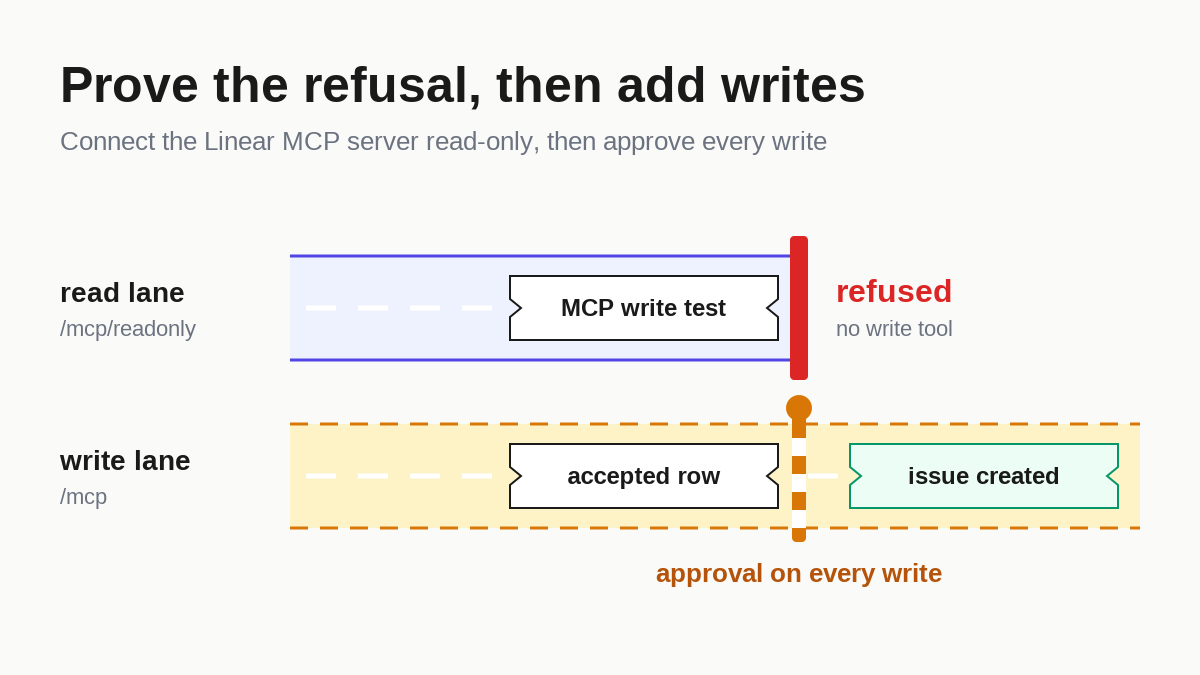
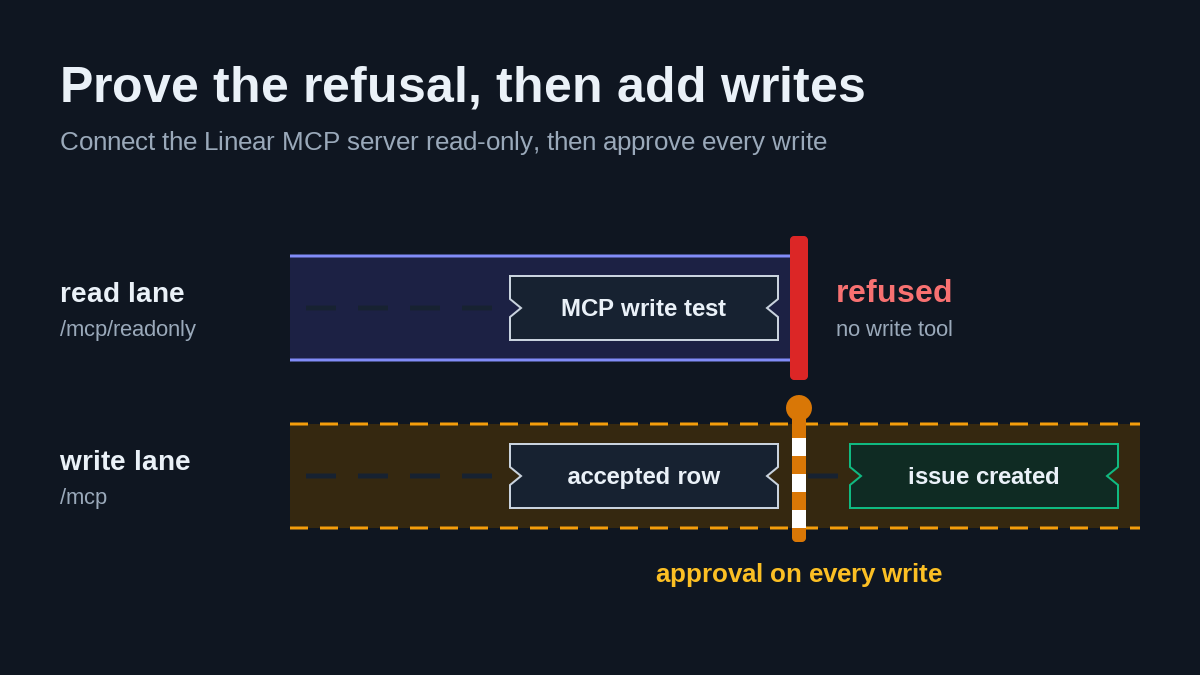
The earlier curl -i "$MCP_URL" request sends no authorization header. Expect HTTP 401 with WWW-Authenticate pointing to resource_metadata. The challenge checks that an unauthenticated request to the protected route reaches the authentication middleware. The metadata tells the client where to start authorization. Together these observations help you distinguish a route that cannot load from a route that is ready for sign-in.
Run the same tool call as Alice and Bob
- Open your compatible MCP client from Alice’s browser profile. Connect to the test function’s
/mcpURL using Streamable HTTP. Sign in as Alice when the flow reaches the app. On first authorization, check the client details, redirect hosts and requested resource before consenting. Finish the callback and wait for the connection to complete. - List tools and select
list_tasks. Execute it once with no fields, or use{}if the client presents a JSON arguments editor. Read the returned text content as JSON and compare it with the Alice row below. - Disconnect Alice’s client connection. Clear the client’s saved OAuth state for the connection or start with independent client storage. Use Bob’s browser profile for the next authorization. Confirm the app session belongs to Bob, then list tools and execute the identical call against the same URL.
- Compare the two authenticated responses with the credential-free
curlresponse. Mark the check complete when the two singleton arrays match their respective owners and the credential-free request receives the challenge.
MCP Inspector’s web client provides direct calls through its Tools screen and includes a JSON arguments editor. The repository documents the launcher below. Use a compatible Node release from the Inspector README if starting it locally. Ordinary website logout affects the app session. Inspector can also retain OAuth tokens outside the browser, so switching browser profiles alone can leave the MCP connection authorized as Alice. MCP Inspector repository · Inspector web client reference
npx @modelcontextprotocol/inspector
Use Inspector for the connection if your installed version supports an onboarding method enabled on the branch. Otherwise, use an already compatible OAuth client with direct tool invocation. Neon documents how it recognizes metadata-document clients and managed clients, and the Inspector references establish how to launch the web client and invoke a tool. An authorization failure leaves the row isolation check pending until you have tool replies under both identities. Neon’s client onboarding options
| Input | Action | Expected result |
|---|---|---|
Alice signed in, with task:draft-edit-01 titled Edit release draft assigned to her |
In Tools, select list_tasks and execute with {} against the test function |
The JSON array inside the first text content item has exactly one object with ID task:draft-edit-01 and title Edit release draft. Bob’s task ID is absent. |
Bob signed in, with task:invoice-review-02 titled Review sample invoice assigned to him |
In a fresh authorized client session, select list_tasks and execute with {} against the same test function |
The JSON array inside the first text content item has exactly one object with ID task:invoice-review-02 and title Review sample invoice. Alice’s task ID is absent. |
No bearer token, same test /mcp URL |
Run curl -i "$MCP_URL" from the shell where the URL is set |
HTTP 401 with WWW-Authenticate pointing to resource_metadata. The response carries no task list. |
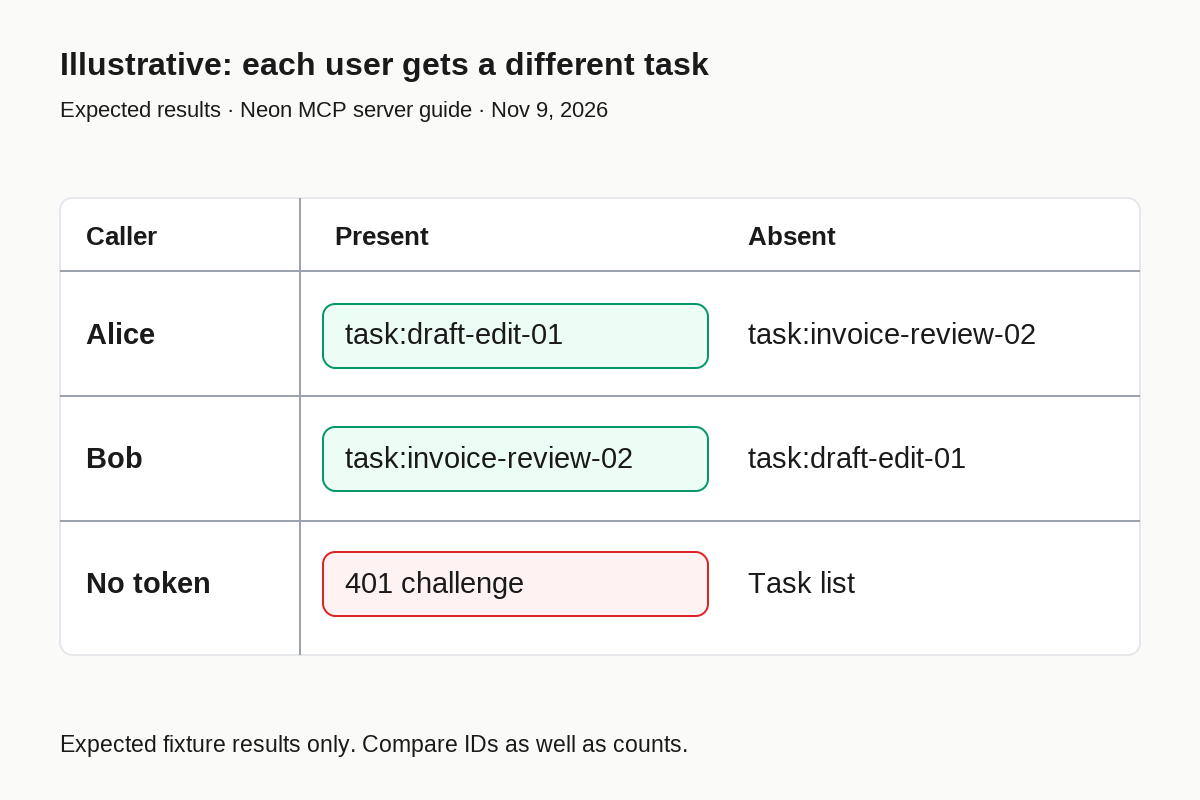
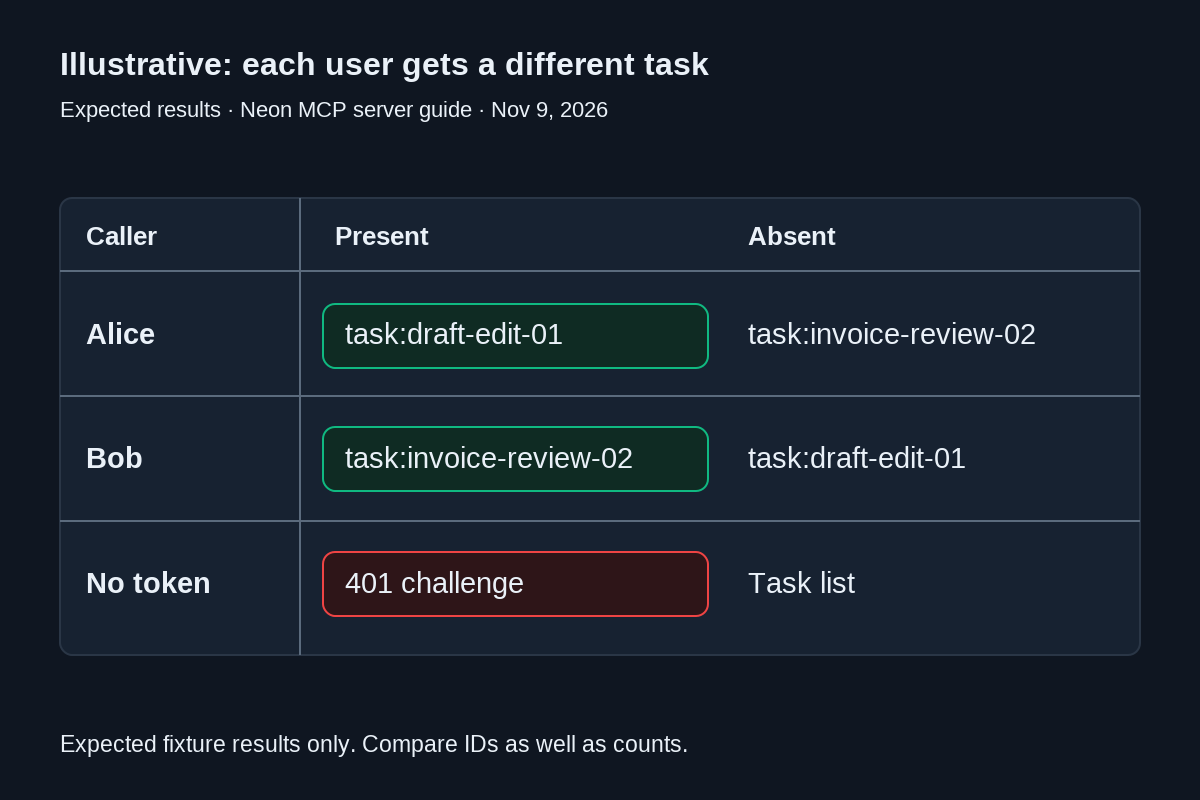
The MCP response wraps the array as a string in a text content item. Compare the parsed array or the displayed JSON text. The two blocks below give the exact illustrative inner JSON for Alice and Bob, in that order. The client may show a surrounding response envelope or format the JSON differently.
[{"id":"task:draft-edit-01","title":"Edit release draft"}]
[{"id":"task:invoice-review-02","title":"Review sample invoice"}]
A connected client shows that the handshake worked. Discovering list_tasks shows that it is registered and visible to that client. To verify the ownership decision, put the identity used for each call next to the actual task ID. If both calls return the draft row, both counts equal one and Bob’s check fails. A direct tool call exposes the returned array even when a chat client’s summary omits rows. Diagnose an MCP connection and verify a tool call
Follow the first unexpected observation
| Observation | Check next | Expected after correction |
|---|---|---|
502 with function_load_failed before authentication |
Inspect taskscope on the test branch and confirm the second deployment set MCP_RESOURCE to the full URL. Recheck protected resource metadata once the deployment serves traffic. |
The metadata responds with the test URL and a request without a token gets 401. |
Signed-out 401 passes, but the client cannot finish OAuth |
Check the branch issuer, the full resource URL, trusted app origin and the client’s registered redirect. Follow the browser through sign-in and consent to see where it stops. | Browser authorization returns to the same client and the connection completes. |
Client connects but list_tasks is absent |
Check the connected URL and the active deployment. Verify that the deployed entry file registers list_tasks. Refresh the tool list or reconnect after deploying. |
The Tools screen lists list_tasks with no required arguments. |
One account receives [] while the other receives its row |
Compare the empty account’s fixture owner with its session user ID. Verify that SQL Editor and the function address the same database on the branch. | The empty account gets the expected single row. |
| The two accounts return the same task, or a call returns both tasks | Confirm each connection used fresh OAuth state. Compare fixture owners, then inspect the live handler’s request-local subject binding and WHERE user_id = $1. |
Each result contains only the task ID assigned to the account used for that call. |
If the browser returns to sign-in after you enter valid credentials, inspect the app’s OAuth continuation behavior. When the SDK hasn’t already redirected, Neon’s app example resumes the signed OAuth request with oauth2.continue({ selected: true }) if the URL carries an OAuth request. The consent page requires a session and carries the signed request through to approval. Start a fresh authorization if that request has expired. The same client, scopes and resource may reuse earlier consent for that user, so check the active app account even if the next authorization skips the consent screen. Neon’s sign-in and consent flow
If both accounts receive [], check the fixture inventory for both IDs and confirm the function is deployed to the same branch and database. If only Bob receives [], start with Bob’s stored owner ID and the app session that actually authorized the second client connection. An empty array can be correct for an account with no rows. Here each account has one row in the fixture, so an empty array leaves that user’s check failing.
If both clients return Alice’s row, repeat Bob’s authorization with fresh client state before changing any code. If Bob’s distinct session still returns the draft, inspect the active deployment for a fixed user ID or a callback that closes over identity outside the route. If a call returns both rows, inspect the stored owners and the deployed predicate. Keep the two fixture rows in place while correcting the implementation so the retest can distinguish a working ownership filter from a changed fixture. Verify the route an MCP call took
Record the function URL, active deployment ID, account labels and observed task IDs together if another developer will review the run. For the credential-free request, keep the status and the challenge header. If you redeploy while troubleshooting, record the new active deployment ID and repeat both authenticated calls and the credential-free request. That ties the final observations to one version of the handler. You can’t replay what you can’t see
Disconnect the client and remove the test deployment
- Disconnect both client sessions and remove their test connection entries. Clear saved OAuth state for these connections using the client’s controls. Sign out of both test app sessions.
- In the linked project, confirm the deployment ID and branch with
get. Deletetaskscopefrommcp-owner-test, then list the branch’s functions to confirm the slug is absent. - If keeping the branch, remove the dedicated fixture table in the same test database. Delete the two synthetic Auth users by the IDs you recorded if you created them solely for this test. For a wholly disposable branch, delete the branch through the Console after confirming its name and ID. The branch deletion removes its fixture table and Auth users together. Neon branching
neon functions get taskscope --branch mcp-owner-test
neon functions delete taskscope --branch mcp-owner-test
neon functions list --branch mcp-owner-test
DROP TABLE public.mcp_owner_test_tasks;
Disconnecting ends the client connection. Already issued access tokens can remain valid until they expire, so delete the function to take the test endpoint out of service. If keeping the branch, remove Auth configuration and client entries dedicated to this exercise through the branch’s OAuth provider settings. Check which entries the test added before removing them, especially if your app inherited a trusted domain. The test is finished when the saved observations account for both fixture rows and the deployed test tool no longer appears on the branch. Neon OAuth provider reference