NotebookLM MCP: Build a Research Notebook and Verify Ingestion
Use NotebookLM MCP to create a research notebook, ingest Markdown and public documentation, retain resource names, and verify readiness before proceeding.

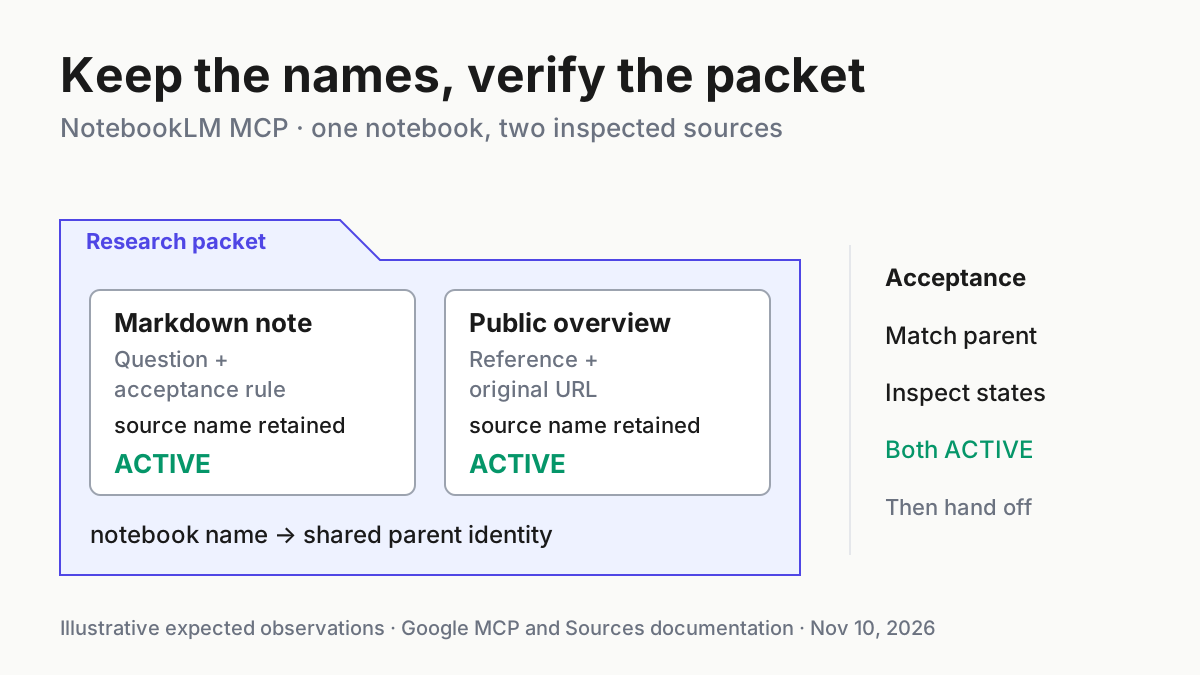
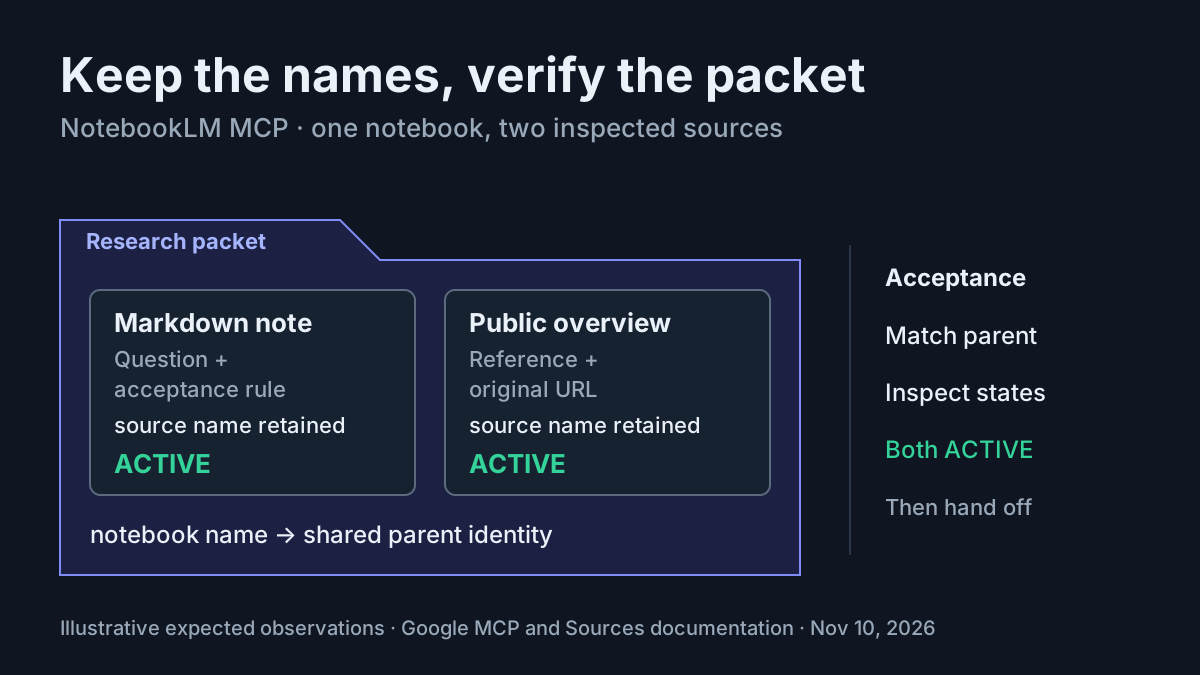
A research packet is only useful when you know which notebook received it and whether its sources finished processing. This NotebookLM MCP tutorial teaches a developer to create one persistent Gemini Notebook, add a concrete Markdown note and a public documentation page, and inspect both sources until their identities and ingestion states are clear.
The worked case is task:notebook-research-01: prepare a small packet about the notebook ingestion interface itself. You will finish with a named notebook, two source resource names, and observations showing whether each source is ACTIVE, still PROCESSING, or FAILED. All example observations are illustrative; these requests were not executed for this article.
Google’s API overview describes an early-access Public Preview and carries a November 2, 2026 update date. That is a documentation date, not proof of a launch timestamp. The durable lesson is the distinction between submitting material and verifying that the intended resources are ready.
Prepare an eligible account and project
Use a local development environment with gcloud, Python 3, curl, and an MCP client supporting remote Streamable HTTP. The commands below use Application Default Credentials, or ADC. You also need an existing Google Cloud project that you are authorized to use and enable this API on. Replace the project placeholder with that project’s actual ID before running anything.
- Confirm that the authorizing identity is an eligible personal Google Account.
- Sign in to Gemini Notebook once with that same account through the service’s normal website.
- Select the authorized project explicitly in the environment variable below.
- Enable the API and request the documented notebook scope.
export PROJECT_ID="YOUR_PROJECT_ID"
gcloud services enable notebook.googleapis.com --project="$PROJECT_ID"
gcloud auth application-default login \
  --scopes="https://www.googleapis.com/auth/cloud-platform,https://www.googleapis.com/auth/notebook"
export ACCESS_TOKEN=$(gcloud auth application-default print-access-token)
The authentication guide says the preview supports personal accounts, while Workspace accounts receive 403 PERMISSION_DENIED with WORKSPACE_ACCOUNT_NOT_SUPPORTED. An account that has never signed in can instead produce 404 NOT_FOUND with Account not found for user. during notebook creation. Diagnose those prerequisites before editing a request body.
The authorization and quota-project headers do different jobs. The bearer token represents the user whose notebooks the API accesses. The x-goog-user-project header identifies the enabled project used for the request’s quota. Supplying the project does not replace user authorization, and supplying a valid user token does not remove the ADC quota-project requirement.
This example needs write access because it creates a notebook and sources. The documented notebook.readonly scope covers inspection and listing but cannot complete creation. An API key is not an alternative: this interface requires OAuth bearer tokens. Standard gcloud auth print-access-token also lacks the notebook scope in Google’s documented quickstart; use the ADC sequence shown above.
Keep tokens out of the research note and any shared execution record. The article’s case label, project ID and resource names help reconcile work; a bearer token is an access credential. A useful handoff contains the former and excludes the latter.
Discover the tools before creating anything
The official MCP guide documents https://notebook.googleapis.com/mcp, Streamable HTTP, JSON-RPC 2.0, and the headers used here. It exposes seven tools: create_notebook, get_notebook, list_notebooks, update_notebook, create_source, get_source, and list_sources. Discovery is a read operation that checks the connection before you introduce persistent resources.
- Send the following discovery request after exporting the two environment variables.
- Read the response for a JSON-RPC error as well as a tool list.
- Confirm that the creation and inspection tools needed by this example are present.
curl -s -X POST "https://notebook.googleapis.com/mcp" \
  -H "Authorization: Bearer $ACCESS_TOKEN" \
  -H "x-goog-user-project: $PROJECT_ID" \
  -H "Content-Type: application/json" \
  -H "MCP-Protocol-Version: 2026-07-28" \
  -H "Mcp-Method: tools/list" \
  -d '{
    "jsonrpc": "2.0",
    "id": 1,
    "method": "tools/list",
    "params": {
      "_meta": {
        "io.modelcontextprotocol/protocolVersion": "2026-07-28"
      }
    }
  }'
An illustrative successful observation is a response containing the seven documented tool names. It proves that discovery worked for this request; it does not prove that a notebook exists or that any source was ingested. If the response contains an authentication error, stop here and repair authentication rather than attempting creation repeatedly.
The protocol version appears in both the HTTP header and request metadata because that is the direct-request pattern Google documents. Keep them consistent. Tool calls also carry Mcp-Name, matching the tool named in params.name; confusing those names makes a transport problem harder to distinguish from an argument problem.
For client-side connection scope choices, see the existing MCP setup guide. For inspecting an unfamiliar tool response before automating it, the MCP Inspector guide supplies a complementary diagnostic workflow. This tutorial keeps the request bodies visible so that notebook identity never depends on an assistant’s summary.
If you also want the tools available in your MCP client, Google supplies the following generic remote-server configuration. Replace both values locally; the configuration contains a literal bearer token, so keep it out of shared project history. The direct requests below remain the worked implementation and do not depend on a client choosing tools autonomously.
{
  "mcpServers": {
    "gemini-notebook-api": {
      "url": "https://notebook.googleapis.com/mcp",
      "headers": {
        "Authorization": "Bearer YOUR_ACCESS_TOKEN",
        "x-goog-user-project": "YOUR_PROJECT_ID"
      }
    }
  }
}
Define the two-source research packet
The packet has one local explanatory note and one public reference. The note establishes the research question and acceptance rule. The public source supplies the documentation under examination. Keeping these roles separate makes it easier to recognize an accidentally duplicated note or a web source pointing at the wrong page.
- Use notebook title
Research packet - task:notebook-research-01. - Use note title
Research question - task:notebook-research-01. - Use web-source title
Gemini Notebook API overview. - Ingest the overview URL selected in this article’s evidence bank.
Here is the complete copyable note artifact, also embedded verbatim in the implementation below. It is illustrative research material, not an assertion that ingestion already succeeded.
# Research packet: task:notebook-research-01

## Question
How can a developer verify that a small research packet was ingested
into the intended Gemini Notebook?

## Packet
- This Markdown note records the question and acceptance rule.
- The public Gemini Notebook API overview is the reference source.

## Acceptance rule
Record the notebook resource name and both source resource names.
Inspect both sources. Accept the packet only when each source belongs
to that notebook and reports ACTIVE.

## Boundary
This exercise verifies ingestion and metadata. It does not test
question answering, deletion, source refresh, or answer quality.
The sources documentation permits inline Markdown using mimeType: text/markdown and textContent.content. A source request sets one input specification: text content or web content. The two inputs therefore require two separate calls, each under the same recorded parent notebook.
Web ingestion requires a publicly accessible HTTPS page without a login wall or paywall. Google Drive and Google Docs URLs are listed among unsupported domains in the documented synchronous-error examples. A familiar browser link is consequently not sufficient evidence that the ingestion service can fetch it. This example deliberately uses a public documentation page.
| Input | Action | Expected result |
|---|---|---|
task:notebook-research-01; notebook title Research packet - task:notebook-research-01; the complete Markdown note above |
Call create_notebook, retain its resource name, then call create_source with that parent, mimeType: text/markdown, and the complete note |
Illustrative: the returned source name starts with the recorded notebook resource name plus /sources/; subsequent inspection reports ACTIVE before acceptance |
task:notebook-research-01; public URL https://developers.google.com/notebook/docs |
Call create_source with the same parent and webContent.url, then inspect the returned source name |
Illustrative: metadata identifies the intended public URL and source resource; accept only after its state is ACTIVE |
Create once, record names, then inspect
The following is a complete Python implementation for the documented direct JSON-RPC path. Save it locally as notebook_packet.py if you choose to run the tutorial. It uses Python’s standard library, so the example adds no third-party package prerequisite. It prints server responses and resource names instead of writing an execution ledger to disk. Retain its output privately for recovery.
- Complete discovery successfully first.
- Run this creation program once for the case.
- Keep the printed notebook and source names even if later inspection fails.
- If execution is interrupted, reconcile through the next section instead of rerunning creation.
import json
import os
import urllib.error
import urllib.request

ENDPOINT = "https://notebook.googleapis.com/mcp"
VERSION = "2026-07-28"
PROJECT = os.environ["PROJECT_ID"]
TOKEN = os.environ["ACCESS_TOKEN"]
sequence = 0

NOTE = """# Research packet: task:notebook-research-01

## Question
How can a developer verify that a small research packet was ingested
into the intended Gemini Notebook?

## Packet
- This Markdown note records the question and acceptance rule.
- The public Gemini Notebook API overview is the reference source.

## Acceptance rule
Record the notebook resource name and both source resource names.
Inspect both sources. Accept the packet only when each source belongs
to that notebook and reports ACTIVE.

## Boundary
This exercise verifies ingestion and metadata. It does not test
question answering, deletion, source refresh, or answer quality.
"""

def call_tool(name, arguments):
    global sequence
    sequence += 1
    body = {
        "jsonrpc": "2.0",
        "id": sequence,
        "method": "tools/call",
        "params": {
            "name": name,
            "arguments": arguments,
            "_meta": {
                "io.modelcontextprotocol/protocolVersion": VERSION
            },
        },
    }
    headers = {
        "Authorization": f"Bearer {TOKEN}",
        "x-goog-user-project": PROJECT,
        "Content-Type": "application/json",
        "MCP-Protocol-Version": VERSION,
        "Mcp-Method": "tools/call",
        "Mcp-Name": name,
    }
    request = urllib.request.Request(
        ENDPOINT, data=json.dumps(body).encode("utf-8"),
        headers=headers, method="POST",
    )
    try:
        with urllib.request.urlopen(request, timeout=60) as response:
            raw = response.read().decode("utf-8")
    except urllib.error.HTTPError as error:
        print(error.read().decode("utf-8"), flush=True)
        raise
    print(raw, flush=True)
    reply = json.loads(raw)
    if "error" in reply:
        raise RuntimeError(reply["error"])
    result = reply["result"]
    if result.get("isError"):
        raise RuntimeError(result)
    return result

def resource(result):
    # Google's direct MCP example reads structuredContent.name.
    # Stop for inspection if the preview returns another shape.
    value = result.get("structuredContent")
    if not isinstance(value, dict) or not value.get("name"):
        raise RuntimeError("Inspect printed response; do not recreate")
    return value

notebook = resource(call_tool("create_notebook", {
    "notebook": {
        "displayName": "Research packet - task:notebook-research-01"
    }
}))
parent = notebook["name"]
print("NOTEBOOK_NAME=" + parent, flush=True)
call_tool("get_notebook", {"name": parent})

inputs = [
    {
        "displayName": "Research question - task:notebook-research-01",
        "mimeType": "text/markdown",
        "textContent": {"content": NOTE},
    },
    {
        "displayName": "Gemini Notebook API overview",
        "webContent": {
            "url": "https://developers.google.com/notebook/docs"
        },
    },
]

for source_input in inputs:
    source = resource(call_tool("create_source", {
        "parent": parent, "source": source_input
    }))
    source_name = source["name"]
    print("SOURCE_NAME=" + source_name, flush=True)
    if not source_name.startswith(parent + "/sources/"):
        raise RuntimeError("Unexpected source parent; stop and inspect")
    call_tool("get_source", {"name": source_name})

call_tool("list_sources", {"parent": parent, "pageSize": 100})
print("Creation finished. Inspect states before accepting the packet.")
python3 notebook_packet.py
The helper assembles documented request fields; its validation and stopping choices are illustrative application logic. In particular, the 60-second network timeout is a local choice, not a service completion guarantee. A timeout can leave creation uncertain. Do not interpret the exception as proof that the server created nothing.
The notebooks reference guide defines name as the identifier and describes server-assigned UUIDs. A display title helps a human find the packet, but your later calls should use the returned resource name. Two notebooks can be confusingly similar to a human even when their resource identities differ.
The program prints the full response before parsing structuredContent. Google demonstrates that location for the notebook creation result. If the preview returns a different shape, the program stops; examine the printed response and current tool schema. This deliberately avoids guessing a resource name or quietly sending another creation request to compensate for a parsing failure.
Read the printed responses in operation order. A notebook name followed by a successful notebook read establishes where subsequent creation calls were directed. The first source corresponds to the Markdown note because the program submits that input first. The second corresponds to the public reference. Preserve that association when copying the two source names into the inspection environment; exchanging the labels would make later human comparisons confusing even if both resources were active.
If the notebook read succeeds but the first source creation fails, the notebook is still a useful recovery anchor. If the note succeeds and web creation fails, inspect the note and list the existing sources before resuming. These are different partial outcomes. Recording the last confirmed operation lets you resume the missing part without discarding successfully ingested material or silently expanding the packet.
Verify readiness without creating duplicates
Creation responses and source readiness answer different questions. Source ingestion is asynchronous: new sources start in PROCESSING, then transition to ACTIVE or FAILED. The source reference also lists DELETING as a possible output state. Treat any state outside the intended active result as a reason to inspect, not a successful packet.
- Retrieve the notebook by its recorded name and confirm its display title.
- Retrieve each recorded source by its full resource name.
- Match the parent prefix, display title and, for the web source,
originalUrl. - Recheck a processing source with a read request after a pause.
- List sources and reconcile the returned identities with your two recorded names.
Use the following read-only program in a separate file, inspect_packet.py. It uses the documented REST inspection methods against the same service. Paste your actual resource names into the environment exports; the example strings below are placeholders, not resources created by this article.
import json
import os
import urllib.request
from urllib.parse import urlencode

parent = os.environ["NOTEBOOK_NAME"]
source_names = [os.environ["NOTE_SOURCE_NAME"],
                os.environ["WEB_SOURCE_NAME"]]
headers = {
    "Authorization": "Bearer " + os.environ["ACCESS_TOKEN"],
    "x-goog-user-project": os.environ["PROJECT_ID"],
}

def get(path):
    request = urllib.request.Request(
        "https://notebook.googleapis.com/v1/" + path,
        headers=headers, method="GET",
    )
    with urllib.request.urlopen(request, timeout=60) as response:
        value = json.load(response)
    print(json.dumps(value, indent=2), flush=True)
    return value

get(parent)
ready = True
for name in source_names:
    source = get(name)
    matches = (source.get("name") == name
               and name.startswith(parent + "/sources/"))
    ready = ready and matches and source.get("state") == "ACTIVE"

page = get(parent + "/sources?pageSize=100")
while page.get("nextPageToken"):
    page = get(parent + "/sources?" + urlencode({
        "pageSize": 100, "pageToken": page["nextPageToken"]
    }))

print("Both recorded sources ACTIVE:", ready)
print("Also compare titles, originalUrl, and listed source identities.")
export NOTEBOOK_NAME="notebooks/PASTE_RETURNED_NOTEBOOK_UUID"
export NOTE_SOURCE_NAME="${NOTEBOOK_NAME}/sources/PASTE_NOTE_UUID"
export WEB_SOURCE_NAME="${NOTEBOOK_NAME}/sources/PASTE_WEB_UUID"
python3 inspect_packet.py
The Boolean printed here checks resource identity and readiness, while the accompanying output supports the title and URL comparison. It does not attest to the quality or completeness of extracted document content. An ACTIVE web source is a ready ingestion resource; it is not proof that future answers will be correct.
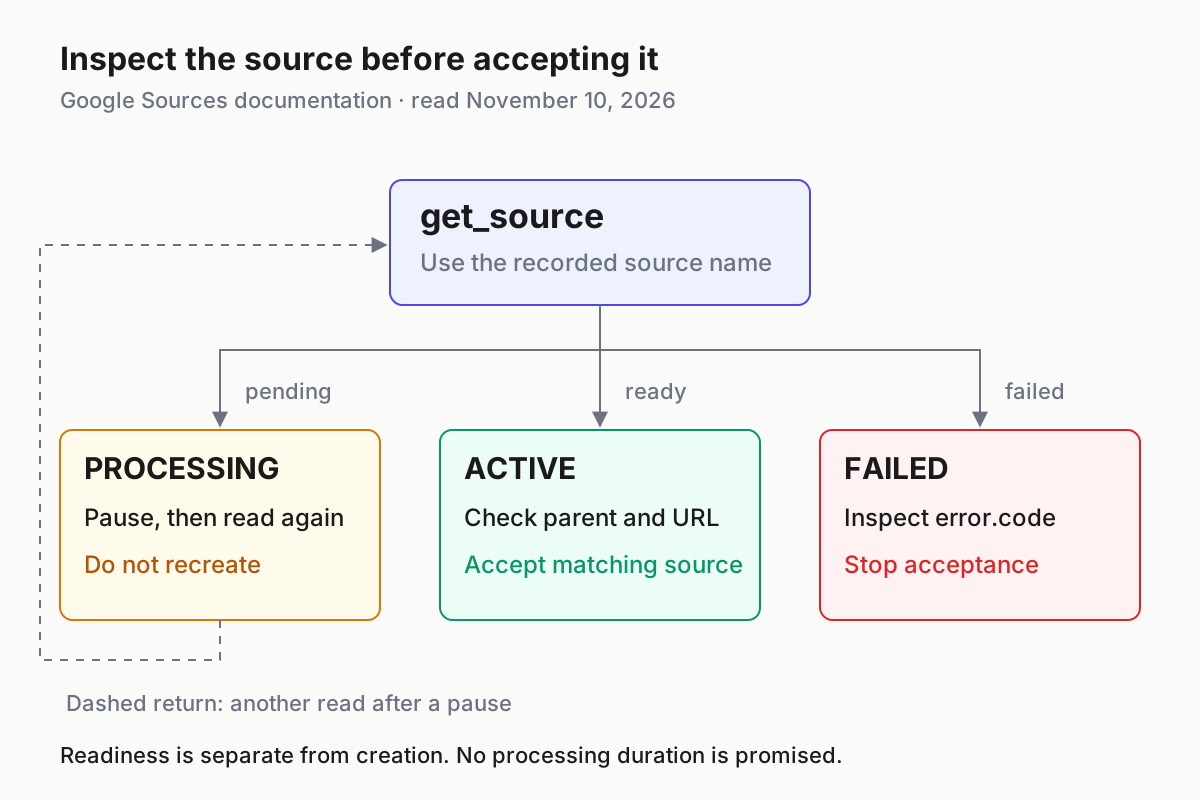
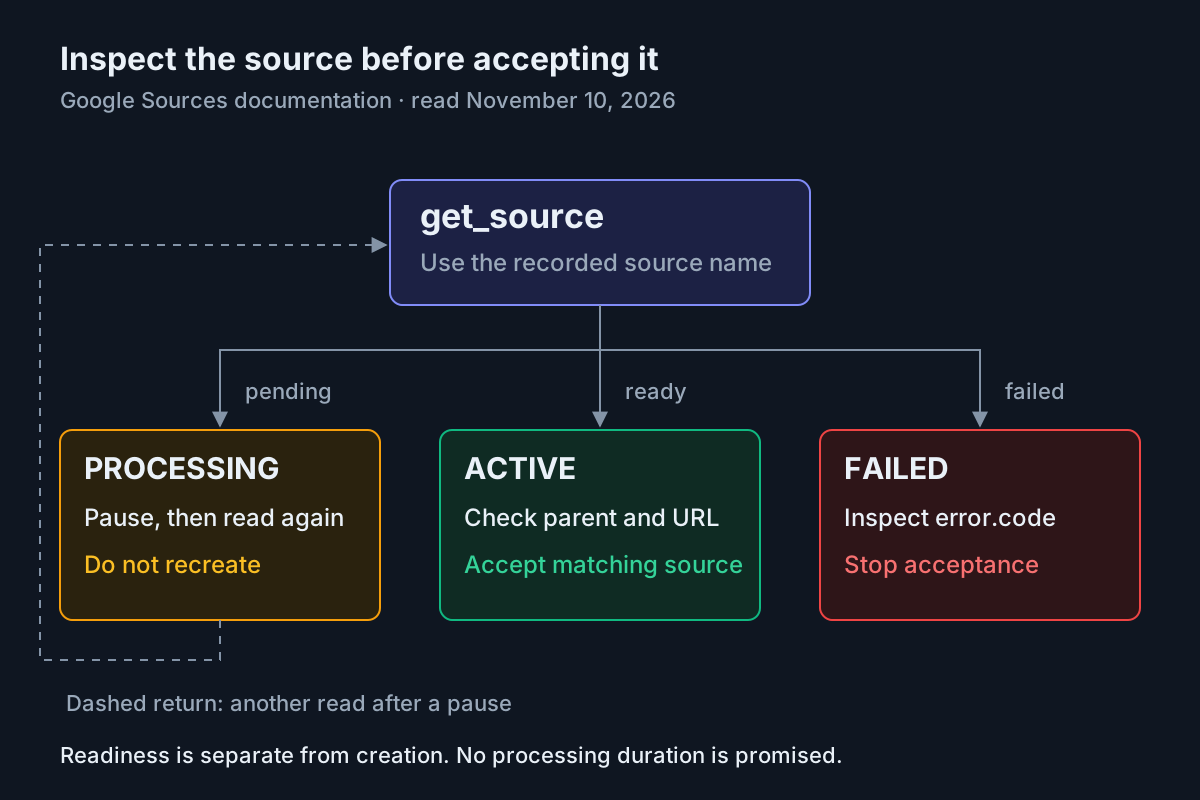
Inspect the existing source while processing; investigate its error when failed. Source: Google Sources documentation, read November 10, 2026. No execution claimed.
For manual rechecks, an initial two-second pause followed by progressively longer pauses up to ten seconds follows the polling pattern in Google’s example. Its 120-second timeout is an example bound, not an ingestion service-level commitment. If your own waiting window expires, retain the identifiers and report unresolved processing. A second create call would introduce another resource rather than finish the first.
Consider an illustrative mixed result: the note is active while the public reference is processing. Keep the successful note and inspect only the outstanding reference after the pause. The packet remains incomplete because its acceptance rule requires both sources. If the reference later fails, preserve its identifier and error alongside the active note’s identifier. This makes the next decision about one known resource rather than an ambiguous request to repeat the entire exercise.
Before accepting a true Boolean, finish the manual comparisons printed beneath it. Confirm the notebook title, both source titles and the original web URL against the case table. Confirm that both recorded names appear in the complete source listing. The program intentionally leaves these comparisons visible instead of treating a status field alone as the entire acceptance decision.
Diagnose errors at the layer that failed
HTTP failures, JSON-RPC failures and asynchronous ingestion failures must remain distinguishable. The code prints responses because collapsing them into “upload failed” discards the information needed for a targeted repair. The rate-limit guide also distinguishes request throttling from account capacity.
| Observation | Interpretation and next action |
|---|---|
401 or 403 |
Check token expiry, notebook scope, ADC quota-project header and access to the target notebook; inspect the returned error before choosing a repair. |
WORKSPACE_ACCOUNT_NOT_SUPPORTED |
The authenticated account is unsupported in this preview. Stop this run; do not compensate by changing request syntax. |
Account not found for user. |
Complete the required initial service sign-in with the authorized account, then inspect existing resources before resuming creation. |
400 INVALID_ARGUMENT |
Check the one-input rule, supported MIME type, public HTTPS URL, nonblank content and payload size. Correct the input before another attempt. |
Source FAILED |
Read its error.code and error.message; a fetch or processing failure occurs after a resource may already exist. |
429 RESOURCE_EXHAUSTED |
Distinguish request-rate pressure from exhausted notebook/source capacity; slow requests with exponential backoff and jitter where appropriate. |
ADC access tokens minted by the documented command expire after one hour. Mint a fresh token with the same ADC command and rerun inspection using the recorded names. If a client configuration embeds a literal token, refreshing the shell variable alone does not update that stored header. Replace the configured token through the client’s supported configuration path.
A web source can fail because it is unreachable, behind a paywall, empty, blocked, or too long. The documented asynchronous error object supplies the more specific diagnosis. Do not replace a failed public-page attempt with private browser cookies or an undocumented upload method. Binary file uploads are described as roadmap work in the selected source documentation, so this implementation stays with inline Markdown and public web content.
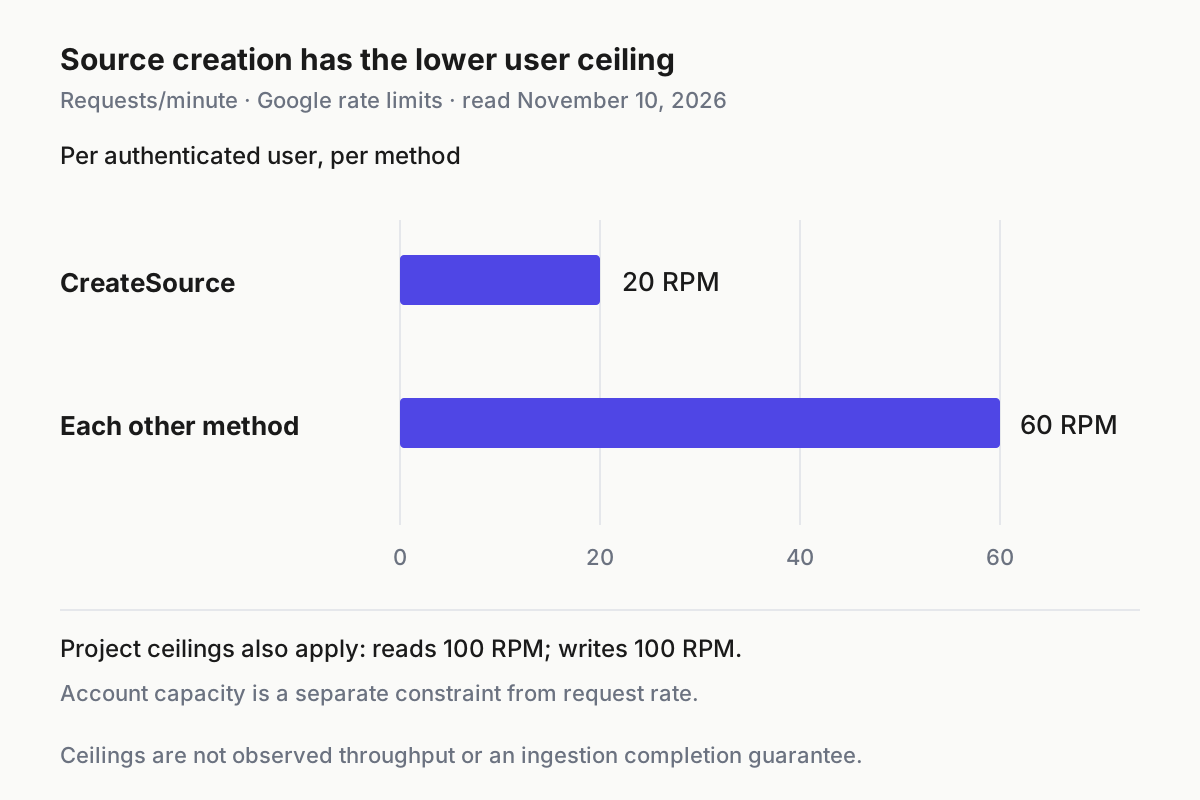
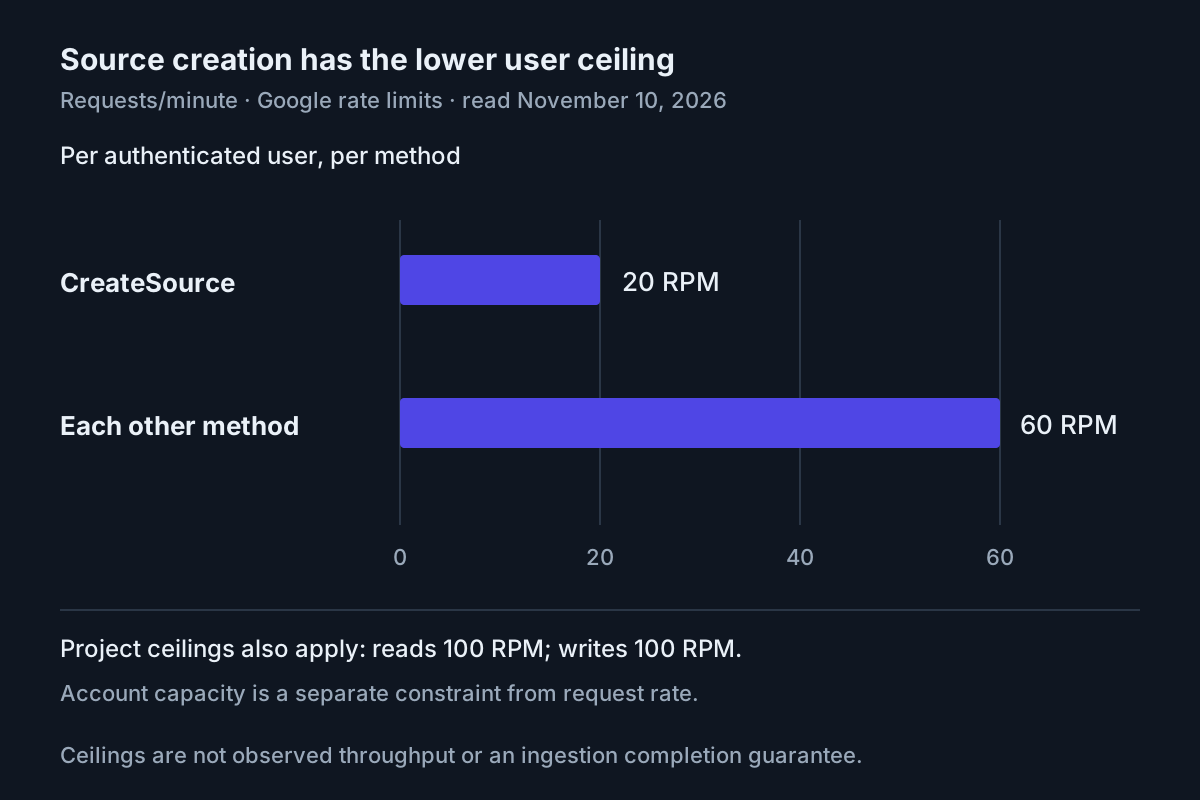
Google documents 20 CreateSource requests per minute per user, 60 per minute per user per other method, and separate project read/write ceilings of 100 per minute. Source: rate-limit guide, read November 10, 2026. These are ceilings, not throughput measurements.
The per-user limit for other methods applies per method, rather than as one combined allowance across all of them. Project read and write ceilings are additional constraints. Neither distinction calls for approaching the ceilings in this two-source exercise: issue the bounded creation calls, then use paced reads for unfinished ingestion.
Inline text has both a 500,000-word limit and a 1,000,000-byte limit. A note can satisfy one bound and exceed the other, especially with multibyte text. Our short artifact avoids approaching either limit. Keep larger research packets bounded deliberately rather than treating acceptance of one short example as evidence that an arbitrary corpus will fit.
The Free tier documentation lists 100 notebooks per user and 50 sources per notebook. Other documented tiers have larger capacities, but changing subscriptions is not a repair step in this tutorial. If capacity is exhausted, stop and assess the existing collection through approved account-management procedures. Backoff helps a request-rate condition; it does not create storage capacity.
Reconcile interruptions and hand off the packet
A lost response is the awkward case: a creation request might have succeeded even though your process never received its identifier. The selected guides document listing and inspection, but they do not promise a creation idempotency key. Recovery therefore starts by examining the existing collection.
- If a notebook name was printed, retrieve that notebook and list its sources.
- If the notebook response was lost, use
list_notebooksand inspect candidates matching the case title. - Follow pagination before concluding that a matching resource is absent.
- Compare names, titles, creation times and the web source’s original URL.
- Resume only the missing operation after resolving ambiguity.
For notebook discovery during recovery, the documented REST listing request is:
curl -s -X GET "https://notebook.googleapis.com/v1/notebooks?pageSize=20&filter=notebook.is_owner%20%3D%20true" \
  -H "Authorization: Bearer $ACCESS_TOKEN" \
  -H "x-goog-user-project: $PROJECT_ID"
Follow nextPageToken using the documented pageToken parameter when present. Notebook and source lists default to 50 items and accept at most 100 per page. Source pagination returns ascending creation order; sources added during pagination appear on later pages. A first page is consequently not a complete absence check for a large notebook.
If two candidates share the same title, do not arbitrarily choose one and continue writing. Inspect their metadata and the captured responses. Keep the uncertainty visible until the intended notebook can be identified. The task label is a reconciliation aid, not a server-enforced uniqueness constraint.
There is no deletion tool among the seven documented MCP tools, and this evidence bank does not establish a deletion recovery procedure. Stopping further writes is the supported containment step here. Preserve unwanted resource identities for manual resolution rather than inventing a cleanup call. Likewise, this guide does not claim automatic web-source refresh or a question-answering API.
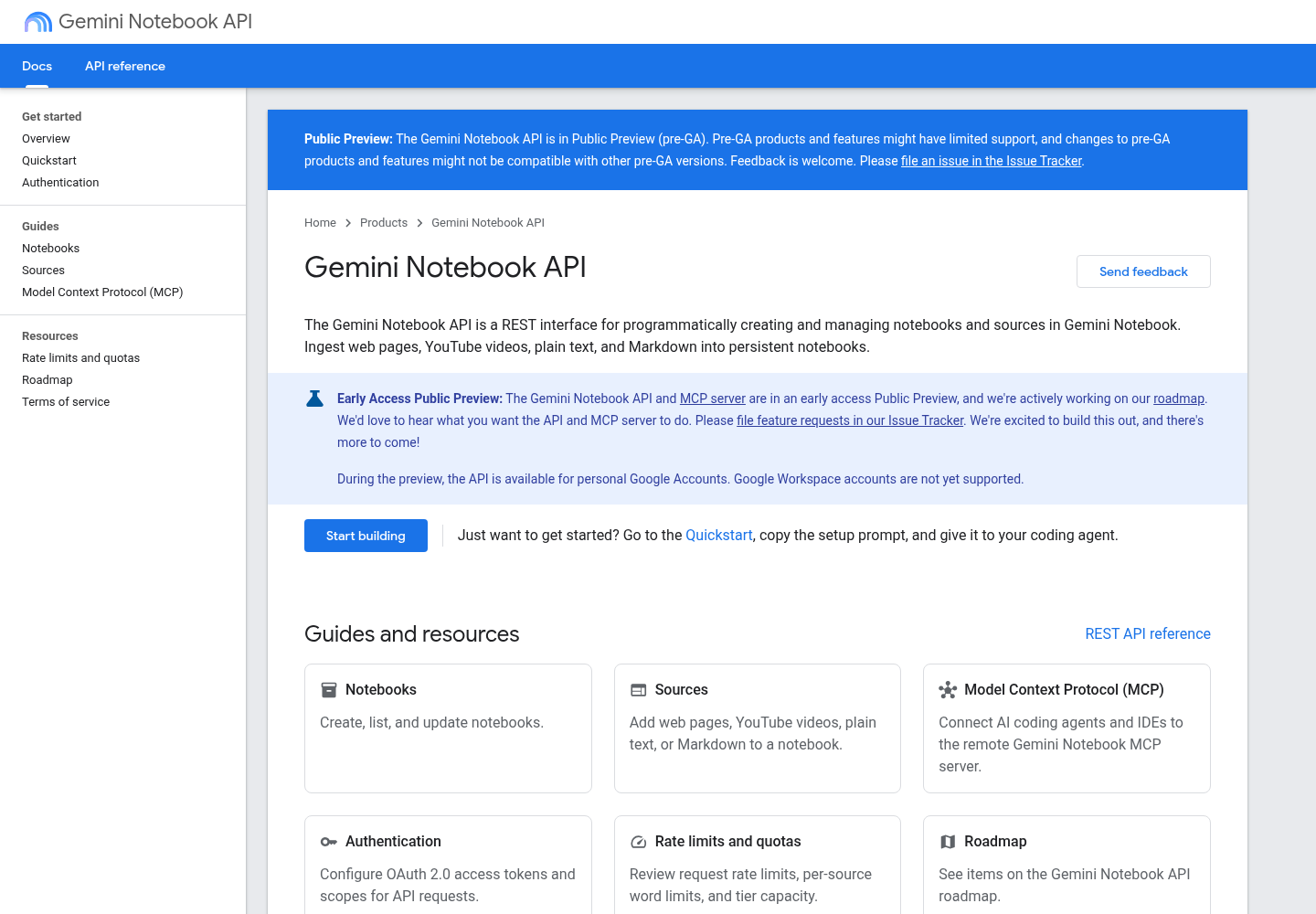
Google Developers’ Gemini Notebook API overview, captured from the selected publisher page. The documentation is reference material, not evidence that this example executed.
For an assistant handoff, use a bounded instruction: “Inspect this recorded notebook and these two source names. Report their identities and states. Do not create replacements.” That confines the next action to the unresolved question. The existing finish-line guide explains why an observable completion condition is more useful than an assistant saying the task is done.
When a research task spans sessions, the fleet replay guide provides the operating-layer rationale for retaining the actual interaction record. The related context engineering guide addresses what to carry into the next session; here, the durable handoff is the resource identity and unresolved state, rather than the entire setup conversation.
Your completed result is a research packet whose notebook identity is known, whose note and public-source identities reconcile with the source list, and whose two inspected states are ACTIVE. If either remains processing or failed, the honest result is a partially ingested packet with named outstanding work. Preserve that distinction before anyone uses the collection as a research input.
Sources
- Google Developers: Gemini Notebook API overview, updated November 2, 2026.
- Google Developers: Model Context Protocol, updated October 29, 2026.
- Google Developers: Authentication, updated October 29, 2026.
- Google Developers: Notebooks, updated October 29, 2026.
- Google Developers: Sources, updated October 29, 2026.
- Google Developers: Rate limits and quotas, updated October 29, 2026.