MCP Inspector: Diagnose a Connection and Verify a Tool Call
Use MCP Inspector to isolate connection, discovery and tool-call failures with a complete echo example, a read-only config and clear recovery steps to follow.

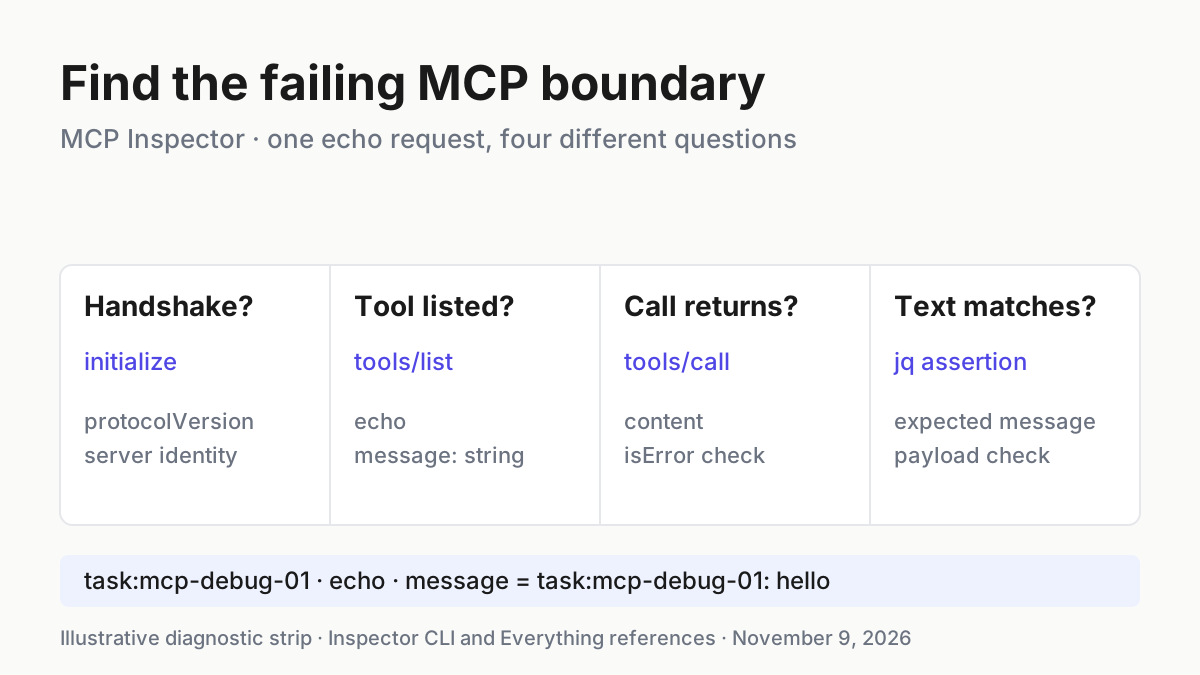
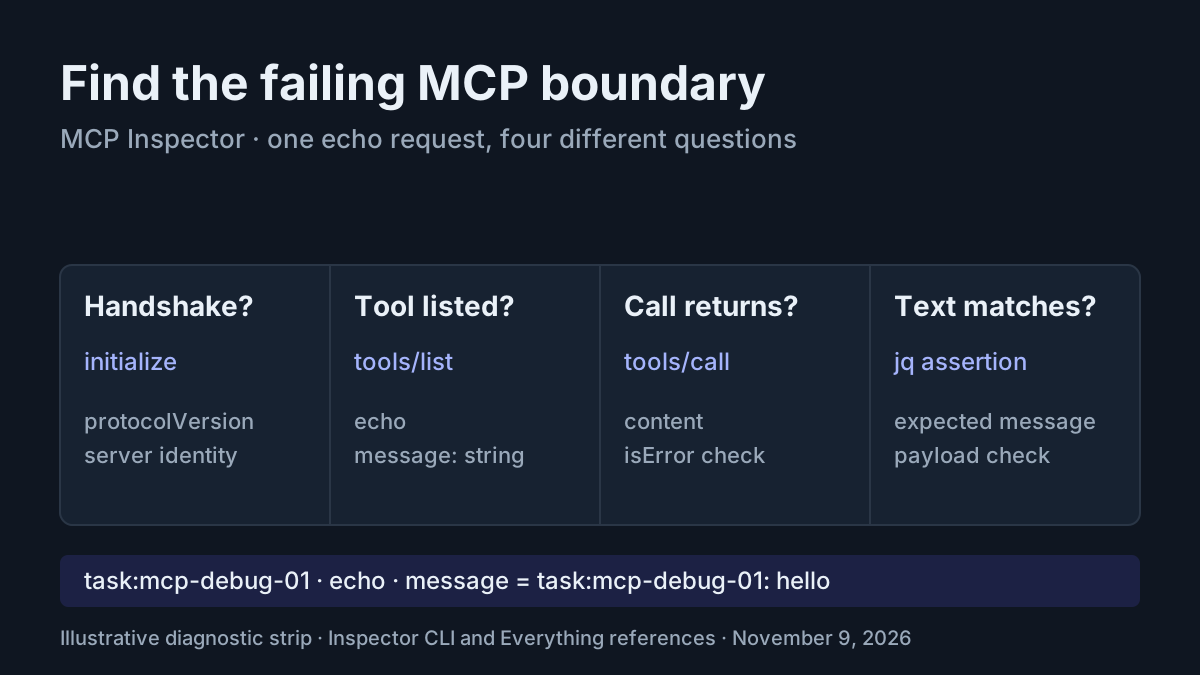
Your MCP server appears disconnected, a tool has vanished, or a call returns something your coding assistant cannot explain. Repeating the same prompt changes too many variables. MCP Inspector lets you address the server directly, inspect its advertised tools and send one explicit request without asking a model to choose what happens.
This troubleshooting tutorial is for a developer who can authorize a local development server launch. You need npm, a compatible Node runtime and a Bash terminal; jq is needed for the final assertions. The worked case, task:mcp-debug-01, uses the official Everything reference server and its documented echo tool. You will produce a reusable configuration and a diagnostic script that distinguishes a failed handshake, missing tool, failed invocation and unexpected payload.
All commands below are documented interfaces composed into an illustrative example. They were not executed for this article. Expected observations describe what to look for, rather than recorded test results.
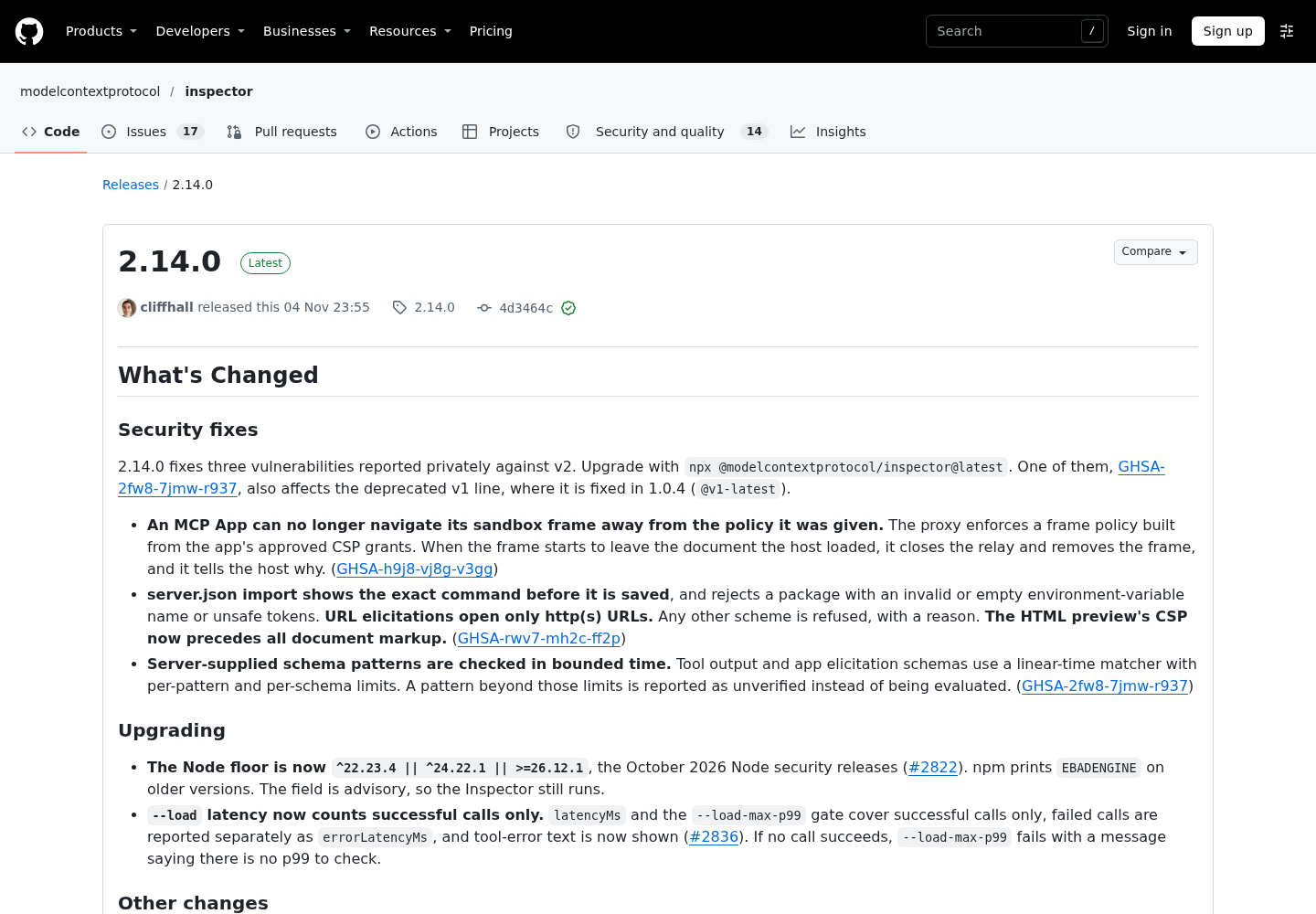
The timely background is the maintainers’ November 4 Inspector 2.14.0 release, which raises its Node compatibility floor and bounds server-supplied schema-pattern checks. Vedang Vatsa’s November 8 post highlights Inspector as a debugging tool; the official technical documents, rather than that recommendation, establish the commands used here.
Choose a small, harmless diagnostic target
- Use a development machine where launching the reference package is authorized.
- Choose Node 24.22.1 or a later supported 24.x release for this example.
- Review the Everything server’s launch command before connecting.
- Keep the test on
echo, with the messagetask:mcp-debug-01: hello.
Inspector 2.14.0 supports Node ^22.23.4 || ^24.22.1 || >=26.12.1. The Everything server README separately requires Node 24 or later. Node 22 therefore does not meet this example’s combined prerequisites, even when it satisfies Inspector’s own requirement. npm’s EBADENGINE warning is not evidence that an unsupported runtime became supported because the process continued.
Check your runtime and the selected Inspector package:
node -v
npx @modelcontextprotocol/inspector@2.14.0 --cli --version
The illustrative expected observations are a supported Node version and Inspector version 2.14.0. The launcher reference documents version reporting without starting a server. Keep --cli immediately after the package name: it selects the client before the remaining arguments reach that client.
Everything is a protocol showcase, not a production application. Its feature reference documents echo as accepting a string named message and echoing it. That is enough to define a concrete, cheap request without inventing a weather API, database fixture or undocumented tool contract.
Do not explore unrelated tools to make this check more realistic. Everything also exposes environment inspection and features that request client capabilities. Those would add different questions. A harmless echo keeps the question precise: can this client discover this tool, send this string and receive it back?
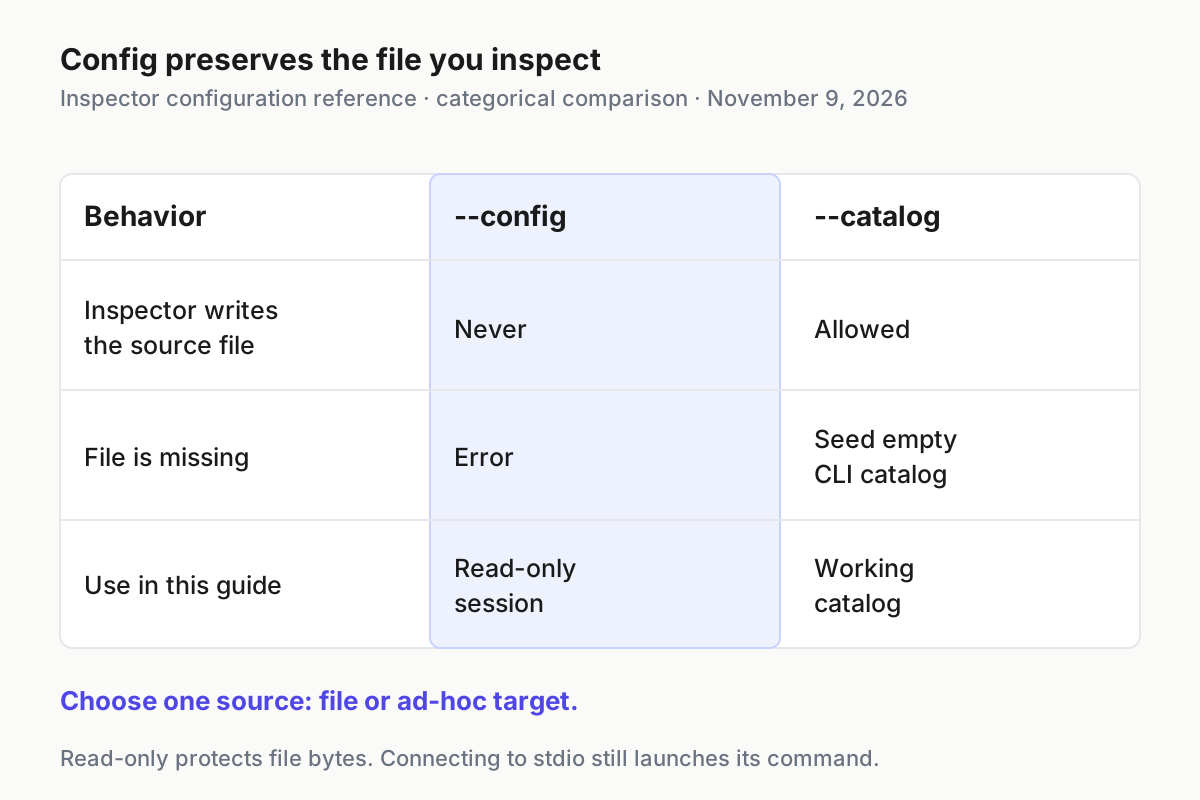
Connecting through stdio launches the configured command on your machine before MCP messages are exchanged. A read-only configuration protects the file from Inspector writes; it does not make the launched program read-only. Review and authorize the command itself. When diagnosing a host configuration later, Claude Desktop MCP setup explains the separate host-side configuration problem.
Save one complete read-only session configuration
- In a scratch directory you control, save the following complete file as
mcp-debug.json. - Keep the server name
everythingconsistent in every command. - Use
--configfor this tutorial, rather than adding a temporary entry to your normal catalog.
{
  "mcpServers": {
    "everything": {
      "type": "stdio",
      "command": "npx",
      "args": ["-y", "@modelcontextprotocol/server-everything"],
      "protocolEra": "legacy",
      "connectionTimeout": 30000,
      "requestTimeout": 30000
    }
  }
}
These are concrete launch arguments from the Everything documentation, combined with documented Inspector settings. protocolEra: legacy deliberately chooses the initialization path taught here. Everything supports both the legacy initialization handshake and a modern discovery path. Changing era midway would make comparisons less useful.
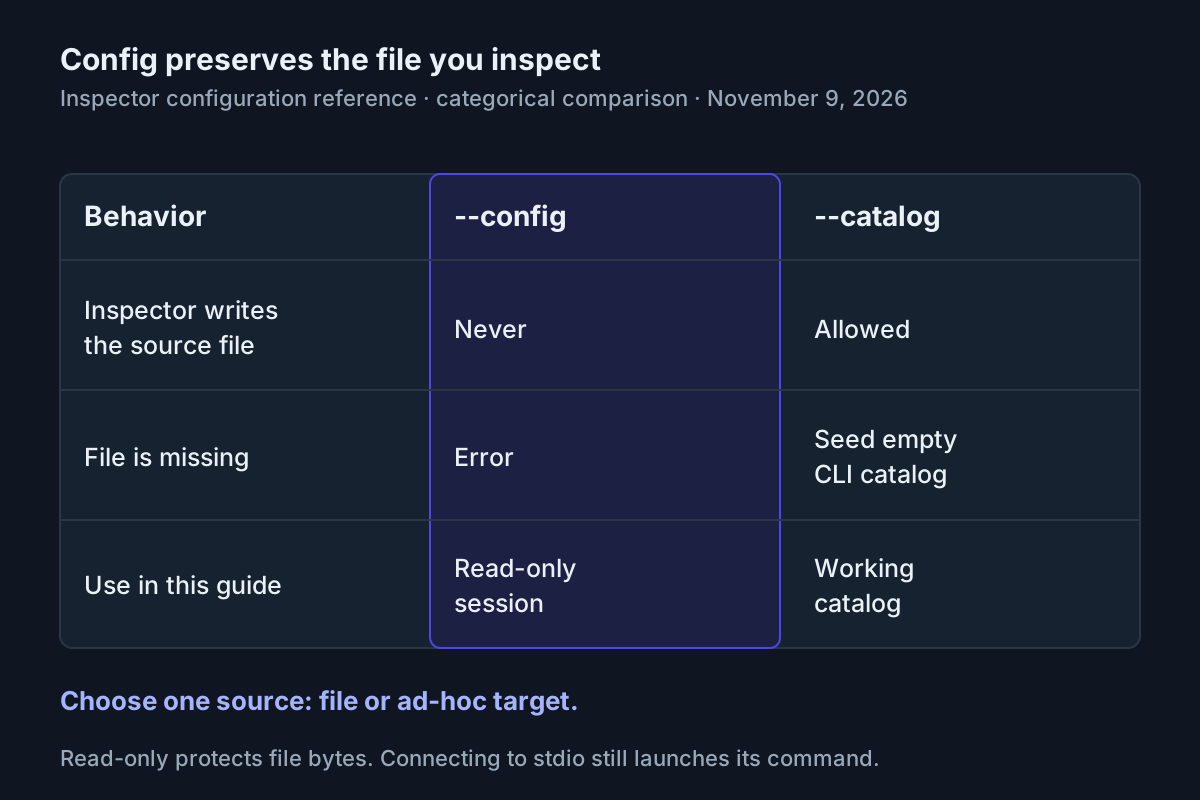
The configuration reference distinguishes --config from --catalog. A config is a read-only session file: Inspector does not seed, migrate or rewrite it, and a missing file is an error. A catalog belongs to Inspector and can be created when missing. Starting with the CLI can seed an empty catalog, so an empty default list does not demonstrate server failure.
The 30,000 millisecond values are illustrative choices using documented fields, not measured startup times. Connection timeout bounds setup; request timeout concerns requests after connecting. A timeout tells you which boundary failed, not automatically why. Package resolution, process startup and the server’s own behavior can all matter before a handshake completes.
The reference server package is intentionally unpinned because the supplied official example does not identify an exact package release. Inspector is pinned to 2.14.0; the server package may change between runs. Record the tool schema you actually receive and stop if it no longer matches this documented example. This is a diagnostic exercise, not a claim of reproducible dependency resolution.
On Windows, the Everything README documents cmd /c to launch npx. The corresponding entry uses "command": "cmd" and "args": ["/c", "npx", "-y", "@modelcontextprotocol/server-everything"]. The final script below requires Bash; do not paste its shell syntax into PowerShell unchanged.
Before using a configuration copied from another application, compare its outer structure with this complete example. The selected server must be a named member of the server map, and each launch argument remains a separate array element. Joining the arguments into one shell string changes the launch boundary and can introduce quoting or interpretation problems. Keep the original file intact and work from a reviewed scratch copy when adapting an existing project.
Prove initialization before asking about tools
- Run the connect-only probe below.
- Inspect the JSON result and retain any stderr diagnostic.
- Continue only after the handshake succeeds.
# Illustrative expected observation: result contains protocolVersion and server information.
npx @modelcontextprotocol/inspector@2.14.0 --cli \
  --config ./mcp-debug.json --server everything \
  --method initialize --format json
The official smoke-testing guide describes initialize as a connect-only probe that prints server information, protocol version, capabilities and instructions, then disconnects. With JSON formatting, read those fields under result. Look for result.protocolVersion and server identity information; do not require an invented server version or exact banner.
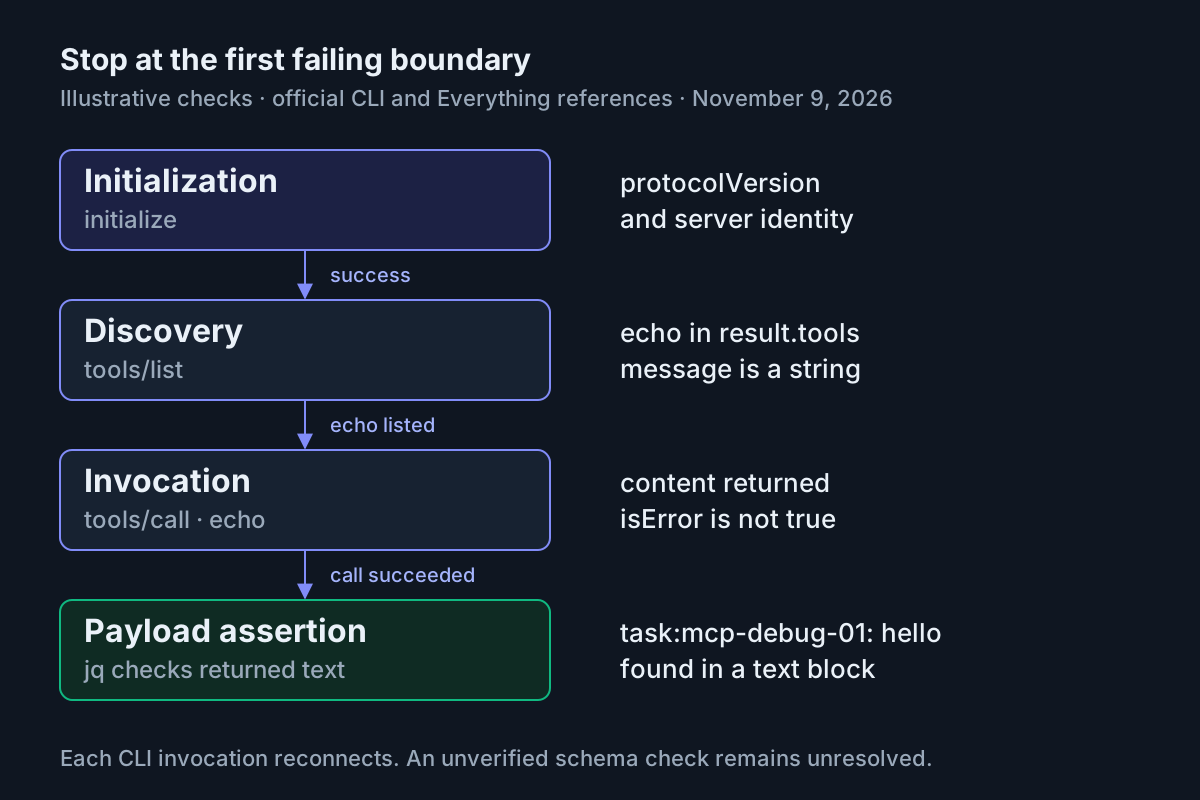
A successful probe establishes that this launch and handshake worked for this invocation. It does not prove that echo exists, that its arguments are accepted or that any returned content is correct. Those are subsequent checks. Each CLI invocation connects, performs its method and disconnects; the next command is a new connection, not a continuation of the first session.
If initialization fails, inspect the launch configuration before editing tool arguments. Check the file path, the selected name, whether npx is available and whether the runtime satisfies both packages. A missing config is not an unreachable network endpoint. A child process that cannot start is not proof of a malformed tool schema.
Keep diagnostic output visible during this work. The CLI reference explains that --quiet suppresses server stderr and advisory warnings. That can be useful after a stable check exists, but it removes useful explanations while locating a startup failure.
Discover echo and send the exact string
- List tools on the same named configuration.
- Find
echoand inspect its advertised input schema. - Confirm that
messageis a string before making the call. - Invoke it with one complete JSON argument object.
# Illustrative expected observation: result.tools contains echo and its input schema.
npx @modelcontextprotocol/inspector@2.14.0 --cli \
  --config ./mcp-debug.json --server everything \
  --method tools/list --format json

# Illustrative expected observation: a text block contains task:mcp-debug-01: hello.
npx @modelcontextprotocol/inspector@2.14.0 --cli \
  --config ./mcp-debug.json --server everything \
  --method tools/call --tool-name echo \
  --tool-args-json '{"message":"task:mcp-debug-01: hello"}' \
  --format json
The expected listing contains an echo entry under result.tools. If initialization succeeds but the tool is absent, the connection problem has narrowed to discovery or target identity. Compare the server entry and the observed identity before changing your host’s allowlist. The Everything feature reference also explains that some other legacy-era tools are registered only when the client declares their required capabilities; avoid assuming that every missing feature has the same cause.
For this call, inspect text blocks under result.content for the exact message substring. The documentation promises an echo, but this article does not assume a particular surrounding sentence, JSON indentation or array index. A substring assertion across text blocks verifies the requested content without inventing an exact response envelope beyond Inspector’s documented shape.
--tool-args-json preserves the JSON types you write. By contrast, --tool-arg key=value JSON-parses values when possible: an all-digit value can become a number. That matters when a tool expects a string identifier. Do not combine these argument forms; the CLI documents them as mutually exclusive.
The following table is a filled diagnostic case. Every result is an illustrative expected observation.
| Input | Action | Expected result |
|---|---|---|
| task:mcp-debug-01; mcp-debug.json selects Everything over stdio, legacy era | Run the initialize command above with --server everything and --format json | A successful invocation returns result.protocolVersion and server information; tool execution has not yet been tested |
| task:mcp-debug-01; tool name echo, message string task:mcp-debug-01: hello | Run tools/list, inspect echo, then tools/call with the exact JSON object above | The listing contains echo; a successful call includes the message in a text block and does not report isError:true |
| task:mcp-debug-01; same file plus an extra positional npx target | Run the deliberate conflicting command in the next section | Inspector rejects the file/ad-hoc combination; remove the positional target before repeating initialization |
If Inspector works but your host still fails, compare the host’s actual command, arguments, working directory and environment with this successful direct path. Claude Code MCP scopes covers where a host loads entries. A direct success narrows the investigation; it does not prove identical host capabilities or configuration.
Do not silently change the expected message to match an unexpected response. The stable case label makes the request distinguishable from startup banners, an earlier manual experiment or another diagnostic run. If the returned text contains only a greeting without that label, the invocation may have completed, but this particular assertion has not passed. Inspect the actual payload and the advertised tool contract before deciding whether the server changed or the request was constructed incorrectly.
Trigger a configuration error and repair it
- Run the deliberately invalid command below once.
- Read its error instead of treating it as a server outage.
- Remove the positional target and repeat the valid initialization command.
- Repeat discovery and the same echo call after the correction.
# Illustrative expected observation: rejection of file source plus ad-hoc target.
npx @modelcontextprotocol/inspector@2.14.0 --cli \
  --config ./mcp-debug.json --server everything \
  npx -y @modelcontextprotocol/server-everything \
  --method initialize --format json

# Illustrative expected observation after correction: initialization result.
npx @modelcontextprotocol/inspector@2.14.0 --cli \
  --config ./mcp-debug.json --server everything \
  --method initialize --format json
Inspector explicitly refuses mixing a file source with an ad-hoc command, URL or transport selection. The expected first observation is a usage/configuration refusal, not a successful connection. Do not repair it by deleting a server, clearing authentication or changing the server implementation. The correct fix is to choose one target source.
Argument ordering deserves special attention when leaving this file-based example. The v1-to-v2 migration guide explains that current v2 accepts Inspector options before or after an ad-hoc target, but variadic options can swallow following non-dash tokens. Put tool arguments after the target, or use a configuration file as here.
A server flag named --config can also collide with Inspector’s own flag. Under the CLI’s target-first separator form, everything before -- belongs to the target and everything after belongs to Inspector. The official example is:
npx @modelcontextprotocol/inspector@2.14.0 --cli \
  node build/index.js --config ./server.conf -- --method tools/list
That line illustrates parsing for an existing local server; build/index.js is not another fixture supplied by this tutorial. It should not replace the runnable Everything example. Web and TUI separator behavior differs, so copying a web launch line into CLI mode without reviewing its boundaries can change what receives a flag.
Preserve the exit class before inspecting content
- Save the complete script below as
mcp-debug.shbeside the JSON file. - Run it with
bash mcp-debug.shfrom that directory. - Read the first failing stage; correct it before repeating the script.
#!/usr/bin/env bash
set -euo pipefail

mcp() {
  npx @modelcontextprotocol/inspector@2.14.0 --cli \
    --config ./mcp-debug.json --server everything \
    --connect-timeout 30000 --format json "$@"
}

probe() {
  local stage="$1"
  shift
  local status=0
  result=$(mcp "$@") || status=$?
  if [ "$status" -ne 0 ]; then
    printf 'STOP: %s; Inspector exit %s\n' "$stage" "$status" >&2
    exit "$status"
  fi
}

probe initialize --method initialize
jq -e '.result.protocolVersion' <<<"$result" > /dev/null
printf 'ok: initialize\n'

probe discovery --method tools/list
jq -e '.result.tools | map(.name) | index("echo") != null' \
  <<<"$result" > /dev/null
printf 'ok: echo discovered\n'

probe invocation --method tools/call --tool-name echo \
  --tool-args-json '{"message":"task:mcp-debug-01: hello"}'
jq -e '.result.isError != true' <<<"$result" > /dev/null
jq -e '[.result.content[] | select(.type == "text") | .text] \
  | any(contains("task:mcp-debug-01: hello"))' \
  <<<"$result" > /dev/null
printf 'ok: echo payload matched task:mcp-debug-01\n'
This is an authored composition of the official CLI and jq assertion patterns. Its illustrative successful output is three ok: lines, ending with the payload match. It captures Inspector’s status before jq runs, while leaving stderr visible. If the CLI fails, STOP names the stage and preserves the exit number. If a later assertion fails, Bash stops with the assertion’s failure status; that means the returned content did not meet this script’s expectation.
This separation avoids a subtle diagnostic trap. Even with pipefail, a pipeline can report jq’s nonzero status instead of Inspector’s more specific failure class. A tool error and a failed assertion can otherwise look like the same generic exit. The official smoke guide explicitly recommends capturing the CLI status first when that class matters.
| Inspector exit | Meaning relevant to this diagnosis | Response |
|---|---|---|
| 1 | Usage or unexpected error | Inspect the final error envelope and fix configuration or invocation syntax |
| 3 | Authentication required | Investigate the authorized server’s authentication path; the local echo example requires no credential |
| 4 | Server unreachable | Check endpoint reachability or startup diagnostics before retrying a tool |
| 5 | Tool not found or isError:true | Distinguish a name mismatch from a tool-reported failure using the payload and error envelope |
| 6 | Error-severity portability finding under --strict | Read the reported schema path and suggestion before changing the schema |
Every nonzero CLI exit writes a final one-line JSON error envelope on stderr. Preserve preceding diagnostics too. Exit zero alone does not establish the intended payload: that is why the script separately checks the echoed string.
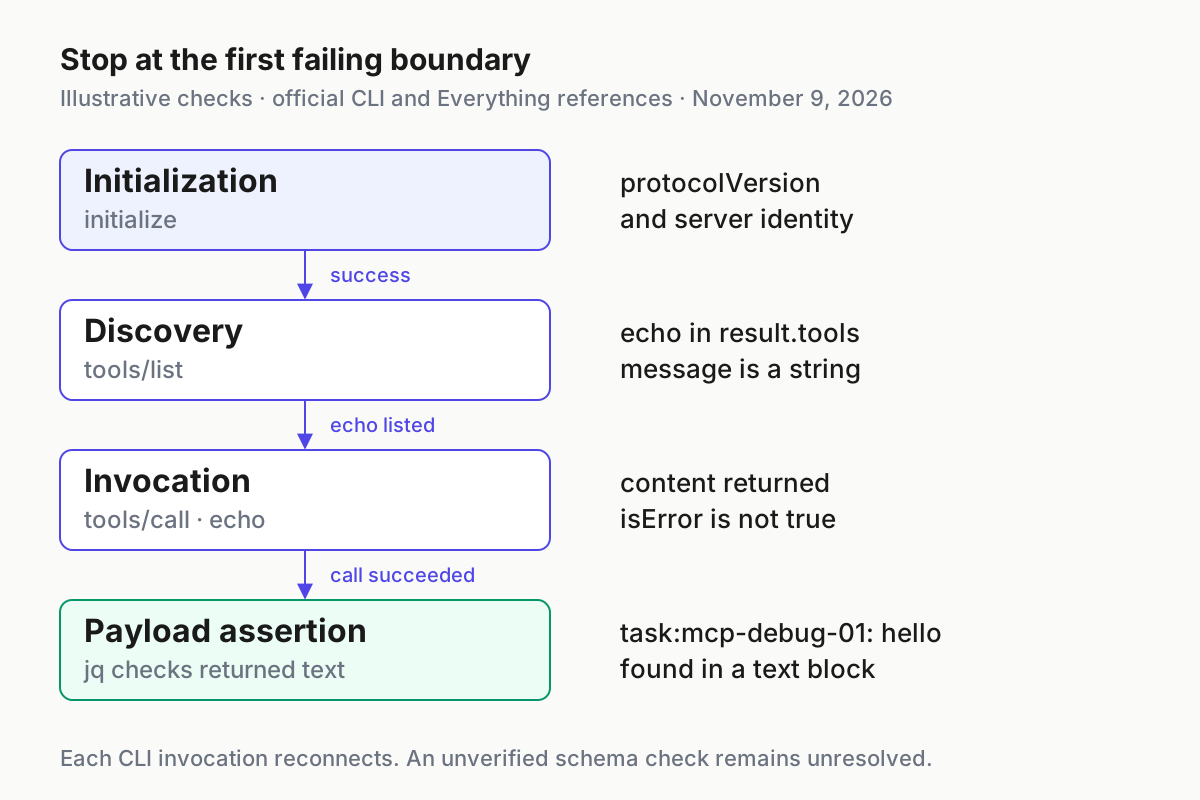
Read the printed progress as a location marker. If initialization is the only completed line, the listing or its assertion failed. If discovery also completed, investigate invocation and the payload checks. A missing jq executable is a local prerequisite failure, not an MCP failure; resolve that before interpreting the assertions. Keep the raw diagnostic available when asking another developer for help, and review it for sensitive values before sharing it.
Keep schema checks and transport checks separate
- Run the optional portability inspection after discovery works.
- Read warnings as findings even when the process exits zero.
- Keep any unverified schema-pattern result unresolved.
npx @modelcontextprotocol/inspector@2.14.0 --cli \
  --config ./mcp-debug.json --server everything \
  --method tools/list --strict --format json
--strict reports tool-schema portability problems and exits 6 for error-severity findings. Warnings do not fail the run. With JSON output, findings are available through schemaFindings; the field can be absent when there are none. The CLI reference explicitly distinguishes this lint from a general JSON Schema validator. A clean portability report is consequently a limited result, not MCP conformance certification.
The release also says server-supplied patterns beyond bounded evaluation limits are reported as unverified. Unverified means a check was not completed; it is not a pass. Keep that distinction in a bug report even when the harmless echo works. This guide verifies one path through the system and makes no claim that it exercises every output-schema rule.
For an existing authorized HTTP server, use its actual URL instead of the file source. A path ending exactly in /mcp infers Streamable HTTP, and /sse infers SSE; another path, including /mcp/, requires an explicit transport. Choose --transport http or --transport sse according to that server’s documentation. Never combine a positional URL with --server-url, or --transport stdio with a URL.
Keep broader security validation separate from this narrow diagnosis. MCP security hardening addresses production controls, while MCP integration red teaming concerns adversarial behavior. Neither is replaced by a successful echo.
Finish with a bounded conclusion and clean up
- Report the last successful stage and the first failing observation.
- Include the selected configuration name, Inspector version and harmless request arguments.
- Remove only the scratch files you created when finished, or retain them deliberately for local reuse.
- Confirm that each CLI invocation has returned before ending the exercise.
A useful successful conclusion is: initialization returned a protocol version; discovery listed echo; invocation returned the requested string; the payload assertion matched. A useful failure conclusion is equally specific: initialization worked, but discovery did not list echo. Avoid replacing those statements with “MCP is broken” or “the server is fully validated.”
No catalog entry was added in this procedure, so there is no normal catalog entry to remove. Inspector’s CLI is documented to disconnect after its method. If an invocation does not return, use a separate terminal to inspect the process through your operating system’s normal tools and stop only the development process you launched. Do not terminate unrelated npx or Node processes by name.
Recovery is to restore the complete JSON shown above, select only that file, then repeat initialization, discovery and invocation in order. For an existing project, preserve its original configuration before adapting anything. The direct check should help locate a boundary without overwriting the host’s working setup.
When retaining the scratch files, retain the expected message and the reason for the chosen legacy era alongside them. Otherwise a later reader may change the transport or handshake while believing they are repeating the same experiment. If adapting the procedure to another documented harmless tool, update both its arguments and its payload assertion together. An unchanged echo assertion cannot validate an unrelated tool merely because both calls exit successfully.
When you return to a coding assistant, carry the exact failing boundary and request rather than a vague prompt to fix everything. Fleet replay supplies the related operating principle: retain the actual observations needed to explain what happened. Here, the usable result is a small config, a concrete echo request and an assertion script whose failure has a location.
Sources
- Inspector 2.14.0 release.
- Inspector CLI reference.
- MCP server configuration.
- v1-to-v2 migration.
- Inspector launcher.
- Vedang Vatsa’s November 8 post.
- CLI smoke testing.
- Everything server README.
- Everything server features.