Claude Code Prompt Caching Explained: Read the /usage Cache Line, Pick the 5-Minute or 1-Hour TTL, and Stop Breaking the Prefix
Claude Code prompt caching guide: read the /usage Prompt cache (main) line, pick a 5m or 1h TTL per bucket in settings.json, and fix what breaks the prefix.

Claude Code makes a new API request for every message you send, and each request carries the whole session again: the system prompt, the project context it loaded, every earlier turn and tool result. Claude Code prompt caching is what keeps that affordable. When the start of a request matches content the API processed recently, the repeat is billed at the cached rate. When it does not match, the full history is processed again and written back to the cache. You feel the difference as a slow first turn after lunch, a plan window that empties faster than your activity explains, or an API bill where a quiet afternoon cost as much as a busy morning.
You no longer have to guess which case you are in. On Oct 31, 2026, Ethan Lin pointed out on X that /usage now prints a “Prompt cache (main)” line with the share of input tokens served from cache, the misses (often with a likely cause), and whether the cache is warm or cold. That post is the hook. Anthropic’s documentation is the authority for everything below.
This guide is written for a developer who uses Claude Code most days, either on a Pro, Max, Ultra, Team or Enterprise subscription or on an API key, Amazon Bedrock, Google Cloud’s Agent Platform or Microsoft Foundry, and who suspects the cache is not doing its job. By the end you will be able to read the cache line in /usage and the status line fields behind it, confirm from claude -p JSON which time to live (TTL) a request actually used, set promptCacheTtl and subagentPromptCacheTtl deliberately, and stop the habits that quietly force a rebuild. Session numbers marked Illustrative are worked examples in the documented format, not output captured from a real run.
How the prefix cache decides what you pay
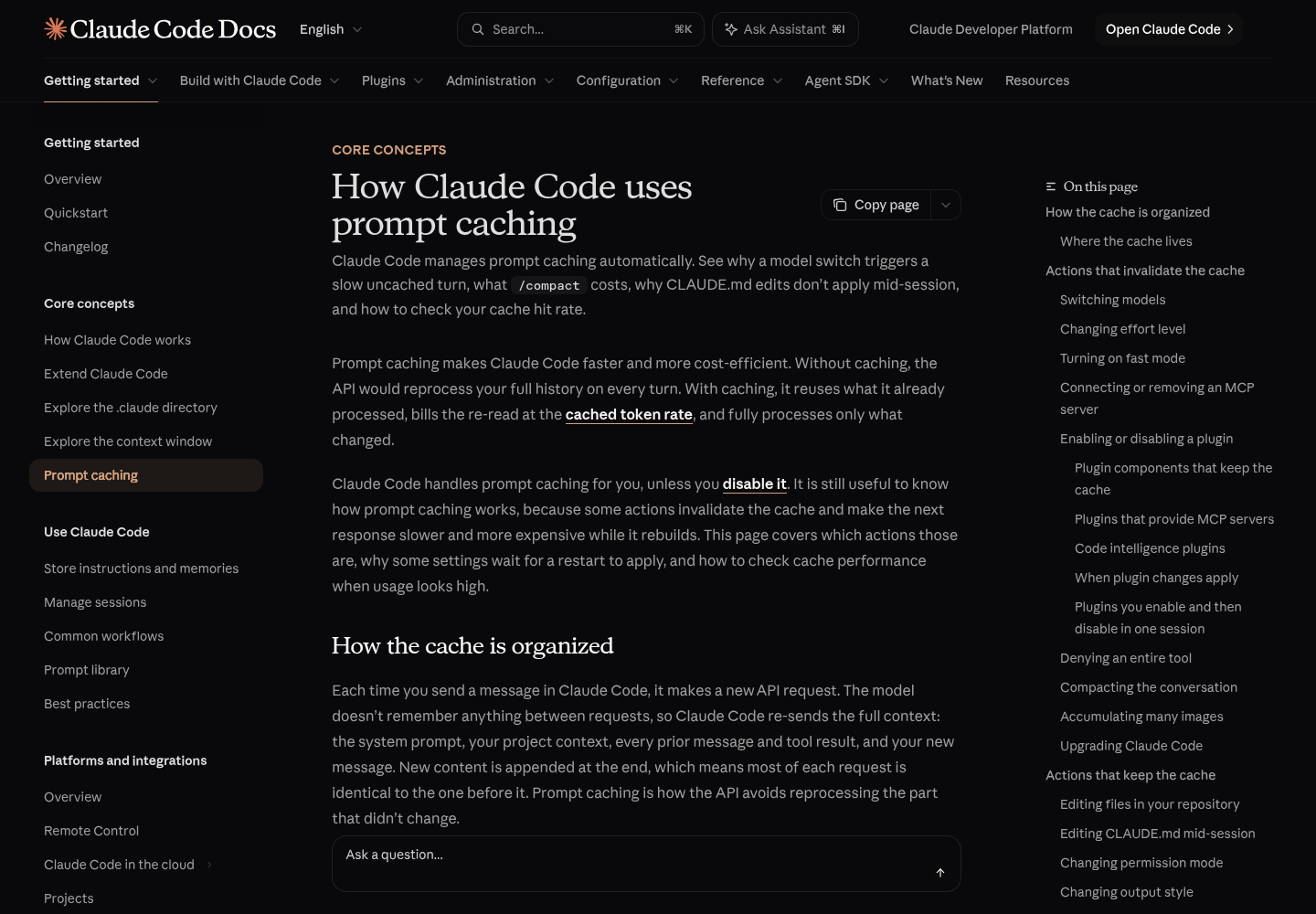
The model keeps nothing between requests, so Claude Code re-sends everything each turn and appends the new material at the end (How Claude Code uses prompt caching). The API caches by matching the start of each request, called the prefix, against content it processed recently. On a normal turn the prefix is the whole previous request and only the latest exchange is new. The match is exact. A change anywhere in the prefix recomputes everything after it, and there is no per-file or per-segment caching to soften the blow.
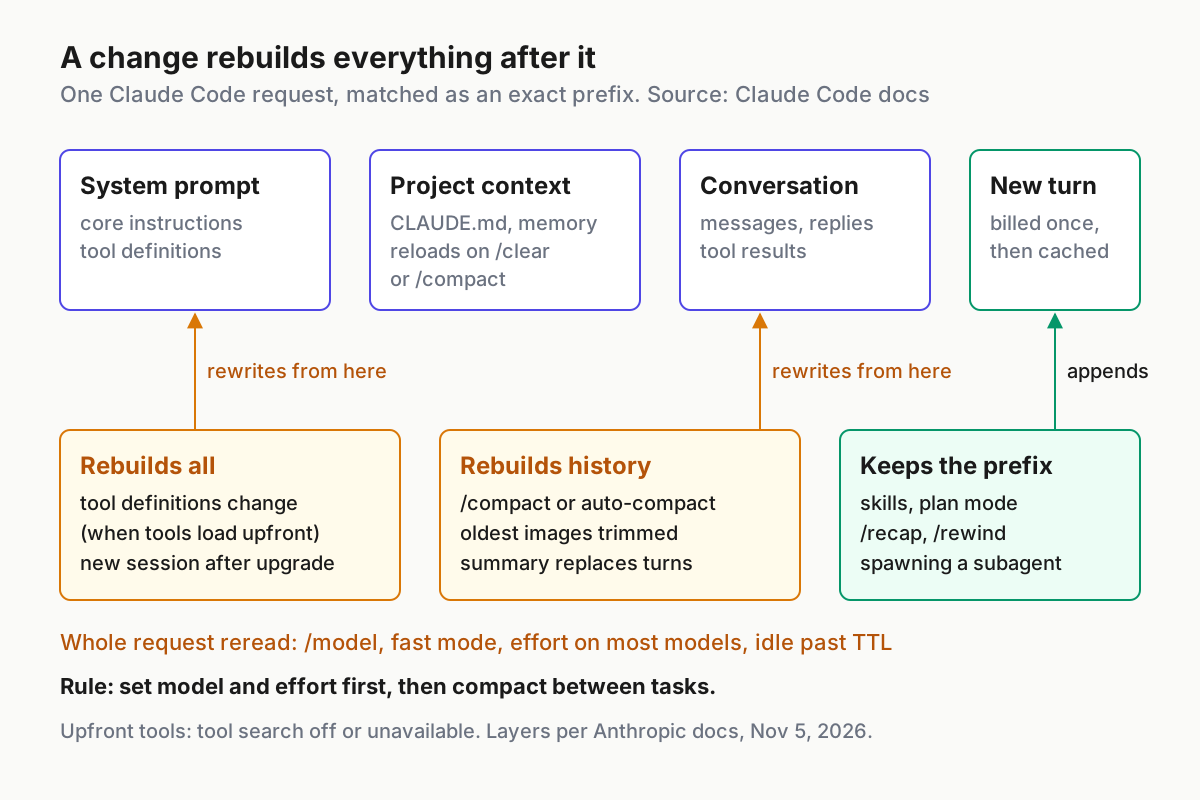
Claude Code orders each request so the content least likely to change comes first:
| Layer | What it holds | Changes when |
|---|---|---|
| System prompt | Core instructions and tool definitions | The set of loaded tool definitions changes |
| Project context | CLAUDE.md, auto memory, unscoped rules | Session start, /clear or /compact |
| Conversation | Your messages, Claude’s replies, tool results | Every turn, appended at the end |
That ordering does most of the work. A new turn only touches the bottom layer, so the system prompt and project context are read from cache. A change to the system prompt invalidates everything, because every later token now sits behind a different prefix. Two things sit outside the table: each model has its own cache, and on most models each effort level has its own cache as well. If you want to see how big each layer is, the context window guide walks through /context; this guide is about whether those tokens are re-read cheaply.
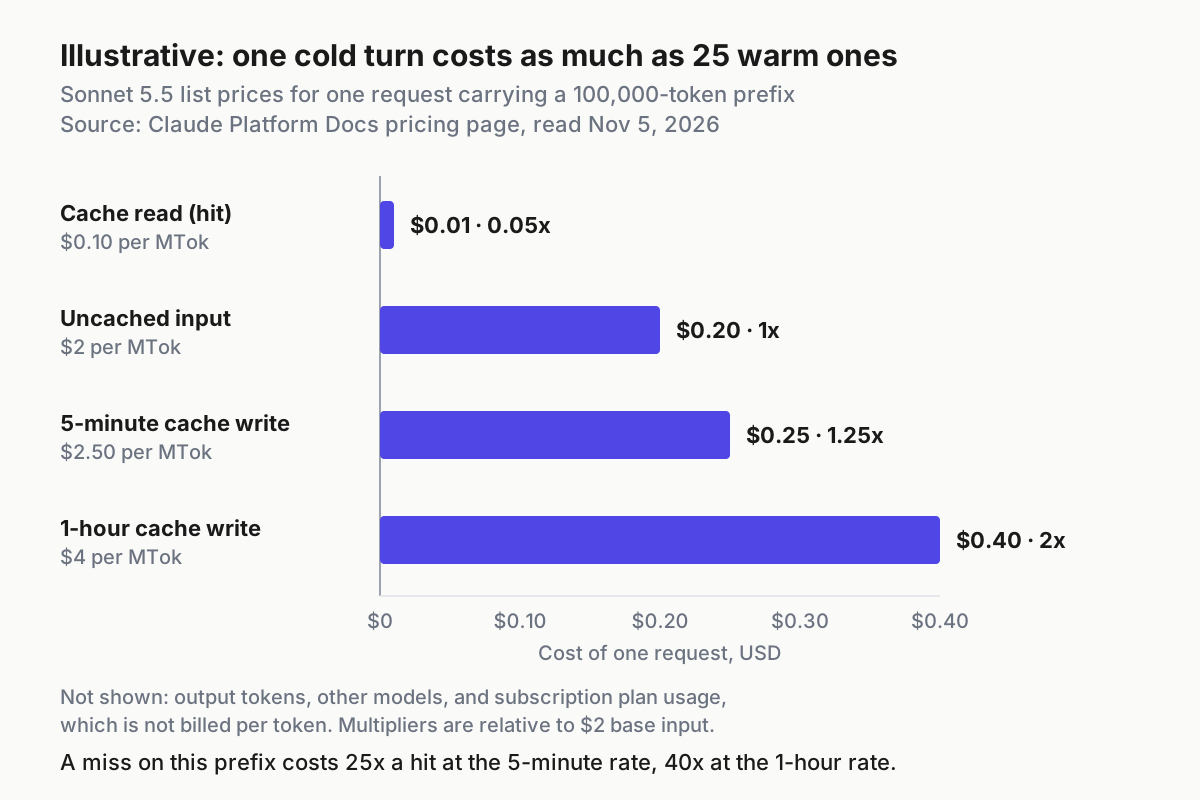
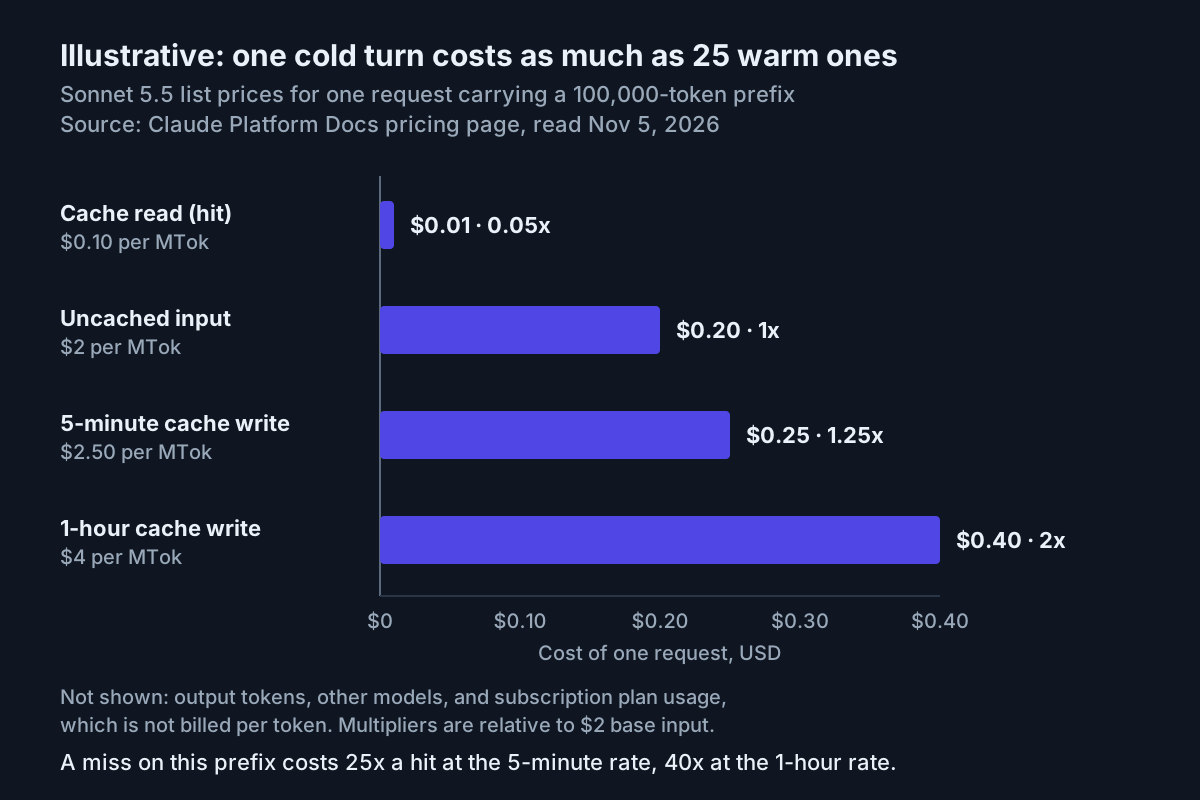
The price gap is what turns a miss from an annoyance into a cost. Anthropic’s pricing page prices a five-minute cache write at 1.25 times the base input rate, a one-hour cache write at 2 times, and a cache read at 0.1 times, with lower read multipliers on the newest models: 0.05 times on Claude Opus 5.5 and Sonnet 5.5, and 0.025 times on Claude Fable 5.1 and Mythos 5.1. On Sonnet 5.5 that is $2 per million input tokens, $2.50 for a five-minute write, $4 for a one-hour write and $0.10 for a read.
Put a 100,000-token session on Sonnet 5.5 through those prices and a warm turn re-reads the prefix for about one cent, while a cold turn rewrites it for 25 cents at the five-minute rate. Each request that hits the cache also resets its timer, so a session you keep working in stays warm; the expensive moments are the first turn after a gap longer than the TTL and any action that changes the prefix. If you run long unattended jobs and want a dollars-per-job ledger rather than a per-session view, the Fable 5.1 overnight meter builds one from the same usage fields.
On a subscription, plan usage is not billed per token, and the costs page says the dollar figure in the /usage Session block is intended for API users. Misses still matter there: the same page lists cache misses after a break longer than the cache lifetime among the main reasons usage climbs in a long session.
Where the cache lives depends on how you sign in. With an API key, a Claude subscription or Claude Platform on AWS it sits in Anthropic’s infrastructure; on Bedrock or Google Cloud’s Agent Platform it sits with your cloud provider; behind a custom ANTHROPIC_BASE_URL or LLM gateway, whether caching works at all depends on the gateway. The cache is also effectively scoped to one machine and one directory, because the system prompt embeds your auto memory paths and the conversation opens with the working directory, platform, shell and OS version. Parallel sessions in the same directory build matching prefixes and can read each other’s cache, which matters if you already split work across parallel sessions. Sequential sessions share a prefix only when the git status snapshot taken at startup matches.
Before you start: versions, billing and tools
The cache features arrived over several releases, so check your version with claude --version before trusting an empty field. Work through this list once:
- [ ] Claude Code v2.1.242 or later, for
promptCacheTtl,subagentPromptCacheTtl,CLAUDE_CODE_PROMPT_CACHE_TTLandCLAUDE_CODE_SUBAGENT_PROMPT_CACHE_TTL. - [ ] v2.1.251 or later, for the Prompt cache (main) line in
/usageand theprompt_cacheobject in status line input. - [ ] v2.1.260 or later, for the likely-cause text,
last_miss_causeandmiss_causes. - [ ] v2.1.305 or later, if you want the
fshortcut that applies/usagerecommendations on a plan. - [ ]
jqinstalled, for the status line script and theclaude -pcheck. - [ ] Write access to
~/.claude/settings.json, or to the project settings you share with your team. - [ ] A clear answer to “how am I billed right now”: subscription within plan usage, subscription drawing usage credits, API key, or a cloud provider. The TTL defaults differ for each.
Upgrading has its own one-time cost. A new version typically changes the system prompt or tool definitions, so the first conversation after an upgrade builds its cache from the top. Auto-update applies new versions on the next launch, never mid-session, so schedule the restart between tasks rather than in the middle of one.
Read the Prompt cache (main) line in /usage
After the main conversation’s first API response, /usage adds a Prompt cache (main) line to its Session block. The costs documentation shows this example:
Prompt cache (main): 14 requests · 91% of input tokens from cache · 2 misses (last 6m 10s ago, 310.2k tokens re-cached) · 1 expected rebuild (compaction or tool-result clearing) · warm (1h TTL, last activity 40s ago)
Read it left to right:
| Part of the line | What it means | What it tells you to do |
|---|---|---|
14 requests |
API requests recorded for the main conversation this session | Gives the ratio its sample size; a handful of requests is too few to judge |
91% of input tokens from cache |
Cache reads as a share of all input: reads, writes and uncached input together | In a long session most input should be re-reads; a share that stays low points at prefix churn |
2 misses (last 6m 10s ago, 310.2k tokens re-cached) |
Requests that reprocessed content the cache already held: more than 5% and at least 2,000 tokens of what could have been read, with no compaction or tool-result clearing to explain it | The re-cached count is what those misses wrote back at the write rate |
likely cause: tool definitions changed |
Shown when Claude Code can identify the cause of the last miss (v2.1.260 or later) | Match it against the habits table later in this guide |
1 expected rebuild |
A rebuild after Claude Code itself compacted or cleared old tool results | Not a fault; appears only after at least one such rebuild |
warm (1h TTL, last activity 40s ago) |
The prefix is still within its lifetime, and which TTL is in effect | When it says cold, it shows how long the session has been idle; the next turn rewrites the prefix |
no prompt caching reported by the API |
No response has reported cache tokens | Go straight to the troubleshooting table |
Use it in this order:
- Send at least one prompt, then run
/usage. The line does not exist until the main conversation has had a response. - Note the hit share, the miss count and the TTL in the warm or cold part.
- If there are misses, read the likely cause before changing anything. Different causes have opposite fixes.
- Take your reading before
/clear, which resets the line along with the rest of the Session block. - On a Pro, Max, Ultra, Team or Enterprise plan, scroll to the recommendations. Each row covers at least 10% of recent usage, and the documented behaviors behind them include long context and cache misses.
- When the footer shows a hint such as
f to fix 2 of 3, pressf. Claude Code runs any row that ends in an/effortcommand, then gives Claude one prompt for the other rows it can act on and asks it to show each change before making it. Rows that end inrun /compactare yours to run.
Two limits are easy to miss. The line covers the main conversation only, not subagents. And while Remote Control is connected, the footer shows no f hint at all.
Worked diagnosis: one session, two kinds of miss
Here is a filled example. The developer works on an API key with Sonnet 5.5, so the main conversation is on the five-minute default. Their session loads tools upfront rather than deferring them (the docs give a Microsoft Foundry deployment hosted on Azure that rejects tool search as one such case), and they have two habits: they connect a documentation MCP server partway through a task and remove it afterwards, and they step away for six to ten minutes while the integration tests run. The numbers are Illustrative, written in the documented format; the exact wording and placement of the likely-cause text on your build may differ.
Before:
Prompt cache (main): 38 requests · 61% of input tokens from cache · 7 misses (last 2m 40s ago, 840.0k tokens re-cached) · likely cause: tool definitions changed · warm (5m TTL, last activity 25s ago)
The status line input for the same moment carries the breakdown that the summary line compresses (Illustrative values, documented field names):
{
  "prompt_cache": {
    "warm": true,
    "caching_observed": true,
    "ttl": "5m",
    "requests": 38,
    "misses": 7,
    "expected_rebuilds": 0,
    "hit_ratio": 0.61,
    "miss_recache_tokens": 840000,
    "last_miss_cause": { "causes": ["tools_changed"], "tools_added": 3, "tools_removed": 0 },
    "miss_causes": { "tools_changed": 4, "ttl_expired_5m": 3 },
    "recache_tokens_if_cold": 124000
  }
}
Seven misses rewrote about 120,000 tokens each. The miss_causes map shows two separate problems hiding behind one hit ratio, and each needs its own fix:
| Finding | Evidence | Cause | Change | Expected observation |
|---|---|---|---|---|
| Four misses from tool changes | tools_changed: 4, last miss added 3 tools |
With tools loaded upfront, a server that connects adds definitions to the system prompt, and removing it on purpose invalidates the cache again | Connect the docs server before the first prompt of the task, or leave it connected; editing MCP config only takes effect on restart anyway | tools_changed stops increasing |
| Three misses from expiry | ttl_expired_5m: 3 |
The test runs leave gaps longer than five minutes, so the next turn finds a cold prefix | Set promptCacheTtl to 1h for the main conversation |
The line shows 1h TTL; no new ttl_expired_5m |
| Size of the next cold turn | recache_tokens_if_cold: 124000 |
The whole conversation would be rewritten | Compact at the end of the task, not after a break | The figure drops after /compact |
After the two changes, a comparable session the next day reads (Illustrative):
Prompt cache (main): 41 requests · 93% of input tokens from cache · 1 miss (last 1h 12m ago, 96.4k tokens re-cached) · warm (1h TTL, last activity 1m 05s ago)
The one remaining miss came after a lunch break longer than an hour, which no TTL setting will cover. The trade-off to keep in view is that every cache write in that session, including each turn’s small appended write, now costs 2 times base input instead of 1.25 times. The decision table further down shows when that premium pays for itself.
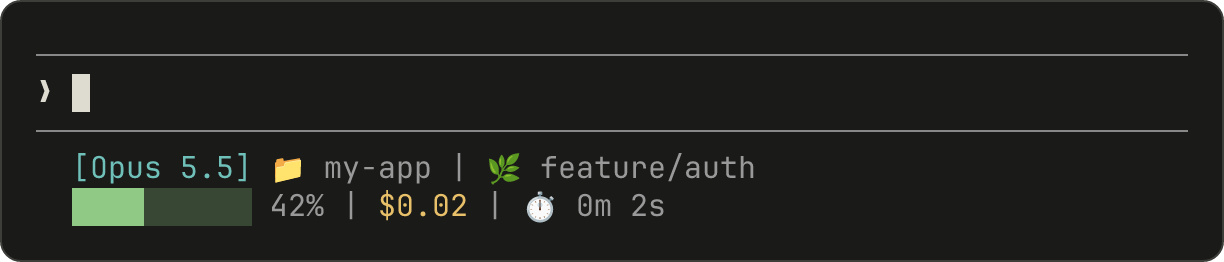
Show cache state in your status line
/usage is something you open; a status line is always on screen. Claude Code passes JSON session data on stdin to a script you configure and displays whatever it prints, and since v2.1.251 that JSON includes the prompt_cache object (status line documentation). The script runs locally and consumes no API tokens. If you already have a status line from the status line setup guide, add the cache fragment to it rather than replacing it.
-
Create the file
~/.claude/statusline.shwith these contents:#!/bin/bash # Prompt cache state for the main conversation (fields documented for v2.1.251+) input=$(cat) MODEL=$(echo "$input" | jq -r '.model.display_name') # Read booleans without "//": jq treats false like null there OBSERVED=$(echo "$input" | jq -r '.prompt_cache.caching_observed') if [ "$OBSERVED" = "null" ]; then echo "[$MODEL] cache: waiting for first response" exit 0 fi if [ "$OBSERVED" = "false" ]; then echo "[$MODEL] cache: none reported" exit 0 fi WARM=$(echo "$input" | jq -r '.prompt_cache.warm') TTL=$(echo "$input" | jq -r '.prompt_cache.ttl // "?"') HIT=$(echo "$input" | jq -r '(.prompt_cache.hit_ratio // 0) * 100 | floor') MISSES=$(echo "$input" | jq -r '.prompt_cache.misses // 0') EXPIRES=$(echo "$input" | jq -r '.prompt_cache.expires_at // empty') CAUSE=$(echo "$input" | jq -r '(.prompt_cache.last_miss_cause.causes // []) | join(",")') STATE="cold" if [ "$WARM" = "true" ] && [ -n "$EXPIRES" ]; then LEFT=$(( (EXPIRES - $(date +%s)) / 60 )) STATE="warm ${LEFT}m left" fi LINE="[$MODEL] cache ${HIT}% · ${MISSES} misses · ${TTL} ${STATE}" [ -n "$CAUSE" ] && LINE="$LINE · last: $CAUSE" echo "$LINE" -
Make it executable with
chmod +x ~/.claude/statusline.sh. -
Point your user settings at it in
~/.claude/settings.json:{ "statusLine": { "type": "command", "command": "~/.claude/statusline.sh" } } -
Feed it mock input before relying on it, as the status line docs recommend:
EXP=$(( $(date +%s) + 1800 )) printf '{"model":{"display_name":"Sonnet"},"prompt_cache":{"caching_observed":true,"warm":true,"ttl":"1h","expires_at":%s,"hit_ratio":0.91,"misses":2,"last_miss_cause":{"causes":["tools_changed"],"tools_added":2,"tools_removed":0}}}\n' "$EXP" | ~/.claude/statusline.sh -
Check the printed line. With that input the script’s logic should print
[Sonnet] cache 91% · 2 misses · 1h warm 30m left · last: tools_changed, or29m leftif a second ticks over. That is the expected result of the script, not captured output. -
Start a real session and send a prompt. Before the first response the line reads
cache: waiting for first response, because theprompt_cacheobject is absent until then.
The script is shaped around how the fields behave. caching_observed false means caching is off or your provider or gateway does not report it, which is a different problem from a cold cache, so it gets its own message. warm is false whenever the last response reported no cache tokens, even when caching was observed earlier, and expires_at is null in that case, so the minutes-left figure only appears for a warm prefix. You do not need a timer to see the cache go cold: Claude Code re-runs the status line when a warm prompt cache in the last data it sent reaches its expires_at time. last_miss_cause is null until the first miss and whenever no cause was identified, which the // [] fallback handles.
The documented cause names are tools_changed, system_prompt_changed, ttl_expired_5m and likely_server_side. With tools_changed you also get tools_added and tools_removed; with system_prompt_changed you get system_char_delta, the change in system prompt length in characters. If the line stays blank, the status line docs list the usual culprits: a script that is not executable, output written to stderr instead of stdout, a workspace you have not trusted, or disableAllHooks.
Confirm the TTL with claude -p JSON
The status line tells you the TTL of the current prefix. To check which TTL a fresh request actually wrote, Anthropic’s prompt caching page gives a one-line test. If you script Claude Code already, the headless mode guide covers -p in depth; here you only need the usage block.
-
Change into the project you care about, because the cache is scoped to machine and directory.
-
Run the documented check from that directory:
claude -p "hello" --output-format json | jq '{write: .usage.cache_creation, read: .usage.cache_read_input_tokens}' -
Read
usage.cache_creation. Claude Code reports one-hour writes underephemeral_1h_input_tokensand five-minute writes underephemeral_5m_input_tokens. On a subscription within plan usage with no overrides, an Illustrative result looks like this:{ "write": { "ephemeral_1h_input_tokens": 18342, "ephemeral_5m_input_tokens": 0 }, "read": 0 } -
Interpret which field is nonzero, not the size. Counts can be small on a second run, because a sequential session in the same directory can read the prefix the first run cached when the git snapshot matches.
-
To prove an override works, run the same command with the opposite setting, for example
FORCE_PROMPT_CACHING_5M=1 claude -p "hello" --output-format json | jq '.usage.cache_creation', and confirm the write moves toephemeral_5m_input_tokens. -
If both write fields and the read count are zero, nothing was cached at all. Treat that as the “no prompt caching reported” case in the troubleshooting table, not as a TTL problem.
claude -p runs land in the main-conversation bucket, so this test checks promptCacheTtl. It does not tell you what your subagents received.
Choose a TTL for each bucket
Claude Code picks a TTL per request, and every request falls into one of two fixed buckets. The main conversation covers your interactive turns, -p runs, Agent SDK turns and the helpers Claude Code runs inline with them. Everything else covers subagents, workflows, in-process teammates, forks, compaction and session titles. The defaults from the prompt caching page:
| Request bucket | Claude subscription, within plan usage | Usage credits, API key or cloud provider |
|---|---|---|
| Main conversation | One hour | Five minutes |
| Everything else | Five minutes, except a small set of server-controlled helper requests, which get one hour | Five minutes |
Once a subscriber goes past the plan’s limit and Claude Code draws on usage credits, the main conversation drops to five minutes, because that usage is now billed and five-minute writes are cheaper. If you run on credits regularly, the usage credits guide covers caps and switching them off; the TTL choice sits alongside it.
The decision, filled in for common cases:
| Your situation | Main conversation | Everything else | Reasoning |
|---|---|---|---|
| Subscription, within plan usage | Leave the default (1h) | Leave the default (5m) | You already get the hour where it matters |
| Subscription on usage credits, with breaks of 10 to 60 minutes | promptCacheTtl: "1h" |
5m | Credits are billed; one cold rewrite after a break costs more than the write premium |
| Subscription on usage credits, continuous short bursts | Default 5m | 5m | The longer lifetime would go unused while every write costs more |
| API key or cloud provider, meetings and long test runs between turns | promptCacheTtl: "1h" |
5m | Same arithmetic as the credits case |
| API key, tight pairing loop with replies inside a few minutes | Default 5m | 5m | Each turn refreshes the timer anyway |
| Many short subagents that finish within minutes | No change | 5m | Unless Claude resumes that subagent soon after, nothing reads its cache again, so a 1h write is waste |
| Long subagents or workflows that sit idle more than five minutes between their own turns | No change | subagentPromptCacheTtl: "1h" |
Their own prefix goes cold between turns at 5m |
| Behind an LLM gateway or on Bedrock | 1h only after confirming support |
5m | A gateway must forward the anthropic-beta header; Bedrock support varies by model |
For a per-token setup the break-even is easy to work out. Take an Illustrative day on Sonnet 5.5 with an API key: the session’s first write covers a 100,000-token prefix, and 60 turns each append about 3,000 tokens, so 280,000 tokens are written over the day. At the five-minute rate that is $0.70; at the one-hour rate it is $1.12, a premium of $0.42. Now add four breaks of 15 to 40 minutes. Under the five-minute TTL each break forces a rewrite of roughly 100,000 tokens for $0.25, where a read would have cost $0.01, so the four breaks add $0.96. The hour comes out about $0.54 ahead. With no breaks at all, the five-minute default wins by the same $0.42, and two breaks a day are enough to tip it, since each saves $0.24. The model ignores that the prefix grows during the day, which only strengthens the case for the hour when breaks happen late. The pricing page states the general rule at the standard 0.1x read rate: a five-minute write pays off after one cache read, a one-hour write after two.
Apply the choice:
-
Add the keys to
~/.claude/settings.json, or to project settings if the whole team should share them. Each takes5mor1h, and Claude Code ignores any other value:{ "promptCacheTtl": "1h", "subagentPromptCacheTtl": "5m", "statusLine": { "type": "command", "command": "~/.claude/statusline.sh" } } -
Start a fresh session so the new value is in force, then repeat the
claude -pcheck and look forephemeral_1h_input_tokensabove zero. -
Watch the status line during your next break: it should still read
1h warmwhen you come back within the hour.
When more than one control is set, Claude Code takes the first match in this order:
FORCE_PROMPT_CACHING_5M=1, which forces five minutes for both buckets.- The bucket’s environment variable:
CLAUDE_CODE_PROMPT_CACHE_TTLorCLAUDE_CODE_SUBAGENT_PROMPT_CACHE_TTL. - The bucket’s setting:
promptCacheTtlorsubagentPromptCacheTtl. - For a subagent’s requests, the
cacheTtlvalue in the subagent’s experimental frontmatter field (v2.1.248 or later), where a1his ignored while a subscription is using usage credits. ENABLE_PROMPT_CACHING_1H=1, which requests one hour for both buckets.- The bucket’s default.
That order explains most “my setting is ignored” reports: an environment variable exported in a shell profile beats the settings file, and FORCE_PROMPT_CACHING_5M beats everything. The environment variables guide shows how to prove which values a session actually sees. Organisations can put any of these variables in the env block of managed settings, and Anthropic suggests FORCE_PROMPT_CACHING_5M=1 when you need to override a longer TTL set there for debugging. The Agent SDK cost-tracking page adds that ENABLE_PROMPT_CACHING_1H asks for one hour on every request in both buckets, that the per-bucket controls take precedence over it, and that promptCacheTtl: "1h" keeps the one-hour cache on the main conversation while you draw on usage credits.
Habits that break the prefix, and ones that don’t
Most misses come from a handful of actions that feel free. Each causes one slow, more expensive turn, after which the new prefix is cached again. This table is limited to behaviors in Anthropic’s documentation:
| Action | Effect on the cache | What you will see | Do this instead |
|---|---|---|---|
/model to another model |
Separate cache per model; the next request reads the whole history uncached | One slow turn and a miss | Pick the model at the start; Claude Code asks you to confirm while the cache is warm |
Plan mode with the opusplan model setting |
Each plan-mode toggle switches between Opus and Sonnet, so it is a model switch | A fresh cache on each toggle | Use one fixed model for long tasks |
| Changing effort level | Rebuild on most models; kept on Opus 5.5, Sonnet 5.5, Haiku 5.5 and Fable 5.1 with an API key or subscription | A confirmation prompt while warm on models that rebuild | Set effort before the task |
| Turning fast mode on or off | Fast and standard speed keep separate caches | The first fast turn re-reads the conversation at fast mode rates | Turn it on at session start |
| Connecting an MCP server mid-session | No effect when tool search defers tools, the default on supported models; invalidates when tools load upfront | tools_changed with tools_added |
Connect servers before the first prompt |
Denying a whole tool such as Bash |
Kept with tool search active; invalidates when tool search is off or unavailable | tools_changed with tools_removed |
Scoped rules such as Bash(rm *) never change the tool list |
| Enabling a plugin | Skills, commands, agents, hooks, monitors and themes append and keep the cache; plugin MCP servers follow the MCP rules | /reload-plugins warns instead of applying a full re-read |
Use /reload-plugins --force only when you accept the rebuild |
/compact or auto-compaction |
Replaces history with a summary; the system prompt and project context can stay cached | An expected rebuild, not a miss | Compact at a natural break; use /rewind to abandon a path |
| Sharing many images | Claude Code removes a batch of the oldest images and PDFs when request limits are reached | One slow turn per batch | Share fewer, smaller screenshots |
| Idling past the TTL | The whole prefix expires | Cold, then ttl_expired_5m on a five-minute TTL |
Use the 1h TTL if you pay per token and break often |
Several actions look risky but keep the prefix, because they append to the end or never touch the request: editing files in your repository (Claude Code appends a notice that the file changed), editing CLAUDE.md mid-session (the edit does not apply until /clear, /compact or a restart), changing permission mode, switching output style, invoking skills and commands (unless their frontmatter names another model), /recap, /rewind and spawning a subagent. A subagent builds its own cache and leaves the parent’s untouched; a fork inherits the parent’s system prompt, tools and history exactly, so its first request reads the parent’s cache.
Compaction deserves one more note. While the cache is warm, the summarization request reads your prefix from cache, so a mid-session /compact costs a fraction of what the context size suggests. After a break longer than the TTL it reprocesses the whole history uncached, which is why compacting an old resumed session is the expensive case. On the one-hour TTL Claude Code can compact a long idle conversation by itself; set idleCompaction to false (v2.1.290 or later) if you would rather choose the moment.
Troubleshooting a cache that won’t stay warm
| Symptom | Likely cause | Fix | Expected observation |
|---|---|---|---|
| Hit share stays low and misses climb every few turns | Tool definitions changing while tools load upfront | Connect MCP servers before the first prompt; avoid mid-task deny rules for whole tools | miss_causes.tools_changed stops rising |
A miss with system_prompt_changed |
The system prompt changed under the session; system_char_delta shows by how much. One documented case is a resumed conversation that kept an outdated prompt switching to the current one at its first compaction |
Upgrade and change system prompt flags between tasks, not mid-task | One miss, then a rising hit share |
| Cold after a coffee break | Five-minute TTL on an API key, cloud provider or usage credits | promptCacheTtl: "1h" if breaks are frequent |
1h TTL on the line; still warm after a 20-minute break |
1h setting has no effect |
Value not exactly 1h; version older than v2.1.242; FORCE_PROMPT_CACHING_5M or CLAUDE_CODE_PROMPT_CACHE_TTL set in the shell or a managed env block |
Fix the value, upgrade, or unset the override | claude -p shows ephemeral_1h_input_tokens above zero |
no prompt caching reported by the API or caching_observed: false |
A DISABLE_PROMPT_CACHING variable is set; a gateway removes the cache_control markers; a Bedrock model or region without cache support |
Unset the variable; make the gateway forward markers; check Bedrock’s supported models | Nonzero cache read and write counts |
| Gateway user stuck at five minutes | Part of the one-hour request travels in the anthropic-beta header |
Forward that header unchanged; for a Claude apps gateway, ask the admin for a gateway policy | ephemeral_1h_input_tokens above zero |
| Usage high but the main line looks healthy | Subagents, workflows and teammates are not in the main line | Check the plan attribution breakdown, or modelUsage in the Agent SDK |
Subagent share visible; set subagentPromptCacheTtl only if they idle over five minutes |
Last cause is likely_server_side |
Nothing you changed locally explains the miss | Note it; do not change settings in response | Misses do not recur |
/compact on an old session is slow and costly |
The summarization request reads history uncached after the TTL | Compact before stepping away, or /rewind instead |
The next compaction runs on a warm cache |
Gateways deserve their own check, because the worst documented failure is silent. A gateway that forwards the cache_control markers unchanged caches like the provider’s own endpoint. One that rejects them with a 400 error naming cache_control triggers a fallback in Claude Code that moves the marker onto your last conversation message, so only the appended system-context block bills uncached. One that removes the markers and still returns success bills your entire conversation history as uncached input on every turn, and a gateway that converts block-form system content to a plain string drops the marker the same way. If you route through a translator or proxy, record its cache behavior in the bridge register next to everything else that sits between your CLI and the model.
Roll back to the defaults
If a change made things worse, or you are returning a machine to standard behavior, undo it in this order:
- Delete
promptCacheTtlandsubagentPromptCacheTtlfrom~/.claude/settings.jsonand from any project settings file you edited. - Remove
CLAUDE_CODE_PROMPT_CACHE_TTL,CLAUDE_CODE_SUBAGENT_PROMPT_CACHE_TTL,ENABLE_PROMPT_CACHING_1HandFORCE_PROMPT_CACHING_5Mfrom your shell profile and from any settingsenvblock, then open a new terminal. - Start a fresh session and rerun the
claude -pcheck. On a subscription within plan usage, expectephemeral_1h_input_tokens; on an API key, cloud provider or usage credits, expectephemeral_5m_input_tokens. - If a value persists after that, it is probably coming from managed settings; check with whoever administers them before working around it.
- Use
DISABLE_PROMPT_CACHING=1only as a short diagnostic when you suspect a provider- or model-specific caching problem, and unset it as soon as you have your answer. Anthropic’s own advice is to leave caching enabled for normal use. - Keep or remove the status line as you like; it costs no API tokens.
Success looks like this: the hit share climbs and stays high through the session, the same cause stops reappearing in miss_causes, the JSON confirms the TTL you intended, and the status line reads warm while you are working. Failure looks like paying one-hour write rates on a lane that never comes back within five minutes, or a setting that does not move the JSON fields at all. Both are visible within one session, which makes the cache one of the easier parts of running agents as an operating discipline to measure rather than argue about.
Sources
- Ethan Lin (@EthanLinAI) on X, Oct 31, 2026: Is your Claude Code session actually hitting the prompt cache?
- Anthropic, Claude Code Docs: How Claude Code uses prompt caching
- Anthropic, Claude Code Docs: Manage costs effectively
- Anthropic, Claude Code Docs: Customize your status line
- Anthropic, Claude Platform Docs: Pricing
- Anthropic, Claude Code Docs: Track cost and usage (Agent SDK)