Claude Extra Usage in Claude Code: What Usage Credits Cost, How to Cap Them and How to Turn Them Off
Claude extra usage is now called usage credits. Learn what draws from them in Claude Code, set a monthly cap, verify it in /usage and turn it off again.

Go deeper. Build your own.
On October 25, 2026, developer Aleksey Smolenchuk posted a two-line warning on X: “claude will prompt you to buy extra usage credits / do NOT DO IT”. The prompt is real, and it usually appears at the worst moment, right after a limit hits in the middle of a task. “Never” isn’t the only sensible answer, though. Claude extra usage, which Anthropic now calls usage credits, can be a cheap way through one deadline. It can also turn into an unpleasant line on next month’s card. Which one you get depends on a few settings you can choose before the prompt ever appears.
This guide is for an individual developer on Claude Pro, Max 5x or Max 20x who works in Claude Code most days and has hit the five-hour or weekly limit at least once. By the end you will have:
- a clear picture of which work draws from usage credits, including work that draws from them while plan usage is still left
- usage credits either left off on purpose, or switched on with a written monthly cap and an auto-reload decision
- a script that prices an overflowed afternoon before you pay for one
- a way to check the credits state from inside Claude Code with
/usage - a tested way to turn credits off again
Team and Enterprise members get short notes where their controls differ. Their admins own the switch.
Everything here comes from Anthropic’s help center, the Claude Code documentation, the Claude API pricing page and the Claude Code release notes, all read on October 28, 2026. Prices and plan rules change, so check them again before you rely on any number. Descriptions of what you’ll see are documented behaviour, not captures from a live account. Every dollar figure in the cost and worked-example sections is an Illustrative model.
Before you start: plan, sign-in and version
Usage credits are an account setting, but most surprises start on the machine. One wrong sign-in or one stray environment variable sends Claude Code to a different bill entirely. Five minutes of checks here can save you a confusing month.
- [ ] An individual Pro, Max 5x or Max 20x subscription, and access to its billing. According to Anthropic’s article Manage usage credits for paid Claude plans, if you subscribed through a Claude mobile app you can only enable usage credits on the web version of Claude, and you have to add a payment method there first.
- [ ] Claude Code signed in with that subscription, not an API key. Run
/statusinside a session. The fast mode documentation describes a Login method row such asClaude Max accountfor a subscription sign-in. An API key row means your requests bill to a Claude Console organization instead. - [ ] No
ANTHROPIC_API_KEYin your environment. Anthropic’s Pro and Max help article warns that when this variable is set, Claude Code uses the key instead of your subscription, “resulting in API usage charges rather than using your subscription’s included usage.” - [ ] A current build. Version 2.1.311 fixed two credit-related messages covered in the troubleshooting table, and builds older than 2.1.236 hide the capped credits row described below.
- [ ] A scratch repository you don’t mind running a few prompts in.
Run these in an ordinary terminal first:
claude --version              # want 2.1.311 or later for the fixes in this guide
env | grep ANTHROPIC_API_KEY  # no output is what you want on a subscription machine
claude update                 # only if the version is older
If the grep prints a line, remove the variable from your shell profile, open a fresh terminal and run the check again before going further. Then start claude in the scratch repository and run /status. If the login isn’t your subscription, the Pro and Max article’s fix is /login from inside Claude Code. If the account picker won’t offer your subscription, the same article lists /logout, then claude update, a full terminal restart, and claude to choose the right account.
What draws from usage credits, and what never does
Anthropic’s help center describes usage credits as a way for Pro, Max 5x and Max 20x subscribers to “continue using Claude after reaching their included usage limits.” Paid plans have a session limit that resets every five hours and a weekly limit, and Max plans have a separate weekly limit for Fable. With credits enabled, once one of those limits is fully used, “your requests switch to pay-as-you-go pricing on usage credits and keep working.” That usage is billed at standard API rates and charged separately from your subscription.
Two details change how you should think about it. First, credits cover both Claude chat and Claude Code, and the article says your combined usage across both counts toward your limits. A long research chat in the browser can be what pushes your terminal session onto credits. Second, credits don’t move any reset. The five-hour and weekly windows reset on their usual schedule whether or not you pay.
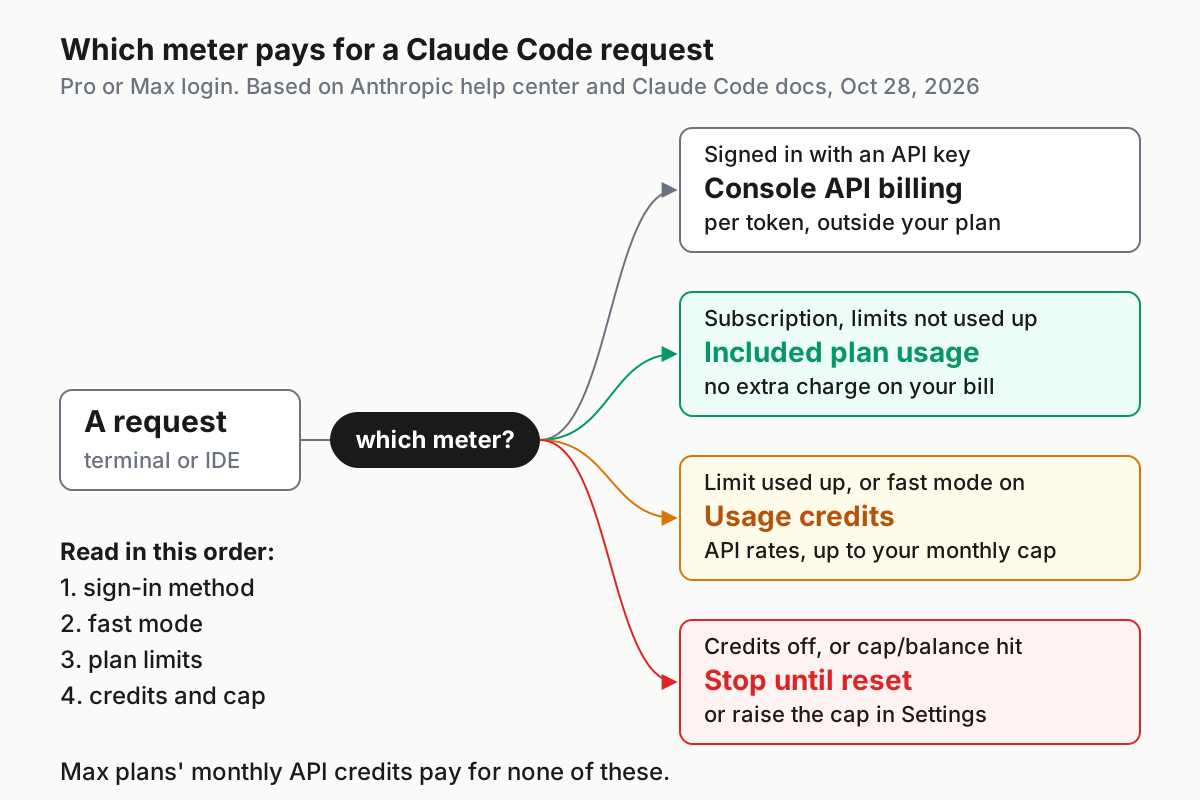
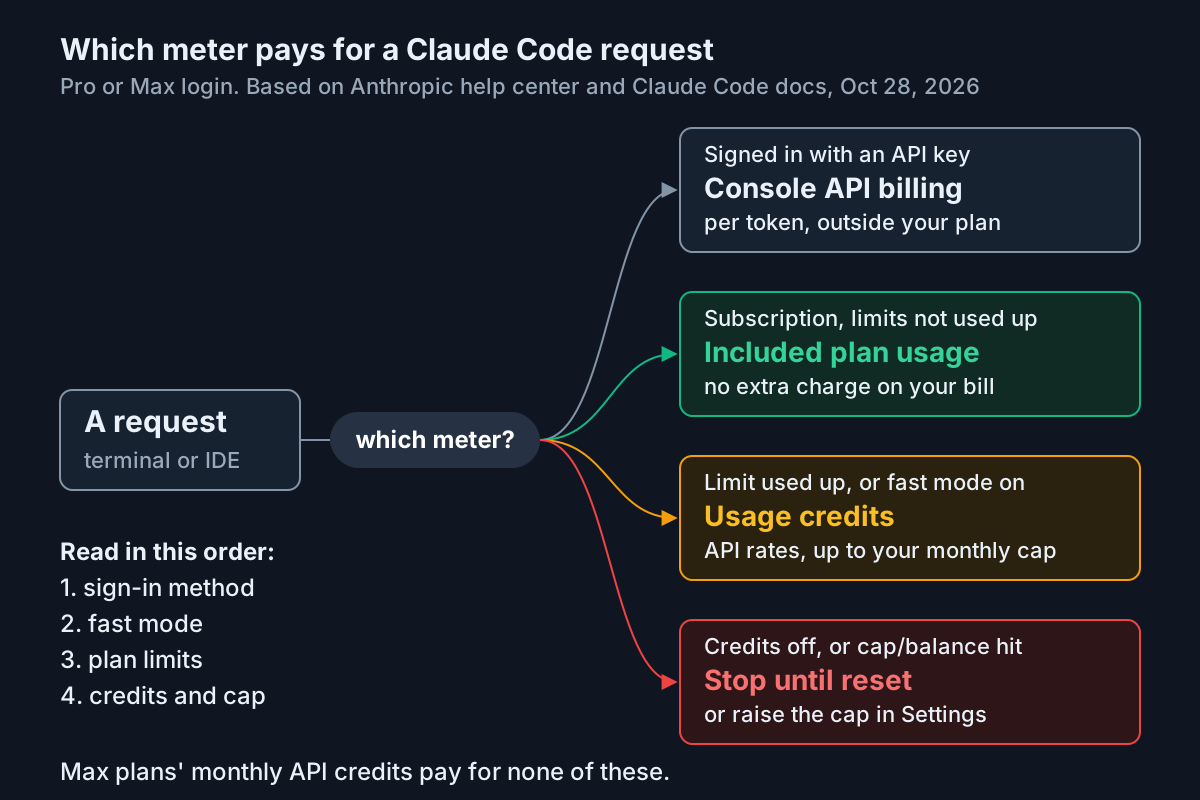
Here is the full map for a Pro or Max login, built from the support and Claude Code docs:
| Work | Paid from | When | Where you see it |
|---|---|---|---|
| Claude Code turns, subscription sign-in | Included plan usage | Until the five-hour, weekly or (Max) Fable weekly limit is used up | Plan bars in /usage |
| The same turns after a limit, credits on | Usage credits at standard API rates | Until the monthly spend limit, or until the balance runs out with auto-reload off | Settings > Usage, and the credits row in /usage |
| The same turns after a limit, credits off | Nothing: you wait | Until the window resets | The limit message |
Fast mode (/fast) on Pro or Max |
Usage credits only | Always, even with plan usage left | The monthly credits total in Settings > Usage, not broken out |
| Claude chat on web or desktop after a limit | Usage credits | Same rules as Claude Code | Settings > Usage |
/ultrareview after the free runs |
Usage credits | After 3 free runs on Pro and Max | Settings > Usage |
Claude Code with ANTHROPIC_API_KEY or a Console login |
Claude Console API billing | Every request; plan and credits unused | The Console |
| Max plan monthly API credits | Never Claude Code, the Claude apps or usage credits | Never | Not applicable |
The fast mode row catches people out most often. The fast mode page is blunt: “Fast mode usage draws directly from usage credits, even if you have remaining usage on your plan.” Until credits are on, /fast reports Fast mode requires usage credits. The /ultrareview row comes from the Claude Code commands reference, which lists 3 free runs on Pro and Max before the command requires usage credits.
The Max row is the other common mistake. Both the credits article and the Pro and Max article say the monthly API credits included with Max can’t be used in Claude Code or the Claude apps, including for usage credits. Budget for overflow as if those API credits didn’t exist.
One regional note. In most cases credits don’t expire, but the support article says that starting September 10, 2026, credits bought in some jurisdictions, such as Japan, expire six months after purchase, with an email seven days before. If that applies to you, prepay in small amounts.
Price an overflowed afternoon before it happens
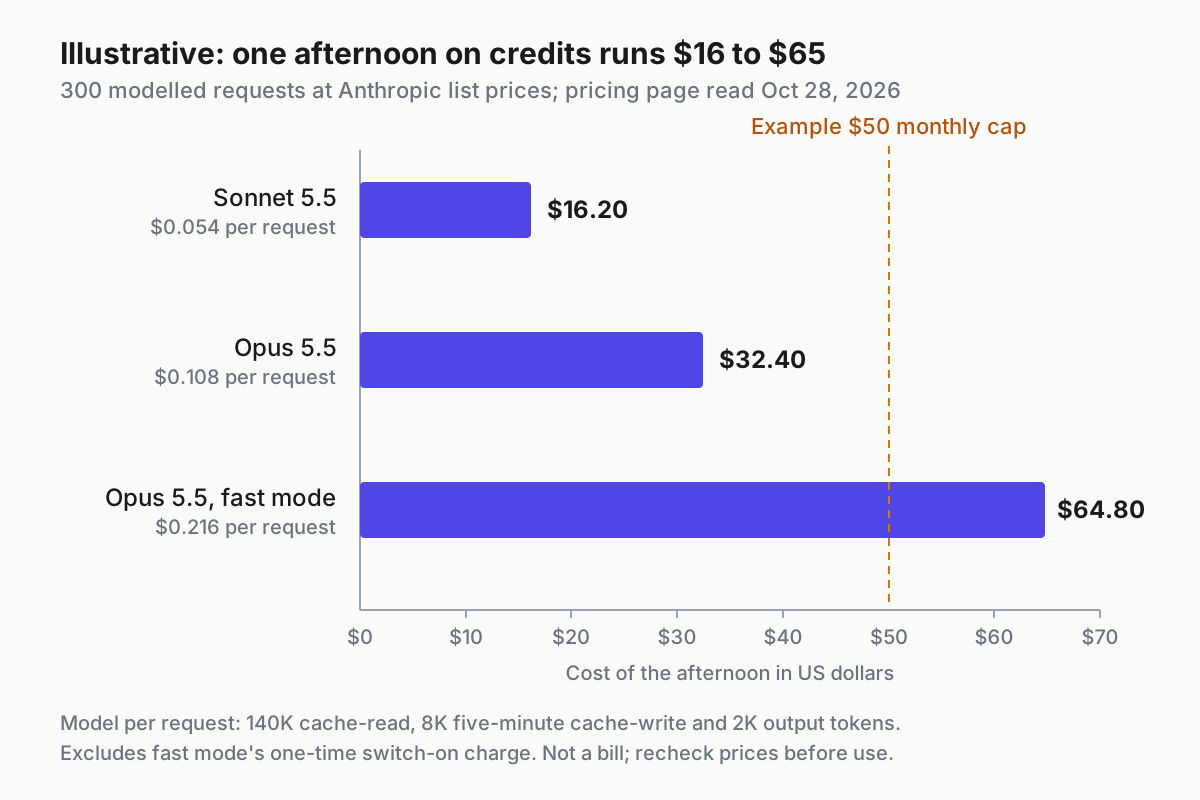
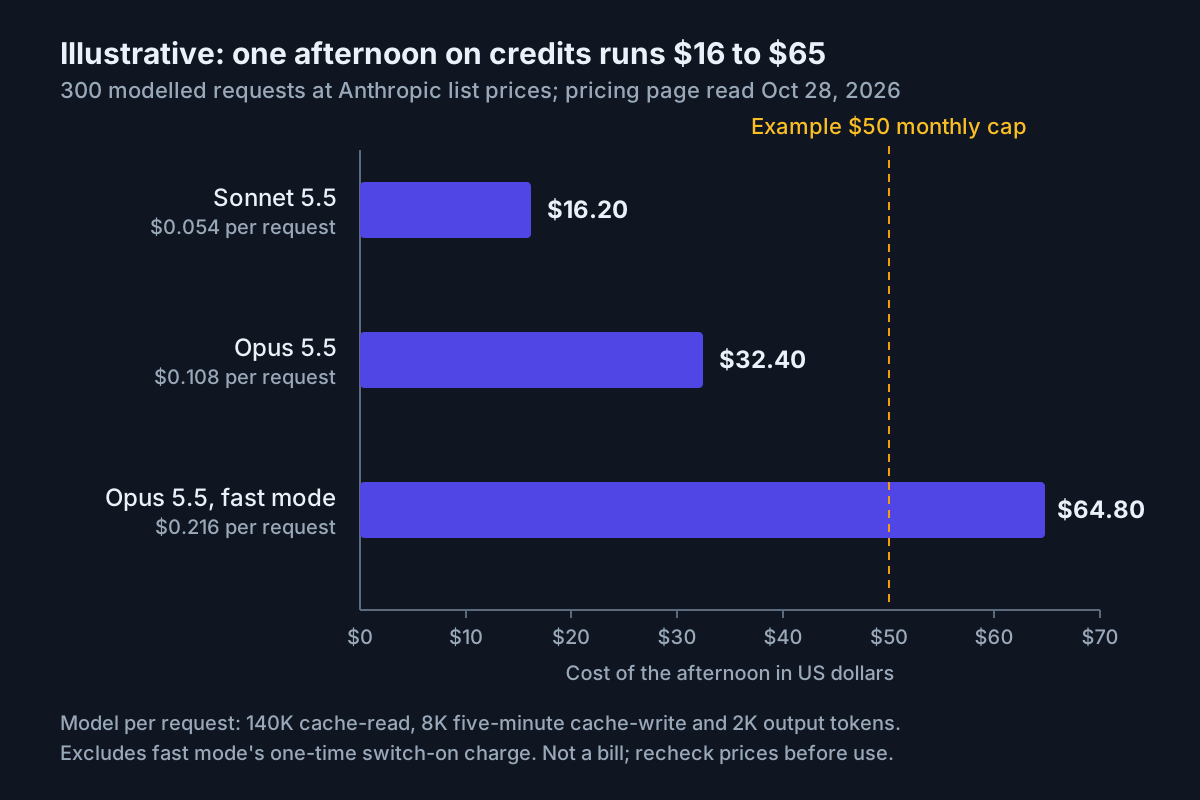
A cap only helps if it fits how you work. Price a realistic afternoon at API rates before you choose one. The rates below are list prices from Anthropic’s Claude API pricing page: Opus 5.5 at $4 per million input tokens and $20 per million output tokens, Sonnet 5.5 at $2 and $10, five-minute cache writes at 1.25 times the input price, and cache reads at 5% of the input price on both models. Fast mode on Opus 5.5 costs $8 and $40, and the page says prompt caching multipliers apply on top of fast mode pricing.
Illustrative model. One afternoon after a five-hour limit runs out: 300 requests. Claude Code sends another request each time Claude uses tools, so a few hours of agent work reaches that count quickly. Each request reads 140,000 cached tokens of conversation, writes 8,000 new tokens to a five-minute cache and produces 2,000 output tokens. These per-request numbers are planning assumptions, not measurements.
Save this as credits-cost.sh. It’s plain shell and awk, with the rates written in so you can see exactly what it multiplies:
#!/usr/bin/env bash
# credits-cost.sh: price one overflowed afternoon on usage credits (Illustrative model)
# Usage: ./credits-cost.sh [requests] [cache_read_tokens] [cache_write_tokens] [output_tokens]
# Rates: $ per million tokens, Claude API pricing page read 2026-10-28.
#   model          cache read   5-min cache write   output
#   Sonnet 5.5     0.10         2.50                10
#   Opus 5.5       0.20         5                   20
#   Opus 5.5 fast  0.40         10                  40
REQ="${1:-300}"; READ="${2:-140000}"; WRITE="${3:-8000}"; OUT="${4:-2000}"

awk -v req="$REQ" -v r="$READ" -v w="$WRITE" -v o="$OUT" '
BEGIN {
  n = split("Sonnet-5.5 0.10 2.50 10|Opus-5.5 0.20 5 20|Opus-5.5-fast 0.40 10 40", rows, "|")
  printf "%-15s %12s %12s\n", "model", "per_request", "afternoon"
  for (i = 1; i <= n; i++) {
    split(rows[i], f, " ")
    per = (r * f[2] + w * f[3] + o * f[4]) / 1000000
    printf "%-15s %12.3f %12.2f\n", f[1], per, per * req
  }
  # fast mode bills the whole context once, uncached, at $8/MTok when first turned on
  printf "fast-mode switch-on, once: %.2f\n", r * 8 / 1000000
}'
Run it with chmod +x credits-cost.sh && ./credits-cost.sh. With the defaults, the arithmetic gives this output (worked by hand from the same formula):
model            per_request    afternoon
Sonnet-5.5             0.054        16.20
Opus-5.5               0.108        32.40
Opus-5.5-fast          0.216        64.80
fast-mode switch-on, once: 1.12
The same numbers as a table, so you can check each column:
| Model and speed | Cache read, 140K | Cache write, 8K | Output, 2K | Per request | 300 requests |
|---|---|---|---|---|---|
| Sonnet 5.5 | $0.10/MTok = $0.014 | $2.50/MTok = $0.020 | $10/MTok = $0.020 | $0.054 | $16.20 |
| Opus 5.5 | $0.20/MTok = $0.028 | $5/MTok = $0.040 | $20/MTok = $0.040 | $0.108 | $32.40 |
| Opus 5.5, fast mode | $0.40/MTok = $0.056 | $10/MTok = $0.080 | $40/MTok = $0.080 | $0.216 | $64.80 |
Here is the Opus row worked out: 140,000 × $0.20, plus 8,000 × $5, plus 2,000 × $20, all divided by one million, is $0.108 per request. Three hundred requests make $32.40. The last line of the output is the extra fast mode charge. The fast mode page says that the first time you turn fast mode on in a conversation, you pay the full uncached fast input price for the whole context. At 140,000 tokens that’s 140,000 × $8 / 1,000,000 = $1.12, charged once.
Compare those figures with the $50 cap in the worked example below. That cap covers one Opus afternoon with room to spare, or three Sonnet afternoons, while fast mode on Opus passes it before the afternoon ends. Context size moves the bill most, because Claude Code sends your full conversation with every request. Pass a larger second argument, for example ./credits-cost.sh 300 400000, to see what a long session costs. The context window explainer shows how to measure what you’re carrying.
The commands reference says Claude Code can open /rate-limit-options by itself when you hit a limit at your terminal, offering to wait and continue, add usage credits or upgrade. That menu is probably the prompt the X post warns about. Decide your answer now, with this rule:
- The reset is close and the task can wait. Wait. On v2.1.234 or later, the wait-and-continue option picks the interrupted task back up after the reset. If you’re holding a saved reset from a promotion, the reset ledger guide covers when spending one beats paying.
- One deadline, and your priced afternoon fits under the remaining cap. Use credits. This is what they’re for.
- You overflow most weeks. Add up three months of credit spend from the history in Settings > Usage, then compare the monthly average with the price difference to the next tier listed at claude.com/pricing. The Pro and Max article suggests upgrading if you consistently hit limits, and the plan decoder walks through the tier comparison.
- The overflow is scripted, headless or CI work. The Pro and Max article lists switching to a Claude Console account with API credits for intensive sprints. Use an API key in that environment only, with Console workspace spend limits, and keep your subscription login for interactive work. While a session is signed in with a key, none of your plan is used.
- A second subscription. Neither help article documents this as a way to extend limits, and it doubles the sign-ins you have to keep straight. Upgrading is the documented path.
Turn usage credits on with a cap you wrote down
If you’ve decided to leave credits off, skip to the verification section, confirm there’s no credits row, and keep this one for later. Otherwise, write the decision down before you open the settings page. A cap chosen calmly beats a number typed while a task is blocked.
This is the complete record for the worked example later in this guide: an Illustrative Max 5x developer whose Opus afternoon prices at $32.40. The decision table further down says which values to change for other situations.
# usage-credits.md  (Illustrative worked example, filled 2026-10-28)
plan:                 Max 5x, billed on the web
sign-in check:        /status shows "Claude Max account"; no ANTHROPIC_API_KEY
credits state:        ON
priced afternoon:     $32.40 on Opus 5.5 (credits-cost.sh defaults)
monthly spend limit:  $50        never "Set to unlimited"
prepaid balance:      $25        Add funds > Purchase
auto-reload:          OFF        an empty balance stops me, which is the point
usage alerts:         ON         if Settings > Usage offers them
fast mode:            per-session opt-in (fastModePerSessionOptIn: true)
allowed to spend:     interactive sessions I am watching; no overnight loops
monthly review:       1st of each month, against Settings > Usage history
turn off if:          a charge I can't explain, or two months at $0
The two dollar figures do different jobs. The monthly spend limit is the ceiling for the month. The prepaid balance is how much can go before you have to act again, because the support article says you “need to prepay to cover usage beyond your plan limits.” With auto-reload off, whichever runs out first stops the spending.
Now the documented enable path:
- Open the settings page. In Claude Code, run
/usage-credits. The Claude Code costs page says that for a Pro or Max subscriber it opens Settings > Usage on claude.ai in your browser. Over SSH, where no browser can open, Claude Code prints the URL instead (v2.1.205 or later). You can also go to Settings > Usage directly. - Find the Usage credits section and select Enable. The costs page says this section is where you turn credits on or off and check your balance, this month’s spend and your monthly spend limit.
- Add a payment method if one isn’t set already. Mobile-app subscribers do this on the web.
- Select Adjust limit and enter your cap. The page also offers Set to unlimited. Don’t choose it: unlimited is the setting behind most surprise charges.
- Select Add funds, enter your prepaid amount and select Purchase. This is a real charge, separate from your subscription.
- Decide on auto-reload. When it’s on, the support article says it buys more automatically once the balance falls below a threshold you set. Write that threshold in your record. With it off, an empty balance stops credit spending.
- Turn on usage alerts if the page offers them. The support article lists usage alerts alongside the monthly cap and auto-reload as spend controls.
What you should see afterwards: the Usage credits section shows credits on, a balance equal to what you bought, this month’s spend at zero, and your limit. Nothing changes in Claude Code until a plan limit is used up, or until you use fast mode.
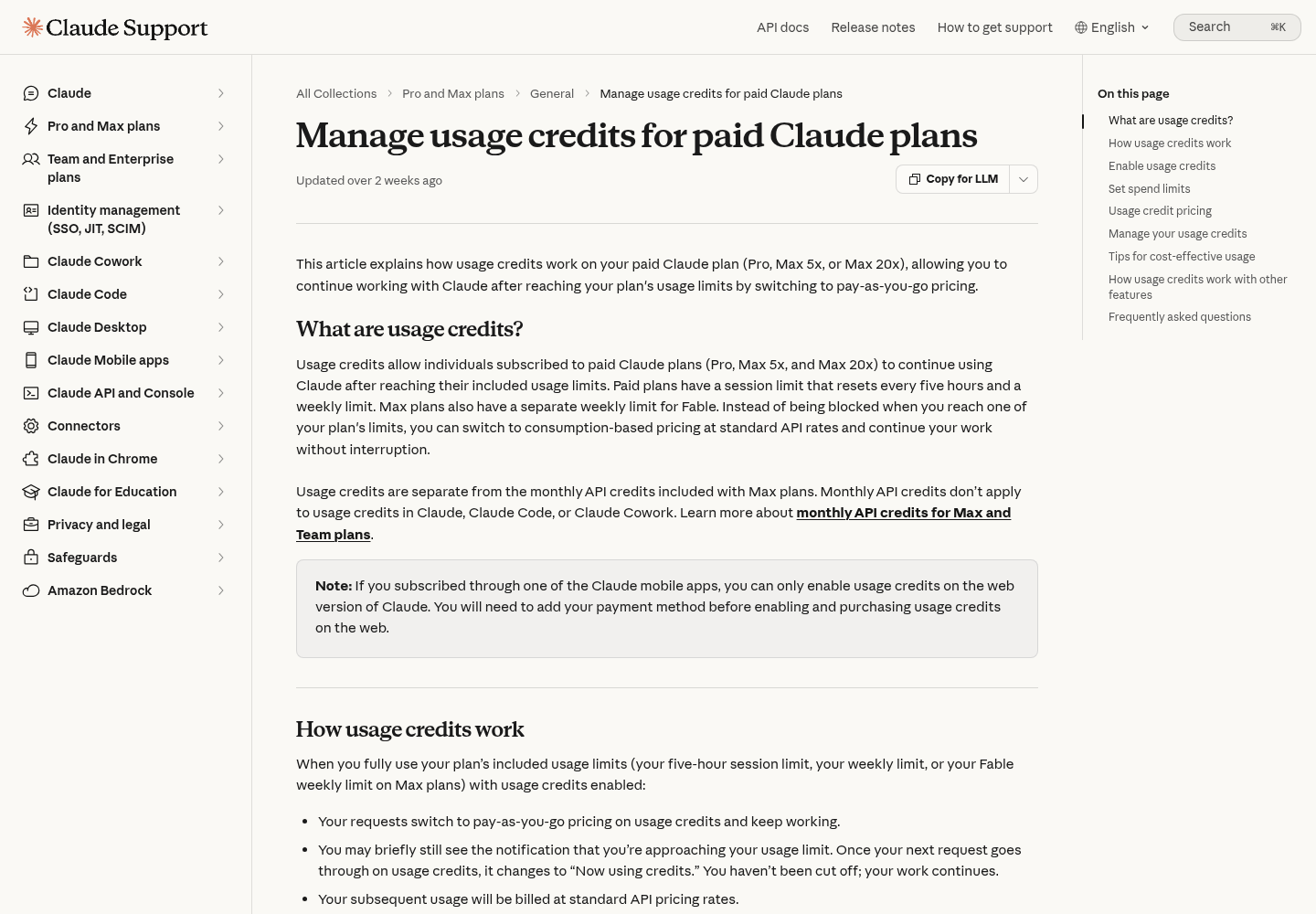
When a limit does run out, the support article warns that the “approaching your usage limit” notice may still be showing at the moment of the switch, so it can look as if you’ve been cut off. Once your next request goes through on credits, the notice changes to Now using credits. From that line on, every turn costs money. Don’t confuse it with Claude Code’s wrap-up allowance. The Pro and Max article describes Usage limit reached · wrapping up as a small, capped allowance that lets an in-progress step finish, counted against your weekly limit rather than billed to credits.
Verify the state from Claude Code with /usage
The settings page is the source of truth for money. /usage lets you check the state without leaving the terminal. The costs page documents a usage-credits row in /usage while credits are on.
- Start a session in your scratch repository and run
/usage./costand/statsare aliases. - Find the usage-credits row and match it against this table:
| What you set | What the documented row shows |
|---|---|
| Credits off | No usage-credits row at all |
| Credits on, monthly limit set, nothing spent yet | The row at 0%, from the moment credits are on (v2.1.236 or later) |
| Credits on, limit set, some spend | This month’s spend measured against your monthly limit |
| Credits on, no limit set | Unlimited, with no spend figure |
- If the row says
Unlimited, go back to step 4 of the enable path. You skipped the cap. - If you expected a row and see none, check
claude --version. Before v2.1.236, a row with a spend limit stayed hidden until you had spent something. - Compare the month’s spend with the figure in Settings > Usage at least once, so you know the two agree.
Don’t treat the dollar figure in the Session block at the top of /usage as your bill. The costs page says Claude Code computes it locally from token counts at list price, that it is an estimate, and that for Pro and Max subscribers “the session cost figure isn’t relevant for billing purposes.” The plan usage breakdown has a limit of its own: it’s computed from local session history on that machine, so usage from other devices or claude.ai isn’t included. Your credits bill comes from the account, not from whichever terminal you happen to be in.
Worked example: a Max 5x developer’s deadline week
This walk-through runs the record above from setup to month-end review. The developer, dates and spend are Illustrative. Each observation is what the cited docs say you should see, not output captured from a real account.
| Day | Action | Input | Expected observation | Decision recorded |
|---|---|---|---|---|
| Mon | Pre-flight checks | claude --version, env | grep ANTHROPIC_API_KEY, /status |
2.1.311 or later; grep prints nothing; Login method shows Claude Max account |
Machine bills the subscription |
| Mon | Price the risk | ./credits-cost.sh |
Opus 5.5 afternoon $32.40; fast mode $64.80 plus $1.12 once | Cap $50; fast mode stays off |
| Mon | Enable credits | /usage-credits, then Enable, Adjust limit $50, Add funds $25, auto-reload off |
Usage credits section: on, balance $25, spend $0, limit $50 | Record filled and dated |
| Mon | Verify from the terminal | /usage |
Usage-credits row at 0% | State confirmed |
| Mon | Fast mode default | Add "fastModePerSessionOptIn": true to user settings, run /fast |
New sessions start with fast mode off | No credit spend from fast mode |
| Tue 14:00 | Five-hour limit runs out mid-task | Keep prompting | Limit notice, then Now using credits. |
Deadline justifies spending |
| Tue 17:30 | Balance runs out | No action | Credit spending stops: with auto-reload off, an empty balance ends it (about 231 Opus requests at $0.108) | Wait for the reset instead of adding funds |
| Wed | Check spend | /usage, then Settings > Usage |
Row shows about $25 of the $50 limit; month-to-date matches | Leave the cap as it is |
| 1st of month | Monthly review | Settings > Usage history | One deadline afternoon, nothing else | Keep credits on; turn them off after two months at $0 |
The Tuesday evening row is where the design pays off. The prepaid balance stopped the spending before the monthly cap did, and the developer chose whether to continue in a calm moment. The alternative setting, unlimited with auto-reload on, would have charged for every request until the deadline was met, at a price nobody had estimated.
If you were prompted instead to raise your spend limit, the costs page explains why: on Pro and Max, Claude Code asks when you reach the limit with usage credits still available. Answer that prompt from your record, not from the task in front of you.
Off, capped low, or on with auto-reload: pick your row
The table below turns the worksheet into a setting. Find the row that sounds most like your last month and change the worked example’s values to match.
| Your situation | Credits | Monthly cap | Auto-reload | Why |
|---|---|---|---|---|
| Pro, hit the limit once or twice this month, no deadlines | Off | Not applicable | Not applicable | Waiting for the five-hour reset costs nothing |
| Pro or Max, occasional deadline days | On | One or two priced afternoons, for example $30 to $50 | Off | Pays for the deadline, then stops by itself |
| Max, weekly limit runs out late in most weeks | On | Two priced afternoons; review after a month | Off | Covers the gap while you collect data for an upgrade decision |
| Uses fast mode every day | On (required) | Priced fast afternoons, plus the switch-on charge | Off | Fast mode bills credits even with plan usage left |
| Runs loops or background sessions overnight | Off, or a very low cap | The cost of one bad night you’d accept | Off | Nobody is watching when the spending happens |
| Blocked work costs more than any overrun | On | A real number anyway | On, with a written threshold | Auto-reload is safe only under a cap you chose |
| Team or Enterprise member | Not your switch | Set by admins | Set by admins | Without billing access, /usage-credits asks admins instead |
The failure case is one specific combination: Set to unlimited, auto-reload on and no alerts. The other is assuming Max API credits will cover the overflow. They won’t. If you’re still adjusting to the September weekly-limit change, the post-September 14 breakdown gives the arithmetic for what a week now holds. On Team and Enterprise plans, the costs page says a member without billing access who runs /usage-credits confirms a dialog and the request goes to the organization’s admins. The budget request intake guide covers how admins can handle those requests.
Keep fast mode and background work from spending quietly
Credits drain fastest on work you didn’t think of as billable. Two sources stand out: fast mode, which bills credits from its first token, and long-running sessions that keep sending requests while you look elsewhere.
- Check fast mode now. Run
/fastto see whether it’s on. The fast mode page says a small ↯ icon appears next to the prompt while it’s active, and that by default fast mode you turn on persists across sessions. - Make fast mode opt-in for each session. Add this documented key to your user settings file, so every session starts with fast mode off:
{
  "fastModePerSessionOptIn": true
}
- Disable fast mode where it should never run. In shells that run unattended work, set
CLAUDE_CODE_DISABLE_FAST_MODE=1, which the fast mode page lists as a way to turn it off entirely. - Know what happens when credits run out. If you run out mid-session, Claude Code retries rejected fast requests at standard speed and pricing, shows
Fast mode disabled · usage credits exhausted, and turns fast mode off for the rest of the session. Turn it back on later with/fast. - Cut idle spending. The costs page lists what keeps a long session busy: scheduled tasks, cross-session messages, goal check-ins, subagents and agent teammates. Stop loops nobody reads, set
CLAUDE_CODE_GOAL_CHECKIN_MINUTESto0where you’ll check goals yourself, and/clearbetween unrelated tasks. The same page says background jobs such as conversation summarization typically cost under $0.04 per session.
The speed budget guide covers when fast mode earns its price. If you run several sessions on one login, the shared usage window guide covers the habits that stop them reaching the limit, and your credits, at the same time.
Troubleshooting usage credits in Claude Code
Most credit problems are one of these. Match the symptom, apply the fix, and confirm the expected observation before moving on.
| Symptom | Cause | Fix | Expected observation |
|---|---|---|---|
| A limit notice is showing, but Claude keeps working | You’re on credits; the notice can lag the switch | Nothing, unless you meant to stop | The notice changes to Now using credits. |
| Claude Code asks you to raise or remove your spend limit mid-task | On Pro and Max, you reached the limit with credits still available | Decline unless your record allows a raise; if it does, raise by a small, written amount | Declining stops credit spending until the plan resets |
A standard-context session stops with Usage credits required for 1M context |
A bug in builds before 2.1.311 when a request ran over 200K tokens | claude update |
Claude Code compacts the conversation and continues |
| A Pro or Max login is told to ask its admin | A message bug fixed in 2.1.311 | claude update |
The message points to billing settings instead |
/usage-credits isn’t available |
Signed in with an API key; the command isn’t available with API key authentication | /login with your subscription, then /status |
The Login method row names your plan |
| Console charges appear even though you have a plan | ANTHROPIC_API_KEY is set in that shell |
Remove it, open a fresh terminal, run /login |
The environment check prints nothing |
| Credits are charged while plan bars show room | Fast mode draws credits directly | Turn /fast off; add fastModePerSessionOptIn |
Credit spend stops rising during normal work |
/fast says Fast mode requires usage credits |
Credits are off | Leave them off, or enable them with a cap | The message goes away only after enabling |
| You expected Max API credits to cover the overflow | They never apply to Claude Code, the apps or credits | Budget the overflow separately | No change: this is by design |
/usage shows no credits row although a cap is set |
A build older than 2.1.236, or credits are off | claude update, then check Settings > Usage |
The row appears at 0% |
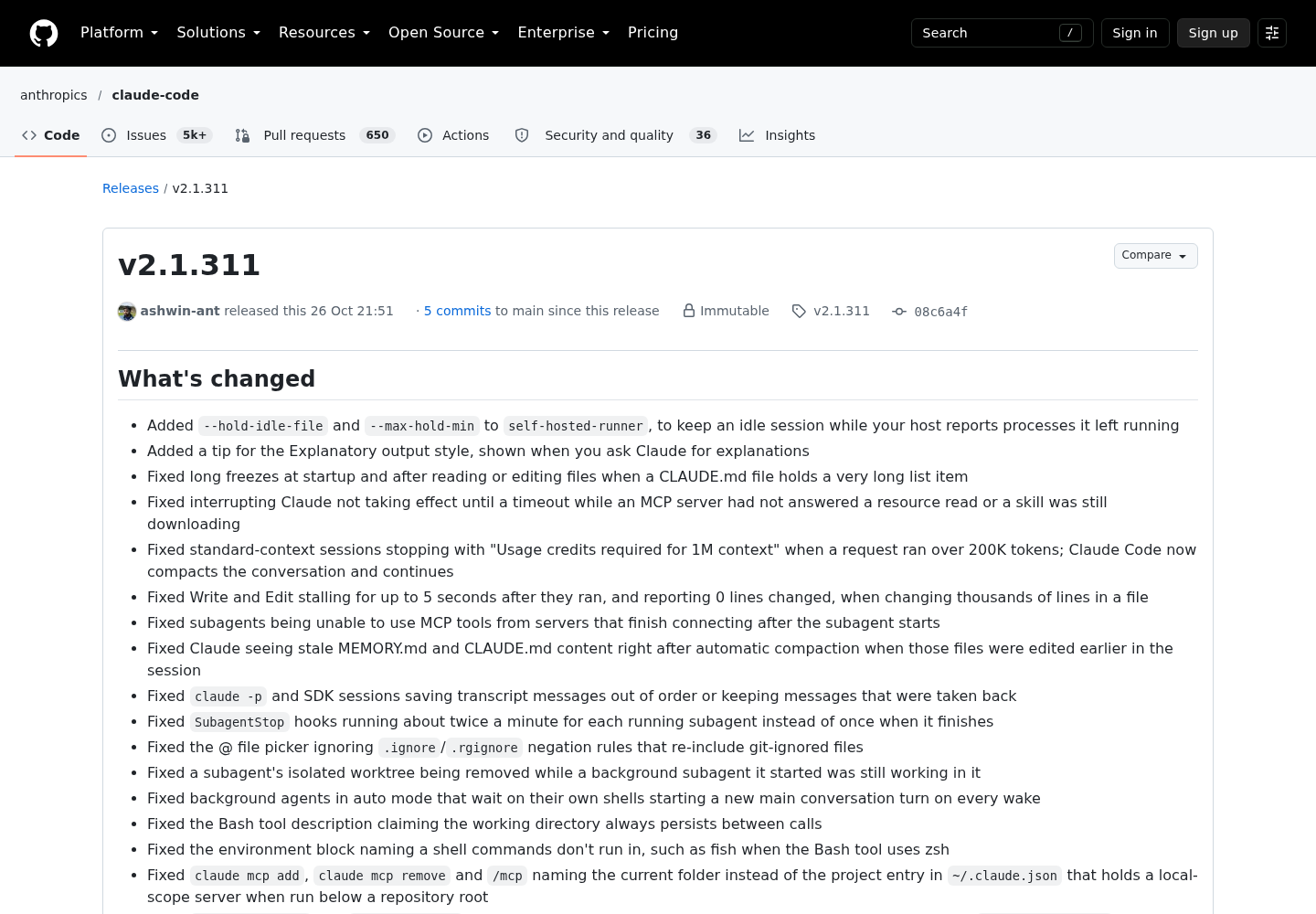
The two 2.1.311 fixes come from the Claude Code v2.1.311 release notes, published on GitHub on October 26, 2026. The spend-limit prompt and the API-key restriction come from the costs page.
Team and Enterprise members see different messages. The costs page says You've hit your individual spend limit, org's monthly spend limit or team's shared budget mean the request would bill to usage credits and has reached a limit an admin set. Only an admin can raise it, in Organization settings > Usage.
Roll back: lower the cap, stop auto-reload, or turn credits off
The support article answers the main question directly. You can disable usage credits at any time in Settings > Usage, and once they’re disabled “you’ll only have access to your plan’s included usage.” Rolling back takes a minute. Confirm each change from the terminal.
- Open the settings page with
/usage-credits, or go to Settings > Usage. - Make the smallest change that fixes the problem. Lower the monthly limit with Adjust limit if the cap was too generous. Turn auto-reload off if a reload surprised you. Disable credits if you want plan usage only.
- Confirm in Claude Code. Run
/usage. After lowering the limit, the row should measure spend against the new number. After disabling, the row should be gone. - Check fast mode with
/fastonce credits are off. Fast mode can’t run without them, so it should report that it requires usage credits. - Update your record with the date and the reason, so next month’s review starts from facts.
- Raise a billing question if a charge still doesn’t make sense. The costs page says subscribers get help at claude.ai: select your initials in the lower left, then Get help.
If you run several machines or agents on this login, keep the credits state with the rest of your fleet’s operating notes. The AgentOps guide describes that layer. Usage credits are one more setting that needs an owner and a review date, not a prompt you answer under pressure.
FAQ
Is Claude extra usage the same thing as usage credits?
Yes. Anthropic’s help center now calls the feature usage credits, and Claude Code’s /usage-credits command was previously named /extra-usage. It lets Pro and Max subscribers keep working after a five-hour or weekly limit, billed at standard API rates up to a monthly spend limit you set.
Do the monthly API credits included with Max pay for usage credits?
No. Both Anthropic help articles say the monthly API credits included with Max plans can’t be used in Claude Code or the Claude apps, including for usage credits. Treat them as a separate budget for API work, and plan any Claude Code overflow as a new charge on your card.
Can I turn usage credits off after enabling them?
Yes, at any time, in Settings > Usage on claude.ai, which /usage-credits opens for Pro and Max subscribers. Once they’re disabled you only have your plan’s included usage, and fast mode stops working. Run /usage afterwards to confirm it: with credits off, the usage-credits row disappears completely.
Sources
- Aleksey Smolenchuk (@lxe) on X: “claude will prompt you to buy extra usage credits”, October 25, 2026
- Anthropic, Claude Help Center: Manage usage credits for paid Claude plans
- Anthropic, Claude Help Center: Use Claude Code with your Pro or Max plan
- Claude Code Docs: Manage costs effectively
- Claude Code Docs: Commands
- Claude Code Docs: Speed up responses with fast mode
- Claude Platform Docs: Pricing
- Anthropic on GitHub: Claude Code release v2.1.311, October 26, 2026