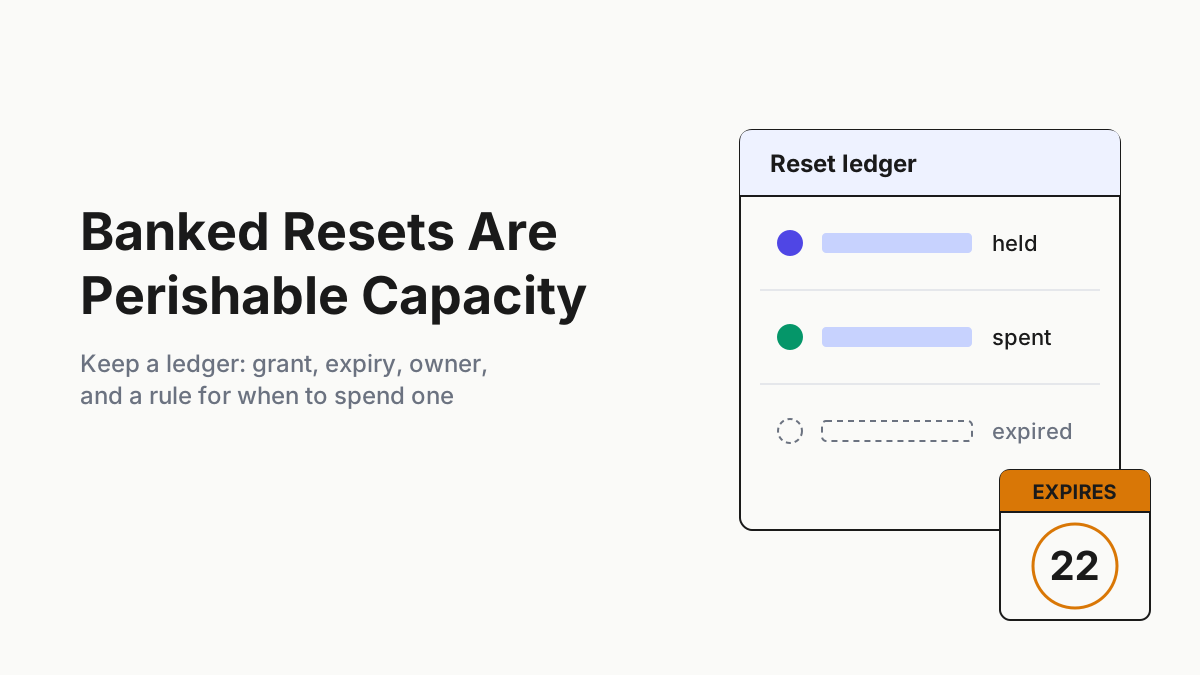
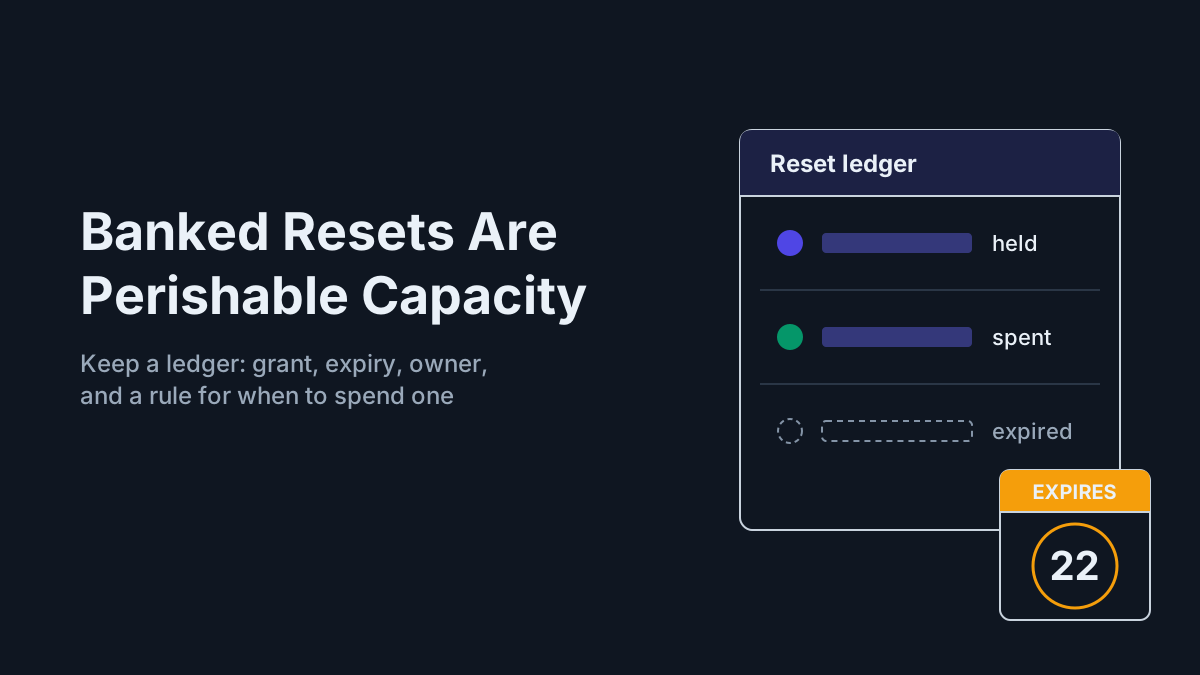
Banked Resets Are Perishable Capacity: Keep a Reset Ledger
A Claude rate limit reset refills one window, then expires. Keep a banked resets ledger: grant, expiry, owner, redeem surface, spend rule and a waste report.

Go deeper. Build your own.
The rate-limit reset that shipped with Opus 5.5 has a shelf life. Anthropic’s developer account says you can “Apply it any time until Oct 22”, and after that an unspent one is gone. The date lives in a settings page and a post on X, not in any dashboard your team watches.
Banked resets are the newest line in a subscription fleet’s capacity, and the oddest. They arrive as promos, on the vendor’s schedule, refill specific usage windows rather than everything, and can be spent only from certain surfaces before they expire. OpenAI has been crediting Codex users with them since June, and some users have held three at once. Treat them as inventory with a date on it and they become a small buffer for a blocked lane; treat them as a nice surprise and they lapse, or get burned at 11 a.m. on a lane that would have been fine by lunch.
By Tuesday you want one ledger row per reset per account: type, grant date, expiry, where it can be redeemed, owner. You want one spend rule the whole team applies: spend a reset only when a critical lane is blocked and the natural reset is more than N hours away, never on exploration. Then log every spend, count every expired reset in a monthly waste report, and keep promos out of the capacity plan.
Sep 22: banked resets reach Claude, three months after Codex
Anthropic’s Opus 5.5 launch page (Sep 22, 2026) raised five-hour usage limits on Pro, Max, Team and seat-based Enterprise plans, then added the line this piece is about: “We’re also providing subscription users a rate limit reset, which you can now save and use whenever you choose.” The page names no expiry date.
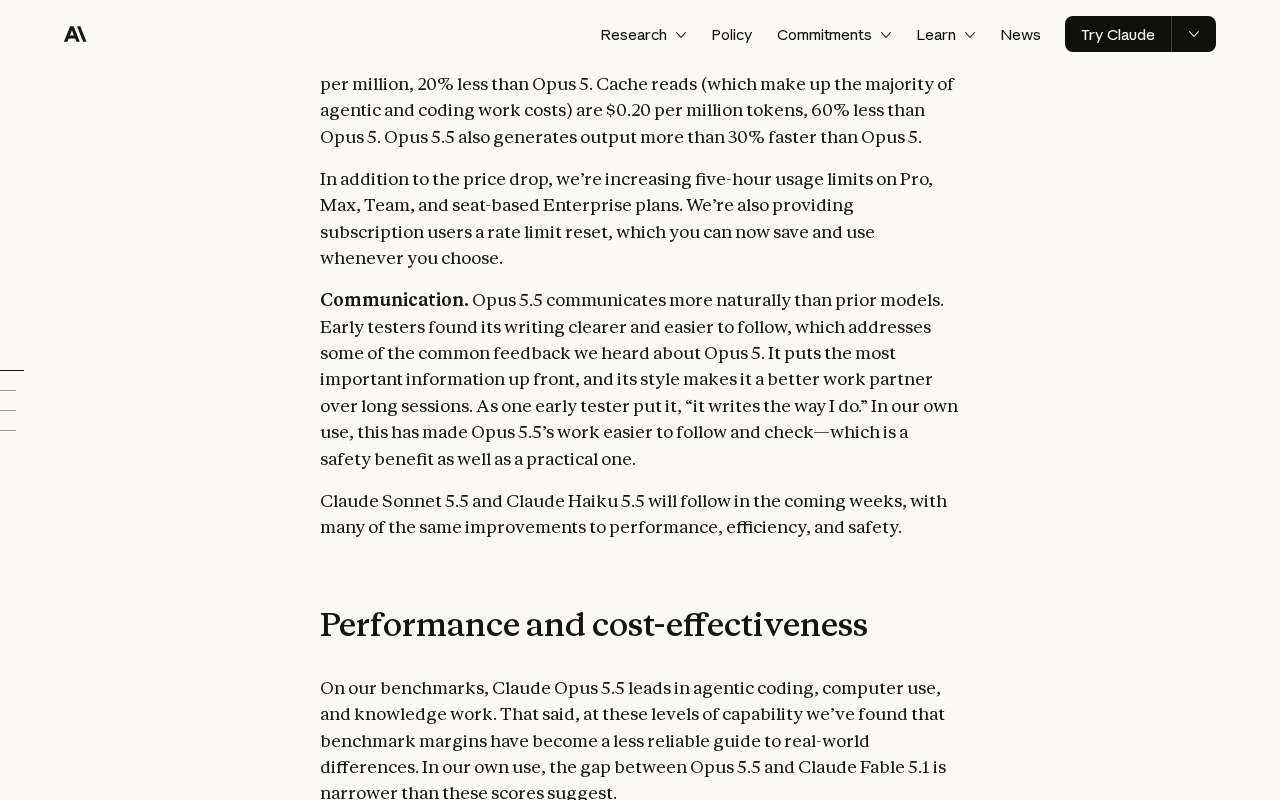 Screenshot: Anthropic, “Introducing Claude Opus 5.5” (launch page, Sep 22, 2026), captured Sep 28, 2026.
The terms live in the help center’s What is a limit reset?, and they are narrower than the word “reset” suggests: “Depending on the limit reset shown, either your five-hour session limit or your weekly usage limit go back to full right away.” One window, not both. “Your weekly limits still reset on their usual day and time.” A reset doesn’t refund extra usage already billed or change your usage-credit balance, and downgrading or cancelling before you use it forfeits it.
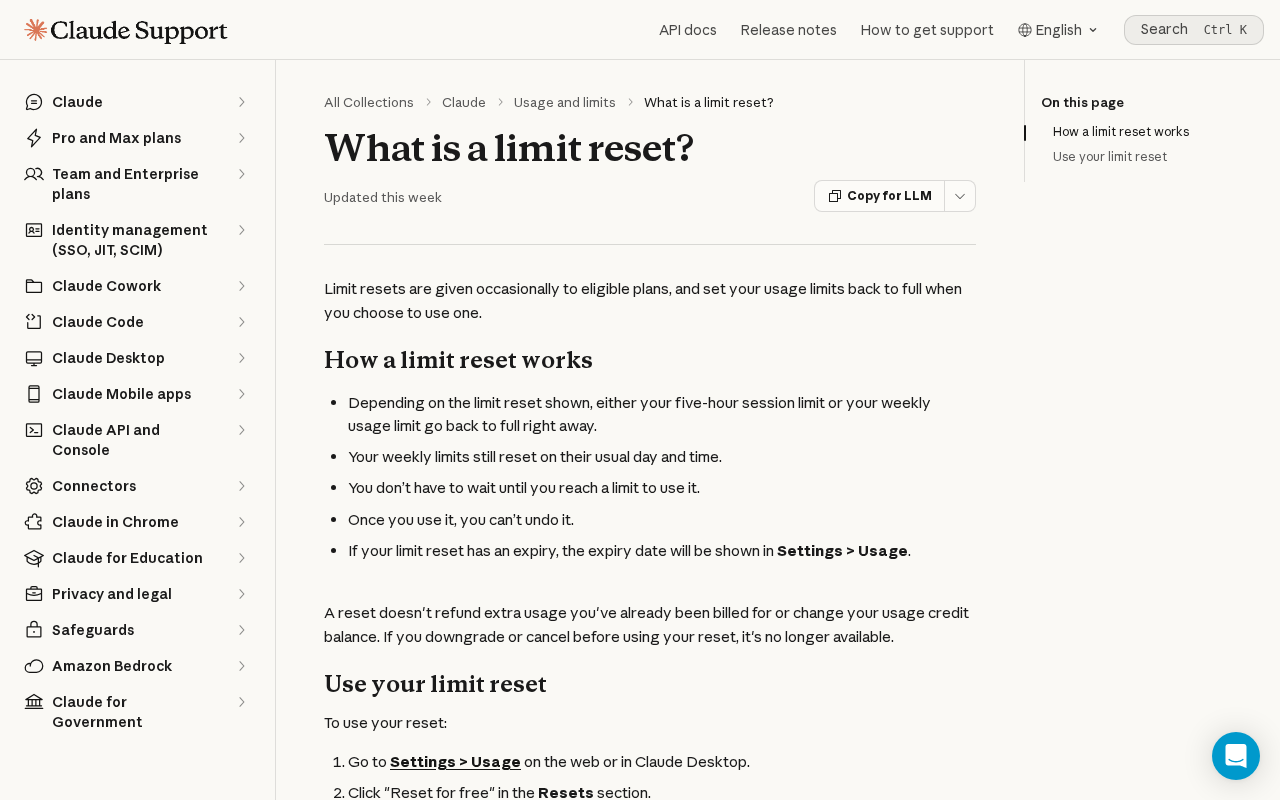 Screenshot: Claude Help Center, “What is a limit reset?” (undated page), captured Sep 28, 2026.
You spend it from Settings > Usage on the web or in Claude Desktop, with “Reset for free” in the Resets section, or from the same button on the limit-reached message. The article says the button isn’t available on the phone or in Claude Code in the terminal or IDE, but limits are account-wide, so a reset pressed in a browser also refills the Claude Code lane. On expiry the article says only “An unused reset expires on the day and time listed on the offer.” The Oct 22 date comes from Anthropic’s developer account on X; no Anthropic web page names it.
The same post says Opus 5.5’s lower price stretches five-hour and weekly limits 25% further. That is a reason to re-baseline your capacity plan, not to count the reset in it.
OpenAI got here first. The Codex pricing page documents a referral program that ran Jun 11–24 for Plus and Pro users, in which both people “receive a banked rate-limit reset”, and it carries the one expiry OpenAI documents on a page we could read: “Banked rate-limit resets are usable for 30 days after they’re granted.” That line sits in the referral section. For every other grant, check the expiry shown on the account.
Since then, Codex lead Tibo has announced grants on X. On Jun 28 he hard-reset everyone’s Codex limits and noted that some users had already stacked up to three banked resets. On Jul 12 came a banked reset for 500k users, and resets became redeemable from the web and the phone, not only the desktop app; everyone got one on Jul 13, at 7M active users. On Aug 21, at 20M active users, every Codex and ChatGPT Work user was credited with another.
One more detail shapes the ledger. In openai/codex#28811, opened Jun 17, a user reported that a public Codex reset seemed to land as an immediate hard reset instead of a banked one. The grant a vendor announces and the grant that lands on your account are two facts. Log both.
Why agent lanes make an idle reset expensive
A person who hits a five-hour limit gets coffee; an agent lane that hits it stops mid-task, often overnight, and everything queued behind it waits for the window to roll over. That is when a reset is worth the most, because a reset returns whatever is used of its window at the moment you press it. Spent at 30% usage, it buys back 30% of a window; spent at the wall, a full one. That’s our arithmetic from the help center’s “back to full”, and it’s the whole case for waiting.
Two facts make that moment hard to hit. The Claude reset can’t be pressed from the terminal where the agent runs, so a person with a browser or Claude Desktop has to do it. And the offer fixes the reset’s window, so a five-hour reset does nothing for a lane blocked on the weekly limit. Without a ledger, whoever is awake at 2 a.m. doesn’t know whether a reset exists, which window it refills, or whether a teammate already spent it.
Step 1: Give every reset a ledger row, per account
Resets live on accounts, and neither vendor documents an admin view of what its members hold. Anthropic’s pages give no count per account, no stacking rule and no API or Console equivalent, and OpenAI’s readable pages give no workspace view either. So the ledger starts as a survey. Every seat holder opens Settings > Usage, or wherever Codex shows their banked resets, and reports each reset with its expiry exactly as displayed.
Make it one row per reset, not one per account, because grants stack. The illustrative rows below use invented accounts; the terms in them are the vendors’ documented ones.
| Account | Reset type | Window it refills | Grant date | Expiry | Where redeemable | Owner | Spent on |
|---|---|---|---|---|---|---|---|
| max-ops-01 | Claude saved reset, Opus 5.5 launch | As shown on the offer | Sep 22 | Oct 22 per @ClaudeDevs; confirm in Settings > Usage | Web or Claude Desktop only | Dana | not spent |
| team-seat-07 | Claude saved reset, Opus 5.5 launch | As shown on the offer | Sep 22 | Oct 22 per @ClaudeDevs | Web or Claude Desktop only | Priya | Sep 26, nightly-migrate blocked, natural reset 3h out |
| codex-pro-build | Codex banked reset, 20M milestone | See Step 2 | Aug 21 | As shown on the account | Desktop app, web, phone | Sam | not spent |
| codex-plus-lab | Codex referral reset | See Step 2 | Jun 18 | Jul 18, 30 days after grant | Desktop app, web, phone | Lee | Expired unspent, counted as waste |
The owner is the person who answers for the reset, usually the seat holder. Name a second person who can redeem it, because the seat holder is asleep at exactly the hour the lane blocks.
Keep the ledger running after this reset is gone. Anthropic’s help center says resets are “given occasionally to eligible plans”, and OpenAI’s record since June shows what occasionally looks like.
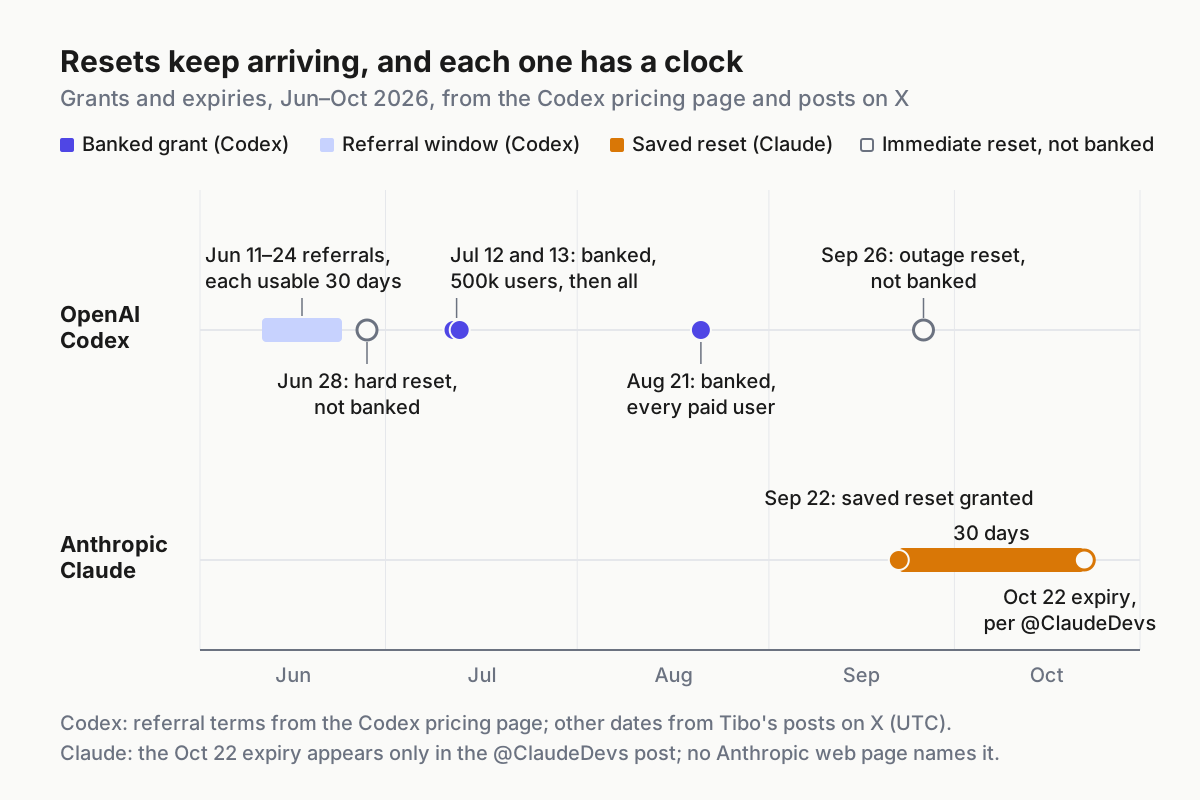
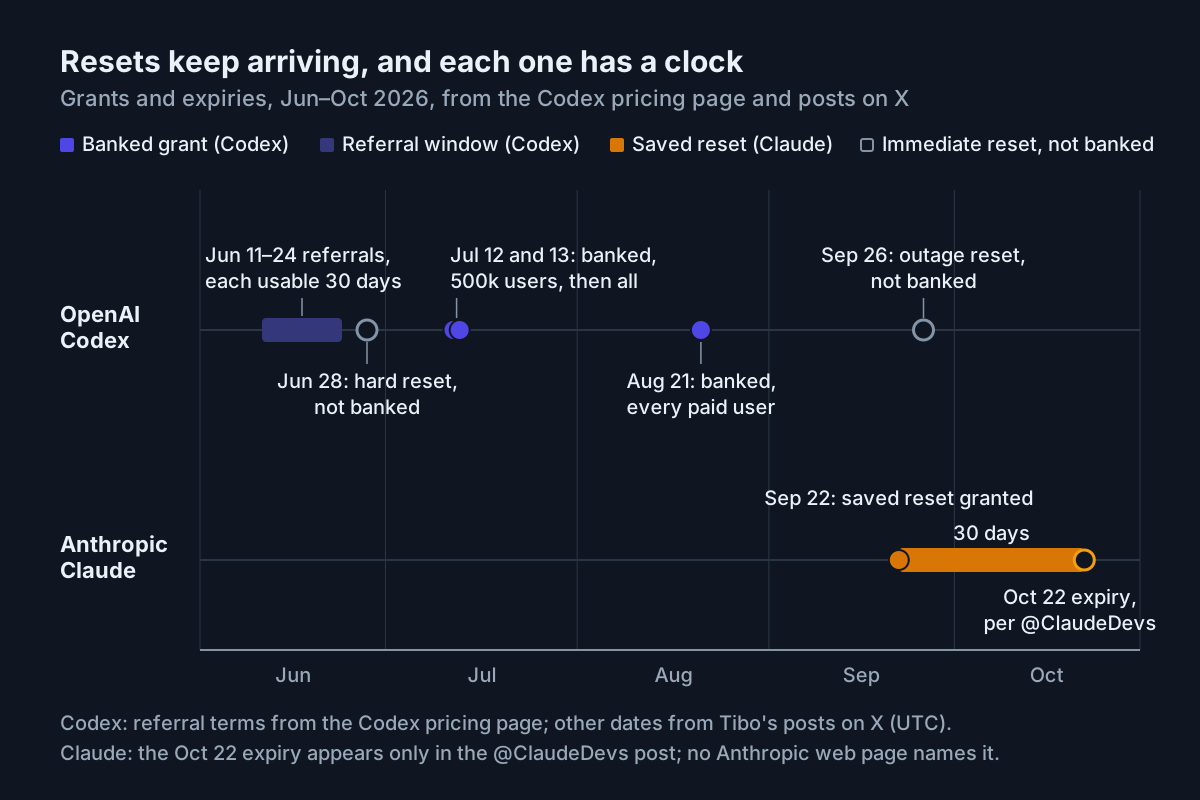 Grants from the Codex pricing page and posts on X by Tibo and @ClaudeDevs. Dates are UTC, decoded from post IDs.
That’s four rounds of banked grants and two immediate resets in four months on one vendor, and the second vendor just started.
Step 2: Record the terms that differ by vendor
The two vendors’ resets share a name and not much else. Put the differences at the top of the ledger so nobody has to remember them at 2 a.m.
| What the docs say | Anthropic (Claude) | OpenAI (Codex) |
|---|---|---|
| How grants arrive | Launch promo on Sep 22; “given occasionally to eligible plans” | Referral program, Jun 11–24; milestone grants announced on X |
| What one reset refills | One window, five-hour or weekly, per the reset shown | Weekly usage (Tibo, Jul 13); help center reportedly both windows |
| Weekly reset day | Unchanged | Help center reportedly says it moves |
| Where to redeem | Web or Claude Desktop; not the phone or Claude Code | Desktop app, web, and phone since Jul 12 |
| Expiry | Per offer, shown in Settings > Usage; Oct 22 for this one, per @ClaudeDevs | 30 days for referral resets; other grants as shown on the account |
| Stacking | Not documented | Up to three held at once (Tibo, Jun 28) |
| Money | No refund of billed extra usage; usage-credit balance unchanged | Not documented on pages we could read |
| Admin view of members’ resets | Not documented | Not documented |
Two Codex cells rest on OpenAI’s help center, which returned 403 to our fetch. Search snippets say a full banked reset refreshes both the five-hour and weekly Codex windows and changes your weekly reset date. Confirm it on your own account before a spend rule depends on it.
Eligibility wording differs too. The launch page says “subscription users”, the @ClaudeDevs post says Pro, Max or Team, and the help center says “eligible plans”. Don’t assume your Enterprise seats hold one. Ask them.
Step 3: Write the spend rule, with N set per window
Put the rule in the runbook word for word: spend a reset only when a critical lane is blocked and the natural reset is more than N hours away. Never on exploration. Three checks hide in that sentence.
- The lane is critical. It is on a list you wrote in advance: a release, an incident, a migration with a customer date. Exploration, spikes and “let’s see what the new model does with this” never qualify, however close the expiry.
- The lane is blocked on the window this reset refills. A five-hour reset does nothing for a weekly block. Read which limit the lane hit before anyone opens a browser.
- The natural reset is more than N hours away. Set N per window. Start with 2 hours for five-hour resets and 24 for weekly ones; those are our defaults, not vendor figures, and a month of spend logs will tell you where yours belong.
Here is an illustrative ledger row and the check your on-call runs before redeeming. The file format is ours; the fields map to the ledger columns.
# resets.yaml (illustrative): one entry per reset, not per account
- id: r-0922-max-ops-01
  account: max-ops-01
  vendor: anthropic
  type: saved-reset
  window: five-hour          # copy from the offer; the other value is weekly
  granted: 2026-09-22
  expires: 2026-10-22        # per @ClaudeDevs; confirm in Settings > Usage
  landed_as: banked          # banked | hard-reset
  redeem_on: [web, desktop]
  owner: dana
  backup_redeemer: priya
  spent: null
# spend_check.py (illustrative): prints SPEND or HOLD with the reason
N_HOURS = {"five-hour": 2, "weekly": 24} # our defaults; tune from the spend log
def may_spend(reset, lane, now):
if reset["spent"]:
return "HOLD", "already spent: read the spend log"
if reset["expires"] < now.date():
return "HOLD", "expired: record it in the waste report"
if lane["purpose"] == "exploration" or not lane["critical"]:
return "HOLD", "not a critical lane"
if lane["blocked_on"] != reset["window"]:
return "HOLD", f"blocked on {lane['blocked_on']}, reset refills {reset['window']}"
wait_h = (lane["natural_reset_at"] - now).total_seconds() / 3600
if wait_h <= N_HOURS[reset["window"]]:
return "HOLD", f"natural reset in {wait_h:.1f}h, wait for it"
return "SPEND", f"redeem on {reset['redeem_on']}, then log it against {lane['name']}"When the check can’t run, or nobody who can redeem is awake, the answer is HOLD: the lane waits for its natural reset. That is the gate’s failure mode, and it fails toward waiting, which costs hours, not capacity. The ledger is a policy, not a lock. Neither vendor documents a way for an admin to stop a seat holder from pressing the button, so the wall behind the rule is the spend log and the monthly reconciliation below.
Step 4: Log every spend where the next person will look
“Once you use it, you can’t undo it,” so the log is the only place a spend gets explained. Each entry needs the reset’s ledger ID, who redeemed it and from which surface, the lane and the limit it was blocked on, and the natural reset time at the moment of the spend. Add what the lane finished afterward, as a commit or task ID, and whether the window actually refilled. Check the usage meter after pressing; a grant can land differently from its announcement.
Never log a reset as covering fast mode. Fast mode draws on usage credits, and the help center says a reset doesn’t change your usage-credit balance, so that spend belongs to the speed budget, not to this ledger.
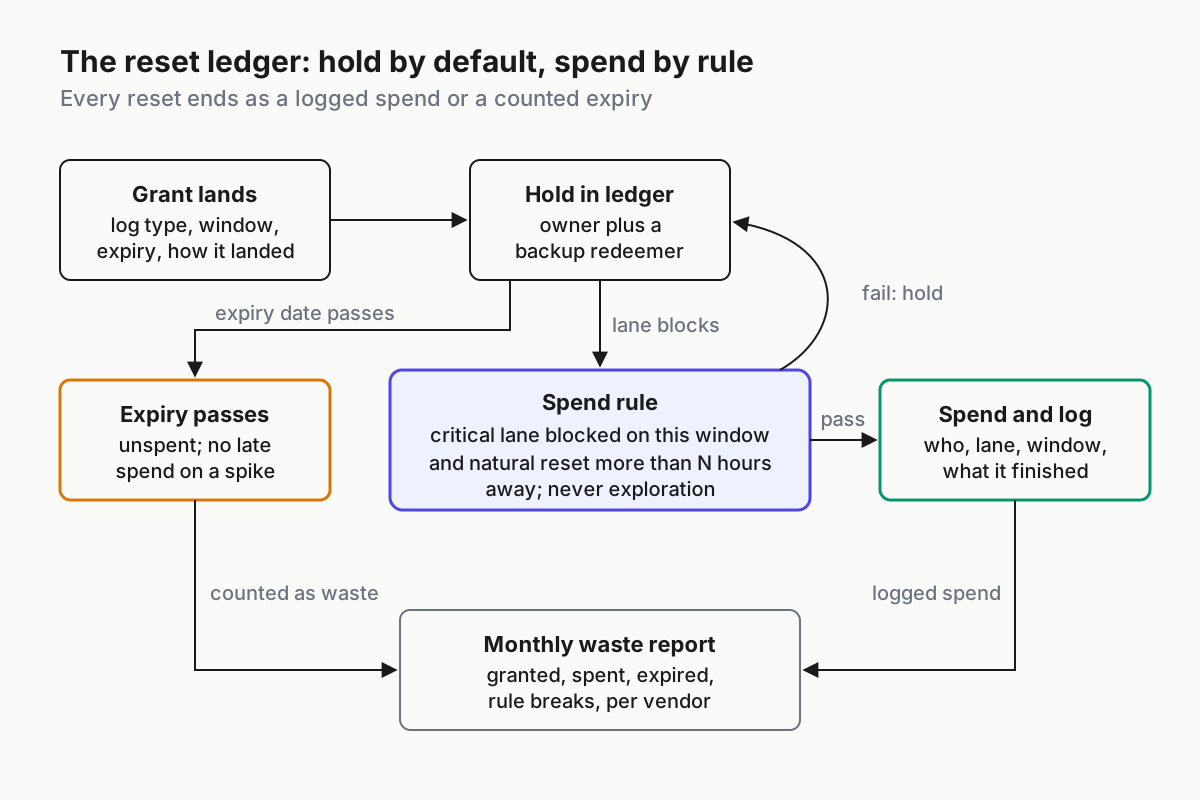
 Every reset ends in one of two rows: spent and logged, or expired and counted.
Step 5: Put every expiry on a calendar, and let resets lapse on purpose
Send the owner a reminder seven days and two days before each expiry. The reminder asks whether the row is still accurate and whether the backup redeemer knows it exists. It does not ask anyone to spend it.
Near-expiry spending is how the rule dies. Once one person burns a reset on a spike “because it was expiring anyway”, the next spend at 40% usage looks the same, and the ledger stops meaning anything. A lapsed reset costs a line in a report. It also keeps that report honest, and the report is the most useful thing the ledger produces.
Seat changes get the same check. Downgrading or cancelling a Claude seat before its reset is used forfeits the reset, so the ticket that changes a seat reads the ledger first.
Step 6: Report expired resets monthly as wasted capacity
On the first working day of the month, reconcile the ledger against what each account shows, then publish four numbers per vendor: resets granted, spent, expired unspent, and spends that broke the rule. A count mismatch means a stacked grant nobody logged or a spend nobody recorded.
Split expired resets into two kinds, because they mean opposite things. A reset that lapsed in a month with no critical lane blocked is healthy: the plan covered the work. A reset that lapsed while a critical lane sat blocked on its window is a process failure: nobody knew, the redeemer was unreachable, or the ledger had the wrong window.
Value the spends too. A reset that let a migration finish before its customer date is worth the tasks it completed, priced the way you price any lane, per completed task rather than per token.
Step 7: Keep promos out of the capacity plan
The capacity plan is the windows you pay for, the ones the September weekly cut reshaped and the plan comparison prices. A reset is a promo: the vendor picks when it arrives, how many you get and which window it refills. None of that is a commitment, so none of it goes in the forecast.
If the forecast needs a reset to hit a date, you have a capacity gap. Close it the normal way: buy capacity, move the work, or file a budget request with a revert date. Resets are one more unit in a meter that already speaks credits and tokens in different dialects, and the plan should read in the unit you pay for.
Signals that banked resets are going to waste
The redeemer is on the wrong surface. A Claude Code lane blocks at 2 a.m., and the on-call has a terminal and a phone, neither of which carries the button. Signal: a critical-lane block with no spend and no HOLD reason logged within 30 minutes. Fix: the backup redeemer column, plus a browser session or Claude Desktop on the on-call laptop. Codex resets redeem from the phone, so this gap is Claude’s.
The reset refilled the wrong window. Someone spends a five-hour reset on a lane blocked by the weekly limit. Signal: the lane blocks again within minutes and the weekly meter hasn’t moved. Fix: the blocked_on check in Step 3 and a window column nobody leaves blank.
The grant landed as something else. A promised banked reset arrives as an immediate hard reset, as in the June Codex report. Signal: a row marked granted with nothing redeemable on the account. Fix: fill landed_as from the account, never from the announcement.
One lane eats every reset. The same lane hits its window every night. Signal: one lane holds most of the month’s spends. Fix: treat it as a spend problem; check its effort level per completed task, and let cost anomaly alerts own the page.
The forecast quietly counts resets. Signal: a capacity line labeled reset or promo. Fix: delete the line and close the gap as in Step 7.
Resets are fleet inventory, so the ledger sits above the vendors
Each vendor shows each account its own resets, one settings page at a time, and neither documents a view across a team. Your fleet runs on several seats and at least two vendors, so the only place that sees every reset, every expiry and every blocked lane at once is the layer that runs the fleet. That layer is what a multi-agent command center is once you strip the dashboard off it: inventory, meters and rules that hold while their author sleeps.
Grants will keep arriving on the vendors’ schedule. Write the rule before the next one lands.
FAQ
Does a Claude rate limit reset refill all my limits?
No. Anthropic’s help center says a reset returns one window to full, either your five-hour session limit or your weekly limit, depending on the reset shown. Your weekly limit still resets on its usual day. A reset doesn’t refund extra usage you were billed for or change your usage-credit balance.
When does the Opus 5.5 rate limit reset expire?
Anthropic’s developer account said on X that Pro, Max and Team users can apply it any time until Oct 22. No Anthropic web page names that date. The help center says an unused reset expires on the day and time listed on the offer, which you can check in Settings > Usage.
Can I use a banked reset from Claude Code?
No. The Reset for free button works on the web and in Claude Desktop, not on the phone or in Claude Code in a terminal or IDE. Limits are account-wide, so a reset pressed in a browser also refills your Claude Code usage. Codex banked resets redeem from the desktop app, web and phone.
Sources
- Anthropic: Introducing Claude Opus 5.5 — Sep 22, 2026; the saved rate-limit reset
- Claude Help Center: What is a limit reset? — one window per reset, where to redeem, expiry per offer
- @ClaudeDevs on X — Sep 22, 2026; where to find the reset, and the Oct 22 expiry
- OpenAI: Codex pricing — the June referral program and the 30-day banked-reset line
- Tibo on X, Jun 28 — hard reset of Codex limits; users already holding several banked resets
- Tibo on X, Jul 12 — banked reset for 500k users; redemption from the web and phone
- Tibo on X, Aug 21 — a banked reset for every Codex and ChatGPT Work user
- openai/codex#28811 — Jun 17, 2026; user report of a reset landing as a hard reset
- Claude Code: fast mode — fast mode draws on usage credits