Claude Code Cron Job Setup: Choose /loop, Desktop, Cloud Tasks or claude -p, Then Add a Cost Gate
Set up a Claude Code cron job the right way: choose /loop, Desktop, cloud tasks or claude -p, then add a cheap pre-screen, spend cap, logs and a stop path.

Go deeper. Build your own.
You want Claude to read your repository every weekday at 06:17 and leave a dependency report waiting, without you opening a terminal. The obvious answer is a Claude Code cron job: one crontab line that calls claude -p. Sometimes that is the right answer. Often one of Claude Code’s built-in schedulers fits better, and choosing the wrong one is how a job quietly stops after a week, stalls on a permission prompt nobody sees, or pays for a full run on a night when nothing changed.
This guide is for a developer on a Claude Pro or Max plan, or holding a Claude Console API key, who wants one recurring job to run without them. You need Claude Code installed and signed in (Anthropic’s Claude Code overview says claude --version should print a version number), a git repository to test against, optionally the Claude Desktop app, and, for the cron path, a Linux or WSL shell with git, jq, flock and timeout. The result is one job on the right surface, a log line proving it ran, a spend ceiling, and a tested way to stop it.
Whether a job deserves a schedule at all is the subject of the manual-to-skill-to-cron ladder; this guide starts after that decision. Every command is documented syntax from Anthropic’s pages, linked where it appears. Nothing was executed for this article, so “expected” output means what the documentation says you should see, and every dollar figure is labelled Illustrative.
Compare the four places a schedule can live
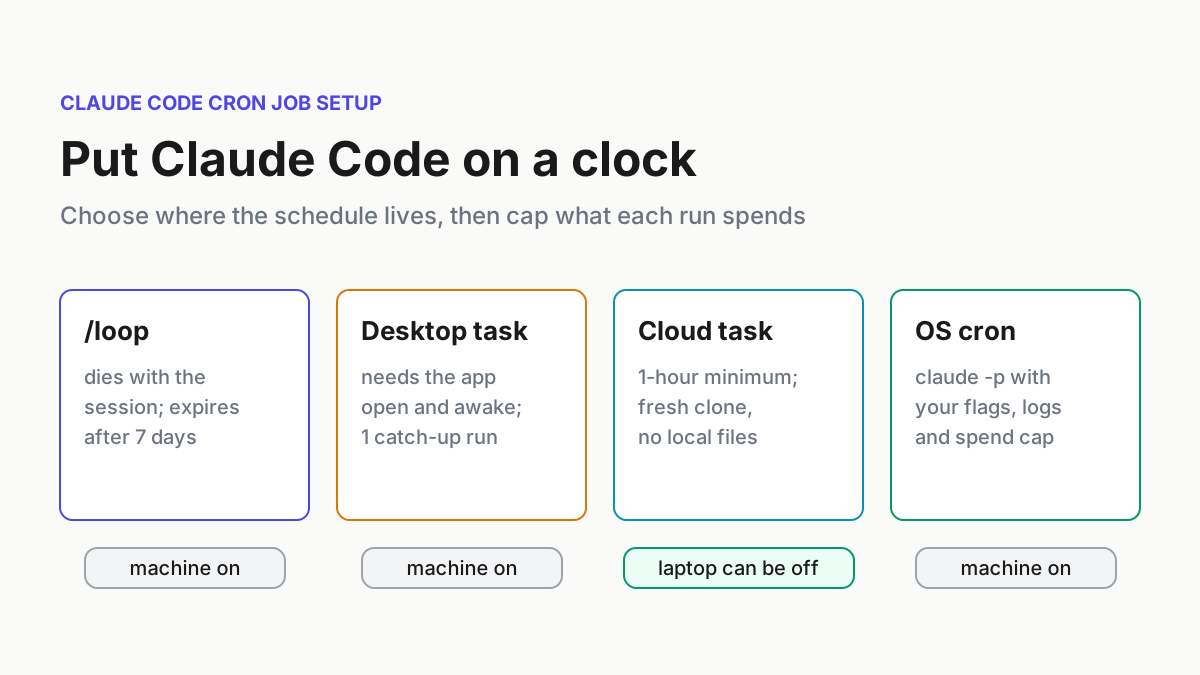
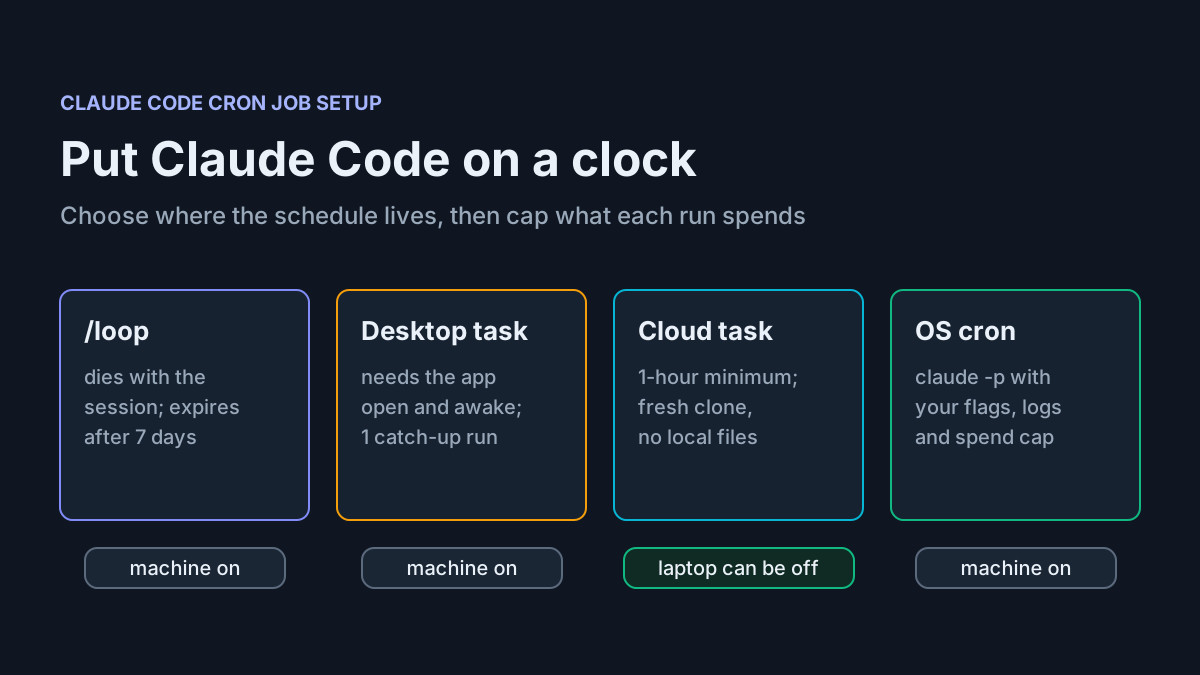
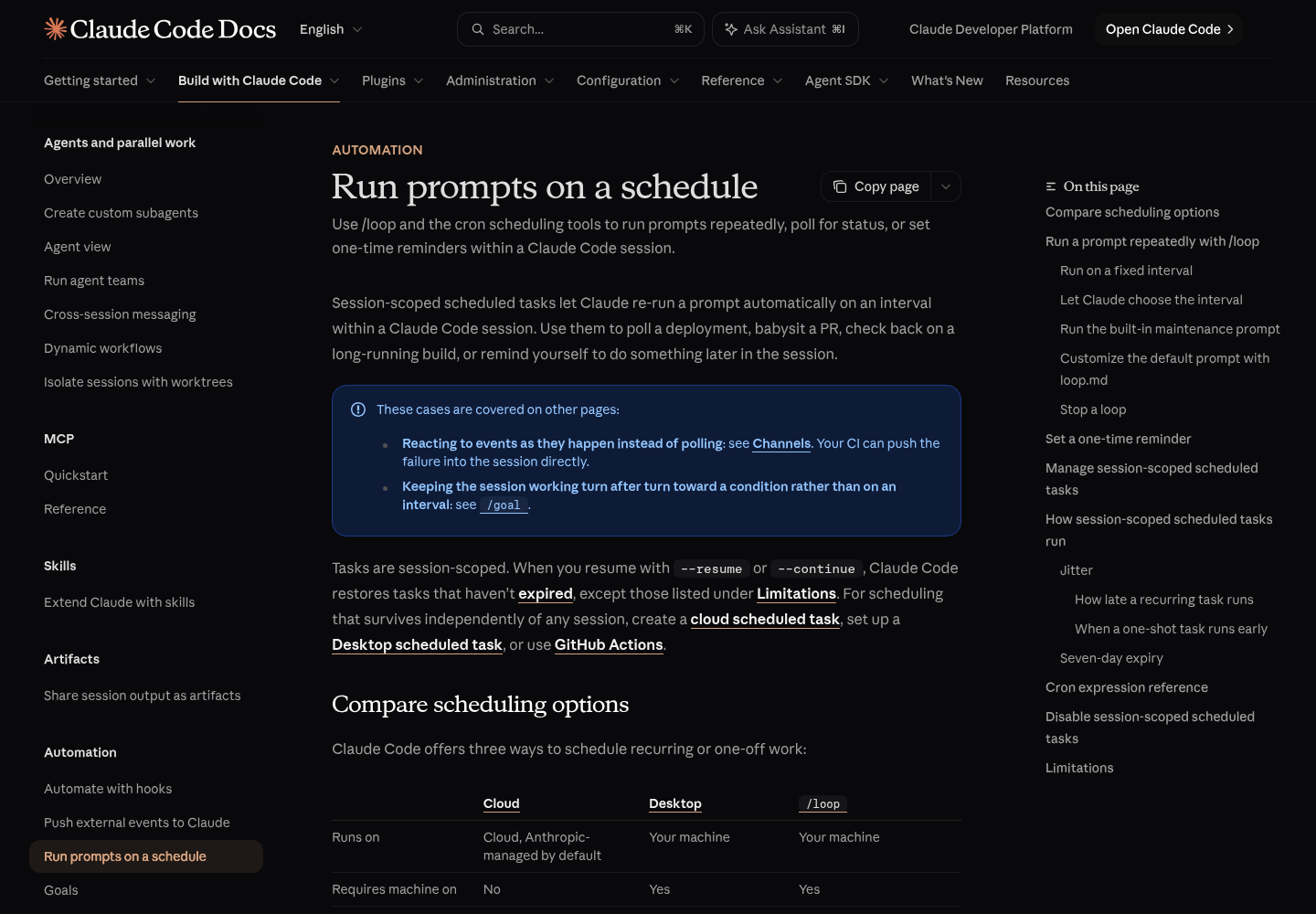
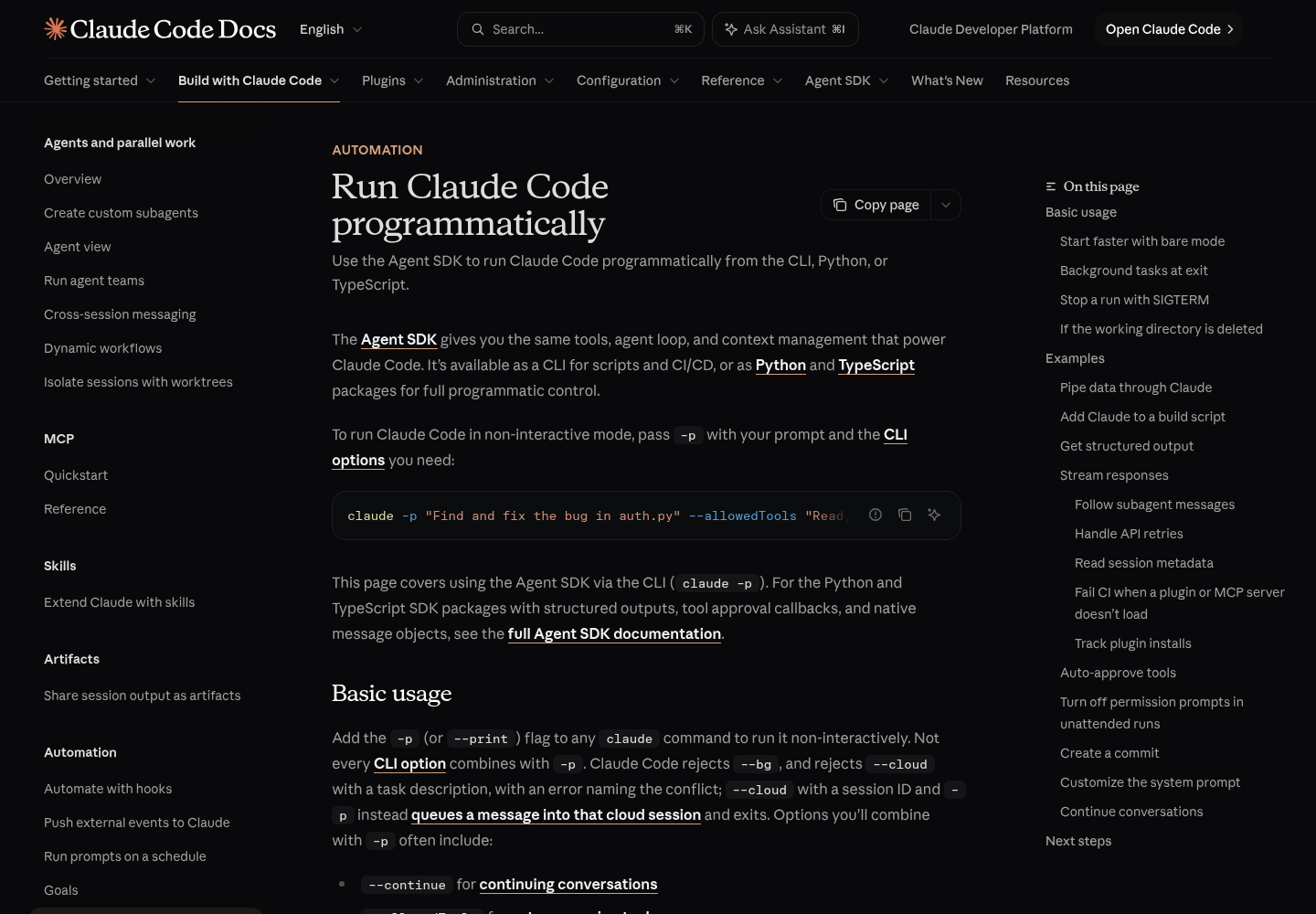
Anthropic’s Run prompts on a schedule page compares the three schedulers that ship with Claude Code: cloud scheduled tasks, Desktop scheduled tasks and the session-bound /loop. The fourth option sits outside Claude Code: your operating system’s cron calling the non-interactive mode described in Run Claude Code programmatically. This table merges the documented limits. Cells marked “cron” describe the operating system, not Claude Code.
| Question | /loop in a session |
Desktop local task | Cloud task (/schedule) |
OS cron + claude -p |
|---|---|---|---|---|
| Where it runs | Your machine, inside an open session | Your machine, via the Desktop app | Anthropic-managed cloud by default | Your machine, no app open |
| Machine must be on | Yes | Yes, app open and awake | No | Yes (cron) |
| Sees local files | Yes | Yes | No, a fresh clone each run | Yes |
| Minimum interval | 1 minute | 1 minute | 1 hour | 1 minute (cron granularity) |
| Permission prompts | Inherits the session | Permission mode set per task | None; runs autonomously | Only what your flags allow; other prompts are denied |
| Missed runs | No catch-up; fires once when idle | One catch-up for the latest miss in 7 days | Skips while GitHub access is missing, up to 72 hours | Not replayed (cron) |
| How long it lives | Recurring tasks expire after 7 days | Until paused or deleted | Until paused or deleted | Until you remove the line |
| Sign-in it needs | The session’s | The Desktop app requires a paid subscription | A claude.ai subscription login | A Console API key in bare mode, or your login without it |
Two rows decide most cases. “Machine must be on” separates the cloud from everything else, and “Sees local files” separates everything else from the cloud. A cloud task clones your GitHub repository fresh every run, so it never sees uncommitted work, local databases or tools installed only on your laptop. The other three run where your files are, and therefore stop when your laptop sleeps.
Match four real jobs to a surface
Here is the decision filled in for four jobs a solo developer commonly wants on a timer. Each row names what the job needs, the surface that provides it, and the reason the others lose.
| Job | What it needs | Surface | Schedule | Why not the others |
|---|---|---|---|---|
| Watch CI on the PR you are fixing this afternoon | A minutes cadence and this session’s context | /loop |
every 10 minutes | Cloud minimum is 1 hour; Desktop and cron start fresh sessions without today’s context |
Summarize PRs merged to main each weekday |
Runs with the laptop closed; repo on GitHub | Cloud task | weekdays at 9:07 | Needs no local files, so nothing ties it to your machine |
| Brief on local branches and uncommitted work | The working tree as it is right now | Desktop local task | Weekdays preset, 08:40 | The cloud sees only a fresh clone; /loop ends with the session |
| Nightly dependency audit with a spend cap | Shell gates, a JSON log per run, a hard ceiling | OS cron + claude -p |
17 6 * * 1-5 |
You need control of every flag and a machine-readable record |
The rules behind those rows, in the order to apply them:
- If the job must run while your laptop is closed and needs nothing beyond a GitHub repository and connectors, use a cloud task.
- If it needs your working tree, local tools or files outside git, and you can keep the Desktop app open, use a Desktop local task.
- If it only matters while you are actively working and needs a cadence of minutes, use
/loop. - If you need a machine-readable log per run, a hard spend ceiling, a gate that skips no-op runs, or you do not use Desktop, use OS cron with
claude -p. - If the job needs a human decision halfway through, schedule none of them. Unattended surfaces either deny the prompt or wait for an answer that never comes; the headless trust-tier guide explains why that tier gets narrower permissions.
Poll from an open session with /loop
/loop is the quickest way to repeat a prompt while you work. The scheduled-tasks docs say the bundled skill converts an interval into a cron expression, schedules the job, and confirms the cadence and a job ID. Here it watches CI on the branch you are fixing this afternoon.
- Start Claude Code in the repository:
cd ~/src/acme-web && claude. - Schedule the check with an explicit interval and an explicit limit on what Claude may do.
- Confirm the schedule by asking for your task list.
- Cancel it when the PR is green.
/loop 10m check whether CI passed on this branch's pull request. If it failed, read the failing job log and summarize the cause in three lines. Do not push, commit or edit files.

what scheduled tasks do I have?

cancel the CI check job
Expected observations: after the first line, Claude confirms an every-10-minutes cadence and a job ID. The task list comes from the CronList tool and shows each task’s 8-character ID, schedule, next run time and prompt; the next-run detail needs v2.1.299 or later. Cancelling calls CronDelete with that ID.
Choices that change behavior:
- Interval format. Units are
s,m,handd. Seconds round up to a minute, and an interval that does not map to a clean cron step, such as7mor90m, is rounded and Claude tells you what it picked. - No interval.
/loop check whether CI passedlets Claude pick a delay between one minute and one hour after each iteration. Press Esc to stop a self-paced loop while it waits. If the Monitor tool is available, Claude may stream a background script instead of polling, which the docs call often more token-efficient. - No prompt. A bare
/loopruns the built-in maintenance prompt, or your own.claude/loop.md(project) or~/.claude/loop.md(user) if one exists. Content beyond 25,000 bytes is truncated. - A skill as the prompt.
/loop 20m /review-pr 1234reruns a skill, but built-ins such as/modeland skills markeddisable-model-invocation: truearrive as plain text instead of executing.
Limits to plan around, all from the same page:
- Tasks fire only while Claude Code is running and idle. Closing the terminal stops them; backgrounding the session carries
/looptasks over to a background session. - Missed fires are not replayed. A task that came due during a long turn fires once afterwards.
- Recurring tasks expire seven days after creation, after one final fire. A session holds at most 50 tasks.
claude --resumeor--continuerestores tasks created withCronCreate, except expired recurring ones and passed one-shots. A self-paced/loopis not restored; run it again.CLAUDE_CODE_DISABLE_CRON=1disables the scheduler, the cron tools and/loopentirely.
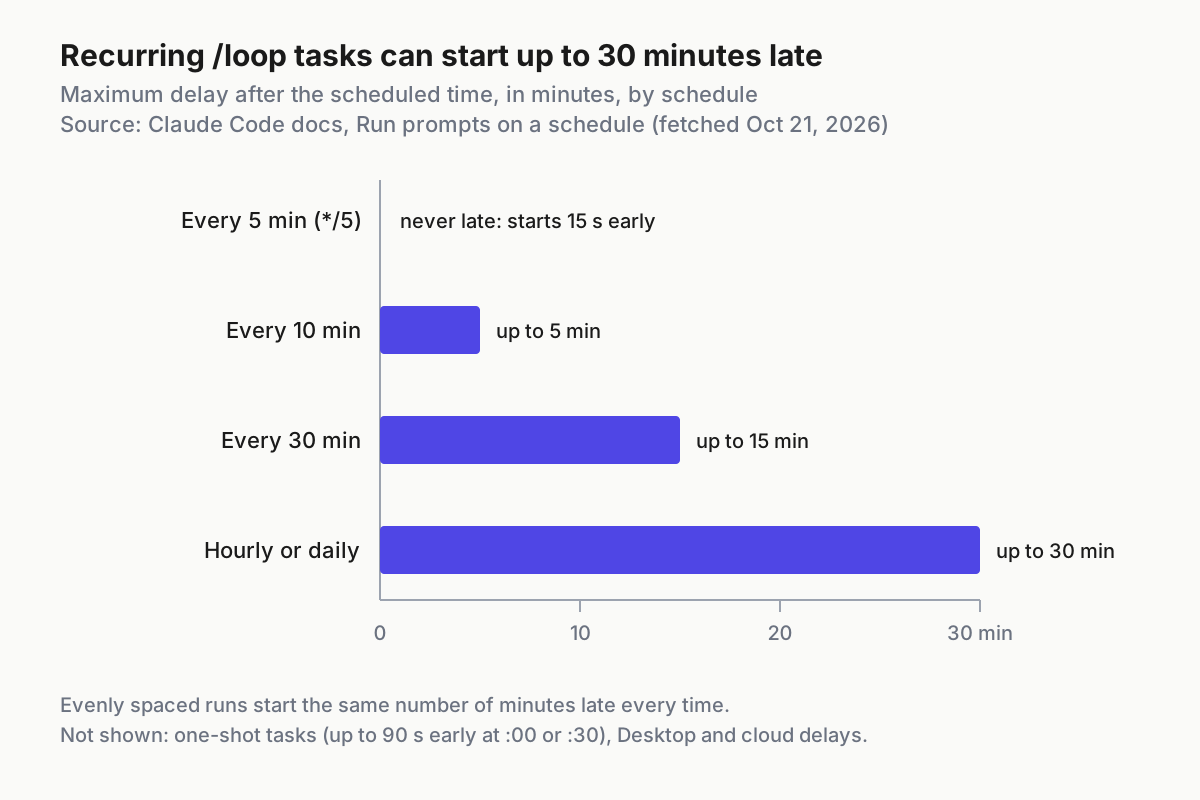
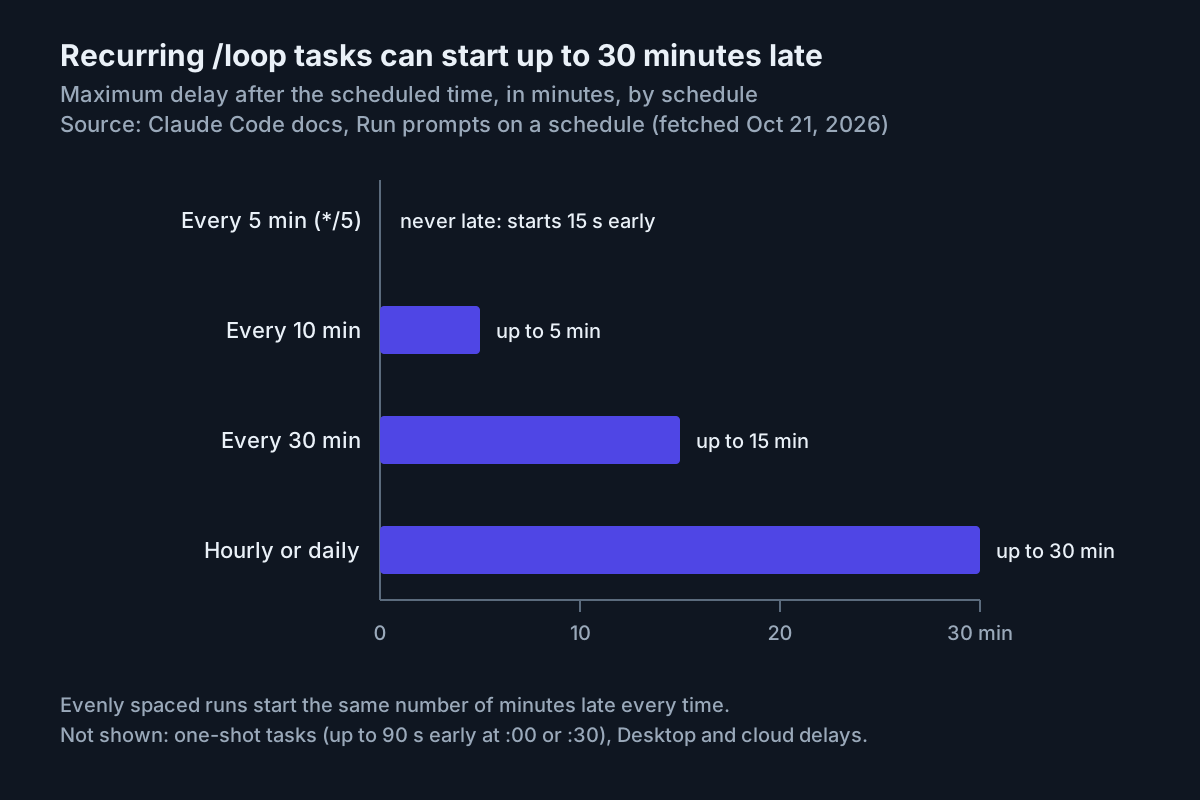
Timing is looser than the cron expression suggests. To spread API load, Claude Code starts a recurring task late by up to half the gap to the next run, capped at 30 minutes; */5 tasks are the exception and run 15 seconds early. For one-shot reminders that must land on time, the page suggests an off-minute such as 3 9 * * * instead of 0 9 * * *.
Cost is the other surprise. Anthropic’s Manage costs effectively page says a session-scoped scheduled task fires on its interval even while the session is idle, sending your full context each time. Keep looping sessions short, and on v2.1.242 or later the /usage breakdown shows a Loops row for the heaviest recent loops. If the CI watch starts pushing fixes, it has become a different job, with the retry caps described in the CI fix-loop guide.
Schedule a Desktop local task against your working tree
Desktop local tasks run on your machine with your files, start a fresh session each time, and do not need a terminal. They require Claude Desktop 1.1.5368 or later, and per Anthropic’s Desktop scheduled tasks page they fire only while the app is open and the computer is awake. The example job is a weekday brief on local branches and uncommitted work in ~/src/acme-web, which a cloud task could never see.
- In the Code tab, click Scheduled in the sidebar (or the sidebar’s More menu), then New task, and choose Set up manually if a menu appears.
- Name it
morning-branch-brief. Desktop converts the name to lowercase kebab-case and uses it as the task’s folder on disk, so it must be unique. - Paste the instructions shown below into the box under the name.
- Expand Advanced settings and turn on Only on this computer. If the switch is unavailable, clear any repository, GitHub event or API trigger; those make it a cloud task.
- Pick
~/src/acme-webas the Local folder. Create stays disabled until you do. - In the Trigger card choose Weekdays and a time such as 08:40.
- In the instructions toolbar, pick a permission mode and model. Leaving them unchanged uses your Claude Code settings and default model.
- Click Create, trust the folder if asked, then click Run now on the detail page and answer each permission prompt with always allow, so later runs do not stall.
Desktop stores the prompt at ~/.claude/scheduled-tasks/morning-branch-brief/SKILL.md, with YAML frontmatter for name and description and the prompt as the body. Edits take effect on the next run; schedule, folder, model and enabled state are not in the file. An illustrative version of this task’s file:
---
name: morning-branch-brief
description: Weekday brief on local branches and uncommitted work in acme-web
---
List local branches that are not merged into main, newest first, with the
date of their last commit. Then summarize uncommitted changes in this folder
in five bullets or fewer. Do not commit, push, stash or delete anything.
If the current local time is after 12:00, the morning run was missed:
say so in the first line and keep the brief to three bullets.
That last instruction follows the docs’ own advice. When the app starts or the computer wakes, Desktop runs exactly one catch-up for the most recently missed time in the last seven days, so an 08:40 task can fire at 15:00. Runs also start a few minutes after the scheduled time, at a fixed offset per task. By default a run sees your working directory as it is, uncommitted changes included; select Worktree in the Edit form to give each run its own git worktree instead.
What to check after the first scheduled day:
- [ ] A session for the run appears under Scheduled in the sidebar.
- [ ] The detail page’s history lists the run; hover any skipped entry to see whether the computer was asleep, the previous run was still going, or other tasks were running.
- [ ] The Always allowed panel lists only the tools you meant to approve.
- [ ] If runs keep skipping, turn on Keep computer awake in Settings > This computer > System. A closed lid still sleeps the machine.
Create a cloud task with /schedule
Cloud scheduled tasks, formerly routines, run on Anthropic-managed infrastructure, so they keep working with your laptop closed. Anthropic’s cloud scheduled tasks page lists them as a research preview on Pro, Max, Team and Enterprise plans, with a one-hour minimum interval. Each run clones the repository, pushes to claude/-prefixed branches unless your prompt says otherwise, and draws on your subscription usage. The example job summarizes the pull requests merged to main each weekday morning.
- Make sure the CLI is signed in with your claude.ai account.
/scheduleis hidden ifANTHROPIC_API_KEYorANTHROPIC_AUTH_TOKENis set in your shell orapiKeyHelperis insettings.json, because those take precedence over a claude.ai login. Run/loginif you are signed out. - From a session inside the repository, describe the task:
/schedule weekdays at 9:07am, summarize pull requests merged into main since the previous weekday: title, author and a one-line risk note each. Do not push, comment or open issues. - Answer Claude’s follow-up questions about schedule, repositories and prompt. A reply saying you must authenticate, or that it cannot reach your claude.ai account, means nothing was saved.
- Open the task at claude.ai/code/routines, choose Edit, and on the Connectors tab remove every connector the job does not need. Included connectors can write without asking during a run.
- Start a test with
/schedule run, then open the run session and read the transcript. - Confirm with
/schedule list. Change the cadence or set a custom cron expression with/schedule update; anything more frequent than hourly is rejected.
The 9:07 start is deliberate: the docs warn that a run scheduled exactly on the hour can start several minutes late. Two observations matter more than the status colour. First, a green status in the run list only means the session started and exited without an infrastructure error, not that the summary is right. Second, the Default environment allows only an allowlist of hosts, and requests elsewhere fail with 403 and x-deny-reason: host_not_allowed. When a run did nothing, ask the CLI on v2.1.227 or later: /schedule why did my weekday PR summary do nothing this morning? Claude lists recent runs and reads the log for tool errors and permission denials.
Fixes still land in this area. Claude Code v2.1.305, released October 20, 2026, fixed more cases of scheduled Cowork cloud sessions waiting five minutes for each subagent whose WebFetch needed a URL approval nobody was there to give. Keep the CLI current before you debug a stalled cloud run.
Write the claude -p wrapper for cron
The cron path gives you what the built-in schedulers do not: a log file per run, a per-run spend ceiling, and gates in plain shell before any model is called. The price is that you own the environment, the authentication and the cleanup. The worked example is a nightly dependency audit for a Node repository, run from a clone that only this job uses, so it never touches your working copy. Clone it once to ~/cron-work/acme-web and save the script as ~/bin/claude-dep-audit.sh.
The script is illustrative and was not executed for this article. Every Claude Code flag in it comes from the headless docs; git, jq, flock and timeout are standard Linux tools.
#!/usr/bin/env bash
# claude-dep-audit.sh: illustrative nightly dependency audit (not executed
# for this article). Claude Code flags come from Anthropic's headless docs;
# git, jq, flock and timeout are standard Linux tools.
set -euo pipefail

REPO="$HOME/cron-work/acme-web"          # a clone used only by this job
STATE="$HOME/.local/state/claude-cron"   # logs, reports, last-run stamp
LOGS="$STATE/logs"
REPORTS="$STATE/reports"
STAMP="$STATE/last-audited-sha"
SCREEN_CAP_USD="0.10"                    # ceiling for the gate call
AUDIT_CAP_USD="1.50"                     # ceiling for the full audit
RUN_ID="$(date +%Y%m%dT%H%M%S)"

# Cron starts with a minimal PATH. Put the directory printed by
# `command -v claude` in an interactive shell first.
export PATH="$HOME/.local/bin:/usr/local/bin:/usr/bin:/bin"

# --bare never reads OAuth credentials or the keychain. Load a Console API
# key here, not in your shell profile, where it would hide /schedule.
ANTHROPIC_API_KEY="$(cat "$HOME/.config/claude-cron/api-key")"
export ANTHROPIC_API_KEY

mkdir -p "$LOGS" "$REPORTS"
log() { echo "$RUN_ID $*" >> "$LOGS/runs.log"; }

cd "$REPO"
git fetch --quiet origin main
HEAD_SHA="$(git rev-parse origin/main)"
LAST_SHA="$(cat "$STAMP" 2>/dev/null || git rev-parse origin/main~20)"
git checkout --quiet --detach "$HEAD_SHA"

# Gate 0: nothing merged since the last audit, so no model call at all.
if [ "$HEAD_SHA" = "$LAST_SHA" ]; then
  log "skip gate=0 reason=no-new-commits"; exit 0
fi

# Gate 1: this job only cares about dependency manifests.
mapfile -t MANIFESTS < <(git diff --name-only "$LAST_SHA" "$HEAD_SHA" -- \
  '*package.json' '*package-lock.json')
if [ "${#MANIFESTS[@]}" -eq 0 ]; then
  echo "$HEAD_SHA" > "$STAMP"
  log "skip gate=1 reason=no-manifest-changes"; exit 0
fi

DIFF="$LOGS/$RUN_ID-manifests.diff"
git diff "$LAST_SHA" "$HEAD_SHA" -- "${MANIFESTS[@]}" > "$DIFF"
head -c 200000 "$DIFF" > "$DIFF.trim"    # keep the gate's input small

# Gate 2: a short structured call decides whether the audit runs.
SCHEMA='{"type":"object","properties":{"needs_run":{"type":"boolean"},"reason":{"type":"string"}},"required":["needs_run","reason"]}'
SCREEN="$LOGS/$RUN_ID-screen.json"
if ! timeout --signal=INT --kill-after=30 180 claude --bare -p \
    "You are a gate for a dependency audit. The piped diff covers package manifests only. Set needs_run to true if any dependency was added, removed or changed version. Set it to false if only scripts, metadata or formatting changed. Give one sentence in reason. Do not use tools." \
    --output-format json --json-schema "$SCHEMA" \
    --permission-mode dontAsk --permission-prompts none \
    --max-budget-usd "$SCREEN_CAP_USD" \
    < "$DIFF.trim" > "$SCREEN"; then
  log "fail stage=screen"; exit 1
fi

NEEDS="$(jq -r 'if has("structured_output") then (.structured_output.needs_run | tostring) else "missing" end' "$SCREEN")"
REASON="$(jq -r '.structured_output.reason // "none"' "$SCREEN")"
SCREEN_USD="$(jq -r '.total_cost_usd // 0' "$SCREEN")"

case "$NEEDS" in
  false)
    echo "$HEAD_SHA" > "$STAMP"
    log "skip gate=2 screen_usd=$SCREEN_USD why=\"$REASON\""; exit 0 ;;
  true) ;;
  *)
    log "fail stage=screen reason=no-structured-output screen_usd=$SCREEN_USD"; exit 1 ;;
esac

# The audit: read-only tools, no prompts, a spend ceiling and a wall clock.
AUDIT="$LOGS/$RUN_ID-audit.json"
if ! timeout --signal=INT --kill-after=60 1800 claude --bare -p \
    "Audit dependency changes in this repository between $LAST_SHA and $HEAD_SHA in: ${MANIFESTS[*]}. For each added, removed or upgraded package give the name, old and new version, and whether npm audit reports an advisory for the new version. End with one verdict line: OK, REVIEW or BLOCK. Reply with the Markdown report only." \
    --append-system-prompt "You run unattended from cron. Nobody can answer questions or approve tools. Do not modify any file." \
    --allowedTools "Read,Bash(git diff *),Bash(git log *),Bash(git show *),Bash(npm audit *)" \
    --permission-mode dontAsk --permission-prompts none \
    --max-budget-usd "$AUDIT_CAP_USD" \
    --output-format json > "$AUDIT"; then
  log "fail stage=audit session=$(jq -r '.session_id // "none"' "$AUDIT" 2>/dev/null || echo none)"
  exit 1
fi

jq -r '.result' "$AUDIT" > "$REPORTS/deps-$(date +%F).md"
SESSION="$(jq -r '.session_id' "$AUDIT")"
AUDIT_USD="$(jq -r '.total_cost_usd' "$AUDIT")"
echo "$HEAD_SHA" > "$STAMP"
log "ok session=$SESSION screen_usd=$SCREEN_USD audit_usd=$AUDIT_USD"
Each consequential choice, and the documented behavior behind it:
| Choice | What the docs say it does | Why this job uses it |
|---|---|---|
--bare |
Skips hooks, skills, plugins, MCP servers, auto memory and CLAUDE.md; never reads OAuth credentials or the keychain | The same behavior every night, whatever lands in the repo’s .claude/ or .mcp.json |
ANTHROPIC_API_KEY in the script |
Bare mode needs a Console key, or an apiKeyHelper passed in --settings JSON |
Cron has no login session to borrow, and a key kept only in this file does not hide /schedule in your shell |
--output-format json |
Returns result, session_id and total_cost_usd |
The report and the log line come straight from those fields |
--json-schema |
Puts schema-conforming output in structured_output; the field is absent if the run ends without valid output |
The gate reads one boolean instead of parsing prose |
--allowedTools "Bash(git diff *)" |
Permission rule syntax; the space before * makes it a prefix match |
The audit can read history and run npm audit, nothing else in the shell |
--permission-mode dontAsk |
Denies every call that would otherwise prompt | A run never waits for a person |
--permission-prompts none |
Tells Claude nobody can approve and not to retry; needs v2.1.259 or later | Denied calls end quickly instead of being retried |
--max-budget-usd |
A spend cap; when a run reaches it, remaining background work is stopped | Bounds a bad night; tune it from a week of logged costs |
timeout --signal=INT |
SIGINT ends the turn; SIGTERM exits with 143 and records no result for the unfinished turn | End the turn rather than abandon it; --kill-after is the backstop |
The headless page also says Claude Code exits 0 on success and non-zero when a run fails, and that a failure inside the run, such as missing authentication, is printed as the result on stdout. That is why the wrapper branches on the exit status and still keeps the JSON file when a run fails.
Two more warnings from the same page shape the choice of --bare. Without it, a -p session runs the hooks in a project’s .claude/settings.json and connects the servers in its .mcp.json, even in a folder you never trusted, with no prompt. In bare mode only servers passed with --mcp-config connect, so if the audit needs one, add it explicitly; the MCP scopes guide explains which config file each server normally comes from.
If you would rather bill the job to your Pro or Max plan, drop --bare and the key, and run only from a directory you trust. On a subscription, total_cost_usd becomes a list-price estimate rather than a bill; the costs page says the session cost figure is intended for API users.
Gate the expensive run with a cheap pre-screen
The wrapper refuses to pay for an audit when there is nothing to audit. It does that in three gates, cheapest first.
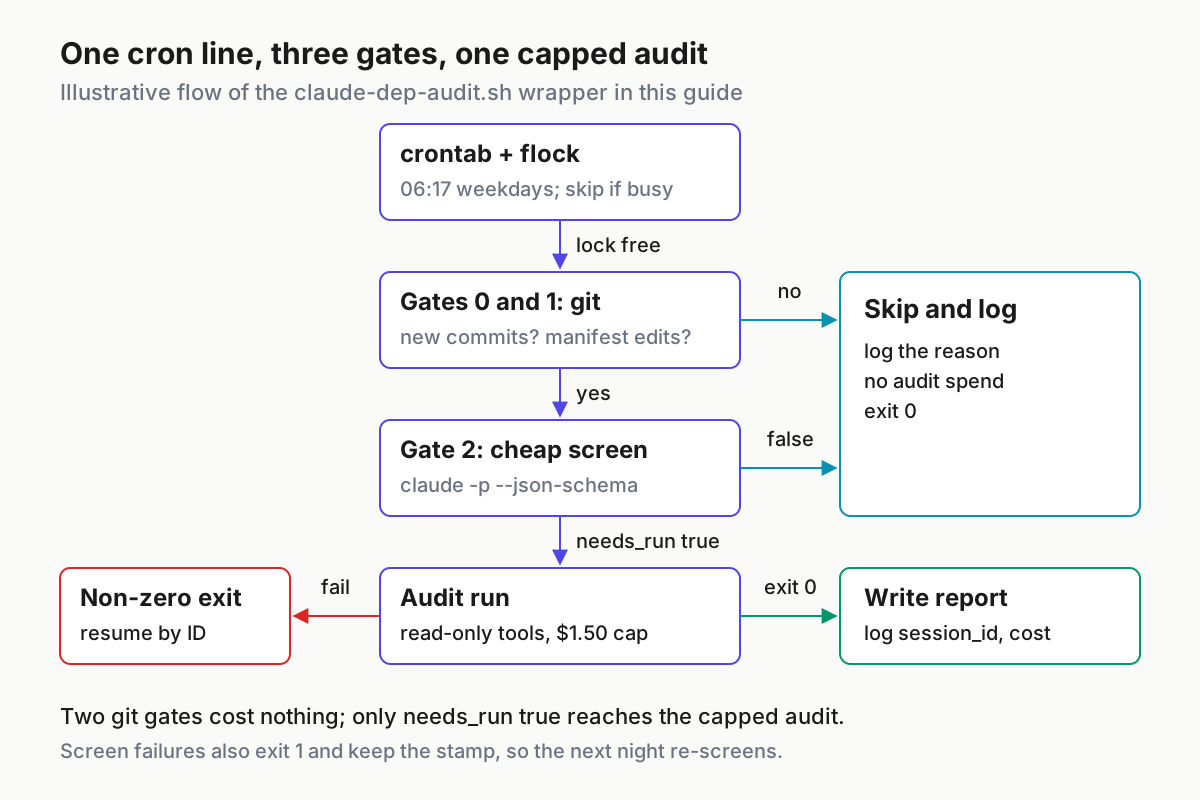
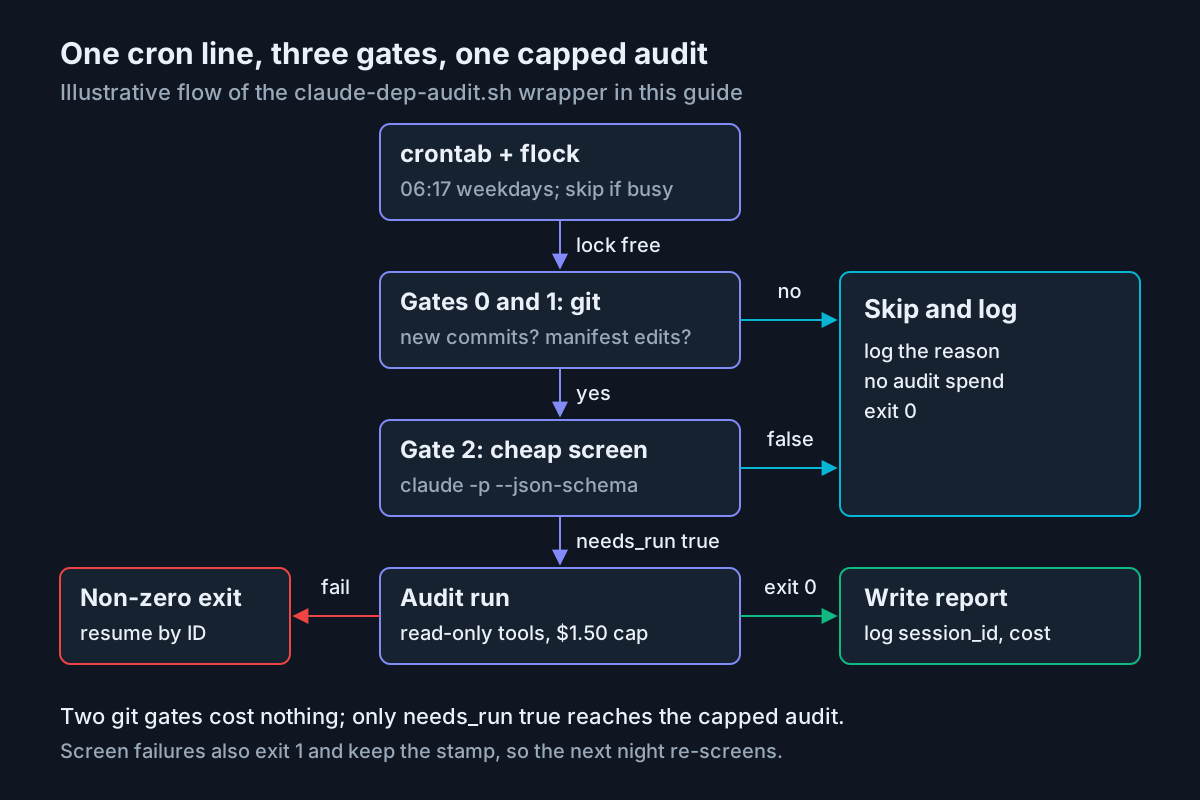
- Gate 0, new commits. If
origin/mainhas not moved since the SHA in the stamp file, the script logs a skip and exits without calling Claude. - Gate 1, manifests changed. If no
package.jsonorpackage-lock.jsonchanged in that range, it advances the stamp and exits, again without a model call. - Gate 2, cheap screen. Only manifest diffs reach a short
claude -pcall with a two-field schema. It decides whether any dependency was added, removed or changed version, which a filename check cannot tell apart from an editedscriptsblock. - Audit. Only
needs_run: truestarts the capped, read-only audit.
The fields the wrapper reads from Gate 2, shown with illustrative values for both branches (real responses carry more metadata):
{ "structured_output": { "needs_run": false, "reason": "Only the scripts block in package.json changed; no dependency versions moved." }, "total_cost_usd": 0.02 }

{ "structured_output": { "needs_run": true, "reason": "package-lock.json upgrades lodash and adds one new transitive package." }, "total_cost_usd": 0.02 }
Read them like this. false means the stamp advances and tomorrow’s range starts at today’s head. true means the audit runs, and the stamp advances only if the audit succeeds. A response with no structured_output at all, which the docs say happens when Claude declines or the run ends without valid output, is logged as a failure and the stamp stays put, so the next night re-screens the same range. That fails closed on spend; the exit status of 1 is what makes a human notice.
The jq line deserves its own warning. jq -r '.structured_output.needs_run // "missing"' looks tidy but is wrong, because jq’s // operator treats false as missing, so every legitimate skip would look like a failure. The script tests has("structured_output") and converts the boolean with tostring instead.
Is the model screen worth it? An Illustrative month, assuming 22 weekday runs, manifests changing on 6 nights, dependency versions moving on 4 of those, $0.60 per audit and $0.02 per screen:
| Illustrative approach | Screens | Audits | Estimated monthly spend |
|---|---|---|---|
| Audit every weekday | 0 | 22 | 22 × $0.60 = $13.20 |
| Git gates only | 0 | 6 | 6 × $0.60 = $3.60 |
| Git gates plus model screen | 6 | 4 | $0.12 + $2.40 = $2.52 |
Most of the saving comes from the free git gates. The model screen earns its place only where cheap filters still let many no-op changes through, so measure before copying it into other jobs. Replace both prices with the total_cost_usd values from your first week of logs, and remember the costs page calls them client-side estimates that can differ from your bill. The same page recommends smaller models for simple work; if your CLI version exposes model selection for -p (check claude --help), point only the screen at your smallest model. Choosing the hour itself by price and cache behavior is a separate decision covered in scheduling agents by the clock.
Install the crontab entry and prove the first run
- In an interactive shell, run
command -v claudeandcommand -v flock, then put those directories in the script’sPATHline and the crontab entry below. - Store the Console key where only you can read it: create
~/.config/claude-cron/, set it to mode 700, paste the key into a file namedapi-key, and set that file to mode 600. In the Console, set a spend limit on the workspace that owns the key; the costs page lists workspace spend limits as the cap for API organizations. - Make
claude-dep-audit.shexecutable and run it once with an empty environment, the way cron will:env -i HOME="$HOME" /bin/bash ~/bin/claude-dep-audit.sh. This catches PATH and key problems before 06:17 does. - Read the last lines of
~/.local/state/claude-cron/logs/runs.logand match them to the formats below. - Add the entry with
crontab -eand confirm it withcrontab -l. - The next weekday, check
runs.logandcron.outfor a 06:17 entry.
# m  h  dom mon dow  command  (illustrative; use your own absolute paths)
17 6 * * 1-5  /usr/bin/flock -n /tmp/claude-dep-audit.lock /home/dev/bin/claude-dep-audit.sh >> /home/dev/.local/state/claude-cron/logs/cron.out 2>&1
flock -n exits immediately if last night’s run still holds the lock, so a slow audit never overlaps the next one. The off-the-hour minute follows the advice the Claude Code docs give for their own schedulers. On macOS, neither flock nor GNU timeout ships by default; use equivalents you trust, or prefer the Desktop surface.
The log formats the script writes, with placeholder values rather than observed output:
20261022T061701 skip gate=0 reason=no-new-commits
20261023T061702 skip gate=1 reason=no-manifest-changes
20261024T061703 skip gate=2 screen_usd=0.02 why="Only the scripts block in package.json changed; no dependency versions moved."
20261027T061704 ok session=<session-id> screen_usd=0.02 audit_usd=0.61
20261028T061702 fail stage=audit session=<session-id>
Success means four things: an entry appears at the expected minute, an ok line carries a session_id, quiet nights produce skip lines with no audit cost, and audit_usd stays under the $1.50 cap. Keep these logs. Per-run records are what make unattended work reviewable later, the argument at the centre of the agentic ops overview.
Troubleshoot unattended runs
| Symptom | Likely cause | Fix |
|---|---|---|
cron.out says claude: command not found |
Cron’s minimal PATH | Put the directory from command -v claude first in the script’s PATH |
The JSON result describes an authentication failure |
Bare mode never reads OAuth or the keychain | Supply ANTHROPIC_API_KEY, or an apiKeyHelper in --settings JSON |
/schedule now returns “Unknown command” |
The API key is exported in your shell profile | Keep the key only in the cron script; unset it in interactive shells |
| The audit says a command was not allowed | The tool is outside --allowedTools, so dontAsk denied it |
Re-run once with --output-format stream-json --verbose to see permission_denied messages, then add one scoped rule |
| A Desktop run is missing | The computer slept through the time | Hover the skipped entry in history; turn on Keep computer awake |
| A Desktop run sits open for hours | Its permission mode needed an approval | Answer it in the Scheduled sidebar and choose always allow; tools marked requiresUserInteraction stall every time |
| A cloud run is green but did nothing | Blocked host, missing connector or a failed step | Read the transcript; widen the environment’s allowed domains only for hosts the job needs |
| Runs stop with a usage-limit message | The subscription window is spent | Cloud runs are rejected until the window resets unless usage credits are on; on the API path, check the workspace limit |
audit_usd differs from the Console |
total_cost_usd is a client-side estimate |
Reconcile against the Console usage page |
A /loop stopped after a week |
Seven-day expiry | Recreate it, or move the job to Desktop or the cloud |
For unattended retries around usage limits, v2.1.305 added CLAUDE_CODE_RETRY_WATCHDOG_USAGE_LIMIT_RECHECK_MS so the unattended retry mode enabled by CLAUDE_CODE_RETRY_WATCHDOG notices a usage limit that was lifted before its reset. The release note does not document values, so read the environment-variable reference before setting either. To hear about a runaway night instead of finding it in the log, feed audit_usd into the thresholds described in the agent cost anomaly guide.
Stop, roll back or resume each surface
| Surface | Pause | Remove | Recover a failed run |
|---|---|---|---|
/loop |
Esc stops a self-paced loop | cancel the <name> job, or CronDelete with the 8-character ID; CLAUDE_CODE_DISABLE_CRON=1 stops all |
claude --resume restores unexpired CronCreate tasks |
| Desktop local task | Status toggle to Paused | Delete on the detail page; tick Also delete files on disk to remove its SKILL.md | Open the run’s session under Scheduled and continue it |
| Cloud task | On/off switch on the detail page | Delete from the menu next to the task name on the web | Open the run session; /schedule run starts a fresh one |
| OS cron | Comment the line out with crontab -e |
Delete the line, then the script, key file and state directory | Resume the session from its logged session_id |
Resuming a failed audit reuses the run’s permissions and the logged ID:
cd ~/cron-work/acme-web
claude --bare -p "Finish the dependency audit report you started. Reply with the Markdown report only." \
  --resume "<session-id from runs.log>" \
  --allowedTools "Read,Bash(git diff *),Bash(git log *),Bash(git show *),Bash(npm audit *)" \
  --permission-mode dontAsk --permission-prompts none \
  --output-format json > ~/.local/state/claude-cron/logs/resume.json
The headless docs note two things about this. A resumed run reports the conversation’s whole total in total_cost_usd, earlier spend included, so do not add it to the failed run’s figure. And Claude Code finds the session by its ID from any directory on the machine, though you should still run it from the job’s clone so tool calls see the same files. To re-audit a range on purpose, write an older SHA into the stamp file; to start over, delete it.
FAQ
Can a Claude Code cron job use my Pro or Max subscription?
Yes, in three ways. Cloud tasks created with /schedule draw on your subscription usage. Desktop local tasks run in the Desktop app, which requires a paid plan. For OS cron, run claude -p without --bare from a trusted directory, because bare mode never reads your login.
Why did my scheduled Claude Code task run late?
Every scheduler adds a delay to spread API load. Session tasks run up to half their interval late, capped at 30 minutes; Desktop adds a fixed few-minute offset per task; cloud runs set exactly on the hour can start several minutes late. Pick off-hour minutes such as 9:07.
Sources
- Anthropic, Run prompts on a schedule, Claude Code Docs (primary source)
- Anthropic, Run Claude Code programmatically, Claude Code Docs
- Anthropic, Automate work with scheduled tasks, Claude Code Docs
- Anthropic, Schedule recurring tasks in Claude Code Desktop, Claude Code Docs
- Anthropic, Manage costs effectively, Claude Code Docs
- Anthropic, Claude Code overview, Claude Code Docs
- Anthropic, Claude Code release v2.1.305, GitHub, October 20, 2026