Claude Code Headless Mode (claude -p): Script It With JSON Output, Resume Sessions, Cap Spend and Measure What It Costs Your Plan
Claude Code headless mode as a scripting interface: parse claude -p JSON with jq, fail on exit codes, resume sessions, scope tools, and measure plan usage.

Your pre-commit hook calls claude -p, gets nothing back, and lets the commit through. Your overnight batch finishes and you wake up to an empty 5-hour window. Both problems come from treating Claude Code headless mode as a black box. It is a command-line program with an exit status, a JSON payload, resumable session IDs, permission flags and a cost estimate, and a script can check every one of them. This guide is for developers on a Claude Pro or Max plan, or on a Console API key, who call Claude Code from shell scripts, git hooks or CI. You will end up with a copyable bash wrapper that reviews a staged git diff, fails on every kind of error and logs each run, plus a usage ratio measured on your own account.
The flags and fields come from Anthropic’s Run Claude Code programmatically page, the CLI reference, the authentication docs and the permissions docs. The commands are documented syntax, not output captured for this article. Where the guide describes an expected result, it is what those pages say you should see. Tables marked Illustrative are models: replace their numbers with your own.
Why the 5-hour window belongs in your script
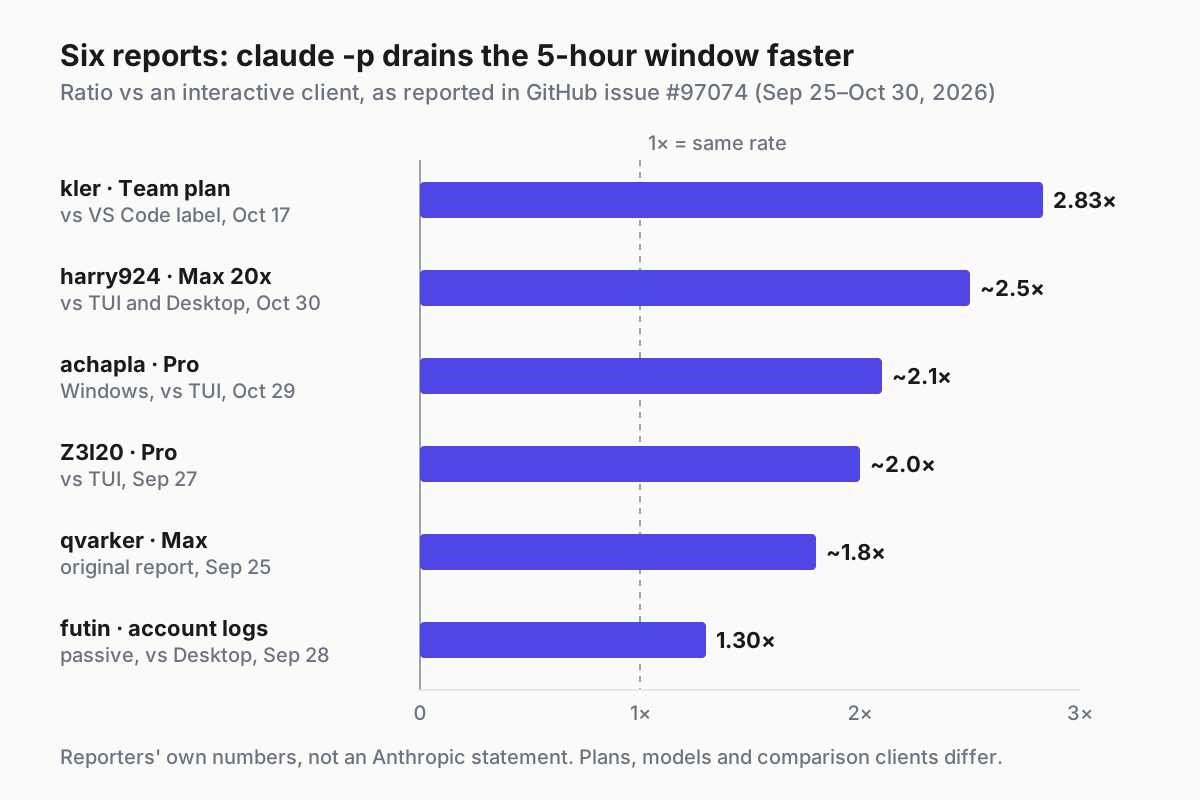
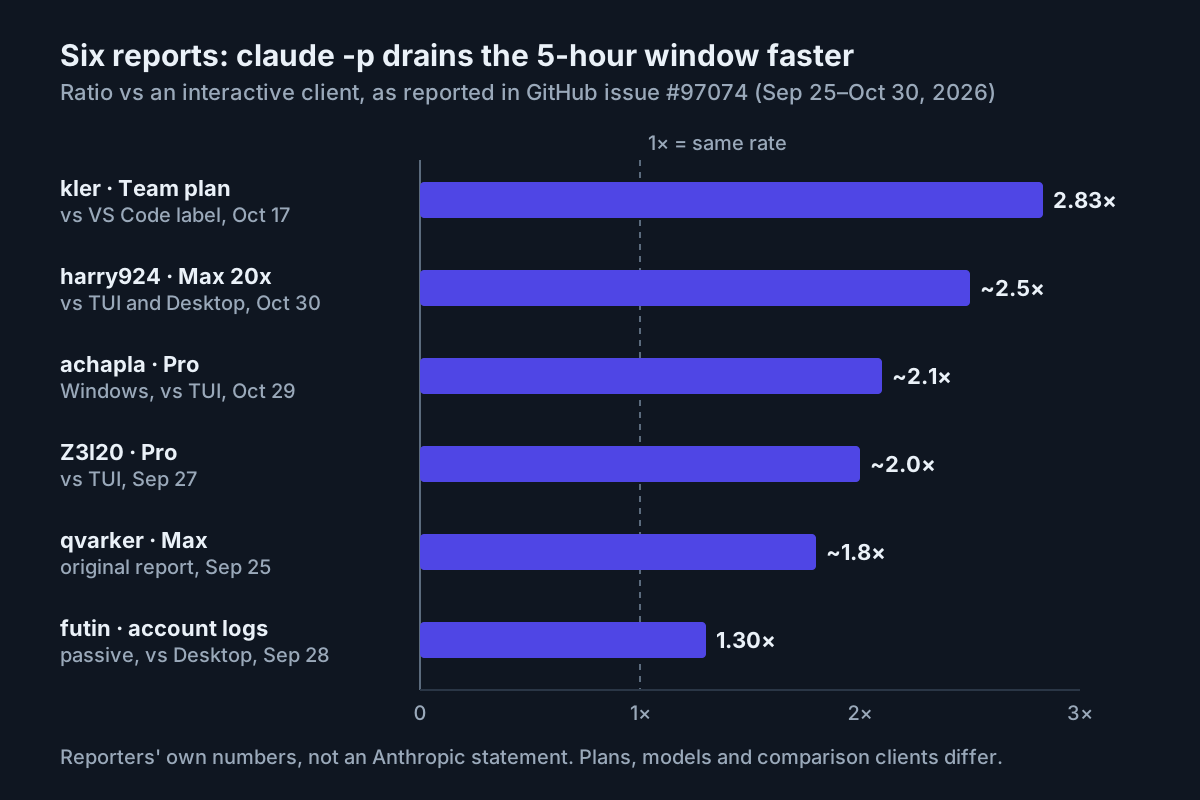
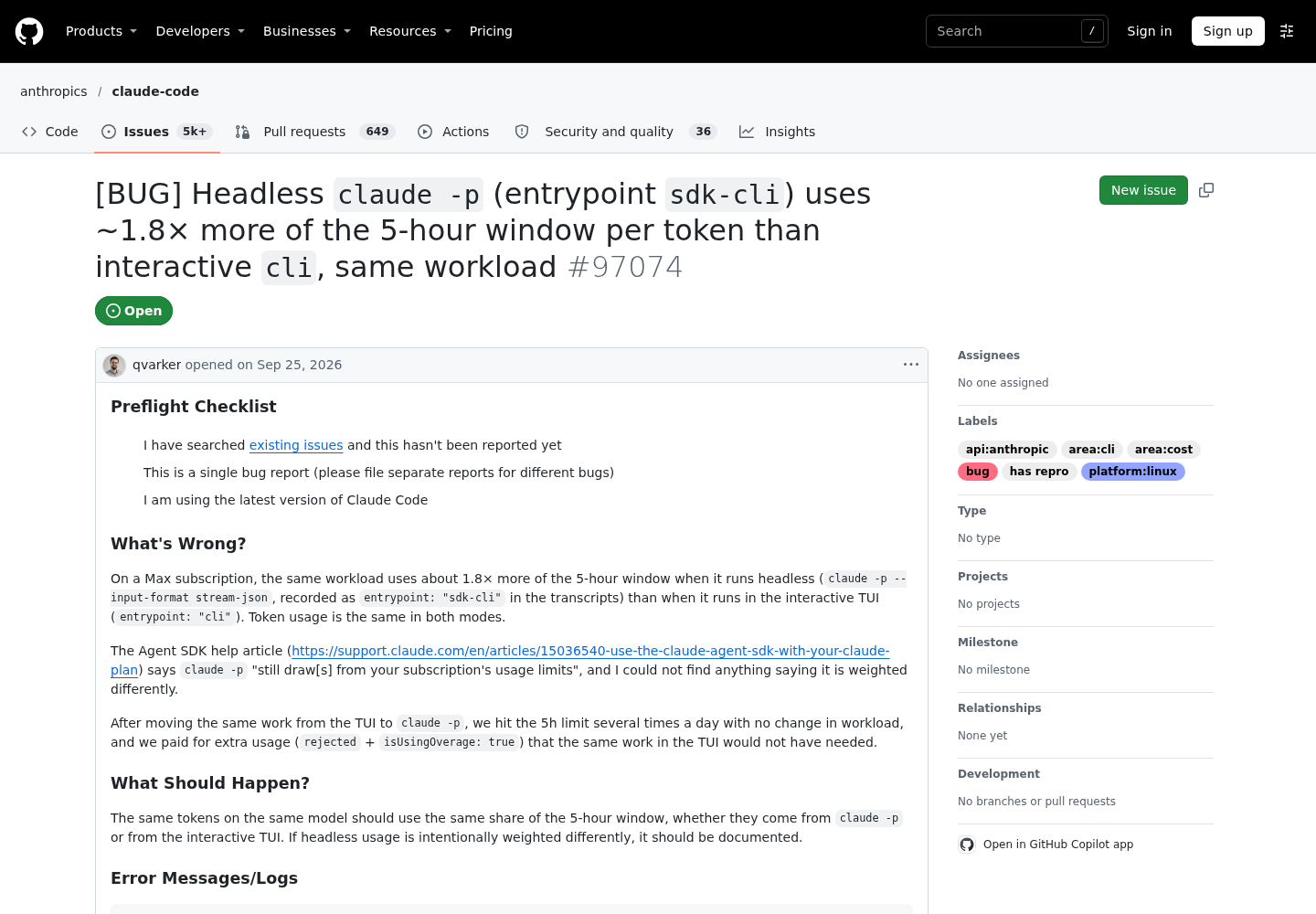
On Oct 25, 2026, developer Frostfire posted on X a warning for anyone running Claude Code headless on a Max plan: a new bug report found that claude -p used about 1.8× more of the 5-hour limit than the interactive CLI on the same workload, with the same or fewer tokens. The report is anthropics/claude-code issue #97074, opened Sep 25 by qvarker. In a controlled A/B on Claude Code 2.1.282 with Opus 5, the headless arm got about $1.6 of API-equivalent work per 1% of the window, and the interactive TUI about $3.0. Session transcripts record headless runs with the entrypoint sdk-cli and the TUI as cli.
Other commenters reproduced the direction on different plans: about 2.0× on Pro, about 2.5× on Max 20x against both the TUI and the Desktop app, and 2.83× on a Team plan against the VS Code extension’s label. The independent claude-p-limit-bench repository measured about 2× on Pro with Claude Code 2.1.312 on Windows: $0.22 of work per 1% of the window through claude -p, against $0.43 to $0.48 interactively.
Treat these numbers as reporter observations, not as Anthropic’s accounting. The issue is open and labelled as a bug with a reproduction, and its commenters are still asking Anthropic whether sdk-cli usage is weighted on purpose. The selected Anthropic docs don’t say. One consequence holds either way: unbounded headless turns on a subscription can spend the window faster than the same work done by hand. So the wrapper below bounds turns and spend, logs the cost estimate of every run, and the measurement section shows how to check the effect on your own plan.
Some commenters work around the gap by setting the undocumented CLAUDE_CODE_ENTRYPOINT variable to another label. Don’t. Another commenter in the same thread points out that if the weighting is intentional, relabeling could count as getting around usage limits. Measure and adapt instead.
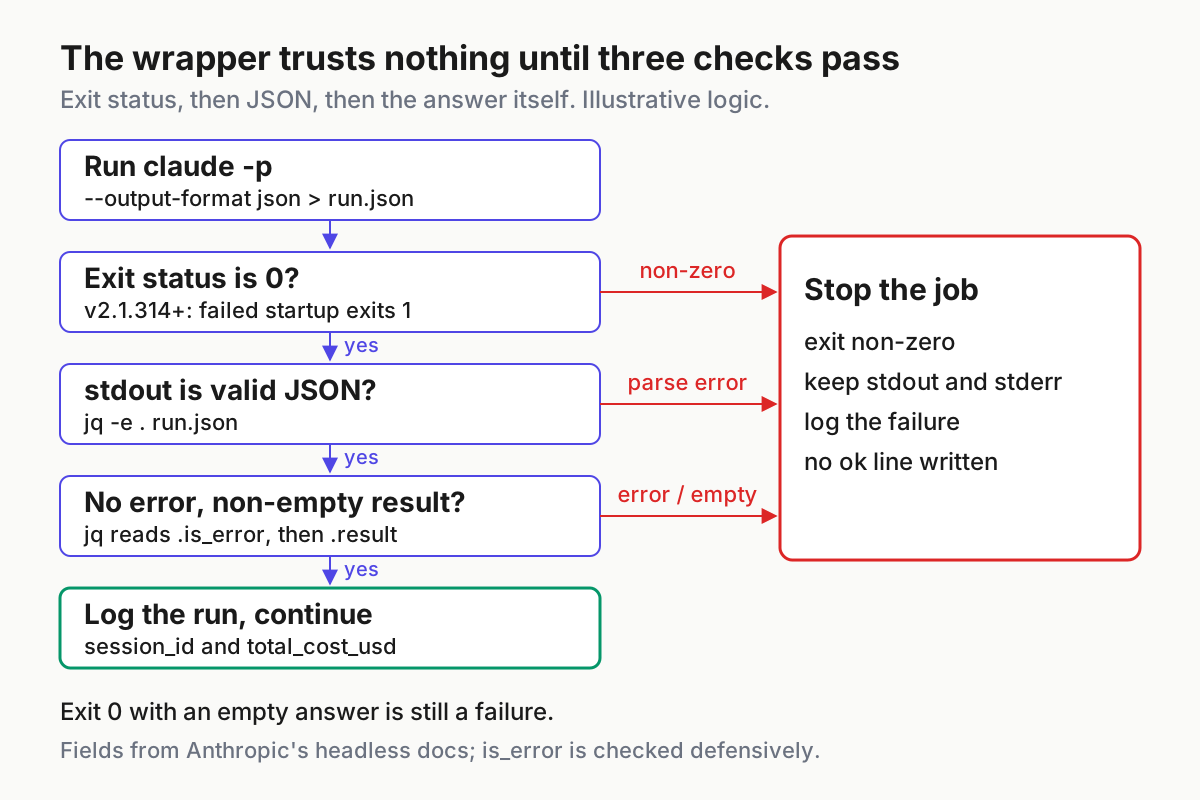
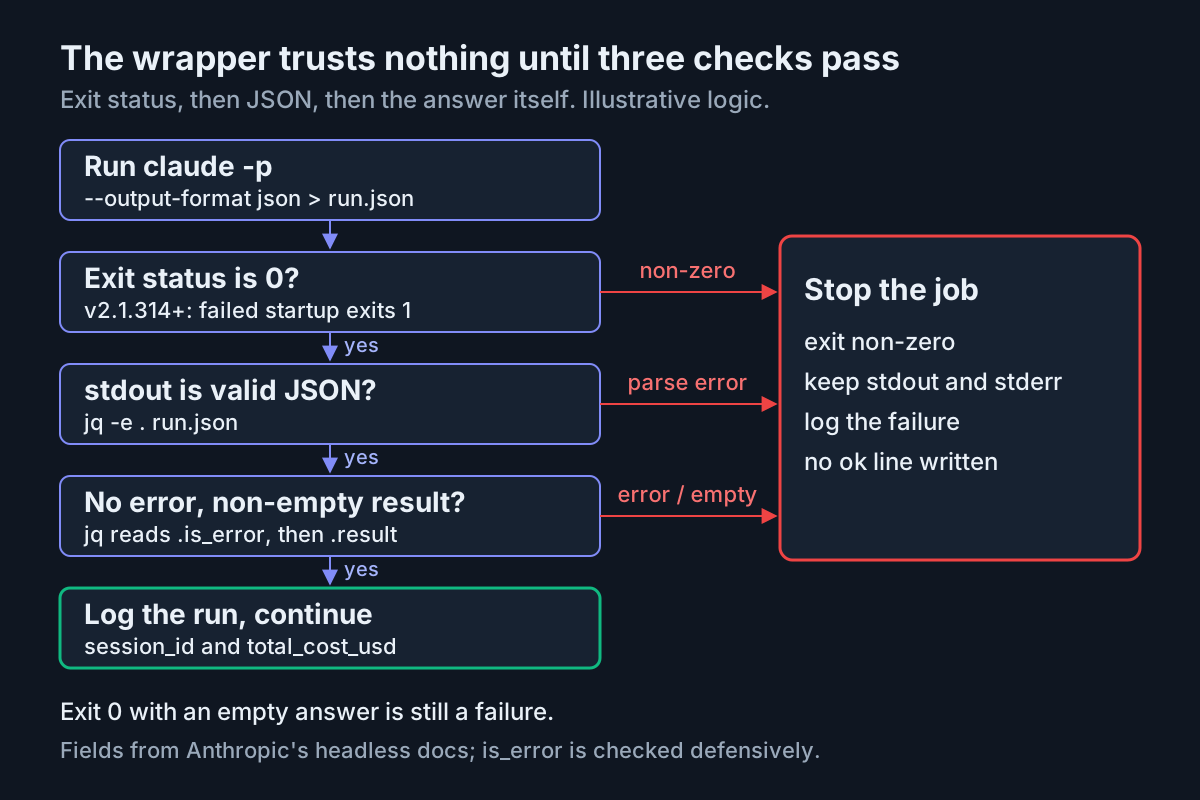
The second fact your script depends on is about exit codes. Claude Code v2.1.314, released Oct 30, 2026, fixed claude -p exiting with code 0 and no output when startup failed; it now prints the error and exits 1. Before that fix, a hook that checked only the exit status could pass on an empty answer. The wrapper checks both the status and the content, so it stays safe on older builds, but you still want the fix.
Check the build, the credential and jq before the first run
Five minutes of preflight saves an evening of confusing failures. Run these from the root of a test repository with at least one staged change.
claude --version                      # want 2.1.314 or later
jq --version
git diff --cached --stat              # something must be staged
claude auth status | jq -r '.authMethod'
env | grep -oE '^(ANTHROPIC_API_KEY|ANTHROPIC_AUTH_TOKEN|CLAUDE_CODE_OAUTH_TOKEN)=' \
  || echo "no credential variables exported"
- [ ]
claude --versionprints 2.1.314 or later. If not, runclaude update, which the CLI reference lists as the command that updates to the latest version. - [ ]
jq --versionprints a version. Every check in this guide depends on it. - [ ]
git diff --cached --statlists at least one file. An empty diff is a skip, not a pass, and the wrapper treats it that way. - [ ]
claude auth statusexits 0. Per the CLI reference it prints JSON, exits 1 when you are not logged in, and itsauthMethodfield is one ofnone,claude.ai,oauth_token,api_key,api_key_helperorthird_party. - [ ] The
envline prints only the variables you meant to export. Any credential variable here changes who pays for the run, as the billing section explains.
Read authMethod before anything else. claude.ai means your subscription login is in use, so runs draw on the plan’s usage windows. api_key means Console billing per token. The authentication docs add an asymmetry that catches people: in an interactive session Claude Code asks once whether to use an exported ANTHROPIC_API_KEY, but in non-interactive -p mode the key is always used when present. A key you declined in the TUI still bills every script.
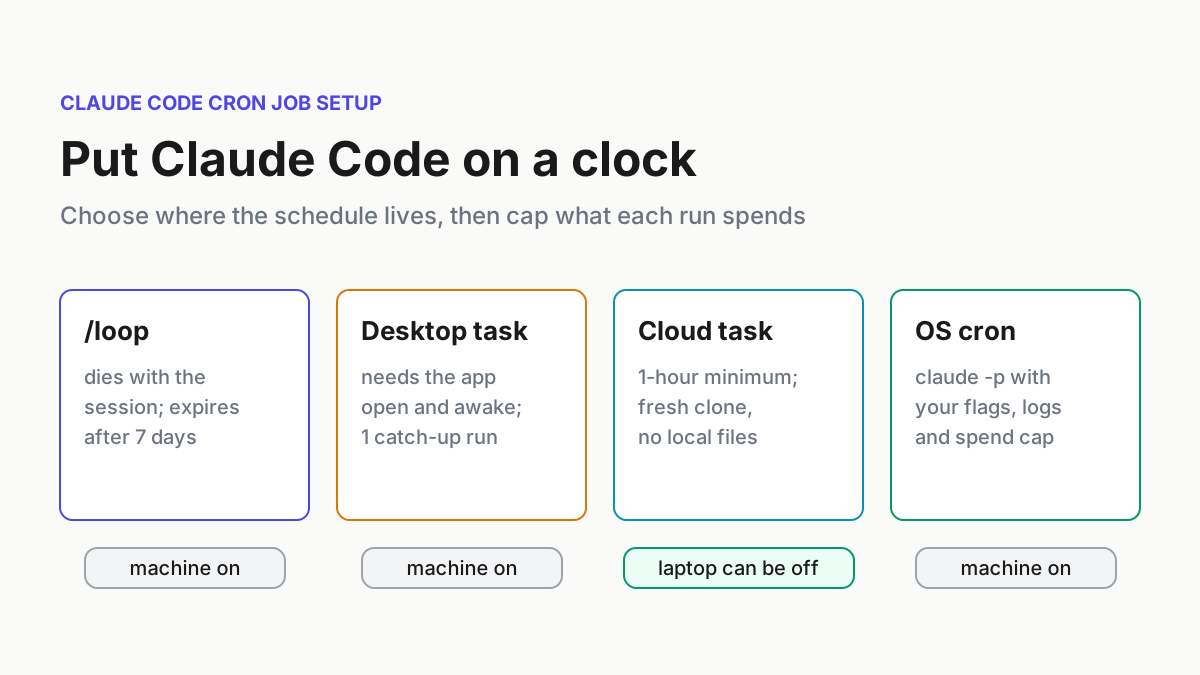
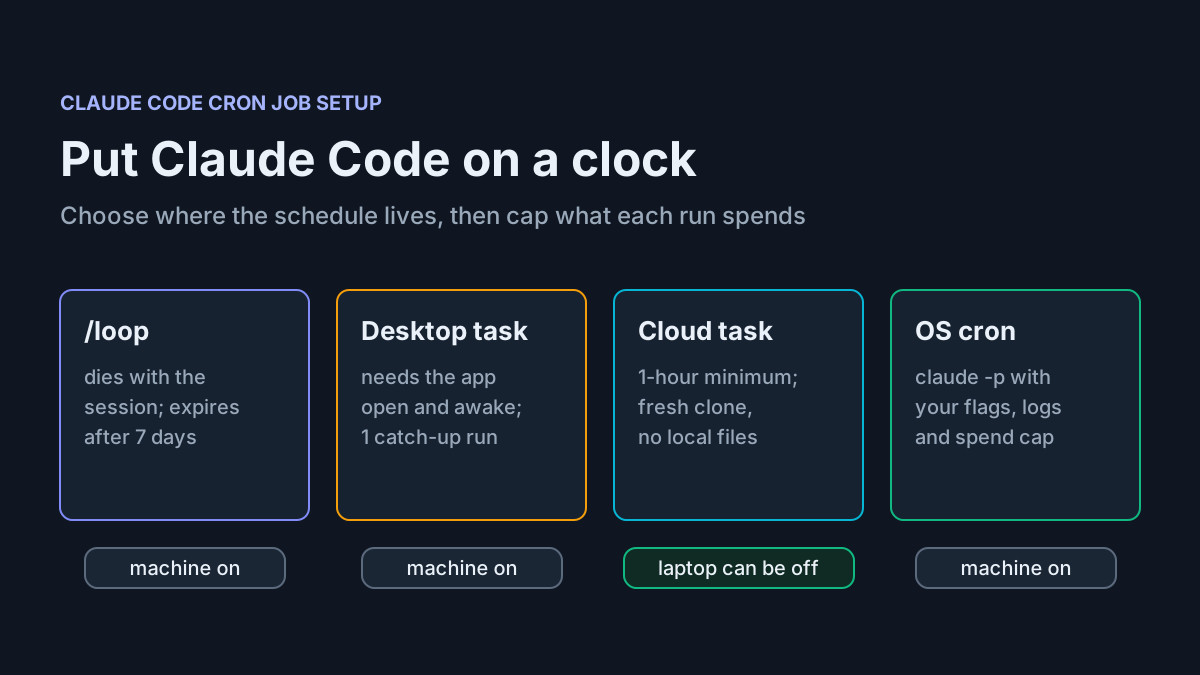
If you are still deciding how to schedule recurring jobs rather than how to script one, the cron and scheduling guide compares /loop, Desktop, cloud tasks and claude -p. This guide assumes you have chosen claude -p.
Pick flags with a decision table
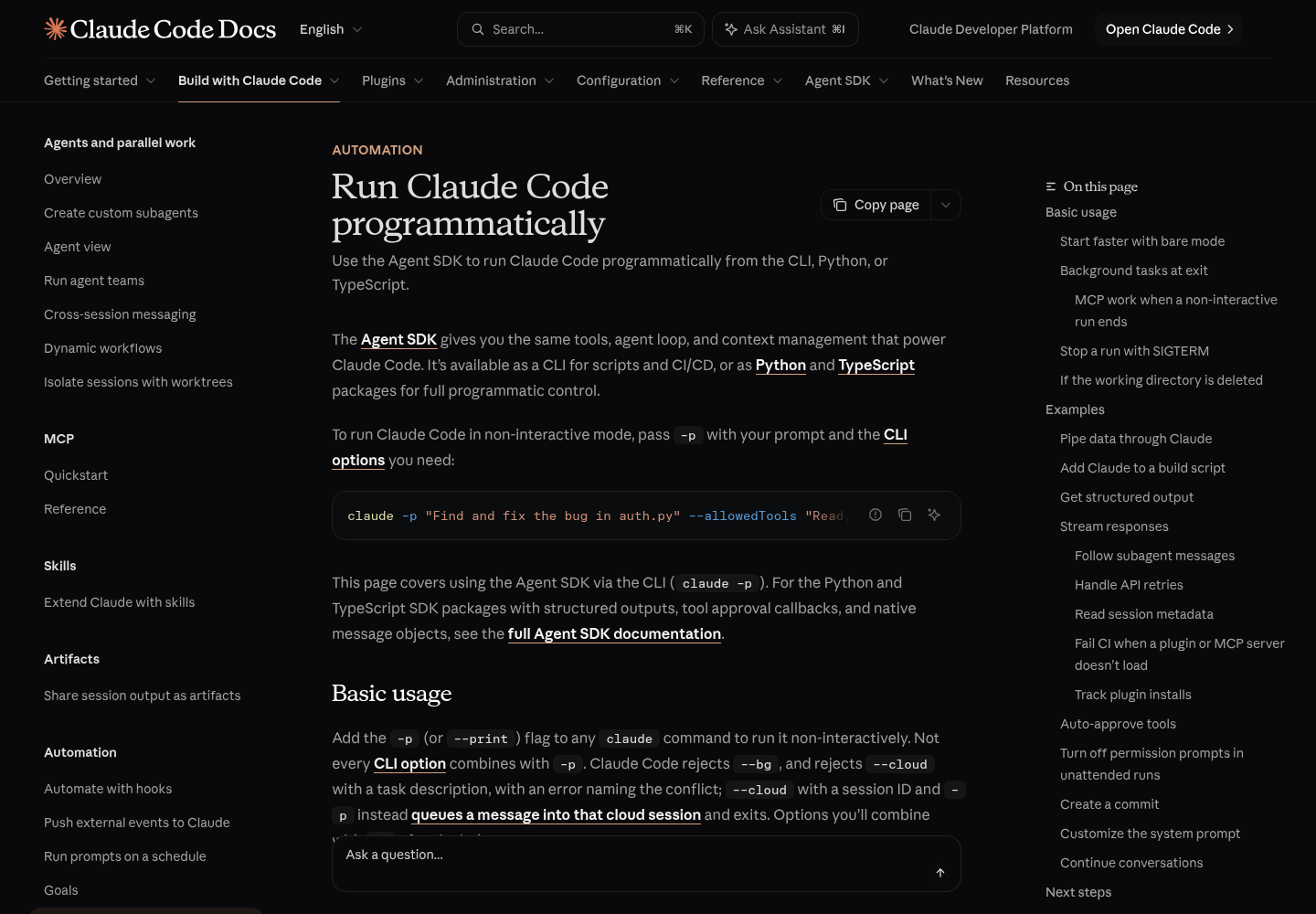
claude -p accepts most of the CLI’s flags, and the CLI reference warns that claude --help does not list every one. These are the flags that matter for scripting, filled in for a review job. The headless page below is the reference for the output formats and session flags.
| Flag | Use it when | What you should see |
|---|---|---|
-p / --print |
Any scripted call | One response, then the process exits |
--output-format text |
A human reads the output directly | Plain text; nothing to parse |
--output-format json |
A script reads the output | One JSON object with result, session_id, total_cost_usd and a per-model cost breakdown |
--output-format stream-json --verbose |
You need events as they happen, the system/init metadata or permission denials |
Newline-delimited JSON; the last line is the result message with cost and session metadata |
--json-schema '<schema>' |
You need typed data, not prose | A structured_output field, or no such field when the run ends without valid output |
--resume <session_id> |
A follow-up must land on one specific earlier run | The answer refers to the earlier turn; cost covers the whole conversation |
--continue |
Manual follow-ups in a directory where nothing else is running | Loads the most recent conversation in the current directory |
--session-id <uuid> |
You want the ID before the run starts | The run uses that ID; it must be a valid UUID |
--no-session-persistence |
The prompt or input holds secrets and you will never resume | The session is not saved to disk and cannot be resumed |
--tools "Read,Grep,Glob" |
The job only needs to read | Other built-in tools are unavailable |
--allowedTools "Bash(git diff *)" |
A specific action should run without a prompt | Matching calls run; everything else follows the permission mode |
--disallowedTools "Bash(git push *)" |
A pattern must never run | Matching calls are denied; a bare tool name removes the tool |
--permission-mode dontAsk |
Locked-down CI | Anything that would prompt is denied |
--permission-prompts none |
Nobody can answer prompts (v2.1.259 or later) | Prompts are denied and Claude is told not to retry |
--max-turns 4 |
You want a hard ceiling on agentic turns | Exits with an error when the limit is reached |
--max-budget-usd 0.50 |
You want a ceiling on estimated spend | The run stops once the estimate reaches the cap; spend can pass it slightly |
--model sonnet |
You want the same model on every run | The alias is used regardless of your settings or ANTHROPIC_MODEL |
--bare |
Reproducible CI authenticated by API key | Hooks, skills, plugins, MCP servers, auto memory and CLAUDE.md are skipped |
A few of these choices deserve a sentence each. Use json, not text, whenever a program reads the answer: text gives you no session ID, no cost and no way to tell an error message from a review. The headless docs pair stream-json with --verbose in every example, and the CLI reference says --include-partial-messages requires stream-json, so treat --verbose as part of the stream-json recipe.
--bare is the mode Anthropic recommends for scripted calls, and the headless docs say it will become the default for -p in a future release. It changes authentication as well as discovery: bare mode never reads OAuth credentials, the keychain or CLAUDE_CODE_OAUTH_TOKEN, so it needs ANTHROPIC_API_KEY or an apiKeyHelper passed through --settings. The wrapper below leaves --bare off so it can run on a subscription. For proving that a headless run ignores state you didn’t declare, follow the headless reproducibility guide rather than re-deriving it here.
Build the wrapper: diff in, checked JSON out
The wrapper does one job: pipe the staged diff into a read-only review and refuse to report success unless three checks pass. Save it as scripts/claude-review.sh.
- Refuse to run when an exported API key would silently switch billing, unless you opt in with
ALLOW_API_BILLING=1. - Refuse to run when no login exists, using the exit status of
claude auth status. - Write the staged diff to a temporary file; skip cleanly when it is empty, and refuse when it nears the 10MB stdin cap.
- Run
claude -pwith JSON output, read-only tools, no prompts, a turn limit and a budget cap. - Check the exit status, then that stdout parses as JSON, then that the answer is not an error and not empty.
- Write one tab-separated log line per run, save the
session_idfor follow-ups, and print the review.
#!/usr/bin/env bash
# claude-review.sh: review the staged diff with Claude Code headless mode.
# Exit codes: 0 ok or skipped, 1 run failed, 2 preflight refused, 3 findings (opt-in).
set -euo pipefail

MODEL="${MODEL:-sonnet}"
MAX_TURNS="${MAX_TURNS:-4}"
MAX_BUDGET_USD="${MAX_BUDGET_USD:-0.50}"
LOG="${LOG:-$HOME/.claude-review/runs.tsv}"
SESSION_FILE="${SESSION_FILE:-.git/claude-review-session}"

work="$(mktemp -d)"
trap 'rm -rf "$work"' EXIT
mkdir -p "$(dirname "$LOG")"

status="-"
log() {  # outcome, session_id, cost
  printf '%s\t%s\t%s\t%s\t%s\n' "$(date -u +%Y-%m-%dT%H:%M:%SZ)" \
    "$1" "$status" "${2:--}" "${3:--}" >> "$LOG"
}

# 1-2. Preflight. In -p mode an exported API key is always used.
if [[ -n "${ANTHROPIC_API_KEY:-}" && "${ALLOW_API_BILLING:-0}" != "1" ]]; then
  echo "claude-review: ANTHROPIC_API_KEY is set; unset it or set ALLOW_API_BILLING=1" >&2
  log "refused:api-key"; exit 2
fi
if [[ -z "${ANTHROPIC_API_KEY:-}" ]] && ! claude auth status > /dev/null 2>&1; then
  echo "claude-review: not logged in (claude auth status exited non-zero)" >&2
  log "refused:no-auth"; exit 2
fi

# 3. Input. Piped stdin is capped at 10MB.
git diff --cached > "$work/diff.patch"
if [[ ! -s "$work/diff.patch" ]]; then
  log "skipped:empty-diff"; exit 0
fi
if (( $(wc -c < "$work/diff.patch") > 9000000 )); then
  echo "claude-review: diff is near the 10MB stdin cap; review it in parts" >&2
  log "refused:too-large"; exit 2
fi

# 4. The run: read-only tools, nothing that prompts, bounded turns and spend.
prompt='You are reviewing a staged git diff supplied on stdin. List concrete bugs or risky changes, one per line, as path:line followed by one sentence. If there are none, reply with exactly: NO FINDINGS'

set +e
cat "$work/diff.patch" | claude -p "$prompt" \
  --output-format json \
  --model "$MODEL" \
  --tools "Read,Grep,Glob" \
  --permission-mode dontAsk \
  --permission-prompts none \
  --max-turns "$MAX_TURNS" \
  --max-budget-usd "$MAX_BUDGET_USD" \
  > "$work/run.json" 2> "$work/run.err"
status=${PIPESTATUS[1]}
set -e

# 5a. Gate 1: exit status. v2.1.314+ exits 1 when startup fails.
if (( status != 0 )); then
  echo "claude-review: claude -p exited $status" >&2
  cat "$work/run.err" >&2
  head -c 4000 "$work/run.json" >&2   # failures inside the run print on stdout
  log "fail:exit"; exit 1
fi

# 5b. Gate 2: stdout must be one JSON document.
if ! jq -e . "$work/run.json" > /dev/null 2>&1; then
  echo "claude-review: stdout is not JSON" >&2
  head -c 4000 "$work/run.json" >&2
  log "fail:not-json"; exit 1
fi

session_id="$(jq -r '.session_id // empty' "$work/run.json")"
cost="$(jq -r '.total_cost_usd // empty' "$work/run.json")"
result="$(jq -r '.result // empty' "$work/run.json")"

# 5c. Gate 3: no error flag and a non-empty answer.
# is_error is checked defensively; the headless docs do not define it.
if jq -e '.is_error == true' "$work/run.json" > /dev/null \
   || [[ -z "${result//[[:space:]]/}" ]]; then
  echo "claude-review: run reported an error or returned an empty result" >&2
  printf '%s\n' "$result" >&2
  log "fail:result" "$session_id" "$cost"; exit 1
fi

# 6. Success: log, keep the session ID, print the review.
log "ok" "$session_id" "$cost"
printf '%s\n' "$session_id" > "$SESSION_FILE"
printf '%s\n' "$result"

if [[ "${FAIL_ON_FINDINGS:-0}" == "1" && "$result" != "NO FINDINGS" ]]; then
  exit 3
fi
Why each choice is there:
- The diff goes in on stdin. The headless docs show the same pattern for a typo linter: piping the diff means Claude doesn’t need Bash permission to read it. The docs also cap piped stdin at 10MB and exit non-zero above it, so the wrapper refuses early with a clearer message.
--tools "Read,Grep,Glob"plusdontAsk. Reading surrounding code is enough for a review. The CLI reference notes that on macOS, Linux and WSL the default tool set leaves out Glob and Grep, so naming them here is how you ask for them.dontAskdenies anything that would prompt, and--permission-prompts nonetells Claude not to spend turns retrying a denial.- Two ceilings.
--max-turnsexits with an error at the limit, and--max-budget-usdstops the run when Anthropic’s client-side estimate reaches the cap. The CLI reference warns that spend can pass the cap, so the default leaves headroom. On a subscription the dollar figure is an estimate, but it is still a useful proxy for how much work a run did. - Three gates in order. The status catches startup failures, bad flags and kills. The JSON parse catches anything that printed text instead of a payload. The content check catches the case the v2.1.314 fix was about: a run that “succeeded” with nothing to say.
- The log line. Timestamp, outcome, exit status,
session_idandtotal_cost_usdgive you an audit trail and a per-run cost series without opening any dashboard.
To run it on every commit, install it as a git hook:
mkdir -p scripts && chmod +x scripts/claude-review.sh
cat > .git/hooks/pre-commit <<'EOF'
#!/usr/bin/env bash
FAIL_ON_FINDINGS=1 exec "$(git rev-parse --show-toplevel)/scripts/claude-review.sh"
EOF
chmod +x .git/hooks/pre-commit
With FAIL_ON_FINDINGS=1, any answer other than NO FINDINGS exits 3 and blocks the commit. git commit --no-verify remains the escape hatch when you disagree with the review.
Read the result: what success and failure look like
Every run ends in one of a handful of states. Learn them once and the log becomes readable at a glance.
| Situation | Exit status from claude -p |
What stdout holds | Wrapper outcome |
|---|---|---|---|
| Clean review | 0 | JSON with result set to NO FINDINGS |
ok, exit 0 |
| Review with findings | 0 | JSON with findings in result |
ok, exit 0, or exit 3 with FAIL_ON_FINDINGS=1 |
| Nothing staged | Not run | Nothing | skipped:empty-diff, exit 0 |
| Invalid flag | Non-zero | Nothing; the error goes to stderr before the run starts | fail:exit, exit 1 |
| Startup failure on v2.1.314 or later | 1 | The error is printed | fail:exit, exit 1 |
| Failure inside the run, such as missing authentication | Non-zero | The failure, printed as the result | fail:exit, exit 1, with stdout echoed to stderr |
| Turn limit reached | Error exit | Varies | fail:exit, exit 1 |
Killed by SIGTERM, for example by timeout |
143 | No result for the interrupted turn | fail:exit, exit 1 |
| Diff over the stdin cap | Not run | Nothing | refused:too-large, exit 2 |
| Old build exits 0 with no output | 0 | Empty | fail:not-json, exit 1 |
A healthy log line looks like this, with a real ID and cost in place of the placeholders:
2026-10-31T14:02:11Z ok 0 <session_id> <total_cost_usd>
Two patterns in the log deserve attention. A run of fail:exit lines right after an update usually means a flag changed or a credential expired; the stderr echo tells you which. A cost column that creeps upward on similar diffs usually means the model is exploring more: tighten the prompt or lower --max-turns before raising the budget.
Resume by session ID, not by --continue
A review is often the first half of a conversation. The second half, asking for fixes, should land on the same session. The docs offer two ways to get there, and only one is safe in scripts.
--continue loads the most recent conversation in the current directory, and the CLI reference notes that claude -p --continue includes sessions started with -p and the Agent SDK. If two jobs share a working directory, the second job’s “most recent” may be the first job’s conversation. The headless docs give the rule directly: if you run multiple conversations, capture the session ID and resume that.
- Read the ID the wrapper saved. It came from the
session_idfield of the JSON payload. - Resume it with the follow-up prompt and re-pass the tool and permission flags, so the follow-up is held to the same limits as the first run.
- Read
.resultand check that it refers to the findings from the first run. - Read
.total_cost_usdand remember that, per the headless docs, a resumed run reports the conversation’s whole total, earlier runs included.
sid="$(cat .git/claude-review-session)"
claude -p "For each finding in your review, propose the smallest fix as a unified diff. Do not edit files." \
  --resume "$sid" \
  --output-format json \
  --tools "Read,Grep,Glob" --permission-mode dontAsk --permission-prompts none \
  --max-turns 4 --max-budget-usd 0.50 \
  > followup.json
jq -r '.result' followup.json
jq -r '.total_cost_usd' followup.json   # conversation total, not just this run
The expected observation is a set of diffs that name the same files and lines as the first review. If the answer reads like a fresh start, you resumed the wrong ID.
Three related flags round this out. --fork-session with --resume creates a new session ID instead of reusing the original, which lets you try two different follow-ups from one review. --session-id assigns a UUID before the run starts, so a supervisor can record the ID even if the run is killed:
sid="$(uuidgen | tr 'A-Z' 'a-z')"
claude -p "Start the review" --session-id "$sid" --output-format json > first.json
claude -p "Try a different fix" --resume "$sid" --fork-session --output-format json \
  | jq -r '.session_id'   # a new ID, not $sid
The headless docs add that the two commands can run from different directories, because Claude Code finds a session by its ID in any project on the machine. They will not find it in a different configuration directory: the authentication docs explain that each CLAUDE_CONFIG_DIR keeps its own session history. Budget caps also behave differently on resume; the CLI reference says totals restored from earlier runs don’t count toward --max-budget-usd.
Extract structured data with --json-schema
When a script needs a list, parsing prose is fragile. --json-schema asks Claude Code to return output that matches a schema in a separate structured_output field, after the agent finishes its work. This example uses the schema from the headless docs to pull function names from a file.
- Write the schema and check that it is at least valid JSON with
jq -e . <<< "$schema". - Run with both
--output-format jsonand--json-schema; the docs require the pair. - Check that
structured_outputexists and holds an array before using it. The docs say a run that ends without valid structured output, for example because Claude declined, has nostructured_outputfield at all. - On failure, print
.resultso you can see why.
schema='{"type":"object","properties":{"functions":{"type":"array","items":{"type":"string"}}},"required":["functions"]}'
jq -e . <<< "$schema" > /dev/null || { echo "schema is not JSON" >&2; exit 1; }

claude -p "Extract the main function names from auth.py" \
  --output-format json \
  --json-schema "$schema" \
  --tools "Read" --permission-mode dontAsk --max-turns 3 \
  > functions.json || { echo "claude -p failed" >&2; exit 1; }

if jq -e '(.structured_output.functions | type) == "array"' functions.json > /dev/null; then
  jq -r '.structured_output.functions[]' functions.json
else
  echo "no structured_output; result text follows" >&2
  jq -r '.result // empty' functions.json >&2
  exit 1
fi
On success you get one function name per line, ready for while read. If the schema itself is broken, Claude Code exits with Error: --json-schema is not a valid JSON Schema followed by the validator’s diagnostic, so that failure surfaces through the exit status. One limit to remember: the docs say Claude Code accepts the format keyword, such as "format": "email", but treats it as an annotation and doesn’t enforce it. Validate formats yourself if they matter.
Scope tools for unattended runs
Nobody is at the keyboard when a hook or a CI job runs, so every permission decision has to be made in advance. The headless docs describe the default: since v2.1.302, claude -p runs start in Manual mode when nothing sets a permission mode, a call that needs approval is denied unless something approves it, and calls to tools that need no approval still run. The permissions docs list what needs no approval in Manual mode, such as file reads in the working directory and the built-in read-only command set. Pick the narrowest row that does the job.
| Job | Flags | What runs | What is refused |
|---|---|---|---|
| Read-only review | --tools "Read,Grep,Glob" --permission-mode dontAsk |
Reads in the working directories | Every edit and shell command |
| Commit from staged changes | --allowedTools "Bash(git diff *),Bash(git log *),Bash(git status *),Bash(git commit *)" |
Those git subcommands | Other shell commands that need approval |
| Apply lint fixes | --permission-mode acceptEdits |
File writes and common filesystem commands such as mkdir and mv |
Other shell commands and network requests without an allow rule |
| Anything near a remote | Add --disallowedTools "Bash(git push *)" |
Unchanged | git push in the form Claude usually writes |
| No permission host | Add --permission-prompts none |
Unchanged | Prompts, with Claude told not to retry |
The space in Bash(git diff *) matters. The headless docs point out that Bash(git diff*) without the space would also match git diff-index. Deny rules win over allow rules regardless of specificity, and the permissions docs are candid that a Bash rule matches command text, not the program: Bash(git push *) doesn’t stop git -C . push. Use rules to shape routine behavior and a sandbox or container for a real boundary. For the broader question of which jobs deserve unattended access at all, see the headless trust-tier guide and the restricted-mode fleet policy.
One default surprises people. Without --bare, a -p session runs the hooks in a project’s .claude/settings.json and connects the servers in its .mcp.json, even in a folder you never trusted, and it shows no trust dialog. Before running claude -p in a repository you didn’t write, the permissions docs suggest --bare, --setting-sources user, or --settings '{"disableAllHooks": true}'.
To see what was refused, switch to stream-json. The headless docs say denials appear as permission_denied system messages and that the final result message lists them in permission_denials. The last line of the stream is that result message:
claude -p "Run npm test and summarise the failures" \
  --output-format stream-json --verbose \
  --tools "Read,Grep,Glob,Bash" \
  --permission-mode dontAsk --permission-prompts none --max-turns 3 \
  | tail -n 1 | jq '.permission_denials'
In dontAsk mode npm test isn’t in the read-only command set, so you should see it listed as denied while the run still finishes. To confirm which tools a session actually loaded, read the system/init event, which the docs say reports the model, tools, MCP servers and plugins: jq -c 'select(.type == "system" and .subtype == "init") | .tools' on the same stream.
Know which meter you are spending
A headless run draws on whichever credential wins the precedence order in the authentication docs. Cloud provider variables come first, then ANTHROPIC_AUTH_TOKEN, then ANTHROPIC_API_KEY, then apiKeyHelper, then CLAUDE_CODE_OAUTH_TOKEN, then Anthropic profiles, and only then your subscription login from /login. A key exported months ago for an unrelated project sits above your plan in that list.
- [ ] Run
claude auth status | jq -r '.authMethod'in the same shell, or the same CI environment, that runs the script. - [ ] If you expected your plan and see
api_key, rununset ANTHROPIC_API_KEY, remove the export from your shell profile, and check again. The authentication docs giveunset ANTHROPIC_API_KEYas the way back to the subscription and/statusas the confirmation. - [ ] If you meant to use Console billing, set
ALLOW_API_BILLING=1for the wrapper and consider--bare, which only authenticates by API key orapiKeyHelperanyway. - [ ] For CI on a subscription where no browser is available, generate a one-year token with
claude setup-tokenand set it asCLAUDE_CODE_OAUTH_TOKEN. It requires a Pro, Max, Ultra, Team or Enterprise plan, and bare mode ignores it. - [ ] Read
total_cost_usdcorrectly for your meter. The headless docs call it a client-side estimate that can differ from your bill. On an API key it approximates real charges. On a subscription the costs docs say usage is included in the plan, so the dollar figure is not a charge; it is a list-price measure of work, which is exactly what the measurement drill needs.
The environment variables guide covers where these variables can be set and how to prove which one is active. If your plan has usage credits turned on, work past the limit can become a real charge; the usage credits guide shows how to cap or disable that.
Measure the headless drain on your own plan
The reports in issue #97074 span plans, models and Claude Code versions. Your number is the one that should drive your scheduling. The drill below follows the method the reporters converged on: run the same work in both modes, alternate the order, and compare dollars of list-price work per point of the 5-hour window.
- Pick a fixed task that does real work, such as reading five source files and answering ten short questions, and write the prompts down. The bench repository’s runs cost about $0.60 to $0.85 each at API prices.
- Make batches big enough to move the meter. The window reading is a whole percentage, so a batch should move it ten points or more; the bench suggests seven runs per batch.
- Make sure nothing else uses the account during a batch, on any machine. That includes claude.ai chat.
- Strip inherited variables before starting the interactive arm. Two commenters found that an interactive
claudelaunched from a shell that inheritedCLAUDE_CODE_ENTRYPOINT=sdk-clirecordssdk-clitoo: useenv -u CLAUDE_CODE_ENTRYPOINT -u CLAUDE_CODE_CHILD_SESSION claude. - Read the 5-hour window before and about 60 seconds after each batch. In the TUI,
/usageshows plan usage bars for subscribers; one commenter notes it refreshes about once a minute, hence the wait. - Record cost per batch. For headless runs, sum
total_cost_usdfrom the wrapper’s log. For the interactive arm, read the Session block’s total cost in/usage, which the costs docs say is computed locally at list price. Both are list-price estimates, so they compare fairly. - Run the batches in the order headless, interactive, interactive, headless inside one window, then compute dollars per point for each mode and divide.
Reporters also read the window from a tiny headless probe. This is their method, not a documented interface, and the field path may change:
# Reporter method from issue #97074; not in Anthropic's docs. Prints the 5-hour utilization.
claude -p "reply: ok" --model haiku --output-format stream-json --verbose \
  | jq -r 'select(.type == "rate_limit_event") | .rate_limit_info.unifiedWindows.five_hour.utilization'
If it prints nothing, fall back to /usage. Here is how a filled record looks. Illustrative: these numbers are a model of the arithmetic, not a measurement.
| Batch (Illustrative) | Mode | Runs | List-price cost | 5-hour window | Points | $ per point |
|---|---|---|---|---|---|---|
| A1 | claude -p |
7 | $5.10 | 10% to 22% | 12 | 0.43 |
| B1 | Interactive | 7 | $4.90 | 22% to 28% | 6 | 0.82 |
| B2 | Interactive | 7 | $5.20 | 28% to 34% | 6 | 0.87 |
| A2 | claude -p |
7 | $4.95 | 34% to 45% | 11 | 0.45 |
| Total | Headless vs interactive | 14 + 14 | $10.05 vs $10.10 | 23 vs 12 | 0.44 vs 0.84 |
In this Illustrative record the interactive arm buys about 1.9× as much work per point, which would put the plan in line with the issue. Then decide:
| Your measured ratio | What it suggests | What to change |
|---|---|---|
| About 1.0 | Your plan and version don’t show the gap | Keep headless jobs as they are; re-measure after major updates |
| 1.3 to 2.0 | Consistent with several reports | Keep claude -p for short bounded jobs; move long multi-turn work to interactive sessions |
| Above 2.0 | Consistent with the steepest reports | Lower --max-turns, consider Console billing for CI, and add your numbers to the issue |
If your headless jobs share a login with interactive sessions, the habits in the shared usage window guide still apply on top of this ratio.
Troubleshooting claude -p scripts
| Symptom | Likely cause | Fix | Expected observation after the fix |
|---|---|---|---|
| A pipeline passes with empty output | Build older than v2.1.314, or claude -p ... | jq without pipefail hid the status |
claude update; use set -o pipefail or read PIPESTATUS as the wrapper does |
Startup failures print an error and exit 1 |
jq: parse error |
Default text output, a failure printed as text, or a whole stream-json stream parsed as one document |
Add --output-format json; for streams use tail -n 1 or jq -c 'select(...)' |
jq -e . run.json succeeds |
| Resume can’t find the session | Wrong ID, a run with --no-session-persistence, or a different CLAUDE_CONFIG_DIR or machine |
Capture session_id from JSON output; resume with the same config directory |
The follow-up refers to the earlier turn |
| Every tool call is refused | Manual mode in -p, no allow rule, or a rule typo such as Bash(git diff*) |
Add a scoped --allowedTools rule with the space before *; check system/init tools |
permission_denials is empty for intended actions |
| Unexpected API charges | Exported ANTHROPIC_API_KEY is always used in -p, or --bare |
unset ANTHROPIC_API_KEY; check authMethod |
authMethod reads claude.ai |
| Window drained mid-batch | The reported sdk-cli weighting, long multi-turn runs or subagents |
Lower --max-turns and --max-budget-usd; move heavy work to interactive; measure |
A known ratio and a log with bounded costs |
| The run doesn’t exit | Waiting for background work, which has a 10-minute idle cap by default, or for a permission host | Add --permission-prompts none; set CLAUDE_CODE_PRINT_BG_WAIT_CEILING_MS; wrap with timeout |
The run ends within the cap |
| Exit status 143 | SIGTERM from timeout or a supervisor; the turn is left unfinished with no result |
Send SIGINT first, for example timeout -s INT, to end the turn |
The turn ends instead of being cut off |
--max-turns error |
The task needs more turns than allowed | Narrow the prompt before raising the limit | The run finishes inside the limit |
If the drain appears after an update that changed subagent behavior, check the fork-subagent migration guide: every subagent sends its own requests, and the costs docs list subagents among the usual reasons usage climbs.
Roll back and clean up
Every change in this guide is reversible. Work through the list that matches what went wrong.
- [ ] Billing surprise:
unset ANTHROPIC_API_KEY, delete the export from your shell profile or CI secrets, and confirm withclaude auth status. - [ ] Window pressure: move heavy, multi-turn work back to interactive sessions, keep the wrapper for short reviews, and lower
MAX_TURNSandMAX_BUDGET_USD. - [ ] Blocked commits you can’t wait on:
git commit --no-verifyfor one commit, orrm .git/hooks/pre-committo remove the hook. - [ ] Secrets in a reviewed diff: delete the wrapper’s log lines and
.git/claude-review-session. Claude Code keeps transcripts locally, and the CLI reference documentsclaude purge [path], which deletes all local Claude Code state for a project; run it with--dry-runfirst. For future runs on sensitive input, add--no-session-persistence. - [ ] Stuck runs: wrap the call in
timeout -s INT 600so the turn ends cleanly instead of being cut off.
The command-center thesis covers the habit that makes all of this easier at scale: one place where every agent run, its cost and its outcome are visible.
Sources
- Frostfire (@frosty575) on X, post on headless claude -p and the 5-hour limit, Oct 25, 2026
- Anthropic, Run Claude Code programmatically
- Anthropic, CLI reference
- Anthropic, Authentication
- Anthropic, Manage costs effectively
- Anthropic, Configure permissions
- Anthropic, Claude Code release v2.1.314 on GitHub, Oct 30, 2026
- GitHub, anthropics/claude-code issue #97074, opened Sep 25, 2026
- achapla, claude-p-limit-bench