Claude Ultra vs Max vs Pro for Claude Code: Measure One Week, Then Pick the Plan
Claude Ultra vs Max vs Pro for Claude Code: read your limits in /usage and Settings, fill a one-week worksheet, verify Ultra and pick stay, upgrade or credits.

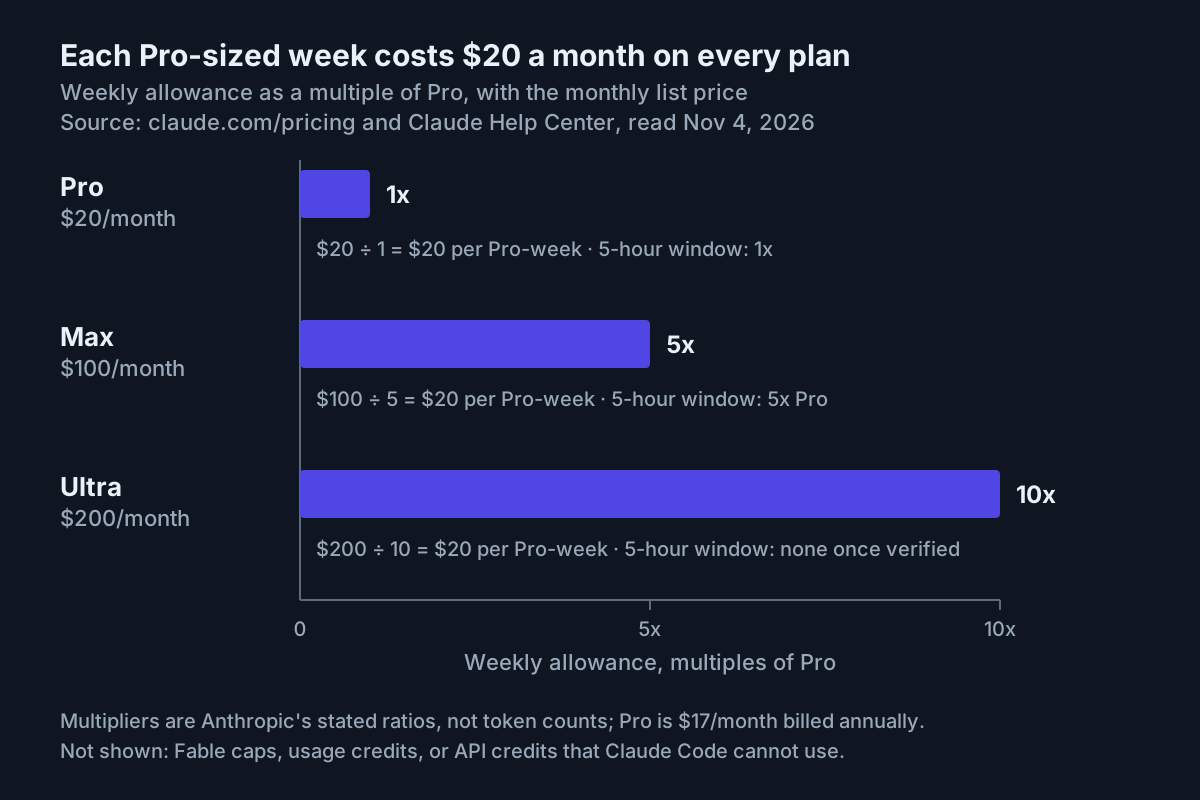
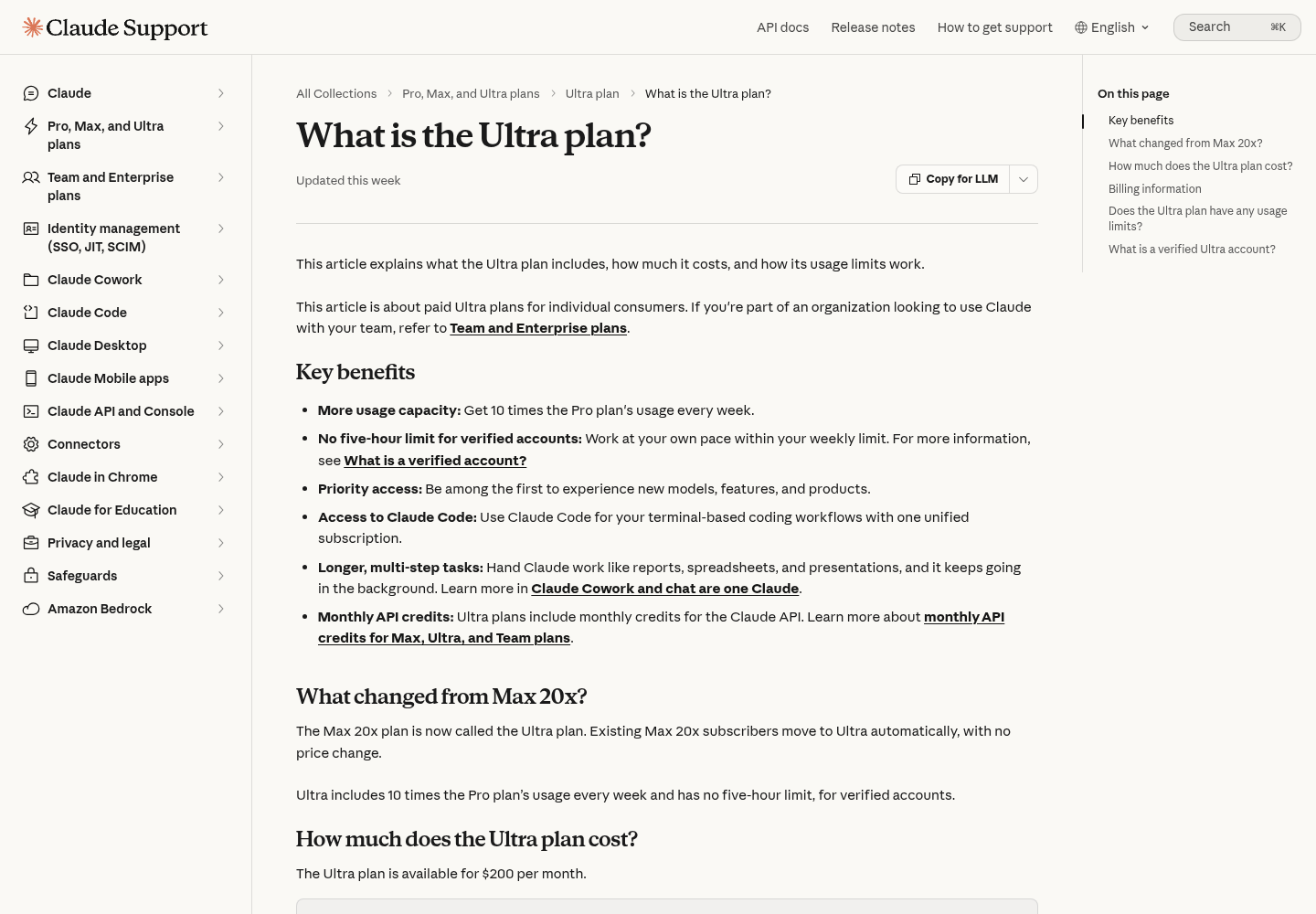
If Claude Code is where you spend most of your working day, the plan question has changed. Choosing between Claude Ultra vs Max, or staying on Pro, now comes down to which wall you keep hitting: the rolling five-hour session window or the weekly allowance. On October 30, 2026, Anthropic announced on X that Max 5x is now called Max and Max 20x is now called Ultra. Prices stay at $100 and $200 a month. The same post said the five-hour limit is being removed for verified Ultra accounts, starting with most existing subscribers. Newer accounts keep a temporary limit until they are verified, and weekly limits are unchanged.
That split matters. If your overnight agent run dies at hour five, there is now a plan that removes that wall. If you run out of weekly allowance by Thursday, the rename gives you nothing new.
This guide is for anyone who pays for Pro, Max or Ultra, uses Claude Code daily and wants to decide whether to stay, upgrade, downgrade or turn on usage credits, based on evidence. You need an active subscription signed in to Claude Code, access to Settings > Usage on claude.ai, and one to two weeks of normal work. By the end you will have a filled measured-week worksheet, a decision you can explain with one rule, confirmation of which limits apply to your account, and a way to undo the change if the next week proves it wrong.
Prices, ratios and limit behavior below come from Anthropic’s pages as read on November 4, 2026. Thresholds such as “five-hour stops on three or more days” are this guide’s rules of thumb, not Anthropic’s. The worked example is Illustrative.
The two walls: how Pro, Max and Ultra limit Claude Code
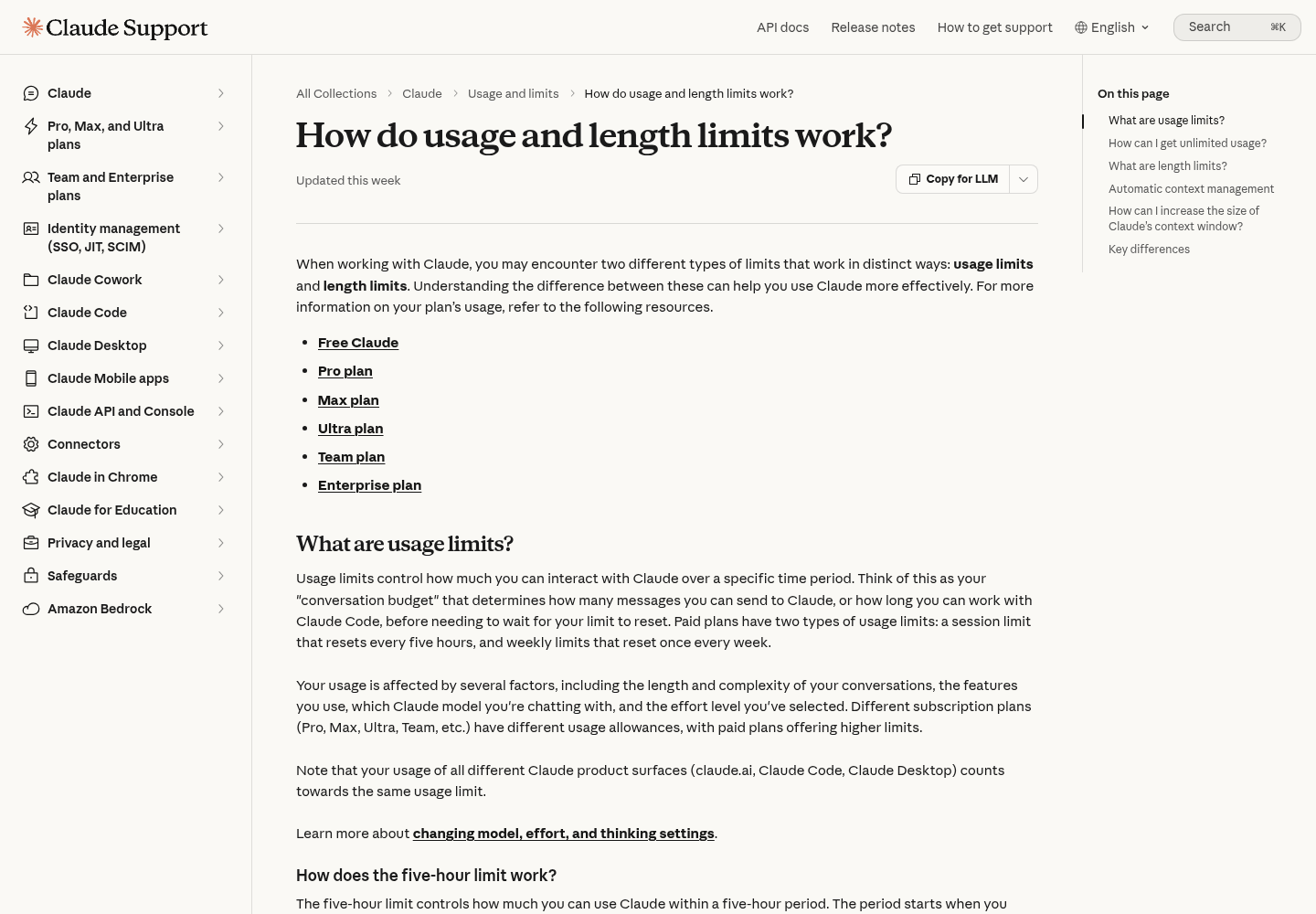
Anthropic’s usage and length limits article describes two usage limits on paid plans: a session limit that resets every five hours, and weekly limits that reset once a week. The five-hour period starts when you send your first message and resets in full five hours later. Weekly limits reset at a fixed day and time assigned to your account, and that time doesn’t move with your subscription date. Weekly limits apply across all models, and some plans add a separate weekly limit for Fable.
Everything draws from one pool. The Claude Code plan article says Claude Code in the terminal and in supported IDEs counts toward the same limits as Claude itself. So a long browser chat at lunch spends the same allowance as your afternoon refactor.
Here is how each plan’s limits compare, compiled from the Claude pricing page, the Ultra plan article and the Claude Code plan article:
| Limit or feature | Pro | Max | Ultra, verified | Ultra, not yet verified |
|---|---|---|---|---|
| Monthly price | $20 monthly, or $17 a month billed annually | $100, monthly only | $200, monthly only | $200, monthly only |
| Five-hour session limit | 1x (the baseline) | 5x Pro | None | Temporary limit |
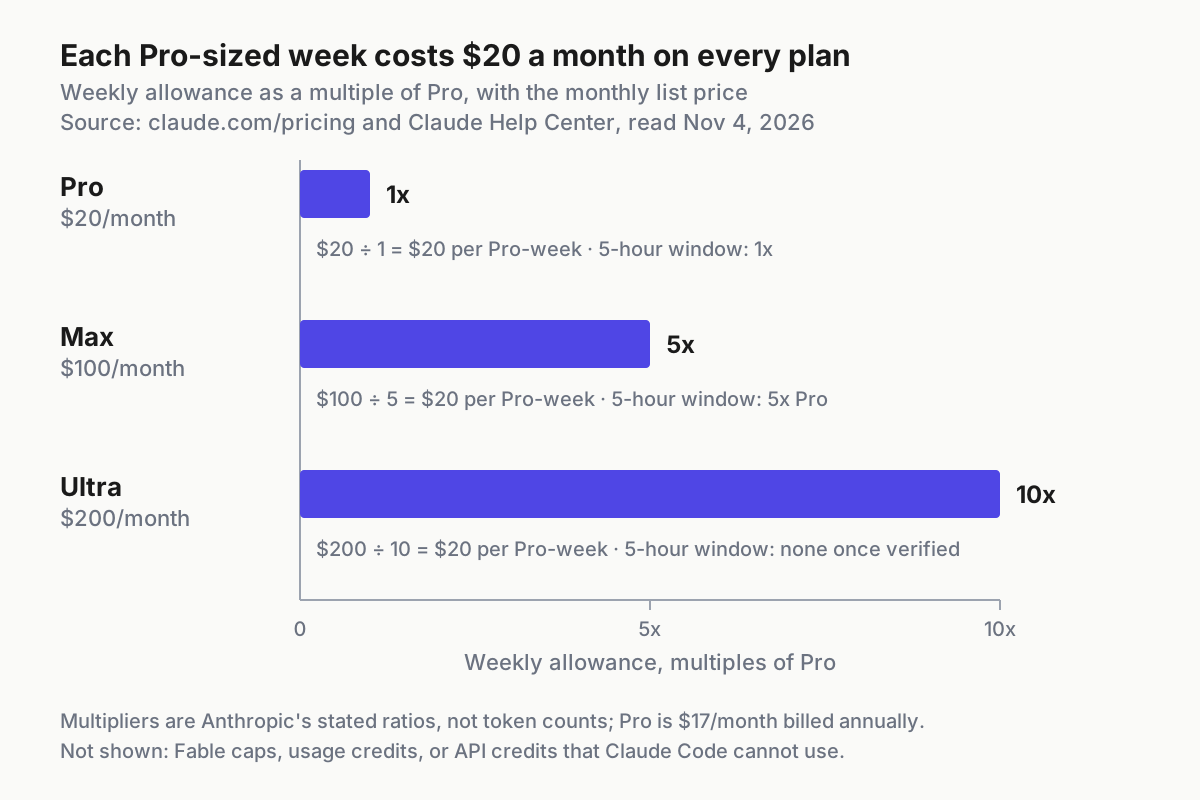
| Weekly limit, all models | 1x | 5x Pro | 10x Pro | 10x Pro |
| Fable | Paid with usage credits | Separate weekly Fable limit, up to half of weekly limits | Same as Max | Same as Max |
| Wrap-up allowance after a five-hour stop | Up to once per weekly period | Each time, within the weekly limit | Does not apply | Works as on Max |
| Monthly API credits | None | $100, not usable in Claude Code | $200, not usable in Claude Code | $200, not usable in Claude Code |
Three facts in that table drive most decisions.
First, Ultra’s weekly allowance is twice Max’s (10x Pro vs 5x Pro) at twice the price. Divide each monthly price by its weekly multiple and every plan costs $20 a month per Pro-sized weekly allowance. Moving up doesn’t get you a volume discount. You pay for more capacity and, on Ultra, for a different limit structure.
Second, Ultra’s change removes the five-hour wall but doesn’t raise weekly totals. If the weekly bar is your problem, the rename changes nothing.
Third, the multipliers describe usage, not tokens. The pricing page says how fast you reach a limit depends on the model you use, how long your chats are and how large your files are. The Ultra article adds that Anthropic may limit usage in other ways at its discretion. Treat the ratios as the plan’s structure, then measure your own usage against it.
Before the measured week: a clean setup checklist
A week of measurements only helps if the bars you read reflect your subscription. The most common problem is Claude Code silently billing an API key instead. The Claude Code plan article warns that if an ANTHROPIC_API_KEY environment variable is set, Claude Code uses that key instead of your subscription. You then pay API usage charges rather than using your plan’s included usage, and your plan bars stay suspiciously flat.
- [ ] Confirm that no API key overrides the subscription (commands below).
- [ ] In Claude Code, run
/statusand confirm you are signed in to your Pro, Max or Ultra account. If you were logged in through Claude Console pay-as-you-go, run/loginand switch to the subscription. - [ ] Open Settings > Usage on claude.ai and write down your weekly reset day and time. That is the first row of the worksheet.
- [ ] Decide how you’ll handle usage credits. Either turn them off for the week so every stop is visible, or leave them on with a low monthly spend limit and record what they spend each day.
- [ ] Save any limit reset you have. Using one mid-week sets a bar back to full and hides your real usage pattern. If you must use one, note it in the notes column.
- [ ] Pick a typical week. A release crunch or a holiday will push you toward the wrong plan.
- [ ] Record your Claude Code version, because
/usagefeatures have changed between versions.
# 1. Is an API key overriding your subscription? (macOS and Linux shells)
printenv ANTHROPIC_API_KEY
# Expected when plan usage is in effect: no output.
# If a key prints, remove it for this shell, then delete it from your shell profile:
unset ANTHROPIC_API_KEY

# 2. Record the Claude Code version you measured with
claude --version

# 3. If the subscription login option is missing, update the client
claude update
# Then restart the terminal completely, run `claude`, and choose the subscription account.
The third step follows Anthropic’s own troubleshooting order: /logout inside Claude Code, claude update, a full terminal restart, then claude and the correct account. If you don’t want the API credit prompt to appear at all, the same article says to run claude logout and claude login using only your plan credentials, without adding Console credentials. Where else environment variables can hide is covered in our Claude Code environment variables guide.
Read your position in /usage and Settings > Usage
You’ll check two places every evening. They answer different questions, so learn what each one shows before the week starts.
- Run
/usagein Claude Code. Anthropic’s Claude Code costs documentation says subscribers see plan usage bars, activity stats and a usage breakdown. The Session block at the top shows a dollar figure calculated from token counts at list price. On Pro, Max and Ultra that figure doesn’t affect what you’re billed, so ignore it here. - Press
dorwto switch the breakdown between the last 24 hours and the last 7 days. The breakdown shows how much of your recent usage went to skills, subagents, plugins and MCP servers, and suggests a change for anything behind 10% or more of it. It only uses session history from that machine, so claude.ai and your other computers are excluded. Use it to explain a spike, not to fill in the worksheet. - Open Settings > Usage on claude.ai. On Pro, Max and Ultra, running
/usage-creditsin Claude Code opens the same page. The usage limit best practices article describes its Plan usage limits section. Current session shows how much of the five-hour limit you’ve used and the time remaining. Weekly limits show when the all-models limit and the Fable limit reset. These numbers cover your whole account, and they’re the ones that go in the worksheet. - Check whether a Current session bar exists. On Pro and Max it always should. On Ultra, its absence means your account is verified, as described later.
- If
/usageshows a Showing last-known usage note, the request for your plan limits was rate limited, and the bars can be up to 60 minutes old. Pressrto retry. A message such as “rate limited until 3:14am” means Claude Code can’t fetch your usage data until then. It doesn’t mean your work is limited.
These are the messages you’ll meet during the week and what each one means for the worksheet:
| What you see | What it means | Record it as |
|---|---|---|
| Current session bar at 100% with time remaining | You reached the five-hour limit | One five-hour stop, with the time |
| “Usage limit reached · wrapping up” in Claude Code | The wrap-up allowance is finishing an in-progress step after the five-hour limit | One five-hour stop |
| “You’ve hit your session limit” or “You’ve hit your weekly limit” | A limit shared across all models; switching with /model won’t restore access |
The stop and which limit it was |
| “Now using credits” | Your request continued on usage credits | Credits spent that day |
| No Current session bar on an Ultra account | Your account is verified, so the five-hour limit doesn’t apply | “Verified” plus the date |
The measured-week worksheet
The worksheet has one row per day, from one weekly reset to the next. Each column maps to a rule in the decision table further down, so don’t drop any of them:
- Day and Claude Code hours. Rough active hours. These tell you whether stops come from long days or from heavy use in a short window.
- Five-hour stops. Count every time the Current session bar reached 100% or Claude Code reported the session limit. This is the wall Ultra removes.
- Weekly % at end of day (all models). Read it from Settings > Usage. The last value before the reset is your weekly peak.
- Fable weekly % at end of day. Only on Max and Ultra, which have a separate weekly Fable limit. On Pro you pay for Fable with usage credits, so record that spend in the credits column instead.
- Credits spent. Take month-to-date usage credit spend from Settings > Usage or the usage credits row in
/usage, and record the change since yesterday. - Long runs blocked. Any unattended or overnight run that a five-hour stop interrupted. Keep this separate from total stops, because it’s the only signal that justifies Ultra for its limit structure alone.
- Notes. Parallel sessions, agent teams, a large repository import, a limit reset you used, a verification email.
Copy this CSV into a spreadsheet or a text file and fill in a row each evening. The first two rows show the format. The full Illustrative week is in the next section.
day,cc_hours,five_hour_stops,weekly_pct_eod,fable_pct_eod,credits_usd,long_runs_blocked,notes
reset,0,0,0,0,0.00,0,"Weekly reset Mon 09:00 per Settings > Usage; credits off"
Mon,6,1,14,6,0.00,0,"Migration refactor; stop at 15:40"
Tue,,,,,,,
Wed,,,,,,,
Thu,,,,,,,
Fri,,,,,,,
Sat,,,,,,,
Sun,,,,,,,
summary,,,,,,,"weekly_peak=; stop_days=; fable_peak=; credits_total=; long_runs_blocked="
Record percentages, not impressions. If you write “heavy day” instead of “51%”, you’ll have nothing to compare against the next plan.
Worked example (Illustrative): a week on Max that keeps hitting hour five
In this example, the developer is on Max and works mostly in Claude Code on a large backend repository. Most evenings they start an unattended test-and-fix run. Their weekly reset is Monday at 09:00, and usage credits were off for the week.
| Day | Claude Code hours | Five-hour stops | Weekly % (all models), end of day | Fable weekly %, end of day | Credits spent | Long runs blocked | Notes |
|---|---|---|---|---|---|---|---|
| Mon | 6 | 1 | 14% | 6% | $0 | 0 | Migration refactor; stop at 15:40 |
| Tue | 5 | 1 | 27% | 10% | $0 | 1 | Evening run stopped when the window filled |
| Wed | 3 | 0 | 34% | 12% | $0 | 0 | Code review only |
| Thu | 7 | 2 | 51% | 25% | $0 | 1 | Two parallel sessions; overnight run blocked at 01:10 |
| Fri | 4 | 0 | 60% | 28% | $0 | 0 | Bug fixes |
| Sat | 0 | 0 | 60% | 28% | $0 | 0 | Off |
| Sun | 2 | 0 | 64% | 30% | $0 | 0 | Small cleanup |
| Week | 27 | 4 stops on 3 days | Peak 64% | Peak 30% | $0 | 2 |
Here is how to read it, one signal at a time.
- Weekly peak is 64%. The weekly allowance isn’t the problem. Max covered the week with a third to spare.
- Pro is out. 64% of Max’s weekly allowance is 3.2 Pro-sized weeks (0.64 × 5), more than three times what Pro allows.
- The five-hour wall is the problem. There were four stops on three days, and two of them killed unattended runs.
- Fable didn’t limit anything. Its bar peaked at 30%.
- Ultra projection (arithmetic, not a measurement). The same usage would be about 32% of Ultra’s weekly allowance (3.2 ÷ 10), with no five-hour stops once the account is verified.
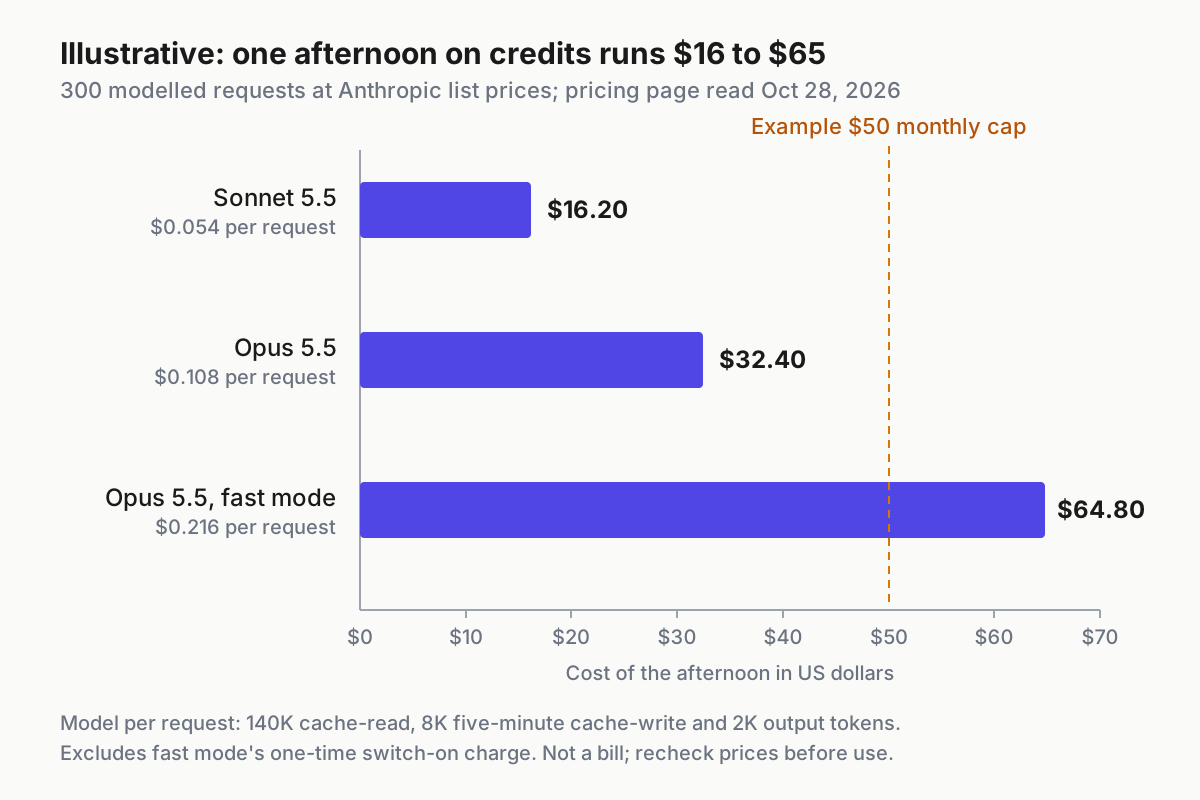
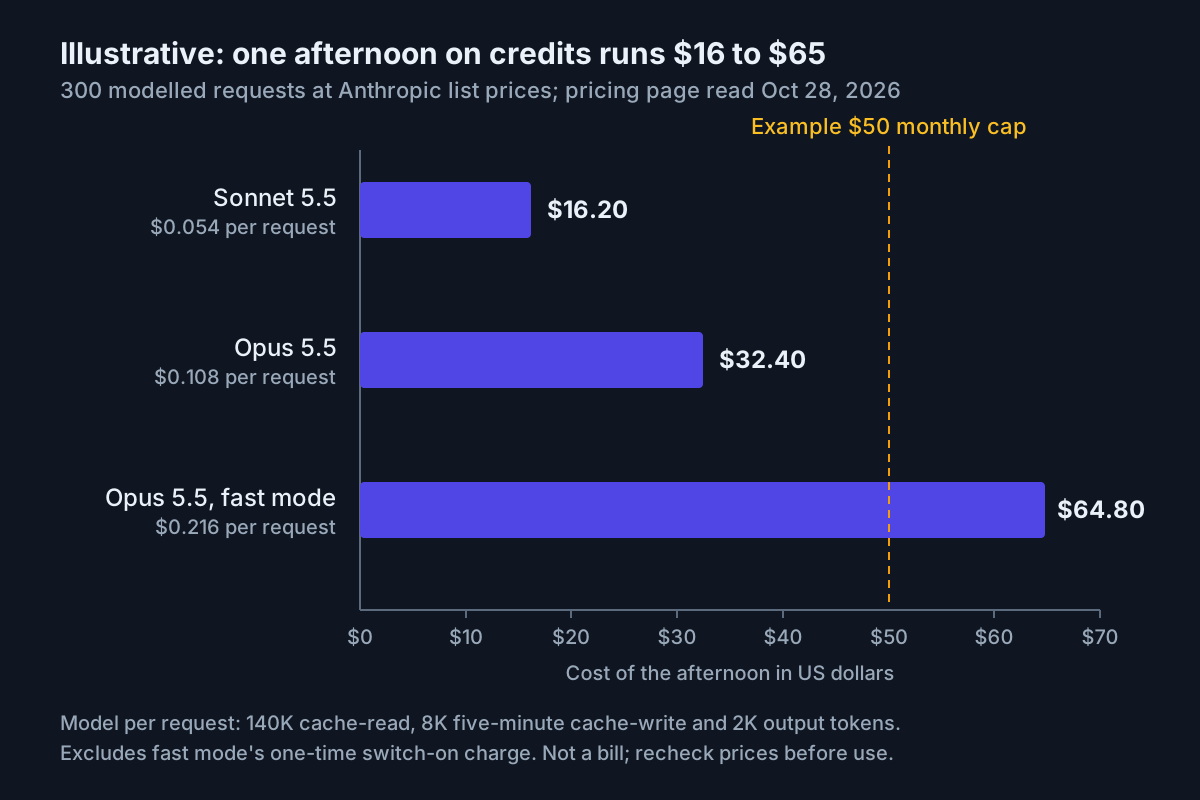
There are three ways to respond. Staying on Max and starting heavy work at the top of a fresh window helps interactive days, but a run that needs more than five hours still can’t fit in one window. Staying on Max and turning on usage credits keeps work going after any five-hour session limit, according to the usage credits article. But those requests are billed at standard API rates, so a stop most evenings becomes a recurring extra charge. Moving to Ultra costs $100 more a month and removes the wall entirely, once verified.
The decision in this example: measure a second week. If it shows blocked overnight runs again, move to Ultra and confirm verification before relying on it. On Ultra, expect no Current session bar and a weekly peak near a third. If the second week shows no blocked runs and the stops were all daytime interactive work, the right answer is to stay on Max and change when heavy sessions start.
Turn your week into a decision
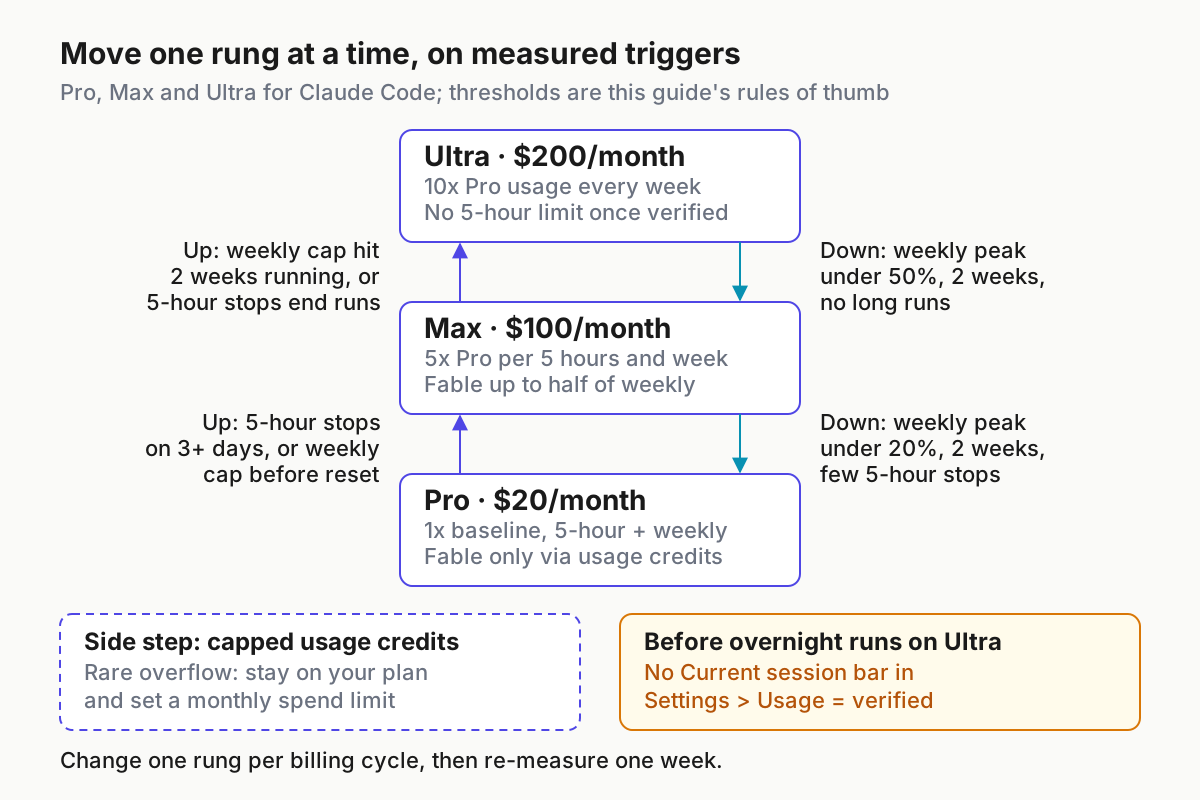
Use the summary row of your worksheet and find the matching line below. If two lines match, use the more conservative one and measure another week.
| Current plan | What your measured week shows | Decision | Why it works |
|---|---|---|---|
| Pro | Weekly peak under 80%, at most one five-hour stop, no blocked long runs | Stay on Pro | The plan covered your real work, and upgrading buys allowance you won’t use |
| Pro | One five-hour or weekly stop in a month, otherwise comfortable | Stay on Pro and turn on usage credits with a monthly spend limit | Credits keep work going at API rates after a session or weekly limit, and Pro already uses credits for Fable |
| Pro | Five-hour stops on three or more days, or the weekly bar reaches 100% before reset | Move up to Max | Max raises both the five-hour and weekly limits to 5x Pro |
| Max | Five-hour stops on three or more days, weekly peak well under 100%, all interactive work | Stay on Max; start heavy sessions in a fresh window or add capped credits | The wall is about timing, not volume, and Ultra would double the bill to fix scheduling |
| Max | Five-hour stops end unattended or overnight runs, or the weekly cap is reached before reset two weeks running | Move up to Ultra, then confirm verification | Ultra removes the five-hour wall for verified accounts and doubles the weekly allowance |
| Max | Weekly peak under 20% for two weeks, and no more than one five-hour stop a week | Move down to Pro | Pro’s weekly allowance is a fifth of Max’s, so 20% fits; its five-hour window is also a fifth, so frequent stops would come back |
| Ultra | Weekly peak under 50% for two weeks, and no runs longer than five hours | Move down to Max | Max’s weekly allowance is half of Ultra’s, and you aren’t using the absence of a five-hour wall |
| Ultra | Weekly cap reached midweek | Stay on Ultra; use capped credits, a limit reset, or a Console account for the sprint | Ultra is the largest individual plan, and the rename didn’t raise weekly totals |
| Any | Fable bar reaches 100% while the all-models bar has room | Keep the plan; move routine work off Fable, or use credits | Fable has its own weekly cap, and a bigger plan only raises it in proportion |
The 20% and 50% thresholds come straight from the published multipliers. Since Max is 5x Pro and Ultra is 10x Pro, Pro’s whole week is 20% of Max’s, and Max’s whole week is 50% of Ultra’s. Requiring two weeks guards against one quiet week. The “three or more days” stop threshold is a judgment call. One stop a week is an annoyance you can absorb with credits, while stops most working days mean the plan doesn’t fit the way you work.
The Claude Code plan article points the same way for each tier. It suggests Pro users consider Max if they consistently hit limits, and Max users consider Ultra. For occasional stops on any plan, it suggests usage credits, a Claude Console account with API credits for intensive coding sprints, or waiting for the reset. We’ve covered what credits cost and how to cap them in Claude extra usage in Claude Code. If you’re weighing an OpenAI subscription for the same work, the ChatGPT Pro Codex tier picker applies the same measure-first method on that side.
Before an overnight run on Ultra: confirm verification
Ultra without verification behaves much like Max for anything longer than five hours. The Ultra article says Anthropic verifies Ultra accounts automatically, using factors such as account and payment history, to prevent fraud and abuse. Until then, a temporary limit applies. Don’t schedule unattended work on the assumption that the wall is gone.
- Open Settings > Usage. The Ultra article gives the check directly: if you don’t see a Current session bar, your account is verified.
- If the bar is still there, wait. The temporary limit is removed automatically once verification completes, and you don’t need to do anything. Anthropic’s X post says you’ll get an email when it’s removed.
- Don’t count phone verification at checkout. The Ultra article says it’s a separate step and doesn’t remove this limit.
- Until the bar disappears, plan as if you were on Max. The Claude Code plan article says the wrap-up allowance on a temporarily limited Ultra account works the same way as on Max. Keep unattended runs under five hours, or turn on usage credits with a spend limit so a stop doesn’t end the run.
- After the bar disappears, run one supervised test first. Run a daytime session that crosses the five-hour mark while you watch. You should see no session-limit message, no wrap-up message, and a weekly bar that keeps climbing.
- Record the verification date in the worksheet notes. If you later downgrade and come back, this is the date you’ll want to compare against.
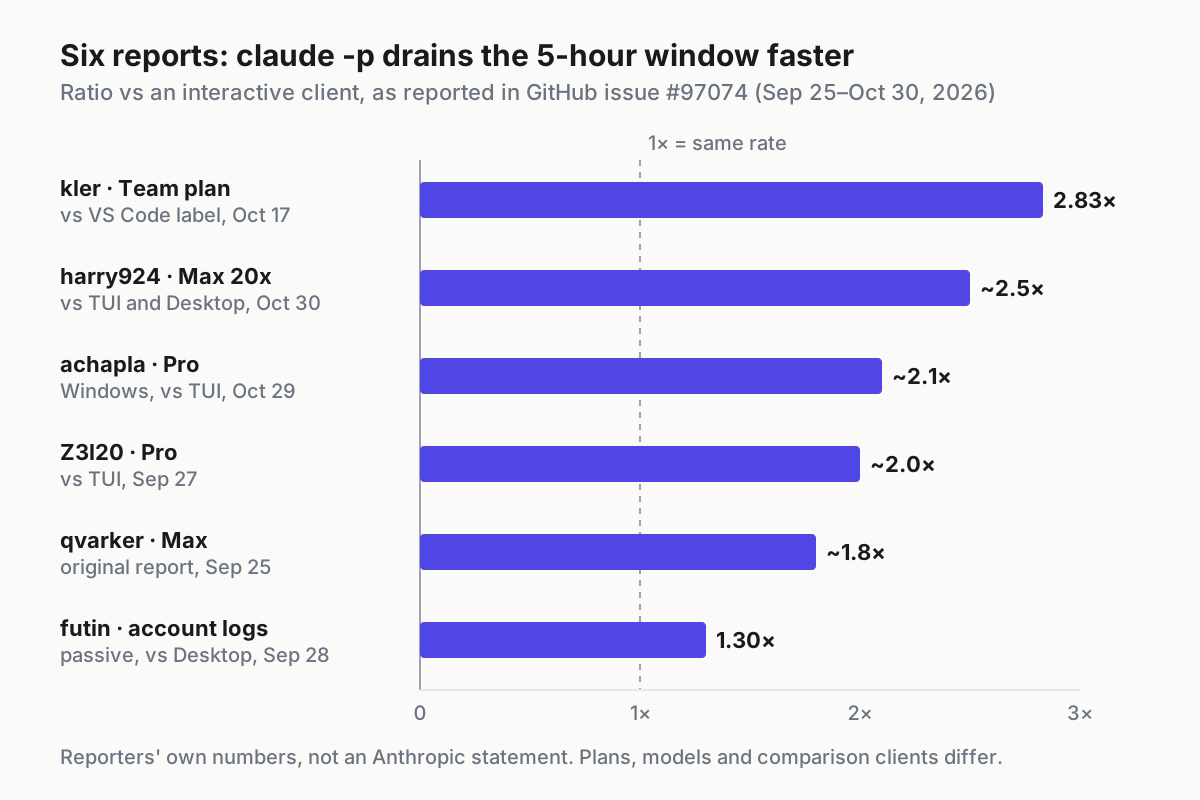
If you trigger long runs through claude -p scripts, measure what they cost your plan separately. Our Claude Code headless mode guide covers how to measure that.
Usage credits, limit resets and monthly API credits are different tools
Three features sound like extra usage, and only two of them help Claude Code. Mixing them up is the most expensive mistake in this whole decision.
| Tool | What it does | Helps Claude Code on your plan? | Where you control it |
|---|---|---|---|
| Usage credits | Keep work going after any five-hour, weekly or Fable limit, at standard API rates, until you reach your monthly spend limit or the balance runs out | Yes | Settings > Usage, Usage credits section; /usage-credits opens it |
| Limit reset | Sets your five-hour or weekly limit back to full once; can’t be undone; your weekly reset day stays the same | Yes, across your whole account once used | “Reset for free” in Settings > Usage on the web or in Claude Desktop, not in Claude Code |
| Monthly API credits on Max ($100) and Ultra ($200) | Credit for building on the Claude Platform | No: they can’t be used in Claude Code or the Claude apps, including for usage credits | Claude Platform |
| Claude Console API credits | Pay-as-you-go usage through a Console login, for intensive sprints | Billed at API rates, separate from your plan | Console billing, including optional auto-reload |
A few details from Anthropic’s pages are worth knowing before you rely on them. The limit reset article says a reset doesn’t refund extra usage you’ve already been billed for. It also says that if you downgrade or cancel before using a reset, the reset is no longer available. The usage credits article says you may briefly see the approaching-limit warning at the moment usage switches to credits. Then it changes to “Now using credits”, and your work hasn’t been cut off.
The rename doesn’t change the case for credits over a bigger plan: credits for occasional overflow, a bigger plan for regular overflow. If you hold resets, keep track of when they expire. Our reset ledger is one way to do that.
Troubleshooting the numbers
When the bars don’t match what you expect, check this table before changing plans. Each row says what you should see once the fix works.
| Symptom | Likely cause | Fix | Expected observation after the fix |
|---|---|---|---|
| Ultra account still stops at five hours | Account not verified yet; a temporary limit applies | Wait for automatic verification; keep runs under five hours or use capped credits in the meantime | Current session bar disappears from Settings > Usage, and you get an email |
| Claude Code bills API usage, and plan bars barely move | ANTHROPIC_API_KEY is set, or you’re logged in through Console |
unset ANTHROPIC_API_KEY, remove it from your profile, then /login with your plan account |
/status shows your subscription account; plan bars move as you work |
| Weekly cap reached midweek on Ultra | Weekly limits didn’t change with the rename | Use capped credits, a limit reset, or wait for the fixed weekly reset | “Now using credits” on the next request, or bars back to full after the reset |
| Fable stops early while other models keep working | Max and Ultra have a separate weekly Fable limit | Move routine work to another model with /model, or use credits |
All-models bar keeps climbing; Fable bar stays at its cap until the reset |
| Usage drains faster with several sessions open | All sessions and surfaces share one pool; agent teams can use about 7x the tokens of a standard session in plan mode | Close idle sessions, keep teams small, check the /usage breakdown |
The day’s weekly % rises more slowly with the same hours of work |
/model doesn’t help after “You’ve hit your session limit” |
The session and weekly limits apply across all models | Wait for the reset, use credits, or use a limit reset | Work resumes at the reset time shown in the message |
/usage shows a Showing last-known usage note |
The usage request was rate limited | Press r, or check Settings > Usage on the web |
Fresh bars replace the last-known ones |
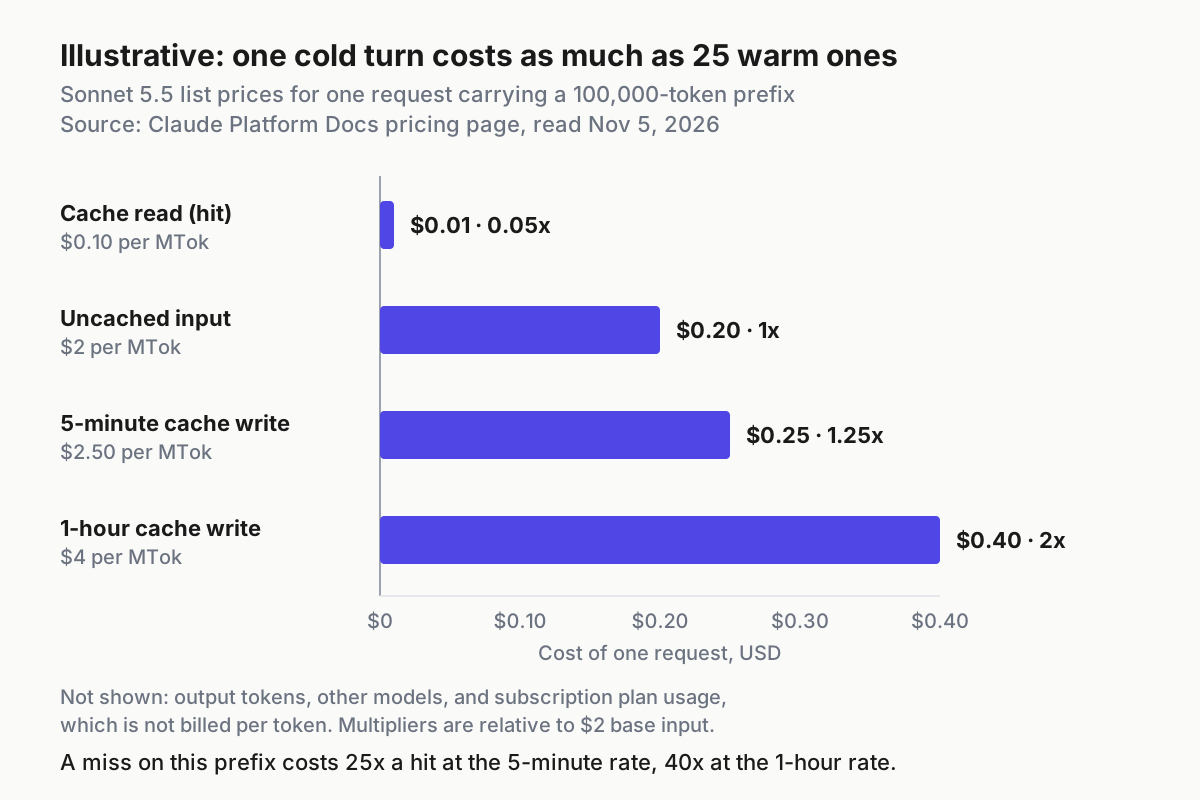
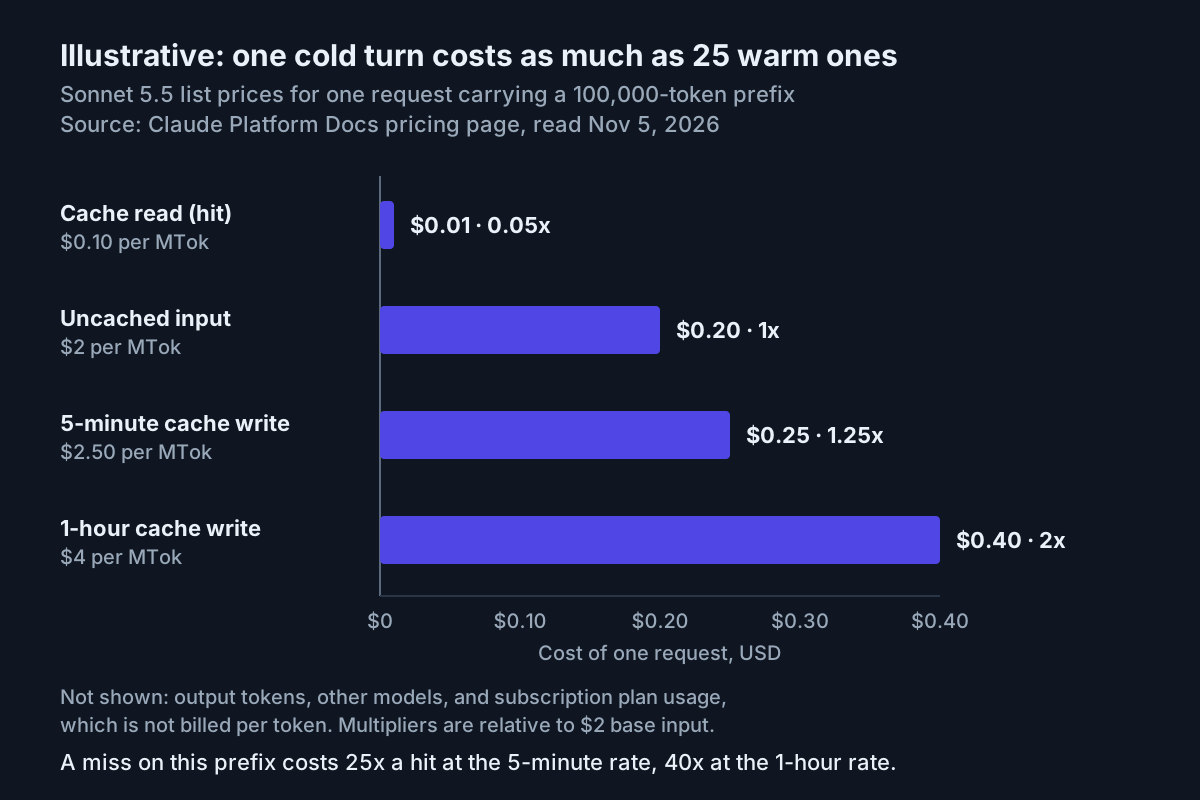
| Long session uses more than its activity suggests | Long context is re-sent with every request; cache misses after breaks; scheduled loops fire while you’re idle | Use /clear between unrelated tasks; follow the /usage recommendations |
Lower daily weekly % for similar work |
The parallel-sessions row is the one that most often leads people to upgrade unnecessarily. If your worksheet notes show the stops all landed on days with three or four sessions open, read parallel sessions and the shared usage window before buying more allowance. For the broader practice of running several agents without losing track of them, see AgentOps. If your expectations still come from before September, our Claude Code after September 14 guide explains that earlier weekly-limit change.
Change plans, then roll back if the next week disagrees
A plan change is reversible, but the timing differs by direction. Anthropic’s pricing page FAQ and the Ultra article describe these rules. Follow them in this order:
- Use any limit reset before you downgrade or cancel. An unused reset is lost when you downgrade or cancel.
- Make the change in Settings > Billing > Manage subscription for web and desktop sign-ups. If you subscribed through the App Store or Google Play, manage it there.
- Expect upgrades to apply right away. The usage limits article says the new plan’s limits apply immediately. The pricing page says unused time on your current plan is credited toward the new one.
- Expect downgrades to apply at the end of the billing period. You keep the higher plan until then. Keep filling in the worksheet so you can see whether the lower plan’s thresholds would have held.
- If you’re cancelling, do it at least 24 hours before your renewal date to avoid the next charge. Pro, Max and Ultra accounts move to the Free plan when the period ends, and your chats, projects and files stay with the account.
- Check the billing edge cases before an annual Pro to Ultra move. If your remaining annual Pro balance is larger than the Ultra price, it’s stored as account credit, and your billing address must match. On Google Play, you’re charged the full new price and the unused value becomes extra days.
- Turn off usage credits in Settings > Usage if you only enabled them for the test. Once off, you only have your plan’s included usage.
- Measure one full week on the new plan with the same worksheet, then compare the two summary rows.
Roll back if the new week contradicts the reason you moved. If you moved to Ultra for overnight runs and the Current session bar is still there after your test, plan as Max until verification. If no run in the week lasted more than five hours, that’s evidence for going back down. If you dropped to Pro and the five-hour stops returned on three or more days, move back up.
You’re done when every box below is ticked:
- [ ] Settings > Usage shows the limits you expect: a Current session bar on Pro and Max, none on verified Ultra.
- [ ] A full measured week on the chosen plan had no unplanned stops, or only the ones you chose to cover with capped credits.
- [ ]
/statusshows your subscription account, andprintenv ANTHROPIC_API_KEYprints nothing. - [ ] Usage credits are either on with a monthly spend limit or off on purpose.
- [ ] The filled worksheet is saved, so next quarter’s review starts from numbers.
Anthropic says it may adjust usage limits at its discretion, so repeat the measured week whenever the pricing page or your Settings > Usage page changes.
Sources
- Claude (@claudeai) on X: renaming Max plans and removing the 5-hour limit for verified Ultra accounts, Oct 30, 2026
- What is the Ultra plan? (Claude Help Center)
- Plans and pricing (Claude)
- How do usage and length limits work? (Claude Help Center)
- Use Claude Code with your Pro, Max, or Ultra plan (Claude Help Center)
- Manage usage credits for paid Claude plans (Claude Help Center)
- What is a limit reset? (Claude Help Center)
- Usage limit best practices (Claude Help Center)
- Manage costs effectively (Claude Code Docs)